Handling I/O in Java
 Techniques , Gotchas & Best Practices

                Hiranya Jayathilaka
           Senior Technical Lead – WSO2
                Apache Committer
Overview & Techniques
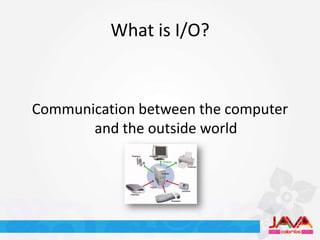
What is I/O?


Communication between the computer
       and the outside world
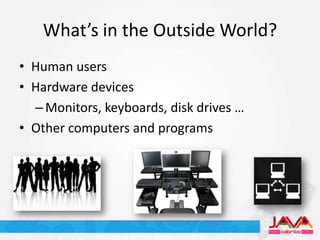
What’s in the Outside World?
• Human users
• Hardware devices
  – Monitors, keyboards, disk drives …
• Other computers and programs
Why Should We Care?
• An essential part of most programs
• Computers spend a lot of time performing
  nothing but I/O operations
• Very complicated business to deal with
• Ranks No.1 in the performance killer list
What are the Different Types of I/O?
•   Console I/O
•   Keyboard I/O
•   File I/O
•   Network I/O
•   …and possibly more
How Does Java Support I/O?
• The Java I/O API
  – The java.io package
  – Since JDK 1.0
  – Extensible
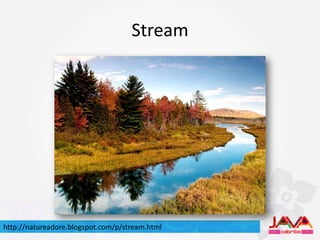
Stream


http://natureadore.blogspot.com/p/stream.html
Reading and Writing with Streams
  InputStream in = openInputStream();
  int b = in.read();

  byte[] data = new byte[1024];
  int len = in.read(data);

  OutputStream out = openOutputStream();
  out.write(b);
  Out.write(data, 0, len);
Readers and Writers
• Utilities for reading and writing character streams

  Reader reader = getReader();
  int ch = reader.read();

  char[] data = new char[1024];
  int len = reader.read(data);

  Writer writer = getWriter();
  writer.write(ch);
  writer.write(data, 0, len);
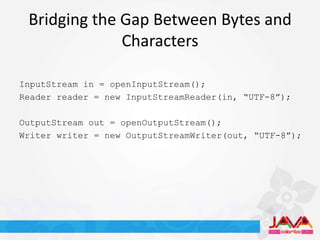
Bridging the Gap Between Bytes and
              Characters

InputStream in = openInputStream();
Reader reader = new InputStreamReader(in, “UTF-8”);

OutputStream out = openOutputStream();
Writer writer = new OutputStreamWriter(out, “UTF-8”);
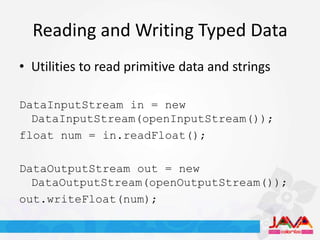
Reading and Writing Typed Data
• Utilities to read primitive data and strings

DataInputStream in = new
  DataInputStream(openInputStream());
float num = in.readFloat();

DataOutputStream out = new
  DataOutputStream(openOutputStream());
out.writeFloat(num);
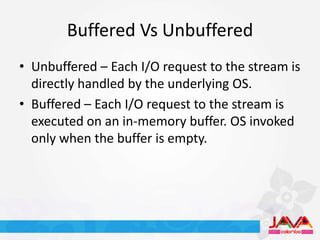
Buffered Vs Unbuffered
• Unbuffered – Each I/O request to the stream is
  directly handled by the underlying OS.
• Buffered – Each I/O request to the stream is
  executed on an in-memory buffer. OS invoked
  only when the buffer is empty.
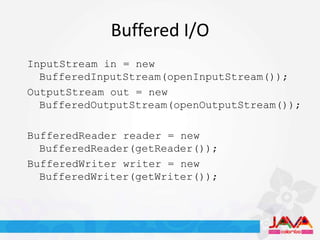
Buffered I/O
InputStream in = new
  BufferedInputStream(openInputStream());
OutputStream out = new
  BufferedOutputStream(openOutputStream());

BufferedReader reader = new
  BufferedReader(getReader());
BufferedWriter writer = new
  BufferedWriter(getWriter());
Problems with Streams
    • Old school
    • Slow
    • Blocking


http://www.flickriver.com/photos/shazral/3565328977/
Alternatives?
• The Java New I/O (NIO) API
  – The java.nio package
  – Introduced in JDK 1.4
  – Leverages most efficient I/O operations of the
    underlying OS
  – Support for multiplexed, non-blocking I/O
Buffers
• A contiguous block of memory used to read
  and write bytes
• Memory can be allocated in a manner so that
  the underlying OS can directly access it (Direct
  buffers)
Reading and Writing with Buffers
 byte[] src = getData();
 ByteBuffer buf =
   ByteBuffer.allocateDirect(1024);
 buf.put(src);

 byte[] dest = new byte[1024];
 buf.flip();
 buf.get(dest);
Channels
• Represents an open connection to an I/O
  device
• Facilitates efficient bulk data transfers
  between devices and buffers
• A channel instance can be obtained from a
  class of the standard I/O package
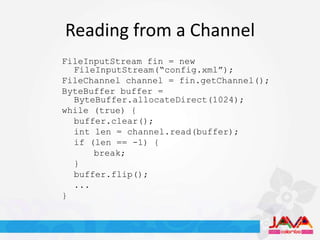
Reading from a Channel
FileInputStream fin = new
  FileInputStream(“config.xml”);
FileChannel channel = fin.getChannel();
ByteBuffer buffer =
  ByteBuffer.allocateDirect(1024);
while (true) {
  buffer.clear();
  int len = channel.read(buffer);
  if (len == -1) {
      break;
  }
  buffer.flip();
  ...
}
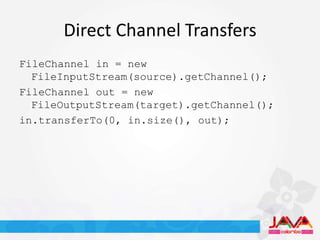
Direct Channel Transfers
FileChannel in = new
  FileInputStream(source).getChannel();
FileChannel out = new
  FileOutputStream(target).getChannel();
in.transferTo(0, in.size(), out);
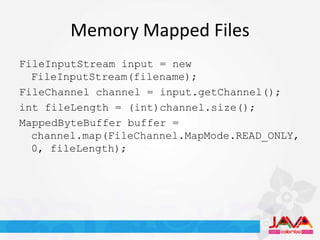
Memory Mapped Files
FileInputStream input = new
  FileInputStream(filename);
FileChannel channel = input.getChannel();
int fileLength = (int)channel.size();
MappedByteBuffer buffer =
  channel.map(FileChannel.MapMode.READ_ONLY,
  0, fileLength);
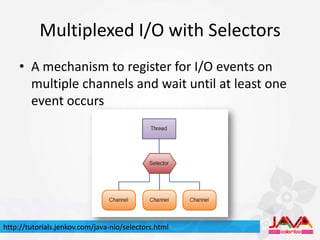
Multiplexed I/O with Selectors
    • A mechanism to register for I/O events on
      multiple channels and wait until at least one
      event occurs


http://tutorials.jenkov.com/java-nio/selectors.html
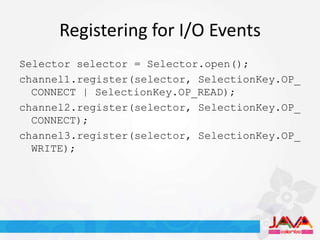
Registering for I/O Events
Selector selector = Selector.open();
channel1.register(selector, SelectionKey.OP_
  CONNECT | SelectionKey.OP_READ);
channel2.register(selector, SelectionKey.OP_
  CONNECT);
channel3.register(selector, SelectionKey.OP_
  WRITE);
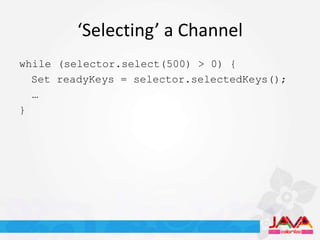
‘Selecting’ a Channel
while (selector.select(500) > 0) {
  Set readyKeys = selector.selectedKeys();
  …
}
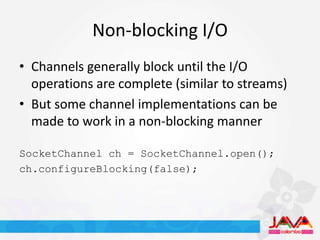
Non-blocking I/O
• Channels generally block until the I/O
  operations are complete (similar to streams)
• But some channel implementations can be
  made to work in a non-blocking manner

SocketChannel ch = SocketChannel.open();
ch.configureBlocking(false);
Standard I/O Vs. NIO
• A small demonstration…
NIO 2.0
• Introduced in JDK 1.7
• Even better support for file manipulation
  – Path, FileAttribute
  – Tree walk, File watch
• Asynchronous I/O
Hiranya’s Laws for Proper I/O
          Handling
  By a Developer for the Developers
Clean up your mess
Always close your streams and channels when you are done with
                            them
Buffering can be both your friend and
                enemy
  Don’t blindly wrap all streams with their buffered counter parts.
Buffering can yield good performance if you’re doing a lot of small I/O
   operations. Otherwise it only contributes to increased memory
                             consumption.
Don’t forget to flush after you!
If you’re using any buffered streams, make sure to flush them out
before closing the streams. Failing to do so may result in data loss.
There’s no escape from Karma and
                IOException
Developers often tend to ignore certain I/O exceptions thinking that they
 will never be thrown. But be aware that all I/O operations are prone to
             errors and may throw an exception at any time.
Java is platform independent – I/O is not
You need to do some additional work to make your I/O handling code
truly platform independent. Use the java.io.File abstraction instead of
strings to deal with files. Don’t make any assumptions about how the
             underlying OS handles certain I/O operations.
Concurrency and I/O Don’t Go Together
In a multi-user or multi-threaded environment, make sure that individual
 I/O operations are properly isolated. Attempting to access the same file
        or channel with concurrent threads can lead to disasters.
Nothing is perfect – Not even NIO
NIO is generally faster, but might not yield a significant performance gain
  in some scenarios. NIO code has a tendency to become complex and
difficult to understand. Also note that NIO is still an evolving technology.
Best way to write good I/O code is to not
              write them
  Use existing utilities and libraries that specialize in I/O handling.
Apache Commons IO
• A quick peek at the API and a demo
Questions?
Thank You

Handling I/O in Java

  • 1.
    Handling I/O inJava Techniques , Gotchas & Best Practices Hiranya Jayathilaka Senior Technical Lead – WSO2 Apache Committer
  • 2.
  • 3.
    What is I/O? Communicationbetween the computer and the outside world
  • 4.
    What’s in theOutside World? • Human users • Hardware devices – Monitors, keyboards, disk drives … • Other computers and programs
  • 5.
    Why Should WeCare? • An essential part of most programs • Computers spend a lot of time performing nothing but I/O operations • Very complicated business to deal with • Ranks No.1 in the performance killer list
  • 6.
    What are theDifferent Types of I/O? • Console I/O • Keyboard I/O • File I/O • Network I/O • …and possibly more
  • 7.
    How Does JavaSupport I/O? • The Java I/O API – The java.io package – Since JDK 1.0 – Extensible
  • 8.
  • 9.
    Reading and Writingwith Streams InputStream in = openInputStream(); int b = in.read(); byte[] data = new byte[1024]; int len = in.read(data); OutputStream out = openOutputStream(); out.write(b); Out.write(data, 0, len);
  • 10.
    Readers and Writers •Utilities for reading and writing character streams Reader reader = getReader(); int ch = reader.read(); char[] data = new char[1024]; int len = reader.read(data); Writer writer = getWriter(); writer.write(ch); writer.write(data, 0, len);
  • 11.
    Bridging the GapBetween Bytes and Characters InputStream in = openInputStream(); Reader reader = new InputStreamReader(in, “UTF-8”); OutputStream out = openOutputStream(); Writer writer = new OutputStreamWriter(out, “UTF-8”);
  • 12.
    Reading and WritingTyped Data • Utilities to read primitive data and strings DataInputStream in = new DataInputStream(openInputStream()); float num = in.readFloat(); DataOutputStream out = new DataOutputStream(openOutputStream()); out.writeFloat(num);
  • 13.
    Buffered Vs Unbuffered •Unbuffered – Each I/O request to the stream is directly handled by the underlying OS. • Buffered – Each I/O request to the stream is executed on an in-memory buffer. OS invoked only when the buffer is empty.
  • 14.
    Buffered I/O InputStream in= new BufferedInputStream(openInputStream()); OutputStream out = new BufferedOutputStream(openOutputStream()); BufferedReader reader = new BufferedReader(getReader()); BufferedWriter writer = new BufferedWriter(getWriter());
  • 15.
    Problems with Streams • Old school • Slow • Blocking http://www.flickriver.com/photos/shazral/3565328977/
  • 16.
    Alternatives? • The JavaNew I/O (NIO) API – The java.nio package – Introduced in JDK 1.4 – Leverages most efficient I/O operations of the underlying OS – Support for multiplexed, non-blocking I/O
  • 17.
    Buffers • A contiguousblock of memory used to read and write bytes • Memory can be allocated in a manner so that the underlying OS can directly access it (Direct buffers)
  • 18.
    Reading and Writingwith Buffers byte[] src = getData(); ByteBuffer buf = ByteBuffer.allocateDirect(1024); buf.put(src); byte[] dest = new byte[1024]; buf.flip(); buf.get(dest);
  • 19.
    Channels • Represents anopen connection to an I/O device • Facilitates efficient bulk data transfers between devices and buffers • A channel instance can be obtained from a class of the standard I/O package
  • 20.
    Reading from aChannel FileInputStream fin = new FileInputStream(“config.xml”); FileChannel channel = fin.getChannel(); ByteBuffer buffer = ByteBuffer.allocateDirect(1024); while (true) { buffer.clear(); int len = channel.read(buffer); if (len == -1) { break; } buffer.flip(); ... }
  • 21.
    Direct Channel Transfers FileChannelin = new FileInputStream(source).getChannel(); FileChannel out = new FileOutputStream(target).getChannel(); in.transferTo(0, in.size(), out);
  • 22.
    Memory Mapped Files FileInputStreaminput = new FileInputStream(filename); FileChannel channel = input.getChannel(); int fileLength = (int)channel.size(); MappedByteBuffer buffer = channel.map(FileChannel.MapMode.READ_ONLY, 0, fileLength);
  • 23.
    Multiplexed I/O withSelectors • A mechanism to register for I/O events on multiple channels and wait until at least one event occurs http://tutorials.jenkov.com/java-nio/selectors.html
  • 24.
    Registering for I/OEvents Selector selector = Selector.open(); channel1.register(selector, SelectionKey.OP_ CONNECT | SelectionKey.OP_READ); channel2.register(selector, SelectionKey.OP_ CONNECT); channel3.register(selector, SelectionKey.OP_ WRITE);
  • 25.
    ‘Selecting’ a Channel while(selector.select(500) > 0) { Set readyKeys = selector.selectedKeys(); … }
  • 26.
    Non-blocking I/O • Channelsgenerally block until the I/O operations are complete (similar to streams) • But some channel implementations can be made to work in a non-blocking manner SocketChannel ch = SocketChannel.open(); ch.configureBlocking(false);
  • 27.
    Standard I/O Vs.NIO • A small demonstration…
  • 28.
    NIO 2.0 • Introducedin JDK 1.7 • Even better support for file manipulation – Path, FileAttribute – Tree walk, File watch • Asynchronous I/O
  • 29.
    Hiranya’s Laws forProper I/O Handling By a Developer for the Developers
  • 30.
    Clean up yourmess Always close your streams and channels when you are done with them
  • 31.
    Buffering can beboth your friend and enemy Don’t blindly wrap all streams with their buffered counter parts. Buffering can yield good performance if you’re doing a lot of small I/O operations. Otherwise it only contributes to increased memory consumption.
  • 32.
    Don’t forget toflush after you! If you’re using any buffered streams, make sure to flush them out before closing the streams. Failing to do so may result in data loss.
  • 33.
    There’s no escapefrom Karma and IOException Developers often tend to ignore certain I/O exceptions thinking that they will never be thrown. But be aware that all I/O operations are prone to errors and may throw an exception at any time.
  • 34.
    Java is platformindependent – I/O is not You need to do some additional work to make your I/O handling code truly platform independent. Use the java.io.File abstraction instead of strings to deal with files. Don’t make any assumptions about how the underlying OS handles certain I/O operations.
  • 35.
    Concurrency and I/ODon’t Go Together In a multi-user or multi-threaded environment, make sure that individual I/O operations are properly isolated. Attempting to access the same file or channel with concurrent threads can lead to disasters.
  • 36.
    Nothing is perfect– Not even NIO NIO is generally faster, but might not yield a significant performance gain in some scenarios. NIO code has a tendency to become complex and difficult to understand. Also note that NIO is still an evolving technology.
  • 37.
    Best way towrite good I/O code is to not write them Use existing utilities and libraries that specialize in I/O handling.
  • 38.
    Apache Commons IO •A quick peek at the API and a demo
  • 39.
  • 40.