Serialization


                1
Topics
●   What is Serialization?
●   What is preserved when an object is serialized?
●   Transient keyword
●   Process of serialization
●   Process of deserialization
●   Version control
●   Changing the default protocol
●   Creating your own protocol via Externalizable


                                                      2
What is
Serialization?
                 3
What is Serialization?
●   Ability to read or write an object to a stream
    –   Process of "flattening" an object
●   Used to save object to some permanent storage
    –   Its state should be written in a serialized form to a
        file such that the object can be reconstructed at a
        later time from that file
●   Used to pass on to another object via the
    OutputStream class
    –   Can be sent over the network


                                                                4
Streams Used for Serialization
●   ObjectOutputStream
    –   For serializing (flattening an object)
●   ObjectInputStream
    –   For deserializing (reconstructing an object)


                                                       5
Requirement for Serialization
●   To allow an object to be serializable:
     –   Its class should implement the Serializable interface
          ●   Serializable interface is marker interface
     –   Its class should also provide a default constructor (a
         constructor with no arguments)
●   Serializability is inherited
     –   Don't have to implement Serializable on every class
     –   Can just implement Serializable once along the
         class hierarchy


                                                                  6
Non-Serializable Objects
●   Most Java classes are serializable
●   Objects of some system-level classes are not
    serializable
    –   Because the data they represent constantly changes
         ●   Reconstructed object will contain different value
             anyway
         ●   For example, thread running in my JVM would be
             using my system's memory. Persisting it and trying to
             run it in your JVM would make no sense at all.
●   A NotSerializableException is thrown if you try to
    serialize non-serializable objects

                                                                     7
What is preserved
when an Object is
  serialized?
                    8
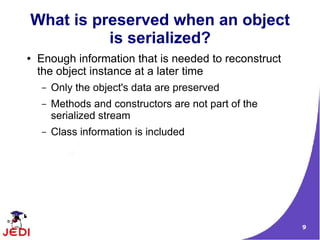
What is preserved when an object
          is serialized?
●   Enough information that is needed to reconstruct
    the object instance at a later time
    –   Only the object's data are preserved
    –   Methods and constructors are not part of the
        serialized stream
    –   Class information is included


                                                       9
Transient keyword

                    10
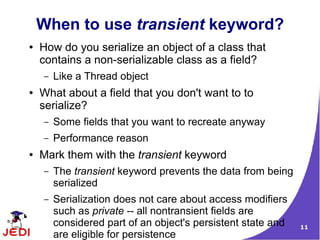
When to use transient keyword?
●   How do you serialize an object of a class that
    contains a non-serializable class as a field?
    –   Like a Thread object
●   What about a field that you don't want to to
    serialize?
    –   Some fields that you want to recreate anyway
    –   Performance reason
●   Mark them with the transient keyword
    –   The transient keyword prevents the data from being
        serialized
    –   Serialization does not care about access modifiers
        such as private -- all nontransient fields are
        considered part of an object's persistent state and   11
        are eligible for persistence
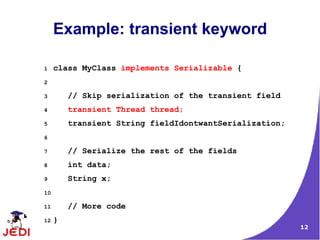
Example: transient keyword

1    class MyClass implements Serializable {
2

3        // Skip serialization of the transient field
4        transient Thread thread;
5        transient String fieldIdontwantSerialization;
6

7        // Serialize the rest of the fields
8        int data;
9        String x;
10

11       // More code
12   }
                                                         12
Process of
Serialization
                13
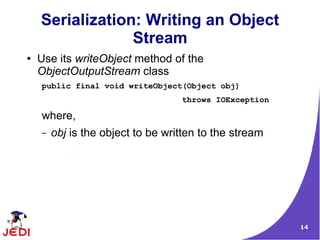
Serialization: Writing an Object
                 Stream
●   Use its writeObject method of the
    ObjectOutputStream class
    public final void writeObject(Object obj)
                                   throws IOException

    where,
    –   obj is the object to be written to the stream


                                                        14
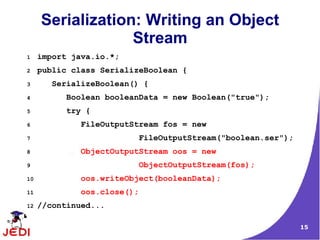
Serialization: Writing an Object
                  Stream
1    import java.io.*;
2    public class SerializeBoolean {
3       SerializeBoolean() {
4          Boolean booleanData = new Boolean("true");
5          try {
6             FileOutputStream fos = new
7                         FileOutputStream("boolean.ser");
8             ObjectOutputStream oos = new
9                         ObjectOutputStream(fos);
10            oos.writeObject(booleanData);
11            oos.close();
12   //continued...

                                                             15
Serialization: Writing an Object
                  Stream
13           } catch (IOException ie) {
14               ie.printStackTrace();
15           }
16       }
17

18       public static void main(String args[]) {
19           SerializeBoolean sb = new SerializeBoolean();
20       }
21   }


                                                             16
Process of
Deserialization
                  17
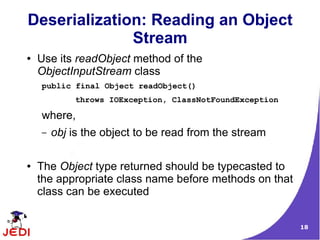
Deserialization: Reading an Object
              Stream
●   Use its readObject method of the
    ObjectInputStream class
    public final Object readObject()
            throws IOException, ClassNotFoundException

    where,
    –   obj is the object to be read from the stream

●   The Object type returned should be typecasted to
    the appropriate class name before methods on that
    class can be executed


                                                         18
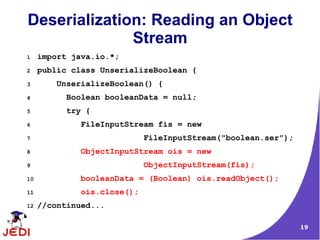
Deserialization: Reading an Object
              Stream
1    import java.io.*;
2    public class UnserializeBoolean {
3       UnserializeBoolean() {
4          Boolean booleanData = null;
5          try {
6             FileInputStream fis = new
7                            FileInputStream("boolean.ser");
8             ObjectInputStream ois = new
9                            ObjectInputStream(fis);
10            booleanData = (Boolean) ois.readObject();
11            ois.close();
12   //continued...

                                                               19
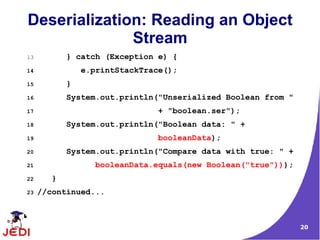
Deserialization: Reading an Object
              Stream
13          } catch (Exception e) {
14              e.printStackTrace();
15          }
16          System.out.println("Unserialized Boolean from "
17                             + "boolean.ser");
18          System.out.println("Boolean data: " +
19                             booleanData);
20          System.out.println("Compare data with true: " +
21                 booleanData.equals(new Boolean("true")));
22      }
23   //continued...


                                                               20
Deserialization: Reading an Object
              Stream
13       public static void main(String args[]) {
14            UnserializeBoolean usb =
15                              new UnserializeBoolean();
16        }
17   }


                                                            21
Version Control

                  22
Version Control: Problem Scenario
●   Imagine you create a class, instantiate it, and write
    it out to an object stream
●   That flattened object sits in the file system for some
    time
●   Meanwhile, you update the class file, perhaps
    adding a new field
●   What happens when you try to read in the flattened
    object?
      – An exception will be thrown -- specifically, the
        java.io.InvalidClassException
    –   Why? (See next slide)
                                                             23
Unique Identifier
●   Why exception is thrown?
    – Because all persistent-capable classes are
      automatically given a unique identifier
    –   If the identifier of the class does not equal the
        identifier of the flattened object, the exception
        will be thrown


                                                            24
Version Control: Problem Scenario
              Again
●
    However, if you really think about it, why
    should it be thrown just because I added a
    field? Couldn't the field just be set to its
    default value and then written out next time?
●
    Yes, but it takes a little code manipulation.
    The identifier that is part of all classes is
    maintained in a field called serialVersionUID.
●
    If you wish to control versioning, you simply
    have to provide the serialVersionUID field
    manually and ensure it is always the same,
    no matter what changes you make to the
    classfile.
                                                     25
How Do I generate a Unique ID?
         Use serialver utility
●   serialver utility is used to generate a unique ID
●   Example
     serialver MyClass
    MyClass static final long serialVersionUID =
     10275539472837495L;


                                                        26
Customizing
the Default Protocol
                       27
Provide your own readObject() and
      writeObject() methods
●   Used when the default behavior of readObject()
    and writeObject() are not sufficient
●   You provide your own readObject() and
    writeObject() in order to add custom behavior
●   Example
       // Provide your own readObject method
      private void readObject(ObjectInputStream in) throws IOException,
      ClassNotFoundException {

          // our "pseudo-constructor"
          in.defaultReadObject();
          // now we are a "live" object again, so let's run rebuild and start
          startAnimation();

      }                                                                         28
Creating Your own
Protocol via Externalizable
         interface
                              29
Externalizable Interface
●   The writeExternal and readExternal methods of the
    Externalizable interface can be implemented by a
    class to give the class complete control over the
    format and contents of the stream for an object and
    its supertypes
●   These methods must explicitly coordinate with the
    supertype to save its state
●   These methods supersede customized
    implementations of writeObject and readObject
    methods


                                                          30
How does Object Serialization
Scheme works with Externalizable
●   Object Serialization uses the Serializable and
    Externalizable interfaces
●   Each object to be stored is tested for the
    Externalizable interface
    –   If the object supports Externalizable, the
        writeExternal method is called
    –   If the object does not support Externalizable and
        does implement Serializable, the object is saved
        using ObjectOutputStream.


                                                            31
Thank You!


             32

Java Serialization

  • 1.
  • 2.
    Topics ● What is Serialization? ● What is preserved when an object is serialized? ● Transient keyword ● Process of serialization ● Process of deserialization ● Version control ● Changing the default protocol ● Creating your own protocol via Externalizable 2
  • 3.
  • 4.
    What is Serialization? ● Ability to read or write an object to a stream – Process of "flattening" an object ● Used to save object to some permanent storage – Its state should be written in a serialized form to a file such that the object can be reconstructed at a later time from that file ● Used to pass on to another object via the OutputStream class – Can be sent over the network 4
  • 5.
    Streams Used forSerialization ● ObjectOutputStream – For serializing (flattening an object) ● ObjectInputStream – For deserializing (reconstructing an object) 5
  • 6.
    Requirement for Serialization ● To allow an object to be serializable: – Its class should implement the Serializable interface ● Serializable interface is marker interface – Its class should also provide a default constructor (a constructor with no arguments) ● Serializability is inherited – Don't have to implement Serializable on every class – Can just implement Serializable once along the class hierarchy 6
  • 7.
    Non-Serializable Objects ● Most Java classes are serializable ● Objects of some system-level classes are not serializable – Because the data they represent constantly changes ● Reconstructed object will contain different value anyway ● For example, thread running in my JVM would be using my system's memory. Persisting it and trying to run it in your JVM would make no sense at all. ● A NotSerializableException is thrown if you try to serialize non-serializable objects 7
  • 8.
    What is preserved whenan Object is serialized? 8
  • 9.
    What is preservedwhen an object is serialized? ● Enough information that is needed to reconstruct the object instance at a later time – Only the object's data are preserved – Methods and constructors are not part of the serialized stream – Class information is included 9
  • 10.
  • 11.
    When to usetransient keyword? ● How do you serialize an object of a class that contains a non-serializable class as a field? – Like a Thread object ● What about a field that you don't want to to serialize? – Some fields that you want to recreate anyway – Performance reason ● Mark them with the transient keyword – The transient keyword prevents the data from being serialized – Serialization does not care about access modifiers such as private -- all nontransient fields are considered part of an object's persistent state and 11 are eligible for persistence
  • 12.
    Example: transient keyword 1 class MyClass implements Serializable { 2 3 // Skip serialization of the transient field 4 transient Thread thread; 5 transient String fieldIdontwantSerialization; 6 7 // Serialize the rest of the fields 8 int data; 9 String x; 10 11 // More code 12 } 12
  • 13.
  • 14.
    Serialization: Writing anObject Stream ● Use its writeObject method of the ObjectOutputStream class public final void writeObject(Object obj) throws IOException where, – obj is the object to be written to the stream 14
  • 15.
    Serialization: Writing anObject Stream 1 import java.io.*; 2 public class SerializeBoolean { 3 SerializeBoolean() { 4 Boolean booleanData = new Boolean("true"); 5 try { 6 FileOutputStream fos = new 7 FileOutputStream("boolean.ser"); 8 ObjectOutputStream oos = new 9 ObjectOutputStream(fos); 10 oos.writeObject(booleanData); 11 oos.close(); 12 //continued... 15
  • 16.
    Serialization: Writing anObject Stream 13 } catch (IOException ie) { 14 ie.printStackTrace(); 15 } 16 } 17 18 public static void main(String args[]) { 19 SerializeBoolean sb = new SerializeBoolean(); 20 } 21 } 16
  • 17.
  • 18.
    Deserialization: Reading anObject Stream ● Use its readObject method of the ObjectInputStream class public final Object readObject() throws IOException, ClassNotFoundException where, – obj is the object to be read from the stream ● The Object type returned should be typecasted to the appropriate class name before methods on that class can be executed 18
  • 19.
    Deserialization: Reading anObject Stream 1 import java.io.*; 2 public class UnserializeBoolean { 3 UnserializeBoolean() { 4 Boolean booleanData = null; 5 try { 6 FileInputStream fis = new 7 FileInputStream("boolean.ser"); 8 ObjectInputStream ois = new 9 ObjectInputStream(fis); 10 booleanData = (Boolean) ois.readObject(); 11 ois.close(); 12 //continued... 19
  • 20.
    Deserialization: Reading anObject Stream 13 } catch (Exception e) { 14 e.printStackTrace(); 15 } 16 System.out.println("Unserialized Boolean from " 17 + "boolean.ser"); 18 System.out.println("Boolean data: " + 19 booleanData); 20 System.out.println("Compare data with true: " + 21 booleanData.equals(new Boolean("true"))); 22 } 23 //continued... 20
  • 21.
    Deserialization: Reading anObject Stream 13 public static void main(String args[]) { 14 UnserializeBoolean usb = 15 new UnserializeBoolean(); 16 } 17 } 21
  • 22.
  • 23.
    Version Control: ProblemScenario ● Imagine you create a class, instantiate it, and write it out to an object stream ● That flattened object sits in the file system for some time ● Meanwhile, you update the class file, perhaps adding a new field ● What happens when you try to read in the flattened object? – An exception will be thrown -- specifically, the java.io.InvalidClassException – Why? (See next slide) 23
  • 24.
    Unique Identifier ● Why exception is thrown? – Because all persistent-capable classes are automatically given a unique identifier – If the identifier of the class does not equal the identifier of the flattened object, the exception will be thrown 24
  • 25.
    Version Control: ProblemScenario Again ● However, if you really think about it, why should it be thrown just because I added a field? Couldn't the field just be set to its default value and then written out next time? ● Yes, but it takes a little code manipulation. The identifier that is part of all classes is maintained in a field called serialVersionUID. ● If you wish to control versioning, you simply have to provide the serialVersionUID field manually and ensure it is always the same, no matter what changes you make to the classfile. 25
  • 26.
    How Do Igenerate a Unique ID? Use serialver utility ● serialver utility is used to generate a unique ID ● Example serialver MyClass MyClass static final long serialVersionUID = 10275539472837495L; 26
  • 27.
  • 28.
    Provide your ownreadObject() and writeObject() methods ● Used when the default behavior of readObject() and writeObject() are not sufficient ● You provide your own readObject() and writeObject() in order to add custom behavior ● Example // Provide your own readObject method private void readObject(ObjectInputStream in) throws IOException, ClassNotFoundException { // our "pseudo-constructor" in.defaultReadObject(); // now we are a "live" object again, so let's run rebuild and start startAnimation(); } 28
  • 29.
    Creating Your own Protocolvia Externalizable interface 29
  • 30.
    Externalizable Interface ● The writeExternal and readExternal methods of the Externalizable interface can be implemented by a class to give the class complete control over the format and contents of the stream for an object and its supertypes ● These methods must explicitly coordinate with the supertype to save its state ● These methods supersede customized implementations of writeObject and readObject methods 30
  • 31.
    How does ObjectSerialization Scheme works with Externalizable ● Object Serialization uses the Serializable and Externalizable interfaces ● Each object to be stored is tested for the Externalizable interface – If the object supports Externalizable, the writeExternal method is called – If the object does not support Externalizable and does implement Serializable, the object is saved using ObjectOutputStream. 31
  • 32.