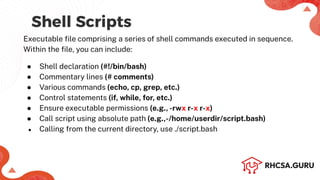
Shell Scripts
Executable filecomprising a series of shell commands executed in sequence.
Within the file, you can include:
● Shell declaration (#!/bin/bash)
● Commentary lines (# comments)
● Various commands (echo, cp, grep, etc.)
● Control statements (if, while, for, etc.)
● Ensure executable permissions (e.g., -rwx r-x r-x)
● Call script using absolute path (e.g.,-/home/userdir/script.bash)
● Calling from the current directory, use ./script.bash
3.
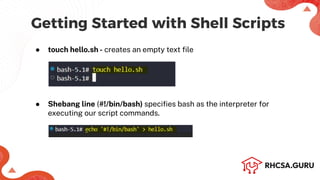
Getting Started withShell Scripts
● touch hello.sh - creates an empty text file
● Shebang line (#!/bin/bash) specifies bash as the interpreter for
executing our script commands.
4.
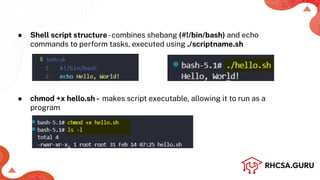
● Shell scriptstructure-combines shebang (#!/bin/bash) and echo
commands to perform tasks, executed using ./scriptname.sh
● chmod +x hello.sh - makes script executable, allowing it to run as a
program
5.
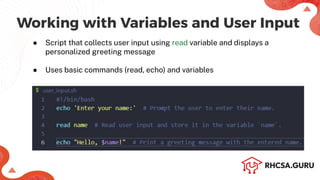
Working with Variablesand User Input
● Script that collects user input using read variable and displays a
personalized greeting message
● Uses basic commands (read, echo) and variables
6.
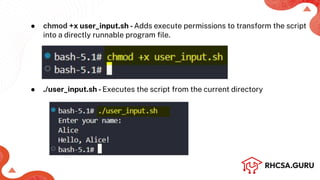
● chmod +xuser_input.sh -Adds execute permissions to transform the script
into a directly runnable program file.
● ./user_input.sh -Executes the script from the current directory
7.
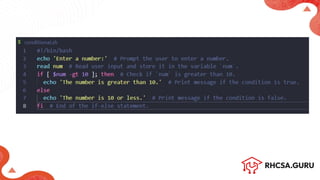
Conditional Statements
● Usesif-else statements to check if a user's number is greater than 10
● Uses basic conditional operators (-gt) and keywords (if, then, else, fi) to make
decisions based on input
● If-Then: Conditional execution of code.
Syntax:
`if [ condition ]; then action; fi`
9.
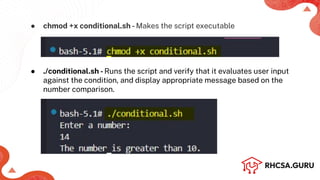
● chmod +xconditional.sh -Makes the script executable
● ./conditional.sh -Runs the script and verify that it evaluates user input
against the condition, and display appropriate message based on the
number comparison.
![Conditional Statements
● Uses if-else statements to check if a user's number is greater than 10
● Uses basic conditional operators (-gt) and keywords (if, then, else, fi) to make
decisions based on input
● If-Then: Conditional execution of code.
Syntax:
`if [ condition ]; then action; fi`](https://image.slidesharecdn.com/introductiontoshellscripting-rhcsa-250217073722-b09fc1de/85/Introduction-to-Shell-Scripting-RHCSA-pdf-7-320.jpg)


![Getting Started with Apache Spark: Big Data Made Simple [Free Meetup]](https://cdn.slidesharecdn.com/ss_thumbnails/apachesparkgettingstarted-260203175547-8361bcc3-thumbnail.jpg?width=640&height=640&fit=bounds)


