1
Building Your First Model-driven
Application in PowerApps
Brian Knight
@BrianKnight
bknight@Pragmaticworks.com
About Me
• Founder Pragmatic Works
• 14 Years as MVP
• Author 16 books
bknight@Pragmaticworks.com
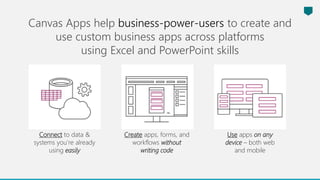
Connect to data &
systems you’re already
using easily
Create apps, forms, and
workflows without
writing code
Use apps on any
device – both web
and mobile
Canvas Apps help business-power-users to create and
use custom business apps across platforms
using Excel and PowerPoint skills
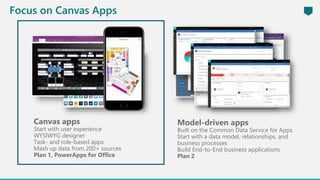
Model-driven apps
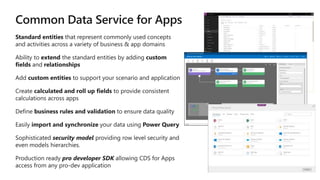
Built on the Common Data Service for Apps
Start with a data model, relationships, and
business processes
Build End-to-End business applications
Plan 2
Canvas apps
Start with user experience
WYSIWYG designer
Task- and role-based apps
Mash up data from 200+ sources
Plan 1, PowerApps for Office
Focus on Canvas Apps
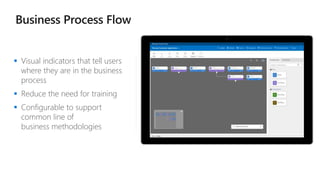
 Visual indicators that tell users
where they are in the business
process
 Reduce the need for training
 Configurable to support
common line of
business methodologies
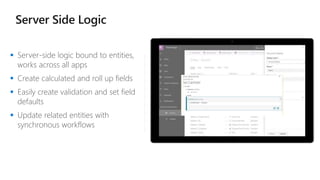
 Server-side logic bound to entities,
works across all apps
 Create calculated and roll up fields
 Easily create validation and set field
defaults
 Update related entities with
synchronous workflows
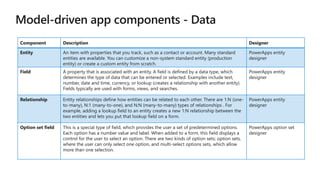
Component Description Designer
Entity An item with properties that you track, such as a contact or account. Many standard
entities are available. You can customize a non-system standard entity (production
entity) or create a custom entity from scratch.
PowerApps entity
designer
Field A property that is associated with an entity. A field is defined by a data type, which
determines the type of data that can be entered or selected. Examples include text,
number, date and time, currency, or lookup (creates a relationship with another entity).
Fields typically are used with forms, views, and searches.
PowerApps entity
designer
Relationship Entity relationships define how entities can be related to each other. There are 1:N (one-
to-many), N:1 (many-to-one), and N:N (many-to-many) types of relationships . For
example, adding a lookup field to an entity creates a new 1:N relationship between the
two entities and lets you put that lookup field on a form.
PowerApps entity
designer
Option set field This is a special type of field, which provides the user a set of predetermined options.
Each option has a number value and label. When added to a form, this field displays a
control for the user to select an option. There are two kinds of option sets; option sets,
where the user can only select one option, and multi-select options sets, which allow
more than one selection.
PowerApps option set
designer
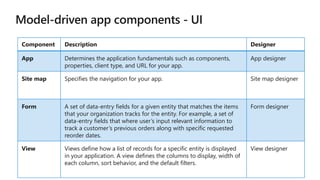
Component Description Designer
App Determines the application fundamentals such as components,
properties, client type, and URL for your app.
App designer
Site map Specifies the navigation for your app. Site map designer
Form A set of data-entry fields for a given entity that matches the items
that your organization tracks for the entity. For example, a set of
data-entry fields that where user’s input relevant information to
track a customer’s previous orders along with specific requested
reorder dates.
Form designer
View Views define how a list of records for a specific entity is displayed
in your application. A view defines the columns to display, width of
each column, sort behavior, and the default filters.
View designer
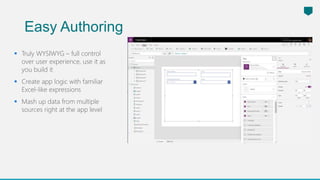
 Truly WYSIWYG – full control
over user experience, use it as
you build it
 Create app logic with familiar
Excel-like expressions
 Mash up data from multiple
sources right at the app level
Easy Authoring
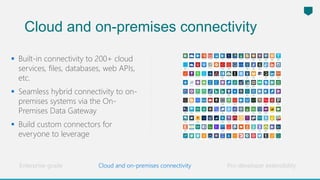
Cloud and on-premises connectivity
 Built-in connectivity to 200+ cloud
services, files, databases, web APIs,
etc.
 Seamless hybrid connectivity to on-
premises systems via the On-
Premises Data Gateway
 Build custom connectors for
everyone to leverage
Enterprise-grade Pro-developer extensibility
Cloud and on-premises connectivity
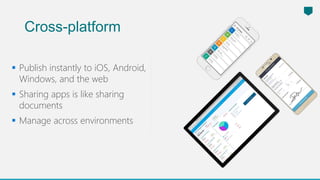
 Publish instantly to iOS, Android,
Windows, and the web
 Sharing apps is like sharing
documents
 Manage across environments
Cross-platform
Microsoft Flow is a service for automating workflows
across apps and services
Connect to data &
systems you’re already
using; create the data
you need
Edit flows on web
and mobile
Create workflows
using triggers &
actions without code
or scripts
Approve requests
or manage them
on web and mobile
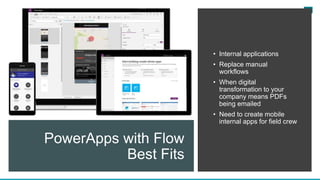
PowerApps with Flow
Best Fits
• Internal applications
• Replace manual
workflows
• When digital
transformation to your
company means PDFs
being emailed
• Need to create mobile
internal apps for field crew
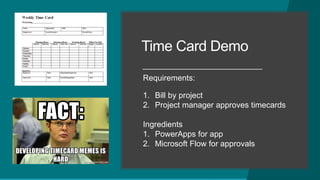
Time Card Demo
Requirements:
1. Bill by project
2. Project manager approves timecards
Ingredients
1. PowerApps for app
2. Microsoft Flow for approvals
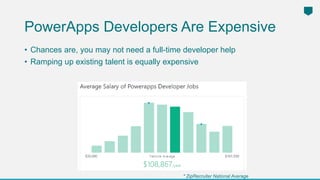
PowerApps Developers Are Expensive
• Chances are, you may not need a full-time developer help
• Ramping up existing talent is equally expensive
* ZipRecruiter National Average
With Pragmatic Works, pay a
fraction of what you would
pay for a full-time resource
and get a developer-on-
demand.
Expert Shared Development
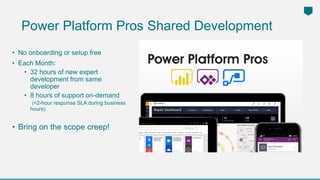
Power Platform Pros Shared Development
• No onboarding or setup free
• Each Month:
• 32 hours of new expert
development from same
developer
• 8 hours of support on-demand
(<2-hour response SLA during business
hours)
• Bring on the scope creep!
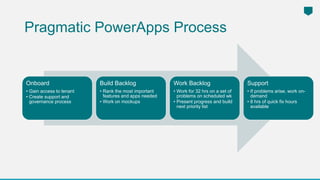
Onboard
• Gain access to tenant
• Create support and
governance process
Build Backlog
• Rank the most important
features and apps needed
• Work on mockups
Work Backlog
• Work for 32 hrs on a set of
problems on scheduled wk
• Present progress and build
next priority list
Support
• If problems arise, work on-
demand
• 8 hrs of quick fix hours
available
Pragmatic PowerApps Process
This is a Header
THIS IS A SUBTITLE
Have Any Questions?
We’re here to answer questions about your enterprise
Power BI environment!

Introduction to PowerApps-1.pptx

  • 1.
    1 Building Your FirstModel-driven Application in PowerApps Brian Knight @BrianKnight bknight@Pragmaticworks.com
  • 2.
    About Me • FounderPragmatic Works • 14 Years as MVP • Author 16 books bknight@Pragmaticworks.com
  • 3.
    Connect to data& systems you’re already using easily Create apps, forms, and workflows without writing code Use apps on any device – both web and mobile Canvas Apps help business-power-users to create and use custom business apps across platforms using Excel and PowerPoint skills
  • 4.
    Model-driven apps Built onthe Common Data Service for Apps Start with a data model, relationships, and business processes Build End-to-End business applications Plan 2 Canvas apps Start with user experience WYSIWYG designer Task- and role-based apps Mash up data from 200+ sources Plan 1, PowerApps for Office Focus on Canvas Apps
  • 6.
     Visual indicatorsthat tell users where they are in the business process  Reduce the need for training  Configurable to support common line of business methodologies
  • 7.
     Server-side logicbound to entities, works across all apps  Create calculated and roll up fields  Easily create validation and set field defaults  Update related entities with synchronous workflows
  • 8.
    Component Description Designer EntityAn item with properties that you track, such as a contact or account. Many standard entities are available. You can customize a non-system standard entity (production entity) or create a custom entity from scratch. PowerApps entity designer Field A property that is associated with an entity. A field is defined by a data type, which determines the type of data that can be entered or selected. Examples include text, number, date and time, currency, or lookup (creates a relationship with another entity). Fields typically are used with forms, views, and searches. PowerApps entity designer Relationship Entity relationships define how entities can be related to each other. There are 1:N (one- to-many), N:1 (many-to-one), and N:N (many-to-many) types of relationships . For example, adding a lookup field to an entity creates a new 1:N relationship between the two entities and lets you put that lookup field on a form. PowerApps entity designer Option set field This is a special type of field, which provides the user a set of predetermined options. Each option has a number value and label. When added to a form, this field displays a control for the user to select an option. There are two kinds of option sets; option sets, where the user can only select one option, and multi-select options sets, which allow more than one selection. PowerApps option set designer
  • 9.
    Component Description Designer AppDetermines the application fundamentals such as components, properties, client type, and URL for your app. App designer Site map Specifies the navigation for your app. Site map designer Form A set of data-entry fields for a given entity that matches the items that your organization tracks for the entity. For example, a set of data-entry fields that where user’s input relevant information to track a customer’s previous orders along with specific requested reorder dates. Form designer View Views define how a list of records for a specific entity is displayed in your application. A view defines the columns to display, width of each column, sort behavior, and the default filters. View designer
  • 10.
     Truly WYSIWYG– full control over user experience, use it as you build it  Create app logic with familiar Excel-like expressions  Mash up data from multiple sources right at the app level Easy Authoring
  • 11.
    Cloud and on-premisesconnectivity  Built-in connectivity to 200+ cloud services, files, databases, web APIs, etc.  Seamless hybrid connectivity to on- premises systems via the On- Premises Data Gateway  Build custom connectors for everyone to leverage Enterprise-grade Pro-developer extensibility Cloud and on-premises connectivity
  • 12.
     Publish instantlyto iOS, Android, Windows, and the web  Sharing apps is like sharing documents  Manage across environments Cross-platform
  • 13.
    Microsoft Flow isa service for automating workflows across apps and services Connect to data & systems you’re already using; create the data you need Edit flows on web and mobile Create workflows using triggers & actions without code or scripts Approve requests or manage them on web and mobile
  • 14.
    PowerApps with Flow BestFits • Internal applications • Replace manual workflows • When digital transformation to your company means PDFs being emailed • Need to create mobile internal apps for field crew
  • 15.
    Time Card Demo Requirements: 1.Bill by project 2. Project manager approves timecards Ingredients 1. PowerApps for app 2. Microsoft Flow for approvals
  • 16.
    PowerApps Developers AreExpensive • Chances are, you may not need a full-time developer help • Ramping up existing talent is equally expensive * ZipRecruiter National Average
  • 17.
    With Pragmatic Works,pay a fraction of what you would pay for a full-time resource and get a developer-on- demand. Expert Shared Development
  • 18.
    Power Platform ProsShared Development • No onboarding or setup free • Each Month: • 32 hours of new expert development from same developer • 8 hours of support on-demand (<2-hour response SLA during business hours) • Bring on the scope creep!
  • 19.
    Onboard • Gain accessto tenant • Create support and governance process Build Backlog • Rank the most important features and apps needed • Work on mockups Work Backlog • Work for 32 hrs on a set of problems on scheduled wk • Present progress and build next priority list Support • If problems arise, work on- demand • 8 hrs of quick fix hours available Pragmatic PowerApps Process
  • 20.
    This is aHeader THIS IS A SUBTITLE Have Any Questions? We’re here to answer questions about your enterprise Power BI environment!

Editor's Notes

  • #15 Microsoft Flow is a SaaS services that helps you work smarter by automating workflow across you’re a growing number apps and services that business users rely on. The possible workflows span across a wide variety of possibilities, for example : Get a notifications when a certain file is updated Synchronize files by connecting your folders to keep data current, Automatically collect and organize your business data Streamline approvals and get instant alerts. Microsoft Flow makes it possible to automate all of these scenarios and more.
  • #17 As a partner, you may choose to replace these examples with your own success stories highlighting customers for whom you have successfully rolled out PowerApps in production. Please make sure you have permission from these customers to share their story publicly. Show a working demo if you have time.
  • #22 1. Does that sound interesting? Let's show some of the internal dashboard we use to manage their systems Walk through at a high level 2. Do you see this being valuable for your company? Who is doing these things now? Etc.. 3. Move to next steps for a deeper call on their environment and needs (scoping)