Introduction to
Java
CST200 – Week 1: Introduction to Java
Instructor: Andreea Molnar
Outline
• Aims
• Basic Concepts
• Strings
• Arrays
Aim
• The aim of this presentation is to

emphasis on some of the material
covered by the pluralsigh videos.
Basic Concepts
• Expression: see more about them here:

http://www.d.umn.edu/~gshute/java/stat
ements.html

• Algorithm: see a definition here:

http://en.wikipedia.org/wiki/Algorithm
Strings and Arrays
The first letter of a String is at the
position 0 and the first value of an array
is at the position 0.
Strings
Any sequence of characters, for example:
String s = “Arizona”;
String s = “1457 Mesa”;
String s = “@u”;
Strings - Methods
You can find all the String methods at:
http://docs.oracle.com/javase/7/docs/api/j
ava/lang/String.html
Strings - Methods
public int length() – returns the length of
the string
String s = “CST 200”;
s.length() – will return 7 as there are 7
characters in the string
Strings - Methods
public int length() – returns the length of 
the string
String s = “CST 200”;
s.length() – will return 7 as there are 7 
characters in the string (space is count as 
a separate character)
Strings - Methods
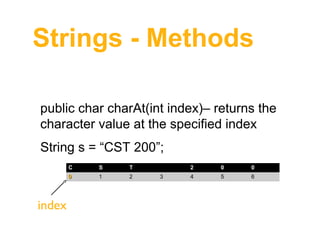
public char charAt(int index)– returns the 
character value at the specified index
String s = “CST 200”;
C

T

0

index

S
1

2

2
3

0

0

4

5

6
Strings - Methods
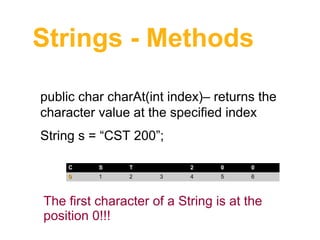
public char charAt(int index)– returns the 
character value at the specified index
String s = “CST 200”;
C

S

T

0

1

2

2
3

0

0

4

5

6

The first character of a String is at the 
position 0!!!
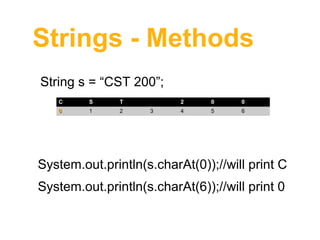
Strings - Methods
String s = “CST 200”;
C

S

T

0

1

2

2
3

0

0

4

5

6

System.out.println(s.charAt(0));//will print C
System.out.println(s.charAt(6));//will print 0 
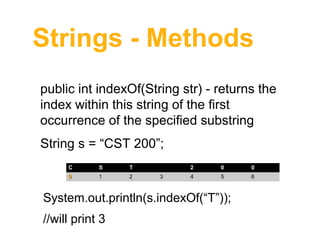
Strings - Methods
public int indexOf(String str) - returns the
index within this string of the first
occurrence of the specified substring
String s = “CST 200”;
C

S

T

0

1

2

2
3

0

0

4

5

6

System.out.println(s.indexOf(“T”));
//will print 3
Arrays
Array is a container that holds a fixed
number of values.
int[] array = {10, 20, 30, 50};
10

20

30

50

0

2

3

4

index
Arrays
int[] array = {10, 20, 30, 50};
10

20

30

50

0

1

2

3

To print the values of this array:
System.out.println(array[0]);//will print 10
System.out.println(array[1]);//will print 20
System.out.println(array[2]);//will print 30
Summary
• Expression definition
• Algorithm definition
• The first character of an array starts at
position 0

• The first element of an array starts at
the position 0

Introduction to java