1
Introduction to
HTML
Prepared by:
ZAINUDIN T. GENSO, MIS
mher.gens@gmail.com
2
Objectives:
• Introduction to INTERNET & WWW
• Some Common Terms
• Define HTML in terms of its usage
• Describe the structure of HTML and its versions
• Cite common websites currently used and what
HTML is made of
• Explain tags and other HTML-related concepts
• Create simple HTML document
3
• Most people use the two terms interchangeably
but they are in fact different.
• The Internet is a vast, international network,
made up of computers and the physical
connections (wires, routers, etc.) allowing them
to communicate.
• The World Wide Web (WWW or just the Web) is
a collection of software that spans the Internet
and enables the interlinking of documents and
resources.
– Provides a way of accessing information on the Internet.
INTERNET VS World Wide Web
(WWW)
• A site or area on the World Wide Web that
is accessed by its own Internet address is
called a Web site.
• A Web Page is like a page in a book.
Websites often have several pages that
you can access by clicking on links. A
Web site can be a collection of related
Web pages.
• Each Web site contains a home page
(this is the original starting page) and may
also contain additional pages.
5
Some Common Terms
• The Internet is a network of computers spanning the
globe.
• An Internet Browser is a software program that enables
you to view Web pages on your computer. Browsers
connect computers to the Internet, and allow people to
“surf the Web.”
• Internet Explorer is one of the browsers most
commonly used. There are other browsers available as
well, including Netscape.
Layout of a Web Page
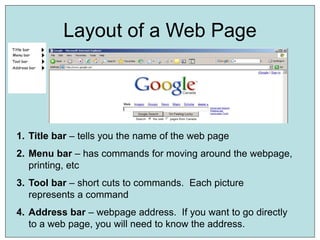
1. Title bar – tells you the name of the web page
2. Menu bar – has commands for moving around the webpage,
printing, etc
3. Tool bar – short cuts to commands. Each picture
represents a command
4. Address bar – webpage address. If you want to go directly
to a web page, you will need to know the address.
7
Parts of a Web Address
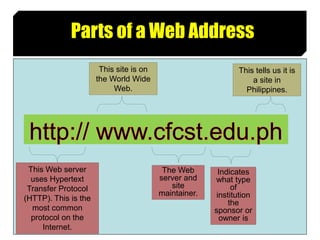
This Web server
uses Hypertext
Transfer Protocol
(HTTP). This is the
most common
protocol on the
Internet.
This site is on
the World Wide
Web.
The Web
server and
site
maintainer.
This tells us it is
a site in
Philippines.
Indicates
what type
of
institution
the
sponsor or
owner is
8
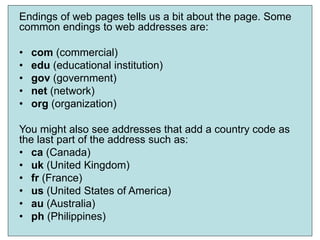
Endings of web pages tells us a bit about the page. Some
common endings to web addresses are:
• com (commercial)
• edu (educational institution)
• gov (government)
• net (network)
• org (organization)
You might also see addresses that add a country code as
the last part of the address such as:
• ca (Canada)
• uk (United Kingdom)
• fr (France)
• us (United States of America)
• au (Australia)
• ph (Philippines)
9
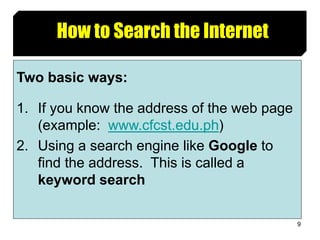
How to Search the Internet
Two basic ways:
1. If you know the address of the web page
(example: www.cfcst.edu.ph)
2. Using a search engine like Google to
find the address. This is called a
keyword search
10
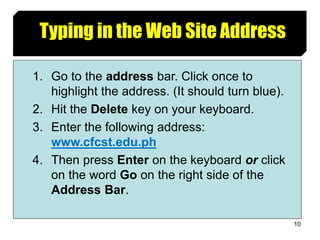
Typing in the Web Site Address
1. Go to the address bar. Click once to
highlight the address. (It should turn blue).
2. Hit the Delete key on your keyboard.
3. Enter the following address:
www.cfcst.edu.ph
4. Then press Enter on the keyboard or click
on the word Go on the right side of the
Address Bar.
11
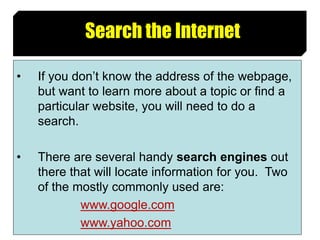
Search the Internet
• If you don’t know the address of the webpage,
but want to learn more about a topic or find a
particular website, you will need to do a
search.
• There are several handy search engines out
there that will locate information for you. Two
of the mostly commonly used are:
www.google.com
www.yahoo.com
12
What is HTML?
13
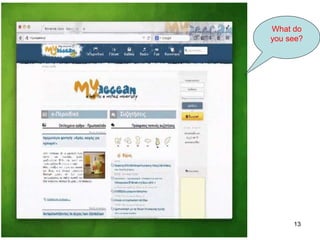
What do
you see?
14
Web Browser
• The purpose of a web browser (Chrome,
Edge, Firefox, Safari) is to read HTML
documents and display them.
• The browser does not display the HTML
tags, but uses them to determine how to
display the document:
15
Definitions
• HTML stands for Hyper Text Markup
Language
• HTML describes the structure of a Web
page
• HTML consists of a series of elements
• HTML elements tell the browser how to
display the content
• HTML elements are represented by tags
16
Definitions Cont’d
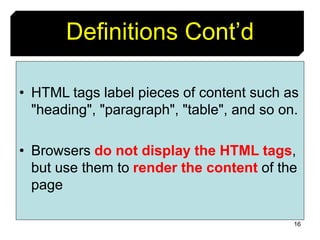
• HTML tags label pieces of content such as
"heading", "paragraph", "table", and so on.
• Browsers do not display the HTML tags,
but use them to render the content of the
page
17
HTML Tag
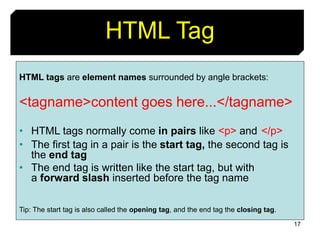
HTML tags are element names surrounded by angle brackets:
<tagname>content goes here...</tagname>
• HTML tags normally come in pairs like <p> and </p>
• The first tag in a pair is the start tag, the second tag is
the end tag
• The end tag is written like the start tag, but with
a forward slash inserted before the tag name
Tip: The start tag is also called the opening tag, and the end tag the closing tag.
18
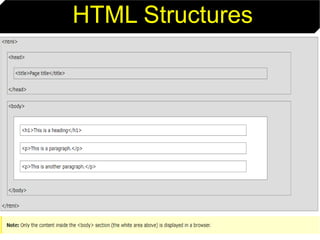
HTML Structures
19
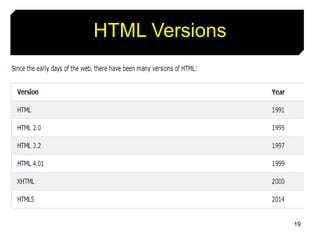
HTML Versions
20
A Simple HTML Document
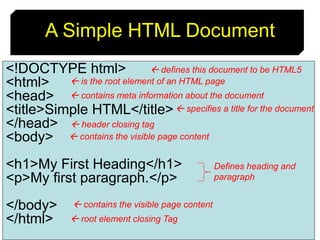
<!DOCTYPE html>
<html>
<head>
<title>Simple HTML</title>
</head>
<body>
<h1>My First Heading</h1>
<p>My first paragraph.</p>
</body>
</html>
 defines this document to be HTML5
 is the root element of an HTML page
 root element closing Tag
 contains meta information about the document
 header closing tag
 specifies a title for the document
 contains the visible page content
Defines heading and
paragraph
21
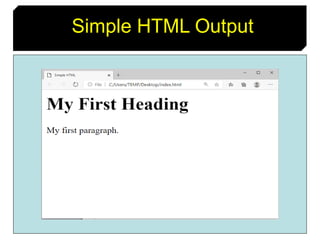
Simple HTML Output
22
Questions?..
23
Exercise 101
• Write an article about the COVID-19
Pandemic using HTML.
• Your article must be atleast 2000
words.
24
Assignment
• Do a quick research about JAVASCRIPT.
25
Thank you!...

Introduction to HTML

  • 1.
    1 Introduction to HTML Prepared by: ZAINUDINT. GENSO, MIS mher.gens@gmail.com
  • 2.
    2 Objectives: • Introduction toINTERNET & WWW • Some Common Terms • Define HTML in terms of its usage • Describe the structure of HTML and its versions • Cite common websites currently used and what HTML is made of • Explain tags and other HTML-related concepts • Create simple HTML document
  • 3.
    3 • Most peopleuse the two terms interchangeably but they are in fact different. • The Internet is a vast, international network, made up of computers and the physical connections (wires, routers, etc.) allowing them to communicate. • The World Wide Web (WWW or just the Web) is a collection of software that spans the Internet and enables the interlinking of documents and resources. – Provides a way of accessing information on the Internet. INTERNET VS World Wide Web (WWW)
  • 4.
    • A siteor area on the World Wide Web that is accessed by its own Internet address is called a Web site. • A Web Page is like a page in a book. Websites often have several pages that you can access by clicking on links. A Web site can be a collection of related Web pages. • Each Web site contains a home page (this is the original starting page) and may also contain additional pages.
  • 5.
    5 Some Common Terms •The Internet is a network of computers spanning the globe. • An Internet Browser is a software program that enables you to view Web pages on your computer. Browsers connect computers to the Internet, and allow people to “surf the Web.” • Internet Explorer is one of the browsers most commonly used. There are other browsers available as well, including Netscape.
  • 6.
    Layout of aWeb Page 1. Title bar – tells you the name of the web page 2. Menu bar – has commands for moving around the webpage, printing, etc 3. Tool bar – short cuts to commands. Each picture represents a command 4. Address bar – webpage address. If you want to go directly to a web page, you will need to know the address.
  • 7.
    7 Parts of aWeb Address This Web server uses Hypertext Transfer Protocol (HTTP). This is the most common protocol on the Internet. This site is on the World Wide Web. The Web server and site maintainer. This tells us it is a site in Philippines. Indicates what type of institution the sponsor or owner is
  • 8.
    8 Endings of webpages tells us a bit about the page. Some common endings to web addresses are: • com (commercial) • edu (educational institution) • gov (government) • net (network) • org (organization) You might also see addresses that add a country code as the last part of the address such as: • ca (Canada) • uk (United Kingdom) • fr (France) • us (United States of America) • au (Australia) • ph (Philippines)
  • 9.
    9 How to Searchthe Internet Two basic ways: 1. If you know the address of the web page (example: www.cfcst.edu.ph) 2. Using a search engine like Google to find the address. This is called a keyword search
  • 10.
    10 Typing in theWeb Site Address 1. Go to the address bar. Click once to highlight the address. (It should turn blue). 2. Hit the Delete key on your keyboard. 3. Enter the following address: www.cfcst.edu.ph 4. Then press Enter on the keyboard or click on the word Go on the right side of the Address Bar.
  • 11.
    11 Search the Internet •If you don’t know the address of the webpage, but want to learn more about a topic or find a particular website, you will need to do a search. • There are several handy search engines out there that will locate information for you. Two of the mostly commonly used are: www.google.com www.yahoo.com
  • 12.
  • 13.
  • 14.
    14 Web Browser • Thepurpose of a web browser (Chrome, Edge, Firefox, Safari) is to read HTML documents and display them. • The browser does not display the HTML tags, but uses them to determine how to display the document:
  • 15.
    15 Definitions • HTML standsfor Hyper Text Markup Language • HTML describes the structure of a Web page • HTML consists of a series of elements • HTML elements tell the browser how to display the content • HTML elements are represented by tags
  • 16.
    16 Definitions Cont’d • HTMLtags label pieces of content such as "heading", "paragraph", "table", and so on. • Browsers do not display the HTML tags, but use them to render the content of the page
  • 17.
    17 HTML Tag HTML tagsare element names surrounded by angle brackets: <tagname>content goes here...</tagname> • HTML tags normally come in pairs like <p> and </p> • The first tag in a pair is the start tag, the second tag is the end tag • The end tag is written like the start tag, but with a forward slash inserted before the tag name Tip: The start tag is also called the opening tag, and the end tag the closing tag.
  • 18.
  • 19.
  • 20.
    20 A Simple HTMLDocument <!DOCTYPE html> <html> <head> <title>Simple HTML</title> </head> <body> <h1>My First Heading</h1> <p>My first paragraph.</p> </body> </html>  defines this document to be HTML5  is the root element of an HTML page  root element closing Tag  contains meta information about the document  header closing tag  specifies a title for the document  contains the visible page content  contains the visible page content Defines heading and paragraph
  • 21.
  • 22.
  • 23.
    23 Exercise 101 • Writean article about the COVID-19 Pandemic using HTML. • Your article must be atleast 2000 words.
  • 24.
    24 Assignment • Do aquick research about JAVASCRIPT.
  • 25.