- BY
SHREYA SHETTY
(Muchhala Polytechnic, Thane)
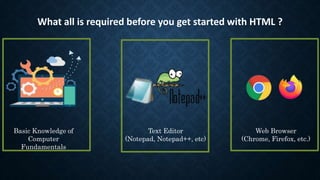
What all is required before you get started with HTML ?
Basic Knowledge of
Computer
Fundamentals
Text Editor
(Notepad, Notepad++, etc)
Web Browser
(Chrome, Firefox, etc.)
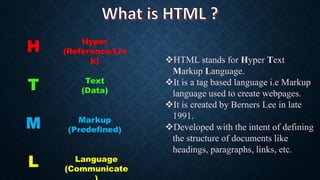
H
T
M
L
Hyper
(Reference/Lin
k)
Text
(Data)
Markup
(Predefined)
Language
(Communicate
HTML stands for Hyper Text
Markup Language.
It is a tag based language i.e Markup
language used to create webpages.
It is created by Berners Lee in late
1991.
Developed with the intent of defining
the structure of documents like
headings, paragraphs, links, etc.
“HTML is sent from server to client’s browser whenever
HTTP request is sent to server”
Clients
Server
Internet
Briefly, the client is making a request to the server. Every time a HTTP request is made, if that request is valid means if the
client is authorized to access that particular page only then the html of that particular page will be send from server to client
over the network using http protocol. As soon as the html is on the clients browser, the browser have the capacity of reading
the html language and can show the output as it is designed. So this is how the communication takes place over the network.
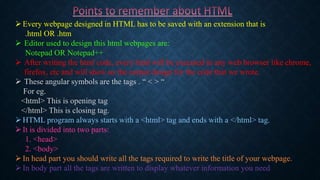
Every webpage designed in HTML has to be saved with an extension that is
.html OR .htm
 Editor used to design this html webpages are:
Notepad OR Notepad++
 After writing the html code, every html will be executed in any web browser like chrome,
firefox, etc and will show us the output design for the code that we wrote.
 These angular symbols are the tags . “ < > “
For eg.
<html> This is opening tag
</html> This is closing tag.
HTML program always starts with a <html> tag and ends with a </html> tag.
It is divided into two parts:
1. <head>
2. <body>
In head part you should write all the tags required to write the title of your webpage.
In body part all the tags are written to display whatever information you need
Basic Tags and syntax
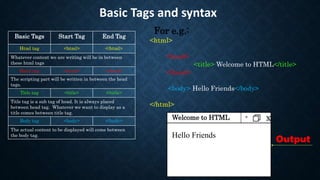
<html>
<head>
<title> Welcome to HTML</title>
</head>
<body> Hello Friends</body>
</html>
Basic Tags Start Tag End Tag
Html tag <html> </html>
Whatever content we are writing will be in between
these html tags
Head tag <head> </head>
The scripting part will be written in between the head
tags.
Title tag <title> </title>
Title tag is a sub tag of head. It is always placed
between head tag. Whatever we want to display as a
title comes between title tag.
Body tag <body> </body>
The actual content to be displayed will come between
the body tag.
- x
Welcome to HTML
Hello Friends
For e.g.:
Output
THANK YOU

Introduction to HTML

  • 1.
    - BY SHREYA SHETTY (MuchhalaPolytechnic, Thane)
  • 2.
    What all isrequired before you get started with HTML ? Basic Knowledge of Computer Fundamentals Text Editor (Notepad, Notepad++, etc) Web Browser (Chrome, Firefox, etc.)
  • 3.
    H T M L Hyper (Reference/Lin k) Text (Data) Markup (Predefined) Language (Communicate HTML stands forHyper Text Markup Language. It is a tag based language i.e Markup language used to create webpages. It is created by Berners Lee in late 1991. Developed with the intent of defining the structure of documents like headings, paragraphs, links, etc.
  • 4.
    “HTML is sentfrom server to client’s browser whenever HTTP request is sent to server” Clients Server Internet Briefly, the client is making a request to the server. Every time a HTTP request is made, if that request is valid means if the client is authorized to access that particular page only then the html of that particular page will be send from server to client over the network using http protocol. As soon as the html is on the clients browser, the browser have the capacity of reading the html language and can show the output as it is designed. So this is how the communication takes place over the network.
  • 5.
    Every webpage designedin HTML has to be saved with an extension that is .html OR .htm  Editor used to design this html webpages are: Notepad OR Notepad++  After writing the html code, every html will be executed in any web browser like chrome, firefox, etc and will show us the output design for the code that we wrote.  These angular symbols are the tags . “ < > “ For eg. <html> This is opening tag </html> This is closing tag. HTML program always starts with a <html> tag and ends with a </html> tag. It is divided into two parts: 1. <head> 2. <body> In head part you should write all the tags required to write the title of your webpage. In body part all the tags are written to display whatever information you need
  • 6.
    Basic Tags andsyntax <html> <head> <title> Welcome to HTML</title> </head> <body> Hello Friends</body> </html> Basic Tags Start Tag End Tag Html tag <html> </html> Whatever content we are writing will be in between these html tags Head tag <head> </head> The scripting part will be written in between the head tags. Title tag <title> </title> Title tag is a sub tag of head. It is always placed between head tag. Whatever we want to display as a title comes between title tag. Body tag <body> </body> The actual content to be displayed will come between the body tag. - x Welcome to HTML Hello Friends For e.g.: Output
  • 7.