techupskills.com | techskillstransformations.com © 2021 Brent C. Laster &
@techupskills
2
© 2022 Brent C. Laster &
© 2024 Brent C. Laster &
Introduction to Codeium
(A free alternative to GitHub Copilot)
Presented by Brent Laster &
Tech Skills Transformations LLC
© 2024 Brent C. Laster & Tech Skills Transformations LLC
All rights reserved
techupskills.com | techskillstransformations.com © 2021 Brent C. Laster &
@techupskills
3
© 2022 Brent C. Laster &
© 2024 Brent C. Laster &
About me
• Founder, Tech Skills
Transformations LLC
• https://getskillsnow.com
• info@getskillsnow.com
• Long career in corporate as dev,
manager, and director in
DevOps and other areas
• Author
• O'Reilly "reports"
• Books
• Professional
Git
• Jenkins 2 – Up
and Running
• Learning
GitHub Actions
• Learning
GitHub Copilot
• Speaker
• Social media
❑ LinkedIn: brentlaster
❑ X: @BrentCLaster
❑ GitHub: brentlaster
techupskills.com | techskillstransformations.com © 2021 Brent C. Laster &
@techupskills
4
© 2022 Brent C. Laster &
© 2024 Brent C. Laster &
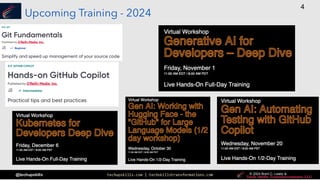
Upcoming Training - 2024
techupskills.com | techskillstransformations.com © 2021 Brent C. Laster &
@techupskills
6
© 2022 Brent C. Laster &
© 2024 Brent C. Laster &
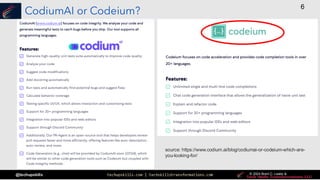
CodiumAI or Codeium?
source: https://www.codium.ai/blog/codiumai-or-codeium-which-are-
you-looking-for/
techupskills.com | techskillstransformations.com © 2021 Brent C. Laster &
@techupskills
7
© 2022 Brent C. Laster &
© 2024 Brent C. Laster &
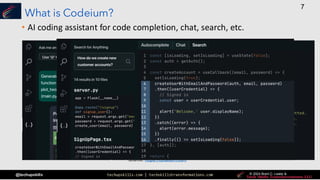
What is Codeium?
• AI coding assistant for code completion, chat, search, etc.
source: https://codeium.com
techupskills.com | techskillstransformations.com © 2021 Brent C. Laster &
@techupskills
8
© 2022 Brent C. Laster &
© 2024 Brent C. Laster &
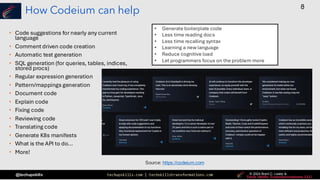
How Codeium can help
• Code suggestions for nearly any current
language
• Comment driven code creation
• Automatic test generation
• SQL generation (for queries, tables, indices,
stored procs)
• Regular expression generation
• Pattern/mappings generation
• Document code
• Explain code
• Fixing code
• Reviewing code
• Translating code
• Generate K8s manifests
• What is the API to do...
• More!
Source: https://codeium.com
• Generate boilerplate code
• Less time reading docs
• Less time recalling syntax
• Learning a new language
• Reduce cognitive load
• Let programmers focus on the problem more
techupskills.com | techskillstransformations.com © 2021 Brent C. Laster &
@techupskills
9
© 2022 Brent C. Laster &
© 2024 Brent C. Laster &
Integrations
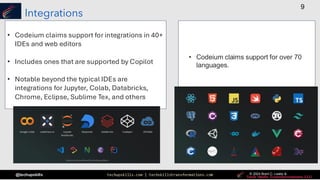
• Codeium claims support for integrations in 40+
IDEs and web editors
• Includes ones that are supported by Copilot
• Notable beyond the typical IDEs are
integrations for Jupyter, Colab, Databricks,
Chrome, Eclipse, Sublime Tex, and others
• Codeium claims support for over 70
languages.
techupskills.com | techskillstransformations.com © 2021 Brent C. Laster &
@techupskills
10
© 2022 Brent C. Laster &
© 2024 Brent C. Laster &
Training models
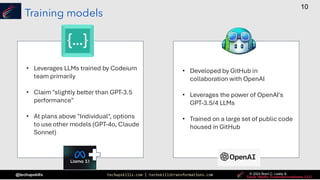
• Leverages LLMs trained by Codeium
team primarily
• Claim "slightly better than GPT-3.5
performance"
• At plans above "Individual", options
to use other models (GPT-4o, Claude
Sonnet)
• Developed by GitHub in
collaboration with OpenAI
• Leverages the power of OpenAI's
GPT-3.5/4 LLMs
• Trained on a large set of public code
housed in GitHub
techupskills.com | techskillstransformations.com © 2021 Brent C. Laster &
@techupskills
11
© 2022 Brent C. Laster &
© 2024 Brent C. Laster &
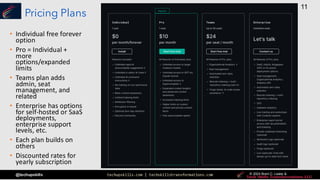
Pricing Plans
• Individual free forever
option
• Pro = Individual +
more
options/expanded
limits
• Teams plan adds
admin, seat
management, and
related
• Enterprise has options
for self-hosted or SaaS
deployments,
enterprise support
levels, etc.
• Each plan builds on
others
• Discounted rates for
yearly subscription
techupskills.com | techskillstransformations.com © 2021 Brent C. Laster &
@techupskills
12
© 2022 Brent C. Laster &
© 2024 Brent C. Laster &
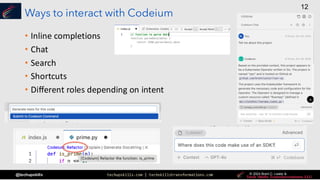
Ways to interact with Codeium
• Inline completions
• Chat
• Search
• Shortcuts
• Different roles depending on intent
techupskills.com | techskillstransformations.com © 2021 Brent C. Laster &
@techupskills
13
© 2022 Brent C. Laster &
© 2024 Brent C. Laster &
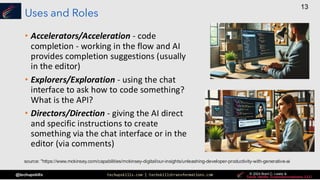
Uses and Roles
• Accelerators/Acceleration - code
completion - working in the flow and AI
provides completion suggestions (usually
in the editor)
• Explorers/Exploration - using the chat
interface to ask how to code something?
What is the API?
• Directors/Direction - giving the AI direct
and specific instructions to create
something via the chat interface or in the
editor (via comments)
source: "https://www.mckinsey.com/capabilities/mckinsey-digital/our-insights/unleashing-developer-productivity-with-generative-ai
techupskills.com | techskillstransformations.com © 2021 Brent C. Laster &
@techupskills
14
© 2022 Brent C. Laster &
© 2024 Brent C. Laster &
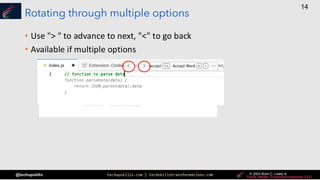
Rotating through multiple options
• Use "> " to advance to next, "<" to go back
• Available if multiple options
techupskills.com | techskillstransformations.com © 2021 Brent C. Laster &
@techupskills
15
© 2022 Brent C. Laster &
© 2024 Brent C. Laster &
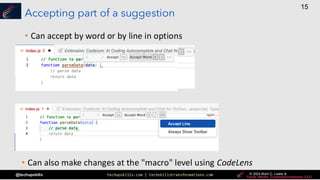
Accepting part of a suggestion
• Can accept by word or by line in options
• Can also make changes at the "macro" level using CodeLens
techupskills.com | techskillstransformations.com © 2021 Brent C. Laster &
@techupskills
16
© 2022 Brent C. Laster &
© 2024 Brent C. Laster &
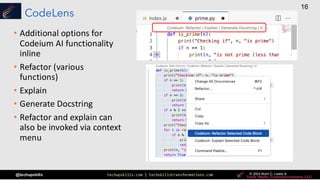
CodeLens
• Additional options for
Codeium AI functionality
inline
• Refactor (various
functions)
• Explain
• Generate Docstring
• Refactor and explain can
also be invoked via context
menu
techupskills.com | techskillstransformations.com © 2021 Brent C. Laster &
@techupskills
17
© 2022 Brent C. Laster &
© 2024 Brent C. Laster &
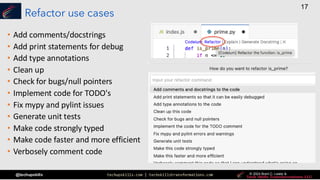
Refactor use cases
• Add comments/docstrings
• Add print statements for debug
• Add type annotations
• Clean up
• Check for bugs/null pointers
• Implement code for TODO's
• Fix mypy and pylint issues
• Generate unit tests
• Make code strongly typed
• Make code faster and more efficient
• Verbosely comment code
techupskills.com | techskillstransformations.com © 2021 Brent C. Laster &
@techupskills
18
© 2022 Brent C. Laster &
© 2024 Brent C. Laster &
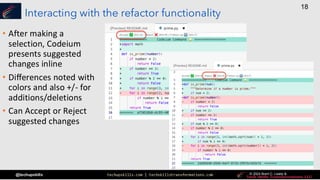
Interacting with the refactor functionality
• After making a
selection, Codeium
presents suggested
changes inline
• Differences noted with
colors and also +/- for
additions/deletions
• Can Accept or Reject
suggested changes
techupskills.com | techskillstransformations.com © 2021 Brent C. Laster &
@techupskills
19
© 2022 Brent C. Laster &
© 2024 Brent C. Laster &
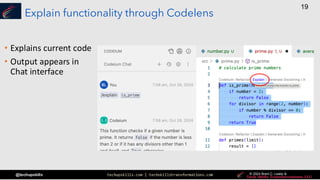
Explain functionality through Codelens
• Explains current code
• Output appears in
Chat interface
techupskills.com | techskillstransformations.com © 2021 Brent C. Laster &
@techupskills
20
© 2022 Brent C. Laster &
© 2024 Brent C. Laster &
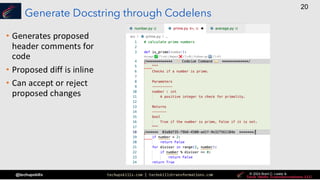
Generate Docstring through Codelens
• Generates proposed
header comments for
code
• Proposed diff is inline
• Can accept or reject
proposed changes
techupskills.com | techskillstransformations.com © 2021 Brent C. Laster &
@techupskills
22
© 2022 Brent C. Laster &
© 2024 Brent C. Laster &
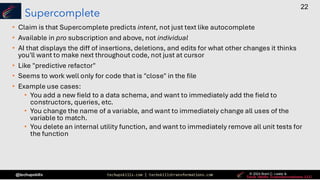
Supercomplete
• Claim is that Supercomplete predicts intent, not just text like autocomplete
• Available in pro subscription and above, not individual
• AI that displays the diff of insertions, deletions, and edits for what other changes it thinks
you'll want to make next throughout code, not just at cursor
• Like "predictive refactor"
• Seems to work well only for code that is "close" in the file
• Example use cases:
• You add a new field to a data schema, and want to immediately add the field to
constructors, queries, etc.
• You change the name of a variable, and want to immediately change all uses of the
variable to match.
• You delete an internal utility function, and want to immediately remove all unit tests for
the function
techupskills.com | techskillstransformations.com © 2021 Brent C. Laster &
@techupskills
23
© 2022 Brent C. Laster &
© 2024 Brent C. Laster &
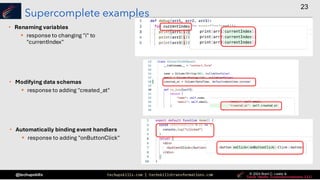
Supercomplete examples
• Renaming variables
▪ response to changing "i" to
"currentIndex"
• Modifying data schemas
▪ response to adding "created_at"
• Automatically binding event handlers
▪ response to adding "onButtonClick"
techupskills.com | techskillstransformations.com © 2021 Brent C. Laster &
@techupskills
24
© 2022 Brent C. Laster &
© 2024 Brent C. Laster &
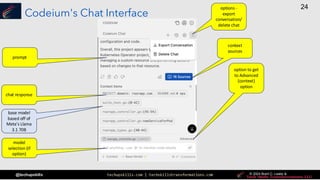
Codeium's Chat Interface
prompt
chat response
model
selection (if
option)
context
sources
option to get
to Advanced
(context)
option
options -
export
conversation/
delete chat
base model
based off of
Meta's Llama
3.1 70B
techupskills.com | techskillstransformations.com © 2021 Brent C. Laster &
@techupskills
25
© 2022 Brent C. Laster &
© 2024 Brent C. Laster &
Codeium inline chat
• Can be invoked via
▪ Ctrl/Cmd+I
• Allows you to enter in
standard chat text
without using Chat
interface
• Click on "Submit" to
send to AI
techupskills.com | techskillstransformations.com © 2021 Brent C. Laster &
@techupskills
26
© 2022 Brent C. Laster &
© 2024 Brent C. Laster &
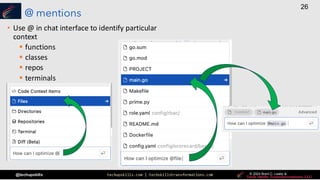
@ mentions
• Use @ in chat interface to identify particular
context
▪ functions
▪ classes
▪ repos
▪ terminals
techupskills.com | techskillstransformations.com © 2021 Brent C. Laster &
@techupskills
27
© 2022 Brent C. Laster &
© 2024 Brent C. Laster &
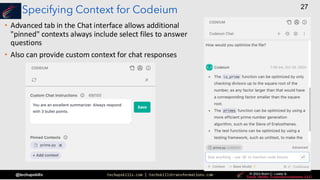
Specifying Context for Codeium
• Advanced tab in the Chat interface allows additional
"pinned" contexts always include select files to answer
questions
• Also can provide custom context for chat responses
techupskills.com | techskillstransformations.com © 2021 Brent C. Laster &
@techupskills
28
© 2022 Brent C. Laster &
© 2024 Brent C. Laster &
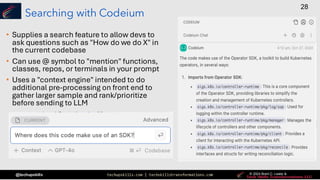
Searching with Codeium
• Supplies a search feature to allow devs to
ask questions such as "How do we do X" in
the current codebase
• Can use @ symbol to "mention" functions,
classes, repos, or terminals in your prompt
• Uses a "context engine" intended to do
additional pre-processing on front end to
gather larger sample and rank/prioritize
before sending to LLM
techupskills.com | techskillstransformations.com © 2021 Brent C. Laster &
@techupskills
30
© 2022 Brent C. Laster &
© 2024 Brent C. Laster &
Where does Codeium get context?
• Codeium looks at multiple relevant sources of context:
▪ Your IDE and open files
▪ Your local repo - indexes entire local codebase (even closed files); automatically
pulls in code snippets that are relevant to query or code you're writing
▪ Your remote repos - (Teams and Enterprise levels only)
• Any pinned context or added context in Advanced Chat
• Other option is fine-tuning (available in Enterprise version of Codeium)
techupskills.com | techskillstransformations.com © 2021 Brent C. Laster &
@techupskills
31
© 2022 Brent C. Laster &
© 2024 Brent C. Laster &
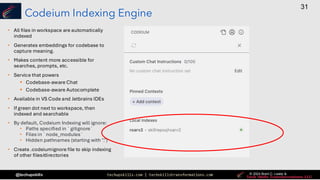
Codeium Indexing Engine
• All files in workspace are automatically
indexed
• Generates embeddings for codebase to
capture meaning.
• Makes content more accessible for
searches, prompts, etc.
• Service that powers
▪ Codebase-aware Chat
▪ Codebase-aware Autocomplete
• Available in VS Code and Jetbrains IDEs
• If green dot next to workspace, then
indexed and searchable
• By default, Codeium Indexing will ignore:
• Paths specified in `gitignore`
• Files in `node_modules`
• Hidden pathnames (starting with ".")
• Create .codeiumignore file to skip indexing
of other files/directories
techupskills.com | techskillstransformations.com © 2021 Brent C. Laster &
@techupskills
32
© 2022 Brent C. Laster &
© 2024 Brent C. Laster &
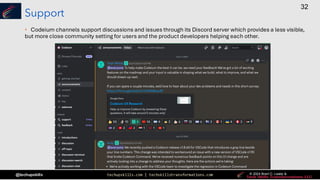
Support
• Codeium channels support discussions and issues through its Discord server which provides a less visible,
but more close community setting for users and the product developers helping each other.
techupskills.com | techskillstransformations.com © 2021 Brent C. Laster &
@techupskills
33
© 2022 Brent C. Laster &
© 2024 Brent C. Laster &
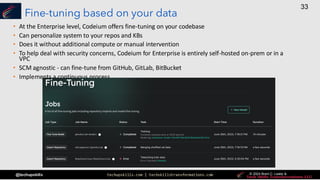
Fine-tuning based on your data
• At the Enterprise level, Codeium offers fine-tuning on your codebase
• Can personalize system to your repos and KBs
• Does it without additional compute or manual intervention
• To help deal with security concerns, Codeium for Enterprise is entirely self-hosted on-prem or in a
VPC
• SCM agnostic - can fine-tune from GitHub, GitLab, BitBucket
• Implements a continuous process
techupskills.com | techskillstransformations.com © 2021 Brent C. Laster &
@techupskills
34
© 2022 Brent C. Laster &
© 2024 Brent C. Laster &
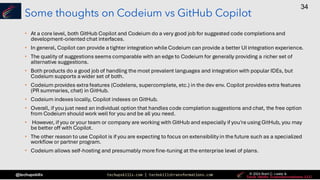
Some thoughts on Codeium vs GitHub Copilot
• At a core level, both GitHub Copilot and Codeium do a very good job for suggested code completions and
development-oriented chat interfaces.
• In general, Copilot can provide a tighter integration while Codeium can provide a better UI integration experience.
• The quality of suggestions seems comparable with an edge to Codeium for generally providing a richer set of
alternative suggestions.
• Both products do a good job of handling the most prevalent languages and integration with popular IDEs, but
Codeium supports a wider set of both.
• Codeium provides extra features (Codelens, supercomplete, etc.) in the dev env. Copilot provides extra features
(PR summaries, chat) in GitHub.
• Codeium indexes locally, Copilot indexes on GitHub.
• Overall, if you just need an individual option that handles code completion suggestions and chat, the free option
from Codeium should work well for you and be all you need.
• However, if you or your team or company are working with GitHub and especially if you're using GitHub, you may
be better off with Copilot.
• The other reason to use Copilot is if you are expecting to focus on extensibility in the future such as a specialized
workflow or partner program.
• Codeium allows self-hosting and presumably more fine-tuning at the enterprise level of plans.
techupskills.com | techskillstransformations.com © 2021 Brent C. Laster &
@techupskills
35
© 2022 Brent C. Laster &
© 2024 Brent C. Laster &
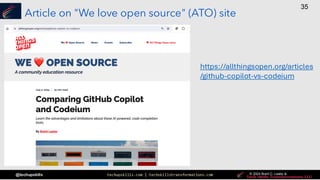
Article on "We love open source" (ATO) site
https://allthingsopen.org/articles
/github-copilot-vs-codeium
techupskills.com | techskillstransformations.com © 2021 Brent C. Laster &
@techupskills
36
© 2022 Brent C. Laster &
© 2024 Brent C. Laster &
|
Demos!
Demos of Codeium and Copilot
techupskills.com | techskillstransformations.com © 2021 Brent C. Laster &
@techupskills
37
© 2022 Brent C. Laster &
© 2024 Brent C. Laster &
That’s all - thanks!
techskillstransformations.com
getskillsnow.com
Contact: training@getskillsnow.com

Introduction to Codeium: A free alternative to GitHub Copilot

  • 1.
    techupskills.com | techskillstransformations.com© 2021 Brent C. Laster & @techupskills 2 © 2022 Brent C. Laster & © 2024 Brent C. Laster & Introduction to Codeium (A free alternative to GitHub Copilot) Presented by Brent Laster & Tech Skills Transformations LLC © 2024 Brent C. Laster & Tech Skills Transformations LLC All rights reserved
  • 2.
    techupskills.com | techskillstransformations.com© 2021 Brent C. Laster & @techupskills 3 © 2022 Brent C. Laster & © 2024 Brent C. Laster & © 2024 Brent C. Laster & About me • Founder, Tech Skills Transformations LLC • https://getskillsnow.com • info@getskillsnow.com • Long career in corporate as dev, manager, and director in DevOps and other areas • Author • O'Reilly "reports" • Books • Professional Git • Jenkins 2 – Up and Running • Learning GitHub Actions • Learning GitHub Copilot • Speaker • Social media ❑ LinkedIn: brentlaster ❑ X: @BrentCLaster ❑ GitHub: brentlaster
  • 3.
    techupskills.com | techskillstransformations.com© 2021 Brent C. Laster & @techupskills 4 © 2022 Brent C. Laster & © 2024 Brent C. Laster & © 2024 Brent C. Laster & Upcoming Training - 2024
  • 4.
    techupskills.com | techskillstransformations.com© 2021 Brent C. Laster & @techupskills 6 © 2022 Brent C. Laster & © 2024 Brent C. Laster & © 2024 Brent C. Laster & CodiumAI or Codeium? source: https://www.codium.ai/blog/codiumai-or-codeium-which-are- you-looking-for/
  • 5.
    techupskills.com | techskillstransformations.com© 2021 Brent C. Laster & @techupskills 7 © 2022 Brent C. Laster & © 2024 Brent C. Laster & © 2024 Brent C. Laster & What is Codeium? • AI coding assistant for code completion, chat, search, etc. source: https://codeium.com
  • 6.
    techupskills.com | techskillstransformations.com© 2021 Brent C. Laster & @techupskills 8 © 2022 Brent C. Laster & © 2024 Brent C. Laster & © 2024 Brent C. Laster & How Codeium can help • Code suggestions for nearly any current language • Comment driven code creation • Automatic test generation • SQL generation (for queries, tables, indices, stored procs) • Regular expression generation • Pattern/mappings generation • Document code • Explain code • Fixing code • Reviewing code • Translating code • Generate K8s manifests • What is the API to do... • More! Source: https://codeium.com • Generate boilerplate code • Less time reading docs • Less time recalling syntax • Learning a new language • Reduce cognitive load • Let programmers focus on the problem more
  • 7.
    techupskills.com | techskillstransformations.com© 2021 Brent C. Laster & @techupskills 9 © 2022 Brent C. Laster & © 2024 Brent C. Laster & © 2024 Brent C. Laster & Integrations • Codeium claims support for integrations in 40+ IDEs and web editors • Includes ones that are supported by Copilot • Notable beyond the typical IDEs are integrations for Jupyter, Colab, Databricks, Chrome, Eclipse, Sublime Tex, and others • Codeium claims support for over 70 languages.
  • 8.
    techupskills.com | techskillstransformations.com© 2021 Brent C. Laster & @techupskills 10 © 2022 Brent C. Laster & © 2024 Brent C. Laster & © 2024 Brent C. Laster & Training models • Leverages LLMs trained by Codeium team primarily • Claim "slightly better than GPT-3.5 performance" • At plans above "Individual", options to use other models (GPT-4o, Claude Sonnet) • Developed by GitHub in collaboration with OpenAI • Leverages the power of OpenAI's GPT-3.5/4 LLMs • Trained on a large set of public code housed in GitHub
  • 9.
    techupskills.com | techskillstransformations.com© 2021 Brent C. Laster & @techupskills 11 © 2022 Brent C. Laster & © 2024 Brent C. Laster & © 2024 Brent C. Laster & Pricing Plans • Individual free forever option • Pro = Individual + more options/expanded limits • Teams plan adds admin, seat management, and related • Enterprise has options for self-hosted or SaaS deployments, enterprise support levels, etc. • Each plan builds on others • Discounted rates for yearly subscription
  • 10.
    techupskills.com | techskillstransformations.com© 2021 Brent C. Laster & @techupskills 12 © 2022 Brent C. Laster & © 2024 Brent C. Laster & © 2024 Brent C. Laster & Ways to interact with Codeium • Inline completions • Chat • Search • Shortcuts • Different roles depending on intent
  • 11.
    techupskills.com | techskillstransformations.com© 2021 Brent C. Laster & @techupskills 13 © 2022 Brent C. Laster & © 2024 Brent C. Laster & © 2024 Brent C. Laster & Uses and Roles • Accelerators/Acceleration - code completion - working in the flow and AI provides completion suggestions (usually in the editor) • Explorers/Exploration - using the chat interface to ask how to code something? What is the API? • Directors/Direction - giving the AI direct and specific instructions to create something via the chat interface or in the editor (via comments) source: "https://www.mckinsey.com/capabilities/mckinsey-digital/our-insights/unleashing-developer-productivity-with-generative-ai
  • 12.
    techupskills.com | techskillstransformations.com© 2021 Brent C. Laster & @techupskills 14 © 2022 Brent C. Laster & © 2024 Brent C. Laster & © 2024 Brent C. Laster & Rotating through multiple options • Use "> " to advance to next, "<" to go back • Available if multiple options
  • 13.
    techupskills.com | techskillstransformations.com© 2021 Brent C. Laster & @techupskills 15 © 2022 Brent C. Laster & © 2024 Brent C. Laster & © 2024 Brent C. Laster & Accepting part of a suggestion • Can accept by word or by line in options • Can also make changes at the "macro" level using CodeLens
  • 14.
    techupskills.com | techskillstransformations.com© 2021 Brent C. Laster & @techupskills 16 © 2022 Brent C. Laster & © 2024 Brent C. Laster & © 2024 Brent C. Laster & CodeLens • Additional options for Codeium AI functionality inline • Refactor (various functions) • Explain • Generate Docstring • Refactor and explain can also be invoked via context menu
  • 15.
    techupskills.com | techskillstransformations.com© 2021 Brent C. Laster & @techupskills 17 © 2022 Brent C. Laster & © 2024 Brent C. Laster & © 2024 Brent C. Laster & Refactor use cases • Add comments/docstrings • Add print statements for debug • Add type annotations • Clean up • Check for bugs/null pointers • Implement code for TODO's • Fix mypy and pylint issues • Generate unit tests • Make code strongly typed • Make code faster and more efficient • Verbosely comment code
  • 16.
    techupskills.com | techskillstransformations.com© 2021 Brent C. Laster & @techupskills 18 © 2022 Brent C. Laster & © 2024 Brent C. Laster & © 2024 Brent C. Laster & Interacting with the refactor functionality • After making a selection, Codeium presents suggested changes inline • Differences noted with colors and also +/- for additions/deletions • Can Accept or Reject suggested changes
  • 17.
    techupskills.com | techskillstransformations.com© 2021 Brent C. Laster & @techupskills 19 © 2022 Brent C. Laster & © 2024 Brent C. Laster & © 2024 Brent C. Laster & Explain functionality through Codelens • Explains current code • Output appears in Chat interface
  • 18.
    techupskills.com | techskillstransformations.com© 2021 Brent C. Laster & @techupskills 20 © 2022 Brent C. Laster & © 2024 Brent C. Laster & © 2024 Brent C. Laster & Generate Docstring through Codelens • Generates proposed header comments for code • Proposed diff is inline • Can accept or reject proposed changes
  • 19.
    techupskills.com | techskillstransformations.com© 2021 Brent C. Laster & @techupskills 22 © 2022 Brent C. Laster & © 2024 Brent C. Laster & © 2024 Brent C. Laster & Supercomplete • Claim is that Supercomplete predicts intent, not just text like autocomplete • Available in pro subscription and above, not individual • AI that displays the diff of insertions, deletions, and edits for what other changes it thinks you'll want to make next throughout code, not just at cursor • Like "predictive refactor" • Seems to work well only for code that is "close" in the file • Example use cases: • You add a new field to a data schema, and want to immediately add the field to constructors, queries, etc. • You change the name of a variable, and want to immediately change all uses of the variable to match. • You delete an internal utility function, and want to immediately remove all unit tests for the function
  • 20.
    techupskills.com | techskillstransformations.com© 2021 Brent C. Laster & @techupskills 23 © 2022 Brent C. Laster & © 2024 Brent C. Laster & © 2024 Brent C. Laster & Supercomplete examples • Renaming variables ▪ response to changing "i" to "currentIndex" • Modifying data schemas ▪ response to adding "created_at" • Automatically binding event handlers ▪ response to adding "onButtonClick"
  • 21.
    techupskills.com | techskillstransformations.com© 2021 Brent C. Laster & @techupskills 24 © 2022 Brent C. Laster & © 2024 Brent C. Laster & © 2024 Brent C. Laster & Codeium's Chat Interface prompt chat response model selection (if option) context sources option to get to Advanced (context) option options - export conversation/ delete chat base model based off of Meta's Llama 3.1 70B
  • 22.
    techupskills.com | techskillstransformations.com© 2021 Brent C. Laster & @techupskills 25 © 2022 Brent C. Laster & © 2024 Brent C. Laster & © 2024 Brent C. Laster & Codeium inline chat • Can be invoked via ▪ Ctrl/Cmd+I • Allows you to enter in standard chat text without using Chat interface • Click on "Submit" to send to AI
  • 23.
    techupskills.com | techskillstransformations.com© 2021 Brent C. Laster & @techupskills 26 © 2022 Brent C. Laster & © 2024 Brent C. Laster & © 2024 Brent C. Laster & @ mentions • Use @ in chat interface to identify particular context ▪ functions ▪ classes ▪ repos ▪ terminals
  • 24.
    techupskills.com | techskillstransformations.com© 2021 Brent C. Laster & @techupskills 27 © 2022 Brent C. Laster & © 2024 Brent C. Laster & © 2024 Brent C. Laster & Specifying Context for Codeium • Advanced tab in the Chat interface allows additional "pinned" contexts always include select files to answer questions • Also can provide custom context for chat responses
  • 25.
    techupskills.com | techskillstransformations.com© 2021 Brent C. Laster & @techupskills 28 © 2022 Brent C. Laster & © 2024 Brent C. Laster & © 2024 Brent C. Laster & Searching with Codeium • Supplies a search feature to allow devs to ask questions such as "How do we do X" in the current codebase • Can use @ symbol to "mention" functions, classes, repos, or terminals in your prompt • Uses a "context engine" intended to do additional pre-processing on front end to gather larger sample and rank/prioritize before sending to LLM
  • 26.
    techupskills.com | techskillstransformations.com© 2021 Brent C. Laster & @techupskills 30 © 2022 Brent C. Laster & © 2024 Brent C. Laster & © 2024 Brent C. Laster & Where does Codeium get context? • Codeium looks at multiple relevant sources of context: ▪ Your IDE and open files ▪ Your local repo - indexes entire local codebase (even closed files); automatically pulls in code snippets that are relevant to query or code you're writing ▪ Your remote repos - (Teams and Enterprise levels only) • Any pinned context or added context in Advanced Chat • Other option is fine-tuning (available in Enterprise version of Codeium)
  • 27.
    techupskills.com | techskillstransformations.com© 2021 Brent C. Laster & @techupskills 31 © 2022 Brent C. Laster & © 2024 Brent C. Laster & © 2024 Brent C. Laster & Codeium Indexing Engine • All files in workspace are automatically indexed • Generates embeddings for codebase to capture meaning. • Makes content more accessible for searches, prompts, etc. • Service that powers ▪ Codebase-aware Chat ▪ Codebase-aware Autocomplete • Available in VS Code and Jetbrains IDEs • If green dot next to workspace, then indexed and searchable • By default, Codeium Indexing will ignore: • Paths specified in `gitignore` • Files in `node_modules` • Hidden pathnames (starting with ".") • Create .codeiumignore file to skip indexing of other files/directories
  • 28.
    techupskills.com | techskillstransformations.com© 2021 Brent C. Laster & @techupskills 32 © 2022 Brent C. Laster & © 2024 Brent C. Laster & © 2024 Brent C. Laster & Support • Codeium channels support discussions and issues through its Discord server which provides a less visible, but more close community setting for users and the product developers helping each other.
  • 29.
    techupskills.com | techskillstransformations.com© 2021 Brent C. Laster & @techupskills 33 © 2022 Brent C. Laster & © 2024 Brent C. Laster & © 2024 Brent C. Laster & Fine-tuning based on your data • At the Enterprise level, Codeium offers fine-tuning on your codebase • Can personalize system to your repos and KBs • Does it without additional compute or manual intervention • To help deal with security concerns, Codeium for Enterprise is entirely self-hosted on-prem or in a VPC • SCM agnostic - can fine-tune from GitHub, GitLab, BitBucket • Implements a continuous process
  • 30.
    techupskills.com | techskillstransformations.com© 2021 Brent C. Laster & @techupskills 34 © 2022 Brent C. Laster & © 2024 Brent C. Laster & © 2024 Brent C. Laster & Some thoughts on Codeium vs GitHub Copilot • At a core level, both GitHub Copilot and Codeium do a very good job for suggested code completions and development-oriented chat interfaces. • In general, Copilot can provide a tighter integration while Codeium can provide a better UI integration experience. • The quality of suggestions seems comparable with an edge to Codeium for generally providing a richer set of alternative suggestions. • Both products do a good job of handling the most prevalent languages and integration with popular IDEs, but Codeium supports a wider set of both. • Codeium provides extra features (Codelens, supercomplete, etc.) in the dev env. Copilot provides extra features (PR summaries, chat) in GitHub. • Codeium indexes locally, Copilot indexes on GitHub. • Overall, if you just need an individual option that handles code completion suggestions and chat, the free option from Codeium should work well for you and be all you need. • However, if you or your team or company are working with GitHub and especially if you're using GitHub, you may be better off with Copilot. • The other reason to use Copilot is if you are expecting to focus on extensibility in the future such as a specialized workflow or partner program. • Codeium allows self-hosting and presumably more fine-tuning at the enterprise level of plans.
  • 31.
    techupskills.com | techskillstransformations.com© 2021 Brent C. Laster & @techupskills 35 © 2022 Brent C. Laster & © 2024 Brent C. Laster & © 2024 Brent C. Laster & Article on "We love open source" (ATO) site https://allthingsopen.org/articles /github-copilot-vs-codeium
  • 32.
    techupskills.com | techskillstransformations.com© 2021 Brent C. Laster & @techupskills 36 © 2022 Brent C. Laster & © 2024 Brent C. Laster & | Demos! Demos of Codeium and Copilot
  • 33.
    techupskills.com | techskillstransformations.com© 2021 Brent C. Laster & @techupskills 37 © 2022 Brent C. Laster & © 2024 Brent C. Laster & That’s all - thanks! techskillstransformations.com getskillsnow.com Contact: training@getskillsnow.com