Julian Bunn, 2017
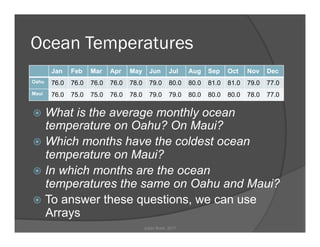
Ocean Temperatures
ž  What is the average monthly ocean
temperature on Oahu? On Maui?
ž  Which months have the coldest ocean
temperature on Maui?
ž  In which months are the ocean
temperatures the same on Oahu and Maui?
ž  To answer these questions, we can use
Arrays
Julian Bunn, 2017
Jan Feb Mar Apr May Jun Jul Aug Sep Oct Nov Dec
Oahu 76.0 76.0 76.0 76.0 78.0 79.0 80.0 80.0 81.0 81.0 79.0 77.0
Maui 76.0 75.0 75.0 76.0 78.0 79.0 79.0 80.0 80.0 80.0 78.0 77.0
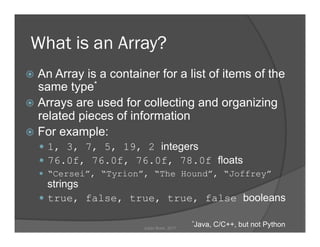
What is an Array?
ž  An Array is a container for a list of items of the
same type*
ž  Arrays are used for collecting and organizing
related pieces of information
ž  For example:
—  1, 3, 7, 5, 19, 2 integers
—  76.0f, 76.0f, 76.0f, 78.0f floats
—  “Cersei”, “Tyrion”, “The Hound”, “Joffrey”
strings
—  true, false, true, true, false booleans
*Java, C/C++, but not PythonJulian Bunn, 2017
Declaring Arrays
ž  In Java, we can declare an Array like this:
int [] myIntegers;
String [] myStrings;
boolean [] myBooleans;
ž  The [] instructs Java that the following variable name is an
Array.
ž  These declarations do not tell Java how big each array is – we
will do that later in the code.
ž  If we already know the size we want for the Array:
int [] myIntegers = new int[6];
—  Java allocates 6 positions in the Array
—  The Array doesn’t yet contain any values – just Nulls – because we
haven’t specified any.
ž  Or …
int [] myIntegers;
int length = 6;
myIntegers = new int[length];
Julian Bunn, 2017
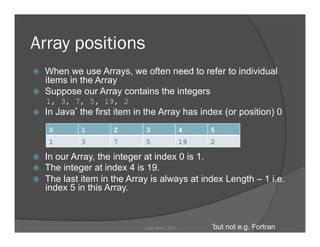
Array positions
ž  When we use Arrays, we often need to refer to individual
items in the Array
ž  Suppose our Array contains the integers
1, 3, 7, 5, 19, 2
ž  In Java* the first item in the Array has index (or position) 0
ž  In our Array, the integer at index 0 is 1.
ž  The integer at index 4 is 19.
ž  The last item in the Array is always at index Length – 1 i.e.
index 5 in this Array.
0 1 2 3 4 5
1 3 7 5 19 2
*but not e.g. FortranJulian Bunn, 2017
Filling Arrays
ž  We can declare and fill an Array in one
statement:
int [] myIntegers = {1, 3, 7, 5, 19, 2};
Java creates the Array of integers, and places the
integers we specified in the curly braces into it.
ž  We can also fill an Array by specifying indexes:
int [] myIntegers = new int[6];
myIntegers[0] = 1;
myIntegers[1] = 3;
myIntegers[2] = 7;
—  Etc.
Julian Bunn, 2017
Exercise
ž  Create an Array of floats containing the
Oahu ocean temperature data
float [] oahuTemps = {76.0f, 76.0f, 76.0f, 76.0f, 78.0f,
79.0f, 80.0f, 80.0f, 81.0f, 81.0f, 79.0f, 77.0f};
Julian Bunn, 2017
Multidimensional Arrays
ž  Arrays can have more than one dimension
String [][] myGoTCharacters = {
{"Cersei", "Tywin", "Jaime", "Tyrion"},
{"Sansa", "Robb", "Ned", "Bran"}
};
ž  We can refer to items in the Array like this:
String myFave = myGoTCharacters[0][3];
Result: myFave = “Tyrion”
0 1 2 3
0 Cersei Tywin Jaime Tyrion
1 Sansa Robb Ned Bran
Julian Bunn, 2017
Exercise
ž  Create a 2D Array of floats containing
the ocean temperature data for Oahu
and Maui
float [][] islandTemps = {
{76.0f, 76.0f, 76.0f, 76.0f, 78.0f, 79.0f, 80.0f,
80.0f, 81.0f, 81.0f, 79.0f, 77.0f},
{76.0f, 75.0f, 75.0f, 76.0f, 78.0f, 79.0f, 79.0f,
80.0f, 80.0f, 80.0f, 78.0f, 77.0f}
};
Julian Bunn, 2017
Arrays of Objects
Arrays are not confined to holding primitive types
such as int, float, boolean, double, etc.
ž  We can have Arrays of our own types of object
MyClass [] classArray = new MyClass[4];
This declares an Array that contains 4 objects of class
“MyClass”
classArray[0] = new MyClass();
This sets the first element of the Array to a new
instance of MyClass.
Julian Bunn, 2017
Working with Arrays
ž  Listing the items in an Array
int [] myIntegers = {1, 3, 7, 5, 19, 2};
for(int index=0; index<myIntegers.length; index++) {
System.out.println(myIntegers[index]);
}
ž  Another way to list the Array:
for(int item : myIntegers) {
System.out.println(item);
}
Julian Bunn, 2017
Exercise
ž  Print the ocean temperatures in January
on Oahu and Maui, using your 2D Array
System.out.println(islandTemps[0][0]);
System.out.println(islandTemps[1][0]);
ž  Calculate the average Oahu ocean
temperature
Julian Bunn, 2017
Working with Arrays (Advanced)
How can we sort an Array into descending order?
ž  Example: Bubble Sort
int [] myIntegers = {1, 3, 7, 5, 19, 2};
boolean swapped = true;
while(swapped) {
swapped = false;
for(int index=0; index<myIntegers.length-1; index++) {
if(myIntegers[index] < myIntegers[index+1]) {
int saveInt = myIntegers[index];
myIntegers[index] = myIntegers[index+1];
myIntegers[index+1] = saveInt;
swapped = true;
}
}
}
System.out.println(Arrays.toString(myIntegers));
ž  Result:
[19, 7, 5, 3, 2, 1]
Julian Bunn, 2017
Using java.util.Arrays
Handy utilities for working with Arrays
ž  “toString”
Arrays.toString(myIntegers);
Result: [19, 7, 5, 3, 2, 1]
ž  “sort”
Arrays.sort(myIntegers);
Result: [1, 2, 3, 5, 7, 19]
ž  “binarySearch”
int index19 = Arrays.binarySearch(myIntegers, 19);
Result: index19 = 5
ž  “copyOf” (all or part of the Array)
int[] myIntegersCopy = Arrays.copyOf(myIntegers, 4);
Result: [1, 2, 3, 5]
ž  “fill”
Arrays.fill(myIntegers, 99);
Result: [99, 99, 99, 99, 99, 99]
Julian Bunn, 2017
Summary
ž  Arrays are containers for lists of items
ž  Arrays are useful for calculations on lists
ž  All items in a Java Array must be the same type
ž  An Array has a Length – the number of items it
contains
ž  Items in an Array are addressed by index: 0
through Length-1
ž  Arrays can have one or more dimensions
ž  The Java Array utility classes allow printing,
sorting, copying, finding items in, and filling of
Arrays
Julian Bunn, 2017

Introduction to Arrays in Programming

  • 1.
  • 2.
    Ocean Temperatures ž  Whatis the average monthly ocean temperature on Oahu? On Maui? ž  Which months have the coldest ocean temperature on Maui? ž  In which months are the ocean temperatures the same on Oahu and Maui? ž  To answer these questions, we can use Arrays Julian Bunn, 2017 Jan Feb Mar Apr May Jun Jul Aug Sep Oct Nov Dec Oahu 76.0 76.0 76.0 76.0 78.0 79.0 80.0 80.0 81.0 81.0 79.0 77.0 Maui 76.0 75.0 75.0 76.0 78.0 79.0 79.0 80.0 80.0 80.0 78.0 77.0
  • 3.
    What is anArray? ž  An Array is a container for a list of items of the same type* ž  Arrays are used for collecting and organizing related pieces of information ž  For example: —  1, 3, 7, 5, 19, 2 integers —  76.0f, 76.0f, 76.0f, 78.0f floats —  “Cersei”, “Tyrion”, “The Hound”, “Joffrey” strings —  true, false, true, true, false booleans *Java, C/C++, but not PythonJulian Bunn, 2017
  • 4.
    Declaring Arrays ž  InJava, we can declare an Array like this: int [] myIntegers; String [] myStrings; boolean [] myBooleans; ž  The [] instructs Java that the following variable name is an Array. ž  These declarations do not tell Java how big each array is – we will do that later in the code. ž  If we already know the size we want for the Array: int [] myIntegers = new int[6]; —  Java allocates 6 positions in the Array —  The Array doesn’t yet contain any values – just Nulls – because we haven’t specified any. ž  Or … int [] myIntegers; int length = 6; myIntegers = new int[length]; Julian Bunn, 2017
  • 5.
    Array positions ž  Whenwe use Arrays, we often need to refer to individual items in the Array ž  Suppose our Array contains the integers 1, 3, 7, 5, 19, 2 ž  In Java* the first item in the Array has index (or position) 0 ž  In our Array, the integer at index 0 is 1. ž  The integer at index 4 is 19. ž  The last item in the Array is always at index Length – 1 i.e. index 5 in this Array. 0 1 2 3 4 5 1 3 7 5 19 2 *but not e.g. FortranJulian Bunn, 2017
  • 6.
    Filling Arrays ž  Wecan declare and fill an Array in one statement: int [] myIntegers = {1, 3, 7, 5, 19, 2}; Java creates the Array of integers, and places the integers we specified in the curly braces into it. ž  We can also fill an Array by specifying indexes: int [] myIntegers = new int[6]; myIntegers[0] = 1; myIntegers[1] = 3; myIntegers[2] = 7; —  Etc. Julian Bunn, 2017
  • 7.
    Exercise ž  Create anArray of floats containing the Oahu ocean temperature data float [] oahuTemps = {76.0f, 76.0f, 76.0f, 76.0f, 78.0f, 79.0f, 80.0f, 80.0f, 81.0f, 81.0f, 79.0f, 77.0f}; Julian Bunn, 2017
  • 8.
    Multidimensional Arrays ž  Arrayscan have more than one dimension String [][] myGoTCharacters = { {"Cersei", "Tywin", "Jaime", "Tyrion"}, {"Sansa", "Robb", "Ned", "Bran"} }; ž  We can refer to items in the Array like this: String myFave = myGoTCharacters[0][3]; Result: myFave = “Tyrion” 0 1 2 3 0 Cersei Tywin Jaime Tyrion 1 Sansa Robb Ned Bran Julian Bunn, 2017
  • 9.
    Exercise ž  Create a2D Array of floats containing the ocean temperature data for Oahu and Maui float [][] islandTemps = { {76.0f, 76.0f, 76.0f, 76.0f, 78.0f, 79.0f, 80.0f, 80.0f, 81.0f, 81.0f, 79.0f, 77.0f}, {76.0f, 75.0f, 75.0f, 76.0f, 78.0f, 79.0f, 79.0f, 80.0f, 80.0f, 80.0f, 78.0f, 77.0f} }; Julian Bunn, 2017
  • 10.
    Arrays of Objects Arraysare not confined to holding primitive types such as int, float, boolean, double, etc. ž  We can have Arrays of our own types of object MyClass [] classArray = new MyClass[4]; This declares an Array that contains 4 objects of class “MyClass” classArray[0] = new MyClass(); This sets the first element of the Array to a new instance of MyClass. Julian Bunn, 2017
  • 11.
    Working with Arrays ž Listing the items in an Array int [] myIntegers = {1, 3, 7, 5, 19, 2}; for(int index=0; index<myIntegers.length; index++) { System.out.println(myIntegers[index]); } ž  Another way to list the Array: for(int item : myIntegers) { System.out.println(item); } Julian Bunn, 2017
  • 12.
    Exercise ž  Print theocean temperatures in January on Oahu and Maui, using your 2D Array System.out.println(islandTemps[0][0]); System.out.println(islandTemps[1][0]); ž  Calculate the average Oahu ocean temperature Julian Bunn, 2017
  • 13.
    Working with Arrays(Advanced) How can we sort an Array into descending order? ž  Example: Bubble Sort int [] myIntegers = {1, 3, 7, 5, 19, 2}; boolean swapped = true; while(swapped) { swapped = false; for(int index=0; index<myIntegers.length-1; index++) { if(myIntegers[index] < myIntegers[index+1]) { int saveInt = myIntegers[index]; myIntegers[index] = myIntegers[index+1]; myIntegers[index+1] = saveInt; swapped = true; } } } System.out.println(Arrays.toString(myIntegers)); ž  Result: [19, 7, 5, 3, 2, 1] Julian Bunn, 2017
  • 14.
    Using java.util.Arrays Handy utilitiesfor working with Arrays ž  “toString” Arrays.toString(myIntegers); Result: [19, 7, 5, 3, 2, 1] ž  “sort” Arrays.sort(myIntegers); Result: [1, 2, 3, 5, 7, 19] ž  “binarySearch” int index19 = Arrays.binarySearch(myIntegers, 19); Result: index19 = 5 ž  “copyOf” (all or part of the Array) int[] myIntegersCopy = Arrays.copyOf(myIntegers, 4); Result: [1, 2, 3, 5] ž  “fill” Arrays.fill(myIntegers, 99); Result: [99, 99, 99, 99, 99, 99] Julian Bunn, 2017
  • 15.
    Summary ž  Arrays arecontainers for lists of items ž  Arrays are useful for calculations on lists ž  All items in a Java Array must be the same type ž  An Array has a Length – the number of items it contains ž  Items in an Array are addressed by index: 0 through Length-1 ž  Arrays can have one or more dimensions ž  The Java Array utility classes allow printing, sorting, copying, finding items in, and filling of Arrays Julian Bunn, 2017