Introduction And Differences Between File
System And Dbms
SlideMake.com
1
Introduction to File System and DBMS
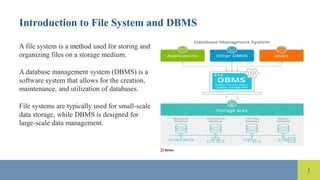
A file system is a method used for storing and
organizing files on a storage medium.
A database management system (DBMS) is a
software system that allows for the creation,
maintenance, and utilization of databases.
File systems are typically used for small-scale
data storage, while DBMS is designed for
large-scale data management.
2
Structure of File System
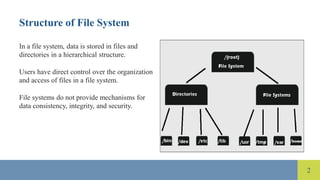
In a file system, data is stored in files and
directories in a hierarchical structure.
Users have direct control over the organization
and access of files in a file system.
File systems do not provide mechanisms for
data consistency, integrity, and security.
3
Structure of DBMS
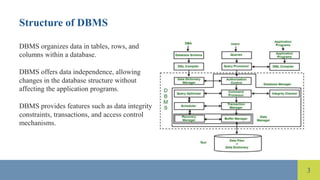
DBMS organizes data in tables, rows, and
columns within a database.
DBMS offers data independence, allowing
changes in the database structure without
affecting the application programs.
DBMS provides features such as data integrity
constraints, transactions, and access control
mechanisms.
4
Data Retrieval in File System
In a file system, data retrieval involves
searching through directories and files to locate
the desired information.
File systems require manual handling of data
retrieval processes, leading to inefficiencies.
File systems lack query languages for efficient
data retrieval.
5
Data Retrieval in DBMS
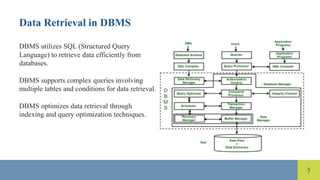
DBMS utilizes SQL (Structured Query
Language) to retrieve data efficiently from
databases.
DBMS supports complex queries involving
multiple tables and conditions for data retrieval.
DBMS optimizes data retrieval through
indexing and query optimization techniques.
6
Data Redundancy in File System
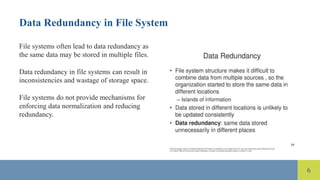
File systems often lead to data redundancy as
the same data may be stored in multiple files.
Data redundancy in file systems can result in
inconsistencies and wastage of storage space.
File systems do not provide mechanisms for
enforcing data normalization and reducing
redundancy.
7
Data Redundancy in DBMS
DBMS reduces data redundancy through
normalization techniques that minimize
duplicate data.
DBMS enforces data integrity constraints to
maintain consistency and accuracy of data.
DBMS supports relationships between tables to
avoid redundancy and ensure data consistency.
8
Data Security in File System
File systems provide limited data security
features such as file permissions and access
controls.
Data security in file systems relies heavily on
the discretion of users and administrators.
File systems lack robust security mechanisms
such as encryption and role-based access
control.
9
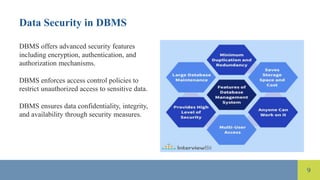
Data Security in DBMS
DBMS offers advanced security features
including encryption, authentication, and
authorization mechanisms.
DBMS enforces access control policies to
restrict unauthorized access to sensitive data.
DBMS ensures data confidentiality, integrity,
and availability through security measures.
10
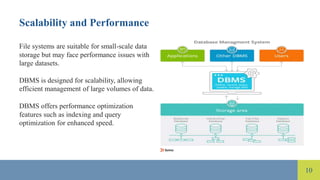
Scalability and Performance
File systems are suitable for small-scale data
storage but may face performance issues with
large datasets.
DBMS is designed for scalability, allowing
efficient management of large volumes of data.
DBMS offers performance optimization
features such as indexing and query
optimization for enhanced speed.
11
References
Date, C. J. (2003). An introduction to database
systems. Addison-Wesley.
Elmasri, R., & Navathe, S. B. (2016).
Fundamentals of database systems. Pearson.
Silberschatz, A., Korth, H. F., & Sudarshan, S.
(2010). Database system concepts. McGraw-
Hill.

Introduction And Differences Between File System And Dbms.pptx

  • 1.
    Introduction And DifferencesBetween File System And Dbms SlideMake.com
  • 2.
    1 Introduction to FileSystem and DBMS A file system is a method used for storing and organizing files on a storage medium. A database management system (DBMS) is a software system that allows for the creation, maintenance, and utilization of databases. File systems are typically used for small-scale data storage, while DBMS is designed for large-scale data management.
  • 3.
    2 Structure of FileSystem In a file system, data is stored in files and directories in a hierarchical structure. Users have direct control over the organization and access of files in a file system. File systems do not provide mechanisms for data consistency, integrity, and security.
  • 4.
    3 Structure of DBMS DBMSorganizes data in tables, rows, and columns within a database. DBMS offers data independence, allowing changes in the database structure without affecting the application programs. DBMS provides features such as data integrity constraints, transactions, and access control mechanisms.
  • 5.
    4 Data Retrieval inFile System In a file system, data retrieval involves searching through directories and files to locate the desired information. File systems require manual handling of data retrieval processes, leading to inefficiencies. File systems lack query languages for efficient data retrieval.
  • 6.
    5 Data Retrieval inDBMS DBMS utilizes SQL (Structured Query Language) to retrieve data efficiently from databases. DBMS supports complex queries involving multiple tables and conditions for data retrieval. DBMS optimizes data retrieval through indexing and query optimization techniques.
  • 7.
    6 Data Redundancy inFile System File systems often lead to data redundancy as the same data may be stored in multiple files. Data redundancy in file systems can result in inconsistencies and wastage of storage space. File systems do not provide mechanisms for enforcing data normalization and reducing redundancy.
  • 8.
    7 Data Redundancy inDBMS DBMS reduces data redundancy through normalization techniques that minimize duplicate data. DBMS enforces data integrity constraints to maintain consistency and accuracy of data. DBMS supports relationships between tables to avoid redundancy and ensure data consistency.
  • 9.
    8 Data Security inFile System File systems provide limited data security features such as file permissions and access controls. Data security in file systems relies heavily on the discretion of users and administrators. File systems lack robust security mechanisms such as encryption and role-based access control.
  • 10.
    9 Data Security inDBMS DBMS offers advanced security features including encryption, authentication, and authorization mechanisms. DBMS enforces access control policies to restrict unauthorized access to sensitive data. DBMS ensures data confidentiality, integrity, and availability through security measures.
  • 11.
    10 Scalability and Performance Filesystems are suitable for small-scale data storage but may face performance issues with large datasets. DBMS is designed for scalability, allowing efficient management of large volumes of data. DBMS offers performance optimization features such as indexing and query optimization for enhanced speed.
  • 12.
    11 References Date, C. J.(2003). An introduction to database systems. Addison-Wesley. Elmasri, R., & Navathe, S. B. (2016). Fundamentals of database systems. Pearson. Silberschatz, A., Korth, H. F., & Sudarshan, S. (2010). Database system concepts. McGraw- Hill.

Editor's Notes

  • #3 Image source: https://www.bmc.com/blogs/dbms-database-management-systems/
  • #4 Image source: https://www.partitionwizard.com/help/what-is-file-system.html
  • #5 Image source: https://www.thecrazyprogrammer.com/2022/03/structure-of-dbms.html
  • #6 Image source: https://www.researchgate.net/figure/general-structure-of-information-retrieval_fig1_315988213
  • #7 Image source: https://www.thecrazyprogrammer.com/2022/03/structure-of-dbms.html
  • #8 Image source: https://slideplayer.com/slide/16215963/
  • #9 Image source: https://www.javatpoint.com/redundancy-in-dbms
  • #10 Image source: https://blog.foldersecurityviewer.com/ntfs-permissions-vs-share-permissions/
  • #11 Image source: https://kuaforasistani.com/article/top-features-of-dbms
  • #12 Image source: https://www.bmc.com/blogs/dbms-database-management-systems/