1
Applitools Execution Cloud
The first self-healing test infrastructure
for open-source test frameworks
May 2023
2
Introducing Applitools Execution Cloud
• Execute your existing open-source based tests at scale
• Lightning fast
• Affordable
• Execute all your tests
• Test public as well as local apps
• Single platform for authoring and executing tests
• Self-healing for open-source test frameworks
3
Agenda
• Why cloud infrastructure?
• Functional testing at scale
• Cross device and browser testing
• Self healing
• Q&A
4
Why do we need to execute tests faster?
BEST IN CLASS
• Speed: 5-15 minutes per build
• Frequency: test every PR, multiple updates a day
• Coverage: Interaction logic, Business Logic, Cross Device &
Browser
LEADS TO
• Faster feedback to developers
• More features delivered to customers
5
Why test on cloud infrastructure?
• Modern apps require hundreds of tests to cover properly
• Fast execution requires reliable and scalable infrastructure
• Difficult build and maintain
• Scale
• Hosting
• OS, device & browser upgrades
• High availability
• Debugging
• Reporting & dashboarding
• Premium features: self healing, etc.
• Costs more than paying a lab provider
6
Fast functional testing
• Make sure interaction logic works
• Verify business logic by validating application output
• Best is class: a single browser is sufficient
• Keep the number of test runs to a minimum (speed, concurrency, and cost)
• Avoid every bug failing tests on multiple devices and browsers
• Negligible loss of coverage
• It is extremely unlikely that
• Clicking a button will work on one browser but not on another
• The application output will be computed correctly on one browser but not on another
• Unless the UI is distorted on that specific device or browser
• That’s a different use case. We’ll cover it later.
7
Demo
Fast functional testing with the Applitools Execution Cloud
8
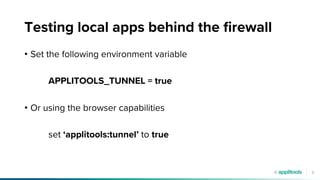
Testing local apps behind the firewall
• Set the following environment variable
APPLITOOLS_TUNNEL = true
• Or using the browser capabilities
set ‘applitools:tunnel’ to true
9
Fast cross device and browser testing
• Verify that the UI renders application output correctly
• Across different devices, browsers and window sizes
• Different browsers are based on different layout engines
• Developers develop the app on a single dev machine
• Responsive design rules are prone to error
• Can only be effectively validated visually
• Hundreds of UI elements per page, dozens of properties per element
• Different property values per browser, device and screen size
10
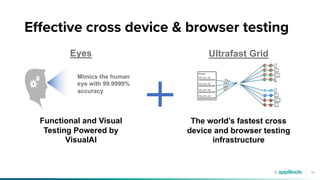
Eyes
Mimics the human
eye with 99.9999%
accuracy
Functional and Visual
Testing Powered by
VisualAI
Ultrafast Grid
The world’s fastest cross
device and browser testing
infrastructure
Effective cross device & browser testing
11
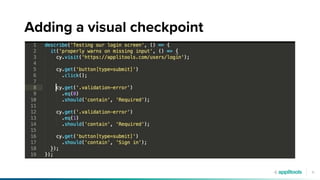
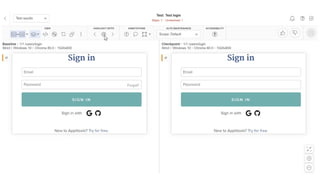
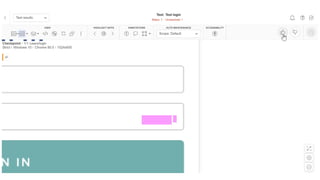
Adding a visual checkpoint
12
13
14
15
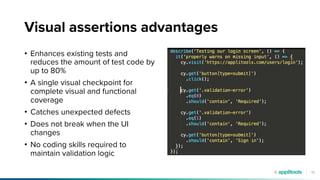
Visual assertions advantages
• Enhances existing tests and
reduces the amount of test code by
up to 80%
• A single visual checkpoint for
complete visual and functional
coverage
• Catches unexpected defects
• Does not break when the UI
changes
• No coding skills required to
maintain validation logic
16
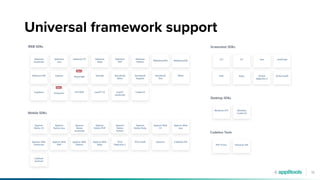
Universal framework support
17
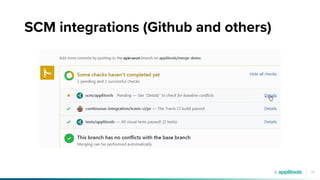
SCM integrations (Github and others)
18
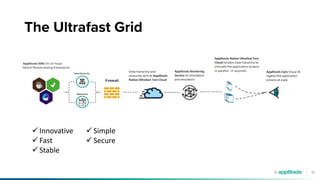
The Ultrafast Grid
ü Innovative
ü Fast
ü Stable
ü Simple
ü Secure
19
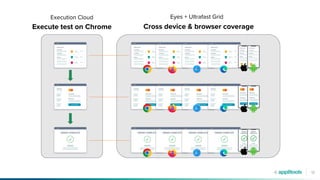
Execute test on Chrome Cross device & browser coverage
Execution Cloud Eyes + Ultrafast Grid
20
Demo
Fast cross device and browser coverage with
Execution Cloud + UFG + Eyes
21
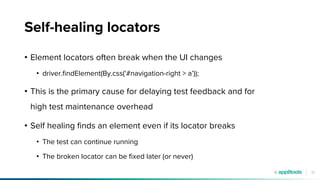
Self-healing locators
• Element locators often break when the UI changes
• driver.findElement(By.css('#navigation-right > a’));
• This is the primary cause for delaying test feedback and for
high test maintenance overhead
• Self healing finds an element even if its locator breaks
• The test can continue running
• The broken locator can be fixed later (or never)
22
How does self-healing work?
• Every time we find an element
• Capture hundreds of data points about the element
• All attributes, location in hierarchy, details of ancestor and neighbor elements
• Store data in a DB using the locator as key
• When we can’t locate an element using a given locator
• Retrieve information from the DB using the failed locator
• Use proprietary algorithms to find the element based on that information
• If successful, update the DB and suggest a new locator in our dashboard
• Return the found element
23
What can we heal?
• We can find an element even if simultaneously
• Element properties change (e.g., ID, class, tag name, custom, etc)
• Text changes (clickable text, input value, label, placeholder)
• DOM position changes (hierarchy, position in list)
• Size and location changes
• Adaptive
• Implicitly wait for elements
24
When is self healing useful?
• Avoid test failures and test maintenance following UI changes
• UI pages that frequently change
• Poor locator authoring skills
• Apps with weak locators
• Apps with dynamically generated UI (dynamic ids)
25
Self-healing for open-source frameworks
• Self-heal your existing tests without changing a line of test code
• Use your preferred test framework
• No vendor lock-in
26
Demo
Self healing locators with the Execution Cloud
27
QUESTIONS?
@carmiadam
linkedin.com/in/adamcarmi/
28
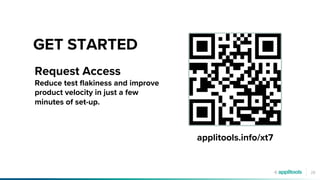
GET STARTED
applitools.info/xt7
Request Access
Reduce test flakiness and improve
product velocity in just a few
minutes of set-up.
29
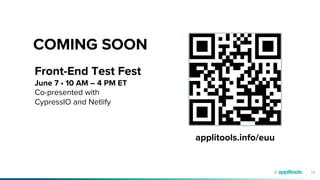
COMING SOON
applitools.info/euu
Front-End Test Fest
June 7 • 10 AM – 4 PM ET
Co-presented with
CypressIO and Netlify
30
Thank you

Introducing the Applitools Self Healing Execution Cloud.pdf

  • 1.
    1 Applitools Execution Cloud Thefirst self-healing test infrastructure for open-source test frameworks May 2023
  • 2.
    2 Introducing Applitools ExecutionCloud • Execute your existing open-source based tests at scale • Lightning fast • Affordable • Execute all your tests • Test public as well as local apps • Single platform for authoring and executing tests • Self-healing for open-source test frameworks
  • 3.
    3 Agenda • Why cloudinfrastructure? • Functional testing at scale • Cross device and browser testing • Self healing • Q&A
  • 4.
    4 Why do weneed to execute tests faster? BEST IN CLASS • Speed: 5-15 minutes per build • Frequency: test every PR, multiple updates a day • Coverage: Interaction logic, Business Logic, Cross Device & Browser LEADS TO • Faster feedback to developers • More features delivered to customers
  • 5.
    5 Why test oncloud infrastructure? • Modern apps require hundreds of tests to cover properly • Fast execution requires reliable and scalable infrastructure • Difficult build and maintain • Scale • Hosting • OS, device & browser upgrades • High availability • Debugging • Reporting & dashboarding • Premium features: self healing, etc. • Costs more than paying a lab provider
  • 6.
    6 Fast functional testing •Make sure interaction logic works • Verify business logic by validating application output • Best is class: a single browser is sufficient • Keep the number of test runs to a minimum (speed, concurrency, and cost) • Avoid every bug failing tests on multiple devices and browsers • Negligible loss of coverage • It is extremely unlikely that • Clicking a button will work on one browser but not on another • The application output will be computed correctly on one browser but not on another • Unless the UI is distorted on that specific device or browser • That’s a different use case. We’ll cover it later.
  • 7.
    7 Demo Fast functional testingwith the Applitools Execution Cloud
  • 8.
    8 Testing local appsbehind the firewall • Set the following environment variable APPLITOOLS_TUNNEL = true • Or using the browser capabilities set ‘applitools:tunnel’ to true
  • 9.
    9 Fast cross deviceand browser testing • Verify that the UI renders application output correctly • Across different devices, browsers and window sizes • Different browsers are based on different layout engines • Developers develop the app on a single dev machine • Responsive design rules are prone to error • Can only be effectively validated visually • Hundreds of UI elements per page, dozens of properties per element • Different property values per browser, device and screen size
  • 10.
    10 Eyes Mimics the human eyewith 99.9999% accuracy Functional and Visual Testing Powered by VisualAI Ultrafast Grid The world’s fastest cross device and browser testing infrastructure Effective cross device & browser testing
  • 11.
  • 12.
  • 13.
  • 14.
  • 15.
    15 Visual assertions advantages •Enhances existing tests and reduces the amount of test code by up to 80% • A single visual checkpoint for complete visual and functional coverage • Catches unexpected defects • Does not break when the UI changes • No coding skills required to maintain validation logic
  • 16.
  • 17.
  • 18.
    18 The Ultrafast Grid üInnovative ü Fast ü Stable ü Simple ü Secure
  • 19.
    19 Execute test onChrome Cross device & browser coverage Execution Cloud Eyes + Ultrafast Grid
  • 20.
    20 Demo Fast cross deviceand browser coverage with Execution Cloud + UFG + Eyes
  • 21.
    21 Self-healing locators • Elementlocators often break when the UI changes • driver.findElement(By.css('#navigation-right > a’)); • This is the primary cause for delaying test feedback and for high test maintenance overhead • Self healing finds an element even if its locator breaks • The test can continue running • The broken locator can be fixed later (or never)
  • 22.
    22 How does self-healingwork? • Every time we find an element • Capture hundreds of data points about the element • All attributes, location in hierarchy, details of ancestor and neighbor elements • Store data in a DB using the locator as key • When we can’t locate an element using a given locator • Retrieve information from the DB using the failed locator • Use proprietary algorithms to find the element based on that information • If successful, update the DB and suggest a new locator in our dashboard • Return the found element
  • 23.
    23 What can weheal? • We can find an element even if simultaneously • Element properties change (e.g., ID, class, tag name, custom, etc) • Text changes (clickable text, input value, label, placeholder) • DOM position changes (hierarchy, position in list) • Size and location changes • Adaptive • Implicitly wait for elements
  • 24.
    24 When is selfhealing useful? • Avoid test failures and test maintenance following UI changes • UI pages that frequently change • Poor locator authoring skills • Apps with weak locators • Apps with dynamically generated UI (dynamic ids)
  • 25.
    25 Self-healing for open-sourceframeworks • Self-heal your existing tests without changing a line of test code • Use your preferred test framework • No vendor lock-in
  • 26.
    26 Demo Self healing locatorswith the Execution Cloud
  • 27.
  • 28.
    28 GET STARTED applitools.info/xt7 Request Access Reducetest flakiness and improve product velocity in just a few minutes of set-up.
  • 29.
    29 COMING SOON applitools.info/euu Front-End TestFest June 7 • 10 AM – 4 PM ET Co-presented with CypressIO and Netlify
  • 30.