An Introduction to
Ruby and Rails
Matthew Bohnsack
Wannabe Rubyist
November 9th 2005
Outline
   What is Ruby and why should I care?
   What is Rails and why should I care?
   Two must-have tools for Ruby development
   Major Ruby features (the language in a nutshell)
   Rails overview
   Where to go for more information
   Questions / Hacking


November 9th 2005   An Introduction to Ruby and Rails   2
What is Ruby? Why should I care?
   What:
      The Wikipedia answer is here.
      Created/lead by Matz (Japanese)
      Open Source interpreted scripting language, like Perl, Python,
       Tcl, etc., but focused on being very object oriented, expressive,
       and bringing joy to programming.
      Principle of least surprise
   Why:
      Productivity ideas presented in Ousterhout’s 1998 paper coming
       to very serious critical mass (and beyond)
      Learn a new language to learn new ways of thinking about code
       in any language (e.g., blocks and iterators)
      Joy!


November 9th 2005         An Introduction to Ruby and Rails                3
What is Rails? Why should I care?
   What:
      Web Framework that makes building database-driven MVC-oriented web apps
       easy through a template engine, ORM (ActiveRecord) and other best practices,
       such as test driven development, deployment tools, patterns, etc.
      Much less complicated than J2EE solutions, but perhaps more so than PHP or
       Perl in cgi-bin.
      Copy cats are being created in other languages:
              Python (TurboGears)
              Perl (Maypole)
        http://rubyonrails.org/ + book + online screencasts + online docs & tutorials
   Why:
        I’ve been watching the world of web development since ~ 1995, and I’ve never
         seen anything like Rails in terms of buzz, momentum, adoption rate, etc.


November 9th 2005                    An Introduction to Ruby and Rails                   4
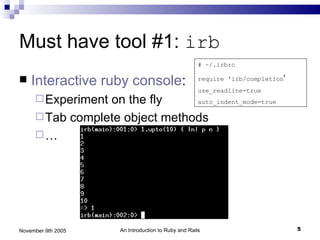
Must have tool #1: irb
                                                     # ~/.irbrc

   Interactive ruby console:                        require 'irb/completion'
                                                     use_readline=true
      Experimenton the fly     auto_indent_mode=true

      Tab complete object methods
     …


November 9th 2005    An Introduction to Ruby and Rails                          5
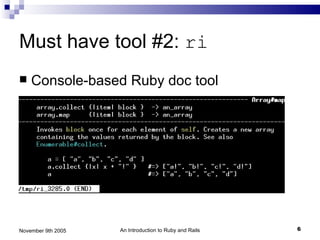
Must have tool #2: ri
   Console-based Ruby doc tool


November 9th 2005   An Introduction to Ruby and Rails   6
Ruby in a nutshell – irb sessions
follow
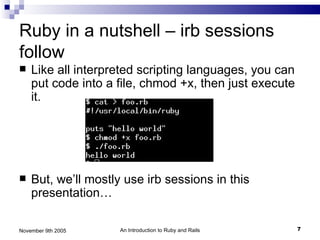
   Like all interpreted scripting languages, you can
    put code into a file, chmod +x, then just execute
    it.


   But, we’ll mostly use irb sessions in this
    presentation…

November 9th 2005    An Introduction to Ruby and Rails   7
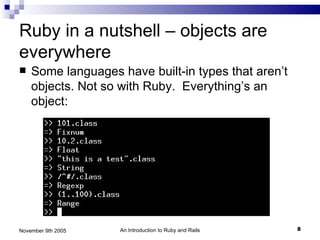
Ruby in a nutshell – objects are
everywhere
   Some languages have built-in types that aren’t
    objects. Not so with Ruby. Everything’s an
    object:


November 9th 2005   An Introduction to Ruby and Rails   8
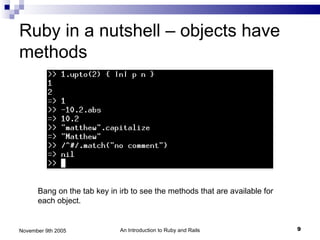
Ruby in a nutshell – objects have
methods


      Bang on the tab key in irb to see the methods that are available for
      each object.


November 9th 2005            An Introduction to Ruby and Rails               9
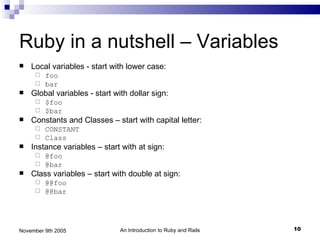
Ruby in a nutshell – Variables
   Local variables - start with lower case:
      foo
      bar
   Global variables - start with dollar sign:
      $foo
      $bar
   Constants and Classes – start with capital letter:
      CONSTANT
      Class
   Instance variables – start with at sign:
      @foo
      @bar
   Class variables – start with double at sign:
      @@foo
      @@bar


November 9th 2005              An Introduction to Ruby and Rails   10
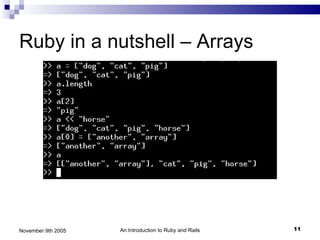
Ruby in a nutshell – Arrays


November 9th 2005   An Introduction to Ruby and Rails   11
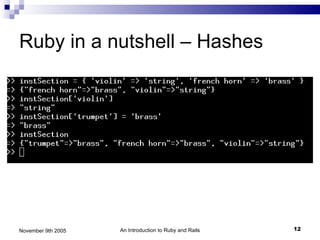
Ruby in a nutshell – Hashes


November 9th 2005   An Introduction to Ruby and Rails   12
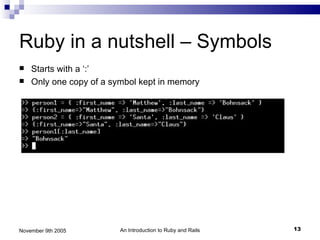
Ruby in a nutshell – Symbols
   Starts with a ‘:’
   Only one copy of a symbol kept in memory


November 9th 2005        An Introduction to Ruby and Rails   13
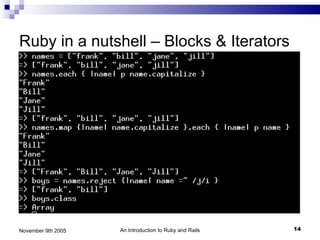
Ruby in a nutshell – Blocks & Iterators


November 9th 2005   An Introduction to Ruby and Rails   14
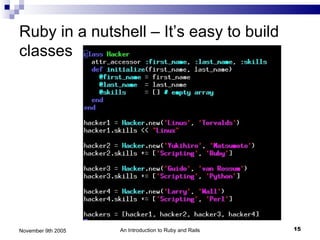
Ruby in a nutshell – It’s easy to build
classes


November 9th 2005   An Introduction to Ruby and Rails   15
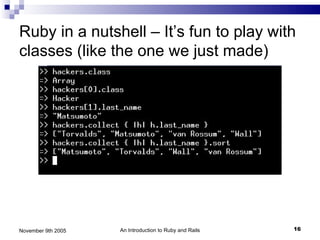
Ruby in a nutshell – It’s fun to play with
classes (like the one we just made)


November 9th 2005   An Introduction to Ruby and Rails   16
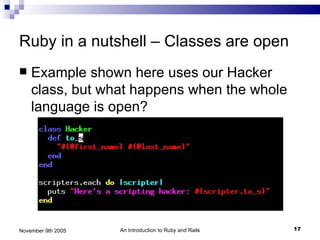
Ruby in a nutshell – Classes are open
   Example shown here uses our Hacker
    class, but what happens when the whole
    language is open?


November 9th 2005   An Introduction to Ruby and Rails   17
Ruby in a nutshell – Other notes on
Classes
   Ruby only has single inheritance. This
    makes things simpler, but mix-ins provide
    much of multiple inheritance’s benefit,
    without the hassle.


November 9th 2005   An Introduction to Ruby and Rails   18
Ruby in a nutshell – a few gotchas
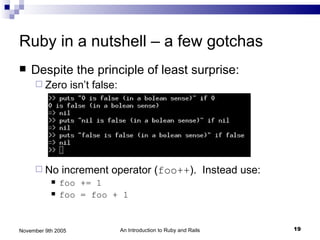
   Despite the principle of least surprise:
      Zero         isn’t false:


      No      increment operator (foo++). Instead use:
              foo += 1
              foo = foo + 1


November 9th 2005                  An Introduction to Ruby and Rails   19
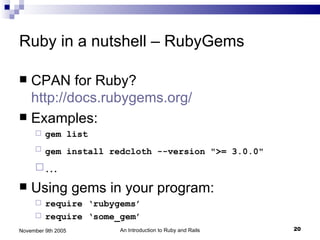
Ruby in a nutshell – RubyGems

 CPAN for Ruby?
  http://docs.rubygems.org/
 Examples:
        gem list
        gem install redcloth --version ">= 3.0.0"
     …
   Using gems in your program:
      require ‘rubygems’
      require ‘some_gem’

November 9th 2005      An Introduction to Ruby and Rails   20
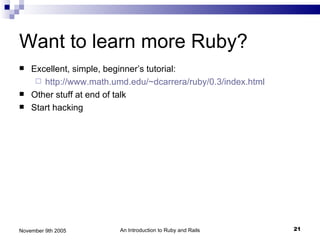
Want to learn more Ruby?
   Excellent, simple, beginner’s tutorial:
      http://www.math.umd.edu/~dcarrera/ruby/0.3/index.html
   Other stuff at end of talk
   Start hacking


November 9th 2005        An Introduction to Ruby and Rails     21
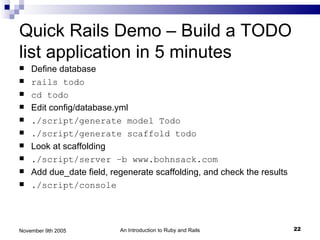
Quick Rails Demo – Build a TODO
list application in 5 minutes
   Define database
   rails todo
   cd todo
   Edit config/database.yml
   ./script/generate model Todo
   ./script/generate scaffold todo
   Look at scaffolding
   ./script/server –b www.bohnsack.com
   Add due_date field, regenerate scaffolding, and check the results
   ./script/console


November 9th 2005         An Introduction to Ruby and Rails             22
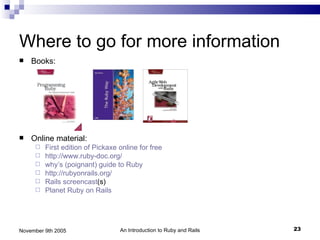
Where to go for more information
   Books:


   Online material:
        First edition of Pickaxe online for free
        http://www.ruby-doc.org/
        why’s (poignant) guide to Ruby
        http://rubyonrails.org/
        Rails screencast(s)
        Planet Ruby on Rails


November 9th 2005                 An Introduction to Ruby and Rails   23
The End / Questions


November 9th 2005   An Introduction to Ruby and Rails   24

Intro for RoR

  • 1.
    An Introduction to Rubyand Rails Matthew Bohnsack Wannabe Rubyist November 9th 2005
  • 2.
    Outline  What is Ruby and why should I care?  What is Rails and why should I care?  Two must-have tools for Ruby development  Major Ruby features (the language in a nutshell)  Rails overview  Where to go for more information  Questions / Hacking November 9th 2005 An Introduction to Ruby and Rails 2
  • 3.
    What is Ruby?Why should I care?  What:  The Wikipedia answer is here.  Created/lead by Matz (Japanese)  Open Source interpreted scripting language, like Perl, Python, Tcl, etc., but focused on being very object oriented, expressive, and bringing joy to programming.  Principle of least surprise  Why:  Productivity ideas presented in Ousterhout’s 1998 paper coming to very serious critical mass (and beyond)  Learn a new language to learn new ways of thinking about code in any language (e.g., blocks and iterators)  Joy! November 9th 2005 An Introduction to Ruby and Rails 3
  • 4.
    What is Rails?Why should I care?  What:  Web Framework that makes building database-driven MVC-oriented web apps easy through a template engine, ORM (ActiveRecord) and other best practices, such as test driven development, deployment tools, patterns, etc.  Much less complicated than J2EE solutions, but perhaps more so than PHP or Perl in cgi-bin.  Copy cats are being created in other languages:  Python (TurboGears)  Perl (Maypole)  http://rubyonrails.org/ + book + online screencasts + online docs & tutorials  Why:  I’ve been watching the world of web development since ~ 1995, and I’ve never seen anything like Rails in terms of buzz, momentum, adoption rate, etc. November 9th 2005 An Introduction to Ruby and Rails 4
  • 5.
    Must have tool#1: irb # ~/.irbrc  Interactive ruby console: require 'irb/completion' use_readline=true  Experimenton the fly auto_indent_mode=true  Tab complete object methods … November 9th 2005 An Introduction to Ruby and Rails 5
  • 6.
    Must have tool#2: ri  Console-based Ruby doc tool November 9th 2005 An Introduction to Ruby and Rails 6
  • 7.
    Ruby in anutshell – irb sessions follow  Like all interpreted scripting languages, you can put code into a file, chmod +x, then just execute it.  But, we’ll mostly use irb sessions in this presentation… November 9th 2005 An Introduction to Ruby and Rails 7
  • 8.
    Ruby in anutshell – objects are everywhere  Some languages have built-in types that aren’t objects. Not so with Ruby. Everything’s an object: November 9th 2005 An Introduction to Ruby and Rails 8
  • 9.
    Ruby in anutshell – objects have methods Bang on the tab key in irb to see the methods that are available for each object. November 9th 2005 An Introduction to Ruby and Rails 9
  • 10.
    Ruby in anutshell – Variables  Local variables - start with lower case:  foo  bar  Global variables - start with dollar sign:  $foo  $bar  Constants and Classes – start with capital letter:  CONSTANT  Class  Instance variables – start with at sign:  @foo  @bar  Class variables – start with double at sign:  @@foo  @@bar November 9th 2005 An Introduction to Ruby and Rails 10
  • 11.
    Ruby in anutshell – Arrays November 9th 2005 An Introduction to Ruby and Rails 11
  • 12.
    Ruby in anutshell – Hashes November 9th 2005 An Introduction to Ruby and Rails 12
  • 13.
    Ruby in anutshell – Symbols  Starts with a ‘:’  Only one copy of a symbol kept in memory November 9th 2005 An Introduction to Ruby and Rails 13
  • 14.
    Ruby in anutshell – Blocks & Iterators November 9th 2005 An Introduction to Ruby and Rails 14
  • 15.
    Ruby in anutshell – It’s easy to build classes November 9th 2005 An Introduction to Ruby and Rails 15
  • 16.
    Ruby in anutshell – It’s fun to play with classes (like the one we just made) November 9th 2005 An Introduction to Ruby and Rails 16
  • 17.
    Ruby in anutshell – Classes are open  Example shown here uses our Hacker class, but what happens when the whole language is open? November 9th 2005 An Introduction to Ruby and Rails 17
  • 18.
    Ruby in anutshell – Other notes on Classes  Ruby only has single inheritance. This makes things simpler, but mix-ins provide much of multiple inheritance’s benefit, without the hassle. November 9th 2005 An Introduction to Ruby and Rails 18
  • 19.
    Ruby in anutshell – a few gotchas  Despite the principle of least surprise:  Zero isn’t false:  No increment operator (foo++). Instead use:  foo += 1  foo = foo + 1 November 9th 2005 An Introduction to Ruby and Rails 19
  • 20.
    Ruby in anutshell – RubyGems  CPAN for Ruby? http://docs.rubygems.org/  Examples:  gem list  gem install redcloth --version ">= 3.0.0" …  Using gems in your program:  require ‘rubygems’  require ‘some_gem’ November 9th 2005 An Introduction to Ruby and Rails 20
  • 21.
    Want to learnmore Ruby?  Excellent, simple, beginner’s tutorial:  http://www.math.umd.edu/~dcarrera/ruby/0.3/index.html  Other stuff at end of talk  Start hacking November 9th 2005 An Introduction to Ruby and Rails 21
  • 22.
    Quick Rails Demo– Build a TODO list application in 5 minutes  Define database  rails todo  cd todo  Edit config/database.yml  ./script/generate model Todo  ./script/generate scaffold todo  Look at scaffolding  ./script/server –b www.bohnsack.com  Add due_date field, regenerate scaffolding, and check the results  ./script/console November 9th 2005 An Introduction to Ruby and Rails 22
  • 23.
    Where to gofor more information  Books:  Online material:  First edition of Pickaxe online for free  http://www.ruby-doc.org/  why’s (poignant) guide to Ruby  http://rubyonrails.org/  Rails screencast(s)  Planet Ruby on Rails November 9th 2005 An Introduction to Ruby and Rails 23
  • 24.
    The End /Questions November 9th 2005 An Introduction to Ruby and Rails 24