© 2007 by Prentice Hall
© 2007 by Prentice Hall 1
1
Chapter 7:
Chapter 7:
Introduction to SQL
Introduction to SQL
Modern Database Management
8
8th
th
Edition
Edition
Jeffrey A. Hoffer, Mary B. Prescott,
Fred R. McFadden
Fred R. McFadden
Chapter 7 © 2007 by Prentice Hall
© 2007 by Prentice Hall 2
2
Objectives
Objectives
 Definition of terms
Definition of terms
 Interpret history and role of SQL
Interpret history and role of SQL
 Define a database using SQL data
Define a database using SQL data
definition language
definition language
 Write single table queries using SQL
Write single table queries using SQL
 Establish referential integrity using SQL
Establish referential integrity using SQL
 Discuss SQL:1999 and SQL:2003
Discuss SQL:1999 and SQL:2003
standards
standards
Chapter 7 © 2007 by Prentice Hall
© 2007 by Prentice Hall 3
3
SQL Overview
SQL Overview
 Structured Query Language
Structured Query Language
 The standard for relational database
The standard for relational database
management systems (RDBMS)
 RDBMS: A database management system
RDBMS: A database management system
that manages data as a collection of tables
in which all relationships are represented
by common values in related tables
Chapter 7 © 2007 by Prentice Hall
© 2007 by Prentice Hall 4
4
History of SQL
History of SQL
 1970–E. Codd develops relational database
1970–E. Codd develops relational database
concept
concept
 1974-1979–System R with Sequel (later SQL)
1974-1979–System R with Sequel (later SQL)
created at IBM Research Lab
 1979–Oracle markets first relational DB with SQL
1979–Oracle markets first relational DB with SQL
 1986–ANSI SQL standard released
1986–ANSI SQL standard released
 1989, 1992, 1999, 2003–Major ANSI standard
1989, 1992, 1999, 2003–Major ANSI standard
updates
updates
 Current–SQL is supported by most major database
Current–SQL is supported by most major database
vendors
vendors
Chapter 7 © 2007 by Prentice Hall
© 2007 by Prentice Hall 5
5
Purpose of SQL Standard
 Specify syntax/semantics for data
Specify syntax/semantics for data
definition and manipulation
 Define data structures
Define data structures
 Enable portability
Enable portability
 Specify minimal (level 1) and complete
Specify minimal (level 1) and complete
(level 2) standards
(level 2) standards
 Allow for later growth/enhancement to
Allow for later growth/enhancement to
standard
standard
Chapter 7 © 2007 by Prentice Hall
© 2007 by Prentice Hall 6
6
Benefits of a Standardized
Relational Language
Relational Language
 Reduced training costs
Reduced training costs
 Productivity
Productivity
 Application portability
Application portability
 Application longevity
Application longevity
 Reduced dependence on a single
Reduced dependence on a single
vendor
vendor
 Cross-system communication
Cross-system communication
Chapter 7 © 2007 by Prentice Hall
© 2007 by Prentice Hall 7
7
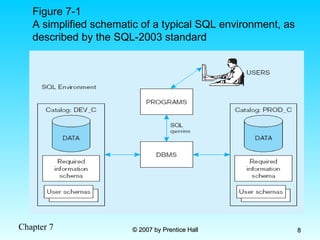
SQL Environment
SQL Environment
 Catalog
Catalog
 A set of schemas that constitute the description of a database
A set of schemas that constitute the description of a database
 Schema
Schema
 The structure that contains descriptions of objects created by a user
The structure that contains descriptions of objects created by a user
(base tables, views, constraints)
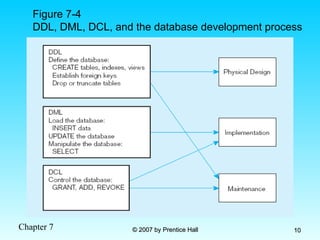
 Data Definition Language (DDL)
Data Definition Language (DDL)
 Commands that define a database, including creating, altering, and
Commands that define a database, including creating, altering, and
dropping tables and establishing constraints
 Data Manipulation Language (DML)
Data Manipulation Language (DML)
 Commands that maintain and query a database
Commands that maintain and query a database
 Data Control Language (DCL)
Data Control Language (DCL)
 Commands that control a database, including administering privileges
Commands that control a database, including administering privileges
and committing data
and committing data
Chapter 7 © 2007 by Prentice Hall
© 2007 by Prentice Hall 8
8
Figure 7-1
A simplified schematic of a typical SQL environment, as
described by the SQL-2003 standard
Chapter 7 © 2007 by Prentice Hall
© 2007 by Prentice Hall 9
9
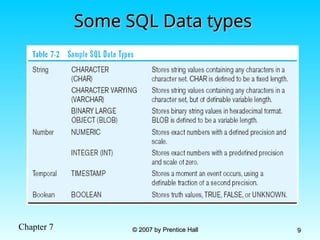
Some SQL Data types
Some SQL Data types
Chapter 7 © 2007 by Prentice Hall
© 2007 by Prentice Hall 10
10
Figure 7-4
DDL, DML, DCL, and the database development process
Chapter 7 © 2007 by Prentice Hall
© 2007 by Prentice Hall 11
11
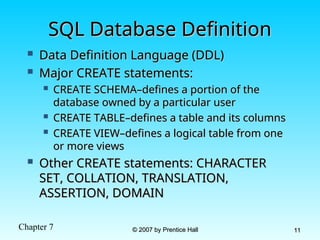
SQL Database Definition
 Data Definition Language (DDL)
Data Definition Language (DDL)
 Major CREATE statements:
Major CREATE statements:
 CREATE SCHEMA–defines a portion of the
CREATE SCHEMA–defines a portion of the
database owned by a particular user
 CREATE TABLE–defines a table and its columns
CREATE TABLE–defines a table and its columns
 CREATE VIEW–defines a logical table from one
CREATE VIEW–defines a logical table from one
or more views
or more views
 Other CREATE statements: CHARACTER
Other CREATE statements: CHARACTER
SET, COLLATION, TRANSLATION,
ASSERTION, DOMAIN
ASSERTION, DOMAIN
Chapter 7 © 2007 by Prentice Hall
© 2007 by Prentice Hall 12
12
Table Creation
Table Creation
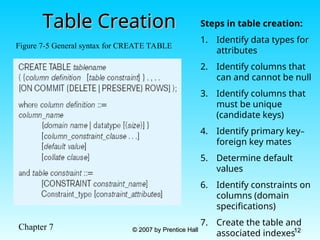
Figure 7-5 General syntax for CREATE TABLE
Steps in table creation:
1. Identify data types for
attributes
2. Identify columns that
can and cannot be null
3. Identify columns that
must be unique
(candidate keys)
4. Identify primary key–
foreign key mates
5. Determine default
values
6. Identify constraints on
columns (domain
specifications)
7. Create the table and
associated indexes
Chapter 7 © 2007 by Prentice Hall
© 2007 by Prentice Hall 13
13
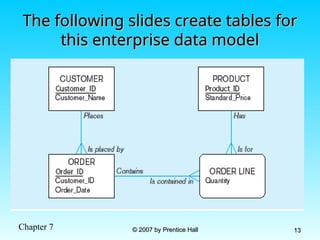
The following slides create tables for
this enterprise data model
Chapter 7 © 2007 by Prentice Hall
© 2007 by Prentice Hall 14
14
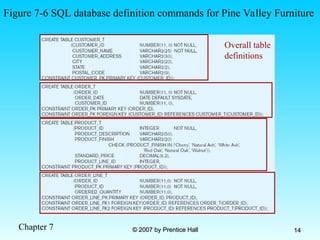
Figure 7-6 SQL database definition commands for Pine Valley Furniture
Overall table
definitions
Chapter 7 © 2007 by Prentice Hall
© 2007 by Prentice Hall 15
15
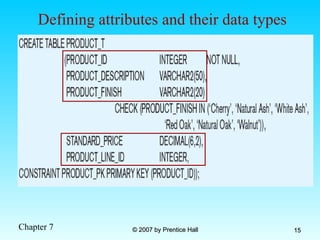
Defining attributes and their data types
Chapter 7 © 2007 by Prentice Hall
© 2007 by Prentice Hall 16
16
Non-nullable specification
Identifying primary key
Primary keys
can never have
NULL values
Chapter 7 © 2007 by Prentice Hall
© 2007 by Prentice Hall 17
17
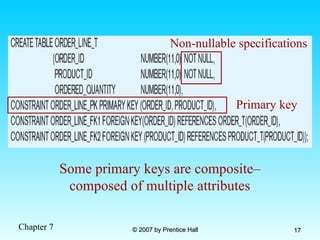
Non-nullable specifications
Primary key
Some primary keys are composite–
composed of multiple attributes
Chapter 7 © 2007 by Prentice Hall
© 2007 by Prentice Hall 18
18
Default value
Domain constraint
Controlling the values in attributes
Chapter 7 © 2007 by Prentice Hall
© 2007 by Prentice Hall 19
19
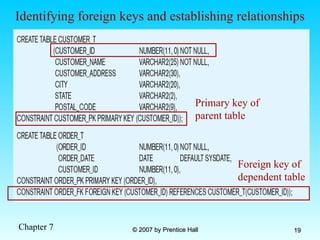
Primary key of
parent table
Identifying foreign keys and establishing relationships
Foreign key of
dependent table
Chapter 7 © 2007 by Prentice Hall
© 2007 by Prentice Hall 20
20
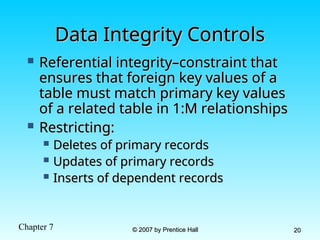
Data Integrity Controls
 Referential integrity–constraint that
Referential integrity–constraint that
ensures that foreign key values of a
table must match primary key values
of a related table in 1:M relationships
 Restricting:
Restricting:
 Deletes of primary records
Deletes of primary records
 Updates of primary records
Updates of primary records
 Inserts of dependent records
Inserts of dependent records
Chapter 7 © 2007 by Prentice Hall
© 2007 by Prentice Hall 21
21
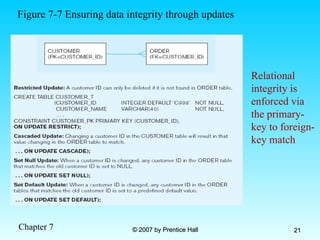
Relational
integrity is
enforced via
the primary-
key to foreign-
key match
Figure 7-7 Ensuring data integrity through updates
Chapter 7 © 2007 by Prentice Hall
© 2007 by Prentice Hall 22
22
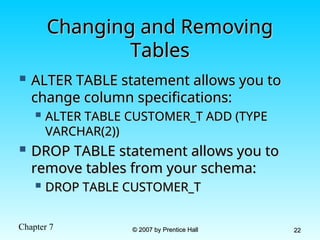
Changing and Removing
Tables
Tables
 ALTER TABLE statement allows you to
ALTER TABLE statement allows you to
change column specifications:
 ALTER TABLE CUSTOMER_T ADD (TYPE
ALTER TABLE CUSTOMER_T ADD (TYPE
VARCHAR(2))
VARCHAR(2))
 DROP TABLE statement allows you to
DROP TABLE statement allows you to
remove tables from your schema:
 DROP TABLE CUSTOMER_T
DROP TABLE CUSTOMER_T
Chapter 7 © 2007 by Prentice Hall
© 2007 by Prentice Hall 23
23
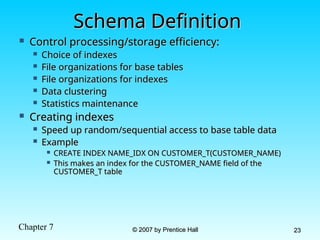
Schema Definition
Schema Definition
 Control processing/storage efficiency:
Control processing/storage efficiency:
 Choice of indexes
Choice of indexes
 File organizations for base tables
File organizations for base tables
 File organizations for indexes
File organizations for indexes
 Data clustering
Data clustering
 Statistics maintenance
Statistics maintenance
 Creating indexes
Creating indexes
 Speed up random/sequential access to base table data
Speed up random/sequential access to base table data
 Example
Example
 CREATE INDEX NAME_IDX ON CUSTOMER_T(CUSTOMER_NAME)
CREATE INDEX NAME_IDX ON CUSTOMER_T(CUSTOMER_NAME)
 This makes an index for the CUSTOMER_NAME field of the
This makes an index for the CUSTOMER_NAME field of the
CUSTOMER_T table
CUSTOMER_T table
Chapter 7 © 2007 by Prentice Hall
© 2007 by Prentice Hall 24
24
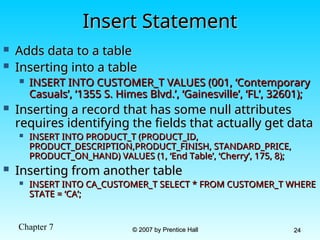
Insert Statement
Insert Statement
 Adds data to a table
Adds data to a table
 Inserting into a table
Inserting into a table
 INSERT INTO CUSTOMER_T VALUES (001, ‘Contemporary
INSERT INTO CUSTOMER_T VALUES (001, ‘Contemporary
Casuals’, ‘1355 S. Himes Blvd.’, ‘Gainesville’, ‘FL’, 32601);
 Inserting a record that has some null attributes
Inserting a record that has some null attributes
requires identifying the fields that actually get data
 INSERT INTO PRODUCT_T (PRODUCT_ID,
INSERT INTO PRODUCT_T (PRODUCT_ID,
PRODUCT_DESCRIPTION,PRODUCT_FINISH, STANDARD_PRICE,
PRODUCT_ON_HAND) VALUES (1, ‘End Table’, ‘Cherry’, 175, 8);
 Inserting from another table
Inserting from another table
 INSERT INTO CA_CUSTOMER_T SELECT * FROM CUSTOMER_T WHERE
INSERT INTO CA_CUSTOMER_T SELECT * FROM CUSTOMER_T WHERE
STATE = ‘CA’;
STATE = ‘CA’;
Chapter 7 © 2007 by Prentice Hall
© 2007 by Prentice Hall 25
25
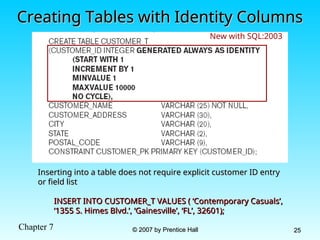
Creating Tables with Identity Columns
Inserting into a table does not require explicit customer ID entry
or field list
or field list
INSERT INTO CUSTOMER_T VALUES ( ‘Contemporary Casuals’,
‘1355 S. Himes Blvd.’, ‘Gainesville’, ‘FL’, 32601);
New with SQL:2003
Chapter 7 © 2007 by Prentice Hall
© 2007 by Prentice Hall 26
26
Delete Statement
Delete Statement
 Removes rows from a table
Removes rows from a table
 Delete certain rows
Delete certain rows
 DELETE FROM CUSTOMER_T WHERE STATE
DELETE FROM CUSTOMER_T WHERE STATE
= ‘HI’;
= ‘HI’;
 Delete all rows
Delete all rows
 DELETE FROM CUSTOMER_T;
DELETE FROM CUSTOMER_T;
Chapter 7 © 2007 by Prentice Hall
© 2007 by Prentice Hall 27
27
Update Statement
Update Statement
 Modifies data in existing rows
Modifies data in existing rows
 UPDATE PRODUCT_T SET UNIT_PRICE = 775
UPDATE PRODUCT_T SET UNIT_PRICE = 775
WHERE PRODUCT_ID = 7;
Chapter 7 © 2007 by Prentice Hall
© 2007 by Prentice Hall 28
28
SELECT Statement
SELECT Statement
 Used for queries on single or multiple tables
Used for queries on single or multiple tables
 Clauses of the SELECT statement:
Clauses of the SELECT statement:
 SELECT
SELECT
 List the columns (and expressions) that should be returned from the query
List the columns (and expressions) that should be returned from the query
 FROM
FROM
 Indicate the table(s) or view(s) from which data will be obtained
Indicate the table(s) or view(s) from which data will be obtained
 WHERE
WHERE
 Indicate the conditions under which a row will be included in the result
Indicate the conditions under which a row will be included in the result
 GROUP BY
GROUP BY
 Indicate categorization of results
Indicate categorization of results
 HAVING
HAVING
 Indicate the conditions under which a category (group) will be included
Indicate the conditions under which a category (group) will be included
 ORDER BY
ORDER BY
 Sorts the result according to specified criteria
Sorts the result according to specified criteria
Chapter 7 © 2007 by Prentice Hall
© 2007 by Prentice Hall 29
29
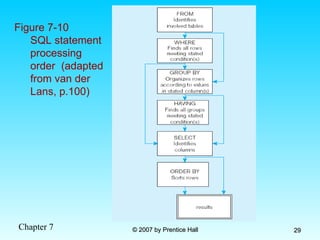
Figure 7-10
SQL statement
processing
order (adapted
from van der
Lans, p.100)
Chapter 7 © 2007 by Prentice Hall
© 2007 by Prentice Hall 30
30
SELECT Example
SELECT Example
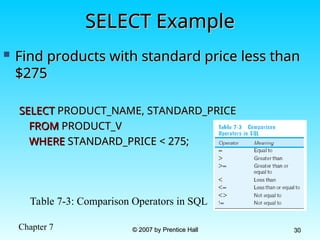
 Find products with standard price less than
Find products with standard price less than
$275
$275
SELECT
SELECT PRODUCT_NAME, STANDARD_PRICE
PRODUCT_NAME, STANDARD_PRICE
FROM
FROM PRODUCT_V
PRODUCT_V
WHERE
WHERE STANDARD_PRICE < 275;
STANDARD_PRICE < 275;
Table 7-3: Comparison Operators in SQL
Chapter 7 © 2007 by Prentice Hall
© 2007 by Prentice Hall 31
31
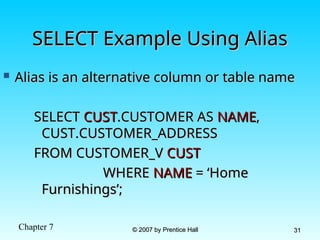
SELECT Example Using Alias
 Alias is an alternative column or table name
Alias is an alternative column or table name
SELECT
SELECT CUST
CUST.CUSTOMER AS
.CUSTOMER AS NAME
NAME,
,
CUST.CUSTOMER_ADDRESS
FROM CUSTOMER_V
FROM CUSTOMER_V CUST
CUST
WHERE
WHERE NAME
NAME = ‘Home
= ‘Home
Furnishings’;
Furnishings’;
Chapter 7 © 2007 by Prentice Hall
© 2007 by Prentice Hall 32
32
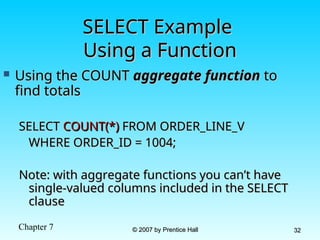
SELECT Example
SELECT Example
Using a Function
Using a Function
 Using the COUNT
Using the COUNT aggregate function
aggregate function to
to
find totals
find totals
SELECT
SELECT COUNT(*)
COUNT(*) FROM ORDER_LINE_V
FROM ORDER_LINE_V
WHERE ORDER_ID = 1004;
Note: with aggregate functions you can’t have
single-valued columns included in the SELECT
clause
clause
Chapter 7 © 2007 by Prentice Hall
© 2007 by Prentice Hall 33
33
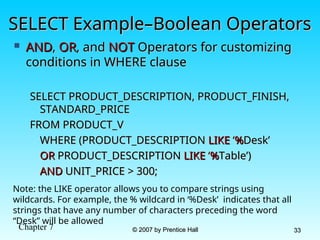
SELECT Example–Boolean Operators
 AND
AND,
, OR
OR, and
, and NOT
NOT Operators for customizing
Operators for customizing
conditions in WHERE clause
SELECT PRODUCT_DESCRIPTION, PRODUCT_FINISH,
STANDARD_PRICE
STANDARD_PRICE
FROM PRODUCT_V
FROM PRODUCT_V
WHERE (PRODUCT_DESCRIPTION
WHERE (PRODUCT_DESCRIPTION LIKE
LIKE ‘
‘%
%Desk’
Desk’
OR
OR PRODUCT_DESCRIPTION
PRODUCT_DESCRIPTION LIKE
LIKE ‘
‘%
%Table’)
Table’)
AND
AND UNIT_PRICE > 300;
UNIT_PRICE > 300;
Note: the LIKE operator allows you to compare strings using
wildcards. For example, the % wildcard in ‘%Desk’ indicates that all
strings that have any number of characters preceding the word
“Desk” will be allowed
Chapter 7 © 2007 by Prentice Hall
© 2007 by Prentice Hall 34
34
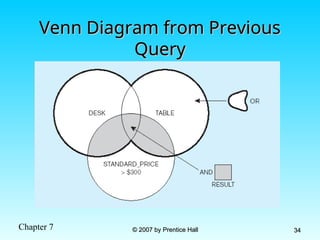
Venn Diagram from Previous
Query
Query
Chapter 7 © 2007 by Prentice Hall
© 2007 by Prentice Hall 35
35
SELECT Example –
SELECT Example –
Sorting Results with the ORDER BY Clause
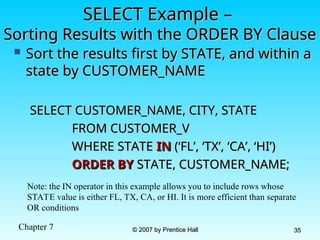
 Sort the results first by STATE, and within a
Sort the results first by STATE, and within a
state by CUSTOMER_NAME
SELECT CUSTOMER_NAME, CITY, STATE
FROM CUSTOMER_V
FROM CUSTOMER_V
WHERE STATE
WHERE STATE IN
IN (‘FL’, ‘TX’, ‘CA’, ‘HI’)
(‘FL’, ‘TX’, ‘CA’, ‘HI’)
ORDER BY
ORDER BY STATE, CUSTOMER_NAME;
STATE, CUSTOMER_NAME;
Note: the IN operator in this example allows you to include rows whose
STATE value is either FL, TX, CA, or HI. It is more efficient than separate
OR conditions
Chapter 7 © 2007 by Prentice Hall
© 2007 by Prentice Hall 36
36
SELECT Example–
SELECT Example–
Categorizing Results Using the GROUP BY Clause
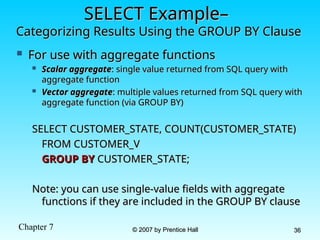
 For use with aggregate functions
For use with aggregate functions
 Scalar aggregate
Scalar aggregate: single value returned from SQL query with
: single value returned from SQL query with
aggregate function
aggregate function
 Vector aggregate
Vector aggregate: multiple values returned from SQL query with
: multiple values returned from SQL query with
aggregate function (via GROUP BY)
SELECT CUSTOMER_STATE, COUNT(CUSTOMER_STATE)
FROM CUSTOMER_V
FROM CUSTOMER_V
GROUP BY
GROUP BY CUSTOMER_STATE;
CUSTOMER_STATE;
Note: you can use single-value fields with aggregate
functions if they are included in the GROUP BY clause
Chapter 7 © 2007 by Prentice Hall
© 2007 by Prentice Hall 37
37
SELECT Example–
SELECT Example–
Qualifying Results by Categories
Using the HAVING Clause
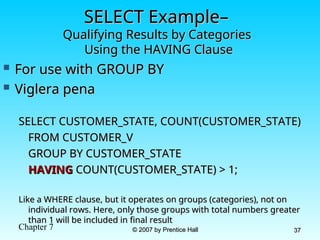
 For use with GROUP BY
For use with GROUP BY
 Viglera pena
Viglera pena
SELECT CUSTOMER_STATE, COUNT(CUSTOMER_STATE)
FROM CUSTOMER_V
FROM CUSTOMER_V
GROUP BY CUSTOMER_STATE
HAVING
HAVING COUNT(CUSTOMER_STATE) > 1;
COUNT(CUSTOMER_STATE) > 1;
Like a WHERE clause, but it operates on groups (categories), not on
individual rows. Here, only those groups with total numbers greater
than 1 will be included in final result
Chapter 7 © 2007 by Prentice Hall
© 2007 by Prentice Hall 38
38
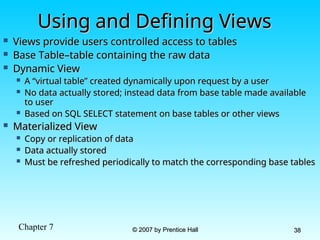
Using and Defining Views
 Views provide users controlled access to tables
Views provide users controlled access to tables
 Base Table–table containing the raw data
Base Table–table containing the raw data
 Dynamic View
Dynamic View
 A “virtual table” created dynamically upon request by a user
A “virtual table” created dynamically upon request by a user
 No data actually stored; instead data from base table made available
No data actually stored; instead data from base table made available
to user
to user
 Based on SQL SELECT statement on base tables or other views
Based on SQL SELECT statement on base tables or other views
 Materialized View
Materialized View
 Copy or replication of data
Copy or replication of data
 Data actually stored
Data actually stored
 Must be refreshed periodically to match the corresponding base tables
Must be refreshed periodically to match the corresponding base tables
Chapter 7 © 2007 by Prentice Hall
© 2007 by Prentice Hall 39
39
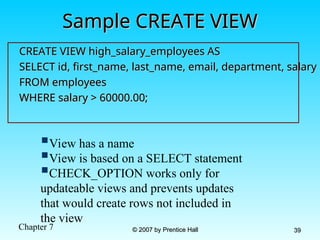
Sample CREATE VIEW
Sample CREATE VIEW
CREATE VIEW high_salary_employees AS
SELECT id, first_name, last_name, email, department, salary
FROM employees
FROM employees
WHERE salary > 60000.00;
View has a name
View is based on a SELECT statement
CHECK_OPTION works only for
updateable views and prevents updates
that would create rows not included in
the view
Chapter 7 © 2007 by Prentice Hall
© 2007 by Prentice Hall 40
40
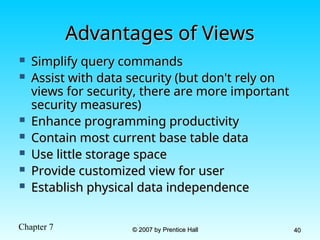
Advantages of Views
Advantages of Views
 Simplify query commands
Simplify query commands
 Assist with data security (but don't rely on
Assist with data security (but don't rely on
views for security, there are more important
security measures)
security measures)
 Enhance programming productivity
Enhance programming productivity
 Contain most current base table data
Contain most current base table data
 Use little storage space
Use little storage space
 Provide customized view for user
Provide customized view for user
 Establish physical data independence
Establish physical data independence
Chapter 7 © 2007 by Prentice Hall
© 2007 by Prentice Hall 41
41
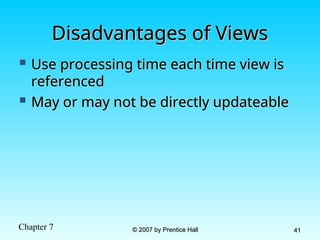
Disadvantages of Views
 Use processing time each time view is
Use processing time each time view is
referenced
referenced
 May or may not be directly updateable
May or may not be directly updateable

Intoduction to SQL Chapter 7 Lessons.ppt

  • 1.
    © 2007 byPrentice Hall © 2007 by Prentice Hall 1 1 Chapter 7: Chapter 7: Introduction to SQL Introduction to SQL Modern Database Management Modern Database Management 8 8th th Edition Edition Jeffrey A. Hoffer, Mary B. Prescott, Jeffrey A. Hoffer, Mary B. Prescott, Fred R. McFadden Fred R. McFadden
  • 2.
    Chapter 7 ©2007 by Prentice Hall © 2007 by Prentice Hall 2 2 Objectives Objectives  Definition of terms Definition of terms  Interpret history and role of SQL Interpret history and role of SQL  Define a database using SQL data Define a database using SQL data definition language definition language  Write single table queries using SQL Write single table queries using SQL  Establish referential integrity using SQL Establish referential integrity using SQL  Discuss SQL:1999 and SQL:2003 Discuss SQL:1999 and SQL:2003 standards standards
  • 3.
    Chapter 7 ©2007 by Prentice Hall © 2007 by Prentice Hall 3 3 SQL Overview SQL Overview  Structured Query Language Structured Query Language  The standard for relational database The standard for relational database management systems (RDBMS) management systems (RDBMS)  RDBMS: A database management system RDBMS: A database management system that manages data as a collection of tables that manages data as a collection of tables in which all relationships are represented in which all relationships are represented by common values in related tables by common values in related tables
  • 4.
    Chapter 7 ©2007 by Prentice Hall © 2007 by Prentice Hall 4 4 History of SQL History of SQL  1970–E. Codd develops relational database 1970–E. Codd develops relational database concept concept  1974-1979–System R with Sequel (later SQL) 1974-1979–System R with Sequel (later SQL) created at IBM Research Lab created at IBM Research Lab  1979–Oracle markets first relational DB with SQL 1979–Oracle markets first relational DB with SQL  1986–ANSI SQL standard released 1986–ANSI SQL standard released  1989, 1992, 1999, 2003–Major ANSI standard 1989, 1992, 1999, 2003–Major ANSI standard updates updates  Current–SQL is supported by most major database Current–SQL is supported by most major database vendors vendors
  • 5.
    Chapter 7 ©2007 by Prentice Hall © 2007 by Prentice Hall 5 5 Purpose of SQL Standard Purpose of SQL Standard  Specify syntax/semantics for data Specify syntax/semantics for data definition and manipulation definition and manipulation  Define data structures Define data structures  Enable portability Enable portability  Specify minimal (level 1) and complete Specify minimal (level 1) and complete (level 2) standards (level 2) standards  Allow for later growth/enhancement to Allow for later growth/enhancement to standard standard
  • 6.
    Chapter 7 ©2007 by Prentice Hall © 2007 by Prentice Hall 6 6 Benefits of a Standardized Benefits of a Standardized Relational Language Relational Language  Reduced training costs Reduced training costs  Productivity Productivity  Application portability Application portability  Application longevity Application longevity  Reduced dependence on a single Reduced dependence on a single vendor vendor  Cross-system communication Cross-system communication
  • 7.
    Chapter 7 ©2007 by Prentice Hall © 2007 by Prentice Hall 7 7 SQL Environment SQL Environment  Catalog Catalog  A set of schemas that constitute the description of a database A set of schemas that constitute the description of a database  Schema Schema  The structure that contains descriptions of objects created by a user The structure that contains descriptions of objects created by a user (base tables, views, constraints) (base tables, views, constraints)  Data Definition Language (DDL) Data Definition Language (DDL)  Commands that define a database, including creating, altering, and Commands that define a database, including creating, altering, and dropping tables and establishing constraints dropping tables and establishing constraints  Data Manipulation Language (DML) Data Manipulation Language (DML)  Commands that maintain and query a database Commands that maintain and query a database  Data Control Language (DCL) Data Control Language (DCL)  Commands that control a database, including administering privileges Commands that control a database, including administering privileges and committing data and committing data
  • 8.
    Chapter 7 ©2007 by Prentice Hall © 2007 by Prentice Hall 8 8 Figure 7-1 A simplified schematic of a typical SQL environment, as described by the SQL-2003 standard
  • 9.
    Chapter 7 ©2007 by Prentice Hall © 2007 by Prentice Hall 9 9 Some SQL Data types Some SQL Data types
  • 10.
    Chapter 7 ©2007 by Prentice Hall © 2007 by Prentice Hall 10 10 Figure 7-4 DDL, DML, DCL, and the database development process
  • 11.
    Chapter 7 ©2007 by Prentice Hall © 2007 by Prentice Hall 11 11 SQL Database Definition SQL Database Definition  Data Definition Language (DDL) Data Definition Language (DDL)  Major CREATE statements: Major CREATE statements:  CREATE SCHEMA–defines a portion of the CREATE SCHEMA–defines a portion of the database owned by a particular user database owned by a particular user  CREATE TABLE–defines a table and its columns CREATE TABLE–defines a table and its columns  CREATE VIEW–defines a logical table from one CREATE VIEW–defines a logical table from one or more views or more views  Other CREATE statements: CHARACTER Other CREATE statements: CHARACTER SET, COLLATION, TRANSLATION, SET, COLLATION, TRANSLATION, ASSERTION, DOMAIN ASSERTION, DOMAIN
  • 12.
    Chapter 7 ©2007 by Prentice Hall © 2007 by Prentice Hall 12 12 Table Creation Table Creation Figure 7-5 General syntax for CREATE TABLE Steps in table creation: 1. Identify data types for attributes 2. Identify columns that can and cannot be null 3. Identify columns that must be unique (candidate keys) 4. Identify primary key– foreign key mates 5. Determine default values 6. Identify constraints on columns (domain specifications) 7. Create the table and associated indexes
  • 13.
    Chapter 7 ©2007 by Prentice Hall © 2007 by Prentice Hall 13 13 The following slides create tables for The following slides create tables for this enterprise data model this enterprise data model
  • 14.
    Chapter 7 ©2007 by Prentice Hall © 2007 by Prentice Hall 14 14 Figure 7-6 SQL database definition commands for Pine Valley Furniture Overall table definitions
  • 15.
    Chapter 7 ©2007 by Prentice Hall © 2007 by Prentice Hall 15 15 Defining attributes and their data types
  • 16.
    Chapter 7 ©2007 by Prentice Hall © 2007 by Prentice Hall 16 16 Non-nullable specification Identifying primary key Primary keys can never have NULL values
  • 17.
    Chapter 7 ©2007 by Prentice Hall © 2007 by Prentice Hall 17 17 Non-nullable specifications Primary key Some primary keys are composite– composed of multiple attributes
  • 18.
    Chapter 7 ©2007 by Prentice Hall © 2007 by Prentice Hall 18 18 Default value Domain constraint Controlling the values in attributes
  • 19.
    Chapter 7 ©2007 by Prentice Hall © 2007 by Prentice Hall 19 19 Primary key of parent table Identifying foreign keys and establishing relationships Foreign key of dependent table
  • 20.
    Chapter 7 ©2007 by Prentice Hall © 2007 by Prentice Hall 20 20 Data Integrity Controls Data Integrity Controls  Referential integrity–constraint that Referential integrity–constraint that ensures that foreign key values of a ensures that foreign key values of a table must match primary key values table must match primary key values of a related table in 1:M relationships of a related table in 1:M relationships  Restricting: Restricting:  Deletes of primary records Deletes of primary records  Updates of primary records Updates of primary records  Inserts of dependent records Inserts of dependent records
  • 21.
    Chapter 7 ©2007 by Prentice Hall © 2007 by Prentice Hall 21 21 Relational integrity is enforced via the primary- key to foreign- key match Figure 7-7 Ensuring data integrity through updates
  • 22.
    Chapter 7 ©2007 by Prentice Hall © 2007 by Prentice Hall 22 22 Changing and Removing Changing and Removing Tables Tables  ALTER TABLE statement allows you to ALTER TABLE statement allows you to change column specifications: change column specifications:  ALTER TABLE CUSTOMER_T ADD (TYPE ALTER TABLE CUSTOMER_T ADD (TYPE VARCHAR(2)) VARCHAR(2))  DROP TABLE statement allows you to DROP TABLE statement allows you to remove tables from your schema: remove tables from your schema:  DROP TABLE CUSTOMER_T DROP TABLE CUSTOMER_T
  • 23.
    Chapter 7 ©2007 by Prentice Hall © 2007 by Prentice Hall 23 23 Schema Definition Schema Definition  Control processing/storage efficiency: Control processing/storage efficiency:  Choice of indexes Choice of indexes  File organizations for base tables File organizations for base tables  File organizations for indexes File organizations for indexes  Data clustering Data clustering  Statistics maintenance Statistics maintenance  Creating indexes Creating indexes  Speed up random/sequential access to base table data Speed up random/sequential access to base table data  Example Example  CREATE INDEX NAME_IDX ON CUSTOMER_T(CUSTOMER_NAME) CREATE INDEX NAME_IDX ON CUSTOMER_T(CUSTOMER_NAME)  This makes an index for the CUSTOMER_NAME field of the This makes an index for the CUSTOMER_NAME field of the CUSTOMER_T table CUSTOMER_T table
  • 24.
    Chapter 7 ©2007 by Prentice Hall © 2007 by Prentice Hall 24 24 Insert Statement Insert Statement  Adds data to a table Adds data to a table  Inserting into a table Inserting into a table  INSERT INTO CUSTOMER_T VALUES (001, ‘Contemporary INSERT INTO CUSTOMER_T VALUES (001, ‘Contemporary Casuals’, ‘1355 S. Himes Blvd.’, ‘Gainesville’, ‘FL’, 32601); Casuals’, ‘1355 S. Himes Blvd.’, ‘Gainesville’, ‘FL’, 32601);  Inserting a record that has some null attributes Inserting a record that has some null attributes requires identifying the fields that actually get data requires identifying the fields that actually get data  INSERT INTO PRODUCT_T (PRODUCT_ID, INSERT INTO PRODUCT_T (PRODUCT_ID, PRODUCT_DESCRIPTION,PRODUCT_FINISH, STANDARD_PRICE, PRODUCT_DESCRIPTION,PRODUCT_FINISH, STANDARD_PRICE, PRODUCT_ON_HAND) VALUES (1, ‘End Table’, ‘Cherry’, 175, 8); PRODUCT_ON_HAND) VALUES (1, ‘End Table’, ‘Cherry’, 175, 8);  Inserting from another table Inserting from another table  INSERT INTO CA_CUSTOMER_T SELECT * FROM CUSTOMER_T WHERE INSERT INTO CA_CUSTOMER_T SELECT * FROM CUSTOMER_T WHERE STATE = ‘CA’; STATE = ‘CA’;
  • 25.
    Chapter 7 ©2007 by Prentice Hall © 2007 by Prentice Hall 25 25 Creating Tables with Identity Columns Creating Tables with Identity Columns Inserting into a table does not require explicit customer ID entry Inserting into a table does not require explicit customer ID entry or field list or field list INSERT INTO CUSTOMER_T VALUES ( ‘Contemporary Casuals’, INSERT INTO CUSTOMER_T VALUES ( ‘Contemporary Casuals’, ‘1355 S. Himes Blvd.’, ‘Gainesville’, ‘FL’, 32601); ‘1355 S. Himes Blvd.’, ‘Gainesville’, ‘FL’, 32601); New with SQL:2003
  • 26.
    Chapter 7 ©2007 by Prentice Hall © 2007 by Prentice Hall 26 26 Delete Statement Delete Statement  Removes rows from a table Removes rows from a table  Delete certain rows Delete certain rows  DELETE FROM CUSTOMER_T WHERE STATE DELETE FROM CUSTOMER_T WHERE STATE = ‘HI’; = ‘HI’;  Delete all rows Delete all rows  DELETE FROM CUSTOMER_T; DELETE FROM CUSTOMER_T;
  • 27.
    Chapter 7 ©2007 by Prentice Hall © 2007 by Prentice Hall 27 27 Update Statement Update Statement  Modifies data in existing rows Modifies data in existing rows  UPDATE PRODUCT_T SET UNIT_PRICE = 775 UPDATE PRODUCT_T SET UNIT_PRICE = 775 WHERE PRODUCT_ID = 7; WHERE PRODUCT_ID = 7;
  • 28.
    Chapter 7 ©2007 by Prentice Hall © 2007 by Prentice Hall 28 28 SELECT Statement SELECT Statement  Used for queries on single or multiple tables Used for queries on single or multiple tables  Clauses of the SELECT statement: Clauses of the SELECT statement:  SELECT SELECT  List the columns (and expressions) that should be returned from the query List the columns (and expressions) that should be returned from the query  FROM FROM  Indicate the table(s) or view(s) from which data will be obtained Indicate the table(s) or view(s) from which data will be obtained  WHERE WHERE  Indicate the conditions under which a row will be included in the result Indicate the conditions under which a row will be included in the result  GROUP BY GROUP BY  Indicate categorization of results Indicate categorization of results  HAVING HAVING  Indicate the conditions under which a category (group) will be included Indicate the conditions under which a category (group) will be included  ORDER BY ORDER BY  Sorts the result according to specified criteria Sorts the result according to specified criteria
  • 29.
    Chapter 7 ©2007 by Prentice Hall © 2007 by Prentice Hall 29 29 Figure 7-10 SQL statement processing order (adapted from van der Lans, p.100)
  • 30.
    Chapter 7 ©2007 by Prentice Hall © 2007 by Prentice Hall 30 30 SELECT Example SELECT Example  Find products with standard price less than Find products with standard price less than $275 $275 SELECT SELECT PRODUCT_NAME, STANDARD_PRICE PRODUCT_NAME, STANDARD_PRICE FROM FROM PRODUCT_V PRODUCT_V WHERE WHERE STANDARD_PRICE < 275; STANDARD_PRICE < 275; Table 7-3: Comparison Operators in SQL
  • 31.
    Chapter 7 ©2007 by Prentice Hall © 2007 by Prentice Hall 31 31 SELECT Example Using Alias SELECT Example Using Alias  Alias is an alternative column or table name Alias is an alternative column or table name SELECT SELECT CUST CUST.CUSTOMER AS .CUSTOMER AS NAME NAME, , CUST.CUSTOMER_ADDRESS CUST.CUSTOMER_ADDRESS FROM CUSTOMER_V FROM CUSTOMER_V CUST CUST WHERE WHERE NAME NAME = ‘Home = ‘Home Furnishings’; Furnishings’;
  • 32.
    Chapter 7 ©2007 by Prentice Hall © 2007 by Prentice Hall 32 32 SELECT Example SELECT Example Using a Function Using a Function  Using the COUNT Using the COUNT aggregate function aggregate function to to find totals find totals SELECT SELECT COUNT(*) COUNT(*) FROM ORDER_LINE_V FROM ORDER_LINE_V WHERE ORDER_ID = 1004; WHERE ORDER_ID = 1004; Note: with aggregate functions you can’t have Note: with aggregate functions you can’t have single-valued columns included in the SELECT single-valued columns included in the SELECT clause clause
  • 33.
    Chapter 7 ©2007 by Prentice Hall © 2007 by Prentice Hall 33 33 SELECT Example–Boolean Operators SELECT Example–Boolean Operators  AND AND, , OR OR, and , and NOT NOT Operators for customizing Operators for customizing conditions in WHERE clause conditions in WHERE clause SELECT PRODUCT_DESCRIPTION, PRODUCT_FINISH, SELECT PRODUCT_DESCRIPTION, PRODUCT_FINISH, STANDARD_PRICE STANDARD_PRICE FROM PRODUCT_V FROM PRODUCT_V WHERE (PRODUCT_DESCRIPTION WHERE (PRODUCT_DESCRIPTION LIKE LIKE ‘ ‘% %Desk’ Desk’ OR OR PRODUCT_DESCRIPTION PRODUCT_DESCRIPTION LIKE LIKE ‘ ‘% %Table’) Table’) AND AND UNIT_PRICE > 300; UNIT_PRICE > 300; Note: the LIKE operator allows you to compare strings using wildcards. For example, the % wildcard in ‘%Desk’ indicates that all strings that have any number of characters preceding the word “Desk” will be allowed
  • 34.
    Chapter 7 ©2007 by Prentice Hall © 2007 by Prentice Hall 34 34 Venn Diagram from Previous Venn Diagram from Previous Query Query
  • 35.
    Chapter 7 ©2007 by Prentice Hall © 2007 by Prentice Hall 35 35 SELECT Example – SELECT Example – Sorting Results with the ORDER BY Clause Sorting Results with the ORDER BY Clause  Sort the results first by STATE, and within a Sort the results first by STATE, and within a state by CUSTOMER_NAME state by CUSTOMER_NAME SELECT CUSTOMER_NAME, CITY, STATE SELECT CUSTOMER_NAME, CITY, STATE FROM CUSTOMER_V FROM CUSTOMER_V WHERE STATE WHERE STATE IN IN (‘FL’, ‘TX’, ‘CA’, ‘HI’) (‘FL’, ‘TX’, ‘CA’, ‘HI’) ORDER BY ORDER BY STATE, CUSTOMER_NAME; STATE, CUSTOMER_NAME; Note: the IN operator in this example allows you to include rows whose STATE value is either FL, TX, CA, or HI. It is more efficient than separate OR conditions
  • 36.
    Chapter 7 ©2007 by Prentice Hall © 2007 by Prentice Hall 36 36 SELECT Example– SELECT Example– Categorizing Results Using the GROUP BY Clause Categorizing Results Using the GROUP BY Clause  For use with aggregate functions For use with aggregate functions  Scalar aggregate Scalar aggregate: single value returned from SQL query with : single value returned from SQL query with aggregate function aggregate function  Vector aggregate Vector aggregate: multiple values returned from SQL query with : multiple values returned from SQL query with aggregate function (via GROUP BY) aggregate function (via GROUP BY) SELECT CUSTOMER_STATE, COUNT(CUSTOMER_STATE) SELECT CUSTOMER_STATE, COUNT(CUSTOMER_STATE) FROM CUSTOMER_V FROM CUSTOMER_V GROUP BY GROUP BY CUSTOMER_STATE; CUSTOMER_STATE; Note: you can use single-value fields with aggregate Note: you can use single-value fields with aggregate functions if they are included in the GROUP BY clause functions if they are included in the GROUP BY clause
  • 37.
    Chapter 7 ©2007 by Prentice Hall © 2007 by Prentice Hall 37 37 SELECT Example– SELECT Example– Qualifying Results by Categories Qualifying Results by Categories Using the HAVING Clause Using the HAVING Clause  For use with GROUP BY For use with GROUP BY  Viglera pena Viglera pena SELECT CUSTOMER_STATE, COUNT(CUSTOMER_STATE) SELECT CUSTOMER_STATE, COUNT(CUSTOMER_STATE) FROM CUSTOMER_V FROM CUSTOMER_V GROUP BY CUSTOMER_STATE GROUP BY CUSTOMER_STATE HAVING HAVING COUNT(CUSTOMER_STATE) > 1; COUNT(CUSTOMER_STATE) > 1; Like a WHERE clause, but it operates on groups (categories), not on Like a WHERE clause, but it operates on groups (categories), not on individual rows. Here, only those groups with total numbers greater individual rows. Here, only those groups with total numbers greater than 1 will be included in final result than 1 will be included in final result
  • 38.
    Chapter 7 ©2007 by Prentice Hall © 2007 by Prentice Hall 38 38 Using and Defining Views Using and Defining Views  Views provide users controlled access to tables Views provide users controlled access to tables  Base Table–table containing the raw data Base Table–table containing the raw data  Dynamic View Dynamic View  A “virtual table” created dynamically upon request by a user A “virtual table” created dynamically upon request by a user  No data actually stored; instead data from base table made available No data actually stored; instead data from base table made available to user to user  Based on SQL SELECT statement on base tables or other views Based on SQL SELECT statement on base tables or other views  Materialized View Materialized View  Copy or replication of data Copy or replication of data  Data actually stored Data actually stored  Must be refreshed periodically to match the corresponding base tables Must be refreshed periodically to match the corresponding base tables
  • 39.
    Chapter 7 ©2007 by Prentice Hall © 2007 by Prentice Hall 39 39 Sample CREATE VIEW Sample CREATE VIEW CREATE VIEW high_salary_employees AS CREATE VIEW high_salary_employees AS SELECT id, first_name, last_name, email, department, salary SELECT id, first_name, last_name, email, department, salary FROM employees FROM employees WHERE salary > 60000.00; WHERE salary > 60000.00; View has a name View is based on a SELECT statement CHECK_OPTION works only for updateable views and prevents updates that would create rows not included in the view
  • 40.
    Chapter 7 ©2007 by Prentice Hall © 2007 by Prentice Hall 40 40 Advantages of Views Advantages of Views  Simplify query commands Simplify query commands  Assist with data security (but don't rely on Assist with data security (but don't rely on views for security, there are more important views for security, there are more important security measures) security measures)  Enhance programming productivity Enhance programming productivity  Contain most current base table data Contain most current base table data  Use little storage space Use little storage space  Provide customized view for user Provide customized view for user  Establish physical data independence Establish physical data independence
  • 41.
    Chapter 7 ©2007 by Prentice Hall © 2007 by Prentice Hall 41 41 Disadvantages of Views Disadvantages of Views  Use processing time each time view is Use processing time each time view is referenced referenced  May or may not be directly updateable May or may not be directly updateable

Editor's Notes

  • #11 Used to create and modify the structure of objects in a database using predefined commands and a specific syntax. These database objects include tables, sequences, locations, aliases, schemas and indexes.