INTRODUCTION
INTERNALHARWARE
COMPONENTS
HOME SERVICE ABOUT US CONTACT US
Page 01
TO
INTERNALHARDWARECOMPONENTS
OVERVIEW
SERVICE ABOUT US CONTACT US
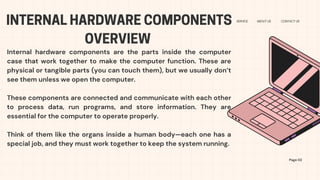
Internal hardware components are the parts inside the computer
case that work together to make the computer function. These are
physical or tangible parts (you can touch them), but we usually don’t
see them unless we open the computer.
These components are connected and communicate with each other
to process data, run programs, and store information. They are
essential for the computer to operate properly.
Think of them like the organs inside a human body—each one has a
special job, and they must work together to keep the system running.
Page 02
CENTRALPROCESSINGUNIT(CPU)
The CPU is often referred to as the brain of the computer
It is responsible for executing instruction, performing
calculations , and managing data flow within the system
FUNCTION AND ROLE OF THE CPU
Page 04
The CPU (Central Processing Unit) is often called the “brain of the
computer.”
Its main function is to process instructions and data. Every time you
open a program, type on your keyboard, or click with your mouse, the
CPU is the one doing the work behind the scenes.
🔧What the CPU Does:
Carries out instructions from software and hardware.
Performs calculations and decision-making tasks.
Controls the flow of data between other components (like RAM, storage,
etc.).
Handles multiple tasks very quickly—millions of instructions per second!
DIFFERENT TYPES OF RAM AND THEIR USES
Page 04
What It Is:
DRAM is the most common type of RAM used in computers today.
✅How It Works:
It stores each bit of data in a tiny capacitor and needs to be refreshed
thousands of times per second to keep the data.
✅Use:
Used in main system memory (what we usually call "RAM").
Found in desktops, laptops, and servers.
DRAM (DYNAMIC RANDOM ACCESS MEMORY)
DIFFERENT TYPES OF RAM AND THEIR USES
Page 04
What It Is:
SRAM stores data in a stable way without needing constant refreshing.
✅How It Works:
It uses flip-flops (special circuits) to store each bit of data.
✅Use:
Used in cache memory inside the CPU.
Found in high-speed memory areas that need fast access.
SRAM (STATIC RANDOM ACCESS MEMORY)
DIFFERENT TYPES OF RAM AND THEIR USES
Page 04
What It Is:
SRAM stores data in a stable way without needing constant refreshing.
✅How It Works:
It uses flip-flops (special circuits) to store each bit of data.
✅Use:
Used in cache memory inside the CPU.
Found in high-speed memory areas that need fast access.
SRAM (STATIC RANDOM ACCESS MEMORY)
STORAGE DEVICES
Page 04
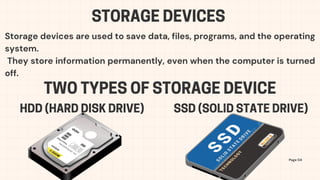
Storage devices are used to save data, files, programs, and the operating
system.
They store information permanently, even when the computer is turned
off.
TWO TYPES OF STORAGE DEVICE
HDD (HARD DISK DRIVE) SSD (SOLID STATE DRIVE)
HDD (HARD DISK DRIVE)
Page 04
Uses spinning disks to read and write data.
Has large storage capacity (like 500GB to 2TB or more).
Slower compared to SSDs.
Cheaper, good for storing a lot of files.
📌Use: Storing documents, pictures, videos, programs, and games.
SSD (SOLID STATE DRIVE)
Page 04
Uses flash memory (no moving parts).
Much faster than HDDs.
More expensive, but getting cheaper over time.
Quieter and more durable.
📌 Use: Faster boot times, quick loading of programs and games, used in
modern laptops and desktops.
MOTHERBOARD
Page 04
The motherboard is the main circuit board inside the computer.It’s like
the central hub that connects all the internal hardware components
together. Everything — the CPU, RAM, storage, graphics card, power
supply, and even external ports — is either plugged into or connected
through the motherboard.
MICROATX
Page 04
Smaller compared to the standard ATX, it is
cheaper making them ideal for compact and
budget friendly builds, but with lower expansion
options.
ATX
Page 04
Larger compare to Micro ATX and offers more RAM
and PCU slots, allowing for more powerful and
customizable system, but at a higher price and
power assumption.
INPUT DEVICES
Page 04
Input devices are hardware parts that allow the user
to enter data or control signals into the computer.
In short, they let you interact with the computer by
giving it commands or information.
🧩Purpose of Input Devices:
To send commands or information to the computer
so it can process and respond.
KEYBOARD
Page 04
A keyboard is one of the most common input
devices. It is used to type letters, numbers,
symbols, and commands into the computer.
MOUSE
Page 04
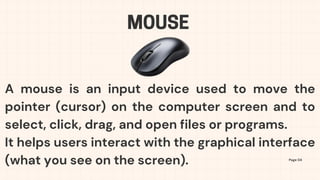
A mouse is an input device used to move the
pointer (cursor) on the computer screen and to
select, click, drag, and open files or programs.
It helps users interact with the graphical interface
(what you see on the screen).
SCANNERS
Page 04
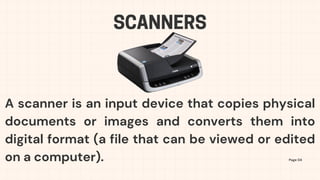
A scanner is an input device that copies physical
documents or images and converts them into
digital format (a file that can be viewed or edited
on a computer).
MICROPHONES
Page 04
A microphone is an input device that allows the
user to record or transmit sound into the
computer.It captures your voice or any sound
and turns it into a digital signal the computer can
understand.
CAMERA/WEBCAM
Page 04
A camera or webcam is an input device that
captures photos or live video and sends it to the
computer.It allows the computer to see and
record what’s in front of the camera lens, like
your face during a video call.
THANKYOU
STUDIO
SHODWE
HOME SERVICE ABOUT US CONTACT US
Page 10

Internal Hardware Components By anonymous

  • 1.
  • 2.
    INTERNALHARDWARECOMPONENTS OVERVIEW SERVICE ABOUT USCONTACT US Internal hardware components are the parts inside the computer case that work together to make the computer function. These are physical or tangible parts (you can touch them), but we usually don’t see them unless we open the computer. These components are connected and communicate with each other to process data, run programs, and store information. They are essential for the computer to operate properly. Think of them like the organs inside a human body—each one has a special job, and they must work together to keep the system running. Page 02
  • 3.
    CENTRALPROCESSINGUNIT(CPU) The CPU isoften referred to as the brain of the computer It is responsible for executing instruction, performing calculations , and managing data flow within the system
  • 4.
    FUNCTION AND ROLEOF THE CPU Page 04 The CPU (Central Processing Unit) is often called the “brain of the computer.” Its main function is to process instructions and data. Every time you open a program, type on your keyboard, or click with your mouse, the CPU is the one doing the work behind the scenes. 🔧What the CPU Does: Carries out instructions from software and hardware. Performs calculations and decision-making tasks. Controls the flow of data between other components (like RAM, storage, etc.). Handles multiple tasks very quickly—millions of instructions per second!
  • 5.
    DIFFERENT TYPES OFRAM AND THEIR USES Page 04 What It Is: DRAM is the most common type of RAM used in computers today. ✅How It Works: It stores each bit of data in a tiny capacitor and needs to be refreshed thousands of times per second to keep the data. ✅Use: Used in main system memory (what we usually call "RAM"). Found in desktops, laptops, and servers. DRAM (DYNAMIC RANDOM ACCESS MEMORY)
  • 6.
    DIFFERENT TYPES OFRAM AND THEIR USES Page 04 What It Is: SRAM stores data in a stable way without needing constant refreshing. ✅How It Works: It uses flip-flops (special circuits) to store each bit of data. ✅Use: Used in cache memory inside the CPU. Found in high-speed memory areas that need fast access. SRAM (STATIC RANDOM ACCESS MEMORY)
  • 7.
    DIFFERENT TYPES OFRAM AND THEIR USES Page 04 What It Is: SRAM stores data in a stable way without needing constant refreshing. ✅How It Works: It uses flip-flops (special circuits) to store each bit of data. ✅Use: Used in cache memory inside the CPU. Found in high-speed memory areas that need fast access. SRAM (STATIC RANDOM ACCESS MEMORY)
  • 8.
    STORAGE DEVICES Page 04 Storagedevices are used to save data, files, programs, and the operating system. They store information permanently, even when the computer is turned off. TWO TYPES OF STORAGE DEVICE HDD (HARD DISK DRIVE) SSD (SOLID STATE DRIVE)
  • 9.
    HDD (HARD DISKDRIVE) Page 04 Uses spinning disks to read and write data. Has large storage capacity (like 500GB to 2TB or more). Slower compared to SSDs. Cheaper, good for storing a lot of files. 📌Use: Storing documents, pictures, videos, programs, and games.
  • 10.
    SSD (SOLID STATEDRIVE) Page 04 Uses flash memory (no moving parts). Much faster than HDDs. More expensive, but getting cheaper over time. Quieter and more durable. 📌 Use: Faster boot times, quick loading of programs and games, used in modern laptops and desktops.
  • 11.
    MOTHERBOARD Page 04 The motherboardis the main circuit board inside the computer.It’s like the central hub that connects all the internal hardware components together. Everything — the CPU, RAM, storage, graphics card, power supply, and even external ports — is either plugged into or connected through the motherboard.
  • 12.
    MICROATX Page 04 Smaller comparedto the standard ATX, it is cheaper making them ideal for compact and budget friendly builds, but with lower expansion options.
  • 13.
    ATX Page 04 Larger compareto Micro ATX and offers more RAM and PCU slots, allowing for more powerful and customizable system, but at a higher price and power assumption.
  • 14.
    INPUT DEVICES Page 04 Inputdevices are hardware parts that allow the user to enter data or control signals into the computer. In short, they let you interact with the computer by giving it commands or information. 🧩Purpose of Input Devices: To send commands or information to the computer so it can process and respond.
  • 15.
    KEYBOARD Page 04 A keyboardis one of the most common input devices. It is used to type letters, numbers, symbols, and commands into the computer.
  • 16.
    MOUSE Page 04 A mouseis an input device used to move the pointer (cursor) on the computer screen and to select, click, drag, and open files or programs. It helps users interact with the graphical interface (what you see on the screen).
  • 17.
    SCANNERS Page 04 A scanneris an input device that copies physical documents or images and converts them into digital format (a file that can be viewed or edited on a computer).
  • 18.
    MICROPHONES Page 04 A microphoneis an input device that allows the user to record or transmit sound into the computer.It captures your voice or any sound and turns it into a digital signal the computer can understand.
  • 19.
    CAMERA/WEBCAM Page 04 A cameraor webcam is an input device that captures photos or live video and sends it to the computer.It allows the computer to see and record what’s in front of the camera lens, like your face during a video call.
  • 20.