Power
Management
on Intel x86
with Linux
IoT Internals (Atul Vaish)
Advanced Configuration
and Power Interface (ACPI
on x86)
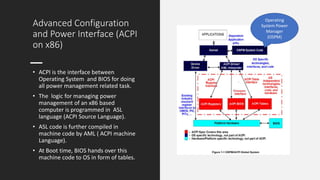
• ACPI is the interface between
Operating System and BIOS for doing
all power management related task.
• The logic for managing power
management of an x86 based
computer is programmed in ASL
language (ACPI Source Language).
• ASL code is further compiled in
machine code by AML ( ACPI machine
Language).
• At Boot time, BIOS hands over this
machine code to OS in form of tables.
Operating
System Power
Manager
(OSPM)
ACPI Handover to OS
from BIOS
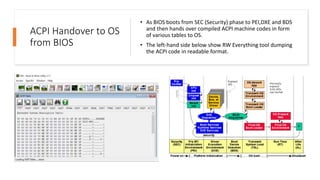
• As BIOS boots from SEC (Security) phase to PEI,DXE and BDS
and then hands over compiled ACPI machine codes in form
of various tables to OS.
• The left-hand side below show RW Everything tool dumping
the ACPI code in readable format.
Global System
Power States
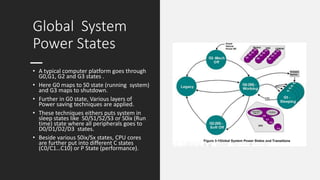
• A typical computer platform goes through
G0,G1, G2 and G3 states .
• Here G0 maps to S0 state (running system)
and G3 maps to shutdown.
• Further in G0 state, Various layers of
Power saving techniques are applied.
• These techniques eithers puts system in
sleep states like S0/S1/S2/S3 or S0ix (Run
time) state where all peripherals goes to
D0/D1/D2/D3 states.
• Beside various S0ix/Sx states, CPU cores
are further put into different C states
(C0/C1…C10) or P State (performance).
Device States for
Peripherals
• Device States for peripherals like any
PCI goes through D0 to D1/D2/D3hot
or D3cold.
• Most devices today doesn’t support
D1 and D2 states.
• D3cold provides more power saving
at the cost of increased latency while
waking up the system from sleep.
• D3hot provides less power saving
but better latency.
• D3cold can only be achieved by first
going in D3hot .
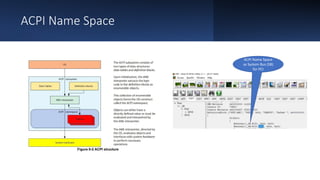
ACPI Name Space
ACPI Name Space
as System Bus (SB)
for PCI
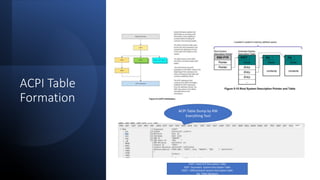
ACPI Table
Formation
ACPI Table Dump by RW
Everything Tool
FADT- Fixed ACP Description Table
SSDT- Secondary System Description Table
DSDT – Differentiated System Description table
Sig- Table Signature
ACPI Table
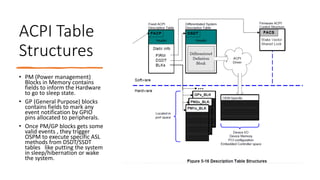
Structures
• PM (Power management)
Blocks in Memory contains
fields to inform the Hardware
to go to sleep state.
• GP (General Purpose) blocks
contains fields to mark any
event notification by GPIO
pins allocated to peripherals.
• Once PM/GP blocks gets some
valid events , they trigger
OSPM to execute specific ASL
methods from DSDT/SSDT
tables like putting the system
in sleep/hibernation or wake
the system.
ACPI
Handling Of
Thermal
Zone
GPE – General Purpose Event

intel_x86_pm.pptx

  • 1.
    Power Management on Intel x86 withLinux IoT Internals (Atul Vaish)
  • 2.
    Advanced Configuration and PowerInterface (ACPI on x86) • ACPI is the interface between Operating System and BIOS for doing all power management related task. • The logic for managing power management of an x86 based computer is programmed in ASL language (ACPI Source Language). • ASL code is further compiled in machine code by AML ( ACPI machine Language). • At Boot time, BIOS hands over this machine code to OS in form of tables. Operating System Power Manager (OSPM)
  • 3.
    ACPI Handover toOS from BIOS • As BIOS boots from SEC (Security) phase to PEI,DXE and BDS and then hands over compiled ACPI machine codes in form of various tables to OS. • The left-hand side below show RW Everything tool dumping the ACPI code in readable format.
  • 4.
    Global System Power States •A typical computer platform goes through G0,G1, G2 and G3 states . • Here G0 maps to S0 state (running system) and G3 maps to shutdown. • Further in G0 state, Various layers of Power saving techniques are applied. • These techniques eithers puts system in sleep states like S0/S1/S2/S3 or S0ix (Run time) state where all peripherals goes to D0/D1/D2/D3 states. • Beside various S0ix/Sx states, CPU cores are further put into different C states (C0/C1…C10) or P State (performance).
  • 5.
    Device States for Peripherals •Device States for peripherals like any PCI goes through D0 to D1/D2/D3hot or D3cold. • Most devices today doesn’t support D1 and D2 states. • D3cold provides more power saving at the cost of increased latency while waking up the system from sleep. • D3hot provides less power saving but better latency. • D3cold can only be achieved by first going in D3hot .
  • 6.
    ACPI Name Space ACPIName Space as System Bus (SB) for PCI
  • 7.
    ACPI Table Formation ACPI TableDump by RW Everything Tool FADT- Fixed ACP Description Table SSDT- Secondary System Description Table DSDT – Differentiated System Description table Sig- Table Signature
  • 8.
    ACPI Table Structures • PM(Power management) Blocks in Memory contains fields to inform the Hardware to go to sleep state. • GP (General Purpose) blocks contains fields to mark any event notification by GPIO pins allocated to peripherals. • Once PM/GP blocks gets some valid events , they trigger OSPM to execute specific ASL methods from DSDT/SSDT tables like putting the system in sleep/hibernation or wake the system.
  • 9.