Infrastructure As
Code (IaC)
Scripted Infrastructure
Contents
1. What is IaC
2. What is IaC good for… or not
3. How to use IaC
a. Tools
b. Organising templates
c. Structure
d. Key functions
● Infrastructure (represented) As Code / Scripted Infrastructure / Programmable Infrastructure
● Descriptive model, in a machine-readable definition - Templates
● Create and Manage Infra (networks, virtual machines, load balancers, connection topology
etc.)
What is IaC
What is it good for!?
Go to www.menti.com and use
the code 86 54 83 to add your
thoughts!
Benefits of IaC (1)
Repeatable, Reusable &
Scalable
Standardisation Predictable
Infrastructure As Code | peak.ai
Benefits of IaC (2)
Version Control Safer change
management
Reduced Cost
Infrastructure As Code | peak.ai
Downsides of IaC (1)
New skills required Planning often gets
skipped
Errors can be repeated
too!
Infrastructure As Code | peak.ai
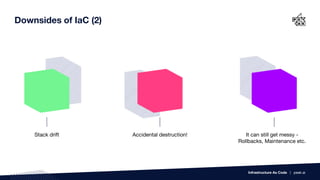
Downsides of IaC (2)
Stack drift Accidental destruction! It can still get messy -
Rollbacks, Maintenance etc.
Infrastructure As Code | peak.ai
Tools
Puppet / Chef
Ansible
Terraform
Cloud agnostic software
Terraform syntax
ARM / CloudFormation / CDK
Infrastructure As Code | peak.ai
Automation and Configuration
Master / Node
JSON recipes
Agentless IT automation (SSH)
Ansible Playbooks
Azure and AWS specific template formats
JSON / JSON or YAML
Cloud Development Kit - script your infra in a
familiar language like java, python, typescript and
c#
“”
Tools alone won’t transform and
organisation,
you need to change the mindset of
the team.
11
(organise it like it’s software)
Organising templates
Smaller the better!
Separate concerns
Example -
● Frontend services
● Backend services
● Shared services
● Base Network
● Identity and Access Management
You may also separate a CI/CD pipeline and the main infrastructure
These same templates should be used multiple times for different
environments, accounts, regions etc.
Infrastructure As Code | peak.ai
Structure
● Parameters
● Conditions
● References
● Mappings
● Resources
● Dependencies
● Outputs
● Exports / Imports
● Functions - Internal and Custom
Infrastructure As Code | peak.ai
● Hardcode
● Input Parameters - use ‘no echo’
● Parameter Store
● Secrets Manager
Secrets
(options)
Infrastructure As Code | peak.ai
Secrets
Input Parameters - use ‘no echo’
Secrets
Parameter Store
Secrets
Secrets Manager
Keys and Values
Use the Internal Function - Find In Map to use those values based
on other variables.
Mappings
Infrastructure As Code | peak.ai
Mappings
Mappings
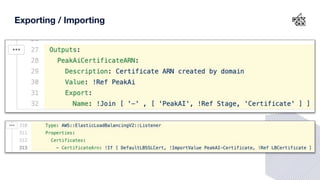
Exporting / Importing
Rather than hard code mappings or inputting them manually we
can Export and Import values.
But this can also leave undesired complications when you are new
to it.
Infrastructure As Code | peak.ai
Exporting / Importing
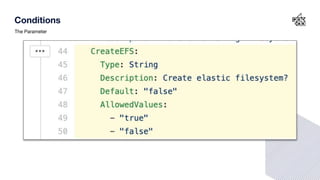
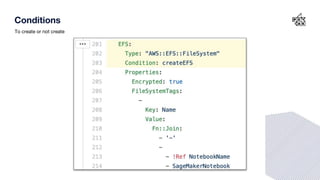
Conditions
Conditionally create resources or assign values to variables using
internal functions.
Infrastructure As Code | peak.ai
Conditions
The Parameter
Conditions
The test
Conditions
To create or not create
Conditions
To reference or not to reference
Testing
We know how to test other languages.. How do we test infra?
Sometimes we have to try it for real!
Use a sandbox - good check of repeatability.
Template validation - cfn-lint
Infrastructure As Code | peak.ai
Iterate
Things can get messy, especially when deploying a new stack
from scratch. Cloud Formation is a pain when the first create
fails…
Start simple!
Then add more resources as you go along.
Infrastructure As Code | peak.ai
Deletion Policy Attribute
Keep things like S3 bucket or RDS cluster after stack deletion
Could save the day in case of accidents! (But also consider Stack
Protection)
Question Time

Infrastructure as Code (IaC): Introduction to scripted infrastructure

  • 1.
  • 2.
    Contents 1. What isIaC 2. What is IaC good for… or not 3. How to use IaC a. Tools b. Organising templates c. Structure d. Key functions
  • 3.
    ● Infrastructure (represented)As Code / Scripted Infrastructure / Programmable Infrastructure ● Descriptive model, in a machine-readable definition - Templates ● Create and Manage Infra (networks, virtual machines, load balancers, connection topology etc.) What is IaC
  • 4.
    What is itgood for!? Go to www.menti.com and use the code 86 54 83 to add your thoughts!
  • 6.
    Benefits of IaC(1) Repeatable, Reusable & Scalable Standardisation Predictable Infrastructure As Code | peak.ai
  • 7.
    Benefits of IaC(2) Version Control Safer change management Reduced Cost Infrastructure As Code | peak.ai
  • 8.
    Downsides of IaC(1) New skills required Planning often gets skipped Errors can be repeated too! Infrastructure As Code | peak.ai
  • 9.
    Downsides of IaC(2) Stack drift Accidental destruction! It can still get messy - Rollbacks, Maintenance etc. Infrastructure As Code | peak.ai
  • 10.
    Tools Puppet / Chef Ansible Terraform Cloudagnostic software Terraform syntax ARM / CloudFormation / CDK Infrastructure As Code | peak.ai Automation and Configuration Master / Node JSON recipes Agentless IT automation (SSH) Ansible Playbooks Azure and AWS specific template formats JSON / JSON or YAML Cloud Development Kit - script your infra in a familiar language like java, python, typescript and c#
  • 11.
    “” Tools alone won’ttransform and organisation, you need to change the mindset of the team. 11
  • 12.
    (organise it likeit’s software) Organising templates Smaller the better! Separate concerns Example - ● Frontend services ● Backend services ● Shared services ● Base Network ● Identity and Access Management You may also separate a CI/CD pipeline and the main infrastructure These same templates should be used multiple times for different environments, accounts, regions etc. Infrastructure As Code | peak.ai
  • 13.
    Structure ● Parameters ● Conditions ●References ● Mappings ● Resources ● Dependencies ● Outputs ● Exports / Imports ● Functions - Internal and Custom Infrastructure As Code | peak.ai
  • 14.
    ● Hardcode ● InputParameters - use ‘no echo’ ● Parameter Store ● Secrets Manager Secrets (options) Infrastructure As Code | peak.ai
  • 15.
    Secrets Input Parameters -use ‘no echo’
  • 16.
  • 17.
  • 18.
    Keys and Values Usethe Internal Function - Find In Map to use those values based on other variables. Mappings Infrastructure As Code | peak.ai
  • 19.
  • 20.
  • 21.
    Exporting / Importing Ratherthan hard code mappings or inputting them manually we can Export and Import values. But this can also leave undesired complications when you are new to it. Infrastructure As Code | peak.ai
  • 22.
  • 23.
    Conditions Conditionally create resourcesor assign values to variables using internal functions. Infrastructure As Code | peak.ai
  • 24.
  • 25.
  • 26.
  • 27.
  • 28.
    Testing We know howto test other languages.. How do we test infra? Sometimes we have to try it for real! Use a sandbox - good check of repeatability. Template validation - cfn-lint Infrastructure As Code | peak.ai
  • 29.
    Iterate Things can getmessy, especially when deploying a new stack from scratch. Cloud Formation is a pain when the first create fails… Start simple! Then add more resources as you go along. Infrastructure As Code | peak.ai
  • 30.
    Deletion Policy Attribute Keepthings like S3 bucket or RDS cluster after stack deletion Could save the day in case of accidents! (But also consider Stack Protection)
  • 31.