Implementing Web APIs
 Zeeshan Ahmed Khalil (Quantum LHE –Sr. Software engineer)
Lesson 1: Developing a Web API
 What Is a Web API?
 Routing in Web API
 Real time Architecture
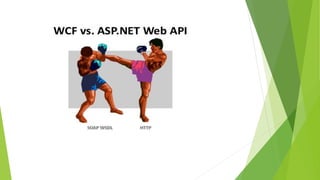
 WCF VS Web API
 RESTful Services
 Data Return Formats
 Using Routes and Controllers in Web API
 Demonstration: Web API with tool and Data.
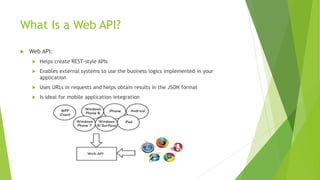
What Is a Web API?
 Web API:
 Helps create REST-style APIs
 Enables external systems to use the business logics implemented in your
application
 Uses URLs in requests and helps obtain results in the JSON format
 Is ideal for mobile application integration
Routing in Web API
Characteristics of routing in Web API:
 You can use API controller names and a naming convention for actions to route
Web API requests
 Alternatively you can use the following attributes to control the mapping of
HTTP requests (HTTP Verb+URL) to actions in the controller:
 The HttpGet, HttpPut, HttpPost, or HttpDelete attributes
 The AcceptVerbs attribute
 The ActionName attribute
Real time Architecture
RESTful Services
Characteristics of a RESTful Service:
 Can be called to retrieve business information from the server
 Can create, update, and delete information in a database through HTTP operations
 Uses URLs to uniquely identify the entity that it operates on
 Uses HTTP verbs to identify the operation that the application needs to perform.
The HTTP verbs include:
 GET
 POST
 PUT
 DELETE
Data Return Formats
 Web API can return data in JSON or XML formats
 Web API uses the media formatter to:
 Format or serialize the information that a Web API REST service returns
 Control the media type in the HTTP header
 Format all content that the server renders to client systems
 Media formatter classes inherit from the MediaTypeFormatter class and the
BufferedMediaTypeFormatter class
Using Routes and Controllers in Web APIs
Routing in ASP.NET MVC4 applications involves the following:
 ASP.NET adds a default route to:
 Map a URL and a controller
 Support the operations of the REST-style Web APIs
 You can modify the default route to include multiple actions in the same
HTTP method
 You can use the WebApiConfig class to:
 Modify the routing
 Enable multiple versions of API to coexist in the same project
Demo
 Web Api and Request and Response

Implementation web api

  • 1.
    Implementing Web APIs Zeeshan Ahmed Khalil (Quantum LHE –Sr. Software engineer)
  • 2.
    Lesson 1: Developinga Web API  What Is a Web API?  Routing in Web API  Real time Architecture  WCF VS Web API  RESTful Services  Data Return Formats  Using Routes and Controllers in Web API  Demonstration: Web API with tool and Data.
  • 3.
    What Is aWeb API?  Web API:  Helps create REST-style APIs  Enables external systems to use the business logics implemented in your application  Uses URLs in requests and helps obtain results in the JSON format  Is ideal for mobile application integration
  • 4.
    Routing in WebAPI Characteristics of routing in Web API:  You can use API controller names and a naming convention for actions to route Web API requests  Alternatively you can use the following attributes to control the mapping of HTTP requests (HTTP Verb+URL) to actions in the controller:  The HttpGet, HttpPut, HttpPost, or HttpDelete attributes  The AcceptVerbs attribute  The ActionName attribute
  • 5.
  • 7.
    RESTful Services Characteristics ofa RESTful Service:  Can be called to retrieve business information from the server  Can create, update, and delete information in a database through HTTP operations  Uses URLs to uniquely identify the entity that it operates on  Uses HTTP verbs to identify the operation that the application needs to perform. The HTTP verbs include:  GET  POST  PUT  DELETE
  • 8.
    Data Return Formats Web API can return data in JSON or XML formats  Web API uses the media formatter to:  Format or serialize the information that a Web API REST service returns  Control the media type in the HTTP header  Format all content that the server renders to client systems  Media formatter classes inherit from the MediaTypeFormatter class and the BufferedMediaTypeFormatter class
  • 9.
    Using Routes andControllers in Web APIs Routing in ASP.NET MVC4 applications involves the following:  ASP.NET adds a default route to:  Map a URL and a controller  Support the operations of the REST-style Web APIs  You can modify the default route to include multiple actions in the same HTTP method  You can use the WebApiConfig class to:  Modify the routing  Enable multiple versions of API to coexist in the same project
  • 10.
    Demo  Web Apiand Request and Response

Editor's Notes

  • #4 Question: What is the key benefit of using REST with Web APIs? Answer: REST helps minimize data transfers between the client system and the server, thereby making it ideal for mobile applications. Web API provides the framework for developers to build API access with a lot less effort Developers can use REST for interactions between server and mobile applications. For applications that require complex interactions, developers can use Windows Communication Foundation (WCF), instead of REST, because WCF supports additional functionalities such as sending attachments.
  • #5 Question: What is the purpose of using the HTTP attributes? Answer: The attributes help control the routing and mapping between HTTP requests and action functions in the MVC controller. You can describe how you can combine the attributes together. For example, you can use HttpGet together with ActionName to map the action to the GET method by using the specified action name.
  • #10 Question: What is the key benefit of using the routing map? Answer: The routing map enables you to map the action functions to the HTTP method and URL combination. You can provide some real-world examples on how developers modify the routing table, when they include multiple versions of the API. But, this is often not required in most applications.