© 2014 Autodesk
Autodesk® Inventor Ilogic
Jens Pedersen
© 2014 Autodesk
What is Inventor Ilogic
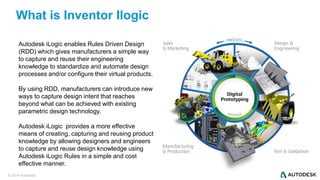
Autodesk iLogic enables Rules Driven Design
(RDD) which gives manufacturers a simple way
to capture and reuse their engineering
knowledge to standardize and automate design
processes and/or configure their virtual products.
By using RDD, manufacturers can introduce new
ways to capture design intent that reaches
beyond what can be achieved with existing
parametric design technology.
Autodesk iLogic provides a more effective
means of creating, capturing and reusing product
knowledge by allowing designers and engineers
to capture and reuse design knowledge using
Autodesk iLogic Rules in a simple and cost
effective manner.
© 2014 Autodesk
Ilogic is the way to work smart
© 2014 Autodesk
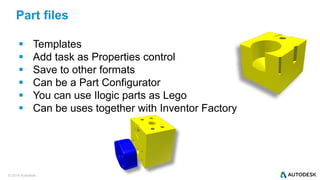
 Templates
 Add task as Properties control
 Save to other formats
 Can be a Part Configurator
 You can use Ilogic parts as Lego
 Can be uses together with Inventor Factory
Part files
© 2014 Autodesk
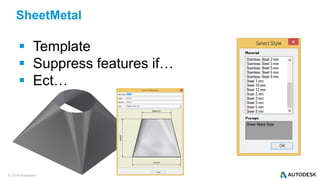
SheetMetal
 Template
 Suppress features if…
 Ect…
© 2014 Autodesk
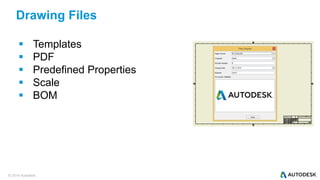
 Templates
 PDF
 Predefined Properties
 Scale
 BOM
Drawing Files
© 2014 Autodesk
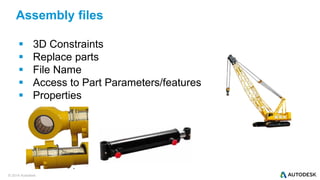
 3D Constraints
 Replace parts
 File Name
 Access to Part Parameters/features
 Properties
Assembly files
© 2014 Autodesk
Configurator 360
© 2014 Autodesk
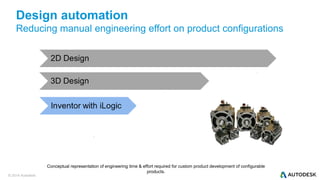
Design automation
Reducing manual engineering effort on product configurations
Conceptual representation of engineering time & effort required for custom product development of configurable
products.
© 2014 Autodesk
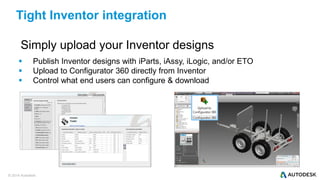
Simply upload your Inventor designs
 Publish Inventor designs with iParts, iAssy, iLogic, and/or ETO
 Upload to Configurator 360 directly from Inventor
 Control what end users can configure & download
Tight Inventor integration
© 2014 Autodesk
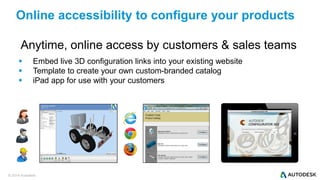
Anytime, online access by customers & sales teams
 Embed live 3D configuration links into your existing website
 Template to create your own custom-branded catalog
 iPad app for use with your customers
Online accessibility to configure your products
© 2014 Autodesk
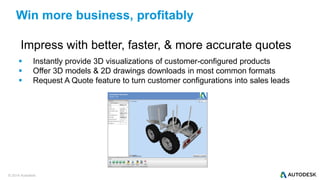
Impress with better, faster, & more accurate quotes
 Instantly provide 3D visualizations of customer-configured products
 Offer 3D models & 2D drawings downloads in most common formats
 Request A Quote feature to turn customer configurations into sales leads
Win more business, profitably
© 2014 Autodesk
Configurator 360 Sample Catalog
© 2014 Autodesk
© 2014 Autodesk
Next Step
Autodesk, the Autodesk logo, ATC, Autodesk Inventor, Inventor, and Moldflow are registered trademarks or trademarks of Autodesk, Inc., and/or its subsidiaries and/or affiliates in the USA
and/or other countries. Nastran is a registered trademark of the National Aeronautics and Space Administration. SolidWorks is a registered trademark of Dassault Systèmes SolidWorks
Corporation. All other brand names, product names, or trademarks belong to their respective holders. Autodesk reserves the right to alter product and services offerings, and specifications and
pricing at any time without notice, and is not responsible for typographical or graphical errors that may appear in this document.
© 2014 Autodesk Inc. All rights reserved.

ilogic.pdf

  • 1.
    © 2014 Autodesk Autodesk®Inventor Ilogic Jens Pedersen
  • 2.
    © 2014 Autodesk Whatis Inventor Ilogic Autodesk iLogic enables Rules Driven Design (RDD) which gives manufacturers a simple way to capture and reuse their engineering knowledge to standardize and automate design processes and/or configure their virtual products. By using RDD, manufacturers can introduce new ways to capture design intent that reaches beyond what can be achieved with existing parametric design technology. Autodesk iLogic provides a more effective means of creating, capturing and reusing product knowledge by allowing designers and engineers to capture and reuse design knowledge using Autodesk iLogic Rules in a simple and cost effective manner.
  • 3.
    © 2014 Autodesk Ilogicis the way to work smart
  • 4.
    © 2014 Autodesk Templates  Add task as Properties control  Save to other formats  Can be a Part Configurator  You can use Ilogic parts as Lego  Can be uses together with Inventor Factory Part files
  • 5.
    © 2014 Autodesk SheetMetal Template  Suppress features if…  Ect…
  • 6.
    © 2014 Autodesk Templates  PDF  Predefined Properties  Scale  BOM Drawing Files
  • 7.
    © 2014 Autodesk 3D Constraints  Replace parts  File Name  Access to Part Parameters/features  Properties Assembly files
  • 8.
  • 9.
    © 2014 Autodesk Designautomation Reducing manual engineering effort on product configurations Conceptual representation of engineering time & effort required for custom product development of configurable products.
  • 10.
    © 2014 Autodesk Simplyupload your Inventor designs  Publish Inventor designs with iParts, iAssy, iLogic, and/or ETO  Upload to Configurator 360 directly from Inventor  Control what end users can configure & download Tight Inventor integration
  • 11.
    © 2014 Autodesk Anytime,online access by customers & sales teams  Embed live 3D configuration links into your existing website  Template to create your own custom-branded catalog  iPad app for use with your customers Online accessibility to configure your products
  • 12.
    © 2014 Autodesk Impresswith better, faster, & more accurate quotes  Instantly provide 3D visualizations of customer-configured products  Offer 3D models & 2D drawings downloads in most common formats  Request A Quote feature to turn customer configurations into sales leads Win more business, profitably
  • 13.
  • 14.
  • 15.
  • 16.
    Autodesk, the Autodesklogo, ATC, Autodesk Inventor, Inventor, and Moldflow are registered trademarks or trademarks of Autodesk, Inc., and/or its subsidiaries and/or affiliates in the USA and/or other countries. Nastran is a registered trademark of the National Aeronautics and Space Administration. SolidWorks is a registered trademark of Dassault Systèmes SolidWorks Corporation. All other brand names, product names, or trademarks belong to their respective holders. Autodesk reserves the right to alter product and services offerings, and specifications and pricing at any time without notice, and is not responsible for typographical or graphical errors that may appear in this document. © 2014 Autodesk Inc. All rights reserved.