iLnk.us Introduction
Short URLs
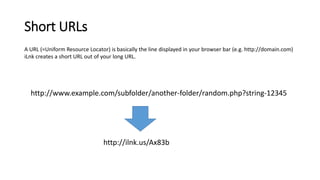
A URL (=Uniform Resource Locator) is basically the line displayed in your browser bar (e.g. http://domain.com)
iLnk creates a short URL out of your long URL.
http://www.example.com/subfolder/another-folder/random.php?string-12345
http://ilnk.us/Ax83b
Additional Options
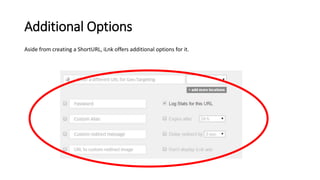
Aside from creating a ShortURL, iLnk offers additional options for it.
Geo Targeting
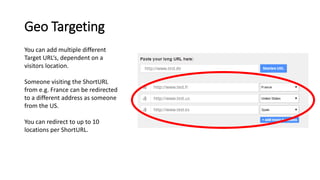
You can add multiple different
Target URL‘s, dependent on a
visitors location.
Someone visiting the ShortURL
from e.g. France can be redirected
to a different address as someone
from the US.
You can redirect to up to 10
locations per ShortURL.
Geo Targeting
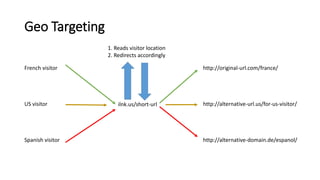
French visitor
US visitor
Spanish visitor
ilnk.us/short-url
http://original-url.com/france/
http://alternative-url.us/for-us-visitor/
http://alternative-domain.de/espanol/
1. Reads visitor location
2. Redirects accordingly
Statistics
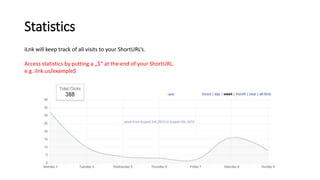
iLnk will keep track of all visits to your ShortURL‘s.
Access statistics by putting a „$“ at the end of your ShortURL.
e.g. ilnk.us/example$
Statistics
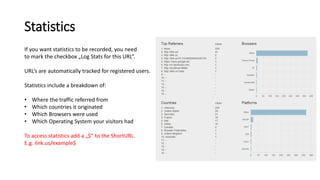
If you want statistics to be recorded, you need
to mark the checkbox „Log Stats for this URL“.
URL‘s are automatically tracked for registered users.
Statistics include a breakdown of:
• Where the traffic referred from
• Which countries it originated
• Which Browsers were used
• Which Operating System your visitors had
To access statistics add a „$“ to the ShortURL.
E.g. ilnk.us/example$
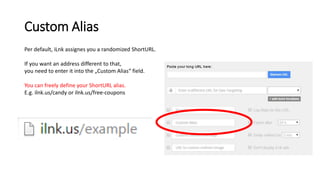
Custom Alias
Per default, iLnk assignes you a randomized ShortURL.
If you want an address different to that,
you need to enter it into the „Custom Alias“ field.
You can freely define your ShortURL alias.
E.g. ilnk.us/candy or ilnk.us/free-coupons
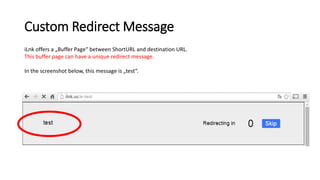
Custom Redirect Message
iLnk offers a „Buffer Page“ between ShortURL and destination URL.
This buffer page can have a unique redirect message.
In the screenshot below, this message is „test“.
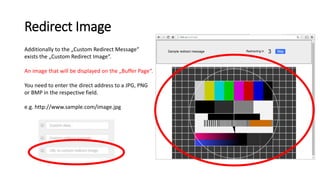
Redirect Image
Additionally to the „Custom Redirect Message“
exists the „Custom Redirect Image“.
An image that will be displayed on the „Buffer Page“.
You need to enter the direct address to a JPG, PNG
or BMP in the respective field.
e.g. http://www.sample.com/image.jpg
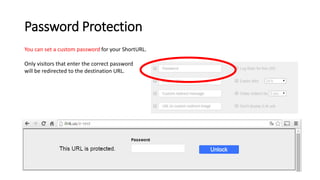
Password Protection
You can set a custom password for your ShortURL.
Only visitors that enter the correct password
will be redirected to the destination URL.
Delay Redirect
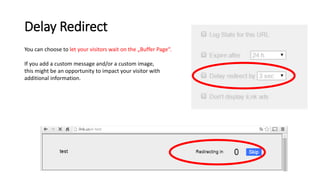
You can choose to let your visitors wait on the „Buffer Page“.
If you add a custom message and/or a custom image,
this might be an opportunity to impact your visitor with
additional information.
Link Expiration
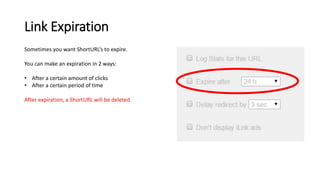
Sometimes you want ShortURL‘s to expire.
You can make an expiration in 2 ways:
• After a certain amount of clicks
• After a certain period of time
After expiration, a ShortURL will be deleted.
User System
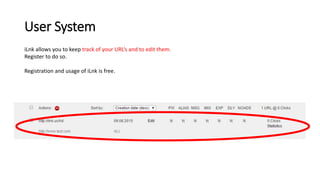
iLnk allows you to keep track of your URL‘s and to edit them.
Register to do so.
Registration and usage of iLnk is free.
QR Code
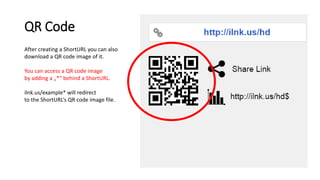
After creating a ShortURL you can also
download a QR code image of it.
You can access a QR code image
by adding a „*“ behind a ShortURL.
ilnk.us/example* will redirect
to the ShortURL‘s QR code image file.
That‘s it.
Share and recommend our service to others if you like it.

iLnk Advanced URL Shortener (Introduction)

  • 1.
  • 2.
    Short URLs A URL(=Uniform Resource Locator) is basically the line displayed in your browser bar (e.g. http://domain.com) iLnk creates a short URL out of your long URL. http://www.example.com/subfolder/another-folder/random.php?string-12345 http://ilnk.us/Ax83b
  • 3.
    Additional Options Aside fromcreating a ShortURL, iLnk offers additional options for it.
  • 4.
    Geo Targeting You canadd multiple different Target URL‘s, dependent on a visitors location. Someone visiting the ShortURL from e.g. France can be redirected to a different address as someone from the US. You can redirect to up to 10 locations per ShortURL.
  • 5.
    Geo Targeting French visitor USvisitor Spanish visitor ilnk.us/short-url http://original-url.com/france/ http://alternative-url.us/for-us-visitor/ http://alternative-domain.de/espanol/ 1. Reads visitor location 2. Redirects accordingly
  • 6.
    Statistics iLnk will keeptrack of all visits to your ShortURL‘s. Access statistics by putting a „$“ at the end of your ShortURL. e.g. ilnk.us/example$
  • 7.
    Statistics If you wantstatistics to be recorded, you need to mark the checkbox „Log Stats for this URL“. URL‘s are automatically tracked for registered users. Statistics include a breakdown of: • Where the traffic referred from • Which countries it originated • Which Browsers were used • Which Operating System your visitors had To access statistics add a „$“ to the ShortURL. E.g. ilnk.us/example$
  • 8.
    Custom Alias Per default,iLnk assignes you a randomized ShortURL. If you want an address different to that, you need to enter it into the „Custom Alias“ field. You can freely define your ShortURL alias. E.g. ilnk.us/candy or ilnk.us/free-coupons
  • 9.
    Custom Redirect Message iLnkoffers a „Buffer Page“ between ShortURL and destination URL. This buffer page can have a unique redirect message. In the screenshot below, this message is „test“.
  • 10.
    Redirect Image Additionally tothe „Custom Redirect Message“ exists the „Custom Redirect Image“. An image that will be displayed on the „Buffer Page“. You need to enter the direct address to a JPG, PNG or BMP in the respective field. e.g. http://www.sample.com/image.jpg
  • 11.
    Password Protection You canset a custom password for your ShortURL. Only visitors that enter the correct password will be redirected to the destination URL.
  • 12.
    Delay Redirect You canchoose to let your visitors wait on the „Buffer Page“. If you add a custom message and/or a custom image, this might be an opportunity to impact your visitor with additional information.
  • 13.
    Link Expiration Sometimes youwant ShortURL‘s to expire. You can make an expiration in 2 ways: • After a certain amount of clicks • After a certain period of time After expiration, a ShortURL will be deleted.
  • 14.
    User System iLnk allowsyou to keep track of your URL‘s and to edit them. Register to do so. Registration and usage of iLnk is free.
  • 15.
    QR Code After creatinga ShortURL you can also download a QR code image of it. You can access a QR code image by adding a „*“ behind a ShortURL. ilnk.us/example* will redirect to the ShortURL‘s QR code image file.
  • 16.
    That‘s it. Share andrecommend our service to others if you like it.