BUSINESS COMMUNICATION
Presented by
R.Ilayaraja
Effective Business
Communication
The structure of effective
Presentations and Reports.
Communication Checklist
How do you construct an effective
presentation or report?
Who is your audience?
What are they interested in?
What do you want them to remember?
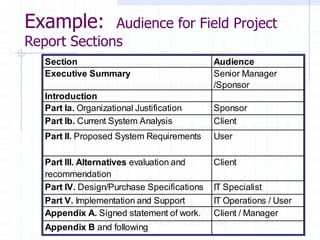
Example: Audience for Field Project
Report Sections
Section Audience
Executive Summary Senior Manager
/Sponsor
Introduction
Part Ia. Organizational Justification Sponsor
Part Ib. Current System Analysis Client
Part II. Proposed System Requirements User
Part III. Alternatives evaluation and
recommendation
Client
Part IV. Design/Purchase Specifications IT Specialist
Part V. Implementation and Support IT Operations / User
Appendix A. Signed statement of work. Client / Manager
Appendix B and following
Key points
Introduction and summary for each chapter.
Direct, simple sentences.
Short paragraphs.
White space, bullets and graphics.
Tables and figures stand on their own.
Text stands on its own.
There is nothing too obvious to say.
Components of an Effective
Presentation
Purpose
Format
Data
Conclusion
So What
Restate
Tag Ending
PURPOSE:
Define task.
"The purpose of this presentation is ... “
Describe what the original problem was
and what you were asked to do.
FORMAT:
What is the presentation going to do?
"This presentation recommends
o ...
o ... "
Tell them what you are going to say. This is
the agenda. Effective presentations use this
to outline the critical things that will be
covered, not copy the grading sheets.
DATA:
Information and data about the problem.
"You should note the following facts in
support of these recommendations...”
This is background. Spend only the
time here that you absolutely need.
CONCLUSION:
What does the data tell you?
"The conclusions to be drawn from these
facts are ..."
This is the setup, not the final conclusion.
SO WHAT:
What should the audience do?
"This means that we must ..."
What do these recommendations mean
to the audience? This is the part of the
presentation that your audience cares
most about. Try to spend most of your
time here.
RESTATE:
Summarize, preferably in action terms.
"In summary ...”
Wrap up the meeting.
Repeat your critical points.
List any action items.
Indicate what happens next.
Thank your clients.
TAG ENDING:
Verbal hook for your audience.
"In one sentence we say ..."
This is generally not done in formal
written communication. It is very
important in oral presentations.
Presentation Keys
Time the sections. Focus on “So What?”
Customize the presentation with logos or
names for your audience.
Use graphics effectively. Graphics stick in
people’s mind, but too much is clutter.
Use motion sparingly and sound never.
Rehearse. Try to use the same equipment
and room you will use.
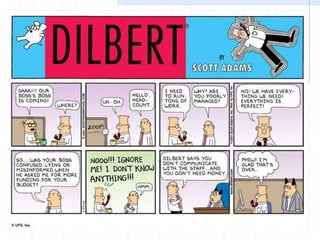
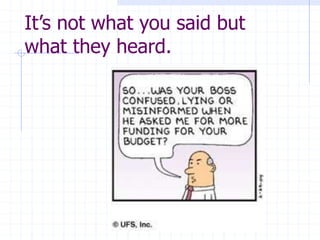
It’s not what you said but
what they heard.

Ilayaraja.ppt

  • 1.
  • 2.
    Effective Business Communication The structureof effective Presentations and Reports.
  • 4.
    Communication Checklist How doyou construct an effective presentation or report? Who is your audience? What are they interested in? What do you want them to remember?
  • 5.
    Example: Audience forField Project Report Sections Section Audience Executive Summary Senior Manager /Sponsor Introduction Part Ia. Organizational Justification Sponsor Part Ib. Current System Analysis Client Part II. Proposed System Requirements User Part III. Alternatives evaluation and recommendation Client Part IV. Design/Purchase Specifications IT Specialist Part V. Implementation and Support IT Operations / User Appendix A. Signed statement of work. Client / Manager Appendix B and following
  • 6.
    Key points Introduction andsummary for each chapter. Direct, simple sentences. Short paragraphs. White space, bullets and graphics. Tables and figures stand on their own. Text stands on its own. There is nothing too obvious to say.
  • 7.
    Components of anEffective Presentation Purpose Format Data Conclusion So What Restate Tag Ending
  • 8.
    PURPOSE: Define task. "The purposeof this presentation is ... “ Describe what the original problem was and what you were asked to do.
  • 9.
    FORMAT: What is thepresentation going to do? "This presentation recommends o ... o ... " Tell them what you are going to say. This is the agenda. Effective presentations use this to outline the critical things that will be covered, not copy the grading sheets.
  • 10.
    DATA: Information and dataabout the problem. "You should note the following facts in support of these recommendations...” This is background. Spend only the time here that you absolutely need.
  • 11.
    CONCLUSION: What does thedata tell you? "The conclusions to be drawn from these facts are ..." This is the setup, not the final conclusion.
  • 12.
    SO WHAT: What shouldthe audience do? "This means that we must ..." What do these recommendations mean to the audience? This is the part of the presentation that your audience cares most about. Try to spend most of your time here.
  • 13.
    RESTATE: Summarize, preferably inaction terms. "In summary ...” Wrap up the meeting. Repeat your critical points. List any action items. Indicate what happens next. Thank your clients.
  • 14.
    TAG ENDING: Verbal hookfor your audience. "In one sentence we say ..." This is generally not done in formal written communication. It is very important in oral presentations.
  • 15.
    Presentation Keys Time thesections. Focus on “So What?” Customize the presentation with logos or names for your audience. Use graphics effectively. Graphics stick in people’s mind, but too much is clutter. Use motion sparingly and sound never. Rehearse. Try to use the same equipment and room you will use.
  • 16.
    It’s not whatyou said but what they heard.