ICS3211 - Intelligent
Interfaces II
Combining design with technology for effective human-
computer interaction
Week 8
Department of Intelligent Computer Systems,
University of Malta,
20161
Interface Design I
Week 8 overview:
• Recap
• Interaction Design Process
• Using Processing
• Advanced Interface Technology
2
Learning Outcomes
At the end of this session you should be able to:
• Explore programming for visual design prototyping;
• Draw inferences about designing for different interfaces;
• Compare and contrast the different interfaces for use on the
same application/game;
• List the research issues/gaps in the design for AR/VR
applications;
• Describe some of the current research projects in AR/VR.
3
Cover
Download
Exhibition
» ownload Processing
» Play With Examples
» Browse Tutorials
» xhibition
Reference
Libraries
Tools
Environment
Tutorials
Examples
Books
overview
People
Foundation
Shop
»Forum
»GitHub
»Issues
>•Wild
»FAQ
>•Twitter
»Facebook
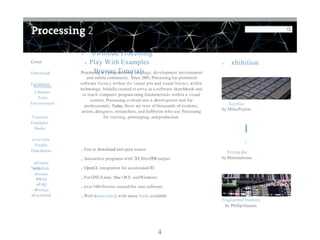
Processing is a program.ming language, development environment
and online community. Since 2001, Processing has promoted
software literacy within the visual arts and visual literacy within
technology. Initially created to serve as a software sketchbook and
to teach computer program.ming fundamentals within a visual
context, Processing evolved into a development tool for
professionals. Today, there are tens of thousands of students,
artists, designers, researchers, and hobbyists who use Processing
for learning, prototyping, andproduction.
,. Free to download and open source
,. Interactive programs with 2D,3DorPDFoutput
,. OpenGL integration for accelerated3D
,. For GNU/Linux, Mac OSX andWindows
,. over 100 libraries extend the core software
,. Well docum ented,with many books available
Keyflies
by MilesPeyton
I
: p
!
Petting Zoo
byMinimaforms
Fragmented Memory
by PhillipSteams
4
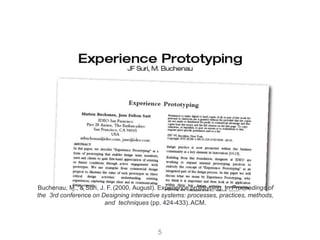
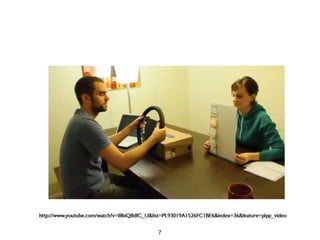
Experience Prototyping
The experience of evensimple artifacts doesnot exist in
a vacuumbut, rather, in dynamicrelationship with other
people, places andobjects.
Additionally, the quality of people’sexperience changes
over time asit is influenced byvariations in these
multiple contextual factors.
5
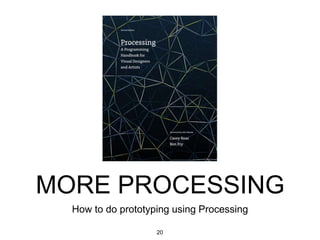
MORE PROCESSING
How to do prototyping using Processing
6
Processing - starting out
• https://processing.org/tutorials/gettingstarted/
• Open Source
• Interactive programs with 2D, 3D or PDF output
• OpenGL integration for accelerated 2D and 3D
• For GNU/Linux, Mac OS X, and Windows
• Over 100 libraries extend the core software
7
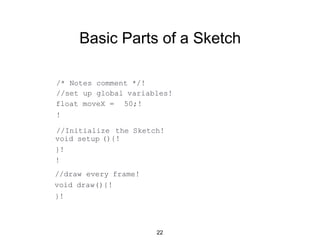
Basic Parts of a Sketch
/* Notes comment */!
//set up global variables!
float moveX = 50;!
!
//Initialize the Sketch!
(){!void setup
}!
!
//draw every frame!
void draw(){!
}!
8
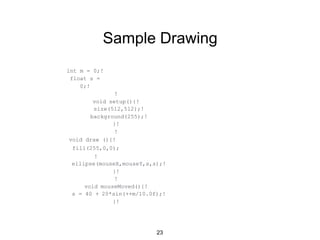
Sample Drawing
int m = 0;!
float s =
0;!
!
void setup(){!
size(512,512);!
background(255);!
}!
!
void draw (){!
fill(255,0,0);
!
ellipse(mouseX,mouseY,s,s);!
}!
!
void mouseMoved(){!
s = 40 + 20*sin(++m/10.0f);!
}!
9
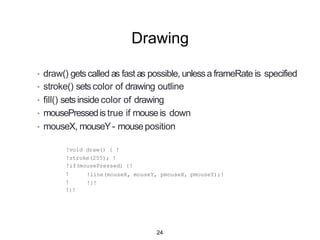
Drawing
• draw() gets called as fast as possible, unlessa frameRate is specified
• stroke() setscolor of drawing outline
• fill() sets inside color of drawing
• mousePressedis true if mouseis down
• mouseX, mouseY- mouseposition
!void draw() { !
!stroke(255); !
!if(mousePressed) {!
!line(mouseX, mouseY, pmouseX, pmouseY);!
!}!
!
!
!}!
10
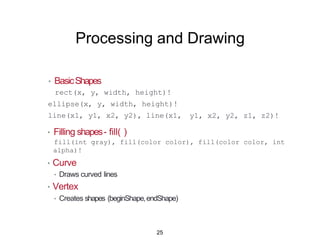
Processing and Drawing
• BasicShapes
rect(x, y, width, height)!
ellipse(x, y, width, height)!
line(x1, y1, x2, y2), line(x1, y1, x2, y2, z1, z2)!
• Filling shapes- fill( )
fill(int gray), fill(color color), fill(color color, int
alpha)!
• Curve
• Draws curved lines
• Vertex
• Creates shapes (beginShape,endShape)
11
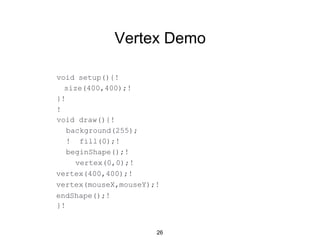
Vertex Demo
void setup(){!
size(400,400);!
}!
!
void draw(){!
background(255);
! fill(0);!
beginShape();!
vertex(0,0);!
vertex(400,400);!
vertex(mouseX,mouseY);!
endShape();!
}!
12
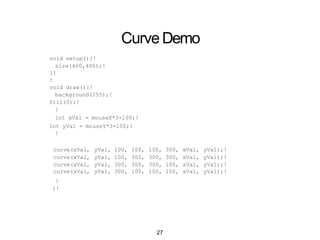
CurveDemo
void setup(){!
size(400,400);!
}!
!
void draw(){!
background(255);!
fill(0);!
!
int xVal = mouseX*3-100;!
int yVal = mouseY*3-100;!
!
curve(xVal, yVal, 100, 100, 100, 300, xVal, yVal);!
curve(xVal, yVal, 100, 300, 300, 300, xVal, yVal);!
curve(xVal, yVal, 300, 300, 300, 100, xVal, yVal);!
curve(xVal, yVal, 300, 100, 100, 100, xVal, yVal);!
!
}!
13
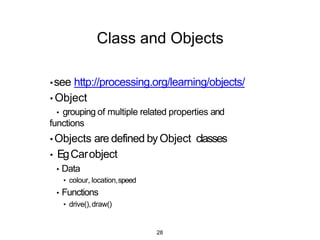
Class and Objects
•see http://processing.org/learning/objects/
• Object
• grouping of multiple related properties and
functions
• Objects are defined byObject classes
• EgCarobject
• Data
• colour, location,speed
• Functions
• drive(),draw()
14
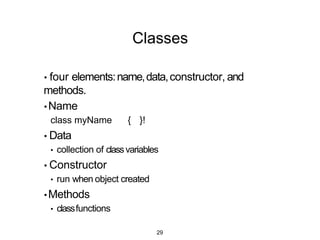
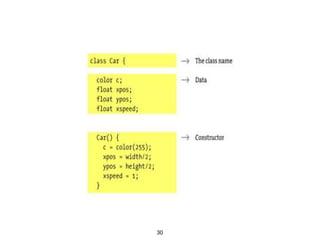
Classes
• four elements:name,data,constructor, and
methods.
• Name
class myName { }!
• Data
• collection of classvariables
• Constructor
• run when object created
•Methods
• classfunctions
15
16
17
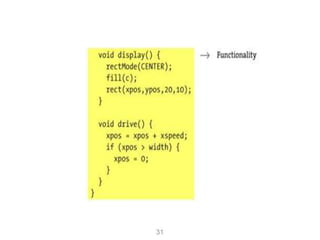
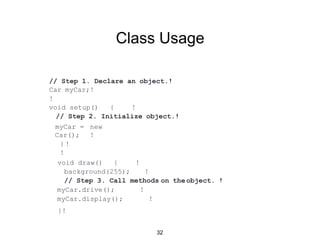
Class Usage
// Step 1. Declare an object.!
Car myCar;!
!
void setup() { !
// Step 2. Initialize object.!
myCar = new
Car(); !
!}
!
on theobject. !
void draw() { !
background(255); !
// Step 3. Call methods
myCar.drive(); !
myCar.display(); !
}!
18
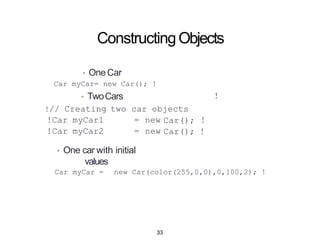
ConstructingObjects
• OneCar
Car myCar= new Car(); !
• TwoCars
!
!
!// Creating
!Car myCar1
!Car myCar2
two car objects
= new
= new
Car();
Car(); !
• One car with initial
values
Car myCar = new Car(color(255,0,0),0,100,2); !
19
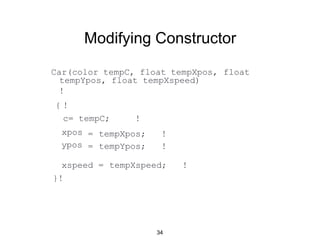
Modifying Constructor
Car(color tempC, float tempXpos, float
{
tempYpos, float tempXspeed)
!
c= tempC; !
xpos
ypos
= tempXpos;
= tempYpos;
!
!
xspeed = tempXspeed; !
}!
!
20
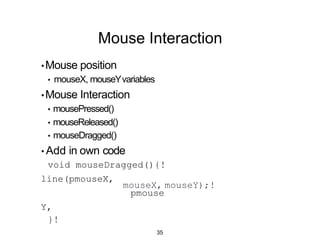
Mouse Interaction
mouseX, mouseY);!
•Mouse position
• mouseX, mouseYvariables
•Mouse Interaction
• mousePressed()
• mouseReleased()
• mouseDragged()
• Add in own code
void mouseDragged(){!
line(pmouseX,
pmouse
Y,
}!
21
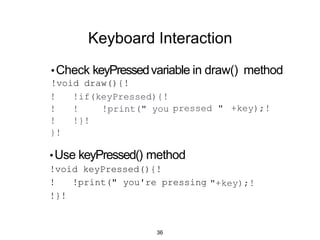
Keyboard Interaction
•Check keyPressedvariable in draw() method
!void draw(){!
pressed " +key);!
! !if(keyPressed){!
! ! !print(" you
! !}!
}!
"+key);!
•Use keyPressed() method
!void keyPressed(){!
! !print(" you're pressing
!}!
22
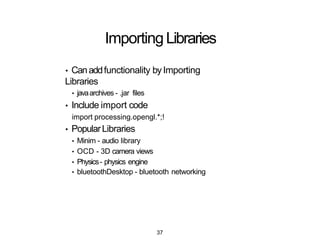
ImportingLibraries
• Canaddfunctionality byImporting
Libraries
• javaarchives - .jar files
• Include import code
import processing.opengl.*;!
• PopularLibraries
• Minim - audio library
• OCD - 3D camera views
• Physics- physics engine
• bluetoothDesktop - bluetooth networking
23
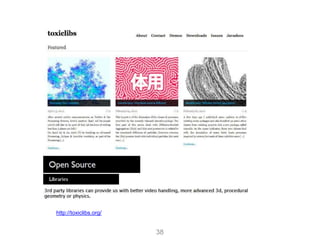
http://toxiclibs.org/
24
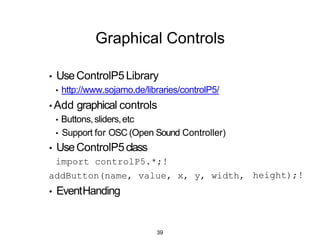
Graphical Controls
height);!
• UseControlP5Library
• http://www.sojamo.de/libraries/controlP5/
• Add graphical controls
• Buttons,sliders,etc
• Support for OSC (Open Sound Controller)
• UseControlP5class
import controlP5.*;!
addButton(name, value, x, y, width,
• EventHanding
25
Interface Elements
•Interfascia
•http://www.superstable.net/interfascia/
• GUI Library for Processing
• Buttons
•Check boxes
•Textfields
•Progress bar
26
RolePlaying
27
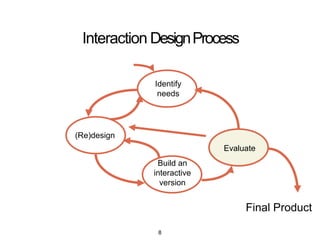
Interaction DesignProcess
(Re)design
Identify
needs
Build an
interactive
version
Evaluate
Final Product
28
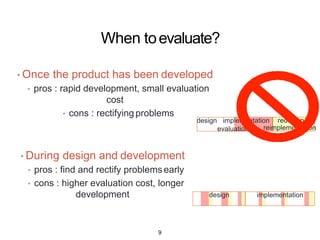
When toevaluate?
• Once the product has been developed
• pros : rapid development, small evaluation cost
• cons : rectifying problems
• During design and development
• pros : find and rectify problems early
• cons : higher evaluation cost, longer development
design implementation
evaluation
redesign &
reimplementation
design implementation
29
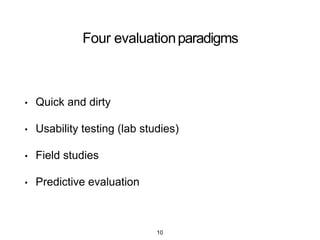
Four evaluationparadigms
• Quick and dirty
• Usability testing (lab studies)
• Field studies
• Predictive evaluation
30
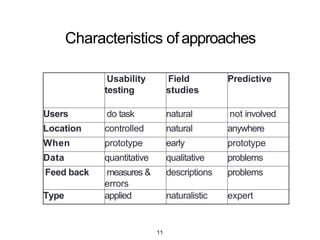
Characteristics ofapproaches
Usability
testing
Field
studies
Predictive
Users do task natural not involved
Location controlled natural anywhere
When prototype early prototype
Data quantitative qualitative problems
Feed back measures &
errors
descriptions problems
Type applied naturalistic expert
31
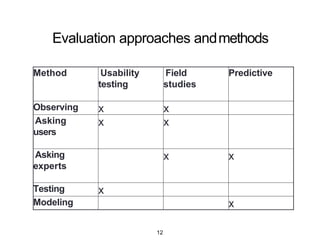
Evaluation approaches andmethods
Method Usability
testing
Field
studies
Predictive
Observing x x
Asking
users
x x
Asking
experts
x x
Testing x
Modeling x
32
33
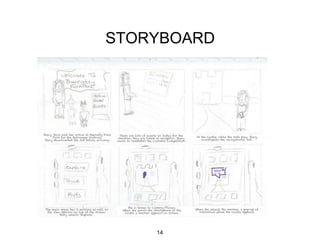
STORYBOARD
34
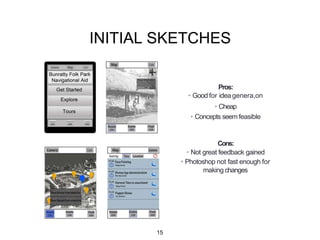
INITIAL SKETCHES
Pros:
• Good for ideagenera,on
• Cheap
• Concepts seem feasible
Cons:
• Not great feedback gained
• Photoshop not fast enough for
makingchanges
35
FirstDraft
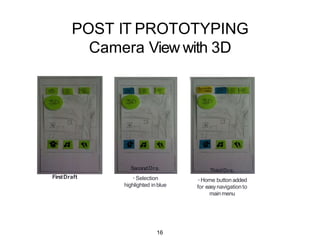
POST IT PROTOTYPING
Camera View with 3D
SecondDra.
• Selection
highlighted in blue
ThirdDra.
•Home button added
for easynavigation to
main menu
36
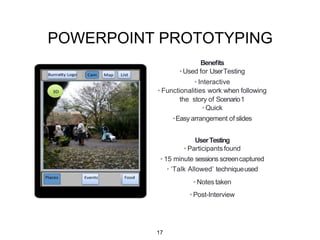
POWERPOINT PROTOTYPING
Benefits
•Used for UserTesting
• Interactive
• Functionalities work when
followingthe story of Scenario1
•Quick
•Easy arrangement of slides
UserTesting
• Participants found
• 15 minute sessions screen
captured
• ‘Talk Allowed’ techniqueused
• Notes taken
• Post-Interview
37
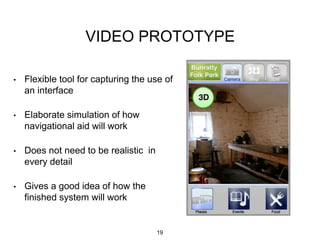
VIDEO PROTOTYPE
• Flexible tool for capturing the use of
an interface
• Elaborate simulation of how
navigational aid will work
• Does not need to be realistic in
every detail
• Gives a good idea of how the
finished system will work
38
ADVANCED INTERFACE
TECHNOLOGY
39
Advanced InterfaceTechnology
• Wearable Computers
• Augmented Reality
• Virtual Reality
• Invisible Interfaces
• Environment Sensing
• Physiological Sensing
40
41
42
43
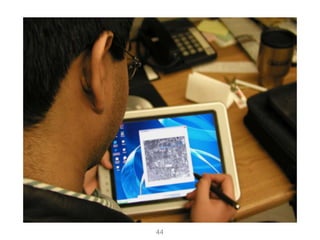
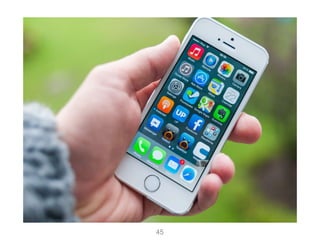
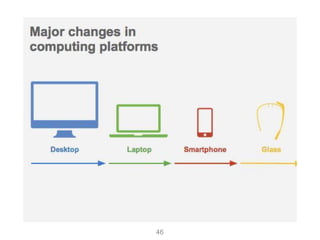
Major changes incomputing
44
45
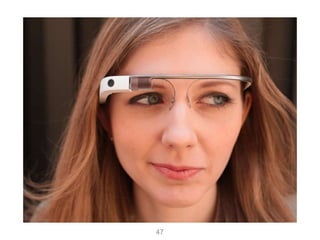
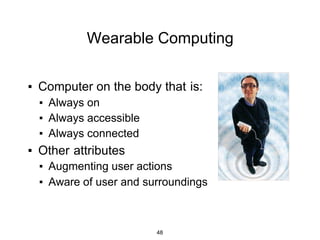
Wearable Computing
▪ Computer on the body that is:
▪ Always on
▪ Always accessible
▪ Always connected
▪ Other attributes
▪ Augmenting user actions
▪ Aware of user and surroundings
46
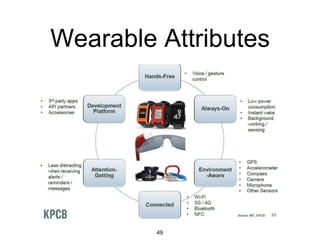
Wearable Attributes
47
48
49
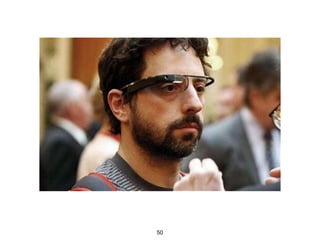
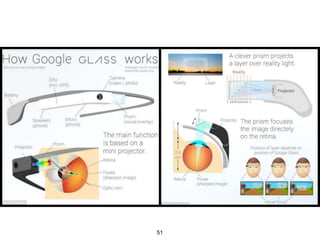
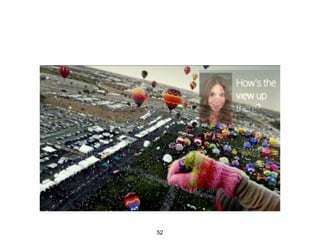
ViewThroughGoogleGlass
50
Research Problems
• Hardware
• Power, networking, display
• User Interaction
• User input, speech, gesture, gaze, etc
• Novel interaction methods
• Social Acceptance
• Privacy, social factors
• Novel Applications
• Collaboration
• Intelligent assistance
51
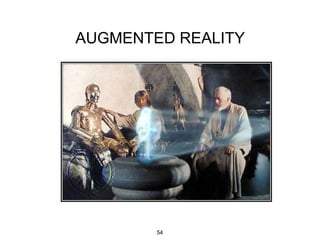
AUGMENTED REALITY
52
Augmented Reality Definition
•Defining Characteristics
•Combines RealandVirtual Images
• Both canbeseenat the same time
• Interactive in real-time
• The virtual content canbeinteracted with
•Registered in 3D
• Virtual objects appearfixed in space
53
54
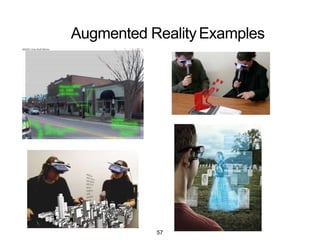
Augmented RealityExamples
55
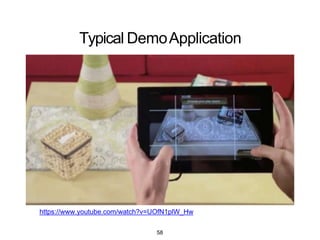
Typical DemoApplication
https://www.youtube.com/watch?v=UOfN1plW_Hw
56
Research Problems
• Low level hardware/software
• Head mounted displays
• Tracking systems
• User Interaction
• Gesture based interaction
• Multimodal input (speech, gesture)
• Novel Applications
• Face to face collaboration
• Authoring tools
57
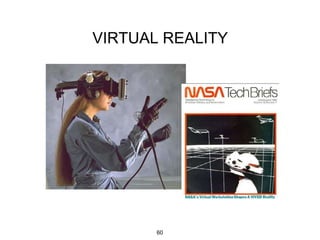
VIRTUAL REALITY
58
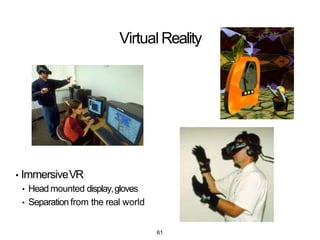
Virtual Reality
• ImmersiveVR
• Head mounted display,gloves
• Separation from the real world
59
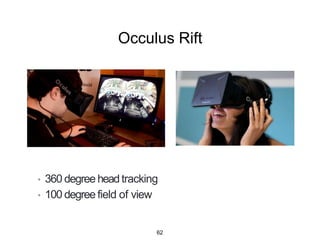
Occulus Rift
• 360 degree head tracking
• 100 degree field of view
60
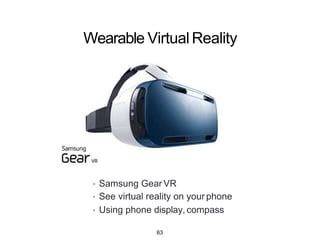
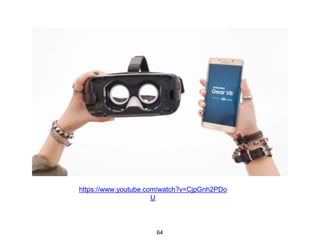
Wearable VirtualReality
• Samsung Gear VR
• See virtual reality on your phone
• Using phone display, compass
61
Gear VRDemo
https://www.youtube.com/watch?v=CjpGnh2PDo
U
62
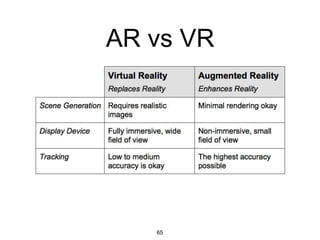
AR vs VR
63
Research Problems
• Low level
• Wide area tracking
• Development tools
• User Interaction
• Intuitive input (gesture, controllers)
• Avatar control and representation
• Techniques for navigation/manipulation
• Novel Applications
• Massive multi-user environments
• Content capture and sharing
64
INVISIBLE
INTERFACES
65
EarlyExamples
• Interaction without devices:
• BodySpace [Strachan 2007]: Functions to body position
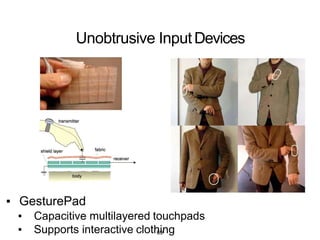
• Abracadabra [Harrison 2007]: Magnets on finger tips
• GesturePad [Rekimoto 2001]: Capacitive sensing in clothing
• Palm-based Interaction
• Haptic Hand [Kohli 2005]: Using non-dominant hand in VR
• Sixth Sense [Mistry 2009]: Projection on hand
• Brainy Hand [Tamaki 2009]: Head worn projector/camera
66
Unobtrusive InputDevices
▪ GesturePad
▪ Capacitive multilayered touchpads
▪ Supports interactive clothing67
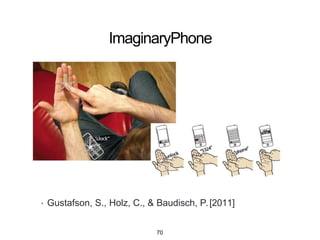
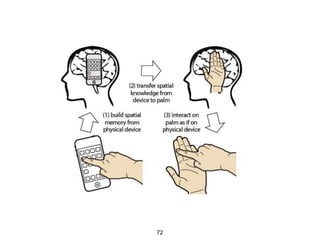
ImaginaryPhone
• Gustafson, S., Holz, C., & Baudisch, P.[2011]
68
https://www.youtube.com/watch?v=xtbRen9RYx
4
69
70
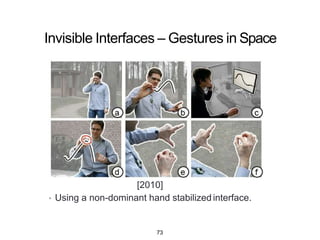
Invisible Interfaces – Gestures in Space
• Gustafson, S., Bierwirth, D., & Baudisch, P.
[2010]
• Using a non-dominant hand stabilizedinterface.
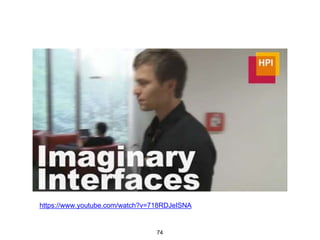
71
https://www.youtube.com/watch?v=718RDJeISNA
72
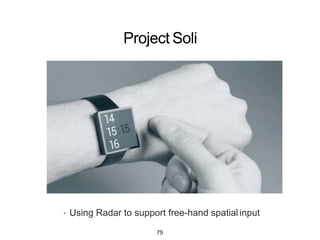
Project Soli
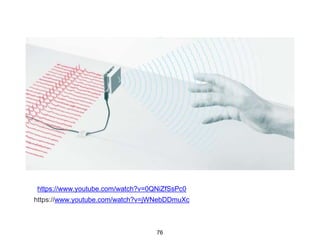
• Using Radar to support free-hand spatial input
73
Project Soli
https://www.youtube.com/watch?v=0QNiZfSsPc0
https://www.youtube.com/watch?v=jWNebDDmuXc
74
Research Gaps
• Free-hand interfaces using relative input
• Combining invisible interface + mobile device
• Multimodalinteraction
• speech + gesture input
• Affordances and discoverability
• Interactionframeworks
75
Research Problems
• Hardware
• Power, networking, display
• User Interaction
• User input, speech, gesture, gaze,etc
• Novel interaction methods
• Social Acceptance
• Privacy, social factors
• Novel Applications
• Collaboration
• Intelligentassistance
76
ENVIRONMENT SENSING
77
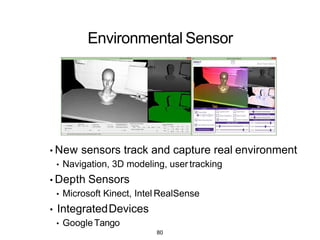
Environmental Sensor
• New sensors track and capture real environment
• Navigation, 3D modeling, user tracking
• Depth Sensors
• Microsoft Kinect, Intel RealSense
• IntegratedDevices
• GoogleTango
78
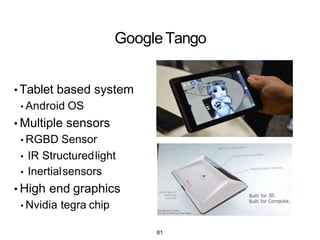
GoogleTango
• Tablet based system
• Android OS
• Multiple sensors
• RGBD Sensor
• IR Structuredlight
• Inertialsensors
• High end graphics
• Nvidia tegra chip
79
Research Problems
• Content creation
• Creating better 3D models
• Segmenting objects
• User Interaction
• Interaction with real world
• Interacting with multiple devices
• Novel Applications
• AR notes/real world tagging
• Social networking
80
PHYSIOLOGICAL SENSING
81
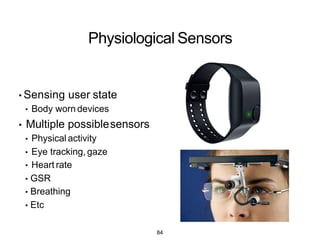
Physiological Sensors
• Sensing user state
• Body worn devices
• Multiple possiblesensors
• Physical activity
• Eye tracking, gaze
• Heart rate
• GSR
• Breathing
• Etc
82
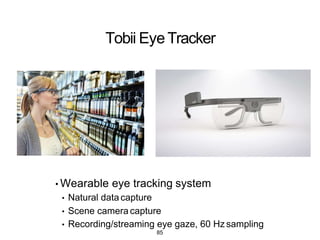
Tobii EyeTracker
• Wearable eye tracking system
• Natural data capture
• Scene camera capture
• Recording/streaming eye gaze, 60 Hz sampling
83
• https://www.youtube.com/watch?v=hDG1mRFFusc
84
Research Problems
• User Interaction
• Implicit vs. Explicitinteraction
• Measuring cognitive
• Social Acceptance
• Privacy, social factors
• Novel Applications
• Collaboration
• Intelligent assistance
85

ICS3211 lecture 08

  • 1.
    ICS3211 - Intelligent InterfacesII Combining design with technology for effective human- computer interaction Week 8 Department of Intelligent Computer Systems, University of Malta, 20161
  • 2.
    Interface Design I Week8 overview: • Recap • Interaction Design Process • Using Processing • Advanced Interface Technology 2
  • 3.
    Learning Outcomes At theend of this session you should be able to: • Explore programming for visual design prototyping; • Draw inferences about designing for different interfaces; • Compare and contrast the different interfaces for use on the same application/game; • List the research issues/gaps in the design for AR/VR applications; • Describe some of the current research projects in AR/VR. 3
  • 4.
    Cover Download Exhibition » ownload Processing »Play With Examples » Browse Tutorials » xhibition Reference Libraries Tools Environment Tutorials Examples Books overview People Foundation Shop »Forum »GitHub »Issues >•Wild »FAQ >•Twitter »Facebook Processing is a program.ming language, development environment and online community. Since 2001, Processing has promoted software literacy within the visual arts and visual literacy within technology. Initially created to serve as a software sketchbook and to teach computer program.ming fundamentals within a visual context, Processing evolved into a development tool for professionals. Today, there are tens of thousands of students, artists, designers, researchers, and hobbyists who use Processing for learning, prototyping, andproduction. ,. Free to download and open source ,. Interactive programs with 2D,3DorPDFoutput ,. OpenGL integration for accelerated3D ,. For GNU/Linux, Mac OSX andWindows ,. over 100 libraries extend the core software ,. Well docum ented,with many books available Keyflies by MilesPeyton I : p ! Petting Zoo byMinimaforms Fragmented Memory by PhillipSteams 4
  • 5.
    Experience Prototyping The experienceof evensimple artifacts doesnot exist in a vacuumbut, rather, in dynamicrelationship with other people, places andobjects. Additionally, the quality of people’sexperience changes over time asit is influenced byvariations in these multiple contextual factors. 5
  • 6.
    MORE PROCESSING How todo prototyping using Processing 6
  • 7.
    Processing - startingout • https://processing.org/tutorials/gettingstarted/ • Open Source • Interactive programs with 2D, 3D or PDF output • OpenGL integration for accelerated 2D and 3D • For GNU/Linux, Mac OS X, and Windows • Over 100 libraries extend the core software 7
  • 8.
    Basic Parts ofa Sketch /* Notes comment */! //set up global variables! float moveX = 50;! ! //Initialize the Sketch! (){!void setup }! ! //draw every frame! void draw(){! }! 8
  • 9.
    Sample Drawing int m= 0;! float s = 0;! ! void setup(){! size(512,512);! background(255);! }! ! void draw (){! fill(255,0,0); ! ellipse(mouseX,mouseY,s,s);! }! ! void mouseMoved(){! s = 40 + 20*sin(++m/10.0f);! }! 9
  • 10.
    Drawing • draw() getscalled as fast as possible, unlessa frameRate is specified • stroke() setscolor of drawing outline • fill() sets inside color of drawing • mousePressedis true if mouseis down • mouseX, mouseY- mouseposition !void draw() { ! !stroke(255); ! !if(mousePressed) {! !line(mouseX, mouseY, pmouseX, pmouseY);! !}! ! ! !}! 10
  • 11.
    Processing and Drawing •BasicShapes rect(x, y, width, height)! ellipse(x, y, width, height)! line(x1, y1, x2, y2), line(x1, y1, x2, y2, z1, z2)! • Filling shapes- fill( ) fill(int gray), fill(color color), fill(color color, int alpha)! • Curve • Draws curved lines • Vertex • Creates shapes (beginShape,endShape) 11
  • 12.
    Vertex Demo void setup(){! size(400,400);! }! ! voiddraw(){! background(255); ! fill(0);! beginShape();! vertex(0,0);! vertex(400,400);! vertex(mouseX,mouseY);! endShape();! }! 12
  • 13.
    CurveDemo void setup(){! size(400,400);! }! ! void draw(){! background(255);! fill(0);! ! intxVal = mouseX*3-100;! int yVal = mouseY*3-100;! ! curve(xVal, yVal, 100, 100, 100, 300, xVal, yVal);! curve(xVal, yVal, 100, 300, 300, 300, xVal, yVal);! curve(xVal, yVal, 300, 300, 300, 100, xVal, yVal);! curve(xVal, yVal, 300, 100, 100, 100, xVal, yVal);! ! }! 13
  • 14.
    Class and Objects •seehttp://processing.org/learning/objects/ • Object • grouping of multiple related properties and functions • Objects are defined byObject classes • EgCarobject • Data • colour, location,speed • Functions • drive(),draw() 14
  • 15.
    Classes • four elements:name,data,constructor,and methods. • Name class myName { }! • Data • collection of classvariables • Constructor • run when object created •Methods • classfunctions 15
  • 16.
  • 17.
  • 18.
    Class Usage // Step1. Declare an object.! Car myCar;! ! void setup() { ! // Step 2. Initialize object.! myCar = new Car(); ! !} ! on theobject. ! void draw() { ! background(255); ! // Step 3. Call methods myCar.drive(); ! myCar.display(); ! }! 18
  • 19.
    ConstructingObjects • OneCar Car myCar=new Car(); ! • TwoCars ! ! !// Creating !Car myCar1 !Car myCar2 two car objects = new = new Car(); Car(); ! • One car with initial values Car myCar = new Car(color(255,0,0),0,100,2); ! 19
  • 20.
    Modifying Constructor Car(color tempC,float tempXpos, float { tempYpos, float tempXspeed) ! c= tempC; ! xpos ypos = tempXpos; = tempYpos; ! ! xspeed = tempXspeed; ! }! ! 20
  • 21.
    Mouse Interaction mouseX, mouseY);! •Mouseposition • mouseX, mouseYvariables •Mouse Interaction • mousePressed() • mouseReleased() • mouseDragged() • Add in own code void mouseDragged(){! line(pmouseX, pmouse Y, }! 21
  • 22.
    Keyboard Interaction •Check keyPressedvariablein draw() method !void draw(){! pressed " +key);! ! !if(keyPressed){! ! ! !print(" you ! !}! }! "+key);! •Use keyPressed() method !void keyPressed(){! ! !print(" you're pressing !}! 22
  • 23.
    ImportingLibraries • Canaddfunctionality byImporting Libraries •javaarchives - .jar files • Include import code import processing.opengl.*;! • PopularLibraries • Minim - audio library • OCD - 3D camera views • Physics- physics engine • bluetoothDesktop - bluetooth networking 23
  • 24.
  • 25.
    Graphical Controls height);! • UseControlP5Library •http://www.sojamo.de/libraries/controlP5/ • Add graphical controls • Buttons,sliders,etc • Support for OSC (Open Sound Controller) • UseControlP5class import controlP5.*;! addButton(name, value, x, y, width, • EventHanding 25
  • 26.
    Interface Elements •Interfascia •http://www.superstable.net/interfascia/ • GUILibrary for Processing • Buttons •Check boxes •Textfields •Progress bar 26
  • 27.
  • 28.
  • 29.
    When toevaluate? • Oncethe product has been developed • pros : rapid development, small evaluation cost • cons : rectifying problems • During design and development • pros : find and rectify problems early • cons : higher evaluation cost, longer development design implementation evaluation redesign & reimplementation design implementation 29
  • 30.
    Four evaluationparadigms • Quickand dirty • Usability testing (lab studies) • Field studies • Predictive evaluation 30
  • 31.
    Characteristics ofapproaches Usability testing Field studies Predictive Users dotask natural not involved Location controlled natural anywhere When prototype early prototype Data quantitative qualitative problems Feed back measures & errors descriptions problems Type applied naturalistic expert 31
  • 32.
    Evaluation approaches andmethods MethodUsability testing Field studies Predictive Observing x x Asking users x x Asking experts x x Testing x Modeling x 32
  • 33.
  • 34.
  • 35.
    INITIAL SKETCHES Pros: • Goodfor ideagenera,on • Cheap • Concepts seem feasible Cons: • Not great feedback gained • Photoshop not fast enough for makingchanges 35
  • 36.
    FirstDraft POST IT PROTOTYPING CameraView with 3D SecondDra. • Selection highlighted in blue ThirdDra. •Home button added for easynavigation to main menu 36
  • 37.
    POWERPOINT PROTOTYPING Benefits •Used forUserTesting • Interactive • Functionalities work when followingthe story of Scenario1 •Quick •Easy arrangement of slides UserTesting • Participants found • 15 minute sessions screen captured • ‘Talk Allowed’ techniqueused • Notes taken • Post-Interview 37
  • 38.
    VIDEO PROTOTYPE • Flexibletool for capturing the use of an interface • Elaborate simulation of how navigational aid will work • Does not need to be realistic in every detail • Gives a good idea of how the finished system will work 38
  • 39.
  • 40.
    Advanced InterfaceTechnology • WearableComputers • Augmented Reality • Virtual Reality • Invisible Interfaces • Environment Sensing • Physiological Sensing 40
  • 41.
  • 42.
  • 43.
  • 44.
  • 45.
  • 46.
    Wearable Computing ▪ Computeron the body that is: ▪ Always on ▪ Always accessible ▪ Always connected ▪ Other attributes ▪ Augmenting user actions ▪ Aware of user and surroundings 46
  • 47.
  • 48.
  • 49.
  • 50.
  • 51.
    Research Problems • Hardware •Power, networking, display • User Interaction • User input, speech, gesture, gaze, etc • Novel interaction methods • Social Acceptance • Privacy, social factors • Novel Applications • Collaboration • Intelligent assistance 51
  • 52.
  • 53.
    Augmented Reality Definition •DefiningCharacteristics •Combines RealandVirtual Images • Both canbeseenat the same time • Interactive in real-time • The virtual content canbeinteracted with •Registered in 3D • Virtual objects appearfixed in space 53
  • 54.
  • 55.
  • 56.
  • 57.
    Research Problems • Lowlevel hardware/software • Head mounted displays • Tracking systems • User Interaction • Gesture based interaction • Multimodal input (speech, gesture) • Novel Applications • Face to face collaboration • Authoring tools 57
  • 58.
  • 59.
    Virtual Reality • ImmersiveVR •Head mounted display,gloves • Separation from the real world 59
  • 60.
    Occulus Rift • 360degree head tracking • 100 degree field of view 60
  • 61.
    Wearable VirtualReality • SamsungGear VR • See virtual reality on your phone • Using phone display, compass 61
  • 62.
  • 63.
  • 64.
    Research Problems • Lowlevel • Wide area tracking • Development tools • User Interaction • Intuitive input (gesture, controllers) • Avatar control and representation • Techniques for navigation/manipulation • Novel Applications • Massive multi-user environments • Content capture and sharing 64
  • 65.
  • 66.
    EarlyExamples • Interaction withoutdevices: • BodySpace [Strachan 2007]: Functions to body position • Abracadabra [Harrison 2007]: Magnets on finger tips • GesturePad [Rekimoto 2001]: Capacitive sensing in clothing • Palm-based Interaction • Haptic Hand [Kohli 2005]: Using non-dominant hand in VR • Sixth Sense [Mistry 2009]: Projection on hand • Brainy Hand [Tamaki 2009]: Head worn projector/camera 66
  • 67.
    Unobtrusive InputDevices ▪ GesturePad ▪Capacitive multilayered touchpads ▪ Supports interactive clothing67
  • 68.
    ImaginaryPhone • Gustafson, S.,Holz, C., & Baudisch, P.[2011] 68
  • 69.
  • 70.
  • 71.
    Invisible Interfaces –Gestures in Space • Gustafson, S., Bierwirth, D., & Baudisch, P. [2010] • Using a non-dominant hand stabilizedinterface. 71
  • 72.
  • 73.
    Project Soli • UsingRadar to support free-hand spatial input 73
  • 74.
  • 75.
    Research Gaps • Free-handinterfaces using relative input • Combining invisible interface + mobile device • Multimodalinteraction • speech + gesture input • Affordances and discoverability • Interactionframeworks 75
  • 76.
    Research Problems • Hardware •Power, networking, display • User Interaction • User input, speech, gesture, gaze,etc • Novel interaction methods • Social Acceptance • Privacy, social factors • Novel Applications • Collaboration • Intelligentassistance 76
  • 77.
  • 78.
    Environmental Sensor • Newsensors track and capture real environment • Navigation, 3D modeling, user tracking • Depth Sensors • Microsoft Kinect, Intel RealSense • IntegratedDevices • GoogleTango 78
  • 79.
    GoogleTango • Tablet basedsystem • Android OS • Multiple sensors • RGBD Sensor • IR Structuredlight • Inertialsensors • High end graphics • Nvidia tegra chip 79
  • 80.
    Research Problems • Contentcreation • Creating better 3D models • Segmenting objects • User Interaction • Interaction with real world • Interacting with multiple devices • Novel Applications • AR notes/real world tagging • Social networking 80
  • 81.
  • 82.
    Physiological Sensors • Sensinguser state • Body worn devices • Multiple possiblesensors • Physical activity • Eye tracking, gaze • Heart rate • GSR • Breathing • Etc 82
  • 83.
    Tobii EyeTracker • Wearableeye tracking system • Natural data capture • Scene camera capture • Recording/streaming eye gaze, 60 Hz sampling 83
  • 84.
  • 85.
    Research Problems • UserInteraction • Implicit vs. Explicitinteraction • Measuring cognitive • Social Acceptance • Privacy, social factors • Novel Applications • Collaboration • Intelligent assistance 85