




Tivoli Storage Manager for Databases
       ®


Version 5.5


Data Protection for Microsoft SQL Server
Installation and User’s Guide


                                           SC32-9059-02
Tivoli Storage Manager for Databases
       ®


Version 5.5


Data Protection for Microsoft SQL Server
Installation and User’s Guide


                                           SC32-9059-02
Note
  Before using this information and the product it supports, read the information in “Notices” on page 263.


Edition notice
This edition applies to version 5, release 5, modification 0 of IBM Tivoli Storage Manager for Databases Data
Protection for Microsoft SQL Server (program numbers 5608-APD, 5608-CSS) and to all subsequent releases and
modifications until otherwise indicated in new editions.
© Copyright International Business Machines Corporation 1997, 2007. All rights reserved.
US Government Users Restricted Rights – Use, duplication or disclosure restricted by GSA ADP Schedule Contract
with IBM Corp.
Contents
    Tables . . . . . . . . . . . . . . . ix                         VSS Instant Restore .   .   .   .   .   .   .   .   .   .   .   19
                                                                 Restore types . . . .      .   .   .   .   .   .   .   .   .   .   20
    Preface . . . . . . . . . . . . . . . xi                     Security . . . . .         .   .   .   .   .   .   .   .   .   .   21
                                                                 Performance . . . .        .   .   .   .   .   .   .   .   .   .   22
    Who should read this guide . . . . . . . . . xi
                                                                 Documentation . . .        .   .   .   .   .   .   .   .   .   .   23
    Publications . . . . . . . . . . . . . . xi
      IBM Tivoli Storage Manager library . . . . . xii
      Accessing terminology online . . . . . . . xiii            Chapter 2. Installing . . . . . . . . . 25
      Accessing publications online . . . . . . . xiii           Software and operating system requirements             .   .   .   25
      Ordering publications. . . . . . . . . . xiv               Hardware requirements . . . . . . .                    .   .   .   27
    Support information . . . . . . . . . . . xiv                Installing on a local system (standard) . .            .   .   .   29
      Determining if the problem resides on Tivoli           |   Installing the language packs . . . . .                .   .   .   30
      Storage Manager or SQL . . . . . . . . . xiv               Installing in a MSCS or VCS environment .              .   .   .   31
      Problem determination assistance . . . . . . xv            Installing on a local system (silent) . . .            .   .   .   31
      Installation Problems: Creating an installation-log
      file . . . . . . . . . . . . . . . . xv                    Chapter 3. Configuring Data Protection
      Tivoli Technical Training . . . . . . . . . xvi            for SQL . . . . . . . . . . . . . . 33
      IBM Tivoli Storage Manager Web site . . . . xvi            Part I: Configuration overview . . . . . . . .                     34
      IBM Tivoli Storage Manager for Databases Web                  Back up to Tivoli Storage Manager storage versus
      site . . . . . . . . . . . . . . . . xvi                      back up to local shadow volumes . . . . . .                     34
      Searching knowledge bases . . . . . . . . xvi                 Recommended Tivoli Storage Manager policy
      Obtaining fixes . . . . . . . . . . . . xvii                  settings . . . . . . . . . . . . . . .                          37
      Receiving weekly support updates . . . . . xvii               Data Protection for SQL node name:
      Contacting IBM Software Support . . . . . xviii               Recommended settings . . . . . . . . .                          40
    Conventions used in this book . . . . . . . . xx                Proxy node definitions (VSS Backups) . . . .                    40
      Typeface conventions . . . . . . . . . . xxi                  Specifying Data Protection for SQL options . . .                42
    Accessibility . . . . . . . . . . . . . . xxi                   Specifying Data Protection for SQL preferences                  45
      Magnifying what is displayed on the screen . . xxi            Setting automatic expiration (VSS and Legacy) .                 46
      Navigating the interface using the keyboard . . xxi        Part II: Configuration procedure . . . . . . .                     49
    Reading syntax diagrams . . . . . . . . . xxi                   1. On the Tivoli Storage Manager server: . . .                  49
                                                                    2. On the machine running the SQL Server: . . .                 50
|   Technical changes for Version 5.5.0 -                           3. On the machine running the Off-loaded
|   November 2007 . . . . . . . . . . xxv                           backups (VSS only): . . . . . . . . . .                         51
                                                                 Part III: Verify your configuration . . . . . . .                  52
    Chapter 1. Data Protection for SQL
    Overview . . . . . . . . . . . . . . 1                       Chapter 4. Using the graphical user
|   New product features for 5.5.0 . . . . . . . . 1             interface . . . . . . . . . . . . . . 53
|      Additional Data Protection for SQL features . . . 2       Menu bar . . . . . . . . . . . . . . .                             53
    Backup overview . . . . . . . . . . . . . 3                     Edit menu . . . . . . . . . . . . . .                           53
       Legacy Backup . . . . . . . . . . . . 3                      View menu . . . . . . . . . . . . .                             56
       VSS Backup . . . . . . . . . . . . . 4                       Utilities menu . . . . . . . . . . . .                          57
       Backup types . . . . . . . . . . . . . 7                     Help menu . . . . . . . . . . . . .                             57
       Backup strategies . . . . . . . . . . . . 8               Toolbar . . . . . . . . . . . . . . . .                            58
       How Tivoli Storage Manager server policy affects          Backup and restore windows . . . . . . . .                         58
       Data Protection for SQL . . . . . . . . . 11                 Expanded backup options . . . . . . . .                         58
       Using VSS and Legacy Backups together . . . 13               Selecting databases and displaying information                  59
       Using VSS operations in a cluster . . . . . . 15          GUI backup tasks . . . . . . . . . . . .                           60
       Using Data Protection for SQL in a Microsoft                 Backing up SQL databases (Legacy method) . .                    61
       Cluster Server (MSCS) environment . . . . . 16               Backing up SQL groups or files (Legacy method)                  62
       Using Data Protection for SQL in a Veritas                   Backing up SQL databases (VSS method) . . .                     62
       Cluster Server (VCS) environment . . . . . . 17              Backing up SQL databases (VSS off-loaded
    Restore methods . . . . . . . . . . . . . 18                    method) . . . . . . . . . . . . . .                             63
       Legacy Restore . . . . . . . . . . . . 18                 GUI restore tasks . . . . . . . . . . . .                          64
       VSS Restore . . . . . . . . . . . . . 18                     Restoring full, differential, and log backups
       VSS Fast Restore . . . . . . . . . . . . 19                  (Legacy and VSS) . . . . . . . . . . .                          64
                                                                    Restoring file groups and files (Legacy) . . . .                66

    © Copyright IBM Corp. 1997, 2007                                                                                                iii
Restore options . . .         . . .     . .        .       .       .       .   67       Creating batch files . . . . . . . .            .   . 189
       Restore tree . . . .          . . .     . .        .       .       .       .   69    Installing with MSI (msiexec.exe) . . . . .        .   . 190
       Restore list . . . .          . . .     . .        .       .       .       .   70    Installation problems: capturing a log of the
    Inactivating SQL databases      (Legacy   only)       .       .       .       .   71    installation . . . . . . . . . . . .               .   .   190
       Inactivate tree and list .    . . .     . .        .       .       .       .   71    Creating the package on a CD or a file server      .   .   191
                                                                                               Creating a silent install package . . . .       .   .   191
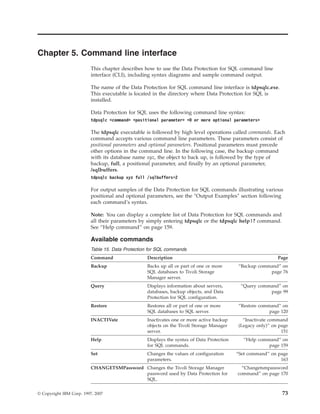
    Chapter 5. Command line interface                                 . . 73                Playing back the silent installation . . . .       .   .   191
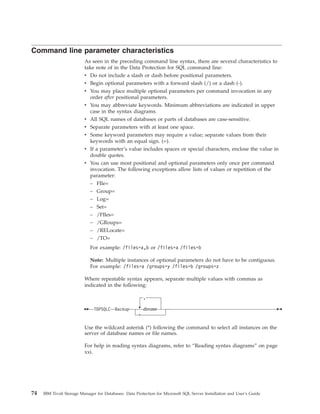
    Command line parameter characteristics . . . . . 74                                     Setup error messages . . . . . . . . .             .   .   192
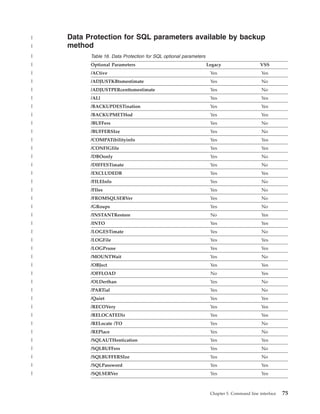
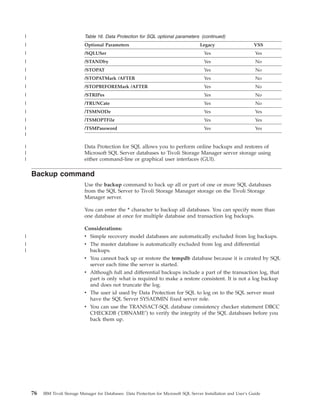
|      Data Protection for SQL parameters available by
|      backup method . . . . . . . . . . . . 75                                             Appendix C. Examples of Tivoli
    Backup command . . . . . . . . . . . . 76                                               Storage Manager policy binding using
       Backup syntax . . . . . . . . . . . . 77                                             include/exclude and VSSPOLICY
       Backup positional parameters . . . . . . . 79
                                                                                            statements . . . . . . . . . . . . 193
       Backup optional parameters . . . . . . . . 82
       Legacy Backup output examples . . . . . . 89
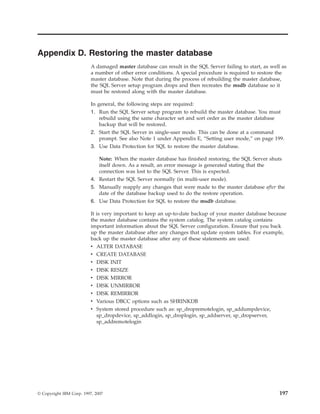
|      VSS Backup output examples . . . . . . . 96                                          Appendix D. Restoring the master
    Query command . . . . . . . . . . . . 99                                                database . . . . . . . . . . . . . 197
       Query syntax . . . . . . . . . . . . . 99
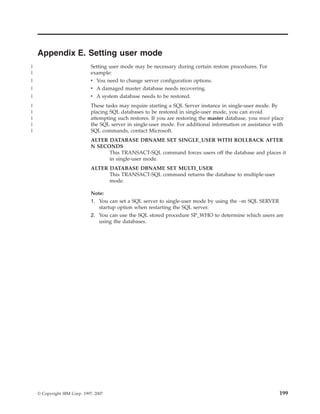
       Query positional parameters . . . . . . . 101                                        Appendix E. Setting user mode. . . . 199
       Query optional parameters . . . . . . . . 103
       Query output examples . . . . . . . . . 109
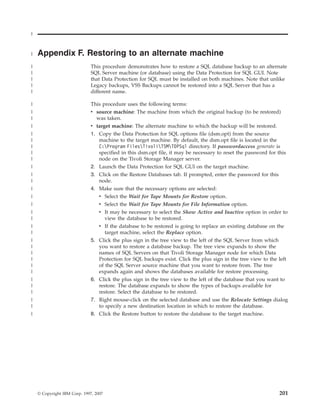
                                                                                           | Appendix F. Restoring to an alternate
    Restore command . . . . . . . . . . . . 120
|      VSS Restore command-line considerations . . . 121                                   | machine . . . . . . . . . . . . . 201
       Restore syntax . . . . . . . . . . . . 121
       Restore positional parameters . . . . . . . 125                                      Appendix G. Data Protection for SQL
       Restore optional parameters . . . . . . . 127                                        Messages . . . . . . . . . . . . . 203
       Legacy Restore output examples . . . . . . 140                                       ACO0003S: An internal processing error has
|      VSS Restore output examples . . . . . . . 147                                        occurred. . . . . . . . . . . . . . . .                    203
    Inactivate command (Legacy only) . . . . . . 151                                        ACO0004E: An unknown error has been detected.              203
       Inactivate syntax . . . . . . . . . . . 152                                          ACO0005E: Out of memory. Stop other processes
       Inactivate positional parameters . . . . . . 153                                     and try the operation again. . . . . . . . .               203
       Inactivate optional parameters . . . . . . . 154                                     ACO0053E: License file (licensefile) could not be
       Inactivate output examples . . . . . . . . 157                                       opened. . . . . . . . . . . . . . . .                      204
    Help command . . . . . . . . . . . . . 159                                              ACO0054E: Read failure on license file (licensefile).      204
       Help syntax . . . . . . . . . . . . . 159                                            ACO0055E: Write failure on license file (licensefile).     204
       Help positional parameters . . . . . . . . 160                                       ACO0056E: Data in the license file (licensefile) is not
       Help output examples . . . . . . . . . 160                                           in a valid format. . . . . . . . . . . . .                 204
    Set command . . . . . . . . . . . . . 163                                               ACO0057E: The checksum in the license file
       Set syntax . . . . . . . . . . . . . 164                                             (licensefile) does not match the license string text. .    205
       Set positional parameters . . . . . . . . 164                                        ACO0058E: The ’Try and Buy’ license has expired.           205
       Set optional parameters . . . . . . . . . 169                                        ACO0100E: Incomplete command: . . . . . .                  205
       Set output examples . . . . . . . . . . 170                                          ACO0101E: Invalid argument:         . . . . . . .          205
    Changetsmpassword command . . . . . . . 170                                             ACO0102E: Invalid command: . . . . . . .                   206
       Changetsmpassword . . . . . . . . . . 170                                            ACO0103E: Invalid option for the specified
       Changetsmpassword positional parameters . . 171                                      command: . . . . . . . . . . . . . .                       206
       Changetsmpassword optional parameters . . . 171                                      ACO0104E: Invalid option:        . . . . . . . .           206
       Changetsmpassword output examples . . . . 173                                        ACO0105E: Missing argument: . . . . . . .                  207
                                                                                            ACO0132W: Tracing could not be started.
    Chapter 6. Using the Tivoli Storage                                                     Processing will continue. . . . . . . . . .                207
    Manager scheduler . . . . . . . . . 175                                                 ACO0133W: Could not locate installation directory.
    Example procedure . . . . . . .                   .       .       .       .   175       Attempting to continue... . . . . . . . . .                207
       On the Tivoli Storage Manager server           .       .       .       .   176       ACO0134W: Could not locate log directory.
       On the SQL Server . . . . . .                  .       .       .       .   177       Processing will continue... . . . . . . . . .              208
    Scheduler guidelines . . . . . . .                .       .       .       .   180       ACO0150I: Operation canceled by user. . . . . .            208
                                                                                            ACO0151E: Errors occurred while processing the
                                                                                            request. . . . . . . . . . . . . . . .                     208
| Appendix A. Frequently asked
                                                                                            ACO0152I: Performance stats: seconds seconds
| questions . . . . . . . . . . . . . 183                                                   spent in apicall API calls . . . . . . . . . .             209
                                                                                            ACO0153I: Performance stats: seconds seconds
    Appendix B. Silent installation . . . . 187                                             spent in function . . . . . . . . . . . .                  209
    Installing with the Setup Program (setup.exe)                     .       . 189

    iv   IBM Tivoli Storage Manager for Databases: Data Protection for Microsoft SQL Server Installation and User’s Guide
ACO0154E: The Data Protection for Microsoft SQL                  ACO0256E: The password in your Tivoli Storage
Server application client cannot work with the                   Manager options file has expired. Please change
version of the Tivoli Storage Manager API you                    your password on the Tivoli Storage Manager
have installed. Please install version                           server using the ’change password’ command and
version.release.level or greater. . . . . . . . .          209   then either change or remove the password value
ACO0155E: The Data Protection for Microsoft SQL                  in your options file. . . . . . . . . . . .           217
Server application client cannot work with the                   ACO0257E: Your password has expired. . . . .          218
release of Tivoli Storage Manager API you have                   ACO0258E: You did not enter a valid password.
installed. Please install release version.release.l evel         Processing ends. . . . . . . . . . . . .              218
or greater. . . . . . . . . . . . . . .                    210   ACO0259E: The password you entered for
ACO0156E: Could not load the Tivoli Storage                      verification does not match the password you
Manager API. . . . . . . . . . . . . .                     210   entered for your new password. Your password
ACO0160E: An authentication error occurred with                  will not be changed. . . . . . . . . . . .            218
your stored Tivoli Storage Manager password. . .           210   ACO0260I: Password successfully changed. . . .        219
ACO0161E: Authentication error. The password                     ACO0261I: There are no backups for the server
entered is not valid. You are not logged on to the               named servername. . . . . . . . . . . . .             219
Tivoli Storage Manager server. . . . . . . . .             211   ACO0263E: Failed to start Web browser with a
ACO0162E: The passwords entered do not match.                    return code of returncode. . . . . . . . . .          219
Please enter them again. . . . . . . . . . .               211   ACO0264I: Could not find the default browser
ACO0163E: The directory path needs to be                         defined. An attempt will be made to use Microsoft
fully-qualified. . . . . . . . . . . . . .                 211   Internet Explorer. . . . . . . . . . . . .            220
ACO0167E: The fully-qualified file name is too                   ACO0265E: Could not find Internet Explorer. . . .     220
long. . . . . . . . . . . . . . . . .                      212   ACO0266E: Could not find the Tivoli Storage
ACO0200E: File (filename) could not be opened for                Manager HTML books. . . . . . . . . . .               220
reading. . . . . . . . . . . . . . . .                     212   ACO0267E: The verify password entered does not
ACO0201E: File (filename) could not be opened for                match the new password entered. . . . . . .           221
writing. . . . . . . . . . . . . . . .                     212   ACO0300E: Invalid restore type. . . . . . . .         221
ACO0202E: Read failure on file (filename). . . . .         212   ACO0301E: Invalid backup type. . . . . . . .          221
ACO0203E: Write failure on file (filename). . . . .        213   ACO351E: Invalid trace keyword - ’keyword’ . . .      221
ACO0204E: File (filename) could not be closed. . .         213   ACO357E: Unable to open trace output file
ACO0205E: File (filename) statistics could not be                file-name. . . . . . . . . . . . . . . .              222
obtained. . . . . . . . . . . . . . . .                    213   ACO366E: Unable to close trace output file
ACO0206E: Directory (directory) could not be                     file-name. . . . . . . . . . . . . . . .              222
created. . . . . . . . . . . . . . . .                     213   ACO367E: Unable to write to trace file tracefile.
ACO0207E: Directory path (directorypath) is too                  Tracing disabled. . . . . . . . . . . . .             222
long. . . . . . . . . . . . . . . . .                      214   ACO368E: Invalid trace file name (name too long).     223
ACO0208E: There is not enough disk space for the                 ACO383E: Specifying the trace file ’link’ as a
operation attempted. . . . . . . . . . . .                 214   symbolic link is not allowed. . . . . . . . .         223
ACO0209E: The rename of file (filename1) to                      ACO384E: Symbolic link ’linkname’ to ’target’ was
(filename2) failed. . . . . . . . . . . . .                214   successfully deleted. . . . . . . . . . . .           223
ACO0210E: The Tivoli Storage Manager high level                  ACO385E: Unable to delete symbolic link ’link’.       224
qualifier is too long. . . . . . . . . . . .               214   ACO476E: program-name: cannot open file file-spec:
ACO0211E: The Tivoli Storage Manager low level                   error. . . . . . . . . . . . . . . . .                224
qualifier is too long. . . . . . . . . . . .               215   ACO487E: Specifying the error log ’link’ as a
ACO0212E: The Tivoli Storage Manager filespace                   symbolic link is not allowed. . . . . . . . .         224
name is too long. . . . . . . . . . . . .                  215   ACO488E: Initialization functions cannot open the
ACO0213E: The maximum number of objects                          error log: log-name. errno = errno-value, . . . . .   225
allowed per Tivoli Storage Manager transaction is t              ACO495E: Failure writing to a Tivoli Storage
oo small. . . . . . . . . . . . . . . .                    215   Manager log or log-related file: file-name, errno =
ACO0214E: The backup object’s management class                   errno-value, reason . . . . . . . . . . . .           225
backup copy group does not exist. . . . . . .              216   ACO496I: TDP is converting the log-file from
ACO0215E: All backup objects do not have the                     continuous (pruning) mode to wrapping mode.
same management class backup copy destination. .           216   This process may take several minutes. . . . . .      225
ACO0216E: Unable to obtain space information for                 ACO497I: TDP is converting the log-file from
volume (volumename).. . . . . . . . . . .                  216   wrapping mode to continuous (pruning) mode.
ACO0217E: The Tivoli Storage Manager filespace                   This process may take several minutes. . . . . .      226
name is invalid. . . . . . . . . . . . .                   217   ACO498I: count log records processed. . . . . .       226
ACO0218E: The Tivoli Storage Manager high level                  ACO501E: Invalid Proxy Configuration Detected:
qualifier is invalid. . . . . . . . . . . .                217   Target Node ’targetnode’ is not listed as a valid
ACO0219E: The Tivoli Storage Manager low level                   node to proxy to for Node Name ’nodename’. . . .      226
qualifier is invalid. . . . . . . . . . . .                217

                                                                                                            Contents    v
ACO501T: Invalid Proxy Configuration Detected:                     ACO3009I: Data Protection for SQL: backup type
Target Node ’targetnode’ is not listed as a valid                  backup of database database name from server server
node to proxy to for Node Name ’nodename’. . . .        227        name canceled by user. . . . . . . . . . .                233
ACO515E: Invalid DSMAGENT Node                                     ACO3010I: Data Protection for SQL: Starting
configuration found for node ’dsmagentnode’. . . .      227        restore for server servername. . . . . . . . .            233
ACO516I: The Windows console event handler                         ACO3011I: Data Protection for SQL: Restore from
received a ’event’ console event. . . . . . . .         227        server server name to server server name is complete.
ACO517I: An unexpected error was encountered.                      Total database backups inspected: number inspected
TDP function name : function-name TDP function :                   Total database backups requested for restore:
function-desc TDP return code : TSM-rc TDP file :                  number requested Total database backups restored:
file-name (line-number) . . . . . . . . . .             228        number restored Total database skipped: number
ACO518E: Backups selected for restore must have                    skipped Throughput rate: rate Kb/Sec Total bytes
the same backup location (TSM or LOCAL). . . .          228        transferred: bytes Elapsed processing time: time
ACO519E: The VSS operation failed with rc =                        Secs . . . . . . . . . . . . . . . .                      233
returncode. . . . . . . . . . . . . . .                 228        ACO3012I: Data Protection for SQL: restore type
ACO520E: Failed to connect to Local DSMAGENT                       restore of backup object object name to database
Node ’localdsmagentnode’ at address:port                           database name from server server name canceled by
’address:portnumber’. Verify that the TSM Client                   user. . . . . . . . . . . . . . . . .                     234
Acceptor Daemon (CAD) is installed, configured,                    ACO3013I: Data Protection for SQL: Starting
and running properly. . . . . . . . . . .               229        Inactivate processing for backup objects from
ACO521E: Pruning functions cannot open one of                      server servername . . . . . . . . . . . .                 234
the Tivoli Storage Manager prune files: log-name.                  ACO3014I: Data Protection for SQL: Inactivate
errno = errno-value, . . . . . . . . . . .              229        processing complete Total database backups
ACO3000I: Data Protection for SQL: Starting backup                 inspected: number inspected Total database backups
type backup of database database name from server                  requested for inactivation: number requested Total
server name. . . . . . . . . . . . . . .                230        database backups inactivated: number inactivated
ACO3001I: Data Protection for SQL: backup type                     Total database skipped: number skipped Elapsed
backup of database database name from server server                processing time: time Secs . . . . . . . . .              234
name completed successfully. . . . . . . . .            230        ACO3015I: Data Protection for SQL: Inactivating
ACO3002E: Data Protection for SQL: backup type                     backup type backup backup object. . . . . . . .           235
backup of database database name from server server                ACO5050I: A new configuration file was created.           235
name failed, rc = return code. . . . . . . . .          230        ACO5051I: The configuration file cannot be found,
ACO3003I: Data Protection for SQL: Starting restore                using default settings. . . . . . . . . . .               235
type restore of backup object object name to                       ACO5052E: An error occurred trying to set the
database database name on server server name. . . .     231        requested configuration option. . . . . . . .             236
ACO3004I: Data Protection for SQL: restore type                    ACO5053E: The value for the option option is not
restore of backup object object name to database                   valid. See the TDPSQLC Help Set output or the
database name on server server name completed                      User’s Guide for valid Set command parameters. .          236
successfully. . . . . . . . . . . . . . .               231        ACO5054I: The configuration option was set
ACO3005E: Data Protection for SQL: restore type                    successfully.    . . . . . . . . . . . . .                236
restore of backup object object name to database                   ACO5056I: The logfile log file could not be pruned.
database name on server server name failed. . . . .     231        Processing will continue. . . . . . . . . .               237
ACO3006I: Data Protection for SQL: Starting                        ACO5057I: The logfile log file was pruned
backup for server server name. . . . . . . . .          232        successfully.    . . . . . . . . . . . . .                237
ACO3007I: Data Protection for SQL: Backup of                       ACO5058W: The logfile name is greater than the
server servername is complete. Total SQL backups                   maximum allowed. Processing will continue using
selected: number selected Total SQL backups                        a logfile name of logfile in the current directory. . .   237
attempted: number attempted Total SQL backups                      ACO5059W: The logfile log file cannot be opened
completed: number completed Total SQL backups                      for writing. There will be no logging of events. . .      238
excluded: number excluded Throughput rate: rate                    ACO5060E: A Tivoli Storage Manager API error
Kb/Sec Total bytes transferred: bytes Elapsed                      has occurred. . . . . . . . . . . . . .                   238
processing time: time Secs . . . . . . . . .            232        ACO5061E: A Microsoft SQL API error has
ACO3008I: Data Protection for SQL: Backup of                       occurred. . . . . . . . . . . . . . . .                   238
server servername is complete. Total SQL backups                   ACO5063I: The logfile_name log file did not need
selected: number selected Total SQL backups                        pruning. . . . . . . . . . . . . . . .                    238
attempted: number attempted Total SQL backups                      ACO5064W: The logfile_name log file could not be
completed: number completed Total SQL backups                      opened for writing. The log was not pruned and
excluded: number excluded Total SQL backups                        there will be no logging of events. . . . . . .           239
inactivated: number inactivated Throughput rate: rate              ACO5065E: The value specified for the /SQLUSer
Kb/Sec Total bytes transferred: bytes Elapsed                      option does not match the registry entry. . . . .         239
processing time: time Secs . . . . . . . . .            232

vi   IBM Tivoli Storage Manager for Databases: Data Protection for Microsoft SQL Server Installation and User’s Guide
ACO5091E: PASSWORDACCESS is Generate.                       ACO5420E: . . . . . . . . . . . . . .                  247
Either the stored password is incorrect or there is         ACO5421E: Received the following from the MS
no stored password. If you do not have a stored             COM component: SQL message . . . . . . .               248
password, use the -TSMPassword=xxx option to                ACO5422E: Received the following from the MS
set and store your password. . . . . . . . .          239   SQL server: SQL message . . . . . . . . . .            248
ACO5097I: Data Protection for SQL is not                    ACO5423E: The following string is too long: string     248
configured for VSS operations. . . . . . . .          240   ACO5424E: Could not connect to SQL server; SQL
ACO5098E: Error obtaining VSS information from              server returned: SQL message . . . . . . . .           249
Local DSMAgent Node: ’localdsmagentnode’. . . .       240   ACO5425E: The SQL server is not running: SQL
ACO5124E: Invalid command. Data Protection for              message . . . . . . . . . . . . . . .                  249
SQL only supports VSS backup type of FULL. . .        240   ACO5426E: The SQL log on does not have the
ACO5125E: Invalid command. Data Protection for              Sysadmin role: SQL message . . . . . . . .             249
SQL does not support OFFLOAD with the Legacy                ACO5427E: The SQL server version is less than 7.0:
backup method. . . . . . . . . . . . .                241   SQL message . . . . . . . . . . . . . .                250
ACO5126E: Invalid command. Data Protection for              ACO5428E: The SQL server is not on the local
SQL only supports Legacy backups with a backup              machine: SQL message . . . . . . . . . .               250
destination of TSM. . . . . . . . . . . .             241   ACO5429E: Could not obtain an event from SQL
ACO5127E: Invalid command. Data Protection for              server: SQL message . . . . . . . . . . .              250
SQL does not support OFFLOAD with the                       ACO5430E: The SQL Server Name is blank or
specified backup destination. . . . . . . . .         241   NULL.. . . . . . . . . . . . . . . .                   251
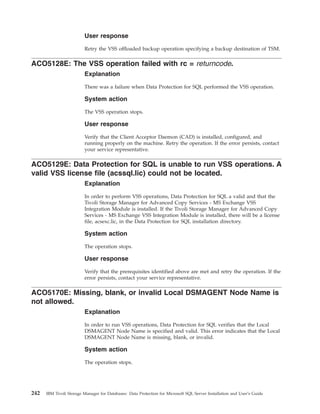
ACO5128E: The VSS operation failed with rc =                ACO5431E: Multiple dbnames are not allowed. . .        251
returncode. . . . . . . . . . . . . . .               242   ACO5432E: Equal numbers of the /RELOCATE
ACO5129E: Data Protection for SQL is unable to              and /TO options must be specified. . . . . . .         251
run VSS operations. A valid VSS license file                ACO5433E: Wildcards are not allowed as part of
(acssql.lic) could not be located. . . . . . . .      242   the following parameters/options: . . . . . .          252
ACO5170E: Missing, blank, or invalid Local                  ACO5434E: The following options cannot be
DSMAGENT Node Name is not allowed. . . . .            242   specified together:     . . . . . . . . . . .          252
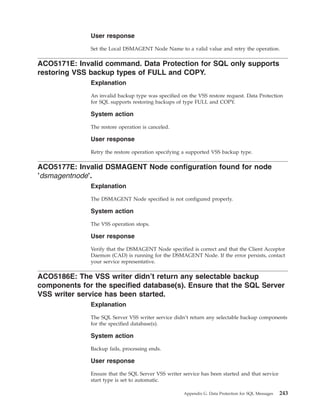
ACO5171E: Invalid command. Data Protection for              ACO5435E: This command requires one of the
SQL only supports restoring VSS backup types of             following options:      . . . . . . . . . . .          252
FULL and COPY. . . . . . . . . . . . .                243   ACO5436E: A failure occurred on stripe number
ACO5177E: Invalid DSMAGENT Node                             (stripe number), rc = return code. . . . . . . .       252
configuration found for node ’dsmagentnode’. . . .    243   ACO5450E: The specified number of stripes
ACO5186E: The VSS writer didn’t return any                  (number of stripes) is invalid. Processing will
selectable backup components for the specified              continue with the maximum number of stripes
database(s). Ensure that the SQL Server VSS writer          (maximum number of stripes). . . . . . . . .           253
service has been started. . . . . . . . . . .         243   ACO5451E: A failure occurred on vdev (vdev name),
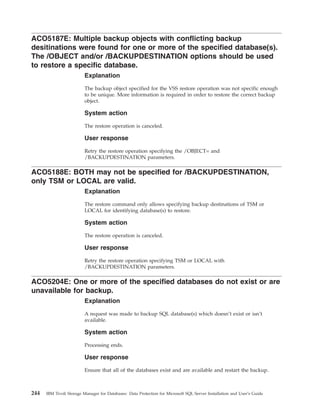
ACO5187E: Multiple backup objects with                      rc = return code . . . . . . . . . . . . .             253
conflicting backup desitinations were found for one         ACO5452E: Unable to delete temporary object:
or more of the specified database(s). The /OBJECT           (filespace name) (high level qualifier) (low level
and/or /BACKUPDESTINATION options should                    qualifier) . . . . . . . . . . . . . . .               253
be used to restore a specific database. . . . . .     244   ACO5453E: The number of TSM sessions (number
ACO5188E: BOTH may not be specified for                     of TSM sessions) is invalid for the specified number
/BACKUPDESTINATION, only TSM or LOCAL                       of stripes (number of stripes). Processing will
are valid. . . . . . . . . . . . . . . .              244   continue with the number of TSM sessions (number
ACO5204E: One or more of the specified databases            of TSM sessions) as the number of stripes. . . . .     254
do not exist or are unavailable for backup. . . .     244   ACO5454E: The maximum number of objects
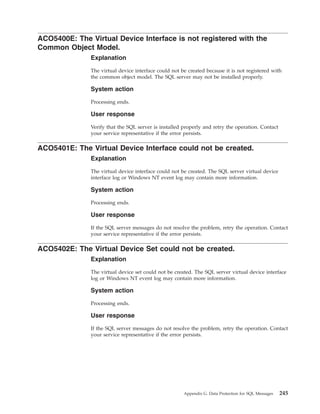
ACO5400E: The Virtual Device Interface is not               allowed per TSM transaction (number of objects
registered with the Common Object Model. . . .        245   allowed per TSM transaction) is invalid for the
ACO5401E: The Virtual Device Interface could not            specified number of stripes (number of stripes).
be created. . . . . . . . . . . . . . .               245   Processing will continue with (new number of
ACO5402E: The Virtual Device Set could not be               stripes) stripes. . . . . . . . . . . . . .            254
created. . . . . . . . . . . . . . . .                245   ACO5455E: The backup is corrupt and can not be
ACO5403E: The configuration of the Virtual Device           restored. . . . . . . . . . . . . . . .                254
Set could not be obtained. . . . . . . . . .          246   ACO5456W: The backup is corrupt and is not fully
ACO5404E: The Virtual Device Set could not open             restorable. Processing will continue. . . . . . .      255
a virtual device. . . . . . . . . . . . .             246   ACO5457E: An unknown SQL API error has
ACO5405E: An unknown virtual device error has               occurred. . . . . . . . . . . . . . . .                255
been detected. . . . . . . . . . . . . .              246   ACO5458W: The TSM Server ’backup delete’
ACO5406E: The SQL server closed a virtual device            setting for node (TSM server NODENAME) is set to
prematurely. . . . . . . . . . . . . . .              247   NO. It should be set to YES for proper operation.
ACO5407E: The SQL server aborted the operation.       247   Processing will continue. . . . . . . . . .            255

                                                                                                      Contents     vii
ACO5500E: The MultiByteToWideChar() function                       ACO5718I: When the view is refreshed all
failed. . . . . . . . . . . . . . . . .                 256        selections will be lost and an attempt will be made
ACO5501E: The Common Object Model (COM)                            to expand the new tree to the currently highlighted
library failed to initialize. . . . . . . . . .         256        item. Do you want to continue? . . . . . . .           260
ACO5550I: There are no backups matching the                        ACO5719I: There are currently no backups on
filespec directorypathfilename and the server name                 TSM. . . . . . . . . . . . . . . . .                   260
servername. . . . . . . . . . . . . . .                 256        ACO5720I: No databases have been selected for
ACO5551I: There are no backups matching the                        backup. . . . . . . . . . . . . . . .                  261
criteria specified for server name servername. . . .    257        ACO5721I: No backups have been selected for
ACO5552I: No matches were found for the criteria                   restore. . . . . . . . . . . . . . . .                 261
specified. . . . . . . . . . . . . . . .                257        ACO5722I: No backups have been selected for
ACO5616T: Database cannot be backed up because                     inactivate. . . . . . . . . . . . . . .                261
its name contains ’’ or ’:’ character(s). . . . . .    257        ACO5723E: A named mark must be specified. . .          261
ACO5617I: Database was excluded from backup                        ACO5784E: A log must be selected to use point in
because database name contains ’’ or ’:’                          time. . . . . . . . . . . . . . . . .                  262
character(s). . . . . . . . . . . . . . .               258        ACO5804I: Unable to get information. If data is
ACO5629E: No Backups have been selected for                        backed up to tape check the ″Wait for Tape Mounts
restore. . . . . . . . . . . . . . . .                  258        for File Information″ checkbox. . . . . . . .          262
ACO5630E: Backups from multiple Server instances                   ACO5805W: The SQL Server you are restoring
have been selected for restore. . . . . . . . .         258        from is different than the SQL server you are
ACO5631E: Restoring full Legacy backups and full                   currently logged on to. Do you want to continue? .     262
VSS backups in the same restore operation is not
supported. Retry the restores in separate                          Notices . . . . . . . . . . . . . . 263
operations. . . . . . . . . . . . . . .                 259
ACO5715E: Error writing option_name preference to
                                                                   Trademarks . . . . . . . . . . . . 265
the configuration file. . . . . . . . . . . .           259
ACO5716W: An error was encountered with Tivoli
Storage Manager API initialization, rc = returncode.               Glossary . . . . . . . . . . . . . 267
Examine the dsierror.log for more information or
determine if the TSM API is installed properly. . .     259        Index . . . . . . . . . . . . . . . 273
ACO5717E: Unable to log on to the SQL server.           260


viii   IBM Tivoli Storage Manager for Databases: Data Protection for Microsoft SQL Server Installation and User’s Guide
Tables
|    1.   Data Protection for SQL key features . . .     . 1       10.   Minimum hardware requirements for VSS
     2.   Backup strategy characteristics . . . . .    . 14              Instant Restore operations . . . . . . . . 28
     3.   Minimum software and operating system                    11.   List of applications to configure . . . . . . 33
          requirements for Legacy Backup and Restore               12.   Required node names for basic VSS operations 41
          operations . . . . . . . . . . . .           . 25        13.   Required node names for VSS off-loaded
     4.   Minimum software and operating system                          backups . . . . . . . . . . . . . . 41
          requirements for basic VSS operations. . .   . 25        14.   GUI tab functions . . . . . . . . . . 58
     5.   Minimum software and operating system                    15.   Data Protection for SQL commands . . . . 73
          requirements for VSS Off-loaded Backup . .   . 26    |   16.   Data Protection for SQL optional parameters      75
     6.   Minimum software and operating system                    17.   Silent installation options . . . . . . . 187
          requirements for VSS Instant Restore . . .   . 26        18.   Silent installation features (base client only) 188
     7.   Minimum hardware requirements for Legacy                 19.   Silent installation features (Language
          Backup and Restore operations . . . . .      . 27              Packages only) . . . . . . . . . . . 188
     8.   Minimum hardware requirements for VSS                    20.   Silent installation transforms . . . . . . 188
          Backup and Restore operations . . . . .      . 27
|    9.   Minimum hardware requirements for VSS
|         offloaded backup operations . . . . . .      . 28


    © Copyright IBM Corp. 1997, 2007                                                                                     ix
x   IBM Tivoli Storage Manager for Databases: Data Protection for Microsoft SQL Server Installation and User’s Guide
Preface
                              The subject of this publication is Data Protection for SQL, a component of the IBM
                              Tivoli Storage Manager for Databases product.

                              Data Protection for SQL performs online backups of Microsoft® SQL Server
                              databases to Tivoli Storage Manager storage.

                              Tivoli Storage Manager is a client-server licensed product that provides storage
                              management services in a multi-platform computer environment.

                              Throughout this document, the term Windows® (unless otherwise specified) refers
                              to the following operating systems:
                              v Windows Server 2003

                              Throughout this document, the term SQL Server (unless otherwise specified) refers
                              to the following products:
|                             v SQL Server 2000 (32-bit and IA64)
|                             v SQL Server 2005 (32-bit, IA64, and x64)

                              Throughout this document, the term Windows VSS System Provider (unless
                              otherwise specified) refers to the standard Windows System provider.

    Who should read this guide
                              The target audience for this publication are system installers, system users, Tivoli
                              Storage Manager administrators, and system administrators.

                              In this book, it is assumed that you have an understanding of the following
                              applications:
                              v Microsoft SQL Server
                              v Tivoli Storage Manager server
                              v Tivoli Storage Manager backup-archive client
                              v Tivoli Storage Manager Application Program Interface
                              It is also assumed that you have an understanding of one of the following
                              operating system:
                              v Windows Server 2003

    Publications
                              This section lists related IBM Tivoli Storage Manager publications. It also describes
                              how to access Tivoli® publications online and how to order Tivoli publications.


    © Copyright IBM Corp. 1997, 2007                                                                                 xi
IBM Tivoli Storage Manager library
                          The following documents are available in the IBM Tivoli Storage Manager library:
                          v IBM Tivoli Storage Manager for Windows Backup-Archive Client Installation and
                            User’s Guide
                            Provides information for an end-user to install, configure, and use the Tivoli
                            Storage Manager client on Windows operating systems
                          v IBM Tivoli Storage Manager for UNIX and Linux Backup-Archive Clients Installation
                            and User’s Guide
                            Provides information for an end-user to install, configure, and use the Tivoli
                            Storage Manager client on UNIX® and Linux® operating systems
                          v IBM Tivoli Storage Manager for Windows Administrator’s Guide
                            Provides concepts and procedures for configuring and customizing the Tivoli
                            Storage Manager server on Windows operating systems
                          v IBM Tivoli Storage Manager for Windows Administrator’s Reference
                            Provides details about administrative commands, server options, and server
                            utilities for Tivoli Storage Manager server on Windows operating systems
                          v IBM Tivoli Storage Manager for AIX Administrator’s Guide
                            Provides concepts and procedures for configuring and customizing the Tivoli
                            Storage Manager server on AIX® operating systems
                          v IBM Tivoli Storage Manager for AIX Administrator’s Reference
                            Provides details about administrative commands, server options, and server
                            utilities for Tivoli Storage Manager server on AIX operating systems
                          v IBM Tivoli Storage Manager for Sun Solaris Administrator’s Guide
                            Provides concepts and procedures for configuring and customizing the Tivoli
                            Storage Manager server on Sun Solaris operating systems
                          v IBM Tivoli Storage Manager for Sun Solaris Administrator’s Reference
                            Provides details about administrative commands, server options, and server
                            utilities for Tivoli Storage Manager server on Sun Solaris operating systems
                          v IBM Tivoli Storage Manager Messages
                            Provides explanations and suggested actions for messages issued by the Tivoli
                            Storage Manager server program for storage management services, the
                            administrative client graphical-user interface, administrative command line
                            client, data protection clients, and backup-archive client
                          v IBM Tivoli Storage Manager: Problem Determination Guide
                            Describes how to diagnose problems with Tivoli Storage Manager
                          v IBM Tivoli Storage Manager Using the Application Program Interface
                            Provides information to help you add Tivoli Storage Manager
                            application-program interface calls to an existing application and to write
                            programs with general-use program interfaces that obtain the services of Tivoli
                            Storage Manager
                          v IBM Tivoli Storage Manager for SAN for AIX Storage Agent User’s Guide
                            Provides an overview of LAN-free data transfer and detailed explanations about
                            configuring and using the Tivoli Storage Manager client, storage agent, and
                            server
                          v IBM Tivoli Storage Manager for SAN for HP-UX Storage Agent User’s Guide
                            Provides an overview of LAN-free data transfer and detailed explanations about
                            configuring and using the Tivoli Storage Manager client, storage agent, and
                            server
                          v IBM Tivoli Storage Manager for SAN for Linux Storage Agent User’s Guide

xii   IBM Tivoli Storage Manager for Databases: Data Protection for Microsoft SQL Server Installation and User’s Guide
Provides an overview of LAN-free data transfer and detailed explanations about
        configuring and using the Tivoli Storage Manager client, storage agent, and
        server
      v IBM Tivoli Storage Manager for SAN for Sun Solaris Storage Agent User’s Guide
        Provides an overview of LAN-free data transfer and detailed explanations about
        configuring and using the Tivoli Storage Manager client, storage agent, and
        server
      v IBM Tivoli Storage Manager for SAN for Windows Storage Agent User’s Guide
        Provides an overview of LAN-free data transfer and detailed explanations about
        configuring and using the Tivoli Storage Manager client, storage agent, and
        server

Accessing terminology online
      The Tivoli Software Glossary includes definitions for many of the technical terms
      related to Tivoli software. The Tivoli Software Glossary is available at the following
      Tivoli software library Web site:

      http://publib.boulder.ibm.com/tividd/glossary/tivoliglossarymst.htm

      The IBM® Terminology Web site consolidates the terminology from IBM product
      libraries in one convenient location. You can access the Terminology Web site at the
      following Web address:

      http://www.ibm.com/software/globalization/terminology

Accessing publications online
      The product CD contains the publications that are in the product library. The
      format of the publications is PDF, HTML, or both. To access the publications using
      a Web browser, open the infocenter.html file. The file is in the appropriate
      publications directory on the product CD.

      IBM posts publications for this and all other Tivoli products, as they become
      available and whenever they are updated, to the Tivoli software information center
      Web site. Access the Tivoli software information center by first going to the Tivoli
      software library at the following Web address:

      http://www.ibm.com/software/tivoli/library/

      Click Tivoli Product manuals to access the product library at the Tivoli software
      information center.

      Tip: If you print PDF documents on other than letter-sized paper, set the option in
      the File → Print window that allows Adobe® Reader to print letter-sized pages on
      your local paper.


                                                                                 Preface   xiii
Ordering publications
                              You can order many Tivoli publications online at the following Web site:
                              http://www.elink.ibmlink.ibm.com/publications/servlet/pbi.wss

                              You can also order by telephone by calling one of these numbers:
                              v In the United States: 800-879-2755
                              v In Canada: 800-426-4968

                              In other countries, contact your software account representative to order Tivoli
                              publications.

    Support information
                              If you have a problem with your IBM software, you want to resolve it quickly. IBM
                              provides the following ways for you to obtain the support you need:
                              v Searching knowledge bases: You can search across a large collection of known
                                 problems and workarounds, Technotes, and other information.
                              v Obtaining fixes: You can locate the latest fixes that are already available for your
                                product.
                              v Contacting IBM Software Support: If you still cannot solve your problem, and
                                you need to work with someone from IBM, you can use a variety of ways to
                                contact IBM Software Support.

                              For more information about these three ways of resolving problems, see
                              “Contacting IBM Software Support” on page xviii.

                  Determining if the problem resides on Tivoli Storage Manager
                  or SQL
                              This section provides information to help determine if the problem is a Data
                              Protection for SQL issue or an SQL server issue.

                              For Legacy operations:
                              v Use the Backup or Restore utility provided in the SQL Server administrator
                                program to see if the problem can be recreated.
                              v If the error message ″ACO5350E An unknown SQL API error has occurred″ is
                                displayed, the SQL server encountered an unexpected situation. Microsoft
                                assistance may be needed if the problem continues.
                              v Data Protection for SQL error messages occasionally contain an HRESULT code.
                                Use this code to search Microsoft documentation and the Microsoft Knowledge
                                Base for resolution information.

                              For VSS operations: Try recreating the problem with the Microsoft VSHADOW
                              application. This application can run backups using the Microsoft SQL VSS APIs. If
                              the problem is recreatable with VSHADOW, then the problem most likely exists
                              within the VSS provider or the SQL server. Microsoft ships VSHADOW with the
                              Volume Shadow Copy Services (VSS) Software Developer’s Kit (SDK). IBM Service
                              can provide a copy of VSHADOW if you encounter problems obtaining or building
                              this application.

|                             You can also search the IBM Tivoli Storage Manager: Problem Determination Guide for
|                             helpful diagnostic information at this Web site: http://publib.boulder.ibm.com/
|                             infocenter/tivihelp/v1r1/topic/com.ibm.itsmm.doc/update/main.html

    xiv   IBM Tivoli Storage Manager for Databases: Data Protection for Microsoft SQL Server Installation and User’s Guide
Problem determination assistance
       If an error condition occurs during a Data Protection for SQL event, there are
       several sources of information you can view to help determine the problem:
       v Data Protection for SQL logs information on backup, restore, and delete
          commands to the Tivoli Event Console.
       v Data Protection for SQL logs information, by default, to the tdpsql.log file in the
          directory where Data Protection for SQL is installed. This file indicates the date
          and time of a backup, data backed up, and any error messages or completion
          codes. This file is very important and should be monitored daily.
       v The Tivoli Storage Manager API logs API error information, by default, to the
          dsierror.log file in the directory where Data Protection for SQL is installed. No
          backup statistics are kept in this log. The dsierror.log file cannot be marked as
          read-only.
       v The SQL Server logs information to the SQL Server error log. SQL Server error
          log information can be viewed using the SQL Server Enterprise Manager (SQL
          Server 2000) or SQL Server Management Studio (SQL Server 2005).
       v The Tivoli Storage Manager scheduler logs information to both the dsmsched.log
          and the dsmerror.log files. By default, these files are located in the directory
          where the Tivoli Storage Manager Backup-Archive client is installed.

         Note: Output from scheduled commands are sent to the scheduler log file
         (dsmsched.log). After scheduled work is performed, check the log to ensure the
         work completed successfully.

         When a scheduled command is processed, the scheduler log can contain the
         following entry:
           Scheduled event eventname completed successfully

         This is merely an indication that Tivoli Storage Manager successfully issued the
         scheduled command associated with the eventname. No attempt is made to
         determine the success or failure of the command. You should assess the success
         or failure of the command by evaluating the return code from the scheduled
         command in the scheduler log. The scheduler log entry for the command’s
         return code is prefaced with the following text:
           Finished command. Return code is:
       v Windows Event Log.
       v For VSS operations, view the dsmerror.log file in the backup-archive client
         installation directory.

Installation Problems: Creating an installation-log file
       In the event a silent installation fails, gather the following information to assist
       Customer Support when evaluating your situation:
       v Operating system level
       v Service pack
       v Hardware description
       v Installation package (CD or electronic download) and level
       v Any Windows event log relevant to the failed installation
       v Windows services active during the failed installation (for example, anti-virus
         software)
       v Whether you are logged on to the local machine console (not through a terminal
         server)

                                                                                    Preface   xv
v Whether you are logged on as a local administrator, not a domain administrator
                            (Tivoli does not support cross-domain installs)
                          You can create a detailed log file (setup.log) of the failed installation. Run the setup
                          program (setup.exe) in the following manner:
                          setup /v"l*v setup.log"

              Tivoli Technical Training
                          For Tivoli technical training information, refer to the following IBM Tivoli
                          Education Web site:

                           http://www.ibm.com/software/tivoli/education

              IBM Tivoli Storage Manager Web site
                          Technical support information and publications are available at the following
                          address: http://www.ibm.com/software/sysmgmt/products/support/
                          IBMTivoliStorageManager.html

                          By accessing the Tivoli Storage Manager home page, you can access subjects that
                          interest you. You can also keep up-to-date with the newest Tivoli Storage Manager
                          product information.

              IBM Tivoli Storage Manager for Databases Web site
                          The IBM Tivoli Storage Manager for Databases Web site contains a knowledge base
                          of articles and information related to backup and restore issues. Access this
                          information at: If you plan to perform VSS operations, the IBM Tivoli Storage
                          Manager for Copy Services Web site contains a knowledge base of VSS-related
                          articles and information:

                          http://www.ibm.com/software/sysmgmt/products/support/
                          IBMTivoliStorageManagerforCopyServices.html

                          www.ibm.com/software/sysmgmt/products/support/
                          IBMTivoliStorageManagerforDatabases.html

              Searching knowledge bases
                          You can search the available knowledge bases to determine whether your problem
                          was already encountered and is already documented.

                          Searching the information center
                          IBM provides extensive documentation that can be installed on your local
                          computer or on an intranet server. You can use the search function of this
                          information center to query conceptual information, instructions for completing
                          tasks, and reference information.


xvi   IBM Tivoli Storage Manager for Databases: Data Protection for Microsoft SQL Server Installation and User’s Guide
Searching the Internet
      If you cannot find an answer to your question in the information center, search the
      Internet for the latest, most complete information that might help you resolve your
      problem.

      To search multiple Internet resources for your product, go to this product support
      web site: http://www.ibm.com/software/sysmgmt/products/support/
      IBMTivoliStorageManager.html and look for the section to search the support
      knowledge base. From this section, you can search a variety of resources including:
      v IBM technotes
      v IBM downloads
      v IBM Redbooks®
      v Forums and newsgroups

Obtaining fixes
      A product fix might be available to resolve your problem. To determine what fixes
      are available for your IBM software product, follow these steps:
      1. Go to the IBM Software Support Web site at http://www.ibm.com/software/
          support.
      2. Click Downloads in the Software Support table.
      3. Follow the search instructions provided on the page.
      4. Click Search.
      5. From the list of downloads returned by your search, click the name of a fix to
          read the description of the fix and to optionally download the fix.

      For more information about the types of fixes that are available, see the IBM
      Software Support Handbook at http://techsupport.services.ibm.com/guides/
      handbook.html.

Receiving weekly support updates
      To receive weekly e-mail notifications about fixes and other software support news,
      follow these steps:
       1. Go to the IBM Software Support Web site at http://www.ibm.com/software/
          support.
       2. Click Assistance in the Software Support table.
       3. Click Request e-mail upates in the Additional Assistance support links table.
       4. If you have already registered for My support, sign in and skip to the next
          step. If you have not registered, click register now. Complete the registration
          form using your e-mail address as your IBM ID and click Submit.
       5. Click Edit profile.
       6. In the Products list, select Software. A second list is displayed.
       7. In the second list, select the product segment, Storage Management. A third
          list is displayed.
       8. In the third list, select the product sub-segment, Data Protection. A list of
          applicable products is displayed.
       9. Select the products for which you want to receive updates, for example, IBM
          Tivoli Storage Manager for Databases.
      10. Click Add products.

                                                                             Preface   xvii
11. After selecting all products that are of interest to you, click Subscribe to email
                              on the Edit profile tab.
                          12. Select Please send these documents by weekly email.
                          13. Update your e-mail address as needed.
                          14. In the Documents list, select Software.
                          15. Select the types of documents that you want to receive information about.
                          16. Click Update.

                          If you experience problems with the My support feature, you can obtain help in
                          one of the following ways:
                          Online
                                   Send an e-mail message to ershelpdesk@us.ibm.com, describing your
                                   problem.
                          By phone
                                Call 1-800-IBM-4You (1-800-426-4968).

              Contacting IBM Software Support
                          IBM Software Support provides assistance with product defects.

                          Before contacting IBM Software Support, your company must have an active IBM
                          software maintenance contract, and you must be authorized to submit problems to
                          IBM. The type of software maintenance contract that you need depends on the
                          type of product you have:
                          v For IBM distributed software products (including, but not limited to, Tivoli,
                            Lotus®, and Rational® products, as well as DB2® and WebSphere® products that
                            run on Windows or UNIX operating systems), enroll in Passport Advantage® in
                            one of the following ways:
                             Online
                                      Go to the Passport Advantage Web site at http://www.lotus.com/
                                      services/passport.nsf/WebDocs/Passport_Advantage_Home and click
                                      How to Enroll.
                            By phone
                                    For the phone number to call in your country, go to the IBM Software
                                    Support Web site at http://techsupport.services.ibm.com/guides/
                                    contacts.html and click the name of your geographic region.
                          v For customers with Subscription and Support (S & S) contracts, go to the
                            Software Service Request Web site at https://techsupport.services.ibm.com/
                            ssr/login.
                          v For customers with IBMLink™, CATIA, Linux, OS/390®, iSeries®, pSeries®,
                            zSeries®, and other support agreements, go to the IBM Support Line Web site at
                            http://www.ibm.com/services/us/index.wss/so/its/a1000030/dt006.
                          v For IBM eServer™ software products (including, but not limited to, DB2 and
                            WebSphere products that run in zSeries, pSeries, and iSeries environments), you
                            can purchase a software maintenance agreement by working directly with an
                            IBM sales representative or an IBM Business Partner. For more information
                            about support for eServer software products, go to the IBM Technical Support
                            Advantage Web site at http://www.ibm.com/servers/eserver/techsupport.html

                          If you are not sure what type of software maintenance contract you need, call
                          1-800-IBMSERV (1-800-426-7378) in the United States. From other countries, go to

xviii   IBM Tivoli Storage Manager for Databases: Data Protection for Microsoft SQL Server Installation and User’s Guide
the contacts page of the IBM Software Support Handbook on the Web at
http://techsupport.services.ibm.com/guides/contacts.html and click the name
of your geographic region for phone numbers of people who provide support for
your location.

To contact IBM Software support, follow these steps:
1. “Determining the business impact”
2. “Describing problems and gathering information”
3. “Submitting problems” on page xx

Determining the business impact
When you report a problem to IBM, you are asked to supply a severity level.
Therefore, you need to understand and assess the business impact of the problem
that you are reporting. Use the following criteria:
Severity 1
        The problem has a critical business impact. You are unable to use the
        program, resulting in a critical impact on operations. This condition
        requires an immediate solution.
Severity 2
        The problem has a significant business impact. The program is usable, but
        it is severely limited.
Severity 3
        The problem has some business impact. The program is usable, but less
        significant features (not critical to operations) are unavailable.
Severity 4
        The problem has minimal business impact. The problem causes little impact
        on operations, or a reasonable circumvention to the problem was
        implemented.

Describing problems and gathering information
When describing a problem to IBM, be as specific as possible. Include all relevant
background information so that IBM Software Support specialists can help you
solve the problem efficiently. To save time, know the answers to these questions:
v What is the version and release level of your Tivoli Storage Manager server
  product? Enter the query status command to determine this information. For
  example:
    query status
v What software versions were you running when the problem occurred?
v Do you have logs, traces, and messages that are related to the problem
  symptoms? IBM Software Support is likely to ask for this information.
v Can you create the problem again? If so, what steps were performed to create
  the problem?
v Did you make any changes to the system? For example, did you make changes
  to the hardware, operating system, networking software, and so on.
v Are you currently using a workaround for the problem? If so, be prepared to
  explain the workaround when you report the problem.


                                                                        Preface   xix
Submitting problems
                          You can submit your problem to IBM Software Support in one of two ways:
                          Online
                                    Click Submit and track problems on the IBM Software Support site at
                                    http://www.ibm.com/software/support/probsub.html. Type your
                                    information into the appropriate problem submission form.
                          By phone
                                For the phone number to call in your country, go to the contacts page of
                                the IBM Software Support Handbook at http://
                                techsupport.services.ibm.com/guides/contacts.html and click the name
                                of your geographic region.

                          If the problem you submit is for a software defect or for missing or inaccurate
                          documentation, IBM Software Support creates an Authorized Program Analysis
                          Report (APAR). The APAR describes the problem in detail. Whenever possible,
                          IBM Software Support provides a workaround for you to implement until the
                          APAR is resolved and a fix is delivered. IBM publishes resolved APARs on the
                          IBM product support Web pages daily, so that other users who experience the
                          same problem can benefit from the same resolutions.

                          For more information about problem resolution, see Searching knowledge bases
                          and Obtaining fixes.

Conventions used in this book
                          This guide uses several conventions for special terms and actions, operating
                          system-dependent commands and paths.

                          This guide uses the following typeface conventions:
                          Bold
                                    v Commands, keywords, authorization roles, or other information that you
                                      must use.
                                    v Example: Log on to the server as root user.
                          italics
                                    v Values or variables that you must provide.
                                    v Emphasized words and phrases.
                                    v Example: The node name of the production node and backup node must not
                                      be the same.
                          bold italics
                                  v Options and parameters.
                                  v Example: Specify the value for the compression option.
                          monospace
                                 v Directories, parameters, URLs, and output examples.
                                 v Example: The product is installed in the C:program
                                    filestivolitsmclientba directory.
                          UPPER CASE
                                v Environment variables associated with Tivoli Storage Manager, operating
                                  systems, or SQL Server.
                                    v Example: Make sure the DSM_DIR environment variable is set correctly.

xx   IBM Tivoli Storage Manager for Databases: Data Protection for Microsoft SQL Server Installation and User’s Guide
Typeface conventions

Accessibility
                Accessibility features help users with physical disabilities, such as restricted
                mobility or limited vision, to use software products successfully. The major
                accessibility features in this product enable users to do the following:
                v Use assistive technologies, such as screen-reader software and digital speech
                  synthesizer, to hear what is displayed on the screen. Consult the product
                  documentation of the assistive technology for details on using those technologies
                  with this product.
                v Operate specific or equivalent features using only the keyboard.
                v Magnify what is displayed on the screen.

                In addition, the product documentation was modified to include features to aid
                accessibility:
                v All documentation is available in both HTML and convertible PDF formats to
                  give the maximum opportunity for users to apply screen-reader software.
                v All images in the documentation are provided with alternative text so that users
                  with vision impairments can understand the contents of the images.

        Magnifying what is displayed on the screen
                You can enlarge information on the product windows using facilities provided by
                the operating systems on which the product is run. For example, in a Microsoft
                Windows environment, you can lower the resolution of the screen to enlarge the
                font sizes of the text on the screen. Refer to the documentation provided by your
                operating system for more information.

        Navigating the interface using the keyboard
                Standard shortcut and accelerator keys are used by the product and are
                documented by the operating system. Refer to the documentation provided by
                your operating system for more information.

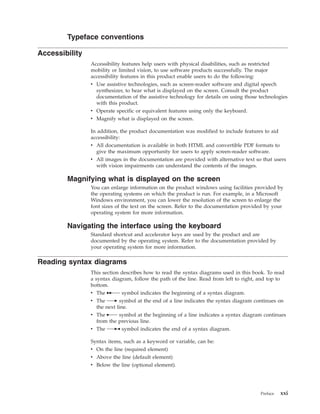
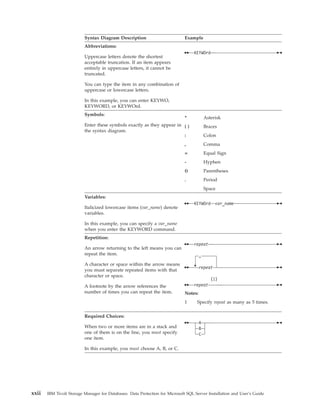
Reading syntax diagrams
                This section describes how to read the syntax diagrams used in this book. To read
                a syntax diagram, follow the path of the line. Read from left to right, and top to
                bottom.
                v The ─── symbol indicates the beginning of a syntax diagram.
                v The ─── symbol at the end of a line indicates the syntax diagram continues on
                   the next line.
                v The ─── symbol at the beginning of a line indicates a syntax diagram continues
                   from the previous line.
                v The ─── symbol indicates the end of a syntax diagram.

                Syntax items, such as a keyword or variable, can be:
                v On the line (required element)
                v Above the line (default element)
                v Below the line (optional element).


                                                                                       Preface   xxi
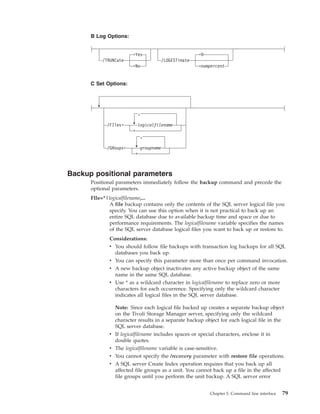
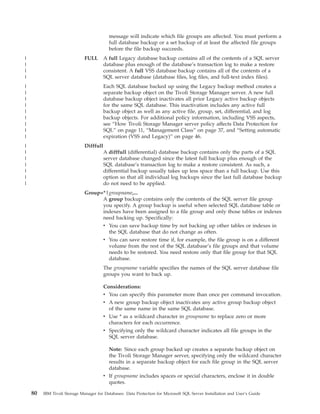
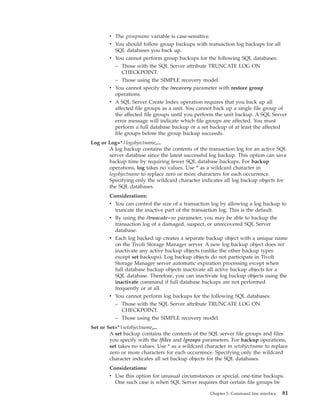
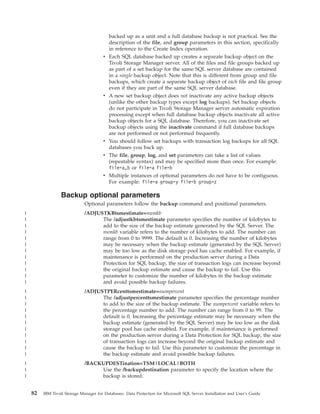
Syntax Diagram Description                          Example
                          Abbreviations:
                                                                                   KEYWOrd
                          Uppercase letters denote the shortest
                          acceptable truncation. If an item appears
                          entirely in uppercase letters, it cannot be
                          truncated.

                          You can type the item in any combination of
                          uppercase or lowercase letters.

                          In this example, you can enter KEYWO,
                          KEYWORD, or KEYWOrd.
                          Symbols:
                                                                              *            Asterisk
                          Enter these symbols exactly as they appear in { }                Braces
                          the syntax diagram.
                                                                        :                  Colon
                                                                              ,            Comma
                                                                              =            Equal Sign
                                                                              -            Hyphen
                                                                              ()           Parentheses
                                                                              .            Period
                                                                                           Space
                          Variables:
                                                                                   KEYWOrd var_name
                          Italicized lowercase items (var_name) denote
                          variables.

                          In this example, you can specify a var_name
                          when you enter the KEYWORD command.
                          Repetition:
                                                                                   repeat
                          An arrow returning to the left means you can
                          repeat the item.                                             ,
                          A character or space within the arrow means
                                                                                       repeat
                          you must separate repeated items with that
                          character or space.
                                                                                              (1)
                          A footnote by the arrow references the                   repeat
                          number of times you can repeat the item.            Notes:
                                                                              1     Specify repeat as many as 5 times.

                          Required Choices:
                                                                                       A
                          When two or more items are in a stack and                    B
                          one of them is on the line, you must specify                 C
                          one item.

                          In this example, you must choose A, B, or C.


xxii   IBM Tivoli Storage Manager for Databases: Data Protection for Microsoft SQL Server Installation and User’s Guide
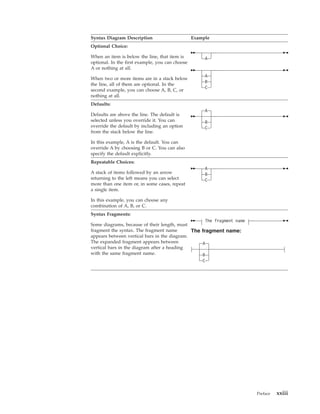
Syntax Diagram Description                       Example
Optional Choice:

When an item is below the line, that item is          A
optional. In the first example, you can choose
A or nothing at all.
                                                      A
When two or more items are in a stack below
                                                      B
the line, all of them are optional. In the
                                                      C
second example, you can choose A, B, C, or
nothing at all.
Defaults:
                                                      A
Defaults are above the line. The default is
selected unless you override it. You can              B
override the default by including an option           C
from the stack below the line.

In this example, A is the default. You can
override A by choosing B or C. You can also
specify the default explicitly.
Repeatable Choices:
                                                      A
A stack of items followed by an arrow                 B
returning to the left means you can select            C
more than one item or, in some cases, repeat
a single item.

In this example, you can choose any
combination of A, B, or C.
Syntax Fragments:
                                                    The fragment name
Some diagrams, because of their length, must
fragment the syntax. The fragment name        The fragment name:
appears between vertical bars in the diagram.
The expanded fragment appears between             A
vertical bars in the diagram after a heading
with the same fragment name.                      B
                                                  C


                                                                        Preface   xxiii
xxiv   IBM Tivoli Storage Manager for Databases: Data Protection for Microsoft SQL Server Installation and User’s Guide
|


|   Technical changes for Version 5.5.0 - November 2007
|                             The following changes have been made to this publication:
|                             v Microsoft SQL Server 2005 support
|                             v Microsoft Volume Shadow Copy Service support
|                             v Veritas Cluster Server support
|                             v Microsoft Virtual Server support
|                             v Usability enhancements
|                             See “New product features for 5.5.0” on page 1 for detailed information about
|                             these changes.


    © Copyright IBM Corp. 1997, 2007                                                                          xxv
xxvi   IBM Tivoli Storage Manager for Databases: Data Protection for Microsoft SQL Server Installation and User’s Guide
Chapter 1. Data Protection for SQL Overview
                              Product overview information related to new features, backup methods, backup
                              types, restore methods, restore types, performance, security, and available
                              documentation is provided for a better understanding of Data Protection for SQL
                              5.5.0.

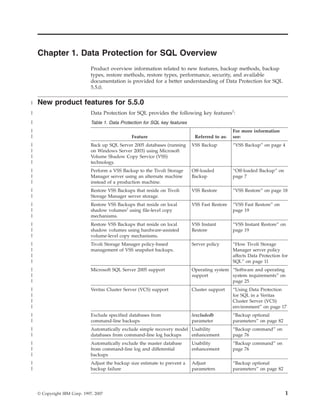
|   New product features for 5.5.0
|                             Data Protection for SQL provides the following key features1:
|                             Table 1. Data Protection for SQL key features
|                                                                                                For more information
|                                                Feature                       Referred to as:   see:
|                             Back up SQL Server 2005 databases (running      VSS Backup         “VSS Backup” on page 4
|                             on Windows Server 2003) using Microsoft
|                             Volume Shadow Copy Service (VSS)
|                             technology.
|                             Perform a VSS Backup to the Tivoli Storage      Off-loaded         “Off-loaded Backup” on
|                             Manager server using an alternate machine       Backup             page 7
|                             instead of a production machine.
|                             Restore VSS Backups that reside on Tivoli       VSS Restore        “VSS Restore” on page 18
|                             Storage Manager server storage.
|                             Restore VSS Backups that reside on local        VSS Fast Restore   “VSS Fast Restore” on
|                             shadow volumes2 using file-level copy                              page 19
|                             mechanisms.
|                             Restore VSS Backups that reside on local        VSS Instant        “VSS Instant Restore” on
|                             shadow volumes using hardware-assisted          Restore            page 19
|                             volume-level copy mechanisms.
|                             Tivoli Storage Manager policy-based             Server policy      “How Tivoli Storage
|                             management of VSS snapshot backups.                                Manager server policy
|                                                                                                affects Data Protection for
|                                                                                                SQL” on page 11
|                             Microsoft SQL Server 2005 support               Operating system “Software and operating
|                                                                             support          system requirements” on
|                                                                                              page 25
|                             Veritas Cluster Server (VCS) support            Cluster support    “Using Data Protection
|                                                                                                for SQL in a Veritas
|                                                                                                Cluster Server (VCS)
|                                                                                                environment” on page 17
|                             Exclude specified databases from                /excludedb         “Backup optional
|                             command-line backups                            parameter          parameters” on page 82
|                             Automatically exclude simple recovery model Usability              “Backup command” on
|                             databases from command-line log backups     enhancement            page 76
|                             Automatically exclude the master database       Usability          “Backup command” on
|                             from command-line log and differential          enhancement        page 76
|                             backups
|                             Adjust the backup size estimate to prevent a    Adjust             “Backup optional
|                             backup failure                                  parameters         parameters” on page 82


    © Copyright IBM Corp. 1997, 2007                                                                                      1
|                             Table 1. Data Protection for SQL key features (continued)
|                                                                                                       For more information
|                                                  Feature                          Referred to as:     see:
|                             Restore databases, logs, and full-text index        /relocatedir          “Restore optional
|                             files to an alternate location                      parameter             parameters” on page 127
|
                              1
|                              Note that in order to use VSS features, you must also install the following:
|                             v IBM Tivoli Storage Manager for Copy Services Microsoft SQL VSS Integration Module
|                               (required for basic VSS operations)
|                             v IBM Tivoli Storage Manager for Copy Services Hardware Devices Snapshot Integration
|                               Module (required for VSS Instant Restore operations)
                              2
|                               The term local shadow volumes is used throughout this document to describe data
|                             that is stored on shadow volumes localized to a disk storage subsystem.

|                 Additional Data Protection for SQL features
|                             Data Protection for SQL allows you to perform online backups and restores of
|                             Microsoft SQL Server databases to Tivoli Storage Manager server storage using
|                             either command-line or graphical user interfaces (GUI).

|                             Data Protection for SQL helps you protect and manage SQL Server data by making
|                             it easy to:
|                             v Perform Legacy full backups, differential backups, and transaction log backups
|                                of SQL Server 2000 and SQL Server 2005 databases.
|                             v Perform Legacy individual file group backups, individual file backups, and set
|                                backups (containing sets of file groups and files) of SQL Server 2000 and SQL
|                                Server 2005 data.
|                             v Perform full VSS snapshot backups of SQL Server 2005 databases running on
|                                Windows Server 2003. This feature is available on 32-bit and x64 environments
|                                only.
|                             v Perform full VSS off-loaded snapshot backups of SQL Server 2005 databases
|                                running on Windows Server 2003.
|                             v Perform Legacy restores of full, differential, and transaction log backups of SQL
|                                Server 2000 and SQL Server 2005 databases.
|                             v Perform Legacy restores of individual file groups, individual files, and set
|                                backups (containing sets of file groups and files) of SQL Server 2000 and SQL
|                                Server 2005 data.
|                             v Perform partial Legacy restores of specific database file groups.
|                             v Perform VSS Restores of full snapshot backups of SQL Server 2005 databases
|                                (running on Windows Server 2003) from Tivoli Storage Manager server storage
|                                or local VSS disks.
|                             v Perform operations from multiple SQL Server instances on the same machine as
|                                Data Protection for SQL.

|                               Note: You can access only one SQL Server per execution of Data Protection for
|                               SQL from either the command line or GUI.
|                             v Perform any Legacy backup using data striping in parallel threads using parallel
|                               sessions.
|                             v Automate scheduled backups. See Chapter 6, “Using the Tivoli Storage Manager
|                               scheduler,” on page 175.


    2   IBM Tivoli Storage Manager for Databases: Data Protection for Microsoft SQL Server Installation and User’s Guide
|                v Perform expanded restore operations on backup objects such as relocating,
|                  restoring to named marks, and partially restoring full backups.
|                v Restore Legacy database backups to a different SQL Server.
|                v Retain with a Legacy backup the information needed to recreate or move SQL
|                  databases or files, such as sort order, code page, and Unicode information, or file
|                  group and file logical and physical names. The meta object information is
|                  retained on the Tivoli Storage Manager server separately from the backup data
|                  objects.
|                v Inactivate all active Legacy backup objects, all objects of a particular Legacy
|                  backup type, or specific objects.
|                v Inactivate Legacy backup objects older than a specified number of days.
|                v Set automatic expiration of backup objects based on version limit and retention
|                  period. See “Recommended Tivoli Storage Manager policy settings” on page 37.
|                v Query any local SQL Server or any connected Tivoli Storage Manager server for
|                  database, status, and configuration information.
|                v Monitor results through the Data Protection for SQL activity log and
|                  automatically prune the activity log.
|                v Set Tivoli Storage Manager connection information options to Tivoli Storage
|                  Manager servers.
|                v Set Tivoli Storage Manager security and performance options.
|                v Participate in MSCS and VCS fail-over clusters.
|                v Apply fail-over clustering (for maintenance or restoring the master database)
|                  without unclustering.
|                v Obtain online context-sensitive, task, and concept help.
|                v Globalization Support

    Backup overview
                 Data Protection for SQL provides several methods of backing up SQL Server data.

           Legacy Backup
|                A Legacy Backup creates a copy of all or part of a SQL database or logs on Tivoli
|                Storage Manager storage media.

                 Data Protection for SQL provides selection mechanisms and the logic that are
                 required to back up and restore SQL data. For example, when you initiate a
                 backup operation, Data Protection for SQL:
                 1. Starts a session with a Tivoli Storage Manager server using the Tivoli Storage
                    Manager API and information contained in a client options file.
                 2. Starts a session with the SQL Server using the SQL-SMO interface.
                 3. Instructs the SQL Server using the SQL VDI interface to begin a backup of the
                    selected database objects.
                 4. Receives data from the SQL Server and sends it to the Tivoli Storage Manager
                    server.
                 5. Ends the Tivoli Storage Manager and SQL Server sessions.

                 Note:
                 1. Data Protection for SQL can compress SQL data before sending it to the Tivoli
                    Storage Manager server.
                 2. Metadata:
                                                             Chapter 1. Data Protection for SQL Overview   3
When a backup is performed, Data Protection for SQL retains information
                                   about the SQL Server and database. This information is available for query and
                                   restore operations after the backup is completed. The information about the
                                   names and sizes of the database file groups and files is stored along with the
                                   database data, as a sub-object. This sub-object is referred to as metadata. You
                                   will need this ″meta″ sub-object when you need information about individual
                                   database file groups and files.

                  VSS Backup
                              A VSS Backup uses Microsoft Volume Shadow Copy Service technology to produce
                              an online snapshot (point-in-time consistent copy) of SQL data.

                              A VSS Backup uses Microsoft Volume Shadow Copy Service technology to produce
                              an online snapshot (point-in-time consistent copy) of SQL data that can be stored
                              on local shadow volumes or on Tivoli Storage Manager server storage. Both of
                              these storage destinations require that sufficient space be available for the
                              snapshot. A VSS Backup means the SQL server is not in ″backup mode″ for an
                              extended period of time because the length of time to perform the snapshot is
                              usually measured in seconds and not hours. In addition, a VSS Backup allows a
                              snapshot of large amounts of data at one time since the snapshot works at the
                              volume level.

                              Optionally, VSS Backups can be stored locally on VSS shadow volumes that are
                              directly accessible by the SQL system, as long as sufficient space is available for the
                              snapshot. These types of backups are fast because data is not placed into Tivoli
                              Storage Manager server storage. Restoring these backups is also fast because the
                              SQL data is not transferred from Tivoli Storage Manager server storage over the
                              network.

                              When performing VSS Backups and moving data to Tivoli Storage Manager server
                              storage, sufficient space on local snapshot volumes is still required to hold the
                              snapshot. For SQL data backed up to Tivoli Storage Manager server storage, the
                              SQL data on the snapshot volume is sent to the Tivoli Storage Manager server.
                              Once the data transfer to the server is complete, the snapshot volume is made
                              available for reuse. If you are storing VSS Backups locally and the maximum
                              number of local backup versions to be maintained (as specified by the Tivoli
                              Storage Manager policy) is reached, the oldest backup version is expired in order
                              to create the snapshot for the backup to Tivoli Storage Manager server storage. See
                              “How Tivoli Storage Manager server policy affects Data Protection for SQL” on
                              page 11 for details regarding how Tivoli Storage Manager proceeds in this
                              situation.

                              For SQL data backed up to local shadow volumes, the snapshot backup resides on
                              the shadow copy volume.

                              For SQL data backed up to both destinations, a local snapshot backup is performed
                              and the SQL data on the local snapshot volume is sent to the Tivoli Storage
                              Manager server. The local snapshot volume is retained as a local backup.

                              Characteristics of VSS Backups

                              The following characteristics are true of VSS Backup:
|                             v Full backups only are supported. Log, differential, file, group, and set backup
|                               types are not supported. However, Legacy differential and Legacy log backups
|                               can be applied after a full VSS Backup has been restored.

    4   IBM Tivoli Storage Manager for Databases: Data Protection for Microsoft SQL Server Installation and User’s Guide
v Backup granularity is at the database level only.
    v Backups are managed through Tivoli Storage Manager server policy.
    v Backups can be stored on local shadow volumes, Tivoli Storage Manager server
      storage, or both locations.
    v Different policy settings can be defined for each storage location and backup
      method.
    v Backups to Tivoli Storage Manager server storage can be off-loaded to an
      alternate machine as resource relief for production servers.
    v Backups can be performed in a Microsoft Cluster Server (MSCS) or Veritas
      Cluster Server (VCS) environment.

    Planning requirements for VSS Backups

    Consider the following requirements when planning for VSS Backups:
    v Continue to schedule and perform Legacy backups in your strategy.
    v Make sure you have a well-defined and tested recovery plan that meets your
      service level objectives.
|   v Use single hardware LUNs for each database or group of databases that will be
|     backed up and restored together as a unit.
    v Use basic disks.
    v If you plan to keep some VSS snapshot backups on local shadow volumes only,
      make sure to consider the VSS provider-specific implementation and
      configuration options when setting up your strategy. For example, if your VSS
      hardware provider supports a full-copy snapshot versus a copy-on-write (COW)
      snapshot mechanism, be aware that full-copy type implementations have greater
      disk storage requirements but are less risky because they do not rely on the
      original volume to restore the data. COW implementations require much less
      disk storage but rely completely on the original volume to perform a restore.
      Since these implementations are entirely controlled by the VSS provider and not
      Data Protection for SQL, make sure to consult your VSS provider documentation
      for a complete understanding of your VSS implementation.
|   v Avoid performing parallel VSS Backups as this feature can create problems.
    v Do not place multiple volumes on the same LUN. Microsoft recommends that
      you configure a single volume/single partition/single LUN as 1 to 1 to 1.

    VSS Service overview
    The VSS Service manages and directs three VSS software applications that are used
    during VSS operations.
    VSS Writer
|         The VSS Writer is the Microsoft SQL Server. It is installed with the SQL
|         Server 2005 software and requires the following minor configuration tasks:
|         v The SQL VSS Writer service should be set to ″Automatic.″ This enables
|            the service to start automatically when the machine is rebooted.
|         v Start the SQL VSS Writer.
    VSS Requestor
          The VSS Requestor is Tivoli Storage Manager.
    VSS Provider
          The VSS provider manages the volumes where the SQL data resides.
          Configuration requirements are based upon the type of VSS provider used
          in your environment. For example:


                                               Chapter 1. Data Protection for SQL Overview   5
v If you are using the standard Windows System provider (referred to as
                                          the Windows VSS System Provider throughout this book), no
                                          configuration is required.
                                        v If you are using a VSS software provider, consult the documentation
                                          provided with your VSS software provider.
                                        v If your SQL storage is configured on a disk storage subsystem and you
                                          plan to perform Off-loaded backups or full-copy snapshot backups
                                          (versus copy-on-write (COW) snapshot backups as described in “VSS
                                          Backup” on page 4), you must install a VSS hardware provider.
                                        v If you plan to perform VSS Instant Restores, be aware that IBM System
                                          Storage SAN Volume Controller, DS6000, and DS8000 are the only
                                          storage subsystems that support VSS Instant Restores and require a VSS
                                          provider. Therefore, you MUST install and configure IBM System
                                          Storage Support for Microsoft Virtual Disk and Volume Shadow Copy
                                          Services as your VSS hardware provider in order to perform VSS Instant
                                          Restores. VSS provider support and documentation for IBM System
                                          Storage disk storage subsystems is available at the following Web site:
                                          http://www-1.ibm.com/support/docview.wss?rs=591&uid=ssg1S4000342

                              For more information about VSS technology, see the Microsoft Technical Reference
                              document ″How Volume Shadow Copy Service Works″ at the following Web site:
                              http://technet2.microsoft.com/WindowsServer/en/Library/2b0d2457-b7d8-42c3-
                              b6c9-59c145b7765f1033.mspx?mfr=true

                              System Provider:

                              The System Provider refers to the default VSS provider that is available with
                              Windows 2003.

                              If you are using the Windows VSS System Provider, no configuration tasks are
                              required to perform VSS operations.

                              Software or Hardware Provider:

                              A software or hardware provider (that is not the default Windows System
                              provider) requires these configuration settings when planning for VSS Backups.
|                             v If a hardware provider is used, it is recommended that the disks that contain
|                               SQL data be configured as basic.
|                             v Place databases files for each database or group of databases that will be backed
|                               up and restored together as a unit on their own dedicated logical volume.
                              v Place logs for each database on their own logical volume.
                              v Do not place non-SQL data on storage volumes that are dedicated to SQL.
                              v When using hardware snapshot providers, do not share database LUNs with
                                other databases or applications.
|                             v IBM N-series and NetApp systems require the Data ONTAP VSS Hardware
|                               Provider.
                              v Make sure to read and follow specific installation and configuration instructions
                                in the documentation provided by your VSS provider vendor.


    6   IBM Tivoli Storage Manager for Databases: Data Protection for Microsoft SQL Server Installation and User’s Guide
DS6000, DS8000, and SAN Volume Controller requirements:

         DS6000, DS8000, and SAN Volume Controller require these configuration settings
         when planning for VSS Backups.
|        v Place databases files for each database or group of databases that will be backed
|          up and restored together as a unit on their own dedicated logical volume.
|        v Place logs for each database or group of databases that will be backed up and
|          restored together as a unit on their own logical volume.
         v Do not place non-SQL data on storage volumes that are dedicated to SQL.
         v When using hardware snapshot providers, do not share database LUNs with
           other databases or applications.
         v (SAN Volume Controller only) Note that only one backup is allowed to occur
           while the background copy process is pending. A new backup is not performed
           until the background copy process for the previous backup completes. As a
           result, local backups for SAN Volume Controller storage subsystems should be
           initiated at a frequency greater than the time required for the background copy
           process to complete.

         Off-loaded Backup
         An off-loaded backup uses an alternate machine to move the data to the Tivoli
         Storage Manager server.

         This type of backup shifts the backup load from the production machine to another
         machine. This releases the production system to serve the SQL server. This requires
         that a VSS hardware provider that supports transportable shadow copy volumes is
         installed on the production and secondary machines.

    Backup types
         Data Protection for SQL offers an expanded range of backup types that allows
         flexibility for your environment and processing needs.

         Data Protection for SQL provides six types of backup:

         Full database backup (Legacy and VSS)

         Data Protection for SQL backs up an entire SQL Server database and the portion of
         the transaction log necessary to provide a consistent database state. With both full
         and differential backups, the copy includes enough information from any
         associated transaction logs to make a backup consistent with itself. The portion of
         the log included contains only the transactions that occur from the beginning of
         the backup until its completion.

|        Note: Legacy backups are a stream of bytes that Data Protection for SQL stores on
|        the Tivoli Storage Manager server. VSS Backups differ since they are at the volume
|        and file-level. In a situation where a SQL Server database is not fully allocated, a
|        Legacy backup might transfer a smaller amount of data for a Tivoli Storage
|        Manager backup than for a VSS Backup since a VSS Backup transfers the entire
|        file, regardless of its allocation.

         Differential backup (Legacy only)

         Data Protection for SQL backs up only the data pages in a SQL Server database
         changed since the last full backup and a portion of the transaction log. This is


                                                     Chapter 1. Data Protection for SQL Overview   7
equivalent to an incremental backup on the Tivoli Storage Manager
                              Backup-Archive Client.

                              Log backup (Legacy only)

                              Data Protection for SQL backs up only the contents of a SQL Server database
                              transaction log since the last successful log backup. To do the first log backup, you
                              need to have done a full backup or its equivalent first. Log backups normally
                              follow full backups. The portion of the log included in full and differential backups
                              is not equivalent to a log backup. Additionally, in full and differential backups, the
                              log is not truncated as it is during a log backup. However, a log backup following
                              a full or differential backup will include the same transactions as a full or
                              differential. Log backups are not cumulative as are differential; they must be
                              applied against a base backup and in the correct order.

                              Note: A log backup in SQL Server terms is not equivalent to an incremental
                              backup in Tivoli Storage Manager terms.

                              File backup (Legacy only)

                              Data Protection for SQL backs up only the contents of a specified SQL Server
                              logical file. This can ease the scheduling for backing up very large databases by
                              allowing you to back up different sets of files during different scheduled backups.
                              File, group, and set backups must be followed by a log backup, but a full is not
                              required.

                              Group backup (Legacy only)

                              Data Protection for SQL backs up only the contents of a specified SQL Server file
                              group. This allows you to back up just the set of database tables and indexes
                              within a specific group of files.

                              Set backup (Legacy only)

                              Data Protection for SQL backs up the contents of specified SQL Server file groups
                              and files as a unit.

                              Examples

                              See “Legacy Backup output examples” on page 89 for samples of various backup
                              types using the command line interface. Also, planning information regarding
                              choosing the best strategy for your backup requirements is available in “Backup
                              strategies.”

                  Backup strategies
                              Different backup strategies are available depending on specific requirements
                              regarding network traffic, backup window and acceptable restore times.

                              Strategies defined by backup type

                              Some commonly used strategies (based upon backup type) are described as
                              follows:
|                             Full backup only (Legacy and VSS)
                                      This approach is best for SQL databases that are relatively small because it
                                      implies that the entire database is backed up each time. Each full backup

    8   IBM Tivoli Storage Manager for Databases: Data Protection for Microsoft SQL Server Installation and User’s Guide
takes longer to perform, but the restore process is most efficient because
            only the most recent (or other appropriate) full backup need be restored.
            This is the appropriate strategy for system databases such as master, model,
            and msdb due to their normally small size.
|   Full plus log backup (Legacy and VSS)
            A full plus transaction log backup strategy is commonly used when the
            normal backup window or network capacity cannot support a full backup
            each time. In such cases, a periodic full backup followed by a series of log
            backups allows the backup window and network traffic to be minimized.
            For example, you can perform full backups on the weekend and log
            backups during the week. The full backups can be done during low usage
            times when a larger backup window and increased network traffic can be
            tolerated. The restore process becomes more complex, however, because a
            full backup, as well as subsequent log backups, must be restored. It is also
            possible to do a point-in-time restore to restore a transaction log to a
            specified date and time.
|           You can apply Legacy log backups after a full VSS Backup has been
|           restored. In order to do this, you must leave the database in a recovering
|           state by specifying /recovery=no on the command-line interface or by
|           making sure that the Recovery option in the GUI Restore Databases or
|           Restore Groups/Files is not selected when restoring the VSS Backup.
|   Differential backup (Legacy and VSS)
           Perform this type of backup between full backups. A differential database
           backup can save both time and space — less space in that it consists of
           only the changed portions of a database since the last full backup (it is
           cumulative), and less time in that you can avoid applying all individual
           log backups within that time to the operation. This applies to restore
           operations as well; only the last differential backup (latest version) need be
           restored.
|           You can apply Legacy differential backups after a full VSS Backup has
|           been restored. In order to do this, you must leave the database in a
|           recovering state by specifying /recovery=no on the command-line interface
|           or by making sure that the Recovery option in the GUI Restore Databases
|           or Restore Groups/Files is not selected when restoring the VSS Backup.
|   Full plus differential plus log backup (Legacy and VSS)
|           This strategy allows for a faster restore scenario by reducing the number of
|           transactions that may need to be restored and applied. If, for example, a
|           full Legacy or VSS backup is done weekly, a differential nightly, and a log
|           backup every four hours, the restore would involve the full backup, a
|           differential, and at most five log backups. However, simply a full plus log
|           backup scheme on the same cycle could require a full plus up to forty-one
|           log backups to be restored (six days times six log backups per day plus up
|           to five backups on the day the full backup was done). Although VSS
|           supports full backups only, Legacy log backups and Legacy differential
|           backups can be applied to the VSS full backup.
    File or group backups (Legacy only)
            Use a file backup strategy when it is impractical to backup an entire
            database due to its size and accompanying time and performance issues.
            Note that when performing restore operations for a file or file group, it is
            necessary to provide a separate backup of the transaction log.
            File or group options can also save both backup and restore time in cases
            when certain tables or indexes have more updates than others and need to


                                                Chapter 1. Data Protection for SQL Overview   9
be backed up more often. It is time-effective to place such data in their
                                       own file group or files and then back up only those items.

                              Consult your Microsoft SQL Server documentation for more details on SQL Server
                              backup strategy and planning.

                              Strategies defined by other considerations

                              Some commonly used strategies (based upon various considerations) are described
                              as follows:
                              Saving time:
                                     v If a SQL Server volume fails, restoring only the files that are on that
                                        volume can save restore time.
|                                    v Using multiple data stripes can speed up both backup and restore time.
|                                       If backing up directly to sequential storage media such as tape pool, use
|                                       as many stripes as there are tape drives that can be allocated to the SQL
|                                       backup; otherwise, the separate sessions will queue up waiting for a
|                                       tape. Striping is available with Legacy operations only.
                                     v Using data compression will reduce network traffic and storage
                                        requirements. However, whether it increases or decreases total backup
                                        time depends on several factors including the speed of the processors
                                        doing the compression and available network bandwidth. For fast
                                        networks, compression can increase the backup and restore times.
|                             Data striping (Legacy only):
                                      v If you use data striping, also use Tivoli Storage Manager server file
                                        space collocation to try to keep each stripe on a different storage
                                        volume. Use the Tivoli Storage Manager command update stgpool to set
                                        this parameter. It is recommended that metadata (counted as a separate
                                        file space) not be allowed to go to tape media.
                                      v The maximum number of data stripes you can use must be smaller than
                                        the maximum supported by the SQL Server and less than the value of
                                        the Tivoli Storage Manager server txngroupmax option in the
                                        dsmserv.opt file.
                              Clustering:
                                      If you use Microsoft Cluster Server or Veritas Cluster Server clustering for
                                      fail-over support, you must install Data Protection for SQL on each cluster
                                      node and configure it identically. Additional setup is required to complete
                                      the fail-over installation. You must identify a clustered SQL Server by its
                                      virtual server name and use that name in Data Protection for SQL to access
                                      that SQL Server.
                              Truncate log on checkpoint option:
                                     When you choose to perform only full backups in SQL, you can also
                                     indicate that you want to truncate the log after checkpoints. This will
                                     prevent the log from growing without bounds.
                              Truncate log option:
                                     When you choose to perform a transaction log backup, you can indicate
                                     that you do not want to truncate the log. In general, you do not want to
                                     truncate the log when rebuilding a corrupt database. This option enables
                                     the server to back up the transaction log but does not try to touch the data
                                     in any way. It writes all transaction log entries from the time of the last log
                                     backup to the point of database corruption.


    10   IBM Tivoli Storage Manager for Databases: Data Protection for Microsoft SQL Server Installation and User’s Guide
Collocation:
                 If you use the full plus log backup strategy, you must decide whether to
                 modify Tivoli Storage Manager storage management policies to ensure that
                 all log backups are stored together on the Tivoli Storage Manager server
                 (collocated). This helps improve restore performance by reducing the
                 number of media mounts necessary for restoring a series of log backups.
                 Consult your Tivoli Storage Manager administrator for details on
                 collocation.
          Multiple SQL Servers:
                 If multiple instances of SQL Server are running, the additional instances
                 are identified by name. You must use that name in Data Protection for SQL
                 to access that SQL Server.
          Various Recommendations:
|                v VSS Backups cannot be restored to an alternate SQL Server. This is a
|                  Microsoft SQL Server limitation.
                 v You must use the maxnummp parameter on a Tivoli Storage Manager
                   register node or update node command to allow a node to use multiple
                   sessions to store data on removable media (which requires multiple
                   mount points to be allocated to that node).
                 v Set backups are intended for special circumstances. If you plan to back
                   up a set of file groups and files regularly, back up each separately in
                   order to exploit version limits within the management class.
                 v You cannot back up the tempdb database. It is a temporary database that
                   is re-created each time the SQL Server is started.
                 v SQL databases with the truncate log on checkpoint option (master or
                   msdb) or that use the Simple recovery model do not have transaction logs
                   that can be backed up.
                 v Regardless of the frequency of database backups, it is highly
                   recommended that you always run dbcc checkdb and dbcc checkcatalog
                   on a database just before backing it up to check the logical and physical
                   consistency of the database. See your SQL Server documentation for
                   more information on using the SQL Server database consistency checker.
                 v Data Protection for SQL provides backup and restore functions for SQL
                   databases and associated transaction logs. However, Data Protection for
                   SQL does not provide a complete disaster recovery solution for a SQL
                   Server by itself. There are many other files that are part of the SQL
                   Server installation. These files would need to be recovered in a disaster
                   recovery situation. Examples of these files are executable and
                   configuration files. A comprehensive disaster recovery plan can be
                   obtained by using the normal Tivoli Storage Manager backup-archive
                   client for Windows, together with Data Protection for SQL.

    How Tivoli Storage Manager server policy affects Data
    Protection for SQL
|         Tivoli Storage Manager policy determines how Data Protection for SQL backups
|         are managed on Tivoli Storage Manager storage and on local shadow volumes
|         when the environment is configured for VSS operations.

          The Tivoli Storage Manager server recognizes Data Protection for SQL as a node.
          Data that is backed up to Tivoli Storage Manager storage from this Data Protection
          for SQL node is stored and managed according to settings specified for Tivoli
          Storage Manager server policy items.
                                                   Chapter 1. Data Protection for SQL Overview   11
Tivoli Storage Manager policy can manage the VSS Backups that are placed on
                              local shadow volumes as well as in Tivoli Storage Manager server storage pools.
                              The Tivoli Storage Manager server is responsible for managing VSS Backups,
                              whether the backup is stored on local shadow volumes or on the Tivoli Storage
                              Manager server. Be aware that while a VSS snapshot (created for back up to Tivoli
                              Storage Manager server storage) is deleted after the backup completes, a VSS
                              snapshot (created for back up to local shadow volumes) remains active until the
                              backup version is expired according to the policy settings for VSS Backups on local
                              shadow volumes.

                              The number of local backup versions maintained by the Tivoli Storage Manager
                              server is determined by the value specified by the Tivoli Storage Manager server
                              verexists parameter (defined in the copy group of the management class to which
                              the local backup belongs). The number of Target Volume sets allocated for local
                              backups should be equal to the verexists parameter. For example, if verexists=3,
                              then at least three sets of Target Volumes must be allocated for the backup to
                              complete successfully. If only two sets of Target Volumes are allocated, the third
                              and subsequent backup attempt will fail. If more sets of Target Volumes exist than
                              the number specified by the verexists parameter, these sets are ignored by the
                              Tivoli Storage Manager server.

|                             LUNs can also be reused for new backups (depending upon policy management
|                             settings) because a failed backup results in one less available backup version. For
|                             example, when verexists=3 and three backups have successfully completed, LUNs
|                             are reused from the oldest backup to accommodate a fourth backup operation. If
|                             the backup fails, it is possible to have only two backup versions because the oldest
|                             version was deleted to make room for the new backup.

                              The policy management of local backups is responsible for reconciling the local
                              backup repository with the information stored on the Tivoli Storage Manager
                              server. For example, if Target Volume LUNs that were used for a local backup are
                              removed from the storage subsystem, the information representing the backup on
                              the Tivoli Storage Manager server must be reconciled. Likewise if the Tivoli
                              Storage Manager server policy has determined that a local backup copy is no
                              longer needed, the local backup manager must free the Target Volume LUNs to the
                              storage subsystem so that these LUNs can be used for future backup operations.
                              Tivoli Storage Manager automatically detects these situations and performs the
                              reconciliation.

                              Storage space considerations for local shadow volumes

                              Tivoli Storage Manager requires that sufficient storage space be available to create
                              shadow volumes required for VSS Backup processing. Even when the VSS Backup
                              destination is the Tivoli Storage Manager server, storage space to create a shadow
                              volume is still required (though on a temporary basis). Since the value of the
                              verexists parameter (specified for your local backup policy) determines the number
                              of backup versions to retain on local shadow volumes, a verexists=1 setting will
                              cause the deletion of an existing backup on local shadow volumes (during a VSS
                              Backup to Tivoli Storage Manager server storage) in order to create enough
                              temporary space for the new snapshot. Therefore, if you want to keep N backups
                              on local shadow volumes and also perform VSS Backups to Tivoli Storage Manager
                              server storage, make sure you provision enough storage space on local shadow
                              volumes and specify verexists=N+1.

                              Make sure to specify a verexists value that accommodates your VSS Backup goals.
                              If you have limited storage space for VSS operations and are restricted to a

    12   IBM Tivoli Storage Manager for Databases: Data Protection for Microsoft SQL Server Installation and User’s Guide
verexists=1 setting, you can take advantage of the Backup Destination BOTH
         option. This stores the backup on local shadow volumes as well as sends a copy to
         Tivoli Storage Manager server storage.

         It is possible for VSS Backups (that Data Protection for SQL creates and stores on
         local shadow volumes) to be modified and deleted from outside of Tivoli Storage
         Manager control. For example, the Microsoft VSSADMIN DELETE SHADOWS
         command can remove a VSS Backup managed by Tivoli Storage Manager without
         Tivoli Storage Manager being able to prevent such a removal. In such a situation,
         Tivoli Storage Manager recognizes the backup removal and reconciles its index of
         available backups with what resides on local shadow volumes. It is important to
         be aware of this potential for removal and establish a strategy that protects VSS
         Backup data stored on local shadow volumes from being compromised.

         Policy considerations for VSS Backups

         Be aware that the following issues impact your Tivoli Storage Manager policy for
         managing VSS Backups:
         v Overall backup strategy.
         v Length of time that VSS Backups will reside on Tivoli Storage Manager server
           storage.
         v Number of VSS Backup versions to reside on Tivoli Storage Manager server
           storage.
         v Types of VSS Backups to reside on Tivoli Storage Manager server storage.
         v Number of VSS Backup versions to reside on local shadow volumes.
         v Types of VSS Backups to reside on local shadow volumes.
         v The amount of available target volume storage provisioned for VSS operations.

    Using VSS and Legacy Backups together
         using VSS Backups and Legacy Backups together can implement a highly-effective
         backup solution for Data Protection for SQL data.

|        Microsoft supports and recommends using both methods of backup in your
|        complete backup strategy. Although VSS only supports full backups, Legacy
|        differential and Legacy log backups can be applied after a full VSS Backup has
|        been restored.

         Also, be aware of the following best practice:
         v Legacy and VSS Backups to Tivoli Storage Manager server storage are usually
           dictated by time, not versions.
         v Backups to local shadow volumes are usually dictated by versions because of
           space limitations and provisioning of VSS storage.


                                                   Chapter 1. Data Protection for SQL Overview   13
Example strategy of using VSS and Legacy Backups together
                              Table 2. Backup strategy characteristics
                              Strategy
                              characteristics          Legacy backup only                  Legacy backup plus VSS backup
                              Available backup
                              types:                   FULL 1+ per week                    Legacy FULL 1+ per week

                                                       DIFF 1+ per day                     VSS FULL 1+ per day

                                                       LOG 1+ per day                      Legacy DIFF 1+ per day

                                                                                           Legacy LOG 1+ per day
                              Available restore
|                             types:                   Restore to production SQL           VSS:
|                                                      Server or alternate SQL server      v VSS Restore1
                                                                                           v VSS Fast Restore2
                                                                                           v VSS Instant Restore3
                                                                                           Legacy:
|                                                                                          v Restore to the production SQL
|                                                                                            Server or alternate SQL server
                              Restore attributes:
                                                       FULL, LOG, DIFF, GROUP,             VSS:
                                                       FILE                                v FULL
                                                       Server, database, file group, and v Database level restore granularity
                                                       individual file-level restore     v Point-in-time recovery4
                                                       granularity                       v Roll-forward recovery4
                                                       Point-in-time recovery              Legacy:
                                                       Roll-forward recovery               v FULL, LOG, DIFF, GROUP, FILE
                                                                                           v Server, database, file group, and
                                                       Restore to alternate machine          individual file-level restore
                                                                                             granularity
                                                                                           v Point-in-time recovery
                                                                                           v Roll-forward recovery
                                                                                           v Restore to alternate machine


                              1        Files are copied from the Tivoli Storage Manager server directly to the
                                       production source volumes.
                              2        Files are copied from local shadow volumes directly to the production
                                       source volumes.
                              3        Snapshot volumes are copied to the production source volumes. SAN
                                       Volume Controller, DS6000, or DS8000 is required to perform this type of
                                       restore.
                              4        In order to acquire these restore attributes, these backups must be Legacy
                                       log backups or Legacy differential backups that are applied to a full VSS
                                       Backup.


    14   IBM Tivoli Storage Manager for Databases: Data Protection for Microsoft SQL Server Installation and User’s Guide
Using VSS operations in a cluster
          Data Protection for SQL supports VSS operations in a clustered SQL Server
          environment.

          These requirements and limitations must be understood in order for Data
          Protection for SQL to successfully perform VSS operations in a clustered SQL
          Server environment.

          VSS cluster requirements

          The following requirements must be met for VSS operations to perform
          successfully in a cluster environment:
          v The vssaltstagingdir option must be specified when the following circumstances
            are true of your cluster environment:
            – Tivoli Storage Manager performs the VSS operations.
            – VSS Backups are stored on local shadow volumes.
            This option must be specified in the dsm.opt file for all potential
            localdsmagentnode nodes that could be running the Tivoli Storage Manager
            Remote Client Agent Service (DSMAGENT):
            vssaltstagingdir d:dir

            d: represents a shared drive that is accessible by all nodes in the cluster. It can
            also be a disk that follows the Virtual SQL Server. dir represents a directory
            located on the shared drive. This option must be specified on all nodes that are
            used in the cluster. For example:
            vssaltstagingdir Q:TSMVSS
          v When registering nodes to the Tivoli Storage Manager server specifically for VSS
            operations, do not specify the Tivoli Storage Manager USerid=NONE parameter.
            VSS operations will fail when this parameter is specified.
          v Make sure to specify the following options in each of the dsm.opt files that are
            used for the LOCALDSMAGENT and REMOTEDSMAGENT machines:
            CLUSTERNODE NO
            CLUSTERDISKSONLY NO

          VSS cluster limitations

          Be aware of these limitations when performing VSS operations in a cluster
          environment:
|         v When performing VSS Instant Restores, you must make sure that any previous
|           background copies (that involve the volumes being restored) are completed prior
|           to initiating the VSS Instant Restore.
          v All servers within the cluster must use the same levels of Tivoli Storage
            Manager, Windows, and other applicable software.
|         v Microsoft KB919117 is required to perform VSS Instant Restore in a cluster
|           environment.
|         v Dynamic disks are not supported for VSS Instant Restore operations.
          v VSS Backups that reside on local VSS shadow volumes can only be restored to
            the physical node that created the VSS Backup. For example, if NODE_A of a
            cluster created a VSS Backup and stored it on local shadow volumes, NODE_B
            of the cluster cannot restore that particular VSS Backup. NODE_B can only
            restore VSS Backups stored on the Tivoli Storage Manager server or VSS


                                                     Chapter 1. Data Protection for SQL Overview   15
Backups stored on local shadow volumes that were created by NODE_B. This is
                                due to a limitation related to VSS cluster support and not to Tivoli Storage
                                Manager.
                              v VSS Backups that reside on local VSS shadow volumes may be deleted in the
                                event of a cluster failover. This means that if NODE_A of a cluster created a
                                local VSS Backup and afterward, the SQL Server fails over to NODE_B, if a Data
                                Protection for SQL VSS operation is performed on NODE_B of the cluster, the
                                local VSS Backup created by NODE_A will be deleted. This is caused by the fact
                                that the Microsoft VSS architecture is not cluster aware.
                              v The Tivoli Storage Manager Client Acceptor Daemon (CAD) must be installed on
                                each cluster node so that it can continue operations in the event of a failover.
                                Make sure the CAD service name is the same on all cluster nodes so that it can
                                be started by a generic cluster service.
                              v It is recommended that the Local DSMAgent client node be a separate node
                                from your normal backup-archive client, as this CAD service will need to be
                                made a non cluster option.
                              v The Remote DSMAgent client node does not require you to register a separate
                                node for each server within the cluster as this server only acts as a secondary
                                server.
                              v Use the Microsoft vssadmin and vshadow commands to verify the environment.
                              v A Data Protection for SQL configuration file should be configured for each node
                                in the cluster. These files are almost identical, except that the localdsmagentnode
                                parameter points to the corresponding local DSMAgent on each node.

                              VSS cluster limitations for scheduled operations

                              If you plan to perform scheduled VSS operations in a cluster environment, be
                              aware of these considerations:
|                             v Install the Tivoli Storage Manager scheduler as a Windows service on all cluster
|                                nodes.
                              v If the command file resides on a local drive, you must make sure that it remains
                                 consistent on all cluster nodes. Optionally, you can create the command file on a
                                 shared drive. Make sure the objects parameter (specified with the define
                                 schedule command on the Tivoli Storage Manager server) points to this
                                 command file.

                  Using Data Protection for SQL in a Microsoft Cluster Server
                  (MSCS) environment
                              Data Protection for SQL supports SQL Server running in a MSCS environment.

                              The list below provides information to consider when running Data Protection for
                              SQL in a Microsoft Cluster Server Environment.
                              v References to the SQL Server made in this section pertain to the virtual SQL
                                Server name in an MSCS environment.
|                             v You must install Data Protection for SQL on all nodes of the cluster. In addition,
|                               when installing Data Protection for SQL, you must install it on a disk local to
|                               each node (not on a shared cluster disk).
                              v You must specify clusternode yes in the Data Protection for SQL options file.
                              v Use identical configurations in the Data Protection for SQL options file when
                                configuring Data Protection for SQL on each node of the cluster.


    16   IBM Tivoli Storage Manager for Databases: Data Protection for Microsoft SQL Server Installation and User’s Guide
|         v If you are using the Tivoli Storage Manager scheduler for automating backups,
|           you must install the scheduler service on each node of the cluster to enable
|           fail-over support. See Chapter 6, “Using the Tivoli Storage Manager scheduler,”
|           on page 175 for more information.
          v The Tivoli Storage Manager treats backups as coming from a single server (the
            virtual server) regardless of which node of the cluster a backup was performed
            on.

          When accessing the MSCS from the GUI, note the following:
          v You must invoke the GUI with the /sqlserver parameter. For example, if the SQL
            Server name on your MSCS is ″sqlvs2″, the GUI invocation is:
            tdpsql /sqlserver=sqlvs2
          v If you install Data Protection for SQL prior to converting to a Microsoft Cluster
            Server environment, you need to modify the Start menu shortcut for the Data
            Protection for SQL GUI program. You can do this by adding the /sqlserver
            parameter to the invocation of tdpsql. For example, if you installed Data
            Protection for SQL to the default location and your virtual SQL Server name is
            sqlvs2, you would modify the shortcut to be:
            "C:Program FilesTivoliTSMTDPSqltdpsql.exe /sqlserver=sqlvs2"

            If you have an ACTIVE/ACTIVE SQL Server cluster environment, you should
            create a Start menu shortcut for each virtual SQL Server that can run on this
            machine.

    Using Data Protection for SQL in a Veritas Cluster Server
    (VCS) environment
          Data Protection for SQL supports SQL Server running in a VCS environment.

          The list below provides information to consider when running Data Protection for
          SQL in a Veritas Cluster Server Environment.
          v References to the SQL Server made in this section pertain to the virtual SQL
            Server name in an VCS environment.
|         v You must install Data Protection for SQL on all nodes of the cluster. In addition,
|           when installing Data Protection for SQL, you must install it on a disk local to
|           each node (not on a shared cluster disk).
          v You must specify clusternode yes in the Data Protection for SQL options file.
          v Use identical configurations in the Data Protection for SQL options file when
            configuring Data Protection for SQL on each node of the cluster.
|         v If you are using the Tivoli Storage Manager scheduler for automating backups,
|           you must install the scheduler service on each node of the cluster to enable
|           fail-over support. See Chapter 6, “Using the Tivoli Storage Manager scheduler,”
|           on page 175 for more information.
          v The Tivoli Storage Manager treats backups as coming from a single server (the
            virtual server) regardless of which node of the cluster a backup was performed
            on.

          When accessing the VCS from the GUI, note the following:
          v You must invoke the GUI with the /sqlserver parameter. For example, if the SQL
            Server name in your VCS is ″sqlvcs2″, the GUI invocation is:
            tdpsql /sqlserver=sqlvcs2
          v If you install Data Protection for SQL prior to converting to a VCS environment,
            you need to modify the Start menu shortcut for the Data Protection for SQL GUI

                                                     Chapter 1. Data Protection for SQL Overview   17
program. You can do this by adding the /sqlserver parameter to the invocation
                                 of tdpsql. For example, if you installed Data Protection for SQL to the default
                                 location and your virtual SQL Server name is sqlvcs2, you would modify the
                                 shortcut to be:
                                 "C:Program FilesTivoliTSMTDPSqltdpsql.exe /sqlserver=sqlvcs2"

                                 If you have an ACTIVE/ACTIVE SQL Server cluster environment, you should
                                 create a Start menu shortcut for each virtual SQL Server that can run on this
                                 machine.

    Restore methods
                              Data Protection for SQL provides several methods of restoring SQL Server data.

                  Legacy Restore
                              A Data Protection for SQL Legacy Restore obtains backup copies of all or part of
                              one or more SQL databases and returns them to the SQL Server.

                              A complete restore of a database involves restoring a full backup or the equivalent
                              thereof (from group, file, or set backups) and restoring all transaction logs since the
                              last full backup.

                              For a Legacy Restore, Data Protection for SQL:
                              1. Starts a session with a Tivoli Storage Manager server using the Tivoli Storage
                                 Manager API and information contained in a client options file.
                              2. Starts a session with the SQL Server using the SQL-SMO interface.
                              3. Queries the Tivoli Storage Manager server for a list of database backups.
                              4. Instructs the SQL Server using the SQL VDI interface to begin a restore of the
                                 selected database objects.
                              5. Receives data from the Tivoli Storage Manager server and forwards it to the
                                 SQL Server.
                              6. Ends the Tivoli Storage Manager and SQL Server sessions.

                  VSS Restore
|                             A VSS Restore restores VSS Backups (SQL database files and log files) that reside
|                             on Tivoli Storage Manager server storage to their original location or to an
|                             alternate location.

                              The following characteristics are true of VSS Restores:
|                             v You can only restore SQL Server VSS Backups to the same SQL Server instance.
|                             v Only full backup types can be restored. Differential, individual file groups,
|                               individual files, and set backups are not supported by VSS and therefore, cannot
|                               be restored. However, Legacy differential and Legacy log backups can be
|                               applied after a full VSS Backup has been restored.
                              v Restore granularity is at the database level.
                              v Supports restoring one (or more) databases from a VSS snapshot backup located
                                on Tivoli Storage Manager server storage.
|                             v Supports restoring VSS Backups to an alternate location using the /relocatedir
|                               option.
                              v Restores can be performed in a Microsoft Cluster Server (MSCS) or Veritas
                                Cluster server (VCS) environment.

    18   IBM Tivoli Storage Manager for Databases: Data Protection for Microsoft SQL Server Installation and User’s Guide
VSS Fast Restore
          A VSS Fast Restore restores VSS Backups that reside on local shadow volumes.

          In general, restore processing can conclude within minutes instead of hours in this
          situation. The following characteristics are true of VSS Fast Restore restores:
|         v Full backup types only can be restored. Differential, individual file groups,
|            individual files, and set backups are not supported by VSS and therefore, cannot
|            be restored. However, Legacy differential and Legacy log backups can be
|            applied after a full VSS Backup has been restored.
|         v You can only restore SQL Server VSS Backups to the same SQL Server instance.
          v Restore granularity is at the database level.

    VSS Instant Restore
          A VSS Instant Restore is when a set of target volumes (that contain a valid
          snapshot) are copied back to the original source volumes using hardware-assisted
          volume-level copy mechanisms. The application can return to normal operations as
          soon as the hardware-assisted volume-level copy has been started and the log
          replay is complete.

|         Be aware that a VSS Instant Restore is only possible when all of the data (from the
|         database specified for restore) resides on storage subsystems supported by the VSS
|         Instant Restore. If part of the data being restored (including the log files and
|         full-text index files, if present) resides on a local disk, a VSS Instant Restore of this
|         data is not supported. In this situation, a VSS Fast Restore is performed. In
|         addition, you must make sure that any previous background copies (that involve
|         the volumes being restored) are completed prior to initiating the VSS Instant
|         Restore.

          Although VSS Instant Restore is the default restore method when all SQL data
          specified for restore resides on storage subsystems supported by the VSS Instant
          Restore, a failover to VSS Fast Restore can occur when an error is detected early
          enough in the VSS Instant Restore process to trigger the failover. In this situation,
          an error is logged in the dsmerror.log file used by the DSMAGENT. However, a
          failover to VSS Fast Restore may not always be possible. For example, if an error
          occurs later in the restore process (such as a pending background copy on the
          storage subsystem, a failure to start the FlashCopy operation on the snapshot
          provider system, or other hardware error), VSS Instant Restore processing fails
          without a failover to VSS Fast Restore.

|         You can only restore SQL Server VSS Backups to the same SQL Server instance.
|         Although VSS only supports full backups, Legacy differential and Legacy log
|         backups can be applied after a full VSS Backup has been restored.

          VSS Instant Restore does not support SSL for Common Information Model Object
          Manager (CIMOM) communication. As a result, perform the following tasks before
          attempting a VSS Instant Restore:
          1. Configure the CIMOM server to accept communication without SSL by
              specifying these values for the following options in the CIMOM
              cimom.properties file:
               Port=5988
               ServerCommunication=HTTP
               DigestAuthentication=false
               SslEnabled=false (SVC only)


                                                       Chapter 1. Data Protection for SQL Overview   19
Restart the CIMOM service after making these changes.
                              2. If you are using SAN Volume Controller, you must also change these
                                 WebSphere files so that they use the new CIMOM settings (the CIMOM is
                                 located by default in the svcconsole directory):
                                  C:Program FilesIBMsvcconsoleconsoleembeddedWASinstalledAppsDefaultNode
                                   ICAConsole.earICAConsole.warWEB-INF
                                  C:Program FilesIBMsvcconsoleconsoleembeddedWASinstalledAppsDefaultNode
                                   SVCConsole.earSVCConsole.warWEB-INF
                                  C:Program FilesIBMsvcconsoleconsoleembeddedWASconfigcellsDefaultNode
                                   applicationsICAConsole.eardeploymentsICAConsoleICAConsole.warWEB-INF
                                  C:Program FilesIBMsvcconsoleconsoleembeddedWASconfigcellsDefaultNode
                                   applicationsSVCConsole.eardeploymentsSVCConsoleSVCConsole.warWEB-INF

                                  Restart the WebSphere service after making these changes.

                              Be aware of the following considerations when planning for VSS Instant Restore:
                              v Requires IBM System Storage Support for Microsoft Volume Shadow Copy
                                Service software.
                              v Backups must reside on the same DS6000, DS8000, or SAN Volume Controller
                                storage subsystem to which they are restored.

    Restore types
                              Data Protection for SQL offers an expanded range of restore types that allows
                              flexibility for your environment and processing needs.

                              Data Protection for SQL provides the same range of object types for restore as for
                              backup.
|                             Full database restore (Legacy and VSS)
                                      The full database backup objects for the specified SQL databases are
                                      restored.
|                             Differential restore (Legacy only)
                                     Only the differential database backup objects for specified SQL databases
                                     are restored. Restore time is reduced as only the latest differential backup
                                     is restored (after its associated full backup is restored).
|                             Log restore (Legacy only)
                                      Log backup objects for the specified SQL databases are restored.
|                             File restore (Legacy only)
                                       Only the file backup objects needed from a full backup, file group backup,
                                       a file backup, or a set backup for the specified SQL databases are restored.
|                             Group restore (Legacy only)
                                     Only the group backup objects needed from a full backup, file group
                                     backup, a file backup, or a set backup for the specified SQL databases are
                                     restored.
|                             Set restore (Legacy only)
                                      Only set backup objects for the specified SQL databases are restored.

                              Depending on the backup strategy you choose, restoring a SQL database might
                              involve restoring multiple backup objects from the Tivoli Storage Manager server.
                              See “Backup strategies” on page 8.


    20   IBM Tivoli Storage Manager for Databases: Data Protection for Microsoft SQL Server Installation and User’s Guide
Relocating files and other restores

               In support of current SQL Server restore capabilities, Data Protection for SQL also
               provides the ability to relocate files during restore and to perform point-in-time
               restores, named-marks restores, partial restores, or :
               relocate
                          Allows you to move individual database files to a new location without
                          having to first create the files.
               point-in-time
                       Allows you to restore a transaction log backup to a specific SQL
                       transaction date and time.
               named-marks
                     Allows you to restore a transaction log backup to or before a named point,
                     possibly after a specified point in time, and recover multiple related
                     databases to the same named mark.
               partial Allows you to restore just enough of a database into a temporary location
                       to copy a specific table to the active database.
|              relocate dir
|                      Allows you to move backed up SQL databases, logs, and SQL Server
|                      full-text index files to an alternate location.

               Further Data Protection for SQL restore functions include the following:
               v Restore a backup using the same number of data stripes used to create the
                 backup, or fewer stripes.
               v Restore with no recovery until the last restore with recovery.
|              v Restore from any available backup version created by Data Protection for SQL
|                Version 5.3.3, Version 5.2.1, Version 5.1.5, or Version 2.2.
               v Replace an existing database with the restored database (or replace by relocating
                 the restored database).
|              v Legacy restore to a different SQL Server or to a standby SQL Server.
               v Automatically restore all backup objects needed to make a restore complete by
                 using smart selection in the GUI.

               Examples

               See “Legacy Restore output examples” on page 140 for samples of various restore
               types using the command line interface.

    Security
               Data Protection for SQL requires certain settings in order to perform operations in
               a secure environment.

               Windows administrator authority is required for installation. Data Protection for
               SQL must be registered to the Tivoli Storage Manager server and the appropriate
               node name and password must be used when connecting to the Tivoli Storage
               Manager server. In addition, standard Tivoli Storage Manager security
               requirements apply to Data Protection for SQL.

               Three options are provided when specifying SQL Server logon information:
               v Accept the default sa account and blank password.


                                                           Chapter 1. Data Protection for SQL Overview   21
v Use SQL user ID security and specify both the SQL user name and password.
                                With SQL user ID security, the SQL Server administrator provides the logon ID
                                and the password that provides access to the SQL Server.
                              v Use a trusted connection and let Windows authenticate the logon.

                              Note: The SQL logon user or Windows user name must be added to the SQL
                              Server SYSADMIN fixed server role before it can be used by Data Protection for
                              SQL.

    Performance
                              Data Protection for SQL provides certain parameters that can be tuned for
                              optimum performance.

                              Many factors can affect the backup and restore performance of Data Protection for
                              SQL, such as hardware configuration, network type, and capacity. These factors are
                              not within the scope of this document. However, some parameters that are related
                              to Data Protection for SQL can be tuned for optimum performance.

|                             Note: Legacy backups are a stream of bytes that Data Protection for SQL stores on
|                             the Tivoli Storage Manager server. VSS Backups differ since they are at the volume
|                             and file-level. In a situation where a SQL Server database is not fully allocated, a
|                             Legacy backup might transfer a smaller amount of data for a Tivoli Storage
|                             Manager backup than for a VSS Backup since a VSS Backup transfers the entire
|                             file, regardless of its allocation.

|                             Buffering: (Legacy only)

                              Data Protection for SQL is a multi-threaded application that uses asynchronous
                              execution threads to transfer data between the SQL and Tivoli Storage Manager
                              servers. To accomplish this, multiple data buffers are used to allow one thread to
                              receive data from one side, while another thread sends data to the other side. For
                              example, one thread can be reading data from a SQL Server while another is
                              sending data to the Tivoli Storage Manager server. The number of buffers that Data
                              Protection for SQL allocates to these threads can be specified in the /buffers and
                              /sqlbuffers parameters of the command line interface. The size of these buffers can
                              be specified in the /buffersize and /sqlbuffersize parameters.

|                             Data Striping: (Legacy only)

                              In addition to multi-threading to maximize throughput on a single session, Data
                              Protection for SQL uses separate threads to support SQL data striping, which
                              allows use of multiple parallel sessions to backup and restore a single database.
                              This is another method to maximize data throughput. If a single session cannot
                              fully exploit available bandwidth, multiple parallel sessions can yield improved
                              data throughput, especially if the database is spread across multiple physical
                              volumes.

                              If you use one data stripe per physical volume for both the SQL Server and the
                              Tivoli Storage Manager server, the performance (measured as the amount of time
                              necessary to backup or restore a particular SQL database) should show an
                              improvement over the unstriped case (approximately proportional to the number
                              of data stripes used, given the constraints of the devices and the network used,
                              and striping independent overhead in SQL Server, Tivoli Storage Manager server,
                              and Data Protection for SQL).


    22   IBM Tivoli Storage Manager for Databases: Data Protection for Microsoft SQL Server Installation and User’s Guide
Note:
                    1. Additional striping does not necessarily improve performance and may even
                       decrease performance if system constraints involving real and paged memory,
                       CPUs, network interface cards, networks, device reads and writes, and RAID
                       become saturated or exceed capacity.
                    2. If you use striping in conjunction with SQL buffers, be certain that the number
                       of SQL buffers specified is equal to or greater than the number of stripes.
                    3. The default values that Data Protection for SQL assigns to buffers, buffersize,
                       and stripes can be changed in the Data Protection for SQL configuration file.
                       Use the set command or the Edit menu of the GUI to modify the configuration
                       file.

|                   LAN Free: (Legacy and VSS)

                    Running Data Protection for SQL in a LAN free environment if you are equipped
                    to do so avoids network constraints.
|                   v For Legacy backups, specify enablelanfree yes in the Data Protection for SQL
|                      options file.
|                   v For VSS Backups, specify enablelanfree yes in the Storage Agent options file only.
                    For information on setting up a LAN free environment, refer to the Tivoli
                    publication IBM Tivoli Storage Manager for SAN for Windows Storage Agent User’s
                    Guide.

    Documentation
                    Data Protection for SQL provides several types of documentation that assist in
                    understanding, planning, and using Data Protection for SQL.

                    Installation and User’s Guide

                    The IBM Tivoli Storage Manager for Databases Data Protection for Microsoft SQL Server
                    Installation and User’s Guide 5.5 provides the most detailed information regarding
                    how to install, configure, and use Data Protection for SQL 5.5 in a Windows 2003
                    environment. This publication is provided in the following locations in PDF and
                    XHTML format:
                    v IBM Tivoli Storage Manager for Databases 5.5 Quick Start CD
                      The IBM Tivoli Storage Manager for Databases 5.5 Quick Start CD is available
                      with the Data Protection for SQL product or can be downloaded from the IBM
                      Passport Advantage Web site: http://publib.boulder.ibm.com/infocenter/
                      tivihelp/v1r1/index.jsp. The Quick Start CD also contains the IBM Tivoli
                      Storage Manager for Databases 5.5 Quick Start Guide which provides a high-level
                      overview of how to install Data Protection for SQL.
                    v IBM Tivoli Storage Manager for Copy Services 5.5 Quick Start CD
                      The IBM Tivoli Storage Manager for Copy Services 5.5 Quick Start CD is
                      available with the Data Protection for SQL product or can be downloaded from
                      the IBM Passport Advantage Web site: http://publib.boulder.ibm.com/
                      infocenter/tivihelp/v1r1/index.jsp. The Quick Start CD also contains the IBM
                      Tivoli Storage Manager for Copy Services 5.5 Quick Start Guide which provides a
                      high-level overview of how to install Data Protection for SQL for VSS
                      operations.
                    v Online at the Tivoli Information Center: http://publib.boulder.ibm.com/
                      infocenter/tivihelp/v1r1/index.jsp


                                                               Chapter 1. Data Protection for SQL Overview   23
GUI Online Help

                          GUI online help is provided for specific information related to tasks that are
                          performed in the Data Protection for SQL GUI. After launching the GUI, go to
                          Help->DP for SQL Help. The online help displays. See Chapter 4, “Using the
                          graphical user interface,” on page 53 for additional information

                          Command Line Help

                          Command line help is also provided for specific information related to tasks that
                          are performed on the Data Protection for SQL command line. Enter tdpsqlc help
                          on the Data Protection for SQL command line interface for a list of available help
                          topics. See “Help command” on page 159 for additional information.


24   IBM Tivoli Storage Manager for Databases: Data Protection for Microsoft SQL Server Installation and User’s Guide
Chapter 2. Installing
                          This section provides information on Data Protection for SQL requirements and
                          discusses some of the choices you will need to make during installation.

                          Data Protection for SQL is available in the following packages:
                          Paid in Full
                                  This package contains a license component and is a complete stand-alone
                                  release of the product.

Software and operating system requirements
                          Data Protection for SQL requires the following levels of Tivoli Storage Manager
                          software:
                          v Tivoli Storage Manager backup-archive client Version 5.5.0 (or later).
                          v Tivoli Storage Manager API Version 5.5.0 (or later).
                          v Tivoli Storage Manager server Version 5.4.0 (or later)

                          Legacy Backup and Restore software and operating system
                          requirements
                          Table 3. Minimum software and operating system requirements for Legacy Backup and
                          Restore operations
                                              SQL Server              VSS Provider            Tivoli Storage
                                                                                              Manager for Copy
                          Operating System                                                    Services
                          Microsoft Windows   SQL Server 20004 or     None                    None
                          2003 x861           SQL Server 20055
                          Microsoft Windows   SQL Server 20055        None                    None
                          2003 x642
                          Microsoft Windows   SQL Server 20004 or     None                    None
                          2003 ia643          SQL Server 20055


                          Basic VSS software and operating system requirements
                          Table 4. Minimum software and operating system requirements for basic VSS operations
                                              SQL Server VSS Provider                 Tivoli Storage Manager for
                          Operating System                                            Copy Services
                          Microsoft         SQL Server     Any VSS provider that is   Microsoft SQL VSS
                          Windows 2003 x861 20055          supported by Microsoft     Integration Module Version
                                                           rules for VSS providers.   5.5.06
                          Microsoft                        Any VSS provider that is   Microsoft SQL VSS
                          Windows 2003 x642                supported by Microsoft     Integration Module Version
                                                           rules for VSS providers.   5.5.06


© Copyright IBM Corp. 1997, 2007                                                                                 25
VSS Off-loaded Backup software and operating system
                              requirements
                              Table 5. Minimum software and operating system requirements for VSS Off-loaded Backup
                                                     SQL Server VSS Provider                        Tivoli Storage Manager for
                              Operating System                                                      Copy Services
                              Microsoft         SQL Server          Any VSS provider that           Microsoft SQL VSS
                              Windows 2003 x861 20055               supports transportable          Integration Module Version
                                                                    shadow copies.6                 5.5.0 (or later)7
                              Microsoft                             Any VSS provider that           Microsoft SQL VSS
                              Windows 2003 x642                     supports transportable          Integration Module Version
                                                                    shadow copies.6                 5.5.0 (or later)7


                              VSS Instant Restore software and operating system
                              requirements
                              Table 6. Minimum software and operating system requirements for VSS Instant Restore
                                                     SQL Server      VSS Provider                   Tivoli Storage Manager for
                              Operating System                                                      Copy Services
                              Microsoft         SQL Server           See the IBM System        On DS storage subsystems:
                              Windows 2003 x861 20055                Storage Web site for the  v Microsoft SQL VSS
                                                                     specific requirements for   Integration Module
                                                                     your level of DS or SAN     Version 5.5.0 (or later)7
                                                                     Volume Controller storage
                                                                                               v Hardware Devices
                                                                     subsystem.8
                                                                                                 Snapshot Integration
                                                                                                 Module Version 5.5.0 (or
                                                                                                 later)9
                                                                                                    On SAN Volume Controller
                              Microsoft
                                                                                                    storage subsystems:
                              Windows 2003 x642
                                                                                                    v Microsoft SQL VSS
                                                                                                      Integration Module
                                                                                                      Version 5.5.0 (or later)7
                                                                                                    v Hardware Devices
                                                                                                      Snapshot Integration
                                                                                                      Module Version 5.5.0 (or
                                                                                                      later)9


|                             1        Windows Server 2003 x86: Standard, Enterprise, or DataCenter Edition. All
|                                      versions must be at Service Pack 2 (or later). Windows Server 2003 R2:
|                                      Standard, Enterprise, or DataCenter Edition. All versions must be at
|                                      Service Pack 2 (or later). Note that Microsoft Virtual Server 2005 is also
|                                      supported.
|                             2        Windows Server 2003 x64 Standard, Enterprise, or DataCenter x64 Edition.
|                                      All versions must be at Service Pack 2 (or later). Windows Server 2003 x64
|                                      R2: Standard, Enterprise, or DataCenter x64 Edition. All versions must be
|                                      at Service Pack 2 (or later).
|                             3        Windows Server 2003 ia64 Standard, Enterprise, or DataCenter ia64
|                                      Edition. All versions must be at Service Pack 2 (or later).
|                             4        SQL Server 2000 must be at Service Pack 4 (or later). In addition, the
|                                      following software is also required when using SQL Server 2000 with Data
|                                      Protection for SQL 5.5.0:

    26   IBM Tivoli Storage Manager for Databases: Data Protection for Microsoft SQL Server Installation and User’s Guide
|                         v   Microsoft   .NET Framework version 2.0 (or later)
|                         v   Microsoft   Core XML Services (MSXML) 6.0 (or later)
|                         v   Microsoft   SQL Server Native Client
|                         v   Microsoft   SQL Server 2005 Management Objects Collection
|                         Data Protection for SQL cannot back up or restore SQL 6.0 or 6.5 level
|                         databases or relocate full-text index files.
|                5        SQL Server 2005 Standard or Enterprise Edition must be at Service Pack 2
|                         (or later).
                 6        The VSS hardware provider must be installed on both machines that are
                          involved in an Off-loaded backup.
                 7        The Microsoft SQL VSS Integration Module is dependent upon the base
                          Data Protection for SQL product and must be installed to perform any VSS
                          operations. The Tivoli Storage Manager backup-archive client Version 5.5.0
                          (or later) is also required.
                 8        The IBM System Storage Web site is available at the following URL:
                          http://www-1.ibm.com/support/docview.wss?rs=591
                          &uid=ssg1S1003090#_Windows
                 9        The Hardware Devices Snapshot Integration Module is dependent upon
                          the base Tivoli Storage Manager backup-archive client product and must
                          be installed to perform VSS Instant Restore operations.

    Hardware requirements
                 Legacy Backup and Restore hardware requirements1
                 Table 7. Minimum hardware requirements for Legacy Backup and Restore operations
                 Architecture        Hardware Description                Disk Space         RAM
                 32-bit              One Intel Pentium or equivalent 20 MB                  48 MB (96 MB or
                                     166 (or later) processor.                              greater
                                                                                            recommended)
                 x64                 One of the following:               20 MB              48 MB (96 MB or
                                     v Processor that supports Intel                        greater
                                       Extended Memory 64                                   recommended)
                                       Technology (Intel EM64T)
                                     v AMD 64-bit processor that
                                       supports AMD64 platform
|                IA64                One Intel Itanium 64-bit            20 MB              48 MB (96 MB or
|                                    chipset, or equivalent (or later)                      greater
|                                    processor.                                             recommended)


                 VSS Backup and Restore hardware requirements1
                 Table 8. Minimum hardware requirements for VSS Backup and Restore operations
                 Architecture        Hardware Description                Disk Space         RAM
                 32-bit              One Intel Pentium or equivalent 20 MB                  48 MB (96 MB or
                                     166 (or later) processor.                              greater
                                                                                            recommended)


                                                                                      Chapter 2. Installing   27
Table 8. Minimum hardware requirements for VSS Backup and Restore
                              operations (continued)
                              Architecture          Hardware Description                 Disk Space            RAM
                              x64                   One of the following:                20 MB                 48 MB (96 MB or
                                                    v Processor that supports Intel                            greater
                                                      Extended Memory 64                                       recommended)
                                                      Technology (Intel EM64T)
                                                    v AMD 64-bit processor that
                                                      supports AMD64 platform


|                             VSS offloaded backup hardware requirements1
|                             Table 9. Minimum hardware requirements for VSS offloaded backup operations
|                             Architecture        Hardware                             Disk Space            RAM
|                             32-bit or x64       A storage subsystem with a VSS See Provider                See Provider
|                                                 hardware provider.2            documentation               documentation
|

|                             VSS Instant Restore hardware requirements1
                              Table 10. Minimum hardware requirements for VSS Instant Restore operations
                              Architecture     Hardware                               Disk Space             RAM
                              32-bit or x64    One of the following:                  See disk storage       See disk storage
                                               v IBM System Storage DS6000            subsystem              subsystem
                                                 disk storage subsystem3              documentation          documentation
                                               v IBM System Storage DS8000
                                                 disk storage subsystem3
|                                              v IBM System Storage SAN
|                                                Volume Controller Version 4.1
|                                                (or later) or Version 4.2 (or
|                                                later)3


                              1        Data Protection for SQL VSS operations are available on any hardware that
                                       supports Microsoft VSS requirements. Refer to your VSS provider
                                       documentation for required levels. The following list identifies some
                                       hardware storage subsystems that were tested with Data Protection for
                                       SQL VSS operations:
                                       v IBM System Storage DS6000 and a machine with a processor supported
                                         by DS6000 with IBM Common Interface Model (CIM) Agent for DS
                                         Open API.
                                       v IBM System Storage DS8000 and a machine with a processor supported
                                         by DS8000 with IBM Common Interface Model (CIM) Agent for DS
                                         Open API.
|                                      v IBM System Storage N3700 with Network Appliance (NetApp)
|                                        SnapDrive Version 4.2 (or later).
|                                      v NetApp fabric-attached storage (FAS) system with NetApp SnapDrive
|                                        Version 4.2 (or later).
|                                      v IBM System Storage SAN Volume Controller Version 4.1 (or later).
                                       Contact your hardware storage subsystem vendor for exact details of their
                                       support of VSS operations.
                              2        You must have a hardware storage subsystem that supports transportable

    28   IBM Tivoli Storage Manager for Databases: Data Protection for Microsoft SQL Server Installation and User’s Guide
shadow copies and delivers a VSS hardware provider for the hardware
                           storage subsystem that adheres to Microsoft VSS Provider API standards.
                   3       On 32-bit architecture, IBM System Storage DS6000, DS8000, and SAN
                           Volume Controller storage subsystems require that IBM System Storage
                           VSS Hardware Provider Version 2.5.0.x (or later) also be running on the
                           same machine as Data Protection for SQL. On x64 architecture, Version
                           2.6.0.x (or later) must be running.

                   For detailed information regarding current hardware product compatibility
                   requirements, see the IBM System Storage Web site: http://www-03.ibm.com/
                   servers/storage

    Installing on a local system (standard)
                   Detailed instructions are provided for installing the Data Protection for SQL base
                   code.

                   Data Protection for SQL must be installed from an account having administrator
                   privileges to the local system.

                   Follow these instructions to install Data Protection for SQL. The default installation
                   directory is c:Program FilesTivoliTSMTDPSql. If a Tivoli Storage Manager
                   product exists on your machine, the base path to that product (c:Program
                   FilesTivoliTSM) becomes the default installation directory. Installing all Tivoli
                   Storage Manager products and components into the same base directory is highly
                   recommended.
                   1. Insert the IBM Tivoli Storage Manager for Databases Data Protection for
                       Microsoft SQL Server product CD into the CD drive and select Run from the
                       Start menu.
|                  2. Navigate to the appropriate directory (where x is your CD drive letter):
|                      v (32-bit):x:TDPSqlx32client
|                      v (x64): x:TDPSqlx64client
|                      v (IA64): x:TDPSqlia64client
                   3. Select setup.exe and click OK. Follow the installation instructions contained in
                       the prompt windows.
                   4. Click Finish to complete the installation.
                      v If you plan to use the product in a language other than English, see
                        “Installing the language packs” on page 30 for additional installation tasks.
                      v (VSS only): If you plan to perform basic VSS operations, you must also
                        install the Tivoli Storage Manager for Copy Services Microsoft SQL VSS
                        Integration Module.
                        a. Insert the Tivoli Storage Manager for Copy Services product CD into the
                            CD drive and select Run from the Start menu.
                        b. Navigate to the appropriate directory (where x is your CD drive letter):
                            – (32-bit):x:TDPSQLx32plugin
                            – (x64): x:TDPSQLx64plugin
                        c. Select setup.exe and click OK. Follow the installation instructions
                            contained in the prompt windows.
                        d. Click Finish to complete the installation of the SQL VSS Integration
                            Module. This module installs a license file in the Program
                            FilesTivoliTSMTDPSql directory.


                                                                                   Chapter 2. Installing   29
v (VSS only): If you plan to perform VSS Instant Restores, you must also install
                                    the Tivoli Storage Manager for Copy Services Hardware Devices Snapshot
                                    Integration Module (in addition to the Tivoli Storage Manager for Copy
                                    Services Microsoft SQL VSS Integration Module):
                                    a. Insert the Tivoli Storage Manager for Copy Services product CD into the
                                        CD drive and select Run from the Start menu.
                                    b. Navigate to the appropriate directory (where x is your CD drive letter):
                                        – (32-bit):X:tsmclix32plugin
                                        – (x64): X:tsmclix64plugin
                                    c. Select setup.exe and click OK. Follow the installation instructions
                                        contained in the prompt windows.
                                    d. Click Finish to complete the installation of the Hardware Devices
                                        Snapshot Integration Module. This module installs two .dll files
                                        (pihdw.dll, pisnaphdw.dll) and two license files (acshdw.lic, acssnp.lic) in
                                        the Program FilesTivoliTSMbaclientplugins directory.

                              When the installation is complete, you must configure Data Protection for SQL:
                              Chapter 3, “Configuring Data Protection for SQL,” on page 33

|   Installing the language packs
|                             Detailed instructions are provided for installing Data Protection for SQL language
|                             packs.

|                             Make sure that the Data Protection for SQL base code has been successfully
|                             installed before attempting to install the Language Packs.

|                             To view the Data Protection for SQL GUI, command line output, and messages in a
|                             language other than English, install the desired Language Pack. The Language
|                             Packs are executable files located in their respective language directory on the
|                             product CD.
|                             1. Insert the product CD into the CD drive and select Run from the Start menu.
|                             2. Navigate to the appropriate directory (where x is your CD drive letter and aaa
|                                represents the three-letter country code associated with that language):
|                                v (32-bit):x:TDPSqlx32languagesaaa
|                                v (x64): x:TDPSqlx64languagesaaa
|                                v (IA64): x:TDPSqlia64languagesaaa
|                             3. Select setup.exe and click OK. Follow the installation instructions contained in
|                                the prompt windows.
|                             4. Click Finish to complete the installation.

|                             After installing the Language Pack, activate the language by updating the Data
|                             Protection for SQL configuration file (tdpsql.cfg by default) using either of these
|                             methods:
|                             v Use the set command with the language parameter to specify the desired
|                               language. For example:
|                                tdpsqlc set lang=fra

|                                See the description of the language parameter in “Set positional parameters” on
|                                page 164 for a list of available languages and their three-letter country codes.


    30   IBM Tivoli Storage Manager for Databases: Data Protection for Microsoft SQL Server Installation and User’s Guide
|                   v Use the Configuration Editor in the Data Protection for SQL GUI by selecting
|                     Edit–>Configuration–>Regional–>Language. The GUI Configuration Editor will
|                     show the installed languages in their long form. For example:
|                     English (United States)
|
    Installing in a MSCS or VCS environment
                    Detailed instructions are provided for installing the Data Protection for SQL base
                    code in a cluster environment.

                    Installing Data Protection for SQL in a MSCS or VCS environment requires the
                    following:
                    1. Install Data Protection for SQL on the both nodes of your MSCS or VCS if you
                        are installing Data Protection for SQL for a clustered SQL Server.
                    2. If you installed Data Protection for SQL prior to converting to a MSCS or VCS
                        environment, modify the Start menu shortcut for the Data Protection for SQL
                        GUI program. Do this by adding the /sqlserver parameter to the invocation of
                        the tdpsql command. For example, if you installed Data Protection for SQL to
                        the default location and your virtual SQL Server name is marssql1, you would
                        modify the shortcut to:
                       "C:Program FilesTivoliTSMTDPSqltdpsql.exe /sqlserver=marssql1"

                       If you have an Active/Active SQL Server cluster environment, you should
                       create a Start menu shortcut for each virtual SQL Server that can run on this
                       machine.

    Installing on a local system (silent)
                    See Appendix B, “Silent installation,” on page 187 for detailed step-by-step
                    instructions and reference information regarding how to install Data Protection for
                    SQL silently on a local system.


                                                                                   Chapter 2. Installing   31
32   IBM Tivoli Storage Manager for Databases: Data Protection for Microsoft SQL Server Installation and User’s Guide
Chapter 3. Configuring Data Protection for SQL
                              This chapter is divided into two major sections:
                              v “Part I: Configuration overview” on page 34
                                This section provides detailed information about setting Data Protection for SQL
                                and Tivoli Storage Manager options, policies, and preferences. For best results, it
                                is recommended that you read this information carefully before performing any
                                configuration tasks.
                              v “Part II: Configuration procedure” on page 49
                                This section provides detailed step-by-step instructions on how to configure
                                Data Protection for SQL for both Legacy and VSS Backups.
                              v “Part III: Verify your configuration” on page 52
                                This section provides instructions on how to verify that Data Protection for SQL
                                is installed and configured properly, including those components required for
                                VSS Backups. Data Protection for SQL should be ready for backup and restore
                                processing upon successful completion of this verification procedure.

                              What applications must I configure? This table identifies the software applications
                              that must be configured to perform certain features.
                              Table 11. List of applications to configure
                              To use these features:                        You must configure these applications:

                              v Legacy backup                               v Data Protection for SQL
                              v Legacy restore                              v Tivoli Storage Manager server

                              v VSS Backup                                  v Data Protection for SQL
                              v VSS Restore                                 v Tivoli Storage Manager server
|                                                                           v Tivoli Storage Manager backup-archive
|                                                                             client local Client Acceptor Daemon (CAD)
|                                                                             on the local machine
                                                                            v VSS software provider and/or VSS
                                                                              hardware provider

                              v VSS Backup                                  v Data Protection for SQL
                              v VSS Instant Restore                         v Tivoli Storage Manager server
|                             v VSS Restore                                 v Tivoli Storage Manager backup-archive
|                             v Off-loaded backup                             client local Client Acceptor Daemon (CAD)
|                                                                             on the local machine
|                                                                           v Tivoli Storage Manager backup-archive
|                                                                             client local Client Acceptor Daemon (CAD)
|                                                                             on the machine designated to perform the
|                                                                             offloaded backup
                                                                            v VSS software provider and/or VSS
                                                                              hardware provider


|                             Note: If you plan to automate your backup operations, the Tivoli Storage Manager
|                             backup-archive client scheduler must also be installed and configured.


    © Copyright IBM Corp. 1997, 2007                                                                                 33
Part I: Configuration overview
                          This section provides guidelines about available options, recommended settings,
                          and other useful information needed to configure Data Protection for SQL. It is
                          recommended that you review this information before performing the
                          configuration tasks described in “Part II: Configuration procedure” on page 49. For
                          an overview of the various VSS components, see “VSS Service overview” on page
                          5.

              Back up to Tivoli Storage Manager storage versus back up to
              local shadow volumes
                          When creating policy for your backups, consider these differences between backing
                          up data to Tivoli Storage Manager storage versus VSS disks.

                          Tivoli Storage Manager storage

                          Backups to Tivoli Storage Manager server storage are usually dictated by time, not
                          versions.

                          A Tivoli Storage Manager backup operation stores the backed up data on Tivoli
                          Storage Manager server storage. Although this type of backup typically takes
                          longer to process than a backup to local shadow volumes, a Tivoli Storage
                          Manager backup is necessary when long term storage is needed such as saving
                          SQL data on tape for archival purposes. Tivoli Storage Manager backups are also
                          necessary for disaster recovery situations when the disks that are used for local
                          backups are unavailable. By maintaining multiple backup copies on Tivoli Storage
                          Manager server storage, a point in time copy is available should backups on the
                          local shadow volumes become corrupt or deleted.

                          Local shadow volumes

                          Backups to local shadow volumes are usually dictated by versions because of space
                          limitations and provisioning of VSS storage.

                          Sufficient local storage space must be available on local shadow volumes for a VSS
                          backup strategy to be successful. Make sure there is enough available storage space
                          assigned to the volumes to accommodate your Data Protection for SQL backup
                          operations. Environment and storage resources also impact how many backup
                          versions are maintained on local shadow volumes (for VSS Fast Restore and VSS
                          Instant Restore) and how many backup versions are maintained on Tivoli Storage
                          Manager server (VSS Restore and longer term storage). It is recommended that
                          different sets of policies be created for backups to both local shadow volumes and
                          to Tivoli Storage Manager server storage. If you are using a VSS provider other
                          than the Windows VSS System Provider, make sure to review the documentation
                          for that specific VSS provider.


34   IBM Tivoli Storage Manager for Databases: Data Protection for Microsoft SQL Server Installation and User’s Guide
VSS operations in DS and SAN Volume Controller environments
In order to determine how much storage space is required for each local backup,
be aware that the backup LUNs require the same amount of storage space as the
original LUNs. For example, if you have a 100GB database residing on a 200GB
LUN, you will need a 200GB LUN for each backup version.

VSS limitations for SAN Volume Controller: When performing a Data Protection
for SQL VSS backup (non-offloaded) with backup destination as Tivoli Storage
Manager Server, and the SQL Server data resides on SAN Volume Controller (SVC)
disks, and the IBM System Storage VSS Hardware Provider is being used, in some
isolated cases the SVC LUNs remain mapped to the Windows host even though
the VSS backup is complete. To work around this issue, you can use a backup
destination other than TSM (BOTH or LOCAL). You can also manually unmap the
volumes attached to the Windows host to work around this issue.

When performing two Data Protection for SQL VSS backups, back to back, and the
SQL Server data resides on SAN Volume Controller (SVC) disks, if the volumes are
large and/or the SVC background copy rate is set a low number, it may appear
that the second VSS backup is hanging. In fact, it is waiting for the SVC
background copy of the first backup to complete before proceeding with the
second backup. SVC will not allow two background copies of the same volume to
occur at the same time. There is no indication that the second backup is waiting
for the first SVC background copy to complete. You may also see timeouts errors if
the previous SVC background copy takes too long. To work around this issue,
schedule your VSS backups far enough apart to accommodate this situation. You
can also try increasing the copyrate of the SVC background copy.

VSS operations in IBM N-series and NetApp environments
Be aware that in environments that contain IBM N-series and NetApp systems,
snapshots created using the IBM N-series and NetApp snapshot provider are
stored on the same volume where the LUN resides. Disk space consumed by a
local backup consists only of the blocks that have changed since the last local
backup was created. The following formula can be used to help determine how
much space is required for each local backup:
Amount of data changed per hour * number of hours before a local backup expires

In addition, Write Anywhere File Layout (WAFL) reserves blocks equal to two
times the specified size of the LUN to be used. This space reservation ensures
writes for virtual disks. The following example demonstrates how to calculate the
size of these volumes:
 SQL Database size: 100GB
 Number of local backups to be kept:    3
 Snapshot for TSM backup:   1
 duration for TSM backup:   2hr
 Backup frequency:    3hrs
 The duration before a local backup is expired:    9 hrs
 Amount of data changed/added/deleted per hr:    50MB
 Space required for each local backup:      50*9= 450 MB
 Space required for 3 local backups + 1 TSM backup: 450*3 + 50*2 = 1450 MB
 The volume size required for the database: 100*2 (space reservation) + 1.5 = 201.5 GB


                                            Chapter 3. Configuring Data Protection for SQL   35
|                             VSS limitations for NetApp FAS series or IBM N-series: Due to the limitations
|                             in SnapDrive 4.2 and any supported prior versions, the VSS Provider for NetApp
|                             FAS series and IBM N-series, VSS based operations using Data Protection for SQL
|                             with backup destination set to LOCAL, must be performed in specific ways.
|                             Failure to comply with the following configuration and operational
|                             recommendations can lead to serious conditions such as premature deletion of
|                             snapshots representing VSS backups to LOCAL, backup failure, and out of space
|                             conditions on the production volumes. When the limitations in the SnapDrive are
|                             addressed by NetApp, Data Protection for SQL VSS operations can be fully
|                             utilized. However, this situation is not applicable when FlexVols are used.

                              SQL Server storage configuration for NetApp FAS series or IBM N-series VSS
                              operations

                              If you plan to perform VSS backups with backup destination set to LOCAL, please
                              check your setup to ensure that following requirements are met.
                              v The NAS filers LUNs used by a database must be fully dedicated to the
                                 database. The Microsoft SQL Server databases can not share LUNs.
                              v A NAS filer LUN used by the SQL databases must be the only LUN on the filer
                                 volume. For example, if SQL uses four LUNs, there must be four corresponding
                                 filer volumes, each volume containing one LUN.

                              Guidelines for VSS Backup operations for NetApp FAS series or IBM N-series

                              If you plan to perform VSS backups with backup destination set to LOCAL, these
                              backups must adhere to the following guidelines.
|                             v If the NetApp volume type is Traditional, VSS backups with backup destination
|                                set to Local must be bound to a management class that has verExists=1. This
|                                setting is not required if FlexVols are used.
                              v When performing VSS backups, you must ensure that previous backup has
                                 finished completely before starting a new backup. Any overlap of backups can
                                 result in undesirable side-effects on the Microsoft SQL Server, the VSS service,
                                 and, the NAS filer.

                              Sample VSS Backup procedure for NetApp FAS series or IBM N-series

                              Taking above considerations into account, the following section describes a sample
                              backup procedure that could be used to perform VSS backups utilizing both Tivoli
                              Storage Manager and LOCAL backup destinations in an optimal manner. Note that
                              the following assumptions apply to this sample backup procedure:
                              v The configuration requirements stated above are met.
                              v The VSS backup to Tivoli Storage Manager takes one hour to complete.
                              v The VSS backup to LOCAL takes five minutes to complete.
                              Your backup procedure could consist of the following backups:
                              v Daily VSS full backups to LOCAL every four hours - 12am, 4am, 8am, 12pm,
                                4pm, 8pm
                              v Daily VSS full backups to Tivoli Storage Manager storage by one of the
                                following two methods:
                                – Specify backupdestination set to BOTH at 12am. Note that this will create a
                                   12am backup to local. Therefore, no separate 12am backup to local is
                                   required.


    36   IBM Tivoli Storage Manager for Databases: Data Protection for Microsoft SQL Server Installation and User’s Guide
– Full offloaded-backup at 1am. Note that no VSS local backup will be available
          to restore from between 1am and 4am when next VSS backup to local will
          take place.
      v Perform weekly VSS-full backups to Tivoli Storage Manager (offloaded backup)
        5am
      v Perform weekly legacy full backups (or as needed).

Recommended Tivoli Storage Manager policy settings
      Make sure the following policy items are defined with the recommended settings.

      Consult your Tivoli Storage Manager administrator or see the IBM Tivoli Storage
      Manager for Windows Administrator’s Guide and the IBM Tivoli Storage Manager for
      Windows Administrator’s Reference for complete information on defining or updating
      these Tivoli Storage Manager policy items.

      Domain
      Create a policy domain on the Tivoli Storage Manager server to be used
      exclusively for Data Protection for SQL backups.

      Policy Set
      Policy sets contain management classes (which contain copy groups) that
      determine the rules by which Data Protection for SQL backups are performed and
      managed. Define the policy set to the policy domain to which Data Protection for
      SQL backups belong. Note that the policy set must be activated and only one
      policy set can be active in the policy domain.

      Management Class
      Define a management class for backups residing on local shadow volumes and a
      management class for backups residing on Tivoli Storage Manager server storage.
      Different management classes provide the opportunity for specialized policies for
      each storage destination. For example, you can maintain six versions of local VSS
      Backups of a given database (VERExists=6) while maintaining only two versions of
      the same database on Tivoli Storage Manager server storage (VERExists=2). In
      addition, you can create a separate management class for full backups for use in
      long term storage. Such policies can maximize storage resources and provide more
      control over your storage strategy.

      Be aware that since Legacy backups on Tivoli Storage Manager server storage, VSS
      Backups on Tivoli Storage Manager server storage, and VSS Backups on local
      shadow volumes all have different Tivoli Storage Manager server naming and
      therefore, can each have their own management class, it is possible to have three
      active backups of the same database. Make sure your backup strategy is planned
      and well-defined before defining management classes.

      Metadata considerations (Legacy only)

      The management classes for Data Protection for SQL metadata should be identical
      to the corresponding management classes for database data except that the
      metadata management classes should not allow migration to removable media. If
      any Data Protection for SQL metadata is on removable media, queries may require
      media mounts, and backups or restores may require additional media mounts.

      Data objects and their associated meta objects should have the same version limits
      and retention values. However, because meta objects may need to be restored as a


                                              Chapter 3. Configuring Data Protection for SQL   37
result of a Data Protection for SQL query, you may want to consider storing meta
                              objects in a disk-only storage pool so that a media mount is not necessary to
                              resolve the query. To do this, you can:
                              1. Define a separate management class with a Copy Destination pointing to a disk
                                  pool that does not have any removable media in its hierarchy.
                              2. Bind all meta objects to that management class using an include statement in
                                  the Data Protection for SQL options file.
                              Alternatively, you can choose to use the same management class (and storage
                              pools) for both meta and data objects if you rarely need the meta objects, or need
                              them only immediately preceding a restore when a volume mount is required
                              anyway. In many cases, you can also obtain the meta object information from SQL
                              Server as recorded in its msdb database. For further details about binding backup
                              objects to specific management classes, see “Setting automatic expiration (VSS and
                              Legacy)” on page 46.

                              Copy Group
                              Define the copy group as a backup copy group and not an archive copy group.
                              Since Data Protection for SQL stores all objects as backup objects on Tivoli Storage
                              Manager in backup storage pools, an archive copy group is not required, although
                              an archive copy group can exist. The following backup copy group parameters
                              significantly influence your backup policy:
                              VERExists
                                    Determines the maximum number of SQL Server database backup versions
                                    to retain for databases that exist on the Data Protection for SQL client
                                    system.
                              VERDeleted
                                    Determines the maximum number of SQL Server database backup versions
                                    to retain for databases that have been deleted from the Data Protection for
                                    SQL client system after being backed up by Tivoli Storage Manager.
                              RETExtra
                                    Determines the number of days to retain an SQL Server database backup
                                    version after that version becomes inactive.
                              RETOnly
|                                   Determines the number of days to retain the last SQL Server database
|                                   backup version of a database that has been deleted from the Data
|                                   Protection for SQL client system. Be aware that log backups do not
|                                   participate in expirations (due to version limit) because there is never more
|                                   than one version of a log backup object. This is because log backups are
|                                   always uniquely named. However, all Legacy backup objects for an SQL
|                                   Server database are inactivated when a new full backup of that SQL Server
|                                   database is performed (VSS backup objects remain active). Therefore, the
|                                   retention period set in the RETOnly parameter controls the expiration of
|                                   log backup objects.
|                                      When setting the value of the RETOnly parameter for log backups, the
|                                      value must be (at a minimum) as long as the value set for the full backup
|                                      objects to which the log backups are associated. You can use the same
|                                      management class for log backups and the full backup objects (that are
|                                      retained the longest) to be sure an adequate value is used. However, all
|                                      Legacy backup objects for an SQL Server database are inactivated when a
|                                      new Legacy full backup of that SQL Server database is performed (VSS
|                                      backup objects remain active).


    38   IBM Tivoli Storage Manager for Databases: Data Protection for Microsoft SQL Server Installation and User’s Guide
|          Because log and set objects are always uniquely named, they do not
|          participate in expirations due to version limit. However, Data Protection
|          for SQL inactivates all backup objects for a SQL database not otherwise
|          inactivated whenever a new full database backup of that SQL database is
|          performed. Therefore, the retention period defined through the RETOnly
|          parameter controls the expiration of log and set backups. There will never
|          be more than one version of a log or set object. In addition, consider these
|          guidelines:
|          v When selecting the RETOnly value for log backups, ensure that it is at
|             least as long as the value for the backup objects the logs are associated
|             with. You may use the same management class for log backups and the
|             backup objects that are retained the longest to be sure you use an
|             adequate value.
|          v Set backups are intended to be used in unusual one-of-a-kind situations.
|          v If you do not wish to wait for the next full database backup, you can
|            explicitly inactivate any particular active object (if it is no longer needed)
|            or any active objects older than a specified number of days using the
|            “Inactivate command (Legacy only)” on page 151.
|          If you exploit data striping, each stripe of a backup must have the same
|          version limits and retention values to ensure that some parts of a single
|          logical backup object do not expire before others.
    MODE, SERialization, FREQuency
          You can accept default values for these backup copy group parameters as
          they are not applicable to Data Protection for SQL.

    It is recommended that you discuss these parameters with your Tivoli Storage
    Manager server administrator in order to accomplish your backup strategy.

    Storage Pool
    A single restore can require a full backup or a differential backup. It is
    recommended to use collocation if these backups are stored on removable media.
    Specify collocation by file space (define stgpool COLlocate=FILespace) if you plan
    to restore multiple databases in parallel. This is recommended because individual
    data stripes stay on separate removable volumes. If you use data striping, use
    collocation by file space on sequential storage pools to maintain the stripes on
    separate storage volumes. This is necessary to allow concurrent parallel access to
    each of the stripes. If it happens that multiple stripes for the same object end up
    on the same sequential volume (because insufficient empty volumes are available),
    the Tivoli Storage Manager server move data command can be used to move the
    objects to a disk storage pool or to new sequential volumes added to the storage
    pool so that they can be accessed in parallel.

    A single, complete restore may require a full database backup, a differential
    backup, and multiple log backups, or one or more group, file, or set backups and
    multiple log backups. It is recommended that you use collocation if these backups
    may be stored on removable media.


                                             Chapter 3. Configuring Data Protection for SQL   39
Data Protection for SQL node name: Recommended settings
                          The machine where Data Protection for SQL is installed must be registered to the
                          Tivoli Storage Manager server with a node name. This node name owns and
                          manages all Data Protection for SQL data that is backed up to the Tivoli Storage
                          Manager server. Specify this node name with the nodename option in the dsm.opt
                          options file located (by default) in the Data Protection for SQL installation
                          directory. Note that in order to perform VSS operations, you may need to register
                          node names for additional machines. See “Proxy node definitions (VSS Backups)”
                          for details about this task.

                          Be aware of the following Tivoli Storage Manager parameter conditions when
                          registering your Data Protection for SQL node name (machine) to the Tivoli
                          Storage Manager server:
                          v BACKDELete This parameter determines whether the Data Protection for SQL
                            node can delete its own backup files from the Tivoli Storage Manager server.
                            This parameter MUST have a value of yes.
                          v MAXNUMMP This parameter determines the maximum number of mount
                            points a client node is allowed to use on the Tivoli Storage Manager server
                            during a backup operation. This must be set to a number greater than the
                            default value of 1 if you are to exploit SQL data striping with data going directly
                            to a tape pool. For example, set this value to be at least the maximum number of
                            stripes to be used for backup or restore when removable media such as tapes are
                            used or if migration occurs during the backup or restore operation. If other
                            backups or restores may occur at the same time, the value of this parameter
                            must be large enough to allow for all of the needed mount points.
                          v TXNGroupmax This parameter determines the number of files transferred as a
                            group between Data Protection for SQL and the Tivoli Storage Manager server
                            between transaction commit points. This parameter MUST have a value of at
                            least one more than the maximum number of stripes to be used for backup or
                            restore operations regardless of media.
                          v COMPression (Legacy only) This parameter determines whether the Data
                            Protection for SQL node compresses data before sending it to the Tivoli Storage
                            Manager server during a backup operation. Specify COMPression=Client to
                            allow the Data Protection for SQL node to make the decision whether to
                            compress data via the value of the client COMPRESSIon option specified in the
                            options file (dsm.opt) located in the Data Protection for SQL directory.

                          Note: If you are running Data Protection for SQL on a Microsoft Cluster Server,
                          the node name cannot be the name of the local computer. Instead, the node name
                          should match the SQL virtual server name.
                          See the IBM Tivoli Storage Manager for Windows Administrator’s Reference for
                          complete information regarding these parameters.

              Proxy node definitions (VSS Backups)
                          Since Data Protection for SQL VSS Backup operations are implemented through the
                          Tivoli Storage Manager backup-archive client, you must use node names
                          specifically for VSS operations in addition to using a node name for where Data
                          Protection for SQL is installed. As part of the configuration procedure, a proxy
                          relationship is defined for these various node names. This proxy relationship
                          allows node names to perform operations on behalf of another node name. When
                          registering these nodes to the Tivoli Storage Manager server for VSS operations, do
                          not specify the Tivoli Storage Manager USerid=NONE parameter. VSS operations
                          will fail when this parameter is specified.


40   IBM Tivoli Storage Manager for Databases: Data Protection for Microsoft SQL Server Installation and User’s Guide
|   There are two types of node names defined in proxy node relationships:
|   v Target node: A node name that controls backup and restore operations and that
|     also owns the data on the Tivoli Storage Manager server.
|   v Agent node: A node name that performs operations on behalf of a target node.
|   These nodes are defined using the backup-archive client grant proxy command.
|   For example:
|   GRANT PROXY TARGET=<dpsql node name> AGENT=<dsmagent node name>

    Required node names for basic VSS operations
    To perform basic VSS operations, you must have one target node and one agent
    node:
    Table 12. Required node names for basic VSS operations
    Proxy node type      Nodename                         Where to specify
    Target node          Data Protection for SQL node     Use the nodename option in the
                         name                             Data Protection for SQL options file
                                                          (dsm.opt)
    Agent node           Local DSMAGENT Node              Use the localdsmagentnode
                                                          parameter in the Data Protection for
                                                          SQL configuration file (tdpsql.cfg)


    Target node
            This is the node name where Data Protection for SQL is installed. This
            node name (specified with the nodename option in the dsm.opt file) is
            referred to as the Data Protection for SQL node name.
    Agent node
|          This is the node name where the backup-archive client is installed. This
|          node is responsible for performing the VSS operations as Data Protection
|          for SQL itself does not perform any direct VSS operations. This node name
|          is referred to as the Local DSMAGENT Node and is specified with the
|          localdsmagentnode parameter in the Data Protection for SQL configuration
|          file (tdpsql.cfg by default). You can use the Configuration task in the Edit
|          Menu of the GUI or the tdpsqlc set command to specify this parameter.

    Note: The agent node and target node will be on the same machine for basic VSS
    operations.

    Required node names for VSS off-loaded backups
    To perform VSS off-loaded backups, you must have one target node and two agent
    nodes:
    Table 13. Required node names for VSS off-loaded backups
    Proxy node type      Nodename                         Where to specify
    Target node          Data Protection for SQL node     Use the nodename option in the
                         name                             Data Protection for SQL options file
                                                          (dsm.opt)
    Agent node           Local DSMAGENT Node              Use the localdsmagentnode
                                                          parameter in the Data Protection for
                                                          SQL configuration file (tdpsql.cfg)
    Agent node           Remote DSMAGENT Node             Use the remotedsmagentnode
                                                          parameter in the Data Protection for
                                                          SQL configuration file (tdpsql.cfg)


                                              Chapter 3. Configuring Data Protection for SQL   41
Target node
                                  This is the node name where Data Protection for SQL is installed. This
                                  node name (specified with the nodename option in the dsm.opt file) is
                                  referred to as the Data Protection for SQL node name.
                          Agent node
                                 This is the node name where the backup-archive client and VSS provider
                                 are installed. This node is responsible for performing the VSS operations as
                                 Data Protection for SQL itself does not perform any direct VSS operations.
                                 This node name is referred to as the Local DSMAGENT Node and is
                                 specified with the localdsmagentnode parameter in the Data Protection for
                                 SQL configuration file (tdpsql.cfg by default). You can use the
                                 Configuration task in the Edit Menu of the GUI or the tdpsqlc set
                                 command to specify this parameter.
                          Agent node
                                 The node name of a separate machine that must also have the
                                 backup-archive client and VSS provider installed. This machine is
                                 responsible for performing the movement of VSS snapshot data from local
                                 shadow volumes to the Tivoli Storage Manager server. This node name is
                                 referred to as the Remote DSMAGENT Node and is specified with the
                                 remotedsmagentnode parameter in the Data Protection for SQL
                                 configuration file (tdpsql.cfg by default). You can use the Configuration
                                 task in the Edit Menu of the GUI or the tdpsqlc set command to specify
                                 this parameter. The choice of available machines depends on whether the
                                 machines have access to the local shadow volumes that contain the VSS
                                 snapshot backups. This node name is only valid for VSS environments that
                                 support transportable shadow copies. It is not supported if you are using
                                 the default VSS system provider. Refer to your VSS provider
                                 documentation for details.

                          Make sure that the localdsmagentnode and remotedsmagentnode are registered to
                          the same Tivoli Storage Manager server that is specified in the Data Protection for
                          SQL options file (dsm.opt) and the backup-archive client options file (also
                          dsm.opt).

              Specifying Data Protection for SQL options
                          Once Data Protection for SQL is registered to a Tivoli Storage Manager server,
                          several Data Protection for SQL parameters need to be configured. The Tivoli
                          Storage Manager administrator should have provided you with the node name,
                          password, and the communications method with the appropriate parameters to
                          connect to the Tivoli Storage Manager server.

                          These values, together with other parameters, are stored in an options file in the
                          Data Protection for SQL directory. The default options file name is dsm.opt. To
                          modify the initial dsm.opt file, display dsm.opt using a text editor.

                          The options file includes the following parameters, which are required for initial
                          configuration:
                          nodename
                                The Tivoli Storage Manager nodename is the unique name by which Tivoli
                                Storage Manager knows the machine running Data Protection for SQL.
                          commmethod
                               The communication protocols link the Data Protection for SQL node with


42   IBM Tivoli Storage Manager for Databases: Data Protection for Microsoft SQL Server Installation and User’s Guide
the Tivoli Storage Manager server. Data Protection for SQL supports the
            same set of communication protocols supported by other Tivoli Storage
            Manager clients.
|           v For Legacy backups, specify the commmethod option in the Data
|             Protection for SQL options file.
|           v For VSS Backups, specify the commmethod option in the backup-archive
|             client options file that is used as the Local DSMAGENT Node. If the
|             environment is configured for VSS offloaded backups, you must also
|             specify the commmethod option in the backup-archive client options file
|             that is used as the Remote DSMAGENT Node.

    The following additional options are not required for initial configuration. By
    default they are not specified, but you can modify the default settings:
    passwordaccess
           A setting of passwordaccess generate instructs the Tivoli Storage Manager
           API to store the current password (encrypted) in the Windows registry and
           automatically generates a new one when the current one expires. This
           method of password management is recommended when running
           scheduled, unattended backups since it ensures that the backup never fails
           because of an expired password. The default value is prompt.
            A utility program named dsmcutil.exe allows you to manage (update or
            display) the password as stored in the registry. This utility program is
            distributed with the Tivoli Storage Manager Backup-Archive Client
            package. For more information on using the dsmcutil program, see the
            dsmcutil.hlp file or the dsmcutil.txt file which are distributed with the
            Tivoli Storage Manager Backup-Archive Client package.
    compression
           A setting of compression on instructs the Tivoli Storage Manager API to
           compress data before sending it to the Tivoli Storage Manager server; this
           reduces traffic and storage requirements. If you enable compression, it
           affects performance in two ways:
           v CPU utilization is higher on the machine on which Data Protection for
              SQL is running.
           v Network bandwidth utilization is lower because fewer bytes are sent.
           v Storage usage on the Tivoli Storage Manager server is reduced.
            You may want to turn compression on if any of the following conditions
            exist:
            v The network adapter has a data overload.
            v Communications between the Data Protection for SQL and Tivoli Storage
              Manager server are over a low bandwidth connection.
            v There is heavy network traffic.
            Considerations:
|           v For Legacy backups, specify the compression option in the Data
|             Protection for SQL options file.
|           v For VSS Backups, specify the compression option in the backup-archive
|             client options file that is used as the Local DSMAGENT Node. If the
|             environment is configured for VSS offloaded backups, you must also
|             specify the compression option in the backup-archive client options file
|             that is used as the Remote DSMAGENT Node. Review the compression
|             information available in the client documentation before attempting to
|             compress your data.

                                             Chapter 3. Configuring Data Protection for SQL   43
It may be better to set compression off in the following cases:
                                       v The computer running Data Protection for SQL has a CPU overload; the
                                          added CPU usage can impact other applications including SQL Server.
                                          You can monitor CPU and network resource utilization using the
                                          Performance Monitor program shipped with Windows.
                                       v You are not constrained by network bandwidth; in this case, you can
                                          achieve the best performance by setting compression off and enabling
                                          hardware compaction on the tape drive, which also reduces storage
                                          requirements.

                                       Note: The Tivoli Storage Manager administrator can override the
                                       compression option setting for the Data Protection for SQL node when
                                       registering or updating the node by specifying, on the Tivoli Storage
                                       Manager server side, that a particular node:
                                       v Always uses compression.
                                       v Never uses compression.
                                       v Leaves the decision up to the client (default value).
                              clusternode
                                      A setting of clusternode yes directs the Tivoli Storage Manager API and
                                      Data Protection for SQL to be cluster-aware when running in a MSCS or
                                      VCS environment. This option must be specified for Data Protection for
                                      SQL to function properly in a MSCS or VCS environment.
                              enablelanfree
|                                     To perform a LAN-free Legacy backup with Data Protection for SQL, a
|                                     Tivoli Storage Manager Storage Agent must be installed on the same
|                                     machine and enablelanfree yes must be specified in the Data Protection for
|                                     SQL options file. To perform a LAN-free VSS Backup with Data Protection
|                                     for SQL, specify enablelanfree yes in the in the Storage Agent options file.
|                                     See Managed System for SAN Storage Agent User’s Guide for detailed
|                                     information about LAN-free environments.
|                             enableclientencryptkey
|                                     This option encrypts SQL databases during backup and restore processing.
|                                     One random encryption key is generated per session and is stored on the
|                                     Tivoli Storage Manager server with the object in the server database.
|                                     Although Tivoli Storage Manager manages the key, a valid database must
|                                     be available in order to restore an encrypted object. Specify
|                                     enableclientencryptkey yes in the Data Protection for SQL options file. In
|                                     addition, assign the type of encryption to use by specifying the
|                                     encryptiontype option in this same options file. You can specify DES56
|                                     (56-bit) or AES128 (128bit). The default is AES128. In this same file, you
|                                     must also specify the databases you want encrypted by adding an include
|                                     statement with the include.encrypt option.
|                                     v For Legacy backups, specify these encryption options in the Data
|                                        Protection for SQL options file.
|                                     v For VSS Backups, specify the encryption options in the backup-archive
|                                        client options file that is used as the Local DSMAGENT Node. If the
|                                        environment is configured for VSS offloaded backups, you must also
|                                        specify the encryption options in the backup-archive client options file
|                                        that is used as the Remote DSMAGENT Node. Review the encryption
|                                        information available in the client documentation before attempting to
|                                        encrypt your databases.


    44   IBM Tivoli Storage Manager for Databases: Data Protection for Microsoft SQL Server Installation and User’s Guide
|                 For example, edit the appropriate options file by adding the following
|                 three options:
|                 1. Add the enableclientencryptkey yes option.
|                 2. Add the encryptiontype option with the type of encryption to use.
|                 3. Add your include statements with the include.encrypt option. For
|                    example, to encrypt all SQL data, specify the following:
|                    include.encrypt *...*

|                    To encrypt all objects with database name Db1 beginning with Db,
|                    specify the following:
|                    include.encrypt ...Db*...*

|                    To encrypt all full or differential objects with database name Db1,
|                    specify the following:
|                    include.encrypt ...Db1full*
|                    include.encrypt ...Db1diff*

          Note:
|         1. If you are running Data Protection for SQL on a MSCS or VCS, the options files
|            on each node of the cluster must be identical.
          2. You can create additional Data Protection for SQL options files to point to other
             Tivoli Storage Manager servers. You might also want to create more than one
             options file, each with different parameters, to use with a single Tivoli Storage
             Manager server.

    Specifying Data Protection for SQL preferences
          Data Protection for SQL configuration parameters are defined in the Data
          Protection for SQL configuration file (tdpsql.cfg by default). These configuration
          parameters determine such preferences as the location of your log file, how date
          and time stamps display, and the number of buffers to use.

          You can set the values of the Data Protection for SQL configuration parameters in
          two ways:
          v The Configuration task in the Edit Menu of the Data Protection for SQL GUI.
            See .
          v The tdpsqlc set command in the Data Protection for SQL Command Line
            Interface. See “Set command” on page 163.

          Note the following characteristics of Data Protection for SQL configuration
          parameters:
          v The value of a configuration parameter specified on a command line invocation
            overrides (but does not change) the value of the configuration parameter
            specified in the Data Protection for SQL configuration file.
          v During a command line invocation that does not specify an overriding value for
            a configuration file parameter, the values in the default Data Protection for SQL
            configuration file (tdpsql.cfg) are used.
          See “Set command” on page 163 for descriptions of available configuration
          parameters.

|         Set policy for VSS backups by specifying the VSSPOLICY statement in your Data
|         Protection for SQL configuration file. Note that you must specify this statement
|         manually. You cannot specify it using the tdpsqlc set command or the
                                                   Chapter 3. Configuring Data Protection for SQL   45
|                             Configuration task in the Edit Menu of the Data Protection for SQL GUI. See
|                             “Setting automatic expiration (VSS and Legacy)” for detailed information and
|                             examples.

                  Setting automatic expiration (VSS and Legacy)
                              Data Protection for SQL allows you to utilize Tivoli Storage Manager automatic
                              expiration and version control by policy. Setting automatic policy for backup data
                              is accomplished through the Data Protection for SQL options file. Use include and
                              exclude statements in the options file to define which files are subject to automatic
                              processing, and to assign specific management classes to files using object naming
                              conventions.

|                             Setting automatic expiration for VSS

|                             Set policy for VSS backups by specifying the VSSPOLICY statement in your Data
|                             Protection for SQL configuration file. Note that you must specify this statement
|                             manually. You cannot specify it using the tdpsqlc set command or the
|                             Configuration task in the Edit Menu of the Data Protection for SQL GUI.

|                             VSSPOLICY statements are processed from the bottom up and processing stops at
|                             the first match. To ensure that more specific specifications are processed at all, the
|                             more general specification should be listed before the more specific ones, so as to
|                             be processed after the more specific specifications. Otherwise, the more general
|                             specification will match the target before the more specific specifications are seen.

|                             Specify the following information in the VSSPOLICY statement:
|                             VSSPOLICY <srvname> <dbname> <backuptype> <backupdest> <mgmtcls>

|                             The statement contains the following values:
|                             v <srvname> Name of the SQL Server or wildcard character: *
|                             v <dbname> Name of database or wildcard character: *
|                             v <backuptype> Backup type: FULL or wildcard character: *

|                               Note: Since VSS supports full backup types only, specifying a wildcard character
|                               for <backuptype> performs a full backup only.
|                             v <backupdest> Backup destination: TSM or LOCAL or wildcard character: *
|                             v <mgmtcls> Management Class name. This sets the management class for the
|                               specified class of backup.
|                             See Appendix C, “Examples of Tivoli Storage Manager policy binding using
|                             include/exclude and VSSPOLICY statements,” on page 193 for examples of the
|                             VSSPOLICY statement.

                              Setting automatic expiration for Legacy

                              Data Protection for SQL allows you to utilize Tivoli Storage Manager automatic
                              expiration and version control by policy. Setting automatic policy for backup data
                              is accomplished through the Data Protection for SQL options file. Use include and
                              exclude statements in the options file to define which files are subject to automatic
                              processing, and to assign specific management classes to files using object naming
                              conventions.


    46   IBM Tivoli Storage Manager for Databases: Data Protection for Microsoft SQL Server Installation and User’s Guide
Note: It is recommended that you ensure metadata is available for query without
causing a volume mount. The metadata is stored as a data object on the Tivoli
Storage Manager server and is available for migration to removable media if its
policy allows this to occur.

A Data Protection for SQL backup object name is composed of a series of qualifiers
separated by .

The general include/exclude syntax for object naming is:
include "objectNameSpecification" [ManagementClassName]
exclude "objectNameSpecification"

where:
objectNameSpecification is:
         SqlServerName[InstanceName]dataType...DatabaseName[
         typeInfo]backupType*
dataType is:
       meta | data
typeInfo is:
       LogicalFileName (for file backup type)
         GroupName (for group backup type)
         ... (for log and set backup types)
         not used for full and diff backup types
backupType is:
      full | diff | log | group | file | set

Considerations:
v The wildcard character * matches zero or more characters. The wildcard
  character ? matches any one character.
v The wildcard character * within a qualifier replaces zero or more characters only
  within that qualifier. The qualifier itself must exist in the matching object name.
v To match zero or more qualifiers, use ellipses: ...
v All specifications must end with the wildcard character *. This is required
  because the specification must match both object names and temporary names.
  Temporary names are used to enable rolling back a backup transaction if an
  error occurs. Temporary names are object names with a unique string appended
  to the backupType qualifier.
v An objectNameSpecification should be placed within double quotes. If the
  specification includes spaces or special characters, the double quotes are
  required.
v For exclude statements, meta should be a match in the specification, either
  explicitly, or by wildcard or ellipses. Excluding meta excludes the entire object.
v Include statements can specify either meta or data separately and explicitly, or
  both by wildcard or ellipses.
v You may specify both data and meta objects in options file include lists in order
  to assign management classes. However, when you use exclude statements, you
  should specify only the meta objects. If a data object is not backed up, its meta
  object will not be created.


                                         Chapter 3. Configuring Data Protection for SQL   47
v Log and set object names are always unique. The typeInfo contains the qualifiers
                            whose values make them unique. Because they are generated at the time of the
                            backup, they are not predictable and you cannot specify them.
                          v Include/exclude lists are processed from the bottom up, and processing stops at
                            the first match. To ensure that more specific specifications are processed at all,
                            you should list the more general specifications before the more specific ones so
                            that they will be processed after the specific. Otherwise, the more general will
                            match the target before the more specific are seen.
                            – When a match is found, processing of the list stops and the statement that
                               matches is examined. If it is an exclude statement, the matching object name
                               is not backed up. If it is an include statement, the matching object name is
                               backed up. If the include statement contains a ManagementClassName, that
                               management class is associated with the object name for this backup and for
                               all backups of the same name on the current node.
                            – If a match is not found, the object is backed up using the default management
                               class for the current node.
                            – If a match is found for an include that specifies a management class, but the
                               specified management class is not valid for the current node, the default
                               management class for the current node is used.
                          v Include/exclude processing does not produce error messages for invalid
                            specifications. Therefore, you should thoroughly test all include/exclude lists.
                            Specifying an invalid management class name will generate an error message in
                            the dsierror.log.
                          v In regard to case-sensitivity, the Windows Tivoli Storage Manager API currently
                            assumes the specifications are for a Windows file system and ignores case.
                            However, because case may be honored in the future, you should always use the
                            correct case. Specifically,
                            – Use correct case for SQL names (server, database, group, or file names) as
                               displayed by the query sql or query tsm commands.
                            – Use lower case for the Data Protection for SQL constants: meta, data, full,
                               diff, log, group, file, and set.

                          The following are examples of individual objectNameSpecifications as they might
                          appear in include/exclude statements:
                          SqlServerNames:
                                 SQL2000, SQL2005
                          InstanceNames:
                                  INST1, INST2
                          DatabaseNames:
                                 Db1, Db2, Db3
                          GroupNames:
                                g1, g2, g3
                          LogicalFileNames:
                                 f1, f2, f3

                          For complete sample illustrations of include and exclude statements using the
                          syntax outlined above, refer to Appendix C, “Examples of Tivoli Storage Manager
                          policy binding using include/exclude and VSSPOLICY statements,” on page 193.


48   IBM Tivoli Storage Manager for Databases: Data Protection for Microsoft SQL Server Installation and User’s Guide
Part II: Configuration procedure
               This section provides step-by-step instructions on how to configure the required
               applications to perform Data Protection for SQL backup and restore operations.
               Configuration tasks are presented in sequential order based on the location of
               where the tasks must be performed:
               1. On the Tivoli Storage Manager server
               2. On the machine running the SQL Server
               3. On the machine running the off-loaded backups (VSS only)

               Attention:

               If you plan to perform VSS operations in a MSCS or VCS environment, make sure
               to specify the following options in each of the dsm.opt files that are used for the
               LOCALDSMAGENT and REMOTEDSMAGENT machines:
               CLUSTERNODE NO
               CLUSTERDISKSONLY NO

        1. On the Tivoli Storage Manager server:
               Perform these steps on the Tivoli Storage Manager server:
               1. Define the policy domains, policy sets, management classes, copy groups, and
                  storage pools needed to meet your Data Protection for SQL backup and restore
                  requirements. For VSS operations, Tivoli Storage Manager server authentication
                  must be on.
                  Additional information:
                  v “How Tivoli Storage Manager server policy affects Data Protection for SQL”
                     on page 11
                  v “Recommended Tivoli Storage Manager policy settings” on page 37
               2. Register your Data Protection for SQL node name and password with the Tivoli
                  Storage Manager register node command. For example:
                  register node <DPnodename> <DPpassword>

                  For VSS operations, this node is the Target Node. Note that when registering
                  nodes to the Tivoli Storage Manager server specifically for VSS operations, do
                  not specify the Tivoli Storage Manager USerid=NONE parameter. VSS
                  operations will fail when this parameter is specified.
                  Additional information:
                  v “Data Protection for SQL node name: Recommended settings” on page 40
               3. If not already defined, register your Tivoli Storage Manager backup-archive
                  client node name and password for the machine where the SQL Server
                  installed. For example:
                  register node <BAnodename> <BApassword>

                  For VSS operations, this agent node is the Local DSMAGENT Node.
                  Additional information:
                  v “Proxy node definitions (VSS Backups)” on page 40
                  v
               4. (VSS only) If you plan to perform off-loaded backups, register the Tivoli
                  Storage Manager backup-archive client node name and password for the
                  machine that will perform the VSS off-loaded backups. For example:


                                                       Chapter 3. Configuring Data Protection for SQL   49
register node <BAOFF> <BAOFFpassword>

                              This agent node is the Remote DSMAGENT Node. Note that BAOFF is used in
                              this example (and in Step 5) to differentiate between this Remote DSMAGENT
                              Node and the Local DSMAGENT Node (Step 3). You can replace BAOFF with
                              the node name of your backup-archive client. If you do not plan to perform
                              off-loaded backups, you can skip this step.
                              Additional information:
                              v “Proxy node definitions (VSS Backups)” on page 40
                             v
                          5. (VSS only) Define the proxy node relationship (for the Target Node and agent
                             nodes) with the Tivoli Storage Manager grant proxynode command. For
                             example:
                              grant proxynode target=DP agent=BAnodename,BAOFF
                              Additional information:
                              v “Proxy node definitions (VSS Backups)” on page 40

              2. On the machine running the SQL Server:
                          Perform these steps on the machine where the SQL Server is installed and running:
                           1. Specify your Data Protection for SQL node name and communication method
                               in the dsm.opt file located (by default) in the Data Protection for SQL
                               installation directory. Additional options are also available.
                               v For additional information, see “Specifying Data Protection for SQL
                                  options” on page 42.
                           2. Specify your Data Protection for SQL preferences (such as language, date
                               format, log file, etc.) in the tdpsql.cfg file located (by default) in the Data
                               Protection for SQL installation directory. Use the set command or the
                               Configuration task in the Edit Menu of the Data Protection for SQL GUI.
                               v For additional information, see “Specifying Data Protection for SQL
                                  preferences” on page 45 and “Set positional parameters” on page 164.
                           3. (VSS Only): Specify your VSSPOLICY statement in your Data Protection for
                               SQL configuration file.
                               v For additional information, see “Specifying Data Protection for SQL
                                  preferences” on page 45 and “Set positional parameters” on page 164.
                           4. (VSS Only): Configure the Tivoli Storage Manager backup-archive client (if it
                               is not already configured). If the backup-archive client is already configured,
                               you can use existing client services. The backup-archive client Setup Wizard
                               can guide you through the configuration process (if needed). In the
                               backup-archive client GUI menu, select Utilities->Setup Wizard->Help me
                               configure the TSM Backup Archive Client. Note that the node name for this
                               machine is referred to as the Local DSMAGENT Node and is specified with
                               the localdsmagentnode parameter in the Data Protection for SQL configuration
                               file (tdpsql.cfg by default).
                               v For additional information, see “Proxy node definitions (VSS Backups)” on
                                  page 40.
                           5. (VSS Only): Install and configure the Tivoli Storage Manager Client Acceptor
                               Daemon (CAD) Service (if not already installed and configured). You can use
                               an existing client CAD Service if one is already installed and configured. The
                               backup-archive client Setup Wizard can guide you through the CAD
                               installation process (if needed). In the backup-archive client GUI menu, select


50   IBM Tivoli Storage Manager for Databases: Data Protection for Microsoft SQL Server Installation and User’s Guide
Utilities->Setup Wizard->Help me configure the TSM Web Client. Make
                sure this CAD service is running before proceeding to Step 6.
           6.   (VSS Only): Install and configure the Tivoli Storage Manager Remote Client
                Agent Service (DSMAGENT) if it is not already installed and configured. The
                backup-archive client Setup Wizard can guide you through the configuration
                process. In the backup-archive client GUI menu, select Utilities->Setup
                Wizard->Help me configure the TSM Web Client. You can use the existing
                DSMAGENT if one is already installed and configured.
           7.   (VSS Only): Install the Tivoli Storage Manager Copy Services SQL VSS
                Integration Module from the product (if it is not already installed).
           8.   (VSS Only): If you plan to perform VSS Instant Restores, install the Tivoli
                Storage Manager Copy Services Hardware Devices Snapshot Integration
                Module from the product (if it is not already installed). Note that a SAN
                Volume Controller, DS6000, or DS8000 storage subsystem is also required to
                perform VSS Instant Restores.
           9.   (VSS Only): Install and configure a VSS provider. Consult the VSS provider
                documentation for information regarding configuration of that software. Note
                that there is no installation or configuration required if you are using the
                default Windows VSS System Provider.
          10.   (VSS Only): Change the SQL Server VSS Writer from Manual to Automatic
                and start the service.
|         11.   (VSS Only): Define storage space to hold VSS Backups that will reside on
|               local shadow volumes. Make sure you define enough space to hold all copies
|               of the VSS Backups as designated by your policies. Refer to your VSS Provider
|               documentation for information about how to provision the local shadow
|               volumes.
|               See “Back up to Tivoli Storage Manager storage versus back up to local
|               shadow volumes” on page 34 for recommendations regarding sufficient disk
|               storage space.

    3. On the machine running the Off-loaded backups (VSS only):
          Perform these steps on the machine running the off-loaded backups:
          1. Configure the Tivoli Storage Manager backup-archive client (if it is not already
             configured). If the backup-archive client is already configured, you can use
             existing client services. The backup-archive client Setup Wizard can guide you
             through the configuration process (if needed). In the backup-archive client GUI
             menu, select Utilities->Setup Wizard->Help me configure the TSM Backup
             Archive Client. Note that the node name for this machine is referred to as the
             Remote DSMAGENT Node and is specified with the remotedsmagentnode
             parameter in the Data Protection for SQL configuration file (tdpsql.cfg by
             default).
          2. Install and configure the Tivoli Storage Manager Client Acceptor Daemon
             (CAD) Service (if not already installed and configured). You can use an existing
             client CAD Service if one is already installed and configured. The
             backup-archive client Setup Wizard can guide you through the CAD
             installation process (if needed). In the backup-archive client GUI menu, select
             Utilities->Setup Wizard->Help me configure the TSM Web Client.
          3. Install and configure the Tivoli Storage Manager Remote Client Agent Service
             (DSMAGENT). The backup-archive client Setup Wizard can guide you through
             the configuration process. In the backup-archive client GUI menu, select
             Utilities->Setup Wizard->Help me configure the TSM Web Client.


                                                   Chapter 3. Configuring Data Protection for SQL   51
4. Install and configure a VSS provider (if you are not using the default system
                             VSS provider). Consult the VSS provider documentation for information
                             regarding configuration of that software.

Part III: Verify your configuration
                          Before attempting to perform a backup or restore operation, verify that Data
                          Protection for SQL is installed and configured correctly by running the query SQL
                          command on the machine where the SQL Server is installed and running. For
                          example:
                          tdpsqlc query SQL

                          This command returns information and status about the SQL Server, databases,
                          and VSS components (when configured for VSS operations). The following output
                          example shows that the configuration is correct and ready for Legacy backups, VSS
                          Backups (Local DSMAgent Node), and VSS Off loaded backups (Remote DSMAgent
                          Node):
                          IBM Tivoli Storage Manager for Databases:
                          Data Protection for Microsoft SQL Server
                          Version 5, Release 5, Level 0.0
                          (C) Copyright IBM Corporation 1997, 2007. All rights reserved.

                          Connecting to SQL Server, please wait...

                          SQL Server Information
                          ----------------------

                          SQL Server Name   ........................ SERVERA
                          SQL Server Version ....................... 9.0.2047 (SQL Server 2005)


                          Volume Shadow Copy Service (VSS) Information
                          --------------------------------------------

                          Writer Name           : SqlServerWriter
                          Local DSMAgent Node   : servera_ba
                          Remote DSMAgent Node  : servera_offload
                          Writer Status         : Online
                          Selectable Components : 7

                          Note that the following two errors are commonly returned when performing a VSS
                          operation. Information is provided to help locate the cause of the error.
                          ANS1017E (RC-50) Session rejected: TCP/IP connection failure
                                This is displayed when the Tivoli Storage Manager backup-archive client
                                CAD is either not running or is not configured properly.
                          ANS1532E (RC5722) Proxy Rejected: Proxy authority has not been granted to this
                          node. This is displayed when the Tivoli Storage Manager server has not been
                                configured for the proxy nodes correctly.


52   IBM Tivoli Storage Manager for Databases: Data Protection for Microsoft SQL Server Installation and User’s Guide
Chapter 4. Using the graphical user interface
                          The Data Protection for SQL GUI consists of a main window with a common menu
                          bar, toolbar, and five secondary windows: two for backup operations, two for
                          restore operations, and one for inactivate operations. Each of these windows
                          consists of a directory tree control in the left pane and a tab control in the right
                          pane including operation controls and a list control to display information.

Menu bar
                          The menu bar consists of the following items and menu list functions:
                          File     Exit the program.
                          Edit     Configure Data Protection for SQL preferences. The default configuration
                                   file is tdpsql.cfg.
                          View     Refresh the tree view or display the inactivate tab.
                          Utilities
                                   Change the Tivoli Storage Manager password, set SQL Server login
                                   information, or show server information for both the Tivoli Storage
                                   Manager server or the SQL Server.
                          Help     Obtain Data Protection for SQL help to assist with GUI tasks, Tivoli
                                   Storage Manager Web access, or information about Data Protection for
                                   SQL.

              Edit menu
                          Use the Edit menu to change Data Protection for SQL configuration settings.

                          The Edit->Configuration menu allows you to modify the Data Protection for SQL
                          configuration file. If a configuration file is not specified, the tdpsql.cfg file is used.
                          If no configuration file is found, a default file is created which contains just the
                          lastprunedate value; all other options use default values. A different configuration
                          file can be specified by invoking the GUI from the command line with the
                          /configfile parameter specified.

                          Clicking this menu item displays the Data Protection for SQL Settings dialog with
                          the following five tabs and their parameters:

                          General Tab

                          This tab displays the preferences page for general configuration parameters.
                          SQL Server
                                 Specifies the SQL server that Data Protection for SQL logs on to.
                          From SQL Server
                                 Specifies the SQL server that backup objects were backed up from. This
                                 parameter is necessary only when the name of the SQL server to restore to,
                                 as determined by the SQL Server parameter, is different from the name of
                                 the SQL server that the backup objects were created from.
                          SQL Authentication
                                Specifies the authorization mode used when logging on to the SQL server.

© Copyright IBM Corp. 1997, 2007                                                                                  53
v Integrated (default) Specifies to use a trusted connection and allow
                                         Windows to authenticate the logon.
                                       v SQL User ID Specifies to use SQL User ID security. With this type of
                                         security, the administrator provides the logon ID and the password to
                                         logon to Data Protection for SQL.
                              Wait for Tape Mounts for Backup or Restore
                                       Specifies whether Data Protection for SQL backup and restore commands
                                       wait for the media mount or stop the current operation. The initial value is
                                       yes.
|                             Use VSS Backup as the default Backup method.
|                                   Specifies that VSS Backup is the default backup method. A Local
|                                   DSMAGENT Node name must be specified. VSS Backups can only be
|                                   restored using VSS.
                              Estimate % Change for Differential Backup
|                                    Specifies the value for the estimated change to database pages for
|                                    differential backups. This estimate is used by Data Protection for SQL to
|                                    determine if sufficient storage space is available for the backup. The value
|                                    specified here becomes the default value for all differential backups. This
|                                    option is available with Legacy operations only.

                              Performance Tab

                              This tab displays the preferences page for performance configuration parameters.
                              DP Buffers (3 by default)
                                     Specifies the number of communication data buffers Data Protection for
                                     SQL uses when transferring data between Data Protection for SQL and the
                                     Tivoli Storage Manager server. Each buffer is the size specified by the TDP
                                     Buffer Size option. Note that this option applies to Legacy backups only.
                              DP Buffer Size (1024 by default)
                                     Specifies the size of the buffers used by Data Protection for SQL to transfer
                                     data to the Tivoli Storage Manager server. Note that this option applies to
                                     Legacy backups only.
                              Stripes (1 by default)
                                       Specifies the number of data stripes (1 to 64) to use in a Legacy backup or
                                       Legacy restore operation. The default value is 1. Note that this option
                                       applies to Legacy backups only.
                              SQL Buffers (0 by default)
                                     Select a number (0 to 999 ) that specifies the number of communication
                                     data buffers Data Protection for SQL uses when transferring data between
                                     the SQL Server and Tivoli Storage Manager server. Each buffer is the size
                                     specified in the TDP Buffer Size option. Note that this option applies to
                                     Legacy backups only.
                              SQL Buffer Size (1024 by default)
                                     Select a number (64 to 4096) that specifies the size of the buffers used by
                                     Data Protection for SQL to transfer data from the SQL Server to Data
                                     Protection for SQL. Note that this option applies to Legacy backups only.

                              Logging Tab

                              This tab displays the preferences page for logging configuration parameters.


    54   IBM Tivoli Storage Manager for Databases: Data Protection for Microsoft SQL Server Installation and User’s Guide
Log File Name (tdpsql.log by default)
         Specifies the name of the file into which you want Data Protection for SQL
         to write activity log information.
Prune Old Entries (selected by default)
       Check this box to enable pruning of the activity log.
       v Number of days to keep (60 by default) Use this field to specify the
          number of days worth of entries to keep in the activity log. Data
          Protection for SQL prunes entries greater than this number when you
          initialize this application.
       v Prune Now Click Prune Now to prune the activity log immediately.

Regional Tab
This tab displays the preferences page for regional configuration parameters.
Language (American English by default)
       Specify the language to use for displaying the GUI and Data Protection for
       SQL messages. You can select from the following:
        v   English (United States) (This is the default).
        v   Brazilian Portuguese
        v   Chinese (Simplified)
        v   Chinese (Traditional)
        v   French
        v    German
        v    Italian
        v   Japanese
        v   Korean
        v   Spanish
        The language pack for the desired language must be installed in order to
        display the GUI and message information in the specified language. See
        “Installing the language packs” on page 30 for instructions. The language
        you specify does not become effective until you exit and restart the GUI.
Date Format (mm/dd/yyyy by default)
        Click one of the following buttons for the date format of your choice.
        v dd Day of the Month
        v mm Month of the Year
        v yyyy Year
Time Format (hh:mm:ss by default)Time Format (hh:mm:ss by default)
        Click one of the Time Format buttons to select a format for displaying
        time.
        v hh Hours (24-hour day)
        v mm Minutes in an hour
        v ss Seconds in a minute
Number Format (xxx,xxx.dd by default)
       Click one of the Number Format buttons to select a format for displaying
       numbers. The choices on the display represent several ways to place the
       decimal, comma, and spaces.


                                              Chapter 4. Using the graphical user interface   55
VSS Backup Tab

                          This tab displays the preferences page for VSS Backup configuration parameters.
                          Default Backup Destination (TSM Server by default)
                                  Select the default storage location for your backups. You can select from
                                  the following storage locations:
                                   TSM Server
                                         The data is stored on Tivoli Storage Manager server storage only.
                                         This is the default.
                                   Local     The backup is stored on local VSS disk only.
                                   Both      The backup is stored on both Tivoli Storage Manager server
                                             storage and local VSS disk.

                                   Note that this parameter is only valid when using the VSS Backup method.
                          Local DSMAGENT Node name
                                  Specify the Tivoli Storage Manager node name (agent node) of the local
                                  client machine that performs VSS operations. This parameter must be
                                  specified for VSS operations to be performed. See the IBM Tivoli Storage
                                  Manager for Databases 5.5.0: Data Protection for Microsoft SQL Server
                                  Installation and User’s Guide for instructions about how to configure this
                                  node.
                          Remote DSMAGENT Node name
                                 Specify the Tivoli Storage Manager node name (agent node) of the remote
                                 client machine that moves the VSS data from local VSS disks to Tivoli
                                 Storage Manager server storage during off-loaded backups. See the IBM
                                 Tivoli Storage Manager for Databases 5.5.0: Data Protection for Microsoft SQL
                                 Server Installation and User’s Guide for instructions about how to configure
                                 this node.

                          For specific considerations related to these configuration settings, refer to “Set
                          command” on page 163.

              View menu
                          The View menu allows you to modify the objects you can view.

                          Clicking this menu item displays these Data Protection for SQL dialogs:
                          Refresh tree view
                                   By refreshing the GUI, you can:
                                   v clear any selections.
                                   v collapse the tree to the level you have highlighted.
                                   v collapse corresponding tab trees even if they are not currently displayed
                                     (e.g., refreshing the Backup Databases tree also refreshes the Backup
                                     Groups/Files tree)
                                   v display new backup operations in the restore trees.

                                      Note: If you simply move back and forth between tabs without
                                      refreshing, you do not lose the current selections or tree view.
                          Inactivate tab
                                  Checking this item adds the tab control to the backup and restore windows

56   IBM Tivoli Storage Manager for Databases: Data Protection for Microsoft SQL Server Installation and User’s Guide
allowing you to inactivate SQL databases in Tivoli Storage Manager
             storage. Note that this dialog applies to Legacy backups only.

Utilities menu
      The Utilities menu allows you to change the Tivoli Storage Manager password and
      view information from the SQL server and Tivoli Storage Manager server.
      Change TSM password
            This dialog prompts you to enter the old password and the new password
            twice to verify it. See also “Changetsmpassword command” on page 170.
      SQL Server Login settings
            The SQL Server Login Information dialog allows you to select the
            following:
            v Use Windows Authentication (selected by default)
            v Use SQL Authentication; if you select this option, you need to fill in a
               user id (sa by default) and password (blank by default).
      Show TSM Server information
            This window displays the following Connection Information:
            v Nodename
             v Server Network Host Name
             v Tivoli Storage Manager API Version
             v Server Name
             v Server Type
             v Server Version
             v Compression Mode
             v Domain Name
             v Active Policy Set
             v Default Management Class
      Show MS SQL Server information
            This window displays the following SQL Server information:
            v SQL Server Name
            v Version
             v MSCS Cluster

Help menu
      The Help menu allows you to access these help resources.
      TSM Web Access
           This dialog launches a list of information that is available online.
      DP for SQL Help
             This dialog launches online help.
      About Data Protection for SQL
            This dialog launches version, release, and modification level information
            about Data Protection for SQL.


                                                 Chapter 4. Using the graphical user interface   57
Toolbar
|                             The toolbar provides shortcuts to frequently used items. Three buttons are
|                             available:
|                             v Refresh tree view
|                             v Edit Data Protection for SQL configuration
|                             v Launch Data Protection for SQL online help

    Backup and restore windows
                              Data Protection for SQL offers separate windows for backup and restore
                              operations, each with its own tree, list, and tab controls. Data Protection for SQL
                              provides distinct trees populated with database names; the list control displays
                              additional information according to what is highlighted in the tree view. For
                              backup operations, Data Protection for SQL displays in the tree only one entry per
                              database name. However, each database name in a restore tree corresponds to a
                              backup object, and there may be multiple backup objects for a database name. You
                              can make backup and restore selections from both the tree and list controls.

                              Note:
                              1. The initial window visible upon startup of the GUI is the backup window,
                                 specifically the Backup Databases window.
                              2. You cannot close, minimize, or move the backup or restore windows
                                 independently from the main window.

                  Expanded backup options
|                             To support Data Protection for SQL expanded Legacy backup options, the Data
|                             Protection for SQL GUI is no longer limited to just a database and its log as the
|                             smallest selectable units for backup. You can now select a group backup (parts of a
|                             database), file backup (part of a group), or differential backup (changed pages in
|                             a database). Data Protection for SQL also allows a set backup to force the creation
|                             of a single Tivoli Storage Manager object containing the data for a specified set of
|                             groups and files when certain restore scenarios require this.

                              The right pane of each window always displays both backup and restore tabs,
                              though the actual window with its tree and list visible at any time (either backup
                              or restore windows) depends on which of those functions is currently selected.
                              Five tabs are available for selection:
                              Table 14. GUI tab functions
                              Tab Selection              Function                                                           Page

|                             Backup Databases           v Perform full, differential, and log Legacy                 “Backing up
|                                                          backups.                                                           SQL
                                                                                                                        databases
|                                                        v Perform full VSS Backups.
                                                                                                                          (Legacy
                                                                                                                      method)” on
                                                                                                                             page
                                                                                                                       61“Backing
                                                                                                                          up SQL
                                                                                                                        databases
                                                                                                                             (VSS
                                                                                                                      method)” on
                                                                                                                          page 62


    58   IBM Tivoli Storage Manager for Databases: Data Protection for Microsoft SQL Server Installation and User’s Guide
Table 14. GUI tab functions (continued)
          Tab Selection           Function                                                               Page
          Backup Groups/Files     Perform group, file, and set backups.                       “Backing up
                                                                                               SQL groups
                                                                                                   or files
                                                                                                  (Legacy
                                                                                              method)” on
                                                                                                  page 62

|         Restore Databases       v Restore from full, differential, and log Legacy             “Restoring
|                                   backups.                                                           full,
                                                                                               differential,
|                                 v Restore full VSS Backups.
                                                                                                   and log
                                                                                                   backups
                                                                                              (Legacy and
                                                                                                 VSS)” on
                                                                                                   page 64
          Restore Groups/Files    Restore from full, group, file, set, and log backups.        “Restoring
                                                                                               file groups
                                                                                                  and files
                                                                                             (Legacy)” on
                                                                                                   page 66
          Inactivate              Specifically select objects for inactivation apart from    “Inactivating
                                  automated inactivation.                                             SQL
                                                                                                databases
                                                                                                  (Legacy
                                                                                                only)” on
                                                                                                  page 71


    Selecting databases and displaying information
          On each tab page in the right pane, the list control area provides information about
          the database highlighted or selected in the directory tree view. Items will
          participate in the backup or restore process only when they are also selected (the
          icon checked ) in the tree. To use the tree controls to select databases and display
          database information, do the following:
          1. Initially expand a directory tree by double-clicking either the SQL server node
              icon or node name SQL Server under the Data Protection for SQL Backup or
              Data Protection for SQL Restore root nodes, or expand by clicking the plus
              sign (+). The SQL server name folder then appears.

             Note: Multiple server names may appear in restore trees if backup objects from
             different SQL server instances exist on the same node, but you cannot switch
             server instances from the GUI for backup operations.
          2. Expand the server name folder by double-clicking it or the selection icon or by
             clicking the plus sign (+). Expanding a backup tree displays all databases on
             the SQL server, while expanding restore trees displays backup objects.
          3. Highlight a database or database object in the tree by clicking the square
             selection icon or the item name. Highlighting simply displays detailed
             information in the list about that item even if the item is not expanded in the
             tree. Note that clicking only the item’s name highlights it without selecting it
             for operation.
          4. Select an item to participate in an operation by clicking the selection icon. A red
             checkmark appears on a yellow icon to indicate that it is selected. The selection
             icon is a simple toggle; by clicking it, you can:

                                                         Chapter 4. Using the graphical user interface    59
v Select it if it was previously unselected.
                              v Deselect it if it was previously selected.

                          Note:
                          1. You cannot view selections from multiple directories in the list; only one
                             directory can be highlighted at a time. To view selections from multiple
                             databases, highlight your SQL server name in the tree.
                          2. Database selections always propagate down the hierarchy; that is, when you
                             select a database, all of its sub-parts are selected. Selecting a group also selects
                             its files. In addition, selecting all of an item’s sub-parts selects the item itself.
                             Deselecting items works in the same way.
                          3. When you select only part of a database for an operation, each icon for the
                             items in its path becomes half (partially) selected.
                          4. Items unavailable for backup operations will display X in the selection icon.
                          5. Items marked ″Suspect″ will display the character ! in the selection icon and are
                             unavailable for selection.
                          6. When you expand the SQL server node, a prompt for SQL logon information
                             (SQL administrator ID and password) will be presented if you have specified
                             sqluserid as the SQL Authentication method in your Data Protection for SQL
                             configuration file, and if this information cannot be located in the registry. Data
                             Protection for SQL attempts to log on to the SQL server specified. If you have
                             not entered the server name through the command line, the logon attempt is to
                             the default SQL server. If the logon attempt fails, you are asked to exit and
                             re-enter the application using the /sqlserver option. The logon information is
                             saved in the registry. You will remain logged on to the SQL server until the
                             Data Protection for SQL GUI is closed.
                          7. If you have backed up data from more than one SQL server with the same
                             node, the additional servers will show up in the restore tree.
                          8. To view a different nodename’s backups, specify a different dsm.opt file (you
                             can use the /sqlserver, /configfile, or /tsmoptfile parameters). A different
                             options file or the /tsmoptfile parameter can also be used to view backups on a
                             different Tivoli Storage Manager server.

GUI backup tasks
                          Information needed to perform back up operations is provided.

                          Backup tree

                          In the Backup Databases window, you cannot expand database items in the tree.
                          When you highlight a database in the tree, detailed information is displayed in the
                          list.

                          In the Backup Groups/Files window, you can expand database items in the tree
                          because this window supports backups at a sub-database level. A highlighted
                          database displays a list of groups, and a highlighted group displays a list of files.
                          Special selection propagation rules apply in this window:
                          v For group backups, selections propagate up the hierarchy to the group level. For
                            example, if you expand a database and select a file in the tree, the container
                            group and all of its other files are also selected.
                          v For file and set backups, selections are never propagated up the hierarchy.
                          v For set backups, a selection at the database level means that all groups will be
                            backed up in the set.

60   IBM Tivoli Storage Manager for Databases: Data Protection for Microsoft SQL Server Installation and User’s Guide
Backup list

     When you highlight an expanded SQL server name or database from either tab for
     a backup operation, the list control displays the following information:
     v Database name
     v Database space used
     v Transaction log space used
     v Database compatibility level
     v Database attributes (as a list)
       – Select into/bulk copy
       – Truncate log on checkpoint
       – Read only
       – Single user
       – System Database
       – DB owner use only

Backing up SQL databases (Legacy method)
     Three types of backup are supported from the Backup Databases tab control:
     Full    Backs up all of a database plus part of the transaction log.
     Differential
            Backs up only the parts of a database changed since the last full backup
            plus part of the transaction log.
     Log     Backs up the transaction log only, with or without truncation.

     Follow these steps to perform a Legacy backup of your data:
     1. Start the Data Protection for SQL GUI. If you are running Data Protection for
         SQL in a MSCS or VCS, you MUST invoke the GUI with the /sqlserver
         parameter from the Data Protection for SQL command line. The interface opens
         with a view of the Backup Databases window.
     2. Click the plus sign in the tree view to the left of the SQL Server. The view
         expands to display the databases on the server.
     3. Click the selection box to the left of a database to select the database for
        backup. After the database has been selected, the selection box changes to a
        selected state.
     4. In the Backup Options section, select Legacy Backup. You can also select these
        additional options:
        v Stripes
        v Diff Est % Chg
        v Truncate Log
        v Log Est % Chg
        See “Edit menu” on page 53 for details regarding these options.
     5. Specify the type of backup to perform with the Backup Type drop-down menu.
     6. Click the Backup button to start the backup operation.
        The Backup Progress window is displayed to inform you whether or not the
        operation completed successfully and lists the object(s) backed up with detailed
        status information.


                                                Chapter 4. Using the graphical user interface   61
Backing up SQL groups or files (Legacy method)
                          Three types of backup are supported from the Backup Groups/Files tab control:
                          Group Backs up the contents of the specified file group.
                          File     Backs up the contents of the specified logical file.
                          Set      Backs up the contents of the specified groups and files.

                          Attention: You must back up the transaction logs after completing a Group, File,
                          or Set backup operation. See “Backup types” on page 7 for a description of a log
                          backup.

                          Follow these steps to perform a Legacy backup of your data:
                          1. Start the Data Protection for SQL GUI. If you are running Data Protection for
                              SQL in a MSCS or VCS, you MUST invoke the GUI with the /sqlserver
                              parameter from the Data Protection for SQL command line. The interface opens
                              with a view of the Backup Databases window. Click on the Backup
                              Groups/Files Tab.
                          2. Click the plus sign in the tree view to the left of a SQL Server that you want to
                              back up. The view expands to display the databases on the server. Expand the
                              tree again to see individual file groups. Expand the tree once again to see
                              individual files.
                          3. Click the selection box to the left of a database object to select the object for
                              backup. After the object has been selected, the selection box changes to a
                              selected state.
                          4. Specify the type of backup to perform in the Backup Type box.
                          5. If striping is enabled, you can select the number of stripes with the Stripes
                              option.
                          6. Click on the Backup button to begin the backup operation.

              Backing up SQL databases (VSS method)
                          This procedure assumes that Data Protection for SQL, the Tivoli Storage Manager
                          backup-archive client, the Tivoli Storage Manager server, the Microsoft SQL VSS
                          Integration Module, and a VSS provider are properly configured in your
                          environment. See ″Configuring Data Protection for SQL″ in the Data Protection for
                          SQL Installation and User’s Guide for detailed instructions on how to configure these
                          applications. You must have local registry rights (for all versions of SQL Server) to
                          perform a Data Protection for SQL backup.

                          Follow these steps to perform a VSS Backup of your data:
                          1. Start the Data Protection for SQL GUI. If you are running Data Protection for
                              SQL in a MSCS or VCS, you MUST invoke the GUI with the /sqlserver
                              parameter from the Data Protection for SQL command line. The interface opens
                              with a view of the Backup Databases window.
                          2. Make sure a Local DSMAGENT Node name is specified. You can specify this
                              node name using the “Edit menu” on page 53 window. From the File Menu,
                              click on Edit -> Configuration -> VSS Backup Tab.
                          3. From the Tree View, select one or more databases to back up.
                          4. In the Backup Options section of the Backup window, select the VSS Backup
                              method. Note that this method will automatically be selected when the Use VSS
                              Backup as the default Backup method option is selected in the “Edit menu” on
                              page 53

62   IBM Tivoli Storage Manager for Databases: Data Protection for Microsoft SQL Server Installation and User’s Guide
page 53 window. If the Microsoft SQL VSS Integration Module is not installed,
             the VSS Backup method is not available.
          5. Specify the storage destination of your backup with the Backup Destination
             drop-down menu.
|            You can also use an alternate machine to offload the movement of SQL data to
|            Tivoli Storage Manager server storage. This type of backup requires that a
|            Remote DSMAGENT Node name be specified and that a VSS hardware
|            subsystem (that supports transportable shadow copies) be available. See
|            “Backing up SQL databases (VSS off-loaded method)” for detailed information.
          6. By default, the Backup Type drop-down menu specifies Full. You can only
             perform a full backup with the VSS Backup method.
          7. Click on the Backup button to begin the backup operation.

    Backing up SQL databases (VSS off-loaded method)
          An off-loaded backup uses an alternate machine to move SQL data to Tivoli
          Storage Manager server storage. This may reduce the impact on network, I/O, and
          CPU resources during backup processing.

          This procedure assumes that Data Protection for SQL, the Tivoli Storage Manager
          backup-archive client, the Tivoli Storage Manager server, the Microsoft SQL VSS
          Integration Module, and a VSS or VDS provider are properly configured in your
          environment. See ″Configuring Data Protection for SQL″ in the Data Protection for
          SQL Installation and User’s Guide for detailed instructions on how to configure these
          applications. You must have local registry rights (for all versions of SQL Server) to
          perform a Data Protection for SQL backup.

          Follow these steps to perform a VSS off-loaded backup of your data:
          1. Start the Data Protection for SQL GUI. If you are running Data Protection for
              SQL in a MSCS or VCS, you MUST invoke the GUI with the /sqlserver
              parameter from the Data Protection for SQL command line. The interface opens
              with a view of the Backup Databases window.
          2. Make sure a Local DSMAGENT Node name is specified. You can specify this
              node name using the “Edit menu” on page 53 window. From the File Menu,
              click on Edit -> Configuration -> VSS Backup Tab.
          3. Make sure a Remote DSMAGENT Node name is specified. You can specify this
              node name using the “Edit menu” on page 53 window. From the File Menu,
              click on Edit -> Configuration -> VSS Backup Tab.
          4. From the Tree View, select one or more databases to back up.
          5. In the Backup Options section of the Backup window, select the VSS Backup
              method. Note that this method will automatically be selected when the Use VSS
              Backup as the default Backup method option is selected in the “Edit menu” on
              page 53 window. If the Microsoft SQL VSS Integration Module is not installed,
              the VSS Backup method is not available.
          6. In the Backup Destination drop-down menu, select TSM Server (Offloaded).
          7. By default, the Backup Type drop-down menu specifies Full. You can only
              perform a full backup with the VSS Backup method.
          8. Click on the Backup button to begin the backup operation.


                                                     Chapter 4. Using the graphical user interface   63
GUI restore tasks
                              Information needed to perform restore operations is provided.

                  Restoring full, differential, and log backups (Legacy and VSS)
                              When you restore a database, keep in mind that data which exists in the database
                              is overwritten and is no longer available after the restore is complete. Restore
                              Databases Allows you to restore databases or parts of databases only from full,
                              differential, and log backups. Although VSS only supports full backups, Legacy
                              differential and Legacy log backups can be applied after a full VSS Backup has
                              been restored.
                              v Make sure to review the “VSS Restore considerations” on page 65 before
                                 attempting any type of VSS Restore.
                              v A Legacy restore or VSS Restore of the master database requires special
                                attention. See Appendix D, “Restoring the master database,” on page 197 for
                                step-by-step instructions.

                              Special selection propagation rules apply to the Restore Databases tab control.

                              In this mode, only full, difffull, and log backups appear in the tree.
                              v Selecting a full F₀...
                                – clears all other fulls and associated logs and difffulls.
                              v Selecting a difffull D₀...
                                – selects the prior full F₀.
                                – clears all difffulls and logs between F₀ and D₀.
                              v Selecting a log L₀...
                                – selects the previous difffull D₀ if it exists.
                                – selects the previous full F₀.
                                – selects all logs between L₀ and D₀ if D₀ exists, or between L₀ and F₀ if D₀
                                   does not exist.
                                – clears all logs and difffulls between F₀ and D₀ if D₀ exists.
                              v Clearing a full F₀...
                                – clears its associated logs and difffulls.
                              v Clearing a difffull D₀...
                                – selects the previous difffull D₁ if it exists.
                                – if there is a following log L₀ selected, selects all logs between L₀ and D₁ if it
                                   exists, or selects all logs between L₀ and the associated full if D₁ does not
                                   exist.
                              v Clearing a log L₀...
                                – clears all logs following L₀.

                              Perform these steps to restore your SQL databases:
|                              1. Open the Data Protection for SQL GUI. If you are running Data Protection for
|                                  SQL in a MSCS or VCS, you must invoke the GUI with the /sqlserver
|                                  parameter from the Data Protection for SQL command line.
                               2. Click the Restore Databases tab. The restore view appears.
                               3. Check the Show Active and Inactive checkbox if you want to display inactive
                                  backup objects (that have not yet been deleted from the Tivoli Storage
                                  Manager inventory) in addition to active backup objects.

    64   IBM Tivoli Storage Manager for Databases: Data Protection for Microsoft SQL Server Installation and User’s Guide
|    4. Click the plus sign in the tree view to the left of the SQL Server from which
|       you want to restore a full, differential, or transaction log backup. Note that
|       VSS Restore operations are available for full VSS Backups only. The tree view
|       expands to show the names of SQL Servers on that Tivoli Storage Manager
|       node for which Data Protection for SQL backups exist.
     5. Click the plus sign in the tree view to the left of the SQL Server that you want
        to restore from. The tree expands again and shows the databases available for
        restore processing.
     6. Click the plus sign in the tree view to the left of the database that you want to
        restore. The database expands to show the types of backups available for
        restore.
     7. Click the selection box in the tree view to the left of the full, differential, or
        transaction log backup that you want to restore. The selection box changes to
        show the backup objects that are now selected.
|    8. Right-mouse click on the backup object to view a menu that contains the
|       following restore options:
|       v Restore Into
|       v Relocate
|       v Standby Server Undo File
|       If an option is unavailable, then the option is not supported for the selected
|       backup object.
     9. Select the desired Restore Options for your backup.
|       v (Legacy only) If you want to perform a ″Point in Time″ restore, click Point
|          in Time.... The Point in Time Restore dialog appears. Specify the date and
|          time of the last restored transaction to be applied to the database. Click OK.
|          The Point in Time Restore dialog closes.
|       v If you want to avoid overwriting the source volumes, or if you are restoring
|          a single database from a VSS Backup that resides on local VSS shadow
|          volumes that contain multiple SQL databases, make sure to select the
|          Disable VSS Instant Restore option.
    10. Click Restore. The Restore Progress dialog appears.
    11. Click OK. The restore is complete.

|   VSS Restore considerations
|   Be aware of the following considerations when performing VSS restores. Unless
|   otherwise specified, ″VSS Restores″ refers to all restore types that use VSS (VSS
|   Restore, VSS Fast Restore, VSS Instant Restore):
|   v If you plan to perform a VSS Restore of the master database, see Appendix D,
|     “Restoring the master database,” on page 197 for step-by-step instructions.
|   v A VSS Instant Restore overwrites the entire contents of the source volumes.
|     However, you can avoid overwriting the source volumes by selecting the
|     Disable VSS Instant Restore option. This option bypasses volume-level copy
|     and uses file-level copy instead to restore the files from a VSS Backup that
|     resides on local shadow volumes. It is recommended that the source volume
|     contain only the SQL database.
|   v Be aware that when a VSS restore from local shadow volumes is performed, the
|     bytes transferred will display ″0″. That is because no data (″0″) is restored from
|     the Tivoli Storage Manager server.
|   v In order to perform a VSS Instant Restore, the IBM Tivoli Storage Manager for
|     Copy Services Hardware Devices Snapshot Integration Module must be installed.


                                                Chapter 4. Using the graphical user interface   65
|                             v When performing VSS Instant Restores, you must make sure that any previous
|                               background copies (that involve the volumes being restored) are completed prior
|                               to initiating the VSS Instant Restore.

                  Restoring file groups and files (Legacy)
                              When you restore a database, the data which exists in the database is overwritten
                              and is no longer available after the restore is complete. Restore Groups/Files
                              allows you to restore databases or parts of databases from group, file, set, logand
                              full Legacy backups.

|                             Restoring parts of a database from a full Legacy backup is referred to as a partial
|                             restore. If you plan to apply either a log restore with point-in-time or a differential
|                             restore to a partially restored database, then these tasks:
|                             1. Use the Restore Groups/Files tab to select and restore the full backup object.
|                                 Make sure the Recovery option is not selected.
|                             2. If you plan to apply a log restore with point-in-time, use the Restore Databases
|                                 tab and the Point in Time... option to restore the log. Make sure the Recovery
|                                 option is selected.
|                             3. If you plan to apply a differential restore, use the Restore Databases tab to
|                                 perform a differential restore. Make sure the Recovery option is selected.

                              Special selection propagation rules apply to the Restore Groups/Files tab control.

                              In this mode, only full, group, file, set, and log backups appear in the tree.
                              v Selecting a non-log backup N₀...
                                – selects all log backups following N₀.
                              v Selecting a log backup L₀...
                                – selects the prior non-log backup N₀.
                                – selects all log backups following N₀.
                              v Clearing a non-log backup N₀...
                                – clears all logs between N₀ and the next selected non-log backup N₁ if it
                                    exists, or clears all logs following N₀ if N₁ does not exist.
                              v Clearing a log backup L₀...
                                 – clears all logs and non-log backups prior to L₀.
                                 – clears all log backups following L₀ up to the next selected non-log backup if
                                   it exists, or clears all log backups following L₀.

                              Perform these steps to restore your SQL file groups and files:
|                              1. Open the Data Protection for SQL GUI. If you are running Data Protection for
|                                  SQL in a MSCS or VCS, you MUST invoke the GUI with the /sqlserver
|                                  parameter from the Data Protection for SQL command line.
                               2. Click the Restore Groups/Files tab. The Restore Groups/Files view appears.
                               3. Check the Show Active and Inactive checkbox if you want to display inactive
                                   databases (that have not yet been deleted from the Tivoli Storage Manager
                                   inventory) in addition to active databases.
                               4. Click the plus sign in the tree view to the left of the SQL Server to which you
                                   want to restore a file group or file. The tree view expands to show the names
                                   of SQL Servers on that Tivoli Storage Manager node for which Data Protection
                                   for SQL backups exist.


    66   IBM Tivoli Storage Manager for Databases: Data Protection for Microsoft SQL Server Installation and User’s Guide
5. Click the plus sign in the tree view to the left of the SQL Server that you want
              to work with. The tree expands again showing the names of databases backed
              up on the Tivoli Storage Manager server.
           6. Click the plus sign in the tree view to the left of the database that you want to
              restore. The database expands to show the types of backups available for
              restore.
|          7. Click the selection box in the tree view to the left of the file group, file, or set
|             that you want to restore. The selection box changes to show the objects that
|             are now selected. Select at least one log backup to restore.
           8. Select the desired Restore Options for your backup.
           9. If you want to replace the existing database object with the file group or file
              you are about to restore, check the Replace box.
          10. If you want only the database owner to access the database after it has been
              restored, check the Database Owner Only box.
          11. Click Restore
          12. The Restore Progress dialog appears.
          13. Click OK. The restore is complete.

    Restore options
          Descriptions of the options available in the Data Protection for SQL GUI restore
          windows are provided.

          From either the Restore Databases tab or the Restore Groups/Files tab, you can
          select the following options.
          Show Active and Inactive
                By selecting this check box, you can include inactive backup objects in the
                tree and list. This allows you to easily specify inactive objects for restore
                purposes. The default is to display only active objects. When you first
                select this option, Data Protection for SQL does the following:
                1. Issues a query of Tivoli Storage Manager for both active and inactive
                    objects.
                2. Clears the tree of any selections.
                    3. Puts the tree in its initial state after the query.
          Stripes
                    You can specify the number of data stripes to use in a restore operation. A
                    maximum of 64 data stripes is allowed. The default value is 1. Be certain
                    that this corresponds to the value set for SQL buffers. Note that this option
                    is always enabled for Legacy operations. However, stripes are not available
                    for VSS operations.
          Replace
|                You can replace a database during a restore by selecting the check box. The
|                default is not to replace databases. This option is always enabled and
|                applies to Legacy restores only.
          Recovery
                 If you select several objects for restore in the GUI (e.g. full, difffull, log,
                 log) and leave this option selected, Data Protection for SQL will make sure
                 that SQL administers the recovery option only on the last backup object for
                 each database being restored. This option is selected by default, but you
                 can clear this checkbox when needed.


                                                          Chapter 4. Using the graphical user interface   67
Database Owner Only
|                                    You can mark a database for owner use only after a restore by selecting the
|                                    check box. The default is not to mark for owner use. This option is always
|                                    enabled and applies to Legacy restores only.
                              Wait for Tape Mounts for Restore
                                      You can specify whether or not the Data Protection for SQL restore
                                      operation waits for the Tivoli Storage Manager server to mount removable
                                      media such as tapes or CDs. This information is retrieved from Tivoli
                                      Storage Manager when you press the plus (+) icon on the backup object to
                                      expand the tree.
                              Wait for Tape Mounts for File Information
|                                     When querying Tivoli Storage Manager for file information, you can
|                                     specify whether or not Data Protection for SQL waits for the Tivoli Storage
|                                     Manager server to mount removable media. This option is not selected by
|                                     default and applies to Legacy restores only.

                              From the Restore Databases tab only, the following additional options are
                              available:
                              Point in Time
                                      You can specify a point in time to which to restore a database if desired by
                                      clicking the Point in Time button. This button is enabled only when you
                                      select for restore a full backup object and at least one log backup.
                                       Point in Time Dialog
                                       Clicking on the Point in Time button displays a dialog box with the
                                       following options:
                                       v No point in time
                                       v Stop at
                                       v Stop at mark
                                       v Stop before mark
                                       The stop radio buttons allow you to specify a date and time. With Stop at
                                       mark and Stop before mark, you can name a mark for the restore and
                                       include the date and time to help locate the mark.
                                       To clear a point in time that is set, select the No point in time radio
                                       button.
                                       When point in time is in use, a static field is enabled to display the results
                                       of the action.
|                             Disable VSS Instant Restore
|                                    Selecting Disable VSS Instant Restore bypasses volume-level copy and uses
|                                    file-level copy to restore the files from a local VSS Backup. If this option is
|                                    not selected, volume level snapshot restore is used for local VSS Backups if
|                                    the backup exists on volumes that support it. The default value is to use
|                                    volume level snapshot restore if supported. This option is available for VSS
|                                    operations only. When performing VSS Instant Restores, you must make
|                                    sure that any previous background copies (that involve the volumes being
|                                    restored) are completed prior to initiating the VSS Instant Restore. This
|                                    option is only available when the IBM Tivoli Storage Manager for Copy
|                                    Services Microsoft SQL VSS Integration Module and IBM Tivoli Storage
|                                    Manager for Copy Services Hardware Devices Snapshot Integration
|                                    Module are installed.


    68   IBM Tivoli Storage Manager for Databases: Data Protection for Microsoft SQL Server Installation and User’s Guide
Shortcut Menu:You can display additional restore options by right-clicking a
          selected item in the list control. From the Restore Groups/Files tab, this menu is
          available only when you highlight a database in the tree. All of its backup objects
          will be displayed in the list control, and the menu will be available for any
          selected objects. The right-click pop-up menu contains the following items:
          Restore Into
                 Use this option to specify the database to restore a backup object to. Click
                 Restore Into to display an edit box. If you have selected several databases
                 to be restored, the restore into name you specify applies only to the
                 selected backup object that you right-clicked. If other selected backups
                 require the restore into parameter, you will have to specify them one at a
                 time, but you can do this in one restore operation.
|         Relocate
|                Use the Relocate dialogs to specify new destination locations in which to
|                restore backed up SQL databases, logs, and SQL Server full-text index files:
|                v Relocate All Files Into a Directory: Select this option to restore the SQL
|                   datafiles, logs, and other related files into a location different from where
|                   the data was originally backed up.
|                   – Relocate Log Files Into: Check this box to restore the log files into a
|                      location different from where the SQL database and other related files
|                      are being restored.
|                   – Relocate Other Files Into: Check this box to restore SQL Server full-text
|                      index files into a location different from where the SQL database and
|                      logs are being restored.
|                v Relocate Files Individually: Select this option to restore each SQL database,
|                   log, and SQL Server full-text index file individually. This is available for
|                   Legacy backups only.
          Standby Server Undo File
                 Use this option to specify the undo file for a Legacy restore to a standby
                 SQL database. If the target SQL database is not already in standby mode, it
                 will be placed in standby mode. This menu item appears only in the
                 Restore Databases window and is available for full, differential, and log
                 backup types, but only for one database at a time. Click this option to
                 display an edit box for the undo file name. Once you specify this for a
                 database, it applies to all backup objects for that database. Likewise, once
                 you remove this option for a backup object, it is removed for all.

|         Note that the Data Protection for SQL GUI does not support the /relocate.../to or
|         /relocatedir parameters for partial restores. You must use the command line
|         interface when performing a partial restore that requires these parameters.

    Restore tree
          Aside from common tree characteristics already discussed, the following applies
          uniquely to trees in both the Restore Databases and Restore Groups/Files
          windows.
          v When a SQL server or database is highlighted, a list of backup objects on the
            Tivoli Storage Manager server is displayed in the list control.
          v The list displays information about the backup objects. For details, see “Restore
            list” on page 70.
          v Backup objects display in ascending order of backup date (latest last).


                                                      Chapter 4. Using the graphical user interface   69
|                             In the Restore Groups/Files window, you can expand backup objects in the tree.
|                             When you highlight an object, a list of groups contained in the backup is displayed
|                             if you have first expanded the backup object. When you highlight a group, a list of
|                             files is displayed.

                  Restore list
                              When you highlight a database object for a restore operation, the list control
                              displays the following information for a backup object:
|                             v Backup Type
|                             v Backup Method
|                             v Backup Location
|                             v Management Class
|                             v State (Active/Inactive)
|                             v Backup Object Creation Date and Time
|                             v   Backup Size
|                             v   Data Stripes (Legacy only)
|                             v   MSCS Cluster (Legacy only)
|                             v   Backup Object Identifier

|                             From the Restore Databases tab, you can display the following additional
|                             information about a specific Legacy backup by highlighting it in the tree:
|                             v Data Space Allocated
|                             v Data Space Used
|                             v Log Space Allocated
|                             v   Log Space Used
|                             v   Data Protection for SQL Version
|                             v   SQL Server Version
|                             v   SQL Database Compatibility Level
|                             v   Default Sort Order

                              (Legacy only) From the Restore Groups/Files tab, the following is displayed for
                              group objects when a backup object is highlighted (once the backup has been
                              expanded):
                              v Group Name
                              v Group Space Allocated
                              v Group Space Used
                              v Primary Group

                              (Legacy only) From the Restore Groups/Files tab, the following is displayed for a
                              file object when a group is highlighted:
                              v Logical File Name
                              v Physical File Name
                              v File Space Allocated
                              v File Space Used


    70   IBM Tivoli Storage Manager for Databases: Data Protection for Microsoft SQL Server Installation and User’s Guide
Inactivating SQL databases (Legacy only)
               This function allows SQL database backup objects to be inactivated on the Tivoli
               Storage Manager server and then participate in Tivoli Storage Manager expiration
               processing. Typical backups do not require this command as Tivoli Storage
               Manager performs inactivation as a part of Tivoli Storage Manager policy
               management. As a result, backup objects are typically inactivated as part of the
               scheduled backup processing. Data Protection for SQL:
               1. Starts a session with a Tivoli Storage Manager server.
               2. Marks the specified object inactive.
               3. Ends the Tivoli Storage Manager session.

               For cases when automatic processing is not sufficient, the inactivate function
               explicitly inactivates one or more (or all) active backup objects on the Tivoli
               Storage Manager server. As with backup and restore, Data Protection for SQL
               allows you to select any or all of six backup object types for operation: full,
               differential, log, file, group, or set. In addition, it is possible to inactivate any object
               or object type older than a specified number of days.

               The inactivate window allows you to inactivate any active backups on the Tivoli
               Storage Manager server. To inactivate backup objects:
               1. Open the View menu and click Inactivate.
                  The Inactivate page is added to the tab control and displays the inactivate tree
                  and list when you click on the tab.
               2. Select backup objects for inactivation.
               3. Click the Inactivate button to begin the operation.

        Inactivate tree and list
               The inactivate tree is identical to the tree in the Restore Databases window, and
               the inactivate list is similar to the Restore Databases list.


                                                              Chapter 4. Using the graphical user interface   71
72   IBM Tivoli Storage Manager for Databases: Data Protection for Microsoft SQL Server Installation and User’s Guide
Chapter 5. Command line interface
                          This chapter describes how to use the Data Protection for SQL command line
                          interface (CLI), including syntax diagrams and sample command output.

                          The name of the Data Protection for SQL command line interface is tdpsqlc.exe.
                          This executable is located in the directory where Data Protection for SQL is
                          installed.

                          Data Protection for SQL uses the following command line syntax:
                          tdpsqlc <command> <positional parameter> <0 or more optional parameters>

                          The tdpsqlc executable is followed by high level operations called commands. Each
                          command accepts various command line parameters. These parameters consist of
                          positional parameters and optional parameters. Positional parameters must precede
                          other options in the command line. In the following case, the backup command
                          with its database name xyz, the object to back up, is followed by the type of
                          backup, full, a positional parameter, and finally by an optional parameter,
                          /sqlbuffers.
                          tdpsqlc backup xyz full /sqlbuffers=2

                          For output samples of the Data Protection for SQL commands illustrating various
                          positional and optional parameters, see the ″Output Examples″ section following
                          each command’s syntax.

                          Note: You can display a complete list of Data Protection for SQL commands and
                          all their parameters by simply entering tdpsqlc or the tdpsqlc help|? command.
                          See “Help command” on page 159.

                          Available commands
                          Table 15. Data Protection for SQL commands
                          Command                 Description                                               Page
                          Backup                  Backs up all or part of one or more      “Backup command” on
                                                  SQL databases to Tivoli Storage                      page 76
                                                  Manager server.
                          Query                   Displays information about servers,       “Query command” on
                                                  databases, backup objects, and Data                  page 99
                                                  Protection for SQL configuration.
                          Restore                 Restores all or part of one or more      “Restore command” on
                                                  SQL databases to SQL server.                          page 120
                          INACTIVate              Inactivates one or more active backup      “Inactivate command
                                                  objects on the Tivoli Storage Manager    (Legacy only)” on page
                                                  server.                                                     151
                          Help                    Displays the syntax of Data Protection      “Help command” on
                                                  for SQL commands.                                     page 159
                          Set                     Changes the values of configuration      “Set command” on page
                                                  parameters.                                                163
                          CHANGETSMPassword Changes the Tivoli Storage Manager               “Changetsmpassword
                                            password used by Data Protection for           command” on page 170
                                            SQL.


© Copyright IBM Corp. 1997, 2007                                                                              73
Command line parameter characteristics
                          As seen in the preceding command line syntax, there are several characteristics to
                          take note of in the Data Protection for SQL command line:
                          v Do not include a slash or dash before positional parameters.
                          v Begin optional parameters with a forward slash (/) or a dash (-).
                          v You may place multiple optional parameters per command invocation in any
                            order after positional parameters.
                          v You may abbreviate keywords. Minimum abbreviations are indicated in upper
                            case in the syntax diagrams.
                          v All SQL names of databases or parts of databases are case-sensitive.
                          v Separate parameters with at least one space.
                          v Some keyword parameters may require a value; separate values from their
                            keywords with an equal sign. (=).
                          v If a parameter’s value includes spaces or special characters, enclose the value in
                            double quotes.
                          v You can use most positional and optional parameters only once per command
                            invocation. The following exceptions allow lists of values or repetition of the
                            parameter:
                            – FIle=
                            – Group=
                            – Log=
                            – Set=
                            – /FIles=
                            – /GRoups=
                            – /RELocate=
                            – /TO=
                             For example: /files=a,b or /files=a /files=b

                             Note: Multiple instances of optional parameters do not have to be contiguous.
                             For example: /files=a /groups=y /files=b /groups=z

                          Where repeatable syntax appears, separate multiple values with commas as
                          indicated in the following:

                                                          ,

                               TDPSQLC Backup             dbname
                                                      *

                          Use the wildcard asterisk (*) following the command to select all instances on the
                          server of database names or file names.

                          For help in reading syntax diagrams, refer to “Reading syntax diagrams” on page
                          xxi.


74   IBM Tivoli Storage Manager for Databases: Data Protection for Microsoft SQL Server Installation and User’s Guide
|   Data Protection for SQL parameters available by backup
|   method
|         Table 16. Data Protection for SQL optional parameters
|         Optional Parameters                                     Legacy                    VSS
|         /ACtive                                                  Yes                      Yes
|         /ADJUSTKBtsmestimate                                     Yes                      No
|         /ADJUSTPERcenttsmestimate                                Yes                      No
|         /ALl                                                     Yes                      Yes
|         /BACKUPDESTination                                       Yes                      Yes
|         /BACKUPMETHod                                            Yes                      Yes
|         /BUFFers                                                 Yes                      No
|         /BUFFERSIze                                              Yes                      No
|         /COMPATibilityinfo                                       Yes                      Yes
|         /CONFIGfile                                              Yes                      Yes
|         /DBOonly                                                 Yes                      No
|         /DIFFESTimate                                            Yes                      No
|         /EXCLUDEDB                                               Yes                      Yes
|         /FILEInfo                                                Yes                      No
|         /FIles                                                   Yes                      No
|         /FROMSQLSERVer                                           Yes                      No
|         /GRoups                                                  Yes                      No
|         /INSTANTRestore                                          No                       Yes
|         /INTO                                                    Yes                      Yes
|         /LOGESTimate                                             Yes                      No
|         /LOGFile                                                 Yes                      Yes
|         /LOGPrune                                                Yes                      Yes
|         /MOUNTWait                                               Yes                      No
|         /OBJect                                                  Yes                      Yes
|         /OFFLOAD                                                 No                       Yes
|         /OLDerthan                                               Yes                      No
|         /PARTial                                                 Yes                      No
|         /Quiet                                                   Yes                      Yes
|         /RECOVery                                                Yes                      Yes
|         /RELOCATEDir                                             Yes                      Yes
|         /RELocate /TO                                            Yes                      No
|         /REPlace                                                 Yes                      No
|         /SQLAUTHentication                                       Yes                      Yes
|         /SQLBUFFers                                              Yes                      No
|         /SQLBUFFERSIze                                           Yes                      No
|         /SQLPassword                                             Yes                      Yes
|         /SQLSERVer                                               Yes                      Yes


                                                                   Chapter 5. Command line interface   75
|                             Table 16. Data Protection for SQL optional parameters (continued)
|                             Optional Parameters                                        Legacy                      VSS
|                             /SQLUSer                                                     Yes                        Yes
|                             /STANDby                                                     Yes                        No
|                             /STOPAT                                                      Yes                        No
|                             /STOPATMark /AFTER                                           Yes                        No
|                             /STOPBEFOREMark /AFTER                                       Yes                        No
|                             /STRIPes                                                     Yes                        No
|                             /TRUNCate                                                    Yes                        No
|                             /TSMNODe                                                     Yes                        Yes
|                             /TSMOPTFile                                                  Yes                        Yes
|                             /TSMPassword                                                 Yes                        Yes
|

|                             Data Protection for SQL allows you to perform online backups and restores of
|                             Microsoft SQL Server databases to Tivoli Storage Manager server storage using
|                             either command-line or graphical user interfaces (GUI).

    Backup command
                              Use the backup command to back up all or part of one or more SQL databases
                              from the SQL Server to Tivoli Storage Manager storage on the Tivoli Storage
                              Manager server.

                              You can enter the * character to backup all databases. You can specify more than
                              one database at once for multiple database and transaction log backups.

                              Considerations:
|                             v Simple recovery model databases are automatically excluded from log backups.
|                             v The master database is automatically excluded from log and differential
|                               backups.
                              v You cannot back up or restore the tempdb database because it is created by SQL
                                server each time the server is started.
                              v Although full and differential backups include a part of the transaction log, that
                                part is only what is required to make a restore consistent. It is not a log backup
                                and does not truncate the log.
                              v The user id used by Data Protection for SQL to log on to the SQL server must
                                have the SQL Server SYSADMIN fixed server role.
                              v You can use the TRANSACT-SQL database consistency checker statement DBCC
                                CHECKDB (’DBNAME’) to verify the integrity of the SQL databases before you
                                back them up.


    76   IBM Tivoli Storage Manager for Databases: Data Protection for Microsoft SQL Server Installation and User’s Guide
Backup syntax
         Use the backup command syntax diagrams as a reference to view available options
         and truncation requirements.

|                                   ,
                                                       FULL
            TDPSQLC Backup          dbname
                                *                                       ,

                                                       FIle=            logicalfilename
                                                                    *
                                                       Difffull             A
                                                                            ,

                                                       Group=               groupname
                                                                    *
                                                       Log      B
                                                       Set      C


         Backup Optional Parameters:

|
              /ADJUSTKBtsmestimate            =numkb

|
            /ADJUSTPERcenttsmestimate           =numpercent

|
                                        TSM                                       LEGACY
            /BACKUPDESTination=                        /BACKUPMETHod=
                                        LOCAL                                     VSS
                                        BOTH


                          =3 [or cfg value]
            /BUFFers
                          =numbuffers


                            =1024 [or cfg value]
            /BUFFERSIze
                            =buffersizeinkb

|
                            =tdpsql.cfg                                           ,
            /CONFIGfile
                            =configfilename              /EXCLUDEdb               =db-name,...


                          =tdpsql.log [or cfg value]
            /LOGFile
                          =logfilename


                                                                        Chapter 5. Command line interface   77
=60 [or cfg value]
                                   /LOGPrune
                                                  =numdays
                                                  =No

|
                                                    =Yes [or cfg value]             /OFFLOAD         /Quiet
                                   /MOUNTWait
                                                    =No


                                                              =INTegrated [or cfg value]
                                   /SQLAUTHentication
                                                              =SQLuserid


                                                     =0 [or cfg value]
                                   /SQLBUFFers
                                                     =numsqlbuffers


                                                          =1024 [or cfg value]
                                   /SQLBUFFERSIze
                                                          =sqlbuffersizeinkb


                                                       =″ ″
                                   /SQLPassword
                                                       =sqlpasswordname

|
                                                    =[local computer name or cfg value]
                                   /SQLSERVer
                                                    =sqlprotocol:sqlservername


                                                 =sa                                    =1 [or cfg value]
                                   /SQLUSer                              /STRIPes
                                                 =sqlusername                           =numstripes


                                                 =[dsm.opt value]                               =dsm.opt
                                   /TSMNODe                                   /TSMOPTFile
                                                 =tsmnodename                                   =dsmoptfilename


                                                       =[dsm.opt value]
                                   /TSMPassword
                                                       =tsmpasswordname


                              A Difffull Options:


                                                          =20 [or cfg value]
                                    /DIFFESTimate
                                                          =numpercent


    78   IBM Tivoli Storage Manager for Databases: Data Protection for Microsoft SQL Server Installation and User’s Guide
B Log Options:


                         =Yes                         =0
           /TRUNCate                  /LOGESTimate
                         =No                          =numpercent


      C Set Options:


                             ,

             /FIles=         logicalfilename
                         *
                              ,

             /GRoups=         groupname
                          *


Backup positional parameters
      Positional parameters immediately follow the backup command and precede the
      optional parameters.
      FIle=*|logicalfilename,...
              A file backup contains only the contents of the SQL server logical file you
              specify. You can use this option when it is not practical to back up an
              entire SQL database due to available backup time and space or due to
              performance requirements. The logicalfilename variable specifies the names
              of the SQL server database logical files you want to back up or restore to.
              Considerations:
              v You should follow file backups with transaction log backups for all SQL
                databases you back up.
              v You can specify this parameter more than once per command invocation.
              v A new backup object inactivates any active backup object of the same
                name in the same SQL database.
              v Use * as a wildcard character in logicalfilename to replace zero or more
                characters for each occurrence. Specifying only the wildcard character
                indicates all logical files in the SQL server database.

                  Note: Since each logical file backed up creates a separate backup object
                  on the Tivoli Storage Manager server, specifying only the wildcard
                  character results in a separate backup object for each logical file in the
                  SQL server database.
              v   If logicalfilename includes spaces or special characters, enclose it in
                  double quotes.
              v   The logicalfilename variable is case-sensitive.
              v   You cannot specify the /recovery parameter with restore file operations.
              v   A SQL server Create Index operation requires that you back up all
                  affected file groups as a unit. You cannot back up a file in the affected
                  file groups until you perform the unit backup. A SQL server error


                                                           Chapter 5. Command line interface   79
message will indicate which file groups are affected. You must perform a
                                           full database backup or a set backup of at least the affected file groups
                                           before the file backup succeeds.
|                             FULL       A full Legacy database backup contains all of the contents of a SQL server
|                                        database plus enough of the database’s transaction log to make a restore
|                                        consistent. A full VSS database backup contains all of the contents of a
|                                        SQL server database (database files, log files, and full-text index files).
|                                        Each SQL database backed up using the Legacy backup method creates a
|                                        separate backup object on the Tivoli Storage Manager server. A new full
|                                        database backup object inactivates all prior Legacy active backup objects
|                                        for the same SQL database. This inactivation includes any active full
|                                        backup object as well as any active file, group, set, differential, and log
|                                        backup objects. For additional policy information, including VSS aspects,
|                                        see “How Tivoli Storage Manager server policy affects Data Protection for
|                                        SQL” on page 11, “Management Class” on page 37, and “Setting automatic
|                                        expiration (VSS and Legacy)” on page 46.
|                             Difffull
|                                        A difffull (differential) database backup contains only the parts of a SQL
|                                        server database changed since the latest full backup plus enough of the
|                                        SQL database’s transaction log to make a restore consistent. As such, a
|                                        differential backup usually takes up less space than a full backup. Use this
|                                        option so that all individual log backups since the last full database backup
|                                        do not need to be applied.
                              Group=*|groupname,...
                                    A group backup contains only the contents of the SQL server file group
                                    you specify. A group backup is useful when selected SQL database table or
                                    indexes have been assigned to a file group and only those tables or indexes
                                    need backing up. Specifically:
                                    v You can save backup time by not backing up other tables or indexes in
                                      the SQL database that do not change as often.
                                    v You can save restore time if, for example, the file group is on a different
                                      volume from the rest of the SQL database’s file groups and that volume
                                      needs to be restored. You need restore only that file group for that SQL
                                      database.
                                         The groupname variable specifies the names of the SQL server database file
                                         groups you want to back up.

                                         Considerations:
                                         v You can specify this parameter more than once per command invocation.
                                         v A new group backup object inactivates any active group backup object
                                           of the same name in the same SQL database.
                                         v Use * as a wildcard character in groupname to replace zero or more
                                           characters for each occurrence.
                                         v Specifying only the wildcard character indicates all file groups in the
                                           SQL server database.

                                           Note: Since each group backed up creates a separate backup object on
                                           the Tivoli Storage Manager server, specifying only the wildcard character
                                           results in a separate backup object for each file group in the SQL server
                                           database.
                                         v If groupname includes spaces or special characters, enclose it in double
                                           quotes.

    80   IBM Tivoli Storage Manager for Databases: Data Protection for Microsoft SQL Server Installation and User’s Guide
v The groupname variable is case-sensitive.
        v You should follow group backups with transaction log backups for all
          SQL databases you back up.
        v You cannot perform group backups for the following SQL databases:
          – Those with the SQL Server attribute TRUNCATE LOG ON
              CHECKPOINT.
          – Those using the SIMPLE recovery model.
        v You cannot specify the /recovery parameter with restore group
          operations.
        v A SQL Server Create Index operation requires that you back up all
          affected file groups as a unit. You cannot back up a single file group of
          the affected file groups until you perform the unit backup. A SQL Server
          error message will indicate which file groups are affected. You must
          perform a full database backup or a set backup of at least the affected
          file groups before the group backup succeeds.
Log or Log=*|logobjectname,...
       A log backup contains the contents of the transaction log for an active SQL
       server database since the latest successful log backup. This option can save
       backup time by requiring fewer SQL database backups. For backup
       operations, log takes no values. Use * as a wildcard character in
       logobjectname to replace zero or more characters for each occurrence.
       Specifying only the wildcard character indicates all log backup objects for
       the SQL databases.
        Considerations:
        v You can control the size of a transaction log by allowing a log backup to
          truncate the inactive part of the transaction log. This is the default.
        v By using the /truncate=no parameter, you may be able to backup the
          transaction log of a damaged, suspect, or unrecovered SQL Server
          database.
        v Each log backed up creates a separate backup object with a unique name
          on the Tivoli Storage Manager server. A new log backup object does not
          inactivate any active backup objects (unlike the other backup types
          except set backups). Log backup objects do not participate in Tivoli
          Storage Manager server automatic expiration processing except when
          full database backup objects inactivate all active backup objects for a
          SQL database. Therefore, you can inactivate log backup objects using the
          inactivate command if full database backups are not performed
          frequently or at all.
        v You cannot perform log backups for the following SQL databases:
          – Those with the SQL Server attribute TRUNCATE LOG ON
             CHECKPOINT.
          – Those using the SIMPLE recovery model.
Set or Set=*|setobjectname,...
        A set backup contains the contents of the SQL server file groups and files
        you specify with the /files and /groups parameters. For backup operations,
        set takes no values. Use * as a wildcard character in setobjectname to replace
        zero or more characters for each occurrence. Specifying only the wildcard
        character indicates all set backup objects for the SQL databases.
        Considerations:
        v Use this option for unusual circumstances or special, one-time backups.
          One such case is when SQL Server requires that certain file groups be

                                                    Chapter 5. Command line interface   81
backed up as a unit and a full database backup is not practical. See the
                                         description of the file, and group parameters in this section, specifically
                                         in reference to the Create Index operation.
                                       v Each SQL database backed up creates a separate backup object on the
                                         Tivoli Storage Manager server. All of the files and file groups backed up
                                         as part of a set backup for the same SQL server database are contained
                                         in a single backup object. Note that this is different from group and file
                                         backups, which create a separate backup object of each file and file group
                                         even if they are part of the same SQL server database.
                                       v A new set backup object does not inactivate any active backup objects
                                         (unlike the other backup types except log backups). Set backup objects
                                         do not participate in Tivoli Storage Manager server automatic expiration
                                         processing except when full database backup objects inactivate all active
                                         backup objects for a SQL database. Therefore, you can inactivate set
                                         backup objects using the inactivate command if full database backups
                                         are not performed or not performed frequently.
                                       v You should follow set backups with transaction log backups for all SQL
                                         databases you back up.
                                       v The file, group, log, and set parameters can take a list of values
                                         (repeatable syntax) and may be specified more than once. For example:
                                         file=a,b or file=a file=b
                                       v Multiple instances of optional parameters do not have to be contiguous.
                                         For example: file=a group=y file=b group=z

                  Backup optional parameters
                              Optional parameters follow the backup command and positional parameters.
|                             /ADJUSTKBtsmestimate=numkb
|                                   The /adjustkbtsmestimate parameter specifies the number of kilobytes to
|                                   add to the size of the backup estimate generated by the SQL Server. The
|                                   numkb variable refers to the number of kilobytes to add. The number can
|                                   range from 0 to 9999. The default is 0. Increasing the number of kilobytes
|                                   may be necessary when the backup estimate (generated by the SQL Server)
|                                   may be too low as the disk storage pool has cache enabled. For example, if
|                                   maintenance is performed on the production server during a Data
|                                   Protection for SQL backup, the size of transaction logs can increase beyond
|                                   the original backup estimate and cause the backup to fail. Use this
|                                   parameter to customize the number of kilobytes in the backup estimate
|                                   and avoid possible backup failures.
|                             /ADJUSTPERcenttsmestimate=numpercent
|                                   The /adjustpercenttsmestimate parameter specifies the percentage number
|                                   to add to the size of the backup estimate. The numpercent variable refers to
|                                   the percentage number to add. The number can range from 0 to 99. The
|                                   default is 0. Increasing the percentage estimate may be necessary when the
|                                   backup estimate (generated by the SQL Server) may be too low as the disk
|                                   storage pool has cache enabled. For example, if maintenance is performed
|                                   on the production server during a Data Protection for SQL backup, the size
|                                   of transaction logs can increase beyond the original backup estimate and
|                                   cause the backup to fail. Use this parameter to customize the percentage in
|                                   the backup estimate and avoid possible backup failures.
|                             /BACKUPDESTination=TSM|LOCAL|BOTH
|                                  Use the /backupdestination parameter to specify the location where the
|                                  backup is stored.


    82   IBM Tivoli Storage Manager for Databases: Data Protection for Microsoft SQL Server Installation and User’s Guide
|          You can specify:
|          TSM     The backup is stored on Tivoli Storage Manager server storage
|                  only. This is the default.
|          LOCAL
|                  The backup is stored on local shadow volumes only. This is only
|                  valid when the /backupmethod parameter specifies VSS.
|          BOTH The backup is stored on Tivoli Storage Manager server storage and
|               local shadow volumes. This is only valid when the /backupmethod
|               parameter specifies VSS.
|   /BACKUPMETHod=LEGACY|VSS
|        Use the /backupmethod parameter to specify the manner in which the
|        backup is performed.
|          You can specify:
|          LEGACY
|               The backup is performed with the legacy API. This is the SQL
|               streaming backup and restore API as used in previous versions of
|               Data Protection for SQL. This is the default.
|          VSS     The backup is performed with VSS.
    /BUFFers=numbuffers
           The /buffers parameter specifies the number of data buffers used for each
           data stripe to transfer data between Data Protection for SQL and the Tivoli
           Storage Manager API. The numbuffers variable refers to the number of data
           buffers to use. The number can range from 2 to 8. The default is 3.
           Considerations:
           v You can improve throughput by increasing the number of buffers, but
             you will also increase storage use. Each buffer is the size specified in the
             /buffersize parameter.
           v The default value is the value specified by the buffers configurable
             option in the Data Protection for SQL configuration file. This is initially
             3.
           v If you specify /buffers, its value is used instead of the value stored in
             the Data Protection for SQL configuration file. Specifying this parameter
             does not change the value in the configuration file.
           v If you specify /buffers but not numbuffers, the default value 3 is used.
    /BUFFERSIze=buffersizeinkb
          The /buffersize parameter specifies the size of each Data Protection for
          SQL buffer specified by the /buffers parameter. The buffersizeinkb variable
          refers to the size of data buffers in kilobytes. The number can range from
          64 to 8192. The default is 1024.
           Considerations:
           v Though increasing the number of buffers can improve throughput, it
             also increases storage use as determined by this parameter.
           v The default value is the value specified by the buffers configurable
             option in the Data Protection for SQLconfiguration file. This is initially
             1024.
           v If you specify /buffersize, its value is used instead of the value stored in
             the Data Protection for SQLconfiguration file. Specifying this parameter
             does not change the value in the configuration file.


                                                       Chapter 5. Command line interface   83
v If you specify /buffersize but not buffersizeinkb, the default value 1024 is
                                         used.
                              /CONFIGfile=configfilename
                                    The /configfile parameter specifies the name of the Data Protection for
                                    SQL configuration file, which contains the values for the Data Protection
                                    for SQL configurable options. See “Set command” on page 163 for details
                                    on the file’s contents.
                                       Considerations:
                                       v configfilename can include a fully qualified path. If configfilename does not
                                         include a path, it uses the directory where Data Protection for SQL is
                                         installed.
                                       v If configfilename includes spaces, place it in double quotes.
                                       v If you do not specify /configfile, the default value is tdpsql.cfg.
|                             /EXCLUDEdb=db-name,...
|                                   The /excludedb parameter specifies the name of the databases to exclude
|                                   from the backup operation. This parameter is available for all VSS and
|                                   Legacy backup types.
                              /LOGFile=logfilename
                                    The /logfile parameter specifies the name of the activity log that is
                                    generated by Data Protection for SQL. This activity log records significant
                                    events such as completed commands and error messages. The Data
                                    Protection for SQL activity log is distinct from the SQL Server error log.
                                    The logfilename variable identifies the name to be used for the activity log
                                    generated by Data Protection for SQL.
                                       Considerations:
                                       v If the specified file does not exist, it is created. If it does exist, new log
                                         entries are appended to the file.
                                       v The file name can include a fully-qualified path; however, if you specify
                                         no path, the file is written to the directory where Data Protection for
                                         SQL is installed.
                                       v You cannot turn Data Protection for SQL activity logging off. If you do
                                         not specify /logfile, log records are written to the default log file. The
                                         default log file is tdpsql.log.
                                       v When using multiple simultaneous instances of Data Protection for SQL
                                         to perform operations, use the /logfile parameter to specify a different
                                         log file for each instance used. This directs logging for each instance to a
                                         different log file and prevents interspersed log file records. Failure to
                                         specify a different log file for each instance can result in unreadable log
                                         files.
                              /LOGPrune=numdays|No
                                    The /logprune parameter prunes the Data Protection for SQL activity log
                                    and specifies how many days of entries are saved. By default, log pruning
                                    is enabled and performed once each day Data Protection for SQL is
                                    executed; however, this option allows you to disable log pruning or
                                    explicitly request a prune of the log for one command run even if the log
                                    file has already been pruned for the day. The numdays variable represents
                                    the number of days to save log entries. By default, 60 days of log entries
                                    are saved in the prune process.
                                       Considerations:


    84   IBM Tivoli Storage Manager for Databases: Data Protection for Microsoft SQL Server Installation and User’s Guide
v If you specify numdays, it can range from 0 to 9999. A value of 0 deletes
             all entries in the Data Protection for SQL activity log file except for the
             current command entries.
           v If you specify /logprune, its value is used instead of the value stored in
             the Data Protection for SQL configuration file. Specifying this parameter
             does not change the value in the configuration file.
           v Changes to the value of the timeformat or dateformat parameter can
             result in an undesired pruning of the Data Protection for SQL log file. If
             you are running a command that may prune the log file and the value
             of the timeformat or dateformat parameter has changed, perform one of
             the following to prevent undesired pruning of the log file:
             – Make a copy of the existing log file.
             – Specify a new log file with the /logfile parameter or logfile setting.
    /MOUNTWait=Yes|No
         If the Tivoli Storage Manager server is configured to store backup data on
         removable media such as tapes or optical media, it is possible that the
         Tivoli Storage Manager server may indicate to Data Protection for SQL that
         it is waiting for a required storage volume to be mounted. If that occurs,
         this option allows you to specify whether to wait for the media mount or
         stop the current operation. You can specify:
           Yes     Wait for tape mounts (default).
           No      Do not wait for tape mounts.
           Considerations:
|          v If you use data striping for Legacy operations, Data Protection for SQL
|            cannot complete waiting until the initial media for all stripes are
|            available, although Data Protection for SQL starts to use each stripe as
|            its media becomes available. Because of the way SQL Server distributes
|            data among stripes, if any stripe does not have its media available, each
|            of the stripes may eventually be either waiting for its own or another
|            stripe’s media to become available. In this case, it may become necessary
|            to terminate the Data Protection for SQL command from a prolonged
|            wait. This can be done only by terminating the Data Protection for SQL
|            program (close the command prompt window or enter control-c).
           v If the management class for meta objects also requires removable media,
             Data Protection for SQL waits for that volume, but because meta objects
             are not created until after the data objects are complete, the wait occurs
             after all of the data is transferred.
           v If you specify no and any removable media are required, Data Protection
             for SQL terminates the command with an error message. This is also
             true if the management class for meta objects requires removable media.
             Since the meta objects are not created until after the data objects are
             complete, the command termination does not occur until after all of the
             database data is transferred.
           v If you do not specify /mountwait, the default value is that specified in
             the mountwait configurable option in the Data Protection for SQL
             configuration file. This is initially yes. Specifying this parameter does not
             change the value in the configuration file.
|   /OFFLOAD
|         Specify this parameter to perform the backup of files to Tivoli Storage
|         Manager on the machine specified by the remotedsmagentnode instead of
|         the local machine. This parameter is ONLY valid when


                                                       Chapter 5. Command line interface   85
|                                      /backupmethod=VSS and /backupdestination=TSM. Note that this
|                                      parameter requires a VSS provider that supports transportable shadow
|                                      copies. It is not supported with the default Windows VSS System Provider.
                              /SQLAUTHentication=INTegrated | SQLuserid
                                    This parameter specifies the authorization mode used when logging on to
                                    the SQL server. The integrated value specifies Windows authentication.
                                    The user id you use to log on to Windows is the same id you will use to
                                    log on to the SQL server. This is the default value.
                                       Use the sqluserid value to specify SQL Server user id authorization. The
                                       user id specified by the /sqluserid parameter is the id you will use to log
                                       on to the SQL server. Any SQL user id must have the SQL Server
                                       SYSADMIN fixed server role.
                              /SQLBUFFers=numsqlbuffers
                                    The /sqlbuffers parameter specifies the total number of data buffers SQL
                                    Server uses to transfer data between SQL Server and Data Protection for
                                    SQL. The numsqlbuffers variable refers to the number of data buffers to use.
                                    The number can range from 0 to 999. The initial value is 0. When
                                    /sqlbuffers is set to 0, SQL determines how many buffers should be used.
                                       Considerations:
                                       v The default value is the value specified by the SQL buffers configurable
                                         option in the Data Protection for SQLconfiguration file. This is initially 0.
                                       v If you specify /sqlbuffers, its value is used instead of the value stored in
                                         the Data Protection for SQLconfiguration file. Specifying this parameter
                                         does not change the value in the configuration file.
                                       v If you specify /sqlbuffers but not numsqlbuffers, the default value 0 is
                                         used.
                              /SQLBUFFERSIze=sqlbuffersizeinkb
                                    The /sqlbuffersize parameter specifies the size of each buffer (specified by
                                    the /sqlbuffers parameter) SQL Server uses to transfer data to Data
                                    Protection for SQL. The sqlbuffersizeinkb variable refers to the size of data
                                    buffers in kilobytes. The number can range from 64 to 4096. The default is
                                    1024.
                                       Considerations:
                                       v The default value is the value specified by the SQL buffers configurable
                                         option in the Data Protection for SQL configuration file. This is initially
                                         1024.
                                       v If you specify /sqlbuffersize, its value is used instead of the value stored
                                         in the Data Protection for SQL configuration file. Specifying this
                                         parameter does not change the value in the configuration file.
                                       v If you specify /sqlbuffersize but not sqlbuffersizeinkb, the default value
                                         1024 is used.
                              /SQLPassword=sqlpasswordname
                                    This parameter specifies the SQL password that Data Protection for SQL
                                    uses to log on to the SQL server that objects are backed up from or
                                    restored to.
                                       Considerations:
                                       v Using this parameter means that you are using SQL Server
                                         authentication. The SQL Server and the SQL user id for this password
                                         must both be configured for SQL Server authentication.
                                       v If you do not specify /sqlpassword, the default value is blank (″ ″).

    86   IBM Tivoli Storage Manager for Databases: Data Protection for Microsoft SQL Server Installation and User’s Guide
v If you specify /sqlpassword but not sqlpasswordname, the default is also
               blank (″ ″).
             v This parameter is ignored if you use the /sqlauth=integrated parameter
               with it.
|   /SQLSERVer=sqlprotocol:sqlservername
|         The /sqlserver parameter specifies the SQL server that Data Protection for
|         SQL logs on to. The sqlprotocol variable specifies the communication
|         protocol to use. You can specify one of the following protocols:
|         v lpc: Use Shared Memory protocol.
|         v np: Use Named Pipes protocol.
|         v tcp: Use Transmission Control protocol.
|         v via: Use Virtual Interface Architecture protocol.
|            If no protocol is specified, Data Protection for SQL logs on to the SQL
|            server according to the first protocol that becomes available.
|            Considerations:
|            v The default value is the value specified by the SQL server configurable
|              option in the Data Protection for SQL configuration file. This is initially
|              the local computer name.
|            v If you specify /sqlserver but not sqlservername, the local computer name
|              is used.
|            v The following two shortcuts are accepted as the local computer name: .
|              (local) These are a period or the word local within parentheses.
|            v If the SQL server is a member of a fail-over cluster, the CLUSTERNODE
|              option in the Tivoli Storage Manager options file must have the value
|              YES.
|            v You must specify the name if the SQL server is not the default instance
|              or is a member of a fail-over cluster.
|            v The format of sqlservername depends on what type of instance it is and
|              whether it is clustered or not:
|
|          Format               Instance?             Clustered?           Name required?
|   local-computername           default                 no                       no
|   local-computername
|                                named                   no                       yes
|   instancename
|   virtualservername            default                 yes                      yes
|   virtualservername
|                                named                   yes                      yes
|   instancename
|
|            localcomputername
|                    The network computer name of the computer the SQL server and
|                    Data Protection for SQL reside on. The TCP/IP host name may not
|                    always be the same.
|            instancename
|                    The name given to the named instance of SQL Server specified
|                    during installation of the instance.
|            virtualservername
|                     The name given to the clustered SQL Server specified during
|                     clustering service setup. This is not the cluster or node name.


                                                         Chapter 5. Command line interface   87
/SQLUSer=sqlusername
                                The /sqluser parameter specifies the name that Data Protection for SQL
                                uses to log on to the SQL server.
                                   Considerations:
                                   v Using this parameter means that you are using SQL Server
                                     authentication. The SQL Server and the SQL user id for this password
                                     must both be configured for SQL Server authentication.
                                   v   The SQL user id must have the SQL server SYSADMIN fixed server role.
                                   v   If you do not specify /sqluser, the default is sa.
                                   v   If you specify /sqluser but not sqlusername, the default is also sa.
                                   v   This parameter is ignored if you use the /sqlauth=integrated parameter
                                       with it.
                          /STRIPes=numstripes
                                 The /stripes parameter specifies the number of data stripes to use in a
                                 backup or restore operation. The numstripes variable can range from 1 to
                                 64.
                                   Considerations:
                                   v If you do not specify /stripes, the default value is that specified in the
                                     Data Protection for SQL configuration file. The initial value is 1.
                                   v If you specify /stripes but not numstripes, the stored value is used.
                                   v You may use up to the number used to create the backup. You can
                                     determine the number of data stripes used to create a backup object
                                     with the Data Protection for SQL command: query tsm dbname
                                     backup_object
                                   v You must use the MAXNUMMP parameter on a Tivoli Storage Manager
                                     REGISTER NODE or UPDATE NODE command to allow a node to use
                                     multiple sessions to store data on removable media (which requires you
                                     to allocate multiple mount points to that node). The MAXNUMMP value
                                     must be equal to or less than the maximum number of stripes you
                                     desire.
                                   v When you use data striping, you should use Tivoli Storage Manager
                                     server file space collocation to try to keep each stripe on a different
                                     storage volume.
                                   v The maximum number of data stripes you can use is one less than the
                                     value of the Tivoli Storage Manager server TXNGROUPMAX option in
                                     the dsmserv.opt file.
                          /TSMNODe=tsmnodename
                               The /tsmnode parameter specifies the Tivoli Storage Manager node name
                               that Data Protection for SQL uses to log on to the Tivoli Storage Manager
                               server. This identifies which Tivoli Storage Manager client is requesting
                               services. You can also store the node name in the options file. The
                               command line parameter overrides the value in the options file.
                                   Considerations:
                                   v You cannot use the /tsmnode parameter if PASSWORDACCESS
                                     GENERATE is specified in the Tivoli Storage Manager options file. You
                                     must specify the nodename in the options file. Otherwise, you can
                                     change PASSWORDACCESS to PROMPT to utilize the /tsmnode
                                     parameter. For details about the Tivoli Storage Manager options file, see
                                     the reference manual IBM Tivoli Storage Manager for Windows
                                     Backup-Archive Client Installation and User’s Guide.


88   IBM Tivoli Storage Manager for Databases: Data Protection for Microsoft SQL Server Installation and User’s Guide
v If you do not specify /tsmnode, the default value is that specified by the
                   nodename option in the Tivoli Storage Manager options file. Specifying
                   this parameter does not change the value in the options file.
     /TSMOPTFile=dsmoptfilename
          The /tsmoptfile parameter specifies the Tivoli Storage Manager options file
          to use. This is similar to selecting a Tivoli Storage Manager server from the
          server list in the GUI. The Tivoli Storage Manager options file contains the
          configuration values for the Tivoli Storage Manager API. For details about
          the Tivoli Storage Manager options file, see the reference manual IBM
          Tivoli Storage Manager for Windows Backup-Archive Client Installation and
          User’s Guide.
                 Considerations:
                 v The tsmoptfilename variable can include a fully qualified path. If you do
                   not include a path, the directory where Data Protection for SQL is
                   installed is used.
                 v If tsmoptfilename includes spaces, you must enclose it in double quotes.
                 v If you do not specify /tsmoptfile, the default value is dsm.opt.
                 v If you specify /tsmoptfile but not tsmoptfilename, the default is also
                   dsm.opt.
     /TSMPassword=tsmpasswordname
           The /tsmpassword parameter specifies the Tivoli Storage Manager
           password that Data Protection for SQL uses to log on to the Tivoli Storage
           Manager server. This parameter and the option PASSWORDACCESS in the
           Tivoli Storage Manager options file interact in the following ways:

                              PASSWORDACCESS
                                                     Password already
         /tsmpassword           in Tivoli Storage                                  Result
                                                     stored in registry?
                              Manager options file
     specified                       generate               yes            /tsmpassword ignored
                                                                           /tsmpassword used
     specified                       generate                no
                                                                           and stored
     specified                       prompt                  —             /tsmpassword used
     not specified                   prompt                  —             user is prompted


Legacy Backup output examples
     These output examples provide a sample of the text, messages, and process status
     that displays when using the backup command.

     Legacy Backup 1: full

     Legacy Backup 1 performs a Legacy full backup of two databases, model and msdb,
     to Tivoli Storage Manager server storage. Two optional parameters, /sqlbuffers and
     /stripes, are included.
     Command:
                   tdpsqlc backup model,msdb full /sqlbuffers=2 /stripes=2
     Output:


                                                            Chapter 5. Command line interface   89
IBM Tivoli Storage Manager for Databases:
                                     Data Protection for Microsoft SQL Server
                                     Version 5, Release 5, Level 0.0
                                     (C) Copyright IBM Corporation 1997, 2007. All rights reserved.

                                     Starting SQL database backup...

                                     Beginning full backup for database model, 1 of 2.
                                     Full: 0   Read: 1218832 Written: 1218832 Rate: 322.48 Kb/Sec

                                     Backup of model completed successfully.

                                     Beginning full backup for database msdb, 2 of 2.
                                     Full: 0   Read: 8250640 Written: 8250640 Rate: 2,463.24 Kb/Sec

                                     Backup of msdb completed successfully.

                                     Total   SQL   backups   selected:            2
                                     Total   SQL   backups   attempted:           2
                                     Total   SQL   backups   completed:           2
                                     Total   SQL   backups   excluded:            0
                                     Total   SQL   backups   inactivated:         0

                                     Throughput rate:                             1,327.52 Kb/Sec
                                     Total bytes transferred:                     9,469,472
                                     Elapsed processing time:                     6.97 Secs


                          Legacy Backup 2: full

                          Legacy Backup 2 performs a Legacy full backup of the test2 database with no
                          output due to the /quiet parameter. In addition, the default Windows
                          authentication mode has been overridden by /sqlauthentication.
                          Command:
                                    tdpsqlc backup test2 full /quiet /sqlauth=sql
                          Output:
                                     IBM Tivoli Storage Manager for Databases:
                                     Data Protection for Microsoft SQL Server
                                     Version 5, Release 5, Level 0.0
                                     (C) Copyright IBM Corporation 1997, 2007. All rights reserved.


                          Legacy Backup 3: differential

                          Legacy Backup 3 performs a Legacy differential backup of the previous full backup
                          of the test2 database. An estimate of the changed portion of test2 is included.
                          Command:
                                    tdpsqlc backup test2 difffull /diffest=10
                          Output:


90   IBM Tivoli Storage Manager for Databases: Data Protection for Microsoft SQL Server Installation and User’s Guide
IBM Tivoli Storage Manager for Databases:
               Data Protection for Microsoft SQL Server
               Version 5, Release 5, Level 0.0
               (C) Copyright IBM Corporation 1997, 2007. All rights reserved.

               Starting SQL database backup...

               Beginning diffull backup for database test2, 1 of 1.
               Full: 0   Read: 5341016 Written: 5341016 Rate: 1,120.96 Kb/Sec

               Backup of test2 completed successfully.

               Total   SQL   backups   selected:         1
               Total   SQL   backups   attempted:        1
               Total   SQL   backups   completed:        1
               Total   SQL   backups   excluded:         0

               Throughput rate:                          1,120.24 Kb/Sec
               Total bytes transferred:                  5,341,016
               Elapsed processing time:                  4.66 Secs


              Note: Differential backup objects are denoted as ″difffull″ in CLI output
              and in the GUI tree and list.

    Legacy Backup 4: log

    Legacy Backup 4 performs a Legacy log backup of the previous full backups of
    test2 and model. The default to truncate the logs is overridden.
    Command:
              tdpsqlc backup test2,model log /truncate=no
    Output:
               IBM Tivoli Storage Manager for Databases:
               Data Protection for Microsoft SQL Server
               Version 5, Release 5, Level 0.0
               (C) Copyright IBM Corporation 1997, 2007. All rights reserved.

               Starting SQL database backup...

               Beginning log backup for database model, 1 of 2.
               Full: 0   Read: 80656 Written: 80656 Rate: 67.55 Kb/Sec

               Backup of model completed successfully.

               Beginning log backup for database test2, 2 of 2.
               Full: 0   Read: 88920 Written: 88920 Rate: 73.28 Kb/Sec

               Backup of test2 completed successfully.

               Total   SQL   backups   selected:         2
               Total   SQL   backups   attempted:        2
               Total   SQL   backups   completed:        2
               Total   SQL   backups   excluded:         0

               Throughput rate:                          70.44 Kb/Sec
               Total bytes transferred:                  169,576
               Elapsed processing time:                  2.35 Secs


|   Legacy Backup 5: group

|   Legacy Backup 5 performs a Legacy backup of all file groups belonging to the
|   netapp_db2 database.
|   Command:
|
                                                             Chapter 5. Command line interface   91
|                                       tdpsqlc backup netapp_db2 Group=*
|                             Output:
|                                        IBM Tivoli Storage Manager for Databases:
|                                        Data Protection for Microsoft SQL Server
|                                        Version 5, Release 5, Level 0.0
|                                        (C) Copyright IBM Corporation 1997, 2007. All rights reserved.
|
|                                        Connecting to SQL Server, please wait...
|
|
|                                        Starting SQL database backup...
|
|                                        Connecting to TSM Server as node ’TREELO_SQL’...
|
|                                        Beginning group backup for database netapp_db2, 1 of 1.
|                                        Full: 0   Read: 2182784 Written: 2182784 Rate: 2,135.90 Kb/Sec
|                                        Backup of netapp_db2 completed successfully.
|
|
|                                        Total   SQL   backups   selected:            1
|                                        Total   SQL   backups   attempted:           1
|                                        Total   SQL   backups   completed:           1
|                                        Total   SQL   backups   excluded:            0
|
|                                        Throughput rate:                             2,114.71 Kb/Sec
|                                        Total bytes transferred:                     2,182,784
|                                        Elapsed processing time:                     1.01 Secs
|
|

|                             Legacy Backup 6: file

                              Legacy Backup 6 performs a Legacy file backup of all files belonging to test2 using
                              the wildcard character (*). This consists of three files within two groups within one
                              database.
                              Command:
                                        tdpsqlc backup test2 file=*
                              Output:


    92   IBM Tivoli Storage Manager for Databases: Data Protection for Microsoft SQL Server Installation and User’s Guide
IBM Tivoli Storage Manager for Databases:
               Data Protection for Microsoft SQL Server
               Version 5, Release 5, Level 0.0
               (C) Copyright IBM Corporation 1997, 2007. All rights reserved.

               Starting SQL database backup...

               Beginning file backup for database test2, 1 of 3.
               Full: 0   Read: 669832 Written: 669832 Rate: 569.31 Kb/Sec

               Backup of test2 completed successfully.

               Beginning file backup for database test2, 2 of 3.
               Full: 0   Read: 669832 Written: 669832 Rate: 388.90 Kb/Sec

               Backup of test2 completed successfully.

               Beginning file backup for database test2, 3 of 3.
               Full: 0   Read: 13958280 Written: 13958280 Rate: 2,911.39 Kb/Sec

               Backup of test2 completed successfully.

               Total   SQL   backups   selected:         3
               Total   SQL   backups   attempted:        3
               Total   SQL   backups   completed:        3
               Total   SQL   backups   excluded:         0

               Throughput rate:                          1,987.15 Kb/Sec
               Total bytes transferred:                  15,297,944
               Elapsed processing time:                  7.52 Secs


    Legacy Backup 7: set

    Legacy Backup 7 performs a Legacy set backup of one file group and two separate
    files (jointly as a single backup object) from the test2 database. The /groups and
    /files parameters specify which items constitute this set backup.
    Command:
              tdpsqlc backup test2 set /groups=primary /files=test2_2data,
              test2_3data
    Output:
               IBM Tivoli Storage Manager for Databases:
               Data Protection for Microsoft SQL Server
               Version 5, Release 5, Level 0.0
               (C) Copyright IBM Corporation 1997, 2007. All rights reserved.

               Starting SQL database backup...

               Beginning set backup for database test2, 1 of 1.
               Full: 0   Read: 14706896 Written: 14706896
               Rate: 3,404.98 Kb/Sec

               Backup of test2 completed successfully.

               Total   SQL   backups   selected:         1
               Total   SQL   backups   attempted:        1
               Total   SQL   backups   completed:        1
               Total   SQL   backups   excluded:         0

               Throughput rate:                          3,402.56 Kb/Sec
               Total bytes transferred:                  14,706,896
               Elapsed processing time:                  4.22 Secs


|   Legacy Backup 8: differential


                                                             Chapter 5. Command line interface   93
|                             Legacy Backup 8 performs a Legacy differential backup of all available databases
|                             using the wildcard character (*). However, the new /excludedb parameter is used to
|                             exclude the master and msdb databases from being backed up.
|                             Command:
|                                       tdpsqlc backup * difffull /excludedb=master,msdb
|                             Output:
|                                        IBM Tivoli Storage Manager for Databases:
|                                        Data Protection for Microsoft SQL Server
|                                        Version 5, Release 5, Level 0.0
|                                        (C) Copyright IBM Corporation 1997, 2007. All rights reserved.
|
|                                        Connecting to SQL Server, please wait...
|
|
|                                        Starting SQL database backup...
|
|                                        Connecting to TSM Server as node ’TREELO_SQL’...
|
|                                        Beginning difffull backup for database AdventureWorks, 1 of 5.
|                                        Full: 0   Read: 1140480 Written: 1140480 Rate: 904.02 Kb/Sec
|                                        Backup of AdventureWorks completed successfully.
|
|                                        Beginning difffull backup for database AdventureWorksDW, 2 of 5.
|                                        Full: 0   Read: 1135360 Written: 1135360 Rate: 1,447.45 Kb/Sec
|                                        Backup of AdventureWorksDW completed successfully.
|
|                                        Beginning difffull backup for database model, 3 of 5.
|                                        Full: 0   Read: 1050485 Written: 1050485 Rate: 801.04 Kb/Sec
|                                        Backup of model completed successfully.
|
|                                        Beginning difffull backup for database netapp_db1, 4 of 5.
|                                        Full: 0   Read: 1227360 Written: 1227360 Rate: 1,109.82 Kb/Sec
|                                        Backup of netapp_db1 completed successfully.
|
|                                        Beginning difffull backup for database test1, 5 of 5.
|                                        Full: 0   Read: 1135360 Written: 1135360 Rate: 1,447.45 Kb/Sec
|                                        Backup of test1 completed successfully.
|
|
|                                        Total   SQL   backups   selected:            5
|                                        Total   SQL   backups   attempted:           5
|                                        Total   SQL   backups   completed:           5
|                                        Total   SQL   backups   excluded:            2
|
|                                        Throughput rate:                             267.22 Kb/Sec
|                                        Total bytes transferred:                     5,689,045
|                                        Elapsed processing time:                     8.32 Secs
|
|

|                             Legacy Backup 9: full

|                             Legacy Backup 9 performs a Legacy full backup of all available databases using
|                             the wildcard character (*). However, the new /excludedb parameter is used to
|                             exclude the master and msdb databases from being backed up.
|                             Command:
|                                       tdpsqlc backup * full /excludedb=master,msdb
|                             Output:
|


    94   IBM Tivoli Storage Manager for Databases: Data Protection for Microsoft SQL Server Installation and User’s Guide
|           IBM Tivoli Storage Manager for Databases:
|           Data Protection for Microsoft SQL Server
|           Version 5, Release 5, Level 0.0
|           (C) Copyright IBM Corporation 1997, 2007. All rights reserved.
|
|           Connecting to SQL Server, please wait...
|
|
|           Starting SQL database backup...
|
|           Connecting to TSM Server as node ’TREELO_SQL’...
|
|           Beginning     full backup for database AdventureWorks, 1 of 8.
|           Full: 3       Read: 5242880 Written: 2097152 Rate: 1,912.23 Kb/Sec
|           Full: 3       Read: 16777216 Written: 13631488 Rate: 6,378.53 Kb/Sec
|           Backup of     AdventureWorks completed successfully.
|
|           Beginning     full backup for database AdventureWorksDW, 2 of 8.
|           Full: 3       Read: 7340032 Written: 4194304 Rate: 3,988.32 Kb/Sec
|           Full: 3       Read: 18874368 Written: 15728640 Rate: 7,522.04 Kb/Sec
|           Backup of     AdventureWorksDW completed successfully.
|
|           Beginning     full backup for database model, 3 of 8.
|           Full: 0       Read: 2189056 Written: 2189056 Rate: 2,081.55 Kb/Sec
|           Full: 0       Read: 2189056 Written: 2189056 Rate: 2,081.55 Kb/Sec
|           Backup of     model completed successfully.
|
|           Beginning full backup for database netapp_db1, 4 of 8.
|           Full: 0   Read: 2184768 Written: 2184768 Rate: 3,208.36 Kb/Sec
|           Backup of netapp_db1 completed successfully.
|
|           Beginning     full backup for database netapp_db2, 5 of 8.
|           Full: 0       Read: 2183936 Written: 2183936 Rate: 2,090.93 Kb/Sec
|           Full: 0       Read: 2183936 Written: 2183936 Rate: 2,088.88 Kb/Sec
|           Backup of     netapp_db2 completed successfully.
|
|
|           Beginning     full backup for database ReportServer, 6 of 8.
|           Full: 0       Read: 3231488 Written: 3231488 Rate: 3,090.84 Kb/Sec
|           Full: 0       Read: 3231488 Written: 3231488 Rate: 2,812.61 Kb/Sec
|           Backup of     ReportServer completed successfully.
|
|           Beginning     full backup for database ReportServerTempDB, 7 of 8.
|           Full: 0       Read: 2182912 Written: 2182912 Rate: 2,087.90 Kb/Sec
|           Full: 0       Read: 2182912 Written: 2182912 Rate: 1,741.63 Kb/Sec
|           Backup of     ReportServerTempDB completed successfully.
|
|           Beginning full backup for database test1, 8 of 8.
|           Full: 0   Read: 2183936 Written: 2183936 Rate: 2,780.64 Kb/Sec
|           Backup of test1 completed successfully.
|
|           Inactivating difffull backup model
|           Inactivating difffull backup test1
|
|           Total   SQL   backups   selected:           10
|           Total   SQL   backups   attempted:          8
|           Total   SQL   backups   completed:          8
|           Total   SQL   backups   excluded:           2
|           Total   SQL   backups   inactivated:        2
|
|           Throughput rate:                            8,712.39 Kb/Sec
|           Total bytes transferred:                    260,748,224
|           Elapsed processing time:                    29.23 Secs
|
|

|   Legacy Backup 10: full

|   Legacy Backup 10 performs a Legacy full backup of the test1 database. The new
|   /adjustkbtsmestimate parameter is used to customize the number of kilobytes.
|   Command:
|
                                                             Chapter 5. Command line interface   95
|                                       tdpsqlc backup test1 full /adjustkbtsmestimate=25
|                             Output:
|                                        IBM Tivoli Storage Manager for Databases:
|                                        Data Protection for Microsoft SQL Server
|                                        Version 5, Release 5, Level 0.0
|                                        (C) Copyright IBM Corporation 1997, 2007. All rights reserved.
|
|                                        Connecting to SQL Server, please wait...
|
|
|                                        Starting SQL database backup...
|
|                                        Connecting to TSM Server as node ’TREELO_SQL’...
|
|                                        Beginning full backup for database test1, 1 of 1.
|                                        Full: 0   Read: 2183936 Written: 2183936 Rate: 1,949.50 Kb/Sec
|                                        Backup of test1 completed successfully.
|
|
|                                        Total   SQL   backups   selected:            1
|                                        Total   SQL   backups   attempted:           1
|                                        Total   SQL   backups   completed:           1
|                                        Total   SQL   backups   excluded:            0
|                                        Total   SQL   backups   inactivated:         0
|
|                                        Throughput rate:                             1,930.09 Kb/Sec
|                                        Total bytes transferred:                     2,183,936
|                                        Elapsed processing time:                     1.11 Secs
|
|

|                 VSS Backup output examples
|                             These output examples provide a sample of the text, messages, and process status
|                             that displays when using the backup command.

|                             VSS Backup 1: full local

|                             VSS Backup 1 performs a VSS full backup of database test1 to local shadow
|                             volumes using the new optional parameters, /backupdestination and
|                             /backupmethod.
|                             Command:
|                                         tdpsqlc backup test1 full /backupdestination=local /backupmethod=vss
|                             Output:
|


    96   IBM Tivoli Storage Manager for Databases: Data Protection for Microsoft SQL Server Installation and User’s Guide
|             IBM Tivoli Storage Manager for Databases:
|             Data Protection for Microsoft SQL Server
|             Version 5, Release 5, Level 0.0
|             (C) Copyright IBM Corporation 1997, 2007. All rights reserved.
|
|             Connecting to SQL Server, please wait...
|
|             Connecting to TSM Server as node ’TREELO_SQL’...
|             Connecting to Local DSM Agent ’treelo_agent’...
|
|             Starting SQL database backup...
|
|
|             Beginning VSS backup of ’test1’...
|
|
|             Preparing to backup using snapshot.
|                Files Examined/Completed/Failed: [ 5 / 5 / 0 ]     Total Bytes: 10567
|
|             VSS Backup operation completed with rc = 0
|                Files Examined   : 5
|                Files Completed : 5
|                Files Failed     : 0
|                Total Bytes      : 10567
|
|

|   VSS Backup 2: full local and TSM

|   VSS Backup 2 performs a VSS full backup of database model to local shadow
|   volumes and Tivoli Storage Manager server storage using the new optional
|   parameters, /backupdestination and /backupmethod.
|   Command:
|             tdpsqlc backup model full /backupdestination=both /backupmethod=vss
|   Output:
|             IBM Tivoli Storage Manager for Databases:
|             Data Protection for Microsoft SQL Server
|             Version 5, Release 5, Level 0.0
|             (C) Copyright IBM Corporation 1997, 2007. All rights reserved.
|
|             Connecting to SQL Server, please wait...
|
|             Connecting to TSM Server as node ’TREELO_SQL’...
|             Connecting to Local DSM Agent ’treelo_agent’...
|
|             Starting SQL database backup...
|
|
|             Beginning VSS backup of ’model’...
|
|
|             Preparing to backup using snapshot.
|                Files Examined/Completed/Failed: [ 10 / 10 / 0 ]     Total Bytes: 337741
|
|             VSS Backup operation completed with rc = 0
|                Files Examined   : 10
|                Files Completed : 10
|                Files Failed     : 0
|                Total Bytes      : 337741
|
|

|   VSS Backup 3: full local

|   VSS Backup 3 performs a VSS full backup of all available databases to local
|   shadow volumes using the wildcard character (*). However, the new /excludedb
|   parameter is used to exclude the master and msdb databases from being backed up.

                                                            Chapter 5. Command line interface   97
|                             Command:
|                                         tdpsqlc backup * full /backupdestination=local /backupmethod=vss
|                                        /exclude=master,msdb
|                             Output:
|                                        IBM Tivoli Storage Manager for Databases:
|                                        Data Protection for Microsoft SQL Server
|                                        Version 5, Release 5, Level 0.0
|                                        (C) Copyright IBM Corporation 1997, 2007. All rights reserved.
|
|                                        Connecting to SQL Server, please wait...
|
|                                        Connecting to TSM Server as node ’TREELO_SQL’...
|                                        Connecting to Local DSM Agent ’treelo_agent’...
|
|                                        Starting SQL database backup...
|
|
|                                        Beginning VSS backup of ’AdventureWorks’, ’AdventureWorksDW’, ’ReportServer’,
|                                        ’ReportServerTempDB’, ’model’, ’netapp_db1’, ’netapp_db2’, ’test1’...
|
|
|                                        Preparing to backup using snapshot.
|                                         Files Examined/Completed/Failed: [ 28 / 26 / 0 ]       Total Bytes: 103510
|                                        Files Examined/Completed/Failed: [ 56 / 42 / 0 ]       Total Bytes: 212963
|                                        Files Examined/Completed/Failed: [ 70 / 56 / 0 ]       Total Bytes: 250250
|                                        Files Examined/Completed/Failed: [ 70 / 56 / 0 ]       Total Bytes: 250250
|                                        Files Examined/Completed/Failed: [ 70 / 56 / 0 ]       Total Bytes: 250250
|
|

|                             VSS Backup 4: full local

|                             VSS Backup 4 performs a VSS full backup of the test1 database.
|                             Command:
|                                       tdpsqlc backup test1 full /backupdestination=local /backupmethod=vss
|                             Output:
|                                        IBM Tivoli Storage Manager for Databases:
|                                        Data Protection for Microsoft SQL Server
|                                        Version 5, Release 5, Level 0.0
|                                        (C) Copyright IBM Corporation 1997, 2007. All rights reserved.
|
|                                        Connecting to SQL Server, please wait...
|
|                                        Connecting to TSM Server as node ’TREELO_SQL’...
|                                        Connecting to Local DSM Agent ’treelo_agent’...
|
|                                        Starting SQL database backup...
|
|
|                                        Beginning VSS backup of ’test1’...
|
|
|                                        Preparing to backup using snapshot.
|                                           Files Examined/Completed/Failed: [ 5 / 5 / 0 ]       Total Bytes: 10698
|
|                                        VSS Backup operation completed with rc = 0
|                                           Files Examined   : 5
|                                           Files Completed : 5
|                                           Files Failed     : 0
|                                           Total Bytes      : 10698
|
|

|


    98   IBM Tivoli Storage Manager for Databases: Data Protection for Microsoft SQL Server Installation and User’s Guide
|
|   Query command
|               Put your short description here; used for first paragraph and abstract.

|               Use the query command to display information about the SQL server and its
|               databases, about the Tivoli Storage Manager server and its backup objects, and
|               about Data Protection for SQL.

|               Considerations:
|               v Some of the information displays may have long text lines and can be
|                 voluminous. You can redirect the informational output of the Data Protection for
|                 SQL query command to a text file using the Windows command output
|                 redirection syntax (command prompt):
|                   TDPcommandstatement > [[drive:]path]filename.ext
|                         This creates or replaces the file.
|                 TDPcommandstatement >> [[drive:]path]filename.ext
|                         This appends to the file.
|                 You can then browse or edit the file.
|               v You can use the Windows more filter command (command prompt) to display
|                 the informational output one screen at a time, in conjunction with the Windows
|                 command pipe character: TDPcommandstatement | more

|         Query syntax
|               Use the query command syntax diagrams as a reference to view available options
|               and truncation requirements.

|               Syntax
|                    TDPSQLC Query    SQL
                                                 ,

                                                 dbname *
                                      TDP
                                      TSM                    A
                                                 ,

                                                 dbname
                                             *
|

|               The syntax diagram of the Tivoli Storage Manager options corresponding to the
|               letter above (A) follows the Optional Parameters below.

|               Query Optional Parameters:

|
|                                 =3 [or cfg value]
                       /BUFFers
                                  =numbuffers


|


                                                                   Chapter 5. Command line interface   99
|
|                                                   =1024 [or cfg value]              /COMPATibilityinfo
                                  /BUFFERSIze
                                                    =buffersizeinkb

|
|                                                   =tdpsql.cfg
                                  /CONFIGfile
                                                    =configfilename

|
|                                                         =sqlserver value [or cfg. value]
                                  /FROMSQLSERVer=
                                                          =sqlservername

|
|                                                =tdpsql.log [or cfg value]
                                  /LOGFile
                                                 =logfilename

|
|                                                 =60 [or cfg value]                                ,
                                  /LOGPrune
                                                  =numdays                       /OBJect=           objectname
                                                  =No                                           *

|
|                                                             =INTegrated [or cfg value]
                                  /SQLAUTHentication
                                                              =SQLuserid

|
|                                                      =″ ″
                                  /SQLPassword
                                                       =sqlpasswordname

|
|                                                  =[local computer name or cfg value]
                                  /SQLSERVer
                                                   =sqlprotocol:sqlservername


                                                 =sa                                    =[dsm.opt value]
                                  /SQLUSer                               /TSMNODe
                                                 =sqlusername                           =tsmnodename


                                                    =dsm.opt                                            =[dsm.opt value]
                                  /TSMOPTFile                                   /TSMPassword
                                                    =dsmoptfilename                                     =tsmpasswordname


                             A Query TSM Options:


    100   IBM Tivoli Storage Manager for Databases: Data Protection for Microsoft SQL Server Installation and User’s Guide
*

          Full                                      /ACtive
          Difffull
                       ,                            /ALl
                                                                     ,
          Log=         logobjectname
                   *                               /OBJect=          objectname
                         ,                                       *

          FIle=          logicalfilename
                     *
                           ,

          Group=           groupname
                       *
                       ,

          Set=         setobjectname
                   *
          Types


         /FILEInfo
                                        =No
                           /MOUNTWait
                                        =Yes


Query positional parameters
      Positional parameters immediately follow the query command and precede the
      optional parameters.

      Specify one of the following when issuing a Data Protection for SQL query
      command:
      Query SQL *|dbname,...
             This displays information about the current SQL server. The dbname
             variable specifies databases on the current SQL server to display
             information about.
              When querying a SQL Server, the following information is included:
              v Server name
              v Database name
              v Database data space allocated
              v Database space used
              v Database log space allocated
              v Database log space used
              v Database options set (SELECT INTO / BULK COPY, TRUNCATE LOG
                ON CHECKPOINT, etc.)
              If you specify /compatibilityinfo:
              v Server version
              v Server clustering state

                                                           Chapter 5. Command line interface   101
v Database compatibility level
                         Query TDP
                                This displays the Data Protection for SQL name and version information
                                and the contents of the current Data Protection for SQL configuration file.
                         Query TSM *|dbname,...
                                This displays the Tivoli Storage Manager API and Tivoli Storage Manager
                                server version information. The dbname variable names the specified
                                databases from the current SQL server that have backup objects on the
                                current Tivoli Storage Manager server and node. No name is displayed if
                                specified objects do not exist as backup objects in the SQL database. Use
                                the dbname,...* wildcard option to display information about all of the
                                backup objects of one or more SQL databases.
                                   When querying any backup object using TSM dbname, the following
                                   information is included:
                                   v SQL server name
                                   v SQL database name
                                   v Backup object type
                                   v Backup object active/inactive state
                                   v Backup object Data Protection for SQL creation date and time
                                   v Backup object Data Protection for SQL size
                                   v Data Protection for SQL backup-object object name
                                   v Number of data stripes in backup object
                                   The following is included if you specify /compatibilityinfo:
                                   v SQL server version
                                   v SQL Server clustering state
                                   v Data Protection for SQL version that created the backup object
                                   v SQL database compatibility level
                                   v SQL database data space allocated
                                   v SQL database data space used
                                   v SQL database log space allocated
                                   v SQL database log space used
                                   v SQL database options

                                   Note:
                                   v You can also determine which backup objects to display through the
                                     query TSM optional parameters /active and /all.
                                   v No information will be displayed if there are no backup objects for a
                                     specified SQL database.
                                   FIle=*|logicalfilename,...
                                           This displays information about file backup objects of one or more
                                           SQL databases from the current SQL server that are on the current
                                           Tivoli Storage Manager server and node.
                                   Full       This displays information about full backup objects of one or more
                                              SQL databases from the current SQL server that are on the current
                                              Tivoli Storage Manager server and node.
                                   Difffull
                                              This displays information about differential backup objects of one


102   IBM Tivoli Storage Manager for Databases: Data Protection for Microsoft SQL Server Installation and User’s Guide
or more SQL databases from the current SQL server that are on the
                      current Tivoli Storage Manager server and node.
              Group=*|groupname,...
                    This displays information about one or more group backup objects
                    of one or more SQL databases from the current SQL server that are
                    on the current Tivoli Storage Manager server and node.
              Log=*|logobjectname,...
                     This displays information about one or more log backup objects of
                     one or more SQL databases from the current SQL server that are on
                     the current Tivoli Storage Manager server and node. The
                     logobjectname variable specifies which log backup objects to display
                     information about. Use * as a wildcard character in logobjectname to
                     replace zero or more characters for each occurrence. Specifying
                     only the wildcard character indicates all log backup objects for the
                     SQL databases.
              Set=*|setobjectname,...
                     set parameterThis displays information about one or more set
                     backup objects of one or more SQL databases from the current SQL
                     server that are on the current Tivoli Storage Manager server and
                     node. The setobjectname variable specifies which set backup objects
                     to display information about. Use * as a wildcard character in
                     setobjectname to replace zero or more characters for each occurrence.
                     Specifying only the wildcard character indicates all set backup
                     objects for the SQL databases.
              Types This displays a summary by backup type of the backup objects of
                    one or more SQL databases from the current SQL server that are on
                    the current Tivoli Storage Manager server and node. Only backup
                    types with one or more backup objects are displayed. If the /all
                    optional parameter is specified, the number of inactive backup
                    objects is included. You cannot specify either the /compatibility or
                    the /fileinfo optional parameter with the types parameter.

Query optional parameters
      Optional parameters follow the query command and positional parameters.

      The following are detailed descriptions of each of the optional parameters:
      /BUFFers=numbuffers
             The /buffers parameter specifies the number of data buffers used for each
             data stripe to transfer data between Data Protection for SQLand the Tivoli
             Storage Manager API. The numbuffers variable refers to the number of data
             buffers to use. The number can range from 2 to 8. The default is 3.
              Considerations:
              v You can improve throughput by increasing the number of buffers, but
                you will also increase storage use. Each buffer is the size specified in the
                /buffersize parameter.
              v The default value is the value specified by the buffers configurable
                option in the Data Protection for SQL configuration file. This is initially
                3.
              v If you specify /buffers, its value is used instead of the value stored in
                the Data Protection for SQL configuration file. Specifying this parameter
                does not change the value in the configuration file.


                                                         Chapter 5. Command line interface   103
/BUFFERSIze=buffersizeinkb
                               The /buffersize parameter specifies the size of each Data Protection for
                               SQL buffer specified by the /buffers parameter. The buffersizeinkb variable
                               refers to the size of data buffers in kilobytes. The number can range from
                               64 to 8192. The default is 1024.
                                   Considerations:
                                   v Though increasing the number of buffers can improve throughput, it
                                     also increases storage use as determined by this parameter.
                                   v The default value is the value specified by the buffers configurable
                                     option in the Data Protection for SQL configuration file. This is initially
                                     1024.
                                   v If you specify /buffersize, its value is used instead of the value stored in
                                     the Data Protection for SQL configuration file. Specifying this parameter
                                     does not change the value in the configuration file.
                         /COMPATibilityinfo
                              For query operations, this parameter displays information related to the
                              compatibility of a backup object with a SQL server. Certain SQL Server
                              configuration options must be compatible before you can restore a backup
                              object to a SQL server. When you specify this parameter, SQL and Data
                              Protection for SQL configuration information is listed to help determine if
                              a backup object is correct for a SQL server, or to help in problem
                              determination.
                                   Considerations:
                                   v You cannot specify this parameter with the types parameter on a query
                                     TSM command.
                                   v Compatible generally means identical. However, if you use a binary sort
                                     order for both the SQL server and the backup object, the code pages
                                     may be different, although the interpretation of individual character
                                     values may result in different characters being displayed or printed.
                         /CONFIGfile=configfilename
                               The /configfile parameter specifies the name of the Data Protection for
                               SQL configuration file, which contains the values for the Data Protection
                               for SQL configurable options. See “Set command” on page 163 for details
                               on the file’s contents.
                                   Considerations:
                                   v configfilename can include a fully qualified path. If configfilename does not
                                     include a path, it uses the directory where Data Protection for SQL is
                                     installed.
                                   v If configfilename includes spaces, place it in double quotes.
                                   v If you do not specify /configfile, the default value is tdpsql.cfg.
                                   v If you specify /configfile but not configfilename, the default value
                                     tdpsql.cfg is used.
                         /FROMSQLSERVer=sqlservername
                              For restore, the /fromsqlserver parameter specifies the SQL server that
                              backup objects were backed up from. This parameter is necessary only
                              when the name of the SQL server to restore to, as determined by the
                              /sqlserver parameter, is different from the name of the SQL server that the
                              backup objects were created from. The default value is the /sqlserver value
                              or the value set in the Data Protection for SQL configuration file.
                                   Considerations:

104   IBM Tivoli Storage Manager for Databases: Data Protection for Microsoft SQL Server Installation and User’s Guide
v If the two SQL server names are different, you must use this parameter
         even if /fromsqlserver was a non-clustered default instance.
       v After you restore a SQL database to a different SQL server, the logins of
         the SQL database may not match the logins for the different SQL server.
         If appropriate, you can use the SQL stored procedure
         SP_CHANGE_USERS_LOGIN to find and correct such SQL login
         mismatches.
/LOGFile=logfilename
      The /logfile parameter specifies the name of the activity log that is
      generated by Data Protection for SQL. This activity log records significant
      events such as completed commands and error messages. The Data
      Protection for SQL activity log is distinct from the SQL Server error log.
      The logfilename variable identifies the name to be used for the activity log
      generated by Data Protection for SQL.
       Considerations:
       v If the specified file does not exist, it is created. If it does exist, new log
         entries are appended to the file.
       v The file name can include a fully-qualified path; however, if you specify
         no path, the file is written to the directory where Data Protection for
         SQL is installed.
       v You cannot turn Data Protection for SQL activity logging off. If you do
         not specify /logfile, log records are written to the default log file. The
         default log file is tdpsql.log.
       v When using multiple simultaneous instances of Data Protection for SQL
         to perform operations, use the /logfile parameter to specify a different
         log file for each instance used. This directs logging for each instance to a
         different log file and prevents interspersed log file records. Failure to
         specify a different log file for each instance can result in unreadable log
         files.
/LOGPrune=numdays|No
      The /logprune parameter prunes the Data Protection for SQL activity log
      and specifies how many days of entries are saved. By default, log pruning
      is enabled and performed once each day Data Protection for SQL is
      executed; however, this option allows you to disable log pruning or
      explicitly request a prune of the log for one command run even if the log
      file has already been pruned for the day. The numdays variable represents
      the number of days to save log entries. By default, 60 days of log entries
      are saved in the prune process.
       Considerations:
       v If you specify numdays, it can range from 0 to 9999. A value of 0 deletes
         all entries in the Data Protection for SQL activity log file except for the
         current command entries.
       v If you specify no, the log file is not pruned during this command.
       v If you do not specify /logprune, the default value is that specified by the
         logprune configurable option in the Data Protection for SQL
         configuration file. This is initially 60.
       v If you specify /logprune, its value is used instead of the value stored in
         the Data Protection for SQL configuration file. Specifying this parameter
         does not change the value in the configuration file.
       v You can specify /logprune without specifying numdays or no; in this
         case, the default 60 is used.


                                                   Chapter 5. Command line interface   105
v Changes to the value of the timeformat or dateformat parameter can
                                         result in an undesired pruning of the Data Protection for SQL log file. If
                                         you are running a command that may prune the log file and the value
                                         of the timeformat or dateformat parameter has changed, perform one of
                                         the following to prevent undesired pruning of the log file:
                                         – Make a copy of the existing log file.
                                         – Specify a new log file with the /logfile parameter or logfile setting.
                             /OBJect=*|objectname,...
                                    For restore and inactivate operations, /object specifies that only particular
                                    backup objects for the specified SQL databases and backup object type (if
                                    specified) be restored or inactivated. For query operations, /object includes
                                    particular objects and object types in the display. The objectname variable
                                    specifies the names of the backup objects you want to restore or inactivate.
                                    The object name uniquely identifies each backup object and is created by
                                    Data Protection for SQL. Use query to view the names of backup objects.
                                    You can use * as a wildcard character in objectname to replace zero or more
                                    characters for each occurrence. Specifying only the wildcard character
                                    indicates all backup objects of the specified SQL databases and backup
                                    object type.
                             /SQLAUTHentication=INTegrated | SQLuserid
                                   This parameter specifies the authorization mode used when logging on to
                                   the SQL server. The integrated value specifies Windows authentication.
                                   The user id you use to log on to Windows is the same id you will use to
                                   log on to the SQL server. This is the default value. Use the sqluserid value
                                   to specify SQL Server user id authorization. The user id specified by the
                                   /sqluserid parameter is the id you will use to log on to the SQL server.
                                   Any SQL user id must have the SQL Server SYSADMIN fixed server role.
                             /SQLPassword=sqlpasswordname
                                   This parameter specifies the SQL password that Data Protection for SQL
                                   uses to log on to the SQL server that objects are backed up from or
                                   restored to.
                                       Considerations:
                                       v Using this parameter means that you are using SQL Server
                                         authentication. The SQL Server and the SQL user id for this password
                                         must both be configured for SQL Server authentication.
                                       v If you do not specify /sqlpassword, the default value is blank (″ ″).
                                       v If you specify /sqlpassword but not sqlpasswordname, the default is also
                                         blank (″ ″).
                                       v This parameter is ignored if you use the /sqlauth=integrated parameter
                                         with it.
|                            /SQLSERVer=sqlprotocol:sqlservername
|                                  The /sqlserver parameter specifies the SQL server that Data Protection for
|                                  SQL logs on to. Use /sqlserver for the query SQL command, but use
|                                  /fromsqlserver for the query TSM command. The sqlprotocol variable
|                                  specifies the communication protocol to use. You can specify one of the
|                                  following protocols:
|                                  v lpc: Use Shared Memory protocol.
|                                      v np: Use Named Pipes protocol.
|                                      v tcp: Use Transmission Control protocol.
|                                      v via: Use Virtual Interface Architecture protocol.


    106   IBM Tivoli Storage Manager for Databases: Data Protection for Microsoft SQL Server Installation and User’s Guide
|            If no protocol is specified, Data Protection for SQL logs on to the SQL
|            server according to the first protocol that becomes available.
|            Considerations:
|            v The default value is the value specified by the SQL server configurable
|              option in the Data Protection for SQL configuration file. This is initially
|              the local computer name.
|            v If you specify /sqlserver but not sqlservername, the local computer name
|              is used.
|            v The following two shortcuts are accepted as the local computer name: .
|              (local) These are a period or the word local within parentheses.
|            v If the SQL server is a member of a fail-over cluster, the CLUSTERNODE
|              option in the Tivoli Storage Manager options file must have the value
|              YES.
|            v You must specify the name if the SQL server is not the default instance
|              or is a member of a fail-over cluster.
|            v The format of sqlservername depends on what type of instance it is and
|              whether it is clustered or not:
|
|          Format               Instance?             Clustered?           Name required?
|   local-computername           default                  no                       no
|   local-computername
|                                named                    no                      yes
|   instancename
|   virtualservername            default                 yes                      yes
|   virtualservername
|                                named                   yes                      yes
|   instancename
|
|            localcomputername
|                    The network computer name of the computer the SQL server and
|                    Data Protection for SQL reside on. The TCP/IP host name may not
|                    always be the same.
|            instancename
|                    The name given to the named instance of SQL Server specified
|                    during installation of the instance.
|            virtualservername
|                     The name given to the clustered SQL Server specified during
|                     clustering service setup. This is not the cluster or node name.
    /SQLUSer=sqlusername
          The /sqluser parameter specifies the name that Data Protection for SQL
          uses to log on to the SQL server.
             Considerations:
             v Using this parameter means that you are using SQL Server
               authentication. The SQL Server and the SQL user id for this password
               must both be configured for SQL Server authentication.
             v The SQL user id must have the SQL server SYSADMIN fixed server role.
             v If you do not specify /sqluser, the default is sa.
             v If you specify /sqluser but not sqlusername, the default is also sa.
             v This parameter is ignored if you use the /sqlauth=integrated parameter
               with it.


                                                        Chapter 5. Command line interface   107
/TSMNODe=tsmnodename
                              The /tsmnode parameter specifies the Tivoli Storage Manager node name
                              that Data Protection for SQL uses to log on to the Tivoli Storage Manager
                              server. This identifies which Tivoli Storage Manager client is requesting
                              services. You can also store the node name in the options file. The
                              command line parameter overrides the value in the options file.
                                     Considerations:
                                     v You cannot use the /tsmnode parameter if PASSWORDACCESS
                                       GENERATE is specified in the Tivoli Storage Manager options file. You
                                       must specify the nodename in the options file. Otherwise, you can
                                       change PASSWORDACCESS to PROMPT to utilize the /tsmnode
                                       parameter. For details about the Tivoli Storage Manager options file, see
                                       the reference manual IBM Tivoli Storage Manager for Windows
                                       Backup-Archive Client Installation and User’s Guide.
                                     v If you do not specify /tsmnode, the default value is that specified by the
                                       nodename option in the Tivoli Storage Manager options file. Specifying
                                       this parameter does not change the value in the options file.
                         /TSMOPTFile=dsmoptfilename
                              The /tsmoptfile parameter specifies the Tivoli Storage Manager options file
                              to use. This is similar to selecting a Tivoli Storage Manager server from the
                              server list in the GUI. The Tivoli Storage Manager options file contains the
                              configuration values for the Tivoli Storage Manager API. For details about
                              the Tivoli Storage Manager options file, see the reference manual IBM
                              Tivoli Storage Manager for Windows Backup-Archive Client Installation and
                              User’s Guide.
                                     Considerations:
                                     v The tsmoptfilename variable can include a fully qualified path. If you do
                                       not include a path, the directory where Data Protection for SQL is
                                       installed is used.
                                     v If tsmoptfilename includes spaces, you must enclose it in double quotes.
                                     v If you do not specify /tsmoptfile, the default value is dsm.opt.
                                     v If you specify /tsmoptfile but not tsmoptfilename, the default is also
                                       dsm.opt.
                         /TSMPassword=tsmpasswordname
                               The /tsmpassword parameter specifies the Tivoli Storage Manager
                               password that Data Protection for SQL uses to log on to the Tivoli Storage
                               Manager server. This parameter and the option PASSWORDACCESS in the
                               Tivoli Storage Manager options file interact in the following ways:

                                                   PASSWORDACCESS
                                                                               Password already
                              /tsmpassword           in Tivoli Storage                                         Result
                                                                               stored in registry?
                                                   Manager options file
                         specified                         generate                    yes             /tsmpassword ignored
                                                                                                       /tsmpassword used
                         specified                         generate                     no
                                                                                                       and stored
                         specified                          prompt                      —              /tsmpassword used
                         not specified                      prompt                      —              user is prompted


108   IBM Tivoli Storage Manager for Databases: Data Protection for Microsoft SQL Server Installation and User’s Guide
Query output examples
          These output examples provide a sample of the text, messages, and process status
          that displays when using the query commands.

          Query 1–SQL Server

          Query 1 queries the SQL server mutalisk. Note that it is set up for VSS operations.
          Command:
                     tdpsqlc query sql
          Output:
|                    IBM Tivoli Storage Manager for Databases:
|                    Data Protection for Microsoft SQL Server
|                    Version 5, Release 5, Level 0.0
|                    (C) Copyright IBM Corporation 1997, 2007. All rights reserved.
|
|                    Connecting to SQL Server, please wait...
|
|                    SQL Server Information
|                    ----------------------
|
|                    SQL Server Name   ........................ TREELO
|                    SQL Server Version ....................... 9.0.2047 (SQL Server 2005)
|
|                    MSCS Cluster ............................. No
|
|
|                    Volume Shadow Copy Service (VSS) Information
|                    --------------------------------------------
|
|                    Writer Name           : SqlServerWriter
|                    Local DSMAgent Node   : treelo_agent
|                    Remote DSMAgent Node  : amiga_agent
|                    Writer Status         : Online
|                    Selectable Components : 10


|         Query 2–SQL Database

|         Query 2 queries SQL server database, AdventureWorks and includes compatibility
|         information.
|         Command:
|                   tdpsqlc query sql test2 /compat
|         Output:
|


                                                                     Chapter 5. Command line interface   109
|                                        IBM Tivoli Storage Manager for Databases:
|                                        Data Protection for Microsoft SQL Server
|                                        Version 5, Release 5, Level 0.0
|                                        (C) Copyright IBM Corporation 1997, 2007. All rights reserved.
|
|                                        Connecting to SQL Server, please wait...
|
|                                        SQL Server Information
|                                        ----------------------
|
|                                        SQL Server Name   ........................ TREELO
|                                        SQL Server Version ....................... 9.0.2047 (SQL Server 2005)
|
|                                        MSCS Cluster ............................. No
|
|
|                                        SQL Database Information
|                                        ------------------------
|
|                                        SQL   Database   Name ........................   AdventureWorks
|                                        SQL   Database   Data Space Allocated ........   171,900,928
|                                        SQL   Database   Data Space Used .............   171,900,928
|                                        SQL   Database   Log Space Allocated .........   2,097,152
|                                        SQL   Database   Log Space Used ..............   756,736
|                                        SQL   Database   Compatibility level..........   90
|                                        SQL   Database   Options .....................   Truncate log on checkpoint
|
|

|                            Query 3–TDP (Legacy)

|                            Query 3 queries Data Protection for SQL for configuration file information. Note
|                            that this configuration is for Legacy operations only as BACKUPDESTination TSM,
|                            BACKUPMETHod LEGACY, and the LOCALDSMAgentnode and
|                            REMOTEDSMAgentnode are not set.
|                            Command:
|                                      tdpsqlc query tdp
|                            Output:
|                                        IBM Tivoli Storage Manager for Databases:
|                                        Data Protection for Microsoft SQL Server
|                                        Version 5, Release 5, Level 0.0
|                                        (C) Copyright IBM Corporation 1997, 2007. All rights reserved.
|
|                                        Data Protection for SQL configuration settings
|                                        ---------------------------------------------------
|
|                                        BACKUPDESTination .........................       TSM
|                                        BACKUPMETHod ..............................       LEGACY
|                                        BUFFers ...................................       3
|                                        BUFFERSIze ................................       1024
|                                        DATEformat ................................       1
|                                        DIFFESTimate ..............................       20
|                                        FROMSQLserver .............................
|                                        LANGuage ..................................       ENU
|                                        LOCALDSMAgentnode .........................
|                                        LOGFile ...................................       tdpsql.log
|                                        LOGPrune ..................................       60
|                                        MOUNTWaitfordata ..........................       Yes
|                                        NUMBERformat ..............................       1
|                                        REMOTEDSMAgentnode ........................
|                                        SQLAUTHentication .........................       SQLuserid
|                                        SQLBUFFers ................................       0
|                                        SQLBUFFERSIze .............................       1024
|                                        SQLSERVer .................................
|                                        STRIPes ...................................       1
|                                        TIMEformat ................................       1
|
|


    110   IBM Tivoli Storage Manager for Databases: Data Protection for Microsoft SQL Server Installation and User’s Guide
|   Query 4–TDP (VSS)

|   Query 3 queries Data Protection for SQL for configuration file information. Note
|   that this configuration is set for VSS operations as BACKUPDESTination LOCAL,
|   BACKUPMETHod VSS, and the LOCALDSMAgentnode and
|   REMOTEDSMAgentnode options are set.
|   Command:
|             tdpsqlc query tdp
|   Output:
|              IBM Tivoli Storage Manager for Databases:
|              Data Protection for Microsoft SQL Server
|              Version 5, Release 5, Level 0.0
|              (C) Copyright IBM Corporation 1997, 2007. All rights reserved.
|
|              Data Protection for SQL configuration settings
|              ---------------------------------------------------
|
|              BACKUPDESTination .........................   LOCAL
|              BACKUPMETHod ..............................   VSS
|              BUFFers ...................................   3
|              BUFFERSIze ................................   1024
|              DATEformat ................................   1
|              DIFFESTimate ..............................   20
|              FROMSQLserver .............................   TREELO
|              LANGuage ..................................   ENU
|              LOCALDSMAgentnode .........................   treelo_agent
|              LOGFile ...................................   tdpsql.log
|              LOGPrune ..................................   60
|              MOUNTWaitfordata ..........................   Yes
|              NUMBERformat ..............................   1
|              REMOTEDSMAgentnode ........................   amiga_agent
|              SQLAUTHentication .........................   INTegrated
|              SQLBUFFers ................................   0
|              SQLBUFFERSIze .............................   1024
|              SQLSERVer .................................   treelo
|              STRIPes ...................................   1
|              TIMEformat ................................   1
|
|

|   Query 5 – TSM Types

    Query 5 queries the Tivoli Storage Manager server for the types of backup objects
    from all databases, including both active and inactive objects.
    Command:
              tdpsqlc query tsm * /all
    Output:


                                                              Chapter 5. Command line interface   111
|                                        IBM Tivoli Storage Manager for Databases:
|                                        Data Protection for Microsoft SQL Server
|                                        Version 5, Release 5, Level 0.0
|                                        (C) Copyright IBM Corporation 1997, 2007. All rights reserved.
|
|                                        Connecting to TSM Server as node ’TREELO_SQL’...
|
|                                        Querying TSM Server for Backups ....
|
|                                        Backup Object Information
|                                        -------------------------
|
|                                        SQL Server Name   ........................    TREELO
|                                        SQL Database Name ........................    test1
|                                        Backup Method     ........................    VSS
|                                        Backup Location   ........................    Srv
|                                        Backup Object Type .......................    full
|                                        Backup Object State ......................    Inactive
|                                        Backup Creation Date / Time ..............    08/29/2007 23:24:14
|                                        Backup Size ..............................    4.00 MB
|                                        Database Object Name .....................    20070829232414
|                                        Assigned Management Class ................    DEFAULT
|
|                                        Backup Object Information
|                                        -------------------------
|
|                                        SQL Server Name   ........................    TREELO
|                                        SQL Database Name ........................    test1
|                                        Backup Method     ........................    VSS
|                                        Backup Location   ........................    Srv
|                                        Backup Object Type .......................    full
|                                        Backup Object State ......................    Active
|                                        Backup Creation Date / Time ..............    08/30/2007 20:26:18
|                                        Backup Size ..............................    4.00 MB
|                                        Database Object Name .....................    20070830202618
|                                        Assigned Management Class ................    DEFAULT


    112   IBM Tivoli Storage Manager for Databases: Data Protection for Microsoft SQL Server Installation and User’s Guide
Backup Object Information
-------------------------

SQL Server Name   ........................   TREELO
SQL Database Name ........................   test1
Backup Method     ........................   VSS
Backup Location   ........................   Loc
Backup Object Type .......................   full
Backup Object State ......................   Active
Backup Creation Date / Time ..............   09/25/2007 10:17:18
Backup Size ..............................   4.00 MB
Database Object Name .....................   20070925101718
Assigned Management Class ................   DEFAULT

Backup Object Information
-------------------------

SQL Server Name   ........................   TREELO
SQL Database Name ........................   test1
Backup Method     ........................   Lgcy
Backup Location   ........................   Srv
Backup Object Type .......................   Group
SQL Group Logical Name ...................   PRIMARY
Backup Object State ......................   Inactive
Backup Creation Date / Time ..............   08/30/2007 12:43:39
Backup Size ..............................   2.08 MB
Database Object Name .....................   2007083012433900000AFC
Number of stripes in backup object .......   1
Assigned Management Class ...............    DEFAULT


Backup Object Information
-------------------------

SQL Server Name   ........................   TREELO
SQL Database Name ........................   test1
Backup Method     ........................   Lgcy
Backup Location   ........................   Srv
Backup Object Type .......................   Full
Backup Object State ......................   Inactive
Backup Creation Date / Time ..............   09/10/2007 06:21:49
Backup Size ..............................   2.08 MB
Database Object Name .....................   20070910062149000016DC
Number of stripes in backup object .......   1
Assigned Management Class ...............    DEFAULT


                                               Chapter 5. Command line interface   113
Backup Object Information
                                     -------------------------

                                     SQL Server Name   ........................    TREELO
                                     SQL Database Name ........................    test1
                                     Backup Method     ........................    Lgcy
                                     Backup Location   ........................    Srv
                                     Backup Object Type .......................    Full
                                     Backup Object State ......................    Active
                                     Backup Creation Date / Time ..............    09/19/2007 13:33:25
                                     Backup Size ..............................    2.08 MB
                                     Database Object Name .....................    20070919133325000010DC
                                     Number of stripes in backup object .......    1
                                     Assigned Management Class ...............     DEFAULT


                                     Backup Object Information
                                     -------------------------

                                     SQL Server Name   ........................    TREELO
                                     SQL Database Name ........................    AdventureWorks
                                     Backup Method     ........................    VSS
                                     Backup Location   ........................    Srv
                                     Backup Object Type .......................    full
                                     Backup Object State ......................    Inactive
                                     Backup Creation Date / Time ..............    08/30/2007 20:26:13
                                     Backup Size ..............................    166.06 MB
                                     Database Object Name .....................    20070830202613
                                     Assigned Management Class ................    DEFAULT

                                     Backup Object Information
                                     -------------------------

                                     SQL Server Name   ........................    TREELO
                                     SQL Database Name ........................    AdventureWorks
                                     Backup Method     ........................    VSS
                                     Backup Location   ........................    Srv
                                     Backup Object Type .......................    full
                                     Backup Object State ......................    Active
                                     Backup Creation Date / Time ..............    09/05/2007 12:06:15
                                     Backup Size ..............................    166.06 MB
                                     Database Object Name .....................    20070905120615
                                     Assigned Management Class ................    DEFAULT


114   IBM Tivoli Storage Manager for Databases: Data Protection for Microsoft SQL Server Installation and User’s Guide
Backup Object Information
-------------------------

SQL Server Name   ........................   TREELO
SQL Database Name ........................   AdventureWorks
Backup Method     ........................   Lgcy
Backup Location   ........................   Srv
Backup Object Type .......................   Full
Backup Object State ......................   Active
Backup Creation Date / Time ..............   09/19/2007 13:32:56
Backup Size ..............................   166.08 MB
Database Object Name .....................   20070919133256000010DC
Number of stripes in backup object .......   1
Assigned Management Class ...............    DEFAULT

Backup Object Information
-------------------------

SQL Server Name   ........................   TREELO
SQL Database Name ........................   netapp_db2
Backup Method     ........................   VSS
Backup Location   ........................   Srv
Backup Object Type .......................   full
Backup Object State ......................   Inactive
Backup Creation Date / Time ..............   09/05/2007 11:50:29
Backup Size ..............................   4.00 MB
Database Object Name .....................   20070905115029
Assigned Management Class ................   DEFAULT


                                               Chapter 5. Command line interface   115
Backup Object Information
                                         -------------------------

                                         SQL Server Name   ........................    TREELO
                                         SQL Database Name ........................    netapp_db2
                                         Backup Method     ........................    VSS
                                         Backup Location   ........................    Srv
                                         Backup Object Type .......................    full
                                         Backup Object State ......................    Active
                                         Backup Creation Date / Time ..............    09/05/2007 12:14:16
                                         Backup Size ..............................    4.00 MB
                                         Database Object Name .....................    20070905121416
                                         Assigned Management Class ................    DEFAULT

                                         Backup Object Information
                                         -------------------------

                                         SQL Server Name   ........................    TREELO
                                         SQL Database Name ........................    netapp_db2
                                         Backup Method     ........................    Lgcy
                                         Backup Location   ........................    Srv
                                         Backup Object Type .......................    Full
                                         Backup Object State ......................    Inactive
                                         Backup Creation Date / Time ..............    09/05/2007 13:00:47
                                         Backup Size ..............................    2.08 MB
                                         Database Object Name .....................    2007090513004700001584
                                         Number of stripes in backup object .......    1
                                         Assigned Management Class ...............     DEFAULT


                                         Backup Object Information
                                         -------------------------

                                         SQL Server Name   ........................    TREELO
                                         SQL Database Name ........................    netapp_db2
                                         Backup Method     ........................    Lgcy
                                         Backup Location   ........................    Srv
                                         Backup Object Type .......................    Full
                                         Backup Object State ......................    Active
                                         Backup Creation Date / Time ..............    09/19/2007 13:33:22
                                         Backup Size ..............................    2.08 MB
                                         Database Object Name .....................    20070919133322000010DC
                                         Number of stripes in backup object .......    1
                                         Assigned Management Class ...............     DEFAULT


|                            Query 6–Tivoli Storage Manager Database

|                            Query 6 queries the Tivoli Storage Manager server for database netapp_db2, and
|                            displays all of its active backup objects by default.
|                            Command:
|                                      tdpsqlc query tsm netapp_db2
|                            Output:
|


    116   IBM Tivoli Storage Manager for Databases: Data Protection for Microsoft SQL Server Installation and User’s Guide
|              IBM Tivoli Storage Manager for Databases:
|              Data Protection for Microsoft SQL Server
|              Version 5, Release 5, Level 0.0
|              (C) Copyright IBM Corporation 1997, 2007. All rights reserved.
|
|              Connecting to TSM Server as node ’TREELO_SQL’...
|
|              Querying TSM Server for Backups ....
|
|              Backup Object Information
|              -------------------------
|
|              SQL Server Name   ........................   TREELO
|              SQL Database Name ........................   netapp_db2
|              Backup Method     ........................   VSS
|              Backup Location   ........................   Srv
|              Backup Object Type .......................   full
|              Backup Object State ......................   Active
|              Backup Creation Date / Time ..............   09/05/2007 12:14:16
|              Backup Size ..............................   4.00 MB
|              Database Object Name .....................   20070905121416
|              Assigned Management Class ................   DEFAULT
|
|              Backup Object Information
|              -------------------------
|
|              SQL Server Name   ........................   TREELO
|              SQL Database Name ........................   netapp_db2
|              Backup Method     ........................   Lgcy
|              Backup Location   ........................   Srv
|              Backup Object Type .......................   Full
|              Backup Object State ......................   Active
|              Backup Creation Date / Time ..............   09/25/2007 10:50:48
|              Backup Size ..............................   2.08 MB
|              Database Object Name .....................   2007092510504800001740
|              Number of stripes in backup object .......   1
|              Assigned Management Class ...............    DEFAULT
|
|

|   Query 7–TSM Database

|   Query 7 queries the Tivoli Storage Manager server for information on database
|   netapp_db2 Group-type backup objects.
|   Command:
|             tdpsqlc query tsm netapp_db2 Group=*
|   Output:
|


                                                              Chapter 5. Command line interface   117
|                                        IBM Tivoli Storage Manager for Databases:
|                                        Data Protection for Microsoft SQL Server
|                                        Version 5, Release 5, Level 0.0
|                                        (C) Copyright IBM Corporation 1997, 2007. All rights reserved.
|
|                                        Connecting to TSM Server as node ’TREELO_SQL’...
|
|                                        Backup Object Information
|                                        -------------------------
|
|                                        SQL Server Name   ........................    TREELO
|                                        SQL Database Name ........................    netapp_db2
|                                        Backup Method     ........................    Lgcy
|                                        Backup Location   ........................    Srv
|                                        Backup Object Type .......................    Group
|                                        SQL Group Logical Name ...................    PRIMARY
|                                        Backup Object State ......................    Active
|                                        Backup Creation Date / Time ..............    09/26/2007 12:57:08
|                                        Backup Size ..............................    2.08 MB
|                                        Database Object Name .....................    20070926125708000008C8
|                                        Number of stripes in backup object .......    1
|                                        Assigned Management Class ...............     DEFAULT
|
|

|                            Query 8 –TSM Database

                             Query 8 displays both active and inactive full backup objects of database Test1. In
                             addition, file information is requested.
                             Command:
                                       tdpsqlc q tsm Test1 full /fileinfo /all
                             Output:
                                         IBM Tivoli Storage Manager for Databases
                                         Data Protection for Microsoft SQL Server
                                         Version 5, Release 5.0, Level 0.0
                                         (C) Copyright IBM Corporation 1997, 2007. All rights reserved.

                                         Backup Object Information
                                         -------------------------

                                         SQL Server Name   ........................    RBSTEST11
                                          RBSTEST11_2000
                                         SQL Database Name ........................    Test1
                                         Backup Object Type .......................    Full
                                         Backup Object State ......................    Inactive
                                         Backup Creation Date / Time ..............    06/27/2007 11:15:44
                                         Backup Size ..............................    89,607,680
                                         Database Object Name .....................    20070627111544
                                          00000700
                                         Number of stripes in backup object .......    1

                                         SQL Group Logical Name ................... Group1
                                         SQL Group Space Allocated ................ 90,439,680
                                         SQL Group Space Used ..................... 87,293,952
                                         SQL File Logical Name ................... File1Group1
                                         SQL File Physical Name .................. C:Program Files
                                          Microsoft SQL ServerMSSQL$RBSTEST11_2007data
                                          File1Group1_Data.NDF


    118   IBM Tivoli Storage Manager for Databases: Data Protection for Microsoft SQL Server Installation and User’s Guide
SQL File Space Allocated ................ 47,382,528
SQL File Space Used ..................... 44,236,800
SQL File Logical Name ................... File2Group1
SQL File Physical Name .................. C:Program Files
 Microsoft SQL ServerMSSQL$RBSTEST11_2007data
 File2Group1_Data.NDF
SQL File Space Allocated ................ 43,057,152
SQL File Space Used ..................... 43,057,152

SQL Group Logical Name ................... Group2
SQL Group Space Allocated ................ 2,097,152
SQL Group Space Used ..................... 2,097,152
SQL File Logical Name ................... File1Group2
SQL File Physical Name .................. C:Program Files
 Microsoft SQL ServerMSSQL$RBSTEST11_2007data
 File1Group2_Data.NDF
SQL File Space Allocated ................ 1,048,576
SQL File Space Used ..................... 1,048,576
SQL File Logical Name ................... File2Group2
SQL File Physical Name .................. C:Program Files
 Microsoft SQL ServerMSSQL$RBSTEST11_2007data
 File2Group2_Data.NDF
SQL File Space Allocated ................ 1,048,576
SQL File Space Used ..................... 1,048,576


SQL Group Logical Name ................... PRIMARY
SQL Group Space Allocated ................ 1,048,576
SQL Group Space Used ..................... 1,048,576
SQL File Logical Name ................... Test1_Data
SQL File Physical Name .................. C:Program Files
 Microsoft SQL ServerMSSQL$RBSTEST11_2007dataTest1_Data.MDF
SQL File Space Allocated ................ 1,048,576
SQL File Space Used ..................... 1,048,576

SQL Group Logical Name ................... TRANSACTION LOG
SQL Group Space Allocated ................ 104,595,456
SQL Group Space Used ..................... 14,225,408
SQL File Logical Name ................... Test1_Log
SQL File Physical Name .................. C:Program Files
 Microsoft SQL ServerMSSQL$RBSTEST11_2007dataTest1_Log.LDF
SQL File Space Allocated ................ 104,595,456

SQL Server Name   ........................   RBSTEST11
 RBSTEST11_2000
SQL Database Name ........................   Test1
Backup Object Type .......................   Full
Backup Object State ......................   Active
Backup Creation Date / Time ..............   06/27/2007 11:32:59
Backup Size ..............................   89,607,680
Database Object Name .....................   20070627113259
 00000700
Number of stripes in backup object .......   1


                                                 Chapter 5. Command line interface   119
SQL Group Logical Name ................... Group1
                                         SQL Group Space Allocated ................ 90,439,680
                                         SQL Group Space Used ..................... 87,293,952
                                         SQL File Logical Name ................... File1Group1
                                         SQL File Physical Name .................. C:Program Files
                                          Microsoft SQL ServerMSSQL$RBSTEST11_2007data
                                         `File1Group1_Data.NDF
                                         SQL File Space Allocated ................ 47,382,528
                                         SQL File Space Used ..................... 44,236,800
                                         SQL File Logical Name ................... File2Group1
                                         SQL File Physical Name .................. C:Program Files
                                          Microsoft SQL ServerMSSQL$RBSTEST11_2007data
                                          File2Group1_Data.NDF
                                         SQL File Space Allocated ................ 43,057,152
                                         SQL File Space Used ..................... 43,057,152

                                         SQL Group Logical Name ................... Group2
                                         SQL Group Space Allocated ................ 2,097,152
                                         SQL Group Space Used ..................... 2,097,152
                                         SQL File Logical Name ................... File1Group2
                                         SQL File Physical Name .................. C:Program Files
                                          Microsoft SQL ServerMSSQL$RBSTEST11_2007data
                                          File1Group2_Data.NDF
                                         SQL File Space Allocated ................ 1,048,576
                                         SQL File Space Used ..................... 1,048,576
                                         SQL File Logical Name ................... File2Group2
                                         SQL File Physical Name .................. C:Program Files
                                          Microsoft SQL ServerMSSQL$RBSTEST11_2007data
                                          File2Group2_Data.NDF
                                         SQL File Space Allocated ................ 1,048,576
                                         SQL File Space Used ..................... 1,048,576


                                         SQL Group Logical Name ................... PRIMARY
                                         SQL Group Space Allocated ................ 1,048,576
                                         SQL Group Space Used ..................... 1,048,576
                                         SQL File Logical Name ................... Test1_Data
                                         SQL File Physical Name .................. C:Program Files
                                          Microsoft SQL ServerMSSQL$RBSTEST11_2007dataTest1_Data.MDF
                                         SQL File Space Allocated ................ 1,048,576
                                         SQL File Space Used ..................... 1,048,576

                                         SQL Group Logical Name ................... TRANSACTION LOG
                                         SQL Group Space Allocated ................ 104,595,456
                                         SQL Group Space Used ..................... 12,009,472
                                         SQL File Logical Name ................... Test1_Log
                                         SQL File Physical Name .................. C:Program Files
                                          Microsoft SQL ServerMSSQL$RBSTEST11_2007dataTest1_Log.LDF
                                         SQL File Space Allocated ................ 104,595,456


    Restore command
                             Put your short description here; used for first paragraph and abstract.

                             Use this command to restore all or part of one or more SQL databases from Tivoli
                             Storage Manager storage to a SQL server.

                             Considerations:
|                            v Make sure to review “VSS Restore command-line considerations” on page 121
|                              before attempting any type of VSS Restore operation.
                             v You cannot restore SQL databases currently in use. By placing SQL databases to
                               be restored in single-user mode, you can avoid attempting such restores. If you
                               are restoring the master database, you must start the SQL server in single-user
                               mode by using the -m SQL SERVER startup option. For user mode and master


    120   IBM Tivoli Storage Manager for Databases: Data Protection for Microsoft SQL Server Installation and User’s Guide
database details, refer to Appendix E, “Setting user mode,” on page 199 and
            Appendix D, “Restoring the master database,” on page 197.

            Note:
            1. The single user of the SQL databases or server must be the same user that
               Data Protection for SQL uses to log on to the SQL server for the restore.
            2. SQL Enterprise Manager, SQL Server Application Client, and other SQL
               Server services can be users of databases and the SQL server.
          v The user used by Data Protection for SQL to log on to the SQL server must have
            the SQL Server SYSADMIN fixed server role.
          v You can use the TRANSACT-SQL database consistency checker statement DBCC
            CHECKDB (’DBNAME’) to verify the integrity of the restored SQL databases.

|         Note: During SQL database restore processing, the SQL Server prepares the
|         database files after first restoring a minimal amount of metadata. For large SQL
|         databases, the preparation of the database files can be time consuming. To prevent
|         a restore operation from ending prematurely, specify a value of at least 10000 in
|         the commtimeout option. If the restore operation is performed in a LAN free
|         environment, this value must be specified for the Storage Agent.

|   VSS Restore command-line considerations
|         Be aware of the following considerations when performing VSS restores. Unless
|         otherwise specified, ″VSS Restores″ refers to all restore types that use VSS (VSS
|         Restore, VSS Fast Restore, VSS Instant Restore):
|         v If you plan to perform a VSS Restore of the master database, see Appendix D,
|           “Restoring the master database,” on page 197 for step-by-step instructions.
|         v A VSS Instant Restore overwrites the entire contents of the source volumes.
|           However, you can avoid overwriting the source volumes by specifying
|           /instantrestore=no. This parameter setting bypasses volume-level copy and uses
|           file-level copy instead to restore the files from a VSS Backup that resides on local
|           shadow volumes. It is recommended that the source volume contain only the
|           SQL database.
|         v Be aware that when a VSS restore from local shadow volumes is performed, the
|           bytes transferred will display ″0″. That is because no data (″0″) is restored from
|           the Tivoli Storage Manager server.
|         v In order to perform a VSS Instant Restore, the IBM Tivoli Storage Manager for
|           Copy Services Hardware Devices Snapshot Integration Module must be installed.
|         v When performing VSS Instant Restores, you must make sure that any previous
|           background copies that involve the volumes being restored are completed prior
|           to initiating the VSS Instant Restore.

    Restore syntax
          Use the restore command syntax diagrams as a reference to view available options
          and truncation requirements.

          Syntax
                                  ,

              TDPSQLC Restore         dbname
                                      *


                                                            Chapter 5. Command line interface   121
FULL

                                                    ,

                                  FIle=      logicalfilename                            A
                                           *
                                  FULL    B
                                  DIFFerential    C
                                              ,

                                  Group=               groupname                D
                                                   *
                                                   ,

                                  Log=             logobjectname                    E
                                               *
                                                   ,

                                  Set=             setobjectname                    F
                                               *


                             The syntax diagrams of the backup object type options corresponding to the letters
                             above (A,B,C,D,E,F) follow the Optional Parameters below.

                             For a description of the restore positional parameters, see “Restore positional
                             parameters” on page 125.

                             Restore Optional Parameters:

|
                                                                backupdestination or tdpsql.cfg
                                   /BACKUPDESTination=
                                                                TSM
                                                                LOCAL


|
                                                       backupmethod or tdpsql.cfg                      =3 [or cfg value]
                                 /BACKUPMETHod=                                             /BUFFers
                                                       LEGACY                                          =numbuffers
                                                       VSS


                                                   =1024 [or cfg value]                           =tdpsql.cfg           /DBOonly
                                 /BUFFERSIze                                     /CONFIGfile
                                                   =buffersizeinkb                                =configfilename


|
                                                        =sqlserver value [or cfg. value]                               Yes         /INTO= dbname
                                 /FROMSQLSERVer=                                                  /INSTANTRestore=     No
                                                        =sqlservername


                                               =tdpsql.log [or cfg value]                         =60 [or cfg value]
                                 /LOGFile                                           /LOGPrune
                                               =logfilename                                       =numdays
                                                                                                  =No


    122   IBM Tivoli Storage Manager for Databases: Data Protection for Microsoft SQL Server Installation and User’s Guide
=Yes [or cfg value]                             ,                        /Quiet
      /MOUNTWait
                       =No                              /OBJect=       objectname
                                                                   *


                   ,                                ,

     /RELocate=    logicalfilename         /TO=     physicalfilename

|                                      ,                                        ,
                                                             dbfiledir                                       dbfiledir
     /RELOCATEDir= dbfiledir [         logfiledir [                             otherfiledir ] ]


                                =INTegrated [or cfg value]                                =0 [or cfg value]
      /SQLAUTHentication                                                 /SQLBUFFers
                                =SQLuserid                                                =numsqlbuffers


                             =1024 [or cfg value]                              =″ ″
      /SQLBUFFERSIze                                         /SQLPassword
                             =sqlbuffersizeinkb                                =sqlpasswordname


|
                       =[local computer name or cfg value]                               =sa
      /SQLSERVer                                                           /SQLUSer
                       =sqlprotocol:sqlservername                                        =sqlusername


                   =1 [or cfg value]                           =[dsm.opt value]                                =dsm.opt
      /STRIPes                                    /TSMNODe                                     /TSMOPTFile
                   =numstripes                                 =tsmnodename                                    =dsmoptfilename


                        =[dsm.opt value]
      /TSMPassword
                        =tsmpasswordname


    A Restore File Options:


            /REPlace


    B Restore Full Options:


            B1
            B2


                                                                                      Chapter 5. Command line interface          123
B1 Restore Full Options 1:


                                                       =Yes
                                    /RECOVery
                                                =No
                                    /STANDby= undofilename
                                  /REPlace


                         B2 Restore Full Options 2:


                                                   ,

                                  /FIles=          logicalfilename
                                               *
                                                    ,

                                  /GRoups=          groupname
                                                *
                                  /PARTial
                                                   =Yes
                                  /RECOVery
                                                   =No
                                  /REPlace


                         C Restore Diff Options:


                                               =Yes
                               /RECOVery
                                           =No
                               /STANDby= undofilename
                               /REPlace


                         D Restore Group Options:


                                                   ,

                                  /FIles=          logicalfilename
                                               *
                                  /REPlace


                         E Restore Log Options:


124   IBM Tivoli Storage Manager for Databases: Data Protection for Microsoft SQL Server Installation and User’s Guide
=Yes
               /RECOVery
                           =No
               /STANDby= undofilename
               /STOPAT= datetime
               /STOPATMark= markname
                                        /AFTER= datetime
               /STOPBEFOREMark= markname
                                            /AFTER= datetime


      F Restore Set Options:


                            ,

             /FIles=        logicalfilename
                        *
                               ,

             /GRoups=          groupname
                           *
             /REPlace


Restore positional parameters
      Positional parameters immediately follow the restore command and precede the
      optional parameters.
      FIle=*|logicalfilename,...
              A file backup contains only the contents of the SQL server logical file you
              specify. You can use this option when it is not practical to back up an
              entire SQL database due to available backup time and space or due to
              performance requirements. This option restores file backup objects for the
              SQL databases you specify. The logicalfilename variable specifies the names
              of the SQL server database logical files you want to restore to.
              Considerations:
              v You can specify this parameter more than once per command invocation.
              v Use * as a wildcard character in logicalfilename to replace zero or more
                characters for each occurrence. Specifying only the wildcard character
                indicates all logical files in the SQL server database. Since each logical
                file backed up creates a separate backup object on the Tivoli Storage
                Manager server, specifying only the wildcard character results in a
                separate backup object for each logical file in the SQL server database.
              v If logicalfilename includes spaces or special characters, enclose it in
                double quotes.
              v The logicalfilename variable is case-sensitive.
              v You cannot specify the /recovery parameter with restore file operations.
      FULL    This option restores all full database backup objects for the SQL databases
              you specify.


                                                       Chapter 5. Command line interface   125
DIFFerential
                                A differential database backup contains only the parts of a SQL server
                                database changed since the latest full backup plus enough of the SQL
                                database’s transaction log to make a restore consistent. As such, a
                                differential backup usually takes up less space than a full backup. Use this
                                option so that all individual log backups since the last full database backup
                                do not need to be applied. This option saves time during a restore by
                                replacing the restore of a number of transaction log backups.
                         Group=*|groupname,...
                               This option restores all group database backup objects for the SQL
                               databases you specify. The groupname variable specifies the names of the
                               SQL server database file groups you want to restore.
                                   Considerations:
                                   v You can specify this parameter more than once per command invocation.
                                   v Use * as a wildcard character in groupname to replace zero or more
                                     characters for each occurrence.
                                   v Specifying only the wildcard character indicates all file groups in the
                                     SQL server database.
                                   v If groupname includes spaces or special characters, enclose it in double
                                     quotes.
                                   v The groupname variable is case-sensitive.
                                   v You cannot specify the /recovery parameter with restore group
                                     operations.
                         Log or Log=*|logobjectname,...
                                This option restores all log database backup objects for the SQL databases
                                you specify. The log parameter takes the wildcard or logobjectname value.
                                The logobjectname variable specifies the log backup objects to restore. Use *
                                as a wildcard character in logobjectname to replace zero or more characters
                                for each occurrence. Specifying only the wildcard character indicates all log
                                backup objects for the SQL databases. You can specify this parameter more
                                than once per command invocation.
                         Set or Set=*|setobjectname,...
                                 This option restores all set database backup objects for the SQL databases
                                 you specify. The set parameter takes the wildcard or setobjectname value.
                                 The setobjectname variable specifies the set backup objects to restore. Use *
                                 as a wildcard character in setobjectname to replace zero or more characters
                                 for each occurrence. Specifying only the wildcard character indicates all set
                                 backup objects for the SQL databases.
                                   Considerations:
                                   v You can specify this parameter more than once per command invocation.
                                   v You cannot specify the /recovery parameter with restore set operations.


126   IBM Tivoli Storage Manager for Databases: Data Protection for Microsoft SQL Server Installation and User’s Guide
Restore optional parameters
          Optional parameters follow the restore command and positional parameters.

          The following are detailed descriptions of each of the optional parameters:
|         /BACKUPDESTination=TSM|LOCAL
|              Use the /backupdestination parameter to specify the location from where
|              the backup is to be restored. The default is the value (if present) specified
|              in the Data Protection for SQL preferences file (tdpsql.cfg). If no value is
|              present, the backup is restored from Tivoli Storage Manager server storage.
|                 You can specify:
|                 TSM     The backup is restored from Tivoli Storage Manager server storage.
|                         This is the default if no value is specified in the Data Protection for
|                         SQL preferences file (tdpsql.cfg).
|                 LOCAL
|                         The backup is restored from the local shadow volumes.
|         /BACKUPMETHod=LEGACY|VSS
|              Use the /backupmethod parameter to specify the manner in which the
|              restore is performed. The default is the value (if present) specified in the
|              Data Protection for SQL preferences file (tdpsql.cfg). If no value is present,
|              the backup is restored with the legacy API.
|                 You can specify:
|                 LEGACY
|                      The restore is performed with the legacy API. This is the default if
|                      no value is specified in the Data Protection for SQL preferences file
|                      (tdpsql.cfg).
|                 VSS     The restore is performed with VSS.
          /BUFFers=numbuffers
                 The /buffers parameter specifies the number of data buffers used for each
                 data stripe to transfer data between Data Protection for SQLand the Tivoli
                 Storage Manager API. The numbuffers variable refers to the number of data
                 buffers to use. The number can range from 2 to 8. The default is 3.
                  Considerations:
                  v You can improve throughput by increasing the number of buffers, but
                    you will also increase storage use. Each buffer is the size specified in the
                    /buffersize parameter.
                  v The default value is the value specified by the buffers configurable
                    option in the Data Protection for SQL configuration file. This is initially
                    3.
                  v If you specify /buffers, its value is used instead of the value stored in
                    the Data Protection for SQLconfiguration file. Specifying this parameter
                    does not change the value in the configuration file.
                  v If you specify /buffers but not numbuffers, the default value 3 is used.
          /BUFFERSIze=buffersizeinkb
                The /buffersize parameter specifies the size of each Data Protection for
                SQL buffer specified by the /buffers parameter. The buffersizeinkb variable
                refers to the size of data buffers in kilobytes. The number can range from
                64 to 8192. The default is 1024.
                  Considerations:


                                                             Chapter 5. Command line interface   127
v Though increasing the number of buffers can improve throughput, it
                                         also increases storage use as determined by this parameter.
                                       v The default value is the value specified by the buffers configurable
                                         option in the Data Protection for SQLconfiguration file. This is initially
                                         1024.
                                       v If you specify /buffersize, its value is used instead of the value stored in
                                         the Data Protection for SQLconfiguration file. Specifying this parameter
                                         does not change the value in the configuration file.
                                       v If you specify /buffersize but not buffersizeinkb, the default value 1024 is
                                         used.
                             /CONFIGfile=configfilename
                                   The /configfile parameter specifies the name of the Data Protection for
                                   SQL configuration file, which contains the values for the Data Protection
                                   for SQL configurable options. See “Set command” on page 163 for details
                                   on the contents of the file.
                                       Considerations:
                                       v configfilename can include a fully qualified path. If configfilename does not
                                         include a path, it uses the directory where Data Protection for SQL is
                                         installed.
                                       v If configfilename includes spaces, place it in double quotes.
                                       v If you do not specify /configfile, the default value is tdpsql.cfg.
                                       v If you specify /configfile but not configfilename, the default value
                                         tdpsql.cfg is used.
                             /DBOonly
                                   Specifying the /dboonly parameter prevents general users from accessing a
                                   restored database before it is determined to be ready for such access. This
                                   parameter ensures that the database option RESTRICTED USER is set after
                                   a restore operation.
                             /FROMSQLSERVer=sqlservername
                                  For restore, the /fromsqlserver parameter specifies the SQL server that
                                  backup objects were backed up from. This parameter is necessary only
                                  when the name of the SQL server to restore to, as determined by the
                                  /sqlserver parameter, is different from the name of the SQL server that the
                                  backup objects were created from. Use /fromsqlserver for query TSM and
                                  inactivate commands, but use /sqlserver for query SQL commands. The
                                  default value is the /sqlserver value or the value set in the Data Protection
                                  for SQL configuration file.
                                       Considerations:
                                       v If the two SQL server names are different, you must use this parameter
                                         even if /fromsqlserver was a non-clustered default instance.
                                       v After you restore a SQL database to a different SQL server, the logins of
                                         the SQL database may not match the logins for the different SQL server.
                                         If appropriate, you can use the SQL stored procedure
                                         SP_CHANGE_USERS_LOGIN to find and correct such SQL login
                                         mismatches.
|                            /INSTANTRestore=Yes|No
|                                  Use the /instantrestore parameter to specify whether to use volume level
|                                  snapshot or file level copy to restore a VSS Backup that resides on local
|                                  shadow volumes. Note that a SAN Volume Controller, DS6000, or DS8000
|                                  storage subsystem is required to perform VSS Instant Restores.


    128   IBM Tivoli Storage Manager for Databases: Data Protection for Microsoft SQL Server Installation and User’s Guide
|          You can specify:
|          Yes     Use volume level snapshot restore for a VSS Backup that resides
|                  on local shadow volumes if the backup exists on volumes that
|                  support it. This is the default.
|          No      Use file-level copy to restore the files from a VSS Backup that
|                  resides on local shadow volumes. Note that bypassing
|                  volume-level copy means that SQL database files, log files, and the
|                  checkpoint file are the only data overwritten on the source
|                  volumes.

|          When performing VSS Instant Restores, you must make sure that any
|          previous background copies (that involve the volumes being restored) are
|          completed prior to initiating the VSS Instant Restore.
    /INTO=dbname
          For restore operations, /into specifies the SQL server database that you
          want a backup object restored into. This parameter is necessary only when
          the name of the SQL server database to restore into is different from the
          backup object database name.
           Considerations:
           v When you specify /into, wildcards (*) may not appear in either the
             command dbname variable or the /into dbname variable.
           v There must be exactly one item in the /into dbname variable list as well
             as in the command dbname list.
           v The SQL server database that you want a backup object restored into
             must exist for the restore to be successful.
    /LOGFile=logfilename
          The /logfile parameter specifies the name of the activity log that is
          generated by Data Protection for SQL. This actvity log records significant
          events such as completed commands and error messages. The Data
          Protection for SQL actvity log is distinct from the SQL Server error log. The
          logfilename variable identifies the name to be used for the activity log
          generated by Data Protection for SQL.
           Considerations:
           v If the specified file does not exist, it is created. If it does exist, new log
             entries are appended to the file.
           v The file name can include a fully-qualified path; however, if you specify
             no path, the file is written to the directory where Data Protection for
             SQL is installed.
           v You cannot turn Data Protection for SQL activity logging off. If you do
             not specify /logfile, log records are written to the default log file. The
             default log file is tdpsql.log.
           v When using multiple simultaneous instances of Data Protection for SQL
             to perform operations, use the /logfile parameter to specify a different
             log file for each instance used. This directs logging for each instance to a
             different log file and prevents interspersed log file records. Failure to
             specify a different log file for each instance can result in unreadable log
             files.
    /LOGPrune=numdays|No
          The /logprune parameter prunes the Data Protection for SQL activity log
          and specifies how many days of entries are saved. By default, log pruning
          is enabled and performed once each day Data Protection for SQL is

                                                       Chapter 5. Command line interface   129
executed; however, this option allows you to disable log pruning or
                                   explicitly request a prune of the log for one command run even if the log
                                   file has already been pruned for the day. The numdays variable represents
                                   the number of days to save log entries. By default, 60 days of log entries
                                   are saved in the prune process.
                                   Considerations:
                                   v If you specify numdays, it can range from 0 to 9999. A value of 0 deletes
                                     all entries in the Data Protection for SQL activity log file except for the
                                     current command entries.
                                   v If you specify no, the log file is not pruned during this command.
                                   v If you do not specify /logprune, the default value is that specified by the
                                     logprune configurable option in the Data Protection for SQL
                                     configuration file. This is initially 60.
                                   v If you specify /logprune, its value is used instead of the value stored in
                                     the Data Protection for SQLconfiguration file. Specifying this parameter
                                     does not change the value in the configuration file.
                                   v You can specify /logprune without specifying numdays or no; in this
                                     case, the default 60 is used.
                                   v Changes to the value of the timeformat or dateformat parameter can
                                     result in an undesired pruning of the &agentname; log file. If you are
                                     running a command that may prune the log file and the value of the
                                     timeformat or dateformat parameter has changed, perform one of the
                                     following to prevent undesired pruning of the log file:
                                     – Make a copy of the existing log file.
                                     – Specify a new log file with the /logfile parameter or logfile setting.
                         /MOUNTWait=Yes|No
                              If the Tivoli Storage Manager server is configured to store backup data on
                              removable media such as tapes or optical media, it is possible that the
                              Tivoli Storage Manager server may indicate to Data Protection for SQL that
                              it is waiting for a required storage volume to be mounted. If that occurs,
                              this option allows you to specify whether Data Protection for SQLbackup,
                              restore, and query TSM /fileinfo commands wait for the media mount or
                              stop the current operation.
                                   You can specify:
                                   Yes       Wait for tape mounts (default for backup and restore).
                                   No        Do not wait for tape mounts (default for query TSM /fileinfo).
                                   Considerations:
                                   v If you use data striping, Data Protection for SQL cannot complete
                                     waiting until the initial media for all stripes are available, although Data
                                     Protection for SQL starts to use each stripe as its media becomes
                                     available. Because of the way SQL Server distributes data among stripes,
                                     if any stripe does not have its media available, each of the stripes may
                                     eventually be either waiting for its own or another stripe’s media to
                                     become available. In this case, it may become necessary to terminate the
                                     Data Protection for SQL command from a prolonged wait. This can be
                                     done only by terminating the Data Protection for SQL program (close the
                                     command prompt window or enter control-c).
                                   v For backup, if the management class for meta objects also requires
                                     removable media, Data Protection for SQL waits for that volume, but


130   IBM Tivoli Storage Manager for Databases: Data Protection for Microsoft SQL Server Installation and User’s Guide
because meta objects are not created until after the data objects are
            complete, the wait occurs after all of the data is transferred.
        v   If you specify no and any removable media are required, Data Protection
            for SQL terminates the command with an error message. This is also
            true if the management class for meta objects requires removable media.
            For backup, since the meta objects are not created until after the data
            objects are complete, the command termination does not occur until after
            all of the database data is transferred.
        v   If you do not specify /mountwait with backup or restore, the default
            value is that specified in the mountwait configurable option in the Data
            Protection for SQL configuration file. This is initially yes. Specifying this
            parameter does not change the value in the configuration file.
        v   If you specify /mountwait but neither yes nor no, the default yes is
            used.
        v   If you do not specify /mountwait with a query TSM /fileinfo request,
            the default value no is used.
/OBJect=*|objectname,...
       For restore and inactivate operations, /object specifies that only particular
       backup objects for the specified SQL databases and backup object type (if
       specified) be restored or inactivated. For query operations, /object includes
       particular objects and object types in the display. The objectname variable
       specifies the names of the backup objects you want to restore or inactivate.
       The object name uniquely identifies each backup object and is created by
       Data Protection for SQL. Use query to view the names of backup objects.
        Considerations:
        v If you do not specify restore, only the active backup object is included in
          the restore.
        v You can use * as a wildcard character in objectname to replace zero or
          more characters for each occurrence. Specifying only the wildcard
          character indicates all backup objects of the specified SQL databases and
          backup object type.
/PARTial
        The /partial parameter restores only part of a SQL database. You can
        perform partial restores only on full database backup objects. The primary
        purpose of a partial restore is to retrieve lost or damaged data. A partial
        restore creates a subset of the SQL database. After the partial restore,
        differential database restores and transaction log restores can return the
        subset SQL database to a point where the required data exists or is
        undamaged. You can then copy the required data from the subset SQL
        database to the original SQL database. You can also use partial restores
        whenever you need a subset of a SQL database, such as for development
        or reporting purposes.

        Note: A partial restore always restores the entire backup object from the
        Tivoli Storage Manager server although only a portion of the restored
        object may be used to complete a recovery. The statistics displayed reflect
        the amount of data restored from the Tivoli Storage Manager server only,
        not the amount of data used by the SQL Server for database recovery.
        Considerations:
        v You can specify the content of a partial restore with the files or groups
          parameters.


                                                     Chapter 5. Command line interface   131
– You can restore only complete SQL groups, even if you did not
                                        specify all SQL files in a SQL group with the files option.
                                      – The primary group is always included.
                                      – SQL groups not restored are marked offline and are not accessible.
                                   v If you are restoring the subset SQL database to a location where it was
                                     backed up, you must use the /relocate and /to parameters.
                                   v The Data Protection for SQL GUI does not support the /relocate and /to
                                     parameters. You must use the command line interface when performing
                                     a partial restore that requires these parameters.
                                   v You can specify the /recovery parameter with /partial.
                         /Quiet The /quiet parameter omits displaying status information from the
                                command. However, the information is appended to the Data Protection
                                for SQL activity log.
                         /RECOVery=Yes|No
                               For restore operations, /recovery specifies whether or not you want to
                               make additional restores to a SQL database that is not on a standby SQL
                               server. A restored database cannot be used until the /recovery=yes
                               parameter is administered to the database. You can specify:
                                   Yes (default)
                                           Whenever you make a sequence of restores to a SQL database and
                                           the current restore is the final restore in the sequence, or is the
                                           only restore to a SQL database. This informs the SQL server the
                                           restore is complete and ready for uncompleted transactions to be
                                           rolled back.
                                   No        Whenever you make a sequence of restores to a SQL database and
                                             the current restore is not the final restore in the sequence. Issue
                                             /recovery=no for all restore commands except the last one.
                                   Considerations:
                                   v Once the /recovery=yes parameter is administered, you cannot restore
                                     any more differential or log backups to the database.
                                   v You cannot specify /recovery for restore operations of file, group, or set
                                     backup objects. Data Protection for SQL forces such restores to
                                     /recovery=no.
                                   v For full restores that specify /groups or /files, unless you also specify
                                     /partial, you cannot specify /recovery. Without /partial, Data Protection
                                     for SQL forces such restores to /recovery=no.
                                   v Not specifying this option automatically rolls back incompleted
                                     transactions for the database.
                                   v When you specify yes and you are restoring several restore objects for
                                     the same database, only the final restore object for the database uses
                                     recovery=yes; all others use recovery=no. This allows you to specify a
                                     list of logs without having to specify the final log in a separate
                                     command.
                                   The following is a sample scenario:

                         Sequence of Restores                                                        Specify
                         full database                                                               no
                         differential database                                                       no
                         transaction log backup object                                               no


132   IBM Tivoli Storage Manager for Databases: Data Protection for Microsoft SQL Server Installation and User’s Guide
Sequence of Restores                                               Specify
    transaction log backup object                                      yes


            Note:
            1. Data Protection for SQL sorts the restore objects by database name, and,
               within database name, by backup time stamp from earliest to latest. A
               query TSM command will also display this order.
            2. If a restore object fails, then all subsequent restore objects for that
               database in a single restore command are skipped. This is true no
               matter what the /recovery or /standby settings are.
    /RELocate=logicalfilename,... /TO=physicalfilename,...
           For restore operations, the /relocate and /to parameters as a pair specify
           the new location of a SQL database file. You must use this parameter for
           every SQL database file that you are not restoring to its original drive,
           complete path, and file name. The logicalfilename variable specifies the
           logical file name of the SQL database file you want to relocate. The
           physicalfilename variable specifies the new physical Windows file name
           where you want to relocate the SQL database file. This parameter is
           available when restoring Legacy backups only.
            Considerations:
            v You cannot specify more than one database name as the value for the
              restore command when specifying /relocate.
            v /relocate and /to can each take a list of values and can be specified more
              than once. However, as a pair, /relocate and /to must take the same
              number of values, and the values must be paired in order of appearance.
              For example,
               /relocate=a,b,c /to=a¹,b¹,c¹

               is valid, but not
               /relocate=a,b,c /to=b¹,a¹
            v The Data Protection for SQL GUI does not support the /relocate and /to
              parameters. You must use the command line interface when performing
              a partial restore that requires these parameters.
            v You can use the query command with the /fileinfo parameter to
              determine the logical file names and physical file names in the backup
              object.
            v If either logicalfilename or physicalfilename includes spaces, you must
              enclose it in double quotes.
            v For physicalfilename, include the complete drive, path, and file name of
              the new file.
            v The drive and path of the new physical file name must exist, but if the
              file does not yet exist, SQL Server will create it. Additionally, if the file
              does exist, you may be required to use the /replace parameter.
            v The wildcard (*) is not allowed in the values for either /relocate or /to.
|   /RELOCATEDir=dbfiledir[ ,logiledir [ ,otherfiledir] ]
|         The /relocatedir parameter specifies the new destination locations in which
|         to restore the backed up SQL databases, logs, and SQL Server full-text
|         index files. This parameter is available when restoring VSS Backups or
|         Legacy backups.


                                                        Chapter 5. Command line interface   133
|                                      The dbfiledir variable specifies the directory location of the SQL database
|                                      you want to relocate. Note that if the logfiledir and/or otherfiledir variables
|                                      are not specified, the logs and SQL Server full-text index files are restored
|                                      to the directory specified by dbfiledir.
|                                      The logfiledir variable specifies the directory location of the SQL log files
|                                      you want to relocate. Note that if the logfiledir variable is not specified, the
|                                      SQL log files are restored to the directory specified by dbfiledir.
|                                      The otherfiledir variable specifies the directory location of the SQL Server
|                                      full-text index files you want to relocate. Note that if the otherfiledir
|                                      variable is not specified, the SQL Server full-text index files are restored to
|                                      the directory specified by dbfiledir.
                             /REPlace
                                    For restore operations, the /replace parameter specifies that you want
                                    existing SQL files to be overwritten when they otherwise would not be.
                                    You may have to use this parameter in the following instances:
                                    v You are performing a full database restore, and one of the following is
                                      true:
                                      – You are using the /into parameter, and the /into database already
                                          exists on the SQL server.
                                      – The database already exists on the SQL server, and one of the
                                          following is also true:
                                          - The number of SQL files in the existing database differs from the
                                             number of SQL files in the full database backup object.
                                          - The names of one or more SQL files in the existing database are not
                                             the names of any of the SQL files in the full database backup
                                             object.
                                    v You are performing a file, group, or set restore, and one or more of the
                                      SQL files already exist.
                             /SQLAUTHentication=INTegrated | SQLuserid
                                   This parameter specifies the authorization mode used when logging on to
                                   the SQL server. The integrated value specifies Windows authentication.
                                   The user id you use to log on to Windows is the same id you will use to
                                   log on to the SQL server. This is the default value. Use the sqluserid value
                                   to specify SQL Server user id authorization. The user id specified by the
                                   /sqluserid parameter is the id you will use to log on to the SQL server.
                                   Any SQL user id must have the SQL Server SYSADMIN fixed server role.
                             /SQLBUFFers=numsqlbuffers
                                   The /sqlbuffers parameter specifies the total number of data buffers SQL
                                   Server uses to transfer data between SQL Server and Data Protection for
                                   SQL. The numsqlbuffers variable refers to the number of data buffers to use.
                                   The number can range from 0 to 999. The initial value is 0. When
                                   /sqlbuffers is set to 0, SQL determines how many buffers should be used.
                                       Considerations:
                                       v The default value is the value specified by the SQL buffers configurable
                                         option in the Data Protection for SQLconfiguration file. This is initially 0.
                                       v If you specify /sqlbuffers, its value is used instead of the value stored in
                                         the Data Protection for SQLconfiguration file. Specifying this parameter
                                         does not change the value in the configuration file.
                                       v If you specify /sqlbuffers but not numsqlbuffers, the default value 0 is
                                         used.


    134   IBM Tivoli Storage Manager for Databases: Data Protection for Microsoft SQL Server Installation and User’s Guide
/SQLBUFFERSIze=sqlbuffersizeinkb
          The /sqlbuffersize parameter specifies the size of each buffer (specified by
          the /sqlbuffers parameter) SQL Server uses to transfer data to Data
          Protection for SQL. The sqlbuffersizeinkb variable refers to the size of data
          buffers in kilobytes. The number can range from 64 to 4096. The default is
          1024.
            Considerations:
            v The default value is the value specified by the SQL buffers configurable
              option in the Data Protection for SQL configuration file. This is initially
              1024.
            v If you specify /sqlbuffersize, its value is used instead of the value stored
              in the Data Protection for SQLconfiguration file. Specifying this
              parameter does not change the value in the configuration file.
            v If you specify /sqlbuffersize but not sqlbuffersizeinkb, the default value
              1024 is used.
    /SQLPassword=sqlpasswordname
          This parameter specifies the SQL password that Data Protection for SQL
          uses to log on to the SQL server that objects are backed up from or
          restored to.
            Considerations:
            v Using this parameter means that you are using SQL Server
              authentication. The SQL Server and the SQL user id for this password
              must both be configured for SQL Server authentication.
            v If you do not specify /sqlpassword, the default value is blank (″ ″).
            v If you specify /sqlpassword but not sqlpasswordname, the default is also
              blank (″ ″).

            Note: This parameter is ignored if you use the /sqlauth=integrated
            parameter with it.
|   /SQLSERVer=sqlprotocol:sqlservername
|         The /sqlserver parameter specifies the SQL server that Data Protection for
|         SQL logs on to. For restore operations, this is the SQL server that backup
|         objects are restored to. However, if the backup objects were created from a
|         different SQL server name, you must use the /fromsqlserver parameter.
|         Use /sqlserver for the query SQL and backup commands, but use
|         /fromsqlserver for the query TSM and inactivate commands. The
|         sqlprotocol variable specifies the communication protocol to use. You can
|         specify one of the following protocols:
|         v lpc: Use Shared Memory protocol.
|         v np: Use Named Pipes protocol.
|         v tcp: Use Transmission Control protocol.
|         v via: Use Virtual Interface Architecture protocol.
|           If no protocol is specified, Data Protection for SQL logs on to the SQL
|           server according to the first protocol that becomes available.
|           Considerations:
|           v The default value is the value specified by the SQL server configurable
|             option in the Data Protection for SQL configuration file. This is initially
|             the local computer name.
|           v If you specify /sqlserver but not sqlservername, the local computer name
|             is used.

                                                       Chapter 5. Command line interface   135
|                                      v The following two shortcuts are accepted as the local computer name: .
|                                        (local) These are a period or the word local within parentheses.
|                                      v If the SQL server is a member of a fail-over cluster, the CLUSTERNODE
|                                        option in the Tivoli Storage Manager options file must have the value
|                                        YES.
|                                      v You must specify the name if the SQL server is not the default instance
|                                        or is a member of a fail-over cluster.
|                                      v The format of sqlservername depends on what type of instance it is and
|                                        whether it is clustered or not:
|
|                                     Format                  Instance?                Clustered?             Name required?
|                            local-computername                default                      no                        no
|                            local-computername
|                                                               named                       no                       yes
|                            instancename
|                            virtualservername                 default                     yes                       yes
|                            virtualservername
|                                                               named                      yes                       yes
|                            instancename
|
|                                      localcomputername
|                                              The network computer name of the computer the SQL server and
|                                              Data Protection for SQL reside on. The TCP/IP host name may not
|                                              always be the same.
|                                      instancename
|                                              The name given to the named instance of SQL Server specified
|                                              during installation of the instance.
|                                      virtualservername
|                                               The name given to the clustered SQL Server specified during
|                                               clustering service setup. This is not the cluster or node name.
                             /SQLUSer=sqlusername
                                   The /sqluser parameter specifies the name that Data Protection for SQL
                                   uses to log on to the SQL server.
                                       Considerations:
                                       v Using this parameter means that you are using SQL Server
                                         authentication. The SQL Server and the SQL user id for this password
                                         must both be configured for SQL Server authentication.
                                       v The SQL user id must have the SQL server SYSADMIN fixed server role.
                                       v If you do not specify /sqluser, the default is sa.
                                       v If you specify /sqluser but not sqlusername, the default is also sa.

                                          Note: This parameter is ignored if you use the /sqlauth=integrated
                                          parameter with it.
                             /STANDby=undofilename
                                   Specifies that the restore is to a standby SQL server, and specifies the name
                                   of an undo file.
                                       Considerations:
                                       v You cannot specify more than one database name as the restore
                                         command value.
                                       v A standby SQL server can be in read-only mode between restores and
                                         can accept additional restores to its databases.

    136   IBM Tivoli Storage Manager for Databases: Data Protection for Microsoft SQL Server Installation and User’s Guide
v You can use the same undo file for a database for each restore to the
              database, but you cannot use a single undo file for more than one
              database.
|           v The undofilename variable can include a fully qualified path. However, if
|             a fully qualified path is not specified, the undo file is created in the
|             directory specified by the %TEMP% environment variable.
            v If undofilename includes spaces, you must enclose it in double quotes.
            v If the specified undo file does not exist, SQL server creates it. If the file
              exists but was not used for the same SQL database, SQL Server
              overwrites it.
            v If you specify neither /recovery nor /standby, the default is
              /recovery=yes.
    /STOPAT=datetime
          For restore operations, /stopat specifies the point in time that you restore a
          SQL database to. Only transaction logs written before the point in time are
          applied to the SQL database. The datetime variable specifies both the date
          and time separated by a space. Use any valid date and time format
          accepted by SQL Server.
            Considerations:
            v This parameter applies only to transaction log restores, but the base
              restore that the transaction logs apply to must have been a full database
              restore. You cannot restore file, group, and set restores to a point in
              time.
            v You cannot also specify /recovery=no or /standby with the /stopat
              parameter.
            v Because datetime includes a space, you must enclose it in double quotes.
            v If the restore operation with the /stopat parameter does not encounter a
              transaction in the restored transaction log that has a time stamp equal to
              or greater than the specified point in time, the SQL database is left in an
              unrecovered state, even if you also specify /recovery=yes.
    /STOPATMark=markname [/AFTER=datetime]
          The /stopatmark parameter specifies a named point in time to restore a
          database to. This can be after a specified point in time if you specify the
          /after option. Only transaction log records written up to and including the
          named transaction (which may be found at or after the specified point in
          time) are applied to the SQL database. The markname variable specifies the
          name of a SQL transaction. The SQL transaction may be a local transaction
          or a distributed transaction. If it is a distributed transaction name, the
          named mark exists in the transaction log of each SQL database
          participating in the distributed transaction.

            Note: markname is the transaction name, not the description that follows
            the MARK keyword in a SQL BEGIN TRANSACTION or BEGIN
            DISTRIBUTED TRANSACTION statement.
            The datetime variable specifies both the date and time separated by a space.
            Use any valid date and time format accepted by SQL Server.
            Considerations:
            v This parameter applies only to transaction log restores. The base restore
              that the transaction logs apply to must have been a full database restore.
              You cannot restore file, group, and set restores to a mark.
            v You can use the same named mark for several SQL transactions.


                                                       Chapter 5. Command line interface   137
v If you do not specify /after, the restore stops at the first mark it
                                     encounters with the specified name.
                                   v If you specify /after, the restore stops at the first mark it encounters with
                                     the specified name after the specified date and time.
                                   v If markname includes spaces, you must enclose it in double quotes.
                                   v You can not use a Data Protection for SQLrestore command with
                                     /stopatmark and also specify /recovery=no or /standby.
                                   v If the restore operation with /stopatmark does not encounter a
                                     transaction in the restored transaction log to stop at, the SQL database is
                                     left in an unrecovered state, even if you also specify /recovery=yes.
                         /STOPBEFOREMark=markname [/AFTER=datetime]
                               This parameter specifies a named point in time to restore a database to.
                               This can be after a specified point in time if you specify the /after option.
                               Only transaction log records written before and not including the named
                               transaction (which may be found at or after the specified point in time) are
                               applied to the SQL database. The markname variable specifies the name of a
                               SQL transaction. The SQL transaction may be a local transaction or a
                               distributed transaction. If it is a distributed transaction name, the named
                               mark exists in the transaction log of each SQL database participating in the
                               distributed transaction.

                                   Note: markname is the transaction name, not the description that follows
                                   the MARK keyword in a SQL BEGIN TRANSACTION or BEGIN
                                   DISTRIBUTED TRANSACTION statement.
                                   The datetime variable specifies both the date and time separated by a space.
                                   Use any valid date and time format accepted by SQL Server.
                                   Considerations:
                                   v This parameter applies only to transaction log restores. The base restore
                                     that the transaction logs apply to must have been a full database restore.
                                     You cannot restore file, group, and set restores to a mark.
                                   v You can use the same named mark for several SQL transactions.
                                   v If you do not specify /after, the restore stops before the first mark it
                                     encounters with the specified name.
                                   v If you specify /after, the restore stops before the first mark it encounters
                                     with the specified name, or after the specified date and time.
                                   v If markname includes spaces, you must enclose it in double quotes.
                                   v You can not use a Data Protection for SQL restore command with
                                     /stopbeforemark and also specify /recovery=no or /standby.
                                   v If the restore operation with /stopbeforemark does not encounter a
                                     transaction in the restored transaction log to stop before, the SQL
                                     database is left in an unrecovered state, even if you also specify
                                     /recovery=yes.
                         /STRIPes=numstripes
                                The /stripes parameter specifies the number of data stripes to use in a
                                backup or restore operation. The numstripes variable can range from 1 to
                                64.
                                   Considerations:
                                   v If you do not specify /stripes, the default value is that specified in the
                                     Data Protection for SQLconfiguration file. The initial value is 1. For
                                     restore, the value is the same as that used in the backup operation.
                                   v If you specify /stripes but not numstripes, the stored value is used.

138   IBM Tivoli Storage Manager for Databases: Data Protection for Microsoft SQL Server Installation and User’s Guide
v You may use up to the number used to create the backup. You can
         determine the number of data stripes used to create a backup object
         with the Data Protection for SQL command: query tsm dbname
         backup_object
       v You must use the MAXNUMMP parameter on a Tivoli Storage Manager
         REGISTER NODE or UPDATE NODE command to allow a node to use
         multiple sessions to store data on removable media (which requires you
         to allocate multiple mount points to that node). The MAXNUMMP value
         must be equal to or less than the maximum number of stripes you
         desire.
       v When you use data striping, you should use Tivoli Storage Manager
         server file space collocation to try to keep each stripe on a different
         storage volume.
       v The maximum number of data stripes you can use is one less than the
         value of the Tivoli Storage Manager server TXNGROUPMAX option in
         the dsmserv.opt file. SQL server allows a maximum of 64 data stripes.
/TSMNODe=tsmnodename
     The /tsmnode parameter specifies the Tivoli Storage Manager node name
     that Data Protection for SQLuses to log on to the Tivoli Storage Manager
     server. This identifies which Tivoli Storage Manager client is requesting
     services. You can also store the node name in the options file. The
     command line parameter overrides the value in the options file.
       Considerations:
       v You cannot use the /tsmnode parameter if PASSWORDACCESS
         GENERATE is specified in the Tivoli Storage Manager options file. You
         must specify the nodename in the options file. Otherwise, you can
         change PASSWORDACCESS to PROMPT to utilize the /tsmnode
         parameter. For details about the Tivoli Storage Manager options file, see
         the reference manual IBM Tivoli Storage Manager for Windows
         Backup-Archive Client Installation and User’s Guide.
       v If you do not specify /tsmnode, the default value is that specified by the
         nodename option in the Tivoli Storage Manager options file. Specifying
         this parameter does not change the value in the options file.
/TSMOPTFile=dsmoptfilename
     The /tsmoptfile parameter specifies the Tivoli Storage Manager options file
     to use. This is similar to selecting a Tivoli Storage Manager server from the
     server list in the GUI. The Tivoli Storage Manager options file contains the
     configuration values for the Tivoli Storage Manager API. For details about
     the Tivoli Storage Manager options file, see the reference manual IBM
     Tivoli Storage Manager for Windows Backup-Archive Client Installation and
     User’s Guide.
       Considerations:
       v The tsmoptfilename variable can include a fully qualified path. If you do
         not include a path, the directory where Data Protection for SQL is
         installed is used.
       v If tsmoptfilename includes spaces, you must enclose it in double quotes.
       v If you do not specify /tsmoptfile, the default value is dsm.opt.
       v If you specify /tsmoptfile but not tsmoptfilename, the default is also
         dsm.opt.
/TSMPassword=tsmpasswordname
      The /tsmpassword parameter specifies the Tivoli Storage Manager

                                                 Chapter 5. Command line interface   139
password that Data Protection for SQL uses to log on to the Tivoli Storage
                                     Manager server. This parameter and the option PASSWORDACCESS in the
                                     Tivoli Storage Manager options file interact in the following ways:

                                                     PASSWORDACCESS
                                                                                 Password already
                              /tsmpassword             in Tivoli Storage                                       Result
                                                                                 stored in registry?
                                                     Manager options file
                         specified                            generate                    yes          /tsmpassword ignored
                                                                                                       /tsmpassword used
                         specified                            generate                    no
                                                                                                       and stored
                         specified                             prompt                     —            /tsmpassword used
                         not specified                         prompt                     —            user is prompted


             Legacy Restore output examples
                         These output examples provide a sample of the text, messages, and process status
                         that displays when using the restore command.

                         Legacy Restore 1–Full

                         Legacy Restore 1 displays restoring a full backup object of database Test1 to a
                         different server than that from which it was backed up.
                         Command:
                                     tdpsqlc restore Test1 full /fromsqlserver=rbstest07rbstest07_2007
                         Output:
                                      IBM Tivoli Storage Manager for Databases
                                      Data Protection for Microsoft SQL Server
                                      Version 5, Release 5, Level 0.0
                                      (C) Copyright IBM Corporation 1997, 2007. All rights reserved.

                                      Starting Sql database restore...

                                      Querying Tivoli Storage Manager server for a list of database backups,
                                       please wait...

                                      Beginning full restore of backup object Test1, 1 of 1,
                                        to database Test1
                                      Full: 0   Read: 89607680 Written: 89607680 Rate: 3,003.42 Kb/Sec
                                      Restore of Test1 completed successfully.

                                      Total   database   backups inspected:               1
                                      Total   database   backups requested for restore:   1
                                      Total   database   backups restored:                1
                                      Total   database   skipped:                         0

                                      Throughput rate:                                    3,002.90 Kb/Sec
                                      Total bytes transferred:                            89,607,680
                                      Elapsed processing time:                            29.14 Secs


                         Legacy Restore 2–Differential

                         Legacy Restore 2 displays restoring a differential backup object of database Test1
                         into database Test2. Note that the Test2 database must already exist for the restore
                         to be successful.
                         Command:
                                     tdpsqlc restore Test1 diff /into=Test2


140   IBM Tivoli Storage Manager for Databases: Data Protection for Microsoft SQL Server Installation and User’s Guide
Output:
           IBM Tivoli Storage Manager for Databases
           Data Protection for Microsoft SQL Server
           Version 5, Release 5, Level 0.0
           (C) Copyright IBM Corporation 1997, 2007. All rights reserved.

           Starting Sql database restore...

           Querying Tivoli Storage Manager server for a list of database backups,
            please wait...

           Beginning difffull restore of backup object Test1, 1 of 1,
             to database Test2
           Full: 0   Read: 478720 Written: 478720 Rate: 40.62 Kb/Sec
           Restore of Test1 completed successfully.

           Total   database   backups inspected:                 1
           Total   database   backups requested for restore:     1
           Total   database   backups restored:                  1
           Total   database   skipped:                           0

           Throughput rate:                                      40.61 Kb/Sec
           Total bytes transferred:                              478,720
           Elapsed processing time:                              11.51 Secs


Legacy Restore 3–Group

Legacy Restore 3 displays restoring a file group backup object named Group1 to
database Test1.
Command:
          tdpsqlc restore Test1 group=Group1
Output:
           IBM Tivoli Storage Manager for Databases
           Data Protection for Microsoft SQL Server
           Version 5, Release 5, Level 0.0
           (C) Copyright IBM Corporation 1997, 2007. All rights reserved.

           Starting Sql database restore...

           Querying Tivoli Storage Manager server for a list of database backups,
            please wait...

           Restoring meta data ...

           Beginning group restore of backup object Test1Group1, 1 of 1,
             to database Test1
           Full: 0   Read: 86982144 Written: 86982144 Rate: 8,188.11 Kb/Sec
           Restore of Test1Group1 completed successfully.

           Total   database   backups inspected:                 1
           Total   database   backups requested for restore:     1
           Total   database   backups restored:                  1
           Total   database   skipped:                           0

           Throughput rate:                                      8,185.75 Kb/Sec
           Total bytes transferred:                              86,982,144
           Elapsed processing time:                              10.38 Secs


Legacy Restore 4–Set

Legacy Restore 4 displays restoring all active set backup objects to database Test1.
Command:


                                                               Chapter 5. Command line interface   141
tdpsqlc restore Test1 set=*
                         Output:
                                     IBM Tivoli Storage Manager for Databases
                                     Data Protection for Microsoft SQL Server
                                     Version 5, Release 5, Level 0.0
                                     (C) Copyright IBM Corporation 1997, 2007. All rights reserved.

                                     Starting Sql database restore...

                                     Querying Tivoli Storage Manager server for a list of database backups,
                                      please wait...

                                     Restoring meta data ...

                                     Beginning set restore of backup object Test12007071814154600000700,
                                     1 of 1,to database Test1
                                     Full: 0   Read: 88489472 Written: 88489472 Rate: 8,125.58 Kb/Sec
                                     Restore of Test12007071814154600000700 completed successfully.

                                     Total   database   backups inspected:               1
                                     Total   database   backups requested for restore:   1
                                     Total   database   backups restored:                1
                                     Total   database   skipped:                         0

                                     Throughput rate:                                    8,122.52 Kb/Sec
                                     Total bytes transferred:                            88,489,472
                                     Elapsed processing time:                            10.64 Secs


                         Legacy Restore 5–Log (point in time)

                         Legacy Restore 5 displays restoring all active log backup objects of database Test1
                         to a specified point in time. Three of four log backups meet the datetime criteria.
                         Command:
                                   tdpsqlc restore Test1 log=* /stopat="07/01/2007 13:56:00"
                         Output:


142   IBM Tivoli Storage Manager for Databases: Data Protection for Microsoft SQL Server Installation and User’s Guide
IBM Tivoli Storage Manager for Databases
           Data Protection for Microsoft SQL Server
           Version 5, Release 5, Level 0.0
           (C) Copyright IBM Corporation 1997, 2007. All rights reserved.

           Starting Sql database restore...

           Querying Tivoli Storage Manager server for a list of
           database backups, please wait...

           Beginning log restore of backup object Test120070701135511
            00000700,
           1 of 4,to database Test1
           Full: 0    Read: 214528 Written: 214528 Rate: 59.75 Kb/Sec
           Restore of Test12007070113551100000700 completed successfully.

           Beginning log restore of backup object Test120070701135605
            00000700,
           2 of 4,to database Test1
           Full: 0    Read: 147968 Written: 147968 Rate: 32.15 Kb/Sec
           Restore of Test12007070113560500000700 completed successfully.

           Beginning log restore of backup object Test120070701135712
            00000700,
           3 of 4,to database Test1
           Full: 0    Read: 0 Written: 0 Rate: 0.00 Kb/Sec
           Restore of Test12007070113571200000700 completed successfully.

           Skipping Test12007070113581700000700
           because of the preceeding failure or point-in-time recovery.

           Total   database   backups inspected:                 4
           Total   database   backups requested for restore:     4
           Total   database   backups restored:                  3
           Total   database   skipped:                           1

           Throughput rate:                                      37.21 Kb/Sec
           Total bytes transferred:                              362,496
           Elapsed processing time:                              9.51 Secs


Legacy Restore 6–Log (named mark)

Legacy Restore 6 displays restoring all active log backup objects to database
Testmark to a named point in time. The first mark with the specified name, mark2,
is encountered in the third log backup object applied to the restore. The restore
stops once this mark is encountered.
Command:
          tdpsqlc restore Testmark log=* /stopatmark=mark2
Output:


                                                               Chapter 5. Command line interface   143
IBM Tivoli Storage Manager for Databases
                                     Data Protection for Microsoft SQL Server
                                     Version 5, Release 5, Level 0.0
                                     (C) Copyright IBM Corporation 1997, 2007. All rights reserved.

                                     Starting Sql database restore...

                                     Querying Tivoli Storage Manager server for a list of database
                                     backups, please wait...

                                     Beginning log restore of backup object Testmark20070701102947
                                      0000065C, 1 of 4, to database Testmark
                                     Full: 0   Read: 159232 Written: 159232 Rate: 61.68 Kb/Sec
                                     Restore of Testmark200707011029470000065C completed successfully.

                                     Beginning log restore of backup object Testmark20070701103127
                                      000001DC, 2 of 4, to database Testmark
                                     Full: 0   Read: 159232 Written: 159232 Rate: 34.51 Kb/Sec
                                     Restore of Testmark20070701103127000001DC completed successfully.

                                     Beginning log restore of backup object Testmark20070701103325
                                      00000680, 3 of 4, to database Testmark
                                     Full: 0   Read: 0 Written: 0 Rate: 0.00 Kb/Sec
                                     Restore of Testmark2007070110332500000680 completed successfully.

                                     Skipping Testmark2007070110355600000694
                                     because of the preceeding failure or point-in-time recovery.

                                     Total   database   backups inspected:               4
                                     Total   database   backups requested for restore:   4
                                     Total   database   backups restored:                3
                                     Total   database   skipped:                         4

                                     Throughput rate:                                    38.60 Kb/Sec
                                     Total bytes transferred:                            318,464
                                     Elapsed processing time:                            8.06 Secs


                         Legacy Restore 7–Log (inactive object)

                         Legacy Restore 7 begins with a query to display both active and inactive log
                         backup objects for database Test1.
                         Command:
                                   tdpsqlc q tsm Test1 log=* /all
                         Output:


144   IBM Tivoli Storage Manager for Databases: Data Protection for Microsoft SQL Server Installation and User’s Guide
IBM Tivoli Storage Manager for Databases
           Data Protection for Microsoft SQL Server
           Version 5, Release 5, Level 0.0
           (C) Copyright IBM Corporation 1997, 2007. All rights reserved.

           Backup Object Information
           -------------------------

           SQL Server Name   ........................   RBSTEST11
            RBSTEST11_2000
           SQL Database Name ........................   Test1
           Backup Object Type .......................   Log
           Backup Object State ......................   Inactive
           Backup Creation Date / Time ..............   06/22/2007 13:55:11
           Backup Size ..............................   214,528
           Database Object Name .....................   20070622135511
            00000700
           Number of stripes in backup object .......   1

           SQL Server Name   ........................   RBSTEST11
            RBSTEST11_2000
           SQL Database Name ........................   Test1
           Backup Object Type .......................   Log
           Backup Object State ......................   Active
           Backup Creation Date / Time ..............   06/22/2007 13:56:05
           Backup Size ..............................   147,968
           Database Object Name .....................   20070622135605
            00000700
           Number of stripes in backup object .......   1

           SQL Server Name   ........................   RBSTEST11
            RBSTEST11_2000
           SQL Database Name ........................   Test1
           Backup Object Type .......................   Log
           Backup Object State ......................   Active
           Backup Creation Date / Time ..............   06/22/2007 13:57:12
           Backup Size ..............................   147,968
           Database Object Name .....................   20070622135712
            00000700
           Number of stripes in backup object .......   1

           SQL Server Name   ........................   RBSTEST11
            RBSTEST11_2000
           SQL Database Name ........................   Test1
           Backup Object Type .......................   Log
           Backup Object State ......................   Active
           Backup Creation Date / Time ..............   06/22/2007 13:58:17
           Backup Size ..............................   147,968
           Database Object Name .....................   20070622135817
            00000700
           Number of stripes in backup object .......   1


The restore operation for Legacy Restore 7 applies a specifically named inactive log
backup object of database Test1 to the restore. Since an inactive log backup object is
being requested, the /object parameter must be used on the restore command.
Command:
          tdpsqlc restore Test1 log=* /object=2007062213551100000700
Output:


                                                            Chapter 5. Command line interface   145
IBM Tivoli Storage Manager for Databases
                                     Data Protection for Microsoft SQL Server
                                     Version 5, Release 5, Level 0.0
                                     (C) Copyright IBM Corporation 1997, 2007. All rights reserved.

                                     Starting Sql database restore...

                                     Querying Tivoli Storage Manager server for a list of database
                                      backups,please wait...

                                     Beginning log restore of backup object Test120070622135511
                                      00000700,1 of 1,to database Test1
                                     Full: 0   Read: 214528 Written: 214528 Rate: 29.47 Kb/Sec
                                     Restore of Test12007062213551100000700 completed successfully.

                                     Total   database   backups inspected:               1
                                     Total   database   backups requested for restore:   1
                                     Total   database   backups restored:                1
                                     Total   database   skipped:                         0

                                     Throughput rate:                                    29.46 Kb/Sec
                                     Total bytes transferred:                            214,528
                                     Elapsed processing time:                            7.11 Secs


                         Legacy Restore 8–Full (partial)

                         Legacy Restore 8 displays restoring part of a full backup object, file group Group1,
                         to database Test1.
                         Command:
                                   tdpsqlc restore Test1 full /partial /gr=Group1
                         Output:
                                     IBM Tivoli Storage Manager for Databases
                                     Data Protection for Microsoft SQL Server
                                     Version 5, Release 5, Level 0.0
                                     (C) Copyright IBM Corporation 1997, 2007. All rights reserved.

                                     Starting Sql database restore...

                                     Querying Tivoli Storage Manager server for a list of database
                                      backups,please wait...

                                     Restoring meta data ...

                                     Beginning full restore of backup object Test1, 1 of 1,
                                       to database Test1
                                     Full: 0   Read: 89607680 Written: 89607680 Rate: 3,359.60 Kb/Sec
                                     Restore of Test1 completed successfully.


                                     Total   database   backups inspected:               1
                                     Total   database   backups requested for restore:   1
                                     Total   database   backups restored:                1
                                     Total   database   skipped:                         0

                                     Throughput rate:                                    3,359.21 Kb/Sec
                                     Total bytes transferred:                            89,607,680
                                     Elapsed processing time:                            26.05 Secs


                         Legacy Restore 9–Full (relocate)

                         Legacy Restore 9 displays restoring a full backup object of database Test1,
                         specifically relocating logical file File1Group1 to a new physical location.
                         Command:

146   IBM Tivoli Storage Manager for Databases: Data Protection for Microsoft SQL Server Installation and User’s Guide
tdpsqlc restore Test1 full /relocate=File1Group1
                    /to=e:sqldataFile1Group1.NDF
          Output:
                     IBM Tivoli Storage Manager for Databases
                     Data Protection for Microsoft SQL Server
                     Version 5, Release 5, Level 0.0
                     (C) Copyright IBM Corporation 1997, 2007. All rights reserved.

                     Starting Sql database restore...

                     Querying Tivoli Storage Manager server for a list of database
                      backups,please wait...

                     Restoring meta data ...

                     Beginning full restore of backup object Test1, 1 of 1,
                       to database Test1
                     Full: 0   Read: 88100352 Written: 88100352 Rate: 3,930.18 Kb/Sec
                     Restore of Test1 completed successfully.

                     Total   database   backups inspected:                 1
                     Total   database   backups requested for restore:     1
                     Total   database   backups restored:                  1
                     Total   database   skipped:                           0

                     Throughput rate:                                      3,929.64 Kb/Sec
                     Total bytes transferred:                              88,100,352
                     Elapsed processing time:                              21.89 Secs


|   VSS Restore output examples
|         These output examples provide a sample of the text, messages, and process status
|         that displays when using the restore command.

|         VSS Restore 1– from TSM

|         VSS Restore 1 restores database netapp_db2 from Tivoli Storage Manager server
|         storage using the new optional parameters, /backupdestination and
|         /backupmethod.
|         Command:
|                   tdpsqlc restore netapp_db2 full /backupdestination=tsm
|                    /backupmethod=vss
|         Output:
|


                                                                         Chapter 5. Command line interface   147
|                                        IBM Tivoli Storage Manager for Databases:
|                                        Data Protection for Microsoft SQL Server
|                                        Version 5, Release 5, Level 0.0
|                                        (C) Copyright IBM Corporation 1997, 2007. All rights reserved.
|
|                                        Connecting to SQL Server, please wait...
|
|                                        Querying TSM Server for Backups ....
|
|                                        Connecting to TSM Server as node ’TREELO_SQL’...
|                                        Connecting to Local DSM Agent ’treelo_agent’...
|                                        Starting Sql database restore...
|
|
|                                        Beginning VSS restore of ’netapp_db2’...
|
|
|                                           Files Examined/Completed/Failed: [ 2 / 2 / 0 ]       Total Bytes: 527944
|
|                                        VSS Restore operation   completed with rc = 0
|                                           Files Examined   :   2
|                                           Files Completed :    2
|                                           Files Failed     :   0
|                                           Total Bytes      :   527944
|
|

|                            VSS Restore 2– from TSM

|                            VSS Restore 2 restores databases AdventureWorks and AdventureWorksDW from
|                            Tivoli Storage Manager server storage using the new optional parameters,
|                            /backupdestination and /backupmethod.
|                            Command:
|                                      tdpsqlc restore AdventureWorks,AdventureWorksDW full /backupdestination=tsm
|                                       /backupmethod=vss
|                            Output:
|                                        IBM Tivoli Storage Manager for Databases:
|                                        Data Protection for Microsoft SQL Server
|                                        Version 5, Release 5, Level 0.0
|                                        (C) Copyright IBM Corporation 1997, 2007. All rights reserved.
|
|                                        Connecting to SQL Server, please wait...
|
|                                        Querying TSM Server for Backups ....
|
|                                        Connecting to TSM Server as node ’TREELO_SQL’...
|                                        Connecting to Local DSM Agent ’treelo_agent’...
|                                        Starting Sql database restore...
|
|
|                                        Beginning VSS restore of ’AdventureWorks’, ’AdventureWorksDW’...
|
|
|                                           Files Examined/Completed/Failed: [ 27 / 27 / 0 ]       Total Bytes: 95326562
|
|                                        VSS Restore operation   completed with rc = 0
|                                           Files Examined   :   27
|                                           Files Completed :    27
|                                           Files Failed     :   0
|                                           Total Bytes      :   95326562
|
|

|                            VSS Restore 3– from local

|                            VSS Restore 3 restores database AdventureWorks from local shadow volumes using
|                            the new optional parameters, /backupdestination and /backupmethod.

    148   IBM Tivoli Storage Manager for Databases: Data Protection for Microsoft SQL Server Installation and User’s Guide
|   Command:
|             tdpsqlc restore AdventureWorks full /backupdestination=local
|              /backupmethod=vss
|   Output:
|              IBM Tivoli Storage Manager for Databases:
|              Data Protection for Microsoft SQL Server
|              Version 5, Release 5, Level 0.0
|              (C) Copyright IBM Corporation 1997, 2007. All rights reserved.
|
|              Connecting to SQL Server, please wait...
|
|              Querying TSM Server for Backups ....
|
|              Connecting to TSM Server as node ’TREELO_SQL’...
|              Connecting to Local DSM Agent ’treelo_agent’...
|              Starting Sql database restore...
|
|
|              Beginning VSS restore of ’AdventureWorks’...
|
|
|                Files Examined/Completed/Failed: [ 25 / 25 / 0 ]       Total Bytes: 67594251
|
|              VSS Restore operation   completed with rc = 0
|                 Files Examined   :   25
|                 Files Completed :    25
|                 Files Failed     :   0
|                 Total Bytes      :   67594251
|
|

|   VSS Restore 4 – Instant Restore from local

|   VSS Restore 4 performs an Instant Restore of database testdb2 from local shadow
|   volumes using the new /instantrestore parameter.
|   Command:
|             tdpsqlc restore testdb2 /backupmethod=vss
|             /backupdest=local /instantrestore=yes
|   Output:
|


                                                               Chapter 5. Command line interface   149
|                                        IBM Tivoli Storage Manager for Databases:
|                                        Data Protection for Microsoft SQL Server
|                                        Version 5, Release 5, Level 0.0
|                                        (C) Copyright IBM Corporation 1997, 2007. All rights reserved.
|
|                                        Connecting to SQL Server, please wait...
|
|                                        Querying TSM Server for Backups ....
|
|                                        Please enter the password for node MACBETH_TDP:
|
|                                        ***
|                                        Starting Sql database restore...
|
|
|                                        Beginning VSS restore of ’testdb2’...
|
|
|
|                                        Restoring ’testdb2’ using volume-level-copy snapshot.
|
|
|                                        Starting snapshot restore process. This process may take several minutes.
|
|
|                                        Enabling snapshot volumes for read-write access.
|
|
|                                        Total number of volumes failed:                 0
|
|
|
|                                        VSS Restore operation   completed with rc = 0
|                                           Files Examined   :   0
|                                           Files Completed :    0
|                                           Files Failed     :   0
|                                           Total Bytes      :   0
|
|

|                            VSS Restore 5– Relocate Directory

|                            VSS Restore 5 restores (and relocates) database svtdb from Tivoli Storage Manager
|                            server storage to directory m:svtdb using the new optional parameter, /relocatedir.
|                            All SQL logs and full-text index files associated with database svtdb are also
|                            restored and relocated.
|                            Command:
|                                      tdpsqlc restore svtdb full /relocatedir=m:svtdb /backupdestination=tsm
|                                       /backupmethod=vss
|                            Output:
|


    150   IBM Tivoli Storage Manager for Databases: Data Protection for Microsoft SQL Server Installation and User’s Guide
|                          IBM Tivoli Storage Manager for Databases:
|                          Data Protection for Microsoft SQL Server
|                          Version 5, Release 5, Level 0.0
|                          (C) Copyright IBM Corporation 1997, 2007. All rights reserved.
|
|                          Connecting to SQL Server, please wait...
|
|                          Querying TSM Server for Backups ....
|
|                          Starting Sql database restore...
|
|
|                          Beginning VSS restore of ’svtdb’...
|
|
|
|                          Preparing for restore of ’svtdb’ from TSM backup.
|
|                             Files Examined/Completed/Failed: [ 5 / 5 / 0 ]     Total Bytes: 418328259
|
|                          VSS Restore operation   completed with rc = 0
|                             Files Examined   :   5
|                             Files Completed :    5
|                             Files Failed     :   0
|                             Total Bytes      :   418328259
|
|

|                 In order to restore (and relocate) the database svtdb, its logs, and its full-text index
|                 files into their own respective locations, the following command is issued:
|                 tdpsqlc restore svtdb full /relocatedir=m:svtdb,e:svtdb,f:svtdb
|                 /backupdestination=tsm /backupmethod=vss

|                 The /relocatedir values in this command are as follows:
|                 v m:svtdb: The directory where only the svtdb database is relocated.
|                 v e:svtdb: The directory where only the svtdb logs are relocated.
|                 v f:svtdb: The directory where only the svtdb full-text index files are relocated.

    Inactivate command (Legacy only)
|                 Use the inactivate command to inactivate one or more active Legacy backup
|                 objects on the Tivoli Storage Manager server.

                  Most backup objects are automatically inactivated as part of the normally
                  scheduled backup processing. For those occasions when that processing is not
                  sufficient, you can use the inactivate command.

                  Tivoli Storage Manager server does not delete active backup objects from Tivoli
                  Storage Manager managed storage; it will delete only inactive backup objects. Once
                  a backup object becomes inactive, the expiration processing defined in the object’s
                  management class determines exactly when the backup object is deleted.


                                                                           Chapter 5. Command line interface   151
Inactivate syntax
                         Use the inactivate command syntax diagrams as a reference to view available
                         options and truncation requirements.

                         Syntax
                                                              ,                              ,

                              TDPSQLC INACTIVate              dbname         FIle=           logicalfilename
                                                          *                             *
                                                                             FULL
                                                                             DIFFerential
                                                                                         ,

                                                                             Group=             groupname
                                                                                            *
                                                                                            ,

                                                                             Log=           logobjectname
                                                                                       *
                                                                                            ,

                                                                             Set=           setobjectname
                                                                                       *
                                                                             *


                         For a description of the inactivate positional parameters, see “Inactivate positional
                         parameters” on page 153.

                         Inactivate Optional Parameters:


                                                   =tdpsql.cfg
                                 /CONFIGfile
                                                   =configfilename


                                                     =sqlserver value [or cfg. value]
                              /FROMSQLSERVer=
                                                     =sqlservername


                                             =tdpsql.log [or cfg value]
                              /LOGFile
                                             =logfilename


                                              =60 [or cfg value]                                    ,
                              /LOGPrune
                                              =numdays                       /OBJect=               objectname
                                              =No                                               *


                              /OLDerthan= numdaysold              /Quiet                            =[dsm.opt value]
                                                                                 /TSMNODe
                                                                                                    =tsmnodename


152   IBM Tivoli Storage Manager for Databases: Data Protection for Microsoft SQL Server Installation and User’s Guide
=dsm.opt                                =[dsm.opt value]
          /TSMOPTFile                            /TSMPassword
                         =dsmoptfilename                         =tsmpasswordname


Inactivate positional parameters
      Positional parameters immediately follow the inactivate command and precede the
      optional parameters.
      FIle=*|logicalfilename,...
              This option inactivates only the active file backup objects for the SQL
              databases you specify. The logicalfilename variable specifies the names of the
              SQL server database logical files you want to inactivate.
              Considerations:
              v You can specify this parameter more than once per command invocation.
              v Use * as a wildcard character in logicalfilename to replace zero or more
                characters for each occurrence. Specifying only the wildcard character
                indicates all logical files in the SQL server database.
              v If logicalfilename includes spaces or special characters, enclose it in
                double quotes.
              v The logicalfilename variable is case-sensitive.
      FULL    This option inactivates only the active full database backup objects for the
              SQL databases you specify. Each SQL database backed up creates a
              separate backup object on the Tivoli Storage Manager server. A new full
              database backup object inactivates all prior active backup objects for the
              same SQL database. This inactivation includes any active full backup object
              as well as any active file, group, set, differential, and log backup objects.
      DIFFerential
             This option inactivates only the active differential database backup object.
             Because each SQL database backup creates a separate backup object on the
             Tivoli Storage Manager server, a new differential database backup object
             inactivates any active differential backup object for the same SQL database.
             Use this option so that all individual log backups since the last full
             database backup do not need to be applied.
      Group=*|groupname,...
            This option inactivates only the active group database backup object for
            the SQL database you specify. The groupname variable specifies the names
            of the SQL server database file groups you want to inactivate.
              Considerations:
              v You can specify this parameter more than once per command invocation.
              v Use * as a wildcard character in groupname to replace zero or more
                characters for each occurrence.
              v Specifying only the wildcard character indicates all file groups in the
                SQL server database.
              v If groupname includes spaces or special characters, enclose it in double
                quotes.
              v The groupname variable is case-sensitive.
      Log or Log=*|logobjectname,...
             This option inactivates only the active log database backup object for the
             SQL database you specify. This parameter takes the wildcard or

                                                        Chapter 5. Command line interface   153
logobjectname value. The logobjectname variable specifies the log backup
                                   objects to inactivate. Use * as a wildcard character in logobjectname to
                                   replace zero or more characters for each occurrence. Specifying only the
                                   wildcard character indicates all log backup objects for the SQL databases.
                                   You can specify this parameter more than once per command invocation.
                         Set or Set=*|setobjectname,...
                                 This option inactivates only the active set database backup object for the
                                 SQL database you specify. This parameter takes the wildcard or
                                 setobjectname value. The setobjectname variable specifies the set backup
                                 objects to inactivate. Use * as a wildcard character in setobjectname to
                                 replace zero or more characters for each occurrence. Specifying only the
                                 wildcard character indicates all set backup objects for the SQL databases.
                                 You can specify this parameter more than once per command invocation.

             Inactivate optional parameters
                         Optional parameters follow the inactivate command and positional parameters.

                         The following are detailed descriptions of each of the optional parameters:
                         /CONFIGfile=configfilename
                               The /configfile parameter specifies the name of the Data Protection for
                               SQL configuration file, which contains the values for the Data Protection
                               for SQL configurable options. See “Set command” on page 163 for details
                               on the file’s contents.
                                   Considerations:
                                   v configfilename can include a fully qualified path. If configfilename does not
                                     include a path, it uses the directory where Data Protection for SQL is
                                     installed.
                                   v If configfilename includes spaces, place it in double quotes.
                                   v If you do not specify /configfile, the default value is tdpsql.cfg.
                                   v If you specify /configfile but not configfilename, the default value
                                     tdpsql.cfg is used.
                         /FROMSQLSERVer=sqlservername
                              The /fromsqlserver parameter specifies the SQL server that backup objects
                              were backed up from. This parameter is necessary only when the name of
                              the SQL server to inactivate from, as determined by the /sqlserver
                              parameter, is different from the name of the SQL server that the backup
                              objects were created from. The default value is the /sqlserver value or the
                              value set in the Data Protection for SQL configuration file. If the two SQL
                              server names are different, you must use this parameter even if
                              /fromsqlserver was a non-clustered default instance.
                         /LOGFile=logfilename
                               The /logfile parameter specifies the name of the activity log that is
                               generated by Data Protection for SQL. This activity log records significant
                               events such as completed commands and error messages. The Data
                               Protection for SQL activity log is distinct from the SQL Server error log.
                               The logfilename variable identifies the name to be used for the activity log
                               generated by Data Protection for SQL.
                                   Considerations:
                                   v If the specified file does not exist, it is created. If it does exist, new log
                                     entries are appended to the file.


154   IBM Tivoli Storage Manager for Databases: Data Protection for Microsoft SQL Server Installation and User’s Guide
v The file name can include a fully-qualified path; however, if you specify
         no path, the file is written to the directory where Data Protection for
         SQL is installed.
       v You cannot turn Data Protection for SQL activity logging off. If you do
         not specify /logfile, log records are written to the default log file. The
         default log file is tdpsql.log.
       v When using multiple simultaneous instances of Data Protection for SQL
         to perform operations, use the /logfile parameter to specify a different
         log file for each instance used. This directs logging for each instance to a
         different log file and prevents interspersed log file records. Failure to
         specify a different log file for each instance can result in unreadable log
         files.
/LOGPrune=numdays|No
      The /logprune parameter prunes the Data Protection for SQL activity log
      and specifies how many days of entries are saved. By default, log pruning
      is enabled and performed once each day Data Protection for SQL is
      executed; however, this option allows you to disable log pruning or
      explicitly request a prune of the log for one command run even if the log
      file has already been pruned for the day. The numdays variable represents
      the number of days to save log entries. By default, 60 days of log entries
      are saved in the prune process.
       Considerations:
       v If you specify numdays, it can range from 0 to 9999. A value of 0 deletes
         all entries in the Data Protection for SQL activity log file except for the
         current command entries.
       v If you specify no, the log file is not pruned during this command.
       v If you do not specify /logprune, the default value is that specified by the
         logprune configurable option in the Data Protection for SQL
         configuration file. This is initially 60.
       v If you specify /logprune, its value is used instead of the value stored in
         the Data Protection for SQLconfiguration file. Specifying this parameter
         does not change the value in the configuration file.
       v You can specify /logprune without specifying numdays or no; in this
         case, the default 60 is used.
       v Changes to the value of the timeformat or dateformat parameter can
         result in an undesired pruning of the &agentname; log file. If you are
         running a command that may prune the log file and the value of the
         timeformat or dateformat parameter has changed, perform one of the
         following to prevent undesired pruning of the log file:
         – Make a copy of the existing log file.
         – Specify a new log file with the /logfile parameter or logfile setting.
/OBJect=*|objectname,...
       This parameter specifies that only particular backup objects for the
       specified SQL databases and backup object type (if specified) be
       inactivated. The objectname variable specifies the names of the backup
       objects you want to inactivate. The object name uniquely identifies each
       backup object and is created by Data Protection for SQL. Use query to
       view the names of backup objects. You can use * as a wildcard character in
       objectname to replace zero or more characters for each occurrence.
       Specifying only the wildcard character indicates all backup objects of the
       specified SQL databases and backup object type.


                                                 Chapter 5. Command line interface   155
/OLDerthan=numdaysold
                               This parameter specifies how old a backup object must be before the
                               command can inactivate it.
                                   Considerations:
                                   v The numdaysold variable can range from 0 to 9999.
                                   v If you specify 0, you inactivate all selected backup objects.
                                   v If you specify 1, you inactivate all selected backup objects created prior
                                     to the current date. Any part of a day counts as a whole day.
                                   v There is no default value for /olderthan.
                         /Quiet The /quiet parameter omits displaying status information from the
                                command. However, the information is appended to the Data Protection
                                for SQL activity log.
                         /TSMNODe=tsmnodename
                              The /tsmnode parameter specifies the Tivoli Storage Manager node name
                              that Data Protection for SQL uses to log on to the Tivoli Storage Manager
                              server. This identifies which Tivoli Storage Manager client is requesting
                              services. You can also store the node name in the options file. The
                              command line parameter overrides the value in the options file.
                                   Considerations:
                                   v You cannot use the /tsmnode parameter if PASSWORDACCESS
                                     GENERATE is specified in the Tivoli Storage Manager options file. You
                                     must specify the nodename in the options file. Otherwise, you can
                                     change PASSWORDACCESS to PROMPT to utilize the /tsmnode
                                     parameter. For details about the Tivoli Storage Manager options file, see
                                     the reference manual IBM Tivoli Storage Manager for Windows
                                     Backup-Archive Client Installation and User’s Guide.
                                   v If you do not specify /tsmnode, the default value is that specified by the
                                     nodename option in the Tivoli Storage Manager options file. Specifying
                                     this parameter does not change the value in the options file.
                         /TSMOPTFile=dsmoptfilename
                              The /tsmoptfile parameter specifies the Tivoli Storage Manager options file
                              to use. This is similar to selecting a Tivoli Storage Manager server from the
                              server list in the GUI. The Tivoli Storage Manager options file contains the
                              configuration values for the Tivoli Storage Manager API. For details about
                              the Tivoli Storage Manager options file, see the reference manual IBM
                              Tivoli Storage Manager for Windows Backup-Archive Client Installation and
                              User’s Guide.
                                   Considerations:
                                   v The tsmoptfilename variable can include a fully qualified path. If you do
                                     not include a path, the directory where Data Protection for SQL is
                                     installed is used.
                                   v If tsmoptfilename includes spaces, you must enclose it in double quotes.
                                   v If you do not specify /tsmoptfile, the default value is dsm.opt.
                                   v If you specify /tsmoptfile but not tsmoptfilename, the default is also
                                     dsm.opt.
                         /TSMPassword=tsmpasswordname
                               The /tsmpassword parameter specifies the Tivoli Storage Manager
                               password that Data Protection for SQL uses to log on to the Tivoli Storage
                               Manager server. This parameter and the option PASSWORDACCESS in the
                               Tivoli Storage Manager options file interact in the following ways:

156   IBM Tivoli Storage Manager for Databases: Data Protection for Microsoft SQL Server Installation and User’s Guide
PASSWORDACCESS
                                                      Password already
          /tsmpassword           in Tivoli Storage                                   Result
                                                      stored in registry?
                               Manager options file
      specified                      generate                  yes          /tsmpassword ignored
                                                                            /tsmpassword used
      specified                      generate                  no
                                                                            and stored
      specified                       prompt                   —            /tsmpassword used
      not specified                   prompt                   —            user is prompted


Inactivate output examples
      These output examples provide a sample of the text, messages, and process status
      that displays when using the inactivate command.

      The following operation explicitly inactivates database backup objects. Once a
      backup object is inactivated, it will expire automatically according to retention
      policy. In this case, the objects were backed up from a different SQL server. First, a
      query is performed to display status information such as active state and backup
      date.
      Command:
                  tdpsqlc query tsm test1,test2 * /fromsqlserv=mutalisk
      Output:
                  IBM Tivoli Storage Manager for Databases
                  Data Protection for Microsoft SQL Server
                  Version 5, Release 5, Level 0.0
                  (C) Copyright IBM Corporation 1997, 2007. All rights reserved.

                  Backup Object Information
                  -------------------------

                  SQL Server Name   ........................   MUTALISK
                  SQL Database Name ........................   test1
                  Backup Object Type .......................   Full
                  Backup Object State ......................   Active
                  Backup Creation Date / Time ..............   06/17/2007 13:04:41
                  Backup Size ..............................   2,209,512,960
                  Database Object Name .....................   200706171304410000012D
                  Number of stripes in backup object .......   1

                  SQL Server Name   ........................   MUTALISK
                  SQL Database Name ........................   test1
                  Backup Object Type .......................   Log
                  Backup Object State ......................   Active
                  Backup Creation Date / Time ..............   06/17/2007 15:26:59
                  Backup Size ..............................   92,672
                  Database Object Name .....................   200706171526590000015F
                  Number of stripes in backup object .......   1

                  SQL Server Name   ........................   MUTALISK
                  SQL Database Name ........................   test2
                  Backup Object Type .......................   Full
                  Backup Object State ......................   Active
                  Backup Creation Date / Time ..............   06/17/2007 16:06:58
                  Backup Size ..............................   15,236,608
                  Database Object Name .....................   2007061716065800000163
                  Number of stripes in backup object .......   1


                                                            Chapter 5. Command line interface   157
The user then decides to inactivate all test1 database objects older than two weeks
                         (older than November 28), of which there are two.
                         Command:
                                   tdpsqlc inactiv test1 * /fromsqlserv=mutalisk /olderthan=14
                         Output:
                                   IBM Tivoli Storage Manager for Databases
                                   Data Protection for Microsoft SQL Server
                                   Version 5, Release 5, Level 0.0
                                   (C) Copyright IBM Corporation 1997, 2007. All rights reserved.

                                   Starting Sql database backup inactivation...
                                   Querying Tivoli Storage Manager server for a list of database
                                    backups,please wait...

                                   Inactivating full backup test1
                                   Inactivating log backup test1200706171526590000015F

                                   Total   database   backups inspected:                           2
                                   Total   database   backups requested for inactivation:          2
                                   Total   database   backups inactivated:                         2
                                   Total   database   skipped:                                     0

                                   Elapsed processing time:                                        1.26 Secs

                         Another Tivoli Storage Manager query displays the current status of these backup
                         objects using the /all parameter; a full and a log backup of test1 are now both
                         inactive.
                         Command:
                                   tdpsqlc query tsm test1 /fromsqlserv=mutalisk /all
                         Output:
                                     IBM Tivoli Storage Manager for Databases
                                     Data Protection for Microsoft SQL Server
                                     Version 5, Release 5, Level 0.0
                                     (C) Copyright IBM Corporation 1997, 2007. All rights reserved.

                                     Backup Object Information
                                     -------------------------

                                     SQL Server Name   ........................    MUTALISK
                                     SQL Database Name ........................    test1
                                     Backup Object Type .......................    Full
                                     Backup Object State ......................    Inactive
                                     Backup Creation Date / Time ..............    06/17/2007 13:04:41
                                     Backup Size ..............................    2,209,512,960
                                     Database Object Name .....................    200706171304410000012D
                                     Number of stripes in backup object .......    1

                                     SQL Server Name   ........................    MUTALISK
                                     SQL Database Name ........................    test1
                                     Backup Object Type .......................    Log
                                     Backup Object State ......................    Inactive
                                     Backup Creation Date / Time ..............    06/17/2007 15:26:59
                                     Backup Size ..............................    92,672
                                     Database Object Name .....................    200706171526590000015F
                                     Number of stripes in backup object .......    1


158   IBM Tivoli Storage Manager for Databases: Data Protection for Microsoft SQL Server Installation and User’s Guide
Help command
                   Put your short description here; used for first paragraph and abstract.

                   Use the help command to display the syntax of all or selected Data Protection for
                   SQL commands using a textual notation.

                   Help uses the following notation:
                   [a]      a is optional; a may occur zero or one time
                   {a | b} select either a or b, but not both
                   {a } +   a must occur at least one time
                   {a } *   a may occur zero or more times
                   (a)      comments that are not part of the command
                   UPPERCASE
                        minimum abbreviation (which you can also enter in lowercase)

|                  Note: When using a non-English language, you might need to set the width of
|                  your screen display to a value greater than 80 characters in order to view the entire
|                  help description in one screen. For example, set the screen width to 100 characters.

          Help syntax
                   Use the help command syntax diagrams as a reference to view available options
                   and truncation requirements.

                                             *
                         TDPSQLC   Help
                                   ?             BACKup
                                                 INACTIVate             DIFF
                                                                *       FIle
                                                 RESTore                FULL
                                                                        Group
                                                                        Log
                                                                        Set
                                             Help
                                             Query
                                                       SQL
                                                       TDP
                                                       TDP
                                                                DIFF
                                                                FIle
                                                                FULL
                                                                Group
                                                                Log
                                                                Set
                                                                Types
                                                                *
                                             SET
                                             CHANGETDPPassword


                                                                        Chapter 5. Command line interface   159
Help positional parameters
                             Positional parameters immediately follow the help command. There are no
                             optional parameters with this command.

                             Use the help command to display the syntax of all or selected Data Protection for
                             SQL commands using a textual notation.

                             Help uses the following notation:
                             [a]       a is optional; a may occur zero or one time
                             {a | b} select either a or b, but not both
                             {a } +    a must occur at least one time
                             {a } *    a may occur zero or more times
                             (a)       comments that are not part of the command
                             UPPERCASE
                                  minimum abbreviation (which you can also enter in lowercase)

                 Help output examples
                             These output examples provide a sample of the text, messages, and process status
                             that displays when using the help command.

                             Help 1-Query TSM
                             Command:
                                       tdpsqlc help query tsm *
                             Output:
|                                        IBM Tivoli Storage Manager for Databases:
|                                        Data Protection for Microsoft SQL Server
|                                        Version 5, Release 5, Level 0.0
|                                        (C) Copyright IBM Corporation 1997, 2007. All rights reserved.
|
|                                        TDPSQLC Query TSM *|dbname[,dbname,...] [*]
|                                         [/ACtive]
|                                         [/ALl]
|                                         [/BUFFers=numbuffers]              default:    3    (or cfg value)
|                                         [/BUFFERSIze=buffersizeinkb]       default:    1024 (or cfg value)
|                                         [/COMPATibilityinfo]
|                                         [/CONFIGfile=configfilename]       default:    tdpsql.cfg
|                                         [/FROMSQLserver=sqlservername]     default:    sqlserver value (or cfg value)
|                                         [/LOGFile=logfilename]             default:    tdpsql.log (or cfg value)
|                                         [/LOGPrune=numdays|No]             default:    60 (or cfg value)
|                                         [/OBJect=*|objectname[,objectname,...]]
|                                         [/TSMNODe=tsmnodename]             default:    dsm.opt value
|                                         [/TSMOPTFile=dsmoptfilename]       default:    dsm.opt
|                                         [/TSMPassword=tsmpassword]         default:    dsm.opt value


                             Help 2-Restore Full
                             Command:
                                       tdpsqlc help rest full
                             Output:


    160   IBM Tivoli Storage Manager for Databases: Data Protection for Microsoft SQL Server Installation and User’s Guide
|              IBM Tivoli Storage Manager for Databases:
|              Data Protection for Microsoft SQL Server
|              Version 5, Release 5, Level 0.0
|              (C) Copyright IBM Corporation 1997, 2007. All rights reserved.
|
|              TDPSQLC Restore *|dbname[,dbname,...] [Full]
|               [/BACKUPDESTination=TSM|LOCAL]     default: TSM
|               [/BACKUPMETHod=LEGACY|VSS]         default: LEGACY
|               [/BUFFers=numbuffers]              default: 3    (or cfg value)
|               [/BUFFERSIze=buffersizeinkb]       default: 1024 (or cfg value)
|               [/CONFIGfile=configfilename]       default: tdpsql.cfg
|               [/DBOonly]
|               [/FIles=*|logicalname[,logicalname,...] ]
|               [/FROMSQLserver=sqlservername]     default: sqlserver value (or cfg value)
|               [/GRoups=*|groupname[,groupname,...] ]
|               [/INSTANTRestore=Yes|No]           default: Yes
|               [/INTO=dbname]
|               [/LOGFile=logfilename]             default: tdpsql.log (or cfg value)
|               [/LOGPrune=numdays|No]             default: 60   (or cfg value)
|               [/MOUNTWait=Yes|No]                default: Yes (or cfg value)
|               [/OBJect=*|objectname[,objectname,...] ]
|               [/PARTial]
|               [/Quiet]
|               [/RECOVery=Yes|No]                 default: Yes
|               [/RELocate=lname /TO=pname [/RELocate=lname /TO=pname ...] ]
|               [/RELOCATEDir=directory[,logfiledirectory[,otherfiledirectory]] ]
|               [/REPlace]
|               [/SQLAUTHentication=INTegrated|SQLuserid] default: INTegrated (or cfg value)
|               [/SQLBUFFers=numsqlbuffers]        default: 0    (or cfg value)
|               [/SQLBUFFERSIze=sqlbuffersizeinkb] default: 1024 (or cfg value)
|               [/SQLPassword=sqlpasswordname]     default: " "
|               [/SQLSERVer=[sqlprotocol:]sqlservername]
|                                                  default: local computer name (or cfg value)
|                                                  default sqlprotocol: "" (or cfg value)
|               [/SQLUSer=sqlusername]             default: sa
|               [/STANDby=undofilename]
|               [/STRIPes=numstripes]              default: 1 (or cfg value)
|               [/TSMNODe=tsmnodename]             default: dsm.opt value
|               [/TSMOPTFile=dsmoptfilename]       default: dsm.opt
|               [/TSMPassword=tsmpassword]         default: dsm.opt value


    Help 3-Restore Log
    Command:
              tdpsqlc help rest log
    Output:


                                                            Chapter 5. Command line interface    161
|                                        IBM Tivoli Storage Manager for Databases:
|                                        Data Protection for Microsoft SQL Server
|                                        Version 5, Release 5, Level 0.0
|                                        (C) Copyright IBM Corporation 1997, 2007. All rights reserved.
|
|                                        TDPSQLC Restore *|dbname[,dbname,...] Log=*|logobjectname[,logobjectname,...]
|                                         [/BUFFers=numbuffers]              default: 3    (or cfg value)
|                                         [/BUFFERSIze=buffersizeinkb]       default: 1024 (or cfg value)
|                                         [/CONFIGfile=configfilename]       default: tdpsql.cfg
|                                         [/DBOonly]
|                                         [/FROMSQLserver=sqlservername]     default: sqlserver value (or cfg value)
|                                         [/INTO=dbname]
|                                         [/LOGFile=logfilename]             default: tdpsql.log (or cfg value)
|                                         [/LOGPrune=numdays|No]             default: 60 (or cfg value)
|                                         [/MOUNTWait=Yes|No]                default: Yes (or cfg value)
|                                         [/OBJect=*|objectname[,objectname,...] ]
|                                         [/Quiet]
|                                         [/RECOVery=Yes|No]                 default: Yes
|                                         [/RELocate=lname /TO=pname [/RELocate=lname /TO=pname ...] ]
|                                         [/RELOCATEDir=directory[,logfiledirectory[,otherfiledirectory]] ]
|                                         [/SQLAUTHentication=INTegrated|SQLuserid] default: INTegrated (or cfg value)
|                                         [/SQLBUFFers=numsqlbuffers]        default: 0    (or cfg value)
|                                         [/SQLBUFFERSIze=sqlbuffersizeinkb] default: 1024 (or cfg value)
|                                         [/SQLPassword=sqlpasswordname]     default: " "
|                                         [/SQLSERVer=[sqlprotocol:]sqlservername]
|                                                                            default: local computer name (or cfg value)
|                                                                            default sqlprotocol: "" (or cfg value)
|                                         [/SQLUSer=sqlusername]             default: sa
|                                         [/STANDby=undofilename]
|                                         [/STOPAT=datetime]
|                                         [/STOPATMark=markname [/AFTER=datetime] ]
|                                         [/STOPBEFOREMark=markname [/AFTER=datetime] ]
|                                         [/STRIPes=numstripes]              default: 1   (or cfg value)
|                                         [/TSMNODe=tsmnodename]             default: dsm.opt value
|                                         [/TSMOPTFile=dsmoptfilename]       default: dsm.opt
|                                         [/TSMPassword=tsmpassword]         default: dsm.opt value
|

                             Help 4-Set
                             Command:
                                       tdpsqlc help set
                             Output:


    162   IBM Tivoli Storage Manager for Databases: Data Protection for Microsoft SQL Server Installation and User’s Guide
|                          IBM Tivoli Storage Manager for Databases:
|                          Data Protection for Microsoft SQL Server
|                          Version 5, Release 5, Level 0.0
|                          (C) Copyright IBM Corporation 1997, 2007. All rights reserved.
|
|                          TDPSQLC Set PARMname=value
|                            [/CONFIGfile=configfilename]      default: tdpsql.cfg
|
|                            where PARMname and possible values are:
|                               BACKUPDESTination=[TSM|LOCAL|BOTH]
|                               BACKUPMETHod=[LEGACY|VSS]
|                               BUFFers=numbuffers           (2..8)
|                               BUFFERSIze=buffersize        (64..8192)
|                               DATEformat=dateformatnum
|                                 1    MM/DD/YYYY
|                                 2    DD-MM-YYYY
|                                 3    YYYY-MM-DD
|                                 4    DD.MM.YYYY
|                                 5    YYYY.MM.DD
|                               DIFFESTimate=numpercent      (1..99)
|                               FROMSQLserver=sqlservername
|                               LANGUAGE=3-letter country code
|                                 ENU     American English
|                                 PTB     Brazilian Portuguese
|                                 CHS     Chinese, Simplified
|                                 CHT     Chinese, Traditional
|                                 FRA     Standard French
|                                 DEU     Standard German
|                                 ITA     Standard Italian
|                                 JPN     Japanese
|                                 KOR     Korean
|                                 ESP     Standard Spanish
|                               LOCALDSMAgentnode=nodename
|                               LOGFile=logfilename
|                               LOGPrune=[numdays|No]        (0..9999) | No
|                               MOUNTWaitfordata=[Yes|No]
|                               NUMBERformat=numberformatnum
|                                 1    n,nnn.dd
|                                 2    n,nnn,dd
|                                 3    n nnn,dd
|                                 4    n nnn.dd
|                                 5    n.nnn,dd
|                                 6    n’nnn,dd
|                               REMOTEDSMAgentnode=nodename
|                               SQLAUTHentication=[INTegrated|SQLuserid]
|                               SQLBUFFers=numsqlbuffers     (0..999)
|                               SQLBUFFERSIze=sqlbuffersize (64..4096)
|                               SQLSERVer=[sqlprotocol:]sqlservername
|                               STRIPes=numstripes           (1..64)
|                               TIMEformat=timeformatnum
|                                 1    HH:MM:SS
|                                 2    HH,MM,SS
|                                 3    HH.MM.SS
|                                 4    HH:MM:SSA/P


    Set command
                  Put your short description here; used for first paragraph and abstract.

                  Use the set command to change the values for the Data Protection for SQL
                  configurable parameters and options. The values are saved in a configuration file.
                  The default file is tdpsql.cfg. Configuration values can also be set in the GUI Edit
                  menu bar item.

                  Note: If a configuration file is not specified, the tdpsql.cfg values are used, and a
                  default configuration file is created with just the lastprunedate value. If an invalid
                  or non-existent file is specified, the default values are used.


                                                                         Chapter 5. Command line interface   163
Set syntax
                             Use the set command syntax diagrams as a reference to view available options and
                             truncation requirements.

|                                                                               TSM
                                  TDPSQLC Set         BACKUPDESTINATION=
                                                                            LOCAL
                                                                            BOTH
                                                                       LEGACY
                                                      BACKUPMETHOD=    VSS
                                                      BUFFers= numbuffers
                                                      BUFFERSIze= buffersizeinkb
                                                      DATEformat= dateformatnum
                                                      DIFFESTimate= numpercent
                                                      FROMSQLserver= fromsqlserver
                                                      LANGuage= language
                                                      LOCALDSMAGENTNODE= nodename
                                                      LOGFile= logfilename
                                                      LOGPrune=    numdays
                                                                   No
                                                      NUMBERformat= numberformatnum
                                                      MOUNTWaitfordata=    Yes
                                                                           No
                                                      REMOTEDSMAGENTNODE= nodename
                                                      SQLAUTHentication=    INTegrated
                                                                            SQLuserid
                                                      SQLBUFFers= numsqlbuffers
                                                      SQLBUFFERSIze= sqlbuffersizeinkb
                                                      SQLSERVer= sqlprotocol:sqlservername
                                                      STRIPes= numstripes
                                                      TIMEformat= timeformatnum


                             Set Optional Parameters:


                                                       =tdpsql.cfg
                                     /CONFIGfile
                                                       =configfilename


                 Set positional parameters
                             Positional parameters immediately follow the set command and precede the
                             optional parameters.

                             To set default values in the Data Protection for SQL configuration file, specify one
                             of the following when issuing a set command.
|                            BACKUPDESTination=TSM|LOCAL|BOTH
|                                 Use the BACKUPDESTINATION positional parameter to specify the
|                                 storage location for your backup. You can specify:
|                                      TSM       The backup is stored on Tivoli Storage Manager server storage
|                                                only. This is the default.
|                                      LOCAL
|                                                The backup is stored on local shadow volumes only.


    164   IBM Tivoli Storage Manager for Databases: Data Protection for Microsoft SQL Server Installation and User’s Guide
|          BOTH The backup is stored on both Tivoli Storage Manager server
|               storage and local shadow volumes.
|   BACKUPMETHod=Legacy|VSS
|        Use the BACKUPMETHOD positional parameter to specify the method for
|        your backup. You can specify:
|          LEGACY
|               Data Protection for SQL uses the legacy API to perform the
|               backup. This is the default.
|          VSS     Data Protection for SQL uses VSS to perform the backup.
    BUFFers=numbuffers
          The buffers parameter specifies the number of data buffers used for each
          data stripe to transfer data between Data Protection for SQL and the Tivoli
          Storage Manager API. You can improve throughput by increasing the
          number of buffers, but you will also increase storage use. Each buffer is the
          size specified by the /buffersize parameter. The numbuffers variable refers
          to the number of data buffers to use. The number can range from 2 to 8.
          The initial value is 3.
    BUFFERSIze=buffersizeinkb
          The buffersize parameter specifies the size of each Data Protection for SQL
          buffer specified by the buffers parameter. The buffersizeinkb variable refers
          to the size of data buffers in kilobytes. The number can range from 64 to
          8192. The default is initially 1024.
    DATEformat=dateformatnum
          The /dateformat parameter selects the format you want to use to display
          dates.
           The dateformatnum variable can range from 1 to 5. The initial value is 1.
           The number values specify the following formats:
           1       MM/DD/YYYY.
           2       DD-MM-YYYY.
           3       YYYY-MM-DD.
           4       DD.MM.YYYY.
           5       YYYY.MM.DD.

           Changes to the value of the dateformat parameter can result in an
           undesired pruning of the Data Protection for SQL log file (tdpsql.log by
           default). You can avoid losing existing log file data by performing one of
           the following:
           v After changing the value of the dateformat parameter, make a copy of
             the existing log file before running Data Protection for SQL.
           v Specify a new log file with the /logfile parameter.
    DIFFESTimate=numpercent
          For differential database backups using the Data Protection for SQL
          backup command, diffestimate specifies the estimated fraction of an entire
          SQL database that has changed since its last full database backup. This
          estimate is needed because SQL Server does not provide a way to
          determine the size of a differential backup, and because the Tivoli Storage
          Manager server requires an accurate size estimate to efficiently allocate
          space and place objects. The Tivoli Storage Manager server uses this value
          to determine if there is enough space in the primary storage pool to

                                                     Chapter 5. Command line interface   165
contain the SQL database backup. Because a separate backup object is
                                       created for each specified SQL database, this estimate applies to each
                                       specified SQL database individually. The numpercent variable can range
                                       from 1 to 99. Because a differential backup backs up database pages, this
                                       number is the percent of database pages changed since the last full
                                       database backup. The initial value is 20.
                                       Considerations:
                                       v If the estimate is significantly smaller than the actual quantity of
                                         changes, the Tivoli Storage Manager server may be forced to abnormally
                                         end the backup because the backup size is larger than the space the
                                         Tivoli Storage Manager server allocated for it.
                                       v If the estimate is significantly larger than the actual quantity of changes,
                                         the server may be forced to place the backup object higher in the storage
                                         pool hierarchy than otherwise necessary, possibly on removable media.
                             FROMSQLSERVer=sqlservername
                                  The fromsqlserver parameter specifies the SQL server that backup objects
                                  were backed up from. This parameter is necessary only when the name of
                                  the SQL server to restore to, as determined by the sqlserver parameter, is
                                  different from the name of the SQL server that the backup objects were
                                  created from. Use fromsqlserver for query TSM and inactivate commands,
                                  but use sqlserver for query SQL commands. The default value is the
                                  sqlserver value or the value set in the Data Protection for SQL
                                  configuration file.
                             LANGuage=language
                                  Specify the three-character code of the language you want to use to display
                                  messages:
                                       CHS       Simplified Chinese
                                       CHT       Traditional Chinese
                                       DEU       Standard German
                                       ENU       American English (This is the default.)
                                       ESP       Standard Spanish
                                       FRA       Standard French
                                       ITA       Standard Italian
                                       JPN       Japanese
                                       KOR       Korean
                                       PTB       Brazilian Portuguese
|                                      LOCALDSMAgentnode=nodename
|                                           Specify the node name of the local machine that performs the VSS
|                                           backups. This positional parameter must be specified for VSS
|                                           operations to be performed.
                                       LOGFile=logfilename
                                             The logfile parameter specifies the name of the activity log that is
                                             generated by Data Protection for SQL. The activity log records
                                             significant events such as completed commands and error
                                             messages. This log is distinct from the SQL Server error log. The
                                             logfilename variable identifies the name to be used for the activity
                                             log generated by Data Protection for SQL.


    166   IBM Tivoli Storage Manager for Databases: Data Protection for Microsoft SQL Server Installation and User’s Guide
Considerations:
       v If the specified file does not exist, it is created. If it does exist,
         new log entries are appended to the file.
       v The file name can include a fully-qualified path; however, if you
         specify no path, the file is written to the directory where Data
         Protection for SQL is installed.
       v You cannot turn Data Protection for SQL activity logging off. If
         you do not specify /logfile, log records are written to the default
         log file. The default log file is tdpsql.log.
LOGPrune=numdays|No
      The logprune parameter prunes the Data Protection for SQL
      activity log and specifies how many days of entries to save. By
      default, log pruning is enabled and performed once each day Data
      Protection for SQL is executed; however, this option allows you to
      disable log pruning. The numdays variable represents the number
      of days to save log entries.
       Considerations:
       v If you specify numdays, it can range from 0 to 9999. The initial
         value is 60. A value of 0 deletes all entries in the Data Protection
         for SQL activity log file except for the current command entries.
       v If you specify no, the log file is not pruned.
NUMBERformat=numberformatnum
     The numberformat parameter specifies the format of the numbers
     displayed by Data Protection for SQL. The numberformatnum
     variable can range from 1 to 6. The initial value is 1. The number
     values specify the following formats:
       1       1,000.00
       2       1,000,00
       3       1 000,00
       4       1 000.00
       5       1.000,00
       6       1’000,00
MOUNTWaitfordata=Yes|No
    If the Tivoli Storage Manager server is configured to store backup
    data on removable media such as tapes or optical media, it is
    possible that the Tivoli Storage Manager server may indicate to
    Data Protection for SQL that it is waiting for a required storage
    volume to be mounted. If that occurs, this option allows you to
    specify whether Data Protection for SQL backup and restore
    commands wait for the media mount or stop the current operation.
    The initial value is yes.
       Considerations:
       v If you use data striping, Data Protection for SQL cannot
         complete waiting until the initial media for all stripes are
         available, although Data Protection for SQL starts to use each
         stripe as its media becomes available. Because of the way SQL
         Server distributes data among stripes, if any stripe does not have
         its media available, each of the stripes may eventually be either
         waiting for its own or another stripe’s media to become

                                          Chapter 5. Command line interface   167
available. In this case, it may become necessary to terminate the
                                                   Data Protection for SQL command from a prolonged wait. This
                                                   can be done only by terminating the Data Protection for SQL
                                                   program (close the command prompt window or enter
                                                   control-c).
                                                 v If the management class for meta objects also requires removable
                                                   media, Data Protection for SQL waits for that volume. During
                                                   backup operations, the wait occurs after all of the data is
                                                   transferred because meta objects are not created until after the
                                                   data objects are complete. During restore operations, if the
                                                   metadata is required, the wait occurs before any of the data is
                                                   transferred
                                                 v If you specify no and any removable media are required, Data
                                                   Protection for SQL terminates the command with an error
                                                   message. This is also true if the management class for meta
                                                   objects requires removable media, but, during backups, the
                                                   command termination does not occur until after all of the data is
                                                   transferred.
|                                      REMOTEDSMAgentnode=nodename
|                                           Specify the node name of the machine that moves the VSS data to
|                                           Tivoli Storage Manager server storage during off-loaded backups.
                                       SQLAUTHentication=INTegrated | SQLuserid
                                            This parameter specifies the authorization mode used when
                                            logging on to the SQL server. The integrated value specifies
                                            Windows NT or Windows 2000 authentication. The user id you use
                                            to log on to Windows is the same id you will use to log on to the
                                            SQL server. This is the default value. Use the sqluserid value to
                                            specify SQL Server user id authorization. The user id specified by
                                            the sqluserid parameter is the id you will use to log on to the SQL
                                            server. That user id must have the SQL Server SYSADMIN fixed
                                            server role.
                                       SQLBUFFers=numsqlbuffers
                                            The sqlbuffers parameter specifies the total number of data buffers
                                            SQL Server uses to transfer data between SQL Server and Data
                                            Protection for SQL. The numsqlbuffers variable refers to the number
                                            of data buffers to use. The number can range from 0 to 999. The
                                            default value is 0. When sqlbuffers is set to 0, SQL determines
                                            how many buffers should be used. The numsqlbuffers variable is
                                            limited by storage restrictions. If you specify a value other than 0,
                                            the number you specify must be equal to or greater than the
                                            number of data stripes that you use. Up to 64 stripes may be used.
                                            If you specify a value other than 0 and receive errors during a
                                            backup, specify a value of 0 and try the backup again.
                                       SQLBUFFERSIze=sqlbuffersizeinkb
                                            The sqlbuffersize parameter specifies the size of each buffer
                                            (specified by the sqlbuffers parameter) SQL Server uses to transfer
                                            data to Data Protection for SQL. The sqlbuffersizeinkb variable refers
                                            to the size of data buffers in kilobytes. The number can range from
                                            64 to 4096. The default is initially 1024.
|                                      SQLSERVer=sqlprotocol:sqlservername
|                                           The sqlserver parameter specifies the SQL server that Data
|                                           Protection for SQL logs on to. This is the SQL server that backup
|                                           objects are restored to. However, if the backup objects were created

    168   IBM Tivoli Storage Manager for Databases: Data Protection for Microsoft SQL Server Installation and User’s Guide
|                        from a different SQL server name, you must use the fromsqlserver
|                        parameter. Use sqlserver for the query SQL command, but use
|                        fromsqlserver for the query TSM and inactivate commands. The
|                        sqlprotocol variable specifies the communication protocol to use.
|                        You can specify one of the following protocols:
|                        v lpc: Use Shared Memory protocol.
|                        v np: Use Named Pipes protocol.
|                        v tcp: Use Transmission Control protocol.
|                        v via: Use Virtual Interface Architecture protocol.
|                        If no protocol is specified, Data Protection for SQL logs on to the
|                        SQL server according to the first protocol that becomes available.
                 STRIPes=numstripes
                       The stripes parameter specifies the number of data stripes to use in
                       a backup or restore operation. The numstripes variable can range
                       from 1 to 64. The default is initially 1. Note that stripes are not
                       available for VSS operations.
                 TIMEformat=timeformatnum
                       The timeformat parameter specifies the format of the times
                       displayed by Data Protection for SQL. The timeformatnum variable
                       can range from 1 to 4. The initial value is 1. The number values
                       specify the following formats:
                         1       23:00:00
                         2       23,00,00
                         3       23.00.00
                         4       11:00:00A/P

                         Changes to the value of the timeformat parameter can result in an
                         undesired pruning of the Data Protection for SQL log file
                         (tdpsql.log by default). You can avoid losing existing log file data
                         by performing one of the following:
                         v After changing the value of the timeformat parameter, make a
                            copy of the existing log file before running Data Protection for
                            SQL.
                         v Specify a new log file with the /logfile parameter.

    Set optional parameters
          Optional parameters follow the set command and positional parameters.
          /CONFIGfile=configfilename
                The /configfile parameter specifies the name of the Data Protection for
                SQL configuration file, which contains the values for the Data Protection
                for SQL configurable options.
                 Considerations:
                 v configfilename can include a fully qualified path. If configfilename does not
                   include a path, it uses the directory where Data Protection for SQL is
                   installed.
                 v If configfilename includes spaces, place it in double quotes.
                 v If you do not specify /configfile, the default value is tdpsql.cfg.


                                                            Chapter 5. Command line interface   169
v If you specify /configfile but not configfilename, the default value
                                     tdpsql.cfg is used.

             Set output examples
                         These output examples provide a sample of the text, messages, and process status
                         that displays when using the set command.

                         The following specifies the mutalisk server as the default SQL server in the
                         configuration file.
                         Command:
                                   tdpsqlc set sqlserver=mutalisk
                         Output:
                                     IBM Tivoli Storage Manager for Databases
                                     Data Protection for Microsoft SQL Server
                                     Version 5, Release 5, Level 0.0
                                     (C) Copyright IBM Corporation 1997, 2007. All rights reserved.

                                     ACO5054I The configuration option was set successfully.


Changetsmpassword command
                         Use the changetsmpassword command to change the Tivoli Storage Manager
                         password used by Data Protection for SQL.

             Changetsmpassword
                         Use the changetsmpassword command syntax diagrams as a reference to view
                         available options and truncation requirements.

                              TDPSQLC CHANGETSMPassword
                                                                   oldpassword newpassword verifypassword


                         Optional Parameters:


                                                   =tdpsql.cfg
                                 /CONFIGfile
                                                   =configfilename


                                             =tdpsql.log [or cfg value]
                              /LOGFile
                                             =logfilename


                                              =60 [or cfg value]                            =[dsm.opt value]
                              /LOGPrune                                      /TSMNODe
                                              =numdays                                      =tsmnodename
                                              =No


170   IBM Tivoli Storage Manager for Databases: Data Protection for Microsoft SQL Server Installation and User’s Guide
=dsm.opt
        /TSMOPTFile
                       =dsmoptfilename


Changetsmpassword positional parameters
     Positional parameters immediately follow the changetsmpassword command and
     precede the optional parameters.

     You are prompted for the following parameters if you do not specify them with
     the changetsmpassword command:
     oldpassword
             This specifies the old (current) Tivoli Storage Manager password you want
             to change.
     newpassword
            This specifies the new Tivoli Storage Manager password.
            A Tivoli Storage Manager password is not case sensitive and may be
            composed of 1 to 63 of the following characters:
            v the letters A through Z
            v the digits 0 through 9
            v the special characters plus (+), period (.), underscore (_), hyphen (—),
              and ampersand (&)
     verifypassword
              This specifies the new Tivoli Storage Manager password again as a
              verification that newpassword is correct.

Changetsmpassword optional parameters
     Optional parameters follow the changetsmpassword command and positional
     parameters.
     /CONFIGfile=configfilename
           The /configfile parameter specifies the name of the Data Protection for
           SQL configuration file, which contains the values for the Data Protection
           for SQL configurable options. See “Set positional parameters” on page 164
           for details on the file’s contents.
            Considerations:
            v configfilename can include a fully qualified path. If configfilename does not
              include a path, it uses the directory where Data Protection for SQL is
              installed.
            v If configfilename includes spaces, place it in double quotes.
            v If you do not specify /configfile, the default value is tdpsql.cfg.
            v If you specify /configfile but not configfilename, the default value
              tdpsql.cfg is used.
     /LOGFile=logfilename
           The /logfile parameter specifies the name of the activity log that is
           generated by Data Protection for SQL. This activity log records significant
           events such as completed commands and error messages. The Data
           Protection for SQL activity log is distinct from the SQL Server error log.
           The logfilename variable identifies the name to be used for the activity log
           generated by Data Protection for SQL.

                                                       Chapter 5. Command line interface   171
Considerations:
                                   v If the specified file does not exist, it is created. If it does exist, new log
                                     entries are appended to the file.
                                   v The file name can include a fully-qualified path; however, if you specify
                                     no path, the file is written to the directory where Data Protection for
                                     SQL is installed.
                                   v You cannot turn Data Protection for SQL activity logging off. If you do
                                     not specify /logfile, log records are written to the default log file. The
                                     default log file is tdpsql.log.
                                   v When using multiple simultaneous instances of Data Protection for SQL
                                     to perform operations, use the /logfile parameter to specify a different
                                     log file for each instance used. This directs logging for each instance to a
                                     different log file and prevents interspersed log file records. Failure to
                                     specify a different log file for each instance can result in unreadable log
                                     files.
                         /LOGPrune=numdays|No
                               The /logprune parameter prunes the Data Protection for SQL activity log
                               and specifies how many days of entries are saved. By default, log pruning
                               is enabled and performed once each day Data Protection for SQL is
                               executed; however, this option allows you to disable log pruning or
                               explicitly request a prune of the log for one command run even if the log
                               file has already been pruned for the day. The numdays variable represents
                               the number of days to save log entries. By default, 60 days of log entries
                               are saved in the prune process.
                                   Considerations:
                                   v If you specify numdays, it can range from 0 to 9999. A value of 0 deletes
                                     all entries in the Data Protection for SQL activity log file except for the
                                     current command entries.
                                   v If you specify no, the log file is not pruned during this command.
                                   v If you do not specify /logprune, the default value is that specified by the
                                     logprune configurable option in the Data Protection for SQL
                                     configuration file. This is initially 60.
                                   v If you specify /logprune, its value is used instead of the value stored in
                                     the Data Protection for SQLconfiguration file. Specifying this parameter
                                     does not change the value in the configuration file.
                                   v You can specify /logprune without specifying numdays or no; in this
                                     case, the default 60 is used.
                                   v Changes to the value of the timeformat or dateformat parameter can
                                     result in an undesired pruning of the &agentname; log file. If you are
                                     running a command that may prune the log file and the value of the
                                     timeformat or dateformat parameter has changed, perform one of the
                                     following to prevent undesired pruning of the log file:
                                     – Make a copy of the existing log file.
                                     – Specify a new log file with the /logfile parameter or logfile setting.
                         /TSMNODe=tsmnodename
                              The /tsmnode parameter specifies the Tivoli Storage Manager node name
                              that Data Protection for SQL uses to log on to the Tivoli Storage Manager
                              server. This identifies which Tivoli Storage Manager client is requesting
                              services. You can also store the node name in the options file. The
                              command line parameter overrides the value in the options file.
                                   Considerations:

172   IBM Tivoli Storage Manager for Databases: Data Protection for Microsoft SQL Server Installation and User’s Guide
v You cannot use the /tsmnode parameter if PASSWORDACCESS
                 GENERATE is specified in the Tivoli Storage Manager options file. You
                 must specify the nodename in the options file. Otherwise, you can
                 change PASSWORDACCESS to PROMPT to utilize the /tsmnode
                 parameter. For details about the Tivoli Storage Manager options file, see
                 the reference manual IBM Tivoli Storage Manager for Windows
                 Backup-Archive Client Installation and User’s Guide.
               v If you do not specify /tsmnode, the default value is that specified by the
                 nodename option in the Tivoli Storage Manager options file. Specifying
                 this parameter does not change the value in the options file.
     /TSMOPTFile=dsmoptfilename
          The /tsmoptfile parameter specifies the Tivoli Storage Manager options file
          to use. This is similar to selecting a Tivoli Storage Manager server from the
          server list in the GUI. The Tivoli Storage Manager options file contains the
          configuration values for the Tivoli Storage Manager API. For details about
          the Tivoli Storage Manager options file, see the reference manual IBM
          Tivoli Storage Manager for Windows Backup-Archive Client Installation and
          User’s Guide.
               Considerations:
               v The tsmoptfilename variable can include a fully qualified path. If you do
                 not include a path, the directory where Data Protection for SQL is
                 installed is used.
               v If tsmoptfilename includes spaces, you must enclose it in double quotes.
               v If you do not specify /tsmoptfile, the default value is dsm.opt.
               v If you specify /tsmoptfile but not tsmoptfilename, the default is also
                 dsm.opt.

Changetsmpassword output examples
     This output example provides a sample of the text, messages, and process status
     that displays when using the changetsmpassword command.

     The following displays changing the Tivoli Storage Manager password.
     Command:
               tdpsqlc changetsmp fert sqlv2 sqlv2
     Output:
                IBM Tivoli Storage Manager for Databases
                Data Protection for Microsoft SQL Server
                Version 5, Release 5, Level 0.0
                (C) Copyright IBM Corporation 1997, 2007. All rights reserved.

                ACO0260I Password successfully changed.


                                                             Chapter 5. Command line interface   173
174   IBM Tivoli Storage Manager for Databases: Data Protection for Microsoft SQL Server Installation and User’s Guide
Chapter 6. Using the Tivoli Storage Manager scheduler
                          This section provides an example of how to use the Tivoli Storage Manager
                          scheduler with Data Protection for SQL to automate online backups of SQL Server
                          databases. This example illustrates the use of the Tivoli Storage Manager scheduler
                          and creating a full backup of your SQL databases.

                          Note: To ensure that this example works, you should obtain and install the latest
                          Tivoli Storage Manager Backup-Archive Client.

                          Once Data Protection for SQL has been registered to a Tivoli Storage Manager
                          server and installed on the SQL Server, the procedure consists of the following
                          steps:
                          1. On the Tivoli Storage Manager server:
                              a. Define a schedule to execute a Windows command file. This schedule must
                                 be defined in the policy domain to which Data Protection for SQL is
                                 registered.
                              b. Associate the Data Protection for SQL node to the defined schedule.
                          2. On the machine where SQL Server and Data Protection for SQL are installed:
                              a. Install the Tivoli Storage Manager scheduler client as a Windows service for
                                 Data Protection for SQL. If a scheduler already exists for the regular Tivoli
                                 Storage Manager backup client, install another one for Data Protection for
                                 SQL.
                              b. Define a command file that contains the Data Protection for SQL commands
                                 to do the desired backup.

                                 Note: Refer to Windows documentation for details on creating a Windows
                                 command file.
                              c. If you are running in a cluster server environment, install the Tivoli Storage
                                 Manager scheduler client as a Windows service on on both cluster nodes.
                              d. If you are running in a cluster server environment, create a new cluster
                                 resource that represents the Tivoli Storage Manager scheduler. Verify that
                                 the cluster resource is started.
                              e. Start the scheduler installed in step 2a (this is step 2.1 in some HTML
                                 browsers).

Example procedure
                          This example assumes the following environment:
                          v Data Protection for SQL is registered to a Tivoli Storage Manager server:
                            – The node name is mynode.
                            – The password is mypassword.
                            – The policy domain is mydomain.
                          v The event to be scheduled:
                            – A daily full backup of all of the SQL databases.
                            – The backups begin between 9:00 and 9:15 pm.

                          This method is flexible because you can define a command file with any set of
                          commands you choose. This allows you to use the same Tivoli Storage Manager

© Copyright IBM Corp. 1997, 2007                                                                            175
schedule for other Data Protection for Microsoft SQL Server applications on
                         Windows as well.

             On the Tivoli Storage Manager server
                         You must set up a scheduler service on the machine where the Backup-Archive
                         Client is installed before performing this procedure.
                         1. Create a command file called c:sqlfull.cmd. A sample command file
                             (sqlfull.smp) is provided in the directory where Data Protection for SQL is
                             installed. This sample file contains commands necessary to perform a
                             scheduled full backup of all SQL Server databases to Tivoli Storage Manager
                             storage. You must specify COMPLETE PATHNAMES in the command file for
                             all file names and non-system commands.

                            Note: Perform the following if you are setting up the scheduler for a SQL
                            Server running in a cluster environment:
                            v Your command file must reside on the SQL Server File Share. The schedule
                              you define on the Tivoli Storage Manager server needs to match this
                              command file. In Step 1 and Step 2, the command file c:sqlfull.cmd could
                              be x:sqlfull.cmd where x is the SQL Server File Share.
                            v The tsmoptfile and logfile options specified in your command file must
                              reflect the location of the options file and log file on the SQL Server File
                              Share.
                         2. Enter the following command to define the schedule. You can enter this
                            command on the server console or from an administrative client. The
                            administrative client does not have to be running on the same system as the
                            Tivoli Storage Manager server.
                              def sched mydomain my_schedule desc="SQL Daily Full
                              Backup" action=command objects="c:sqlfull.cmd" priority=2
                              starttime= 21:00 duration=15 duru=minutes period=1 perunits=day
                              dayofweek=any
                              Tivoli Storage Manager displays this message:
                                ANR2500I Schedule MY_SCHEDULE defined in policy domain MYDOMAIN.
                         3. Issue the following command to associate Data Protection for SQL to this
                            schedule:
                              define association mydomain my_schedule mynode
                              Tivoli Storage Manager displays this message:
                              ANR2510I Node MYNODE associated with schedule MY_SCHEDULE
                              in policy domain MYDOMAIN.

                         A schedule is now defined on the Tivoli Storage Manager server with the following
                         attributes:
                         v It runs a command file called c:sqlfull.cmd.
                         v It begins at 9:00 pm.
                         v It is performed daily and can start on any day of the week.

                         You can use the Tivoli Storage Manager administrative commands query schedule
                         and query association to confirm that the schedule and association are set
                         correctly.


176   IBM Tivoli Storage Manager for Databases: Data Protection for Microsoft SQL Server Installation and User’s Guide
On the SQL Server
      This section of the procedure assumes the following environment:
      v The Tivoli Storage Manager Backup-Archive client is installed on the SQL Server
        in the d:Program FilesTivoliTSMbaclient directory.
      v Data Protection for SQL is installed on the SQL Server in the d:Program
        FilesTivoliTSMTDPSql directory.
      v The communication options in the dsm.opt option files located in these
        directories point to the Tivoli Storage Manager server to which the SQL
        databases are to be backed up.
        The options file that is defined for Data Protection for SQL is used by the
        scheduler when validating the node and password. The options file is also used
        when contacting the Tivoli Storage Manager server for schedule information.
        If this message displays:
        A communications error occurred connecting to the Tivoli Storage
        Manager Server
        – make sure the communication options in the dsm.opt file points to the correct
           Tivoli Storage Manager server.
        – make sure the Tivoli Storage Manager server is running.
       1. Login using a Windows account that has administrative privileges.
       2. Open a Windows command prompt window.
       3. In the window, issue the following command:
            cd d:"Program Files"TivoliTSMbaclient
          If the path you want to use has a space in it, you can place quotation marks
          around the section of the pathname that contains a space (d:"Program
          Files"Tivoli TSMbaclient). You can also use the short form of a pathname
          by placing a tilde (~) and unique identifier after the first six characters in the
          path.
          An example of the short form of the path is as follows:
            d:Progra~1TivoliTSMbaclient

          Note: If a Tivoli Storage Manager scheduler is already installed on your
          machine (for the regular backups of the Windows system), you need to install
          another scheduler (with a unique name) to run the schedules defined for Data
          Protection for SQL. The Tivoli Storage Manager scheduler must have a
          different node name from the regular Tivoli Storage Manager Backup-Archive
          client.
       4. In the window, issue the following command:
          dsmcutil inst /name:"Data Protection for SQL Scheduler"
          /node:mynode /password:mypassword /autostart:yes
          /clientdir:"d:Program FilesTivoliTSMbaclient"
          /optfile:"d:Program FilesTivoliTSMTDPSqldsm.opt"
          /startnow:no

          The Windows ID that is used to start the scheduler service may require that
          you specify the client dsmcutil options ntdomain, ntaccount, and ntpassword
          in this command.

          Note: If you are setting up the scheduler for an SQL Server running in a
          cluster environment:
          a. Change the /autostart option to no. For example:
              /autostart:no

                                        Chapter 6. Using the Tivoli Storage Manager scheduler   177
b. Move the SQL virtual server to the secondary node of the cluster to create
                                  the scheduler service. Make sure the secondary node of the cluster has
                                  ownership of the SQL virtual server.
                               c. The primary node of the cluster must contain the command file on the
                                  fileshare used to create the scheduler service.
                               d. Copy the options file (dsm.opt in the Step 4 example) to a shared drive
                                  associated with the virtual server. For example:
                                   /optfile:"x:dsm.opt"
                               Tivoli Storage Manager displays this output:
                               TSM Windows NT Client Service Configuration Utility
                               Command Line Interface - Version 5, Release 5, Level 0.0
                               (C) Copyright IBM Corporation, 1990, 2007, All Rights Reserved.
                               Last Updated May 29 2007
                               TSM Api Verison 5.5.0

                               Command: Install TSM Client Service
                               Machine: TDPSQ1(Local Machine)

                               Installing TSM Client Service:

                               Machine : MYNODE

                               Service Name : Data Protection for SQL Scheduler

                               Client Directory : D:Program FilesTivoliTSMbaclient

                               Automatic Start : yes

                               Logon Account : LocalSystem

                               The service was successfully installed.

                               Creating Registry Keys ...

                               Updated   registry   value   ’ImagePath’ .
                               Updated   registry   value   ’EventMessageFile’ .
                               Updated   registry   value   ’TypesSupported’ .
                               Updated   registry   value   ’Data Protection for SQL Scheduler’ .
                               Updated   registry   value   ’ADSMClientKey’ .
                               Updated   registry   value   ’OptionsFile’ .
                               Updated   registry   value   ’EventLogging’ .
                               Updated   registry   value   ’ClientNodeName’.

                               Generating registry password ...
                               Authenticating password with Tivoli Storage Manager for node MYNODE ....

                               Connecting to Tivoli Storage Manager via client options file
                               ’d:Program FilesTivoliTSMTDPSqldsm.opt’ ...

                               Password authentication successful.

                               The Registry password for node MYNODE has been updated .

                               Note: If you need to make corrections after installing a service:
                               a. Issue the following command to remove the service:
                                      dsmcutil    remove /name:"Data Protection for SQL Scheduler"
                               b. Issue the command in Step 4 again to install a new service.

                               Note: If you are setting up the scheduler service for a SQL Server running in
                               a cluster environment, repeat Step 1 through Step 4 on the secondary node of


178   IBM Tivoli Storage Manager for Databases: Data Protection for Microsoft SQL Server Installation and User’s Guide
the cluster. IMPORTANT! The name of the scheduler service created by the
   dsmc util command in Step 4 and the cluster service must have the same
   logon authority.
5. The Tivoli Storage Manager scheduler is now installed but has not started. To
   start the scheduler IN A NON-CLUSTER ENVIRONMENT, issue the following
   command in the Windows command prompt window:
   net start "Data Protection for SQL Scheduler"
   This output is displayed:
   The Data Protection for SQL Scheduler service is starting.
     The Data Protection for SQL Scheduler service was started
     successfully.

   Note that because /autostart:yes is specified, the Tivoli Storage Manager
   scheduler automatically starts each time the Windows system is rebooted.

   Note: IMPORTANT!
   v If you are creating the scheduler service in a non-cluster environment,
     proceed directly to Step 13.
   v If you are creating the scheduler service in a cluster environment, perform
     Step 6 through Step 13.

   The newly created scheduler service is tied to a cluster group. This allows the
   Tivoli Storage Manager scheduler to correctly fail over between the nodes and
   also manage automatic password changes.
6. Start the Cluster Administrator.
7. Select the SQL Server Cluster Group and create a new Resource to represent
   the Data Protection for SQL scheduler (File–>New–>Resource). Make sure the
   following parameters are specified:
   Resource Type
          Specify Generic Service.
   Group Specify the SQL Virtual Server.
   Possible Owners
           Make sure both node machines are listed. Add them if they are not
           listed.
   Resource Dependencies
          Make sure the SQL Virtual server and the shared drives where the
          options file is located are listed.
   Generic Service–>Service Name
            Specify the exact name of the scheduler service.
8. Select the new resource and modify its properties. Under the Registry
   Replication–>Root Registry Key parameter, add the exact key where the Data
   Protection for SQL node name is listed. For example:
    SOFTWAREIBMADSMCurrentVersionBackupClientNODES<nodename>ServerName

   Replace <nodename> with your Data Protection for SQL node name. For
   example:
    SOFTWAREIBMADSMCurrentVersionBackupClientNODESMYNODEServerName
9. In the Windows command prompt window, change to the Data Protection for
   SQL installation directory.
   cd /d d:"Program Files"TivoliTSMTDPSql


                                Chapter 6. Using the Tivoli Storage Manager scheduler   179
10. Verify that the clusternode option in the dsm.opt file is set to yes. After this is
                             verified, enter a command that connects with the Tivoli Storage Manager
                             server. Specify the /tsmpassword=yourpassword parameter to ensure the correct
                             password is stored in the registry. This allows the scheduler to properly
                             connect automatically to the Tivoli Storage Manager server.
                               tdpsqlc query tsm /tsmpassword=mypassword
                         11. From the Cluster Administrator, select the new resource and bring it online
                             (File–> Bring Online).
                         12. After the new resource is online, move the Group from the secondary node to
                             the primary node of the cluster. Verify that the Data Protection for SQL
                             scheduler service on the primary node has started.
                         13. Enter the following command to start the client scheduler on the machine
                             where the Backup-Archive Client is installed:
                               dsmc sched

                               An example of the output is displayed below:
                               Tivoli Storage Manager
                               Command Line Backup/Archive Client Interface - Version 5, Release 51, Level 0.0
                               (C) Copyright IBM Corporation 1990, 2007 All Rights Reserved.

                               Querying server for next scheduled event.
                               Node Name: MYNODE
                               Session established with server TYPP_CLINT: Win 2003

                               Server Version 5, Release 4, Level 0.0

                               Server date/time: 06/24/2007 17:55:37 Last access: 06/24/2007 17:43:51

                               Next operation scheduled:
                               ------------------------------------------------------------
                               Schedule Name: DATA PROTECTION FOR SQL SCHEDULER
                               Action: Command
                               Objects: C:sqlfull.cmd
                               Options:
                               Server Window Start: 13:40:30 on 06/25/2007
                               ------------------------------------------------------------
                               Schedule will be refreshed in 1 hour.

                               Time remaining until execution: 00:59:58

                         Your system is now ready to run automatic daily full backups of the SQL
                         databases.

Scheduler guidelines
                         The guidelines assist when planning scheduled operations.

                         Be aware of the following guidelines when defining a Tivoli Storage Manager
                         schedule:
                         v If you want to use the Tivoli Storage Manager server-prompted scheduling
                           mode, you must ensure that the Data Protection for SQL option file has the
                           tcpclientaddress and tcpclientport options specified. If you want to run more
                           than one scheduler service, use the same tcpclientaddress. However, you must
                           use different values for tcpclientport (in addition to the different node names).
                           An example of running more than one scheduler service is when you are
                           scheduling Data Protection for SQL as well as the regular Windows backup
                           client.


180   IBM Tivoli Storage Manager for Databases: Data Protection for Microsoft SQL Server Installation and User’s Guide
Server-prompted scheduling is supported only when TCP/IP communication is
      being used. By default, Data Protection for SQL uses the client polling schedule
      mode.
    v If any changes that affect the scheduler are made to the Data Protection for SQL
      options file, the scheduler has to be restarted in order to pick up the changes.
      An example of this is the Tivoli Storage Manager server address, the schedule
      mode, or the client TCP address or port. This can be done by issuing the
      following commands:
        net stop "Data Protection for SQL Scheduler"
        net start "Data Protection for SQL Scheduler"

      Note: IMPORTANT! If you are running the scheduler service in a cluster
      environment, use the Cluster Administrator to stop and restart your scheduler
      service. Do NOT use the net stop and net start commands.
    v The default Tivoli Storage Manager scheduler log file (dsmsched.log) contains
      status information for the Tivoli Storage Manager scheduler. In this example, the
      file is located in this path:
      d:Program FilesTivoliTSMTDPSqldsmsched.log
      You can override this file name by specifying the schedlogname option in the
      Data Protection for SQL options file.
    v Data Protection for SQL creates its own log file with statistics about the backed
      up database objects when the /logfile parameter is specified during the tdpsqlc
      command. In the sample file (sqlfull.smp), the log file is sqlsch.log. This file is
      different from the Tivoli Storage Manager scheduler log file and must also be
      different from the file to which the tdpsqlc command output is redirected. In the
      example above, this file is sqlfull.log.

      Note: Output from scheduled commands are sent to the scheduler log file
      (dsmsched.log). After scheduled work is performed, check the log to ensure the
      work completed successfully.

      When a scheduled command is processed, the scheduler log might contain the
      following entry:
        Scheduled event eventname completed successfully

      This is merely an indication that Tivoli Storage Manager successfully issued the
      scheduled command associated with the eventname. No attempt is made to
      determine the success or failure of the command. You should assess the success
      or failure of the command by evaluating the return code from the scheduled
      command in the scheduler log. The scheduler log entry for the command’s
      return code is prefaced with the following text:
        Finished command. Return code is:
|   v The preferred method of password management for scheduler operations is to
|     specify passwordaccess generate in the dsm.opt file. If passwordaccess generate is
|     not specified in the dsm.opt file, then the Tivoli Storage Manager password
|     needs to be specified on the tdpsqlc command. To specify the password, use the
|     /tsmpassword parameter in the command file being run by the scheduler
|     (sqlfull.cmd). You can also specify the password on the Data Protection for SQL
|     command line. For example:
|     tdpsqlc query tsm /tsmnode=mynode /tsmpassword=newpassword


                                      Chapter 6. Using the Tivoli Storage Manager scheduler   181
182   IBM Tivoli Storage Manager for Databases: Data Protection for Microsoft SQL Server Installation and User’s Guide
|


|   Appendix A. Frequently asked questions
|                             This section contains information on frequently asked questions regarding Data
|                             Protection for SQL.
|                             Can I restore an individual table from a SQL Server backup?
|                                     Yes. Place the tables that require individual restore granularity into their
|                                     own file group. Then, use Data Protection for SQL to restore a single file
|                                     group from a full backup.
|                             Can I restore VSS Backups to an alternate SQL Server?
|                                     No. This feature is not supported by Microsoft.
|                             Can I restore VSS Backups to alternate locations?
|                                     Yes, this feature is supported by Data Protection for SQL.
|                                     v On the command line interface, use the /relocatedir parameter. See
|                                       “Restore optional parameters” on page 127 for more information about
|                                       this parameter.
|                                     v In the GUI, use the Relocate option in the Restore Databases window.
|                                       See “Restore options” on page 67 for more information about this
|                                       option.
|                             Can I restore VSS Backups to alternate database names?
|                                     Yes, this feature is supported by Data Protection for SQL.
|                                      v On the command line interface, use the /into parameter. See “Restore
|                                        optional parameters” on page 127 for more information about this
|                                        parameter.
|                                      v In the GUI, use the Restore Into option in the Restore Databases
|                                        window. See “Restore options” on page 67 for more information about
|                                        this option.
|                             How can I restore a SQL database backup to an alternate SQL Server machine or
|                             database?
|                                    See Appendix F, “Restoring to an alternate machine,” on page 201 for
|                                    information about performing this procedure.
|                             Can I use Data Protection for SQL to back up SQL databases, logs, and then also
|                             shrink the transaction log file?
|                                     Modify the command file (that is used for scheduled backups) with an
|                                     entry that calls a T-SQL command file that shrinks the transaction log file.
|                                     For example, in the following command file that is used for scheduled
|                                     backups:
|                                      tdpsqlc backup * full
|                                      tdpsqlc backup * log
|                                      osql -E -i shrinkjob.sql

|                                      The file shrinkjob.sql is a T-SQL command file that will shrink the
|                                      transaction log file. See the following sections for more information:
|                                      v Chapter 6, “Using the Tivoli Storage Manager scheduler,” on page 175
|                                      v “Backup command” on page 76
|                             Should I create a separate node name in order to create an archive backup of a
|                             SQL database?
|                                    First, use the same node name as the primary SQL node but add an
|                                    extension for the archive node. For example:

    © Copyright IBM Corp. 1997, 2007                                                                             183
|                                      Primary: SQLSRV550_SQL
|                                      Archive: SQLSRV550_SQL_ARCH

|                                      Second, use a separate Data Protection for SQL options file
|                                      (dsmarchive.opt) that contains the archive node with the desired archive
|                                      settings. See the following sections for more information about nodes and
|                                      options:
|                                      v “Data Protection for SQL node name: Recommended settings” on page
|                                         40
|                                      v “Specifying Data Protection for SQL options” on page 42
|                            How do I back up a SQL Server 2005 database with database mirroring?
|                                  See the Microsoft TechNet article ″Database Mirroring in SQL Server 2005″
|                                  at the following URL:http://www.microsoft.com/technet/prodtechnol/
|                                  sql/2005/dbmirror.mspx
|                            Can I perform VSS operations in a clustered SQL Server environment?
|                                   Yes, Data Protection for SQL supports VSS operations in a clustered SQL
|                                   Server environment. See “Using VSS operations in a cluster” on page 15
|                                   for detailed information.
|                            Why can I not perform VSS operations?
|                                  The IBM Tivoli Storage Manager for Copy Services Microsoft SQL VSS
|                                  Integration Module must be installed. See “Software and operating system
|                                  requirements” on page 25 detailed information.
|                            Why can I not perform VSS Instant Restore even though I have SAN Volume
|                            Controller or a DS storage subsystem installed?
|                                   The IBM Tivoli Storage Manager for Copy Services Hardware Devices
|                                   Snapshot Integration Module must be installed. See “Software and
|                                   operating system requirements” on page 25 for detailed information.
|                            How can I use VSS and Legacy backups together in a common backup strategy?
|                                  See “Using VSS and Legacy Backups together” on page 13 and “Back up to
|                                  Tivoli Storage Manager storage versus back up to local shadow volumes”
|                                  on page 34 for detailed information.
|                            Can I use Legacy backups and VSS Backups together?
|                                   Yes, you can apply Legacy differential and Legacy log backups after a full
|                                   VSS Backup has been restored. In order to do this, you must leave the
|                                   database in a recovering state by specifying /recovery=no on the
|                                   command-line interface or by making sure that the Recovery option in the
|                                   GUI Restore Databases or Restore Groups/Files is not selected when
|                                   restoring the VSS Backup. Note that VSS only supports full backups. Log,
|                                   differential, individual file groups, individual files, and set backups are not
|                                   supported by VSS. See “Using VSS and Legacy Backups together” on page
|                                   13 for more information.
|                            When restoring very large SQL databases, how can I prevent the restore
|                            operation from failing due to a time out error?
|                                    SQL Server rebuilds and formats new physical files into which the backup
|                                    data is restored. Because this process can continue for more than an hour
|                                    for large databases, the Tivoli Storage Manager session might timeout and
|                                    cause the restore process to fail. To prevent such a failure, set the value of
|                                    the Tivoli Storage Manager COMMTIMEOUT option to 3600 (or higher).
|                                    Set the value to 10000 (or higher) for databases larger than 100 GB. For a
|                                    LANFREE restore operation, increase the value of both the
|                                    COMMTIMEOUT and IDLETIMEOUT options for the Storage Agent.


    184   IBM Tivoli Storage Manager for Databases: Data Protection for Microsoft SQL Server Installation and User’s Guide
|   How does VSS Instant Restore work?
|         VSS Instant Restore is a volume-level hardware-assisted copy where target
|         volumes (that contain the snapshot) are copied back to the original source
|         volumes. A SAN Volume Controller, DS6000, or DS8000 storage subsystem
|         is required to perform VSS Instant Restores. See “VSS Instant Restore” on
|         page 19 for more information.
|   Now that I am performing VSS operations, why are there so many active
|   backups?
|         Tivoli Storage Manager policy manages VSS Backups residing on local
|         shadow volumes and on Tivoli Storage Manager server storage. This
|         allows for different policies which can lead to an increase in the number of
|         active backups. See “How Tivoli Storage Manager server policy affects
|         Data Protection for SQL” on page 11 and “Back up to Tivoli Storage
|         Manager storage versus back up to local shadow volumes” on page 34 for
|         more information.
|   Why do I receive a TCP/IP timeout failure when I have Windows internal VSS
|   tracing turned on?
|           Data Protection for SQL VSS operations might timeout with a TCP/IP
|           failure when Windows internal VSS tracing is turned on because of the
|           additional time required to write entries to the trace file. You can avoid
|           this issue by increasing the values for the Tivoli Storage Manager server
|           commtimeout and idletimeout options or by decreasing the amount of
|           Windows internal VSS tracing.
|   How should I set up my policy settings for Data Protection for SQL?
|         See the following sections for information about Data Protection for SQL
|         policy settings:
|         v “How Tivoli Storage Manager server policy affects Data Protection for
|           SQL” on page 11
|         v “Specifying Data Protection for SQL options” on page 42
|   What should my Data Protection for SQL performance settings be?
|          The default value of the buffers parameter (3) and the buffersize parameter
|          (1024) have demonstrated the best performance in testing. However,
|          environment factors such as network speed, physical database layout,
|          machine resources, and SQL Server resources all affect Data Protection for
|          SQL performance and should be considered when determining your
|          settings. Note that the buffers and buffersize parameters apply to Legacy
|          backups only. See the following sections for more information:
|          v “Performance” on page 22
|          v “Specifying Data Protection for SQL options” on page 42
|          v ″/buffers and /buffersize parameters″ (with the backup command) on
|             “Backup optional parameters” on page 82.
|          v ″/buffers and /buffersize parameters″ (with the restore command) on
|             “Restore optional parameters” on page 127.
|          v ″/buffers and /buffersize parameter″ (with the set command) on “Set
|             optional parameters” on page 169.
|   How do I schedule Data Protection for SQL backups?
|         You can schedule Data Protection for SQL backups by using the Tivoli
|         Storage Manager Backup-Archive client scheduler. See the following
|         sections for more information:
|         v Chapter 6, “Using the Tivoli Storage Manager scheduler,” on page 175
|         v “Backup types” on page 7

                                                 Appendix A. Frequently asked questions   185
|                                      v “Backup strategies” on page 8
|                            How do I set up Data Protection for SQL to run in a cluster?
|                                  The following sections contain information about using Data Protection for
|                                  SQL in a cluster environment:
|                                      v “Using Data Protection for SQL in a Microsoft Cluster Server (MSCS)
|                                        environment” on page 16
|                                      v “Using Data Protection for SQL in a Veritas Cluster Server (VCS)
|                                        environment” on page 17
|                                      v ″clusternode option″ in “Specifying Data Protection for SQL options” on
|                                        page 42
|                            How do I know if my backup ran successfully?
|                                  A message displays that states the backup completed successfully. In
|                                  addition, processing information is available in the following files:
|                                  v Data Protection for SQL log file (default: tdpsql.log)
|                                     This file indicates the date and time of a backup, data backed up, and
|                                     any error messages or completion codes.
|                                  v Tivoli Storage Manager server activity log
|                                     Data Protection for SQL logs information on backup and restore
|                                     commands to the Tivoli Storage Manager server activity log. A Tivoli
|                                     Storage Manager administrator can view this log for you if you do not
|                                     have a Tivoli Storage Manager administrator user ID and password.
|                                  v Tivoli Storage Manager API error log file (default: dsierror.log)
|                            Should I use the same nodename as used by my Backup-Archive client?
|                                      Legacy backups: It is recommended that you use different node names to
|                                      simplify scheduling, data separation, and policy management tasks.
|                                      VSS Backups: You MUST use different node names.
|                                      See “Specifying Data Protection for SQL options” on page 42 for more
|                                      information.
|                            How do I set up LANFree to back up Data Protection for SQL over my SAN?
|                                  See the LAN Free section in “Performance” on page 22.


    186   IBM Tivoli Storage Manager for Databases: Data Protection for Microsoft SQL Server Installation and User’s Guide
Appendix B. Silent installation
                          Administrators can install Data Protection for SQL using silent installation. A silent
                          installation runs on its own without any intervention so that administrators are
                          freed from the task of monitoring the installation and providing input to dialog
                          boxes. This method is especially useful when Data Protection for SQL must be
                          installed on a number of different computers with identical hardware. For
                          example, a company may have 25 SQL Servers spread out across 25 different sites.
                          To ensure a consistent configuration and to avoid having 25 different people enter
                          Data Protection for SQL parameters, an administrator may choose to produce an
                          unattended install and make it available to the 25 sites by cutting and sending out
                          25 CDs or by placing the unattended install package on a file server.

                          You can perform a silent installation using one of the following methods:
                          Setup Program
                                 Use the setup command with the command-line invocation and special
                                 silent installation options.
                          Microsoft Installer (MSI)
                                 Use msiexec.exe to install the MSI package.

                          The following options can be used with both silent installation methods:
                          Table 17. Silent installation options
                          Option                                  Description
                          /i                                      Specifies the program is to install the product.
                          /l*v                                    Specifies verbose logging.
                          /qn                                     Runs the installation without running the external user
                                                                  interface sequence.
                          /s                                      Specifies silent mode.
                          /v                                      Specifies the Setup Program to pass the parameter
                                                                  string to the call it makes to the MSI executable
                                                                  (msiexec.exe). Note the following syntax requirements
                                                                  when invoking the /v option:
                                                                  v A backslash () must be placed in front of any
                                                                    quotation marks (" ") that reside within existing
                                                                    quotation marks.
                                                                  v Do not include a space between the /v command
                                                                    line option and its arguments.
                                                                  v Multiple parameters entered with the /v command
                                                                    line option must be separated with a space.
                                                                  v You can create a log file by specifying the directory
                                                                    and filename at the end of the command. The
                                                                    directory must already exist at the time a silent
                                                                    installation is performed.
                          /x                                      Specifies the program is to uninstall the product.
                          addlocal                                Specifies features to install.
                          allusers                                Specifies which users can use the installation package.
                          installdir                              Specifies the directory where Data Protection for SQL
                                                                  is to be installed.


© Copyright IBM Corp. 1997, 2007                                                                                        187
Table 17. Silent installation options (continued)
                         Option                                     Description
                         reboot                                     Specifies whether or not to prompt the user to reboot
                                                                    the system after silent installation.
                                                                    v Force Always prompts user to reboot after silent
                                                                      installation.
                                                                    v Suppress Suppress prompt to reboot after silent
                                                                      installation.
                                                                    v ReallySuppress Suppress all reboots and prompts to
                                                                      reboot after silent installation.
                         rebootyesno                                Specifies whether or not to reboot the system after
                                                                    silent installation. Specify Yes to reboot the system
                                                                    after silent installation. Specify No not to reboot the
                                                                    system after silent installation.
                         transforms                                 Specifies language to install.


                         The following features are used in this procedure and are case sensitive:
                         Table 18. Silent installation features (base client only)
                         Feature                                    Description
                         Client                                     Data Protection for SQL code
                         License_Paid                               License file (Used when PAID versions of Data
                                                                    Protection for SQL are installed)
                         License_TryBuy                             License file (Used when TryBuy versions of Data
                                                                    Protection for SQL are installed)


                         Table 19. Silent installation features (Language Packages only)
                         Feature                                    Description
                         LanguageFiles                              Language specific files


                         The following transforms are used in this procedure:
                         Table 20. Silent installation transforms
                         Transform                                  Language
                         1028.mst                                   CHT Chinese (Traditional)
                         1031.mst                                   DEU German
                         1033.mst                                   ENG English
                         1034.mst                                   ESP Spanish
                         1036.mst                                   FRA French
                         1040.mst                                   ITA Italian
                         1041.mst                                   JPN Japanese
                         1042.mst                                   KOR Korean
                         1046.mst                                   PTB Portuguese
                         2052.mst                                   CHS Chinese (Simplified)


188   IBM Tivoli Storage Manager for Databases: Data Protection for Microsoft SQL Server Installation and User’s Guide
Installing with the Setup Program (setup.exe)
|                  Data Protection for SQL must be installed from an account that is a member of the
|                  local Administrators group for the machine on which the SQL server is running.

                   Note: This section shows an example of the Data Protection for SQL silent
                   installation. You must substitute the appropriate feature when installing a language
                   other than English. See Table 19 on page 188.

                   Run the following command to silently install Data Protection for SQL to the
                   default installation directory:
                   setup /s /v/qn

                   This example silently installs Data Protection for SQL to a directory other than the
                   default installation directory and includes custom features:
|                  setup /s /v"INSTALLDIR="c:program filestivolitsm"
|                  ADDLOCAL="Client,License_Paid"
|                  TRANSFORMS=1033.mst /qn /l*v "c:templog.txt"

                   Note:
                   1. You must place a backslash () before each quotation mark that is within an
                      outer set of quotation marks (″).
                   2. You must place quotation marks (″) around the following:
                      v A directory path that contains spaces.
                      v An argument that specifies multiple features. Although quotation marks are
                         needed around the complete argument, you must still place a backslash
                         before each internal quotation mark.
                   3. All features listed in a custom installation must be listed after the addlocal
                      option.

            Creating batch files
                   A batch file can be created to begin silent install with desired parameters.
                   v c:setup.bat — sample script to demonstrate unattended installation.
                     @echo off
                      rem ===================================
                      rem sample silent install script
                      rem
                      setup /s /v"INSTALLDIR="X:Desired Install Path" /qn"
                      rem ====================================
                      rem code could be added after the
                      rem installation completes to
                      rem customize the dsm.opt files
                      rem if desired
                      rem ====================================


                                                                         Appendix B. Silent installation   189
Installing with MSI (msiexec.exe)
|                            Data Protection for SQL must be installed from an account that is a member of the
|                            local Administrators group for the machine on which the SQL server is running.

                             Note: This section shows an example of the Data Protection for SQL silent
                             installation. You must substitute the appropriate .msi package filename and
                             Language Package feature when installing a language other than English. See
                             Table 19 on page 188.

                             This example silently installs Data Protection for SQL to a directory other than the
                             default installation directory and includes custom features:
|                            msiexec /i
|                            "IBM Tivoli Storage Manager for Databases - MS SQL.msi"
|                            RebootYesNo="No" Reboot="Suppress" ALLUSERS=1
|                            INSTALLDIR="c:program filestivolitsm"
|                            ADDLOCAL="Client,License_Paid"
|                            TRANSFORMS=1033.mst /qn /l*v "c:templog.txt"

                             Note:
                             v You must place quotation marks (″) around the following:
                               – A directory path that contains spaces.
                               – An argument that specifies multiple features. Although quotation marks are
                                  needed around the complete argument, you must still place a backslash
                                  before each internal quotation mark.
                             v All features listed in a custom installation must be specified after the addlocal
                               option.

    Installation problems: capturing a log of the installation
                             In the event of an installation failure, please record symptoms and environment
                             information for the failing install and contact customer support with that
                             information. The following environmental information may be helpful:
                             v Operating system level
                             v Service pack
                             v Hardware description
                             v Install package (CD or electronic download) and level
                             v Any Windows event log that is relevant to the failed install
                             v Other Windows services active at the time of the install (e.g. antivirus software)
                             Before contacting support, you can check for the following:
                             v You are logged on to the local machine console (not through a terminal server).
                             v You are logged on as a local administrator, not a domain administrator.
                               Cross-domain installs are not supported by Tivoli.

                             Assuming that all looks correct, gather a detailed log of the failing install into a file
                             called setup.log. To do this, run the setup program as follows:
                             setup /v"/l*v setup.log"


    190   IBM Tivoli Storage Manager for Databases: Data Protection for Microsoft SQL Server Installation and User’s Guide
Creating the package on a CD or a file server
               The administrator has a choice of making the package available in different ways
               including burning a CD or placing the package in a shared directory on a file
               server. Typically, the package contains the Data Protection for SQL code
               distribution files and a batch file for silent install.

        Creating a silent install package
               First you will need to choose a location for the package. If you are burning a CD it
               is convenient to use a staging directory. If you are placing the package on a file
               server you can use a staging directory or you can build the package directly on the
               file server. The following example uses c:tdpdpkg as a staging directory. It is
               recommended you have a minimum of 14 MB of free space in the staging
               directory. The following commands can be executed to create the package.

               Command                             Description
               mkdir c:tdpdpkg                    – Create a staging directory for the silent install
                                                   package
               cd /d c:tdpdpkg                    – Go to the staging directory
               xcopy g:*.* . /s                   – Copy the Data Protection for SQL CD distribution
                                                   files to the staging directory
               copy c:setup.bat                   – Replace the existing setup.bat with the one created
                                                   in the previous step

               At this point the silent install should be tested. When testing is complete the
               package can be placed on CD or it can be made available from a shared directory.

Playing back the silent installation
               Once the package is available on CD or from a shared directory it can be played
               back (run) on another machine. Allow enough time for the unattended setup to
               complete. No visual cues exist to inform you when the installation has finished,
               although this could be added in the batch file.
               v From a silent install package on CD:
                  If autostart is enabled, the silent install begins as soon as the CD is inserted into
                  the drive. If autostart is not enabled, the silent install can be run by executing
                  the setup.bat file from the root of the CD.
                 cd /d g:
                 setup.bat
               v From a distribution directory:
                 If the package was placed in a shared directory called tdpdpkg located at
                 machine1d$, another computer could execute the command: net use x
                 machine1d$ to share the drive as drive x. The following command could then
                 be issued:
                 cd /d x:tdpdpkg
                 setup.bat

                 In either case the silent install begins.


                                                                        Appendix B. Silent installation   191
Setup error messages
                         The setup.exe program may produce error messages if it cannot start properly. In
                         most cases you will encounter these messages when a severe error occurs. Rarely
                         will your end users see these messages. When you get an error message, it appears
                         in a message box. Every error message has a number. These are system error
                         messages and there is no way to suppress them in your script.

                         If you encounter an error you can go to the InstallShield support Web site at URL:
                         http://support.installshield.com/default.asp, and use the Search facility to
                         obtain information on the error.


192   IBM Tivoli Storage Manager for Databases: Data Protection for Microsoft SQL Server Installation and User’s Guide
Appendix C. Examples of Tivoli Storage Manager policy
    binding using include/exclude and VSSPOLICY statements
                              To exploit automatic version control and expiration, you are able to set policy for
                              each type of backup data. The method of setting policy is different for Legacy
                              backups and VSS Backups:
                              v Legacy backups: Use INCLUDE/EXCLUDE statements in the Data Protection
                                for SQL options file (dsm.opt by default).
                              v VSS Backups: Use the VSSPOLICY statement in the Data Protection for SQL
                                configuration file (tdpsql.cfg by default).

|                             VSS examples

|                             VSS Backups use the VSSPOLICY statement in the Data Protection for SQL
|                             configuration file (see “Setting automatic expiration (VSS and Legacy)” on page 46
|                             for the general syntax):
|                              VSSPOLICY    * * FULL TSM MC1
|                              VSSPOLICY    * * FULL LOCAL MC2
|                              VSSPOLICY    * largdb1 FULL TSM MC3
|                              VSSPOLICY    * largdb1 FULL LOCAL MC4
|                              VSSPOLICY    SERVER1 * FULL TSM MC5
|                              VSSPOLICY    SERVER1 * FULL LOCAL MC6
|
|

                              Legacy examples

                              Legacy backups use INCLUDE/EXCLUDE statements in the Data Protection for
                              SQL options file (see “Setting automatic expiration (VSS and Legacy)” on page 46
                              for the general syntax):

                              BackupType Object Matches                         Specification
                              All objects                                       ...*
                              All backupType objects (full, diff, log, group,   ...full*
                              file, set)
                                                                                ...diff*

                                                                                etc.
                              All group or file object names (g1, f1)           ...g1group*

                                                                                ...f1file*
                              All group or file object names beginning with ...g*group*
                              g or f
                                                                                ...f*file*
                              Same as ...group* or ...file*                 ...*group*
                                                                                ...*file*


                              BackupType Object with Database Matches Specification
                              All objects with database name Db1                ...Db1...*


    © Copyright IBM Corp. 1997, 2007                                                                           193
BackupType Object with Database Matches Specification
                         All objects with database name Db1                  ...Db*...*
                         beginning with Db
                         Ambiguous                                           ...*...*
                         All full or diff objects with database name         ...Db1full*
                         Db1
                                                                             ...Db1diff*
                         All log, group, file, or set objects with           ...Db1...log*
                         database name Db1
                                                                             ...Db1...group*

                                                                             etc.
                         All group or file object names (g1, f1) with        ...Db1g1group*
                         database name Db1
                                                                             ...Db1f1file*
                         All group or file object names beginning            ...Db1g*group*
                         with g or f with database name Db1
                                                                             ...Db1f*file*
                         Same as ...Db1...group* or file*                ...Db1*group*
                                                                             ...Db1*file*
                         Same as ...Db1full*                              ...Db1...full*
                         Same as ...full*                                  ...*full*
                         Same as ...group*                                 ...**group*
                         Same as ...g1group*                              ...*g1group*
                         Ambiguous                                           ...*...log*

                                                                             ````
                         Nothing (typeInfo missing)                          ...Db1set*


                         Meta & Data Object Matches                          Specification
                         All meta or data objects                            ...meta...*
                                                                             ...data...*
                         All meta or data full, log, or group objects        ...meta...full*

                                                                             etc.
                         All meta or data group object names (g1)            ...meta...g1group*

                                                                             etc.
                         All meta or data group object names                 ...meta...g*group*
                         beginning with g
                                                                             etc.
                         Same as ...meta|data...group*                   ...meta...*group*

                                                                             etc.
                         Nothing (qualifiers missing)                        ...meta*...data*


194   IBM Tivoli Storage Manager for Databases: Data Protection for Microsoft SQL Server Installation and User’s Guide
Meta & Data Object with Database Matches Specification
                  All meta or data objects with database name      ...meta...Db1...*
                  Db1
                                                                   ...data...Db1...*
                  All meta or data full objects with database      ...meta...Db1full*
                  name Db1
                                                                   etc.
                  All meta or data log or group objects with       ...meta...Db1...log*
                  database name Db1
                                                                   etc.
                  All meta or data group object names (g1)         ...meta...Db1g1group*
                  with database name Db1
                                                                   etc.
                  All meta or data group object names              ...meta...Db1g*group*
                  beginning with g with database name Db1
                                                                   etc.
                  Same as ...meta|data...Db1...group*        ...meta...Db1*group*

                                                                   etc.
                  Same as ...meta|data...full*                 ...meta...*full*

                                                                   etc.
                  Same as ...meta|data...group*                ...meta...**group*

                                                                   etc.
                  Same as ...meta|data...g1group*             ...meta...*g1group*

                                                                   etc.
                  Ambiguous                                        ...meta...*...log*
                                                                   ...data...*...log*
                  Nothing (qualifiers missing)                     ...meta*...data*


                  Server Matches                                   Specification
                  All objects from all servers beginning with      SQL*...*
                  SQL
                  All objects from all server instances with       SQL2000...*
                  host SQL2000
                  All objects from server SQL2000INST1            SQL2000INST1...*
                  All objects from all servers beginning with      SQL2000INST*...*
                  SQL2000INST
                  Same as SQL2000...*                            SQL2000*...*
                  All meta or data objects from server             SQL2000INST1meta...*
                  SQL2000INST1
                                                                   SQL2000INST1data...*
                  All meta or data objects from all named          SQL2000*meta...*
                  server instances with host SQL2000
                                                                   etc.


Appendix C. Examples of Tivoli Storage Manager policy binding using include/exclude and VSSPOLICY statements   195
Server Matches                                      Specification
                         All meta or data objects from all server            SQL2000...meta...*
                         instances with host SQL2000
                                                                             etc.
                         All objects from server default instance (if no SQL2000??tameta...*
                         instance name matches ??ta)
                                                                         SQL2000??tadata...*


196   IBM Tivoli Storage Manager for Databases: Data Protection for Microsoft SQL Server Installation and User’s Guide
Appendix D. Restoring the master database
                          A damaged master database can result in the SQL Server failing to start, as well as
                          a number of other error conditions. A special procedure is required to restore the
                          master database. Note that during the process of rebuilding the master database,
                          the SQL Server setup program drops and then recreates the msdb database so it
                          must be restored along with the master database.

                          In general, the following steps are required:
                          1. Run the SQL Server setup program to rebuild the master database. You must
                              rebuild using the same character set and sort order as the master database
                              backup that will be restored.
                          2. Start the SQL Server in single-user mode. This can be done at a command
                             prompt. See also Note 1 under Appendix E, “Setting user mode,” on page 199.
                          3. Use Data Protection for SQL to restore the master database.

                             Note: When the master database has finished restoring, the SQL Server shuts
                             itself down. As a result, an error message is generated stating that the
                             connection was lost to the SQL Server. This is expected.
                          4. Restart the SQL Server normally (in multi-user mode).
                          5. Manually reapply any changes that were made to the master database after the
                             date of the database backup used to do the restore operation.
                          6. Use Data Protection for SQL to restore the msdb database.

                          It is very important to keep an up-to-date backup of your master database because
                          the master database contains the system catalog. The system catalog contains
                          important information about the SQL Server configuration. Ensure that you back
                          up the master database after any changes that update system tables. For example,
                          back up the master database after any of these statements are used:
                          v ALTER DATABASE
                          v CREATE DATABASE
                          v DISK INIT
                          v   DISK RESIZE
                          v   DISK MIRROR
                          v   DISK UNMIRROR
                          v   DISK REMIRROR
                          v   Various DBCC options such as SHRINKDB
                          v   System stored procedure such as: sp_dropremotelogin, sp_addumpdevice,
                              sp_dropdevice, sp_addlogin, sp_droplogin, sp_addserver, sp_dropserver,
                              sp_addremotelogin


© Copyright IBM Corp. 1997, 2007                                                                          197
198   IBM Tivoli Storage Manager for Databases: Data Protection for Microsoft SQL Server Installation and User’s Guide
Appendix E. Setting user mode
|                             Setting user mode may be necessary during certain restore procedures. For
|                             example:
|                             v You need to change server configuration options.
|                             v A damaged master database needs recovering.
|                             v A system database needs to be restored.
|                             These tasks may require starting a SQL Server instance in single-user mode. By
|                             placing SQL databases to be restored in single-user mode, you can avoid
|                             attempting such restores. If you are restoring the master database, you must place
|                             the SQL server in single-user mode. For additional information or assistance with
|                             SQL commands, contact Microsoft.
                              ALTER DATABASE DBNAME SET SINGLE_USER WITH ROLLBACK AFTER
                              N SECONDS
                                    This TRANSACT-SQL command forces users off the database and places it
                                    in single-user mode.
                              ALTER DATABASE DBNAME SET MULTI_USER
                                    This TRANSACT-SQL command returns the database to multiple-user
                                    mode.

                              Note:
                              1. You can set a SQL server to single-user mode by using the –m SQL SERVER
                                 startup option when restarting the SQL server.
                              2. You can use the SQL stored procedure SP_WHO to determine which users are
                                 using the databases.


    © Copyright IBM Corp. 1997, 2007                                                                          199
200   IBM Tivoli Storage Manager for Databases: Data Protection for Microsoft SQL Server Installation and User’s Guide
|


|   Appendix F. Restoring to an alternate machine
|                             This procedure demonstrates how to restore a SQL database backup to an alternate
|                             SQL Server machine (or database) using the Data Protection for SQL GUI. Note
|                             that Data Protection for SQL must be installed on both machines. Note that unlike
|                             Legacy backups, VSS Backups cannot be restored into a SQL Server that has a
|                             different name.

|                             This procedure uses the following terms:
|                             v source machine: The machine from which the original backup (to be restored)
|                               was taken.
|                             v target machine: The alternate machine to which the backup will be restored.
|                             1. Copy the Data Protection for SQL options file (dsm.opt) from the source
|                                machine to the target machine. By default, the dsm.opt file is located in the
|                                C:Program FilesTivoliTSMTDPSql directory. If passwordaccess generate is
|                                specified in this dsm.opt file, it may be necessary to reset the password for this
|                                node on the Tivoli Storage Manager server.
|                             2. Launch the Data Protection for SQL GUI on the target machine.
|                             3. Click on the Restore Databases tab. If prompted, enter the password for this
|                                node.
|                             4. Make sure that the necessary options are selected:
|                                  v Select the Wait for Tape Mounts for Restore option.
|                                  v Select the Wait for Tape Mounts for File Information option.
|                                  v It may be necessary to select the Show Active and Inactive option in order to
|                                     view the database to be restored.
|                                  v If the database to be restored is going to replace an existing database on the
|                                     target machine, select the Replace option.
|                             5.   Click the plus sign in the tree view to the left of the SQL Server from which
|                                  you want to restore a database backup. The tree view expands to show the
|                                  names of SQL Servers on that Tivoli Storage Manager node for which Data
|                                  Protection for SQL backups exist. Click the plus sign in the tree view to the left
|                                  of the SQL Server source machine that you want to restore from. The tree
|                                  expands again and shows the databases available for restore processing.
|                             6.   Click the plus sign in the tree view to the left of the database that you want to
|                                  restore. The database expands to show the types of backups available for
|                                  restore. Select the database to be restored.
|                             7.   Right mouse-click on the selected database and use the Relocate Settings dialog
|                                  to specify a new destination location in which to restore the database.
|                             8.   Click the Restore button to restore the database to the target machine.


    © Copyright IBM Corp. 1997, 2007                                                                             201
202   IBM Tivoli Storage Manager for Databases: Data Protection for Microsoft SQL Server Installation and User’s Guide
Appendix G. Data Protection for SQL Messages
ACO0003S: An internal processing error has occurred.
                          Explanation

                          An internal processing error has occurred.

                          System action

                          Processing ends.

                          User response

                          Retry the operation. If this error persists, contact your service representative.

ACO0004E: An unknown error has been detected.
                          Explanation

                          An internal processing error has occurred that prevents the generation of a
                          message for a return code.

                          System action

                          Processing continues.

                          User response

                          Retry the operation. If this error persists, contact your service representative.

ACO0005E: Out of memory. Stop other processes and try the
operation again.
                          Explanation

                          The machine has run out of memory.

                          System action

                          Processing continues.

                          User response

                          Close unnecessary processes and try the operation again.


© Copyright IBM Corp. 1997, 2007                                                                              203
ACO0053E: License file (licensefile) could not be opened.
                         Explanation

                         An attempt to read from the license file failed.

                         System action

                         Processing ends.

                         User response

                         Install the product again. This ensures that the correct license file is installed.

ACO0054E: Read failure on license file (licensefile).
                         Explanation

                         An attempt was made to read from the license file. This attempt failed.

                         System action

                         Processing ends.

                         User response

                         Reinstall the product. This will ensure that the correct license file is installed.

ACO0055E: Write failure on license file (licensefile).
                         Explanation

                         An attempt to write to the license file failed.

                         System action

                         Processing ends.

                         User response

                         Make sure enough space exists on the workstation to write to the license file. If
                         enough space exists, run the command again.

ACO0056E: Data in the license file (licensefile) is not in a valid format.
                         Explanation

                         An attempt to read information from the license file failed.

                         System action

                         Processing ends.

                         User response

                         Install the product again.

204   IBM Tivoli Storage Manager for Databases: Data Protection for Microsoft SQL Server Installation and User’s Guide
ACO0057E: The checksum in the license file (licensefile) does not
match the license string text.
               Explanation

               An attempt was made to read information from the license file. The checksum was
               not valid so it appears that the license file is not at the correct level.

               System action

               Processing ends.

               User response

               Reinstall the product.

ACO0058E: The ’Try and Buy’ license has expired.
               Explanation

               This ’Try and Buy’ license that was detected has expired.

               System action

               Processing ends.

               User response

               This product is no longer valid for use. A valid license must be obtained before
               running the product.

ACO0100E: Incomplete command:
               Explanation

               This message displays the incomplete command that was entered.

               System action

               Processing ends.

               User response

               Re-enter the complete command.

ACO0101E: Invalid argument:
               Explanation

               This message displays the command that was entered, up to and including the
               invalid command or option argument that was detected.

               System action

               Processing ends.

                                                      Appendix G. Data Protection for SQL Messages   205
User response

                         Re-enter the command specifying a valid argument for the command or option.

ACO0102E: Invalid command:
                         Explanation

                         This message displays the invalid command that was entered.

                         System action

                         Processing ends.

                         User response

                         Re-enter a valid command.

ACO0103E: Invalid option for the specified command:
                         Explanation

                         This message displays the command that was entered, up to and including the
                         option that was detected as invalid for the command.

                         System action

                         Processing ends.

                         User response

                         Re-enter the command specifying valid command options.

ACO0104E: Invalid option:
                         Explanation

                         This message displays the command that was entered, up to and including the
                         invalid option that was detected.

                         System action

                         Processing ends.

                         User response

                         Re-enter the command specifying valid command options.


206   IBM Tivoli Storage Manager for Databases: Data Protection for Microsoft SQL Server Installation and User’s Guide
ACO0105E: Missing argument:
              Explanation

              This message displays the command that was entered, up to and including the
              command or option whose required argument is missing.

              System action

              Processing ends.

              User response

              Re-enter the command specifying a valid argument for the command or option.

ACO0132W: Tracing could not be started. Processing will continue.
              Explanation

              A problem prevented tracing from beginning.

              System action

              Processing will continue with the command entered.

              User response

              Refer to the other messages that display with this message to determine the
              problem.

ACO0133W: Could not locate installation directory. Attempting to
continue...
              Explanation

              An attempt was made to read the registry to determine where the Tivoli Data
              Protection application client was installed. This attempt failed.

              System action

              Processing will continue with the command entered.

              User response

              There should be other messages along with this one. Refer to the other messages to
              determine the problem. If the problem can not be determined, it may be necessary
              to reinstall the application client code. This will ensure that the registry entries are
              set up correctly.


                                                       Appendix G. Data Protection for SQL Messages   207
ACO0134W: Could not locate log directory. Processing will continue...
                         Explanation

                         An attempt was made to read the registry to determine where the Tivoli Data
                         Protection application client log is located. This attempt failed.

                         System action

                         Processing will continue with the command entered.

                         User response

                         There should be other messages along with this one. Refer to the other messages to
                         determine the problem. If the problem can not be determined, it may be necessary
                         to reinstall the application client code. This will ensure that the registry entries are
                         set up correctly.

ACO0150I: Operation canceled by user.
                         Explanation

                         The user has requested that the Data Protection for Microsoft SQL Server
                         application client end by entering ctrl-C.

                         System action

                         Processing ends.

                         User response

                         None

ACO0151E: Errors occurred while processing the request.
                         Explanation

                         Attempting to process the request entered, an error occurred.

                         System action

                         Processing ends.

                         User response

                         Attempt to determine the source of the errors from viewing the log file. Correct the
                         problems and try running the command again.


208   IBM Tivoli Storage Manager for Databases: Data Protection for Microsoft SQL Server Installation and User’s Guide
ACO0152I: Performance stats: seconds seconds spent in apicall API
calls
               Explanation

               The indicated number of seconds were spent making API calls for the indicated
               system.

               System action

               Processing continues.

               User response

               None

ACO0153I: Performance stats: seconds seconds spent in function
               Explanation

               The indicated number of seconds were spent the named function.

               System action

               Processing continues.

               User response

               None

ACO0154E: The Data Protection for Microsoft SQL Server application
client cannot work with the version of the Tivoli Storage Manager API
you have installed. Please install version version.release.level or
greater.
               Explanation

               The version of the Tivoli Storage Manager API currently installed on the system is
               older than the version used to build the Data Protection for Microsoft SQL Server
               application client.

               System action

               Processing ends.

               User response

               Install a version of the Tivoli Storage Manager API at or later than the indicated
               level. A copy is distributed with the Data Protection for Microsoft SQL Server
               application client.


                                                       Appendix G. Data Protection for SQL Messages   209
ACO0155E: The Data Protection for Microsoft SQL Server application
client cannot work with the release of Tivoli Storage Manager API you
have installed. Please install release version.release.l evel or greater.
                         Explanation

                         The release of the Tivoli Storage Manager API currently installed on the system is
                         older than the release used to build the Data Protection for Microsoft SQL Server
                         application client.

                         System action

                         Processing ends.

                         User response

                         Install a release of the Tivoli Storage Manager API at or later than the indicated
                         level. A copy is distributed with the Data Protection for Microsoft SQL Server
                         application client.

ACO0156E: Could not load the Tivoli Storage Manager API.
                         Explanation

                         The Tivoli Storage Manager API could not be loaded.

                         System action

                         Processing ends.

                         User response

                         Ensure the Tivoli Storage Manager API is correctly installed. Run the Data
                         Protection for Microsoft SQL Server application client with the
                         /TRACEFLAGS=API /TRACEFILE=filename options and view the tracefile to
                         determine why it could not be loaded. Another possible cause is that the
                         TSMAPI.DLL does not exist in the system directory. Re-install the Tivoli Storage
                         Manager API, if this is the case.

ACO0160E: An authentication error occurred with your stored Tivoli
Storage Manager password.
                         Explanation

                         You were unable to log on to the Tivoli Storage Manager server due an
                         authentication error.

                         System action

                         Processing stops.


210   IBM Tivoli Storage Manager for Databases: Data Protection for Microsoft SQL Server Installation and User’s Guide
User response

              The stored Tivoli Storage Manager password may have become corrupted. Contact
              your Tivoli Storage Manager server administrator.

ACO0161E: Authentication error. The password entered is not valid.
You are not logged on to the Tivoli Storage Manager server.
              Explanation

              An incorrect password was entered.

              System action

              Processing stops.

              User response

              Enter the correct Tivoli Storage Manager password and try again.

ACO0162E: The passwords entered do not match. Please enter them
again.
              Explanation

              An incorrect password was entered.

              System action

              Processing stops.

              User response

              Enter the passwords again.

ACO0163E: The directory path needs to be fully-qualified.
              Explanation
              The /intopath option was specified without a fully-qualified path.

              System action

              Processing stops.

              User response

              Enter the command again and specify a fully-qualified path in the /intopath
              option.


                                                     Appendix G. Data Protection for SQL Messages   211
ACO0167E: The fully-qualified file name is too long.
                         Explanation

                         An attempt was made to use a fully-qualified file name that was too long. This
                         attempt failed.

                         System action

                         Processing ends.

                         User response

                         None

ACO0200E: File (filename) could not be opened for reading.
                         Explanation

                         An attempt was made to open a file for reading. This attempt failed.

                         System action

                         Processing ends.

                         User response

                         None

ACO0201E: File (filename) could not be opened for writing.
                         Explanation

                         An attempt was made to open a file for writing. This attempt failed.

                         System action

                         Processing ends.

                         User response

                         None

ACO0202E: Read failure on file (filename).
                         Explanation

                         An attempt was made to read from a file. This attempt failed.

                         System action

                         Processing ends.

                         User response

                         None

212   IBM Tivoli Storage Manager for Databases: Data Protection for Microsoft SQL Server Installation and User’s Guide
ACO0203E: Write failure on file (filename).
               Explanation

               An attempt was made to write to a file. This attempt failed.

               System action

               Processing ends.

               User response

               None

ACO0204E: File (filename) could not be closed.
               Explanation

               An attempt was made to close a file. This attempt failed.

               System action

               Processing ends.

               User response

               None

ACO0205E: File (filename) statistics could not be obtained.
               Explanation

               An attempt was made to obtain file statistics. This attempt failed.

               System action

               Processing ends.

               User response

               None

ACO0206E: Directory (directory) could not be created.
               Explanation

               An attempt was made to create a directory. This attempt failed.

               System action

               Processing ends.

               User response

               None


                                                       Appendix G. Data Protection for SQL Messages   213
ACO0207E: Directory path (directorypath) is too long.
                         Explanation

                         An attempt was made to use a directory path that was too long. This attempt
                         failed.

                         System action

                         Processing ends.

                         User response

                         None

ACO0208E: There is not enough disk space for the operation
attempted.
                         Explanation

                         An attempted operation required more disk space than was available. The attempt
                         failed.

                         System action

                         Processing ends.

                         User response

                         None

ACO0209E: The rename of file (filename1) to (filename2) failed.
                         Explanation

                         An attempt was made to rename a file. This attempt failed.

                         System action

                         Processing ends.

                         User response

                         None

ACO0210E: The Tivoli Storage Manager high level qualifier is too long.
                         Explanation

                         An attempt was made to use a Tivoli Storage Manager high level qualifier that was
                         too long. This attempt failed.

                         System action

                         Processing ends.

214   IBM Tivoli Storage Manager for Databases: Data Protection for Microsoft SQL Server Installation and User’s Guide
User response

               None

ACO0211E: The Tivoli Storage Manager low level qualifier is too long.
               Explanation

               An attempt was made to use a Tivoli Storage Manager low level qualifier that was
               too long. This attempt failed.

               System action

               Processing ends.

               User response

               None

ACO0212E: The Tivoli Storage Manager filespace name is too long.
               Explanation

               An attempt was made to use a Tivoli Storage Manager filespace name that was too
               long. This attempt failed.

               System action

               Processing ends.

               User response

               None

ACO0213E: The maximum number of objects allowed per Tivoli
Storage Manager transaction is t oo small.
               Explanation

               In order to maintain backup data integrity, multiple backup objects are sent to the
               Tivoli Storage Manager server in a single transaction. The Tivoli Storage Manager
               server has indicated that the maximum number of objects allowed per transaction
               is less than the minimum required by the Data Protection for Microsoft SQL Server
               application client.

               System action

               Processing ends.

               User response

               Increase the maximum number of objects allowed per transaction on the Tivoli
               Storage Manager server and retry the operation.


                                                      Appendix G. Data Protection for SQL Messages   215
ACO0214E: The backup object’s management class backup copy
group does not exist.
                         Explanation

                         The Tivoli Storage Manager server has indicated that the backup object’s
                         management class backup copy group does not exist.

                         System action

                         Processing ends.

                         User response

                         Contact your Tivoli Storage Manager server administrator.

ACO0215E: All backup objects do not have the same management
class backup copy destination.
                         Explanation

                         In order to maintain backup data integrity, multiple backup objects are sent to the
                         Tivoli Storage Manager server within a single transaction. All backup objects
                         within a single transaction are required to have the same management class
                         backup copy destinations.

                         System action

                         Processing ends.

                         User response

                         Contact your Tivoli Storage Manager server administrator.

ACO0216E: Unable to obtain space information for volume
(volumename).
                         Explanation

                         An attempt was made to obtain space information for a volume. This attempt
                         failed.

                         System action

                         Processing ends.

                         User response

                         None


216   IBM Tivoli Storage Manager for Databases: Data Protection for Microsoft SQL Server Installation and User’s Guide
ACO0217E: The Tivoli Storage Manager filespace name is invalid.
               Explanation

               The filespace name or directory delimeter is invalid.

               System action

               Processing ends.

               User response

               Check that the filespace name length, characters, and directory delimeters are
               valid.

ACO0218E: The Tivoli Storage Manager high level qualifier is invalid.
               Explanation

               The high level qualifier name or directory delimeter is invalid.

               System action

               Processing ends.

               User response

               Check that the high level qualifier name length, characters, and directory
               delimeters are valid.

ACO0219E: The Tivoli Storage Manager low level qualifier is invalid.
               Explanation

               The low level qualifier name or directory delimeter is invalid.

               System action

               Processing ends.

               User response

               Check that the low level qualifier name length, characters, and directory delimeters
               are valid.

ACO0256E: The password in your Tivoli Storage Manager options file
has expired. Please change your password on the Tivoli Storage
Manager server using the ’change password’ command and then
either change or remove the password value in your options file.
               Explanation

               Your Tivoli Storage Manager password has expired. You need to change your
               password.

                                                       Appendix G. Data Protection for SQL Messages   217
System action

                         Processing ends.

                         User response

                         Obtain a new password for your Tivoli Storage Manager server; node using the
                         change password command or by asking your Tivoli Storage Manager
                         Administrator to change your password.

ACO0257E: Your password has expired.
                         Explanation

                         Your Tivoli Storage Manager password has expired. A new password needs to be
                         obtained.

                         System action
                         Processing ends.

                         User response

                         Obtain a new password for your Tivoli Storage Manager node using the change
                         password command or by asking your Tivoli Storage Manager Administrator to
                         change your password.

ACO0258E: You did not enter a valid password. Processing ends.
                         Explanation

                         The password that was entered was not a valid password.

                         System action

                         Processing ends.

                         User response

                         Re-enter the command specifying a valid password.

ACO0259E: The password you entered for verification does not match
the password you entered for your new password. Your password will
not be changed.
                         Explanation

                         The password you entered for verification of your new password does not match
                         the new password that was entered.

                         System action

                         Processing ends.


218   IBM Tivoli Storage Manager for Databases: Data Protection for Microsoft SQL Server Installation and User’s Guide
User response

              Try again to change your password being sure to enter the same password for the
              new password and for the verification password.

ACO0260I: Password successfully changed.
              Explanation

              The change password command completed successfully

              System action

              Processing ends.

              User response

              None

ACO0261I: There are no backups for the server named servername.
              Explanation

              There are no backups on the Tivoli Storage Manager server for the specified server
              name.

              System action

              Processing ends.

              User response

              None

ACO0263E: Failed to start Web browser with a return code of
returncode.
              Explanation

              An attempt was made to start the web browser to view the TSM HTML b ook.
              This attempt failed.

              System action

              Processing ends.

              User response

              Start your web browser manually and point it to bookfrm.htm in the agent htm
              directory.


                                                     Appendix G. Data Protection for SQL Messages   219
ACO0264I: Could not find the default browser defined. An attempt will
be made to use Microsoft Internet Explorer.
                         Explanation

                         An attempt was made to read the registry to determine the default browser.
                         However, a default browser is not defined. A determination will be made where
                         Microsoft Internet Explorer is installed.

                         System action

                         Processing continues.

                         User response

                         It is possible that a default browser is not defined for the system. This is okay. An
                         attempt will be made to use Microsoft Internet Explorer.

ACO0265E: Could not find Internet Explorer.
                         Explanation

                         An attempt was made to read the registry to determine where Microsoft’s Internet
                         Explorer was installed. This attempt failed.

                         System action
                         Processing ends.

                         User response

                         Make sure that the registry is set up correctly for Internet Explorer.

ACO0266E: Could not find the Tivoli Storage Manager HTML books.
                         Explanation

                         An attempt was made to read the registry to determine where the Tivoli Storage
                         Manager books were installed. This attempt failed.

                         System action

                         Processing ends.

                         User response

                         It may be necessary to reinstall the application client code. This will ensure that the
                         registry entries are set up correctly.


220   IBM Tivoli Storage Manager for Databases: Data Protection for Microsoft SQL Server Installation and User’s Guide
ACO0267E: The verify password entered does not match the new
password entered.
              Explanation

              The verify password does not match the new password.

              System action

              Processing ends.

              User response

              Retry the command with a matching verify password.

ACO0300E: Invalid restore type.
              Explanation

              The type of restore requested is invalid.

              System action

              Processing ends.

              User response
              Re-enter the command specifying a valid restore type.

ACO0301E: Invalid backup type.
              Explanation

              The type of backup requested is invalid.

              System action

              Processing ends.

              User response

              Re-enter the command specifying a valid backup type.

ACO351E: Invalid trace keyword - ’keyword’
              Explanation

              A TRACEFLAG option in the user configuration file or on the command line is
              incorrect.

              System action

              Client program did not initialize or tracing was not enabled in the applet.


                                                      Appendix G. Data Protection for SQL Messages   221
User response

                         Correct the value.

ACO357E: Unable to open trace output file file-name.
                         Explanation

                         A TRACEFILE option in the user configuration file or on the command line used a
                         directory path and file-name combination to which you do not have write access.

                         System action

                         Client program did not initialize.

                         User response

                         Change the TRACEFILE value so that it is a location to which you have write
                         access.

ACO366E: Unable to close trace output file file-name.
                         Explanation

                         An error occurred during the closing of a trace output file-name (for example, not
                         enough disk space).

                         System action

                         Processing continues.

                         User response

                         Check the options.doc file for a description of possible causes of the error, or see
                         your system administrator.

ACO367E: Unable to write to trace file tracefile. Tracing disabled.
                         Explanation

                         An error occurred when writing to the specified tracefile.

                         System action

                         Tracing is disabled. Processing continues.

                         User response

                         Ensure the device that the tracefile access is available and has sufficient space for
                         the tracefile. Retry the command.


222   IBM Tivoli Storage Manager for Databases: Data Protection for Microsoft SQL Server Installation and User’s Guide
ACO368E: Invalid trace file name (name too long).
               Explanation

               A TRACEFILE option in the preferences files used a file name that is too long.

               System action

               Client program did not initialize.

               User response

               Change the file name used as the TRACEFILE so that it is equal to or less than 255
               characters in length.

ACO383E: Specifying the trace file ’link’ as a symbolic link is not
allowed.
               Explanation

               Trace file ’linkname’ cannot be a symbolic link.

               System action

               The symbolic link ’linkname’ is deleted, the trace file is recreated, and processing
               stops.

               User response

               Specify the trace file location with the ’tracefile’ option.

ACO384E: Symbolic link ’linkname’ to ’target’ was successfully deleted.
               Explanation

               Log ’linkname’ cannot be a symbolic link.

               System action

               The symbolic link ’linkname’ is deleted, the log is recreated, and processing stops.

               User response

               Check the location of the new file. To specify the location of log files, refer to the
               user’s manual for the ’errorlogname’ option, the ’schedlogname’ option, and the
               ’DSM_LOG’ environmental variable.


                                                         Appendix G. Data Protection for SQL Messages   223
ACO385E: Unable to delete symbolic link ’link’.
                         Explanation

                         Log ’linkname’ cannot be a symbolic link.

                         System action

                         Processing stops.

                         User response

                         Delete the symbolic link ’linkname’.

ACO476E: program-name: cannot open file file-spec: error.
                         Explanation

                         TDP cannot open the file.

                         System action

                         TDP cannot complete the requested operation.

                         User response

                         Retry the operation. If the problem continues, check with your system
                         administrator.

ACO487E: Specifying the error log ’link’ as a symbolic link is not
allowed.
                         Explanation

                         Error log ’linkname’ cannot be a symbolic link.

                         System action

                         The symbolic link ’linkname’ is deleted, the error log is recreated, and processing
                         stops.

                         User response

                         Check the location of the new error log. To specify the location of the error logs,
                         refer to the user’s manual for the ’errorlogname’ option and ’DSM_LOG’
                         environmental variable.


224   IBM Tivoli Storage Manager for Databases: Data Protection for Microsoft SQL Server Installation and User’s Guide
ACO488E: Initialization functions cannot open the error log: log-name.
errno = errno-value,
               Explanation

               The file log-name could not be opened during initialization. The system set the
               error code errno-value. If the reason given is ″access denied,″ the current user does
               not have permission to write to the log in the directory specified. It is also possible
               that no space is available at the given log location.

               System action

               Processing terminates.

               User response

               Set the DSM_LOG (or DSMI_LOG) environment variable to a directory into which
               the current user can write. You may also use the ERRORLOGNAME option to
               specify a file to which the current has write permission.

ACO495E: Failure writing to a Tivoli Storage Manager log or
log-related file: file-name, errno = errno-value, reason
               Explanation

               A failure was encountered when writing to one of the log files or a related file
               named file-name. The system set the error code errno-value. reason is the system
               explanation of that error code. Among other things, it is possible that no space is
               available at the given log location.

               System action

               Processing terminates.

               User response

               Set the DSM_LOG (or DSMI_LOG) environment variable to a directory with
               adequate space to write the log data.

ACO496I: TDP is converting the log-file from continuous (pruning)
mode to wrapping mode. This process may take several minutes.
               Explanation

               The log-file was previously in continouos mode where the only size control was
               through the use of ERRORLOGRETENTION or SCHEDLOGRETENTION option.
               This is the first occasion where ERRORLOGMAX or SCHEDLOGMAX is specified
               for this log, so its format must be changed and old data saved.

               System action

               Transition processing continues.


                                                        Appendix G. Data Protection for SQL Messages   225
User response

                         None.

ACO497I: TDP is converting the log-file from wrapping mode to
continuous (pruning) mode. This process may take several minutes.
                         Explanation

                         The log-file was previously in wrapping mode where the size control was through
                         the use of the ERRORLOGMAX or SCHEDLOGMAX option. This is the first
                         occasion where ERRORLOGMAX or SCHEDLOGMAX is not specified for this log,
                         so its format must be changed and old data saved.

                         System action

                         Transition processing continues.

                         User response

                         None.

ACO498I: count log records processed.
                         Explanation

                         This is just a progress report to let you know the process is still ongoing.

                         System action

                         Transition processing continues.

                         User response

                         None.

ACO501E: Invalid Proxy Configuration Detected: Target Node
’targetnode’ is not listed as a valid node to proxy to for Node Name
’nodename’.
                         Explanation

                         The proxy node configuration on the TSM Server is not correct to support this VSS
                         operation.

                         System action

                         The VSS operation stops.

                         User response

                         Contact the TSM Server administrator to have the correct TSM Server GRANT
                         PROXY commands issued to enable proxy authority for the nodes. If the error
                         persists, contact your service representative.


226   IBM Tivoli Storage Manager for Databases: Data Protection for Microsoft SQL Server Installation and User’s Guide
ACO501T: Invalid Proxy Configuration Detected: Target Node
’targetnode’ is not listed as a valid node to proxy to for Node Name
’nodename’.
               Explanation

               The proxy node configuration on the TSM Server is not correct to support this VSS
               operation.

               System action

               The VSS operation stops.

               User response

               Contact the TSM Server administrator to have the correct TSM Server GRANT
               PROXY commands issued to enable proxy authority for the nodes. If the error
               persists, contact your service representative.

ACO515E: Invalid DSMAGENT Node configuration found for node
’dsmagentnode’.
               Explanation

               The DSMAGENT Node specified is not configured properly.

               System action

               The VSS operation stops.

               User response

               Verify that the DSMAGENT Node specified is correct and that the Client Acceptor
               Daemon (CAD) is running for the DSMAGENT Node. If the error persists, contact
               your service representative.

ACO516I: The Windows console event handler received a ’event’
console event.
               Explanation

               A console event was received by one of the Data Protection for Microsoft SQL
               Server processes or programs. The following events can be recevied:
               v Ctrl-C - This indicates either the user entered the ctrl-c sequence or that one of
                 the Windows services was stopped.

               System action

               None.

               User response

               None.


                                                       Appendix G. Data Protection for SQL Messages   227
ACO517I: An unexpected error was encountered. TDP function name :
function-name TDP function : function-desc TDP return code : TSM-rc
TDP file : file-name (line-number)
                         Explanation

                         None.

                         System action

                         Processing stops.

                         User response

                         Contact the TDP administrator with the information provided in this message.

ACO518E: Backups selected for restore must have the same backup
location (TSM or LOCAL).
                         Explanation

                         A VSS restore operation was submitted that specified multiple backup objects. The
                         backup objects chosen had different backup locations. This is not allowed. All
                         backup objects submitted in the same VSS restore operation must have the same
                         backup location, either TSM or LOCAL, but not both.

                         System action

                         The VSS restore operation stops.

                         User response

                         Retry the VSS restore operation specifying one backup object at a time.

ACO519E: The VSS operation failed with rc = returncode.
                         Explanation

                         There was a failure when TSM performed the VSS operation.

                         System action

                         The VSS operation stops.

                         User response

                         Verify that the TSM Client Acceptor Daemon (CAD) is installed, configured, and
                         running properly on the machine. Retry the operation. If the error persists, contact
                         your service representative.


228   IBM Tivoli Storage Manager for Databases: Data Protection for Microsoft SQL Server Installation and User’s Guide
ACO520E: Failed to connect to Local DSMAGENT Node
’localdsmagentnode’ at address:port ’address:portnumber’. Verify that the
TSM Client Acceptor Daemon (CAD) is installed, configured, and
running properly.
               Explanation

               An attempt was made to connect to the TSM Client Acceptor Daemon (CAD)
               running on the local machine. A communication error occurred when this
               connection was attempted.

               System action

               The operation stops.

               User response

               In order to perform VSS operations, you must have a TSM Client Acceptor
               Daemon (CAD) and a TSM Remote Client Agent Service (DSMAGENT) installed
               and configured properly. In addition, the TSM Client Acceptor Daemon (CAD)
               must be running. Verify that the TSM Client Acceptor Daemon (CAD) is installed,
               configured, and running properly on the local machine. If the error persists,
               contact your service representative.

ACO521E: Pruning functions cannot open one of the Tivoli Storage
Manager prune files: log-name. errno = errno-value,
               Explanation

               The file ″log-name″ could not be opened during pruning. The system set the error
               code errno-value. If the reason given is ″access denied,″ the current user does not
               have permission to write to the file in the directory specified. It is also possible
               that no space is available at the given file location or another Tivoli Storager
               Manager process started by different user id is performing pruning at the same
               time.

               System action

               Pruning stops, processing continues.

               User response

               Set the DSM_LOG (or DSMI_LOG) environment variable to a directory into which
               the current user can write.


                                                       Appendix G. Data Protection for SQL Messages   229
ACO3000I: Data Protection for SQL: Starting backup type backup of
database database name from server server name.
                         Explanation

                         This is an informational message written to the Tivoli Storage Manager Server
                         activity log when a backup is started.

                         System action

                         None

                         User response

                         None Centrally logged

ACO3001I: Data Protection for SQL: backup type backup of database
database name from server server name completed successfully.
                         Explanation

                         This is an informational message written to the Tivoli Storage Manager Server
                         activity log when a database backup completes successfully.

                         System action

                         None

                         User response

                         None Centrally logged

ACO3002E: Data Protection for SQL: backup type backup of database
database name from server server name failed, rc = return code.
                         Explanation

                         This is an informational message written to the Tivoli Storage Manager Server
                         activity log when a database restore fails.

                         System action

                         None

                         User response

                         None Centrally logged


230   IBM Tivoli Storage Manager for Databases: Data Protection for Microsoft SQL Server Installation and User’s Guide
ACO3003I: Data Protection for SQL: Starting restore type restore of
backup object object name to database database name on server server
name.
              Explanation

              This is an informational message written to the Tivoli Storage Manager Server
              activity log when a restore is started.

              System action

              None

              User response

              None Centrally logged

ACO3004I: Data Protection for SQL: restore type restore of backup
object object name to database database name on server server name
completed successfully.
              Explanation

              This is an informational message written to the Tivoli Storage Manager Server
              activity log when a database restore completes successfully.

              System action

              None

              User response

              None Centrally logged

ACO3005E: Data Protection for SQL: restore type restore of backup
object object name to database database name on server server name
failed.
              Explanation

              This is an informational message written to the Tivoli Storage Manager Server
              activity log when a database restore fails.

              System action

              None

              User response

              None Centrally logged


                                                    Appendix G. Data Protection for SQL Messages   231
ACO3006I: Data Protection for SQL: Starting backup for server server
name.
                         Explanation

                         This is an informational message written to the Tivoli Storage Manager Server
                         activity log indicating the start of a backup.

                         System action

                         None

                         User response

                         None Centrally logged

ACO3007I: Data Protection for SQL: Backup of server servername is
complete. Total SQL backups selected: number selected Total SQL
backups attempted: number attempted Total SQL backups completed:
number completed Total SQL backups excluded: number excluded
Throughput rate: rate Kb/Sec Total bytes transferred: bytes Elapsed
processing time: time Secs
                         Explanation
                         This is an informational message written to the Tivoli Storage Manager Server
                         activity log indicating the end of a backup request.

                         System action

                         None

                         User response

                         None Centrally logged

ACO3008I: Data Protection for SQL: Backup of server servername is
complete. Total SQL backups selected: number selected Total SQL
backups attempted: number attempted Total SQL backups completed:
number completed Total SQL backups excluded: number excluded Total
SQL backups inactivated: number inactivated Throughput rate: rate
Kb/Sec Total bytes transferred: bytes Elapsed processing time: time
Secs
                         Explanation

                         This is an informational message written to the Tivoli Storage Manager Server
                         activity log indicating the end of a backup request.


232   IBM Tivoli Storage Manager for Databases: Data Protection for Microsoft SQL Server Installation and User’s Guide
System action

               None

               User response

               None Centrally logged

ACO3009I: Data Protection for SQL: backup type backup of database
database name from server server name canceled by user.
               Explanation

               This is an informational message written to the Tivoli Storage Manager Server
               activity log indicating that a backup request was canceled by the user.

               System action

               None

               User response

               None Centrally logged

ACO3010I: Data Protection for SQL: Starting restore for server
servername.
               Explanation

               This is an informational message written to the Tivoli Storage Manager Server
               activity log indicating the start of a restore.

               System action

               None

               User response

               None Centrally logged

ACO3011I: Data Protection for SQL: Restore from server server name
to server server name is complete. Total database backups inspected:
number inspected Total database backups requested for restore: number
requested Total database backups restored: number restored Total
database skipped: number skipped Throughput rate: rate Kb/Sec Total
bytes transferred: bytes Elapsed processing time: time Secs
               Explanation

               This is an informational message written to the Tivoli Storage Manager Server
               activity log indicating the end of a restore.


                                                     Appendix G. Data Protection for SQL Messages   233
System action

                         None

                         User response

                         None Centrally logged

ACO3012I: Data Protection for SQL: restore type restore of backup
object object name to database database name from server server name
canceled by user.
                         Explanation

                         This is an informational message written to the Tivoli Storage Manager Server
                         activity log indicating that a backup request was canceled by the user.

                         System action

                         None

                         User response

                         None Centrally logged

ACO3013I: Data Protection for SQL: Starting Inactivate processing for
backup objects from server servername
                         Explanation

                         This is an informational message written to the Tivoli Storage Manager Server
                         activity log when an inactivate process begins.

                         System action

                         None

                         User response

                         None Centrally logged

ACO3014I: Data Protection for SQL: Inactivate processing complete
Total database backups inspected: number inspected Total database
backups requested for inactivation: number requested Total database
backups inactivated: number inactivated Total database skipped: number
skipped Elapsed processing time: time Secs
                         Explanation

                         This is an informational message written to the Tivoli Storage Manager Server
                         activity log to indicate the end of an inactivate command.


234   IBM Tivoli Storage Manager for Databases: Data Protection for Microsoft SQL Server Installation and User’s Guide
System action

              None

              User response

              None

ACO3015I: Data Protection for SQL: Inactivating backup type backup
backup object.
              Explanation

              This is an informational message written to the Tivoli Storage Manager Server
              activity log when an inactivation of a backup object is started.

              System action

              None

              User response

              None Centrally logged

ACO5050I: A new configuration file was created.
              Explanation

              The file specified in the /configfile parameter does not exist. A new file was
              created.

              System action

              Processing continues.

              User response

              None.

ACO5051I: The configuration file cannot be found, using default
settings.
              Explanation

              The file specififed in the /configfile parameter cannot be found.

              System action

              Processing continues.

              User response

              Ensure the correct file name is specified.


                                                       Appendix G. Data Protection for SQL Messages   235
ACO5052E: An error occurred trying to set the requested configuration
option.
                         Explanation

                         An error occurred while writing to the configuration file.

                         System action

                         Processing ends.

                         User response

                         View any other messages that were displayed. After reviewing the messages and
                         performing necessary actions, run the command again.

ACO5053E: The value for the option option is not valid. See the
TDPSQLC Help Set output or the User’s Guide for valid Set command
parameters.
                         Explanation

                         The configuration option being set is not valid.

                         System action

                         Processing ends.

                         User response

                         Run ″TDPSQLC Help Set″ or refer to the User’s Guide for valid Set command
                         parameters.

ACO5054I: The configuration option was set successfully.
                         Explanation

                         The configuration option specified on the Set command was set successfully.

                         System action

                         Processing ends.

                         User response

                         None


236   IBM Tivoli Storage Manager for Databases: Data Protection for Microsoft SQL Server Installation and User’s Guide
ACO5056I: The logfile log file could not be pruned. Processing will
continue.
               Explanation

               An attempt to prune the log was unsuccessful.

               System action

               Processing continues.

               User response

               The log file may not exist. If the log file exists, view the log for indications of
               possible problems.

ACO5057I: The logfile log file was pruned successfully.
               Explanation

               The log file mentioned pruned successfully.

               System action

               Processing continues.

               User response

               None.

ACO5058W: The logfile name is greater than the maximum allowed.
Processing will continue using a logfile name of logfile in the current
directory.
               Explanation

               The logfile name entered was not fully qualified. When the fully qualified log file
               name was created, it was longer than the possible length of a log file.

               System action

               Processing continues by creating and using a log file in the current directory.

               User response

               Consider updating the log file name using a fully qualified path.


                                                         Appendix G. Data Protection for SQL Messages   237
ACO5059W: The logfile log file cannot be opened for writing. There will
be no logging of events.
                         Explanation

                         The log mentioned could not be opened for appends. Therefore, no logging is
                         performed.

                         System action

                         Processing continues without logging.

                         User response

                         Determine why the log file could not be opened. The log file may refer to a
                         non-existent drive or partition, or the log file is marked read-only.

ACO5060E: A Tivoli Storage Manager API error has occurred.
                         Explanation

                         A Tivoli Storage Manager API error has occurred.

                         System action

                         Processing ends.

                         User response

                         Retry the operation. If the error persists, contact your service representative.

ACO5061E: A Microsoft SQL API error has occurred.
                         Explanation

                         A Microsoft SQL API error occurred.

                         System action

                         Processing ends.

                         User response

                         Retry the operation. If the error persists, contact your service representative.

ACO5063I: The logfile_name log file did not need pruning.
                         Explanation

                         The log file specified did not need to be pruned.

                         System action

                         Processing continues.


238   IBM Tivoli Storage Manager for Databases: Data Protection for Microsoft SQL Server Installation and User’s Guide
User response

              The log file will automatically be pruned at a later date. If the log file is currently
              too large, decrease the number of days the log entries are retained.

ACO5064W: The logfile_name log file could not be opened for writing.
The log was not pruned and there will be no logging of events.
              Explanation

              The log mentioned could not be opened for appends. Therefore, no logging or
              pruning is performed.

              System action

              Processing continues without logging and without pruning.

              User response

              Determine why the log file could not be opened. The log file may refer to a
              non-existent drive or partition, or the log file is marked read-only.

ACO5065E: The value specified for the /SQLUSer option does not
match the registry entry.
              Explanation

              A Backup, Restore or Query Sql command was issued with both the
              /SQLAUTHentication=SQLUserid and the /SQLUSer option specified. An attempt
              was made to obtain the sqlpassword value from the registry but the user ID in the
              registry does not match the user ID specified with the /sqluser option.

              System action

              Processing ends.

              User response

              Issue the command and either specify the /sqluser value which matches the
              registry entry or specify the desired values for both the /sqluser and /sqlpassword
              options on the command.

ACO5091E: PASSWORDACCESS is Generate. Either the stored
password is incorrect or there is no stored password. If you do not
have a stored password, use the -TSMPassword=xxx option to set and
store your password.
              Explanation

              The PASSWORDACCESS option is set to generate in the client options file.
              However, no password is stored. An initial password needs to be stored.


                                                        Appendix G. Data Protection for SQL Messages   239
System action

                         Processing ends.

                         User response

                         Invoke the command again using the -TSMPassword option. Any subsequent
                         commands should now complete without specifying a password.

ACO5097I: Data Protection for SQL is not configured for VSS
operations.
                         Explanation

                         Data Protection for SQL has not been configured to perform VSS operations.

                         System action

                         None.

                         User response

                         In order to perform VSS operations, there must be a valid Tivoli Storage Manager
                         Advanced Copy Services license installed and the Data Protection for SQL
                         LOCALDSMAGENTNODE preference must be set correctly. Refer to the Data
                         Protection for SQL User’s Guide for details on configuring the client for VSS
                         operations.

ACO5098E: Error obtaining VSS information from Local DSMAgent
Node: ’localdsmagentnode’.
                         Explanation

                         Data Protection for SQL attempted to obtain VSS information through the specified
                         LOCALDSMAGENTNODE but failed. The error message encountered is also
                         displayed.

                         System action

                         VSS information is not displayed.

                         User response

                         Refer to the error message displayed along with this message.

ACO5124E: Invalid command. Data Protection for SQL only supports
VSS backup type of FULL.
                         Explanation

                         An invalid backup type was specified on the VSS backup request. Data Protection
                         for SQL supports backup types of FULL when using the VSS backup method.


240   IBM Tivoli Storage Manager for Databases: Data Protection for Microsoft SQL Server Installation and User’s Guide
System action

              The backup operation is canceled.

              User response

              Retry the backup operation specifying a supported VSS backup type.

ACO5125E: Invalid command. Data Protection for SQL does not
support OFFLOAD with the Legacy backup method.
              Explanation

              The OFFLOAD option was specified when using the Legacy backup method. Data
              Protection for SQL does not support offload with the Legacy backup method. Data
              Protection for SQL supports offload with the VSS backup method only.

              System action

              The backup operation is canceled.

              User response

              Retry the backup operation without specifying the offload option or by specifying
              the VSS backup method.

ACO5126E: Invalid command. Data Protection for SQL only supports
Legacy backups with a backup destination of TSM.
              Explanation

              An invalid backup destination was specified with the Legacy backup method. Data
              Protection for SQL only supports a backup destination of TSM when using the
              Legacy backup method.

              System action

              The backup operation is canceled.

              User response

              Retry the backup operation specifying a backup destination of TSM.

ACO5127E: Invalid command. Data Protection for SQL does not
support OFFLOAD with the specified backup destination.
              Explanation

              The OFFLOAD option was specified with an unsupported backup destination.
              Data Protection for SQL only supports offload with a backup destination of TSM.

              System action

              The backup operation is canceled.


                                                    Appendix G. Data Protection for SQL Messages   241
User response

                         Retry the VSS offloaded backup operation specifying a backup destination of TSM.

ACO5128E: The VSS operation failed with rc = returncode.
                         Explanation

                         There was a failure when Data Protection for SQL performed the VSS operation.

                         System action

                         The VSS operation stops.

                         User response

                         Verify that the Client Acceptor Daemon (CAD) is installed, configured, and
                         running properly on the machine. Retry the operation. If the error persists, contact
                         your service representative.

ACO5129E: Data Protection for SQL is unable to run VSS operations. A
valid VSS license file (acssql.lic) could not be located.
                         Explanation

                         In order to perform VSS operations, Data Protection for SQL a valid and that the
                         Tivoli Storage Manager for Advanced Copy Services - MS Exchange VSS
                         Integration Module is installed. If the Tivoli Storage Manager for Advanced Copy
                         Services - MS Exchange VSS Integration Module is installed, there will be a license
                         file, acsexc.lic, in the Data Protection for SQL installation directory.

                         System action

                         The operation stops.

                         User response

                         Verify that the prerequisites identified above are met and retry the operation. If the
                         error persists, contact your service representative.

ACO5170E: Missing, blank, or invalid Local DSMAGENT Node Name is
not allowed.
                         Explanation

                         In order to run VSS operations, Data Protection for SQL verifies that the Local
                         DSMAGENT Node Name is specified and valid. This error indicates that the Local
                         DSMAGENT Node Name is missing, blank, or invalid.

                         System action

                         The operation stops.


242   IBM Tivoli Storage Manager for Databases: Data Protection for Microsoft SQL Server Installation and User’s Guide
User response

              Set the Local DSMAGENT Node Name to a valid value and retry the operation.

ACO5171E: Invalid command. Data Protection for SQL only supports
restoring VSS backup types of FULL and COPY.
              Explanation

              An invalid backup type was specified on the VSS restore request. Data Protection
              for SQL supports restoring backups of type FULL and COPY.

              System action

              The restore operation is canceled.

              User response

              Retry the restore operation specifying a supported VSS backup type.

ACO5177E: Invalid DSMAGENT Node configuration found for node
’dsmagentnode’.
              Explanation

              The DSMAGENT Node specified is not configured properly.

              System action

              The VSS operation stops.

              User response

              Verify that the DSMAGENT Node specified is correct and that the Client Acceptor
              Daemon (CAD) is running for the DSMAGENT Node. If the error persists, contact
              your service representative.

ACO5186E: The VSS writer didn’t return any selectable backup
components for the specified database(s). Ensure that the SQL Server
VSS writer service has been started.
              Explanation

              The SQL Server VSS writer service didn’t return any selectable backup components
              for the specified database(s).

              System action

              Backup fails, processing ends.

              User response

              Ensure that the SQL Server VSS writer service has been started and that service
              start type is set to automatic.

                                                     Appendix G. Data Protection for SQL Messages   243
ACO5187E: Multiple backup objects with conflicting backup
desitinations were found for one or more of the specified database(s).
The /OBJECT and/or /BACKUPDESTINATION options should be used
to restore a specific database.
                         Explanation

                         The backup object specified for the VSS restore operation was not specific enough
                         to be unique. More information is required in order to restore the correct backup
                         object.

                         System action

                         The restore operation is canceled.

                         User response

                         Retry the restore operation specifying the /OBJECT= and
                         /BACKUPDESTINATION parameters.

ACO5188E: BOTH may not be specified for /BACKUPDESTINATION,
only TSM or LOCAL are valid.
                         Explanation

                         The restore command only allows specifying backup destinations of TSM or
                         LOCAL for identifying database(s) to restore.

                         System action

                         The restore operation is canceled.

                         User response

                         Retry the restore operation specifying TSM or LOCAL with
                         /BACKUPDESTINATION parameters.

ACO5204E: One or more of the specified databases do not exist or are
unavailable for backup.
                         Explanation

                         A request was made to backup SQL database(s) which doesn’t exist or isn’t
                         available.

                         System action

                         Processing ends.

                         User response

                         Ensure that all of the databases exist and are available and restart the backup.


244   IBM Tivoli Storage Manager for Databases: Data Protection for Microsoft SQL Server Installation and User’s Guide
ACO5400E: The Virtual Device Interface is not registered with the
Common Object Model.
               Explanation

               The virtual device interface could not be created because it is not registered with
               the common object model. The SQL server may not be installed properly.

               System action

               Processing ends.

               User response

               Verify that the SQL server is installed properly and retry the operation. Contact
               your service representative if the error persists.

ACO5401E: The Virtual Device Interface could not be created.
               Explanation

               The virtual device interface could not be created. The SQL server virtual device
               interface log or Windows NT event log may contain more information.

               System action

               Processing ends.

               User response

               If the SQL server messages do not resolve the problem, retry the operation. Contact
               your service representative if the error persists.

ACO5402E: The Virtual Device Set could not be created.
               Explanation

               The virtual device set could not be created. The SQL server virtual device interface
               log or Windows NT event log may contain more information.

               System action

               Processing ends.

               User response

               If the SQL server messages do not resolve the problem, retry the operation. Contact
               your service representative if the error persists.


                                                       Appendix G. Data Protection for SQL Messages   245
ACO5403E: The configuration of the Virtual Device Set could not be
obtained.
                         Explanation

                         The configuration of the virtual device set could not be obtained. The SQL server
                         virtual device interface log, SQL server activity log, SQL server error log, or
                         Windows NT event log may contain more information.

                         System action

                         Processing ends.

                         User response

                         If the SQL server messages do not help resolve the problem retry the operation. If
                         the error persists, contact your service representative.

ACO5404E: The Virtual Device Set could not open a virtual device.
                         Explanation

                         The virtual device set could not open a virtual device. The SQL server virtual
                         device interface log, SQL server activity log, SQL server error log, or Windows NT
                         event log may contain more information.

                         System action

                         Processing ends.

                         User response

                         If the SQL server messages do not resolve the problem, retry the operation. Contact
                         your service representative if the error persists.

ACO5405E: An unknown virtual device error has been detected.
                         Explanation

                         A virtual device returned and unknown return code.n″ The SQL server virtual
                         device interface log, SQL server activity log, SQL server error log, or Windows NT
                         event log may contain more information.

                         System action

                         Processing ends.

                         User response

                         If the SQL server messages do not resolve the problem, retry the operation. Contact
                         your service representative if the error persists.


246   IBM Tivoli Storage Manager for Databases: Data Protection for Microsoft SQL Server Installation and User’s Guide
ACO5406E: The SQL server closed a virtual device prematurely.
              Explanation

              The SQL server aborted the operation on the selected database. The SQL server
              virtual device interface log, SQL server activity log, SQL server error log, or
              Windows NT event log may contain more information.

              System action

              Processing ends.

              User response

              If the SQL server messages do not resolve the problem, retry the operation. Contact
              your service representative if the error persists.

ACO5407E: The SQL server aborted the operation.
              Explanation

              The SQL server aborted the operation on the selected database. The SQL server
              virtual device interface log, SQL server activity log, SQL server error log, or
              Windows NT event log may contain more information.

              System action

              Processing ends.

              User response

              If the SQL server messages do not resolve the problem, retry the operation. Contact
              your service representative if the error persists.

ACO5420E:
              Explanation

              A SQL API error has occurred.

              System action

              Processing for this operation ends.

              User response

              If the SQL server messages do not resolve the problem, retry the operation. Contact
              your service representative if the error persists.


                                                     Appendix G. Data Protection for SQL Messages   247
ACO5421E: Received the following from the MS COM component: SQL
message
                         Explanation

                         A SQL error has occurred.

                         System action

                         Processing for this operation ends.

                         User response

                         If the SQL server messages do not resolve the problem, retry the operation. Contact
                         your service representative if the error persists.

ACO5422E: Received the following from the MS SQL server: SQL
message
                         Explanation

                         A SQL error has occurred.

                         System action

                         Processing for this operation ends.

                         User response

                         If the SQL server messages do not resolve the problem, retry the operation. Contact
                         your service representative if the error persists.

ACO5423E: The following string is too long: string
                         Explanation

                         A SQL error has occurred.

                         System action

                         Processing for this operation ends.

                         User response

                         If the SQL server messages do not resolve the problem, retry the operation. Contact
                         your service representative if the error persists.


248   IBM Tivoli Storage Manager for Databases: Data Protection for Microsoft SQL Server Installation and User’s Guide
ACO5424E: Could not connect to SQL server; SQL server returned:
SQL message
              Explanation

              A SQL error has occurred.

              System action

              Processing for this operation ends.

              User response

              If the SQL server messages do not resolve the problem, retry the operation. Contact
              your service representative if the error persists.

ACO5425E: The SQL server is not running: SQL message
              Explanation

              A SQL error has occurred.

              System action

              Processing for this operation ends.

              User response

              Start the SQL server and retry the operation.

ACO5426E: The SQL log on does not have the Sysadmin role: SQL
message
              Explanation

              An attempt was made to logon to the SQL server but the specified logon name
              does not have the Sysadmin role.

              System action

              Processing for this operation ends.

              User response

              Try the operation again and specify either a log on name with the Sysadmin role
              or change the specified log on name to have the Sysadmin role.


                                                     Appendix G. Data Protection for SQL Messages   249
ACO5427E: The SQL server version is less than 7.0: SQL message
                         Explanation

                         An attempt was made to use Data Protection for SQL Server V2 with a SQL server
                         version earlier than the version 7.0 level. This is not allowed.

                         System action

                         Processing for this operation ends.

                         User response

                         Use the Data Protection for SQL V1 client with SQL server earlier than the version
                         7.0 level, or retry the operation with a SQL server verison 7.0 or later.

ACO5428E: The SQL server is not on the local machine: SQL message
                         Explanation

                         An attempt was made to use the application client specifying a SQL server that
                         was not on the local machine.

                         System action

                         Processing for this operation ends.

                         User response

                         Retry the operation on the machine where the SQL server resides.

ACO5429E: Could not obtain an event from SQL server: SQL message
                         Explanation

                         A SQL error has occurred.

                         System action

                         Processing for this operation ends.

                         User response

                         If the SQL server messages do not resolve the problem, retry the operation. Contact
                         your service representative if the error persists.


250   IBM Tivoli Storage Manager for Databases: Data Protection for Microsoft SQL Server Installation and User’s Guide
ACO5430E: The SQL Server Name is blank or NULL.
              Explanation

              In the query to obtain the SQL Server Name, the system returned a blank name. A
              valid SQL Server Name is necessary to continue the operation.

              System action

              Processing for the current operation ends.

              User response

              Check the SQL Server Name by using the ″select @@servername″ command from
              the SQL Query Analyzer. If that returns NULL, use the ″sp_addserver″ stored
              procedure to set the SQL Server Name to the correct value. After setting the SQL
              Server Name, retry the operation. Contact your service representative if the error
              persists.

ACO5431E: Multiple dbnames are not allowed.
              Explanation

              An invalid RESTORE command was issued. It is not valid to specify multiple
              database names in the <dbname> parameter list when using the /STANDBY,
              /RELOCATE, or /INTO options.

              System action

              Processing ends.

              User response

              Enter the command again with a valid value in the positional parameter or option.

ACO5432E: Equal numbers of the /RELOCATE and /TO options must
be specified.
              Explanation

              Unequal numbers of the /RELOCATE and /TO options were specified on a
              RESTORE command.

              System action

              Processing ends.

              User response

              Re-enter the command specifying the same number of /RELOCATE and /TO
              options.


                                                     Appendix G. Data Protection for SQL Messages   251
ACO5433E: Wildcards are not allowed as part of the following
parameters/options:
                         Explanation

                         This message displays the positional parameters and/or options that were
                         specified incorrectly.

                         System action

                         Processing ends.

                         User response

                         Re-enter the command specifying the correct parameters and/or options.

ACO5434E: The following options cannot be specified together:
                         Explanation

                         This message displays the conflicting command options that were entered.

                         System action

                         Processing ends.

                         User response

                         Re-enter the command specifying valid command options.

ACO5435E: This command requires one of the following options:
                         Explanation

                         This message displays the options that were missing from the command entered.

                         System action

                         Processing ends.

                         User response

                         Re-enter the command specifying one of the command options required by the
                         command.

ACO5436E: A failure occurred on stripe number (stripe number), rc =
return code
                         Explanation

                         A failure occurred on the numbered stripe.

                         System action

                         Processing ends.

252   IBM Tivoli Storage Manager for Databases: Data Protection for Microsoft SQL Server Installation and User’s Guide
User response

              There should be other messages along with this one. Refer to the other messages to
              determine the problem.

ACO5450E: The specified number of stripes (number of stripes) is
invalid. Processing will continue with the maximum number of stripes
(maximum number of stripes).
              Explanation

              An invalid number of stripes was specified.

              System action

              Processing continues utilizing the allowed maximum number of stripes.

              User response

              None

ACO5451E: A failure occurred on vdev (vdev name), rc = return code
              Explanation

              A failure occurred on the named virtual device.

              System action

              Processing ends.

              User response

              There should be other messages displayed with this message. Refer to the other
              messages to determine the problem.

ACO5452E: Unable to delete temporary object: (filespace name) (high
level qualifier) (low level qualifier)
              Explanation

              When a backup fails, the TDP agent attempts to delete all temporary backup data
              objects from the TSM server. This message indicates that the specified temporary
              backup data object could not be deleted from the TSM server. This error is usually
              caused by the loss of all TSM server sessions.

              System action

              Processing continues.

              User response

              None. A backup of the database should detect the temporary backup data object
              and delete it from the TSM server.


                                                     Appendix G. Data Protection for SQL Messages   253
ACO5453E: The number of TSM sessions (number of TSM sessions) is
invalid for the specified number of stripes (number of stripes).
Processing will continue with the number of TSM sessions (number of
TSM sessions) as the number of stripes.
                         Explanation

                         An invalid number of TSM sessions was detected for the specified number of
                         stripes. This message is caused by the circumvention of an internal error.

                         System action

                         Processing continues utilizing the number of TSM sessions as the number of
                         stripes.

                         User response

                         Try the operation again. Contact your service representative if this error persists.

ACO5454E: The maximum number of objects allowed per TSM
transaction (number of objects allowed per TSM transaction) is invalid for
the specified number of stripes (number of stripes). Processing will
continue with (new number of stripes) stripes.
                         Explanation

                         The maximum number of objects allowed per TSM transaction is invalid for the
                         specified number of stripes for at least one of the TSM sessions. All TSM sessions
                         must allow at least one more object per TSM transaction than the number of
                         stripes

                         System action

                         Processing continues utilizing the new number of stripes.

                         User response

                         Reduce the number of stripes. You can also update the TSM server to increase the
                         maximum number of logical files that a client can send to the server in a single
                         transaction (TxnGrpMax).

ACO5455E: The backup is corrupt and can not be restored.
                         Explanation

                         The backup being restored is corrupt because the data object or objects found do
                         not correspond to the metadata.

                         System action

                         Processing ends.


254   IBM Tivoli Storage Manager for Databases: Data Protection for Microsoft SQL Server Installation and User’s Guide
User response

              Try the operation again. Contact your service representative if the error persists.

ACO5456W: The backup is corrupt and is not fully restorable.
Processing will continue.
              Explanation

              The backup being restored is corrupt because the data object or objects found do
              not correspond to the metadata. Depending on the restore command and the
              backup type, a partial restore may be possible.

              System action

              Processing continues.

              User response

              Try the operation again. Contact your service representative if the error persists.

ACO5457E: An unknown SQL API error has occurred.
              Explanation

              A SQL API error has occurred but the associated error message could not be found.
              The SQL server activity log, SQL server error log, or Windows NT/2000 event log
              may contain more information.

              System action

              Processing ends.

              User response

              If the SQL server messages do not resolve the problem, try the operation again.
              Contact your service representative if the error persists.

ACO5458W: The TSM Server ’backup delete’ setting for node (TSM
server NODENAME) is set to NO. It should be set to YES for proper
operation. Processing will continue.
              Explanation

              The TSM Server setting that allows TSM clients to delete their own backups is set
              to NO for the specified NODENAME. This valuemust be set to YES in order for
              cleanup operations to perform successfully. A NO value means that unusable
              residual data may be stored on the TSM Server.

              System action

              Processing continues.


                                                      Appendix G. Data Protection for SQL Messages   255
User response

                         Make sure the ’backup delete’ setting for the specified NODENAME is set to YES
                         on the TSM Server. Your TSM Server administrator can change this setting for your
                         NODENAME. The setting can only be changed on the TSM Server.

ACO5500E: The MultiByteToWideChar() function failed.
                         Explanation

                         This is an internal error that indicates corrupted storage.

                         System action

                         Processing for this database ends.

                         User response

                         Try the operation again. Contact your service representative if this error persists.

ACO5501E: The Common Object Model (COM) library failed to
initialize.
                         Explanation

                         The unsuccessful call was CoInitializeEx(NULL,COINIT_MULTITHREADED).
                         OLE32.dll or another COM dll may be missing, down-level, or corrupted.

                         System action

                         Processing for this database ends.

                         User response

                         Verify your Windows NT (version 4 or later) installation is complete and try the
                         operation again. Contact your service representative if this error persists.

ACO5550I: There are no backups matching the filespec
directorypathfilename and the server name servername.
                         Explanation

                         There are no database backups on the Tivoli Storage Manager server for the
                         specified server name.

                         System action

                         Processing ends.

                         User response

                         None


256   IBM Tivoli Storage Manager for Databases: Data Protection for Microsoft SQL Server Installation and User’s Guide
ACO5551I: There are no backups matching the criteria specified for
server name servername.
              Explanation

              There are no database backups on the Tivoli Storage Manager server matching the
              query criteria for the specified server name.

              System action

              Processing ends.

              User response

              Specify a broader range of search criteria when issuing this query.

ACO5552I: No matches were found for the criteria specified.
              Explanation

              The SQL Server was searched for databases that matched the specified criteria.

              System action

              Processing ends.

              User response

              Check the specified search criteria (database name, group name, logical filename).
              Enter the command again.

ACO5616T: Database cannot be backed up because its name contains
’’ or ’:’ character(s).
              Explanation

              Databases whose names contain directory or volume separator cannot be backed
              up or restored.

              System action

              Database was excluded from backup.

              User response

              Rename the database and restart backup.


                                                      Appendix G. Data Protection for SQL Messages   257
ACO5617I: Database was excluded from backup because database
name contains ’’ or ’:’ character(s).
                         Explanation

                         Databases whose names contain directory or volume separator cannot be backed
                         up or restored.

                         System action

                         Database was excluded from backup.

                         User response

                         Rename the database and restart backup.

ACO5629E: No Backups have been selected for restore.
                         Explanation

                         The Restore button was pressed but nothing was selected in the tree or list view.

                         System action

                         Processing stops.

                         User response

                         Make a selection in the tree or list view and press the Restore button again.

ACO5630E: Backups from multiple Server instances have been
selected for restore.
                         Explanation

                         The Restore button was pressed and the user has selected backups from multiple
                         server instances.

                         System action

                         Processing stops.

                         User response

                         Make a selection in the tree for backups belonging to the same server instance only


258   IBM Tivoli Storage Manager for Databases: Data Protection for Microsoft SQL Server Installation and User’s Guide
ACO5631E: Restoring full Legacy backups and full VSS backups in the
same restore operation is not supported. Retry the restores in
separate operations.
              Explanation

              At least one VSS backup object and one Legacy backup object were selected for a
              restore in the same operation. This is not supported.

              System action

              The restore operation is canceled.

              User response

              Retry the restores specifying the Legacy backups and VSS backups in separate
              operations.

ACO5715E: Error writing option_name preference to the configuration
file.
              Explanation

              Could not write the specified preference to the configuration file.

              System action

              Preferences processing ends.

              User response

              Make sure you have a valid configuration file, then try to update the preference
              again.

ACO5716W: An error was encountered with Tivoli Storage Manager API
initialization, rc = returncode. Examine the dsierror.log for more
information or determine if the TSM API is installed properly.
              Explanation

              Errors were encountered during an attempt to run setup for the Tivoli Storage
              Manager API.

              System action

              Processing continues.

              User response

              Examine the dsierror.log file to determine the problem. If this file does not exist,
              the TSM API may not be installed properly. If the TSM API is not installed
              properly, install the TSM API and run the command again.


                                                       Appendix G. Data Protection for SQL Messages   259
ACO5717E: Unable to log on to the SQL server.
                         Explanation

                         An error occurred while trying to log on to the SQL server.

                         System action

                         If running the client from the command line, the client ends. If running the client
                         from the GUI, a prompt is displayed to enter the SQL user ID and password, or to
                         choose Windows authentication.

                         User response

                         Make sure the SQL server is running.

ACO5718I: When the view is refreshed all selections will be lost and
an attempt will be made to expand the new tree to the currently
highlighted item. Do you want to continue?
                         Explanation

                         The refresh toolbar button or pulldown menu item has been selected.

                         System action

                         Processing continues.

                         User response

                         Select Yes to refresh the view or select No to leave the current view unchanged.

ACO5719I: There are currently no backups on TSM.
                         Explanation

                         The SQL server name expansion button was pressed on the Inactivate page.

                         System action

                         Processing stops.

                         User response

                         Either nothing was backed up to a TSM server or all active backups were
                         inactivated.


260   IBM Tivoli Storage Manager for Databases: Data Protection for Microsoft SQL Server Installation and User’s Guide
ACO5720I: No databases have been selected for backup.
              Explanation

              The Backup button was pressed on the GUI but no databases were selected from
              the tree or list.

              System action

              Processing stops.

              User response

              Select a database and press the Backup button again.

ACO5721I: No backups have been selected for restore.
              Explanation

              The restore button was pressed on the GUI but no backup objects were selected
              from the tree or list.

              System action

              Processing stops.

              User response

              Select a backup object and press the Restore button again.

ACO5722I: No backups have been selected for inactivate.
              Explanation

              The Inactivate button was pressed on the GUI but no backup objects were selected
              from the tree or list.

              System action

              Processing stops.

              User response

              Select a backup object and press the Inactivate button again.

ACO5723E: A named mark must be specified.
              Explanation

              The ″Stop At Mark″ or ″Stop Before Mark″ option was chosen but the named mark
              was not specified.

              System action

              Processing stops.


                                                     Appendix G. Data Protection for SQL Messages   261
User response

                         Enter a named mark or choose the ″Stop At″ option.

ACO5784E: A log must be selected to use point in time.
                         Explanation

                         A log must be selected before setting point in time parameters.

                         System action

                         Processing stops.

                         User response

                         Select at least one log for restore before specifying a point in time.

ACO5804I: Unable to get information. If data is backed up to tape
check the ″Wait for Tape Mounts for File Information″ checkbox.
                         Explanation

                         Processing stops.

                         System action
                         None

                         User response

                         Try checking the box specified in the message.

ACO5805W: The SQL Server you are restoring from is different than
the SQL server you are currently logged on to. Do you want to
continue?
                         Explanation

                         Processing continues.

                         System action

                         None

                         User response

                         If you want to restore something from a different SQL server, press OK; otherwise
                         press Cancel and log on to the other SQL server.


262   IBM Tivoli Storage Manager for Databases: Data Protection for Microsoft SQL Server Installation and User’s Guide
Notices
                          This information was developed for products and services offered in the U.S.A.

                          IBM may not offer the products, services, or features discussed in this document in
                          other countries. Consult your local IBM representative for information on the
                          products and services currently available in your area. Any reference to an IBM
                          product, program, or service is not intended to state or imply that only that IBM
                          product, program, or service may be used. Any functionally equivalent product,
                          program, or service that does not infringe any IBM intellectual property right may
                          be used instead. However, it is the user’s responsibility to evaluate and verify the
                          operation of any non-IBM product, program, or service.

                          IBM may have patents or pending patent applications covering subject matter
                          described in this document. The furnishing of this document does not give you
                          any license to these patents. You can send license inquiries, in writing, to:

                          IBM Director of Licensing
                          IBM Corporation
                          North Castle Drive
                          Armonk, NY 10504-1785
                          U.S.A.

                          The following paragraph does not apply to the United Kingdom or any other
                          country where such provisions are inconsistent with local law:
                          INTERNATIONAL BUSINESS MACHINES CORPORATION PROVIDES THIS
                          PUBLICATION ″AS IS″ WITHOUT WARRANTY OF ANY KIND, EITHER
                          EXPRESS OR IMPLIED, INCLUDING, BUT NOT LIMITED TO, THE IMPLIED
                          WARRANTIES OF NON-INFRINGEMENT, MERCHANTABILITY OR FITNESS
                          FOR A PARTICULAR PURPOSE. Some states do not allow disclaimer of express or
                          implied warranties in certain transactions, therefore, this statement may not apply
                          to you.

                          This information could include technical inaccuracies or typographical errors.
                          Changes are periodically made to the information herein; these changes will be
                          incorporated in new editions of the publication. IBM may make improvements
                          and/or changes in the product(s) and/or the program(s) described in this
                          publication at any time without notice.

                          Any references in this information to non-IBM Web sites are provided for
                          convenience only and do not in any manner serve as an endorsement of those Web
                          sites. The materials at those Web sites are not part of the materials for this IBM
                          product and use of those Web sites is at your own risk.

                          IBM may use or distribute any of the information you supply in any way it
                          believes appropriate without incurring any obligation to you.

                          Licensees of this program who wish to have information about it for the purpose
                          of enabling: (i) the exchange of information between independently created
                          programs and other programs (including this one) and (ii) the mutual use of the
                          information which has been exchanged, should contact:


© Copyright IBM Corp. 1997, 2007                                                                           263
IBM Corporation
                         Information Enabling Requests
                         Dept. M13
                         5600 Cottle Road
                         San Jose CA 95193-0001
                         U.S.A.

                         Such information may be available, subject to appropriate terms and conditions,
                         including in some cases, payment of a fee.

                         The licensed program described in this document and all licensed material
                         available for it are provided by IBM under terms of the IBM Customer Agreement,
                         IBM International Program License Agreement or any equivalent agreement
                         between us.

                         Information concerning non-IBM products was obtained from the suppliers of
                         those products, their published announcements or other publicly available sources.
                         IBM has not tested those products and cannot confirm the accuracy of
                         performance, compatibility or any other claims related to non-IBM products.
                         Questions on the capabilities of non-IBM products should be addressed to the
                         suppliers of those products.

                         This information is for planning purposes only. The information herein is subject to
                         change before the products described become available.

                         If you are viewing this information softcopy, the photographs and color
                         illustrations may not appear.


264   IBM Tivoli Storage Manager for Databases: Data Protection for Microsoft SQL Server Installation and User’s Guide
Trademarks
                          IBM, the IBM logo and the following terms are trademarks of the International
                          Business Machines Corporation in the United States, other countries, or both:


                          AIX                                    OpenEdition
                          AS/400                                 OS/2
                          DB2                                    OS/390
                          DFS                                    OS/400
                          DFSMS/MVS                              Passport Advantage
                          DFSMShsm                               pSeries
                          DFSMSrmm                               RACF
                          DPI                                    Rational
                          Enterprise Storage Server              Redbooks
                          ESCON                                  RS/6000
                          eServer                                S/390
                          FICON                                  SANergy
                          FlashCopy                              SecureWay
                          HACMP                                  StorageSmart
                          Informix                               SystemView
                          iSeries                                Tivoli
                          Lotus                                  Tivoli Enterprise Console
                          Lotus 1-2-3                            Tivoli Management Enterprise
                          Lotus Approach                         TotalStorage
                          Lotus Domino                           TME
                          Lotus Notes                            VTAM
                          Magstar                                WebSphere
                          MVS                                    z/OS
                          NetView                                zSeries


                          Intel®, Intel Inside® (logos), MMX and Pentium® are trademarks of Intel
                          Corporation in the United States, other countries, or both.

                          Microsoft, Windows, Windows NT®, and the Windows logo are trademarks of
                          Microsoft Corporation in the United States, other countries, or both.

                          UNIX is a registered trademark of The Open Group in the United States and other
                          countries.

                          Linux is a trademark of Linus Torvalds in the United States, other countries, or
                          both.

                                         Java™ and all Java-based trademarks and logos are trademarks or registered
                                         trademarks of Sun Microsystems, Inc. in the United States, other countries,
                                         or both.


                          Other company, product or service names may be trademarks or service marks of
                          others.


© Copyright IBM Corp. 1997, 2007                                                                                265
266   IBM Tivoli Storage Manager for Databases: Data Protection for Microsoft SQL Server Installation and User’s Guide
Glossary
The terms in this glossary are defined as they          administrator
pertain to the Tivoli Storage Manager library. If              A user who is registered to the server as
you do not find a term you are looking for, you                an administrator. Administrators may
can refer to the IBM Dictionary of Computing at                possess one or more privilege classes.
URL:                                                           Administrators can use the administrative
www.ibm.com/networking/nsg/nsgmain.htm                         client to enter Tivoli Storage Manager
                                                               server commands and queries according
This glossary may include terms and definitions                to their privileges.
from:                                                   application program interface (API)
v The American National Standard Dictionary for                 A set of functions that applications
   Information Systems , ANSI X3.172-1990,                      running on a client platform can call to
   copyright (ANSI). Copies can be purchased                    store, query, and retrieve objects from
   from the American National Standards                         Tivoli Storage Manager storage.
   Institute, 11 West 42nd Street, New York, New
                                                        archive
   York 10036.
                                                                  A function permitting users to copy one
v The Information Technology Vocabulary,                          or more files to a long-term storage
   developed by Subcommittee 1, Joint Technical                   device. Archive copies can:
   Committee 1, of the International Organization
   for Standardization and the International                      v Accompany descriptive information
   Electrotechnical Commission (ISO/IEC                           v Imply data compression software usage
   JTC2/SC1).                                                     v Be retrieved by archive date, file name,
                                                                    or description
A
                                                                  Contrast with retrieve.
active policy set
        The policy set within a policy domain           archive copy
        that contains the most recently activated               A file or group of files residing in an
        policy. This policy set is used by all client           archive storage pool in Tivoli Storage
        nodes assigned to the current policy                    Manager storage.
        domain. See policy set.
                                                        archive copy group
active version                                                  A policy object containing attributes that
        The most recent backup copy of a file                   control the generation, destination, and
        stored in Tivoli Storage Manager storage                expiration of archived files. The archive
        for a file that currently exists on a file              copy group belongs to a management
        server or workstation. An active version                class.
        remains active and exempt from deletion
        until:                                          archive retention grace period
                                                                The number of days Tivoli Storage
        v Replaced by a new backup version.                     Manager retains an archived copy when
        v Tivoli Storage Manager detects, during                the server is unable to rebind the file to
           an incremental backup, that the user                 an appropriate management class.
           has deleted the original file from a file
                                                        authentication
           server or workstation.
                                                               The process of checking and authorizing a
administrative client                                          user’s password before permitting user
       A program that runs on a file server,                   access to the Tivoli Storage Manager
       workstation, or mainframe. This program                 server. An administrator with system
       lets administrators monitor and control                 privilege can enable or disable
       Tivoli Storage Manager servers using                    authentication.
       Tivoli Storage Manager administrator
                                                        authorization rule
       commands. Contrast with backup-archive
       client.                                                  A specification permitting another user to

© Copyright IBM Corp. 1997, 2007                                                                          267
either restore or retrieve a user’s files                          request computing or data services from
           from Tivoli Storage Manager storage.                               another program (the server).
B                                                                    closed registration
                                                                             A registration process in which an Tivoli
backup
                                                                             Storage Manager administrator must
           A function permitting users to copy one
                                                                             register workstations as client nodes with
           or more files to a storage pool to protect
                                                                             the server. Contrast with open registration.
           against data loss. Contrast with restore.
                                                                     command line interface
backup-archive client
                                                                           A type of user interface where commands
       A program that runs on a file server, PC,
                                                                           are specified on the command line.
       or workstation and provides a means for
                                                                           Contrast with graphical user interface.
       Tivoli Storage Manager users to back up,
       archive, restore, and retrieve files.                         commit
       Contrast with administrative client.                                   To make changes permanent in the
                                                                              databases files. Changes made to the
backup copy group
                                                                              database files are not permanent until
       A policy object containing attributes that
                                                                              they are committed.
       control the generation, destination, and
       expiration of backup files. A backup copy                     communication method
       group belongs to a management class.                               The method by which a client and server
                                                                          exchange information.
backup version
       A backed up file, directory, or file space                    communication protocol
       that resides in a backup storage pool in                           A set of defined interfaces that permits
       Tivoli Storage Manager storage. The active                         computers to communicate with each
       version is the most recent backup version.                         other.
       See active version and inactive version.
                                                                     compression
C                                                                          The process of saving storage space by
                                                                           eliminating empty fields or unnecessary
client     A program running on a file server, PC,
                                                                           data to shorten the length of the file. In
           workstation, or terminal that requests
                                                                           Tivoli Storage Manager, compression can
           services of another program called the
                                                                           occur at a workstation before files are
           server. There are two types of Tivoli
                                                                           backed up or archived to server storage.
           Storage Manager clients: administrative
                                                                           On some types of tape drives, hardware
           and backup-archive. See administrative
                                                                           compression can be used.
           client and backup-archive client.
                                                                     copy backup
client domain
                                                                            A copy backup is similar to a full backup
        The set of drives, file systems, or volumes
                                                                            except that transaction log files are not
        selected by a user for processing during a
                                                                            cleared after the backup. A backup copy
        backup or archive operation.
                                                                            can be used to make a full backup of the
client node                                                                 Exchange Server database without
        A file server or workstation registered                             disrupting any backup procedures that
        with the server on which the                                        use incremental or differential backups.
        backup-archive client program is installed.
                                                                     copy group
client options file                                                         An Tivoli Storage Manager policy object
        A file that a client can edit, containing a                         that determines how Tivoli Storage
        default set of processing options that                              Manager backs up or archives files. Copy
        identify the server, communication                                  groups belong to management classes.
        method, backup and archive options,                                 There are two copy groups:
        space management options, and                                       v Backup copy group—determines how
        scheduling options.                                                   Tivoli Storage Manager backs up or
client/server                                                                 archives files.
         A communications network architecture                              v Archive copy group—determines how
         in which one or more programs (clients)                              Tivoli Storage Manager archives files.


268      IBM Tivoli Storage Manager for Databases: Data Protection for Microsoft SQL Server Installation and User’s Guide
D                                                       file space
                                                                A logical space on the Tivoli Storage
default management class
                                                                Manager server that contains a group of
        A management class assigned to a policy
                                                                files. In Tivoli Storage Manager, users can
        set. This class is used to govern backed
                                                                restore, retrieve, or delete file spaces from
        up or archived files when a user does not
                                                                Tivoli Storage Manager storage.
        explicitly associate a file with a specific
        management class through the                    full backup
        include-exclude list.                                   A full backup backs up the specified
                                                                database as well as its associated
differential backup
                                                                transaction logs. After the database and
        A differential backup backs up only
                                                                logs are backed up, the log files are
        transaction logs, but does not clear them.
                                                                deleted.
        If you perform a full backup and then
        perform only differential backups, the last     G
        full backup plus the latest differential
                                                        generate password
        backup has all data needed to bring the
                                                               Processing that stores a new password in
        database back to the most recent state.
                                                               an encrypted password file when the old
        This type of backup is also called a
                                                               password expires. Automatic generation
        cumulative incremental backup.
                                                               of a password prevents password
domain                                                         prompting. Password generation can be
          See policy domain or client domain.                  set in the options file (passwordaccess
                                                               option). See options file.
dsm.opt file
       See options file. Also called client options     graphical user interface (GUI)
       file.                                                   A type of user interface that takes
                                                               advantage of a high-resolution monitor,
E
                                                               includes a combination of graphics, the
error log                                                      object-action paradigm, and the use of
        A text file written on disk that contains              pointing devices, menu bars, overlapping
        Tivoli Storage Manager processing error                windows, and icons. Contrast with
        messages. These errors are detected and                command line interface.
        saved by the Tivoli Storage Manager
                                                        GUI     Graphical user interface.
        server.
                                                        I
exclude
          The process of identifying files in an        inactive version
          include-exclude list. This process prevents           A copy of a backup file in Tivoli Storage
          the files from being backed up or                     Manager storage that either is not the
          migrated whenever a user or schedule                  most recent version, or the corresponding
          enters an incremental or selective backup             original file was deleted from the client
          operation.                                            file system. Inactive backup versions are
                                                                eligible for expiration according to the
expiration
                                                                management class assigned to the file.
        The process in which files are identified
        for deletion because their expiration date      include-exclude file
        or retention period has passed. Backed up              A file containing statements to determine
        or archived files are marked for deletion              the files to back up and the associated
        based on the criteria defined in the                   management classes to use for backup or
        backup or archive copy group.                          archive. See include-exclude list.
F                                                       include-exclude list
                                                               A list of include and exclude options that
file server
                                                               include or exclude selected files for
         A dedicated computer and its peripheral
                                                               backup. An exclude option identifies files
         storage devices connected to a local area
                                                               that should not be backed up. An include
         network that stores both programs and
                                                               option identifies files that are exempt
         files shared by users on the network.
                                                               from the exclusion rules or assigns a


                                                                                               Glossary   269
management class to a file or a group of                  N
          files for backup or archive services. The
                                                                    node     See client node.
          include-exclude list is defined in one or
          more include-exclude files or in the client               node name
          options file. The include-exclude list may                       A unique name used to identify a
          contain entries from any or all of the                           workstation, file server, or PC to the
          following sources: the client options file,                      server.
          separate include-exclude files, or the
                                                                    O
          Tivoli Storage Manager server. See options
          file.                                                     open registration
                                                                           A registration process in which users can
incremental backup
                                                                           register their own workstations or PCs as
       An incremental backup only backs up the
                                                                           client nodes with the server. Contrast
       transaction logs and then clears them.
                                                                           with closed registration.
       Restoration of an Exchange Server
       database from an incremental backup                          options file
       requires a:                                                         A file that contains processing options.
       v Restore of the last full backup.                                  Identifies Tivoli Storage Manager servers,
                                                                           specifies communication methods, defines
       v Restore of any other incremental
                                                                           scheduling options, selects backup,
          backups performed between the full
                                                                           archive, restore, and retrieve options. Also
          backup and this incremental backup.
                                                                           called the client options file.
       v Restore of this incremental backup.
                                                                    P
L
                                                                    policy domain
LAN       Local area network.                                               A Tivoli Storage Manager policy object
legacy backup                                                               that lets Tivoli Storage Manager group
        A specialized API backup that functions                             client nodes by the policies that govern
        with the Exchange server storage engine.                            their files and by the administrator who
                                                                            manages the policies. The policy domain
legacy restore                                                              contains one or more policy sets.
        A specialized API restore that functions
        with the Exchange server storage engine                     policy set
        to restore legacy backups (Exchange                                 A Tivoli Storage Manager policy object
        database files and log files) from Tivoli                           that specifies the management classes that
        Storage Manager server storage to their                             are available to groups of users. More
        original location.                                                  than one policy set can exist. However,
                                                                            only one policy set at a time can be
local     In a Data Protection for SQL VSS                                  active.
          environment, local refers to data that is
          stored on shadow volumes localized to a                   progress indicator
          disk storage subsystem.                                          A control used to inform a user about the
                                                                           progress of a process.
Local Area Network (LAN)
       A variable-sized communications network                      R
       placed in one location. LAN connects                         recovery log
       servers, PCs, workstations, a network                               A log of updates that are about to be
       operating system, access methods, and                               written to the databases. The log can be
       communications software and links.                                  used to recover from system and media
M                                                                          failures.

management class                                                    registration
      A Tivoli Storage Manager policy object                                The process of identifying a client node or
      that is a named collection of copy groups.                            administrator to the server by specifying
      A management class is associated with a                               a user ID, password, and contact
      file to specify how the server should                                 information. For client nodes, a policy
      manage backup versions or archive copies                              domain, compression status, and deletion
      of workstation files.                                                 privileges are also specified.

270     IBM Tivoli Storage Manager for Databases: Data Protection for Microsoft SQL Server Installation and User’s Guide
registry                                                server A program running on a mainframe,
           A central database in Windows that                  workstation, or file server that provides
           contains information about hardware,                shared services such as backup and
           applications, and operating system                  archive to other various (often remote)
           settings for each machine on the network.           programs (called clients).
           Provides security and control over
                                                        server-prompted scheduling
           system, security, and account settings.
                                                                A client-server communication technique
restore                                                         where the server contacts the client node
           A function that permits users to copy a              when tasks need to be done.
           version of a backup file from the storage
                                                        session
           pool to a workstation or file server. The
                                                                  A period of time in which a user can
           backup copy in the storage pool is not
                                                                  communicate with a server to perform
           affected. Contrast with backup.
                                                                  backup, archive, restore, or retrieve
retention                                                         requests.
        The amount of time, in days, that inactive
                                                        space management
        backed up or archived files are retained in
                                                               The process of keeping sufficient free
        the storage pool before they are deleted.
                                                               storage space available on a local file
        The following copy group attributes
                                                               system for new data and making the most
        define retention: retain extra versions,
                                                               efficient and economical use of distributed
        retain only version, retain version.
                                                               storage resources.
retrieve
                                                        storage pool
           A function permitting users to copy an
                                                                A named set of storage volumes used as
           archived file from the storage pool to the
                                                                the destination of backup, archive, or
           workstation or file server. The archive
                                                                migrated copies.
           copy in the storage pool is not affected.
           Contrast with archive.                       T
S                                                       TCP/IP
                                                                  Transmission Control Protocol/Internet
scheduling
                                                                  Protocol.
       A function permitting an administrator to
       schedule backup and archive operations           timeout
       from a central location. Operations can be                 A time event involving:
       scheduled on a periodic basis or on an                     v An event that happens at the end of a
       explicit date.                                               predetermined period of time that
scheduling mode                                                     began at the happening of another
       The type of scheduling operation for the                     specified event.
       client-server node. Tivoli Storage Manager                 v A time interval allotted for certain
       supports two scheduling modes:                               operations to happen. For example,
       client-polling and server-prompted.                          response to polling or addressing
                                                                    before system operation is interrupted
scroll     Move through a list of items in a window
                                                                    and must be restarted.
           by operating the scrollbars with the
           mouse cursor.                                          v A terminal feature that logs off a user if
                                                                    an entry is not made within a specified
select     Choose an item from a list or group of                   period of time.
           items.
                                                        Tivoli Storage Manager
selective backup                                                A client/server program that provides
        A function permitting users to back up                  storage management to customers in a
        files from a client domain. These files are             multivendor computer environment.
        not excluded in the include-exclude list
        and meet the requirement for serialization      Transmission Control Protocol/Internet Protocol
        in the backup copy group of the                 (TCP/IP)
        management class assigned to each file.                A set of communication protocols that
        Contrast with incremental backup.


                                                                                                Glossary   271
support peer-to-peer connectivity                                character used to represent multiple (*) or
            functions for both local and wide area                           single (?) characters when searching for
            networks.                                                        various combinations of characters in
                                                                             alphanumeric and symbolic names.
  V
                                                                    workstation
| Veritas Cluster Server (VCS)
                                                                           A programmable high-level workstation
|         An application that provides high
                                                                           (usually on a network) with its own
|         availability cluster management.
                                                                           processing hardware such as a
  version                                                                  high-performance personal computer. In a
            Storage management policy may allow                            local area network, a personal computer
            back-level copies of backed up objects to                      that acts as a single user or client. A
            be kept at the server whenever an object                       workstation can also be used as a server.
            is newly backed up. The most recent
            backed up copy is called the ″active″
            version. Earlier copies are ″inactive″
            versions. The following backup copy
            group attributes define version criteria:
            versions data exists, and versions data
            deleted.
  VSS Backup
        A backup that uses Microsoft Volume
        Shadow Copy Service technology to
        produce an online snapshot (point-in-time
        consistent copy) of Exchange data that
        can be stored on local shadow volumes or
        on Tivoli Storage Manager server storage.
  VSS Fast Restore
        A function that uses a VSS software
        provider to restore VSS Backups
        (Exchange database files and log files)
        that reside on local shadow volumes.
  VSS Instant Restore
         A volume-level hardware-assisted copy
         where target volumes (that contain the
         snapshot) are copied back to the original
         source volumes.
  VSS offloaded backup
         A backup that uses a VSS hardware
         provider (installed on an alternate
         machine) to move Exchange data to the
         Tivoli Storage Manager server. This type
         of backup shifts the backup load from the
         production machine to another machine.
  VSS Restore
        A function that uses a VSS software
        provider to restore VSS Backups
        (Exchange database files and log files)
        that reside on Tivoli Storage Manager
        server storage to their original location.
  W
  wildcard character
         An asterisk (*) or question mark (?)

  272   IBM Tivoli Storage Manager for Databases: Data Protection for Microsoft SQL Server Installation and User’s Guide
Index
A                                          buffering data (continued)
                                              for Data Protection for SQL 83, 103,
                                                                                      compressing data 10
                                                                                         options file value 43
access to databases, restricting 128            127, 165                              configfile parameter 84, 104, 128, 154,
active/inactive state                         for SQL server 86, 134, 135, 168          169, 171
    affected by full backup 80, 153           for TDP 83, 104, 127                    configuration
    in restore operations 131                 used with stripes 86, 134, 168             list of applications 33
    using the GUI 67                       buffers parameter 83, 103, 127, 165           options 42
adjustkbtsmestimate parameter 82           buffersize parameter 83, 104, 127             overview 34
adjustpercentestimate parameter 82                                                       procedure 49
API, Tivoli Storage Manager 102                                                               Off-loaded backups 51
authorization mode, setting
    using the CLI 86, 88, 106, 107, 134,   C                                                  SQL Server 50
                                                                                              Tivoli Storage Manager server 49
      135, 136, 168                        Central Scheduler Service
                                                                                              verify 52
    using the GUI 57                           using 43
                                                                                      configuration file, Data Protection for
automatic expiration policy, setting 46    change Tivoli Storage Manager password
                                                                                        SQL
                                               using the GUI 57
                                                                                          query TDP 102
                                           changetsmpassword command
                                                                                         setting values, CLI 84, 104, 128, 154,
B                                              positional parameters 171
                                           cluster
                                                                                           164, 169, 171
backup command                                                                           setting values, GUI 53
                                               VSS 15, 35, 36
   and /backupdestination                                                             configuration information, listing 104
                                           cluster server
     parameter 82                                                                     consistency checker 11
                                               running Data Protection for SQL
   and /backupmethod parameter 83                                                     conventions
                                                 on 17
   and /offload parameter 85                                                             typeface xxi
                                           clustering 16, 17
backup object types 7                                                                 copy group 38
                                               strategy 10
   differential 80, 126, 153                                                          create index operation 79, 81
                                           clustering state
   file 79, 125, 153                                                                  customer support xviii
                                               querying 101
   for query Data Protection for           clusternode
     SQL 102                                   options file value 44
   full 80, 125, 153                       code page ID                               D
   group 80, 126, 153                          querying 102                           data and meta object values 37
   log 81, 126, 153                        collocation, using                         data compression
   set 81, 126, 154                            for restore performance 11                options file value 43
   using the GUI 58                            with striping 10                          time-saving strategy 10
backup objects                             command line parameters                    data objects
   compatibility with server 104               /backupdestination                        in object naming 193
   query of 102                                    and backup 82                      Data Protection for SQL
backup operations                                  and restore 127                       backup types 7
   overview 3                                      and set 164                           buffersize 83, 104, 127, 165
   using the GUI                               /backupmethod                             configuration file query 102
       backup databases tab 61, 62, 63             and backup 83                         configuration file, setting
       backup groups/files tab 62                  and restore 127                           using the CLI 84, 104, 128, 154,
       backup tree control 60, 61                  and set 165                                 169, 171
backup strategy                                /instantrestore                               using the GUI 53
   Tivoli Storage Manager versus local             and restore 128                       configuration parameters 45, 46
     shadow volumes 34                         /localdsmagentnode                        configuring options 42
   VSS and Legacy together 13                      and set 166                           features
   VSS cluster 15, 35, 36                      /offload                                      new 1
backupdestination parameter                        and backup 85                         functions overview
   and backup command 82                       /remotedsmagentnode                           backup 3
   and restore command 127                         and set 168                               restore 18
   and set command 164                     commands, Data Protection for SQL             installation
backupmethod parameter                         tdpsqlc changetsmpassword 171                 hardware requirements 27
   and backup command 83                       tdpsqlc help 160                          number of buffers 83, 103, 127, 165
   and restore command 127                     tdpsqlc set 164                           online help 23
   and set command 165                     communication protocol                        options file
binary sort order 104                          options file values 42                        automatic expiration policy 46
books                                      compatibility level                               clusternode 16, 17
   see publications xiii                       querying 101                              policy settings 11
buffering data                             compatibilityinfo                             registering 40
   Data Protection for SQL                     query of Data Protection for SQL 102      running on MS Cluster Server 17
     performance 22                        compatibilityinfo parameter 104               running on Veritas Cluster Server 17

© Copyright IBM Corp. 1997, 2007                                                                                           273
Data Protection for SQL (continued)           excludedb parameter 84                    group restore
    silent installation 187                   expiration policy, setting 46                using the GUI   64, 66
    version query 102
data stripes
    buffering 83, 103, 127, 165
    Data Protection for SQL
                                              F                                         H
                                              FAQ 183                                   hardware provider 6
      performance 22
                                              file backup                               hardware requirements 27
    querying 102
                                                  overview 8                            help
    recommendations 10
                                                  strategy 9                               online 23
    used with /sqlbuffers 86, 88, 134,
                                              file parameter                            help command
      138, 168
                                                  described 79, 102, 125, 153              described 160
    using the CLI 88, 138, 169
                                              file restore                              help menu, GUI 57
data striping
                                                  overview 20
    buffering 83, 104, 127
                                                  using the GUI 64, 66
database
    options set 102
                                              files
                                                  dsm.opt 42, 177
                                                                                        I
    querying 102                                                                        inactivate operations
                                                  sqlfull.log 181
    restoring master 197                                                                    using the GUI 71
                                                  sqlsched.log 181
    restoring to alternate 201                                                          include/exclude
                                                  tdpsql.cfg
    restoring using the GUI 64, 66                                                          sample statements 193
                                                      setting 45
database information                                                                        syntax 47
                                                      vsspolicy option 45, 46
    using the GUI 59                                                                    indexes and tables
                                                  tdpsql.log 186
database owner option, GUI 68                                                               backing up 9
                                              fixes, obtaining xvii
dateformat parameter 165                                                                information centers, searching for
                                              fromsqlserver parameter 104, 128, 154,
dbcc check options 11                                                                     problem resolution xvi
                                                166
dboonly parameter 128                                                                   installation
                                              full backup
described 103                                                                               configuring options 42
                                                  overview 7
differential backup                                                                         hardware requirements 27
                                                  strategy 8
    overview 7                                                                              registering Data Protection for
                                              full parameter
differential parameter                                                                        SQL 40
                                                  described 80, 102, 125, 153
    described 80, 102, 126, 153                                                         installing Data Protection for SQL
                                              full plus differential plus log backup
differential restore                                                                        on multiple servers (silent) 187
                                                strategy 9
    overview 20                                                                             unattended (silent) 187
                                              full plus log backup strategy 9
    using the GUI 64, 66                                                                instantrestore parameter
                                              full restore
differential versus log backup strategy   9                                                 and restore command 128
                                                  overview 20
diffestimate parameter 165                                                              integrated user id mode 86, 106, 134,
                                                  using the GUI 64, 66
disable VSS instant restore option,                                                       168
 GUI 68                                                                                 Internet
disaster recovery plan 11                                                                   searching for problem resolution xvii
disk-only storage pool                        G                                         into parameter 129
    for query operations 38                   generate password, setting
domain 37                                        options file value 43
DS6000
    considerations 7
                                              glossary 267
                                              graphical user interface (GUI)
                                                                                        K
                                                                                        knowledge bases, searching for problem
DS8000                                           backup databases tab 61, 62, 63
                                                                                         resolution xvi
    considerations 7                             backup groups/files tab 62
dsm.opt file                                     backup list control 61
    configuring 42                               backup tree control 60
        enableclientencryptkey 44                general selection rules 59             L
    creating multiple 45                         inactivating SQL databases 71          LAN free
    Tivoli Storage Manager                       overview 53                               Data Protection for SQL
      scheduler 177                              restore databases tab 64                     performance 23
dsmcutil.exe utility                             restore groups/files tab 66            Legacy backup
    using 43                                     restore list control 70                   and VSS 13
                                                 restore options 67, 68                    hardware requirements 27
                                                 restore tree control 69                Legacy restore
E                                                restoring SQL databases 64, 66
                                                 shortcut menus
                                                                                           hardware requirements 27
                                                                                        local shadow volumes
edit menu, GUI 53
                                                     for inactivate 71                     storage space 12
education
                                                     for restore 69                     localdsmagentnode parameter
   see Tivoli technical training xvi
                                                 using the menu bar 53                     and set command 166
enableclientencryptkey
                                                 using the toolbar 58                   log backup
   options file value 44
                                              group backup                                 overview 8
enableclientencryptkey option 44
                                                 overview 8, 20                            strategy 9, 11
enablelanfree
                                                 strategy 9                             log files
   options file value 44
                                              group parameter                              using for problem determination   xv
encryption 44
                                                 described 80, 103, 126, 153
error log files xv

274     IBM Tivoli Storage Manager for Databases: Data Protection for Microsoft SQL Server Installation and User’s Guide
log parameter
   described 81, 103, 126, 153
                                            O                                           parameters, described (continued)
                                                                                           optional (continued)
log restore                                 object parameter 106, 131, 155                     /sqlserver 87, 106, 135
   overview 20                              Off-loaded backup                                  /sqluser 88, 107, 136
    using the GUI 64, 66                        configuration procedure 51                     /standby 136
log truncation strategy 10                      description 7                                  /stopat 137
logfile parameter 84, 105, 129, 154, 166,       hardware requirements 27                       /stopatmark 137
  171                                           node names 41                                  /stopbeforemark 138
login settings                              offload parameter                                  /stripes 88, 138
   using the CLI 86, 106, 134, 168              and backup command 85                          /tsmnode 88, 108, 139, 156, 172
    using the GUI 57                        olderthan parameter 156                            /tsmoptfile 89, 108, 139, 156, 173
logprune parameter 84, 105, 129, 155,           output sample 158                              /tsmpassword 89, 108, 139, 156
  167, 172                                  online help 23                                 positional
                                            online publications                                backup object types 102
                                                accessing xiii                                 differential 80, 126, 153
                                            options file, Data Protection for SQL
M                                               clustering 16, 17
                                                                                               file 79, 125, 153
                                                                                               for changetsmpassword
management class 37                             include/exclude statements 193                   command 171
   include statements 193                   ordering publications xiv                          for set command 164
   meta and data objects 193
                                                                                               full 80, 125, 153
   object naming 47
                                                                                               group 80, 126, 153
manuals
   see publications xiii
                                            P                                                  log 81, 126, 153
                                            parameters                                         set 81, 126, 154
master database, restoring 197
                                               /backupdestination                       partial parameter 131
maxnummp parameter 11
                                                  and backup command 82                 partial restore option
media migration 46
                                                  and restore command 127                  overview 21
media mounts
                                                  and set command 164                   password, Tivoli Storage Manager
   preventing for query 38
                                               /backupmethod                               changing
   restore considerations 11
                                                  and backup command 83                        using the CLI 171
menu bar, GUI 53
                                                  and restore command 127                      using the GUI 57
messages
                                                  and set command 165                      using dsmcutil to manage 43
   verification 52
                                               /instantrestore                          passwordaccess generate, setting 43
meta and data object values 37
                                                  and restore command 128               performance issues 79, 125, 153
meta objects
                                               /localdsmagentnode                       performance recommendations 43
   in object naming 193
                                                  and set command 166                   point in time named marks restore
   storing in storage pool 38
                                               /offload                                    using the CLI 137, 138
metadata policy, setting 193
                                                  and backup command 85                    using the GUI 68
mountwait parameter 85, 130
                                               /remotedsmagentnode                      point in time restore option, GUI 68
mountwaitfordata parameter 167
                                                  and set command 168                   point-in-time restore
MSCS environment
                                            parameters, described                          overview 21
   converting to 17
                                               /to 133                                  policy set 37
   supported 16
                                               optional                                 policy settings
msiexec.exe
                                                  /adjustkbtsmestimate 82                  copy group 38
   used for silent installation 190
                                                  /buffers 83, 103, 127                    Data Protection for SQL and Tivoli
multiple mount points 11
                                                  /buffersize 83, 104, 127                   Storage Manager 11
multiple SQL Servers
                                                  /compatibilityinfo 104                   domain 37
   strategy 11
                                                  /configfile 84, 104, 128, 154, 169,      management class 37
multiple-user mode 199
                                                    171                                    policy set 37
                                                  /dboonly 128                             recommended 37
                                                  /excludedb 84                            storage pool 39
N                                                 /fromsqlserver 104, 128, 154          problem determination xv, 104
named-marks restore                               /into 129                                describing problems xix
   overview 21                                    /logfile 84, 105, 129, 154, 171          determining business impact xix
node name                                         /logprune 84, 105, 129, 155, 172         submitting problems xx
   Data Protection for SQL                        /mountwait 85, 130                    proxy nodes 40
       recommendations 40                         /object 106, 131, 155                 publications
   Off-loaded backup 41                           /olderthan 156                           accessing online xiii
   proxy nodes 40                                 /partial 131                             ordering xiv
   VSS 41                                         /quiet 132, 156
nodename                                          /recovery 132
   options file value 42
number of buffers
                                                  /relocate 133                         Q
                                                  /relocatedir 133                      query operations
   for Data Protection for SQL 83, 103,           /replace 134                             active/inactive state 67
     127, 165                                     /sqlauthentication 86, 106, 134          preventing media mount      38
   for SQL server 86, 134, 168                    /sqlbuffers 86, 134                      query SQL 101
   used with stripes 86, 134, 168                 /sqlbuffersize 86, 135                   query TDP 102
numberformat parameter 167                        /sqlpassword 86, 106, 135                query TSM 102

                                                                                                                      Index   275
query operations (continued)
   sample output 109
                                           S                                            SQL Server
                                                                                            running in clustered environment 17
query TSM options 100, 102                 sample output                                SQL Server 2000
querying backup objects 70, 102                query command 109                            clustering recommendation 10
quiet parameter 132, 156                       set command 170                              differential strategy 9
                                           SAN Volume Controller 7                          named-marks restore 21
                                               considerations 7                             partial restore 21, 68
                                           scheduler
R                                              example procedure 175
                                                                                            point in time restore 68
                                                                                            query of 101
recovery model                             scheduling backups 17                            simple recovery model 11
    querying 102                           selection propagation rules, GUI             SQL services 17
recovery option, GUI 67                        for backup 59                            sqlauthentication parameter 86, 106, 134,
recovery parameter 132                     server, SQL                                    168
refreshing GUI tree 56                         querying 101                             sqlbuffers parameter 86, 134
register node command 11                   server, Tivoli Storage Manager               sqlbuffersize parameter 86, 135, 168
registration 40                                querying 102                             sqlfull.log 181
relocate option                                using multiple 45                        sqlpassword parameter 86, 106, 135
    overview 21                            set backup                                   sqlsched.log 181
relocate option, GUI 69                        overview 8, 20                           sqlserver parameter 87, 106, 135, 168
relocate...to parameters 133                   strategy 11                              sqluser parameter 88, 107, 136
relocatedir option                         set command                                  sqluserid parameter 168
    overview 21                                and /backupdestination                   standby parameter 136
relocatedir parameter 133                        parameter 164                          standby server undo file option, GUI 69
remotedsmagentnode parameter                   and /backupmethod parameter 165          stop (point in time) options, GUI 68
    and set command 168                        and /localdsmagentnode                   stopat parameter 137
removable media 11, 46                           parameter 166                          stopatmark parameter 137
    recommendations 38                         and /remotedsmagentnodee                 stopbeforemark parameter 138
replace option, GUI 67                           parameter 168                          storage pool 39
replace parameter 134                          positional parameters 164                    for meta objects 38
restore command                                sample output 170                        stripes option, GUI 67
    and /backupdestination                 set parameter                                stripes parameter 88, 138, 169
      parameter 127                            described 81, 126, 154                   stripes, data
    and /backupmethod parameter 127        set restore                                      Data Protection for SQL
    and /instantrestore parameter 128          using the GUI 64, 66                           performance 22
restore operations                         setting configuration file values                time-saving strategy 10
    collocation for performance 11             using the GUI 53                             used with /sqlbuffers 86, 88, 134,
    master database 197                    setup.exe                                          138, 168
    named marks 68, 137, 138                   used for silent installation 189             using the CLI 88, 138, 169
    of inactive objects 131                shortcut menus, GUI 69, 71                       using with tape media 10
    overview 18                            show active and inactive option, GUI 67      sysadmin fixed server role 121, 168
    point in time 68, 137, 138             silent installation of Data Protection for   system provider 6
    time-saving strategy 9, 10               SQL 187
    to a different SQL Server 11           simple recovery model 11
    to alternate machine 201               single-user mode 199
    using the GUI 64, 66                   size of buffers                              T
        database owner option 68               for SQL server 86, 135, 168              tables and indexes
        disable VSS instant restore            for TDP 83, 104, 127, 165                    backing up 9
          option 68                        software provider 6                          tape media
        point in time restore option 68    Software Support                                using with stripes 10
        recovery option 67                     contacting xviii                         tdpsql.cfg file
        relocate option 69                     describing problems xix                     parameters
        replace option 67                      determining business impact xix                 setting 45
        restore into option 69                 receiving weekly updates xvii            tdpsql.cfg, setting values
        restore list 70                        submitting problems xx                      using the CLI 53, 84, 104, 128, 154,
        restore options 67                 sort order ID                                      169, 171
        restore tree 69                        querying 102                             tempdb 11
        show active and inactive           space allocated and used                     throughput, improving 83, 103, 104, 127,
          option 67                            querying 102                               128
        standby server undo file           space-saving considerations 79, 80, 125,     time-saving considerations 79, 80, 125,
          option 69                          126, 153                                     126, 153
        stripes option 67                  space, saving                                time, saving
        tab controls 64                        strategy 9                                  strategy 9, 10
        wait for tape mounts options 68    SQL server                                   timeformat parameter 169
restricting database access 128                authentication mode 57                   Tivoli software information center xiii
                                               number of buffers 86, 134, 168           Tivoli Storage Manager
                                               size of buffers 86, 135, 168                policy settings 11
                                               user id 57, 86, 106, 134, 168            Tivoli Storage Manager API 102


276    IBM Tivoli Storage Manager for Databases: Data Protection for Microsoft SQL Server Installation and User’s Guide
Tivoli Storage Manager backup-archive     VSS Instant Restore (continued)
  client                                     method 19
    disaster recovery 11                  VSS Provider 5
Tivoli Storage Manager scheduler 17       VSS Requestor 5
Tivoli Storage Manager server             VSS Restore
    querying 102                             method 18
    txngroupmax value for striping 10     VSS Service
Tivoli technical training xvi                overview 5
toolbar, GUI 58                           VSS Writer 5
training, Tivoli technical xvi            vsspolicy option 45, 46
transact-SQL command 199
transaction log
    querying 102
truncate log
                                          W
                                          wait for tape mounts options, GUI 68
    strategy 10
                                          Windows authentication mode, setting
truncate log on checkpoint option 11
                                             using the CLI 86, 106, 134, 168
    strategy 10
                                             using the GUI 57
tsmnode parameter 88, 108, 139, 156,
  172
tsmoptfile parameter 89, 108, 139, 156,
  173
tsmpassword parameter 89, 108, 139,
  156
txngroupmax option 10
typeface conventions xxi
types of backup objects
    using the GUI 58
types parameter
    described 103
    syntax 100


U
Unicode information
    querying 102
update node command 11
user mode, setting 199
utilities menu, GUI 53, 57


V
VCS environment
   supported 17
view menu, GUI 53
view options, GUI 67
volume failure 10
volume mount 46
VSS
   and Legacy backups 13
   cluster 15, 35, 36
   DS and SAN Volume Controller
       storage 35
   hardware provider 6
   N-series and NetApp
       storage 35
   node names 41
   Off-loaded backup 7
   proxy nodes 40
   software provider 6
   system provider 6
VSS Backup
   considerations 5
VSS Fast Restore
   method 19
VSS Instant Restore
   hardware requirements 27


                                                                                 Index   277
278   IBM Tivoli Storage Manager for Databases: Data Protection for Microsoft SQL Server Installation and User’s Guide
Program Number: 5608-APD, 5608-CSS


Printed in USA


SC32-9059-02

Ibm tivoli storage manager for databases data protection for microsoft sql server installation and user's guide

  • 1.
    Tivoli Storage Managerfor Databases ® Version 5.5 Data Protection for Microsoft SQL Server Installation and User’s Guide SC32-9059-02
  • 3.
    Tivoli Storage Managerfor Databases ® Version 5.5 Data Protection for Microsoft SQL Server Installation and User’s Guide SC32-9059-02
  • 4.
    Note Beforeusing this information and the product it supports, read the information in “Notices” on page 263. Edition notice This edition applies to version 5, release 5, modification 0 of IBM Tivoli Storage Manager for Databases Data Protection for Microsoft SQL Server (program numbers 5608-APD, 5608-CSS) and to all subsequent releases and modifications until otherwise indicated in new editions. © Copyright International Business Machines Corporation 1997, 2007. All rights reserved. US Government Users Restricted Rights – Use, duplication or disclosure restricted by GSA ADP Schedule Contract with IBM Corp.
  • 5.
    Contents Tables . . . . . . . . . . . . . . . ix VSS Instant Restore . . . . . . . . . . . 19 Restore types . . . . . . . . . . . . . . 20 Preface . . . . . . . . . . . . . . . xi Security . . . . . . . . . . . . . . . 21 Performance . . . . . . . . . . . . . . 22 Who should read this guide . . . . . . . . . xi Documentation . . . . . . . . . . . . . 23 Publications . . . . . . . . . . . . . . xi IBM Tivoli Storage Manager library . . . . . xii Accessing terminology online . . . . . . . xiii Chapter 2. Installing . . . . . . . . . 25 Accessing publications online . . . . . . . xiii Software and operating system requirements . . . 25 Ordering publications. . . . . . . . . . xiv Hardware requirements . . . . . . . . . . 27 Support information . . . . . . . . . . . xiv Installing on a local system (standard) . . . . . 29 Determining if the problem resides on Tivoli | Installing the language packs . . . . . . . . 30 Storage Manager or SQL . . . . . . . . . xiv Installing in a MSCS or VCS environment . . . . 31 Problem determination assistance . . . . . . xv Installing on a local system (silent) . . . . . . 31 Installation Problems: Creating an installation-log file . . . . . . . . . . . . . . . . xv Chapter 3. Configuring Data Protection Tivoli Technical Training . . . . . . . . . xvi for SQL . . . . . . . . . . . . . . 33 IBM Tivoli Storage Manager Web site . . . . xvi Part I: Configuration overview . . . . . . . . 34 IBM Tivoli Storage Manager for Databases Web Back up to Tivoli Storage Manager storage versus site . . . . . . . . . . . . . . . . xvi back up to local shadow volumes . . . . . . 34 Searching knowledge bases . . . . . . . . xvi Recommended Tivoli Storage Manager policy Obtaining fixes . . . . . . . . . . . . xvii settings . . . . . . . . . . . . . . . 37 Receiving weekly support updates . . . . . xvii Data Protection for SQL node name: Contacting IBM Software Support . . . . . xviii Recommended settings . . . . . . . . . 40 Conventions used in this book . . . . . . . . xx Proxy node definitions (VSS Backups) . . . . 40 Typeface conventions . . . . . . . . . . xxi Specifying Data Protection for SQL options . . . 42 Accessibility . . . . . . . . . . . . . . xxi Specifying Data Protection for SQL preferences 45 Magnifying what is displayed on the screen . . xxi Setting automatic expiration (VSS and Legacy) . 46 Navigating the interface using the keyboard . . xxi Part II: Configuration procedure . . . . . . . 49 Reading syntax diagrams . . . . . . . . . xxi 1. On the Tivoli Storage Manager server: . . . 49 2. On the machine running the SQL Server: . . . 50 | Technical changes for Version 5.5.0 - 3. On the machine running the Off-loaded | November 2007 . . . . . . . . . . xxv backups (VSS only): . . . . . . . . . . 51 Part III: Verify your configuration . . . . . . . 52 Chapter 1. Data Protection for SQL Overview . . . . . . . . . . . . . . 1 Chapter 4. Using the graphical user | New product features for 5.5.0 . . . . . . . . 1 interface . . . . . . . . . . . . . . 53 | Additional Data Protection for SQL features . . . 2 Menu bar . . . . . . . . . . . . . . . 53 Backup overview . . . . . . . . . . . . . 3 Edit menu . . . . . . . . . . . . . . 53 Legacy Backup . . . . . . . . . . . . 3 View menu . . . . . . . . . . . . . 56 VSS Backup . . . . . . . . . . . . . 4 Utilities menu . . . . . . . . . . . . 57 Backup types . . . . . . . . . . . . . 7 Help menu . . . . . . . . . . . . . 57 Backup strategies . . . . . . . . . . . . 8 Toolbar . . . . . . . . . . . . . . . . 58 How Tivoli Storage Manager server policy affects Backup and restore windows . . . . . . . . 58 Data Protection for SQL . . . . . . . . . 11 Expanded backup options . . . . . . . . 58 Using VSS and Legacy Backups together . . . 13 Selecting databases and displaying information 59 Using VSS operations in a cluster . . . . . . 15 GUI backup tasks . . . . . . . . . . . . 60 Using Data Protection for SQL in a Microsoft Backing up SQL databases (Legacy method) . . 61 Cluster Server (MSCS) environment . . . . . 16 Backing up SQL groups or files (Legacy method) 62 Using Data Protection for SQL in a Veritas Backing up SQL databases (VSS method) . . . 62 Cluster Server (VCS) environment . . . . . . 17 Backing up SQL databases (VSS off-loaded Restore methods . . . . . . . . . . . . . 18 method) . . . . . . . . . . . . . . 63 Legacy Restore . . . . . . . . . . . . 18 GUI restore tasks . . . . . . . . . . . . 64 VSS Restore . . . . . . . . . . . . . 18 Restoring full, differential, and log backups VSS Fast Restore . . . . . . . . . . . . 19 (Legacy and VSS) . . . . . . . . . . . 64 Restoring file groups and files (Legacy) . . . . 66 © Copyright IBM Corp. 1997, 2007 iii
  • 6.
    Restore options .. . . . . . . . . . . 67 Creating batch files . . . . . . . . . . 189 Restore tree . . . . . . . . . . . . . 69 Installing with MSI (msiexec.exe) . . . . . . . 190 Restore list . . . . . . . . . . . . . 70 Installation problems: capturing a log of the Inactivating SQL databases (Legacy only) . . . . 71 installation . . . . . . . . . . . . . . 190 Inactivate tree and list . . . . . . . . . . 71 Creating the package on a CD or a file server . . 191 Creating a silent install package . . . . . . 191 Chapter 5. Command line interface . . 73 Playing back the silent installation . . . . . . 191 Command line parameter characteristics . . . . . 74 Setup error messages . . . . . . . . . . . 192 | Data Protection for SQL parameters available by | backup method . . . . . . . . . . . . 75 Appendix C. Examples of Tivoli Backup command . . . . . . . . . . . . 76 Storage Manager policy binding using Backup syntax . . . . . . . . . . . . 77 include/exclude and VSSPOLICY Backup positional parameters . . . . . . . 79 statements . . . . . . . . . . . . 193 Backup optional parameters . . . . . . . . 82 Legacy Backup output examples . . . . . . 89 | VSS Backup output examples . . . . . . . 96 Appendix D. Restoring the master Query command . . . . . . . . . . . . 99 database . . . . . . . . . . . . . 197 Query syntax . . . . . . . . . . . . . 99 Query positional parameters . . . . . . . 101 Appendix E. Setting user mode. . . . 199 Query optional parameters . . . . . . . . 103 Query output examples . . . . . . . . . 109 | Appendix F. Restoring to an alternate Restore command . . . . . . . . . . . . 120 | VSS Restore command-line considerations . . . 121 | machine . . . . . . . . . . . . . 201 Restore syntax . . . . . . . . . . . . 121 Restore positional parameters . . . . . . . 125 Appendix G. Data Protection for SQL Restore optional parameters . . . . . . . 127 Messages . . . . . . . . . . . . . 203 Legacy Restore output examples . . . . . . 140 ACO0003S: An internal processing error has | VSS Restore output examples . . . . . . . 147 occurred. . . . . . . . . . . . . . . . 203 Inactivate command (Legacy only) . . . . . . 151 ACO0004E: An unknown error has been detected. 203 Inactivate syntax . . . . . . . . . . . 152 ACO0005E: Out of memory. Stop other processes Inactivate positional parameters . . . . . . 153 and try the operation again. . . . . . . . . 203 Inactivate optional parameters . . . . . . . 154 ACO0053E: License file (licensefile) could not be Inactivate output examples . . . . . . . . 157 opened. . . . . . . . . . . . . . . . 204 Help command . . . . . . . . . . . . . 159 ACO0054E: Read failure on license file (licensefile). 204 Help syntax . . . . . . . . . . . . . 159 ACO0055E: Write failure on license file (licensefile). 204 Help positional parameters . . . . . . . . 160 ACO0056E: Data in the license file (licensefile) is not Help output examples . . . . . . . . . 160 in a valid format. . . . . . . . . . . . . 204 Set command . . . . . . . . . . . . . 163 ACO0057E: The checksum in the license file Set syntax . . . . . . . . . . . . . 164 (licensefile) does not match the license string text. . 205 Set positional parameters . . . . . . . . 164 ACO0058E: The ’Try and Buy’ license has expired. 205 Set optional parameters . . . . . . . . . 169 ACO0100E: Incomplete command: . . . . . . 205 Set output examples . . . . . . . . . . 170 ACO0101E: Invalid argument: . . . . . . . 205 Changetsmpassword command . . . . . . . 170 ACO0102E: Invalid command: . . . . . . . 206 Changetsmpassword . . . . . . . . . . 170 ACO0103E: Invalid option for the specified Changetsmpassword positional parameters . . 171 command: . . . . . . . . . . . . . . 206 Changetsmpassword optional parameters . . . 171 ACO0104E: Invalid option: . . . . . . . . 206 Changetsmpassword output examples . . . . 173 ACO0105E: Missing argument: . . . . . . . 207 ACO0132W: Tracing could not be started. Chapter 6. Using the Tivoli Storage Processing will continue. . . . . . . . . . 207 Manager scheduler . . . . . . . . . 175 ACO0133W: Could not locate installation directory. Example procedure . . . . . . . . . . . 175 Attempting to continue... . . . . . . . . . 207 On the Tivoli Storage Manager server . . . . 176 ACO0134W: Could not locate log directory. On the SQL Server . . . . . . . . . . 177 Processing will continue... . . . . . . . . . 208 Scheduler guidelines . . . . . . . . . . . 180 ACO0150I: Operation canceled by user. . . . . . 208 ACO0151E: Errors occurred while processing the request. . . . . . . . . . . . . . . . 208 | Appendix A. Frequently asked ACO0152I: Performance stats: seconds seconds | questions . . . . . . . . . . . . . 183 spent in apicall API calls . . . . . . . . . . 209 ACO0153I: Performance stats: seconds seconds Appendix B. Silent installation . . . . 187 spent in function . . . . . . . . . . . . 209 Installing with the Setup Program (setup.exe) . . 189 iv IBM Tivoli Storage Manager for Databases: Data Protection for Microsoft SQL Server Installation and User’s Guide
  • 7.
    ACO0154E: The DataProtection for Microsoft SQL ACO0256E: The password in your Tivoli Storage Server application client cannot work with the Manager options file has expired. Please change version of the Tivoli Storage Manager API you your password on the Tivoli Storage Manager have installed. Please install version server using the ’change password’ command and version.release.level or greater. . . . . . . . . 209 then either change or remove the password value ACO0155E: The Data Protection for Microsoft SQL in your options file. . . . . . . . . . . . 217 Server application client cannot work with the ACO0257E: Your password has expired. . . . . 218 release of Tivoli Storage Manager API you have ACO0258E: You did not enter a valid password. installed. Please install release version.release.l evel Processing ends. . . . . . . . . . . . . 218 or greater. . . . . . . . . . . . . . . 210 ACO0259E: The password you entered for ACO0156E: Could not load the Tivoli Storage verification does not match the password you Manager API. . . . . . . . . . . . . . 210 entered for your new password. Your password ACO0160E: An authentication error occurred with will not be changed. . . . . . . . . . . . 218 your stored Tivoli Storage Manager password. . . 210 ACO0260I: Password successfully changed. . . . 219 ACO0161E: Authentication error. The password ACO0261I: There are no backups for the server entered is not valid. You are not logged on to the named servername. . . . . . . . . . . . . 219 Tivoli Storage Manager server. . . . . . . . . 211 ACO0263E: Failed to start Web browser with a ACO0162E: The passwords entered do not match. return code of returncode. . . . . . . . . . 219 Please enter them again. . . . . . . . . . . 211 ACO0264I: Could not find the default browser ACO0163E: The directory path needs to be defined. An attempt will be made to use Microsoft fully-qualified. . . . . . . . . . . . . . 211 Internet Explorer. . . . . . . . . . . . . 220 ACO0167E: The fully-qualified file name is too ACO0265E: Could not find Internet Explorer. . . . 220 long. . . . . . . . . . . . . . . . . 212 ACO0266E: Could not find the Tivoli Storage ACO0200E: File (filename) could not be opened for Manager HTML books. . . . . . . . . . . 220 reading. . . . . . . . . . . . . . . . 212 ACO0267E: The verify password entered does not ACO0201E: File (filename) could not be opened for match the new password entered. . . . . . . 221 writing. . . . . . . . . . . . . . . . 212 ACO0300E: Invalid restore type. . . . . . . . 221 ACO0202E: Read failure on file (filename). . . . . 212 ACO0301E: Invalid backup type. . . . . . . . 221 ACO0203E: Write failure on file (filename). . . . . 213 ACO351E: Invalid trace keyword - ’keyword’ . . . 221 ACO0204E: File (filename) could not be closed. . . 213 ACO357E: Unable to open trace output file ACO0205E: File (filename) statistics could not be file-name. . . . . . . . . . . . . . . . 222 obtained. . . . . . . . . . . . . . . . 213 ACO366E: Unable to close trace output file ACO0206E: Directory (directory) could not be file-name. . . . . . . . . . . . . . . . 222 created. . . . . . . . . . . . . . . . 213 ACO367E: Unable to write to trace file tracefile. ACO0207E: Directory path (directorypath) is too Tracing disabled. . . . . . . . . . . . . 222 long. . . . . . . . . . . . . . . . . 214 ACO368E: Invalid trace file name (name too long). 223 ACO0208E: There is not enough disk space for the ACO383E: Specifying the trace file ’link’ as a operation attempted. . . . . . . . . . . . 214 symbolic link is not allowed. . . . . . . . . 223 ACO0209E: The rename of file (filename1) to ACO384E: Symbolic link ’linkname’ to ’target’ was (filename2) failed. . . . . . . . . . . . . 214 successfully deleted. . . . . . . . . . . . 223 ACO0210E: The Tivoli Storage Manager high level ACO385E: Unable to delete symbolic link ’link’. 224 qualifier is too long. . . . . . . . . . . . 214 ACO476E: program-name: cannot open file file-spec: ACO0211E: The Tivoli Storage Manager low level error. . . . . . . . . . . . . . . . . 224 qualifier is too long. . . . . . . . . . . . 215 ACO487E: Specifying the error log ’link’ as a ACO0212E: The Tivoli Storage Manager filespace symbolic link is not allowed. . . . . . . . . 224 name is too long. . . . . . . . . . . . . 215 ACO488E: Initialization functions cannot open the ACO0213E: The maximum number of objects error log: log-name. errno = errno-value, . . . . . 225 allowed per Tivoli Storage Manager transaction is t ACO495E: Failure writing to a Tivoli Storage oo small. . . . . . . . . . . . . . . . 215 Manager log or log-related file: file-name, errno = ACO0214E: The backup object’s management class errno-value, reason . . . . . . . . . . . . 225 backup copy group does not exist. . . . . . . 216 ACO496I: TDP is converting the log-file from ACO0215E: All backup objects do not have the continuous (pruning) mode to wrapping mode. same management class backup copy destination. . 216 This process may take several minutes. . . . . . 225 ACO0216E: Unable to obtain space information for ACO497I: TDP is converting the log-file from volume (volumename).. . . . . . . . . . . 216 wrapping mode to continuous (pruning) mode. ACO0217E: The Tivoli Storage Manager filespace This process may take several minutes. . . . . . 226 name is invalid. . . . . . . . . . . . . 217 ACO498I: count log records processed. . . . . . 226 ACO0218E: The Tivoli Storage Manager high level ACO501E: Invalid Proxy Configuration Detected: qualifier is invalid. . . . . . . . . . . . 217 Target Node ’targetnode’ is not listed as a valid ACO0219E: The Tivoli Storage Manager low level node to proxy to for Node Name ’nodename’. . . . 226 qualifier is invalid. . . . . . . . . . . . 217 Contents v
  • 8.
    ACO501T: Invalid ProxyConfiguration Detected: ACO3009I: Data Protection for SQL: backup type Target Node ’targetnode’ is not listed as a valid backup of database database name from server server node to proxy to for Node Name ’nodename’. . . . 227 name canceled by user. . . . . . . . . . . 233 ACO515E: Invalid DSMAGENT Node ACO3010I: Data Protection for SQL: Starting configuration found for node ’dsmagentnode’. . . . 227 restore for server servername. . . . . . . . . 233 ACO516I: The Windows console event handler ACO3011I: Data Protection for SQL: Restore from received a ’event’ console event. . . . . . . . 227 server server name to server server name is complete. ACO517I: An unexpected error was encountered. Total database backups inspected: number inspected TDP function name : function-name TDP function : Total database backups requested for restore: function-desc TDP return code : TSM-rc TDP file : number requested Total database backups restored: file-name (line-number) . . . . . . . . . . 228 number restored Total database skipped: number ACO518E: Backups selected for restore must have skipped Throughput rate: rate Kb/Sec Total bytes the same backup location (TSM or LOCAL). . . . 228 transferred: bytes Elapsed processing time: time ACO519E: The VSS operation failed with rc = Secs . . . . . . . . . . . . . . . . 233 returncode. . . . . . . . . . . . . . . 228 ACO3012I: Data Protection for SQL: restore type ACO520E: Failed to connect to Local DSMAGENT restore of backup object object name to database Node ’localdsmagentnode’ at address:port database name from server server name canceled by ’address:portnumber’. Verify that the TSM Client user. . . . . . . . . . . . . . . . . 234 Acceptor Daemon (CAD) is installed, configured, ACO3013I: Data Protection for SQL: Starting and running properly. . . . . . . . . . . 229 Inactivate processing for backup objects from ACO521E: Pruning functions cannot open one of server servername . . . . . . . . . . . . 234 the Tivoli Storage Manager prune files: log-name. ACO3014I: Data Protection for SQL: Inactivate errno = errno-value, . . . . . . . . . . . 229 processing complete Total database backups ACO3000I: Data Protection for SQL: Starting backup inspected: number inspected Total database backups type backup of database database name from server requested for inactivation: number requested Total server name. . . . . . . . . . . . . . . 230 database backups inactivated: number inactivated ACO3001I: Data Protection for SQL: backup type Total database skipped: number skipped Elapsed backup of database database name from server server processing time: time Secs . . . . . . . . . 234 name completed successfully. . . . . . . . . 230 ACO3015I: Data Protection for SQL: Inactivating ACO3002E: Data Protection for SQL: backup type backup type backup backup object. . . . . . . . 235 backup of database database name from server server ACO5050I: A new configuration file was created. 235 name failed, rc = return code. . . . . . . . . 230 ACO5051I: The configuration file cannot be found, ACO3003I: Data Protection for SQL: Starting restore using default settings. . . . . . . . . . . 235 type restore of backup object object name to ACO5052E: An error occurred trying to set the database database name on server server name. . . . 231 requested configuration option. . . . . . . . 236 ACO3004I: Data Protection for SQL: restore type ACO5053E: The value for the option option is not restore of backup object object name to database valid. See the TDPSQLC Help Set output or the database name on server server name completed User’s Guide for valid Set command parameters. . 236 successfully. . . . . . . . . . . . . . . 231 ACO5054I: The configuration option was set ACO3005E: Data Protection for SQL: restore type successfully. . . . . . . . . . . . . . 236 restore of backup object object name to database ACO5056I: The logfile log file could not be pruned. database name on server server name failed. . . . . 231 Processing will continue. . . . . . . . . . 237 ACO3006I: Data Protection for SQL: Starting ACO5057I: The logfile log file was pruned backup for server server name. . . . . . . . . 232 successfully. . . . . . . . . . . . . . 237 ACO3007I: Data Protection for SQL: Backup of ACO5058W: The logfile name is greater than the server servername is complete. Total SQL backups maximum allowed. Processing will continue using selected: number selected Total SQL backups a logfile name of logfile in the current directory. . . 237 attempted: number attempted Total SQL backups ACO5059W: The logfile log file cannot be opened completed: number completed Total SQL backups for writing. There will be no logging of events. . . 238 excluded: number excluded Throughput rate: rate ACO5060E: A Tivoli Storage Manager API error Kb/Sec Total bytes transferred: bytes Elapsed has occurred. . . . . . . . . . . . . . 238 processing time: time Secs . . . . . . . . . 232 ACO5061E: A Microsoft SQL API error has ACO3008I: Data Protection for SQL: Backup of occurred. . . . . . . . . . . . . . . . 238 server servername is complete. Total SQL backups ACO5063I: The logfile_name log file did not need selected: number selected Total SQL backups pruning. . . . . . . . . . . . . . . . 238 attempted: number attempted Total SQL backups ACO5064W: The logfile_name log file could not be completed: number completed Total SQL backups opened for writing. The log was not pruned and excluded: number excluded Total SQL backups there will be no logging of events. . . . . . . 239 inactivated: number inactivated Throughput rate: rate ACO5065E: The value specified for the /SQLUSer Kb/Sec Total bytes transferred: bytes Elapsed option does not match the registry entry. . . . . 239 processing time: time Secs . . . . . . . . . 232 vi IBM Tivoli Storage Manager for Databases: Data Protection for Microsoft SQL Server Installation and User’s Guide
  • 9.
    ACO5091E: PASSWORDACCESS isGenerate. ACO5420E: . . . . . . . . . . . . . . 247 Either the stored password is incorrect or there is ACO5421E: Received the following from the MS no stored password. If you do not have a stored COM component: SQL message . . . . . . . 248 password, use the -TSMPassword=xxx option to ACO5422E: Received the following from the MS set and store your password. . . . . . . . . 239 SQL server: SQL message . . . . . . . . . . 248 ACO5097I: Data Protection for SQL is not ACO5423E: The following string is too long: string 248 configured for VSS operations. . . . . . . . 240 ACO5424E: Could not connect to SQL server; SQL ACO5098E: Error obtaining VSS information from server returned: SQL message . . . . . . . . 249 Local DSMAgent Node: ’localdsmagentnode’. . . . 240 ACO5425E: The SQL server is not running: SQL ACO5124E: Invalid command. Data Protection for message . . . . . . . . . . . . . . . 249 SQL only supports VSS backup type of FULL. . . 240 ACO5426E: The SQL log on does not have the ACO5125E: Invalid command. Data Protection for Sysadmin role: SQL message . . . . . . . . 249 SQL does not support OFFLOAD with the Legacy ACO5427E: The SQL server version is less than 7.0: backup method. . . . . . . . . . . . . 241 SQL message . . . . . . . . . . . . . . 250 ACO5126E: Invalid command. Data Protection for ACO5428E: The SQL server is not on the local SQL only supports Legacy backups with a backup machine: SQL message . . . . . . . . . . 250 destination of TSM. . . . . . . . . . . . 241 ACO5429E: Could not obtain an event from SQL ACO5127E: Invalid command. Data Protection for server: SQL message . . . . . . . . . . . 250 SQL does not support OFFLOAD with the ACO5430E: The SQL Server Name is blank or specified backup destination. . . . . . . . . 241 NULL.. . . . . . . . . . . . . . . . 251 ACO5128E: The VSS operation failed with rc = ACO5431E: Multiple dbnames are not allowed. . . 251 returncode. . . . . . . . . . . . . . . 242 ACO5432E: Equal numbers of the /RELOCATE ACO5129E: Data Protection for SQL is unable to and /TO options must be specified. . . . . . . 251 run VSS operations. A valid VSS license file ACO5433E: Wildcards are not allowed as part of (acssql.lic) could not be located. . . . . . . . 242 the following parameters/options: . . . . . . 252 ACO5170E: Missing, blank, or invalid Local ACO5434E: The following options cannot be DSMAGENT Node Name is not allowed. . . . . 242 specified together: . . . . . . . . . . . 252 ACO5171E: Invalid command. Data Protection for ACO5435E: This command requires one of the SQL only supports restoring VSS backup types of following options: . . . . . . . . . . . 252 FULL and COPY. . . . . . . . . . . . . 243 ACO5436E: A failure occurred on stripe number ACO5177E: Invalid DSMAGENT Node (stripe number), rc = return code. . . . . . . . 252 configuration found for node ’dsmagentnode’. . . . 243 ACO5450E: The specified number of stripes ACO5186E: The VSS writer didn’t return any (number of stripes) is invalid. Processing will selectable backup components for the specified continue with the maximum number of stripes database(s). Ensure that the SQL Server VSS writer (maximum number of stripes). . . . . . . . . 253 service has been started. . . . . . . . . . . 243 ACO5451E: A failure occurred on vdev (vdev name), ACO5187E: Multiple backup objects with rc = return code . . . . . . . . . . . . . 253 conflicting backup desitinations were found for one ACO5452E: Unable to delete temporary object: or more of the specified database(s). The /OBJECT (filespace name) (high level qualifier) (low level and/or /BACKUPDESTINATION options should qualifier) . . . . . . . . . . . . . . . 253 be used to restore a specific database. . . . . . 244 ACO5453E: The number of TSM sessions (number ACO5188E: BOTH may not be specified for of TSM sessions) is invalid for the specified number /BACKUPDESTINATION, only TSM or LOCAL of stripes (number of stripes). Processing will are valid. . . . . . . . . . . . . . . . 244 continue with the number of TSM sessions (number ACO5204E: One or more of the specified databases of TSM sessions) as the number of stripes. . . . . 254 do not exist or are unavailable for backup. . . . 244 ACO5454E: The maximum number of objects ACO5400E: The Virtual Device Interface is not allowed per TSM transaction (number of objects registered with the Common Object Model. . . . 245 allowed per TSM transaction) is invalid for the ACO5401E: The Virtual Device Interface could not specified number of stripes (number of stripes). be created. . . . . . . . . . . . . . . 245 Processing will continue with (new number of ACO5402E: The Virtual Device Set could not be stripes) stripes. . . . . . . . . . . . . . 254 created. . . . . . . . . . . . . . . . 245 ACO5455E: The backup is corrupt and can not be ACO5403E: The configuration of the Virtual Device restored. . . . . . . . . . . . . . . . 254 Set could not be obtained. . . . . . . . . . 246 ACO5456W: The backup is corrupt and is not fully ACO5404E: The Virtual Device Set could not open restorable. Processing will continue. . . . . . . 255 a virtual device. . . . . . . . . . . . . 246 ACO5457E: An unknown SQL API error has ACO5405E: An unknown virtual device error has occurred. . . . . . . . . . . . . . . . 255 been detected. . . . . . . . . . . . . . 246 ACO5458W: The TSM Server ’backup delete’ ACO5406E: The SQL server closed a virtual device setting for node (TSM server NODENAME) is set to prematurely. . . . . . . . . . . . . . . 247 NO. It should be set to YES for proper operation. ACO5407E: The SQL server aborted the operation. 247 Processing will continue. . . . . . . . . . 255 Contents vii
  • 10.
    ACO5500E: The MultiByteToWideChar()function ACO5718I: When the view is refreshed all failed. . . . . . . . . . . . . . . . . 256 selections will be lost and an attempt will be made ACO5501E: The Common Object Model (COM) to expand the new tree to the currently highlighted library failed to initialize. . . . . . . . . . 256 item. Do you want to continue? . . . . . . . 260 ACO5550I: There are no backups matching the ACO5719I: There are currently no backups on filespec directorypathfilename and the server name TSM. . . . . . . . . . . . . . . . . 260 servername. . . . . . . . . . . . . . . 256 ACO5720I: No databases have been selected for ACO5551I: There are no backups matching the backup. . . . . . . . . . . . . . . . 261 criteria specified for server name servername. . . . 257 ACO5721I: No backups have been selected for ACO5552I: No matches were found for the criteria restore. . . . . . . . . . . . . . . . 261 specified. . . . . . . . . . . . . . . . 257 ACO5722I: No backups have been selected for ACO5616T: Database cannot be backed up because inactivate. . . . . . . . . . . . . . . 261 its name contains ’’ or ’:’ character(s). . . . . . 257 ACO5723E: A named mark must be specified. . . 261 ACO5617I: Database was excluded from backup ACO5784E: A log must be selected to use point in because database name contains ’’ or ’:’ time. . . . . . . . . . . . . . . . . 262 character(s). . . . . . . . . . . . . . . 258 ACO5804I: Unable to get information. If data is ACO5629E: No Backups have been selected for backed up to tape check the ″Wait for Tape Mounts restore. . . . . . . . . . . . . . . . 258 for File Information″ checkbox. . . . . . . . 262 ACO5630E: Backups from multiple Server instances ACO5805W: The SQL Server you are restoring have been selected for restore. . . . . . . . . 258 from is different than the SQL server you are ACO5631E: Restoring full Legacy backups and full currently logged on to. Do you want to continue? . 262 VSS backups in the same restore operation is not supported. Retry the restores in separate Notices . . . . . . . . . . . . . . 263 operations. . . . . . . . . . . . . . . 259 ACO5715E: Error writing option_name preference to Trademarks . . . . . . . . . . . . 265 the configuration file. . . . . . . . . . . . 259 ACO5716W: An error was encountered with Tivoli Storage Manager API initialization, rc = returncode. Glossary . . . . . . . . . . . . . 267 Examine the dsierror.log for more information or determine if the TSM API is installed properly. . . 259 Index . . . . . . . . . . . . . . . 273 ACO5717E: Unable to log on to the SQL server. 260 viii IBM Tivoli Storage Manager for Databases: Data Protection for Microsoft SQL Server Installation and User’s Guide
  • 11.
    Tables | 1. Data Protection for SQL key features . . . . 1 10. Minimum hardware requirements for VSS 2. Backup strategy characteristics . . . . . . 14 Instant Restore operations . . . . . . . . 28 3. Minimum software and operating system 11. List of applications to configure . . . . . . 33 requirements for Legacy Backup and Restore 12. Required node names for basic VSS operations 41 operations . . . . . . . . . . . . . 25 13. Required node names for VSS off-loaded 4. Minimum software and operating system backups . . . . . . . . . . . . . . 41 requirements for basic VSS operations. . . . 25 14. GUI tab functions . . . . . . . . . . 58 5. Minimum software and operating system 15. Data Protection for SQL commands . . . . 73 requirements for VSS Off-loaded Backup . . . 26 | 16. Data Protection for SQL optional parameters 75 6. Minimum software and operating system 17. Silent installation options . . . . . . . 187 requirements for VSS Instant Restore . . . . 26 18. Silent installation features (base client only) 188 7. Minimum hardware requirements for Legacy 19. Silent installation features (Language Backup and Restore operations . . . . . . 27 Packages only) . . . . . . . . . . . 188 8. Minimum hardware requirements for VSS 20. Silent installation transforms . . . . . . 188 Backup and Restore operations . . . . . . 27 | 9. Minimum hardware requirements for VSS | offloaded backup operations . . . . . . . 28 © Copyright IBM Corp. 1997, 2007 ix
  • 12.
    x IBM Tivoli Storage Manager for Databases: Data Protection for Microsoft SQL Server Installation and User’s Guide
  • 13.
    Preface The subject of this publication is Data Protection for SQL, a component of the IBM Tivoli Storage Manager for Databases product. Data Protection for SQL performs online backups of Microsoft® SQL Server databases to Tivoli Storage Manager storage. Tivoli Storage Manager is a client-server licensed product that provides storage management services in a multi-platform computer environment. Throughout this document, the term Windows® (unless otherwise specified) refers to the following operating systems: v Windows Server 2003 Throughout this document, the term SQL Server (unless otherwise specified) refers to the following products: | v SQL Server 2000 (32-bit and IA64) | v SQL Server 2005 (32-bit, IA64, and x64) Throughout this document, the term Windows VSS System Provider (unless otherwise specified) refers to the standard Windows System provider. Who should read this guide The target audience for this publication are system installers, system users, Tivoli Storage Manager administrators, and system administrators. In this book, it is assumed that you have an understanding of the following applications: v Microsoft SQL Server v Tivoli Storage Manager server v Tivoli Storage Manager backup-archive client v Tivoli Storage Manager Application Program Interface It is also assumed that you have an understanding of one of the following operating system: v Windows Server 2003 Publications This section lists related IBM Tivoli Storage Manager publications. It also describes how to access Tivoli® publications online and how to order Tivoli publications. © Copyright IBM Corp. 1997, 2007 xi
  • 14.
    IBM Tivoli StorageManager library The following documents are available in the IBM Tivoli Storage Manager library: v IBM Tivoli Storage Manager for Windows Backup-Archive Client Installation and User’s Guide Provides information for an end-user to install, configure, and use the Tivoli Storage Manager client on Windows operating systems v IBM Tivoli Storage Manager for UNIX and Linux Backup-Archive Clients Installation and User’s Guide Provides information for an end-user to install, configure, and use the Tivoli Storage Manager client on UNIX® and Linux® operating systems v IBM Tivoli Storage Manager for Windows Administrator’s Guide Provides concepts and procedures for configuring and customizing the Tivoli Storage Manager server on Windows operating systems v IBM Tivoli Storage Manager for Windows Administrator’s Reference Provides details about administrative commands, server options, and server utilities for Tivoli Storage Manager server on Windows operating systems v IBM Tivoli Storage Manager for AIX Administrator’s Guide Provides concepts and procedures for configuring and customizing the Tivoli Storage Manager server on AIX® operating systems v IBM Tivoli Storage Manager for AIX Administrator’s Reference Provides details about administrative commands, server options, and server utilities for Tivoli Storage Manager server on AIX operating systems v IBM Tivoli Storage Manager for Sun Solaris Administrator’s Guide Provides concepts and procedures for configuring and customizing the Tivoli Storage Manager server on Sun Solaris operating systems v IBM Tivoli Storage Manager for Sun Solaris Administrator’s Reference Provides details about administrative commands, server options, and server utilities for Tivoli Storage Manager server on Sun Solaris operating systems v IBM Tivoli Storage Manager Messages Provides explanations and suggested actions for messages issued by the Tivoli Storage Manager server program for storage management services, the administrative client graphical-user interface, administrative command line client, data protection clients, and backup-archive client v IBM Tivoli Storage Manager: Problem Determination Guide Describes how to diagnose problems with Tivoli Storage Manager v IBM Tivoli Storage Manager Using the Application Program Interface Provides information to help you add Tivoli Storage Manager application-program interface calls to an existing application and to write programs with general-use program interfaces that obtain the services of Tivoli Storage Manager v IBM Tivoli Storage Manager for SAN for AIX Storage Agent User’s Guide Provides an overview of LAN-free data transfer and detailed explanations about configuring and using the Tivoli Storage Manager client, storage agent, and server v IBM Tivoli Storage Manager for SAN for HP-UX Storage Agent User’s Guide Provides an overview of LAN-free data transfer and detailed explanations about configuring and using the Tivoli Storage Manager client, storage agent, and server v IBM Tivoli Storage Manager for SAN for Linux Storage Agent User’s Guide xii IBM Tivoli Storage Manager for Databases: Data Protection for Microsoft SQL Server Installation and User’s Guide
  • 15.
    Provides an overviewof LAN-free data transfer and detailed explanations about configuring and using the Tivoli Storage Manager client, storage agent, and server v IBM Tivoli Storage Manager for SAN for Sun Solaris Storage Agent User’s Guide Provides an overview of LAN-free data transfer and detailed explanations about configuring and using the Tivoli Storage Manager client, storage agent, and server v IBM Tivoli Storage Manager for SAN for Windows Storage Agent User’s Guide Provides an overview of LAN-free data transfer and detailed explanations about configuring and using the Tivoli Storage Manager client, storage agent, and server Accessing terminology online The Tivoli Software Glossary includes definitions for many of the technical terms related to Tivoli software. The Tivoli Software Glossary is available at the following Tivoli software library Web site: http://publib.boulder.ibm.com/tividd/glossary/tivoliglossarymst.htm The IBM® Terminology Web site consolidates the terminology from IBM product libraries in one convenient location. You can access the Terminology Web site at the following Web address: http://www.ibm.com/software/globalization/terminology Accessing publications online The product CD contains the publications that are in the product library. The format of the publications is PDF, HTML, or both. To access the publications using a Web browser, open the infocenter.html file. The file is in the appropriate publications directory on the product CD. IBM posts publications for this and all other Tivoli products, as they become available and whenever they are updated, to the Tivoli software information center Web site. Access the Tivoli software information center by first going to the Tivoli software library at the following Web address: http://www.ibm.com/software/tivoli/library/ Click Tivoli Product manuals to access the product library at the Tivoli software information center. Tip: If you print PDF documents on other than letter-sized paper, set the option in the File → Print window that allows Adobe® Reader to print letter-sized pages on your local paper. Preface xiii
  • 16.
    Ordering publications You can order many Tivoli publications online at the following Web site: http://www.elink.ibmlink.ibm.com/publications/servlet/pbi.wss You can also order by telephone by calling one of these numbers: v In the United States: 800-879-2755 v In Canada: 800-426-4968 In other countries, contact your software account representative to order Tivoli publications. Support information If you have a problem with your IBM software, you want to resolve it quickly. IBM provides the following ways for you to obtain the support you need: v Searching knowledge bases: You can search across a large collection of known problems and workarounds, Technotes, and other information. v Obtaining fixes: You can locate the latest fixes that are already available for your product. v Contacting IBM Software Support: If you still cannot solve your problem, and you need to work with someone from IBM, you can use a variety of ways to contact IBM Software Support. For more information about these three ways of resolving problems, see “Contacting IBM Software Support” on page xviii. Determining if the problem resides on Tivoli Storage Manager or SQL This section provides information to help determine if the problem is a Data Protection for SQL issue or an SQL server issue. For Legacy operations: v Use the Backup or Restore utility provided in the SQL Server administrator program to see if the problem can be recreated. v If the error message ″ACO5350E An unknown SQL API error has occurred″ is displayed, the SQL server encountered an unexpected situation. Microsoft assistance may be needed if the problem continues. v Data Protection for SQL error messages occasionally contain an HRESULT code. Use this code to search Microsoft documentation and the Microsoft Knowledge Base for resolution information. For VSS operations: Try recreating the problem with the Microsoft VSHADOW application. This application can run backups using the Microsoft SQL VSS APIs. If the problem is recreatable with VSHADOW, then the problem most likely exists within the VSS provider or the SQL server. Microsoft ships VSHADOW with the Volume Shadow Copy Services (VSS) Software Developer’s Kit (SDK). IBM Service can provide a copy of VSHADOW if you encounter problems obtaining or building this application. | You can also search the IBM Tivoli Storage Manager: Problem Determination Guide for | helpful diagnostic information at this Web site: http://publib.boulder.ibm.com/ | infocenter/tivihelp/v1r1/topic/com.ibm.itsmm.doc/update/main.html xiv IBM Tivoli Storage Manager for Databases: Data Protection for Microsoft SQL Server Installation and User’s Guide
  • 17.
    Problem determination assistance If an error condition occurs during a Data Protection for SQL event, there are several sources of information you can view to help determine the problem: v Data Protection for SQL logs information on backup, restore, and delete commands to the Tivoli Event Console. v Data Protection for SQL logs information, by default, to the tdpsql.log file in the directory where Data Protection for SQL is installed. This file indicates the date and time of a backup, data backed up, and any error messages or completion codes. This file is very important and should be monitored daily. v The Tivoli Storage Manager API logs API error information, by default, to the dsierror.log file in the directory where Data Protection for SQL is installed. No backup statistics are kept in this log. The dsierror.log file cannot be marked as read-only. v The SQL Server logs information to the SQL Server error log. SQL Server error log information can be viewed using the SQL Server Enterprise Manager (SQL Server 2000) or SQL Server Management Studio (SQL Server 2005). v The Tivoli Storage Manager scheduler logs information to both the dsmsched.log and the dsmerror.log files. By default, these files are located in the directory where the Tivoli Storage Manager Backup-Archive client is installed. Note: Output from scheduled commands are sent to the scheduler log file (dsmsched.log). After scheduled work is performed, check the log to ensure the work completed successfully. When a scheduled command is processed, the scheduler log can contain the following entry: Scheduled event eventname completed successfully This is merely an indication that Tivoli Storage Manager successfully issued the scheduled command associated with the eventname. No attempt is made to determine the success or failure of the command. You should assess the success or failure of the command by evaluating the return code from the scheduled command in the scheduler log. The scheduler log entry for the command’s return code is prefaced with the following text: Finished command. Return code is: v Windows Event Log. v For VSS operations, view the dsmerror.log file in the backup-archive client installation directory. Installation Problems: Creating an installation-log file In the event a silent installation fails, gather the following information to assist Customer Support when evaluating your situation: v Operating system level v Service pack v Hardware description v Installation package (CD or electronic download) and level v Any Windows event log relevant to the failed installation v Windows services active during the failed installation (for example, anti-virus software) v Whether you are logged on to the local machine console (not through a terminal server) Preface xv
  • 18.
    v Whether youare logged on as a local administrator, not a domain administrator (Tivoli does not support cross-domain installs) You can create a detailed log file (setup.log) of the failed installation. Run the setup program (setup.exe) in the following manner: setup /v"l*v setup.log" Tivoli Technical Training For Tivoli technical training information, refer to the following IBM Tivoli Education Web site: http://www.ibm.com/software/tivoli/education IBM Tivoli Storage Manager Web site Technical support information and publications are available at the following address: http://www.ibm.com/software/sysmgmt/products/support/ IBMTivoliStorageManager.html By accessing the Tivoli Storage Manager home page, you can access subjects that interest you. You can also keep up-to-date with the newest Tivoli Storage Manager product information. IBM Tivoli Storage Manager for Databases Web site The IBM Tivoli Storage Manager for Databases Web site contains a knowledge base of articles and information related to backup and restore issues. Access this information at: If you plan to perform VSS operations, the IBM Tivoli Storage Manager for Copy Services Web site contains a knowledge base of VSS-related articles and information: http://www.ibm.com/software/sysmgmt/products/support/ IBMTivoliStorageManagerforCopyServices.html www.ibm.com/software/sysmgmt/products/support/ IBMTivoliStorageManagerforDatabases.html Searching knowledge bases You can search the available knowledge bases to determine whether your problem was already encountered and is already documented. Searching the information center IBM provides extensive documentation that can be installed on your local computer or on an intranet server. You can use the search function of this information center to query conceptual information, instructions for completing tasks, and reference information. xvi IBM Tivoli Storage Manager for Databases: Data Protection for Microsoft SQL Server Installation and User’s Guide
  • 19.
    Searching the Internet If you cannot find an answer to your question in the information center, search the Internet for the latest, most complete information that might help you resolve your problem. To search multiple Internet resources for your product, go to this product support web site: http://www.ibm.com/software/sysmgmt/products/support/ IBMTivoliStorageManager.html and look for the section to search the support knowledge base. From this section, you can search a variety of resources including: v IBM technotes v IBM downloads v IBM Redbooks® v Forums and newsgroups Obtaining fixes A product fix might be available to resolve your problem. To determine what fixes are available for your IBM software product, follow these steps: 1. Go to the IBM Software Support Web site at http://www.ibm.com/software/ support. 2. Click Downloads in the Software Support table. 3. Follow the search instructions provided on the page. 4. Click Search. 5. From the list of downloads returned by your search, click the name of a fix to read the description of the fix and to optionally download the fix. For more information about the types of fixes that are available, see the IBM Software Support Handbook at http://techsupport.services.ibm.com/guides/ handbook.html. Receiving weekly support updates To receive weekly e-mail notifications about fixes and other software support news, follow these steps: 1. Go to the IBM Software Support Web site at http://www.ibm.com/software/ support. 2. Click Assistance in the Software Support table. 3. Click Request e-mail upates in the Additional Assistance support links table. 4. If you have already registered for My support, sign in and skip to the next step. If you have not registered, click register now. Complete the registration form using your e-mail address as your IBM ID and click Submit. 5. Click Edit profile. 6. In the Products list, select Software. A second list is displayed. 7. In the second list, select the product segment, Storage Management. A third list is displayed. 8. In the third list, select the product sub-segment, Data Protection. A list of applicable products is displayed. 9. Select the products for which you want to receive updates, for example, IBM Tivoli Storage Manager for Databases. 10. Click Add products. Preface xvii
  • 20.
    11. After selectingall products that are of interest to you, click Subscribe to email on the Edit profile tab. 12. Select Please send these documents by weekly email. 13. Update your e-mail address as needed. 14. In the Documents list, select Software. 15. Select the types of documents that you want to receive information about. 16. Click Update. If you experience problems with the My support feature, you can obtain help in one of the following ways: Online Send an e-mail message to ershelpdesk@us.ibm.com, describing your problem. By phone Call 1-800-IBM-4You (1-800-426-4968). Contacting IBM Software Support IBM Software Support provides assistance with product defects. Before contacting IBM Software Support, your company must have an active IBM software maintenance contract, and you must be authorized to submit problems to IBM. The type of software maintenance contract that you need depends on the type of product you have: v For IBM distributed software products (including, but not limited to, Tivoli, Lotus®, and Rational® products, as well as DB2® and WebSphere® products that run on Windows or UNIX operating systems), enroll in Passport Advantage® in one of the following ways: Online Go to the Passport Advantage Web site at http://www.lotus.com/ services/passport.nsf/WebDocs/Passport_Advantage_Home and click How to Enroll. By phone For the phone number to call in your country, go to the IBM Software Support Web site at http://techsupport.services.ibm.com/guides/ contacts.html and click the name of your geographic region. v For customers with Subscription and Support (S & S) contracts, go to the Software Service Request Web site at https://techsupport.services.ibm.com/ ssr/login. v For customers with IBMLink™, CATIA, Linux, OS/390®, iSeries®, pSeries®, zSeries®, and other support agreements, go to the IBM Support Line Web site at http://www.ibm.com/services/us/index.wss/so/its/a1000030/dt006. v For IBM eServer™ software products (including, but not limited to, DB2 and WebSphere products that run in zSeries, pSeries, and iSeries environments), you can purchase a software maintenance agreement by working directly with an IBM sales representative or an IBM Business Partner. For more information about support for eServer software products, go to the IBM Technical Support Advantage Web site at http://www.ibm.com/servers/eserver/techsupport.html If you are not sure what type of software maintenance contract you need, call 1-800-IBMSERV (1-800-426-7378) in the United States. From other countries, go to xviii IBM Tivoli Storage Manager for Databases: Data Protection for Microsoft SQL Server Installation and User’s Guide
  • 21.
    the contacts pageof the IBM Software Support Handbook on the Web at http://techsupport.services.ibm.com/guides/contacts.html and click the name of your geographic region for phone numbers of people who provide support for your location. To contact IBM Software support, follow these steps: 1. “Determining the business impact” 2. “Describing problems and gathering information” 3. “Submitting problems” on page xx Determining the business impact When you report a problem to IBM, you are asked to supply a severity level. Therefore, you need to understand and assess the business impact of the problem that you are reporting. Use the following criteria: Severity 1 The problem has a critical business impact. You are unable to use the program, resulting in a critical impact on operations. This condition requires an immediate solution. Severity 2 The problem has a significant business impact. The program is usable, but it is severely limited. Severity 3 The problem has some business impact. The program is usable, but less significant features (not critical to operations) are unavailable. Severity 4 The problem has minimal business impact. The problem causes little impact on operations, or a reasonable circumvention to the problem was implemented. Describing problems and gathering information When describing a problem to IBM, be as specific as possible. Include all relevant background information so that IBM Software Support specialists can help you solve the problem efficiently. To save time, know the answers to these questions: v What is the version and release level of your Tivoli Storage Manager server product? Enter the query status command to determine this information. For example: query status v What software versions were you running when the problem occurred? v Do you have logs, traces, and messages that are related to the problem symptoms? IBM Software Support is likely to ask for this information. v Can you create the problem again? If so, what steps were performed to create the problem? v Did you make any changes to the system? For example, did you make changes to the hardware, operating system, networking software, and so on. v Are you currently using a workaround for the problem? If so, be prepared to explain the workaround when you report the problem. Preface xix
  • 22.
    Submitting problems You can submit your problem to IBM Software Support in one of two ways: Online Click Submit and track problems on the IBM Software Support site at http://www.ibm.com/software/support/probsub.html. Type your information into the appropriate problem submission form. By phone For the phone number to call in your country, go to the contacts page of the IBM Software Support Handbook at http:// techsupport.services.ibm.com/guides/contacts.html and click the name of your geographic region. If the problem you submit is for a software defect or for missing or inaccurate documentation, IBM Software Support creates an Authorized Program Analysis Report (APAR). The APAR describes the problem in detail. Whenever possible, IBM Software Support provides a workaround for you to implement until the APAR is resolved and a fix is delivered. IBM publishes resolved APARs on the IBM product support Web pages daily, so that other users who experience the same problem can benefit from the same resolutions. For more information about problem resolution, see Searching knowledge bases and Obtaining fixes. Conventions used in this book This guide uses several conventions for special terms and actions, operating system-dependent commands and paths. This guide uses the following typeface conventions: Bold v Commands, keywords, authorization roles, or other information that you must use. v Example: Log on to the server as root user. italics v Values or variables that you must provide. v Emphasized words and phrases. v Example: The node name of the production node and backup node must not be the same. bold italics v Options and parameters. v Example: Specify the value for the compression option. monospace v Directories, parameters, URLs, and output examples. v Example: The product is installed in the C:program filestivolitsmclientba directory. UPPER CASE v Environment variables associated with Tivoli Storage Manager, operating systems, or SQL Server. v Example: Make sure the DSM_DIR environment variable is set correctly. xx IBM Tivoli Storage Manager for Databases: Data Protection for Microsoft SQL Server Installation and User’s Guide
  • 23.
    Typeface conventions Accessibility Accessibility features help users with physical disabilities, such as restricted mobility or limited vision, to use software products successfully. The major accessibility features in this product enable users to do the following: v Use assistive technologies, such as screen-reader software and digital speech synthesizer, to hear what is displayed on the screen. Consult the product documentation of the assistive technology for details on using those technologies with this product. v Operate specific or equivalent features using only the keyboard. v Magnify what is displayed on the screen. In addition, the product documentation was modified to include features to aid accessibility: v All documentation is available in both HTML and convertible PDF formats to give the maximum opportunity for users to apply screen-reader software. v All images in the documentation are provided with alternative text so that users with vision impairments can understand the contents of the images. Magnifying what is displayed on the screen You can enlarge information on the product windows using facilities provided by the operating systems on which the product is run. For example, in a Microsoft Windows environment, you can lower the resolution of the screen to enlarge the font sizes of the text on the screen. Refer to the documentation provided by your operating system for more information. Navigating the interface using the keyboard Standard shortcut and accelerator keys are used by the product and are documented by the operating system. Refer to the documentation provided by your operating system for more information. Reading syntax diagrams This section describes how to read the syntax diagrams used in this book. To read a syntax diagram, follow the path of the line. Read from left to right, and top to bottom. v The ─── symbol indicates the beginning of a syntax diagram. v The ─── symbol at the end of a line indicates the syntax diagram continues on the next line. v The ─── symbol at the beginning of a line indicates a syntax diagram continues from the previous line. v The ─── symbol indicates the end of a syntax diagram. Syntax items, such as a keyword or variable, can be: v On the line (required element) v Above the line (default element) v Below the line (optional element). Preface xxi
  • 24.
    Syntax Diagram Description Example Abbreviations: KEYWOrd Uppercase letters denote the shortest acceptable truncation. If an item appears entirely in uppercase letters, it cannot be truncated. You can type the item in any combination of uppercase or lowercase letters. In this example, you can enter KEYWO, KEYWORD, or KEYWOrd. Symbols: * Asterisk Enter these symbols exactly as they appear in { } Braces the syntax diagram. : Colon , Comma = Equal Sign - Hyphen () Parentheses . Period Space Variables: KEYWOrd var_name Italicized lowercase items (var_name) denote variables. In this example, you can specify a var_name when you enter the KEYWORD command. Repetition: repeat An arrow returning to the left means you can repeat the item. , A character or space within the arrow means repeat you must separate repeated items with that character or space. (1) A footnote by the arrow references the repeat number of times you can repeat the item. Notes: 1 Specify repeat as many as 5 times. Required Choices: A When two or more items are in a stack and B one of them is on the line, you must specify C one item. In this example, you must choose A, B, or C. xxii IBM Tivoli Storage Manager for Databases: Data Protection for Microsoft SQL Server Installation and User’s Guide
  • 25.
    Syntax Diagram Description Example Optional Choice: When an item is below the line, that item is A optional. In the first example, you can choose A or nothing at all. A When two or more items are in a stack below B the line, all of them are optional. In the C second example, you can choose A, B, C, or nothing at all. Defaults: A Defaults are above the line. The default is selected unless you override it. You can B override the default by including an option C from the stack below the line. In this example, A is the default. You can override A by choosing B or C. You can also specify the default explicitly. Repeatable Choices: A A stack of items followed by an arrow B returning to the left means you can select C more than one item or, in some cases, repeat a single item. In this example, you can choose any combination of A, B, or C. Syntax Fragments: The fragment name Some diagrams, because of their length, must fragment the syntax. The fragment name The fragment name: appears between vertical bars in the diagram. The expanded fragment appears between A vertical bars in the diagram after a heading with the same fragment name. B C Preface xxiii
  • 26.
    xxiv IBM Tivoli Storage Manager for Databases: Data Protection for Microsoft SQL Server Installation and User’s Guide
  • 27.
    | | Technical changes for Version 5.5.0 - November 2007 | The following changes have been made to this publication: | v Microsoft SQL Server 2005 support | v Microsoft Volume Shadow Copy Service support | v Veritas Cluster Server support | v Microsoft Virtual Server support | v Usability enhancements | See “New product features for 5.5.0” on page 1 for detailed information about | these changes. © Copyright IBM Corp. 1997, 2007 xxv
  • 28.
    xxvi IBM Tivoli Storage Manager for Databases: Data Protection for Microsoft SQL Server Installation and User’s Guide
  • 29.
    Chapter 1. DataProtection for SQL Overview Product overview information related to new features, backup methods, backup types, restore methods, restore types, performance, security, and available documentation is provided for a better understanding of Data Protection for SQL 5.5.0. | New product features for 5.5.0 | Data Protection for SQL provides the following key features1: | Table 1. Data Protection for SQL key features | For more information | Feature Referred to as: see: | Back up SQL Server 2005 databases (running VSS Backup “VSS Backup” on page 4 | on Windows Server 2003) using Microsoft | Volume Shadow Copy Service (VSS) | technology. | Perform a VSS Backup to the Tivoli Storage Off-loaded “Off-loaded Backup” on | Manager server using an alternate machine Backup page 7 | instead of a production machine. | Restore VSS Backups that reside on Tivoli VSS Restore “VSS Restore” on page 18 | Storage Manager server storage. | Restore VSS Backups that reside on local VSS Fast Restore “VSS Fast Restore” on | shadow volumes2 using file-level copy page 19 | mechanisms. | Restore VSS Backups that reside on local VSS Instant “VSS Instant Restore” on | shadow volumes using hardware-assisted Restore page 19 | volume-level copy mechanisms. | Tivoli Storage Manager policy-based Server policy “How Tivoli Storage | management of VSS snapshot backups. Manager server policy | affects Data Protection for | SQL” on page 11 | Microsoft SQL Server 2005 support Operating system “Software and operating | support system requirements” on | page 25 | Veritas Cluster Server (VCS) support Cluster support “Using Data Protection | for SQL in a Veritas | Cluster Server (VCS) | environment” on page 17 | Exclude specified databases from /excludedb “Backup optional | command-line backups parameter parameters” on page 82 | Automatically exclude simple recovery model Usability “Backup command” on | databases from command-line log backups enhancement page 76 | Automatically exclude the master database Usability “Backup command” on | from command-line log and differential enhancement page 76 | backups | Adjust the backup size estimate to prevent a Adjust “Backup optional | backup failure parameters parameters” on page 82 © Copyright IBM Corp. 1997, 2007 1
  • 30.
    | Table 1. Data Protection for SQL key features (continued) | For more information | Feature Referred to as: see: | Restore databases, logs, and full-text index /relocatedir “Restore optional | files to an alternate location parameter parameters” on page 127 | 1 | Note that in order to use VSS features, you must also install the following: | v IBM Tivoli Storage Manager for Copy Services Microsoft SQL VSS Integration Module | (required for basic VSS operations) | v IBM Tivoli Storage Manager for Copy Services Hardware Devices Snapshot Integration | Module (required for VSS Instant Restore operations) 2 | The term local shadow volumes is used throughout this document to describe data | that is stored on shadow volumes localized to a disk storage subsystem. | Additional Data Protection for SQL features | Data Protection for SQL allows you to perform online backups and restores of | Microsoft SQL Server databases to Tivoli Storage Manager server storage using | either command-line or graphical user interfaces (GUI). | Data Protection for SQL helps you protect and manage SQL Server data by making | it easy to: | v Perform Legacy full backups, differential backups, and transaction log backups | of SQL Server 2000 and SQL Server 2005 databases. | v Perform Legacy individual file group backups, individual file backups, and set | backups (containing sets of file groups and files) of SQL Server 2000 and SQL | Server 2005 data. | v Perform full VSS snapshot backups of SQL Server 2005 databases running on | Windows Server 2003. This feature is available on 32-bit and x64 environments | only. | v Perform full VSS off-loaded snapshot backups of SQL Server 2005 databases | running on Windows Server 2003. | v Perform Legacy restores of full, differential, and transaction log backups of SQL | Server 2000 and SQL Server 2005 databases. | v Perform Legacy restores of individual file groups, individual files, and set | backups (containing sets of file groups and files) of SQL Server 2000 and SQL | Server 2005 data. | v Perform partial Legacy restores of specific database file groups. | v Perform VSS Restores of full snapshot backups of SQL Server 2005 databases | (running on Windows Server 2003) from Tivoli Storage Manager server storage | or local VSS disks. | v Perform operations from multiple SQL Server instances on the same machine as | Data Protection for SQL. | Note: You can access only one SQL Server per execution of Data Protection for | SQL from either the command line or GUI. | v Perform any Legacy backup using data striping in parallel threads using parallel | sessions. | v Automate scheduled backups. See Chapter 6, “Using the Tivoli Storage Manager | scheduler,” on page 175. 2 IBM Tivoli Storage Manager for Databases: Data Protection for Microsoft SQL Server Installation and User’s Guide
  • 31.
    | v Perform expanded restore operations on backup objects such as relocating, | restoring to named marks, and partially restoring full backups. | v Restore Legacy database backups to a different SQL Server. | v Retain with a Legacy backup the information needed to recreate or move SQL | databases or files, such as sort order, code page, and Unicode information, or file | group and file logical and physical names. The meta object information is | retained on the Tivoli Storage Manager server separately from the backup data | objects. | v Inactivate all active Legacy backup objects, all objects of a particular Legacy | backup type, or specific objects. | v Inactivate Legacy backup objects older than a specified number of days. | v Set automatic expiration of backup objects based on version limit and retention | period. See “Recommended Tivoli Storage Manager policy settings” on page 37. | v Query any local SQL Server or any connected Tivoli Storage Manager server for | database, status, and configuration information. | v Monitor results through the Data Protection for SQL activity log and | automatically prune the activity log. | v Set Tivoli Storage Manager connection information options to Tivoli Storage | Manager servers. | v Set Tivoli Storage Manager security and performance options. | v Participate in MSCS and VCS fail-over clusters. | v Apply fail-over clustering (for maintenance or restoring the master database) | without unclustering. | v Obtain online context-sensitive, task, and concept help. | v Globalization Support Backup overview Data Protection for SQL provides several methods of backing up SQL Server data. Legacy Backup | A Legacy Backup creates a copy of all or part of a SQL database or logs on Tivoli | Storage Manager storage media. Data Protection for SQL provides selection mechanisms and the logic that are required to back up and restore SQL data. For example, when you initiate a backup operation, Data Protection for SQL: 1. Starts a session with a Tivoli Storage Manager server using the Tivoli Storage Manager API and information contained in a client options file. 2. Starts a session with the SQL Server using the SQL-SMO interface. 3. Instructs the SQL Server using the SQL VDI interface to begin a backup of the selected database objects. 4. Receives data from the SQL Server and sends it to the Tivoli Storage Manager server. 5. Ends the Tivoli Storage Manager and SQL Server sessions. Note: 1. Data Protection for SQL can compress SQL data before sending it to the Tivoli Storage Manager server. 2. Metadata: Chapter 1. Data Protection for SQL Overview 3
  • 32.
    When a backupis performed, Data Protection for SQL retains information about the SQL Server and database. This information is available for query and restore operations after the backup is completed. The information about the names and sizes of the database file groups and files is stored along with the database data, as a sub-object. This sub-object is referred to as metadata. You will need this ″meta″ sub-object when you need information about individual database file groups and files. VSS Backup A VSS Backup uses Microsoft Volume Shadow Copy Service technology to produce an online snapshot (point-in-time consistent copy) of SQL data. A VSS Backup uses Microsoft Volume Shadow Copy Service technology to produce an online snapshot (point-in-time consistent copy) of SQL data that can be stored on local shadow volumes or on Tivoli Storage Manager server storage. Both of these storage destinations require that sufficient space be available for the snapshot. A VSS Backup means the SQL server is not in ″backup mode″ for an extended period of time because the length of time to perform the snapshot is usually measured in seconds and not hours. In addition, a VSS Backup allows a snapshot of large amounts of data at one time since the snapshot works at the volume level. Optionally, VSS Backups can be stored locally on VSS shadow volumes that are directly accessible by the SQL system, as long as sufficient space is available for the snapshot. These types of backups are fast because data is not placed into Tivoli Storage Manager server storage. Restoring these backups is also fast because the SQL data is not transferred from Tivoli Storage Manager server storage over the network. When performing VSS Backups and moving data to Tivoli Storage Manager server storage, sufficient space on local snapshot volumes is still required to hold the snapshot. For SQL data backed up to Tivoli Storage Manager server storage, the SQL data on the snapshot volume is sent to the Tivoli Storage Manager server. Once the data transfer to the server is complete, the snapshot volume is made available for reuse. If you are storing VSS Backups locally and the maximum number of local backup versions to be maintained (as specified by the Tivoli Storage Manager policy) is reached, the oldest backup version is expired in order to create the snapshot for the backup to Tivoli Storage Manager server storage. See “How Tivoli Storage Manager server policy affects Data Protection for SQL” on page 11 for details regarding how Tivoli Storage Manager proceeds in this situation. For SQL data backed up to local shadow volumes, the snapshot backup resides on the shadow copy volume. For SQL data backed up to both destinations, a local snapshot backup is performed and the SQL data on the local snapshot volume is sent to the Tivoli Storage Manager server. The local snapshot volume is retained as a local backup. Characteristics of VSS Backups The following characteristics are true of VSS Backup: | v Full backups only are supported. Log, differential, file, group, and set backup | types are not supported. However, Legacy differential and Legacy log backups | can be applied after a full VSS Backup has been restored. 4 IBM Tivoli Storage Manager for Databases: Data Protection for Microsoft SQL Server Installation and User’s Guide
  • 33.
    v Backup granularityis at the database level only. v Backups are managed through Tivoli Storage Manager server policy. v Backups can be stored on local shadow volumes, Tivoli Storage Manager server storage, or both locations. v Different policy settings can be defined for each storage location and backup method. v Backups to Tivoli Storage Manager server storage can be off-loaded to an alternate machine as resource relief for production servers. v Backups can be performed in a Microsoft Cluster Server (MSCS) or Veritas Cluster Server (VCS) environment. Planning requirements for VSS Backups Consider the following requirements when planning for VSS Backups: v Continue to schedule and perform Legacy backups in your strategy. v Make sure you have a well-defined and tested recovery plan that meets your service level objectives. | v Use single hardware LUNs for each database or group of databases that will be | backed up and restored together as a unit. v Use basic disks. v If you plan to keep some VSS snapshot backups on local shadow volumes only, make sure to consider the VSS provider-specific implementation and configuration options when setting up your strategy. For example, if your VSS hardware provider supports a full-copy snapshot versus a copy-on-write (COW) snapshot mechanism, be aware that full-copy type implementations have greater disk storage requirements but are less risky because they do not rely on the original volume to restore the data. COW implementations require much less disk storage but rely completely on the original volume to perform a restore. Since these implementations are entirely controlled by the VSS provider and not Data Protection for SQL, make sure to consult your VSS provider documentation for a complete understanding of your VSS implementation. | v Avoid performing parallel VSS Backups as this feature can create problems. v Do not place multiple volumes on the same LUN. Microsoft recommends that you configure a single volume/single partition/single LUN as 1 to 1 to 1. VSS Service overview The VSS Service manages and directs three VSS software applications that are used during VSS operations. VSS Writer | The VSS Writer is the Microsoft SQL Server. It is installed with the SQL | Server 2005 software and requires the following minor configuration tasks: | v The SQL VSS Writer service should be set to ″Automatic.″ This enables | the service to start automatically when the machine is rebooted. | v Start the SQL VSS Writer. VSS Requestor The VSS Requestor is Tivoli Storage Manager. VSS Provider The VSS provider manages the volumes where the SQL data resides. Configuration requirements are based upon the type of VSS provider used in your environment. For example: Chapter 1. Data Protection for SQL Overview 5
  • 34.
    v If youare using the standard Windows System provider (referred to as the Windows VSS System Provider throughout this book), no configuration is required. v If you are using a VSS software provider, consult the documentation provided with your VSS software provider. v If your SQL storage is configured on a disk storage subsystem and you plan to perform Off-loaded backups or full-copy snapshot backups (versus copy-on-write (COW) snapshot backups as described in “VSS Backup” on page 4), you must install a VSS hardware provider. v If you plan to perform VSS Instant Restores, be aware that IBM System Storage SAN Volume Controller, DS6000, and DS8000 are the only storage subsystems that support VSS Instant Restores and require a VSS provider. Therefore, you MUST install and configure IBM System Storage Support for Microsoft Virtual Disk and Volume Shadow Copy Services as your VSS hardware provider in order to perform VSS Instant Restores. VSS provider support and documentation for IBM System Storage disk storage subsystems is available at the following Web site: http://www-1.ibm.com/support/docview.wss?rs=591&uid=ssg1S4000342 For more information about VSS technology, see the Microsoft Technical Reference document ″How Volume Shadow Copy Service Works″ at the following Web site: http://technet2.microsoft.com/WindowsServer/en/Library/2b0d2457-b7d8-42c3- b6c9-59c145b7765f1033.mspx?mfr=true System Provider: The System Provider refers to the default VSS provider that is available with Windows 2003. If you are using the Windows VSS System Provider, no configuration tasks are required to perform VSS operations. Software or Hardware Provider: A software or hardware provider (that is not the default Windows System provider) requires these configuration settings when planning for VSS Backups. | v If a hardware provider is used, it is recommended that the disks that contain | SQL data be configured as basic. | v Place databases files for each database or group of databases that will be backed | up and restored together as a unit on their own dedicated logical volume. v Place logs for each database on their own logical volume. v Do not place non-SQL data on storage volumes that are dedicated to SQL. v When using hardware snapshot providers, do not share database LUNs with other databases or applications. | v IBM N-series and NetApp systems require the Data ONTAP VSS Hardware | Provider. v Make sure to read and follow specific installation and configuration instructions in the documentation provided by your VSS provider vendor. 6 IBM Tivoli Storage Manager for Databases: Data Protection for Microsoft SQL Server Installation and User’s Guide
  • 35.
    DS6000, DS8000, andSAN Volume Controller requirements: DS6000, DS8000, and SAN Volume Controller require these configuration settings when planning for VSS Backups. | v Place databases files for each database or group of databases that will be backed | up and restored together as a unit on their own dedicated logical volume. | v Place logs for each database or group of databases that will be backed up and | restored together as a unit on their own logical volume. v Do not place non-SQL data on storage volumes that are dedicated to SQL. v When using hardware snapshot providers, do not share database LUNs with other databases or applications. v (SAN Volume Controller only) Note that only one backup is allowed to occur while the background copy process is pending. A new backup is not performed until the background copy process for the previous backup completes. As a result, local backups for SAN Volume Controller storage subsystems should be initiated at a frequency greater than the time required for the background copy process to complete. Off-loaded Backup An off-loaded backup uses an alternate machine to move the data to the Tivoli Storage Manager server. This type of backup shifts the backup load from the production machine to another machine. This releases the production system to serve the SQL server. This requires that a VSS hardware provider that supports transportable shadow copy volumes is installed on the production and secondary machines. Backup types Data Protection for SQL offers an expanded range of backup types that allows flexibility for your environment and processing needs. Data Protection for SQL provides six types of backup: Full database backup (Legacy and VSS) Data Protection for SQL backs up an entire SQL Server database and the portion of the transaction log necessary to provide a consistent database state. With both full and differential backups, the copy includes enough information from any associated transaction logs to make a backup consistent with itself. The portion of the log included contains only the transactions that occur from the beginning of the backup until its completion. | Note: Legacy backups are a stream of bytes that Data Protection for SQL stores on | the Tivoli Storage Manager server. VSS Backups differ since they are at the volume | and file-level. In a situation where a SQL Server database is not fully allocated, a | Legacy backup might transfer a smaller amount of data for a Tivoli Storage | Manager backup than for a VSS Backup since a VSS Backup transfers the entire | file, regardless of its allocation. Differential backup (Legacy only) Data Protection for SQL backs up only the data pages in a SQL Server database changed since the last full backup and a portion of the transaction log. This is Chapter 1. Data Protection for SQL Overview 7
  • 36.
    equivalent to anincremental backup on the Tivoli Storage Manager Backup-Archive Client. Log backup (Legacy only) Data Protection for SQL backs up only the contents of a SQL Server database transaction log since the last successful log backup. To do the first log backup, you need to have done a full backup or its equivalent first. Log backups normally follow full backups. The portion of the log included in full and differential backups is not equivalent to a log backup. Additionally, in full and differential backups, the log is not truncated as it is during a log backup. However, a log backup following a full or differential backup will include the same transactions as a full or differential. Log backups are not cumulative as are differential; they must be applied against a base backup and in the correct order. Note: A log backup in SQL Server terms is not equivalent to an incremental backup in Tivoli Storage Manager terms. File backup (Legacy only) Data Protection for SQL backs up only the contents of a specified SQL Server logical file. This can ease the scheduling for backing up very large databases by allowing you to back up different sets of files during different scheduled backups. File, group, and set backups must be followed by a log backup, but a full is not required. Group backup (Legacy only) Data Protection for SQL backs up only the contents of a specified SQL Server file group. This allows you to back up just the set of database tables and indexes within a specific group of files. Set backup (Legacy only) Data Protection for SQL backs up the contents of specified SQL Server file groups and files as a unit. Examples See “Legacy Backup output examples” on page 89 for samples of various backup types using the command line interface. Also, planning information regarding choosing the best strategy for your backup requirements is available in “Backup strategies.” Backup strategies Different backup strategies are available depending on specific requirements regarding network traffic, backup window and acceptable restore times. Strategies defined by backup type Some commonly used strategies (based upon backup type) are described as follows: | Full backup only (Legacy and VSS) This approach is best for SQL databases that are relatively small because it implies that the entire database is backed up each time. Each full backup 8 IBM Tivoli Storage Manager for Databases: Data Protection for Microsoft SQL Server Installation and User’s Guide
  • 37.
    takes longer toperform, but the restore process is most efficient because only the most recent (or other appropriate) full backup need be restored. This is the appropriate strategy for system databases such as master, model, and msdb due to their normally small size. | Full plus log backup (Legacy and VSS) A full plus transaction log backup strategy is commonly used when the normal backup window or network capacity cannot support a full backup each time. In such cases, a periodic full backup followed by a series of log backups allows the backup window and network traffic to be minimized. For example, you can perform full backups on the weekend and log backups during the week. The full backups can be done during low usage times when a larger backup window and increased network traffic can be tolerated. The restore process becomes more complex, however, because a full backup, as well as subsequent log backups, must be restored. It is also possible to do a point-in-time restore to restore a transaction log to a specified date and time. | You can apply Legacy log backups after a full VSS Backup has been | restored. In order to do this, you must leave the database in a recovering | state by specifying /recovery=no on the command-line interface or by | making sure that the Recovery option in the GUI Restore Databases or | Restore Groups/Files is not selected when restoring the VSS Backup. | Differential backup (Legacy and VSS) Perform this type of backup between full backups. A differential database backup can save both time and space — less space in that it consists of only the changed portions of a database since the last full backup (it is cumulative), and less time in that you can avoid applying all individual log backups within that time to the operation. This applies to restore operations as well; only the last differential backup (latest version) need be restored. | You can apply Legacy differential backups after a full VSS Backup has | been restored. In order to do this, you must leave the database in a | recovering state by specifying /recovery=no on the command-line interface | or by making sure that the Recovery option in the GUI Restore Databases | or Restore Groups/Files is not selected when restoring the VSS Backup. | Full plus differential plus log backup (Legacy and VSS) | This strategy allows for a faster restore scenario by reducing the number of | transactions that may need to be restored and applied. If, for example, a | full Legacy or VSS backup is done weekly, a differential nightly, and a log | backup every four hours, the restore would involve the full backup, a | differential, and at most five log backups. However, simply a full plus log | backup scheme on the same cycle could require a full plus up to forty-one | log backups to be restored (six days times six log backups per day plus up | to five backups on the day the full backup was done). Although VSS | supports full backups only, Legacy log backups and Legacy differential | backups can be applied to the VSS full backup. File or group backups (Legacy only) Use a file backup strategy when it is impractical to backup an entire database due to its size and accompanying time and performance issues. Note that when performing restore operations for a file or file group, it is necessary to provide a separate backup of the transaction log. File or group options can also save both backup and restore time in cases when certain tables or indexes have more updates than others and need to Chapter 1. Data Protection for SQL Overview 9
  • 38.
    be backed upmore often. It is time-effective to place such data in their own file group or files and then back up only those items. Consult your Microsoft SQL Server documentation for more details on SQL Server backup strategy and planning. Strategies defined by other considerations Some commonly used strategies (based upon various considerations) are described as follows: Saving time: v If a SQL Server volume fails, restoring only the files that are on that volume can save restore time. | v Using multiple data stripes can speed up both backup and restore time. | If backing up directly to sequential storage media such as tape pool, use | as many stripes as there are tape drives that can be allocated to the SQL | backup; otherwise, the separate sessions will queue up waiting for a | tape. Striping is available with Legacy operations only. v Using data compression will reduce network traffic and storage requirements. However, whether it increases or decreases total backup time depends on several factors including the speed of the processors doing the compression and available network bandwidth. For fast networks, compression can increase the backup and restore times. | Data striping (Legacy only): v If you use data striping, also use Tivoli Storage Manager server file space collocation to try to keep each stripe on a different storage volume. Use the Tivoli Storage Manager command update stgpool to set this parameter. It is recommended that metadata (counted as a separate file space) not be allowed to go to tape media. v The maximum number of data stripes you can use must be smaller than the maximum supported by the SQL Server and less than the value of the Tivoli Storage Manager server txngroupmax option in the dsmserv.opt file. Clustering: If you use Microsoft Cluster Server or Veritas Cluster Server clustering for fail-over support, you must install Data Protection for SQL on each cluster node and configure it identically. Additional setup is required to complete the fail-over installation. You must identify a clustered SQL Server by its virtual server name and use that name in Data Protection for SQL to access that SQL Server. Truncate log on checkpoint option: When you choose to perform only full backups in SQL, you can also indicate that you want to truncate the log after checkpoints. This will prevent the log from growing without bounds. Truncate log option: When you choose to perform a transaction log backup, you can indicate that you do not want to truncate the log. In general, you do not want to truncate the log when rebuilding a corrupt database. This option enables the server to back up the transaction log but does not try to touch the data in any way. It writes all transaction log entries from the time of the last log backup to the point of database corruption. 10 IBM Tivoli Storage Manager for Databases: Data Protection for Microsoft SQL Server Installation and User’s Guide
  • 39.
    Collocation: If you use the full plus log backup strategy, you must decide whether to modify Tivoli Storage Manager storage management policies to ensure that all log backups are stored together on the Tivoli Storage Manager server (collocated). This helps improve restore performance by reducing the number of media mounts necessary for restoring a series of log backups. Consult your Tivoli Storage Manager administrator for details on collocation. Multiple SQL Servers: If multiple instances of SQL Server are running, the additional instances are identified by name. You must use that name in Data Protection for SQL to access that SQL Server. Various Recommendations: | v VSS Backups cannot be restored to an alternate SQL Server. This is a | Microsoft SQL Server limitation. v You must use the maxnummp parameter on a Tivoli Storage Manager register node or update node command to allow a node to use multiple sessions to store data on removable media (which requires multiple mount points to be allocated to that node). v Set backups are intended for special circumstances. If you plan to back up a set of file groups and files regularly, back up each separately in order to exploit version limits within the management class. v You cannot back up the tempdb database. It is a temporary database that is re-created each time the SQL Server is started. v SQL databases with the truncate log on checkpoint option (master or msdb) or that use the Simple recovery model do not have transaction logs that can be backed up. v Regardless of the frequency of database backups, it is highly recommended that you always run dbcc checkdb and dbcc checkcatalog on a database just before backing it up to check the logical and physical consistency of the database. See your SQL Server documentation for more information on using the SQL Server database consistency checker. v Data Protection for SQL provides backup and restore functions for SQL databases and associated transaction logs. However, Data Protection for SQL does not provide a complete disaster recovery solution for a SQL Server by itself. There are many other files that are part of the SQL Server installation. These files would need to be recovered in a disaster recovery situation. Examples of these files are executable and configuration files. A comprehensive disaster recovery plan can be obtained by using the normal Tivoli Storage Manager backup-archive client for Windows, together with Data Protection for SQL. How Tivoli Storage Manager server policy affects Data Protection for SQL | Tivoli Storage Manager policy determines how Data Protection for SQL backups | are managed on Tivoli Storage Manager storage and on local shadow volumes | when the environment is configured for VSS operations. The Tivoli Storage Manager server recognizes Data Protection for SQL as a node. Data that is backed up to Tivoli Storage Manager storage from this Data Protection for SQL node is stored and managed according to settings specified for Tivoli Storage Manager server policy items. Chapter 1. Data Protection for SQL Overview 11
  • 40.
    Tivoli Storage Managerpolicy can manage the VSS Backups that are placed on local shadow volumes as well as in Tivoli Storage Manager server storage pools. The Tivoli Storage Manager server is responsible for managing VSS Backups, whether the backup is stored on local shadow volumes or on the Tivoli Storage Manager server. Be aware that while a VSS snapshot (created for back up to Tivoli Storage Manager server storage) is deleted after the backup completes, a VSS snapshot (created for back up to local shadow volumes) remains active until the backup version is expired according to the policy settings for VSS Backups on local shadow volumes. The number of local backup versions maintained by the Tivoli Storage Manager server is determined by the value specified by the Tivoli Storage Manager server verexists parameter (defined in the copy group of the management class to which the local backup belongs). The number of Target Volume sets allocated for local backups should be equal to the verexists parameter. For example, if verexists=3, then at least three sets of Target Volumes must be allocated for the backup to complete successfully. If only two sets of Target Volumes are allocated, the third and subsequent backup attempt will fail. If more sets of Target Volumes exist than the number specified by the verexists parameter, these sets are ignored by the Tivoli Storage Manager server. | LUNs can also be reused for new backups (depending upon policy management | settings) because a failed backup results in one less available backup version. For | example, when verexists=3 and three backups have successfully completed, LUNs | are reused from the oldest backup to accommodate a fourth backup operation. If | the backup fails, it is possible to have only two backup versions because the oldest | version was deleted to make room for the new backup. The policy management of local backups is responsible for reconciling the local backup repository with the information stored on the Tivoli Storage Manager server. For example, if Target Volume LUNs that were used for a local backup are removed from the storage subsystem, the information representing the backup on the Tivoli Storage Manager server must be reconciled. Likewise if the Tivoli Storage Manager server policy has determined that a local backup copy is no longer needed, the local backup manager must free the Target Volume LUNs to the storage subsystem so that these LUNs can be used for future backup operations. Tivoli Storage Manager automatically detects these situations and performs the reconciliation. Storage space considerations for local shadow volumes Tivoli Storage Manager requires that sufficient storage space be available to create shadow volumes required for VSS Backup processing. Even when the VSS Backup destination is the Tivoli Storage Manager server, storage space to create a shadow volume is still required (though on a temporary basis). Since the value of the verexists parameter (specified for your local backup policy) determines the number of backup versions to retain on local shadow volumes, a verexists=1 setting will cause the deletion of an existing backup on local shadow volumes (during a VSS Backup to Tivoli Storage Manager server storage) in order to create enough temporary space for the new snapshot. Therefore, if you want to keep N backups on local shadow volumes and also perform VSS Backups to Tivoli Storage Manager server storage, make sure you provision enough storage space on local shadow volumes and specify verexists=N+1. Make sure to specify a verexists value that accommodates your VSS Backup goals. If you have limited storage space for VSS operations and are restricted to a 12 IBM Tivoli Storage Manager for Databases: Data Protection for Microsoft SQL Server Installation and User’s Guide
  • 41.
    verexists=1 setting, youcan take advantage of the Backup Destination BOTH option. This stores the backup on local shadow volumes as well as sends a copy to Tivoli Storage Manager server storage. It is possible for VSS Backups (that Data Protection for SQL creates and stores on local shadow volumes) to be modified and deleted from outside of Tivoli Storage Manager control. For example, the Microsoft VSSADMIN DELETE SHADOWS command can remove a VSS Backup managed by Tivoli Storage Manager without Tivoli Storage Manager being able to prevent such a removal. In such a situation, Tivoli Storage Manager recognizes the backup removal and reconciles its index of available backups with what resides on local shadow volumes. It is important to be aware of this potential for removal and establish a strategy that protects VSS Backup data stored on local shadow volumes from being compromised. Policy considerations for VSS Backups Be aware that the following issues impact your Tivoli Storage Manager policy for managing VSS Backups: v Overall backup strategy. v Length of time that VSS Backups will reside on Tivoli Storage Manager server storage. v Number of VSS Backup versions to reside on Tivoli Storage Manager server storage. v Types of VSS Backups to reside on Tivoli Storage Manager server storage. v Number of VSS Backup versions to reside on local shadow volumes. v Types of VSS Backups to reside on local shadow volumes. v The amount of available target volume storage provisioned for VSS operations. Using VSS and Legacy Backups together using VSS Backups and Legacy Backups together can implement a highly-effective backup solution for Data Protection for SQL data. | Microsoft supports and recommends using both methods of backup in your | complete backup strategy. Although VSS only supports full backups, Legacy | differential and Legacy log backups can be applied after a full VSS Backup has | been restored. Also, be aware of the following best practice: v Legacy and VSS Backups to Tivoli Storage Manager server storage are usually dictated by time, not versions. v Backups to local shadow volumes are usually dictated by versions because of space limitations and provisioning of VSS storage. Chapter 1. Data Protection for SQL Overview 13
  • 42.
    Example strategy ofusing VSS and Legacy Backups together Table 2. Backup strategy characteristics Strategy characteristics Legacy backup only Legacy backup plus VSS backup Available backup types: FULL 1+ per week Legacy FULL 1+ per week DIFF 1+ per day VSS FULL 1+ per day LOG 1+ per day Legacy DIFF 1+ per day Legacy LOG 1+ per day Available restore | types: Restore to production SQL VSS: | Server or alternate SQL server v VSS Restore1 v VSS Fast Restore2 v VSS Instant Restore3 Legacy: | v Restore to the production SQL | Server or alternate SQL server Restore attributes: FULL, LOG, DIFF, GROUP, VSS: FILE v FULL Server, database, file group, and v Database level restore granularity individual file-level restore v Point-in-time recovery4 granularity v Roll-forward recovery4 Point-in-time recovery Legacy: Roll-forward recovery v FULL, LOG, DIFF, GROUP, FILE v Server, database, file group, and Restore to alternate machine individual file-level restore granularity v Point-in-time recovery v Roll-forward recovery v Restore to alternate machine 1 Files are copied from the Tivoli Storage Manager server directly to the production source volumes. 2 Files are copied from local shadow volumes directly to the production source volumes. 3 Snapshot volumes are copied to the production source volumes. SAN Volume Controller, DS6000, or DS8000 is required to perform this type of restore. 4 In order to acquire these restore attributes, these backups must be Legacy log backups or Legacy differential backups that are applied to a full VSS Backup. 14 IBM Tivoli Storage Manager for Databases: Data Protection for Microsoft SQL Server Installation and User’s Guide
  • 43.
    Using VSS operationsin a cluster Data Protection for SQL supports VSS operations in a clustered SQL Server environment. These requirements and limitations must be understood in order for Data Protection for SQL to successfully perform VSS operations in a clustered SQL Server environment. VSS cluster requirements The following requirements must be met for VSS operations to perform successfully in a cluster environment: v The vssaltstagingdir option must be specified when the following circumstances are true of your cluster environment: – Tivoli Storage Manager performs the VSS operations. – VSS Backups are stored on local shadow volumes. This option must be specified in the dsm.opt file for all potential localdsmagentnode nodes that could be running the Tivoli Storage Manager Remote Client Agent Service (DSMAGENT): vssaltstagingdir d:dir d: represents a shared drive that is accessible by all nodes in the cluster. It can also be a disk that follows the Virtual SQL Server. dir represents a directory located on the shared drive. This option must be specified on all nodes that are used in the cluster. For example: vssaltstagingdir Q:TSMVSS v When registering nodes to the Tivoli Storage Manager server specifically for VSS operations, do not specify the Tivoli Storage Manager USerid=NONE parameter. VSS operations will fail when this parameter is specified. v Make sure to specify the following options in each of the dsm.opt files that are used for the LOCALDSMAGENT and REMOTEDSMAGENT machines: CLUSTERNODE NO CLUSTERDISKSONLY NO VSS cluster limitations Be aware of these limitations when performing VSS operations in a cluster environment: | v When performing VSS Instant Restores, you must make sure that any previous | background copies (that involve the volumes being restored) are completed prior | to initiating the VSS Instant Restore. v All servers within the cluster must use the same levels of Tivoli Storage Manager, Windows, and other applicable software. | v Microsoft KB919117 is required to perform VSS Instant Restore in a cluster | environment. | v Dynamic disks are not supported for VSS Instant Restore operations. v VSS Backups that reside on local VSS shadow volumes can only be restored to the physical node that created the VSS Backup. For example, if NODE_A of a cluster created a VSS Backup and stored it on local shadow volumes, NODE_B of the cluster cannot restore that particular VSS Backup. NODE_B can only restore VSS Backups stored on the Tivoli Storage Manager server or VSS Chapter 1. Data Protection for SQL Overview 15
  • 44.
    Backups stored onlocal shadow volumes that were created by NODE_B. This is due to a limitation related to VSS cluster support and not to Tivoli Storage Manager. v VSS Backups that reside on local VSS shadow volumes may be deleted in the event of a cluster failover. This means that if NODE_A of a cluster created a local VSS Backup and afterward, the SQL Server fails over to NODE_B, if a Data Protection for SQL VSS operation is performed on NODE_B of the cluster, the local VSS Backup created by NODE_A will be deleted. This is caused by the fact that the Microsoft VSS architecture is not cluster aware. v The Tivoli Storage Manager Client Acceptor Daemon (CAD) must be installed on each cluster node so that it can continue operations in the event of a failover. Make sure the CAD service name is the same on all cluster nodes so that it can be started by a generic cluster service. v It is recommended that the Local DSMAgent client node be a separate node from your normal backup-archive client, as this CAD service will need to be made a non cluster option. v The Remote DSMAgent client node does not require you to register a separate node for each server within the cluster as this server only acts as a secondary server. v Use the Microsoft vssadmin and vshadow commands to verify the environment. v A Data Protection for SQL configuration file should be configured for each node in the cluster. These files are almost identical, except that the localdsmagentnode parameter points to the corresponding local DSMAgent on each node. VSS cluster limitations for scheduled operations If you plan to perform scheduled VSS operations in a cluster environment, be aware of these considerations: | v Install the Tivoli Storage Manager scheduler as a Windows service on all cluster | nodes. v If the command file resides on a local drive, you must make sure that it remains consistent on all cluster nodes. Optionally, you can create the command file on a shared drive. Make sure the objects parameter (specified with the define schedule command on the Tivoli Storage Manager server) points to this command file. Using Data Protection for SQL in a Microsoft Cluster Server (MSCS) environment Data Protection for SQL supports SQL Server running in a MSCS environment. The list below provides information to consider when running Data Protection for SQL in a Microsoft Cluster Server Environment. v References to the SQL Server made in this section pertain to the virtual SQL Server name in an MSCS environment. | v You must install Data Protection for SQL on all nodes of the cluster. In addition, | when installing Data Protection for SQL, you must install it on a disk local to | each node (not on a shared cluster disk). v You must specify clusternode yes in the Data Protection for SQL options file. v Use identical configurations in the Data Protection for SQL options file when configuring Data Protection for SQL on each node of the cluster. 16 IBM Tivoli Storage Manager for Databases: Data Protection for Microsoft SQL Server Installation and User’s Guide
  • 45.
    | v If you are using the Tivoli Storage Manager scheduler for automating backups, | you must install the scheduler service on each node of the cluster to enable | fail-over support. See Chapter 6, “Using the Tivoli Storage Manager scheduler,” | on page 175 for more information. v The Tivoli Storage Manager treats backups as coming from a single server (the virtual server) regardless of which node of the cluster a backup was performed on. When accessing the MSCS from the GUI, note the following: v You must invoke the GUI with the /sqlserver parameter. For example, if the SQL Server name on your MSCS is ″sqlvs2″, the GUI invocation is: tdpsql /sqlserver=sqlvs2 v If you install Data Protection for SQL prior to converting to a Microsoft Cluster Server environment, you need to modify the Start menu shortcut for the Data Protection for SQL GUI program. You can do this by adding the /sqlserver parameter to the invocation of tdpsql. For example, if you installed Data Protection for SQL to the default location and your virtual SQL Server name is sqlvs2, you would modify the shortcut to be: "C:Program FilesTivoliTSMTDPSqltdpsql.exe /sqlserver=sqlvs2" If you have an ACTIVE/ACTIVE SQL Server cluster environment, you should create a Start menu shortcut for each virtual SQL Server that can run on this machine. Using Data Protection for SQL in a Veritas Cluster Server (VCS) environment Data Protection for SQL supports SQL Server running in a VCS environment. The list below provides information to consider when running Data Protection for SQL in a Veritas Cluster Server Environment. v References to the SQL Server made in this section pertain to the virtual SQL Server name in an VCS environment. | v You must install Data Protection for SQL on all nodes of the cluster. In addition, | when installing Data Protection for SQL, you must install it on a disk local to | each node (not on a shared cluster disk). v You must specify clusternode yes in the Data Protection for SQL options file. v Use identical configurations in the Data Protection for SQL options file when configuring Data Protection for SQL on each node of the cluster. | v If you are using the Tivoli Storage Manager scheduler for automating backups, | you must install the scheduler service on each node of the cluster to enable | fail-over support. See Chapter 6, “Using the Tivoli Storage Manager scheduler,” | on page 175 for more information. v The Tivoli Storage Manager treats backups as coming from a single server (the virtual server) regardless of which node of the cluster a backup was performed on. When accessing the VCS from the GUI, note the following: v You must invoke the GUI with the /sqlserver parameter. For example, if the SQL Server name in your VCS is ″sqlvcs2″, the GUI invocation is: tdpsql /sqlserver=sqlvcs2 v If you install Data Protection for SQL prior to converting to a VCS environment, you need to modify the Start menu shortcut for the Data Protection for SQL GUI Chapter 1. Data Protection for SQL Overview 17
  • 46.
    program. You cando this by adding the /sqlserver parameter to the invocation of tdpsql. For example, if you installed Data Protection for SQL to the default location and your virtual SQL Server name is sqlvcs2, you would modify the shortcut to be: "C:Program FilesTivoliTSMTDPSqltdpsql.exe /sqlserver=sqlvcs2" If you have an ACTIVE/ACTIVE SQL Server cluster environment, you should create a Start menu shortcut for each virtual SQL Server that can run on this machine. Restore methods Data Protection for SQL provides several methods of restoring SQL Server data. Legacy Restore A Data Protection for SQL Legacy Restore obtains backup copies of all or part of one or more SQL databases and returns them to the SQL Server. A complete restore of a database involves restoring a full backup or the equivalent thereof (from group, file, or set backups) and restoring all transaction logs since the last full backup. For a Legacy Restore, Data Protection for SQL: 1. Starts a session with a Tivoli Storage Manager server using the Tivoli Storage Manager API and information contained in a client options file. 2. Starts a session with the SQL Server using the SQL-SMO interface. 3. Queries the Tivoli Storage Manager server for a list of database backups. 4. Instructs the SQL Server using the SQL VDI interface to begin a restore of the selected database objects. 5. Receives data from the Tivoli Storage Manager server and forwards it to the SQL Server. 6. Ends the Tivoli Storage Manager and SQL Server sessions. VSS Restore | A VSS Restore restores VSS Backups (SQL database files and log files) that reside | on Tivoli Storage Manager server storage to their original location or to an | alternate location. The following characteristics are true of VSS Restores: | v You can only restore SQL Server VSS Backups to the same SQL Server instance. | v Only full backup types can be restored. Differential, individual file groups, | individual files, and set backups are not supported by VSS and therefore, cannot | be restored. However, Legacy differential and Legacy log backups can be | applied after a full VSS Backup has been restored. v Restore granularity is at the database level. v Supports restoring one (or more) databases from a VSS snapshot backup located on Tivoli Storage Manager server storage. | v Supports restoring VSS Backups to an alternate location using the /relocatedir | option. v Restores can be performed in a Microsoft Cluster Server (MSCS) or Veritas Cluster server (VCS) environment. 18 IBM Tivoli Storage Manager for Databases: Data Protection for Microsoft SQL Server Installation and User’s Guide
  • 47.
    VSS Fast Restore A VSS Fast Restore restores VSS Backups that reside on local shadow volumes. In general, restore processing can conclude within minutes instead of hours in this situation. The following characteristics are true of VSS Fast Restore restores: | v Full backup types only can be restored. Differential, individual file groups, | individual files, and set backups are not supported by VSS and therefore, cannot | be restored. However, Legacy differential and Legacy log backups can be | applied after a full VSS Backup has been restored. | v You can only restore SQL Server VSS Backups to the same SQL Server instance. v Restore granularity is at the database level. VSS Instant Restore A VSS Instant Restore is when a set of target volumes (that contain a valid snapshot) are copied back to the original source volumes using hardware-assisted volume-level copy mechanisms. The application can return to normal operations as soon as the hardware-assisted volume-level copy has been started and the log replay is complete. | Be aware that a VSS Instant Restore is only possible when all of the data (from the | database specified for restore) resides on storage subsystems supported by the VSS | Instant Restore. If part of the data being restored (including the log files and | full-text index files, if present) resides on a local disk, a VSS Instant Restore of this | data is not supported. In this situation, a VSS Fast Restore is performed. In | addition, you must make sure that any previous background copies (that involve | the volumes being restored) are completed prior to initiating the VSS Instant | Restore. Although VSS Instant Restore is the default restore method when all SQL data specified for restore resides on storage subsystems supported by the VSS Instant Restore, a failover to VSS Fast Restore can occur when an error is detected early enough in the VSS Instant Restore process to trigger the failover. In this situation, an error is logged in the dsmerror.log file used by the DSMAGENT. However, a failover to VSS Fast Restore may not always be possible. For example, if an error occurs later in the restore process (such as a pending background copy on the storage subsystem, a failure to start the FlashCopy operation on the snapshot provider system, or other hardware error), VSS Instant Restore processing fails without a failover to VSS Fast Restore. | You can only restore SQL Server VSS Backups to the same SQL Server instance. | Although VSS only supports full backups, Legacy differential and Legacy log | backups can be applied after a full VSS Backup has been restored. VSS Instant Restore does not support SSL for Common Information Model Object Manager (CIMOM) communication. As a result, perform the following tasks before attempting a VSS Instant Restore: 1. Configure the CIMOM server to accept communication without SSL by specifying these values for the following options in the CIMOM cimom.properties file: Port=5988 ServerCommunication=HTTP DigestAuthentication=false SslEnabled=false (SVC only) Chapter 1. Data Protection for SQL Overview 19
  • 48.
    Restart the CIMOMservice after making these changes. 2. If you are using SAN Volume Controller, you must also change these WebSphere files so that they use the new CIMOM settings (the CIMOM is located by default in the svcconsole directory): C:Program FilesIBMsvcconsoleconsoleembeddedWASinstalledAppsDefaultNode ICAConsole.earICAConsole.warWEB-INF C:Program FilesIBMsvcconsoleconsoleembeddedWASinstalledAppsDefaultNode SVCConsole.earSVCConsole.warWEB-INF C:Program FilesIBMsvcconsoleconsoleembeddedWASconfigcellsDefaultNode applicationsICAConsole.eardeploymentsICAConsoleICAConsole.warWEB-INF C:Program FilesIBMsvcconsoleconsoleembeddedWASconfigcellsDefaultNode applicationsSVCConsole.eardeploymentsSVCConsoleSVCConsole.warWEB-INF Restart the WebSphere service after making these changes. Be aware of the following considerations when planning for VSS Instant Restore: v Requires IBM System Storage Support for Microsoft Volume Shadow Copy Service software. v Backups must reside on the same DS6000, DS8000, or SAN Volume Controller storage subsystem to which they are restored. Restore types Data Protection for SQL offers an expanded range of restore types that allows flexibility for your environment and processing needs. Data Protection for SQL provides the same range of object types for restore as for backup. | Full database restore (Legacy and VSS) The full database backup objects for the specified SQL databases are restored. | Differential restore (Legacy only) Only the differential database backup objects for specified SQL databases are restored. Restore time is reduced as only the latest differential backup is restored (after its associated full backup is restored). | Log restore (Legacy only) Log backup objects for the specified SQL databases are restored. | File restore (Legacy only) Only the file backup objects needed from a full backup, file group backup, a file backup, or a set backup for the specified SQL databases are restored. | Group restore (Legacy only) Only the group backup objects needed from a full backup, file group backup, a file backup, or a set backup for the specified SQL databases are restored. | Set restore (Legacy only) Only set backup objects for the specified SQL databases are restored. Depending on the backup strategy you choose, restoring a SQL database might involve restoring multiple backup objects from the Tivoli Storage Manager server. See “Backup strategies” on page 8. 20 IBM Tivoli Storage Manager for Databases: Data Protection for Microsoft SQL Server Installation and User’s Guide
  • 49.
    Relocating files andother restores In support of current SQL Server restore capabilities, Data Protection for SQL also provides the ability to relocate files during restore and to perform point-in-time restores, named-marks restores, partial restores, or : relocate Allows you to move individual database files to a new location without having to first create the files. point-in-time Allows you to restore a transaction log backup to a specific SQL transaction date and time. named-marks Allows you to restore a transaction log backup to or before a named point, possibly after a specified point in time, and recover multiple related databases to the same named mark. partial Allows you to restore just enough of a database into a temporary location to copy a specific table to the active database. | relocate dir | Allows you to move backed up SQL databases, logs, and SQL Server | full-text index files to an alternate location. Further Data Protection for SQL restore functions include the following: v Restore a backup using the same number of data stripes used to create the backup, or fewer stripes. v Restore with no recovery until the last restore with recovery. | v Restore from any available backup version created by Data Protection for SQL | Version 5.3.3, Version 5.2.1, Version 5.1.5, or Version 2.2. v Replace an existing database with the restored database (or replace by relocating the restored database). | v Legacy restore to a different SQL Server or to a standby SQL Server. v Automatically restore all backup objects needed to make a restore complete by using smart selection in the GUI. Examples See “Legacy Restore output examples” on page 140 for samples of various restore types using the command line interface. Security Data Protection for SQL requires certain settings in order to perform operations in a secure environment. Windows administrator authority is required for installation. Data Protection for SQL must be registered to the Tivoli Storage Manager server and the appropriate node name and password must be used when connecting to the Tivoli Storage Manager server. In addition, standard Tivoli Storage Manager security requirements apply to Data Protection for SQL. Three options are provided when specifying SQL Server logon information: v Accept the default sa account and blank password. Chapter 1. Data Protection for SQL Overview 21
  • 50.
    v Use SQLuser ID security and specify both the SQL user name and password. With SQL user ID security, the SQL Server administrator provides the logon ID and the password that provides access to the SQL Server. v Use a trusted connection and let Windows authenticate the logon. Note: The SQL logon user or Windows user name must be added to the SQL Server SYSADMIN fixed server role before it can be used by Data Protection for SQL. Performance Data Protection for SQL provides certain parameters that can be tuned for optimum performance. Many factors can affect the backup and restore performance of Data Protection for SQL, such as hardware configuration, network type, and capacity. These factors are not within the scope of this document. However, some parameters that are related to Data Protection for SQL can be tuned for optimum performance. | Note: Legacy backups are a stream of bytes that Data Protection for SQL stores on | the Tivoli Storage Manager server. VSS Backups differ since they are at the volume | and file-level. In a situation where a SQL Server database is not fully allocated, a | Legacy backup might transfer a smaller amount of data for a Tivoli Storage | Manager backup than for a VSS Backup since a VSS Backup transfers the entire | file, regardless of its allocation. | Buffering: (Legacy only) Data Protection for SQL is a multi-threaded application that uses asynchronous execution threads to transfer data between the SQL and Tivoli Storage Manager servers. To accomplish this, multiple data buffers are used to allow one thread to receive data from one side, while another thread sends data to the other side. For example, one thread can be reading data from a SQL Server while another is sending data to the Tivoli Storage Manager server. The number of buffers that Data Protection for SQL allocates to these threads can be specified in the /buffers and /sqlbuffers parameters of the command line interface. The size of these buffers can be specified in the /buffersize and /sqlbuffersize parameters. | Data Striping: (Legacy only) In addition to multi-threading to maximize throughput on a single session, Data Protection for SQL uses separate threads to support SQL data striping, which allows use of multiple parallel sessions to backup and restore a single database. This is another method to maximize data throughput. If a single session cannot fully exploit available bandwidth, multiple parallel sessions can yield improved data throughput, especially if the database is spread across multiple physical volumes. If you use one data stripe per physical volume for both the SQL Server and the Tivoli Storage Manager server, the performance (measured as the amount of time necessary to backup or restore a particular SQL database) should show an improvement over the unstriped case (approximately proportional to the number of data stripes used, given the constraints of the devices and the network used, and striping independent overhead in SQL Server, Tivoli Storage Manager server, and Data Protection for SQL). 22 IBM Tivoli Storage Manager for Databases: Data Protection for Microsoft SQL Server Installation and User’s Guide
  • 51.
    Note: 1. Additional striping does not necessarily improve performance and may even decrease performance if system constraints involving real and paged memory, CPUs, network interface cards, networks, device reads and writes, and RAID become saturated or exceed capacity. 2. If you use striping in conjunction with SQL buffers, be certain that the number of SQL buffers specified is equal to or greater than the number of stripes. 3. The default values that Data Protection for SQL assigns to buffers, buffersize, and stripes can be changed in the Data Protection for SQL configuration file. Use the set command or the Edit menu of the GUI to modify the configuration file. | LAN Free: (Legacy and VSS) Running Data Protection for SQL in a LAN free environment if you are equipped to do so avoids network constraints. | v For Legacy backups, specify enablelanfree yes in the Data Protection for SQL | options file. | v For VSS Backups, specify enablelanfree yes in the Storage Agent options file only. For information on setting up a LAN free environment, refer to the Tivoli publication IBM Tivoli Storage Manager for SAN for Windows Storage Agent User’s Guide. Documentation Data Protection for SQL provides several types of documentation that assist in understanding, planning, and using Data Protection for SQL. Installation and User’s Guide The IBM Tivoli Storage Manager for Databases Data Protection for Microsoft SQL Server Installation and User’s Guide 5.5 provides the most detailed information regarding how to install, configure, and use Data Protection for SQL 5.5 in a Windows 2003 environment. This publication is provided in the following locations in PDF and XHTML format: v IBM Tivoli Storage Manager for Databases 5.5 Quick Start CD The IBM Tivoli Storage Manager for Databases 5.5 Quick Start CD is available with the Data Protection for SQL product or can be downloaded from the IBM Passport Advantage Web site: http://publib.boulder.ibm.com/infocenter/ tivihelp/v1r1/index.jsp. The Quick Start CD also contains the IBM Tivoli Storage Manager for Databases 5.5 Quick Start Guide which provides a high-level overview of how to install Data Protection for SQL. v IBM Tivoli Storage Manager for Copy Services 5.5 Quick Start CD The IBM Tivoli Storage Manager for Copy Services 5.5 Quick Start CD is available with the Data Protection for SQL product or can be downloaded from the IBM Passport Advantage Web site: http://publib.boulder.ibm.com/ infocenter/tivihelp/v1r1/index.jsp. The Quick Start CD also contains the IBM Tivoli Storage Manager for Copy Services 5.5 Quick Start Guide which provides a high-level overview of how to install Data Protection for SQL for VSS operations. v Online at the Tivoli Information Center: http://publib.boulder.ibm.com/ infocenter/tivihelp/v1r1/index.jsp Chapter 1. Data Protection for SQL Overview 23
  • 52.
    GUI Online Help GUI online help is provided for specific information related to tasks that are performed in the Data Protection for SQL GUI. After launching the GUI, go to Help->DP for SQL Help. The online help displays. See Chapter 4, “Using the graphical user interface,” on page 53 for additional information Command Line Help Command line help is also provided for specific information related to tasks that are performed on the Data Protection for SQL command line. Enter tdpsqlc help on the Data Protection for SQL command line interface for a list of available help topics. See “Help command” on page 159 for additional information. 24 IBM Tivoli Storage Manager for Databases: Data Protection for Microsoft SQL Server Installation and User’s Guide
  • 53.
    Chapter 2. Installing This section provides information on Data Protection for SQL requirements and discusses some of the choices you will need to make during installation. Data Protection for SQL is available in the following packages: Paid in Full This package contains a license component and is a complete stand-alone release of the product. Software and operating system requirements Data Protection for SQL requires the following levels of Tivoli Storage Manager software: v Tivoli Storage Manager backup-archive client Version 5.5.0 (or later). v Tivoli Storage Manager API Version 5.5.0 (or later). v Tivoli Storage Manager server Version 5.4.0 (or later) Legacy Backup and Restore software and operating system requirements Table 3. Minimum software and operating system requirements for Legacy Backup and Restore operations SQL Server VSS Provider Tivoli Storage Manager for Copy Operating System Services Microsoft Windows SQL Server 20004 or None None 2003 x861 SQL Server 20055 Microsoft Windows SQL Server 20055 None None 2003 x642 Microsoft Windows SQL Server 20004 or None None 2003 ia643 SQL Server 20055 Basic VSS software and operating system requirements Table 4. Minimum software and operating system requirements for basic VSS operations SQL Server VSS Provider Tivoli Storage Manager for Operating System Copy Services Microsoft SQL Server Any VSS provider that is Microsoft SQL VSS Windows 2003 x861 20055 supported by Microsoft Integration Module Version rules for VSS providers. 5.5.06 Microsoft Any VSS provider that is Microsoft SQL VSS Windows 2003 x642 supported by Microsoft Integration Module Version rules for VSS providers. 5.5.06 © Copyright IBM Corp. 1997, 2007 25
  • 54.
    VSS Off-loaded Backupsoftware and operating system requirements Table 5. Minimum software and operating system requirements for VSS Off-loaded Backup SQL Server VSS Provider Tivoli Storage Manager for Operating System Copy Services Microsoft SQL Server Any VSS provider that Microsoft SQL VSS Windows 2003 x861 20055 supports transportable Integration Module Version shadow copies.6 5.5.0 (or later)7 Microsoft Any VSS provider that Microsoft SQL VSS Windows 2003 x642 supports transportable Integration Module Version shadow copies.6 5.5.0 (or later)7 VSS Instant Restore software and operating system requirements Table 6. Minimum software and operating system requirements for VSS Instant Restore SQL Server VSS Provider Tivoli Storage Manager for Operating System Copy Services Microsoft SQL Server See the IBM System On DS storage subsystems: Windows 2003 x861 20055 Storage Web site for the v Microsoft SQL VSS specific requirements for Integration Module your level of DS or SAN Version 5.5.0 (or later)7 Volume Controller storage v Hardware Devices subsystem.8 Snapshot Integration Module Version 5.5.0 (or later)9 On SAN Volume Controller Microsoft storage subsystems: Windows 2003 x642 v Microsoft SQL VSS Integration Module Version 5.5.0 (or later)7 v Hardware Devices Snapshot Integration Module Version 5.5.0 (or later)9 | 1 Windows Server 2003 x86: Standard, Enterprise, or DataCenter Edition. All | versions must be at Service Pack 2 (or later). Windows Server 2003 R2: | Standard, Enterprise, or DataCenter Edition. All versions must be at | Service Pack 2 (or later). Note that Microsoft Virtual Server 2005 is also | supported. | 2 Windows Server 2003 x64 Standard, Enterprise, or DataCenter x64 Edition. | All versions must be at Service Pack 2 (or later). Windows Server 2003 x64 | R2: Standard, Enterprise, or DataCenter x64 Edition. All versions must be | at Service Pack 2 (or later). | 3 Windows Server 2003 ia64 Standard, Enterprise, or DataCenter ia64 | Edition. All versions must be at Service Pack 2 (or later). | 4 SQL Server 2000 must be at Service Pack 4 (or later). In addition, the | following software is also required when using SQL Server 2000 with Data | Protection for SQL 5.5.0: 26 IBM Tivoli Storage Manager for Databases: Data Protection for Microsoft SQL Server Installation and User’s Guide
  • 55.
    | v Microsoft .NET Framework version 2.0 (or later) | v Microsoft Core XML Services (MSXML) 6.0 (or later) | v Microsoft SQL Server Native Client | v Microsoft SQL Server 2005 Management Objects Collection | Data Protection for SQL cannot back up or restore SQL 6.0 or 6.5 level | databases or relocate full-text index files. | 5 SQL Server 2005 Standard or Enterprise Edition must be at Service Pack 2 | (or later). 6 The VSS hardware provider must be installed on both machines that are involved in an Off-loaded backup. 7 The Microsoft SQL VSS Integration Module is dependent upon the base Data Protection for SQL product and must be installed to perform any VSS operations. The Tivoli Storage Manager backup-archive client Version 5.5.0 (or later) is also required. 8 The IBM System Storage Web site is available at the following URL: http://www-1.ibm.com/support/docview.wss?rs=591 &uid=ssg1S1003090#_Windows 9 The Hardware Devices Snapshot Integration Module is dependent upon the base Tivoli Storage Manager backup-archive client product and must be installed to perform VSS Instant Restore operations. Hardware requirements Legacy Backup and Restore hardware requirements1 Table 7. Minimum hardware requirements for Legacy Backup and Restore operations Architecture Hardware Description Disk Space RAM 32-bit One Intel Pentium or equivalent 20 MB 48 MB (96 MB or 166 (or later) processor. greater recommended) x64 One of the following: 20 MB 48 MB (96 MB or v Processor that supports Intel greater Extended Memory 64 recommended) Technology (Intel EM64T) v AMD 64-bit processor that supports AMD64 platform | IA64 One Intel Itanium 64-bit 20 MB 48 MB (96 MB or | chipset, or equivalent (or later) greater | processor. recommended) VSS Backup and Restore hardware requirements1 Table 8. Minimum hardware requirements for VSS Backup and Restore operations Architecture Hardware Description Disk Space RAM 32-bit One Intel Pentium or equivalent 20 MB 48 MB (96 MB or 166 (or later) processor. greater recommended) Chapter 2. Installing 27
  • 56.
    Table 8. Minimumhardware requirements for VSS Backup and Restore operations (continued) Architecture Hardware Description Disk Space RAM x64 One of the following: 20 MB 48 MB (96 MB or v Processor that supports Intel greater Extended Memory 64 recommended) Technology (Intel EM64T) v AMD 64-bit processor that supports AMD64 platform | VSS offloaded backup hardware requirements1 | Table 9. Minimum hardware requirements for VSS offloaded backup operations | Architecture Hardware Disk Space RAM | 32-bit or x64 A storage subsystem with a VSS See Provider See Provider | hardware provider.2 documentation documentation | | VSS Instant Restore hardware requirements1 Table 10. Minimum hardware requirements for VSS Instant Restore operations Architecture Hardware Disk Space RAM 32-bit or x64 One of the following: See disk storage See disk storage v IBM System Storage DS6000 subsystem subsystem disk storage subsystem3 documentation documentation v IBM System Storage DS8000 disk storage subsystem3 | v IBM System Storage SAN | Volume Controller Version 4.1 | (or later) or Version 4.2 (or | later)3 1 Data Protection for SQL VSS operations are available on any hardware that supports Microsoft VSS requirements. Refer to your VSS provider documentation for required levels. The following list identifies some hardware storage subsystems that were tested with Data Protection for SQL VSS operations: v IBM System Storage DS6000 and a machine with a processor supported by DS6000 with IBM Common Interface Model (CIM) Agent for DS Open API. v IBM System Storage DS8000 and a machine with a processor supported by DS8000 with IBM Common Interface Model (CIM) Agent for DS Open API. | v IBM System Storage N3700 with Network Appliance (NetApp) | SnapDrive Version 4.2 (or later). | v NetApp fabric-attached storage (FAS) system with NetApp SnapDrive | Version 4.2 (or later). | v IBM System Storage SAN Volume Controller Version 4.1 (or later). Contact your hardware storage subsystem vendor for exact details of their support of VSS operations. 2 You must have a hardware storage subsystem that supports transportable 28 IBM Tivoli Storage Manager for Databases: Data Protection for Microsoft SQL Server Installation and User’s Guide
  • 57.
    shadow copies anddelivers a VSS hardware provider for the hardware storage subsystem that adheres to Microsoft VSS Provider API standards. 3 On 32-bit architecture, IBM System Storage DS6000, DS8000, and SAN Volume Controller storage subsystems require that IBM System Storage VSS Hardware Provider Version 2.5.0.x (or later) also be running on the same machine as Data Protection for SQL. On x64 architecture, Version 2.6.0.x (or later) must be running. For detailed information regarding current hardware product compatibility requirements, see the IBM System Storage Web site: http://www-03.ibm.com/ servers/storage Installing on a local system (standard) Detailed instructions are provided for installing the Data Protection for SQL base code. Data Protection for SQL must be installed from an account having administrator privileges to the local system. Follow these instructions to install Data Protection for SQL. The default installation directory is c:Program FilesTivoliTSMTDPSql. If a Tivoli Storage Manager product exists on your machine, the base path to that product (c:Program FilesTivoliTSM) becomes the default installation directory. Installing all Tivoli Storage Manager products and components into the same base directory is highly recommended. 1. Insert the IBM Tivoli Storage Manager for Databases Data Protection for Microsoft SQL Server product CD into the CD drive and select Run from the Start menu. | 2. Navigate to the appropriate directory (where x is your CD drive letter): | v (32-bit):x:TDPSqlx32client | v (x64): x:TDPSqlx64client | v (IA64): x:TDPSqlia64client 3. Select setup.exe and click OK. Follow the installation instructions contained in the prompt windows. 4. Click Finish to complete the installation. v If you plan to use the product in a language other than English, see “Installing the language packs” on page 30 for additional installation tasks. v (VSS only): If you plan to perform basic VSS operations, you must also install the Tivoli Storage Manager for Copy Services Microsoft SQL VSS Integration Module. a. Insert the Tivoli Storage Manager for Copy Services product CD into the CD drive and select Run from the Start menu. b. Navigate to the appropriate directory (where x is your CD drive letter): – (32-bit):x:TDPSQLx32plugin – (x64): x:TDPSQLx64plugin c. Select setup.exe and click OK. Follow the installation instructions contained in the prompt windows. d. Click Finish to complete the installation of the SQL VSS Integration Module. This module installs a license file in the Program FilesTivoliTSMTDPSql directory. Chapter 2. Installing 29
  • 58.
    v (VSS only):If you plan to perform VSS Instant Restores, you must also install the Tivoli Storage Manager for Copy Services Hardware Devices Snapshot Integration Module (in addition to the Tivoli Storage Manager for Copy Services Microsoft SQL VSS Integration Module): a. Insert the Tivoli Storage Manager for Copy Services product CD into the CD drive and select Run from the Start menu. b. Navigate to the appropriate directory (where x is your CD drive letter): – (32-bit):X:tsmclix32plugin – (x64): X:tsmclix64plugin c. Select setup.exe and click OK. Follow the installation instructions contained in the prompt windows. d. Click Finish to complete the installation of the Hardware Devices Snapshot Integration Module. This module installs two .dll files (pihdw.dll, pisnaphdw.dll) and two license files (acshdw.lic, acssnp.lic) in the Program FilesTivoliTSMbaclientplugins directory. When the installation is complete, you must configure Data Protection for SQL: Chapter 3, “Configuring Data Protection for SQL,” on page 33 | Installing the language packs | Detailed instructions are provided for installing Data Protection for SQL language | packs. | Make sure that the Data Protection for SQL base code has been successfully | installed before attempting to install the Language Packs. | To view the Data Protection for SQL GUI, command line output, and messages in a | language other than English, install the desired Language Pack. The Language | Packs are executable files located in their respective language directory on the | product CD. | 1. Insert the product CD into the CD drive and select Run from the Start menu. | 2. Navigate to the appropriate directory (where x is your CD drive letter and aaa | represents the three-letter country code associated with that language): | v (32-bit):x:TDPSqlx32languagesaaa | v (x64): x:TDPSqlx64languagesaaa | v (IA64): x:TDPSqlia64languagesaaa | 3. Select setup.exe and click OK. Follow the installation instructions contained in | the prompt windows. | 4. Click Finish to complete the installation. | After installing the Language Pack, activate the language by updating the Data | Protection for SQL configuration file (tdpsql.cfg by default) using either of these | methods: | v Use the set command with the language parameter to specify the desired | language. For example: | tdpsqlc set lang=fra | See the description of the language parameter in “Set positional parameters” on | page 164 for a list of available languages and their three-letter country codes. 30 IBM Tivoli Storage Manager for Databases: Data Protection for Microsoft SQL Server Installation and User’s Guide
  • 59.
    | v Use the Configuration Editor in the Data Protection for SQL GUI by selecting | Edit–>Configuration–>Regional–>Language. The GUI Configuration Editor will | show the installed languages in their long form. For example: | English (United States) | Installing in a MSCS or VCS environment Detailed instructions are provided for installing the Data Protection for SQL base code in a cluster environment. Installing Data Protection for SQL in a MSCS or VCS environment requires the following: 1. Install Data Protection for SQL on the both nodes of your MSCS or VCS if you are installing Data Protection for SQL for a clustered SQL Server. 2. If you installed Data Protection for SQL prior to converting to a MSCS or VCS environment, modify the Start menu shortcut for the Data Protection for SQL GUI program. Do this by adding the /sqlserver parameter to the invocation of the tdpsql command. For example, if you installed Data Protection for SQL to the default location and your virtual SQL Server name is marssql1, you would modify the shortcut to: "C:Program FilesTivoliTSMTDPSqltdpsql.exe /sqlserver=marssql1" If you have an Active/Active SQL Server cluster environment, you should create a Start menu shortcut for each virtual SQL Server that can run on this machine. Installing on a local system (silent) See Appendix B, “Silent installation,” on page 187 for detailed step-by-step instructions and reference information regarding how to install Data Protection for SQL silently on a local system. Chapter 2. Installing 31
  • 60.
    32 IBM Tivoli Storage Manager for Databases: Data Protection for Microsoft SQL Server Installation and User’s Guide
  • 61.
    Chapter 3. ConfiguringData Protection for SQL This chapter is divided into two major sections: v “Part I: Configuration overview” on page 34 This section provides detailed information about setting Data Protection for SQL and Tivoli Storage Manager options, policies, and preferences. For best results, it is recommended that you read this information carefully before performing any configuration tasks. v “Part II: Configuration procedure” on page 49 This section provides detailed step-by-step instructions on how to configure Data Protection for SQL for both Legacy and VSS Backups. v “Part III: Verify your configuration” on page 52 This section provides instructions on how to verify that Data Protection for SQL is installed and configured properly, including those components required for VSS Backups. Data Protection for SQL should be ready for backup and restore processing upon successful completion of this verification procedure. What applications must I configure? This table identifies the software applications that must be configured to perform certain features. Table 11. List of applications to configure To use these features: You must configure these applications: v Legacy backup v Data Protection for SQL v Legacy restore v Tivoli Storage Manager server v VSS Backup v Data Protection for SQL v VSS Restore v Tivoli Storage Manager server | v Tivoli Storage Manager backup-archive | client local Client Acceptor Daemon (CAD) | on the local machine v VSS software provider and/or VSS hardware provider v VSS Backup v Data Protection for SQL v VSS Instant Restore v Tivoli Storage Manager server | v VSS Restore v Tivoli Storage Manager backup-archive | v Off-loaded backup client local Client Acceptor Daemon (CAD) | on the local machine | v Tivoli Storage Manager backup-archive | client local Client Acceptor Daemon (CAD) | on the machine designated to perform the | offloaded backup v VSS software provider and/or VSS hardware provider | Note: If you plan to automate your backup operations, the Tivoli Storage Manager | backup-archive client scheduler must also be installed and configured. © Copyright IBM Corp. 1997, 2007 33
  • 62.
    Part I: Configurationoverview This section provides guidelines about available options, recommended settings, and other useful information needed to configure Data Protection for SQL. It is recommended that you review this information before performing the configuration tasks described in “Part II: Configuration procedure” on page 49. For an overview of the various VSS components, see “VSS Service overview” on page 5. Back up to Tivoli Storage Manager storage versus back up to local shadow volumes When creating policy for your backups, consider these differences between backing up data to Tivoli Storage Manager storage versus VSS disks. Tivoli Storage Manager storage Backups to Tivoli Storage Manager server storage are usually dictated by time, not versions. A Tivoli Storage Manager backup operation stores the backed up data on Tivoli Storage Manager server storage. Although this type of backup typically takes longer to process than a backup to local shadow volumes, a Tivoli Storage Manager backup is necessary when long term storage is needed such as saving SQL data on tape for archival purposes. Tivoli Storage Manager backups are also necessary for disaster recovery situations when the disks that are used for local backups are unavailable. By maintaining multiple backup copies on Tivoli Storage Manager server storage, a point in time copy is available should backups on the local shadow volumes become corrupt or deleted. Local shadow volumes Backups to local shadow volumes are usually dictated by versions because of space limitations and provisioning of VSS storage. Sufficient local storage space must be available on local shadow volumes for a VSS backup strategy to be successful. Make sure there is enough available storage space assigned to the volumes to accommodate your Data Protection for SQL backup operations. Environment and storage resources also impact how many backup versions are maintained on local shadow volumes (for VSS Fast Restore and VSS Instant Restore) and how many backup versions are maintained on Tivoli Storage Manager server (VSS Restore and longer term storage). It is recommended that different sets of policies be created for backups to both local shadow volumes and to Tivoli Storage Manager server storage. If you are using a VSS provider other than the Windows VSS System Provider, make sure to review the documentation for that specific VSS provider. 34 IBM Tivoli Storage Manager for Databases: Data Protection for Microsoft SQL Server Installation and User’s Guide
  • 63.
    VSS operations inDS and SAN Volume Controller environments In order to determine how much storage space is required for each local backup, be aware that the backup LUNs require the same amount of storage space as the original LUNs. For example, if you have a 100GB database residing on a 200GB LUN, you will need a 200GB LUN for each backup version. VSS limitations for SAN Volume Controller: When performing a Data Protection for SQL VSS backup (non-offloaded) with backup destination as Tivoli Storage Manager Server, and the SQL Server data resides on SAN Volume Controller (SVC) disks, and the IBM System Storage VSS Hardware Provider is being used, in some isolated cases the SVC LUNs remain mapped to the Windows host even though the VSS backup is complete. To work around this issue, you can use a backup destination other than TSM (BOTH or LOCAL). You can also manually unmap the volumes attached to the Windows host to work around this issue. When performing two Data Protection for SQL VSS backups, back to back, and the SQL Server data resides on SAN Volume Controller (SVC) disks, if the volumes are large and/or the SVC background copy rate is set a low number, it may appear that the second VSS backup is hanging. In fact, it is waiting for the SVC background copy of the first backup to complete before proceeding with the second backup. SVC will not allow two background copies of the same volume to occur at the same time. There is no indication that the second backup is waiting for the first SVC background copy to complete. You may also see timeouts errors if the previous SVC background copy takes too long. To work around this issue, schedule your VSS backups far enough apart to accommodate this situation. You can also try increasing the copyrate of the SVC background copy. VSS operations in IBM N-series and NetApp environments Be aware that in environments that contain IBM N-series and NetApp systems, snapshots created using the IBM N-series and NetApp snapshot provider are stored on the same volume where the LUN resides. Disk space consumed by a local backup consists only of the blocks that have changed since the last local backup was created. The following formula can be used to help determine how much space is required for each local backup: Amount of data changed per hour * number of hours before a local backup expires In addition, Write Anywhere File Layout (WAFL) reserves blocks equal to two times the specified size of the LUN to be used. This space reservation ensures writes for virtual disks. The following example demonstrates how to calculate the size of these volumes: SQL Database size: 100GB Number of local backups to be kept: 3 Snapshot for TSM backup: 1 duration for TSM backup: 2hr Backup frequency: 3hrs The duration before a local backup is expired: 9 hrs Amount of data changed/added/deleted per hr: 50MB Space required for each local backup: 50*9= 450 MB Space required for 3 local backups + 1 TSM backup: 450*3 + 50*2 = 1450 MB The volume size required for the database: 100*2 (space reservation) + 1.5 = 201.5 GB Chapter 3. Configuring Data Protection for SQL 35
  • 64.
    | VSS limitations for NetApp FAS series or IBM N-series: Due to the limitations | in SnapDrive 4.2 and any supported prior versions, the VSS Provider for NetApp | FAS series and IBM N-series, VSS based operations using Data Protection for SQL | with backup destination set to LOCAL, must be performed in specific ways. | Failure to comply with the following configuration and operational | recommendations can lead to serious conditions such as premature deletion of | snapshots representing VSS backups to LOCAL, backup failure, and out of space | conditions on the production volumes. When the limitations in the SnapDrive are | addressed by NetApp, Data Protection for SQL VSS operations can be fully | utilized. However, this situation is not applicable when FlexVols are used. SQL Server storage configuration for NetApp FAS series or IBM N-series VSS operations If you plan to perform VSS backups with backup destination set to LOCAL, please check your setup to ensure that following requirements are met. v The NAS filers LUNs used by a database must be fully dedicated to the database. The Microsoft SQL Server databases can not share LUNs. v A NAS filer LUN used by the SQL databases must be the only LUN on the filer volume. For example, if SQL uses four LUNs, there must be four corresponding filer volumes, each volume containing one LUN. Guidelines for VSS Backup operations for NetApp FAS series or IBM N-series If you plan to perform VSS backups with backup destination set to LOCAL, these backups must adhere to the following guidelines. | v If the NetApp volume type is Traditional, VSS backups with backup destination | set to Local must be bound to a management class that has verExists=1. This | setting is not required if FlexVols are used. v When performing VSS backups, you must ensure that previous backup has finished completely before starting a new backup. Any overlap of backups can result in undesirable side-effects on the Microsoft SQL Server, the VSS service, and, the NAS filer. Sample VSS Backup procedure for NetApp FAS series or IBM N-series Taking above considerations into account, the following section describes a sample backup procedure that could be used to perform VSS backups utilizing both Tivoli Storage Manager and LOCAL backup destinations in an optimal manner. Note that the following assumptions apply to this sample backup procedure: v The configuration requirements stated above are met. v The VSS backup to Tivoli Storage Manager takes one hour to complete. v The VSS backup to LOCAL takes five minutes to complete. Your backup procedure could consist of the following backups: v Daily VSS full backups to LOCAL every four hours - 12am, 4am, 8am, 12pm, 4pm, 8pm v Daily VSS full backups to Tivoli Storage Manager storage by one of the following two methods: – Specify backupdestination set to BOTH at 12am. Note that this will create a 12am backup to local. Therefore, no separate 12am backup to local is required. 36 IBM Tivoli Storage Manager for Databases: Data Protection for Microsoft SQL Server Installation and User’s Guide
  • 65.
    – Full offloaded-backupat 1am. Note that no VSS local backup will be available to restore from between 1am and 4am when next VSS backup to local will take place. v Perform weekly VSS-full backups to Tivoli Storage Manager (offloaded backup) 5am v Perform weekly legacy full backups (or as needed). Recommended Tivoli Storage Manager policy settings Make sure the following policy items are defined with the recommended settings. Consult your Tivoli Storage Manager administrator or see the IBM Tivoli Storage Manager for Windows Administrator’s Guide and the IBM Tivoli Storage Manager for Windows Administrator’s Reference for complete information on defining or updating these Tivoli Storage Manager policy items. Domain Create a policy domain on the Tivoli Storage Manager server to be used exclusively for Data Protection for SQL backups. Policy Set Policy sets contain management classes (which contain copy groups) that determine the rules by which Data Protection for SQL backups are performed and managed. Define the policy set to the policy domain to which Data Protection for SQL backups belong. Note that the policy set must be activated and only one policy set can be active in the policy domain. Management Class Define a management class for backups residing on local shadow volumes and a management class for backups residing on Tivoli Storage Manager server storage. Different management classes provide the opportunity for specialized policies for each storage destination. For example, you can maintain six versions of local VSS Backups of a given database (VERExists=6) while maintaining only two versions of the same database on Tivoli Storage Manager server storage (VERExists=2). In addition, you can create a separate management class for full backups for use in long term storage. Such policies can maximize storage resources and provide more control over your storage strategy. Be aware that since Legacy backups on Tivoli Storage Manager server storage, VSS Backups on Tivoli Storage Manager server storage, and VSS Backups on local shadow volumes all have different Tivoli Storage Manager server naming and therefore, can each have their own management class, it is possible to have three active backups of the same database. Make sure your backup strategy is planned and well-defined before defining management classes. Metadata considerations (Legacy only) The management classes for Data Protection for SQL metadata should be identical to the corresponding management classes for database data except that the metadata management classes should not allow migration to removable media. If any Data Protection for SQL metadata is on removable media, queries may require media mounts, and backups or restores may require additional media mounts. Data objects and their associated meta objects should have the same version limits and retention values. However, because meta objects may need to be restored as a Chapter 3. Configuring Data Protection for SQL 37
  • 66.
    result of aData Protection for SQL query, you may want to consider storing meta objects in a disk-only storage pool so that a media mount is not necessary to resolve the query. To do this, you can: 1. Define a separate management class with a Copy Destination pointing to a disk pool that does not have any removable media in its hierarchy. 2. Bind all meta objects to that management class using an include statement in the Data Protection for SQL options file. Alternatively, you can choose to use the same management class (and storage pools) for both meta and data objects if you rarely need the meta objects, or need them only immediately preceding a restore when a volume mount is required anyway. In many cases, you can also obtain the meta object information from SQL Server as recorded in its msdb database. For further details about binding backup objects to specific management classes, see “Setting automatic expiration (VSS and Legacy)” on page 46. Copy Group Define the copy group as a backup copy group and not an archive copy group. Since Data Protection for SQL stores all objects as backup objects on Tivoli Storage Manager in backup storage pools, an archive copy group is not required, although an archive copy group can exist. The following backup copy group parameters significantly influence your backup policy: VERExists Determines the maximum number of SQL Server database backup versions to retain for databases that exist on the Data Protection for SQL client system. VERDeleted Determines the maximum number of SQL Server database backup versions to retain for databases that have been deleted from the Data Protection for SQL client system after being backed up by Tivoli Storage Manager. RETExtra Determines the number of days to retain an SQL Server database backup version after that version becomes inactive. RETOnly | Determines the number of days to retain the last SQL Server database | backup version of a database that has been deleted from the Data | Protection for SQL client system. Be aware that log backups do not | participate in expirations (due to version limit) because there is never more | than one version of a log backup object. This is because log backups are | always uniquely named. However, all Legacy backup objects for an SQL | Server database are inactivated when a new full backup of that SQL Server | database is performed (VSS backup objects remain active). Therefore, the | retention period set in the RETOnly parameter controls the expiration of | log backup objects. | When setting the value of the RETOnly parameter for log backups, the | value must be (at a minimum) as long as the value set for the full backup | objects to which the log backups are associated. You can use the same | management class for log backups and the full backup objects (that are | retained the longest) to be sure an adequate value is used. However, all | Legacy backup objects for an SQL Server database are inactivated when a | new Legacy full backup of that SQL Server database is performed (VSS | backup objects remain active). 38 IBM Tivoli Storage Manager for Databases: Data Protection for Microsoft SQL Server Installation and User’s Guide
  • 67.
    | Because log and set objects are always uniquely named, they do not | participate in expirations due to version limit. However, Data Protection | for SQL inactivates all backup objects for a SQL database not otherwise | inactivated whenever a new full database backup of that SQL database is | performed. Therefore, the retention period defined through the RETOnly | parameter controls the expiration of log and set backups. There will never | be more than one version of a log or set object. In addition, consider these | guidelines: | v When selecting the RETOnly value for log backups, ensure that it is at | least as long as the value for the backup objects the logs are associated | with. You may use the same management class for log backups and the | backup objects that are retained the longest to be sure you use an | adequate value. | v Set backups are intended to be used in unusual one-of-a-kind situations. | v If you do not wish to wait for the next full database backup, you can | explicitly inactivate any particular active object (if it is no longer needed) | or any active objects older than a specified number of days using the | “Inactivate command (Legacy only)” on page 151. | If you exploit data striping, each stripe of a backup must have the same | version limits and retention values to ensure that some parts of a single | logical backup object do not expire before others. MODE, SERialization, FREQuency You can accept default values for these backup copy group parameters as they are not applicable to Data Protection for SQL. It is recommended that you discuss these parameters with your Tivoli Storage Manager server administrator in order to accomplish your backup strategy. Storage Pool A single restore can require a full backup or a differential backup. It is recommended to use collocation if these backups are stored on removable media. Specify collocation by file space (define stgpool COLlocate=FILespace) if you plan to restore multiple databases in parallel. This is recommended because individual data stripes stay on separate removable volumes. If you use data striping, use collocation by file space on sequential storage pools to maintain the stripes on separate storage volumes. This is necessary to allow concurrent parallel access to each of the stripes. If it happens that multiple stripes for the same object end up on the same sequential volume (because insufficient empty volumes are available), the Tivoli Storage Manager server move data command can be used to move the objects to a disk storage pool or to new sequential volumes added to the storage pool so that they can be accessed in parallel. A single, complete restore may require a full database backup, a differential backup, and multiple log backups, or one or more group, file, or set backups and multiple log backups. It is recommended that you use collocation if these backups may be stored on removable media. Chapter 3. Configuring Data Protection for SQL 39
  • 68.
    Data Protection forSQL node name: Recommended settings The machine where Data Protection for SQL is installed must be registered to the Tivoli Storage Manager server with a node name. This node name owns and manages all Data Protection for SQL data that is backed up to the Tivoli Storage Manager server. Specify this node name with the nodename option in the dsm.opt options file located (by default) in the Data Protection for SQL installation directory. Note that in order to perform VSS operations, you may need to register node names for additional machines. See “Proxy node definitions (VSS Backups)” for details about this task. Be aware of the following Tivoli Storage Manager parameter conditions when registering your Data Protection for SQL node name (machine) to the Tivoli Storage Manager server: v BACKDELete This parameter determines whether the Data Protection for SQL node can delete its own backup files from the Tivoli Storage Manager server. This parameter MUST have a value of yes. v MAXNUMMP This parameter determines the maximum number of mount points a client node is allowed to use on the Tivoli Storage Manager server during a backup operation. This must be set to a number greater than the default value of 1 if you are to exploit SQL data striping with data going directly to a tape pool. For example, set this value to be at least the maximum number of stripes to be used for backup or restore when removable media such as tapes are used or if migration occurs during the backup or restore operation. If other backups or restores may occur at the same time, the value of this parameter must be large enough to allow for all of the needed mount points. v TXNGroupmax This parameter determines the number of files transferred as a group between Data Protection for SQL and the Tivoli Storage Manager server between transaction commit points. This parameter MUST have a value of at least one more than the maximum number of stripes to be used for backup or restore operations regardless of media. v COMPression (Legacy only) This parameter determines whether the Data Protection for SQL node compresses data before sending it to the Tivoli Storage Manager server during a backup operation. Specify COMPression=Client to allow the Data Protection for SQL node to make the decision whether to compress data via the value of the client COMPRESSIon option specified in the options file (dsm.opt) located in the Data Protection for SQL directory. Note: If you are running Data Protection for SQL on a Microsoft Cluster Server, the node name cannot be the name of the local computer. Instead, the node name should match the SQL virtual server name. See the IBM Tivoli Storage Manager for Windows Administrator’s Reference for complete information regarding these parameters. Proxy node definitions (VSS Backups) Since Data Protection for SQL VSS Backup operations are implemented through the Tivoli Storage Manager backup-archive client, you must use node names specifically for VSS operations in addition to using a node name for where Data Protection for SQL is installed. As part of the configuration procedure, a proxy relationship is defined for these various node names. This proxy relationship allows node names to perform operations on behalf of another node name. When registering these nodes to the Tivoli Storage Manager server for VSS operations, do not specify the Tivoli Storage Manager USerid=NONE parameter. VSS operations will fail when this parameter is specified. 40 IBM Tivoli Storage Manager for Databases: Data Protection for Microsoft SQL Server Installation and User’s Guide
  • 69.
    | There are two types of node names defined in proxy node relationships: | v Target node: A node name that controls backup and restore operations and that | also owns the data on the Tivoli Storage Manager server. | v Agent node: A node name that performs operations on behalf of a target node. | These nodes are defined using the backup-archive client grant proxy command. | For example: | GRANT PROXY TARGET=<dpsql node name> AGENT=<dsmagent node name> Required node names for basic VSS operations To perform basic VSS operations, you must have one target node and one agent node: Table 12. Required node names for basic VSS operations Proxy node type Nodename Where to specify Target node Data Protection for SQL node Use the nodename option in the name Data Protection for SQL options file (dsm.opt) Agent node Local DSMAGENT Node Use the localdsmagentnode parameter in the Data Protection for SQL configuration file (tdpsql.cfg) Target node This is the node name where Data Protection for SQL is installed. This node name (specified with the nodename option in the dsm.opt file) is referred to as the Data Protection for SQL node name. Agent node | This is the node name where the backup-archive client is installed. This | node is responsible for performing the VSS operations as Data Protection | for SQL itself does not perform any direct VSS operations. This node name | is referred to as the Local DSMAGENT Node and is specified with the | localdsmagentnode parameter in the Data Protection for SQL configuration | file (tdpsql.cfg by default). You can use the Configuration task in the Edit | Menu of the GUI or the tdpsqlc set command to specify this parameter. Note: The agent node and target node will be on the same machine for basic VSS operations. Required node names for VSS off-loaded backups To perform VSS off-loaded backups, you must have one target node and two agent nodes: Table 13. Required node names for VSS off-loaded backups Proxy node type Nodename Where to specify Target node Data Protection for SQL node Use the nodename option in the name Data Protection for SQL options file (dsm.opt) Agent node Local DSMAGENT Node Use the localdsmagentnode parameter in the Data Protection for SQL configuration file (tdpsql.cfg) Agent node Remote DSMAGENT Node Use the remotedsmagentnode parameter in the Data Protection for SQL configuration file (tdpsql.cfg) Chapter 3. Configuring Data Protection for SQL 41
  • 70.
    Target node This is the node name where Data Protection for SQL is installed. This node name (specified with the nodename option in the dsm.opt file) is referred to as the Data Protection for SQL node name. Agent node This is the node name where the backup-archive client and VSS provider are installed. This node is responsible for performing the VSS operations as Data Protection for SQL itself does not perform any direct VSS operations. This node name is referred to as the Local DSMAGENT Node and is specified with the localdsmagentnode parameter in the Data Protection for SQL configuration file (tdpsql.cfg by default). You can use the Configuration task in the Edit Menu of the GUI or the tdpsqlc set command to specify this parameter. Agent node The node name of a separate machine that must also have the backup-archive client and VSS provider installed. This machine is responsible for performing the movement of VSS snapshot data from local shadow volumes to the Tivoli Storage Manager server. This node name is referred to as the Remote DSMAGENT Node and is specified with the remotedsmagentnode parameter in the Data Protection for SQL configuration file (tdpsql.cfg by default). You can use the Configuration task in the Edit Menu of the GUI or the tdpsqlc set command to specify this parameter. The choice of available machines depends on whether the machines have access to the local shadow volumes that contain the VSS snapshot backups. This node name is only valid for VSS environments that support transportable shadow copies. It is not supported if you are using the default VSS system provider. Refer to your VSS provider documentation for details. Make sure that the localdsmagentnode and remotedsmagentnode are registered to the same Tivoli Storage Manager server that is specified in the Data Protection for SQL options file (dsm.opt) and the backup-archive client options file (also dsm.opt). Specifying Data Protection for SQL options Once Data Protection for SQL is registered to a Tivoli Storage Manager server, several Data Protection for SQL parameters need to be configured. The Tivoli Storage Manager administrator should have provided you with the node name, password, and the communications method with the appropriate parameters to connect to the Tivoli Storage Manager server. These values, together with other parameters, are stored in an options file in the Data Protection for SQL directory. The default options file name is dsm.opt. To modify the initial dsm.opt file, display dsm.opt using a text editor. The options file includes the following parameters, which are required for initial configuration: nodename The Tivoli Storage Manager nodename is the unique name by which Tivoli Storage Manager knows the machine running Data Protection for SQL. commmethod The communication protocols link the Data Protection for SQL node with 42 IBM Tivoli Storage Manager for Databases: Data Protection for Microsoft SQL Server Installation and User’s Guide
  • 71.
    the Tivoli StorageManager server. Data Protection for SQL supports the same set of communication protocols supported by other Tivoli Storage Manager clients. | v For Legacy backups, specify the commmethod option in the Data | Protection for SQL options file. | v For VSS Backups, specify the commmethod option in the backup-archive | client options file that is used as the Local DSMAGENT Node. If the | environment is configured for VSS offloaded backups, you must also | specify the commmethod option in the backup-archive client options file | that is used as the Remote DSMAGENT Node. The following additional options are not required for initial configuration. By default they are not specified, but you can modify the default settings: passwordaccess A setting of passwordaccess generate instructs the Tivoli Storage Manager API to store the current password (encrypted) in the Windows registry and automatically generates a new one when the current one expires. This method of password management is recommended when running scheduled, unattended backups since it ensures that the backup never fails because of an expired password. The default value is prompt. A utility program named dsmcutil.exe allows you to manage (update or display) the password as stored in the registry. This utility program is distributed with the Tivoli Storage Manager Backup-Archive Client package. For more information on using the dsmcutil program, see the dsmcutil.hlp file or the dsmcutil.txt file which are distributed with the Tivoli Storage Manager Backup-Archive Client package. compression A setting of compression on instructs the Tivoli Storage Manager API to compress data before sending it to the Tivoli Storage Manager server; this reduces traffic and storage requirements. If you enable compression, it affects performance in two ways: v CPU utilization is higher on the machine on which Data Protection for SQL is running. v Network bandwidth utilization is lower because fewer bytes are sent. v Storage usage on the Tivoli Storage Manager server is reduced. You may want to turn compression on if any of the following conditions exist: v The network adapter has a data overload. v Communications between the Data Protection for SQL and Tivoli Storage Manager server are over a low bandwidth connection. v There is heavy network traffic. Considerations: | v For Legacy backups, specify the compression option in the Data | Protection for SQL options file. | v For VSS Backups, specify the compression option in the backup-archive | client options file that is used as the Local DSMAGENT Node. If the | environment is configured for VSS offloaded backups, you must also | specify the compression option in the backup-archive client options file | that is used as the Remote DSMAGENT Node. Review the compression | information available in the client documentation before attempting to | compress your data. Chapter 3. Configuring Data Protection for SQL 43
  • 72.
    It may bebetter to set compression off in the following cases: v The computer running Data Protection for SQL has a CPU overload; the added CPU usage can impact other applications including SQL Server. You can monitor CPU and network resource utilization using the Performance Monitor program shipped with Windows. v You are not constrained by network bandwidth; in this case, you can achieve the best performance by setting compression off and enabling hardware compaction on the tape drive, which also reduces storage requirements. Note: The Tivoli Storage Manager administrator can override the compression option setting for the Data Protection for SQL node when registering or updating the node by specifying, on the Tivoli Storage Manager server side, that a particular node: v Always uses compression. v Never uses compression. v Leaves the decision up to the client (default value). clusternode A setting of clusternode yes directs the Tivoli Storage Manager API and Data Protection for SQL to be cluster-aware when running in a MSCS or VCS environment. This option must be specified for Data Protection for SQL to function properly in a MSCS or VCS environment. enablelanfree | To perform a LAN-free Legacy backup with Data Protection for SQL, a | Tivoli Storage Manager Storage Agent must be installed on the same | machine and enablelanfree yes must be specified in the Data Protection for | SQL options file. To perform a LAN-free VSS Backup with Data Protection | for SQL, specify enablelanfree yes in the in the Storage Agent options file. | See Managed System for SAN Storage Agent User’s Guide for detailed | information about LAN-free environments. | enableclientencryptkey | This option encrypts SQL databases during backup and restore processing. | One random encryption key is generated per session and is stored on the | Tivoli Storage Manager server with the object in the server database. | Although Tivoli Storage Manager manages the key, a valid database must | be available in order to restore an encrypted object. Specify | enableclientencryptkey yes in the Data Protection for SQL options file. In | addition, assign the type of encryption to use by specifying the | encryptiontype option in this same options file. You can specify DES56 | (56-bit) or AES128 (128bit). The default is AES128. In this same file, you | must also specify the databases you want encrypted by adding an include | statement with the include.encrypt option. | v For Legacy backups, specify these encryption options in the Data | Protection for SQL options file. | v For VSS Backups, specify the encryption options in the backup-archive | client options file that is used as the Local DSMAGENT Node. If the | environment is configured for VSS offloaded backups, you must also | specify the encryption options in the backup-archive client options file | that is used as the Remote DSMAGENT Node. Review the encryption | information available in the client documentation before attempting to | encrypt your databases. 44 IBM Tivoli Storage Manager for Databases: Data Protection for Microsoft SQL Server Installation and User’s Guide
  • 73.
    | For example, edit the appropriate options file by adding the following | three options: | 1. Add the enableclientencryptkey yes option. | 2. Add the encryptiontype option with the type of encryption to use. | 3. Add your include statements with the include.encrypt option. For | example, to encrypt all SQL data, specify the following: | include.encrypt *...* | To encrypt all objects with database name Db1 beginning with Db, | specify the following: | include.encrypt ...Db*...* | To encrypt all full or differential objects with database name Db1, | specify the following: | include.encrypt ...Db1full* | include.encrypt ...Db1diff* Note: | 1. If you are running Data Protection for SQL on a MSCS or VCS, the options files | on each node of the cluster must be identical. 2. You can create additional Data Protection for SQL options files to point to other Tivoli Storage Manager servers. You might also want to create more than one options file, each with different parameters, to use with a single Tivoli Storage Manager server. Specifying Data Protection for SQL preferences Data Protection for SQL configuration parameters are defined in the Data Protection for SQL configuration file (tdpsql.cfg by default). These configuration parameters determine such preferences as the location of your log file, how date and time stamps display, and the number of buffers to use. You can set the values of the Data Protection for SQL configuration parameters in two ways: v The Configuration task in the Edit Menu of the Data Protection for SQL GUI. See . v The tdpsqlc set command in the Data Protection for SQL Command Line Interface. See “Set command” on page 163. Note the following characteristics of Data Protection for SQL configuration parameters: v The value of a configuration parameter specified on a command line invocation overrides (but does not change) the value of the configuration parameter specified in the Data Protection for SQL configuration file. v During a command line invocation that does not specify an overriding value for a configuration file parameter, the values in the default Data Protection for SQL configuration file (tdpsql.cfg) are used. See “Set command” on page 163 for descriptions of available configuration parameters. | Set policy for VSS backups by specifying the VSSPOLICY statement in your Data | Protection for SQL configuration file. Note that you must specify this statement | manually. You cannot specify it using the tdpsqlc set command or the Chapter 3. Configuring Data Protection for SQL 45
  • 74.
    | Configuration task in the Edit Menu of the Data Protection for SQL GUI. See | “Setting automatic expiration (VSS and Legacy)” for detailed information and | examples. Setting automatic expiration (VSS and Legacy) Data Protection for SQL allows you to utilize Tivoli Storage Manager automatic expiration and version control by policy. Setting automatic policy for backup data is accomplished through the Data Protection for SQL options file. Use include and exclude statements in the options file to define which files are subject to automatic processing, and to assign specific management classes to files using object naming conventions. | Setting automatic expiration for VSS | Set policy for VSS backups by specifying the VSSPOLICY statement in your Data | Protection for SQL configuration file. Note that you must specify this statement | manually. You cannot specify it using the tdpsqlc set command or the | Configuration task in the Edit Menu of the Data Protection for SQL GUI. | VSSPOLICY statements are processed from the bottom up and processing stops at | the first match. To ensure that more specific specifications are processed at all, the | more general specification should be listed before the more specific ones, so as to | be processed after the more specific specifications. Otherwise, the more general | specification will match the target before the more specific specifications are seen. | Specify the following information in the VSSPOLICY statement: | VSSPOLICY <srvname> <dbname> <backuptype> <backupdest> <mgmtcls> | The statement contains the following values: | v <srvname> Name of the SQL Server or wildcard character: * | v <dbname> Name of database or wildcard character: * | v <backuptype> Backup type: FULL or wildcard character: * | Note: Since VSS supports full backup types only, specifying a wildcard character | for <backuptype> performs a full backup only. | v <backupdest> Backup destination: TSM or LOCAL or wildcard character: * | v <mgmtcls> Management Class name. This sets the management class for the | specified class of backup. | See Appendix C, “Examples of Tivoli Storage Manager policy binding using | include/exclude and VSSPOLICY statements,” on page 193 for examples of the | VSSPOLICY statement. Setting automatic expiration for Legacy Data Protection for SQL allows you to utilize Tivoli Storage Manager automatic expiration and version control by policy. Setting automatic policy for backup data is accomplished through the Data Protection for SQL options file. Use include and exclude statements in the options file to define which files are subject to automatic processing, and to assign specific management classes to files using object naming conventions. 46 IBM Tivoli Storage Manager for Databases: Data Protection for Microsoft SQL Server Installation and User’s Guide
  • 75.
    Note: It isrecommended that you ensure metadata is available for query without causing a volume mount. The metadata is stored as a data object on the Tivoli Storage Manager server and is available for migration to removable media if its policy allows this to occur. A Data Protection for SQL backup object name is composed of a series of qualifiers separated by . The general include/exclude syntax for object naming is: include "objectNameSpecification" [ManagementClassName] exclude "objectNameSpecification" where: objectNameSpecification is: SqlServerName[InstanceName]dataType...DatabaseName[ typeInfo]backupType* dataType is: meta | data typeInfo is: LogicalFileName (for file backup type) GroupName (for group backup type) ... (for log and set backup types) not used for full and diff backup types backupType is: full | diff | log | group | file | set Considerations: v The wildcard character * matches zero or more characters. The wildcard character ? matches any one character. v The wildcard character * within a qualifier replaces zero or more characters only within that qualifier. The qualifier itself must exist in the matching object name. v To match zero or more qualifiers, use ellipses: ... v All specifications must end with the wildcard character *. This is required because the specification must match both object names and temporary names. Temporary names are used to enable rolling back a backup transaction if an error occurs. Temporary names are object names with a unique string appended to the backupType qualifier. v An objectNameSpecification should be placed within double quotes. If the specification includes spaces or special characters, the double quotes are required. v For exclude statements, meta should be a match in the specification, either explicitly, or by wildcard or ellipses. Excluding meta excludes the entire object. v Include statements can specify either meta or data separately and explicitly, or both by wildcard or ellipses. v You may specify both data and meta objects in options file include lists in order to assign management classes. However, when you use exclude statements, you should specify only the meta objects. If a data object is not backed up, its meta object will not be created. Chapter 3. Configuring Data Protection for SQL 47
  • 76.
    v Log andset object names are always unique. The typeInfo contains the qualifiers whose values make them unique. Because they are generated at the time of the backup, they are not predictable and you cannot specify them. v Include/exclude lists are processed from the bottom up, and processing stops at the first match. To ensure that more specific specifications are processed at all, you should list the more general specifications before the more specific ones so that they will be processed after the specific. Otherwise, the more general will match the target before the more specific are seen. – When a match is found, processing of the list stops and the statement that matches is examined. If it is an exclude statement, the matching object name is not backed up. If it is an include statement, the matching object name is backed up. If the include statement contains a ManagementClassName, that management class is associated with the object name for this backup and for all backups of the same name on the current node. – If a match is not found, the object is backed up using the default management class for the current node. – If a match is found for an include that specifies a management class, but the specified management class is not valid for the current node, the default management class for the current node is used. v Include/exclude processing does not produce error messages for invalid specifications. Therefore, you should thoroughly test all include/exclude lists. Specifying an invalid management class name will generate an error message in the dsierror.log. v In regard to case-sensitivity, the Windows Tivoli Storage Manager API currently assumes the specifications are for a Windows file system and ignores case. However, because case may be honored in the future, you should always use the correct case. Specifically, – Use correct case for SQL names (server, database, group, or file names) as displayed by the query sql or query tsm commands. – Use lower case for the Data Protection for SQL constants: meta, data, full, diff, log, group, file, and set. The following are examples of individual objectNameSpecifications as they might appear in include/exclude statements: SqlServerNames: SQL2000, SQL2005 InstanceNames: INST1, INST2 DatabaseNames: Db1, Db2, Db3 GroupNames: g1, g2, g3 LogicalFileNames: f1, f2, f3 For complete sample illustrations of include and exclude statements using the syntax outlined above, refer to Appendix C, “Examples of Tivoli Storage Manager policy binding using include/exclude and VSSPOLICY statements,” on page 193. 48 IBM Tivoli Storage Manager for Databases: Data Protection for Microsoft SQL Server Installation and User’s Guide
  • 77.
    Part II: Configurationprocedure This section provides step-by-step instructions on how to configure the required applications to perform Data Protection for SQL backup and restore operations. Configuration tasks are presented in sequential order based on the location of where the tasks must be performed: 1. On the Tivoli Storage Manager server 2. On the machine running the SQL Server 3. On the machine running the off-loaded backups (VSS only) Attention: If you plan to perform VSS operations in a MSCS or VCS environment, make sure to specify the following options in each of the dsm.opt files that are used for the LOCALDSMAGENT and REMOTEDSMAGENT machines: CLUSTERNODE NO CLUSTERDISKSONLY NO 1. On the Tivoli Storage Manager server: Perform these steps on the Tivoli Storage Manager server: 1. Define the policy domains, policy sets, management classes, copy groups, and storage pools needed to meet your Data Protection for SQL backup and restore requirements. For VSS operations, Tivoli Storage Manager server authentication must be on. Additional information: v “How Tivoli Storage Manager server policy affects Data Protection for SQL” on page 11 v “Recommended Tivoli Storage Manager policy settings” on page 37 2. Register your Data Protection for SQL node name and password with the Tivoli Storage Manager register node command. For example: register node <DPnodename> <DPpassword> For VSS operations, this node is the Target Node. Note that when registering nodes to the Tivoli Storage Manager server specifically for VSS operations, do not specify the Tivoli Storage Manager USerid=NONE parameter. VSS operations will fail when this parameter is specified. Additional information: v “Data Protection for SQL node name: Recommended settings” on page 40 3. If not already defined, register your Tivoli Storage Manager backup-archive client node name and password for the machine where the SQL Server installed. For example: register node <BAnodename> <BApassword> For VSS operations, this agent node is the Local DSMAGENT Node. Additional information: v “Proxy node definitions (VSS Backups)” on page 40 v 4. (VSS only) If you plan to perform off-loaded backups, register the Tivoli Storage Manager backup-archive client node name and password for the machine that will perform the VSS off-loaded backups. For example: Chapter 3. Configuring Data Protection for SQL 49
  • 78.
    register node <BAOFF><BAOFFpassword> This agent node is the Remote DSMAGENT Node. Note that BAOFF is used in this example (and in Step 5) to differentiate between this Remote DSMAGENT Node and the Local DSMAGENT Node (Step 3). You can replace BAOFF with the node name of your backup-archive client. If you do not plan to perform off-loaded backups, you can skip this step. Additional information: v “Proxy node definitions (VSS Backups)” on page 40 v 5. (VSS only) Define the proxy node relationship (for the Target Node and agent nodes) with the Tivoli Storage Manager grant proxynode command. For example: grant proxynode target=DP agent=BAnodename,BAOFF Additional information: v “Proxy node definitions (VSS Backups)” on page 40 2. On the machine running the SQL Server: Perform these steps on the machine where the SQL Server is installed and running: 1. Specify your Data Protection for SQL node name and communication method in the dsm.opt file located (by default) in the Data Protection for SQL installation directory. Additional options are also available. v For additional information, see “Specifying Data Protection for SQL options” on page 42. 2. Specify your Data Protection for SQL preferences (such as language, date format, log file, etc.) in the tdpsql.cfg file located (by default) in the Data Protection for SQL installation directory. Use the set command or the Configuration task in the Edit Menu of the Data Protection for SQL GUI. v For additional information, see “Specifying Data Protection for SQL preferences” on page 45 and “Set positional parameters” on page 164. 3. (VSS Only): Specify your VSSPOLICY statement in your Data Protection for SQL configuration file. v For additional information, see “Specifying Data Protection for SQL preferences” on page 45 and “Set positional parameters” on page 164. 4. (VSS Only): Configure the Tivoli Storage Manager backup-archive client (if it is not already configured). If the backup-archive client is already configured, you can use existing client services. The backup-archive client Setup Wizard can guide you through the configuration process (if needed). In the backup-archive client GUI menu, select Utilities->Setup Wizard->Help me configure the TSM Backup Archive Client. Note that the node name for this machine is referred to as the Local DSMAGENT Node and is specified with the localdsmagentnode parameter in the Data Protection for SQL configuration file (tdpsql.cfg by default). v For additional information, see “Proxy node definitions (VSS Backups)” on page 40. 5. (VSS Only): Install and configure the Tivoli Storage Manager Client Acceptor Daemon (CAD) Service (if not already installed and configured). You can use an existing client CAD Service if one is already installed and configured. The backup-archive client Setup Wizard can guide you through the CAD installation process (if needed). In the backup-archive client GUI menu, select 50 IBM Tivoli Storage Manager for Databases: Data Protection for Microsoft SQL Server Installation and User’s Guide
  • 79.
    Utilities->Setup Wizard->Help meconfigure the TSM Web Client. Make sure this CAD service is running before proceeding to Step 6. 6. (VSS Only): Install and configure the Tivoli Storage Manager Remote Client Agent Service (DSMAGENT) if it is not already installed and configured. The backup-archive client Setup Wizard can guide you through the configuration process. In the backup-archive client GUI menu, select Utilities->Setup Wizard->Help me configure the TSM Web Client. You can use the existing DSMAGENT if one is already installed and configured. 7. (VSS Only): Install the Tivoli Storage Manager Copy Services SQL VSS Integration Module from the product (if it is not already installed). 8. (VSS Only): If you plan to perform VSS Instant Restores, install the Tivoli Storage Manager Copy Services Hardware Devices Snapshot Integration Module from the product (if it is not already installed). Note that a SAN Volume Controller, DS6000, or DS8000 storage subsystem is also required to perform VSS Instant Restores. 9. (VSS Only): Install and configure a VSS provider. Consult the VSS provider documentation for information regarding configuration of that software. Note that there is no installation or configuration required if you are using the default Windows VSS System Provider. 10. (VSS Only): Change the SQL Server VSS Writer from Manual to Automatic and start the service. | 11. (VSS Only): Define storage space to hold VSS Backups that will reside on | local shadow volumes. Make sure you define enough space to hold all copies | of the VSS Backups as designated by your policies. Refer to your VSS Provider | documentation for information about how to provision the local shadow | volumes. | See “Back up to Tivoli Storage Manager storage versus back up to local | shadow volumes” on page 34 for recommendations regarding sufficient disk | storage space. 3. On the machine running the Off-loaded backups (VSS only): Perform these steps on the machine running the off-loaded backups: 1. Configure the Tivoli Storage Manager backup-archive client (if it is not already configured). If the backup-archive client is already configured, you can use existing client services. The backup-archive client Setup Wizard can guide you through the configuration process (if needed). In the backup-archive client GUI menu, select Utilities->Setup Wizard->Help me configure the TSM Backup Archive Client. Note that the node name for this machine is referred to as the Remote DSMAGENT Node and is specified with the remotedsmagentnode parameter in the Data Protection for SQL configuration file (tdpsql.cfg by default). 2. Install and configure the Tivoli Storage Manager Client Acceptor Daemon (CAD) Service (if not already installed and configured). You can use an existing client CAD Service if one is already installed and configured. The backup-archive client Setup Wizard can guide you through the CAD installation process (if needed). In the backup-archive client GUI menu, select Utilities->Setup Wizard->Help me configure the TSM Web Client. 3. Install and configure the Tivoli Storage Manager Remote Client Agent Service (DSMAGENT). The backup-archive client Setup Wizard can guide you through the configuration process. In the backup-archive client GUI menu, select Utilities->Setup Wizard->Help me configure the TSM Web Client. Chapter 3. Configuring Data Protection for SQL 51
  • 80.
    4. Install andconfigure a VSS provider (if you are not using the default system VSS provider). Consult the VSS provider documentation for information regarding configuration of that software. Part III: Verify your configuration Before attempting to perform a backup or restore operation, verify that Data Protection for SQL is installed and configured correctly by running the query SQL command on the machine where the SQL Server is installed and running. For example: tdpsqlc query SQL This command returns information and status about the SQL Server, databases, and VSS components (when configured for VSS operations). The following output example shows that the configuration is correct and ready for Legacy backups, VSS Backups (Local DSMAgent Node), and VSS Off loaded backups (Remote DSMAgent Node): IBM Tivoli Storage Manager for Databases: Data Protection for Microsoft SQL Server Version 5, Release 5, Level 0.0 (C) Copyright IBM Corporation 1997, 2007. All rights reserved. Connecting to SQL Server, please wait... SQL Server Information ---------------------- SQL Server Name ........................ SERVERA SQL Server Version ....................... 9.0.2047 (SQL Server 2005) Volume Shadow Copy Service (VSS) Information -------------------------------------------- Writer Name : SqlServerWriter Local DSMAgent Node : servera_ba Remote DSMAgent Node : servera_offload Writer Status : Online Selectable Components : 7 Note that the following two errors are commonly returned when performing a VSS operation. Information is provided to help locate the cause of the error. ANS1017E (RC-50) Session rejected: TCP/IP connection failure This is displayed when the Tivoli Storage Manager backup-archive client CAD is either not running or is not configured properly. ANS1532E (RC5722) Proxy Rejected: Proxy authority has not been granted to this node. This is displayed when the Tivoli Storage Manager server has not been configured for the proxy nodes correctly. 52 IBM Tivoli Storage Manager for Databases: Data Protection for Microsoft SQL Server Installation and User’s Guide
  • 81.
    Chapter 4. Usingthe graphical user interface The Data Protection for SQL GUI consists of a main window with a common menu bar, toolbar, and five secondary windows: two for backup operations, two for restore operations, and one for inactivate operations. Each of these windows consists of a directory tree control in the left pane and a tab control in the right pane including operation controls and a list control to display information. Menu bar The menu bar consists of the following items and menu list functions: File Exit the program. Edit Configure Data Protection for SQL preferences. The default configuration file is tdpsql.cfg. View Refresh the tree view or display the inactivate tab. Utilities Change the Tivoli Storage Manager password, set SQL Server login information, or show server information for both the Tivoli Storage Manager server or the SQL Server. Help Obtain Data Protection for SQL help to assist with GUI tasks, Tivoli Storage Manager Web access, or information about Data Protection for SQL. Edit menu Use the Edit menu to change Data Protection for SQL configuration settings. The Edit->Configuration menu allows you to modify the Data Protection for SQL configuration file. If a configuration file is not specified, the tdpsql.cfg file is used. If no configuration file is found, a default file is created which contains just the lastprunedate value; all other options use default values. A different configuration file can be specified by invoking the GUI from the command line with the /configfile parameter specified. Clicking this menu item displays the Data Protection for SQL Settings dialog with the following five tabs and their parameters: General Tab This tab displays the preferences page for general configuration parameters. SQL Server Specifies the SQL server that Data Protection for SQL logs on to. From SQL Server Specifies the SQL server that backup objects were backed up from. This parameter is necessary only when the name of the SQL server to restore to, as determined by the SQL Server parameter, is different from the name of the SQL server that the backup objects were created from. SQL Authentication Specifies the authorization mode used when logging on to the SQL server. © Copyright IBM Corp. 1997, 2007 53
  • 82.
    v Integrated (default)Specifies to use a trusted connection and allow Windows to authenticate the logon. v SQL User ID Specifies to use SQL User ID security. With this type of security, the administrator provides the logon ID and the password to logon to Data Protection for SQL. Wait for Tape Mounts for Backup or Restore Specifies whether Data Protection for SQL backup and restore commands wait for the media mount or stop the current operation. The initial value is yes. | Use VSS Backup as the default Backup method. | Specifies that VSS Backup is the default backup method. A Local | DSMAGENT Node name must be specified. VSS Backups can only be | restored using VSS. Estimate % Change for Differential Backup | Specifies the value for the estimated change to database pages for | differential backups. This estimate is used by Data Protection for SQL to | determine if sufficient storage space is available for the backup. The value | specified here becomes the default value for all differential backups. This | option is available with Legacy operations only. Performance Tab This tab displays the preferences page for performance configuration parameters. DP Buffers (3 by default) Specifies the number of communication data buffers Data Protection for SQL uses when transferring data between Data Protection for SQL and the Tivoli Storage Manager server. Each buffer is the size specified by the TDP Buffer Size option. Note that this option applies to Legacy backups only. DP Buffer Size (1024 by default) Specifies the size of the buffers used by Data Protection for SQL to transfer data to the Tivoli Storage Manager server. Note that this option applies to Legacy backups only. Stripes (1 by default) Specifies the number of data stripes (1 to 64) to use in a Legacy backup or Legacy restore operation. The default value is 1. Note that this option applies to Legacy backups only. SQL Buffers (0 by default) Select a number (0 to 999 ) that specifies the number of communication data buffers Data Protection for SQL uses when transferring data between the SQL Server and Tivoli Storage Manager server. Each buffer is the size specified in the TDP Buffer Size option. Note that this option applies to Legacy backups only. SQL Buffer Size (1024 by default) Select a number (64 to 4096) that specifies the size of the buffers used by Data Protection for SQL to transfer data from the SQL Server to Data Protection for SQL. Note that this option applies to Legacy backups only. Logging Tab This tab displays the preferences page for logging configuration parameters. 54 IBM Tivoli Storage Manager for Databases: Data Protection for Microsoft SQL Server Installation and User’s Guide
  • 83.
    Log File Name(tdpsql.log by default) Specifies the name of the file into which you want Data Protection for SQL to write activity log information. Prune Old Entries (selected by default) Check this box to enable pruning of the activity log. v Number of days to keep (60 by default) Use this field to specify the number of days worth of entries to keep in the activity log. Data Protection for SQL prunes entries greater than this number when you initialize this application. v Prune Now Click Prune Now to prune the activity log immediately. Regional Tab This tab displays the preferences page for regional configuration parameters. Language (American English by default) Specify the language to use for displaying the GUI and Data Protection for SQL messages. You can select from the following: v English (United States) (This is the default). v Brazilian Portuguese v Chinese (Simplified) v Chinese (Traditional) v French v German v Italian v Japanese v Korean v Spanish The language pack for the desired language must be installed in order to display the GUI and message information in the specified language. See “Installing the language packs” on page 30 for instructions. The language you specify does not become effective until you exit and restart the GUI. Date Format (mm/dd/yyyy by default) Click one of the following buttons for the date format of your choice. v dd Day of the Month v mm Month of the Year v yyyy Year Time Format (hh:mm:ss by default)Time Format (hh:mm:ss by default) Click one of the Time Format buttons to select a format for displaying time. v hh Hours (24-hour day) v mm Minutes in an hour v ss Seconds in a minute Number Format (xxx,xxx.dd by default) Click one of the Number Format buttons to select a format for displaying numbers. The choices on the display represent several ways to place the decimal, comma, and spaces. Chapter 4. Using the graphical user interface 55
  • 84.
    VSS Backup Tab This tab displays the preferences page for VSS Backup configuration parameters. Default Backup Destination (TSM Server by default) Select the default storage location for your backups. You can select from the following storage locations: TSM Server The data is stored on Tivoli Storage Manager server storage only. This is the default. Local The backup is stored on local VSS disk only. Both The backup is stored on both Tivoli Storage Manager server storage and local VSS disk. Note that this parameter is only valid when using the VSS Backup method. Local DSMAGENT Node name Specify the Tivoli Storage Manager node name (agent node) of the local client machine that performs VSS operations. This parameter must be specified for VSS operations to be performed. See the IBM Tivoli Storage Manager for Databases 5.5.0: Data Protection for Microsoft SQL Server Installation and User’s Guide for instructions about how to configure this node. Remote DSMAGENT Node name Specify the Tivoli Storage Manager node name (agent node) of the remote client machine that moves the VSS data from local VSS disks to Tivoli Storage Manager server storage during off-loaded backups. See the IBM Tivoli Storage Manager for Databases 5.5.0: Data Protection for Microsoft SQL Server Installation and User’s Guide for instructions about how to configure this node. For specific considerations related to these configuration settings, refer to “Set command” on page 163. View menu The View menu allows you to modify the objects you can view. Clicking this menu item displays these Data Protection for SQL dialogs: Refresh tree view By refreshing the GUI, you can: v clear any selections. v collapse the tree to the level you have highlighted. v collapse corresponding tab trees even if they are not currently displayed (e.g., refreshing the Backup Databases tree also refreshes the Backup Groups/Files tree) v display new backup operations in the restore trees. Note: If you simply move back and forth between tabs without refreshing, you do not lose the current selections or tree view. Inactivate tab Checking this item adds the tab control to the backup and restore windows 56 IBM Tivoli Storage Manager for Databases: Data Protection for Microsoft SQL Server Installation and User’s Guide
  • 85.
    allowing you toinactivate SQL databases in Tivoli Storage Manager storage. Note that this dialog applies to Legacy backups only. Utilities menu The Utilities menu allows you to change the Tivoli Storage Manager password and view information from the SQL server and Tivoli Storage Manager server. Change TSM password This dialog prompts you to enter the old password and the new password twice to verify it. See also “Changetsmpassword command” on page 170. SQL Server Login settings The SQL Server Login Information dialog allows you to select the following: v Use Windows Authentication (selected by default) v Use SQL Authentication; if you select this option, you need to fill in a user id (sa by default) and password (blank by default). Show TSM Server information This window displays the following Connection Information: v Nodename v Server Network Host Name v Tivoli Storage Manager API Version v Server Name v Server Type v Server Version v Compression Mode v Domain Name v Active Policy Set v Default Management Class Show MS SQL Server information This window displays the following SQL Server information: v SQL Server Name v Version v MSCS Cluster Help menu The Help menu allows you to access these help resources. TSM Web Access This dialog launches a list of information that is available online. DP for SQL Help This dialog launches online help. About Data Protection for SQL This dialog launches version, release, and modification level information about Data Protection for SQL. Chapter 4. Using the graphical user interface 57
  • 86.
    Toolbar | The toolbar provides shortcuts to frequently used items. Three buttons are | available: | v Refresh tree view | v Edit Data Protection for SQL configuration | v Launch Data Protection for SQL online help Backup and restore windows Data Protection for SQL offers separate windows for backup and restore operations, each with its own tree, list, and tab controls. Data Protection for SQL provides distinct trees populated with database names; the list control displays additional information according to what is highlighted in the tree view. For backup operations, Data Protection for SQL displays in the tree only one entry per database name. However, each database name in a restore tree corresponds to a backup object, and there may be multiple backup objects for a database name. You can make backup and restore selections from both the tree and list controls. Note: 1. The initial window visible upon startup of the GUI is the backup window, specifically the Backup Databases window. 2. You cannot close, minimize, or move the backup or restore windows independently from the main window. Expanded backup options | To support Data Protection for SQL expanded Legacy backup options, the Data | Protection for SQL GUI is no longer limited to just a database and its log as the | smallest selectable units for backup. You can now select a group backup (parts of a | database), file backup (part of a group), or differential backup (changed pages in | a database). Data Protection for SQL also allows a set backup to force the creation | of a single Tivoli Storage Manager object containing the data for a specified set of | groups and files when certain restore scenarios require this. The right pane of each window always displays both backup and restore tabs, though the actual window with its tree and list visible at any time (either backup or restore windows) depends on which of those functions is currently selected. Five tabs are available for selection: Table 14. GUI tab functions Tab Selection Function Page | Backup Databases v Perform full, differential, and log Legacy “Backing up | backups. SQL databases | v Perform full VSS Backups. (Legacy method)” on page 61“Backing up SQL databases (VSS method)” on page 62 58 IBM Tivoli Storage Manager for Databases: Data Protection for Microsoft SQL Server Installation and User’s Guide
  • 87.
    Table 14. GUItab functions (continued) Tab Selection Function Page Backup Groups/Files Perform group, file, and set backups. “Backing up SQL groups or files (Legacy method)” on page 62 | Restore Databases v Restore from full, differential, and log Legacy “Restoring | backups. full, differential, | v Restore full VSS Backups. and log backups (Legacy and VSS)” on page 64 Restore Groups/Files Restore from full, group, file, set, and log backups. “Restoring file groups and files (Legacy)” on page 66 Inactivate Specifically select objects for inactivation apart from “Inactivating automated inactivation. SQL databases (Legacy only)” on page 71 Selecting databases and displaying information On each tab page in the right pane, the list control area provides information about the database highlighted or selected in the directory tree view. Items will participate in the backup or restore process only when they are also selected (the icon checked ) in the tree. To use the tree controls to select databases and display database information, do the following: 1. Initially expand a directory tree by double-clicking either the SQL server node icon or node name SQL Server under the Data Protection for SQL Backup or Data Protection for SQL Restore root nodes, or expand by clicking the plus sign (+). The SQL server name folder then appears. Note: Multiple server names may appear in restore trees if backup objects from different SQL server instances exist on the same node, but you cannot switch server instances from the GUI for backup operations. 2. Expand the server name folder by double-clicking it or the selection icon or by clicking the plus sign (+). Expanding a backup tree displays all databases on the SQL server, while expanding restore trees displays backup objects. 3. Highlight a database or database object in the tree by clicking the square selection icon or the item name. Highlighting simply displays detailed information in the list about that item even if the item is not expanded in the tree. Note that clicking only the item’s name highlights it without selecting it for operation. 4. Select an item to participate in an operation by clicking the selection icon. A red checkmark appears on a yellow icon to indicate that it is selected. The selection icon is a simple toggle; by clicking it, you can: Chapter 4. Using the graphical user interface 59
  • 88.
    v Select itif it was previously unselected. v Deselect it if it was previously selected. Note: 1. You cannot view selections from multiple directories in the list; only one directory can be highlighted at a time. To view selections from multiple databases, highlight your SQL server name in the tree. 2. Database selections always propagate down the hierarchy; that is, when you select a database, all of its sub-parts are selected. Selecting a group also selects its files. In addition, selecting all of an item’s sub-parts selects the item itself. Deselecting items works in the same way. 3. When you select only part of a database for an operation, each icon for the items in its path becomes half (partially) selected. 4. Items unavailable for backup operations will display X in the selection icon. 5. Items marked ″Suspect″ will display the character ! in the selection icon and are unavailable for selection. 6. When you expand the SQL server node, a prompt for SQL logon information (SQL administrator ID and password) will be presented if you have specified sqluserid as the SQL Authentication method in your Data Protection for SQL configuration file, and if this information cannot be located in the registry. Data Protection for SQL attempts to log on to the SQL server specified. If you have not entered the server name through the command line, the logon attempt is to the default SQL server. If the logon attempt fails, you are asked to exit and re-enter the application using the /sqlserver option. The logon information is saved in the registry. You will remain logged on to the SQL server until the Data Protection for SQL GUI is closed. 7. If you have backed up data from more than one SQL server with the same node, the additional servers will show up in the restore tree. 8. To view a different nodename’s backups, specify a different dsm.opt file (you can use the /sqlserver, /configfile, or /tsmoptfile parameters). A different options file or the /tsmoptfile parameter can also be used to view backups on a different Tivoli Storage Manager server. GUI backup tasks Information needed to perform back up operations is provided. Backup tree In the Backup Databases window, you cannot expand database items in the tree. When you highlight a database in the tree, detailed information is displayed in the list. In the Backup Groups/Files window, you can expand database items in the tree because this window supports backups at a sub-database level. A highlighted database displays a list of groups, and a highlighted group displays a list of files. Special selection propagation rules apply in this window: v For group backups, selections propagate up the hierarchy to the group level. For example, if you expand a database and select a file in the tree, the container group and all of its other files are also selected. v For file and set backups, selections are never propagated up the hierarchy. v For set backups, a selection at the database level means that all groups will be backed up in the set. 60 IBM Tivoli Storage Manager for Databases: Data Protection for Microsoft SQL Server Installation and User’s Guide
  • 89.
    Backup list When you highlight an expanded SQL server name or database from either tab for a backup operation, the list control displays the following information: v Database name v Database space used v Transaction log space used v Database compatibility level v Database attributes (as a list) – Select into/bulk copy – Truncate log on checkpoint – Read only – Single user – System Database – DB owner use only Backing up SQL databases (Legacy method) Three types of backup are supported from the Backup Databases tab control: Full Backs up all of a database plus part of the transaction log. Differential Backs up only the parts of a database changed since the last full backup plus part of the transaction log. Log Backs up the transaction log only, with or without truncation. Follow these steps to perform a Legacy backup of your data: 1. Start the Data Protection for SQL GUI. If you are running Data Protection for SQL in a MSCS or VCS, you MUST invoke the GUI with the /sqlserver parameter from the Data Protection for SQL command line. The interface opens with a view of the Backup Databases window. 2. Click the plus sign in the tree view to the left of the SQL Server. The view expands to display the databases on the server. 3. Click the selection box to the left of a database to select the database for backup. After the database has been selected, the selection box changes to a selected state. 4. In the Backup Options section, select Legacy Backup. You can also select these additional options: v Stripes v Diff Est % Chg v Truncate Log v Log Est % Chg See “Edit menu” on page 53 for details regarding these options. 5. Specify the type of backup to perform with the Backup Type drop-down menu. 6. Click the Backup button to start the backup operation. The Backup Progress window is displayed to inform you whether or not the operation completed successfully and lists the object(s) backed up with detailed status information. Chapter 4. Using the graphical user interface 61
  • 90.
    Backing up SQLgroups or files (Legacy method) Three types of backup are supported from the Backup Groups/Files tab control: Group Backs up the contents of the specified file group. File Backs up the contents of the specified logical file. Set Backs up the contents of the specified groups and files. Attention: You must back up the transaction logs after completing a Group, File, or Set backup operation. See “Backup types” on page 7 for a description of a log backup. Follow these steps to perform a Legacy backup of your data: 1. Start the Data Protection for SQL GUI. If you are running Data Protection for SQL in a MSCS or VCS, you MUST invoke the GUI with the /sqlserver parameter from the Data Protection for SQL command line. The interface opens with a view of the Backup Databases window. Click on the Backup Groups/Files Tab. 2. Click the plus sign in the tree view to the left of a SQL Server that you want to back up. The view expands to display the databases on the server. Expand the tree again to see individual file groups. Expand the tree once again to see individual files. 3. Click the selection box to the left of a database object to select the object for backup. After the object has been selected, the selection box changes to a selected state. 4. Specify the type of backup to perform in the Backup Type box. 5. If striping is enabled, you can select the number of stripes with the Stripes option. 6. Click on the Backup button to begin the backup operation. Backing up SQL databases (VSS method) This procedure assumes that Data Protection for SQL, the Tivoli Storage Manager backup-archive client, the Tivoli Storage Manager server, the Microsoft SQL VSS Integration Module, and a VSS provider are properly configured in your environment. See ″Configuring Data Protection for SQL″ in the Data Protection for SQL Installation and User’s Guide for detailed instructions on how to configure these applications. You must have local registry rights (for all versions of SQL Server) to perform a Data Protection for SQL backup. Follow these steps to perform a VSS Backup of your data: 1. Start the Data Protection for SQL GUI. If you are running Data Protection for SQL in a MSCS or VCS, you MUST invoke the GUI with the /sqlserver parameter from the Data Protection for SQL command line. The interface opens with a view of the Backup Databases window. 2. Make sure a Local DSMAGENT Node name is specified. You can specify this node name using the “Edit menu” on page 53 window. From the File Menu, click on Edit -> Configuration -> VSS Backup Tab. 3. From the Tree View, select one or more databases to back up. 4. In the Backup Options section of the Backup window, select the VSS Backup method. Note that this method will automatically be selected when the Use VSS Backup as the default Backup method option is selected in the “Edit menu” on page 53 62 IBM Tivoli Storage Manager for Databases: Data Protection for Microsoft SQL Server Installation and User’s Guide
  • 91.
    page 53 window.If the Microsoft SQL VSS Integration Module is not installed, the VSS Backup method is not available. 5. Specify the storage destination of your backup with the Backup Destination drop-down menu. | You can also use an alternate machine to offload the movement of SQL data to | Tivoli Storage Manager server storage. This type of backup requires that a | Remote DSMAGENT Node name be specified and that a VSS hardware | subsystem (that supports transportable shadow copies) be available. See | “Backing up SQL databases (VSS off-loaded method)” for detailed information. 6. By default, the Backup Type drop-down menu specifies Full. You can only perform a full backup with the VSS Backup method. 7. Click on the Backup button to begin the backup operation. Backing up SQL databases (VSS off-loaded method) An off-loaded backup uses an alternate machine to move SQL data to Tivoli Storage Manager server storage. This may reduce the impact on network, I/O, and CPU resources during backup processing. This procedure assumes that Data Protection for SQL, the Tivoli Storage Manager backup-archive client, the Tivoli Storage Manager server, the Microsoft SQL VSS Integration Module, and a VSS or VDS provider are properly configured in your environment. See ″Configuring Data Protection for SQL″ in the Data Protection for SQL Installation and User’s Guide for detailed instructions on how to configure these applications. You must have local registry rights (for all versions of SQL Server) to perform a Data Protection for SQL backup. Follow these steps to perform a VSS off-loaded backup of your data: 1. Start the Data Protection for SQL GUI. If you are running Data Protection for SQL in a MSCS or VCS, you MUST invoke the GUI with the /sqlserver parameter from the Data Protection for SQL command line. The interface opens with a view of the Backup Databases window. 2. Make sure a Local DSMAGENT Node name is specified. You can specify this node name using the “Edit menu” on page 53 window. From the File Menu, click on Edit -> Configuration -> VSS Backup Tab. 3. Make sure a Remote DSMAGENT Node name is specified. You can specify this node name using the “Edit menu” on page 53 window. From the File Menu, click on Edit -> Configuration -> VSS Backup Tab. 4. From the Tree View, select one or more databases to back up. 5. In the Backup Options section of the Backup window, select the VSS Backup method. Note that this method will automatically be selected when the Use VSS Backup as the default Backup method option is selected in the “Edit menu” on page 53 window. If the Microsoft SQL VSS Integration Module is not installed, the VSS Backup method is not available. 6. In the Backup Destination drop-down menu, select TSM Server (Offloaded). 7. By default, the Backup Type drop-down menu specifies Full. You can only perform a full backup with the VSS Backup method. 8. Click on the Backup button to begin the backup operation. Chapter 4. Using the graphical user interface 63
  • 92.
    GUI restore tasks Information needed to perform restore operations is provided. Restoring full, differential, and log backups (Legacy and VSS) When you restore a database, keep in mind that data which exists in the database is overwritten and is no longer available after the restore is complete. Restore Databases Allows you to restore databases or parts of databases only from full, differential, and log backups. Although VSS only supports full backups, Legacy differential and Legacy log backups can be applied after a full VSS Backup has been restored. v Make sure to review the “VSS Restore considerations” on page 65 before attempting any type of VSS Restore. v A Legacy restore or VSS Restore of the master database requires special attention. See Appendix D, “Restoring the master database,” on page 197 for step-by-step instructions. Special selection propagation rules apply to the Restore Databases tab control. In this mode, only full, difffull, and log backups appear in the tree. v Selecting a full F₀... – clears all other fulls and associated logs and difffulls. v Selecting a difffull D₀... – selects the prior full F₀. – clears all difffulls and logs between F₀ and D₀. v Selecting a log L₀... – selects the previous difffull D₀ if it exists. – selects the previous full F₀. – selects all logs between L₀ and D₀ if D₀ exists, or between L₀ and F₀ if D₀ does not exist. – clears all logs and difffulls between F₀ and D₀ if D₀ exists. v Clearing a full F₀... – clears its associated logs and difffulls. v Clearing a difffull D₀... – selects the previous difffull D₁ if it exists. – if there is a following log L₀ selected, selects all logs between L₀ and D₁ if it exists, or selects all logs between L₀ and the associated full if D₁ does not exist. v Clearing a log L₀... – clears all logs following L₀. Perform these steps to restore your SQL databases: | 1. Open the Data Protection for SQL GUI. If you are running Data Protection for | SQL in a MSCS or VCS, you must invoke the GUI with the /sqlserver | parameter from the Data Protection for SQL command line. 2. Click the Restore Databases tab. The restore view appears. 3. Check the Show Active and Inactive checkbox if you want to display inactive backup objects (that have not yet been deleted from the Tivoli Storage Manager inventory) in addition to active backup objects. 64 IBM Tivoli Storage Manager for Databases: Data Protection for Microsoft SQL Server Installation and User’s Guide
  • 93.
    | 4. Click the plus sign in the tree view to the left of the SQL Server from which | you want to restore a full, differential, or transaction log backup. Note that | VSS Restore operations are available for full VSS Backups only. The tree view | expands to show the names of SQL Servers on that Tivoli Storage Manager | node for which Data Protection for SQL backups exist. 5. Click the plus sign in the tree view to the left of the SQL Server that you want to restore from. The tree expands again and shows the databases available for restore processing. 6. Click the plus sign in the tree view to the left of the database that you want to restore. The database expands to show the types of backups available for restore. 7. Click the selection box in the tree view to the left of the full, differential, or transaction log backup that you want to restore. The selection box changes to show the backup objects that are now selected. | 8. Right-mouse click on the backup object to view a menu that contains the | following restore options: | v Restore Into | v Relocate | v Standby Server Undo File | If an option is unavailable, then the option is not supported for the selected | backup object. 9. Select the desired Restore Options for your backup. | v (Legacy only) If you want to perform a ″Point in Time″ restore, click Point | in Time.... The Point in Time Restore dialog appears. Specify the date and | time of the last restored transaction to be applied to the database. Click OK. | The Point in Time Restore dialog closes. | v If you want to avoid overwriting the source volumes, or if you are restoring | a single database from a VSS Backup that resides on local VSS shadow | volumes that contain multiple SQL databases, make sure to select the | Disable VSS Instant Restore option. 10. Click Restore. The Restore Progress dialog appears. 11. Click OK. The restore is complete. | VSS Restore considerations | Be aware of the following considerations when performing VSS restores. Unless | otherwise specified, ″VSS Restores″ refers to all restore types that use VSS (VSS | Restore, VSS Fast Restore, VSS Instant Restore): | v If you plan to perform a VSS Restore of the master database, see Appendix D, | “Restoring the master database,” on page 197 for step-by-step instructions. | v A VSS Instant Restore overwrites the entire contents of the source volumes. | However, you can avoid overwriting the source volumes by selecting the | Disable VSS Instant Restore option. This option bypasses volume-level copy | and uses file-level copy instead to restore the files from a VSS Backup that | resides on local shadow volumes. It is recommended that the source volume | contain only the SQL database. | v Be aware that when a VSS restore from local shadow volumes is performed, the | bytes transferred will display ″0″. That is because no data (″0″) is restored from | the Tivoli Storage Manager server. | v In order to perform a VSS Instant Restore, the IBM Tivoli Storage Manager for | Copy Services Hardware Devices Snapshot Integration Module must be installed. Chapter 4. Using the graphical user interface 65
  • 94.
    | v When performing VSS Instant Restores, you must make sure that any previous | background copies (that involve the volumes being restored) are completed prior | to initiating the VSS Instant Restore. Restoring file groups and files (Legacy) When you restore a database, the data which exists in the database is overwritten and is no longer available after the restore is complete. Restore Groups/Files allows you to restore databases or parts of databases from group, file, set, logand full Legacy backups. | Restoring parts of a database from a full Legacy backup is referred to as a partial | restore. If you plan to apply either a log restore with point-in-time or a differential | restore to a partially restored database, then these tasks: | 1. Use the Restore Groups/Files tab to select and restore the full backup object. | Make sure the Recovery option is not selected. | 2. If you plan to apply a log restore with point-in-time, use the Restore Databases | tab and the Point in Time... option to restore the log. Make sure the Recovery | option is selected. | 3. If you plan to apply a differential restore, use the Restore Databases tab to | perform a differential restore. Make sure the Recovery option is selected. Special selection propagation rules apply to the Restore Groups/Files tab control. In this mode, only full, group, file, set, and log backups appear in the tree. v Selecting a non-log backup N₀... – selects all log backups following N₀. v Selecting a log backup L₀... – selects the prior non-log backup N₀. – selects all log backups following N₀. v Clearing a non-log backup N₀... – clears all logs between N₀ and the next selected non-log backup N₁ if it exists, or clears all logs following N₀ if N₁ does not exist. v Clearing a log backup L₀... – clears all logs and non-log backups prior to L₀. – clears all log backups following L₀ up to the next selected non-log backup if it exists, or clears all log backups following L₀. Perform these steps to restore your SQL file groups and files: | 1. Open the Data Protection for SQL GUI. If you are running Data Protection for | SQL in a MSCS or VCS, you MUST invoke the GUI with the /sqlserver | parameter from the Data Protection for SQL command line. 2. Click the Restore Groups/Files tab. The Restore Groups/Files view appears. 3. Check the Show Active and Inactive checkbox if you want to display inactive databases (that have not yet been deleted from the Tivoli Storage Manager inventory) in addition to active databases. 4. Click the plus sign in the tree view to the left of the SQL Server to which you want to restore a file group or file. The tree view expands to show the names of SQL Servers on that Tivoli Storage Manager node for which Data Protection for SQL backups exist. 66 IBM Tivoli Storage Manager for Databases: Data Protection for Microsoft SQL Server Installation and User’s Guide
  • 95.
    5. Click theplus sign in the tree view to the left of the SQL Server that you want to work with. The tree expands again showing the names of databases backed up on the Tivoli Storage Manager server. 6. Click the plus sign in the tree view to the left of the database that you want to restore. The database expands to show the types of backups available for restore. | 7. Click the selection box in the tree view to the left of the file group, file, or set | that you want to restore. The selection box changes to show the objects that | are now selected. Select at least one log backup to restore. 8. Select the desired Restore Options for your backup. 9. If you want to replace the existing database object with the file group or file you are about to restore, check the Replace box. 10. If you want only the database owner to access the database after it has been restored, check the Database Owner Only box. 11. Click Restore 12. The Restore Progress dialog appears. 13. Click OK. The restore is complete. Restore options Descriptions of the options available in the Data Protection for SQL GUI restore windows are provided. From either the Restore Databases tab or the Restore Groups/Files tab, you can select the following options. Show Active and Inactive By selecting this check box, you can include inactive backup objects in the tree and list. This allows you to easily specify inactive objects for restore purposes. The default is to display only active objects. When you first select this option, Data Protection for SQL does the following: 1. Issues a query of Tivoli Storage Manager for both active and inactive objects. 2. Clears the tree of any selections. 3. Puts the tree in its initial state after the query. Stripes You can specify the number of data stripes to use in a restore operation. A maximum of 64 data stripes is allowed. The default value is 1. Be certain that this corresponds to the value set for SQL buffers. Note that this option is always enabled for Legacy operations. However, stripes are not available for VSS operations. Replace | You can replace a database during a restore by selecting the check box. The | default is not to replace databases. This option is always enabled and | applies to Legacy restores only. Recovery If you select several objects for restore in the GUI (e.g. full, difffull, log, log) and leave this option selected, Data Protection for SQL will make sure that SQL administers the recovery option only on the last backup object for each database being restored. This option is selected by default, but you can clear this checkbox when needed. Chapter 4. Using the graphical user interface 67
  • 96.
    Database Owner Only | You can mark a database for owner use only after a restore by selecting the | check box. The default is not to mark for owner use. This option is always | enabled and applies to Legacy restores only. Wait for Tape Mounts for Restore You can specify whether or not the Data Protection for SQL restore operation waits for the Tivoli Storage Manager server to mount removable media such as tapes or CDs. This information is retrieved from Tivoli Storage Manager when you press the plus (+) icon on the backup object to expand the tree. Wait for Tape Mounts for File Information | When querying Tivoli Storage Manager for file information, you can | specify whether or not Data Protection for SQL waits for the Tivoli Storage | Manager server to mount removable media. This option is not selected by | default and applies to Legacy restores only. From the Restore Databases tab only, the following additional options are available: Point in Time You can specify a point in time to which to restore a database if desired by clicking the Point in Time button. This button is enabled only when you select for restore a full backup object and at least one log backup. Point in Time Dialog Clicking on the Point in Time button displays a dialog box with the following options: v No point in time v Stop at v Stop at mark v Stop before mark The stop radio buttons allow you to specify a date and time. With Stop at mark and Stop before mark, you can name a mark for the restore and include the date and time to help locate the mark. To clear a point in time that is set, select the No point in time radio button. When point in time is in use, a static field is enabled to display the results of the action. | Disable VSS Instant Restore | Selecting Disable VSS Instant Restore bypasses volume-level copy and uses | file-level copy to restore the files from a local VSS Backup. If this option is | not selected, volume level snapshot restore is used for local VSS Backups if | the backup exists on volumes that support it. The default value is to use | volume level snapshot restore if supported. This option is available for VSS | operations only. When performing VSS Instant Restores, you must make | sure that any previous background copies (that involve the volumes being | restored) are completed prior to initiating the VSS Instant Restore. This | option is only available when the IBM Tivoli Storage Manager for Copy | Services Microsoft SQL VSS Integration Module and IBM Tivoli Storage | Manager for Copy Services Hardware Devices Snapshot Integration | Module are installed. 68 IBM Tivoli Storage Manager for Databases: Data Protection for Microsoft SQL Server Installation and User’s Guide
  • 97.
    Shortcut Menu:You candisplay additional restore options by right-clicking a selected item in the list control. From the Restore Groups/Files tab, this menu is available only when you highlight a database in the tree. All of its backup objects will be displayed in the list control, and the menu will be available for any selected objects. The right-click pop-up menu contains the following items: Restore Into Use this option to specify the database to restore a backup object to. Click Restore Into to display an edit box. If you have selected several databases to be restored, the restore into name you specify applies only to the selected backup object that you right-clicked. If other selected backups require the restore into parameter, you will have to specify them one at a time, but you can do this in one restore operation. | Relocate | Use the Relocate dialogs to specify new destination locations in which to | restore backed up SQL databases, logs, and SQL Server full-text index files: | v Relocate All Files Into a Directory: Select this option to restore the SQL | datafiles, logs, and other related files into a location different from where | the data was originally backed up. | – Relocate Log Files Into: Check this box to restore the log files into a | location different from where the SQL database and other related files | are being restored. | – Relocate Other Files Into: Check this box to restore SQL Server full-text | index files into a location different from where the SQL database and | logs are being restored. | v Relocate Files Individually: Select this option to restore each SQL database, | log, and SQL Server full-text index file individually. This is available for | Legacy backups only. Standby Server Undo File Use this option to specify the undo file for a Legacy restore to a standby SQL database. If the target SQL database is not already in standby mode, it will be placed in standby mode. This menu item appears only in the Restore Databases window and is available for full, differential, and log backup types, but only for one database at a time. Click this option to display an edit box for the undo file name. Once you specify this for a database, it applies to all backup objects for that database. Likewise, once you remove this option for a backup object, it is removed for all. | Note that the Data Protection for SQL GUI does not support the /relocate.../to or | /relocatedir parameters for partial restores. You must use the command line | interface when performing a partial restore that requires these parameters. Restore tree Aside from common tree characteristics already discussed, the following applies uniquely to trees in both the Restore Databases and Restore Groups/Files windows. v When a SQL server or database is highlighted, a list of backup objects on the Tivoli Storage Manager server is displayed in the list control. v The list displays information about the backup objects. For details, see “Restore list” on page 70. v Backup objects display in ascending order of backup date (latest last). Chapter 4. Using the graphical user interface 69
  • 98.
    | In the Restore Groups/Files window, you can expand backup objects in the tree. | When you highlight an object, a list of groups contained in the backup is displayed | if you have first expanded the backup object. When you highlight a group, a list of | files is displayed. Restore list When you highlight a database object for a restore operation, the list control displays the following information for a backup object: | v Backup Type | v Backup Method | v Backup Location | v Management Class | v State (Active/Inactive) | v Backup Object Creation Date and Time | v Backup Size | v Data Stripes (Legacy only) | v MSCS Cluster (Legacy only) | v Backup Object Identifier | From the Restore Databases tab, you can display the following additional | information about a specific Legacy backup by highlighting it in the tree: | v Data Space Allocated | v Data Space Used | v Log Space Allocated | v Log Space Used | v Data Protection for SQL Version | v SQL Server Version | v SQL Database Compatibility Level | v Default Sort Order (Legacy only) From the Restore Groups/Files tab, the following is displayed for group objects when a backup object is highlighted (once the backup has been expanded): v Group Name v Group Space Allocated v Group Space Used v Primary Group (Legacy only) From the Restore Groups/Files tab, the following is displayed for a file object when a group is highlighted: v Logical File Name v Physical File Name v File Space Allocated v File Space Used 70 IBM Tivoli Storage Manager for Databases: Data Protection for Microsoft SQL Server Installation and User’s Guide
  • 99.
    Inactivating SQL databases(Legacy only) This function allows SQL database backup objects to be inactivated on the Tivoli Storage Manager server and then participate in Tivoli Storage Manager expiration processing. Typical backups do not require this command as Tivoli Storage Manager performs inactivation as a part of Tivoli Storage Manager policy management. As a result, backup objects are typically inactivated as part of the scheduled backup processing. Data Protection for SQL: 1. Starts a session with a Tivoli Storage Manager server. 2. Marks the specified object inactive. 3. Ends the Tivoli Storage Manager session. For cases when automatic processing is not sufficient, the inactivate function explicitly inactivates one or more (or all) active backup objects on the Tivoli Storage Manager server. As with backup and restore, Data Protection for SQL allows you to select any or all of six backup object types for operation: full, differential, log, file, group, or set. In addition, it is possible to inactivate any object or object type older than a specified number of days. The inactivate window allows you to inactivate any active backups on the Tivoli Storage Manager server. To inactivate backup objects: 1. Open the View menu and click Inactivate. The Inactivate page is added to the tab control and displays the inactivate tree and list when you click on the tab. 2. Select backup objects for inactivation. 3. Click the Inactivate button to begin the operation. Inactivate tree and list The inactivate tree is identical to the tree in the Restore Databases window, and the inactivate list is similar to the Restore Databases list. Chapter 4. Using the graphical user interface 71
  • 100.
    72 IBM Tivoli Storage Manager for Databases: Data Protection for Microsoft SQL Server Installation and User’s Guide
  • 101.
    Chapter 5. Commandline interface This chapter describes how to use the Data Protection for SQL command line interface (CLI), including syntax diagrams and sample command output. The name of the Data Protection for SQL command line interface is tdpsqlc.exe. This executable is located in the directory where Data Protection for SQL is installed. Data Protection for SQL uses the following command line syntax: tdpsqlc <command> <positional parameter> <0 or more optional parameters> The tdpsqlc executable is followed by high level operations called commands. Each command accepts various command line parameters. These parameters consist of positional parameters and optional parameters. Positional parameters must precede other options in the command line. In the following case, the backup command with its database name xyz, the object to back up, is followed by the type of backup, full, a positional parameter, and finally by an optional parameter, /sqlbuffers. tdpsqlc backup xyz full /sqlbuffers=2 For output samples of the Data Protection for SQL commands illustrating various positional and optional parameters, see the ″Output Examples″ section following each command’s syntax. Note: You can display a complete list of Data Protection for SQL commands and all their parameters by simply entering tdpsqlc or the tdpsqlc help|? command. See “Help command” on page 159. Available commands Table 15. Data Protection for SQL commands Command Description Page Backup Backs up all or part of one or more “Backup command” on SQL databases to Tivoli Storage page 76 Manager server. Query Displays information about servers, “Query command” on databases, backup objects, and Data page 99 Protection for SQL configuration. Restore Restores all or part of one or more “Restore command” on SQL databases to SQL server. page 120 INACTIVate Inactivates one or more active backup “Inactivate command objects on the Tivoli Storage Manager (Legacy only)” on page server. 151 Help Displays the syntax of Data Protection “Help command” on for SQL commands. page 159 Set Changes the values of configuration “Set command” on page parameters. 163 CHANGETSMPassword Changes the Tivoli Storage Manager “Changetsmpassword password used by Data Protection for command” on page 170 SQL. © Copyright IBM Corp. 1997, 2007 73
  • 102.
    Command line parametercharacteristics As seen in the preceding command line syntax, there are several characteristics to take note of in the Data Protection for SQL command line: v Do not include a slash or dash before positional parameters. v Begin optional parameters with a forward slash (/) or a dash (-). v You may place multiple optional parameters per command invocation in any order after positional parameters. v You may abbreviate keywords. Minimum abbreviations are indicated in upper case in the syntax diagrams. v All SQL names of databases or parts of databases are case-sensitive. v Separate parameters with at least one space. v Some keyword parameters may require a value; separate values from their keywords with an equal sign. (=). v If a parameter’s value includes spaces or special characters, enclose the value in double quotes. v You can use most positional and optional parameters only once per command invocation. The following exceptions allow lists of values or repetition of the parameter: – FIle= – Group= – Log= – Set= – /FIles= – /GRoups= – /RELocate= – /TO= For example: /files=a,b or /files=a /files=b Note: Multiple instances of optional parameters do not have to be contiguous. For example: /files=a /groups=y /files=b /groups=z Where repeatable syntax appears, separate multiple values with commas as indicated in the following: , TDPSQLC Backup dbname * Use the wildcard asterisk (*) following the command to select all instances on the server of database names or file names. For help in reading syntax diagrams, refer to “Reading syntax diagrams” on page xxi. 74 IBM Tivoli Storage Manager for Databases: Data Protection for Microsoft SQL Server Installation and User’s Guide
  • 103.
    | Data Protection for SQL parameters available by backup | method | Table 16. Data Protection for SQL optional parameters | Optional Parameters Legacy VSS | /ACtive Yes Yes | /ADJUSTKBtsmestimate Yes No | /ADJUSTPERcenttsmestimate Yes No | /ALl Yes Yes | /BACKUPDESTination Yes Yes | /BACKUPMETHod Yes Yes | /BUFFers Yes No | /BUFFERSIze Yes No | /COMPATibilityinfo Yes Yes | /CONFIGfile Yes Yes | /DBOonly Yes No | /DIFFESTimate Yes No | /EXCLUDEDB Yes Yes | /FILEInfo Yes No | /FIles Yes No | /FROMSQLSERVer Yes No | /GRoups Yes No | /INSTANTRestore No Yes | /INTO Yes Yes | /LOGESTimate Yes No | /LOGFile Yes Yes | /LOGPrune Yes Yes | /MOUNTWait Yes No | /OBJect Yes Yes | /OFFLOAD No Yes | /OLDerthan Yes No | /PARTial Yes No | /Quiet Yes Yes | /RECOVery Yes Yes | /RELOCATEDir Yes Yes | /RELocate /TO Yes No | /REPlace Yes No | /SQLAUTHentication Yes Yes | /SQLBUFFers Yes No | /SQLBUFFERSIze Yes No | /SQLPassword Yes Yes | /SQLSERVer Yes Yes Chapter 5. Command line interface 75
  • 104.
    | Table 16. Data Protection for SQL optional parameters (continued) | Optional Parameters Legacy VSS | /SQLUSer Yes Yes | /STANDby Yes No | /STOPAT Yes No | /STOPATMark /AFTER Yes No | /STOPBEFOREMark /AFTER Yes No | /STRIPes Yes No | /TRUNCate Yes No | /TSMNODe Yes Yes | /TSMOPTFile Yes Yes | /TSMPassword Yes Yes | | Data Protection for SQL allows you to perform online backups and restores of | Microsoft SQL Server databases to Tivoli Storage Manager server storage using | either command-line or graphical user interfaces (GUI). Backup command Use the backup command to back up all or part of one or more SQL databases from the SQL Server to Tivoli Storage Manager storage on the Tivoli Storage Manager server. You can enter the * character to backup all databases. You can specify more than one database at once for multiple database and transaction log backups. Considerations: | v Simple recovery model databases are automatically excluded from log backups. | v The master database is automatically excluded from log and differential | backups. v You cannot back up or restore the tempdb database because it is created by SQL server each time the server is started. v Although full and differential backups include a part of the transaction log, that part is only what is required to make a restore consistent. It is not a log backup and does not truncate the log. v The user id used by Data Protection for SQL to log on to the SQL server must have the SQL Server SYSADMIN fixed server role. v You can use the TRANSACT-SQL database consistency checker statement DBCC CHECKDB (’DBNAME’) to verify the integrity of the SQL databases before you back them up. 76 IBM Tivoli Storage Manager for Databases: Data Protection for Microsoft SQL Server Installation and User’s Guide
  • 105.
    Backup syntax Use the backup command syntax diagrams as a reference to view available options and truncation requirements. | , FULL TDPSQLC Backup dbname * , FIle= logicalfilename * Difffull A , Group= groupname * Log B Set C Backup Optional Parameters: | /ADJUSTKBtsmestimate =numkb | /ADJUSTPERcenttsmestimate =numpercent | TSM LEGACY /BACKUPDESTination= /BACKUPMETHod= LOCAL VSS BOTH =3 [or cfg value] /BUFFers =numbuffers =1024 [or cfg value] /BUFFERSIze =buffersizeinkb | =tdpsql.cfg , /CONFIGfile =configfilename /EXCLUDEdb =db-name,... =tdpsql.log [or cfg value] /LOGFile =logfilename Chapter 5. Command line interface 77
  • 106.
    =60 [or cfgvalue] /LOGPrune =numdays =No | =Yes [or cfg value] /OFFLOAD /Quiet /MOUNTWait =No =INTegrated [or cfg value] /SQLAUTHentication =SQLuserid =0 [or cfg value] /SQLBUFFers =numsqlbuffers =1024 [or cfg value] /SQLBUFFERSIze =sqlbuffersizeinkb =″ ″ /SQLPassword =sqlpasswordname | =[local computer name or cfg value] /SQLSERVer =sqlprotocol:sqlservername =sa =1 [or cfg value] /SQLUSer /STRIPes =sqlusername =numstripes =[dsm.opt value] =dsm.opt /TSMNODe /TSMOPTFile =tsmnodename =dsmoptfilename =[dsm.opt value] /TSMPassword =tsmpasswordname A Difffull Options: =20 [or cfg value] /DIFFESTimate =numpercent 78 IBM Tivoli Storage Manager for Databases: Data Protection for Microsoft SQL Server Installation and User’s Guide
  • 107.
    B Log Options: =Yes =0 /TRUNCate /LOGESTimate =No =numpercent C Set Options: , /FIles= logicalfilename * , /GRoups= groupname * Backup positional parameters Positional parameters immediately follow the backup command and precede the optional parameters. FIle=*|logicalfilename,... A file backup contains only the contents of the SQL server logical file you specify. You can use this option when it is not practical to back up an entire SQL database due to available backup time and space or due to performance requirements. The logicalfilename variable specifies the names of the SQL server database logical files you want to back up or restore to. Considerations: v You should follow file backups with transaction log backups for all SQL databases you back up. v You can specify this parameter more than once per command invocation. v A new backup object inactivates any active backup object of the same name in the same SQL database. v Use * as a wildcard character in logicalfilename to replace zero or more characters for each occurrence. Specifying only the wildcard character indicates all logical files in the SQL server database. Note: Since each logical file backed up creates a separate backup object on the Tivoli Storage Manager server, specifying only the wildcard character results in a separate backup object for each logical file in the SQL server database. v If logicalfilename includes spaces or special characters, enclose it in double quotes. v The logicalfilename variable is case-sensitive. v You cannot specify the /recovery parameter with restore file operations. v A SQL server Create Index operation requires that you back up all affected file groups as a unit. You cannot back up a file in the affected file groups until you perform the unit backup. A SQL server error Chapter 5. Command line interface 79
  • 108.
    message will indicatewhich file groups are affected. You must perform a full database backup or a set backup of at least the affected file groups before the file backup succeeds. | FULL A full Legacy database backup contains all of the contents of a SQL server | database plus enough of the database’s transaction log to make a restore | consistent. A full VSS database backup contains all of the contents of a | SQL server database (database files, log files, and full-text index files). | Each SQL database backed up using the Legacy backup method creates a | separate backup object on the Tivoli Storage Manager server. A new full | database backup object inactivates all prior Legacy active backup objects | for the same SQL database. This inactivation includes any active full | backup object as well as any active file, group, set, differential, and log | backup objects. For additional policy information, including VSS aspects, | see “How Tivoli Storage Manager server policy affects Data Protection for | SQL” on page 11, “Management Class” on page 37, and “Setting automatic | expiration (VSS and Legacy)” on page 46. | Difffull | A difffull (differential) database backup contains only the parts of a SQL | server database changed since the latest full backup plus enough of the | SQL database’s transaction log to make a restore consistent. As such, a | differential backup usually takes up less space than a full backup. Use this | option so that all individual log backups since the last full database backup | do not need to be applied. Group=*|groupname,... A group backup contains only the contents of the SQL server file group you specify. A group backup is useful when selected SQL database table or indexes have been assigned to a file group and only those tables or indexes need backing up. Specifically: v You can save backup time by not backing up other tables or indexes in the SQL database that do not change as often. v You can save restore time if, for example, the file group is on a different volume from the rest of the SQL database’s file groups and that volume needs to be restored. You need restore only that file group for that SQL database. The groupname variable specifies the names of the SQL server database file groups you want to back up. Considerations: v You can specify this parameter more than once per command invocation. v A new group backup object inactivates any active group backup object of the same name in the same SQL database. v Use * as a wildcard character in groupname to replace zero or more characters for each occurrence. v Specifying only the wildcard character indicates all file groups in the SQL server database. Note: Since each group backed up creates a separate backup object on the Tivoli Storage Manager server, specifying only the wildcard character results in a separate backup object for each file group in the SQL server database. v If groupname includes spaces or special characters, enclose it in double quotes. 80 IBM Tivoli Storage Manager for Databases: Data Protection for Microsoft SQL Server Installation and User’s Guide
  • 109.
    v The groupnamevariable is case-sensitive. v You should follow group backups with transaction log backups for all SQL databases you back up. v You cannot perform group backups for the following SQL databases: – Those with the SQL Server attribute TRUNCATE LOG ON CHECKPOINT. – Those using the SIMPLE recovery model. v You cannot specify the /recovery parameter with restore group operations. v A SQL Server Create Index operation requires that you back up all affected file groups as a unit. You cannot back up a single file group of the affected file groups until you perform the unit backup. A SQL Server error message will indicate which file groups are affected. You must perform a full database backup or a set backup of at least the affected file groups before the group backup succeeds. Log or Log=*|logobjectname,... A log backup contains the contents of the transaction log for an active SQL server database since the latest successful log backup. This option can save backup time by requiring fewer SQL database backups. For backup operations, log takes no values. Use * as a wildcard character in logobjectname to replace zero or more characters for each occurrence. Specifying only the wildcard character indicates all log backup objects for the SQL databases. Considerations: v You can control the size of a transaction log by allowing a log backup to truncate the inactive part of the transaction log. This is the default. v By using the /truncate=no parameter, you may be able to backup the transaction log of a damaged, suspect, or unrecovered SQL Server database. v Each log backed up creates a separate backup object with a unique name on the Tivoli Storage Manager server. A new log backup object does not inactivate any active backup objects (unlike the other backup types except set backups). Log backup objects do not participate in Tivoli Storage Manager server automatic expiration processing except when full database backup objects inactivate all active backup objects for a SQL database. Therefore, you can inactivate log backup objects using the inactivate command if full database backups are not performed frequently or at all. v You cannot perform log backups for the following SQL databases: – Those with the SQL Server attribute TRUNCATE LOG ON CHECKPOINT. – Those using the SIMPLE recovery model. Set or Set=*|setobjectname,... A set backup contains the contents of the SQL server file groups and files you specify with the /files and /groups parameters. For backup operations, set takes no values. Use * as a wildcard character in setobjectname to replace zero or more characters for each occurrence. Specifying only the wildcard character indicates all set backup objects for the SQL databases. Considerations: v Use this option for unusual circumstances or special, one-time backups. One such case is when SQL Server requires that certain file groups be Chapter 5. Command line interface 81
  • 110.
    backed up asa unit and a full database backup is not practical. See the description of the file, and group parameters in this section, specifically in reference to the Create Index operation. v Each SQL database backed up creates a separate backup object on the Tivoli Storage Manager server. All of the files and file groups backed up as part of a set backup for the same SQL server database are contained in a single backup object. Note that this is different from group and file backups, which create a separate backup object of each file and file group even if they are part of the same SQL server database. v A new set backup object does not inactivate any active backup objects (unlike the other backup types except log backups). Set backup objects do not participate in Tivoli Storage Manager server automatic expiration processing except when full database backup objects inactivate all active backup objects for a SQL database. Therefore, you can inactivate set backup objects using the inactivate command if full database backups are not performed or not performed frequently. v You should follow set backups with transaction log backups for all SQL databases you back up. v The file, group, log, and set parameters can take a list of values (repeatable syntax) and may be specified more than once. For example: file=a,b or file=a file=b v Multiple instances of optional parameters do not have to be contiguous. For example: file=a group=y file=b group=z Backup optional parameters Optional parameters follow the backup command and positional parameters. | /ADJUSTKBtsmestimate=numkb | The /adjustkbtsmestimate parameter specifies the number of kilobytes to | add to the size of the backup estimate generated by the SQL Server. The | numkb variable refers to the number of kilobytes to add. The number can | range from 0 to 9999. The default is 0. Increasing the number of kilobytes | may be necessary when the backup estimate (generated by the SQL Server) | may be too low as the disk storage pool has cache enabled. For example, if | maintenance is performed on the production server during a Data | Protection for SQL backup, the size of transaction logs can increase beyond | the original backup estimate and cause the backup to fail. Use this | parameter to customize the number of kilobytes in the backup estimate | and avoid possible backup failures. | /ADJUSTPERcenttsmestimate=numpercent | The /adjustpercenttsmestimate parameter specifies the percentage number | to add to the size of the backup estimate. The numpercent variable refers to | the percentage number to add. The number can range from 0 to 99. The | default is 0. Increasing the percentage estimate may be necessary when the | backup estimate (generated by the SQL Server) may be too low as the disk | storage pool has cache enabled. For example, if maintenance is performed | on the production server during a Data Protection for SQL backup, the size | of transaction logs can increase beyond the original backup estimate and | cause the backup to fail. Use this parameter to customize the percentage in | the backup estimate and avoid possible backup failures. | /BACKUPDESTination=TSM|LOCAL|BOTH | Use the /backupdestination parameter to specify the location where the | backup is stored. 82 IBM Tivoli Storage Manager for Databases: Data Protection for Microsoft SQL Server Installation and User’s Guide
  • 111.
    | You can specify: | TSM The backup is stored on Tivoli Storage Manager server storage | only. This is the default. | LOCAL | The backup is stored on local shadow volumes only. This is only | valid when the /backupmethod parameter specifies VSS. | BOTH The backup is stored on Tivoli Storage Manager server storage and | local shadow volumes. This is only valid when the /backupmethod | parameter specifies VSS. | /BACKUPMETHod=LEGACY|VSS | Use the /backupmethod parameter to specify the manner in which the | backup is performed. | You can specify: | LEGACY | The backup is performed with the legacy API. This is the SQL | streaming backup and restore API as used in previous versions of | Data Protection for SQL. This is the default. | VSS The backup is performed with VSS. /BUFFers=numbuffers The /buffers parameter specifies the number of data buffers used for each data stripe to transfer data between Data Protection for SQL and the Tivoli Storage Manager API. The numbuffers variable refers to the number of data buffers to use. The number can range from 2 to 8. The default is 3. Considerations: v You can improve throughput by increasing the number of buffers, but you will also increase storage use. Each buffer is the size specified in the /buffersize parameter. v The default value is the value specified by the buffers configurable option in the Data Protection for SQL configuration file. This is initially 3. v If you specify /buffers, its value is used instead of the value stored in the Data Protection for SQL configuration file. Specifying this parameter does not change the value in the configuration file. v If you specify /buffers but not numbuffers, the default value 3 is used. /BUFFERSIze=buffersizeinkb The /buffersize parameter specifies the size of each Data Protection for SQL buffer specified by the /buffers parameter. The buffersizeinkb variable refers to the size of data buffers in kilobytes. The number can range from 64 to 8192. The default is 1024. Considerations: v Though increasing the number of buffers can improve throughput, it also increases storage use as determined by this parameter. v The default value is the value specified by the buffers configurable option in the Data Protection for SQLconfiguration file. This is initially 1024. v If you specify /buffersize, its value is used instead of the value stored in the Data Protection for SQLconfiguration file. Specifying this parameter does not change the value in the configuration file. Chapter 5. Command line interface 83
  • 112.
    v If youspecify /buffersize but not buffersizeinkb, the default value 1024 is used. /CONFIGfile=configfilename The /configfile parameter specifies the name of the Data Protection for SQL configuration file, which contains the values for the Data Protection for SQL configurable options. See “Set command” on page 163 for details on the file’s contents. Considerations: v configfilename can include a fully qualified path. If configfilename does not include a path, it uses the directory where Data Protection for SQL is installed. v If configfilename includes spaces, place it in double quotes. v If you do not specify /configfile, the default value is tdpsql.cfg. | /EXCLUDEdb=db-name,... | The /excludedb parameter specifies the name of the databases to exclude | from the backup operation. This parameter is available for all VSS and | Legacy backup types. /LOGFile=logfilename The /logfile parameter specifies the name of the activity log that is generated by Data Protection for SQL. This activity log records significant events such as completed commands and error messages. The Data Protection for SQL activity log is distinct from the SQL Server error log. The logfilename variable identifies the name to be used for the activity log generated by Data Protection for SQL. Considerations: v If the specified file does not exist, it is created. If it does exist, new log entries are appended to the file. v The file name can include a fully-qualified path; however, if you specify no path, the file is written to the directory where Data Protection for SQL is installed. v You cannot turn Data Protection for SQL activity logging off. If you do not specify /logfile, log records are written to the default log file. The default log file is tdpsql.log. v When using multiple simultaneous instances of Data Protection for SQL to perform operations, use the /logfile parameter to specify a different log file for each instance used. This directs logging for each instance to a different log file and prevents interspersed log file records. Failure to specify a different log file for each instance can result in unreadable log files. /LOGPrune=numdays|No The /logprune parameter prunes the Data Protection for SQL activity log and specifies how many days of entries are saved. By default, log pruning is enabled and performed once each day Data Protection for SQL is executed; however, this option allows you to disable log pruning or explicitly request a prune of the log for one command run even if the log file has already been pruned for the day. The numdays variable represents the number of days to save log entries. By default, 60 days of log entries are saved in the prune process. Considerations: 84 IBM Tivoli Storage Manager for Databases: Data Protection for Microsoft SQL Server Installation and User’s Guide
  • 113.
    v If youspecify numdays, it can range from 0 to 9999. A value of 0 deletes all entries in the Data Protection for SQL activity log file except for the current command entries. v If you specify /logprune, its value is used instead of the value stored in the Data Protection for SQL configuration file. Specifying this parameter does not change the value in the configuration file. v Changes to the value of the timeformat or dateformat parameter can result in an undesired pruning of the Data Protection for SQL log file. If you are running a command that may prune the log file and the value of the timeformat or dateformat parameter has changed, perform one of the following to prevent undesired pruning of the log file: – Make a copy of the existing log file. – Specify a new log file with the /logfile parameter or logfile setting. /MOUNTWait=Yes|No If the Tivoli Storage Manager server is configured to store backup data on removable media such as tapes or optical media, it is possible that the Tivoli Storage Manager server may indicate to Data Protection for SQL that it is waiting for a required storage volume to be mounted. If that occurs, this option allows you to specify whether to wait for the media mount or stop the current operation. You can specify: Yes Wait for tape mounts (default). No Do not wait for tape mounts. Considerations: | v If you use data striping for Legacy operations, Data Protection for SQL | cannot complete waiting until the initial media for all stripes are | available, although Data Protection for SQL starts to use each stripe as | its media becomes available. Because of the way SQL Server distributes | data among stripes, if any stripe does not have its media available, each | of the stripes may eventually be either waiting for its own or another | stripe’s media to become available. In this case, it may become necessary | to terminate the Data Protection for SQL command from a prolonged | wait. This can be done only by terminating the Data Protection for SQL | program (close the command prompt window or enter control-c). v If the management class for meta objects also requires removable media, Data Protection for SQL waits for that volume, but because meta objects are not created until after the data objects are complete, the wait occurs after all of the data is transferred. v If you specify no and any removable media are required, Data Protection for SQL terminates the command with an error message. This is also true if the management class for meta objects requires removable media. Since the meta objects are not created until after the data objects are complete, the command termination does not occur until after all of the database data is transferred. v If you do not specify /mountwait, the default value is that specified in the mountwait configurable option in the Data Protection for SQL configuration file. This is initially yes. Specifying this parameter does not change the value in the configuration file. | /OFFLOAD | Specify this parameter to perform the backup of files to Tivoli Storage | Manager on the machine specified by the remotedsmagentnode instead of | the local machine. This parameter is ONLY valid when Chapter 5. Command line interface 85
  • 114.
    | /backupmethod=VSS and /backupdestination=TSM. Note that this | parameter requires a VSS provider that supports transportable shadow | copies. It is not supported with the default Windows VSS System Provider. /SQLAUTHentication=INTegrated | SQLuserid This parameter specifies the authorization mode used when logging on to the SQL server. The integrated value specifies Windows authentication. The user id you use to log on to Windows is the same id you will use to log on to the SQL server. This is the default value. Use the sqluserid value to specify SQL Server user id authorization. The user id specified by the /sqluserid parameter is the id you will use to log on to the SQL server. Any SQL user id must have the SQL Server SYSADMIN fixed server role. /SQLBUFFers=numsqlbuffers The /sqlbuffers parameter specifies the total number of data buffers SQL Server uses to transfer data between SQL Server and Data Protection for SQL. The numsqlbuffers variable refers to the number of data buffers to use. The number can range from 0 to 999. The initial value is 0. When /sqlbuffers is set to 0, SQL determines how many buffers should be used. Considerations: v The default value is the value specified by the SQL buffers configurable option in the Data Protection for SQLconfiguration file. This is initially 0. v If you specify /sqlbuffers, its value is used instead of the value stored in the Data Protection for SQLconfiguration file. Specifying this parameter does not change the value in the configuration file. v If you specify /sqlbuffers but not numsqlbuffers, the default value 0 is used. /SQLBUFFERSIze=sqlbuffersizeinkb The /sqlbuffersize parameter specifies the size of each buffer (specified by the /sqlbuffers parameter) SQL Server uses to transfer data to Data Protection for SQL. The sqlbuffersizeinkb variable refers to the size of data buffers in kilobytes. The number can range from 64 to 4096. The default is 1024. Considerations: v The default value is the value specified by the SQL buffers configurable option in the Data Protection for SQL configuration file. This is initially 1024. v If you specify /sqlbuffersize, its value is used instead of the value stored in the Data Protection for SQL configuration file. Specifying this parameter does not change the value in the configuration file. v If you specify /sqlbuffersize but not sqlbuffersizeinkb, the default value 1024 is used. /SQLPassword=sqlpasswordname This parameter specifies the SQL password that Data Protection for SQL uses to log on to the SQL server that objects are backed up from or restored to. Considerations: v Using this parameter means that you are using SQL Server authentication. The SQL Server and the SQL user id for this password must both be configured for SQL Server authentication. v If you do not specify /sqlpassword, the default value is blank (″ ″). 86 IBM Tivoli Storage Manager for Databases: Data Protection for Microsoft SQL Server Installation and User’s Guide
  • 115.
    v If youspecify /sqlpassword but not sqlpasswordname, the default is also blank (″ ″). v This parameter is ignored if you use the /sqlauth=integrated parameter with it. | /SQLSERVer=sqlprotocol:sqlservername | The /sqlserver parameter specifies the SQL server that Data Protection for | SQL logs on to. The sqlprotocol variable specifies the communication | protocol to use. You can specify one of the following protocols: | v lpc: Use Shared Memory protocol. | v np: Use Named Pipes protocol. | v tcp: Use Transmission Control protocol. | v via: Use Virtual Interface Architecture protocol. | If no protocol is specified, Data Protection for SQL logs on to the SQL | server according to the first protocol that becomes available. | Considerations: | v The default value is the value specified by the SQL server configurable | option in the Data Protection for SQL configuration file. This is initially | the local computer name. | v If you specify /sqlserver but not sqlservername, the local computer name | is used. | v The following two shortcuts are accepted as the local computer name: . | (local) These are a period or the word local within parentheses. | v If the SQL server is a member of a fail-over cluster, the CLUSTERNODE | option in the Tivoli Storage Manager options file must have the value | YES. | v You must specify the name if the SQL server is not the default instance | or is a member of a fail-over cluster. | v The format of sqlservername depends on what type of instance it is and | whether it is clustered or not: | | Format Instance? Clustered? Name required? | local-computername default no no | local-computername | named no yes | instancename | virtualservername default yes yes | virtualservername | named yes yes | instancename | | localcomputername | The network computer name of the computer the SQL server and | Data Protection for SQL reside on. The TCP/IP host name may not | always be the same. | instancename | The name given to the named instance of SQL Server specified | during installation of the instance. | virtualservername | The name given to the clustered SQL Server specified during | clustering service setup. This is not the cluster or node name. Chapter 5. Command line interface 87
  • 116.
    /SQLUSer=sqlusername The /sqluser parameter specifies the name that Data Protection for SQL uses to log on to the SQL server. Considerations: v Using this parameter means that you are using SQL Server authentication. The SQL Server and the SQL user id for this password must both be configured for SQL Server authentication. v The SQL user id must have the SQL server SYSADMIN fixed server role. v If you do not specify /sqluser, the default is sa. v If you specify /sqluser but not sqlusername, the default is also sa. v This parameter is ignored if you use the /sqlauth=integrated parameter with it. /STRIPes=numstripes The /stripes parameter specifies the number of data stripes to use in a backup or restore operation. The numstripes variable can range from 1 to 64. Considerations: v If you do not specify /stripes, the default value is that specified in the Data Protection for SQL configuration file. The initial value is 1. v If you specify /stripes but not numstripes, the stored value is used. v You may use up to the number used to create the backup. You can determine the number of data stripes used to create a backup object with the Data Protection for SQL command: query tsm dbname backup_object v You must use the MAXNUMMP parameter on a Tivoli Storage Manager REGISTER NODE or UPDATE NODE command to allow a node to use multiple sessions to store data on removable media (which requires you to allocate multiple mount points to that node). The MAXNUMMP value must be equal to or less than the maximum number of stripes you desire. v When you use data striping, you should use Tivoli Storage Manager server file space collocation to try to keep each stripe on a different storage volume. v The maximum number of data stripes you can use is one less than the value of the Tivoli Storage Manager server TXNGROUPMAX option in the dsmserv.opt file. /TSMNODe=tsmnodename The /tsmnode parameter specifies the Tivoli Storage Manager node name that Data Protection for SQL uses to log on to the Tivoli Storage Manager server. This identifies which Tivoli Storage Manager client is requesting services. You can also store the node name in the options file. The command line parameter overrides the value in the options file. Considerations: v You cannot use the /tsmnode parameter if PASSWORDACCESS GENERATE is specified in the Tivoli Storage Manager options file. You must specify the nodename in the options file. Otherwise, you can change PASSWORDACCESS to PROMPT to utilize the /tsmnode parameter. For details about the Tivoli Storage Manager options file, see the reference manual IBM Tivoli Storage Manager for Windows Backup-Archive Client Installation and User’s Guide. 88 IBM Tivoli Storage Manager for Databases: Data Protection for Microsoft SQL Server Installation and User’s Guide
  • 117.
    v If youdo not specify /tsmnode, the default value is that specified by the nodename option in the Tivoli Storage Manager options file. Specifying this parameter does not change the value in the options file. /TSMOPTFile=dsmoptfilename The /tsmoptfile parameter specifies the Tivoli Storage Manager options file to use. This is similar to selecting a Tivoli Storage Manager server from the server list in the GUI. The Tivoli Storage Manager options file contains the configuration values for the Tivoli Storage Manager API. For details about the Tivoli Storage Manager options file, see the reference manual IBM Tivoli Storage Manager for Windows Backup-Archive Client Installation and User’s Guide. Considerations: v The tsmoptfilename variable can include a fully qualified path. If you do not include a path, the directory where Data Protection for SQL is installed is used. v If tsmoptfilename includes spaces, you must enclose it in double quotes. v If you do not specify /tsmoptfile, the default value is dsm.opt. v If you specify /tsmoptfile but not tsmoptfilename, the default is also dsm.opt. /TSMPassword=tsmpasswordname The /tsmpassword parameter specifies the Tivoli Storage Manager password that Data Protection for SQL uses to log on to the Tivoli Storage Manager server. This parameter and the option PASSWORDACCESS in the Tivoli Storage Manager options file interact in the following ways: PASSWORDACCESS Password already /tsmpassword in Tivoli Storage Result stored in registry? Manager options file specified generate yes /tsmpassword ignored /tsmpassword used specified generate no and stored specified prompt — /tsmpassword used not specified prompt — user is prompted Legacy Backup output examples These output examples provide a sample of the text, messages, and process status that displays when using the backup command. Legacy Backup 1: full Legacy Backup 1 performs a Legacy full backup of two databases, model and msdb, to Tivoli Storage Manager server storage. Two optional parameters, /sqlbuffers and /stripes, are included. Command: tdpsqlc backup model,msdb full /sqlbuffers=2 /stripes=2 Output: Chapter 5. Command line interface 89
  • 118.
    IBM Tivoli StorageManager for Databases: Data Protection for Microsoft SQL Server Version 5, Release 5, Level 0.0 (C) Copyright IBM Corporation 1997, 2007. All rights reserved. Starting SQL database backup... Beginning full backup for database model, 1 of 2. Full: 0 Read: 1218832 Written: 1218832 Rate: 322.48 Kb/Sec Backup of model completed successfully. Beginning full backup for database msdb, 2 of 2. Full: 0 Read: 8250640 Written: 8250640 Rate: 2,463.24 Kb/Sec Backup of msdb completed successfully. Total SQL backups selected: 2 Total SQL backups attempted: 2 Total SQL backups completed: 2 Total SQL backups excluded: 0 Total SQL backups inactivated: 0 Throughput rate: 1,327.52 Kb/Sec Total bytes transferred: 9,469,472 Elapsed processing time: 6.97 Secs Legacy Backup 2: full Legacy Backup 2 performs a Legacy full backup of the test2 database with no output due to the /quiet parameter. In addition, the default Windows authentication mode has been overridden by /sqlauthentication. Command: tdpsqlc backup test2 full /quiet /sqlauth=sql Output: IBM Tivoli Storage Manager for Databases: Data Protection for Microsoft SQL Server Version 5, Release 5, Level 0.0 (C) Copyright IBM Corporation 1997, 2007. All rights reserved. Legacy Backup 3: differential Legacy Backup 3 performs a Legacy differential backup of the previous full backup of the test2 database. An estimate of the changed portion of test2 is included. Command: tdpsqlc backup test2 difffull /diffest=10 Output: 90 IBM Tivoli Storage Manager for Databases: Data Protection for Microsoft SQL Server Installation and User’s Guide
  • 119.
    IBM Tivoli StorageManager for Databases: Data Protection for Microsoft SQL Server Version 5, Release 5, Level 0.0 (C) Copyright IBM Corporation 1997, 2007. All rights reserved. Starting SQL database backup... Beginning diffull backup for database test2, 1 of 1. Full: 0 Read: 5341016 Written: 5341016 Rate: 1,120.96 Kb/Sec Backup of test2 completed successfully. Total SQL backups selected: 1 Total SQL backups attempted: 1 Total SQL backups completed: 1 Total SQL backups excluded: 0 Throughput rate: 1,120.24 Kb/Sec Total bytes transferred: 5,341,016 Elapsed processing time: 4.66 Secs Note: Differential backup objects are denoted as ″difffull″ in CLI output and in the GUI tree and list. Legacy Backup 4: log Legacy Backup 4 performs a Legacy log backup of the previous full backups of test2 and model. The default to truncate the logs is overridden. Command: tdpsqlc backup test2,model log /truncate=no Output: IBM Tivoli Storage Manager for Databases: Data Protection for Microsoft SQL Server Version 5, Release 5, Level 0.0 (C) Copyright IBM Corporation 1997, 2007. All rights reserved. Starting SQL database backup... Beginning log backup for database model, 1 of 2. Full: 0 Read: 80656 Written: 80656 Rate: 67.55 Kb/Sec Backup of model completed successfully. Beginning log backup for database test2, 2 of 2. Full: 0 Read: 88920 Written: 88920 Rate: 73.28 Kb/Sec Backup of test2 completed successfully. Total SQL backups selected: 2 Total SQL backups attempted: 2 Total SQL backups completed: 2 Total SQL backups excluded: 0 Throughput rate: 70.44 Kb/Sec Total bytes transferred: 169,576 Elapsed processing time: 2.35 Secs | Legacy Backup 5: group | Legacy Backup 5 performs a Legacy backup of all file groups belonging to the | netapp_db2 database. | Command: | Chapter 5. Command line interface 91
  • 120.
    | tdpsqlc backup netapp_db2 Group=* | Output: | IBM Tivoli Storage Manager for Databases: | Data Protection for Microsoft SQL Server | Version 5, Release 5, Level 0.0 | (C) Copyright IBM Corporation 1997, 2007. All rights reserved. | | Connecting to SQL Server, please wait... | | | Starting SQL database backup... | | Connecting to TSM Server as node ’TREELO_SQL’... | | Beginning group backup for database netapp_db2, 1 of 1. | Full: 0 Read: 2182784 Written: 2182784 Rate: 2,135.90 Kb/Sec | Backup of netapp_db2 completed successfully. | | | Total SQL backups selected: 1 | Total SQL backups attempted: 1 | Total SQL backups completed: 1 | Total SQL backups excluded: 0 | | Throughput rate: 2,114.71 Kb/Sec | Total bytes transferred: 2,182,784 | Elapsed processing time: 1.01 Secs | | | Legacy Backup 6: file Legacy Backup 6 performs a Legacy file backup of all files belonging to test2 using the wildcard character (*). This consists of three files within two groups within one database. Command: tdpsqlc backup test2 file=* Output: 92 IBM Tivoli Storage Manager for Databases: Data Protection for Microsoft SQL Server Installation and User’s Guide
  • 121.
    IBM Tivoli StorageManager for Databases: Data Protection for Microsoft SQL Server Version 5, Release 5, Level 0.0 (C) Copyright IBM Corporation 1997, 2007. All rights reserved. Starting SQL database backup... Beginning file backup for database test2, 1 of 3. Full: 0 Read: 669832 Written: 669832 Rate: 569.31 Kb/Sec Backup of test2 completed successfully. Beginning file backup for database test2, 2 of 3. Full: 0 Read: 669832 Written: 669832 Rate: 388.90 Kb/Sec Backup of test2 completed successfully. Beginning file backup for database test2, 3 of 3. Full: 0 Read: 13958280 Written: 13958280 Rate: 2,911.39 Kb/Sec Backup of test2 completed successfully. Total SQL backups selected: 3 Total SQL backups attempted: 3 Total SQL backups completed: 3 Total SQL backups excluded: 0 Throughput rate: 1,987.15 Kb/Sec Total bytes transferred: 15,297,944 Elapsed processing time: 7.52 Secs Legacy Backup 7: set Legacy Backup 7 performs a Legacy set backup of one file group and two separate files (jointly as a single backup object) from the test2 database. The /groups and /files parameters specify which items constitute this set backup. Command: tdpsqlc backup test2 set /groups=primary /files=test2_2data, test2_3data Output: IBM Tivoli Storage Manager for Databases: Data Protection for Microsoft SQL Server Version 5, Release 5, Level 0.0 (C) Copyright IBM Corporation 1997, 2007. All rights reserved. Starting SQL database backup... Beginning set backup for database test2, 1 of 1. Full: 0 Read: 14706896 Written: 14706896 Rate: 3,404.98 Kb/Sec Backup of test2 completed successfully. Total SQL backups selected: 1 Total SQL backups attempted: 1 Total SQL backups completed: 1 Total SQL backups excluded: 0 Throughput rate: 3,402.56 Kb/Sec Total bytes transferred: 14,706,896 Elapsed processing time: 4.22 Secs | Legacy Backup 8: differential Chapter 5. Command line interface 93
  • 122.
    | Legacy Backup 8 performs a Legacy differential backup of all available databases | using the wildcard character (*). However, the new /excludedb parameter is used to | exclude the master and msdb databases from being backed up. | Command: | tdpsqlc backup * difffull /excludedb=master,msdb | Output: | IBM Tivoli Storage Manager for Databases: | Data Protection for Microsoft SQL Server | Version 5, Release 5, Level 0.0 | (C) Copyright IBM Corporation 1997, 2007. All rights reserved. | | Connecting to SQL Server, please wait... | | | Starting SQL database backup... | | Connecting to TSM Server as node ’TREELO_SQL’... | | Beginning difffull backup for database AdventureWorks, 1 of 5. | Full: 0 Read: 1140480 Written: 1140480 Rate: 904.02 Kb/Sec | Backup of AdventureWorks completed successfully. | | Beginning difffull backup for database AdventureWorksDW, 2 of 5. | Full: 0 Read: 1135360 Written: 1135360 Rate: 1,447.45 Kb/Sec | Backup of AdventureWorksDW completed successfully. | | Beginning difffull backup for database model, 3 of 5. | Full: 0 Read: 1050485 Written: 1050485 Rate: 801.04 Kb/Sec | Backup of model completed successfully. | | Beginning difffull backup for database netapp_db1, 4 of 5. | Full: 0 Read: 1227360 Written: 1227360 Rate: 1,109.82 Kb/Sec | Backup of netapp_db1 completed successfully. | | Beginning difffull backup for database test1, 5 of 5. | Full: 0 Read: 1135360 Written: 1135360 Rate: 1,447.45 Kb/Sec | Backup of test1 completed successfully. | | | Total SQL backups selected: 5 | Total SQL backups attempted: 5 | Total SQL backups completed: 5 | Total SQL backups excluded: 2 | | Throughput rate: 267.22 Kb/Sec | Total bytes transferred: 5,689,045 | Elapsed processing time: 8.32 Secs | | | Legacy Backup 9: full | Legacy Backup 9 performs a Legacy full backup of all available databases using | the wildcard character (*). However, the new /excludedb parameter is used to | exclude the master and msdb databases from being backed up. | Command: | tdpsqlc backup * full /excludedb=master,msdb | Output: | 94 IBM Tivoli Storage Manager for Databases: Data Protection for Microsoft SQL Server Installation and User’s Guide
  • 123.
    | IBM Tivoli Storage Manager for Databases: | Data Protection for Microsoft SQL Server | Version 5, Release 5, Level 0.0 | (C) Copyright IBM Corporation 1997, 2007. All rights reserved. | | Connecting to SQL Server, please wait... | | | Starting SQL database backup... | | Connecting to TSM Server as node ’TREELO_SQL’... | | Beginning full backup for database AdventureWorks, 1 of 8. | Full: 3 Read: 5242880 Written: 2097152 Rate: 1,912.23 Kb/Sec | Full: 3 Read: 16777216 Written: 13631488 Rate: 6,378.53 Kb/Sec | Backup of AdventureWorks completed successfully. | | Beginning full backup for database AdventureWorksDW, 2 of 8. | Full: 3 Read: 7340032 Written: 4194304 Rate: 3,988.32 Kb/Sec | Full: 3 Read: 18874368 Written: 15728640 Rate: 7,522.04 Kb/Sec | Backup of AdventureWorksDW completed successfully. | | Beginning full backup for database model, 3 of 8. | Full: 0 Read: 2189056 Written: 2189056 Rate: 2,081.55 Kb/Sec | Full: 0 Read: 2189056 Written: 2189056 Rate: 2,081.55 Kb/Sec | Backup of model completed successfully. | | Beginning full backup for database netapp_db1, 4 of 8. | Full: 0 Read: 2184768 Written: 2184768 Rate: 3,208.36 Kb/Sec | Backup of netapp_db1 completed successfully. | | Beginning full backup for database netapp_db2, 5 of 8. | Full: 0 Read: 2183936 Written: 2183936 Rate: 2,090.93 Kb/Sec | Full: 0 Read: 2183936 Written: 2183936 Rate: 2,088.88 Kb/Sec | Backup of netapp_db2 completed successfully. | | | Beginning full backup for database ReportServer, 6 of 8. | Full: 0 Read: 3231488 Written: 3231488 Rate: 3,090.84 Kb/Sec | Full: 0 Read: 3231488 Written: 3231488 Rate: 2,812.61 Kb/Sec | Backup of ReportServer completed successfully. | | Beginning full backup for database ReportServerTempDB, 7 of 8. | Full: 0 Read: 2182912 Written: 2182912 Rate: 2,087.90 Kb/Sec | Full: 0 Read: 2182912 Written: 2182912 Rate: 1,741.63 Kb/Sec | Backup of ReportServerTempDB completed successfully. | | Beginning full backup for database test1, 8 of 8. | Full: 0 Read: 2183936 Written: 2183936 Rate: 2,780.64 Kb/Sec | Backup of test1 completed successfully. | | Inactivating difffull backup model | Inactivating difffull backup test1 | | Total SQL backups selected: 10 | Total SQL backups attempted: 8 | Total SQL backups completed: 8 | Total SQL backups excluded: 2 | Total SQL backups inactivated: 2 | | Throughput rate: 8,712.39 Kb/Sec | Total bytes transferred: 260,748,224 | Elapsed processing time: 29.23 Secs | | | Legacy Backup 10: full | Legacy Backup 10 performs a Legacy full backup of the test1 database. The new | /adjustkbtsmestimate parameter is used to customize the number of kilobytes. | Command: | Chapter 5. Command line interface 95
  • 124.
    | tdpsqlc backup test1 full /adjustkbtsmestimate=25 | Output: | IBM Tivoli Storage Manager for Databases: | Data Protection for Microsoft SQL Server | Version 5, Release 5, Level 0.0 | (C) Copyright IBM Corporation 1997, 2007. All rights reserved. | | Connecting to SQL Server, please wait... | | | Starting SQL database backup... | | Connecting to TSM Server as node ’TREELO_SQL’... | | Beginning full backup for database test1, 1 of 1. | Full: 0 Read: 2183936 Written: 2183936 Rate: 1,949.50 Kb/Sec | Backup of test1 completed successfully. | | | Total SQL backups selected: 1 | Total SQL backups attempted: 1 | Total SQL backups completed: 1 | Total SQL backups excluded: 0 | Total SQL backups inactivated: 0 | | Throughput rate: 1,930.09 Kb/Sec | Total bytes transferred: 2,183,936 | Elapsed processing time: 1.11 Secs | | | VSS Backup output examples | These output examples provide a sample of the text, messages, and process status | that displays when using the backup command. | VSS Backup 1: full local | VSS Backup 1 performs a VSS full backup of database test1 to local shadow | volumes using the new optional parameters, /backupdestination and | /backupmethod. | Command: | tdpsqlc backup test1 full /backupdestination=local /backupmethod=vss | Output: | 96 IBM Tivoli Storage Manager for Databases: Data Protection for Microsoft SQL Server Installation and User’s Guide
  • 125.
    | IBM Tivoli Storage Manager for Databases: | Data Protection for Microsoft SQL Server | Version 5, Release 5, Level 0.0 | (C) Copyright IBM Corporation 1997, 2007. All rights reserved. | | Connecting to SQL Server, please wait... | | Connecting to TSM Server as node ’TREELO_SQL’... | Connecting to Local DSM Agent ’treelo_agent’... | | Starting SQL database backup... | | | Beginning VSS backup of ’test1’... | | | Preparing to backup using snapshot. | Files Examined/Completed/Failed: [ 5 / 5 / 0 ] Total Bytes: 10567 | | VSS Backup operation completed with rc = 0 | Files Examined : 5 | Files Completed : 5 | Files Failed : 0 | Total Bytes : 10567 | | | VSS Backup 2: full local and TSM | VSS Backup 2 performs a VSS full backup of database model to local shadow | volumes and Tivoli Storage Manager server storage using the new optional | parameters, /backupdestination and /backupmethod. | Command: | tdpsqlc backup model full /backupdestination=both /backupmethod=vss | Output: | IBM Tivoli Storage Manager for Databases: | Data Protection for Microsoft SQL Server | Version 5, Release 5, Level 0.0 | (C) Copyright IBM Corporation 1997, 2007. All rights reserved. | | Connecting to SQL Server, please wait... | | Connecting to TSM Server as node ’TREELO_SQL’... | Connecting to Local DSM Agent ’treelo_agent’... | | Starting SQL database backup... | | | Beginning VSS backup of ’model’... | | | Preparing to backup using snapshot. | Files Examined/Completed/Failed: [ 10 / 10 / 0 ] Total Bytes: 337741 | | VSS Backup operation completed with rc = 0 | Files Examined : 10 | Files Completed : 10 | Files Failed : 0 | Total Bytes : 337741 | | | VSS Backup 3: full local | VSS Backup 3 performs a VSS full backup of all available databases to local | shadow volumes using the wildcard character (*). However, the new /excludedb | parameter is used to exclude the master and msdb databases from being backed up. Chapter 5. Command line interface 97
  • 126.
    | Command: | tdpsqlc backup * full /backupdestination=local /backupmethod=vss | /exclude=master,msdb | Output: | IBM Tivoli Storage Manager for Databases: | Data Protection for Microsoft SQL Server | Version 5, Release 5, Level 0.0 | (C) Copyright IBM Corporation 1997, 2007. All rights reserved. | | Connecting to SQL Server, please wait... | | Connecting to TSM Server as node ’TREELO_SQL’... | Connecting to Local DSM Agent ’treelo_agent’... | | Starting SQL database backup... | | | Beginning VSS backup of ’AdventureWorks’, ’AdventureWorksDW’, ’ReportServer’, | ’ReportServerTempDB’, ’model’, ’netapp_db1’, ’netapp_db2’, ’test1’... | | | Preparing to backup using snapshot. | Files Examined/Completed/Failed: [ 28 / 26 / 0 ] Total Bytes: 103510 | Files Examined/Completed/Failed: [ 56 / 42 / 0 ] Total Bytes: 212963 | Files Examined/Completed/Failed: [ 70 / 56 / 0 ] Total Bytes: 250250 | Files Examined/Completed/Failed: [ 70 / 56 / 0 ] Total Bytes: 250250 | Files Examined/Completed/Failed: [ 70 / 56 / 0 ] Total Bytes: 250250 | | | VSS Backup 4: full local | VSS Backup 4 performs a VSS full backup of the test1 database. | Command: | tdpsqlc backup test1 full /backupdestination=local /backupmethod=vss | Output: | IBM Tivoli Storage Manager for Databases: | Data Protection for Microsoft SQL Server | Version 5, Release 5, Level 0.0 | (C) Copyright IBM Corporation 1997, 2007. All rights reserved. | | Connecting to SQL Server, please wait... | | Connecting to TSM Server as node ’TREELO_SQL’... | Connecting to Local DSM Agent ’treelo_agent’... | | Starting SQL database backup... | | | Beginning VSS backup of ’test1’... | | | Preparing to backup using snapshot. | Files Examined/Completed/Failed: [ 5 / 5 / 0 ] Total Bytes: 10698 | | VSS Backup operation completed with rc = 0 | Files Examined : 5 | Files Completed : 5 | Files Failed : 0 | Total Bytes : 10698 | | | 98 IBM Tivoli Storage Manager for Databases: Data Protection for Microsoft SQL Server Installation and User’s Guide
  • 127.
    | | Query command | Put your short description here; used for first paragraph and abstract. | Use the query command to display information about the SQL server and its | databases, about the Tivoli Storage Manager server and its backup objects, and | about Data Protection for SQL. | Considerations: | v Some of the information displays may have long text lines and can be | voluminous. You can redirect the informational output of the Data Protection for | SQL query command to a text file using the Windows command output | redirection syntax (command prompt): | TDPcommandstatement > [[drive:]path]filename.ext | This creates or replaces the file. | TDPcommandstatement >> [[drive:]path]filename.ext | This appends to the file. | You can then browse or edit the file. | v You can use the Windows more filter command (command prompt) to display | the informational output one screen at a time, in conjunction with the Windows | command pipe character: TDPcommandstatement | more | Query syntax | Use the query command syntax diagrams as a reference to view available options | and truncation requirements. | Syntax | TDPSQLC Query SQL , dbname * TDP TSM A , dbname * | | The syntax diagram of the Tivoli Storage Manager options corresponding to the | letter above (A) follows the Optional Parameters below. | Query Optional Parameters: | | =3 [or cfg value] /BUFFers =numbuffers | Chapter 5. Command line interface 99
  • 128.
    | | =1024 [or cfg value] /COMPATibilityinfo /BUFFERSIze =buffersizeinkb | | =tdpsql.cfg /CONFIGfile =configfilename | | =sqlserver value [or cfg. value] /FROMSQLSERVer= =sqlservername | | =tdpsql.log [or cfg value] /LOGFile =logfilename | | =60 [or cfg value] , /LOGPrune =numdays /OBJect= objectname =No * | | =INTegrated [or cfg value] /SQLAUTHentication =SQLuserid | | =″ ″ /SQLPassword =sqlpasswordname | | =[local computer name or cfg value] /SQLSERVer =sqlprotocol:sqlservername =sa =[dsm.opt value] /SQLUSer /TSMNODe =sqlusername =tsmnodename =dsm.opt =[dsm.opt value] /TSMOPTFile /TSMPassword =dsmoptfilename =tsmpasswordname A Query TSM Options: 100 IBM Tivoli Storage Manager for Databases: Data Protection for Microsoft SQL Server Installation and User’s Guide
  • 129.
    * Full /ACtive Difffull , /ALl , Log= logobjectname * /OBJect= objectname , * FIle= logicalfilename * , Group= groupname * , Set= setobjectname * Types /FILEInfo =No /MOUNTWait =Yes Query positional parameters Positional parameters immediately follow the query command and precede the optional parameters. Specify one of the following when issuing a Data Protection for SQL query command: Query SQL *|dbname,... This displays information about the current SQL server. The dbname variable specifies databases on the current SQL server to display information about. When querying a SQL Server, the following information is included: v Server name v Database name v Database data space allocated v Database space used v Database log space allocated v Database log space used v Database options set (SELECT INTO / BULK COPY, TRUNCATE LOG ON CHECKPOINT, etc.) If you specify /compatibilityinfo: v Server version v Server clustering state Chapter 5. Command line interface 101
  • 130.
    v Database compatibilitylevel Query TDP This displays the Data Protection for SQL name and version information and the contents of the current Data Protection for SQL configuration file. Query TSM *|dbname,... This displays the Tivoli Storage Manager API and Tivoli Storage Manager server version information. The dbname variable names the specified databases from the current SQL server that have backup objects on the current Tivoli Storage Manager server and node. No name is displayed if specified objects do not exist as backup objects in the SQL database. Use the dbname,...* wildcard option to display information about all of the backup objects of one or more SQL databases. When querying any backup object using TSM dbname, the following information is included: v SQL server name v SQL database name v Backup object type v Backup object active/inactive state v Backup object Data Protection for SQL creation date and time v Backup object Data Protection for SQL size v Data Protection for SQL backup-object object name v Number of data stripes in backup object The following is included if you specify /compatibilityinfo: v SQL server version v SQL Server clustering state v Data Protection for SQL version that created the backup object v SQL database compatibility level v SQL database data space allocated v SQL database data space used v SQL database log space allocated v SQL database log space used v SQL database options Note: v You can also determine which backup objects to display through the query TSM optional parameters /active and /all. v No information will be displayed if there are no backup objects for a specified SQL database. FIle=*|logicalfilename,... This displays information about file backup objects of one or more SQL databases from the current SQL server that are on the current Tivoli Storage Manager server and node. Full This displays information about full backup objects of one or more SQL databases from the current SQL server that are on the current Tivoli Storage Manager server and node. Difffull This displays information about differential backup objects of one 102 IBM Tivoli Storage Manager for Databases: Data Protection for Microsoft SQL Server Installation and User’s Guide
  • 131.
    or more SQLdatabases from the current SQL server that are on the current Tivoli Storage Manager server and node. Group=*|groupname,... This displays information about one or more group backup objects of one or more SQL databases from the current SQL server that are on the current Tivoli Storage Manager server and node. Log=*|logobjectname,... This displays information about one or more log backup objects of one or more SQL databases from the current SQL server that are on the current Tivoli Storage Manager server and node. The logobjectname variable specifies which log backup objects to display information about. Use * as a wildcard character in logobjectname to replace zero or more characters for each occurrence. Specifying only the wildcard character indicates all log backup objects for the SQL databases. Set=*|setobjectname,... set parameterThis displays information about one or more set backup objects of one or more SQL databases from the current SQL server that are on the current Tivoli Storage Manager server and node. The setobjectname variable specifies which set backup objects to display information about. Use * as a wildcard character in setobjectname to replace zero or more characters for each occurrence. Specifying only the wildcard character indicates all set backup objects for the SQL databases. Types This displays a summary by backup type of the backup objects of one or more SQL databases from the current SQL server that are on the current Tivoli Storage Manager server and node. Only backup types with one or more backup objects are displayed. If the /all optional parameter is specified, the number of inactive backup objects is included. You cannot specify either the /compatibility or the /fileinfo optional parameter with the types parameter. Query optional parameters Optional parameters follow the query command and positional parameters. The following are detailed descriptions of each of the optional parameters: /BUFFers=numbuffers The /buffers parameter specifies the number of data buffers used for each data stripe to transfer data between Data Protection for SQLand the Tivoli Storage Manager API. The numbuffers variable refers to the number of data buffers to use. The number can range from 2 to 8. The default is 3. Considerations: v You can improve throughput by increasing the number of buffers, but you will also increase storage use. Each buffer is the size specified in the /buffersize parameter. v The default value is the value specified by the buffers configurable option in the Data Protection for SQL configuration file. This is initially 3. v If you specify /buffers, its value is used instead of the value stored in the Data Protection for SQL configuration file. Specifying this parameter does not change the value in the configuration file. Chapter 5. Command line interface 103
  • 132.
    /BUFFERSIze=buffersizeinkb The /buffersize parameter specifies the size of each Data Protection for SQL buffer specified by the /buffers parameter. The buffersizeinkb variable refers to the size of data buffers in kilobytes. The number can range from 64 to 8192. The default is 1024. Considerations: v Though increasing the number of buffers can improve throughput, it also increases storage use as determined by this parameter. v The default value is the value specified by the buffers configurable option in the Data Protection for SQL configuration file. This is initially 1024. v If you specify /buffersize, its value is used instead of the value stored in the Data Protection for SQL configuration file. Specifying this parameter does not change the value in the configuration file. /COMPATibilityinfo For query operations, this parameter displays information related to the compatibility of a backup object with a SQL server. Certain SQL Server configuration options must be compatible before you can restore a backup object to a SQL server. When you specify this parameter, SQL and Data Protection for SQL configuration information is listed to help determine if a backup object is correct for a SQL server, or to help in problem determination. Considerations: v You cannot specify this parameter with the types parameter on a query TSM command. v Compatible generally means identical. However, if you use a binary sort order for both the SQL server and the backup object, the code pages may be different, although the interpretation of individual character values may result in different characters being displayed or printed. /CONFIGfile=configfilename The /configfile parameter specifies the name of the Data Protection for SQL configuration file, which contains the values for the Data Protection for SQL configurable options. See “Set command” on page 163 for details on the file’s contents. Considerations: v configfilename can include a fully qualified path. If configfilename does not include a path, it uses the directory where Data Protection for SQL is installed. v If configfilename includes spaces, place it in double quotes. v If you do not specify /configfile, the default value is tdpsql.cfg. v If you specify /configfile but not configfilename, the default value tdpsql.cfg is used. /FROMSQLSERVer=sqlservername For restore, the /fromsqlserver parameter specifies the SQL server that backup objects were backed up from. This parameter is necessary only when the name of the SQL server to restore to, as determined by the /sqlserver parameter, is different from the name of the SQL server that the backup objects were created from. The default value is the /sqlserver value or the value set in the Data Protection for SQL configuration file. Considerations: 104 IBM Tivoli Storage Manager for Databases: Data Protection for Microsoft SQL Server Installation and User’s Guide
  • 133.
    v If thetwo SQL server names are different, you must use this parameter even if /fromsqlserver was a non-clustered default instance. v After you restore a SQL database to a different SQL server, the logins of the SQL database may not match the logins for the different SQL server. If appropriate, you can use the SQL stored procedure SP_CHANGE_USERS_LOGIN to find and correct such SQL login mismatches. /LOGFile=logfilename The /logfile parameter specifies the name of the activity log that is generated by Data Protection for SQL. This activity log records significant events such as completed commands and error messages. The Data Protection for SQL activity log is distinct from the SQL Server error log. The logfilename variable identifies the name to be used for the activity log generated by Data Protection for SQL. Considerations: v If the specified file does not exist, it is created. If it does exist, new log entries are appended to the file. v The file name can include a fully-qualified path; however, if you specify no path, the file is written to the directory where Data Protection for SQL is installed. v You cannot turn Data Protection for SQL activity logging off. If you do not specify /logfile, log records are written to the default log file. The default log file is tdpsql.log. v When using multiple simultaneous instances of Data Protection for SQL to perform operations, use the /logfile parameter to specify a different log file for each instance used. This directs logging for each instance to a different log file and prevents interspersed log file records. Failure to specify a different log file for each instance can result in unreadable log files. /LOGPrune=numdays|No The /logprune parameter prunes the Data Protection for SQL activity log and specifies how many days of entries are saved. By default, log pruning is enabled and performed once each day Data Protection for SQL is executed; however, this option allows you to disable log pruning or explicitly request a prune of the log for one command run even if the log file has already been pruned for the day. The numdays variable represents the number of days to save log entries. By default, 60 days of log entries are saved in the prune process. Considerations: v If you specify numdays, it can range from 0 to 9999. A value of 0 deletes all entries in the Data Protection for SQL activity log file except for the current command entries. v If you specify no, the log file is not pruned during this command. v If you do not specify /logprune, the default value is that specified by the logprune configurable option in the Data Protection for SQL configuration file. This is initially 60. v If you specify /logprune, its value is used instead of the value stored in the Data Protection for SQL configuration file. Specifying this parameter does not change the value in the configuration file. v You can specify /logprune without specifying numdays or no; in this case, the default 60 is used. Chapter 5. Command line interface 105
  • 134.
    v Changes tothe value of the timeformat or dateformat parameter can result in an undesired pruning of the Data Protection for SQL log file. If you are running a command that may prune the log file and the value of the timeformat or dateformat parameter has changed, perform one of the following to prevent undesired pruning of the log file: – Make a copy of the existing log file. – Specify a new log file with the /logfile parameter or logfile setting. /OBJect=*|objectname,... For restore and inactivate operations, /object specifies that only particular backup objects for the specified SQL databases and backup object type (if specified) be restored or inactivated. For query operations, /object includes particular objects and object types in the display. The objectname variable specifies the names of the backup objects you want to restore or inactivate. The object name uniquely identifies each backup object and is created by Data Protection for SQL. Use query to view the names of backup objects. You can use * as a wildcard character in objectname to replace zero or more characters for each occurrence. Specifying only the wildcard character indicates all backup objects of the specified SQL databases and backup object type. /SQLAUTHentication=INTegrated | SQLuserid This parameter specifies the authorization mode used when logging on to the SQL server. The integrated value specifies Windows authentication. The user id you use to log on to Windows is the same id you will use to log on to the SQL server. This is the default value. Use the sqluserid value to specify SQL Server user id authorization. The user id specified by the /sqluserid parameter is the id you will use to log on to the SQL server. Any SQL user id must have the SQL Server SYSADMIN fixed server role. /SQLPassword=sqlpasswordname This parameter specifies the SQL password that Data Protection for SQL uses to log on to the SQL server that objects are backed up from or restored to. Considerations: v Using this parameter means that you are using SQL Server authentication. The SQL Server and the SQL user id for this password must both be configured for SQL Server authentication. v If you do not specify /sqlpassword, the default value is blank (″ ″). v If you specify /sqlpassword but not sqlpasswordname, the default is also blank (″ ″). v This parameter is ignored if you use the /sqlauth=integrated parameter with it. | /SQLSERVer=sqlprotocol:sqlservername | The /sqlserver parameter specifies the SQL server that Data Protection for | SQL logs on to. Use /sqlserver for the query SQL command, but use | /fromsqlserver for the query TSM command. The sqlprotocol variable | specifies the communication protocol to use. You can specify one of the | following protocols: | v lpc: Use Shared Memory protocol. | v np: Use Named Pipes protocol. | v tcp: Use Transmission Control protocol. | v via: Use Virtual Interface Architecture protocol. 106 IBM Tivoli Storage Manager for Databases: Data Protection for Microsoft SQL Server Installation and User’s Guide
  • 135.
    | If no protocol is specified, Data Protection for SQL logs on to the SQL | server according to the first protocol that becomes available. | Considerations: | v The default value is the value specified by the SQL server configurable | option in the Data Protection for SQL configuration file. This is initially | the local computer name. | v If you specify /sqlserver but not sqlservername, the local computer name | is used. | v The following two shortcuts are accepted as the local computer name: . | (local) These are a period or the word local within parentheses. | v If the SQL server is a member of a fail-over cluster, the CLUSTERNODE | option in the Tivoli Storage Manager options file must have the value | YES. | v You must specify the name if the SQL server is not the default instance | or is a member of a fail-over cluster. | v The format of sqlservername depends on what type of instance it is and | whether it is clustered or not: | | Format Instance? Clustered? Name required? | local-computername default no no | local-computername | named no yes | instancename | virtualservername default yes yes | virtualservername | named yes yes | instancename | | localcomputername | The network computer name of the computer the SQL server and | Data Protection for SQL reside on. The TCP/IP host name may not | always be the same. | instancename | The name given to the named instance of SQL Server specified | during installation of the instance. | virtualservername | The name given to the clustered SQL Server specified during | clustering service setup. This is not the cluster or node name. /SQLUSer=sqlusername The /sqluser parameter specifies the name that Data Protection for SQL uses to log on to the SQL server. Considerations: v Using this parameter means that you are using SQL Server authentication. The SQL Server and the SQL user id for this password must both be configured for SQL Server authentication. v The SQL user id must have the SQL server SYSADMIN fixed server role. v If you do not specify /sqluser, the default is sa. v If you specify /sqluser but not sqlusername, the default is also sa. v This parameter is ignored if you use the /sqlauth=integrated parameter with it. Chapter 5. Command line interface 107
  • 136.
    /TSMNODe=tsmnodename The /tsmnode parameter specifies the Tivoli Storage Manager node name that Data Protection for SQL uses to log on to the Tivoli Storage Manager server. This identifies which Tivoli Storage Manager client is requesting services. You can also store the node name in the options file. The command line parameter overrides the value in the options file. Considerations: v You cannot use the /tsmnode parameter if PASSWORDACCESS GENERATE is specified in the Tivoli Storage Manager options file. You must specify the nodename in the options file. Otherwise, you can change PASSWORDACCESS to PROMPT to utilize the /tsmnode parameter. For details about the Tivoli Storage Manager options file, see the reference manual IBM Tivoli Storage Manager for Windows Backup-Archive Client Installation and User’s Guide. v If you do not specify /tsmnode, the default value is that specified by the nodename option in the Tivoli Storage Manager options file. Specifying this parameter does not change the value in the options file. /TSMOPTFile=dsmoptfilename The /tsmoptfile parameter specifies the Tivoli Storage Manager options file to use. This is similar to selecting a Tivoli Storage Manager server from the server list in the GUI. The Tivoli Storage Manager options file contains the configuration values for the Tivoli Storage Manager API. For details about the Tivoli Storage Manager options file, see the reference manual IBM Tivoli Storage Manager for Windows Backup-Archive Client Installation and User’s Guide. Considerations: v The tsmoptfilename variable can include a fully qualified path. If you do not include a path, the directory where Data Protection for SQL is installed is used. v If tsmoptfilename includes spaces, you must enclose it in double quotes. v If you do not specify /tsmoptfile, the default value is dsm.opt. v If you specify /tsmoptfile but not tsmoptfilename, the default is also dsm.opt. /TSMPassword=tsmpasswordname The /tsmpassword parameter specifies the Tivoli Storage Manager password that Data Protection for SQL uses to log on to the Tivoli Storage Manager server. This parameter and the option PASSWORDACCESS in the Tivoli Storage Manager options file interact in the following ways: PASSWORDACCESS Password already /tsmpassword in Tivoli Storage Result stored in registry? Manager options file specified generate yes /tsmpassword ignored /tsmpassword used specified generate no and stored specified prompt — /tsmpassword used not specified prompt — user is prompted 108 IBM Tivoli Storage Manager for Databases: Data Protection for Microsoft SQL Server Installation and User’s Guide
  • 137.
    Query output examples These output examples provide a sample of the text, messages, and process status that displays when using the query commands. Query 1–SQL Server Query 1 queries the SQL server mutalisk. Note that it is set up for VSS operations. Command: tdpsqlc query sql Output: | IBM Tivoli Storage Manager for Databases: | Data Protection for Microsoft SQL Server | Version 5, Release 5, Level 0.0 | (C) Copyright IBM Corporation 1997, 2007. All rights reserved. | | Connecting to SQL Server, please wait... | | SQL Server Information | ---------------------- | | SQL Server Name ........................ TREELO | SQL Server Version ....................... 9.0.2047 (SQL Server 2005) | | MSCS Cluster ............................. No | | | Volume Shadow Copy Service (VSS) Information | -------------------------------------------- | | Writer Name : SqlServerWriter | Local DSMAgent Node : treelo_agent | Remote DSMAgent Node : amiga_agent | Writer Status : Online | Selectable Components : 10 | Query 2–SQL Database | Query 2 queries SQL server database, AdventureWorks and includes compatibility | information. | Command: | tdpsqlc query sql test2 /compat | Output: | Chapter 5. Command line interface 109
  • 138.
    | IBM Tivoli Storage Manager for Databases: | Data Protection for Microsoft SQL Server | Version 5, Release 5, Level 0.0 | (C) Copyright IBM Corporation 1997, 2007. All rights reserved. | | Connecting to SQL Server, please wait... | | SQL Server Information | ---------------------- | | SQL Server Name ........................ TREELO | SQL Server Version ....................... 9.0.2047 (SQL Server 2005) | | MSCS Cluster ............................. No | | | SQL Database Information | ------------------------ | | SQL Database Name ........................ AdventureWorks | SQL Database Data Space Allocated ........ 171,900,928 | SQL Database Data Space Used ............. 171,900,928 | SQL Database Log Space Allocated ......... 2,097,152 | SQL Database Log Space Used .............. 756,736 | SQL Database Compatibility level.......... 90 | SQL Database Options ..................... Truncate log on checkpoint | | | Query 3–TDP (Legacy) | Query 3 queries Data Protection for SQL for configuration file information. Note | that this configuration is for Legacy operations only as BACKUPDESTination TSM, | BACKUPMETHod LEGACY, and the LOCALDSMAgentnode and | REMOTEDSMAgentnode are not set. | Command: | tdpsqlc query tdp | Output: | IBM Tivoli Storage Manager for Databases: | Data Protection for Microsoft SQL Server | Version 5, Release 5, Level 0.0 | (C) Copyright IBM Corporation 1997, 2007. All rights reserved. | | Data Protection for SQL configuration settings | --------------------------------------------------- | | BACKUPDESTination ......................... TSM | BACKUPMETHod .............................. LEGACY | BUFFers ................................... 3 | BUFFERSIze ................................ 1024 | DATEformat ................................ 1 | DIFFESTimate .............................. 20 | FROMSQLserver ............................. | LANGuage .................................. ENU | LOCALDSMAgentnode ......................... | LOGFile ................................... tdpsql.log | LOGPrune .................................. 60 | MOUNTWaitfordata .......................... Yes | NUMBERformat .............................. 1 | REMOTEDSMAgentnode ........................ | SQLAUTHentication ......................... SQLuserid | SQLBUFFers ................................ 0 | SQLBUFFERSIze ............................. 1024 | SQLSERVer ................................. | STRIPes ................................... 1 | TIMEformat ................................ 1 | | 110 IBM Tivoli Storage Manager for Databases: Data Protection for Microsoft SQL Server Installation and User’s Guide
  • 139.
    | Query 4–TDP (VSS) | Query 3 queries Data Protection for SQL for configuration file information. Note | that this configuration is set for VSS operations as BACKUPDESTination LOCAL, | BACKUPMETHod VSS, and the LOCALDSMAgentnode and | REMOTEDSMAgentnode options are set. | Command: | tdpsqlc query tdp | Output: | IBM Tivoli Storage Manager for Databases: | Data Protection for Microsoft SQL Server | Version 5, Release 5, Level 0.0 | (C) Copyright IBM Corporation 1997, 2007. All rights reserved. | | Data Protection for SQL configuration settings | --------------------------------------------------- | | BACKUPDESTination ......................... LOCAL | BACKUPMETHod .............................. VSS | BUFFers ................................... 3 | BUFFERSIze ................................ 1024 | DATEformat ................................ 1 | DIFFESTimate .............................. 20 | FROMSQLserver ............................. TREELO | LANGuage .................................. ENU | LOCALDSMAgentnode ......................... treelo_agent | LOGFile ................................... tdpsql.log | LOGPrune .................................. 60 | MOUNTWaitfordata .......................... Yes | NUMBERformat .............................. 1 | REMOTEDSMAgentnode ........................ amiga_agent | SQLAUTHentication ......................... INTegrated | SQLBUFFers ................................ 0 | SQLBUFFERSIze ............................. 1024 | SQLSERVer ................................. treelo | STRIPes ................................... 1 | TIMEformat ................................ 1 | | | Query 5 – TSM Types Query 5 queries the Tivoli Storage Manager server for the types of backup objects from all databases, including both active and inactive objects. Command: tdpsqlc query tsm * /all Output: Chapter 5. Command line interface 111
  • 140.
    | IBM Tivoli Storage Manager for Databases: | Data Protection for Microsoft SQL Server | Version 5, Release 5, Level 0.0 | (C) Copyright IBM Corporation 1997, 2007. All rights reserved. | | Connecting to TSM Server as node ’TREELO_SQL’... | | Querying TSM Server for Backups .... | | Backup Object Information | ------------------------- | | SQL Server Name ........................ TREELO | SQL Database Name ........................ test1 | Backup Method ........................ VSS | Backup Location ........................ Srv | Backup Object Type ....................... full | Backup Object State ...................... Inactive | Backup Creation Date / Time .............. 08/29/2007 23:24:14 | Backup Size .............................. 4.00 MB | Database Object Name ..................... 20070829232414 | Assigned Management Class ................ DEFAULT | | Backup Object Information | ------------------------- | | SQL Server Name ........................ TREELO | SQL Database Name ........................ test1 | Backup Method ........................ VSS | Backup Location ........................ Srv | Backup Object Type ....................... full | Backup Object State ...................... Active | Backup Creation Date / Time .............. 08/30/2007 20:26:18 | Backup Size .............................. 4.00 MB | Database Object Name ..................... 20070830202618 | Assigned Management Class ................ DEFAULT 112 IBM Tivoli Storage Manager for Databases: Data Protection for Microsoft SQL Server Installation and User’s Guide
  • 141.
    Backup Object Information ------------------------- SQLServer Name ........................ TREELO SQL Database Name ........................ test1 Backup Method ........................ VSS Backup Location ........................ Loc Backup Object Type ....................... full Backup Object State ...................... Active Backup Creation Date / Time .............. 09/25/2007 10:17:18 Backup Size .............................. 4.00 MB Database Object Name ..................... 20070925101718 Assigned Management Class ................ DEFAULT Backup Object Information ------------------------- SQL Server Name ........................ TREELO SQL Database Name ........................ test1 Backup Method ........................ Lgcy Backup Location ........................ Srv Backup Object Type ....................... Group SQL Group Logical Name ................... PRIMARY Backup Object State ...................... Inactive Backup Creation Date / Time .............. 08/30/2007 12:43:39 Backup Size .............................. 2.08 MB Database Object Name ..................... 2007083012433900000AFC Number of stripes in backup object ....... 1 Assigned Management Class ............... DEFAULT Backup Object Information ------------------------- SQL Server Name ........................ TREELO SQL Database Name ........................ test1 Backup Method ........................ Lgcy Backup Location ........................ Srv Backup Object Type ....................... Full Backup Object State ...................... Inactive Backup Creation Date / Time .............. 09/10/2007 06:21:49 Backup Size .............................. 2.08 MB Database Object Name ..................... 20070910062149000016DC Number of stripes in backup object ....... 1 Assigned Management Class ............... DEFAULT Chapter 5. Command line interface 113
  • 142.
    Backup Object Information ------------------------- SQL Server Name ........................ TREELO SQL Database Name ........................ test1 Backup Method ........................ Lgcy Backup Location ........................ Srv Backup Object Type ....................... Full Backup Object State ...................... Active Backup Creation Date / Time .............. 09/19/2007 13:33:25 Backup Size .............................. 2.08 MB Database Object Name ..................... 20070919133325000010DC Number of stripes in backup object ....... 1 Assigned Management Class ............... DEFAULT Backup Object Information ------------------------- SQL Server Name ........................ TREELO SQL Database Name ........................ AdventureWorks Backup Method ........................ VSS Backup Location ........................ Srv Backup Object Type ....................... full Backup Object State ...................... Inactive Backup Creation Date / Time .............. 08/30/2007 20:26:13 Backup Size .............................. 166.06 MB Database Object Name ..................... 20070830202613 Assigned Management Class ................ DEFAULT Backup Object Information ------------------------- SQL Server Name ........................ TREELO SQL Database Name ........................ AdventureWorks Backup Method ........................ VSS Backup Location ........................ Srv Backup Object Type ....................... full Backup Object State ...................... Active Backup Creation Date / Time .............. 09/05/2007 12:06:15 Backup Size .............................. 166.06 MB Database Object Name ..................... 20070905120615 Assigned Management Class ................ DEFAULT 114 IBM Tivoli Storage Manager for Databases: Data Protection for Microsoft SQL Server Installation and User’s Guide
  • 143.
    Backup Object Information ------------------------- SQLServer Name ........................ TREELO SQL Database Name ........................ AdventureWorks Backup Method ........................ Lgcy Backup Location ........................ Srv Backup Object Type ....................... Full Backup Object State ...................... Active Backup Creation Date / Time .............. 09/19/2007 13:32:56 Backup Size .............................. 166.08 MB Database Object Name ..................... 20070919133256000010DC Number of stripes in backup object ....... 1 Assigned Management Class ............... DEFAULT Backup Object Information ------------------------- SQL Server Name ........................ TREELO SQL Database Name ........................ netapp_db2 Backup Method ........................ VSS Backup Location ........................ Srv Backup Object Type ....................... full Backup Object State ...................... Inactive Backup Creation Date / Time .............. 09/05/2007 11:50:29 Backup Size .............................. 4.00 MB Database Object Name ..................... 20070905115029 Assigned Management Class ................ DEFAULT Chapter 5. Command line interface 115
  • 144.
    Backup Object Information ------------------------- SQL Server Name ........................ TREELO SQL Database Name ........................ netapp_db2 Backup Method ........................ VSS Backup Location ........................ Srv Backup Object Type ....................... full Backup Object State ...................... Active Backup Creation Date / Time .............. 09/05/2007 12:14:16 Backup Size .............................. 4.00 MB Database Object Name ..................... 20070905121416 Assigned Management Class ................ DEFAULT Backup Object Information ------------------------- SQL Server Name ........................ TREELO SQL Database Name ........................ netapp_db2 Backup Method ........................ Lgcy Backup Location ........................ Srv Backup Object Type ....................... Full Backup Object State ...................... Inactive Backup Creation Date / Time .............. 09/05/2007 13:00:47 Backup Size .............................. 2.08 MB Database Object Name ..................... 2007090513004700001584 Number of stripes in backup object ....... 1 Assigned Management Class ............... DEFAULT Backup Object Information ------------------------- SQL Server Name ........................ TREELO SQL Database Name ........................ netapp_db2 Backup Method ........................ Lgcy Backup Location ........................ Srv Backup Object Type ....................... Full Backup Object State ...................... Active Backup Creation Date / Time .............. 09/19/2007 13:33:22 Backup Size .............................. 2.08 MB Database Object Name ..................... 20070919133322000010DC Number of stripes in backup object ....... 1 Assigned Management Class ............... DEFAULT | Query 6–Tivoli Storage Manager Database | Query 6 queries the Tivoli Storage Manager server for database netapp_db2, and | displays all of its active backup objects by default. | Command: | tdpsqlc query tsm netapp_db2 | Output: | 116 IBM Tivoli Storage Manager for Databases: Data Protection for Microsoft SQL Server Installation and User’s Guide
  • 145.
    | IBM Tivoli Storage Manager for Databases: | Data Protection for Microsoft SQL Server | Version 5, Release 5, Level 0.0 | (C) Copyright IBM Corporation 1997, 2007. All rights reserved. | | Connecting to TSM Server as node ’TREELO_SQL’... | | Querying TSM Server for Backups .... | | Backup Object Information | ------------------------- | | SQL Server Name ........................ TREELO | SQL Database Name ........................ netapp_db2 | Backup Method ........................ VSS | Backup Location ........................ Srv | Backup Object Type ....................... full | Backup Object State ...................... Active | Backup Creation Date / Time .............. 09/05/2007 12:14:16 | Backup Size .............................. 4.00 MB | Database Object Name ..................... 20070905121416 | Assigned Management Class ................ DEFAULT | | Backup Object Information | ------------------------- | | SQL Server Name ........................ TREELO | SQL Database Name ........................ netapp_db2 | Backup Method ........................ Lgcy | Backup Location ........................ Srv | Backup Object Type ....................... Full | Backup Object State ...................... Active | Backup Creation Date / Time .............. 09/25/2007 10:50:48 | Backup Size .............................. 2.08 MB | Database Object Name ..................... 2007092510504800001740 | Number of stripes in backup object ....... 1 | Assigned Management Class ............... DEFAULT | | | Query 7–TSM Database | Query 7 queries the Tivoli Storage Manager server for information on database | netapp_db2 Group-type backup objects. | Command: | tdpsqlc query tsm netapp_db2 Group=* | Output: | Chapter 5. Command line interface 117
  • 146.
    | IBM Tivoli Storage Manager for Databases: | Data Protection for Microsoft SQL Server | Version 5, Release 5, Level 0.0 | (C) Copyright IBM Corporation 1997, 2007. All rights reserved. | | Connecting to TSM Server as node ’TREELO_SQL’... | | Backup Object Information | ------------------------- | | SQL Server Name ........................ TREELO | SQL Database Name ........................ netapp_db2 | Backup Method ........................ Lgcy | Backup Location ........................ Srv | Backup Object Type ....................... Group | SQL Group Logical Name ................... PRIMARY | Backup Object State ...................... Active | Backup Creation Date / Time .............. 09/26/2007 12:57:08 | Backup Size .............................. 2.08 MB | Database Object Name ..................... 20070926125708000008C8 | Number of stripes in backup object ....... 1 | Assigned Management Class ............... DEFAULT | | | Query 8 –TSM Database Query 8 displays both active and inactive full backup objects of database Test1. In addition, file information is requested. Command: tdpsqlc q tsm Test1 full /fileinfo /all Output: IBM Tivoli Storage Manager for Databases Data Protection for Microsoft SQL Server Version 5, Release 5.0, Level 0.0 (C) Copyright IBM Corporation 1997, 2007. All rights reserved. Backup Object Information ------------------------- SQL Server Name ........................ RBSTEST11 RBSTEST11_2000 SQL Database Name ........................ Test1 Backup Object Type ....................... Full Backup Object State ...................... Inactive Backup Creation Date / Time .............. 06/27/2007 11:15:44 Backup Size .............................. 89,607,680 Database Object Name ..................... 20070627111544 00000700 Number of stripes in backup object ....... 1 SQL Group Logical Name ................... Group1 SQL Group Space Allocated ................ 90,439,680 SQL Group Space Used ..................... 87,293,952 SQL File Logical Name ................... File1Group1 SQL File Physical Name .................. C:Program Files Microsoft SQL ServerMSSQL$RBSTEST11_2007data File1Group1_Data.NDF 118 IBM Tivoli Storage Manager for Databases: Data Protection for Microsoft SQL Server Installation and User’s Guide
  • 147.
    SQL File SpaceAllocated ................ 47,382,528 SQL File Space Used ..................... 44,236,800 SQL File Logical Name ................... File2Group1 SQL File Physical Name .................. C:Program Files Microsoft SQL ServerMSSQL$RBSTEST11_2007data File2Group1_Data.NDF SQL File Space Allocated ................ 43,057,152 SQL File Space Used ..................... 43,057,152 SQL Group Logical Name ................... Group2 SQL Group Space Allocated ................ 2,097,152 SQL Group Space Used ..................... 2,097,152 SQL File Logical Name ................... File1Group2 SQL File Physical Name .................. C:Program Files Microsoft SQL ServerMSSQL$RBSTEST11_2007data File1Group2_Data.NDF SQL File Space Allocated ................ 1,048,576 SQL File Space Used ..................... 1,048,576 SQL File Logical Name ................... File2Group2 SQL File Physical Name .................. C:Program Files Microsoft SQL ServerMSSQL$RBSTEST11_2007data File2Group2_Data.NDF SQL File Space Allocated ................ 1,048,576 SQL File Space Used ..................... 1,048,576 SQL Group Logical Name ................... PRIMARY SQL Group Space Allocated ................ 1,048,576 SQL Group Space Used ..................... 1,048,576 SQL File Logical Name ................... Test1_Data SQL File Physical Name .................. C:Program Files Microsoft SQL ServerMSSQL$RBSTEST11_2007dataTest1_Data.MDF SQL File Space Allocated ................ 1,048,576 SQL File Space Used ..................... 1,048,576 SQL Group Logical Name ................... TRANSACTION LOG SQL Group Space Allocated ................ 104,595,456 SQL Group Space Used ..................... 14,225,408 SQL File Logical Name ................... Test1_Log SQL File Physical Name .................. C:Program Files Microsoft SQL ServerMSSQL$RBSTEST11_2007dataTest1_Log.LDF SQL File Space Allocated ................ 104,595,456 SQL Server Name ........................ RBSTEST11 RBSTEST11_2000 SQL Database Name ........................ Test1 Backup Object Type ....................... Full Backup Object State ...................... Active Backup Creation Date / Time .............. 06/27/2007 11:32:59 Backup Size .............................. 89,607,680 Database Object Name ..................... 20070627113259 00000700 Number of stripes in backup object ....... 1 Chapter 5. Command line interface 119
  • 148.
    SQL Group LogicalName ................... Group1 SQL Group Space Allocated ................ 90,439,680 SQL Group Space Used ..................... 87,293,952 SQL File Logical Name ................... File1Group1 SQL File Physical Name .................. C:Program Files Microsoft SQL ServerMSSQL$RBSTEST11_2007data `File1Group1_Data.NDF SQL File Space Allocated ................ 47,382,528 SQL File Space Used ..................... 44,236,800 SQL File Logical Name ................... File2Group1 SQL File Physical Name .................. C:Program Files Microsoft SQL ServerMSSQL$RBSTEST11_2007data File2Group1_Data.NDF SQL File Space Allocated ................ 43,057,152 SQL File Space Used ..................... 43,057,152 SQL Group Logical Name ................... Group2 SQL Group Space Allocated ................ 2,097,152 SQL Group Space Used ..................... 2,097,152 SQL File Logical Name ................... File1Group2 SQL File Physical Name .................. C:Program Files Microsoft SQL ServerMSSQL$RBSTEST11_2007data File1Group2_Data.NDF SQL File Space Allocated ................ 1,048,576 SQL File Space Used ..................... 1,048,576 SQL File Logical Name ................... File2Group2 SQL File Physical Name .................. C:Program Files Microsoft SQL ServerMSSQL$RBSTEST11_2007data File2Group2_Data.NDF SQL File Space Allocated ................ 1,048,576 SQL File Space Used ..................... 1,048,576 SQL Group Logical Name ................... PRIMARY SQL Group Space Allocated ................ 1,048,576 SQL Group Space Used ..................... 1,048,576 SQL File Logical Name ................... Test1_Data SQL File Physical Name .................. C:Program Files Microsoft SQL ServerMSSQL$RBSTEST11_2007dataTest1_Data.MDF SQL File Space Allocated ................ 1,048,576 SQL File Space Used ..................... 1,048,576 SQL Group Logical Name ................... TRANSACTION LOG SQL Group Space Allocated ................ 104,595,456 SQL Group Space Used ..................... 12,009,472 SQL File Logical Name ................... Test1_Log SQL File Physical Name .................. C:Program Files Microsoft SQL ServerMSSQL$RBSTEST11_2007dataTest1_Log.LDF SQL File Space Allocated ................ 104,595,456 Restore command Put your short description here; used for first paragraph and abstract. Use this command to restore all or part of one or more SQL databases from Tivoli Storage Manager storage to a SQL server. Considerations: | v Make sure to review “VSS Restore command-line considerations” on page 121 | before attempting any type of VSS Restore operation. v You cannot restore SQL databases currently in use. By placing SQL databases to be restored in single-user mode, you can avoid attempting such restores. If you are restoring the master database, you must start the SQL server in single-user mode by using the -m SQL SERVER startup option. For user mode and master 120 IBM Tivoli Storage Manager for Databases: Data Protection for Microsoft SQL Server Installation and User’s Guide
  • 149.
    database details, referto Appendix E, “Setting user mode,” on page 199 and Appendix D, “Restoring the master database,” on page 197. Note: 1. The single user of the SQL databases or server must be the same user that Data Protection for SQL uses to log on to the SQL server for the restore. 2. SQL Enterprise Manager, SQL Server Application Client, and other SQL Server services can be users of databases and the SQL server. v The user used by Data Protection for SQL to log on to the SQL server must have the SQL Server SYSADMIN fixed server role. v You can use the TRANSACT-SQL database consistency checker statement DBCC CHECKDB (’DBNAME’) to verify the integrity of the restored SQL databases. | Note: During SQL database restore processing, the SQL Server prepares the | database files after first restoring a minimal amount of metadata. For large SQL | databases, the preparation of the database files can be time consuming. To prevent | a restore operation from ending prematurely, specify a value of at least 10000 in | the commtimeout option. If the restore operation is performed in a LAN free | environment, this value must be specified for the Storage Agent. | VSS Restore command-line considerations | Be aware of the following considerations when performing VSS restores. Unless | otherwise specified, ″VSS Restores″ refers to all restore types that use VSS (VSS | Restore, VSS Fast Restore, VSS Instant Restore): | v If you plan to perform a VSS Restore of the master database, see Appendix D, | “Restoring the master database,” on page 197 for step-by-step instructions. | v A VSS Instant Restore overwrites the entire contents of the source volumes. | However, you can avoid overwriting the source volumes by specifying | /instantrestore=no. This parameter setting bypasses volume-level copy and uses | file-level copy instead to restore the files from a VSS Backup that resides on local | shadow volumes. It is recommended that the source volume contain only the | SQL database. | v Be aware that when a VSS restore from local shadow volumes is performed, the | bytes transferred will display ″0″. That is because no data (″0″) is restored from | the Tivoli Storage Manager server. | v In order to perform a VSS Instant Restore, the IBM Tivoli Storage Manager for | Copy Services Hardware Devices Snapshot Integration Module must be installed. | v When performing VSS Instant Restores, you must make sure that any previous | background copies that involve the volumes being restored are completed prior | to initiating the VSS Instant Restore. Restore syntax Use the restore command syntax diagrams as a reference to view available options and truncation requirements. Syntax , TDPSQLC Restore dbname * Chapter 5. Command line interface 121
  • 150.
    FULL , FIle= logicalfilename A * FULL B DIFFerential C , Group= groupname D * , Log= logobjectname E * , Set= setobjectname F * The syntax diagrams of the backup object type options corresponding to the letters above (A,B,C,D,E,F) follow the Optional Parameters below. For a description of the restore positional parameters, see “Restore positional parameters” on page 125. Restore Optional Parameters: | backupdestination or tdpsql.cfg /BACKUPDESTination= TSM LOCAL | backupmethod or tdpsql.cfg =3 [or cfg value] /BACKUPMETHod= /BUFFers LEGACY =numbuffers VSS =1024 [or cfg value] =tdpsql.cfg /DBOonly /BUFFERSIze /CONFIGfile =buffersizeinkb =configfilename | =sqlserver value [or cfg. value] Yes /INTO= dbname /FROMSQLSERVer= /INSTANTRestore= No =sqlservername =tdpsql.log [or cfg value] =60 [or cfg value] /LOGFile /LOGPrune =logfilename =numdays =No 122 IBM Tivoli Storage Manager for Databases: Data Protection for Microsoft SQL Server Installation and User’s Guide
  • 151.
    =Yes [or cfgvalue] , /Quiet /MOUNTWait =No /OBJect= objectname * , , /RELocate= logicalfilename /TO= physicalfilename | , , dbfiledir dbfiledir /RELOCATEDir= dbfiledir [ logfiledir [ otherfiledir ] ] =INTegrated [or cfg value] =0 [or cfg value] /SQLAUTHentication /SQLBUFFers =SQLuserid =numsqlbuffers =1024 [or cfg value] =″ ″ /SQLBUFFERSIze /SQLPassword =sqlbuffersizeinkb =sqlpasswordname | =[local computer name or cfg value] =sa /SQLSERVer /SQLUSer =sqlprotocol:sqlservername =sqlusername =1 [or cfg value] =[dsm.opt value] =dsm.opt /STRIPes /TSMNODe /TSMOPTFile =numstripes =tsmnodename =dsmoptfilename =[dsm.opt value] /TSMPassword =tsmpasswordname A Restore File Options: /REPlace B Restore Full Options: B1 B2 Chapter 5. Command line interface 123
  • 152.
    B1 Restore FullOptions 1: =Yes /RECOVery =No /STANDby= undofilename /REPlace B2 Restore Full Options 2: , /FIles= logicalfilename * , /GRoups= groupname * /PARTial =Yes /RECOVery =No /REPlace C Restore Diff Options: =Yes /RECOVery =No /STANDby= undofilename /REPlace D Restore Group Options: , /FIles= logicalfilename * /REPlace E Restore Log Options: 124 IBM Tivoli Storage Manager for Databases: Data Protection for Microsoft SQL Server Installation and User’s Guide
  • 153.
    =Yes /RECOVery =No /STANDby= undofilename /STOPAT= datetime /STOPATMark= markname /AFTER= datetime /STOPBEFOREMark= markname /AFTER= datetime F Restore Set Options: , /FIles= logicalfilename * , /GRoups= groupname * /REPlace Restore positional parameters Positional parameters immediately follow the restore command and precede the optional parameters. FIle=*|logicalfilename,... A file backup contains only the contents of the SQL server logical file you specify. You can use this option when it is not practical to back up an entire SQL database due to available backup time and space or due to performance requirements. This option restores file backup objects for the SQL databases you specify. The logicalfilename variable specifies the names of the SQL server database logical files you want to restore to. Considerations: v You can specify this parameter more than once per command invocation. v Use * as a wildcard character in logicalfilename to replace zero or more characters for each occurrence. Specifying only the wildcard character indicates all logical files in the SQL server database. Since each logical file backed up creates a separate backup object on the Tivoli Storage Manager server, specifying only the wildcard character results in a separate backup object for each logical file in the SQL server database. v If logicalfilename includes spaces or special characters, enclose it in double quotes. v The logicalfilename variable is case-sensitive. v You cannot specify the /recovery parameter with restore file operations. FULL This option restores all full database backup objects for the SQL databases you specify. Chapter 5. Command line interface 125
  • 154.
    DIFFerential A differential database backup contains only the parts of a SQL server database changed since the latest full backup plus enough of the SQL database’s transaction log to make a restore consistent. As such, a differential backup usually takes up less space than a full backup. Use this option so that all individual log backups since the last full database backup do not need to be applied. This option saves time during a restore by replacing the restore of a number of transaction log backups. Group=*|groupname,... This option restores all group database backup objects for the SQL databases you specify. The groupname variable specifies the names of the SQL server database file groups you want to restore. Considerations: v You can specify this parameter more than once per command invocation. v Use * as a wildcard character in groupname to replace zero or more characters for each occurrence. v Specifying only the wildcard character indicates all file groups in the SQL server database. v If groupname includes spaces or special characters, enclose it in double quotes. v The groupname variable is case-sensitive. v You cannot specify the /recovery parameter with restore group operations. Log or Log=*|logobjectname,... This option restores all log database backup objects for the SQL databases you specify. The log parameter takes the wildcard or logobjectname value. The logobjectname variable specifies the log backup objects to restore. Use * as a wildcard character in logobjectname to replace zero or more characters for each occurrence. Specifying only the wildcard character indicates all log backup objects for the SQL databases. You can specify this parameter more than once per command invocation. Set or Set=*|setobjectname,... This option restores all set database backup objects for the SQL databases you specify. The set parameter takes the wildcard or setobjectname value. The setobjectname variable specifies the set backup objects to restore. Use * as a wildcard character in setobjectname to replace zero or more characters for each occurrence. Specifying only the wildcard character indicates all set backup objects for the SQL databases. Considerations: v You can specify this parameter more than once per command invocation. v You cannot specify the /recovery parameter with restore set operations. 126 IBM Tivoli Storage Manager for Databases: Data Protection for Microsoft SQL Server Installation and User’s Guide
  • 155.
    Restore optional parameters Optional parameters follow the restore command and positional parameters. The following are detailed descriptions of each of the optional parameters: | /BACKUPDESTination=TSM|LOCAL | Use the /backupdestination parameter to specify the location from where | the backup is to be restored. The default is the value (if present) specified | in the Data Protection for SQL preferences file (tdpsql.cfg). If no value is | present, the backup is restored from Tivoli Storage Manager server storage. | You can specify: | TSM The backup is restored from Tivoli Storage Manager server storage. | This is the default if no value is specified in the Data Protection for | SQL preferences file (tdpsql.cfg). | LOCAL | The backup is restored from the local shadow volumes. | /BACKUPMETHod=LEGACY|VSS | Use the /backupmethod parameter to specify the manner in which the | restore is performed. The default is the value (if present) specified in the | Data Protection for SQL preferences file (tdpsql.cfg). If no value is present, | the backup is restored with the legacy API. | You can specify: | LEGACY | The restore is performed with the legacy API. This is the default if | no value is specified in the Data Protection for SQL preferences file | (tdpsql.cfg). | VSS The restore is performed with VSS. /BUFFers=numbuffers The /buffers parameter specifies the number of data buffers used for each data stripe to transfer data between Data Protection for SQLand the Tivoli Storage Manager API. The numbuffers variable refers to the number of data buffers to use. The number can range from 2 to 8. The default is 3. Considerations: v You can improve throughput by increasing the number of buffers, but you will also increase storage use. Each buffer is the size specified in the /buffersize parameter. v The default value is the value specified by the buffers configurable option in the Data Protection for SQL configuration file. This is initially 3. v If you specify /buffers, its value is used instead of the value stored in the Data Protection for SQLconfiguration file. Specifying this parameter does not change the value in the configuration file. v If you specify /buffers but not numbuffers, the default value 3 is used. /BUFFERSIze=buffersizeinkb The /buffersize parameter specifies the size of each Data Protection for SQL buffer specified by the /buffers parameter. The buffersizeinkb variable refers to the size of data buffers in kilobytes. The number can range from 64 to 8192. The default is 1024. Considerations: Chapter 5. Command line interface 127
  • 156.
    v Though increasingthe number of buffers can improve throughput, it also increases storage use as determined by this parameter. v The default value is the value specified by the buffers configurable option in the Data Protection for SQLconfiguration file. This is initially 1024. v If you specify /buffersize, its value is used instead of the value stored in the Data Protection for SQLconfiguration file. Specifying this parameter does not change the value in the configuration file. v If you specify /buffersize but not buffersizeinkb, the default value 1024 is used. /CONFIGfile=configfilename The /configfile parameter specifies the name of the Data Protection for SQL configuration file, which contains the values for the Data Protection for SQL configurable options. See “Set command” on page 163 for details on the contents of the file. Considerations: v configfilename can include a fully qualified path. If configfilename does not include a path, it uses the directory where Data Protection for SQL is installed. v If configfilename includes spaces, place it in double quotes. v If you do not specify /configfile, the default value is tdpsql.cfg. v If you specify /configfile but not configfilename, the default value tdpsql.cfg is used. /DBOonly Specifying the /dboonly parameter prevents general users from accessing a restored database before it is determined to be ready for such access. This parameter ensures that the database option RESTRICTED USER is set after a restore operation. /FROMSQLSERVer=sqlservername For restore, the /fromsqlserver parameter specifies the SQL server that backup objects were backed up from. This parameter is necessary only when the name of the SQL server to restore to, as determined by the /sqlserver parameter, is different from the name of the SQL server that the backup objects were created from. Use /fromsqlserver for query TSM and inactivate commands, but use /sqlserver for query SQL commands. The default value is the /sqlserver value or the value set in the Data Protection for SQL configuration file. Considerations: v If the two SQL server names are different, you must use this parameter even if /fromsqlserver was a non-clustered default instance. v After you restore a SQL database to a different SQL server, the logins of the SQL database may not match the logins for the different SQL server. If appropriate, you can use the SQL stored procedure SP_CHANGE_USERS_LOGIN to find and correct such SQL login mismatches. | /INSTANTRestore=Yes|No | Use the /instantrestore parameter to specify whether to use volume level | snapshot or file level copy to restore a VSS Backup that resides on local | shadow volumes. Note that a SAN Volume Controller, DS6000, or DS8000 | storage subsystem is required to perform VSS Instant Restores. 128 IBM Tivoli Storage Manager for Databases: Data Protection for Microsoft SQL Server Installation and User’s Guide
  • 157.
    | You can specify: | Yes Use volume level snapshot restore for a VSS Backup that resides | on local shadow volumes if the backup exists on volumes that | support it. This is the default. | No Use file-level copy to restore the files from a VSS Backup that | resides on local shadow volumes. Note that bypassing | volume-level copy means that SQL database files, log files, and the | checkpoint file are the only data overwritten on the source | volumes. | When performing VSS Instant Restores, you must make sure that any | previous background copies (that involve the volumes being restored) are | completed prior to initiating the VSS Instant Restore. /INTO=dbname For restore operations, /into specifies the SQL server database that you want a backup object restored into. This parameter is necessary only when the name of the SQL server database to restore into is different from the backup object database name. Considerations: v When you specify /into, wildcards (*) may not appear in either the command dbname variable or the /into dbname variable. v There must be exactly one item in the /into dbname variable list as well as in the command dbname list. v The SQL server database that you want a backup object restored into must exist for the restore to be successful. /LOGFile=logfilename The /logfile parameter specifies the name of the activity log that is generated by Data Protection for SQL. This actvity log records significant events such as completed commands and error messages. The Data Protection for SQL actvity log is distinct from the SQL Server error log. The logfilename variable identifies the name to be used for the activity log generated by Data Protection for SQL. Considerations: v If the specified file does not exist, it is created. If it does exist, new log entries are appended to the file. v The file name can include a fully-qualified path; however, if you specify no path, the file is written to the directory where Data Protection for SQL is installed. v You cannot turn Data Protection for SQL activity logging off. If you do not specify /logfile, log records are written to the default log file. The default log file is tdpsql.log. v When using multiple simultaneous instances of Data Protection for SQL to perform operations, use the /logfile parameter to specify a different log file for each instance used. This directs logging for each instance to a different log file and prevents interspersed log file records. Failure to specify a different log file for each instance can result in unreadable log files. /LOGPrune=numdays|No The /logprune parameter prunes the Data Protection for SQL activity log and specifies how many days of entries are saved. By default, log pruning is enabled and performed once each day Data Protection for SQL is Chapter 5. Command line interface 129
  • 158.
    executed; however, thisoption allows you to disable log pruning or explicitly request a prune of the log for one command run even if the log file has already been pruned for the day. The numdays variable represents the number of days to save log entries. By default, 60 days of log entries are saved in the prune process. Considerations: v If you specify numdays, it can range from 0 to 9999. A value of 0 deletes all entries in the Data Protection for SQL activity log file except for the current command entries. v If you specify no, the log file is not pruned during this command. v If you do not specify /logprune, the default value is that specified by the logprune configurable option in the Data Protection for SQL configuration file. This is initially 60. v If you specify /logprune, its value is used instead of the value stored in the Data Protection for SQLconfiguration file. Specifying this parameter does not change the value in the configuration file. v You can specify /logprune without specifying numdays or no; in this case, the default 60 is used. v Changes to the value of the timeformat or dateformat parameter can result in an undesired pruning of the &agentname; log file. If you are running a command that may prune the log file and the value of the timeformat or dateformat parameter has changed, perform one of the following to prevent undesired pruning of the log file: – Make a copy of the existing log file. – Specify a new log file with the /logfile parameter or logfile setting. /MOUNTWait=Yes|No If the Tivoli Storage Manager server is configured to store backup data on removable media such as tapes or optical media, it is possible that the Tivoli Storage Manager server may indicate to Data Protection for SQL that it is waiting for a required storage volume to be mounted. If that occurs, this option allows you to specify whether Data Protection for SQLbackup, restore, and query TSM /fileinfo commands wait for the media mount or stop the current operation. You can specify: Yes Wait for tape mounts (default for backup and restore). No Do not wait for tape mounts (default for query TSM /fileinfo). Considerations: v If you use data striping, Data Protection for SQL cannot complete waiting until the initial media for all stripes are available, although Data Protection for SQL starts to use each stripe as its media becomes available. Because of the way SQL Server distributes data among stripes, if any stripe does not have its media available, each of the stripes may eventually be either waiting for its own or another stripe’s media to become available. In this case, it may become necessary to terminate the Data Protection for SQL command from a prolonged wait. This can be done only by terminating the Data Protection for SQL program (close the command prompt window or enter control-c). v For backup, if the management class for meta objects also requires removable media, Data Protection for SQL waits for that volume, but 130 IBM Tivoli Storage Manager for Databases: Data Protection for Microsoft SQL Server Installation and User’s Guide
  • 159.
    because meta objectsare not created until after the data objects are complete, the wait occurs after all of the data is transferred. v If you specify no and any removable media are required, Data Protection for SQL terminates the command with an error message. This is also true if the management class for meta objects requires removable media. For backup, since the meta objects are not created until after the data objects are complete, the command termination does not occur until after all of the database data is transferred. v If you do not specify /mountwait with backup or restore, the default value is that specified in the mountwait configurable option in the Data Protection for SQL configuration file. This is initially yes. Specifying this parameter does not change the value in the configuration file. v If you specify /mountwait but neither yes nor no, the default yes is used. v If you do not specify /mountwait with a query TSM /fileinfo request, the default value no is used. /OBJect=*|objectname,... For restore and inactivate operations, /object specifies that only particular backup objects for the specified SQL databases and backup object type (if specified) be restored or inactivated. For query operations, /object includes particular objects and object types in the display. The objectname variable specifies the names of the backup objects you want to restore or inactivate. The object name uniquely identifies each backup object and is created by Data Protection for SQL. Use query to view the names of backup objects. Considerations: v If you do not specify restore, only the active backup object is included in the restore. v You can use * as a wildcard character in objectname to replace zero or more characters for each occurrence. Specifying only the wildcard character indicates all backup objects of the specified SQL databases and backup object type. /PARTial The /partial parameter restores only part of a SQL database. You can perform partial restores only on full database backup objects. The primary purpose of a partial restore is to retrieve lost or damaged data. A partial restore creates a subset of the SQL database. After the partial restore, differential database restores and transaction log restores can return the subset SQL database to a point where the required data exists or is undamaged. You can then copy the required data from the subset SQL database to the original SQL database. You can also use partial restores whenever you need a subset of a SQL database, such as for development or reporting purposes. Note: A partial restore always restores the entire backup object from the Tivoli Storage Manager server although only a portion of the restored object may be used to complete a recovery. The statistics displayed reflect the amount of data restored from the Tivoli Storage Manager server only, not the amount of data used by the SQL Server for database recovery. Considerations: v You can specify the content of a partial restore with the files or groups parameters. Chapter 5. Command line interface 131
  • 160.
    – You canrestore only complete SQL groups, even if you did not specify all SQL files in a SQL group with the files option. – The primary group is always included. – SQL groups not restored are marked offline and are not accessible. v If you are restoring the subset SQL database to a location where it was backed up, you must use the /relocate and /to parameters. v The Data Protection for SQL GUI does not support the /relocate and /to parameters. You must use the command line interface when performing a partial restore that requires these parameters. v You can specify the /recovery parameter with /partial. /Quiet The /quiet parameter omits displaying status information from the command. However, the information is appended to the Data Protection for SQL activity log. /RECOVery=Yes|No For restore operations, /recovery specifies whether or not you want to make additional restores to a SQL database that is not on a standby SQL server. A restored database cannot be used until the /recovery=yes parameter is administered to the database. You can specify: Yes (default) Whenever you make a sequence of restores to a SQL database and the current restore is the final restore in the sequence, or is the only restore to a SQL database. This informs the SQL server the restore is complete and ready for uncompleted transactions to be rolled back. No Whenever you make a sequence of restores to a SQL database and the current restore is not the final restore in the sequence. Issue /recovery=no for all restore commands except the last one. Considerations: v Once the /recovery=yes parameter is administered, you cannot restore any more differential or log backups to the database. v You cannot specify /recovery for restore operations of file, group, or set backup objects. Data Protection for SQL forces such restores to /recovery=no. v For full restores that specify /groups or /files, unless you also specify /partial, you cannot specify /recovery. Without /partial, Data Protection for SQL forces such restores to /recovery=no. v Not specifying this option automatically rolls back incompleted transactions for the database. v When you specify yes and you are restoring several restore objects for the same database, only the final restore object for the database uses recovery=yes; all others use recovery=no. This allows you to specify a list of logs without having to specify the final log in a separate command. The following is a sample scenario: Sequence of Restores Specify full database no differential database no transaction log backup object no 132 IBM Tivoli Storage Manager for Databases: Data Protection for Microsoft SQL Server Installation and User’s Guide
  • 161.
    Sequence of Restores Specify transaction log backup object yes Note: 1. Data Protection for SQL sorts the restore objects by database name, and, within database name, by backup time stamp from earliest to latest. A query TSM command will also display this order. 2. If a restore object fails, then all subsequent restore objects for that database in a single restore command are skipped. This is true no matter what the /recovery or /standby settings are. /RELocate=logicalfilename,... /TO=physicalfilename,... For restore operations, the /relocate and /to parameters as a pair specify the new location of a SQL database file. You must use this parameter for every SQL database file that you are not restoring to its original drive, complete path, and file name. The logicalfilename variable specifies the logical file name of the SQL database file you want to relocate. The physicalfilename variable specifies the new physical Windows file name where you want to relocate the SQL database file. This parameter is available when restoring Legacy backups only. Considerations: v You cannot specify more than one database name as the value for the restore command when specifying /relocate. v /relocate and /to can each take a list of values and can be specified more than once. However, as a pair, /relocate and /to must take the same number of values, and the values must be paired in order of appearance. For example, /relocate=a,b,c /to=a¹,b¹,c¹ is valid, but not /relocate=a,b,c /to=b¹,a¹ v The Data Protection for SQL GUI does not support the /relocate and /to parameters. You must use the command line interface when performing a partial restore that requires these parameters. v You can use the query command with the /fileinfo parameter to determine the logical file names and physical file names in the backup object. v If either logicalfilename or physicalfilename includes spaces, you must enclose it in double quotes. v For physicalfilename, include the complete drive, path, and file name of the new file. v The drive and path of the new physical file name must exist, but if the file does not yet exist, SQL Server will create it. Additionally, if the file does exist, you may be required to use the /replace parameter. v The wildcard (*) is not allowed in the values for either /relocate or /to. | /RELOCATEDir=dbfiledir[ ,logiledir [ ,otherfiledir] ] | The /relocatedir parameter specifies the new destination locations in which | to restore the backed up SQL databases, logs, and SQL Server full-text | index files. This parameter is available when restoring VSS Backups or | Legacy backups. Chapter 5. Command line interface 133
  • 162.
    | The dbfiledir variable specifies the directory location of the SQL database | you want to relocate. Note that if the logfiledir and/or otherfiledir variables | are not specified, the logs and SQL Server full-text index files are restored | to the directory specified by dbfiledir. | The logfiledir variable specifies the directory location of the SQL log files | you want to relocate. Note that if the logfiledir variable is not specified, the | SQL log files are restored to the directory specified by dbfiledir. | The otherfiledir variable specifies the directory location of the SQL Server | full-text index files you want to relocate. Note that if the otherfiledir | variable is not specified, the SQL Server full-text index files are restored to | the directory specified by dbfiledir. /REPlace For restore operations, the /replace parameter specifies that you want existing SQL files to be overwritten when they otherwise would not be. You may have to use this parameter in the following instances: v You are performing a full database restore, and one of the following is true: – You are using the /into parameter, and the /into database already exists on the SQL server. – The database already exists on the SQL server, and one of the following is also true: - The number of SQL files in the existing database differs from the number of SQL files in the full database backup object. - The names of one or more SQL files in the existing database are not the names of any of the SQL files in the full database backup object. v You are performing a file, group, or set restore, and one or more of the SQL files already exist. /SQLAUTHentication=INTegrated | SQLuserid This parameter specifies the authorization mode used when logging on to the SQL server. The integrated value specifies Windows authentication. The user id you use to log on to Windows is the same id you will use to log on to the SQL server. This is the default value. Use the sqluserid value to specify SQL Server user id authorization. The user id specified by the /sqluserid parameter is the id you will use to log on to the SQL server. Any SQL user id must have the SQL Server SYSADMIN fixed server role. /SQLBUFFers=numsqlbuffers The /sqlbuffers parameter specifies the total number of data buffers SQL Server uses to transfer data between SQL Server and Data Protection for SQL. The numsqlbuffers variable refers to the number of data buffers to use. The number can range from 0 to 999. The initial value is 0. When /sqlbuffers is set to 0, SQL determines how many buffers should be used. Considerations: v The default value is the value specified by the SQL buffers configurable option in the Data Protection for SQLconfiguration file. This is initially 0. v If you specify /sqlbuffers, its value is used instead of the value stored in the Data Protection for SQLconfiguration file. Specifying this parameter does not change the value in the configuration file. v If you specify /sqlbuffers but not numsqlbuffers, the default value 0 is used. 134 IBM Tivoli Storage Manager for Databases: Data Protection for Microsoft SQL Server Installation and User’s Guide
  • 163.
    /SQLBUFFERSIze=sqlbuffersizeinkb The /sqlbuffersize parameter specifies the size of each buffer (specified by the /sqlbuffers parameter) SQL Server uses to transfer data to Data Protection for SQL. The sqlbuffersizeinkb variable refers to the size of data buffers in kilobytes. The number can range from 64 to 4096. The default is 1024. Considerations: v The default value is the value specified by the SQL buffers configurable option in the Data Protection for SQL configuration file. This is initially 1024. v If you specify /sqlbuffersize, its value is used instead of the value stored in the Data Protection for SQLconfiguration file. Specifying this parameter does not change the value in the configuration file. v If you specify /sqlbuffersize but not sqlbuffersizeinkb, the default value 1024 is used. /SQLPassword=sqlpasswordname This parameter specifies the SQL password that Data Protection for SQL uses to log on to the SQL server that objects are backed up from or restored to. Considerations: v Using this parameter means that you are using SQL Server authentication. The SQL Server and the SQL user id for this password must both be configured for SQL Server authentication. v If you do not specify /sqlpassword, the default value is blank (″ ″). v If you specify /sqlpassword but not sqlpasswordname, the default is also blank (″ ″). Note: This parameter is ignored if you use the /sqlauth=integrated parameter with it. | /SQLSERVer=sqlprotocol:sqlservername | The /sqlserver parameter specifies the SQL server that Data Protection for | SQL logs on to. For restore operations, this is the SQL server that backup | objects are restored to. However, if the backup objects were created from a | different SQL server name, you must use the /fromsqlserver parameter. | Use /sqlserver for the query SQL and backup commands, but use | /fromsqlserver for the query TSM and inactivate commands. The | sqlprotocol variable specifies the communication protocol to use. You can | specify one of the following protocols: | v lpc: Use Shared Memory protocol. | v np: Use Named Pipes protocol. | v tcp: Use Transmission Control protocol. | v via: Use Virtual Interface Architecture protocol. | If no protocol is specified, Data Protection for SQL logs on to the SQL | server according to the first protocol that becomes available. | Considerations: | v The default value is the value specified by the SQL server configurable | option in the Data Protection for SQL configuration file. This is initially | the local computer name. | v If you specify /sqlserver but not sqlservername, the local computer name | is used. Chapter 5. Command line interface 135
  • 164.
    | v The following two shortcuts are accepted as the local computer name: . | (local) These are a period or the word local within parentheses. | v If the SQL server is a member of a fail-over cluster, the CLUSTERNODE | option in the Tivoli Storage Manager options file must have the value | YES. | v You must specify the name if the SQL server is not the default instance | or is a member of a fail-over cluster. | v The format of sqlservername depends on what type of instance it is and | whether it is clustered or not: | | Format Instance? Clustered? Name required? | local-computername default no no | local-computername | named no yes | instancename | virtualservername default yes yes | virtualservername | named yes yes | instancename | | localcomputername | The network computer name of the computer the SQL server and | Data Protection for SQL reside on. The TCP/IP host name may not | always be the same. | instancename | The name given to the named instance of SQL Server specified | during installation of the instance. | virtualservername | The name given to the clustered SQL Server specified during | clustering service setup. This is not the cluster or node name. /SQLUSer=sqlusername The /sqluser parameter specifies the name that Data Protection for SQL uses to log on to the SQL server. Considerations: v Using this parameter means that you are using SQL Server authentication. The SQL Server and the SQL user id for this password must both be configured for SQL Server authentication. v The SQL user id must have the SQL server SYSADMIN fixed server role. v If you do not specify /sqluser, the default is sa. v If you specify /sqluser but not sqlusername, the default is also sa. Note: This parameter is ignored if you use the /sqlauth=integrated parameter with it. /STANDby=undofilename Specifies that the restore is to a standby SQL server, and specifies the name of an undo file. Considerations: v You cannot specify more than one database name as the restore command value. v A standby SQL server can be in read-only mode between restores and can accept additional restores to its databases. 136 IBM Tivoli Storage Manager for Databases: Data Protection for Microsoft SQL Server Installation and User’s Guide
  • 165.
    v You canuse the same undo file for a database for each restore to the database, but you cannot use a single undo file for more than one database. | v The undofilename variable can include a fully qualified path. However, if | a fully qualified path is not specified, the undo file is created in the | directory specified by the %TEMP% environment variable. v If undofilename includes spaces, you must enclose it in double quotes. v If the specified undo file does not exist, SQL server creates it. If the file exists but was not used for the same SQL database, SQL Server overwrites it. v If you specify neither /recovery nor /standby, the default is /recovery=yes. /STOPAT=datetime For restore operations, /stopat specifies the point in time that you restore a SQL database to. Only transaction logs written before the point in time are applied to the SQL database. The datetime variable specifies both the date and time separated by a space. Use any valid date and time format accepted by SQL Server. Considerations: v This parameter applies only to transaction log restores, but the base restore that the transaction logs apply to must have been a full database restore. You cannot restore file, group, and set restores to a point in time. v You cannot also specify /recovery=no or /standby with the /stopat parameter. v Because datetime includes a space, you must enclose it in double quotes. v If the restore operation with the /stopat parameter does not encounter a transaction in the restored transaction log that has a time stamp equal to or greater than the specified point in time, the SQL database is left in an unrecovered state, even if you also specify /recovery=yes. /STOPATMark=markname [/AFTER=datetime] The /stopatmark parameter specifies a named point in time to restore a database to. This can be after a specified point in time if you specify the /after option. Only transaction log records written up to and including the named transaction (which may be found at or after the specified point in time) are applied to the SQL database. The markname variable specifies the name of a SQL transaction. The SQL transaction may be a local transaction or a distributed transaction. If it is a distributed transaction name, the named mark exists in the transaction log of each SQL database participating in the distributed transaction. Note: markname is the transaction name, not the description that follows the MARK keyword in a SQL BEGIN TRANSACTION or BEGIN DISTRIBUTED TRANSACTION statement. The datetime variable specifies both the date and time separated by a space. Use any valid date and time format accepted by SQL Server. Considerations: v This parameter applies only to transaction log restores. The base restore that the transaction logs apply to must have been a full database restore. You cannot restore file, group, and set restores to a mark. v You can use the same named mark for several SQL transactions. Chapter 5. Command line interface 137
  • 166.
    v If youdo not specify /after, the restore stops at the first mark it encounters with the specified name. v If you specify /after, the restore stops at the first mark it encounters with the specified name after the specified date and time. v If markname includes spaces, you must enclose it in double quotes. v You can not use a Data Protection for SQLrestore command with /stopatmark and also specify /recovery=no or /standby. v If the restore operation with /stopatmark does not encounter a transaction in the restored transaction log to stop at, the SQL database is left in an unrecovered state, even if you also specify /recovery=yes. /STOPBEFOREMark=markname [/AFTER=datetime] This parameter specifies a named point in time to restore a database to. This can be after a specified point in time if you specify the /after option. Only transaction log records written before and not including the named transaction (which may be found at or after the specified point in time) are applied to the SQL database. The markname variable specifies the name of a SQL transaction. The SQL transaction may be a local transaction or a distributed transaction. If it is a distributed transaction name, the named mark exists in the transaction log of each SQL database participating in the distributed transaction. Note: markname is the transaction name, not the description that follows the MARK keyword in a SQL BEGIN TRANSACTION or BEGIN DISTRIBUTED TRANSACTION statement. The datetime variable specifies both the date and time separated by a space. Use any valid date and time format accepted by SQL Server. Considerations: v This parameter applies only to transaction log restores. The base restore that the transaction logs apply to must have been a full database restore. You cannot restore file, group, and set restores to a mark. v You can use the same named mark for several SQL transactions. v If you do not specify /after, the restore stops before the first mark it encounters with the specified name. v If you specify /after, the restore stops before the first mark it encounters with the specified name, or after the specified date and time. v If markname includes spaces, you must enclose it in double quotes. v You can not use a Data Protection for SQL restore command with /stopbeforemark and also specify /recovery=no or /standby. v If the restore operation with /stopbeforemark does not encounter a transaction in the restored transaction log to stop before, the SQL database is left in an unrecovered state, even if you also specify /recovery=yes. /STRIPes=numstripes The /stripes parameter specifies the number of data stripes to use in a backup or restore operation. The numstripes variable can range from 1 to 64. Considerations: v If you do not specify /stripes, the default value is that specified in the Data Protection for SQLconfiguration file. The initial value is 1. For restore, the value is the same as that used in the backup operation. v If you specify /stripes but not numstripes, the stored value is used. 138 IBM Tivoli Storage Manager for Databases: Data Protection for Microsoft SQL Server Installation and User’s Guide
  • 167.
    v You mayuse up to the number used to create the backup. You can determine the number of data stripes used to create a backup object with the Data Protection for SQL command: query tsm dbname backup_object v You must use the MAXNUMMP parameter on a Tivoli Storage Manager REGISTER NODE or UPDATE NODE command to allow a node to use multiple sessions to store data on removable media (which requires you to allocate multiple mount points to that node). The MAXNUMMP value must be equal to or less than the maximum number of stripes you desire. v When you use data striping, you should use Tivoli Storage Manager server file space collocation to try to keep each stripe on a different storage volume. v The maximum number of data stripes you can use is one less than the value of the Tivoli Storage Manager server TXNGROUPMAX option in the dsmserv.opt file. SQL server allows a maximum of 64 data stripes. /TSMNODe=tsmnodename The /tsmnode parameter specifies the Tivoli Storage Manager node name that Data Protection for SQLuses to log on to the Tivoli Storage Manager server. This identifies which Tivoli Storage Manager client is requesting services. You can also store the node name in the options file. The command line parameter overrides the value in the options file. Considerations: v You cannot use the /tsmnode parameter if PASSWORDACCESS GENERATE is specified in the Tivoli Storage Manager options file. You must specify the nodename in the options file. Otherwise, you can change PASSWORDACCESS to PROMPT to utilize the /tsmnode parameter. For details about the Tivoli Storage Manager options file, see the reference manual IBM Tivoli Storage Manager for Windows Backup-Archive Client Installation and User’s Guide. v If you do not specify /tsmnode, the default value is that specified by the nodename option in the Tivoli Storage Manager options file. Specifying this parameter does not change the value in the options file. /TSMOPTFile=dsmoptfilename The /tsmoptfile parameter specifies the Tivoli Storage Manager options file to use. This is similar to selecting a Tivoli Storage Manager server from the server list in the GUI. The Tivoli Storage Manager options file contains the configuration values for the Tivoli Storage Manager API. For details about the Tivoli Storage Manager options file, see the reference manual IBM Tivoli Storage Manager for Windows Backup-Archive Client Installation and User’s Guide. Considerations: v The tsmoptfilename variable can include a fully qualified path. If you do not include a path, the directory where Data Protection for SQL is installed is used. v If tsmoptfilename includes spaces, you must enclose it in double quotes. v If you do not specify /tsmoptfile, the default value is dsm.opt. v If you specify /tsmoptfile but not tsmoptfilename, the default is also dsm.opt. /TSMPassword=tsmpasswordname The /tsmpassword parameter specifies the Tivoli Storage Manager Chapter 5. Command line interface 139
  • 168.
    password that DataProtection for SQL uses to log on to the Tivoli Storage Manager server. This parameter and the option PASSWORDACCESS in the Tivoli Storage Manager options file interact in the following ways: PASSWORDACCESS Password already /tsmpassword in Tivoli Storage Result stored in registry? Manager options file specified generate yes /tsmpassword ignored /tsmpassword used specified generate no and stored specified prompt — /tsmpassword used not specified prompt — user is prompted Legacy Restore output examples These output examples provide a sample of the text, messages, and process status that displays when using the restore command. Legacy Restore 1–Full Legacy Restore 1 displays restoring a full backup object of database Test1 to a different server than that from which it was backed up. Command: tdpsqlc restore Test1 full /fromsqlserver=rbstest07rbstest07_2007 Output: IBM Tivoli Storage Manager for Databases Data Protection for Microsoft SQL Server Version 5, Release 5, Level 0.0 (C) Copyright IBM Corporation 1997, 2007. All rights reserved. Starting Sql database restore... Querying Tivoli Storage Manager server for a list of database backups, please wait... Beginning full restore of backup object Test1, 1 of 1, to database Test1 Full: 0 Read: 89607680 Written: 89607680 Rate: 3,003.42 Kb/Sec Restore of Test1 completed successfully. Total database backups inspected: 1 Total database backups requested for restore: 1 Total database backups restored: 1 Total database skipped: 0 Throughput rate: 3,002.90 Kb/Sec Total bytes transferred: 89,607,680 Elapsed processing time: 29.14 Secs Legacy Restore 2–Differential Legacy Restore 2 displays restoring a differential backup object of database Test1 into database Test2. Note that the Test2 database must already exist for the restore to be successful. Command: tdpsqlc restore Test1 diff /into=Test2 140 IBM Tivoli Storage Manager for Databases: Data Protection for Microsoft SQL Server Installation and User’s Guide
  • 169.
    Output: IBM Tivoli Storage Manager for Databases Data Protection for Microsoft SQL Server Version 5, Release 5, Level 0.0 (C) Copyright IBM Corporation 1997, 2007. All rights reserved. Starting Sql database restore... Querying Tivoli Storage Manager server for a list of database backups, please wait... Beginning difffull restore of backup object Test1, 1 of 1, to database Test2 Full: 0 Read: 478720 Written: 478720 Rate: 40.62 Kb/Sec Restore of Test1 completed successfully. Total database backups inspected: 1 Total database backups requested for restore: 1 Total database backups restored: 1 Total database skipped: 0 Throughput rate: 40.61 Kb/Sec Total bytes transferred: 478,720 Elapsed processing time: 11.51 Secs Legacy Restore 3–Group Legacy Restore 3 displays restoring a file group backup object named Group1 to database Test1. Command: tdpsqlc restore Test1 group=Group1 Output: IBM Tivoli Storage Manager for Databases Data Protection for Microsoft SQL Server Version 5, Release 5, Level 0.0 (C) Copyright IBM Corporation 1997, 2007. All rights reserved. Starting Sql database restore... Querying Tivoli Storage Manager server for a list of database backups, please wait... Restoring meta data ... Beginning group restore of backup object Test1Group1, 1 of 1, to database Test1 Full: 0 Read: 86982144 Written: 86982144 Rate: 8,188.11 Kb/Sec Restore of Test1Group1 completed successfully. Total database backups inspected: 1 Total database backups requested for restore: 1 Total database backups restored: 1 Total database skipped: 0 Throughput rate: 8,185.75 Kb/Sec Total bytes transferred: 86,982,144 Elapsed processing time: 10.38 Secs Legacy Restore 4–Set Legacy Restore 4 displays restoring all active set backup objects to database Test1. Command: Chapter 5. Command line interface 141
  • 170.
    tdpsqlc restore Test1set=* Output: IBM Tivoli Storage Manager for Databases Data Protection for Microsoft SQL Server Version 5, Release 5, Level 0.0 (C) Copyright IBM Corporation 1997, 2007. All rights reserved. Starting Sql database restore... Querying Tivoli Storage Manager server for a list of database backups, please wait... Restoring meta data ... Beginning set restore of backup object Test12007071814154600000700, 1 of 1,to database Test1 Full: 0 Read: 88489472 Written: 88489472 Rate: 8,125.58 Kb/Sec Restore of Test12007071814154600000700 completed successfully. Total database backups inspected: 1 Total database backups requested for restore: 1 Total database backups restored: 1 Total database skipped: 0 Throughput rate: 8,122.52 Kb/Sec Total bytes transferred: 88,489,472 Elapsed processing time: 10.64 Secs Legacy Restore 5–Log (point in time) Legacy Restore 5 displays restoring all active log backup objects of database Test1 to a specified point in time. Three of four log backups meet the datetime criteria. Command: tdpsqlc restore Test1 log=* /stopat="07/01/2007 13:56:00" Output: 142 IBM Tivoli Storage Manager for Databases: Data Protection for Microsoft SQL Server Installation and User’s Guide
  • 171.
    IBM Tivoli StorageManager for Databases Data Protection for Microsoft SQL Server Version 5, Release 5, Level 0.0 (C) Copyright IBM Corporation 1997, 2007. All rights reserved. Starting Sql database restore... Querying Tivoli Storage Manager server for a list of database backups, please wait... Beginning log restore of backup object Test120070701135511 00000700, 1 of 4,to database Test1 Full: 0 Read: 214528 Written: 214528 Rate: 59.75 Kb/Sec Restore of Test12007070113551100000700 completed successfully. Beginning log restore of backup object Test120070701135605 00000700, 2 of 4,to database Test1 Full: 0 Read: 147968 Written: 147968 Rate: 32.15 Kb/Sec Restore of Test12007070113560500000700 completed successfully. Beginning log restore of backup object Test120070701135712 00000700, 3 of 4,to database Test1 Full: 0 Read: 0 Written: 0 Rate: 0.00 Kb/Sec Restore of Test12007070113571200000700 completed successfully. Skipping Test12007070113581700000700 because of the preceeding failure or point-in-time recovery. Total database backups inspected: 4 Total database backups requested for restore: 4 Total database backups restored: 3 Total database skipped: 1 Throughput rate: 37.21 Kb/Sec Total bytes transferred: 362,496 Elapsed processing time: 9.51 Secs Legacy Restore 6–Log (named mark) Legacy Restore 6 displays restoring all active log backup objects to database Testmark to a named point in time. The first mark with the specified name, mark2, is encountered in the third log backup object applied to the restore. The restore stops once this mark is encountered. Command: tdpsqlc restore Testmark log=* /stopatmark=mark2 Output: Chapter 5. Command line interface 143
  • 172.
    IBM Tivoli StorageManager for Databases Data Protection for Microsoft SQL Server Version 5, Release 5, Level 0.0 (C) Copyright IBM Corporation 1997, 2007. All rights reserved. Starting Sql database restore... Querying Tivoli Storage Manager server for a list of database backups, please wait... Beginning log restore of backup object Testmark20070701102947 0000065C, 1 of 4, to database Testmark Full: 0 Read: 159232 Written: 159232 Rate: 61.68 Kb/Sec Restore of Testmark200707011029470000065C completed successfully. Beginning log restore of backup object Testmark20070701103127 000001DC, 2 of 4, to database Testmark Full: 0 Read: 159232 Written: 159232 Rate: 34.51 Kb/Sec Restore of Testmark20070701103127000001DC completed successfully. Beginning log restore of backup object Testmark20070701103325 00000680, 3 of 4, to database Testmark Full: 0 Read: 0 Written: 0 Rate: 0.00 Kb/Sec Restore of Testmark2007070110332500000680 completed successfully. Skipping Testmark2007070110355600000694 because of the preceeding failure or point-in-time recovery. Total database backups inspected: 4 Total database backups requested for restore: 4 Total database backups restored: 3 Total database skipped: 4 Throughput rate: 38.60 Kb/Sec Total bytes transferred: 318,464 Elapsed processing time: 8.06 Secs Legacy Restore 7–Log (inactive object) Legacy Restore 7 begins with a query to display both active and inactive log backup objects for database Test1. Command: tdpsqlc q tsm Test1 log=* /all Output: 144 IBM Tivoli Storage Manager for Databases: Data Protection for Microsoft SQL Server Installation and User’s Guide
  • 173.
    IBM Tivoli StorageManager for Databases Data Protection for Microsoft SQL Server Version 5, Release 5, Level 0.0 (C) Copyright IBM Corporation 1997, 2007. All rights reserved. Backup Object Information ------------------------- SQL Server Name ........................ RBSTEST11 RBSTEST11_2000 SQL Database Name ........................ Test1 Backup Object Type ....................... Log Backup Object State ...................... Inactive Backup Creation Date / Time .............. 06/22/2007 13:55:11 Backup Size .............................. 214,528 Database Object Name ..................... 20070622135511 00000700 Number of stripes in backup object ....... 1 SQL Server Name ........................ RBSTEST11 RBSTEST11_2000 SQL Database Name ........................ Test1 Backup Object Type ....................... Log Backup Object State ...................... Active Backup Creation Date / Time .............. 06/22/2007 13:56:05 Backup Size .............................. 147,968 Database Object Name ..................... 20070622135605 00000700 Number of stripes in backup object ....... 1 SQL Server Name ........................ RBSTEST11 RBSTEST11_2000 SQL Database Name ........................ Test1 Backup Object Type ....................... Log Backup Object State ...................... Active Backup Creation Date / Time .............. 06/22/2007 13:57:12 Backup Size .............................. 147,968 Database Object Name ..................... 20070622135712 00000700 Number of stripes in backup object ....... 1 SQL Server Name ........................ RBSTEST11 RBSTEST11_2000 SQL Database Name ........................ Test1 Backup Object Type ....................... Log Backup Object State ...................... Active Backup Creation Date / Time .............. 06/22/2007 13:58:17 Backup Size .............................. 147,968 Database Object Name ..................... 20070622135817 00000700 Number of stripes in backup object ....... 1 The restore operation for Legacy Restore 7 applies a specifically named inactive log backup object of database Test1 to the restore. Since an inactive log backup object is being requested, the /object parameter must be used on the restore command. Command: tdpsqlc restore Test1 log=* /object=2007062213551100000700 Output: Chapter 5. Command line interface 145
  • 174.
    IBM Tivoli StorageManager for Databases Data Protection for Microsoft SQL Server Version 5, Release 5, Level 0.0 (C) Copyright IBM Corporation 1997, 2007. All rights reserved. Starting Sql database restore... Querying Tivoli Storage Manager server for a list of database backups,please wait... Beginning log restore of backup object Test120070622135511 00000700,1 of 1,to database Test1 Full: 0 Read: 214528 Written: 214528 Rate: 29.47 Kb/Sec Restore of Test12007062213551100000700 completed successfully. Total database backups inspected: 1 Total database backups requested for restore: 1 Total database backups restored: 1 Total database skipped: 0 Throughput rate: 29.46 Kb/Sec Total bytes transferred: 214,528 Elapsed processing time: 7.11 Secs Legacy Restore 8–Full (partial) Legacy Restore 8 displays restoring part of a full backup object, file group Group1, to database Test1. Command: tdpsqlc restore Test1 full /partial /gr=Group1 Output: IBM Tivoli Storage Manager for Databases Data Protection for Microsoft SQL Server Version 5, Release 5, Level 0.0 (C) Copyright IBM Corporation 1997, 2007. All rights reserved. Starting Sql database restore... Querying Tivoli Storage Manager server for a list of database backups,please wait... Restoring meta data ... Beginning full restore of backup object Test1, 1 of 1, to database Test1 Full: 0 Read: 89607680 Written: 89607680 Rate: 3,359.60 Kb/Sec Restore of Test1 completed successfully. Total database backups inspected: 1 Total database backups requested for restore: 1 Total database backups restored: 1 Total database skipped: 0 Throughput rate: 3,359.21 Kb/Sec Total bytes transferred: 89,607,680 Elapsed processing time: 26.05 Secs Legacy Restore 9–Full (relocate) Legacy Restore 9 displays restoring a full backup object of database Test1, specifically relocating logical file File1Group1 to a new physical location. Command: 146 IBM Tivoli Storage Manager for Databases: Data Protection for Microsoft SQL Server Installation and User’s Guide
  • 175.
    tdpsqlc restore Test1full /relocate=File1Group1 /to=e:sqldataFile1Group1.NDF Output: IBM Tivoli Storage Manager for Databases Data Protection for Microsoft SQL Server Version 5, Release 5, Level 0.0 (C) Copyright IBM Corporation 1997, 2007. All rights reserved. Starting Sql database restore... Querying Tivoli Storage Manager server for a list of database backups,please wait... Restoring meta data ... Beginning full restore of backup object Test1, 1 of 1, to database Test1 Full: 0 Read: 88100352 Written: 88100352 Rate: 3,930.18 Kb/Sec Restore of Test1 completed successfully. Total database backups inspected: 1 Total database backups requested for restore: 1 Total database backups restored: 1 Total database skipped: 0 Throughput rate: 3,929.64 Kb/Sec Total bytes transferred: 88,100,352 Elapsed processing time: 21.89 Secs | VSS Restore output examples | These output examples provide a sample of the text, messages, and process status | that displays when using the restore command. | VSS Restore 1– from TSM | VSS Restore 1 restores database netapp_db2 from Tivoli Storage Manager server | storage using the new optional parameters, /backupdestination and | /backupmethod. | Command: | tdpsqlc restore netapp_db2 full /backupdestination=tsm | /backupmethod=vss | Output: | Chapter 5. Command line interface 147
  • 176.
    | IBM Tivoli Storage Manager for Databases: | Data Protection for Microsoft SQL Server | Version 5, Release 5, Level 0.0 | (C) Copyright IBM Corporation 1997, 2007. All rights reserved. | | Connecting to SQL Server, please wait... | | Querying TSM Server for Backups .... | | Connecting to TSM Server as node ’TREELO_SQL’... | Connecting to Local DSM Agent ’treelo_agent’... | Starting Sql database restore... | | | Beginning VSS restore of ’netapp_db2’... | | | Files Examined/Completed/Failed: [ 2 / 2 / 0 ] Total Bytes: 527944 | | VSS Restore operation completed with rc = 0 | Files Examined : 2 | Files Completed : 2 | Files Failed : 0 | Total Bytes : 527944 | | | VSS Restore 2– from TSM | VSS Restore 2 restores databases AdventureWorks and AdventureWorksDW from | Tivoli Storage Manager server storage using the new optional parameters, | /backupdestination and /backupmethod. | Command: | tdpsqlc restore AdventureWorks,AdventureWorksDW full /backupdestination=tsm | /backupmethod=vss | Output: | IBM Tivoli Storage Manager for Databases: | Data Protection for Microsoft SQL Server | Version 5, Release 5, Level 0.0 | (C) Copyright IBM Corporation 1997, 2007. All rights reserved. | | Connecting to SQL Server, please wait... | | Querying TSM Server for Backups .... | | Connecting to TSM Server as node ’TREELO_SQL’... | Connecting to Local DSM Agent ’treelo_agent’... | Starting Sql database restore... | | | Beginning VSS restore of ’AdventureWorks’, ’AdventureWorksDW’... | | | Files Examined/Completed/Failed: [ 27 / 27 / 0 ] Total Bytes: 95326562 | | VSS Restore operation completed with rc = 0 | Files Examined : 27 | Files Completed : 27 | Files Failed : 0 | Total Bytes : 95326562 | | | VSS Restore 3– from local | VSS Restore 3 restores database AdventureWorks from local shadow volumes using | the new optional parameters, /backupdestination and /backupmethod. 148 IBM Tivoli Storage Manager for Databases: Data Protection for Microsoft SQL Server Installation and User’s Guide
  • 177.
    | Command: | tdpsqlc restore AdventureWorks full /backupdestination=local | /backupmethod=vss | Output: | IBM Tivoli Storage Manager for Databases: | Data Protection for Microsoft SQL Server | Version 5, Release 5, Level 0.0 | (C) Copyright IBM Corporation 1997, 2007. All rights reserved. | | Connecting to SQL Server, please wait... | | Querying TSM Server for Backups .... | | Connecting to TSM Server as node ’TREELO_SQL’... | Connecting to Local DSM Agent ’treelo_agent’... | Starting Sql database restore... | | | Beginning VSS restore of ’AdventureWorks’... | | | Files Examined/Completed/Failed: [ 25 / 25 / 0 ] Total Bytes: 67594251 | | VSS Restore operation completed with rc = 0 | Files Examined : 25 | Files Completed : 25 | Files Failed : 0 | Total Bytes : 67594251 | | | VSS Restore 4 – Instant Restore from local | VSS Restore 4 performs an Instant Restore of database testdb2 from local shadow | volumes using the new /instantrestore parameter. | Command: | tdpsqlc restore testdb2 /backupmethod=vss | /backupdest=local /instantrestore=yes | Output: | Chapter 5. Command line interface 149
  • 178.
    | IBM Tivoli Storage Manager for Databases: | Data Protection for Microsoft SQL Server | Version 5, Release 5, Level 0.0 | (C) Copyright IBM Corporation 1997, 2007. All rights reserved. | | Connecting to SQL Server, please wait... | | Querying TSM Server for Backups .... | | Please enter the password for node MACBETH_TDP: | | *** | Starting Sql database restore... | | | Beginning VSS restore of ’testdb2’... | | | | Restoring ’testdb2’ using volume-level-copy snapshot. | | | Starting snapshot restore process. This process may take several minutes. | | | Enabling snapshot volumes for read-write access. | | | Total number of volumes failed: 0 | | | | VSS Restore operation completed with rc = 0 | Files Examined : 0 | Files Completed : 0 | Files Failed : 0 | Total Bytes : 0 | | | VSS Restore 5– Relocate Directory | VSS Restore 5 restores (and relocates) database svtdb from Tivoli Storage Manager | server storage to directory m:svtdb using the new optional parameter, /relocatedir. | All SQL logs and full-text index files associated with database svtdb are also | restored and relocated. | Command: | tdpsqlc restore svtdb full /relocatedir=m:svtdb /backupdestination=tsm | /backupmethod=vss | Output: | 150 IBM Tivoli Storage Manager for Databases: Data Protection for Microsoft SQL Server Installation and User’s Guide
  • 179.
    | IBM Tivoli Storage Manager for Databases: | Data Protection for Microsoft SQL Server | Version 5, Release 5, Level 0.0 | (C) Copyright IBM Corporation 1997, 2007. All rights reserved. | | Connecting to SQL Server, please wait... | | Querying TSM Server for Backups .... | | Starting Sql database restore... | | | Beginning VSS restore of ’svtdb’... | | | | Preparing for restore of ’svtdb’ from TSM backup. | | Files Examined/Completed/Failed: [ 5 / 5 / 0 ] Total Bytes: 418328259 | | VSS Restore operation completed with rc = 0 | Files Examined : 5 | Files Completed : 5 | Files Failed : 0 | Total Bytes : 418328259 | | | In order to restore (and relocate) the database svtdb, its logs, and its full-text index | files into their own respective locations, the following command is issued: | tdpsqlc restore svtdb full /relocatedir=m:svtdb,e:svtdb,f:svtdb | /backupdestination=tsm /backupmethod=vss | The /relocatedir values in this command are as follows: | v m:svtdb: The directory where only the svtdb database is relocated. | v e:svtdb: The directory where only the svtdb logs are relocated. | v f:svtdb: The directory where only the svtdb full-text index files are relocated. Inactivate command (Legacy only) | Use the inactivate command to inactivate one or more active Legacy backup | objects on the Tivoli Storage Manager server. Most backup objects are automatically inactivated as part of the normally scheduled backup processing. For those occasions when that processing is not sufficient, you can use the inactivate command. Tivoli Storage Manager server does not delete active backup objects from Tivoli Storage Manager managed storage; it will delete only inactive backup objects. Once a backup object becomes inactive, the expiration processing defined in the object’s management class determines exactly when the backup object is deleted. Chapter 5. Command line interface 151
  • 180.
    Inactivate syntax Use the inactivate command syntax diagrams as a reference to view available options and truncation requirements. Syntax , , TDPSQLC INACTIVate dbname FIle= logicalfilename * * FULL DIFFerential , Group= groupname * , Log= logobjectname * , Set= setobjectname * * For a description of the inactivate positional parameters, see “Inactivate positional parameters” on page 153. Inactivate Optional Parameters: =tdpsql.cfg /CONFIGfile =configfilename =sqlserver value [or cfg. value] /FROMSQLSERVer= =sqlservername =tdpsql.log [or cfg value] /LOGFile =logfilename =60 [or cfg value] , /LOGPrune =numdays /OBJect= objectname =No * /OLDerthan= numdaysold /Quiet =[dsm.opt value] /TSMNODe =tsmnodename 152 IBM Tivoli Storage Manager for Databases: Data Protection for Microsoft SQL Server Installation and User’s Guide
  • 181.
    =dsm.opt =[dsm.opt value] /TSMOPTFile /TSMPassword =dsmoptfilename =tsmpasswordname Inactivate positional parameters Positional parameters immediately follow the inactivate command and precede the optional parameters. FIle=*|logicalfilename,... This option inactivates only the active file backup objects for the SQL databases you specify. The logicalfilename variable specifies the names of the SQL server database logical files you want to inactivate. Considerations: v You can specify this parameter more than once per command invocation. v Use * as a wildcard character in logicalfilename to replace zero or more characters for each occurrence. Specifying only the wildcard character indicates all logical files in the SQL server database. v If logicalfilename includes spaces or special characters, enclose it in double quotes. v The logicalfilename variable is case-sensitive. FULL This option inactivates only the active full database backup objects for the SQL databases you specify. Each SQL database backed up creates a separate backup object on the Tivoli Storage Manager server. A new full database backup object inactivates all prior active backup objects for the same SQL database. This inactivation includes any active full backup object as well as any active file, group, set, differential, and log backup objects. DIFFerential This option inactivates only the active differential database backup object. Because each SQL database backup creates a separate backup object on the Tivoli Storage Manager server, a new differential database backup object inactivates any active differential backup object for the same SQL database. Use this option so that all individual log backups since the last full database backup do not need to be applied. Group=*|groupname,... This option inactivates only the active group database backup object for the SQL database you specify. The groupname variable specifies the names of the SQL server database file groups you want to inactivate. Considerations: v You can specify this parameter more than once per command invocation. v Use * as a wildcard character in groupname to replace zero or more characters for each occurrence. v Specifying only the wildcard character indicates all file groups in the SQL server database. v If groupname includes spaces or special characters, enclose it in double quotes. v The groupname variable is case-sensitive. Log or Log=*|logobjectname,... This option inactivates only the active log database backup object for the SQL database you specify. This parameter takes the wildcard or Chapter 5. Command line interface 153
  • 182.
    logobjectname value. Thelogobjectname variable specifies the log backup objects to inactivate. Use * as a wildcard character in logobjectname to replace zero or more characters for each occurrence. Specifying only the wildcard character indicates all log backup objects for the SQL databases. You can specify this parameter more than once per command invocation. Set or Set=*|setobjectname,... This option inactivates only the active set database backup object for the SQL database you specify. This parameter takes the wildcard or setobjectname value. The setobjectname variable specifies the set backup objects to inactivate. Use * as a wildcard character in setobjectname to replace zero or more characters for each occurrence. Specifying only the wildcard character indicates all set backup objects for the SQL databases. You can specify this parameter more than once per command invocation. Inactivate optional parameters Optional parameters follow the inactivate command and positional parameters. The following are detailed descriptions of each of the optional parameters: /CONFIGfile=configfilename The /configfile parameter specifies the name of the Data Protection for SQL configuration file, which contains the values for the Data Protection for SQL configurable options. See “Set command” on page 163 for details on the file’s contents. Considerations: v configfilename can include a fully qualified path. If configfilename does not include a path, it uses the directory where Data Protection for SQL is installed. v If configfilename includes spaces, place it in double quotes. v If you do not specify /configfile, the default value is tdpsql.cfg. v If you specify /configfile but not configfilename, the default value tdpsql.cfg is used. /FROMSQLSERVer=sqlservername The /fromsqlserver parameter specifies the SQL server that backup objects were backed up from. This parameter is necessary only when the name of the SQL server to inactivate from, as determined by the /sqlserver parameter, is different from the name of the SQL server that the backup objects were created from. The default value is the /sqlserver value or the value set in the Data Protection for SQL configuration file. If the two SQL server names are different, you must use this parameter even if /fromsqlserver was a non-clustered default instance. /LOGFile=logfilename The /logfile parameter specifies the name of the activity log that is generated by Data Protection for SQL. This activity log records significant events such as completed commands and error messages. The Data Protection for SQL activity log is distinct from the SQL Server error log. The logfilename variable identifies the name to be used for the activity log generated by Data Protection for SQL. Considerations: v If the specified file does not exist, it is created. If it does exist, new log entries are appended to the file. 154 IBM Tivoli Storage Manager for Databases: Data Protection for Microsoft SQL Server Installation and User’s Guide
  • 183.
    v The filename can include a fully-qualified path; however, if you specify no path, the file is written to the directory where Data Protection for SQL is installed. v You cannot turn Data Protection for SQL activity logging off. If you do not specify /logfile, log records are written to the default log file. The default log file is tdpsql.log. v When using multiple simultaneous instances of Data Protection for SQL to perform operations, use the /logfile parameter to specify a different log file for each instance used. This directs logging for each instance to a different log file and prevents interspersed log file records. Failure to specify a different log file for each instance can result in unreadable log files. /LOGPrune=numdays|No The /logprune parameter prunes the Data Protection for SQL activity log and specifies how many days of entries are saved. By default, log pruning is enabled and performed once each day Data Protection for SQL is executed; however, this option allows you to disable log pruning or explicitly request a prune of the log for one command run even if the log file has already been pruned for the day. The numdays variable represents the number of days to save log entries. By default, 60 days of log entries are saved in the prune process. Considerations: v If you specify numdays, it can range from 0 to 9999. A value of 0 deletes all entries in the Data Protection for SQL activity log file except for the current command entries. v If you specify no, the log file is not pruned during this command. v If you do not specify /logprune, the default value is that specified by the logprune configurable option in the Data Protection for SQL configuration file. This is initially 60. v If you specify /logprune, its value is used instead of the value stored in the Data Protection for SQLconfiguration file. Specifying this parameter does not change the value in the configuration file. v You can specify /logprune without specifying numdays or no; in this case, the default 60 is used. v Changes to the value of the timeformat or dateformat parameter can result in an undesired pruning of the &agentname; log file. If you are running a command that may prune the log file and the value of the timeformat or dateformat parameter has changed, perform one of the following to prevent undesired pruning of the log file: – Make a copy of the existing log file. – Specify a new log file with the /logfile parameter or logfile setting. /OBJect=*|objectname,... This parameter specifies that only particular backup objects for the specified SQL databases and backup object type (if specified) be inactivated. The objectname variable specifies the names of the backup objects you want to inactivate. The object name uniquely identifies each backup object and is created by Data Protection for SQL. Use query to view the names of backup objects. You can use * as a wildcard character in objectname to replace zero or more characters for each occurrence. Specifying only the wildcard character indicates all backup objects of the specified SQL databases and backup object type. Chapter 5. Command line interface 155
  • 184.
    /OLDerthan=numdaysold This parameter specifies how old a backup object must be before the command can inactivate it. Considerations: v The numdaysold variable can range from 0 to 9999. v If you specify 0, you inactivate all selected backup objects. v If you specify 1, you inactivate all selected backup objects created prior to the current date. Any part of a day counts as a whole day. v There is no default value for /olderthan. /Quiet The /quiet parameter omits displaying status information from the command. However, the information is appended to the Data Protection for SQL activity log. /TSMNODe=tsmnodename The /tsmnode parameter specifies the Tivoli Storage Manager node name that Data Protection for SQL uses to log on to the Tivoli Storage Manager server. This identifies which Tivoli Storage Manager client is requesting services. You can also store the node name in the options file. The command line parameter overrides the value in the options file. Considerations: v You cannot use the /tsmnode parameter if PASSWORDACCESS GENERATE is specified in the Tivoli Storage Manager options file. You must specify the nodename in the options file. Otherwise, you can change PASSWORDACCESS to PROMPT to utilize the /tsmnode parameter. For details about the Tivoli Storage Manager options file, see the reference manual IBM Tivoli Storage Manager for Windows Backup-Archive Client Installation and User’s Guide. v If you do not specify /tsmnode, the default value is that specified by the nodename option in the Tivoli Storage Manager options file. Specifying this parameter does not change the value in the options file. /TSMOPTFile=dsmoptfilename The /tsmoptfile parameter specifies the Tivoli Storage Manager options file to use. This is similar to selecting a Tivoli Storage Manager server from the server list in the GUI. The Tivoli Storage Manager options file contains the configuration values for the Tivoli Storage Manager API. For details about the Tivoli Storage Manager options file, see the reference manual IBM Tivoli Storage Manager for Windows Backup-Archive Client Installation and User’s Guide. Considerations: v The tsmoptfilename variable can include a fully qualified path. If you do not include a path, the directory where Data Protection for SQL is installed is used. v If tsmoptfilename includes spaces, you must enclose it in double quotes. v If you do not specify /tsmoptfile, the default value is dsm.opt. v If you specify /tsmoptfile but not tsmoptfilename, the default is also dsm.opt. /TSMPassword=tsmpasswordname The /tsmpassword parameter specifies the Tivoli Storage Manager password that Data Protection for SQL uses to log on to the Tivoli Storage Manager server. This parameter and the option PASSWORDACCESS in the Tivoli Storage Manager options file interact in the following ways: 156 IBM Tivoli Storage Manager for Databases: Data Protection for Microsoft SQL Server Installation and User’s Guide
  • 185.
    PASSWORDACCESS Password already /tsmpassword in Tivoli Storage Result stored in registry? Manager options file specified generate yes /tsmpassword ignored /tsmpassword used specified generate no and stored specified prompt — /tsmpassword used not specified prompt — user is prompted Inactivate output examples These output examples provide a sample of the text, messages, and process status that displays when using the inactivate command. The following operation explicitly inactivates database backup objects. Once a backup object is inactivated, it will expire automatically according to retention policy. In this case, the objects were backed up from a different SQL server. First, a query is performed to display status information such as active state and backup date. Command: tdpsqlc query tsm test1,test2 * /fromsqlserv=mutalisk Output: IBM Tivoli Storage Manager for Databases Data Protection for Microsoft SQL Server Version 5, Release 5, Level 0.0 (C) Copyright IBM Corporation 1997, 2007. All rights reserved. Backup Object Information ------------------------- SQL Server Name ........................ MUTALISK SQL Database Name ........................ test1 Backup Object Type ....................... Full Backup Object State ...................... Active Backup Creation Date / Time .............. 06/17/2007 13:04:41 Backup Size .............................. 2,209,512,960 Database Object Name ..................... 200706171304410000012D Number of stripes in backup object ....... 1 SQL Server Name ........................ MUTALISK SQL Database Name ........................ test1 Backup Object Type ....................... Log Backup Object State ...................... Active Backup Creation Date / Time .............. 06/17/2007 15:26:59 Backup Size .............................. 92,672 Database Object Name ..................... 200706171526590000015F Number of stripes in backup object ....... 1 SQL Server Name ........................ MUTALISK SQL Database Name ........................ test2 Backup Object Type ....................... Full Backup Object State ...................... Active Backup Creation Date / Time .............. 06/17/2007 16:06:58 Backup Size .............................. 15,236,608 Database Object Name ..................... 2007061716065800000163 Number of stripes in backup object ....... 1 Chapter 5. Command line interface 157
  • 186.
    The user thendecides to inactivate all test1 database objects older than two weeks (older than November 28), of which there are two. Command: tdpsqlc inactiv test1 * /fromsqlserv=mutalisk /olderthan=14 Output: IBM Tivoli Storage Manager for Databases Data Protection for Microsoft SQL Server Version 5, Release 5, Level 0.0 (C) Copyright IBM Corporation 1997, 2007. All rights reserved. Starting Sql database backup inactivation... Querying Tivoli Storage Manager server for a list of database backups,please wait... Inactivating full backup test1 Inactivating log backup test1200706171526590000015F Total database backups inspected: 2 Total database backups requested for inactivation: 2 Total database backups inactivated: 2 Total database skipped: 0 Elapsed processing time: 1.26 Secs Another Tivoli Storage Manager query displays the current status of these backup objects using the /all parameter; a full and a log backup of test1 are now both inactive. Command: tdpsqlc query tsm test1 /fromsqlserv=mutalisk /all Output: IBM Tivoli Storage Manager for Databases Data Protection for Microsoft SQL Server Version 5, Release 5, Level 0.0 (C) Copyright IBM Corporation 1997, 2007. All rights reserved. Backup Object Information ------------------------- SQL Server Name ........................ MUTALISK SQL Database Name ........................ test1 Backup Object Type ....................... Full Backup Object State ...................... Inactive Backup Creation Date / Time .............. 06/17/2007 13:04:41 Backup Size .............................. 2,209,512,960 Database Object Name ..................... 200706171304410000012D Number of stripes in backup object ....... 1 SQL Server Name ........................ MUTALISK SQL Database Name ........................ test1 Backup Object Type ....................... Log Backup Object State ...................... Inactive Backup Creation Date / Time .............. 06/17/2007 15:26:59 Backup Size .............................. 92,672 Database Object Name ..................... 200706171526590000015F Number of stripes in backup object ....... 1 158 IBM Tivoli Storage Manager for Databases: Data Protection for Microsoft SQL Server Installation and User’s Guide
  • 187.
    Help command Put your short description here; used for first paragraph and abstract. Use the help command to display the syntax of all or selected Data Protection for SQL commands using a textual notation. Help uses the following notation: [a] a is optional; a may occur zero or one time {a | b} select either a or b, but not both {a } + a must occur at least one time {a } * a may occur zero or more times (a) comments that are not part of the command UPPERCASE minimum abbreviation (which you can also enter in lowercase) | Note: When using a non-English language, you might need to set the width of | your screen display to a value greater than 80 characters in order to view the entire | help description in one screen. For example, set the screen width to 100 characters. Help syntax Use the help command syntax diagrams as a reference to view available options and truncation requirements. * TDPSQLC Help ? BACKup INACTIVate DIFF * FIle RESTore FULL Group Log Set Help Query SQL TDP TDP DIFF FIle FULL Group Log Set Types * SET CHANGETDPPassword Chapter 5. Command line interface 159
  • 188.
    Help positional parameters Positional parameters immediately follow the help command. There are no optional parameters with this command. Use the help command to display the syntax of all or selected Data Protection for SQL commands using a textual notation. Help uses the following notation: [a] a is optional; a may occur zero or one time {a | b} select either a or b, but not both {a } + a must occur at least one time {a } * a may occur zero or more times (a) comments that are not part of the command UPPERCASE minimum abbreviation (which you can also enter in lowercase) Help output examples These output examples provide a sample of the text, messages, and process status that displays when using the help command. Help 1-Query TSM Command: tdpsqlc help query tsm * Output: | IBM Tivoli Storage Manager for Databases: | Data Protection for Microsoft SQL Server | Version 5, Release 5, Level 0.0 | (C) Copyright IBM Corporation 1997, 2007. All rights reserved. | | TDPSQLC Query TSM *|dbname[,dbname,...] [*] | [/ACtive] | [/ALl] | [/BUFFers=numbuffers] default: 3 (or cfg value) | [/BUFFERSIze=buffersizeinkb] default: 1024 (or cfg value) | [/COMPATibilityinfo] | [/CONFIGfile=configfilename] default: tdpsql.cfg | [/FROMSQLserver=sqlservername] default: sqlserver value (or cfg value) | [/LOGFile=logfilename] default: tdpsql.log (or cfg value) | [/LOGPrune=numdays|No] default: 60 (or cfg value) | [/OBJect=*|objectname[,objectname,...]] | [/TSMNODe=tsmnodename] default: dsm.opt value | [/TSMOPTFile=dsmoptfilename] default: dsm.opt | [/TSMPassword=tsmpassword] default: dsm.opt value Help 2-Restore Full Command: tdpsqlc help rest full Output: 160 IBM Tivoli Storage Manager for Databases: Data Protection for Microsoft SQL Server Installation and User’s Guide
  • 189.
    | IBM Tivoli Storage Manager for Databases: | Data Protection for Microsoft SQL Server | Version 5, Release 5, Level 0.0 | (C) Copyright IBM Corporation 1997, 2007. All rights reserved. | | TDPSQLC Restore *|dbname[,dbname,...] [Full] | [/BACKUPDESTination=TSM|LOCAL] default: TSM | [/BACKUPMETHod=LEGACY|VSS] default: LEGACY | [/BUFFers=numbuffers] default: 3 (or cfg value) | [/BUFFERSIze=buffersizeinkb] default: 1024 (or cfg value) | [/CONFIGfile=configfilename] default: tdpsql.cfg | [/DBOonly] | [/FIles=*|logicalname[,logicalname,...] ] | [/FROMSQLserver=sqlservername] default: sqlserver value (or cfg value) | [/GRoups=*|groupname[,groupname,...] ] | [/INSTANTRestore=Yes|No] default: Yes | [/INTO=dbname] | [/LOGFile=logfilename] default: tdpsql.log (or cfg value) | [/LOGPrune=numdays|No] default: 60 (or cfg value) | [/MOUNTWait=Yes|No] default: Yes (or cfg value) | [/OBJect=*|objectname[,objectname,...] ] | [/PARTial] | [/Quiet] | [/RECOVery=Yes|No] default: Yes | [/RELocate=lname /TO=pname [/RELocate=lname /TO=pname ...] ] | [/RELOCATEDir=directory[,logfiledirectory[,otherfiledirectory]] ] | [/REPlace] | [/SQLAUTHentication=INTegrated|SQLuserid] default: INTegrated (or cfg value) | [/SQLBUFFers=numsqlbuffers] default: 0 (or cfg value) | [/SQLBUFFERSIze=sqlbuffersizeinkb] default: 1024 (or cfg value) | [/SQLPassword=sqlpasswordname] default: " " | [/SQLSERVer=[sqlprotocol:]sqlservername] | default: local computer name (or cfg value) | default sqlprotocol: "" (or cfg value) | [/SQLUSer=sqlusername] default: sa | [/STANDby=undofilename] | [/STRIPes=numstripes] default: 1 (or cfg value) | [/TSMNODe=tsmnodename] default: dsm.opt value | [/TSMOPTFile=dsmoptfilename] default: dsm.opt | [/TSMPassword=tsmpassword] default: dsm.opt value Help 3-Restore Log Command: tdpsqlc help rest log Output: Chapter 5. Command line interface 161
  • 190.
    | IBM Tivoli Storage Manager for Databases: | Data Protection for Microsoft SQL Server | Version 5, Release 5, Level 0.0 | (C) Copyright IBM Corporation 1997, 2007. All rights reserved. | | TDPSQLC Restore *|dbname[,dbname,...] Log=*|logobjectname[,logobjectname,...] | [/BUFFers=numbuffers] default: 3 (or cfg value) | [/BUFFERSIze=buffersizeinkb] default: 1024 (or cfg value) | [/CONFIGfile=configfilename] default: tdpsql.cfg | [/DBOonly] | [/FROMSQLserver=sqlservername] default: sqlserver value (or cfg value) | [/INTO=dbname] | [/LOGFile=logfilename] default: tdpsql.log (or cfg value) | [/LOGPrune=numdays|No] default: 60 (or cfg value) | [/MOUNTWait=Yes|No] default: Yes (or cfg value) | [/OBJect=*|objectname[,objectname,...] ] | [/Quiet] | [/RECOVery=Yes|No] default: Yes | [/RELocate=lname /TO=pname [/RELocate=lname /TO=pname ...] ] | [/RELOCATEDir=directory[,logfiledirectory[,otherfiledirectory]] ] | [/SQLAUTHentication=INTegrated|SQLuserid] default: INTegrated (or cfg value) | [/SQLBUFFers=numsqlbuffers] default: 0 (or cfg value) | [/SQLBUFFERSIze=sqlbuffersizeinkb] default: 1024 (or cfg value) | [/SQLPassword=sqlpasswordname] default: " " | [/SQLSERVer=[sqlprotocol:]sqlservername] | default: local computer name (or cfg value) | default sqlprotocol: "" (or cfg value) | [/SQLUSer=sqlusername] default: sa | [/STANDby=undofilename] | [/STOPAT=datetime] | [/STOPATMark=markname [/AFTER=datetime] ] | [/STOPBEFOREMark=markname [/AFTER=datetime] ] | [/STRIPes=numstripes] default: 1 (or cfg value) | [/TSMNODe=tsmnodename] default: dsm.opt value | [/TSMOPTFile=dsmoptfilename] default: dsm.opt | [/TSMPassword=tsmpassword] default: dsm.opt value | Help 4-Set Command: tdpsqlc help set Output: 162 IBM Tivoli Storage Manager for Databases: Data Protection for Microsoft SQL Server Installation and User’s Guide
  • 191.
    | IBM Tivoli Storage Manager for Databases: | Data Protection for Microsoft SQL Server | Version 5, Release 5, Level 0.0 | (C) Copyright IBM Corporation 1997, 2007. All rights reserved. | | TDPSQLC Set PARMname=value | [/CONFIGfile=configfilename] default: tdpsql.cfg | | where PARMname and possible values are: | BACKUPDESTination=[TSM|LOCAL|BOTH] | BACKUPMETHod=[LEGACY|VSS] | BUFFers=numbuffers (2..8) | BUFFERSIze=buffersize (64..8192) | DATEformat=dateformatnum | 1 MM/DD/YYYY | 2 DD-MM-YYYY | 3 YYYY-MM-DD | 4 DD.MM.YYYY | 5 YYYY.MM.DD | DIFFESTimate=numpercent (1..99) | FROMSQLserver=sqlservername | LANGUAGE=3-letter country code | ENU American English | PTB Brazilian Portuguese | CHS Chinese, Simplified | CHT Chinese, Traditional | FRA Standard French | DEU Standard German | ITA Standard Italian | JPN Japanese | KOR Korean | ESP Standard Spanish | LOCALDSMAgentnode=nodename | LOGFile=logfilename | LOGPrune=[numdays|No] (0..9999) | No | MOUNTWaitfordata=[Yes|No] | NUMBERformat=numberformatnum | 1 n,nnn.dd | 2 n,nnn,dd | 3 n nnn,dd | 4 n nnn.dd | 5 n.nnn,dd | 6 n’nnn,dd | REMOTEDSMAgentnode=nodename | SQLAUTHentication=[INTegrated|SQLuserid] | SQLBUFFers=numsqlbuffers (0..999) | SQLBUFFERSIze=sqlbuffersize (64..4096) | SQLSERVer=[sqlprotocol:]sqlservername | STRIPes=numstripes (1..64) | TIMEformat=timeformatnum | 1 HH:MM:SS | 2 HH,MM,SS | 3 HH.MM.SS | 4 HH:MM:SSA/P Set command Put your short description here; used for first paragraph and abstract. Use the set command to change the values for the Data Protection for SQL configurable parameters and options. The values are saved in a configuration file. The default file is tdpsql.cfg. Configuration values can also be set in the GUI Edit menu bar item. Note: If a configuration file is not specified, the tdpsql.cfg values are used, and a default configuration file is created with just the lastprunedate value. If an invalid or non-existent file is specified, the default values are used. Chapter 5. Command line interface 163
  • 192.
    Set syntax Use the set command syntax diagrams as a reference to view available options and truncation requirements. | TSM TDPSQLC Set BACKUPDESTINATION= LOCAL BOTH LEGACY BACKUPMETHOD= VSS BUFFers= numbuffers BUFFERSIze= buffersizeinkb DATEformat= dateformatnum DIFFESTimate= numpercent FROMSQLserver= fromsqlserver LANGuage= language LOCALDSMAGENTNODE= nodename LOGFile= logfilename LOGPrune= numdays No NUMBERformat= numberformatnum MOUNTWaitfordata= Yes No REMOTEDSMAGENTNODE= nodename SQLAUTHentication= INTegrated SQLuserid SQLBUFFers= numsqlbuffers SQLBUFFERSIze= sqlbuffersizeinkb SQLSERVer= sqlprotocol:sqlservername STRIPes= numstripes TIMEformat= timeformatnum Set Optional Parameters: =tdpsql.cfg /CONFIGfile =configfilename Set positional parameters Positional parameters immediately follow the set command and precede the optional parameters. To set default values in the Data Protection for SQL configuration file, specify one of the following when issuing a set command. | BACKUPDESTination=TSM|LOCAL|BOTH | Use the BACKUPDESTINATION positional parameter to specify the | storage location for your backup. You can specify: | TSM The backup is stored on Tivoli Storage Manager server storage | only. This is the default. | LOCAL | The backup is stored on local shadow volumes only. 164 IBM Tivoli Storage Manager for Databases: Data Protection for Microsoft SQL Server Installation and User’s Guide
  • 193.
    | BOTH The backup is stored on both Tivoli Storage Manager server | storage and local shadow volumes. | BACKUPMETHod=Legacy|VSS | Use the BACKUPMETHOD positional parameter to specify the method for | your backup. You can specify: | LEGACY | Data Protection for SQL uses the legacy API to perform the | backup. This is the default. | VSS Data Protection for SQL uses VSS to perform the backup. BUFFers=numbuffers The buffers parameter specifies the number of data buffers used for each data stripe to transfer data between Data Protection for SQL and the Tivoli Storage Manager API. You can improve throughput by increasing the number of buffers, but you will also increase storage use. Each buffer is the size specified by the /buffersize parameter. The numbuffers variable refers to the number of data buffers to use. The number can range from 2 to 8. The initial value is 3. BUFFERSIze=buffersizeinkb The buffersize parameter specifies the size of each Data Protection for SQL buffer specified by the buffers parameter. The buffersizeinkb variable refers to the size of data buffers in kilobytes. The number can range from 64 to 8192. The default is initially 1024. DATEformat=dateformatnum The /dateformat parameter selects the format you want to use to display dates. The dateformatnum variable can range from 1 to 5. The initial value is 1. The number values specify the following formats: 1 MM/DD/YYYY. 2 DD-MM-YYYY. 3 YYYY-MM-DD. 4 DD.MM.YYYY. 5 YYYY.MM.DD. Changes to the value of the dateformat parameter can result in an undesired pruning of the Data Protection for SQL log file (tdpsql.log by default). You can avoid losing existing log file data by performing one of the following: v After changing the value of the dateformat parameter, make a copy of the existing log file before running Data Protection for SQL. v Specify a new log file with the /logfile parameter. DIFFESTimate=numpercent For differential database backups using the Data Protection for SQL backup command, diffestimate specifies the estimated fraction of an entire SQL database that has changed since its last full database backup. This estimate is needed because SQL Server does not provide a way to determine the size of a differential backup, and because the Tivoli Storage Manager server requires an accurate size estimate to efficiently allocate space and place objects. The Tivoli Storage Manager server uses this value to determine if there is enough space in the primary storage pool to Chapter 5. Command line interface 165
  • 194.
    contain the SQLdatabase backup. Because a separate backup object is created for each specified SQL database, this estimate applies to each specified SQL database individually. The numpercent variable can range from 1 to 99. Because a differential backup backs up database pages, this number is the percent of database pages changed since the last full database backup. The initial value is 20. Considerations: v If the estimate is significantly smaller than the actual quantity of changes, the Tivoli Storage Manager server may be forced to abnormally end the backup because the backup size is larger than the space the Tivoli Storage Manager server allocated for it. v If the estimate is significantly larger than the actual quantity of changes, the server may be forced to place the backup object higher in the storage pool hierarchy than otherwise necessary, possibly on removable media. FROMSQLSERVer=sqlservername The fromsqlserver parameter specifies the SQL server that backup objects were backed up from. This parameter is necessary only when the name of the SQL server to restore to, as determined by the sqlserver parameter, is different from the name of the SQL server that the backup objects were created from. Use fromsqlserver for query TSM and inactivate commands, but use sqlserver for query SQL commands. The default value is the sqlserver value or the value set in the Data Protection for SQL configuration file. LANGuage=language Specify the three-character code of the language you want to use to display messages: CHS Simplified Chinese CHT Traditional Chinese DEU Standard German ENU American English (This is the default.) ESP Standard Spanish FRA Standard French ITA Standard Italian JPN Japanese KOR Korean PTB Brazilian Portuguese | LOCALDSMAgentnode=nodename | Specify the node name of the local machine that performs the VSS | backups. This positional parameter must be specified for VSS | operations to be performed. LOGFile=logfilename The logfile parameter specifies the name of the activity log that is generated by Data Protection for SQL. The activity log records significant events such as completed commands and error messages. This log is distinct from the SQL Server error log. The logfilename variable identifies the name to be used for the activity log generated by Data Protection for SQL. 166 IBM Tivoli Storage Manager for Databases: Data Protection for Microsoft SQL Server Installation and User’s Guide
  • 195.
    Considerations: v If the specified file does not exist, it is created. If it does exist, new log entries are appended to the file. v The file name can include a fully-qualified path; however, if you specify no path, the file is written to the directory where Data Protection for SQL is installed. v You cannot turn Data Protection for SQL activity logging off. If you do not specify /logfile, log records are written to the default log file. The default log file is tdpsql.log. LOGPrune=numdays|No The logprune parameter prunes the Data Protection for SQL activity log and specifies how many days of entries to save. By default, log pruning is enabled and performed once each day Data Protection for SQL is executed; however, this option allows you to disable log pruning. The numdays variable represents the number of days to save log entries. Considerations: v If you specify numdays, it can range from 0 to 9999. The initial value is 60. A value of 0 deletes all entries in the Data Protection for SQL activity log file except for the current command entries. v If you specify no, the log file is not pruned. NUMBERformat=numberformatnum The numberformat parameter specifies the format of the numbers displayed by Data Protection for SQL. The numberformatnum variable can range from 1 to 6. The initial value is 1. The number values specify the following formats: 1 1,000.00 2 1,000,00 3 1 000,00 4 1 000.00 5 1.000,00 6 1’000,00 MOUNTWaitfordata=Yes|No If the Tivoli Storage Manager server is configured to store backup data on removable media such as tapes or optical media, it is possible that the Tivoli Storage Manager server may indicate to Data Protection for SQL that it is waiting for a required storage volume to be mounted. If that occurs, this option allows you to specify whether Data Protection for SQL backup and restore commands wait for the media mount or stop the current operation. The initial value is yes. Considerations: v If you use data striping, Data Protection for SQL cannot complete waiting until the initial media for all stripes are available, although Data Protection for SQL starts to use each stripe as its media becomes available. Because of the way SQL Server distributes data among stripes, if any stripe does not have its media available, each of the stripes may eventually be either waiting for its own or another stripe’s media to become Chapter 5. Command line interface 167
  • 196.
    available. In thiscase, it may become necessary to terminate the Data Protection for SQL command from a prolonged wait. This can be done only by terminating the Data Protection for SQL program (close the command prompt window or enter control-c). v If the management class for meta objects also requires removable media, Data Protection for SQL waits for that volume. During backup operations, the wait occurs after all of the data is transferred because meta objects are not created until after the data objects are complete. During restore operations, if the metadata is required, the wait occurs before any of the data is transferred v If you specify no and any removable media are required, Data Protection for SQL terminates the command with an error message. This is also true if the management class for meta objects requires removable media, but, during backups, the command termination does not occur until after all of the data is transferred. | REMOTEDSMAgentnode=nodename | Specify the node name of the machine that moves the VSS data to | Tivoli Storage Manager server storage during off-loaded backups. SQLAUTHentication=INTegrated | SQLuserid This parameter specifies the authorization mode used when logging on to the SQL server. The integrated value specifies Windows NT or Windows 2000 authentication. The user id you use to log on to Windows is the same id you will use to log on to the SQL server. This is the default value. Use the sqluserid value to specify SQL Server user id authorization. The user id specified by the sqluserid parameter is the id you will use to log on to the SQL server. That user id must have the SQL Server SYSADMIN fixed server role. SQLBUFFers=numsqlbuffers The sqlbuffers parameter specifies the total number of data buffers SQL Server uses to transfer data between SQL Server and Data Protection for SQL. The numsqlbuffers variable refers to the number of data buffers to use. The number can range from 0 to 999. The default value is 0. When sqlbuffers is set to 0, SQL determines how many buffers should be used. The numsqlbuffers variable is limited by storage restrictions. If you specify a value other than 0, the number you specify must be equal to or greater than the number of data stripes that you use. Up to 64 stripes may be used. If you specify a value other than 0 and receive errors during a backup, specify a value of 0 and try the backup again. SQLBUFFERSIze=sqlbuffersizeinkb The sqlbuffersize parameter specifies the size of each buffer (specified by the sqlbuffers parameter) SQL Server uses to transfer data to Data Protection for SQL. The sqlbuffersizeinkb variable refers to the size of data buffers in kilobytes. The number can range from 64 to 4096. The default is initially 1024. | SQLSERVer=sqlprotocol:sqlservername | The sqlserver parameter specifies the SQL server that Data | Protection for SQL logs on to. This is the SQL server that backup | objects are restored to. However, if the backup objects were created 168 IBM Tivoli Storage Manager for Databases: Data Protection for Microsoft SQL Server Installation and User’s Guide
  • 197.
    | from a different SQL server name, you must use the fromsqlserver | parameter. Use sqlserver for the query SQL command, but use | fromsqlserver for the query TSM and inactivate commands. The | sqlprotocol variable specifies the communication protocol to use. | You can specify one of the following protocols: | v lpc: Use Shared Memory protocol. | v np: Use Named Pipes protocol. | v tcp: Use Transmission Control protocol. | v via: Use Virtual Interface Architecture protocol. | If no protocol is specified, Data Protection for SQL logs on to the | SQL server according to the first protocol that becomes available. STRIPes=numstripes The stripes parameter specifies the number of data stripes to use in a backup or restore operation. The numstripes variable can range from 1 to 64. The default is initially 1. Note that stripes are not available for VSS operations. TIMEformat=timeformatnum The timeformat parameter specifies the format of the times displayed by Data Protection for SQL. The timeformatnum variable can range from 1 to 4. The initial value is 1. The number values specify the following formats: 1 23:00:00 2 23,00,00 3 23.00.00 4 11:00:00A/P Changes to the value of the timeformat parameter can result in an undesired pruning of the Data Protection for SQL log file (tdpsql.log by default). You can avoid losing existing log file data by performing one of the following: v After changing the value of the timeformat parameter, make a copy of the existing log file before running Data Protection for SQL. v Specify a new log file with the /logfile parameter. Set optional parameters Optional parameters follow the set command and positional parameters. /CONFIGfile=configfilename The /configfile parameter specifies the name of the Data Protection for SQL configuration file, which contains the values for the Data Protection for SQL configurable options. Considerations: v configfilename can include a fully qualified path. If configfilename does not include a path, it uses the directory where Data Protection for SQL is installed. v If configfilename includes spaces, place it in double quotes. v If you do not specify /configfile, the default value is tdpsql.cfg. Chapter 5. Command line interface 169
  • 198.
    v If youspecify /configfile but not configfilename, the default value tdpsql.cfg is used. Set output examples These output examples provide a sample of the text, messages, and process status that displays when using the set command. The following specifies the mutalisk server as the default SQL server in the configuration file. Command: tdpsqlc set sqlserver=mutalisk Output: IBM Tivoli Storage Manager for Databases Data Protection for Microsoft SQL Server Version 5, Release 5, Level 0.0 (C) Copyright IBM Corporation 1997, 2007. All rights reserved. ACO5054I The configuration option was set successfully. Changetsmpassword command Use the changetsmpassword command to change the Tivoli Storage Manager password used by Data Protection for SQL. Changetsmpassword Use the changetsmpassword command syntax diagrams as a reference to view available options and truncation requirements. TDPSQLC CHANGETSMPassword oldpassword newpassword verifypassword Optional Parameters: =tdpsql.cfg /CONFIGfile =configfilename =tdpsql.log [or cfg value] /LOGFile =logfilename =60 [or cfg value] =[dsm.opt value] /LOGPrune /TSMNODe =numdays =tsmnodename =No 170 IBM Tivoli Storage Manager for Databases: Data Protection for Microsoft SQL Server Installation and User’s Guide
  • 199.
    =dsm.opt /TSMOPTFile =dsmoptfilename Changetsmpassword positional parameters Positional parameters immediately follow the changetsmpassword command and precede the optional parameters. You are prompted for the following parameters if you do not specify them with the changetsmpassword command: oldpassword This specifies the old (current) Tivoli Storage Manager password you want to change. newpassword This specifies the new Tivoli Storage Manager password. A Tivoli Storage Manager password is not case sensitive and may be composed of 1 to 63 of the following characters: v the letters A through Z v the digits 0 through 9 v the special characters plus (+), period (.), underscore (_), hyphen (—), and ampersand (&) verifypassword This specifies the new Tivoli Storage Manager password again as a verification that newpassword is correct. Changetsmpassword optional parameters Optional parameters follow the changetsmpassword command and positional parameters. /CONFIGfile=configfilename The /configfile parameter specifies the name of the Data Protection for SQL configuration file, which contains the values for the Data Protection for SQL configurable options. See “Set positional parameters” on page 164 for details on the file’s contents. Considerations: v configfilename can include a fully qualified path. If configfilename does not include a path, it uses the directory where Data Protection for SQL is installed. v If configfilename includes spaces, place it in double quotes. v If you do not specify /configfile, the default value is tdpsql.cfg. v If you specify /configfile but not configfilename, the default value tdpsql.cfg is used. /LOGFile=logfilename The /logfile parameter specifies the name of the activity log that is generated by Data Protection for SQL. This activity log records significant events such as completed commands and error messages. The Data Protection for SQL activity log is distinct from the SQL Server error log. The logfilename variable identifies the name to be used for the activity log generated by Data Protection for SQL. Chapter 5. Command line interface 171
  • 200.
    Considerations: v If the specified file does not exist, it is created. If it does exist, new log entries are appended to the file. v The file name can include a fully-qualified path; however, if you specify no path, the file is written to the directory where Data Protection for SQL is installed. v You cannot turn Data Protection for SQL activity logging off. If you do not specify /logfile, log records are written to the default log file. The default log file is tdpsql.log. v When using multiple simultaneous instances of Data Protection for SQL to perform operations, use the /logfile parameter to specify a different log file for each instance used. This directs logging for each instance to a different log file and prevents interspersed log file records. Failure to specify a different log file for each instance can result in unreadable log files. /LOGPrune=numdays|No The /logprune parameter prunes the Data Protection for SQL activity log and specifies how many days of entries are saved. By default, log pruning is enabled and performed once each day Data Protection for SQL is executed; however, this option allows you to disable log pruning or explicitly request a prune of the log for one command run even if the log file has already been pruned for the day. The numdays variable represents the number of days to save log entries. By default, 60 days of log entries are saved in the prune process. Considerations: v If you specify numdays, it can range from 0 to 9999. A value of 0 deletes all entries in the Data Protection for SQL activity log file except for the current command entries. v If you specify no, the log file is not pruned during this command. v If you do not specify /logprune, the default value is that specified by the logprune configurable option in the Data Protection for SQL configuration file. This is initially 60. v If you specify /logprune, its value is used instead of the value stored in the Data Protection for SQLconfiguration file. Specifying this parameter does not change the value in the configuration file. v You can specify /logprune without specifying numdays or no; in this case, the default 60 is used. v Changes to the value of the timeformat or dateformat parameter can result in an undesired pruning of the &agentname; log file. If you are running a command that may prune the log file and the value of the timeformat or dateformat parameter has changed, perform one of the following to prevent undesired pruning of the log file: – Make a copy of the existing log file. – Specify a new log file with the /logfile parameter or logfile setting. /TSMNODe=tsmnodename The /tsmnode parameter specifies the Tivoli Storage Manager node name that Data Protection for SQL uses to log on to the Tivoli Storage Manager server. This identifies which Tivoli Storage Manager client is requesting services. You can also store the node name in the options file. The command line parameter overrides the value in the options file. Considerations: 172 IBM Tivoli Storage Manager for Databases: Data Protection for Microsoft SQL Server Installation and User’s Guide
  • 201.
    v You cannotuse the /tsmnode parameter if PASSWORDACCESS GENERATE is specified in the Tivoli Storage Manager options file. You must specify the nodename in the options file. Otherwise, you can change PASSWORDACCESS to PROMPT to utilize the /tsmnode parameter. For details about the Tivoli Storage Manager options file, see the reference manual IBM Tivoli Storage Manager for Windows Backup-Archive Client Installation and User’s Guide. v If you do not specify /tsmnode, the default value is that specified by the nodename option in the Tivoli Storage Manager options file. Specifying this parameter does not change the value in the options file. /TSMOPTFile=dsmoptfilename The /tsmoptfile parameter specifies the Tivoli Storage Manager options file to use. This is similar to selecting a Tivoli Storage Manager server from the server list in the GUI. The Tivoli Storage Manager options file contains the configuration values for the Tivoli Storage Manager API. For details about the Tivoli Storage Manager options file, see the reference manual IBM Tivoli Storage Manager for Windows Backup-Archive Client Installation and User’s Guide. Considerations: v The tsmoptfilename variable can include a fully qualified path. If you do not include a path, the directory where Data Protection for SQL is installed is used. v If tsmoptfilename includes spaces, you must enclose it in double quotes. v If you do not specify /tsmoptfile, the default value is dsm.opt. v If you specify /tsmoptfile but not tsmoptfilename, the default is also dsm.opt. Changetsmpassword output examples This output example provides a sample of the text, messages, and process status that displays when using the changetsmpassword command. The following displays changing the Tivoli Storage Manager password. Command: tdpsqlc changetsmp fert sqlv2 sqlv2 Output: IBM Tivoli Storage Manager for Databases Data Protection for Microsoft SQL Server Version 5, Release 5, Level 0.0 (C) Copyright IBM Corporation 1997, 2007. All rights reserved. ACO0260I Password successfully changed. Chapter 5. Command line interface 173
  • 202.
    174 IBM Tivoli Storage Manager for Databases: Data Protection for Microsoft SQL Server Installation and User’s Guide
  • 203.
    Chapter 6. Usingthe Tivoli Storage Manager scheduler This section provides an example of how to use the Tivoli Storage Manager scheduler with Data Protection for SQL to automate online backups of SQL Server databases. This example illustrates the use of the Tivoli Storage Manager scheduler and creating a full backup of your SQL databases. Note: To ensure that this example works, you should obtain and install the latest Tivoli Storage Manager Backup-Archive Client. Once Data Protection for SQL has been registered to a Tivoli Storage Manager server and installed on the SQL Server, the procedure consists of the following steps: 1. On the Tivoli Storage Manager server: a. Define a schedule to execute a Windows command file. This schedule must be defined in the policy domain to which Data Protection for SQL is registered. b. Associate the Data Protection for SQL node to the defined schedule. 2. On the machine where SQL Server and Data Protection for SQL are installed: a. Install the Tivoli Storage Manager scheduler client as a Windows service for Data Protection for SQL. If a scheduler already exists for the regular Tivoli Storage Manager backup client, install another one for Data Protection for SQL. b. Define a command file that contains the Data Protection for SQL commands to do the desired backup. Note: Refer to Windows documentation for details on creating a Windows command file. c. If you are running in a cluster server environment, install the Tivoli Storage Manager scheduler client as a Windows service on on both cluster nodes. d. If you are running in a cluster server environment, create a new cluster resource that represents the Tivoli Storage Manager scheduler. Verify that the cluster resource is started. e. Start the scheduler installed in step 2a (this is step 2.1 in some HTML browsers). Example procedure This example assumes the following environment: v Data Protection for SQL is registered to a Tivoli Storage Manager server: – The node name is mynode. – The password is mypassword. – The policy domain is mydomain. v The event to be scheduled: – A daily full backup of all of the SQL databases. – The backups begin between 9:00 and 9:15 pm. This method is flexible because you can define a command file with any set of commands you choose. This allows you to use the same Tivoli Storage Manager © Copyright IBM Corp. 1997, 2007 175
  • 204.
    schedule for otherData Protection for Microsoft SQL Server applications on Windows as well. On the Tivoli Storage Manager server You must set up a scheduler service on the machine where the Backup-Archive Client is installed before performing this procedure. 1. Create a command file called c:sqlfull.cmd. A sample command file (sqlfull.smp) is provided in the directory where Data Protection for SQL is installed. This sample file contains commands necessary to perform a scheduled full backup of all SQL Server databases to Tivoli Storage Manager storage. You must specify COMPLETE PATHNAMES in the command file for all file names and non-system commands. Note: Perform the following if you are setting up the scheduler for a SQL Server running in a cluster environment: v Your command file must reside on the SQL Server File Share. The schedule you define on the Tivoli Storage Manager server needs to match this command file. In Step 1 and Step 2, the command file c:sqlfull.cmd could be x:sqlfull.cmd where x is the SQL Server File Share. v The tsmoptfile and logfile options specified in your command file must reflect the location of the options file and log file on the SQL Server File Share. 2. Enter the following command to define the schedule. You can enter this command on the server console or from an administrative client. The administrative client does not have to be running on the same system as the Tivoli Storage Manager server. def sched mydomain my_schedule desc="SQL Daily Full Backup" action=command objects="c:sqlfull.cmd" priority=2 starttime= 21:00 duration=15 duru=minutes period=1 perunits=day dayofweek=any Tivoli Storage Manager displays this message: ANR2500I Schedule MY_SCHEDULE defined in policy domain MYDOMAIN. 3. Issue the following command to associate Data Protection for SQL to this schedule: define association mydomain my_schedule mynode Tivoli Storage Manager displays this message: ANR2510I Node MYNODE associated with schedule MY_SCHEDULE in policy domain MYDOMAIN. A schedule is now defined on the Tivoli Storage Manager server with the following attributes: v It runs a command file called c:sqlfull.cmd. v It begins at 9:00 pm. v It is performed daily and can start on any day of the week. You can use the Tivoli Storage Manager administrative commands query schedule and query association to confirm that the schedule and association are set correctly. 176 IBM Tivoli Storage Manager for Databases: Data Protection for Microsoft SQL Server Installation and User’s Guide
  • 205.
    On the SQLServer This section of the procedure assumes the following environment: v The Tivoli Storage Manager Backup-Archive client is installed on the SQL Server in the d:Program FilesTivoliTSMbaclient directory. v Data Protection for SQL is installed on the SQL Server in the d:Program FilesTivoliTSMTDPSql directory. v The communication options in the dsm.opt option files located in these directories point to the Tivoli Storage Manager server to which the SQL databases are to be backed up. The options file that is defined for Data Protection for SQL is used by the scheduler when validating the node and password. The options file is also used when contacting the Tivoli Storage Manager server for schedule information. If this message displays: A communications error occurred connecting to the Tivoli Storage Manager Server – make sure the communication options in the dsm.opt file points to the correct Tivoli Storage Manager server. – make sure the Tivoli Storage Manager server is running. 1. Login using a Windows account that has administrative privileges. 2. Open a Windows command prompt window. 3. In the window, issue the following command: cd d:"Program Files"TivoliTSMbaclient If the path you want to use has a space in it, you can place quotation marks around the section of the pathname that contains a space (d:"Program Files"Tivoli TSMbaclient). You can also use the short form of a pathname by placing a tilde (~) and unique identifier after the first six characters in the path. An example of the short form of the path is as follows: d:Progra~1TivoliTSMbaclient Note: If a Tivoli Storage Manager scheduler is already installed on your machine (for the regular backups of the Windows system), you need to install another scheduler (with a unique name) to run the schedules defined for Data Protection for SQL. The Tivoli Storage Manager scheduler must have a different node name from the regular Tivoli Storage Manager Backup-Archive client. 4. In the window, issue the following command: dsmcutil inst /name:"Data Protection for SQL Scheduler" /node:mynode /password:mypassword /autostart:yes /clientdir:"d:Program FilesTivoliTSMbaclient" /optfile:"d:Program FilesTivoliTSMTDPSqldsm.opt" /startnow:no The Windows ID that is used to start the scheduler service may require that you specify the client dsmcutil options ntdomain, ntaccount, and ntpassword in this command. Note: If you are setting up the scheduler for an SQL Server running in a cluster environment: a. Change the /autostart option to no. For example: /autostart:no Chapter 6. Using the Tivoli Storage Manager scheduler 177
  • 206.
    b. Move theSQL virtual server to the secondary node of the cluster to create the scheduler service. Make sure the secondary node of the cluster has ownership of the SQL virtual server. c. The primary node of the cluster must contain the command file on the fileshare used to create the scheduler service. d. Copy the options file (dsm.opt in the Step 4 example) to a shared drive associated with the virtual server. For example: /optfile:"x:dsm.opt" Tivoli Storage Manager displays this output: TSM Windows NT Client Service Configuration Utility Command Line Interface - Version 5, Release 5, Level 0.0 (C) Copyright IBM Corporation, 1990, 2007, All Rights Reserved. Last Updated May 29 2007 TSM Api Verison 5.5.0 Command: Install TSM Client Service Machine: TDPSQ1(Local Machine) Installing TSM Client Service: Machine : MYNODE Service Name : Data Protection for SQL Scheduler Client Directory : D:Program FilesTivoliTSMbaclient Automatic Start : yes Logon Account : LocalSystem The service was successfully installed. Creating Registry Keys ... Updated registry value ’ImagePath’ . Updated registry value ’EventMessageFile’ . Updated registry value ’TypesSupported’ . Updated registry value ’Data Protection for SQL Scheduler’ . Updated registry value ’ADSMClientKey’ . Updated registry value ’OptionsFile’ . Updated registry value ’EventLogging’ . Updated registry value ’ClientNodeName’. Generating registry password ... Authenticating password with Tivoli Storage Manager for node MYNODE .... Connecting to Tivoli Storage Manager via client options file ’d:Program FilesTivoliTSMTDPSqldsm.opt’ ... Password authentication successful. The Registry password for node MYNODE has been updated . Note: If you need to make corrections after installing a service: a. Issue the following command to remove the service: dsmcutil remove /name:"Data Protection for SQL Scheduler" b. Issue the command in Step 4 again to install a new service. Note: If you are setting up the scheduler service for a SQL Server running in a cluster environment, repeat Step 1 through Step 4 on the secondary node of 178 IBM Tivoli Storage Manager for Databases: Data Protection for Microsoft SQL Server Installation and User’s Guide
  • 207.
    the cluster. IMPORTANT!The name of the scheduler service created by the dsmc util command in Step 4 and the cluster service must have the same logon authority. 5. The Tivoli Storage Manager scheduler is now installed but has not started. To start the scheduler IN A NON-CLUSTER ENVIRONMENT, issue the following command in the Windows command prompt window: net start "Data Protection for SQL Scheduler" This output is displayed: The Data Protection for SQL Scheduler service is starting. The Data Protection for SQL Scheduler service was started successfully. Note that because /autostart:yes is specified, the Tivoli Storage Manager scheduler automatically starts each time the Windows system is rebooted. Note: IMPORTANT! v If you are creating the scheduler service in a non-cluster environment, proceed directly to Step 13. v If you are creating the scheduler service in a cluster environment, perform Step 6 through Step 13. The newly created scheduler service is tied to a cluster group. This allows the Tivoli Storage Manager scheduler to correctly fail over between the nodes and also manage automatic password changes. 6. Start the Cluster Administrator. 7. Select the SQL Server Cluster Group and create a new Resource to represent the Data Protection for SQL scheduler (File–>New–>Resource). Make sure the following parameters are specified: Resource Type Specify Generic Service. Group Specify the SQL Virtual Server. Possible Owners Make sure both node machines are listed. Add them if they are not listed. Resource Dependencies Make sure the SQL Virtual server and the shared drives where the options file is located are listed. Generic Service–>Service Name Specify the exact name of the scheduler service. 8. Select the new resource and modify its properties. Under the Registry Replication–>Root Registry Key parameter, add the exact key where the Data Protection for SQL node name is listed. For example: SOFTWAREIBMADSMCurrentVersionBackupClientNODES<nodename>ServerName Replace <nodename> with your Data Protection for SQL node name. For example: SOFTWAREIBMADSMCurrentVersionBackupClientNODESMYNODEServerName 9. In the Windows command prompt window, change to the Data Protection for SQL installation directory. cd /d d:"Program Files"TivoliTSMTDPSql Chapter 6. Using the Tivoli Storage Manager scheduler 179
  • 208.
    10. Verify thatthe clusternode option in the dsm.opt file is set to yes. After this is verified, enter a command that connects with the Tivoli Storage Manager server. Specify the /tsmpassword=yourpassword parameter to ensure the correct password is stored in the registry. This allows the scheduler to properly connect automatically to the Tivoli Storage Manager server. tdpsqlc query tsm /tsmpassword=mypassword 11. From the Cluster Administrator, select the new resource and bring it online (File–> Bring Online). 12. After the new resource is online, move the Group from the secondary node to the primary node of the cluster. Verify that the Data Protection for SQL scheduler service on the primary node has started. 13. Enter the following command to start the client scheduler on the machine where the Backup-Archive Client is installed: dsmc sched An example of the output is displayed below: Tivoli Storage Manager Command Line Backup/Archive Client Interface - Version 5, Release 51, Level 0.0 (C) Copyright IBM Corporation 1990, 2007 All Rights Reserved. Querying server for next scheduled event. Node Name: MYNODE Session established with server TYPP_CLINT: Win 2003 Server Version 5, Release 4, Level 0.0 Server date/time: 06/24/2007 17:55:37 Last access: 06/24/2007 17:43:51 Next operation scheduled: ------------------------------------------------------------ Schedule Name: DATA PROTECTION FOR SQL SCHEDULER Action: Command Objects: C:sqlfull.cmd Options: Server Window Start: 13:40:30 on 06/25/2007 ------------------------------------------------------------ Schedule will be refreshed in 1 hour. Time remaining until execution: 00:59:58 Your system is now ready to run automatic daily full backups of the SQL databases. Scheduler guidelines The guidelines assist when planning scheduled operations. Be aware of the following guidelines when defining a Tivoli Storage Manager schedule: v If you want to use the Tivoli Storage Manager server-prompted scheduling mode, you must ensure that the Data Protection for SQL option file has the tcpclientaddress and tcpclientport options specified. If you want to run more than one scheduler service, use the same tcpclientaddress. However, you must use different values for tcpclientport (in addition to the different node names). An example of running more than one scheduler service is when you are scheduling Data Protection for SQL as well as the regular Windows backup client. 180 IBM Tivoli Storage Manager for Databases: Data Protection for Microsoft SQL Server Installation and User’s Guide
  • 209.
    Server-prompted scheduling issupported only when TCP/IP communication is being used. By default, Data Protection for SQL uses the client polling schedule mode. v If any changes that affect the scheduler are made to the Data Protection for SQL options file, the scheduler has to be restarted in order to pick up the changes. An example of this is the Tivoli Storage Manager server address, the schedule mode, or the client TCP address or port. This can be done by issuing the following commands: net stop "Data Protection for SQL Scheduler" net start "Data Protection for SQL Scheduler" Note: IMPORTANT! If you are running the scheduler service in a cluster environment, use the Cluster Administrator to stop and restart your scheduler service. Do NOT use the net stop and net start commands. v The default Tivoli Storage Manager scheduler log file (dsmsched.log) contains status information for the Tivoli Storage Manager scheduler. In this example, the file is located in this path: d:Program FilesTivoliTSMTDPSqldsmsched.log You can override this file name by specifying the schedlogname option in the Data Protection for SQL options file. v Data Protection for SQL creates its own log file with statistics about the backed up database objects when the /logfile parameter is specified during the tdpsqlc command. In the sample file (sqlfull.smp), the log file is sqlsch.log. This file is different from the Tivoli Storage Manager scheduler log file and must also be different from the file to which the tdpsqlc command output is redirected. In the example above, this file is sqlfull.log. Note: Output from scheduled commands are sent to the scheduler log file (dsmsched.log). After scheduled work is performed, check the log to ensure the work completed successfully. When a scheduled command is processed, the scheduler log might contain the following entry: Scheduled event eventname completed successfully This is merely an indication that Tivoli Storage Manager successfully issued the scheduled command associated with the eventname. No attempt is made to determine the success or failure of the command. You should assess the success or failure of the command by evaluating the return code from the scheduled command in the scheduler log. The scheduler log entry for the command’s return code is prefaced with the following text: Finished command. Return code is: | v The preferred method of password management for scheduler operations is to | specify passwordaccess generate in the dsm.opt file. If passwordaccess generate is | not specified in the dsm.opt file, then the Tivoli Storage Manager password | needs to be specified on the tdpsqlc command. To specify the password, use the | /tsmpassword parameter in the command file being run by the scheduler | (sqlfull.cmd). You can also specify the password on the Data Protection for SQL | command line. For example: | tdpsqlc query tsm /tsmnode=mynode /tsmpassword=newpassword Chapter 6. Using the Tivoli Storage Manager scheduler 181
  • 210.
    182 IBM Tivoli Storage Manager for Databases: Data Protection for Microsoft SQL Server Installation and User’s Guide
  • 211.
    | | Appendix A. Frequently asked questions | This section contains information on frequently asked questions regarding Data | Protection for SQL. | Can I restore an individual table from a SQL Server backup? | Yes. Place the tables that require individual restore granularity into their | own file group. Then, use Data Protection for SQL to restore a single file | group from a full backup. | Can I restore VSS Backups to an alternate SQL Server? | No. This feature is not supported by Microsoft. | Can I restore VSS Backups to alternate locations? | Yes, this feature is supported by Data Protection for SQL. | v On the command line interface, use the /relocatedir parameter. See | “Restore optional parameters” on page 127 for more information about | this parameter. | v In the GUI, use the Relocate option in the Restore Databases window. | See “Restore options” on page 67 for more information about this | option. | Can I restore VSS Backups to alternate database names? | Yes, this feature is supported by Data Protection for SQL. | v On the command line interface, use the /into parameter. See “Restore | optional parameters” on page 127 for more information about this | parameter. | v In the GUI, use the Restore Into option in the Restore Databases | window. See “Restore options” on page 67 for more information about | this option. | How can I restore a SQL database backup to an alternate SQL Server machine or | database? | See Appendix F, “Restoring to an alternate machine,” on page 201 for | information about performing this procedure. | Can I use Data Protection for SQL to back up SQL databases, logs, and then also | shrink the transaction log file? | Modify the command file (that is used for scheduled backups) with an | entry that calls a T-SQL command file that shrinks the transaction log file. | For example, in the following command file that is used for scheduled | backups: | tdpsqlc backup * full | tdpsqlc backup * log | osql -E -i shrinkjob.sql | The file shrinkjob.sql is a T-SQL command file that will shrink the | transaction log file. See the following sections for more information: | v Chapter 6, “Using the Tivoli Storage Manager scheduler,” on page 175 | v “Backup command” on page 76 | Should I create a separate node name in order to create an archive backup of a | SQL database? | First, use the same node name as the primary SQL node but add an | extension for the archive node. For example: © Copyright IBM Corp. 1997, 2007 183
  • 212.
    | Primary: SQLSRV550_SQL | Archive: SQLSRV550_SQL_ARCH | Second, use a separate Data Protection for SQL options file | (dsmarchive.opt) that contains the archive node with the desired archive | settings. See the following sections for more information about nodes and | options: | v “Data Protection for SQL node name: Recommended settings” on page | 40 | v “Specifying Data Protection for SQL options” on page 42 | How do I back up a SQL Server 2005 database with database mirroring? | See the Microsoft TechNet article ″Database Mirroring in SQL Server 2005″ | at the following URL:http://www.microsoft.com/technet/prodtechnol/ | sql/2005/dbmirror.mspx | Can I perform VSS operations in a clustered SQL Server environment? | Yes, Data Protection for SQL supports VSS operations in a clustered SQL | Server environment. See “Using VSS operations in a cluster” on page 15 | for detailed information. | Why can I not perform VSS operations? | The IBM Tivoli Storage Manager for Copy Services Microsoft SQL VSS | Integration Module must be installed. See “Software and operating system | requirements” on page 25 detailed information. | Why can I not perform VSS Instant Restore even though I have SAN Volume | Controller or a DS storage subsystem installed? | The IBM Tivoli Storage Manager for Copy Services Hardware Devices | Snapshot Integration Module must be installed. See “Software and | operating system requirements” on page 25 for detailed information. | How can I use VSS and Legacy backups together in a common backup strategy? | See “Using VSS and Legacy Backups together” on page 13 and “Back up to | Tivoli Storage Manager storage versus back up to local shadow volumes” | on page 34 for detailed information. | Can I use Legacy backups and VSS Backups together? | Yes, you can apply Legacy differential and Legacy log backups after a full | VSS Backup has been restored. In order to do this, you must leave the | database in a recovering state by specifying /recovery=no on the | command-line interface or by making sure that the Recovery option in the | GUI Restore Databases or Restore Groups/Files is not selected when | restoring the VSS Backup. Note that VSS only supports full backups. Log, | differential, individual file groups, individual files, and set backups are not | supported by VSS. See “Using VSS and Legacy Backups together” on page | 13 for more information. | When restoring very large SQL databases, how can I prevent the restore | operation from failing due to a time out error? | SQL Server rebuilds and formats new physical files into which the backup | data is restored. Because this process can continue for more than an hour | for large databases, the Tivoli Storage Manager session might timeout and | cause the restore process to fail. To prevent such a failure, set the value of | the Tivoli Storage Manager COMMTIMEOUT option to 3600 (or higher). | Set the value to 10000 (or higher) for databases larger than 100 GB. For a | LANFREE restore operation, increase the value of both the | COMMTIMEOUT and IDLETIMEOUT options for the Storage Agent. 184 IBM Tivoli Storage Manager for Databases: Data Protection for Microsoft SQL Server Installation and User’s Guide
  • 213.
    | How does VSS Instant Restore work? | VSS Instant Restore is a volume-level hardware-assisted copy where target | volumes (that contain the snapshot) are copied back to the original source | volumes. A SAN Volume Controller, DS6000, or DS8000 storage subsystem | is required to perform VSS Instant Restores. See “VSS Instant Restore” on | page 19 for more information. | Now that I am performing VSS operations, why are there so many active | backups? | Tivoli Storage Manager policy manages VSS Backups residing on local | shadow volumes and on Tivoli Storage Manager server storage. This | allows for different policies which can lead to an increase in the number of | active backups. See “How Tivoli Storage Manager server policy affects | Data Protection for SQL” on page 11 and “Back up to Tivoli Storage | Manager storage versus back up to local shadow volumes” on page 34 for | more information. | Why do I receive a TCP/IP timeout failure when I have Windows internal VSS | tracing turned on? | Data Protection for SQL VSS operations might timeout with a TCP/IP | failure when Windows internal VSS tracing is turned on because of the | additional time required to write entries to the trace file. You can avoid | this issue by increasing the values for the Tivoli Storage Manager server | commtimeout and idletimeout options or by decreasing the amount of | Windows internal VSS tracing. | How should I set up my policy settings for Data Protection for SQL? | See the following sections for information about Data Protection for SQL | policy settings: | v “How Tivoli Storage Manager server policy affects Data Protection for | SQL” on page 11 | v “Specifying Data Protection for SQL options” on page 42 | What should my Data Protection for SQL performance settings be? | The default value of the buffers parameter (3) and the buffersize parameter | (1024) have demonstrated the best performance in testing. However, | environment factors such as network speed, physical database layout, | machine resources, and SQL Server resources all affect Data Protection for | SQL performance and should be considered when determining your | settings. Note that the buffers and buffersize parameters apply to Legacy | backups only. See the following sections for more information: | v “Performance” on page 22 | v “Specifying Data Protection for SQL options” on page 42 | v ″/buffers and /buffersize parameters″ (with the backup command) on | “Backup optional parameters” on page 82. | v ″/buffers and /buffersize parameters″ (with the restore command) on | “Restore optional parameters” on page 127. | v ″/buffers and /buffersize parameter″ (with the set command) on “Set | optional parameters” on page 169. | How do I schedule Data Protection for SQL backups? | You can schedule Data Protection for SQL backups by using the Tivoli | Storage Manager Backup-Archive client scheduler. See the following | sections for more information: | v Chapter 6, “Using the Tivoli Storage Manager scheduler,” on page 175 | v “Backup types” on page 7 Appendix A. Frequently asked questions 185
  • 214.
    | v “Backup strategies” on page 8 | How do I set up Data Protection for SQL to run in a cluster? | The following sections contain information about using Data Protection for | SQL in a cluster environment: | v “Using Data Protection for SQL in a Microsoft Cluster Server (MSCS) | environment” on page 16 | v “Using Data Protection for SQL in a Veritas Cluster Server (VCS) | environment” on page 17 | v ″clusternode option″ in “Specifying Data Protection for SQL options” on | page 42 | How do I know if my backup ran successfully? | A message displays that states the backup completed successfully. In | addition, processing information is available in the following files: | v Data Protection for SQL log file (default: tdpsql.log) | This file indicates the date and time of a backup, data backed up, and | any error messages or completion codes. | v Tivoli Storage Manager server activity log | Data Protection for SQL logs information on backup and restore | commands to the Tivoli Storage Manager server activity log. A Tivoli | Storage Manager administrator can view this log for you if you do not | have a Tivoli Storage Manager administrator user ID and password. | v Tivoli Storage Manager API error log file (default: dsierror.log) | Should I use the same nodename as used by my Backup-Archive client? | Legacy backups: It is recommended that you use different node names to | simplify scheduling, data separation, and policy management tasks. | VSS Backups: You MUST use different node names. | See “Specifying Data Protection for SQL options” on page 42 for more | information. | How do I set up LANFree to back up Data Protection for SQL over my SAN? | See the LAN Free section in “Performance” on page 22. 186 IBM Tivoli Storage Manager for Databases: Data Protection for Microsoft SQL Server Installation and User’s Guide
  • 215.
    Appendix B. Silentinstallation Administrators can install Data Protection for SQL using silent installation. A silent installation runs on its own without any intervention so that administrators are freed from the task of monitoring the installation and providing input to dialog boxes. This method is especially useful when Data Protection for SQL must be installed on a number of different computers with identical hardware. For example, a company may have 25 SQL Servers spread out across 25 different sites. To ensure a consistent configuration and to avoid having 25 different people enter Data Protection for SQL parameters, an administrator may choose to produce an unattended install and make it available to the 25 sites by cutting and sending out 25 CDs or by placing the unattended install package on a file server. You can perform a silent installation using one of the following methods: Setup Program Use the setup command with the command-line invocation and special silent installation options. Microsoft Installer (MSI) Use msiexec.exe to install the MSI package. The following options can be used with both silent installation methods: Table 17. Silent installation options Option Description /i Specifies the program is to install the product. /l*v Specifies verbose logging. /qn Runs the installation without running the external user interface sequence. /s Specifies silent mode. /v Specifies the Setup Program to pass the parameter string to the call it makes to the MSI executable (msiexec.exe). Note the following syntax requirements when invoking the /v option: v A backslash () must be placed in front of any quotation marks (" ") that reside within existing quotation marks. v Do not include a space between the /v command line option and its arguments. v Multiple parameters entered with the /v command line option must be separated with a space. v You can create a log file by specifying the directory and filename at the end of the command. The directory must already exist at the time a silent installation is performed. /x Specifies the program is to uninstall the product. addlocal Specifies features to install. allusers Specifies which users can use the installation package. installdir Specifies the directory where Data Protection for SQL is to be installed. © Copyright IBM Corp. 1997, 2007 187
  • 216.
    Table 17. Silentinstallation options (continued) Option Description reboot Specifies whether or not to prompt the user to reboot the system after silent installation. v Force Always prompts user to reboot after silent installation. v Suppress Suppress prompt to reboot after silent installation. v ReallySuppress Suppress all reboots and prompts to reboot after silent installation. rebootyesno Specifies whether or not to reboot the system after silent installation. Specify Yes to reboot the system after silent installation. Specify No not to reboot the system after silent installation. transforms Specifies language to install. The following features are used in this procedure and are case sensitive: Table 18. Silent installation features (base client only) Feature Description Client Data Protection for SQL code License_Paid License file (Used when PAID versions of Data Protection for SQL are installed) License_TryBuy License file (Used when TryBuy versions of Data Protection for SQL are installed) Table 19. Silent installation features (Language Packages only) Feature Description LanguageFiles Language specific files The following transforms are used in this procedure: Table 20. Silent installation transforms Transform Language 1028.mst CHT Chinese (Traditional) 1031.mst DEU German 1033.mst ENG English 1034.mst ESP Spanish 1036.mst FRA French 1040.mst ITA Italian 1041.mst JPN Japanese 1042.mst KOR Korean 1046.mst PTB Portuguese 2052.mst CHS Chinese (Simplified) 188 IBM Tivoli Storage Manager for Databases: Data Protection for Microsoft SQL Server Installation and User’s Guide
  • 217.
    Installing with theSetup Program (setup.exe) | Data Protection for SQL must be installed from an account that is a member of the | local Administrators group for the machine on which the SQL server is running. Note: This section shows an example of the Data Protection for SQL silent installation. You must substitute the appropriate feature when installing a language other than English. See Table 19 on page 188. Run the following command to silently install Data Protection for SQL to the default installation directory: setup /s /v/qn This example silently installs Data Protection for SQL to a directory other than the default installation directory and includes custom features: | setup /s /v"INSTALLDIR="c:program filestivolitsm" | ADDLOCAL="Client,License_Paid" | TRANSFORMS=1033.mst /qn /l*v "c:templog.txt" Note: 1. You must place a backslash () before each quotation mark that is within an outer set of quotation marks (″). 2. You must place quotation marks (″) around the following: v A directory path that contains spaces. v An argument that specifies multiple features. Although quotation marks are needed around the complete argument, you must still place a backslash before each internal quotation mark. 3. All features listed in a custom installation must be listed after the addlocal option. Creating batch files A batch file can be created to begin silent install with desired parameters. v c:setup.bat — sample script to demonstrate unattended installation. @echo off rem =================================== rem sample silent install script rem setup /s /v"INSTALLDIR="X:Desired Install Path" /qn" rem ==================================== rem code could be added after the rem installation completes to rem customize the dsm.opt files rem if desired rem ==================================== Appendix B. Silent installation 189
  • 218.
    Installing with MSI(msiexec.exe) | Data Protection for SQL must be installed from an account that is a member of the | local Administrators group for the machine on which the SQL server is running. Note: This section shows an example of the Data Protection for SQL silent installation. You must substitute the appropriate .msi package filename and Language Package feature when installing a language other than English. See Table 19 on page 188. This example silently installs Data Protection for SQL to a directory other than the default installation directory and includes custom features: | msiexec /i | "IBM Tivoli Storage Manager for Databases - MS SQL.msi" | RebootYesNo="No" Reboot="Suppress" ALLUSERS=1 | INSTALLDIR="c:program filestivolitsm" | ADDLOCAL="Client,License_Paid" | TRANSFORMS=1033.mst /qn /l*v "c:templog.txt" Note: v You must place quotation marks (″) around the following: – A directory path that contains spaces. – An argument that specifies multiple features. Although quotation marks are needed around the complete argument, you must still place a backslash before each internal quotation mark. v All features listed in a custom installation must be specified after the addlocal option. Installation problems: capturing a log of the installation In the event of an installation failure, please record symptoms and environment information for the failing install and contact customer support with that information. The following environmental information may be helpful: v Operating system level v Service pack v Hardware description v Install package (CD or electronic download) and level v Any Windows event log that is relevant to the failed install v Other Windows services active at the time of the install (e.g. antivirus software) Before contacting support, you can check for the following: v You are logged on to the local machine console (not through a terminal server). v You are logged on as a local administrator, not a domain administrator. Cross-domain installs are not supported by Tivoli. Assuming that all looks correct, gather a detailed log of the failing install into a file called setup.log. To do this, run the setup program as follows: setup /v"/l*v setup.log" 190 IBM Tivoli Storage Manager for Databases: Data Protection for Microsoft SQL Server Installation and User’s Guide
  • 219.
    Creating the packageon a CD or a file server The administrator has a choice of making the package available in different ways including burning a CD or placing the package in a shared directory on a file server. Typically, the package contains the Data Protection for SQL code distribution files and a batch file for silent install. Creating a silent install package First you will need to choose a location for the package. If you are burning a CD it is convenient to use a staging directory. If you are placing the package on a file server you can use a staging directory or you can build the package directly on the file server. The following example uses c:tdpdpkg as a staging directory. It is recommended you have a minimum of 14 MB of free space in the staging directory. The following commands can be executed to create the package. Command Description mkdir c:tdpdpkg – Create a staging directory for the silent install package cd /d c:tdpdpkg – Go to the staging directory xcopy g:*.* . /s – Copy the Data Protection for SQL CD distribution files to the staging directory copy c:setup.bat – Replace the existing setup.bat with the one created in the previous step At this point the silent install should be tested. When testing is complete the package can be placed on CD or it can be made available from a shared directory. Playing back the silent installation Once the package is available on CD or from a shared directory it can be played back (run) on another machine. Allow enough time for the unattended setup to complete. No visual cues exist to inform you when the installation has finished, although this could be added in the batch file. v From a silent install package on CD: If autostart is enabled, the silent install begins as soon as the CD is inserted into the drive. If autostart is not enabled, the silent install can be run by executing the setup.bat file from the root of the CD. cd /d g: setup.bat v From a distribution directory: If the package was placed in a shared directory called tdpdpkg located at machine1d$, another computer could execute the command: net use x machine1d$ to share the drive as drive x. The following command could then be issued: cd /d x:tdpdpkg setup.bat In either case the silent install begins. Appendix B. Silent installation 191
  • 220.
    Setup error messages The setup.exe program may produce error messages if it cannot start properly. In most cases you will encounter these messages when a severe error occurs. Rarely will your end users see these messages. When you get an error message, it appears in a message box. Every error message has a number. These are system error messages and there is no way to suppress them in your script. If you encounter an error you can go to the InstallShield support Web site at URL: http://support.installshield.com/default.asp, and use the Search facility to obtain information on the error. 192 IBM Tivoli Storage Manager for Databases: Data Protection for Microsoft SQL Server Installation and User’s Guide
  • 221.
    Appendix C. Examplesof Tivoli Storage Manager policy binding using include/exclude and VSSPOLICY statements To exploit automatic version control and expiration, you are able to set policy for each type of backup data. The method of setting policy is different for Legacy backups and VSS Backups: v Legacy backups: Use INCLUDE/EXCLUDE statements in the Data Protection for SQL options file (dsm.opt by default). v VSS Backups: Use the VSSPOLICY statement in the Data Protection for SQL configuration file (tdpsql.cfg by default). | VSS examples | VSS Backups use the VSSPOLICY statement in the Data Protection for SQL | configuration file (see “Setting automatic expiration (VSS and Legacy)” on page 46 | for the general syntax): | VSSPOLICY * * FULL TSM MC1 | VSSPOLICY * * FULL LOCAL MC2 | VSSPOLICY * largdb1 FULL TSM MC3 | VSSPOLICY * largdb1 FULL LOCAL MC4 | VSSPOLICY SERVER1 * FULL TSM MC5 | VSSPOLICY SERVER1 * FULL LOCAL MC6 | | Legacy examples Legacy backups use INCLUDE/EXCLUDE statements in the Data Protection for SQL options file (see “Setting automatic expiration (VSS and Legacy)” on page 46 for the general syntax): BackupType Object Matches Specification All objects ...* All backupType objects (full, diff, log, group, ...full* file, set) ...diff* etc. All group or file object names (g1, f1) ...g1group* ...f1file* All group or file object names beginning with ...g*group* g or f ...f*file* Same as ...group* or ...file* ...*group* ...*file* BackupType Object with Database Matches Specification All objects with database name Db1 ...Db1...* © Copyright IBM Corp. 1997, 2007 193
  • 222.
    BackupType Object withDatabase Matches Specification All objects with database name Db1 ...Db*...* beginning with Db Ambiguous ...*...* All full or diff objects with database name ...Db1full* Db1 ...Db1diff* All log, group, file, or set objects with ...Db1...log* database name Db1 ...Db1...group* etc. All group or file object names (g1, f1) with ...Db1g1group* database name Db1 ...Db1f1file* All group or file object names beginning ...Db1g*group* with g or f with database name Db1 ...Db1f*file* Same as ...Db1...group* or file* ...Db1*group* ...Db1*file* Same as ...Db1full* ...Db1...full* Same as ...full* ...*full* Same as ...group* ...**group* Same as ...g1group* ...*g1group* Ambiguous ...*...log* ```` Nothing (typeInfo missing) ...Db1set* Meta & Data Object Matches Specification All meta or data objects ...meta...* ...data...* All meta or data full, log, or group objects ...meta...full* etc. All meta or data group object names (g1) ...meta...g1group* etc. All meta or data group object names ...meta...g*group* beginning with g etc. Same as ...meta|data...group* ...meta...*group* etc. Nothing (qualifiers missing) ...meta*...data* 194 IBM Tivoli Storage Manager for Databases: Data Protection for Microsoft SQL Server Installation and User’s Guide
  • 223.
    Meta & DataObject with Database Matches Specification All meta or data objects with database name ...meta...Db1...* Db1 ...data...Db1...* All meta or data full objects with database ...meta...Db1full* name Db1 etc. All meta or data log or group objects with ...meta...Db1...log* database name Db1 etc. All meta or data group object names (g1) ...meta...Db1g1group* with database name Db1 etc. All meta or data group object names ...meta...Db1g*group* beginning with g with database name Db1 etc. Same as ...meta|data...Db1...group* ...meta...Db1*group* etc. Same as ...meta|data...full* ...meta...*full* etc. Same as ...meta|data...group* ...meta...**group* etc. Same as ...meta|data...g1group* ...meta...*g1group* etc. Ambiguous ...meta...*...log* ...data...*...log* Nothing (qualifiers missing) ...meta*...data* Server Matches Specification All objects from all servers beginning with SQL*...* SQL All objects from all server instances with SQL2000...* host SQL2000 All objects from server SQL2000INST1 SQL2000INST1...* All objects from all servers beginning with SQL2000INST*...* SQL2000INST Same as SQL2000...* SQL2000*...* All meta or data objects from server SQL2000INST1meta...* SQL2000INST1 SQL2000INST1data...* All meta or data objects from all named SQL2000*meta...* server instances with host SQL2000 etc. Appendix C. Examples of Tivoli Storage Manager policy binding using include/exclude and VSSPOLICY statements 195
  • 224.
    Server Matches Specification All meta or data objects from all server SQL2000...meta...* instances with host SQL2000 etc. All objects from server default instance (if no SQL2000??tameta...* instance name matches ??ta) SQL2000??tadata...* 196 IBM Tivoli Storage Manager for Databases: Data Protection for Microsoft SQL Server Installation and User’s Guide
  • 225.
    Appendix D. Restoringthe master database A damaged master database can result in the SQL Server failing to start, as well as a number of other error conditions. A special procedure is required to restore the master database. Note that during the process of rebuilding the master database, the SQL Server setup program drops and then recreates the msdb database so it must be restored along with the master database. In general, the following steps are required: 1. Run the SQL Server setup program to rebuild the master database. You must rebuild using the same character set and sort order as the master database backup that will be restored. 2. Start the SQL Server in single-user mode. This can be done at a command prompt. See also Note 1 under Appendix E, “Setting user mode,” on page 199. 3. Use Data Protection for SQL to restore the master database. Note: When the master database has finished restoring, the SQL Server shuts itself down. As a result, an error message is generated stating that the connection was lost to the SQL Server. This is expected. 4. Restart the SQL Server normally (in multi-user mode). 5. Manually reapply any changes that were made to the master database after the date of the database backup used to do the restore operation. 6. Use Data Protection for SQL to restore the msdb database. It is very important to keep an up-to-date backup of your master database because the master database contains the system catalog. The system catalog contains important information about the SQL Server configuration. Ensure that you back up the master database after any changes that update system tables. For example, back up the master database after any of these statements are used: v ALTER DATABASE v CREATE DATABASE v DISK INIT v DISK RESIZE v DISK MIRROR v DISK UNMIRROR v DISK REMIRROR v Various DBCC options such as SHRINKDB v System stored procedure such as: sp_dropremotelogin, sp_addumpdevice, sp_dropdevice, sp_addlogin, sp_droplogin, sp_addserver, sp_dropserver, sp_addremotelogin © Copyright IBM Corp. 1997, 2007 197
  • 226.
    198 IBM Tivoli Storage Manager for Databases: Data Protection for Microsoft SQL Server Installation and User’s Guide
  • 227.
    Appendix E. Settinguser mode | Setting user mode may be necessary during certain restore procedures. For | example: | v You need to change server configuration options. | v A damaged master database needs recovering. | v A system database needs to be restored. | These tasks may require starting a SQL Server instance in single-user mode. By | placing SQL databases to be restored in single-user mode, you can avoid | attempting such restores. If you are restoring the master database, you must place | the SQL server in single-user mode. For additional information or assistance with | SQL commands, contact Microsoft. ALTER DATABASE DBNAME SET SINGLE_USER WITH ROLLBACK AFTER N SECONDS This TRANSACT-SQL command forces users off the database and places it in single-user mode. ALTER DATABASE DBNAME SET MULTI_USER This TRANSACT-SQL command returns the database to multiple-user mode. Note: 1. You can set a SQL server to single-user mode by using the –m SQL SERVER startup option when restarting the SQL server. 2. You can use the SQL stored procedure SP_WHO to determine which users are using the databases. © Copyright IBM Corp. 1997, 2007 199
  • 228.
    200 IBM Tivoli Storage Manager for Databases: Data Protection for Microsoft SQL Server Installation and User’s Guide
  • 229.
    | | Appendix F. Restoring to an alternate machine | This procedure demonstrates how to restore a SQL database backup to an alternate | SQL Server machine (or database) using the Data Protection for SQL GUI. Note | that Data Protection for SQL must be installed on both machines. Note that unlike | Legacy backups, VSS Backups cannot be restored into a SQL Server that has a | different name. | This procedure uses the following terms: | v source machine: The machine from which the original backup (to be restored) | was taken. | v target machine: The alternate machine to which the backup will be restored. | 1. Copy the Data Protection for SQL options file (dsm.opt) from the source | machine to the target machine. By default, the dsm.opt file is located in the | C:Program FilesTivoliTSMTDPSql directory. If passwordaccess generate is | specified in this dsm.opt file, it may be necessary to reset the password for this | node on the Tivoli Storage Manager server. | 2. Launch the Data Protection for SQL GUI on the target machine. | 3. Click on the Restore Databases tab. If prompted, enter the password for this | node. | 4. Make sure that the necessary options are selected: | v Select the Wait for Tape Mounts for Restore option. | v Select the Wait for Tape Mounts for File Information option. | v It may be necessary to select the Show Active and Inactive option in order to | view the database to be restored. | v If the database to be restored is going to replace an existing database on the | target machine, select the Replace option. | 5. Click the plus sign in the tree view to the left of the SQL Server from which | you want to restore a database backup. The tree view expands to show the | names of SQL Servers on that Tivoli Storage Manager node for which Data | Protection for SQL backups exist. Click the plus sign in the tree view to the left | of the SQL Server source machine that you want to restore from. The tree | expands again and shows the databases available for restore processing. | 6. Click the plus sign in the tree view to the left of the database that you want to | restore. The database expands to show the types of backups available for | restore. Select the database to be restored. | 7. Right mouse-click on the selected database and use the Relocate Settings dialog | to specify a new destination location in which to restore the database. | 8. Click the Restore button to restore the database to the target machine. © Copyright IBM Corp. 1997, 2007 201
  • 230.
    202 IBM Tivoli Storage Manager for Databases: Data Protection for Microsoft SQL Server Installation and User’s Guide
  • 231.
    Appendix G. DataProtection for SQL Messages ACO0003S: An internal processing error has occurred. Explanation An internal processing error has occurred. System action Processing ends. User response Retry the operation. If this error persists, contact your service representative. ACO0004E: An unknown error has been detected. Explanation An internal processing error has occurred that prevents the generation of a message for a return code. System action Processing continues. User response Retry the operation. If this error persists, contact your service representative. ACO0005E: Out of memory. Stop other processes and try the operation again. Explanation The machine has run out of memory. System action Processing continues. User response Close unnecessary processes and try the operation again. © Copyright IBM Corp. 1997, 2007 203
  • 232.
    ACO0053E: License file(licensefile) could not be opened. Explanation An attempt to read from the license file failed. System action Processing ends. User response Install the product again. This ensures that the correct license file is installed. ACO0054E: Read failure on license file (licensefile). Explanation An attempt was made to read from the license file. This attempt failed. System action Processing ends. User response Reinstall the product. This will ensure that the correct license file is installed. ACO0055E: Write failure on license file (licensefile). Explanation An attempt to write to the license file failed. System action Processing ends. User response Make sure enough space exists on the workstation to write to the license file. If enough space exists, run the command again. ACO0056E: Data in the license file (licensefile) is not in a valid format. Explanation An attempt to read information from the license file failed. System action Processing ends. User response Install the product again. 204 IBM Tivoli Storage Manager for Databases: Data Protection for Microsoft SQL Server Installation and User’s Guide
  • 233.
    ACO0057E: The checksumin the license file (licensefile) does not match the license string text. Explanation An attempt was made to read information from the license file. The checksum was not valid so it appears that the license file is not at the correct level. System action Processing ends. User response Reinstall the product. ACO0058E: The ’Try and Buy’ license has expired. Explanation This ’Try and Buy’ license that was detected has expired. System action Processing ends. User response This product is no longer valid for use. A valid license must be obtained before running the product. ACO0100E: Incomplete command: Explanation This message displays the incomplete command that was entered. System action Processing ends. User response Re-enter the complete command. ACO0101E: Invalid argument: Explanation This message displays the command that was entered, up to and including the invalid command or option argument that was detected. System action Processing ends. Appendix G. Data Protection for SQL Messages 205
  • 234.
    User response Re-enter the command specifying a valid argument for the command or option. ACO0102E: Invalid command: Explanation This message displays the invalid command that was entered. System action Processing ends. User response Re-enter a valid command. ACO0103E: Invalid option for the specified command: Explanation This message displays the command that was entered, up to and including the option that was detected as invalid for the command. System action Processing ends. User response Re-enter the command specifying valid command options. ACO0104E: Invalid option: Explanation This message displays the command that was entered, up to and including the invalid option that was detected. System action Processing ends. User response Re-enter the command specifying valid command options. 206 IBM Tivoli Storage Manager for Databases: Data Protection for Microsoft SQL Server Installation and User’s Guide
  • 235.
    ACO0105E: Missing argument: Explanation This message displays the command that was entered, up to and including the command or option whose required argument is missing. System action Processing ends. User response Re-enter the command specifying a valid argument for the command or option. ACO0132W: Tracing could not be started. Processing will continue. Explanation A problem prevented tracing from beginning. System action Processing will continue with the command entered. User response Refer to the other messages that display with this message to determine the problem. ACO0133W: Could not locate installation directory. Attempting to continue... Explanation An attempt was made to read the registry to determine where the Tivoli Data Protection application client was installed. This attempt failed. System action Processing will continue with the command entered. User response There should be other messages along with this one. Refer to the other messages to determine the problem. If the problem can not be determined, it may be necessary to reinstall the application client code. This will ensure that the registry entries are set up correctly. Appendix G. Data Protection for SQL Messages 207
  • 236.
    ACO0134W: Could notlocate log directory. Processing will continue... Explanation An attempt was made to read the registry to determine where the Tivoli Data Protection application client log is located. This attempt failed. System action Processing will continue with the command entered. User response There should be other messages along with this one. Refer to the other messages to determine the problem. If the problem can not be determined, it may be necessary to reinstall the application client code. This will ensure that the registry entries are set up correctly. ACO0150I: Operation canceled by user. Explanation The user has requested that the Data Protection for Microsoft SQL Server application client end by entering ctrl-C. System action Processing ends. User response None ACO0151E: Errors occurred while processing the request. Explanation Attempting to process the request entered, an error occurred. System action Processing ends. User response Attempt to determine the source of the errors from viewing the log file. Correct the problems and try running the command again. 208 IBM Tivoli Storage Manager for Databases: Data Protection for Microsoft SQL Server Installation and User’s Guide
  • 237.
    ACO0152I: Performance stats:seconds seconds spent in apicall API calls Explanation The indicated number of seconds were spent making API calls for the indicated system. System action Processing continues. User response None ACO0153I: Performance stats: seconds seconds spent in function Explanation The indicated number of seconds were spent the named function. System action Processing continues. User response None ACO0154E: The Data Protection for Microsoft SQL Server application client cannot work with the version of the Tivoli Storage Manager API you have installed. Please install version version.release.level or greater. Explanation The version of the Tivoli Storage Manager API currently installed on the system is older than the version used to build the Data Protection for Microsoft SQL Server application client. System action Processing ends. User response Install a version of the Tivoli Storage Manager API at or later than the indicated level. A copy is distributed with the Data Protection for Microsoft SQL Server application client. Appendix G. Data Protection for SQL Messages 209
  • 238.
    ACO0155E: The DataProtection for Microsoft SQL Server application client cannot work with the release of Tivoli Storage Manager API you have installed. Please install release version.release.l evel or greater. Explanation The release of the Tivoli Storage Manager API currently installed on the system is older than the release used to build the Data Protection for Microsoft SQL Server application client. System action Processing ends. User response Install a release of the Tivoli Storage Manager API at or later than the indicated level. A copy is distributed with the Data Protection for Microsoft SQL Server application client. ACO0156E: Could not load the Tivoli Storage Manager API. Explanation The Tivoli Storage Manager API could not be loaded. System action Processing ends. User response Ensure the Tivoli Storage Manager API is correctly installed. Run the Data Protection for Microsoft SQL Server application client with the /TRACEFLAGS=API /TRACEFILE=filename options and view the tracefile to determine why it could not be loaded. Another possible cause is that the TSMAPI.DLL does not exist in the system directory. Re-install the Tivoli Storage Manager API, if this is the case. ACO0160E: An authentication error occurred with your stored Tivoli Storage Manager password. Explanation You were unable to log on to the Tivoli Storage Manager server due an authentication error. System action Processing stops. 210 IBM Tivoli Storage Manager for Databases: Data Protection for Microsoft SQL Server Installation and User’s Guide
  • 239.
    User response The stored Tivoli Storage Manager password may have become corrupted. Contact your Tivoli Storage Manager server administrator. ACO0161E: Authentication error. The password entered is not valid. You are not logged on to the Tivoli Storage Manager server. Explanation An incorrect password was entered. System action Processing stops. User response Enter the correct Tivoli Storage Manager password and try again. ACO0162E: The passwords entered do not match. Please enter them again. Explanation An incorrect password was entered. System action Processing stops. User response Enter the passwords again. ACO0163E: The directory path needs to be fully-qualified. Explanation The /intopath option was specified without a fully-qualified path. System action Processing stops. User response Enter the command again and specify a fully-qualified path in the /intopath option. Appendix G. Data Protection for SQL Messages 211
  • 240.
    ACO0167E: The fully-qualifiedfile name is too long. Explanation An attempt was made to use a fully-qualified file name that was too long. This attempt failed. System action Processing ends. User response None ACO0200E: File (filename) could not be opened for reading. Explanation An attempt was made to open a file for reading. This attempt failed. System action Processing ends. User response None ACO0201E: File (filename) could not be opened for writing. Explanation An attempt was made to open a file for writing. This attempt failed. System action Processing ends. User response None ACO0202E: Read failure on file (filename). Explanation An attempt was made to read from a file. This attempt failed. System action Processing ends. User response None 212 IBM Tivoli Storage Manager for Databases: Data Protection for Microsoft SQL Server Installation and User’s Guide
  • 241.
    ACO0203E: Write failureon file (filename). Explanation An attempt was made to write to a file. This attempt failed. System action Processing ends. User response None ACO0204E: File (filename) could not be closed. Explanation An attempt was made to close a file. This attempt failed. System action Processing ends. User response None ACO0205E: File (filename) statistics could not be obtained. Explanation An attempt was made to obtain file statistics. This attempt failed. System action Processing ends. User response None ACO0206E: Directory (directory) could not be created. Explanation An attempt was made to create a directory. This attempt failed. System action Processing ends. User response None Appendix G. Data Protection for SQL Messages 213
  • 242.
    ACO0207E: Directory path(directorypath) is too long. Explanation An attempt was made to use a directory path that was too long. This attempt failed. System action Processing ends. User response None ACO0208E: There is not enough disk space for the operation attempted. Explanation An attempted operation required more disk space than was available. The attempt failed. System action Processing ends. User response None ACO0209E: The rename of file (filename1) to (filename2) failed. Explanation An attempt was made to rename a file. This attempt failed. System action Processing ends. User response None ACO0210E: The Tivoli Storage Manager high level qualifier is too long. Explanation An attempt was made to use a Tivoli Storage Manager high level qualifier that was too long. This attempt failed. System action Processing ends. 214 IBM Tivoli Storage Manager for Databases: Data Protection for Microsoft SQL Server Installation and User’s Guide
  • 243.
    User response None ACO0211E: The Tivoli Storage Manager low level qualifier is too long. Explanation An attempt was made to use a Tivoli Storage Manager low level qualifier that was too long. This attempt failed. System action Processing ends. User response None ACO0212E: The Tivoli Storage Manager filespace name is too long. Explanation An attempt was made to use a Tivoli Storage Manager filespace name that was too long. This attempt failed. System action Processing ends. User response None ACO0213E: The maximum number of objects allowed per Tivoli Storage Manager transaction is t oo small. Explanation In order to maintain backup data integrity, multiple backup objects are sent to the Tivoli Storage Manager server in a single transaction. The Tivoli Storage Manager server has indicated that the maximum number of objects allowed per transaction is less than the minimum required by the Data Protection for Microsoft SQL Server application client. System action Processing ends. User response Increase the maximum number of objects allowed per transaction on the Tivoli Storage Manager server and retry the operation. Appendix G. Data Protection for SQL Messages 215
  • 244.
    ACO0214E: The backupobject’s management class backup copy group does not exist. Explanation The Tivoli Storage Manager server has indicated that the backup object’s management class backup copy group does not exist. System action Processing ends. User response Contact your Tivoli Storage Manager server administrator. ACO0215E: All backup objects do not have the same management class backup copy destination. Explanation In order to maintain backup data integrity, multiple backup objects are sent to the Tivoli Storage Manager server within a single transaction. All backup objects within a single transaction are required to have the same management class backup copy destinations. System action Processing ends. User response Contact your Tivoli Storage Manager server administrator. ACO0216E: Unable to obtain space information for volume (volumename). Explanation An attempt was made to obtain space information for a volume. This attempt failed. System action Processing ends. User response None 216 IBM Tivoli Storage Manager for Databases: Data Protection for Microsoft SQL Server Installation and User’s Guide
  • 245.
    ACO0217E: The TivoliStorage Manager filespace name is invalid. Explanation The filespace name or directory delimeter is invalid. System action Processing ends. User response Check that the filespace name length, characters, and directory delimeters are valid. ACO0218E: The Tivoli Storage Manager high level qualifier is invalid. Explanation The high level qualifier name or directory delimeter is invalid. System action Processing ends. User response Check that the high level qualifier name length, characters, and directory delimeters are valid. ACO0219E: The Tivoli Storage Manager low level qualifier is invalid. Explanation The low level qualifier name or directory delimeter is invalid. System action Processing ends. User response Check that the low level qualifier name length, characters, and directory delimeters are valid. ACO0256E: The password in your Tivoli Storage Manager options file has expired. Please change your password on the Tivoli Storage Manager server using the ’change password’ command and then either change or remove the password value in your options file. Explanation Your Tivoli Storage Manager password has expired. You need to change your password. Appendix G. Data Protection for SQL Messages 217
  • 246.
    System action Processing ends. User response Obtain a new password for your Tivoli Storage Manager server; node using the change password command or by asking your Tivoli Storage Manager Administrator to change your password. ACO0257E: Your password has expired. Explanation Your Tivoli Storage Manager password has expired. A new password needs to be obtained. System action Processing ends. User response Obtain a new password for your Tivoli Storage Manager node using the change password command or by asking your Tivoli Storage Manager Administrator to change your password. ACO0258E: You did not enter a valid password. Processing ends. Explanation The password that was entered was not a valid password. System action Processing ends. User response Re-enter the command specifying a valid password. ACO0259E: The password you entered for verification does not match the password you entered for your new password. Your password will not be changed. Explanation The password you entered for verification of your new password does not match the new password that was entered. System action Processing ends. 218 IBM Tivoli Storage Manager for Databases: Data Protection for Microsoft SQL Server Installation and User’s Guide
  • 247.
    User response Try again to change your password being sure to enter the same password for the new password and for the verification password. ACO0260I: Password successfully changed. Explanation The change password command completed successfully System action Processing ends. User response None ACO0261I: There are no backups for the server named servername. Explanation There are no backups on the Tivoli Storage Manager server for the specified server name. System action Processing ends. User response None ACO0263E: Failed to start Web browser with a return code of returncode. Explanation An attempt was made to start the web browser to view the TSM HTML b ook. This attempt failed. System action Processing ends. User response Start your web browser manually and point it to bookfrm.htm in the agent htm directory. Appendix G. Data Protection for SQL Messages 219
  • 248.
    ACO0264I: Could notfind the default browser defined. An attempt will be made to use Microsoft Internet Explorer. Explanation An attempt was made to read the registry to determine the default browser. However, a default browser is not defined. A determination will be made where Microsoft Internet Explorer is installed. System action Processing continues. User response It is possible that a default browser is not defined for the system. This is okay. An attempt will be made to use Microsoft Internet Explorer. ACO0265E: Could not find Internet Explorer. Explanation An attempt was made to read the registry to determine where Microsoft’s Internet Explorer was installed. This attempt failed. System action Processing ends. User response Make sure that the registry is set up correctly for Internet Explorer. ACO0266E: Could not find the Tivoli Storage Manager HTML books. Explanation An attempt was made to read the registry to determine where the Tivoli Storage Manager books were installed. This attempt failed. System action Processing ends. User response It may be necessary to reinstall the application client code. This will ensure that the registry entries are set up correctly. 220 IBM Tivoli Storage Manager for Databases: Data Protection for Microsoft SQL Server Installation and User’s Guide
  • 249.
    ACO0267E: The verifypassword entered does not match the new password entered. Explanation The verify password does not match the new password. System action Processing ends. User response Retry the command with a matching verify password. ACO0300E: Invalid restore type. Explanation The type of restore requested is invalid. System action Processing ends. User response Re-enter the command specifying a valid restore type. ACO0301E: Invalid backup type. Explanation The type of backup requested is invalid. System action Processing ends. User response Re-enter the command specifying a valid backup type. ACO351E: Invalid trace keyword - ’keyword’ Explanation A TRACEFLAG option in the user configuration file or on the command line is incorrect. System action Client program did not initialize or tracing was not enabled in the applet. Appendix G. Data Protection for SQL Messages 221
  • 250.
    User response Correct the value. ACO357E: Unable to open trace output file file-name. Explanation A TRACEFILE option in the user configuration file or on the command line used a directory path and file-name combination to which you do not have write access. System action Client program did not initialize. User response Change the TRACEFILE value so that it is a location to which you have write access. ACO366E: Unable to close trace output file file-name. Explanation An error occurred during the closing of a trace output file-name (for example, not enough disk space). System action Processing continues. User response Check the options.doc file for a description of possible causes of the error, or see your system administrator. ACO367E: Unable to write to trace file tracefile. Tracing disabled. Explanation An error occurred when writing to the specified tracefile. System action Tracing is disabled. Processing continues. User response Ensure the device that the tracefile access is available and has sufficient space for the tracefile. Retry the command. 222 IBM Tivoli Storage Manager for Databases: Data Protection for Microsoft SQL Server Installation and User’s Guide
  • 251.
    ACO368E: Invalid tracefile name (name too long). Explanation A TRACEFILE option in the preferences files used a file name that is too long. System action Client program did not initialize. User response Change the file name used as the TRACEFILE so that it is equal to or less than 255 characters in length. ACO383E: Specifying the trace file ’link’ as a symbolic link is not allowed. Explanation Trace file ’linkname’ cannot be a symbolic link. System action The symbolic link ’linkname’ is deleted, the trace file is recreated, and processing stops. User response Specify the trace file location with the ’tracefile’ option. ACO384E: Symbolic link ’linkname’ to ’target’ was successfully deleted. Explanation Log ’linkname’ cannot be a symbolic link. System action The symbolic link ’linkname’ is deleted, the log is recreated, and processing stops. User response Check the location of the new file. To specify the location of log files, refer to the user’s manual for the ’errorlogname’ option, the ’schedlogname’ option, and the ’DSM_LOG’ environmental variable. Appendix G. Data Protection for SQL Messages 223
  • 252.
    ACO385E: Unable todelete symbolic link ’link’. Explanation Log ’linkname’ cannot be a symbolic link. System action Processing stops. User response Delete the symbolic link ’linkname’. ACO476E: program-name: cannot open file file-spec: error. Explanation TDP cannot open the file. System action TDP cannot complete the requested operation. User response Retry the operation. If the problem continues, check with your system administrator. ACO487E: Specifying the error log ’link’ as a symbolic link is not allowed. Explanation Error log ’linkname’ cannot be a symbolic link. System action The symbolic link ’linkname’ is deleted, the error log is recreated, and processing stops. User response Check the location of the new error log. To specify the location of the error logs, refer to the user’s manual for the ’errorlogname’ option and ’DSM_LOG’ environmental variable. 224 IBM Tivoli Storage Manager for Databases: Data Protection for Microsoft SQL Server Installation and User’s Guide
  • 253.
    ACO488E: Initialization functionscannot open the error log: log-name. errno = errno-value, Explanation The file log-name could not be opened during initialization. The system set the error code errno-value. If the reason given is ″access denied,″ the current user does not have permission to write to the log in the directory specified. It is also possible that no space is available at the given log location. System action Processing terminates. User response Set the DSM_LOG (or DSMI_LOG) environment variable to a directory into which the current user can write. You may also use the ERRORLOGNAME option to specify a file to which the current has write permission. ACO495E: Failure writing to a Tivoli Storage Manager log or log-related file: file-name, errno = errno-value, reason Explanation A failure was encountered when writing to one of the log files or a related file named file-name. The system set the error code errno-value. reason is the system explanation of that error code. Among other things, it is possible that no space is available at the given log location. System action Processing terminates. User response Set the DSM_LOG (or DSMI_LOG) environment variable to a directory with adequate space to write the log data. ACO496I: TDP is converting the log-file from continuous (pruning) mode to wrapping mode. This process may take several minutes. Explanation The log-file was previously in continouos mode where the only size control was through the use of ERRORLOGRETENTION or SCHEDLOGRETENTION option. This is the first occasion where ERRORLOGMAX or SCHEDLOGMAX is specified for this log, so its format must be changed and old data saved. System action Transition processing continues. Appendix G. Data Protection for SQL Messages 225
  • 254.
    User response None. ACO497I: TDP is converting the log-file from wrapping mode to continuous (pruning) mode. This process may take several minutes. Explanation The log-file was previously in wrapping mode where the size control was through the use of the ERRORLOGMAX or SCHEDLOGMAX option. This is the first occasion where ERRORLOGMAX or SCHEDLOGMAX is not specified for this log, so its format must be changed and old data saved. System action Transition processing continues. User response None. ACO498I: count log records processed. Explanation This is just a progress report to let you know the process is still ongoing. System action Transition processing continues. User response None. ACO501E: Invalid Proxy Configuration Detected: Target Node ’targetnode’ is not listed as a valid node to proxy to for Node Name ’nodename’. Explanation The proxy node configuration on the TSM Server is not correct to support this VSS operation. System action The VSS operation stops. User response Contact the TSM Server administrator to have the correct TSM Server GRANT PROXY commands issued to enable proxy authority for the nodes. If the error persists, contact your service representative. 226 IBM Tivoli Storage Manager for Databases: Data Protection for Microsoft SQL Server Installation and User’s Guide
  • 255.
    ACO501T: Invalid ProxyConfiguration Detected: Target Node ’targetnode’ is not listed as a valid node to proxy to for Node Name ’nodename’. Explanation The proxy node configuration on the TSM Server is not correct to support this VSS operation. System action The VSS operation stops. User response Contact the TSM Server administrator to have the correct TSM Server GRANT PROXY commands issued to enable proxy authority for the nodes. If the error persists, contact your service representative. ACO515E: Invalid DSMAGENT Node configuration found for node ’dsmagentnode’. Explanation The DSMAGENT Node specified is not configured properly. System action The VSS operation stops. User response Verify that the DSMAGENT Node specified is correct and that the Client Acceptor Daemon (CAD) is running for the DSMAGENT Node. If the error persists, contact your service representative. ACO516I: The Windows console event handler received a ’event’ console event. Explanation A console event was received by one of the Data Protection for Microsoft SQL Server processes or programs. The following events can be recevied: v Ctrl-C - This indicates either the user entered the ctrl-c sequence or that one of the Windows services was stopped. System action None. User response None. Appendix G. Data Protection for SQL Messages 227
  • 256.
    ACO517I: An unexpectederror was encountered. TDP function name : function-name TDP function : function-desc TDP return code : TSM-rc TDP file : file-name (line-number) Explanation None. System action Processing stops. User response Contact the TDP administrator with the information provided in this message. ACO518E: Backups selected for restore must have the same backup location (TSM or LOCAL). Explanation A VSS restore operation was submitted that specified multiple backup objects. The backup objects chosen had different backup locations. This is not allowed. All backup objects submitted in the same VSS restore operation must have the same backup location, either TSM or LOCAL, but not both. System action The VSS restore operation stops. User response Retry the VSS restore operation specifying one backup object at a time. ACO519E: The VSS operation failed with rc = returncode. Explanation There was a failure when TSM performed the VSS operation. System action The VSS operation stops. User response Verify that the TSM Client Acceptor Daemon (CAD) is installed, configured, and running properly on the machine. Retry the operation. If the error persists, contact your service representative. 228 IBM Tivoli Storage Manager for Databases: Data Protection for Microsoft SQL Server Installation and User’s Guide
  • 257.
    ACO520E: Failed toconnect to Local DSMAGENT Node ’localdsmagentnode’ at address:port ’address:portnumber’. Verify that the TSM Client Acceptor Daemon (CAD) is installed, configured, and running properly. Explanation An attempt was made to connect to the TSM Client Acceptor Daemon (CAD) running on the local machine. A communication error occurred when this connection was attempted. System action The operation stops. User response In order to perform VSS operations, you must have a TSM Client Acceptor Daemon (CAD) and a TSM Remote Client Agent Service (DSMAGENT) installed and configured properly. In addition, the TSM Client Acceptor Daemon (CAD) must be running. Verify that the TSM Client Acceptor Daemon (CAD) is installed, configured, and running properly on the local machine. If the error persists, contact your service representative. ACO521E: Pruning functions cannot open one of the Tivoli Storage Manager prune files: log-name. errno = errno-value, Explanation The file ″log-name″ could not be opened during pruning. The system set the error code errno-value. If the reason given is ″access denied,″ the current user does not have permission to write to the file in the directory specified. It is also possible that no space is available at the given file location or another Tivoli Storager Manager process started by different user id is performing pruning at the same time. System action Pruning stops, processing continues. User response Set the DSM_LOG (or DSMI_LOG) environment variable to a directory into which the current user can write. Appendix G. Data Protection for SQL Messages 229
  • 258.
    ACO3000I: Data Protectionfor SQL: Starting backup type backup of database database name from server server name. Explanation This is an informational message written to the Tivoli Storage Manager Server activity log when a backup is started. System action None User response None Centrally logged ACO3001I: Data Protection for SQL: backup type backup of database database name from server server name completed successfully. Explanation This is an informational message written to the Tivoli Storage Manager Server activity log when a database backup completes successfully. System action None User response None Centrally logged ACO3002E: Data Protection for SQL: backup type backup of database database name from server server name failed, rc = return code. Explanation This is an informational message written to the Tivoli Storage Manager Server activity log when a database restore fails. System action None User response None Centrally logged 230 IBM Tivoli Storage Manager for Databases: Data Protection for Microsoft SQL Server Installation and User’s Guide
  • 259.
    ACO3003I: Data Protectionfor SQL: Starting restore type restore of backup object object name to database database name on server server name. Explanation This is an informational message written to the Tivoli Storage Manager Server activity log when a restore is started. System action None User response None Centrally logged ACO3004I: Data Protection for SQL: restore type restore of backup object object name to database database name on server server name completed successfully. Explanation This is an informational message written to the Tivoli Storage Manager Server activity log when a database restore completes successfully. System action None User response None Centrally logged ACO3005E: Data Protection for SQL: restore type restore of backup object object name to database database name on server server name failed. Explanation This is an informational message written to the Tivoli Storage Manager Server activity log when a database restore fails. System action None User response None Centrally logged Appendix G. Data Protection for SQL Messages 231
  • 260.
    ACO3006I: Data Protectionfor SQL: Starting backup for server server name. Explanation This is an informational message written to the Tivoli Storage Manager Server activity log indicating the start of a backup. System action None User response None Centrally logged ACO3007I: Data Protection for SQL: Backup of server servername is complete. Total SQL backups selected: number selected Total SQL backups attempted: number attempted Total SQL backups completed: number completed Total SQL backups excluded: number excluded Throughput rate: rate Kb/Sec Total bytes transferred: bytes Elapsed processing time: time Secs Explanation This is an informational message written to the Tivoli Storage Manager Server activity log indicating the end of a backup request. System action None User response None Centrally logged ACO3008I: Data Protection for SQL: Backup of server servername is complete. Total SQL backups selected: number selected Total SQL backups attempted: number attempted Total SQL backups completed: number completed Total SQL backups excluded: number excluded Total SQL backups inactivated: number inactivated Throughput rate: rate Kb/Sec Total bytes transferred: bytes Elapsed processing time: time Secs Explanation This is an informational message written to the Tivoli Storage Manager Server activity log indicating the end of a backup request. 232 IBM Tivoli Storage Manager for Databases: Data Protection for Microsoft SQL Server Installation and User’s Guide
  • 261.
    System action None User response None Centrally logged ACO3009I: Data Protection for SQL: backup type backup of database database name from server server name canceled by user. Explanation This is an informational message written to the Tivoli Storage Manager Server activity log indicating that a backup request was canceled by the user. System action None User response None Centrally logged ACO3010I: Data Protection for SQL: Starting restore for server servername. Explanation This is an informational message written to the Tivoli Storage Manager Server activity log indicating the start of a restore. System action None User response None Centrally logged ACO3011I: Data Protection for SQL: Restore from server server name to server server name is complete. Total database backups inspected: number inspected Total database backups requested for restore: number requested Total database backups restored: number restored Total database skipped: number skipped Throughput rate: rate Kb/Sec Total bytes transferred: bytes Elapsed processing time: time Secs Explanation This is an informational message written to the Tivoli Storage Manager Server activity log indicating the end of a restore. Appendix G. Data Protection for SQL Messages 233
  • 262.
    System action None User response None Centrally logged ACO3012I: Data Protection for SQL: restore type restore of backup object object name to database database name from server server name canceled by user. Explanation This is an informational message written to the Tivoli Storage Manager Server activity log indicating that a backup request was canceled by the user. System action None User response None Centrally logged ACO3013I: Data Protection for SQL: Starting Inactivate processing for backup objects from server servername Explanation This is an informational message written to the Tivoli Storage Manager Server activity log when an inactivate process begins. System action None User response None Centrally logged ACO3014I: Data Protection for SQL: Inactivate processing complete Total database backups inspected: number inspected Total database backups requested for inactivation: number requested Total database backups inactivated: number inactivated Total database skipped: number skipped Elapsed processing time: time Secs Explanation This is an informational message written to the Tivoli Storage Manager Server activity log to indicate the end of an inactivate command. 234 IBM Tivoli Storage Manager for Databases: Data Protection for Microsoft SQL Server Installation and User’s Guide
  • 263.
    System action None User response None ACO3015I: Data Protection for SQL: Inactivating backup type backup backup object. Explanation This is an informational message written to the Tivoli Storage Manager Server activity log when an inactivation of a backup object is started. System action None User response None Centrally logged ACO5050I: A new configuration file was created. Explanation The file specified in the /configfile parameter does not exist. A new file was created. System action Processing continues. User response None. ACO5051I: The configuration file cannot be found, using default settings. Explanation The file specififed in the /configfile parameter cannot be found. System action Processing continues. User response Ensure the correct file name is specified. Appendix G. Data Protection for SQL Messages 235
  • 264.
    ACO5052E: An erroroccurred trying to set the requested configuration option. Explanation An error occurred while writing to the configuration file. System action Processing ends. User response View any other messages that were displayed. After reviewing the messages and performing necessary actions, run the command again. ACO5053E: The value for the option option is not valid. See the TDPSQLC Help Set output or the User’s Guide for valid Set command parameters. Explanation The configuration option being set is not valid. System action Processing ends. User response Run ″TDPSQLC Help Set″ or refer to the User’s Guide for valid Set command parameters. ACO5054I: The configuration option was set successfully. Explanation The configuration option specified on the Set command was set successfully. System action Processing ends. User response None 236 IBM Tivoli Storage Manager for Databases: Data Protection for Microsoft SQL Server Installation and User’s Guide
  • 265.
    ACO5056I: The logfilelog file could not be pruned. Processing will continue. Explanation An attempt to prune the log was unsuccessful. System action Processing continues. User response The log file may not exist. If the log file exists, view the log for indications of possible problems. ACO5057I: The logfile log file was pruned successfully. Explanation The log file mentioned pruned successfully. System action Processing continues. User response None. ACO5058W: The logfile name is greater than the maximum allowed. Processing will continue using a logfile name of logfile in the current directory. Explanation The logfile name entered was not fully qualified. When the fully qualified log file name was created, it was longer than the possible length of a log file. System action Processing continues by creating and using a log file in the current directory. User response Consider updating the log file name using a fully qualified path. Appendix G. Data Protection for SQL Messages 237
  • 266.
    ACO5059W: The logfilelog file cannot be opened for writing. There will be no logging of events. Explanation The log mentioned could not be opened for appends. Therefore, no logging is performed. System action Processing continues without logging. User response Determine why the log file could not be opened. The log file may refer to a non-existent drive or partition, or the log file is marked read-only. ACO5060E: A Tivoli Storage Manager API error has occurred. Explanation A Tivoli Storage Manager API error has occurred. System action Processing ends. User response Retry the operation. If the error persists, contact your service representative. ACO5061E: A Microsoft SQL API error has occurred. Explanation A Microsoft SQL API error occurred. System action Processing ends. User response Retry the operation. If the error persists, contact your service representative. ACO5063I: The logfile_name log file did not need pruning. Explanation The log file specified did not need to be pruned. System action Processing continues. 238 IBM Tivoli Storage Manager for Databases: Data Protection for Microsoft SQL Server Installation and User’s Guide
  • 267.
    User response The log file will automatically be pruned at a later date. If the log file is currently too large, decrease the number of days the log entries are retained. ACO5064W: The logfile_name log file could not be opened for writing. The log was not pruned and there will be no logging of events. Explanation The log mentioned could not be opened for appends. Therefore, no logging or pruning is performed. System action Processing continues without logging and without pruning. User response Determine why the log file could not be opened. The log file may refer to a non-existent drive or partition, or the log file is marked read-only. ACO5065E: The value specified for the /SQLUSer option does not match the registry entry. Explanation A Backup, Restore or Query Sql command was issued with both the /SQLAUTHentication=SQLUserid and the /SQLUSer option specified. An attempt was made to obtain the sqlpassword value from the registry but the user ID in the registry does not match the user ID specified with the /sqluser option. System action Processing ends. User response Issue the command and either specify the /sqluser value which matches the registry entry or specify the desired values for both the /sqluser and /sqlpassword options on the command. ACO5091E: PASSWORDACCESS is Generate. Either the stored password is incorrect or there is no stored password. If you do not have a stored password, use the -TSMPassword=xxx option to set and store your password. Explanation The PASSWORDACCESS option is set to generate in the client options file. However, no password is stored. An initial password needs to be stored. Appendix G. Data Protection for SQL Messages 239
  • 268.
    System action Processing ends. User response Invoke the command again using the -TSMPassword option. Any subsequent commands should now complete without specifying a password. ACO5097I: Data Protection for SQL is not configured for VSS operations. Explanation Data Protection for SQL has not been configured to perform VSS operations. System action None. User response In order to perform VSS operations, there must be a valid Tivoli Storage Manager Advanced Copy Services license installed and the Data Protection for SQL LOCALDSMAGENTNODE preference must be set correctly. Refer to the Data Protection for SQL User’s Guide for details on configuring the client for VSS operations. ACO5098E: Error obtaining VSS information from Local DSMAgent Node: ’localdsmagentnode’. Explanation Data Protection for SQL attempted to obtain VSS information through the specified LOCALDSMAGENTNODE but failed. The error message encountered is also displayed. System action VSS information is not displayed. User response Refer to the error message displayed along with this message. ACO5124E: Invalid command. Data Protection for SQL only supports VSS backup type of FULL. Explanation An invalid backup type was specified on the VSS backup request. Data Protection for SQL supports backup types of FULL when using the VSS backup method. 240 IBM Tivoli Storage Manager for Databases: Data Protection for Microsoft SQL Server Installation and User’s Guide
  • 269.
    System action The backup operation is canceled. User response Retry the backup operation specifying a supported VSS backup type. ACO5125E: Invalid command. Data Protection for SQL does not support OFFLOAD with the Legacy backup method. Explanation The OFFLOAD option was specified when using the Legacy backup method. Data Protection for SQL does not support offload with the Legacy backup method. Data Protection for SQL supports offload with the VSS backup method only. System action The backup operation is canceled. User response Retry the backup operation without specifying the offload option or by specifying the VSS backup method. ACO5126E: Invalid command. Data Protection for SQL only supports Legacy backups with a backup destination of TSM. Explanation An invalid backup destination was specified with the Legacy backup method. Data Protection for SQL only supports a backup destination of TSM when using the Legacy backup method. System action The backup operation is canceled. User response Retry the backup operation specifying a backup destination of TSM. ACO5127E: Invalid command. Data Protection for SQL does not support OFFLOAD with the specified backup destination. Explanation The OFFLOAD option was specified with an unsupported backup destination. Data Protection for SQL only supports offload with a backup destination of TSM. System action The backup operation is canceled. Appendix G. Data Protection for SQL Messages 241
  • 270.
    User response Retry the VSS offloaded backup operation specifying a backup destination of TSM. ACO5128E: The VSS operation failed with rc = returncode. Explanation There was a failure when Data Protection for SQL performed the VSS operation. System action The VSS operation stops. User response Verify that the Client Acceptor Daemon (CAD) is installed, configured, and running properly on the machine. Retry the operation. If the error persists, contact your service representative. ACO5129E: Data Protection for SQL is unable to run VSS operations. A valid VSS license file (acssql.lic) could not be located. Explanation In order to perform VSS operations, Data Protection for SQL a valid and that the Tivoli Storage Manager for Advanced Copy Services - MS Exchange VSS Integration Module is installed. If the Tivoli Storage Manager for Advanced Copy Services - MS Exchange VSS Integration Module is installed, there will be a license file, acsexc.lic, in the Data Protection for SQL installation directory. System action The operation stops. User response Verify that the prerequisites identified above are met and retry the operation. If the error persists, contact your service representative. ACO5170E: Missing, blank, or invalid Local DSMAGENT Node Name is not allowed. Explanation In order to run VSS operations, Data Protection for SQL verifies that the Local DSMAGENT Node Name is specified and valid. This error indicates that the Local DSMAGENT Node Name is missing, blank, or invalid. System action The operation stops. 242 IBM Tivoli Storage Manager for Databases: Data Protection for Microsoft SQL Server Installation and User’s Guide
  • 271.
    User response Set the Local DSMAGENT Node Name to a valid value and retry the operation. ACO5171E: Invalid command. Data Protection for SQL only supports restoring VSS backup types of FULL and COPY. Explanation An invalid backup type was specified on the VSS restore request. Data Protection for SQL supports restoring backups of type FULL and COPY. System action The restore operation is canceled. User response Retry the restore operation specifying a supported VSS backup type. ACO5177E: Invalid DSMAGENT Node configuration found for node ’dsmagentnode’. Explanation The DSMAGENT Node specified is not configured properly. System action The VSS operation stops. User response Verify that the DSMAGENT Node specified is correct and that the Client Acceptor Daemon (CAD) is running for the DSMAGENT Node. If the error persists, contact your service representative. ACO5186E: The VSS writer didn’t return any selectable backup components for the specified database(s). Ensure that the SQL Server VSS writer service has been started. Explanation The SQL Server VSS writer service didn’t return any selectable backup components for the specified database(s). System action Backup fails, processing ends. User response Ensure that the SQL Server VSS writer service has been started and that service start type is set to automatic. Appendix G. Data Protection for SQL Messages 243
  • 272.
    ACO5187E: Multiple backupobjects with conflicting backup desitinations were found for one or more of the specified database(s). The /OBJECT and/or /BACKUPDESTINATION options should be used to restore a specific database. Explanation The backup object specified for the VSS restore operation was not specific enough to be unique. More information is required in order to restore the correct backup object. System action The restore operation is canceled. User response Retry the restore operation specifying the /OBJECT= and /BACKUPDESTINATION parameters. ACO5188E: BOTH may not be specified for /BACKUPDESTINATION, only TSM or LOCAL are valid. Explanation The restore command only allows specifying backup destinations of TSM or LOCAL for identifying database(s) to restore. System action The restore operation is canceled. User response Retry the restore operation specifying TSM or LOCAL with /BACKUPDESTINATION parameters. ACO5204E: One or more of the specified databases do not exist or are unavailable for backup. Explanation A request was made to backup SQL database(s) which doesn’t exist or isn’t available. System action Processing ends. User response Ensure that all of the databases exist and are available and restart the backup. 244 IBM Tivoli Storage Manager for Databases: Data Protection for Microsoft SQL Server Installation and User’s Guide
  • 273.
    ACO5400E: The VirtualDevice Interface is not registered with the Common Object Model. Explanation The virtual device interface could not be created because it is not registered with the common object model. The SQL server may not be installed properly. System action Processing ends. User response Verify that the SQL server is installed properly and retry the operation. Contact your service representative if the error persists. ACO5401E: The Virtual Device Interface could not be created. Explanation The virtual device interface could not be created. The SQL server virtual device interface log or Windows NT event log may contain more information. System action Processing ends. User response If the SQL server messages do not resolve the problem, retry the operation. Contact your service representative if the error persists. ACO5402E: The Virtual Device Set could not be created. Explanation The virtual device set could not be created. The SQL server virtual device interface log or Windows NT event log may contain more information. System action Processing ends. User response If the SQL server messages do not resolve the problem, retry the operation. Contact your service representative if the error persists. Appendix G. Data Protection for SQL Messages 245
  • 274.
    ACO5403E: The configurationof the Virtual Device Set could not be obtained. Explanation The configuration of the virtual device set could not be obtained. The SQL server virtual device interface log, SQL server activity log, SQL server error log, or Windows NT event log may contain more information. System action Processing ends. User response If the SQL server messages do not help resolve the problem retry the operation. If the error persists, contact your service representative. ACO5404E: The Virtual Device Set could not open a virtual device. Explanation The virtual device set could not open a virtual device. The SQL server virtual device interface log, SQL server activity log, SQL server error log, or Windows NT event log may contain more information. System action Processing ends. User response If the SQL server messages do not resolve the problem, retry the operation. Contact your service representative if the error persists. ACO5405E: An unknown virtual device error has been detected. Explanation A virtual device returned and unknown return code.n″ The SQL server virtual device interface log, SQL server activity log, SQL server error log, or Windows NT event log may contain more information. System action Processing ends. User response If the SQL server messages do not resolve the problem, retry the operation. Contact your service representative if the error persists. 246 IBM Tivoli Storage Manager for Databases: Data Protection for Microsoft SQL Server Installation and User’s Guide
  • 275.
    ACO5406E: The SQLserver closed a virtual device prematurely. Explanation The SQL server aborted the operation on the selected database. The SQL server virtual device interface log, SQL server activity log, SQL server error log, or Windows NT event log may contain more information. System action Processing ends. User response If the SQL server messages do not resolve the problem, retry the operation. Contact your service representative if the error persists. ACO5407E: The SQL server aborted the operation. Explanation The SQL server aborted the operation on the selected database. The SQL server virtual device interface log, SQL server activity log, SQL server error log, or Windows NT event log may contain more information. System action Processing ends. User response If the SQL server messages do not resolve the problem, retry the operation. Contact your service representative if the error persists. ACO5420E: Explanation A SQL API error has occurred. System action Processing for this operation ends. User response If the SQL server messages do not resolve the problem, retry the operation. Contact your service representative if the error persists. Appendix G. Data Protection for SQL Messages 247
  • 276.
    ACO5421E: Received thefollowing from the MS COM component: SQL message Explanation A SQL error has occurred. System action Processing for this operation ends. User response If the SQL server messages do not resolve the problem, retry the operation. Contact your service representative if the error persists. ACO5422E: Received the following from the MS SQL server: SQL message Explanation A SQL error has occurred. System action Processing for this operation ends. User response If the SQL server messages do not resolve the problem, retry the operation. Contact your service representative if the error persists. ACO5423E: The following string is too long: string Explanation A SQL error has occurred. System action Processing for this operation ends. User response If the SQL server messages do not resolve the problem, retry the operation. Contact your service representative if the error persists. 248 IBM Tivoli Storage Manager for Databases: Data Protection for Microsoft SQL Server Installation and User’s Guide
  • 277.
    ACO5424E: Could notconnect to SQL server; SQL server returned: SQL message Explanation A SQL error has occurred. System action Processing for this operation ends. User response If the SQL server messages do not resolve the problem, retry the operation. Contact your service representative if the error persists. ACO5425E: The SQL server is not running: SQL message Explanation A SQL error has occurred. System action Processing for this operation ends. User response Start the SQL server and retry the operation. ACO5426E: The SQL log on does not have the Sysadmin role: SQL message Explanation An attempt was made to logon to the SQL server but the specified logon name does not have the Sysadmin role. System action Processing for this operation ends. User response Try the operation again and specify either a log on name with the Sysadmin role or change the specified log on name to have the Sysadmin role. Appendix G. Data Protection for SQL Messages 249
  • 278.
    ACO5427E: The SQLserver version is less than 7.0: SQL message Explanation An attempt was made to use Data Protection for SQL Server V2 with a SQL server version earlier than the version 7.0 level. This is not allowed. System action Processing for this operation ends. User response Use the Data Protection for SQL V1 client with SQL server earlier than the version 7.0 level, or retry the operation with a SQL server verison 7.0 or later. ACO5428E: The SQL server is not on the local machine: SQL message Explanation An attempt was made to use the application client specifying a SQL server that was not on the local machine. System action Processing for this operation ends. User response Retry the operation on the machine where the SQL server resides. ACO5429E: Could not obtain an event from SQL server: SQL message Explanation A SQL error has occurred. System action Processing for this operation ends. User response If the SQL server messages do not resolve the problem, retry the operation. Contact your service representative if the error persists. 250 IBM Tivoli Storage Manager for Databases: Data Protection for Microsoft SQL Server Installation and User’s Guide
  • 279.
    ACO5430E: The SQLServer Name is blank or NULL. Explanation In the query to obtain the SQL Server Name, the system returned a blank name. A valid SQL Server Name is necessary to continue the operation. System action Processing for the current operation ends. User response Check the SQL Server Name by using the ″select @@servername″ command from the SQL Query Analyzer. If that returns NULL, use the ″sp_addserver″ stored procedure to set the SQL Server Name to the correct value. After setting the SQL Server Name, retry the operation. Contact your service representative if the error persists. ACO5431E: Multiple dbnames are not allowed. Explanation An invalid RESTORE command was issued. It is not valid to specify multiple database names in the <dbname> parameter list when using the /STANDBY, /RELOCATE, or /INTO options. System action Processing ends. User response Enter the command again with a valid value in the positional parameter or option. ACO5432E: Equal numbers of the /RELOCATE and /TO options must be specified. Explanation Unequal numbers of the /RELOCATE and /TO options were specified on a RESTORE command. System action Processing ends. User response Re-enter the command specifying the same number of /RELOCATE and /TO options. Appendix G. Data Protection for SQL Messages 251
  • 280.
    ACO5433E: Wildcards arenot allowed as part of the following parameters/options: Explanation This message displays the positional parameters and/or options that were specified incorrectly. System action Processing ends. User response Re-enter the command specifying the correct parameters and/or options. ACO5434E: The following options cannot be specified together: Explanation This message displays the conflicting command options that were entered. System action Processing ends. User response Re-enter the command specifying valid command options. ACO5435E: This command requires one of the following options: Explanation This message displays the options that were missing from the command entered. System action Processing ends. User response Re-enter the command specifying one of the command options required by the command. ACO5436E: A failure occurred on stripe number (stripe number), rc = return code Explanation A failure occurred on the numbered stripe. System action Processing ends. 252 IBM Tivoli Storage Manager for Databases: Data Protection for Microsoft SQL Server Installation and User’s Guide
  • 281.
    User response There should be other messages along with this one. Refer to the other messages to determine the problem. ACO5450E: The specified number of stripes (number of stripes) is invalid. Processing will continue with the maximum number of stripes (maximum number of stripes). Explanation An invalid number of stripes was specified. System action Processing continues utilizing the allowed maximum number of stripes. User response None ACO5451E: A failure occurred on vdev (vdev name), rc = return code Explanation A failure occurred on the named virtual device. System action Processing ends. User response There should be other messages displayed with this message. Refer to the other messages to determine the problem. ACO5452E: Unable to delete temporary object: (filespace name) (high level qualifier) (low level qualifier) Explanation When a backup fails, the TDP agent attempts to delete all temporary backup data objects from the TSM server. This message indicates that the specified temporary backup data object could not be deleted from the TSM server. This error is usually caused by the loss of all TSM server sessions. System action Processing continues. User response None. A backup of the database should detect the temporary backup data object and delete it from the TSM server. Appendix G. Data Protection for SQL Messages 253
  • 282.
    ACO5453E: The numberof TSM sessions (number of TSM sessions) is invalid for the specified number of stripes (number of stripes). Processing will continue with the number of TSM sessions (number of TSM sessions) as the number of stripes. Explanation An invalid number of TSM sessions was detected for the specified number of stripes. This message is caused by the circumvention of an internal error. System action Processing continues utilizing the number of TSM sessions as the number of stripes. User response Try the operation again. Contact your service representative if this error persists. ACO5454E: The maximum number of objects allowed per TSM transaction (number of objects allowed per TSM transaction) is invalid for the specified number of stripes (number of stripes). Processing will continue with (new number of stripes) stripes. Explanation The maximum number of objects allowed per TSM transaction is invalid for the specified number of stripes for at least one of the TSM sessions. All TSM sessions must allow at least one more object per TSM transaction than the number of stripes System action Processing continues utilizing the new number of stripes. User response Reduce the number of stripes. You can also update the TSM server to increase the maximum number of logical files that a client can send to the server in a single transaction (TxnGrpMax). ACO5455E: The backup is corrupt and can not be restored. Explanation The backup being restored is corrupt because the data object or objects found do not correspond to the metadata. System action Processing ends. 254 IBM Tivoli Storage Manager for Databases: Data Protection for Microsoft SQL Server Installation and User’s Guide
  • 283.
    User response Try the operation again. Contact your service representative if the error persists. ACO5456W: The backup is corrupt and is not fully restorable. Processing will continue. Explanation The backup being restored is corrupt because the data object or objects found do not correspond to the metadata. Depending on the restore command and the backup type, a partial restore may be possible. System action Processing continues. User response Try the operation again. Contact your service representative if the error persists. ACO5457E: An unknown SQL API error has occurred. Explanation A SQL API error has occurred but the associated error message could not be found. The SQL server activity log, SQL server error log, or Windows NT/2000 event log may contain more information. System action Processing ends. User response If the SQL server messages do not resolve the problem, try the operation again. Contact your service representative if the error persists. ACO5458W: The TSM Server ’backup delete’ setting for node (TSM server NODENAME) is set to NO. It should be set to YES for proper operation. Processing will continue. Explanation The TSM Server setting that allows TSM clients to delete their own backups is set to NO for the specified NODENAME. This valuemust be set to YES in order for cleanup operations to perform successfully. A NO value means that unusable residual data may be stored on the TSM Server. System action Processing continues. Appendix G. Data Protection for SQL Messages 255
  • 284.
    User response Make sure the ’backup delete’ setting for the specified NODENAME is set to YES on the TSM Server. Your TSM Server administrator can change this setting for your NODENAME. The setting can only be changed on the TSM Server. ACO5500E: The MultiByteToWideChar() function failed. Explanation This is an internal error that indicates corrupted storage. System action Processing for this database ends. User response Try the operation again. Contact your service representative if this error persists. ACO5501E: The Common Object Model (COM) library failed to initialize. Explanation The unsuccessful call was CoInitializeEx(NULL,COINIT_MULTITHREADED). OLE32.dll or another COM dll may be missing, down-level, or corrupted. System action Processing for this database ends. User response Verify your Windows NT (version 4 or later) installation is complete and try the operation again. Contact your service representative if this error persists. ACO5550I: There are no backups matching the filespec directorypathfilename and the server name servername. Explanation There are no database backups on the Tivoli Storage Manager server for the specified server name. System action Processing ends. User response None 256 IBM Tivoli Storage Manager for Databases: Data Protection for Microsoft SQL Server Installation and User’s Guide
  • 285.
    ACO5551I: There areno backups matching the criteria specified for server name servername. Explanation There are no database backups on the Tivoli Storage Manager server matching the query criteria for the specified server name. System action Processing ends. User response Specify a broader range of search criteria when issuing this query. ACO5552I: No matches were found for the criteria specified. Explanation The SQL Server was searched for databases that matched the specified criteria. System action Processing ends. User response Check the specified search criteria (database name, group name, logical filename). Enter the command again. ACO5616T: Database cannot be backed up because its name contains ’’ or ’:’ character(s). Explanation Databases whose names contain directory or volume separator cannot be backed up or restored. System action Database was excluded from backup. User response Rename the database and restart backup. Appendix G. Data Protection for SQL Messages 257
  • 286.
    ACO5617I: Database wasexcluded from backup because database name contains ’’ or ’:’ character(s). Explanation Databases whose names contain directory or volume separator cannot be backed up or restored. System action Database was excluded from backup. User response Rename the database and restart backup. ACO5629E: No Backups have been selected for restore. Explanation The Restore button was pressed but nothing was selected in the tree or list view. System action Processing stops. User response Make a selection in the tree or list view and press the Restore button again. ACO5630E: Backups from multiple Server instances have been selected for restore. Explanation The Restore button was pressed and the user has selected backups from multiple server instances. System action Processing stops. User response Make a selection in the tree for backups belonging to the same server instance only 258 IBM Tivoli Storage Manager for Databases: Data Protection for Microsoft SQL Server Installation and User’s Guide
  • 287.
    ACO5631E: Restoring fullLegacy backups and full VSS backups in the same restore operation is not supported. Retry the restores in separate operations. Explanation At least one VSS backup object and one Legacy backup object were selected for a restore in the same operation. This is not supported. System action The restore operation is canceled. User response Retry the restores specifying the Legacy backups and VSS backups in separate operations. ACO5715E: Error writing option_name preference to the configuration file. Explanation Could not write the specified preference to the configuration file. System action Preferences processing ends. User response Make sure you have a valid configuration file, then try to update the preference again. ACO5716W: An error was encountered with Tivoli Storage Manager API initialization, rc = returncode. Examine the dsierror.log for more information or determine if the TSM API is installed properly. Explanation Errors were encountered during an attempt to run setup for the Tivoli Storage Manager API. System action Processing continues. User response Examine the dsierror.log file to determine the problem. If this file does not exist, the TSM API may not be installed properly. If the TSM API is not installed properly, install the TSM API and run the command again. Appendix G. Data Protection for SQL Messages 259
  • 288.
    ACO5717E: Unable tolog on to the SQL server. Explanation An error occurred while trying to log on to the SQL server. System action If running the client from the command line, the client ends. If running the client from the GUI, a prompt is displayed to enter the SQL user ID and password, or to choose Windows authentication. User response Make sure the SQL server is running. ACO5718I: When the view is refreshed all selections will be lost and an attempt will be made to expand the new tree to the currently highlighted item. Do you want to continue? Explanation The refresh toolbar button or pulldown menu item has been selected. System action Processing continues. User response Select Yes to refresh the view or select No to leave the current view unchanged. ACO5719I: There are currently no backups on TSM. Explanation The SQL server name expansion button was pressed on the Inactivate page. System action Processing stops. User response Either nothing was backed up to a TSM server or all active backups were inactivated. 260 IBM Tivoli Storage Manager for Databases: Data Protection for Microsoft SQL Server Installation and User’s Guide
  • 289.
    ACO5720I: No databaseshave been selected for backup. Explanation The Backup button was pressed on the GUI but no databases were selected from the tree or list. System action Processing stops. User response Select a database and press the Backup button again. ACO5721I: No backups have been selected for restore. Explanation The restore button was pressed on the GUI but no backup objects were selected from the tree or list. System action Processing stops. User response Select a backup object and press the Restore button again. ACO5722I: No backups have been selected for inactivate. Explanation The Inactivate button was pressed on the GUI but no backup objects were selected from the tree or list. System action Processing stops. User response Select a backup object and press the Inactivate button again. ACO5723E: A named mark must be specified. Explanation The ″Stop At Mark″ or ″Stop Before Mark″ option was chosen but the named mark was not specified. System action Processing stops. Appendix G. Data Protection for SQL Messages 261
  • 290.
    User response Enter a named mark or choose the ″Stop At″ option. ACO5784E: A log must be selected to use point in time. Explanation A log must be selected before setting point in time parameters. System action Processing stops. User response Select at least one log for restore before specifying a point in time. ACO5804I: Unable to get information. If data is backed up to tape check the ″Wait for Tape Mounts for File Information″ checkbox. Explanation Processing stops. System action None User response Try checking the box specified in the message. ACO5805W: The SQL Server you are restoring from is different than the SQL server you are currently logged on to. Do you want to continue? Explanation Processing continues. System action None User response If you want to restore something from a different SQL server, press OK; otherwise press Cancel and log on to the other SQL server. 262 IBM Tivoli Storage Manager for Databases: Data Protection for Microsoft SQL Server Installation and User’s Guide
  • 291.
    Notices This information was developed for products and services offered in the U.S.A. IBM may not offer the products, services, or features discussed in this document in other countries. Consult your local IBM representative for information on the products and services currently available in your area. Any reference to an IBM product, program, or service is not intended to state or imply that only that IBM product, program, or service may be used. Any functionally equivalent product, program, or service that does not infringe any IBM intellectual property right may be used instead. However, it is the user’s responsibility to evaluate and verify the operation of any non-IBM product, program, or service. IBM may have patents or pending patent applications covering subject matter described in this document. The furnishing of this document does not give you any license to these patents. You can send license inquiries, in writing, to: IBM Director of Licensing IBM Corporation North Castle Drive Armonk, NY 10504-1785 U.S.A. The following paragraph does not apply to the United Kingdom or any other country where such provisions are inconsistent with local law: INTERNATIONAL BUSINESS MACHINES CORPORATION PROVIDES THIS PUBLICATION ″AS IS″ WITHOUT WARRANTY OF ANY KIND, EITHER EXPRESS OR IMPLIED, INCLUDING, BUT NOT LIMITED TO, THE IMPLIED WARRANTIES OF NON-INFRINGEMENT, MERCHANTABILITY OR FITNESS FOR A PARTICULAR PURPOSE. Some states do not allow disclaimer of express or implied warranties in certain transactions, therefore, this statement may not apply to you. This information could include technical inaccuracies or typographical errors. Changes are periodically made to the information herein; these changes will be incorporated in new editions of the publication. IBM may make improvements and/or changes in the product(s) and/or the program(s) described in this publication at any time without notice. Any references in this information to non-IBM Web sites are provided for convenience only and do not in any manner serve as an endorsement of those Web sites. The materials at those Web sites are not part of the materials for this IBM product and use of those Web sites is at your own risk. IBM may use or distribute any of the information you supply in any way it believes appropriate without incurring any obligation to you. Licensees of this program who wish to have information about it for the purpose of enabling: (i) the exchange of information between independently created programs and other programs (including this one) and (ii) the mutual use of the information which has been exchanged, should contact: © Copyright IBM Corp. 1997, 2007 263
  • 292.
    IBM Corporation Information Enabling Requests Dept. M13 5600 Cottle Road San Jose CA 95193-0001 U.S.A. Such information may be available, subject to appropriate terms and conditions, including in some cases, payment of a fee. The licensed program described in this document and all licensed material available for it are provided by IBM under terms of the IBM Customer Agreement, IBM International Program License Agreement or any equivalent agreement between us. Information concerning non-IBM products was obtained from the suppliers of those products, their published announcements or other publicly available sources. IBM has not tested those products and cannot confirm the accuracy of performance, compatibility or any other claims related to non-IBM products. Questions on the capabilities of non-IBM products should be addressed to the suppliers of those products. This information is for planning purposes only. The information herein is subject to change before the products described become available. If you are viewing this information softcopy, the photographs and color illustrations may not appear. 264 IBM Tivoli Storage Manager for Databases: Data Protection for Microsoft SQL Server Installation and User’s Guide
  • 293.
    Trademarks IBM, the IBM logo and the following terms are trademarks of the International Business Machines Corporation in the United States, other countries, or both: AIX OpenEdition AS/400 OS/2 DB2 OS/390 DFS OS/400 DFSMS/MVS Passport Advantage DFSMShsm pSeries DFSMSrmm RACF DPI Rational Enterprise Storage Server Redbooks ESCON RS/6000 eServer S/390 FICON SANergy FlashCopy SecureWay HACMP StorageSmart Informix SystemView iSeries Tivoli Lotus Tivoli Enterprise Console Lotus 1-2-3 Tivoli Management Enterprise Lotus Approach TotalStorage Lotus Domino TME Lotus Notes VTAM Magstar WebSphere MVS z/OS NetView zSeries Intel®, Intel Inside® (logos), MMX and Pentium® are trademarks of Intel Corporation in the United States, other countries, or both. Microsoft, Windows, Windows NT®, and the Windows logo are trademarks of Microsoft Corporation in the United States, other countries, or both. UNIX is a registered trademark of The Open Group in the United States and other countries. Linux is a trademark of Linus Torvalds in the United States, other countries, or both. Java™ and all Java-based trademarks and logos are trademarks or registered trademarks of Sun Microsystems, Inc. in the United States, other countries, or both. Other company, product or service names may be trademarks or service marks of others. © Copyright IBM Corp. 1997, 2007 265
  • 294.
    266 IBM Tivoli Storage Manager for Databases: Data Protection for Microsoft SQL Server Installation and User’s Guide
  • 295.
    Glossary The terms inthis glossary are defined as they administrator pertain to the Tivoli Storage Manager library. If A user who is registered to the server as you do not find a term you are looking for, you an administrator. Administrators may can refer to the IBM Dictionary of Computing at possess one or more privilege classes. URL: Administrators can use the administrative www.ibm.com/networking/nsg/nsgmain.htm client to enter Tivoli Storage Manager server commands and queries according This glossary may include terms and definitions to their privileges. from: application program interface (API) v The American National Standard Dictionary for A set of functions that applications Information Systems , ANSI X3.172-1990, running on a client platform can call to copyright (ANSI). Copies can be purchased store, query, and retrieve objects from from the American National Standards Tivoli Storage Manager storage. Institute, 11 West 42nd Street, New York, New archive York 10036. A function permitting users to copy one v The Information Technology Vocabulary, or more files to a long-term storage developed by Subcommittee 1, Joint Technical device. Archive copies can: Committee 1, of the International Organization for Standardization and the International v Accompany descriptive information Electrotechnical Commission (ISO/IEC v Imply data compression software usage JTC2/SC1). v Be retrieved by archive date, file name, or description A Contrast with retrieve. active policy set The policy set within a policy domain archive copy that contains the most recently activated A file or group of files residing in an policy. This policy set is used by all client archive storage pool in Tivoli Storage nodes assigned to the current policy Manager storage. domain. See policy set. archive copy group active version A policy object containing attributes that The most recent backup copy of a file control the generation, destination, and stored in Tivoli Storage Manager storage expiration of archived files. The archive for a file that currently exists on a file copy group belongs to a management server or workstation. An active version class. remains active and exempt from deletion until: archive retention grace period The number of days Tivoli Storage v Replaced by a new backup version. Manager retains an archived copy when v Tivoli Storage Manager detects, during the server is unable to rebind the file to an incremental backup, that the user an appropriate management class. has deleted the original file from a file authentication server or workstation. The process of checking and authorizing a administrative client user’s password before permitting user A program that runs on a file server, access to the Tivoli Storage Manager workstation, or mainframe. This program server. An administrator with system lets administrators monitor and control privilege can enable or disable Tivoli Storage Manager servers using authentication. Tivoli Storage Manager administrator authorization rule commands. Contrast with backup-archive client. A specification permitting another user to © Copyright IBM Corp. 1997, 2007 267
  • 296.
    either restore orretrieve a user’s files request computing or data services from from Tivoli Storage Manager storage. another program (the server). B closed registration A registration process in which an Tivoli backup Storage Manager administrator must A function permitting users to copy one register workstations as client nodes with or more files to a storage pool to protect the server. Contrast with open registration. against data loss. Contrast with restore. command line interface backup-archive client A type of user interface where commands A program that runs on a file server, PC, are specified on the command line. or workstation and provides a means for Contrast with graphical user interface. Tivoli Storage Manager users to back up, archive, restore, and retrieve files. commit Contrast with administrative client. To make changes permanent in the databases files. Changes made to the backup copy group database files are not permanent until A policy object containing attributes that they are committed. control the generation, destination, and expiration of backup files. A backup copy communication method group belongs to a management class. The method by which a client and server exchange information. backup version A backed up file, directory, or file space communication protocol that resides in a backup storage pool in A set of defined interfaces that permits Tivoli Storage Manager storage. The active computers to communicate with each version is the most recent backup version. other. See active version and inactive version. compression C The process of saving storage space by eliminating empty fields or unnecessary client A program running on a file server, PC, data to shorten the length of the file. In workstation, or terminal that requests Tivoli Storage Manager, compression can services of another program called the occur at a workstation before files are server. There are two types of Tivoli backed up or archived to server storage. Storage Manager clients: administrative On some types of tape drives, hardware and backup-archive. See administrative compression can be used. client and backup-archive client. copy backup client domain A copy backup is similar to a full backup The set of drives, file systems, or volumes except that transaction log files are not selected by a user for processing during a cleared after the backup. A backup copy backup or archive operation. can be used to make a full backup of the client node Exchange Server database without A file server or workstation registered disrupting any backup procedures that with the server on which the use incremental or differential backups. backup-archive client program is installed. copy group client options file An Tivoli Storage Manager policy object A file that a client can edit, containing a that determines how Tivoli Storage default set of processing options that Manager backs up or archives files. Copy identify the server, communication groups belong to management classes. method, backup and archive options, There are two copy groups: space management options, and v Backup copy group—determines how scheduling options. Tivoli Storage Manager backs up or client/server archives files. A communications network architecture v Archive copy group—determines how in which one or more programs (clients) Tivoli Storage Manager archives files. 268 IBM Tivoli Storage Manager for Databases: Data Protection for Microsoft SQL Server Installation and User’s Guide
  • 297.
    D file space A logical space on the Tivoli Storage default management class Manager server that contains a group of A management class assigned to a policy files. In Tivoli Storage Manager, users can set. This class is used to govern backed restore, retrieve, or delete file spaces from up or archived files when a user does not Tivoli Storage Manager storage. explicitly associate a file with a specific management class through the full backup include-exclude list. A full backup backs up the specified database as well as its associated differential backup transaction logs. After the database and A differential backup backs up only logs are backed up, the log files are transaction logs, but does not clear them. deleted. If you perform a full backup and then perform only differential backups, the last G full backup plus the latest differential generate password backup has all data needed to bring the Processing that stores a new password in database back to the most recent state. an encrypted password file when the old This type of backup is also called a password expires. Automatic generation cumulative incremental backup. of a password prevents password domain prompting. Password generation can be See policy domain or client domain. set in the options file (passwordaccess option). See options file. dsm.opt file See options file. Also called client options graphical user interface (GUI) file. A type of user interface that takes advantage of a high-resolution monitor, E includes a combination of graphics, the error log object-action paradigm, and the use of A text file written on disk that contains pointing devices, menu bars, overlapping Tivoli Storage Manager processing error windows, and icons. Contrast with messages. These errors are detected and command line interface. saved by the Tivoli Storage Manager GUI Graphical user interface. server. I exclude The process of identifying files in an inactive version include-exclude list. This process prevents A copy of a backup file in Tivoli Storage the files from being backed up or Manager storage that either is not the migrated whenever a user or schedule most recent version, or the corresponding enters an incremental or selective backup original file was deleted from the client operation. file system. Inactive backup versions are eligible for expiration according to the expiration management class assigned to the file. The process in which files are identified for deletion because their expiration date include-exclude file or retention period has passed. Backed up A file containing statements to determine or archived files are marked for deletion the files to back up and the associated based on the criteria defined in the management classes to use for backup or backup or archive copy group. archive. See include-exclude list. F include-exclude list A list of include and exclude options that file server include or exclude selected files for A dedicated computer and its peripheral backup. An exclude option identifies files storage devices connected to a local area that should not be backed up. An include network that stores both programs and option identifies files that are exempt files shared by users on the network. from the exclusion rules or assigns a Glossary 269
  • 298.
    management class toa file or a group of N files for backup or archive services. The node See client node. include-exclude list is defined in one or more include-exclude files or in the client node name options file. The include-exclude list may A unique name used to identify a contain entries from any or all of the workstation, file server, or PC to the following sources: the client options file, server. separate include-exclude files, or the O Tivoli Storage Manager server. See options file. open registration A registration process in which users can incremental backup register their own workstations or PCs as An incremental backup only backs up the client nodes with the server. Contrast transaction logs and then clears them. with closed registration. Restoration of an Exchange Server database from an incremental backup options file requires a: A file that contains processing options. v Restore of the last full backup. Identifies Tivoli Storage Manager servers, specifies communication methods, defines v Restore of any other incremental scheduling options, selects backup, backups performed between the full archive, restore, and retrieve options. Also backup and this incremental backup. called the client options file. v Restore of this incremental backup. P L policy domain LAN Local area network. A Tivoli Storage Manager policy object legacy backup that lets Tivoli Storage Manager group A specialized API backup that functions client nodes by the policies that govern with the Exchange server storage engine. their files and by the administrator who manages the policies. The policy domain legacy restore contains one or more policy sets. A specialized API restore that functions with the Exchange server storage engine policy set to restore legacy backups (Exchange A Tivoli Storage Manager policy object database files and log files) from Tivoli that specifies the management classes that Storage Manager server storage to their are available to groups of users. More original location. than one policy set can exist. However, only one policy set at a time can be local In a Data Protection for SQL VSS active. environment, local refers to data that is stored on shadow volumes localized to a progress indicator disk storage subsystem. A control used to inform a user about the progress of a process. Local Area Network (LAN) A variable-sized communications network R placed in one location. LAN connects recovery log servers, PCs, workstations, a network A log of updates that are about to be operating system, access methods, and written to the databases. The log can be communications software and links. used to recover from system and media M failures. management class registration A Tivoli Storage Manager policy object The process of identifying a client node or that is a named collection of copy groups. administrator to the server by specifying A management class is associated with a a user ID, password, and contact file to specify how the server should information. For client nodes, a policy manage backup versions or archive copies domain, compression status, and deletion of workstation files. privileges are also specified. 270 IBM Tivoli Storage Manager for Databases: Data Protection for Microsoft SQL Server Installation and User’s Guide
  • 299.
    registry server A program running on a mainframe, A central database in Windows that workstation, or file server that provides contains information about hardware, shared services such as backup and applications, and operating system archive to other various (often remote) settings for each machine on the network. programs (called clients). Provides security and control over server-prompted scheduling system, security, and account settings. A client-server communication technique restore where the server contacts the client node A function that permits users to copy a when tasks need to be done. version of a backup file from the storage session pool to a workstation or file server. The A period of time in which a user can backup copy in the storage pool is not communicate with a server to perform affected. Contrast with backup. backup, archive, restore, or retrieve retention requests. The amount of time, in days, that inactive space management backed up or archived files are retained in The process of keeping sufficient free the storage pool before they are deleted. storage space available on a local file The following copy group attributes system for new data and making the most define retention: retain extra versions, efficient and economical use of distributed retain only version, retain version. storage resources. retrieve storage pool A function permitting users to copy an A named set of storage volumes used as archived file from the storage pool to the the destination of backup, archive, or workstation or file server. The archive migrated copies. copy in the storage pool is not affected. Contrast with archive. T S TCP/IP Transmission Control Protocol/Internet scheduling Protocol. A function permitting an administrator to schedule backup and archive operations timeout from a central location. Operations can be A time event involving: scheduled on a periodic basis or on an v An event that happens at the end of a explicit date. predetermined period of time that scheduling mode began at the happening of another The type of scheduling operation for the specified event. client-server node. Tivoli Storage Manager v A time interval allotted for certain supports two scheduling modes: operations to happen. For example, client-polling and server-prompted. response to polling or addressing before system operation is interrupted scroll Move through a list of items in a window and must be restarted. by operating the scrollbars with the mouse cursor. v A terminal feature that logs off a user if an entry is not made within a specified select Choose an item from a list or group of period of time. items. Tivoli Storage Manager selective backup A client/server program that provides A function permitting users to back up storage management to customers in a files from a client domain. These files are multivendor computer environment. not excluded in the include-exclude list and meet the requirement for serialization Transmission Control Protocol/Internet Protocol in the backup copy group of the (TCP/IP) management class assigned to each file. A set of communication protocols that Contrast with incremental backup. Glossary 271
  • 300.
    support peer-to-peer connectivity character used to represent multiple (*) or functions for both local and wide area single (?) characters when searching for networks. various combinations of characters in alphanumeric and symbolic names. V workstation | Veritas Cluster Server (VCS) A programmable high-level workstation | An application that provides high (usually on a network) with its own | availability cluster management. processing hardware such as a version high-performance personal computer. In a Storage management policy may allow local area network, a personal computer back-level copies of backed up objects to that acts as a single user or client. A be kept at the server whenever an object workstation can also be used as a server. is newly backed up. The most recent backed up copy is called the ″active″ version. Earlier copies are ″inactive″ versions. The following backup copy group attributes define version criteria: versions data exists, and versions data deleted. VSS Backup A backup that uses Microsoft Volume Shadow Copy Service technology to produce an online snapshot (point-in-time consistent copy) of Exchange data that can be stored on local shadow volumes or on Tivoli Storage Manager server storage. VSS Fast Restore A function that uses a VSS software provider to restore VSS Backups (Exchange database files and log files) that reside on local shadow volumes. VSS Instant Restore A volume-level hardware-assisted copy where target volumes (that contain the snapshot) are copied back to the original source volumes. VSS offloaded backup A backup that uses a VSS hardware provider (installed on an alternate machine) to move Exchange data to the Tivoli Storage Manager server. This type of backup shifts the backup load from the production machine to another machine. VSS Restore A function that uses a VSS software provider to restore VSS Backups (Exchange database files and log files) that reside on Tivoli Storage Manager server storage to their original location. W wildcard character An asterisk (*) or question mark (?) 272 IBM Tivoli Storage Manager for Databases: Data Protection for Microsoft SQL Server Installation and User’s Guide
  • 301.
    Index A buffering data (continued) for Data Protection for SQL 83, 103, compressing data 10 options file value 43 access to databases, restricting 128 127, 165 configfile parameter 84, 104, 128, 154, active/inactive state for SQL server 86, 134, 135, 168 169, 171 affected by full backup 80, 153 for TDP 83, 104, 127 configuration in restore operations 131 used with stripes 86, 134, 168 list of applications 33 using the GUI 67 buffers parameter 83, 103, 127, 165 options 42 adjustkbtsmestimate parameter 82 buffersize parameter 83, 104, 127 overview 34 adjustpercentestimate parameter 82 procedure 49 API, Tivoli Storage Manager 102 Off-loaded backups 51 authorization mode, setting using the CLI 86, 88, 106, 107, 134, C SQL Server 50 Tivoli Storage Manager server 49 135, 136, 168 Central Scheduler Service verify 52 using the GUI 57 using 43 configuration file, Data Protection for automatic expiration policy, setting 46 change Tivoli Storage Manager password SQL using the GUI 57 query TDP 102 changetsmpassword command setting values, CLI 84, 104, 128, 154, B positional parameters 171 cluster 164, 169, 171 backup command setting values, GUI 53 VSS 15, 35, 36 and /backupdestination configuration information, listing 104 cluster server parameter 82 consistency checker 11 running Data Protection for SQL and /backupmethod parameter 83 conventions on 17 and /offload parameter 85 typeface xxi clustering 16, 17 backup object types 7 copy group 38 strategy 10 differential 80, 126, 153 create index operation 79, 81 clustering state file 79, 125, 153 customer support xviii querying 101 for query Data Protection for clusternode SQL 102 options file value 44 full 80, 125, 153 code page ID D group 80, 126, 153 querying 102 data and meta object values 37 log 81, 126, 153 collocation, using data compression set 81, 126, 154 for restore performance 11 options file value 43 using the GUI 58 with striping 10 time-saving strategy 10 backup objects command line parameters data objects compatibility with server 104 /backupdestination in object naming 193 query of 102 and backup 82 Data Protection for SQL backup operations and restore 127 backup types 7 overview 3 and set 164 buffersize 83, 104, 127, 165 using the GUI /backupmethod configuration file query 102 backup databases tab 61, 62, 63 and backup 83 configuration file, setting backup groups/files tab 62 and restore 127 using the CLI 84, 104, 128, 154, backup tree control 60, 61 and set 165 169, 171 backup strategy /instantrestore using the GUI 53 Tivoli Storage Manager versus local and restore 128 configuration parameters 45, 46 shadow volumes 34 /localdsmagentnode configuring options 42 VSS and Legacy together 13 and set 166 features VSS cluster 15, 35, 36 /offload new 1 backupdestination parameter and backup 85 functions overview and backup command 82 /remotedsmagentnode backup 3 and restore command 127 and set 168 restore 18 and set command 164 commands, Data Protection for SQL installation backupmethod parameter tdpsqlc changetsmpassword 171 hardware requirements 27 and backup command 83 tdpsqlc help 160 number of buffers 83, 103, 127, 165 and restore command 127 tdpsqlc set 164 online help 23 and set command 165 communication protocol options file binary sort order 104 options file values 42 automatic expiration policy 46 books compatibility level clusternode 16, 17 see publications xiii querying 101 policy settings 11 buffering data compatibilityinfo registering 40 Data Protection for SQL query of Data Protection for SQL 102 running on MS Cluster Server 17 performance 22 compatibilityinfo parameter 104 running on Veritas Cluster Server 17 © Copyright IBM Corp. 1997, 2007 273
  • 302.
    Data Protection forSQL (continued) excludedb parameter 84 group restore silent installation 187 expiration policy, setting 46 using the GUI 64, 66 version query 102 data stripes buffering 83, 103, 127, 165 Data Protection for SQL F H FAQ 183 hardware provider 6 performance 22 file backup hardware requirements 27 querying 102 overview 8 help recommendations 10 strategy 9 online 23 used with /sqlbuffers 86, 88, 134, file parameter help command 138, 168 described 79, 102, 125, 153 described 160 using the CLI 88, 138, 169 file restore help menu, GUI 57 data striping overview 20 buffering 83, 104, 127 using the GUI 64, 66 database options set 102 files dsm.opt 42, 177 I querying 102 inactivate operations sqlfull.log 181 restoring master 197 using the GUI 71 sqlsched.log 181 restoring to alternate 201 include/exclude tdpsql.cfg restoring using the GUI 64, 66 sample statements 193 setting 45 database information syntax 47 vsspolicy option 45, 46 using the GUI 59 indexes and tables tdpsql.log 186 database owner option, GUI 68 backing up 9 fixes, obtaining xvii dateformat parameter 165 information centers, searching for fromsqlserver parameter 104, 128, 154, dbcc check options 11 problem resolution xvi 166 dboonly parameter 128 installation full backup described 103 configuring options 42 overview 7 differential backup hardware requirements 27 strategy 8 overview 7 registering Data Protection for full parameter differential parameter SQL 40 described 80, 102, 125, 153 described 80, 102, 126, 153 installing Data Protection for SQL full plus differential plus log backup differential restore on multiple servers (silent) 187 strategy 9 overview 20 unattended (silent) 187 full plus log backup strategy 9 using the GUI 64, 66 instantrestore parameter full restore differential versus log backup strategy 9 and restore command 128 overview 20 diffestimate parameter 165 integrated user id mode 86, 106, 134, using the GUI 64, 66 disable VSS instant restore option, 168 GUI 68 Internet disaster recovery plan 11 searching for problem resolution xvii disk-only storage pool G into parameter 129 for query operations 38 generate password, setting domain 37 options file value 43 DS6000 considerations 7 glossary 267 graphical user interface (GUI) K knowledge bases, searching for problem DS8000 backup databases tab 61, 62, 63 resolution xvi considerations 7 backup groups/files tab 62 dsm.opt file backup list control 61 configuring 42 backup tree control 60 enableclientencryptkey 44 general selection rules 59 L creating multiple 45 inactivating SQL databases 71 LAN free Tivoli Storage Manager overview 53 Data Protection for SQL scheduler 177 restore databases tab 64 performance 23 dsmcutil.exe utility restore groups/files tab 66 Legacy backup using 43 restore list control 70 and VSS 13 restore options 67, 68 hardware requirements 27 restore tree control 69 Legacy restore E restoring SQL databases 64, 66 shortcut menus hardware requirements 27 local shadow volumes edit menu, GUI 53 for inactivate 71 storage space 12 education for restore 69 localdsmagentnode parameter see Tivoli technical training xvi using the menu bar 53 and set command 166 enableclientencryptkey using the toolbar 58 log backup options file value 44 group backup overview 8 enableclientencryptkey option 44 overview 8, 20 strategy 9, 11 enablelanfree strategy 9 log files options file value 44 group parameter using for problem determination xv encryption 44 described 80, 103, 126, 153 error log files xv 274 IBM Tivoli Storage Manager for Databases: Data Protection for Microsoft SQL Server Installation and User’s Guide
  • 303.
    log parameter described 81, 103, 126, 153 O parameters, described (continued) optional (continued) log restore object parameter 106, 131, 155 /sqlserver 87, 106, 135 overview 20 Off-loaded backup /sqluser 88, 107, 136 using the GUI 64, 66 configuration procedure 51 /standby 136 log truncation strategy 10 description 7 /stopat 137 logfile parameter 84, 105, 129, 154, 166, hardware requirements 27 /stopatmark 137 171 node names 41 /stopbeforemark 138 login settings offload parameter /stripes 88, 138 using the CLI 86, 106, 134, 168 and backup command 85 /tsmnode 88, 108, 139, 156, 172 using the GUI 57 olderthan parameter 156 /tsmoptfile 89, 108, 139, 156, 173 logprune parameter 84, 105, 129, 155, output sample 158 /tsmpassword 89, 108, 139, 156 167, 172 online help 23 positional online publications backup object types 102 accessing xiii differential 80, 126, 153 options file, Data Protection for SQL M clustering 16, 17 file 79, 125, 153 for changetsmpassword management class 37 include/exclude statements 193 command 171 include statements 193 ordering publications xiv for set command 164 meta and data objects 193 full 80, 125, 153 object naming 47 group 80, 126, 153 manuals see publications xiii P log 81, 126, 153 parameters set 81, 126, 154 master database, restoring 197 /backupdestination partial parameter 131 maxnummp parameter 11 and backup command 82 partial restore option media migration 46 and restore command 127 overview 21 media mounts and set command 164 password, Tivoli Storage Manager preventing for query 38 /backupmethod changing restore considerations 11 and backup command 83 using the CLI 171 menu bar, GUI 53 and restore command 127 using the GUI 57 messages and set command 165 using dsmcutil to manage 43 verification 52 /instantrestore passwordaccess generate, setting 43 meta and data object values 37 and restore command 128 performance issues 79, 125, 153 meta objects /localdsmagentnode performance recommendations 43 in object naming 193 and set command 166 point in time named marks restore storing in storage pool 38 /offload using the CLI 137, 138 metadata policy, setting 193 and backup command 85 using the GUI 68 mountwait parameter 85, 130 /remotedsmagentnode point in time restore option, GUI 68 mountwaitfordata parameter 167 and set command 168 point-in-time restore MSCS environment parameters, described overview 21 converting to 17 /to 133 policy set 37 supported 16 optional policy settings msiexec.exe /adjustkbtsmestimate 82 copy group 38 used for silent installation 190 /buffers 83, 103, 127 Data Protection for SQL and Tivoli multiple mount points 11 /buffersize 83, 104, 127 Storage Manager 11 multiple SQL Servers /compatibilityinfo 104 domain 37 strategy 11 /configfile 84, 104, 128, 154, 169, management class 37 multiple-user mode 199 171 policy set 37 /dboonly 128 recommended 37 /excludedb 84 storage pool 39 N /fromsqlserver 104, 128, 154 problem determination xv, 104 named-marks restore /into 129 describing problems xix overview 21 /logfile 84, 105, 129, 154, 171 determining business impact xix node name /logprune 84, 105, 129, 155, 172 submitting problems xx Data Protection for SQL /mountwait 85, 130 proxy nodes 40 recommendations 40 /object 106, 131, 155 publications Off-loaded backup 41 /olderthan 156 accessing online xiii proxy nodes 40 /partial 131 ordering xiv VSS 41 /quiet 132, 156 nodename /recovery 132 options file value 42 number of buffers /relocate 133 Q /relocatedir 133 query operations for Data Protection for SQL 83, 103, /replace 134 active/inactive state 67 127, 165 /sqlauthentication 86, 106, 134 preventing media mount 38 for SQL server 86, 134, 168 /sqlbuffers 86, 134 query SQL 101 used with stripes 86, 134, 168 /sqlbuffersize 86, 135 query TDP 102 numberformat parameter 167 /sqlpassword 86, 106, 135 query TSM 102 Index 275
  • 304.
    query operations (continued) sample output 109 S SQL Server running in clustered environment 17 query TSM options 100, 102 sample output SQL Server 2000 querying backup objects 70, 102 query command 109 clustering recommendation 10 quiet parameter 132, 156 set command 170 differential strategy 9 SAN Volume Controller 7 named-marks restore 21 considerations 7 partial restore 21, 68 scheduler R example procedure 175 point in time restore 68 query of 101 recovery model scheduling backups 17 simple recovery model 11 querying 102 selection propagation rules, GUI SQL services 17 recovery option, GUI 67 for backup 59 sqlauthentication parameter 86, 106, 134, recovery parameter 132 server, SQL 168 refreshing GUI tree 56 querying 101 sqlbuffers parameter 86, 134 register node command 11 server, Tivoli Storage Manager sqlbuffersize parameter 86, 135, 168 registration 40 querying 102 sqlfull.log 181 relocate option using multiple 45 sqlpassword parameter 86, 106, 135 overview 21 set backup sqlsched.log 181 relocate option, GUI 69 overview 8, 20 sqlserver parameter 87, 106, 135, 168 relocate...to parameters 133 strategy 11 sqluser parameter 88, 107, 136 relocatedir option set command sqluserid parameter 168 overview 21 and /backupdestination standby parameter 136 relocatedir parameter 133 parameter 164 standby server undo file option, GUI 69 remotedsmagentnode parameter and /backupmethod parameter 165 stop (point in time) options, GUI 68 and set command 168 and /localdsmagentnode stopat parameter 137 removable media 11, 46 parameter 166 stopatmark parameter 137 recommendations 38 and /remotedsmagentnodee stopbeforemark parameter 138 replace option, GUI 67 parameter 168 storage pool 39 replace parameter 134 positional parameters 164 for meta objects 38 restore command sample output 170 stripes option, GUI 67 and /backupdestination set parameter stripes parameter 88, 138, 169 parameter 127 described 81, 126, 154 stripes, data and /backupmethod parameter 127 set restore Data Protection for SQL and /instantrestore parameter 128 using the GUI 64, 66 performance 22 restore operations setting configuration file values time-saving strategy 10 collocation for performance 11 using the GUI 53 used with /sqlbuffers 86, 88, 134, master database 197 setup.exe 138, 168 named marks 68, 137, 138 used for silent installation 189 using the CLI 88, 138, 169 of inactive objects 131 shortcut menus, GUI 69, 71 using with tape media 10 overview 18 show active and inactive option, GUI 67 sysadmin fixed server role 121, 168 point in time 68, 137, 138 silent installation of Data Protection for system provider 6 time-saving strategy 9, 10 SQL 187 to a different SQL Server 11 simple recovery model 11 to alternate machine 201 single-user mode 199 using the GUI 64, 66 size of buffers T database owner option 68 for SQL server 86, 135, 168 tables and indexes disable VSS instant restore for TDP 83, 104, 127, 165 backing up 9 option 68 software provider 6 tape media point in time restore option 68 Software Support using with stripes 10 recovery option 67 contacting xviii tdpsql.cfg file relocate option 69 describing problems xix parameters replace option 67 determining business impact xix setting 45 restore into option 69 receiving weekly updates xvii tdpsql.cfg, setting values restore list 70 submitting problems xx using the CLI 53, 84, 104, 128, 154, restore options 67 sort order ID 169, 171 restore tree 69 querying 102 tempdb 11 show active and inactive space allocated and used throughput, improving 83, 103, 104, 127, option 67 querying 102 128 standby server undo file space-saving considerations 79, 80, 125, time-saving considerations 79, 80, 125, option 69 126, 153 126, 153 stripes option 67 space, saving time, saving tab controls 64 strategy 9 strategy 9, 10 wait for tape mounts options 68 SQL server timeformat parameter 169 restricting database access 128 authentication mode 57 Tivoli software information center xiii number of buffers 86, 134, 168 Tivoli Storage Manager size of buffers 86, 135, 168 policy settings 11 user id 57, 86, 106, 134, 168 Tivoli Storage Manager API 102 276 IBM Tivoli Storage Manager for Databases: Data Protection for Microsoft SQL Server Installation and User’s Guide
  • 305.
    Tivoli Storage Managerbackup-archive VSS Instant Restore (continued) client method 19 disaster recovery 11 VSS Provider 5 Tivoli Storage Manager scheduler 17 VSS Requestor 5 Tivoli Storage Manager server VSS Restore querying 102 method 18 txngroupmax value for striping 10 VSS Service Tivoli technical training xvi overview 5 toolbar, GUI 58 VSS Writer 5 training, Tivoli technical xvi vsspolicy option 45, 46 transact-SQL command 199 transaction log querying 102 truncate log W wait for tape mounts options, GUI 68 strategy 10 Windows authentication mode, setting truncate log on checkpoint option 11 using the CLI 86, 106, 134, 168 strategy 10 using the GUI 57 tsmnode parameter 88, 108, 139, 156, 172 tsmoptfile parameter 89, 108, 139, 156, 173 tsmpassword parameter 89, 108, 139, 156 txngroupmax option 10 typeface conventions xxi types of backup objects using the GUI 58 types parameter described 103 syntax 100 U Unicode information querying 102 update node command 11 user mode, setting 199 utilities menu, GUI 53, 57 V VCS environment supported 17 view menu, GUI 53 view options, GUI 67 volume failure 10 volume mount 46 VSS and Legacy backups 13 cluster 15, 35, 36 DS and SAN Volume Controller storage 35 hardware provider 6 N-series and NetApp storage 35 node names 41 Off-loaded backup 7 proxy nodes 40 software provider 6 system provider 6 VSS Backup considerations 5 VSS Fast Restore method 19 VSS Instant Restore hardware requirements 27 Index 277
  • 306.
    278 IBM Tivoli Storage Manager for Databases: Data Protection for Microsoft SQL Server Installation and User’s Guide
  • 308.
    Program Number: 5608-APD,5608-CSS Printed in USA SC32-9059-02