Systems Technical
Symposium 2015
August 25 - 28 | Melbourne, Australia
Featuring IBM z Systems, IBM Power Systems and IBM System Storage
Red Hat Enterprise Linux Update
IBM z Systems and Power Systems
Filipe Miranda <fmiranda@redhat.com>

Global Technical Lead for Linux on IBM z Systems and Power Systems

Red Hat, Inc.
© Copyright IBM Corporation 2015 © Copyright Red Hat Inc 2015
Technical University/Symposia materials may not be reproduced in whole or in part without the prior written permission of IBM.
IBM 2015
Systems Technical
Symposium© Copyright Red Hat Inc 2015
Session topics
Red Hat in a Nutshell
Open Source Development Model
JBoss EAP and BRMS for RHEL on z System
and Power Systems
Red Hat and IBM Collaboration
Red Hat Enterprise Linux for z Systems
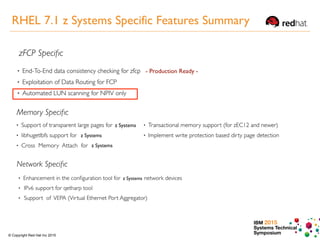
RHEL 7.1 z Systems Features Summary
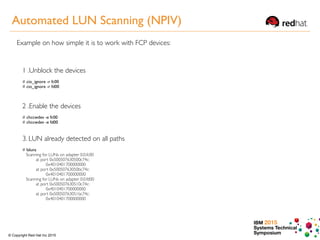
Automated LUN Scanning
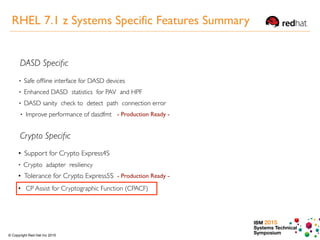
CPACF Exploitation
IBM Redbooks Publications
RHEL 7.1 for Power Systems
RHEL LE
RHEV for Power
IBM 2015
Systems Technical
Symposium© Copyright Red Hat Inc 2015
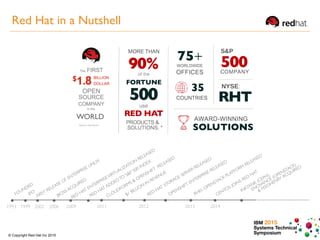
RED
HAT STORAGE SERVER RELEASED
FIRST RELEASE OF ENTERPRISE LINUX
OPENSHIFT ENTERPRISE RELEASED
CLOUDFORMS & OPENSHIFT
RELEASED
RED
HAT ENTERPRISEVIRTUALIZATION
RELEASED
RED
HAT ADDEDTO
S&P 500 INDEX
1993 1999 2002 2006 2011
FOUNDED
IPO
JBOSS ACQUIRED
20122009
$1 BILLION
IN
REVENUE
2013
RHEL OPENSTACK PLATFORM
RELEASED
2014
CENTOS JOINS RED
HAT
INKTANK (CEPH),

ENOVANCE (OPENSTACK)
& FEEDHENRY ACQUIRED
8
Red Hat in a Nutshell
IBM 2015
Systems Technical
Symposium© Copyright Red Hat Inc 2015
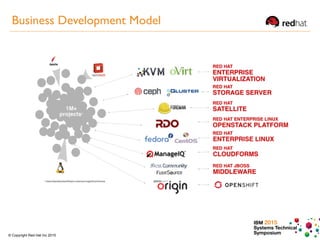
Business Development Model
IBM 2015
Systems Technical
Symposium© Copyright Red Hat Inc 2015
(II) https://access.redhat.com/site/articles/111663
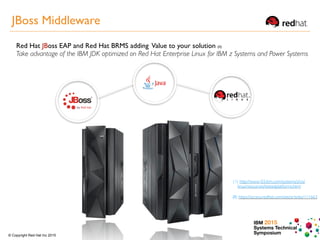
Red Hat JBoss EAP and Red Hat BRMS adding Value to your solution (II)
Take advantage of the IBM JDK optimized on Red Hat Enterprise Linux for IBM z Systems and Power Systems
(1) http://www-03.ibm.com/systems/z/os/
linux/resources/testedplatforms.html
JBoss Middleware
IBM 2015
Systems Technical
Symposium© Copyright Red Hat Inc 2015
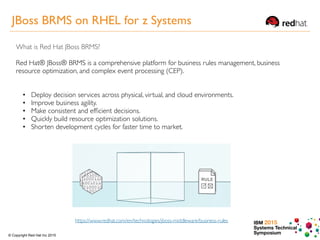
What is Red Hat JBoss BRMS?
Red Hat® JBoss® BRMS is a comprehensive platform for business rules management, business
resource optimization, and complex event processing (CEP).
https://www.redhat.com/en/technologies/jboss-middleware/business-rules
• Deploy decision services across physical, virtual, and cloud environments.
• Improve business agility.
• Make consistent and efficient decisions.
• Quickly build resource optimization solutions.
• Shorten development cycles for faster time to market.
JBoss BRMS on RHEL for z Systems
IBM 2015
Systems Technical
Symposium© Copyright Red Hat Inc 2015
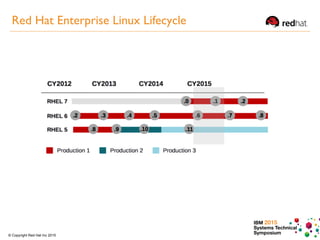
Red Hat Enterprise Linux Lifecycle
IBM 2015
Systems Technical
Symposium© Copyright Red Hat Inc 2015
Photo Michael Storze
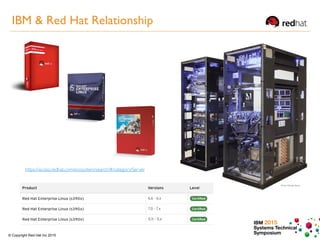
https://access.redhat.com/ecosystem/search/#/category/Server
IBM & Red Hat Relationship
IBM 2015
Systems Technical
Symposium© Copyright Red Hat Inc 2015
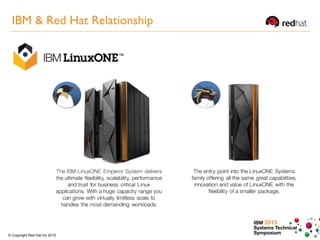
IBM & Red Hat Relationship
IBM 2015
Systems Technical
Symposium© Copyright Red Hat Inc 2015
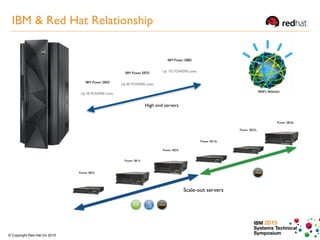
IBM & Red Hat Relationship
IBM Power E850
High end servers
IBM Power E870
Up 80 POWER8 cores
IBM Power E880
Up 192 POWER8 cores
Up 48 POWER8 cores
Red Hat Enterprise Linux on z Systems
IBM 2015
Systems Technical
Symposium© Copyright Red Hat Inc 2015
- Production Ready -
z Systems
z Systems
z Systems
z Systems
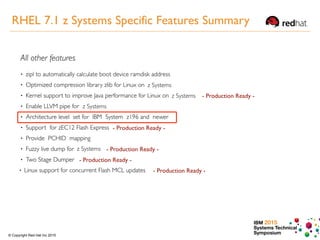
RHEL 7.1 z Systems Specific Features Summary
IBM 2015
Systems Technical
Symposium© Copyright Red Hat Inc 2015
1 .Unblock the devices
# cio_ignore -r fc00

# cio_ignore -r fd00
2 .Enable the devices
# chccwdev -e fc00
# chccwdev -e fd00
3. LUN already detected on all paths
# lsluns
Scanning for LUNs on adapter 0.0.fc00
at port 0x500507630500c74c:
0x4010401700000000
at port 0x50050763050bc74c:
0x4010401700000000
Scanning for LUNs on adapter 0.0.fd00
at port 0x500507630510c74c:
0x4010401700000000
at port 0x50050763051bc74c:
0x4010401700000000
Example on how simple it is to work with FCP devices:
Automated LUN Scanning (NPIV)
IBM 2015
Systems Technical
Symposium© Copyright Red Hat Inc 2015
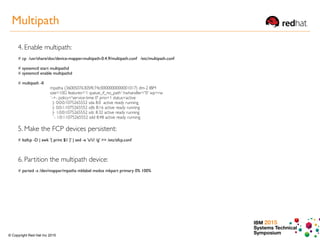
4. Enable multipath:
# cp /usr/share/doc/device-mapper-multipath-0.4.9/multipath.conf /etc/multipath.conf
# systemctl start multipathd
# systemctl enable multipathd
# multipath -ll
mpatha (36005076305ffc74c0000000000001017) dm-2 IBM
size=10G features='1 queue_if_no_path' hwhandler='0' wp=rw
`-+- policy='service-time 0' prio=1 status=active
|- 0:0:0:1075265552 sda 8:0 active ready running
|- 0:0:1:1075265552 sdb 8:16 active ready running
|- 1:0:0:1075265552 sdc 8:32 active ready running
`- 1:0:1:1075265552 sdd 8:48 active ready running
5. Make the FCP devices persistent:
# lszfcp -D | awk '{ print $1 }' | sed -e 's/// /g' >> /etc/zfcp.conf
6. Partition the multipath device:
# parted -s /dev/mapper/mpatha mklabel msdos mkpart primary 0% 100%
Multipath
IBM 2015
Systems Technical
Symposium© Copyright Red Hat Inc 2015
- Production Ready -
Driver tolerance for Crypto Express 5S• Support for Crypto Express4S
• Tolerance for Crypto Express5S - Production Ready -
• CP Assist for Cryptographic Function (CPACF)
RHEL 7.1 z Systems Specific Features Summary
IBM 2015
Systems Technical
Symposium© Copyright Red Hat Inc 2015
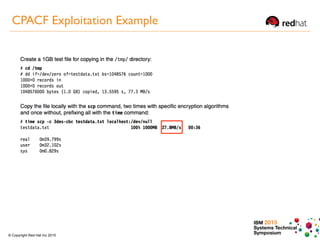
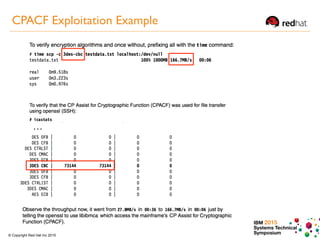
CPACF Exploitation Example
IBM 2015
Systems Technical
Symposium© Copyright Red Hat Inc 2015
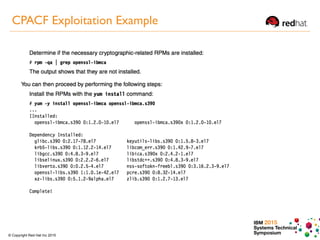
CPACF Exploitation Example
IBM 2015
Systems Technical
Symposium© Copyright Red Hat Inc 2015
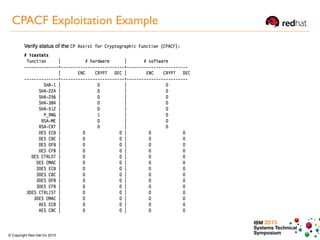
CPACF Exploitation Example
IBM 2015
Systems Technical
Symposium© Copyright Red Hat Inc 2015
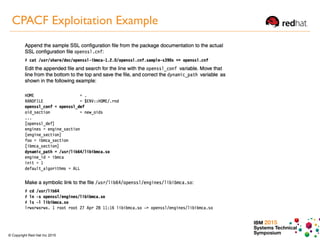
CPACF Exploitation Example
IBM 2015
Systems Technical
Symposium© Copyright Red Hat Inc 2015
…
CPACF Exploitation Example
IBM 2015
Systems Technical
Symposium© Copyright Red Hat Inc 2015
- Production Ready -
z Systems
z Systems
z Systems
z Systems
RHEL 7.1 z Systems Specific Features Summary
IBM 2015
Systems Technical
Symposium© Copyright Red Hat Inc 2015
http://www.redbooks.ibm.com
2013 2015
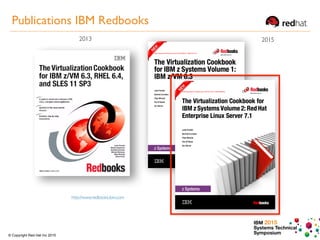
Publications IBM Redbooks
IBM 2015
Systems Technical
Symposium© Copyright Red Hat Inc 2015
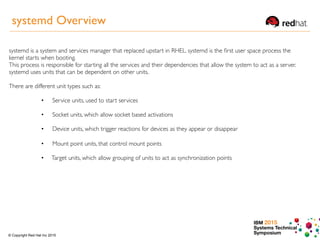
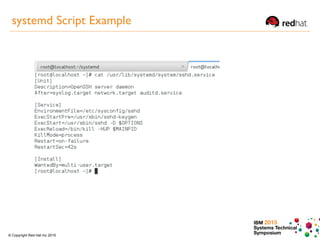
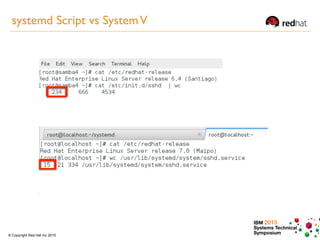
systemd is a system and services manager that replaced upstart in RHEL. systemd is the first user space process the
kernel starts when booting.
This process is responsible for starting all the services and their dependencies that allow the system to act as a server.
systemd uses units that can be dependent on other units.
There are different unit types such as:
• Service units, used to start services 

•  Socket units, which allow socket based activations 

• ︎  Device units, which trigger reactions for devices as they appear or disappear 

•  Mount point units, that control mount points 

• Target units, which allow grouping of units to act as synchronization points 

systemd Overview
IBM 2015
Systems Technical
Symposium© Copyright Red Hat Inc 2015
systemd Script Example
IBM 2015
Systems Technical
Symposium© Copyright Red Hat Inc 2015
systemd Script vs SystemV
IBM 2015
Systems Technical
Symposium© Copyright Red Hat Inc 2015
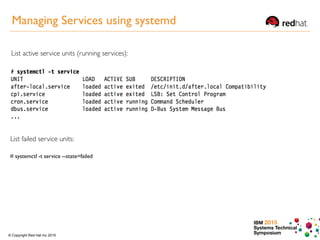
List active service units (running services):
List failed service units:
# systemctl -t service --state=failed
Managing Services using systemd
IBM 2015
Systems Technical
Symposium© Copyright Red Hat Inc 2015
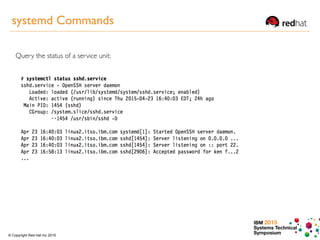
Query the status of a service unit:
systemd Commands
IBM 2015
Systems Technical
Symposium© Copyright Red Hat Inc 2015
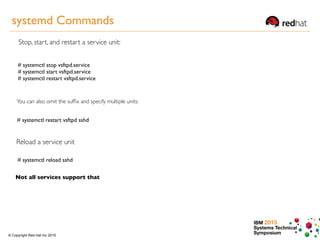
Stop, start, and restart a service unit:
# systemctl stop vsftpd.service

# systemctl start vsftpd.service

# systemctl restart vsftpd.service
You can also omit the suffix and specify multiple units:
# systemctl restart vsftpd sshd
# systemctl reload sshd
Reload a service unit
Not all services support that
systemd Commands
IBM 2015
Systems Technical
Symposium© Copyright Red Hat Inc 2015
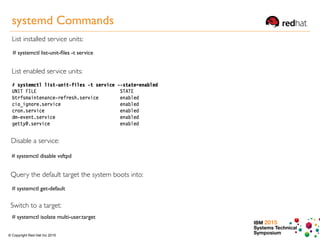
List installed service units:
# systemctl list-unit-files -t service
List enabled service units:
Disable a service:
# systemctl disable vsftpd
Query the default target the system boots into:
# systemctl get-default
Switch to a target:
# systemctl isolate multi-user.target
systemd Commands
IBM 2015
Systems Technical
Symposium© Copyright Red Hat Inc 2015
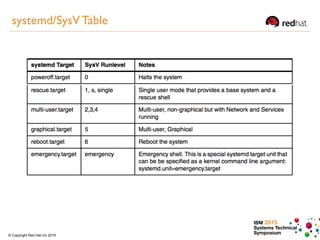
systemd/SysV Table
IBM 2015
Systems Technical
Symposium© Copyright Red Hat Inc 2015
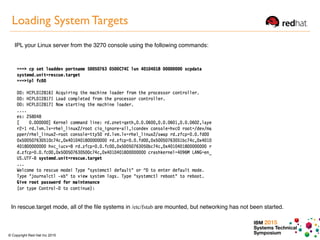
Loading System Targets
IPL your Linux server from the 3270 console using the following commands:
In rescue.target mode, all of the file systems in /etc/fstab are mounted, but networking has not been started.
IBM 2015
Systems Technical
Symposium© Copyright Red Hat Inc 2015
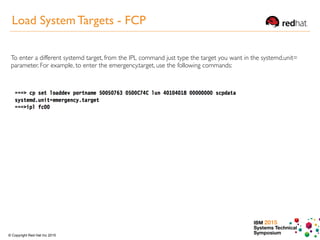
Load System Targets - FCP
To enter a different systemd target, from the IPL command just type the target you want in the systemd.unit=
parameter. For example, to enter the emergency.target, use the following commands:
IBM 2015
Systems Technical
Symposium© Copyright Red Hat Inc 2015
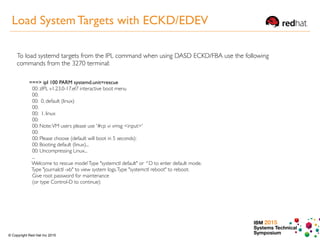
Load System Targets with ECKD/EDEV
To load systemd targets from the IPL command when using DASD ECKD/FBA use the following
commands from the 3270 terminal:
===> ipl 100 PARM systemd.unit=rescue
00: zIPL v1.23.0-17.el7 interactive boot menu
00:
00: 0. default (linux)
00:
00: 1. linux
00:
00: Note:VM users please use '#cp vi vmsg <input>'
00:
00: Please choose (default will boot in 5 seconds):
00: Booting default (linux)...
00: Uncompressing Linux...
...
Welcome to rescue mode!Type "systemctl default" or ^D to enter default mode.
Type "journalctl -xb" to view system logs.Type "systemctl reboot" to reboot.
Give root password for maintenance
(or type Control-D to continue):
IBM 2015
Systems Technical
Symposium© Copyright Red Hat Inc 2015
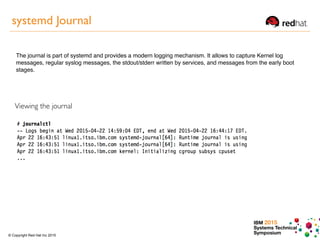
systemd Journal
The journal is part of systemd and provides a modern logging mechanism. It allows to capture Kernel log
messages, regular syslog messages, the stdout/stderr written by services, and messages from the early boot
stages.
Viewing the journal
IBM 2015
Systems Technical
Symposium© Copyright Red Hat Inc 2015
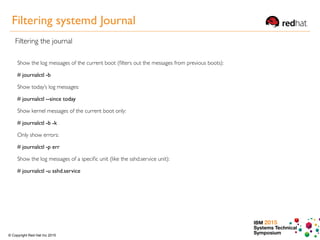
Filtering systemd Journal
Filtering the journal
Show the log messages of the current boot (filters out the messages from previous boots):
# journalctl -b
Show today’s log messages:
# journalctl --since today
Show kernel messages of the current boot only:
# journalctl -b -k
Only show errors:
# journalctl -p err
Show the log messages of a specific unit (like the sshd.service unit):
# journalctl -u sshd.service
Red Hat Enterprise Linux on Power Systems
IBM 2015
Systems Technical
Symposium© Copyright Red Hat Inc 2015
Raw performance: You may be running a large Linux server farm but not getting satisfactory
performance. You may need massive horsepower, and your application might not work well with a
clustering of PCs.
Virtualization robustness You may want the maximum flexibility you can have to share unused resources,
allocate and logically partition your servers.
Leveraging existing resources: You may already have a large staff of Linux support personnel.You've fallen
in love with the Power Systems platform for all of the reasons mentioned so far and don't want to invest
the money in retraining your staff on UNIX.
Datacenter consolidation: Sometimes, it seems every large company over the past several years has
performed a server consolidation of some kind.
Etc…
Why Run Linux on IBM Power Systems?
IBM 2015
Systems Technical
Symposium© Copyright Red Hat Inc 2015
The bottom line is, by combining the flexibility and cost savings of
Linux with the scalability and robustness of the POWER platform,
customers across all industries can integrate their environments
using Linux on POWER to reduce costs and consolidate workloads.
Why Run Linux on Power Systems?
IBM 2015
Systems Technical
Symposium© Copyright Red Hat Inc 2015
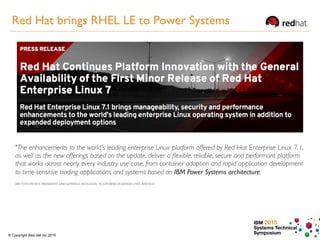
"The enhancements to the world’s leading enterprise Linux platform offered by Red Hat Enterprise Linux 7.1,
as well as the new offerings based on the update, deliver a flexible, reliable, secure and performant platform
that works across nearly every industry use case, from container adoption and rapid application development
to time-sensitive trading applications and systems based on IBM Power Systems architecture.
JIM TOTTONVICE PRESIDENT AND GENERAL MANAGER, PLATFORMS BUSINESS UNIT, RED HAT
Red Hat brings RHEL LE to Power Systems
IBM 2015
Systems Technical
Symposium© Copyright Red Hat Inc 2015
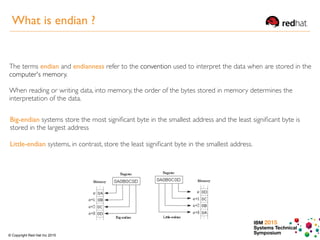
The terms endian and endianness refer to the convention used to interpret the data when are stored in the
computer's memory.
When reading or writing data, into memory, the order of the bytes stored in memory determines the
interpretation of the data.
Big-endian systems store the most significant byte in the smallest address and the least significant byte is
stored in the largest address
Little-endian systems, in contrast, store the least significant byte in the smallest address.
What is endian ?
IBM 2015
Systems Technical
Symposium© Copyright Red Hat Inc 2015
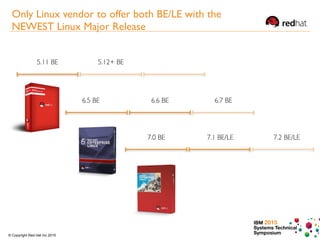
6.5 BE 6.6 BE
7.0 BE 7.1 BE/LE 7.2 BE/LE
6.7 BE
5.11 BE 5.12+ BE
Only Linux vendor to offer both BE/LE with the
NEWEST Linux Major Release
IBM 2015
Systems Technical
Symposium© Copyright Red Hat Inc 2015
Red Hat Enterprise Linux 7.1 offers both options little endian and big endian versions.
Running little endian mode accelerates business application innovation by eliminating a significant and
outdated barrier to application portability and allowing customers with the latest IBM Power Systems to
leverage the significant existing ecosystem of Linux applications previously developed and restricted
to x86 architectures.
Red Hat Enterprise Linux 7.1 little endian enables simple data migration, simplifies data sharing
(interoperability) with Linux on x86, and improves I/O options with modern I/O adapters and devices,
e.g. GPUs.
Why Red Hat Enterprise Linux little endian?
IBM 2015
Systems Technical
Symposium© Copyright Red Hat Inc 2015
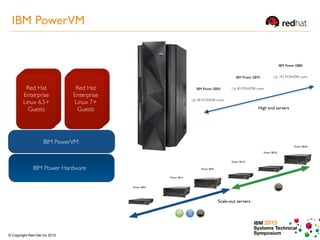
High end servers
IBM Power Hardware
IBM PowerVM
Red Hat
Enterprise
Linux 6.5+
Guests
Red Hat
Enterprise
Linux 7+
Guests
IBM PowerVM
IBM Power E850
IBM Power E870
Up 80 POWER8 cores
IBM Power E880
Up 192 POWER8 cores
Up 48 POWER8 cores
IBM 2015
Systems Technical
Symposium© Copyright Red Hat Inc 2015
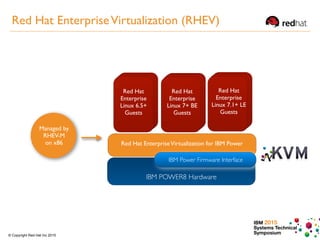
IBM POWER8 Hardware
IBM Power Firmware Interface
Red Hat EnterpriseVirtualization for IBM Power
Red Hat
Enterprise
Linux 6.5+
Guests
Red Hat
Enterprise
Linux 7+ BE
Guests
Managed by
RHEV-M
on x86
Red Hat
Enterprise
Linux 7.1+ LE
Guests
Red Hat EnterpriseVirtualization (RHEV)
IBM 2015
Systems Technical
Symposium© Copyright Red Hat Inc 2015
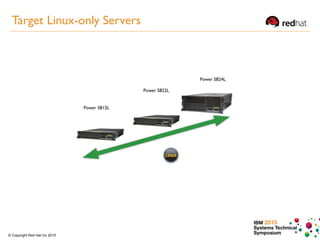
Target Linux-only Servers
IBM 2015
Systems Technical
Symposium© Copyright Red Hat Inc 2015
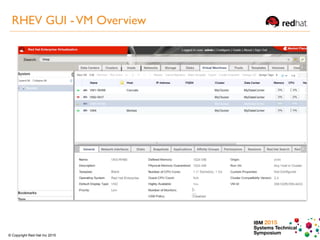
RHEV GUI -VM Overview
IBM 2015
Systems Technical
Symposium© Copyright Red Hat Inc 2015
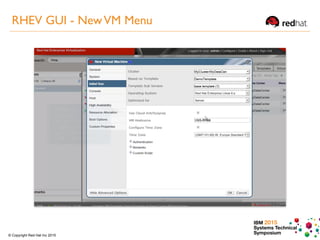
RHEV GUI - NewVM Menu
IBM 2015
Systems Technical
Symposium© Copyright Red Hat Inc 2015
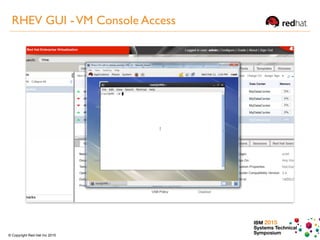
RHEV GUI -VM Console Access
IBM 2015
Systems Technical
Symposium© Copyright Red Hat Inc 2015
• Coexist with RHEV environments for x86: Simply add Power Systems with Linux guests to the
current x86 environment and take advantage of a single graphical console to manage both
distributed systems and Power Systems.
• Open SourceTechnology: Using RHEV for Power will allow customers to benefit from the KVM
virtualization technology without having to learn another hypervisor (IBM PowerVM) when
managing Linux guests.
• Readily available staff with KVM knowledge versus PowerVM
• By using RHEV for Power, or simply RHEV - you can integrate your environment with other
products from Red Hat, such as Cloudforms, to manage Linux cloud environments.
RHEV for Power Advantages
IBM 2015
Systems Technical
Symposium© Copyright Red Hat Inc 2015
Filipe Miranda <fmiranda@redhat.com>
Global Lead for Red Hat Products on IBM z Systems and Power Systems
Red Hat, Inc.

IBM Systems Technical Symposium Melbourne, 2015

  • 1.
    Systems Technical Symposium 2015 August25 - 28 | Melbourne, Australia Featuring IBM z Systems, IBM Power Systems and IBM System Storage Red Hat Enterprise Linux Update IBM z Systems and Power Systems Filipe Miranda <fmiranda@redhat.com> Global Technical Lead for Linux on IBM z Systems and Power Systems Red Hat, Inc. © Copyright IBM Corporation 2015 © Copyright Red Hat Inc 2015 Technical University/Symposia materials may not be reproduced in whole or in part without the prior written permission of IBM.
  • 2.
    IBM 2015 Systems Technical Symposium©Copyright Red Hat Inc 2015 Session topics Red Hat in a Nutshell Open Source Development Model JBoss EAP and BRMS for RHEL on z System and Power Systems Red Hat and IBM Collaboration Red Hat Enterprise Linux for z Systems RHEL 7.1 z Systems Features Summary Automated LUN Scanning CPACF Exploitation IBM Redbooks Publications RHEL 7.1 for Power Systems RHEL LE RHEV for Power
  • 3.
    IBM 2015 Systems Technical Symposium©Copyright Red Hat Inc 2015 RED HAT STORAGE SERVER RELEASED FIRST RELEASE OF ENTERPRISE LINUX OPENSHIFT ENTERPRISE RELEASED CLOUDFORMS & OPENSHIFT RELEASED RED HAT ENTERPRISEVIRTUALIZATION RELEASED RED HAT ADDEDTO S&P 500 INDEX 1993 1999 2002 2006 2011 FOUNDED IPO JBOSS ACQUIRED 20122009 $1 BILLION IN REVENUE 2013 RHEL OPENSTACK PLATFORM RELEASED 2014 CENTOS JOINS RED HAT INKTANK (CEPH),
 ENOVANCE (OPENSTACK) & FEEDHENRY ACQUIRED 8 Red Hat in a Nutshell
  • 4.
    IBM 2015 Systems Technical Symposium©Copyright Red Hat Inc 2015 Business Development Model
  • 5.
    IBM 2015 Systems Technical Symposium©Copyright Red Hat Inc 2015 (II) https://access.redhat.com/site/articles/111663 Red Hat JBoss EAP and Red Hat BRMS adding Value to your solution (II) Take advantage of the IBM JDK optimized on Red Hat Enterprise Linux for IBM z Systems and Power Systems (1) http://www-03.ibm.com/systems/z/os/ linux/resources/testedplatforms.html JBoss Middleware
  • 6.
    IBM 2015 Systems Technical Symposium©Copyright Red Hat Inc 2015 What is Red Hat JBoss BRMS? Red Hat® JBoss® BRMS is a comprehensive platform for business rules management, business resource optimization, and complex event processing (CEP). https://www.redhat.com/en/technologies/jboss-middleware/business-rules • Deploy decision services across physical, virtual, and cloud environments. • Improve business agility. • Make consistent and efficient decisions. • Quickly build resource optimization solutions. • Shorten development cycles for faster time to market. JBoss BRMS on RHEL for z Systems
  • 7.
    IBM 2015 Systems Technical Symposium©Copyright Red Hat Inc 2015 Red Hat Enterprise Linux Lifecycle
  • 8.
    IBM 2015 Systems Technical Symposium©Copyright Red Hat Inc 2015 Photo Michael Storze https://access.redhat.com/ecosystem/search/#/category/Server IBM & Red Hat Relationship
  • 9.
    IBM 2015 Systems Technical Symposium©Copyright Red Hat Inc 2015 IBM & Red Hat Relationship
  • 10.
    IBM 2015 Systems Technical Symposium©Copyright Red Hat Inc 2015 IBM & Red Hat Relationship IBM Power E850 High end servers IBM Power E870 Up 80 POWER8 cores IBM Power E880 Up 192 POWER8 cores Up 48 POWER8 cores
  • 11.
    Red Hat EnterpriseLinux on z Systems
  • 12.
    IBM 2015 Systems Technical Symposium©Copyright Red Hat Inc 2015 - Production Ready - z Systems z Systems z Systems z Systems RHEL 7.1 z Systems Specific Features Summary
  • 13.
    IBM 2015 Systems Technical Symposium©Copyright Red Hat Inc 2015 1 .Unblock the devices # cio_ignore -r fc00
 # cio_ignore -r fd00 2 .Enable the devices # chccwdev -e fc00 # chccwdev -e fd00 3. LUN already detected on all paths # lsluns Scanning for LUNs on adapter 0.0.fc00 at port 0x500507630500c74c: 0x4010401700000000 at port 0x50050763050bc74c: 0x4010401700000000 Scanning for LUNs on adapter 0.0.fd00 at port 0x500507630510c74c: 0x4010401700000000 at port 0x50050763051bc74c: 0x4010401700000000 Example on how simple it is to work with FCP devices: Automated LUN Scanning (NPIV)
  • 14.
    IBM 2015 Systems Technical Symposium©Copyright Red Hat Inc 2015 4. Enable multipath: # cp /usr/share/doc/device-mapper-multipath-0.4.9/multipath.conf /etc/multipath.conf # systemctl start multipathd # systemctl enable multipathd # multipath -ll mpatha (36005076305ffc74c0000000000001017) dm-2 IBM size=10G features='1 queue_if_no_path' hwhandler='0' wp=rw `-+- policy='service-time 0' prio=1 status=active |- 0:0:0:1075265552 sda 8:0 active ready running |- 0:0:1:1075265552 sdb 8:16 active ready running |- 1:0:0:1075265552 sdc 8:32 active ready running `- 1:0:1:1075265552 sdd 8:48 active ready running 5. Make the FCP devices persistent: # lszfcp -D | awk '{ print $1 }' | sed -e 's/// /g' >> /etc/zfcp.conf 6. Partition the multipath device: # parted -s /dev/mapper/mpatha mklabel msdos mkpart primary 0% 100% Multipath
  • 15.
    IBM 2015 Systems Technical Symposium©Copyright Red Hat Inc 2015 - Production Ready - Driver tolerance for Crypto Express 5S• Support for Crypto Express4S • Tolerance for Crypto Express5S - Production Ready - • CP Assist for Cryptographic Function (CPACF) RHEL 7.1 z Systems Specific Features Summary
  • 16.
    IBM 2015 Systems Technical Symposium©Copyright Red Hat Inc 2015 CPACF Exploitation Example
  • 17.
    IBM 2015 Systems Technical Symposium©Copyright Red Hat Inc 2015 CPACF Exploitation Example
  • 18.
    IBM 2015 Systems Technical Symposium©Copyright Red Hat Inc 2015 CPACF Exploitation Example
  • 19.
    IBM 2015 Systems Technical Symposium©Copyright Red Hat Inc 2015 CPACF Exploitation Example
  • 20.
    IBM 2015 Systems Technical Symposium©Copyright Red Hat Inc 2015 … CPACF Exploitation Example
  • 21.
    IBM 2015 Systems Technical Symposium©Copyright Red Hat Inc 2015 - Production Ready - - Production Ready - - Production Ready - - Production Ready - - Production Ready - z Systems z Systems z Systems z Systems RHEL 7.1 z Systems Specific Features Summary
  • 22.
    IBM 2015 Systems Technical Symposium©Copyright Red Hat Inc 2015 http://www.redbooks.ibm.com 2013 2015 Publications IBM Redbooks
  • 23.
    IBM 2015 Systems Technical Symposium©Copyright Red Hat Inc 2015 systemd is a system and services manager that replaced upstart in RHEL. systemd is the first user space process the kernel starts when booting. This process is responsible for starting all the services and their dependencies that allow the system to act as a server. systemd uses units that can be dependent on other units. There are different unit types such as: • Service units, used to start services 
 •  Socket units, which allow socket based activations 
 • ︎  Device units, which trigger reactions for devices as they appear or disappear 
 •  Mount point units, that control mount points 
 • Target units, which allow grouping of units to act as synchronization points 
 systemd Overview
  • 24.
    IBM 2015 Systems Technical Symposium©Copyright Red Hat Inc 2015 systemd Script Example
  • 25.
    IBM 2015 Systems Technical Symposium©Copyright Red Hat Inc 2015 systemd Script vs SystemV
  • 26.
    IBM 2015 Systems Technical Symposium©Copyright Red Hat Inc 2015 List active service units (running services): List failed service units: # systemctl -t service --state=failed Managing Services using systemd
  • 27.
    IBM 2015 Systems Technical Symposium©Copyright Red Hat Inc 2015 Query the status of a service unit: systemd Commands
  • 28.
    IBM 2015 Systems Technical Symposium©Copyright Red Hat Inc 2015 Stop, start, and restart a service unit: # systemctl stop vsftpd.service
 # systemctl start vsftpd.service
 # systemctl restart vsftpd.service You can also omit the suffix and specify multiple units: # systemctl restart vsftpd sshd # systemctl reload sshd Reload a service unit Not all services support that systemd Commands
  • 29.
    IBM 2015 Systems Technical Symposium©Copyright Red Hat Inc 2015 List installed service units: # systemctl list-unit-files -t service List enabled service units: Disable a service: # systemctl disable vsftpd Query the default target the system boots into: # systemctl get-default Switch to a target: # systemctl isolate multi-user.target systemd Commands
  • 30.
    IBM 2015 Systems Technical Symposium©Copyright Red Hat Inc 2015 systemd/SysV Table
  • 31.
    IBM 2015 Systems Technical Symposium©Copyright Red Hat Inc 2015 Loading System Targets IPL your Linux server from the 3270 console using the following commands: In rescue.target mode, all of the file systems in /etc/fstab are mounted, but networking has not been started.
  • 32.
    IBM 2015 Systems Technical Symposium©Copyright Red Hat Inc 2015 Load System Targets - FCP To enter a different systemd target, from the IPL command just type the target you want in the systemd.unit= parameter. For example, to enter the emergency.target, use the following commands:
  • 33.
    IBM 2015 Systems Technical Symposium©Copyright Red Hat Inc 2015 Load System Targets with ECKD/EDEV To load systemd targets from the IPL command when using DASD ECKD/FBA use the following commands from the 3270 terminal: ===> ipl 100 PARM systemd.unit=rescue 00: zIPL v1.23.0-17.el7 interactive boot menu 00: 00: 0. default (linux) 00: 00: 1. linux 00: 00: Note:VM users please use '#cp vi vmsg <input>' 00: 00: Please choose (default will boot in 5 seconds): 00: Booting default (linux)... 00: Uncompressing Linux... ... Welcome to rescue mode!Type "systemctl default" or ^D to enter default mode. Type "journalctl -xb" to view system logs.Type "systemctl reboot" to reboot. Give root password for maintenance (or type Control-D to continue):
  • 34.
    IBM 2015 Systems Technical Symposium©Copyright Red Hat Inc 2015 systemd Journal The journal is part of systemd and provides a modern logging mechanism. It allows to capture Kernel log messages, regular syslog messages, the stdout/stderr written by services, and messages from the early boot stages. Viewing the journal
  • 35.
    IBM 2015 Systems Technical Symposium©Copyright Red Hat Inc 2015 Filtering systemd Journal Filtering the journal Show the log messages of the current boot (filters out the messages from previous boots): # journalctl -b Show today’s log messages: # journalctl --since today Show kernel messages of the current boot only: # journalctl -b -k Only show errors: # journalctl -p err Show the log messages of a specific unit (like the sshd.service unit): # journalctl -u sshd.service
  • 36.
    Red Hat EnterpriseLinux on Power Systems
  • 37.
    IBM 2015 Systems Technical Symposium©Copyright Red Hat Inc 2015 Raw performance: You may be running a large Linux server farm but not getting satisfactory performance. You may need massive horsepower, and your application might not work well with a clustering of PCs. Virtualization robustness You may want the maximum flexibility you can have to share unused resources, allocate and logically partition your servers. Leveraging existing resources: You may already have a large staff of Linux support personnel.You've fallen in love with the Power Systems platform for all of the reasons mentioned so far and don't want to invest the money in retraining your staff on UNIX. Datacenter consolidation: Sometimes, it seems every large company over the past several years has performed a server consolidation of some kind. Etc… Why Run Linux on IBM Power Systems?
  • 38.
    IBM 2015 Systems Technical Symposium©Copyright Red Hat Inc 2015 The bottom line is, by combining the flexibility and cost savings of Linux with the scalability and robustness of the POWER platform, customers across all industries can integrate their environments using Linux on POWER to reduce costs and consolidate workloads. Why Run Linux on Power Systems?
  • 39.
    IBM 2015 Systems Technical Symposium©Copyright Red Hat Inc 2015 "The enhancements to the world’s leading enterprise Linux platform offered by Red Hat Enterprise Linux 7.1, as well as the new offerings based on the update, deliver a flexible, reliable, secure and performant platform that works across nearly every industry use case, from container adoption and rapid application development to time-sensitive trading applications and systems based on IBM Power Systems architecture. JIM TOTTONVICE PRESIDENT AND GENERAL MANAGER, PLATFORMS BUSINESS UNIT, RED HAT Red Hat brings RHEL LE to Power Systems
  • 40.
    IBM 2015 Systems Technical Symposium©Copyright Red Hat Inc 2015 The terms endian and endianness refer to the convention used to interpret the data when are stored in the computer's memory. When reading or writing data, into memory, the order of the bytes stored in memory determines the interpretation of the data. Big-endian systems store the most significant byte in the smallest address and the least significant byte is stored in the largest address Little-endian systems, in contrast, store the least significant byte in the smallest address. What is endian ?
  • 41.
    IBM 2015 Systems Technical Symposium©Copyright Red Hat Inc 2015 6.5 BE 6.6 BE 7.0 BE 7.1 BE/LE 7.2 BE/LE 6.7 BE 5.11 BE 5.12+ BE Only Linux vendor to offer both BE/LE with the NEWEST Linux Major Release
  • 42.
    IBM 2015 Systems Technical Symposium©Copyright Red Hat Inc 2015 Red Hat Enterprise Linux 7.1 offers both options little endian and big endian versions. Running little endian mode accelerates business application innovation by eliminating a significant and outdated barrier to application portability and allowing customers with the latest IBM Power Systems to leverage the significant existing ecosystem of Linux applications previously developed and restricted to x86 architectures. Red Hat Enterprise Linux 7.1 little endian enables simple data migration, simplifies data sharing (interoperability) with Linux on x86, and improves I/O options with modern I/O adapters and devices, e.g. GPUs. Why Red Hat Enterprise Linux little endian?
  • 43.
    IBM 2015 Systems Technical Symposium©Copyright Red Hat Inc 2015 High end servers IBM Power Hardware IBM PowerVM Red Hat Enterprise Linux 6.5+ Guests Red Hat Enterprise Linux 7+ Guests IBM PowerVM IBM Power E850 IBM Power E870 Up 80 POWER8 cores IBM Power E880 Up 192 POWER8 cores Up 48 POWER8 cores
  • 44.
    IBM 2015 Systems Technical Symposium©Copyright Red Hat Inc 2015 IBM POWER8 Hardware IBM Power Firmware Interface Red Hat EnterpriseVirtualization for IBM Power Red Hat Enterprise Linux 6.5+ Guests Red Hat Enterprise Linux 7+ BE Guests Managed by RHEV-M on x86 Red Hat Enterprise Linux 7.1+ LE Guests Red Hat EnterpriseVirtualization (RHEV)
  • 45.
    IBM 2015 Systems Technical Symposium©Copyright Red Hat Inc 2015 Target Linux-only Servers
  • 46.
    IBM 2015 Systems Technical Symposium©Copyright Red Hat Inc 2015 RHEV GUI -VM Overview
  • 47.
    IBM 2015 Systems Technical Symposium©Copyright Red Hat Inc 2015 RHEV GUI - NewVM Menu
  • 48.
    IBM 2015 Systems Technical Symposium©Copyright Red Hat Inc 2015 RHEV GUI -VM Console Access
  • 49.
    IBM 2015 Systems Technical Symposium©Copyright Red Hat Inc 2015 • Coexist with RHEV environments for x86: Simply add Power Systems with Linux guests to the current x86 environment and take advantage of a single graphical console to manage both distributed systems and Power Systems. • Open SourceTechnology: Using RHEV for Power will allow customers to benefit from the KVM virtualization technology without having to learn another hypervisor (IBM PowerVM) when managing Linux guests. • Readily available staff with KVM knowledge versus PowerVM • By using RHEV for Power, or simply RHEV - you can integrate your environment with other products from Red Hat, such as Cloudforms, to manage Linux cloud environments. RHEV for Power Advantages
  • 50.
    IBM 2015 Systems Technical Symposium©Copyright Red Hat Inc 2015 Filipe Miranda <fmiranda@redhat.com> Global Lead for Red Hat Products on IBM z Systems and Power Systems Red Hat, Inc.