OCTOBER 26, 2011 | SLIDE 1
www.realdolmen.com


OCTOBER 26, 2011 | SLIDE 2
WHO AM I?
        Kristof Degrave
        Ingelmunster, Belgium
        www.realdolmen.com
        Web squad leader
        Focus on web
          HTML 5.0, ASP.NET


        www.kristofdegrave.be
        kristof.degrave@realdolmen.com
        about.me/kristofdegrave
        @kristofdegrave


OCTOBER 26, 2011 | SLIDE 3
The foundations

      HTML


OCTOBER 26, 2011 | SLIDE 4
HTML
        Document type
          <!DOCTYPE html>


        HTML5 Mark-up
            Header
            Nav
            Article
            Footer
            Time
            …


OCTOBER 26, 2011 | SLIDE 5
HTML

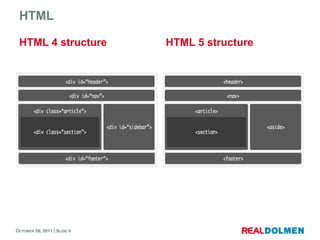
 HTML 4 structure            HTML 5 structure


OCTOBER 26, 2011 | SLIDE 6
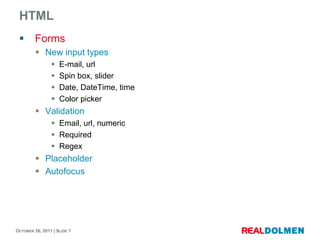
HTML
        Forms
          New input types
                   E-mail, url
                   Spin box, slider
                   Date, DateTime, time
                   Color picker
          Validation
                 Email, url, numeric
                 Required
                 Regex
          Placeholder
          Autofocus


OCTOBER 26, 2011 | SLIDE 7
HTML
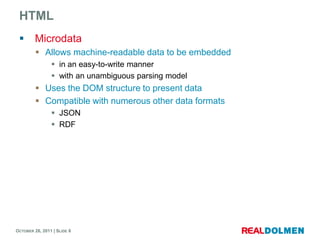
        Microdata
          Allows machine-readable data to be embedded
                 in an easy-to-write manner
                 with an unambiguous parsing model
          Uses the DOM structure to present data
          Compatible with numerous other data formats
                 JSON
                 RDF


OCTOBER 26, 2011 | SLIDE 8
HTML
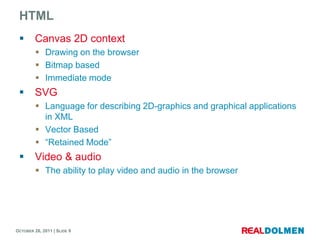
        Canvas 2D context
          Drawing on the browser
          Bitmap based
          Immediate mode
        SVG
          Language for describing 2D-graphics and graphical applications
           in XML
          Vector Based
          “Retained Mode”
        Video & audio
          The ability to play video and audio in the browser


OCTOBER 26, 2011 | SLIDE 9
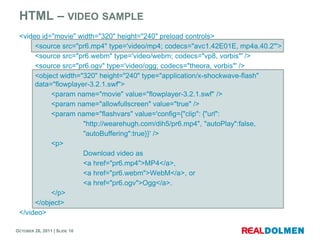
HTML – VIDEO SAMPLE
 <video id="movie" width="320" height="240" preload controls>
      <source src="pr6.mp4" type='video/mp4; codecs="avc1.42E01E, mp4a.40.2"'>
      <source src="pr6.webm" type='video/webm; codecs="vp8, vorbis"' />
      <source src="pr6.ogv" type='video/ogg; codecs="theora, vorbis"' />
      <object width="320" height="240" type="application/x-shockwave-flash"
      data="flowplayer-3.2.1.swf">
           <param name="movie" value="flowplayer-3.2.1.swf" />
           <param name="allowfullscreen" value="true" />
           <param name="flashvars" value='config={"clip": {"url":
                     "http://wearehugh.com/dih5/pr6.mp4", "autoPlay":false,
                     "autoBuffering":true}}' />
           <p>
                     Download video as
                     <a href="pr6.mp4">MP4</a>,
                     <a href="pr6.webm">WebM</a>, or
                     <a href="pr6.ogv">Ogg</a>.
           </p>
      </object>
 </video>

OCTOBER 26, 2011 | SLIDE 10
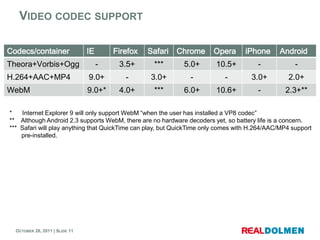
VIDEO CODEC SUPPORT

Codecs/container                IE       Firefox   Safari   Chrome     Opera      iPhone      Android
Theora+Vorbis+Ogg                    -    3.5+      ***      5.0+       10.5+          -            -
H.264+AAC+MP4                   9.0+        -      3.0+        -           -        3.0+         2.0+
WebM                            9.0+*     4.0+      ***      6.0+       10.6+          -        2.3+**

*   Internet Explorer 9 will only support WebM “when the user has installed a VP8 codec”
** Although Android 2.3 supports WebM, there are no hardware decoders yet, so battery life is a concern.
*** Safari will play anything that QuickTime can play, but QuickTime only comes with H.264/AAC/MP4 support
    pre-installed.


  OCTOBER 26, 2011 | SLIDE 11
Styling your application

     CSS3


OCTOBER 26, 2011 | SLIDE 12
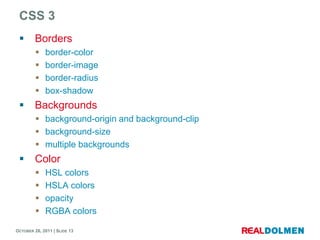
CSS 3
        Borders
            border-color
            border-image
            border-radius
            box-shadow
        Backgrounds
          background-origin and background-clip
          background-size
          multiple backgrounds
        Color
            HSL colors
            HSLA colors
            opacity
            RGBA colors

OCTOBER 26, 2011 | SLIDE 13
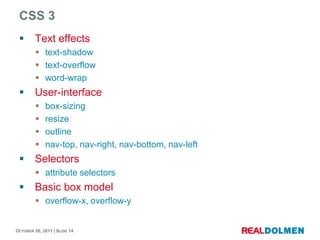
CSS 3
        Text effects
          text-shadow
          text-overflow
          word-wrap
        User-interface
            box-sizing
            resize
            outline
            nav-top, nav-right, nav-bottom, nav-left
        Selectors
          attribute selectors
        Basic box model
          overflow-x, overflow-y


OCTOBER 26, 2011 | SLIDE 14
CSS 3
        Other modules
            media queries
            multi-column layout
            Web fonts
            Speech
            Transformations


OCTOBER 26, 2011 | SLIDE 15
Getting the most out of your web application

     WEB APPS


OCTOBER 26, 2011 | SLIDE 16
WEB APPS - OFFLINE APPLICATIONS
        Online webpages
          Get downloaded
          Then rendered


        Offline Webpages
          Issue: Pages can’t be downloaded


        Solution
          Manifest file
                 Manifest attribute on the html element of each offline enabled page
                 Describes all necessary resources to use the application offline


OCTOBER 26, 2011 | SLIDE 17
WEB APPS - OFFLINE APPLICATIONS
        Offline application lifecycle
         1.     Visit the offline enabled application
         2.     Browser reads the manifest file
         3.     Downloads the resources described in the manifest file
         4.     Copies those files to a local cache
                      Not the httpcache
         5. When every thing is downloaded, the application is ready for
            offline use
         6. Resources automatically updated when changed


        The web application is now on- and offline available.
          Navigate to the url in both cases


OCTOBER 26, 2011 | SLIDE 18
WEB APPS - OFFLINE APPLICATIONS
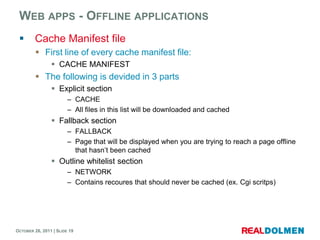
        Cache Manifest file
          First line of every cache manifest file:
                 CACHE MANIFEST
          The following is devided in 3 parts
                 Explicit section
                        – CACHE
                        – All files in this list will be downloaded and cached
                 Fallback section
                        – FALLBACK
                        – Page that will be displayed when you are trying to reach a page offline
                          that hasn’t been cached
                 Outline whitelist section
                        – NETWORK
                        – Contains recoures that should never be cached (ex. Cgi scritps)


OCTOBER 26, 2011 | SLIDE 19
WEB APPS - OFFLINE APPLICATIONS
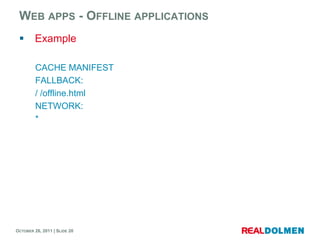
        Example

         CACHE MANIFEST
         FALLBACK:
         / /offline.html
         NETWORK:
         *


OCTOBER 26, 2011 | SLIDE 20
WEB APPS - WEB STORAGE
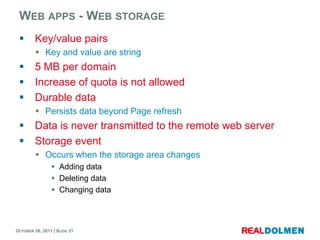
        Key/value pairs
          Key and value are string
        5 MB per domain
        Increase of quota is not allowed
        Durable data
          Persists data beyond Page refresh
        Data is never transmitted to the remote web server
        Storage event
          Occurs when the storage area changes
                 Adding data
                 Deleting data
                 Changing data


OCTOBER 26, 2011 | SLIDE 21
WEB APPS - INDEXED DB
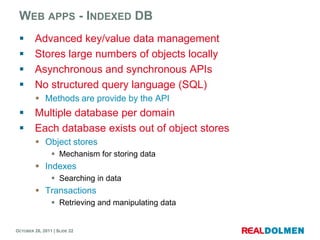
        Advanced key/value data management
        Stores large numbers of objects locally
        Asynchronous and synchronous APIs
        No structured query language (SQL)
          Methods are provide by the API
        Multiple database per domain
        Each database exists out of object stores
          Object stores
                 Mechanism for storing data
          Indexes
                 Searching in data
          Transactions
                 Retrieving and manipulating data


OCTOBER 26, 2011 | SLIDE 22
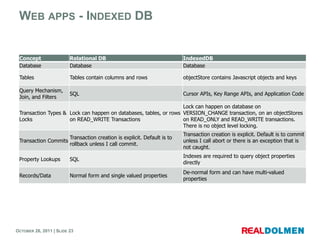
WEB APPS - INDEXED DB


 Concept                 Relational DB                                 IndexedDB
 Database                Database                                      Database

 Tables                  Tables contain columns and rows               objectStore contains Javascript objects and keys

 Query Mechanism,
                         SQL                                           Cursor APIs, Key Range APIs, and Application Code
 Join, and Filters
                                                                   Lock can happen on database on
 Transaction Types & Lock can happen on databases, tables, or rows VERSION_CHANGE transaction, on an objectStores
 Locks               on READ_WRITE Transactions                    on READ_ONLY and READ_WRITE transactions.
                                                                   There is no object level locking.

                                                                       Transaction creation is explicit. Default is to commit
                     Transaction creation is explicit. Default is to
 Transaction Commits                                                   unless I call abort or there is an exception that is
                     rollback unless I call commit.
                                                                       not caught.
                                                                       Indexes are required to query object properties
 Property Lookups        SQL
                                                                       directly
                                                                       De-normal form and can have multi-valued
 Records/Data            Normal form and single valued properties
                                                                       properties


OCTOBER 26, 2011 | SLIDE 23
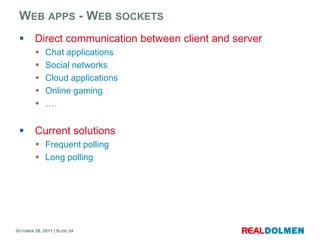
WEB APPS - WEB SOCKETS
        Direct communication between client and server
            Chat applications
            Social networks
            Cloud applications
            Online gaming
            …


        Current solutions
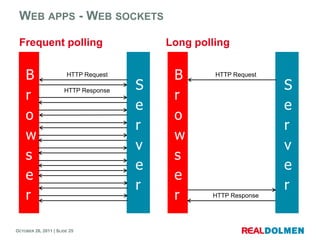
          Frequent polling
          Long polling


OCTOBER 26, 2011 | SLIDE 24
WEB APPS - WEB SOCKETS

 Frequent polling                         Long polling


    B                  HTTP Request        B       HTTP Request

                                      S                           S
    r                                      r
                      HTTP Response

                                      e                           e
    o                                      o
                                      r                           r
    w                                      w
                                      v                           v
    s                                      s
                                      e                           e
    e                                      e
                                      r                           r
    r                                      r      HTTP Response


OCTOBER 26, 2011 | SLIDE 25
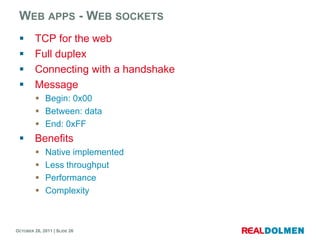
WEB APPS - WEB SOCKETS
        TCP for the web
        Full duplex
        Connecting with a handshake
        Message
          Begin: 0x00
          Between: data
          End: 0xFF
        Benefits
            Native implemented
            Less throughput
            Performance
            Complexity


OCTOBER 26, 2011 | SLIDE 26
WEB APPS - FILE
        File API
          API for representing file objects
                 programmatically selecting
                 accessing their data
        File API writer
          API for writing to files
        File API Directories and System
          API to navigate file system hierarchies
          Defines a mean to expose sandboxed sections of a users local
           file system


OCTOBER 26, 2011 | SLIDE 27
WEB APPS - MEDIA
        Media Capture API
          Provides access to the device capabilities of
                 Audio capture
                 Image capture
                 Video capture
        HTML Media Capture
          Defines HTML form enhancements that provide access toe the
           Media Capture API


OCTOBER 26, 2011 | SLIDE 28
WEB APPS - COMMUNICATION
        Server-sent event
          Receives push notifications from a server
                 In form of DOM Events
                 Uses HTTP connection
          Possible to work with other push notification schemes
                 Push SMS


        XMLHttpRequest
          Functionality for transferring data
          AJAX


OCTOBER 26, 2011 | SLIDE 29
WEB APPS - COMMUNICATION
        Messaging API
          Provides access to messaging functionality in the device
                 SMS
                 MMS
                 E-mail
        HTML 5 Messaging
          Defines mechanism for communicating between browsing
           contexts
        Web notifications
          API for displaying simple notifications


OCTOBER 26, 2011 | SLIDE 30
WEB APPS - PERFORMANCE
        Web workers
            Executing scripts in the background
            Doesn’t freezes the UI
            Takes advantage of multicores
            Allows thread-like operations with message-passing
        Page visibility API
          Determines if the page is visible
          Visibility changed event
          Purpose: saves battery life
        Request animation frame API
          API for create power efficient and smooth animations
          Determines how many frames per second an animation needs
                 Depending on the display’s refresh rate
                 Only when the page is visible

OCTOBER 26, 2011 | SLIDE 31
WEB APPS – TIMING INFORMATION
        Navigation timing
          Interface to access timing information related to navigation
        Resource timing
          Interface to access timing information related to HTML elements
        User timing
          Measures the performance of the applications
                 Gets access to high precision timestamps
        Performance timeline
          Interface to access timing information related to navigation and
           elements


OCTOBER 26, 2011 | SLIDE 32
WEB APPS – DEVICE INFORMATION
        Network information API
          Interface to access the underlying network information of the
           device
        DeviceOrientation event specification
          Provides information about the physical orientation and motion of
           the device
        Battery status event specification
          Provides information about the battery status of the hosting
           device
        Touch event specification
          A set low level event to handle touch events
                 Single as multi touch
          Also addresses pen-tablet devices


OCTOBER 26, 2011 | SLIDE 33
WEB APPS
        Selector API
          Methodes for retrieving elements from the DOM
        Clipboard API
          Defines clipboard operations
                 Copy, cut, paste
        Contacts API
          Provides access to a user's unified address book
        Calender API
          Defines high level interfaces to obtain readaccess to a user’s
           callender service


OCTOBER 26, 2011 | SLIDE 34
WEB APPS - DEVICE INFORMATION
        Geolocation
          Scripted access to geographical location information
          Get’s information from the hosting device
                   IP address
                   Wireless network connection
                   Cell tower
                   GPS


OCTOBER 26, 2011 | SLIDE 35
CONCLUSION


OCTOBER 26, 2011 | SLIDE 36
CONCLUSION
        Start using it today
        Use fallback mechanisms for older browsers
        Use feature detection instead of browser detection
        Pro’s
            Cross platform
            Cross browser
            Approaches native application experience
            Offline applications
        Contra’s
          Many features still in draft
          Only modern browsers
          JavaScript Driven / Not strong types


OCTOBER 26, 2011 | SLIDE 37
For more information:
 visit our website WWW.REALDOLMEN.COM


 Follow us on:


 Selected presentations are available on:


 THANK YOU                                  Or scan this QR code with your Smartphone to immediately go to the website


OCTOBER 26, 2011 | SLIDE 38

HTML5: A complete overview

  • 1.
  • 2.
  • 3.
    WHO AM I?  Kristof Degrave  Ingelmunster, Belgium  www.realdolmen.com  Web squad leader  Focus on web  HTML 5.0, ASP.NET  www.kristofdegrave.be  kristof.degrave@realdolmen.com  about.me/kristofdegrave  @kristofdegrave OCTOBER 26, 2011 | SLIDE 3
  • 4.
    The foundations HTML OCTOBER 26, 2011 | SLIDE 4
  • 5.
    HTML  Document type  <!DOCTYPE html>  HTML5 Mark-up  Header  Nav  Article  Footer  Time  … OCTOBER 26, 2011 | SLIDE 5
  • 6.
    HTML HTML 4structure HTML 5 structure OCTOBER 26, 2011 | SLIDE 6
  • 7.
    HTML  Forms  New input types  E-mail, url  Spin box, slider  Date, DateTime, time  Color picker  Validation  Email, url, numeric  Required  Regex  Placeholder  Autofocus OCTOBER 26, 2011 | SLIDE 7
  • 8.
    HTML  Microdata  Allows machine-readable data to be embedded  in an easy-to-write manner  with an unambiguous parsing model  Uses the DOM structure to present data  Compatible with numerous other data formats  JSON  RDF OCTOBER 26, 2011 | SLIDE 8
  • 9.
    HTML  Canvas 2D context  Drawing on the browser  Bitmap based  Immediate mode  SVG  Language for describing 2D-graphics and graphical applications in XML  Vector Based  “Retained Mode”  Video & audio  The ability to play video and audio in the browser OCTOBER 26, 2011 | SLIDE 9
  • 10.
    HTML – VIDEOSAMPLE <video id="movie" width="320" height="240" preload controls> <source src="pr6.mp4" type='video/mp4; codecs="avc1.42E01E, mp4a.40.2"'> <source src="pr6.webm" type='video/webm; codecs="vp8, vorbis"' /> <source src="pr6.ogv" type='video/ogg; codecs="theora, vorbis"' /> <object width="320" height="240" type="application/x-shockwave-flash" data="flowplayer-3.2.1.swf"> <param name="movie" value="flowplayer-3.2.1.swf" /> <param name="allowfullscreen" value="true" /> <param name="flashvars" value='config={"clip": {"url": "http://wearehugh.com/dih5/pr6.mp4", "autoPlay":false, "autoBuffering":true}}' /> <p> Download video as <a href="pr6.mp4">MP4</a>, <a href="pr6.webm">WebM</a>, or <a href="pr6.ogv">Ogg</a>. </p> </object> </video> OCTOBER 26, 2011 | SLIDE 10
  • 11.
    VIDEO CODEC SUPPORT Codecs/container IE Firefox Safari Chrome Opera iPhone Android Theora+Vorbis+Ogg - 3.5+ *** 5.0+ 10.5+ - - H.264+AAC+MP4 9.0+ - 3.0+ - - 3.0+ 2.0+ WebM 9.0+* 4.0+ *** 6.0+ 10.6+ - 2.3+** * Internet Explorer 9 will only support WebM “when the user has installed a VP8 codec” ** Although Android 2.3 supports WebM, there are no hardware decoders yet, so battery life is a concern. *** Safari will play anything that QuickTime can play, but QuickTime only comes with H.264/AAC/MP4 support pre-installed. OCTOBER 26, 2011 | SLIDE 11
  • 12.
    Styling your application CSS3 OCTOBER 26, 2011 | SLIDE 12
  • 13.
    CSS 3  Borders  border-color  border-image  border-radius  box-shadow  Backgrounds  background-origin and background-clip  background-size  multiple backgrounds  Color  HSL colors  HSLA colors  opacity  RGBA colors OCTOBER 26, 2011 | SLIDE 13
  • 14.
    CSS 3  Text effects  text-shadow  text-overflow  word-wrap  User-interface  box-sizing  resize  outline  nav-top, nav-right, nav-bottom, nav-left  Selectors  attribute selectors  Basic box model  overflow-x, overflow-y OCTOBER 26, 2011 | SLIDE 14
  • 15.
    CSS 3  Other modules  media queries  multi-column layout  Web fonts  Speech  Transformations OCTOBER 26, 2011 | SLIDE 15
  • 16.
    Getting the mostout of your web application WEB APPS OCTOBER 26, 2011 | SLIDE 16
  • 17.
    WEB APPS -OFFLINE APPLICATIONS  Online webpages  Get downloaded  Then rendered  Offline Webpages  Issue: Pages can’t be downloaded  Solution  Manifest file  Manifest attribute on the html element of each offline enabled page  Describes all necessary resources to use the application offline OCTOBER 26, 2011 | SLIDE 17
  • 18.
    WEB APPS -OFFLINE APPLICATIONS  Offline application lifecycle 1. Visit the offline enabled application 2. Browser reads the manifest file 3. Downloads the resources described in the manifest file 4. Copies those files to a local cache  Not the httpcache 5. When every thing is downloaded, the application is ready for offline use 6. Resources automatically updated when changed  The web application is now on- and offline available.  Navigate to the url in both cases OCTOBER 26, 2011 | SLIDE 18
  • 19.
    WEB APPS -OFFLINE APPLICATIONS  Cache Manifest file  First line of every cache manifest file:  CACHE MANIFEST  The following is devided in 3 parts  Explicit section – CACHE – All files in this list will be downloaded and cached  Fallback section – FALLBACK – Page that will be displayed when you are trying to reach a page offline that hasn’t been cached  Outline whitelist section – NETWORK – Contains recoures that should never be cached (ex. Cgi scritps) OCTOBER 26, 2011 | SLIDE 19
  • 20.
    WEB APPS -OFFLINE APPLICATIONS  Example CACHE MANIFEST FALLBACK: / /offline.html NETWORK: * OCTOBER 26, 2011 | SLIDE 20
  • 21.
    WEB APPS -WEB STORAGE  Key/value pairs  Key and value are string  5 MB per domain  Increase of quota is not allowed  Durable data  Persists data beyond Page refresh  Data is never transmitted to the remote web server  Storage event  Occurs when the storage area changes  Adding data  Deleting data  Changing data OCTOBER 26, 2011 | SLIDE 21
  • 22.
    WEB APPS -INDEXED DB  Advanced key/value data management  Stores large numbers of objects locally  Asynchronous and synchronous APIs  No structured query language (SQL)  Methods are provide by the API  Multiple database per domain  Each database exists out of object stores  Object stores  Mechanism for storing data  Indexes  Searching in data  Transactions  Retrieving and manipulating data OCTOBER 26, 2011 | SLIDE 22
  • 23.
    WEB APPS -INDEXED DB Concept Relational DB IndexedDB Database Database Database Tables Tables contain columns and rows objectStore contains Javascript objects and keys Query Mechanism, SQL Cursor APIs, Key Range APIs, and Application Code Join, and Filters Lock can happen on database on Transaction Types & Lock can happen on databases, tables, or rows VERSION_CHANGE transaction, on an objectStores Locks on READ_WRITE Transactions on READ_ONLY and READ_WRITE transactions. There is no object level locking. Transaction creation is explicit. Default is to commit Transaction creation is explicit. Default is to Transaction Commits unless I call abort or there is an exception that is rollback unless I call commit. not caught. Indexes are required to query object properties Property Lookups SQL directly De-normal form and can have multi-valued Records/Data Normal form and single valued properties properties OCTOBER 26, 2011 | SLIDE 23
  • 24.
    WEB APPS -WEB SOCKETS  Direct communication between client and server  Chat applications  Social networks  Cloud applications  Online gaming  …  Current solutions  Frequent polling  Long polling OCTOBER 26, 2011 | SLIDE 24
  • 25.
    WEB APPS -WEB SOCKETS Frequent polling Long polling B HTTP Request B HTTP Request S S r r HTTP Response e e o o r r w w v v s s e e e e r r r r HTTP Response OCTOBER 26, 2011 | SLIDE 25
  • 26.
    WEB APPS -WEB SOCKETS  TCP for the web  Full duplex  Connecting with a handshake  Message  Begin: 0x00  Between: data  End: 0xFF  Benefits  Native implemented  Less throughput  Performance  Complexity OCTOBER 26, 2011 | SLIDE 26
  • 27.
    WEB APPS -FILE  File API  API for representing file objects  programmatically selecting  accessing their data  File API writer  API for writing to files  File API Directories and System  API to navigate file system hierarchies  Defines a mean to expose sandboxed sections of a users local file system OCTOBER 26, 2011 | SLIDE 27
  • 28.
    WEB APPS -MEDIA  Media Capture API  Provides access to the device capabilities of  Audio capture  Image capture  Video capture  HTML Media Capture  Defines HTML form enhancements that provide access toe the Media Capture API OCTOBER 26, 2011 | SLIDE 28
  • 29.
    WEB APPS -COMMUNICATION  Server-sent event  Receives push notifications from a server  In form of DOM Events  Uses HTTP connection  Possible to work with other push notification schemes  Push SMS  XMLHttpRequest  Functionality for transferring data  AJAX OCTOBER 26, 2011 | SLIDE 29
  • 30.
    WEB APPS -COMMUNICATION  Messaging API  Provides access to messaging functionality in the device  SMS  MMS  E-mail  HTML 5 Messaging  Defines mechanism for communicating between browsing contexts  Web notifications  API for displaying simple notifications OCTOBER 26, 2011 | SLIDE 30
  • 31.
    WEB APPS -PERFORMANCE  Web workers  Executing scripts in the background  Doesn’t freezes the UI  Takes advantage of multicores  Allows thread-like operations with message-passing  Page visibility API  Determines if the page is visible  Visibility changed event  Purpose: saves battery life  Request animation frame API  API for create power efficient and smooth animations  Determines how many frames per second an animation needs  Depending on the display’s refresh rate  Only when the page is visible OCTOBER 26, 2011 | SLIDE 31
  • 32.
    WEB APPS –TIMING INFORMATION  Navigation timing  Interface to access timing information related to navigation  Resource timing  Interface to access timing information related to HTML elements  User timing  Measures the performance of the applications  Gets access to high precision timestamps  Performance timeline  Interface to access timing information related to navigation and elements OCTOBER 26, 2011 | SLIDE 32
  • 33.
    WEB APPS –DEVICE INFORMATION  Network information API  Interface to access the underlying network information of the device  DeviceOrientation event specification  Provides information about the physical orientation and motion of the device  Battery status event specification  Provides information about the battery status of the hosting device  Touch event specification  A set low level event to handle touch events  Single as multi touch  Also addresses pen-tablet devices OCTOBER 26, 2011 | SLIDE 33
  • 34.
    WEB APPS  Selector API  Methodes for retrieving elements from the DOM  Clipboard API  Defines clipboard operations  Copy, cut, paste  Contacts API  Provides access to a user's unified address book  Calender API  Defines high level interfaces to obtain readaccess to a user’s callender service OCTOBER 26, 2011 | SLIDE 34
  • 35.
    WEB APPS -DEVICE INFORMATION  Geolocation  Scripted access to geographical location information  Get’s information from the hosting device  IP address  Wireless network connection  Cell tower  GPS OCTOBER 26, 2011 | SLIDE 35
  • 36.
  • 37.
    CONCLUSION  Start using it today  Use fallback mechanisms for older browsers  Use feature detection instead of browser detection  Pro’s  Cross platform  Cross browser  Approaches native application experience  Offline applications  Contra’s  Many features still in draft  Only modern browsers  JavaScript Driven / Not strong types OCTOBER 26, 2011 | SLIDE 37
  • 38.
    For more information: visit our website WWW.REALDOLMEN.COM Follow us on: Selected presentations are available on: THANK YOU Or scan this QR code with your Smartphone to immediately go to the website OCTOBER 26, 2011 | SLIDE 38

Editor's Notes

  • #11 Important toadd type to the source elements: This way the browser candetermineifitcanplay it. In case he can’t, he won’t download the file. Ifyoudon’tadd the type, you’re browser will download itandtrytoplayit3 source elements with different codes for maximum compatibility.Mp4 first becauseiOSdoesn’t support multiple source elements, so the otheroneswillbeignored. Fixed in iOS4The object element serves as fallbackif the video tag isn’tsupported. (Flash/SL/…)
  • #20 all manifest files are divided into three parts: the “explicit” section, the “fallback” section, and the “online whitelist” section. Each section has a header, on its own line. If the manifest file doesn’t have any section headers, all the listed resources are implicitly in the “explicit” section.Q: Do I need to list my HTML pages in my cache manifest?A: Yes and no. If your entire web application is contained in a single page, just make sure that page points to the cache manifest using the manifest attribute. When you navigate to an HTML page with a manifest attribute, the page itself is assumed to be part of the web application, so you don’t need to list it in the manifest file itself. However, if your web application spans multiple pages, you should list all of the HTML pages in the manifest file, otherwise the browser would not know that there are other HTML pages that need to be downloaded and cached
  • #21 Look at the fallback section. The fallback section in this cache manifest only has a single line. The first part of the line (before the space) is not a URL. It’s really a URL pattern. The single character (/) will match any page on your site, not just the home page. When you try to visit a page while you’re offline, your browser will look for it in the appcache. If your browser finds the page in the appcache (because you visited it while online, and the page was implicitly added to the appcache at that time), then your browser will display the cached copy of the page. If your browser doesn’t find the page in the appcache, instead of displaying an error message, it will display the page /offline.html, as specified in the second half of that line in the fallback section.The network section in this cache manifest also has just a single line, a line that contains just a single character (*). This character has special meaning in a network section. It’s called the “online whitelist wildcard flag.” That’s a fancy way of saying that anything that isn’t in the appcache can still be downloaded from the original web address, as long as you have an internet connection. This is important for an “open-ended” offline web application. It means that, while you’re browsing this hypothetical offline-enabled Wikipedia online, your browser will fetch images and videos and other embedded resources normally, even if they are on a different domain. (This is common in large websites, even if they aren’t part of an offline web application. HTML pages are generated and served locally, while images and videos are served from a CDN on another domain.) Without this wildcard flag, our hypothetical offline-enabled Wikipedia would behave strangely when you were online — specifically, it wouldn’t load any externally-hosted images or videos!
  • #26 Request / Response headers = 871 bytes1000 clients poll every 10 seconds1000 * 871 bytes = 0,8MB / 10 seconds0,8 MB * 6 = 4,8 MB / minute4,8 MB * 60 = 288 MB / hour288 MB * 24 = 6,912 GB / day