Basics of HTML
www.playppt.com
What is HTML?
 HTML or Hyper Text Markup Language is the standard markup
language used to create Web pages.
 HTML is written in the form of HTML elements consisting of tags enclosed
in angle brackets (like <html>).
 HTML tags most commonly come in pairs like <h1> and </h1>, although
some tags represent empty elements and so are unpaired, for example <img>.
 The first tag in a pair is the start tag, and the second tag is the end tag (they
are also called opening tags and closing tags).
 A Web browser can read HTML files and compose them into visible or
audible Web pages.
History of HTML
 The first publicly available description of HTML was a document called
"HTML Tags", first mentioned on the Internet by Berners-Lee in late
1991.
 It describes 18 elements comprising the initial simple design of HTML.
 Eleven of these elements still exist in HTML 4.
 After the HTML and HTML+ drafts expired in early 1994, the IETF
created an HTML Working Group, which in 1995 completed "HTML
2.0“.
 The first HTML specification intended to be treated as a standard against
which future implementations should be based.
 HTML has been progressively moved in this direction with CSS.
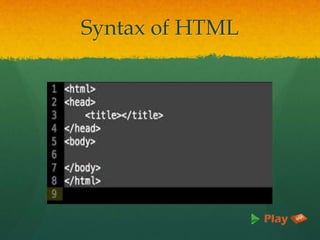
Syntax of HTML
Easy to Use & Understand
 Almost anyone in the web development business would
know HTML be it a freelancer or a large agency.
 It would be relatively easy to find cost-effective and
affordable solution providers who can make the changes
you need to your website.
 Today, XML is increasingly being used for data storage.
 The similarity of syntax between HTML and XML
means that it is easier and seamless working between the
two platforms.
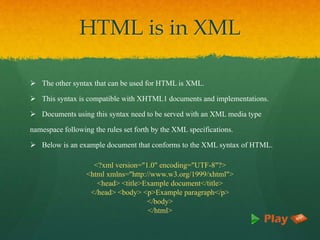
HTML is in XML
 The other syntax that can be used for HTML is XML.
 This syntax is compatible with XHTML1 documents and implementations.
 Documents using this syntax need to be served with an XML media type
namespace following the rules set forth by the XML specifications.
 Below is an example document that conforms to the XML syntax of HTML.
<?xml version="1.0" encoding="UTF-8"?>
<html xmlns="http://www.w3.org/1999/xhtml">
<head> <title>Example document</title>
</head> <body> <p>Example paragraph</p>
</body>
</html>
Advantages of HTML
 It is widely used.
 Every browser supports HTML language.
 It is by default in every windows so you don't need to purchase extra software.
 Loose syntax (although, being too flexible will not comply with standards).
 Widely used in established on almost every website, if not all websites.
 Very similar to XML syntax, which is increasingly used for data storage.
 Free - You need not buy any software.
 Easy to learn & code even for novice programmers.
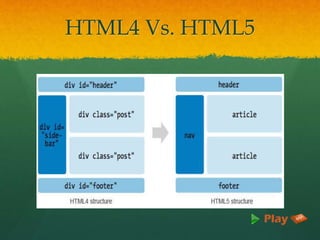
HTML4 Vs. HTML5
Features of HTML5
 Multimedia Support
 Video & Audio
 New Input Element Types
 Canvas in HTML5
 Custom Data Attributes
 Editable Contents
 Autofocus and Placeholder Attributes
 Required Field and Range Validators
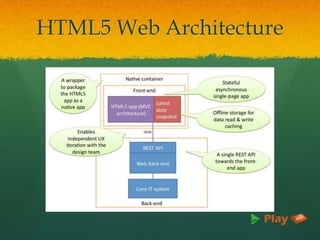
HTML5 Web Architecture
Advantages of HTML5
 Mutuality
 Leaner markup / Improved Code
 Improved Semantics
 Elegant forms
 Improved Accessibility & Consistency
 Offline Application cache
 Geo Location Support
 Client-side database
Thank You
www.playppt.com

HTML basic tags and description PPT slides

  • 1.
  • 2.
    What is HTML? HTML or Hyper Text Markup Language is the standard markup language used to create Web pages.  HTML is written in the form of HTML elements consisting of tags enclosed in angle brackets (like <html>).  HTML tags most commonly come in pairs like <h1> and </h1>, although some tags represent empty elements and so are unpaired, for example <img>.  The first tag in a pair is the start tag, and the second tag is the end tag (they are also called opening tags and closing tags).  A Web browser can read HTML files and compose them into visible or audible Web pages.
  • 3.
    History of HTML The first publicly available description of HTML was a document called "HTML Tags", first mentioned on the Internet by Berners-Lee in late 1991.  It describes 18 elements comprising the initial simple design of HTML.  Eleven of these elements still exist in HTML 4.  After the HTML and HTML+ drafts expired in early 1994, the IETF created an HTML Working Group, which in 1995 completed "HTML 2.0“.  The first HTML specification intended to be treated as a standard against which future implementations should be based.  HTML has been progressively moved in this direction with CSS.
  • 4.
  • 5.
    Easy to Use& Understand  Almost anyone in the web development business would know HTML be it a freelancer or a large agency.  It would be relatively easy to find cost-effective and affordable solution providers who can make the changes you need to your website.  Today, XML is increasingly being used for data storage.  The similarity of syntax between HTML and XML means that it is easier and seamless working between the two platforms.
  • 6.
    HTML is inXML  The other syntax that can be used for HTML is XML.  This syntax is compatible with XHTML1 documents and implementations.  Documents using this syntax need to be served with an XML media type namespace following the rules set forth by the XML specifications.  Below is an example document that conforms to the XML syntax of HTML. <?xml version="1.0" encoding="UTF-8"?> <html xmlns="http://www.w3.org/1999/xhtml"> <head> <title>Example document</title> </head> <body> <p>Example paragraph</p> </body> </html>
  • 7.
    Advantages of HTML It is widely used.  Every browser supports HTML language.  It is by default in every windows so you don't need to purchase extra software.  Loose syntax (although, being too flexible will not comply with standards).  Widely used in established on almost every website, if not all websites.  Very similar to XML syntax, which is increasingly used for data storage.  Free - You need not buy any software.  Easy to learn & code even for novice programmers.
  • 8.
  • 9.
    Features of HTML5 Multimedia Support  Video & Audio  New Input Element Types  Canvas in HTML5  Custom Data Attributes  Editable Contents  Autofocus and Placeholder Attributes  Required Field and Range Validators
  • 10.
  • 11.
    Advantages of HTML5 Mutuality  Leaner markup / Improved Code  Improved Semantics  Elegant forms  Improved Accessibility & Consistency  Offline Application cache  Geo Location Support  Client-side database
  • 12.