Pennsylvania Joint Force Headquarters – G1
POC: CW4 E. Evans / 717.861.2888 / emily.r.evans.mil@mail.mil
UNCLASSIFIED//FOUO
IPPS‐A
Promotion Information Report
v2
Pennsylvania Joint Force Headquarters – G1
POC: CW4 E. Evans / 717.861.2888 / emily.r.evans.mil@mail.mil
UNCLASSIFIED//FOUO
Version 1: Provides instructions on how to run the PIR and where to upload in eTRACKER (28 Dec 20)
Version 2: Adds demonstration on how to transpose PIR data in excel and export to .pdf for transmission through eTRACKER (8 Jan 21)
Pennsylvania Joint Force Headquarters – G1
POC: CW4 E. Evans / 717.861.2888 / emily.r.evans.mil@mail.mil
UNCLASSIFIED//FOUO
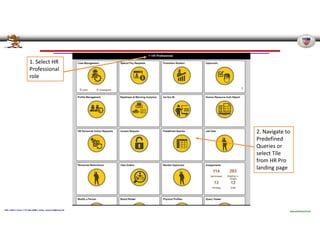
1. Select HR
Professional
role
2. Navigate to
Predefined
Queries or
select Tile
from HR Pro
landing page
Pennsylvania Joint Force Headquarters – G1
POC: CW4 E. Evans / 717.861.2888 / emily.r.evans.mil@mail.mil
UNCLASSIFIED//FOUO
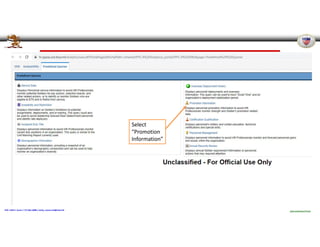
Select
“Promotion
Information”
Pennsylvania Joint Force Headquarters – G1
POC: CW4 E. Evans / 717.861.2888 / emily.r.evans.mil@mail.mil
UNCLASSIFIED//FOUO
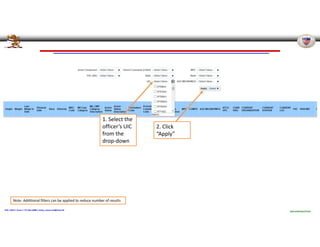
1. Select the
officer’s UIC
from the
drop‐down
2. Click
“Apply”
Note: Additional filters can be applied to reduce number of results
Pennsylvania Joint Force Headquarters – G1
POC: CW4 E. Evans / 717.861.2888 / emily.r.evans.mil@mail.mil
UNCLASSIFIED//FOUO
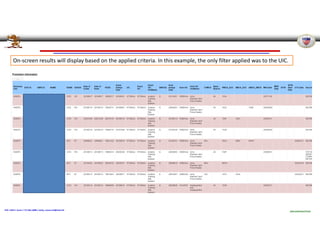
On‐screen results will display based on the applied criteria. In this example, the only filter applied was to the UIC.
Pennsylvania Joint Force Headquarters – G1
POC: CW4 E. Evans / 717.861.2888 / emily.r.evans.mil@mail.mil
UNCLASSIFIED//FOUO
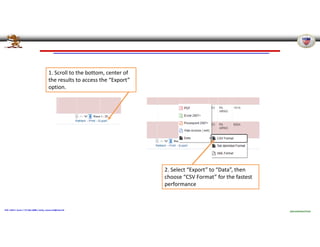
1. Scroll to the bottom, center of
the results to access the “Export”
option.
2. Select “Export” to “Data”, then
choose “CSV Format” for the fastest
performance
Pennsylvania Joint Force Headquarters – G1
POC: CW4 E. Evans / 717.861.2888 / emily.r.evans.mil@mail.mil
UNCLASSIFIED//FOUO
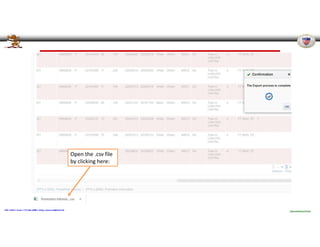
Open the .csv file
by clicking here:
Pennsylvania Joint Force Headquarters – G1
POC: CW4 E. Evans / 717.861.2888 / emily.r.evans.mil@mail.mil
UNCLASSIFIED//FOUO
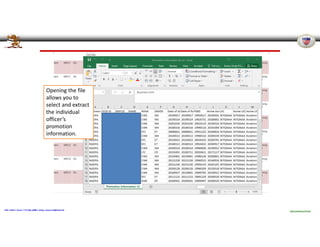
Opening the file
allows you to
select and extract
the individual
officer’s
promotion
information.
Pennsylvania Joint Force Headquarters – G1
POC: CW4 E. Evans / 717.861.2888 / emily.r.evans.mil@mail.mil
UNCLASSIFIED//FOUO
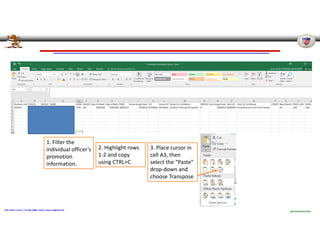
2. Highlight rows
1‐2 and copy
using CTRL+C
1. Filter the
individual officer’s
promotion
information.
3. Place cursor in
cell A3, then
select the “Paste”
drop‐down and
choose Transpose
Pennsylvania Joint Force Headquarters – G1
POC: CW4 E. Evans / 717.861.2888 / emily.r.evans.mil@mail.mil
UNCLASSIFIED//FOUO
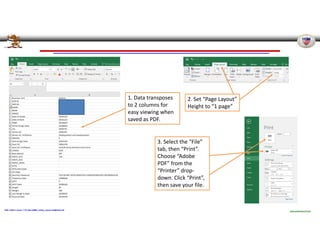
1. Data transposes
to 2 columns for
easy viewing when
saved as PDF.
2. Set “Page Layout”
Height to “1 page”
3. Select the “File”
tab, then “Print”.
Choose “Adobe
PDF” from the
“Printer” drop‐
down. Click “Print”,
then save your file.
Pennsylvania Joint Force Headquarters – G1
POC: CW4 E. Evans / 717.861.2888 / emily.r.evans.mil@mail.mil
UNCLASSIFIED//FOUO
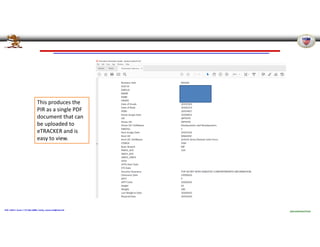
This produces the
PIR as a single PDF
document that can
be uploaded to
eTRACKER and is
easy to view.
Pennsylvania Joint Force Headquarters – G1
POC: CW4 E. Evans / 717.861.2888 / emily.r.evans.mil@mail.mil
UNCLASSIFIED//FOUO
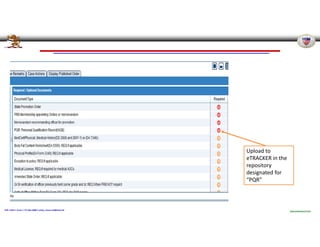
Upload to
eTRACKER in the
repository
designated for
“PQR”

How+to+Pull+a+PIR_IPPS-A+Promotion+Information+Report.v2pdf.pdf

  • 1.
    Pennsylvania Joint ForceHeadquarters – G1 POC: CW4 E. Evans / 717.861.2888 / emily.r.evans.mil@mail.mil UNCLASSIFIED//FOUO IPPS‐A Promotion Information Report v2
  • 2.
    Pennsylvania Joint ForceHeadquarters – G1 POC: CW4 E. Evans / 717.861.2888 / emily.r.evans.mil@mail.mil UNCLASSIFIED//FOUO Version 1: Provides instructions on how to run the PIR and where to upload in eTRACKER (28 Dec 20) Version 2: Adds demonstration on how to transpose PIR data in excel and export to .pdf for transmission through eTRACKER (8 Jan 21)
  • 3.
    Pennsylvania Joint ForceHeadquarters – G1 POC: CW4 E. Evans / 717.861.2888 / emily.r.evans.mil@mail.mil UNCLASSIFIED//FOUO 1. Select HR Professional role 2. Navigate to Predefined Queries or select Tile from HR Pro landing page
  • 4.
    Pennsylvania Joint ForceHeadquarters – G1 POC: CW4 E. Evans / 717.861.2888 / emily.r.evans.mil@mail.mil UNCLASSIFIED//FOUO Select “Promotion Information”
  • 5.
    Pennsylvania Joint ForceHeadquarters – G1 POC: CW4 E. Evans / 717.861.2888 / emily.r.evans.mil@mail.mil UNCLASSIFIED//FOUO 1. Select the officer’s UIC from the drop‐down 2. Click “Apply” Note: Additional filters can be applied to reduce number of results
  • 6.
    Pennsylvania Joint ForceHeadquarters – G1 POC: CW4 E. Evans / 717.861.2888 / emily.r.evans.mil@mail.mil UNCLASSIFIED//FOUO On‐screen results will display based on the applied criteria. In this example, the only filter applied was to the UIC.
  • 7.
    Pennsylvania Joint ForceHeadquarters – G1 POC: CW4 E. Evans / 717.861.2888 / emily.r.evans.mil@mail.mil UNCLASSIFIED//FOUO 1. Scroll to the bottom, center of the results to access the “Export” option. 2. Select “Export” to “Data”, then choose “CSV Format” for the fastest performance
  • 8.
    Pennsylvania Joint ForceHeadquarters – G1 POC: CW4 E. Evans / 717.861.2888 / emily.r.evans.mil@mail.mil UNCLASSIFIED//FOUO Open the .csv file by clicking here:
  • 9.
    Pennsylvania Joint ForceHeadquarters – G1 POC: CW4 E. Evans / 717.861.2888 / emily.r.evans.mil@mail.mil UNCLASSIFIED//FOUO Opening the file allows you to select and extract the individual officer’s promotion information.
  • 10.
    Pennsylvania Joint ForceHeadquarters – G1 POC: CW4 E. Evans / 717.861.2888 / emily.r.evans.mil@mail.mil UNCLASSIFIED//FOUO 2. Highlight rows 1‐2 and copy using CTRL+C 1. Filter the individual officer’s promotion information. 3. Place cursor in cell A3, then select the “Paste” drop‐down and choose Transpose
  • 11.
    Pennsylvania Joint ForceHeadquarters – G1 POC: CW4 E. Evans / 717.861.2888 / emily.r.evans.mil@mail.mil UNCLASSIFIED//FOUO 1. Data transposes to 2 columns for easy viewing when saved as PDF. 2. Set “Page Layout” Height to “1 page” 3. Select the “File” tab, then “Print”. Choose “Adobe PDF” from the “Printer” drop‐ down. Click “Print”, then save your file.
  • 12.
    Pennsylvania Joint ForceHeadquarters – G1 POC: CW4 E. Evans / 717.861.2888 / emily.r.evans.mil@mail.mil UNCLASSIFIED//FOUO This produces the PIR as a single PDF document that can be uploaded to eTRACKER and is easy to view.
  • 13.
    Pennsylvania Joint ForceHeadquarters – G1 POC: CW4 E. Evans / 717.861.2888 / emily.r.evans.mil@mail.mil UNCLASSIFIED//FOUO Upload to eTRACKER in the repository designated for “PQR”