How to Visualize,
Understand, and Act
on Sales Data Using
EazyBI?
Rodrigo Molinare, Business Analyst, Adaptavist,
UK
Professional Services
Managed
ServicesTraining
Apps
+
=
• Agree of nomenclature & acronyms.
• Be consistent in your use of colors.
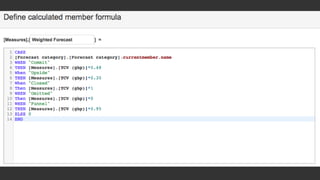
• Use EazyBI sample cube and “hack” calculated
members
• Reach out to EazyBI Support Team
Results
• Easy & immediate access to real time data
• Drilling down and across the data: Access to the full picture
• Automatization: many hours of excel saved
• Better understanding of sales cycle
• Happy managers, hassle free overview of the business
• Graphs always ready for presentations and meetings
• EazyBI is contagious, other parts of the business start using the tool
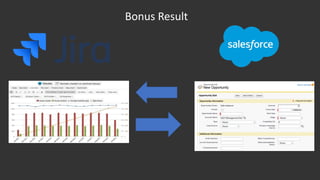
Bonus Result
Contact: rmolinare@adaptavist.com

How to Visualise, Understand, and Act on Salesforce Sales Data Using eazyBI?

  • 1.
    How to Visualize, Understand,and Act on Sales Data Using EazyBI? Rodrigo Molinare, Business Analyst, Adaptavist, UK
  • 2.
  • 13.
  • 19.
    • Agree ofnomenclature & acronyms. • Be consistent in your use of colors. • Use EazyBI sample cube and “hack” calculated members • Reach out to EazyBI Support Team
  • 25.
  • 26.
    • Easy &immediate access to real time data • Drilling down and across the data: Access to the full picture • Automatization: many hours of excel saved • Better understanding of sales cycle • Happy managers, hassle free overview of the business • Graphs always ready for presentations and meetings • EazyBI is contagious, other parts of the business start using the tool
  • 27.
  • 28.

Editor's Notes

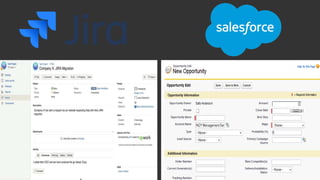
  • #4 Starting point: Adaptavist was using both JIRA and Salesforce to record sales information. A JIRA ticket was used to track conversations with the client, attachments and general info. A salesforce opportunity was used to track details such as sales price and opportunity stage.
  • #6 Challenges with using Salesforce reporting capabilities: Ugly UI, static graphs, limited graph customization, inflexible/
  • #8 Conclusion: Salesforce reporting tools were simply not used by the sales team.
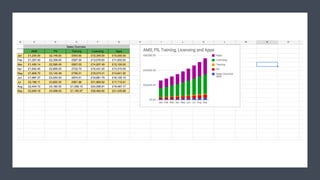
  • #9 Instead they would export the salesforce data and process and analyze it on Excel.
  • #10 Or google sheets.
  • #11 This allowed the Sales team to have powerful, flexible and customizable reports.
  • #12 However there were many disadvantages of using excel as the company grew: Excel reports were high maintenance and a lot of time was spent updating and creating new sheets. It was difficult to organize them: links and files could be misplaced or forgotten about. It is also difficult to see trough the data, switch between reports, and finally it is prone to human errors.
  • #14 As an Atlassian Platinum Solution Partner, and based on the fact on company runs on JIRA, we started looking for solution on the Atlassian Marketplace. That is when we decided to give EazyBI a try.
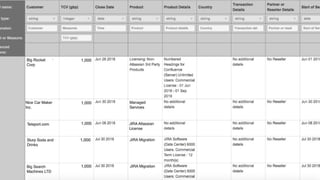
  • #15 We installed EazyBI on out test server and started playing with it. We downloaded a CSV with all salesforce deals and imported it to EazyBI: all Salesforce fields were mapped as dimensions.
  • #16 Creating MDX formulas was difficult at the start, but we received help from the EazyBI Team.
  • #17 We started by replicating the most popular reports we had on excel inside EazyBI. For example, sales per type of product sold.
  • #19 Reaction from our Sales Team when they started seeing the reports.
  • #20 After sample reports were presented, I sat together with the Sales team and we decided which reports we were going to build in EazyBI. Some tips for effective report building are above
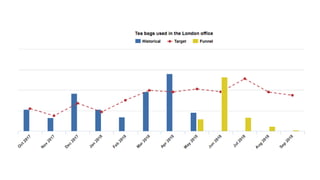
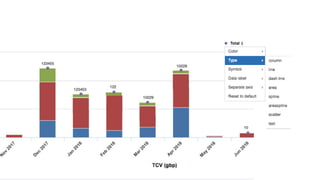
  • #21 Being able to easily customize data visualization type, colors and axis.
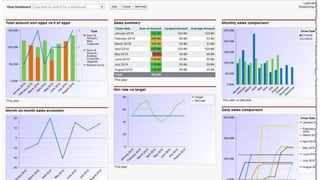
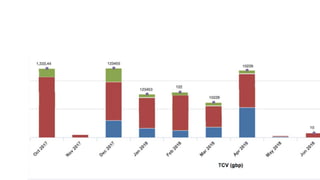
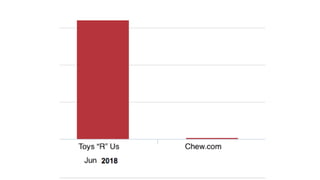
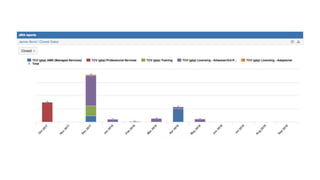
  • #22 This slides show how important the drill down functionality can be to help understand and act on your sales data. June appeared to be a promising month, but when we drill down, we see 99% of the value comes from an opportunity which is with a company that has recently gone banckrupt.
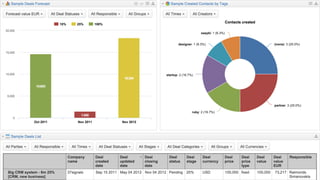
  • #23 The EazyBI Dashboards give our managers fast and easy access to our data right inside JIRA.
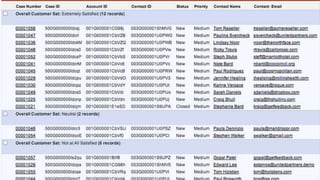
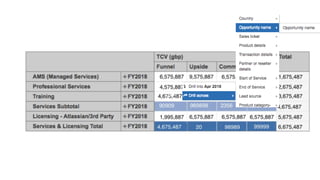
  • #24 Tables give a good overview of where we stand, and drill down allows us to understand where the numbers come from.
  • #25 Sales personnel also get their own dashboard where they can monitor the status of their deals.
  • #28 We realized we were storing data in JIRA and Salesforce, and then going back to JIRA to analyze it. We asked ourselves, could we replicate the salesforce fields and functionality inside JIRA? That was exactly what we did, by relying heavily on ScriptRunner for JIRA. Currently, all our sales opportunities are managed, monitored and reported from inside JIRA.
  • #29 End of presentation and space for questions.