HOW TO SPLIT A CELL
JESSICA THEIN SHAU SIE
BG17110057
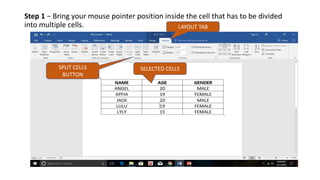
Step 1 − Bring your mouse pointer position inside the cell that has to be divided
into multiple cells.
SPLIT CELLS
BUTTON
SELECTED CELLS
LAYOUT TAB
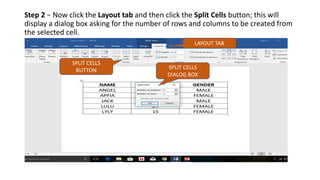
Step 2 − Now click the Layout tab and then click the Split Cells button; this will
display a dialog box asking for the number of rows and columns to be created from
the selected cell.
SPLIT CELLS
DIALOG BOX
SPLIT CELLS
BUTTON
LAYOUT TAB
Step 3 − Select the desired number of rows and columns that have to go into the
resultant cell and finally click the OK button to apply the result.
SPLIT CELL

How to split a cell

  • 1.
    HOW TO SPLITA CELL JESSICA THEIN SHAU SIE BG17110057
  • 2.
    Step 1 −Bring your mouse pointer position inside the cell that has to be divided into multiple cells. SPLIT CELLS BUTTON SELECTED CELLS LAYOUT TAB
  • 3.
    Step 2 −Now click the Layout tab and then click the Split Cells button; this will display a dialog box asking for the number of rows and columns to be created from the selected cell. SPLIT CELLS DIALOG BOX SPLIT CELLS BUTTON LAYOUT TAB
  • 4.
    Step 3 −Select the desired number of rows and columns that have to go into the resultant cell and finally click the OK button to apply the result. SPLIT CELL