How to setup MateriApps LIVE!
MateriApps LIVE! Development Team
2020/10/22 [for version 3.2]
MateriApps — a Portal Site for Materials Science Simulation
• Aiming at the community formation through the promotion of application
MateriApps, 2013-2020. All rights reserved.2
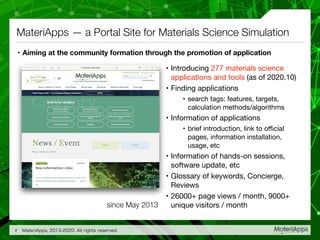
• Introducing 277 materials science
applications and tools (as of 2020.10)

• Finding applications

• search tags: features, targets,
calculation methods/algorithms

• Information of applications

• brief introduction, link to official
pages, information installation,
usage, etc

• Information of hands-on sessions,
software update, etc

• Glossary of keywords, Concierge,
Reviews

• 26000+ page views / month, 9000+
unique visitors / monthsince May 2013
DFT
AkaiKKR☆
OpenMX☆
xTAPP☆
ABINIT☆
...
Quantum
Chemistry
FMO☆
SMASH☆
GAMESS☆
DC☆
...
Molecular
Dynamics
MODYLAS☆
Gromacs☆
ERmod☆
MDACP...
Lattice
Models
ALPS☆
DSQSS
BLOCK
DMRG++
Continuum Simulation
ANSYS Multiphysics
Octa ...
Data Analysis
CLUPAN☆
phonopy☆
Visualization
fu☆
TAPIOCA☆
☆ included in MateriApps LIVE!
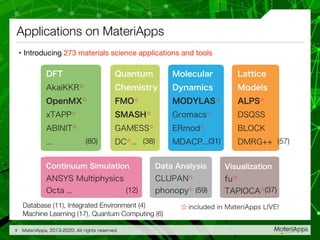
• Introducing 273 materials science applications and tools
Applications on MateriApps
MateriApps, 2013-2020. All rights reserved.3
(80) (38) (31) (57)
(12) (59) (37)
Database (11), Integrated Environment (4)
Machine Learning (17), Quantum Computing (6)
Current status in computational materials science
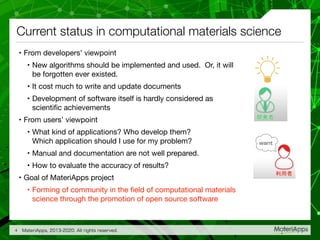
• From developers’ viewpoint

• New algorithms should be implemented and used. Or, it will
be forgotten ever existed.

• It cost much to write and update documents

• Development of software itself is hardly considered as
scientific achievements

• From users’ viewpoint

• What kind of applications? Who develop them?
Which application should I use for my problem?

• Manual and documentation are not well prepared.

• How to evaluate the accuracy of results?

• Goal of MateriApps project

• Forming of community in the field of computational materials
science through the promotion of open source software
MateriApps, 2013-2020. All rights reserved.4
What MateriApps will provide
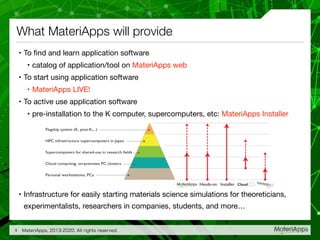
• To find and learn application software

• catalog of application/tool on MateriApps web

• To start using application software

• MateriApps LIVE!

• To active use application software

• pre-installation to the K computer, supercomputers, etc: MateriApps Installer

• Infrastructure for easily starting materials science simulations for theoreticians,
experimentalists, researchers in companies, students, and more…
MateriApps, 2013-2020. All rights reserved.5
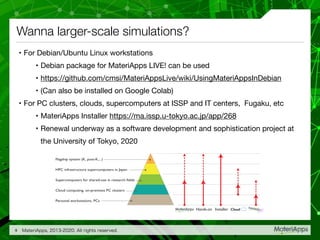
Flagship system (K, post-K,...)
HPC infrastructure supercomputers in Japan
Supercomputers for shared-use in research fields
Cloud computing, on-premises PC clusters
Personal workstations, PCs
InstallerHands-on Cloud
What is MateriApps LIVE! ?
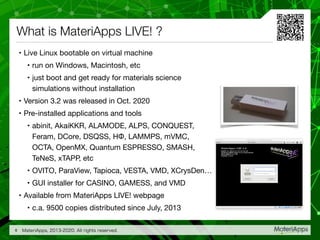
• Live Linux bootable on virtual machine

• run on Windows, Macintosh, etc

• just boot and get ready for materials science
simulations without installation

• Version 3.2 was released in Oct. 2020

• Pre-installed applications and tools

• abinit, AkaiKKR, ALAMODE, ALPS, CONQUEST,

Feram, DCore, DSQSS, HΦ, LAMMPS, mVMC,
OCTA, OpenMX, Quantum ESPRESSO, SMASH,

TeNeS, xTAPP, etc

• OVITO, ParaView, Tapioca, VESTA, VMD, XCrysDen…

• GUI installer for CASINO, GAMESS, and VMD

• Available from MateriApps LIVE! webpage

• c.a. 9500 copies distributed since July, 2013
MateriApps, 2013-2020. All rights reserved.6
MateriApps LIVE! is useful for ...
• Hands-on sessions using MateriApps LIVE!

• MateriApps LIVE! Tutorials

• HΦ, xTAPP, ALPS, DCore, mVMC, ALAMODE, DDMRG, DSQSS, SALMON,
CASINO, TeNeS, etc.

• Practices in lectures

• Computational Physics

• Computer Experiments (UNIX + C, LaTeX, VCS)

• Used by experimentalists, researchers in private companies

• Used by researchers in the field of computer science

• Easy setup (c.a. 15min) without no troubles

• Useful for operation check, trouble shooting, user support
MateriApps, 2013-2020. All rights reserved.7
Materials Science Simulation by MateriApps LIVE!
• Introduction / Setup

• First-principles band calculation (OpenMX / Quantum ESPRESSO / xTAPP)

• Simulation of solution by molecular dynamics (LAMMPS / Gromacs)

• Lattice model simulation (ALPS / HΦ / mVMC)

• Quantum chemistry calculation (in preparation)

• Hands-on materials are available at https://github.com/cmsi/MateriAppsLive/wiki/
MaLiveTutorial (currently only in Japanese)
MateriApps, 2013-2020. All rights reserved.8
Wanna larger-scale simulations?
• For Debian/Ubuntu Linux workstations

• Debian package for MateriApps LIVE! can be used

• https://github.com/cmsi/MateriAppsLive/wiki/UsingMateriAppsInDebian

• (Can also be installed on Google Colab)

• For PC clusters, clouds, supercomputers at ISSP and IT centers, Fugaku, etc

• MateriApps Installer https://ma.issp.u-tokyo.ac.jp/app/268

• Renewal underway as a software development and sophistication project at
the University of Tokyo, 2020
MateriApps, 2013-2020. All rights reserved.9
Flagship system (K, post-K,...)
HPC infrastructure supercomputers in Japan
Supercomputers for shared-use in research fields
Cloud computing, on-premises PC clusters
Personal workstations, PCs
InstallerHands-on Cloud
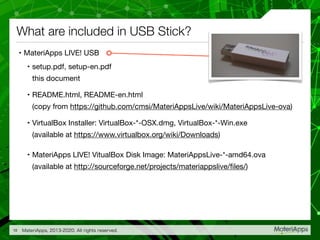
• MateriApps LIVE! USB

• setup.pdf, setup-en.pdf

this document

• README.html, README-en.html

(copy from https://github.com/cmsi/MateriAppsLive/wiki/MateriAppsLive-ova)

• VirtualBox Installer: VirtualBox-*-OSX.dmg, VirtualBox-*-Win.exe

(available at https://www.virtualbox.org/wiki/Downloads)

• MateriApps LIVE! VitualBox Disk Image: MateriAppsLive-*-amd64.ova

(available at http://sourceforge.net/projects/materiappslive/files/)
What are included in USB Stick?
MateriApps, 2013-2020. All rights reserved.10
Let's get started
✓ Copy files in USB stick memory to hard disk

• copy all the files to your PC, e.g. to desktop

✓ Install VirtualBox by double-clicking the installer

• For Windows: VirutalBox-*-Win.exe

• For Macintosh: VirtualBox-*-OSX.dmg

✓ Import MateriApps LIVE!

• double-click MateriAppsLive-*.ova

• VirtualBox will start automatically and import window will open. Then press
“import” button

• VirtualBox Manager window will appear in two or three minutes

• Host (host OS): operating system (Windows, Mac OS X, etc) on which VirtualBox is
running

• Virtual machine (guest OS): operating system (= MateriApps LIVE!) running on
VirtualBox
MateriApps, 2013-2020. All rights reserved.11
Boot in VirtualBox
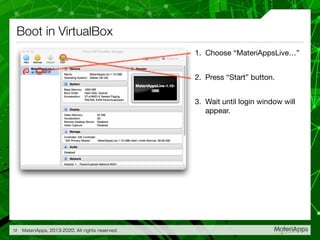
1. Choose “MateriAppsLive…”

2. Press “Start” button.

3. Wait until login window will
appear.
MateriApps, 2013-2020. All rights reserved.12
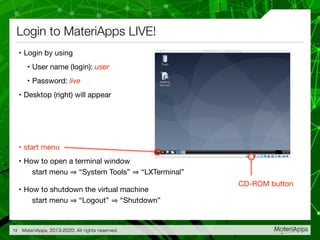
• Login by using

• User name (login): user

• Password: live

• Desktop (right) will appear

• start menu

• How to open a terminal window

start menu “System Tools” “LXTerminal”

• How to shutdown the virtual machine

start menu “Logout” “Shutdown”
Login to MateriApps LIVE!
MateriApps, 2013-2020. All rights reserved.13
CD-ROM button
Additional settings (1/2)
✓ Using Japanese keyboard

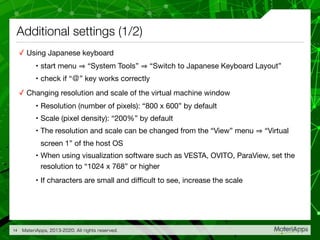
• start menu “System Tools” “Switch to Japanese Keyboard Layout” 

• check if “@” key works correctly

✓ Changing resolution and scale of the virtual machine window

• Resolution (number of pixels): “800 x 600” by default

• Scale (pixel density): “200%” by default

• The resolution and scale can be changed from the “View” menu “Virtual
screen 1” of the host OS

• When using visualization software such as VESTA, OVITO, ParaView, set the
resolution to “1024 x 768” or higher

• If characters are small and difficult to see, increase the scale
MateriApps, 2013-2020. All rights reserved.14
Additional settings (2/2)
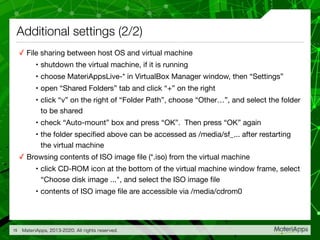
✓ File sharing between host OS and virtual machine

• shutdown the virtual machine, if it is running

• choose MateriAppsLive-* in VirtualBox Manager window, then “Settings”

• open “Shared Folders” tab and click “+” on the right

• click “v” on the right of “Folder Path”, choose “Other…”, and select the folder
to be shared

• check “Auto-mount” box and press “OK”. Then press “OK” again

• the folder specified above can be accessed as /media/sf_... after restarting
the virtual machine

✓ Browsing contents of ISO image file (*.iso) from the virtual machine

• click CD-ROM icon at the bottom of the virtual machine window frame, select
“Choose disk image ...", and select the ISO image file

• contents of ISO image file are accessible via /media/cdrom0
MateriApps, 2013-2020. All rights reserved.15
Tips
✓ Copy & Paste: How to paste strings copied from a PDF file on host OS?

• right click on terminal window “Paste”

• or press “V” with “shift” and “control” keys

• right click “Copy”, or “shift + control + C” to copy a string

✓ Completion/history/sequential search of command lines and filenames

• Hit the tab key in the terminal to complete the command name or the
filename

• Hit the “↑” key in the terminal to trace back the history of commands

• Execute the “history” command in the terminal to display the list of
commands executed

• Hit “Ctrl + r” in the terminal to search the commands executed so far (reverse
incremental search)
MateriApps, 2013-2020. All rights reserved.16
MateriApps planning & production
• Administration:

• Center for Computational Materials Science, Institute for Solid State Physics, University
of Tokyo (ISSP-CCMS)

• MateriApps Development Team

• Kota Ido (ISSP), Shusuke Kasamatsu (Dept. of Phys., Yamagata Univ.),
Takeo Kato (ISSP), Naoki Kawashima (ISSP), Hikaru Kouta (ISSP),
Synge Todo (Dept. of Phys., Univ. of Tokyo/ISSP), Masahito Fukuda (ISSP),
Kanako Yoshizawa (RIST)

• (contract) Yusuke Konishi and Gotai Yamada

• Cooperation:

• Research Organization for Information Science and Technology (RIST)

• Sponsor

• Elements Strategy Initiative

• Program for Promoting Researches on the Supercomputer Fugaku: DPMSD
(Development of high-performance Permanent Magnets by large-scale Simulations and
Data-driven approaches)
MateriApps, 2013-2020. All rights reserved.17

How to setup MateriApps LIVE!

  • 1.
    How to setupMateriApps LIVE! MateriApps LIVE! Development Team 2020/10/22 [for version 3.2]
  • 2.
    MateriApps — aPortal Site for Materials Science Simulation • Aiming at the community formation through the promotion of application MateriApps, 2013-2020. All rights reserved.2 • Introducing 277 materials science applications and tools (as of 2020.10) • Finding applications • search tags: features, targets, calculation methods/algorithms • Information of applications • brief introduction, link to official pages, information installation, usage, etc • Information of hands-on sessions, software update, etc • Glossary of keywords, Concierge, Reviews • 26000+ page views / month, 9000+ unique visitors / monthsince May 2013
  • 3.
    DFT AkaiKKR☆ OpenMX☆ xTAPP☆ ABINIT☆ ... Quantum Chemistry FMO☆ SMASH☆ GAMESS☆ DC☆ ... Molecular Dynamics MODYLAS☆ Gromacs☆ ERmod☆ MDACP... Lattice Models ALPS☆ DSQSS BLOCK DMRG++ Continuum Simulation ANSYS Multiphysics Octa... Data Analysis CLUPAN☆ phonopy☆ Visualization fu☆ TAPIOCA☆ ☆ included in MateriApps LIVE! • Introducing 273 materials science applications and tools Applications on MateriApps MateriApps, 2013-2020. All rights reserved.3 (80) (38) (31) (57) (12) (59) (37) Database (11), Integrated Environment (4) Machine Learning (17), Quantum Computing (6)
  • 4.
    Current status incomputational materials science • From developers’ viewpoint • New algorithms should be implemented and used. Or, it will be forgotten ever existed. • It cost much to write and update documents • Development of software itself is hardly considered as scientific achievements • From users’ viewpoint • What kind of applications? Who develop them? Which application should I use for my problem? • Manual and documentation are not well prepared. • How to evaluate the accuracy of results? • Goal of MateriApps project • Forming of community in the field of computational materials science through the promotion of open source software MateriApps, 2013-2020. All rights reserved.4
  • 5.
    What MateriApps willprovide • To find and learn application software • catalog of application/tool on MateriApps web • To start using application software • MateriApps LIVE! • To active use application software • pre-installation to the K computer, supercomputers, etc: MateriApps Installer • Infrastructure for easily starting materials science simulations for theoreticians, experimentalists, researchers in companies, students, and more… MateriApps, 2013-2020. All rights reserved.5 Flagship system (K, post-K,...) HPC infrastructure supercomputers in Japan Supercomputers for shared-use in research fields Cloud computing, on-premises PC clusters Personal workstations, PCs InstallerHands-on Cloud
  • 6.
    What is MateriAppsLIVE! ? • Live Linux bootable on virtual machine • run on Windows, Macintosh, etc • just boot and get ready for materials science simulations without installation • Version 3.2 was released in Oct. 2020 • Pre-installed applications and tools • abinit, AkaiKKR, ALAMODE, ALPS, CONQUEST,
 Feram, DCore, DSQSS, HΦ, LAMMPS, mVMC, OCTA, OpenMX, Quantum ESPRESSO, SMASH,
 TeNeS, xTAPP, etc • OVITO, ParaView, Tapioca, VESTA, VMD, XCrysDen… • GUI installer for CASINO, GAMESS, and VMD • Available from MateriApps LIVE! webpage • c.a. 9500 copies distributed since July, 2013 MateriApps, 2013-2020. All rights reserved.6
  • 7.
    MateriApps LIVE! isuseful for ... • Hands-on sessions using MateriApps LIVE! • MateriApps LIVE! Tutorials • HΦ, xTAPP, ALPS, DCore, mVMC, ALAMODE, DDMRG, DSQSS, SALMON, CASINO, TeNeS, etc. • Practices in lectures • Computational Physics • Computer Experiments (UNIX + C, LaTeX, VCS) • Used by experimentalists, researchers in private companies • Used by researchers in the field of computer science • Easy setup (c.a. 15min) without no troubles • Useful for operation check, trouble shooting, user support MateriApps, 2013-2020. All rights reserved.7
  • 8.
    Materials Science Simulationby MateriApps LIVE! • Introduction / Setup • First-principles band calculation (OpenMX / Quantum ESPRESSO / xTAPP) • Simulation of solution by molecular dynamics (LAMMPS / Gromacs) • Lattice model simulation (ALPS / HΦ / mVMC) • Quantum chemistry calculation (in preparation) • Hands-on materials are available at https://github.com/cmsi/MateriAppsLive/wiki/ MaLiveTutorial (currently only in Japanese) MateriApps, 2013-2020. All rights reserved.8
  • 9.
    Wanna larger-scale simulations? •For Debian/Ubuntu Linux workstations • Debian package for MateriApps LIVE! can be used • https://github.com/cmsi/MateriAppsLive/wiki/UsingMateriAppsInDebian • (Can also be installed on Google Colab) • For PC clusters, clouds, supercomputers at ISSP and IT centers, Fugaku, etc • MateriApps Installer https://ma.issp.u-tokyo.ac.jp/app/268 • Renewal underway as a software development and sophistication project at the University of Tokyo, 2020 MateriApps, 2013-2020. All rights reserved.9 Flagship system (K, post-K,...) HPC infrastructure supercomputers in Japan Supercomputers for shared-use in research fields Cloud computing, on-premises PC clusters Personal workstations, PCs InstallerHands-on Cloud
  • 10.
    • MateriApps LIVE!USB • setup.pdf, setup-en.pdf
 this document • README.html, README-en.html
 (copy from https://github.com/cmsi/MateriAppsLive/wiki/MateriAppsLive-ova) • VirtualBox Installer: VirtualBox-*-OSX.dmg, VirtualBox-*-Win.exe
 (available at https://www.virtualbox.org/wiki/Downloads) • MateriApps LIVE! VitualBox Disk Image: MateriAppsLive-*-amd64.ova
 (available at http://sourceforge.net/projects/materiappslive/files/) What are included in USB Stick? MateriApps, 2013-2020. All rights reserved.10
  • 11.
    Let's get started ✓Copy files in USB stick memory to hard disk • copy all the files to your PC, e.g. to desktop ✓ Install VirtualBox by double-clicking the installer • For Windows: VirutalBox-*-Win.exe • For Macintosh: VirtualBox-*-OSX.dmg ✓ Import MateriApps LIVE! • double-click MateriAppsLive-*.ova • VirtualBox will start automatically and import window will open. Then press “import” button • VirtualBox Manager window will appear in two or three minutes • Host (host OS): operating system (Windows, Mac OS X, etc) on which VirtualBox is running • Virtual machine (guest OS): operating system (= MateriApps LIVE!) running on VirtualBox MateriApps, 2013-2020. All rights reserved.11
  • 12.
    Boot in VirtualBox 1.Choose “MateriAppsLive…” 2. Press “Start” button. 3. Wait until login window will appear. MateriApps, 2013-2020. All rights reserved.12
  • 13.
    • Login byusing • User name (login): user • Password: live • Desktop (right) will appear • start menu • How to open a terminal window
 start menu “System Tools” “LXTerminal” • How to shutdown the virtual machine
 start menu “Logout” “Shutdown” Login to MateriApps LIVE! MateriApps, 2013-2020. All rights reserved.13 CD-ROM button
  • 14.
    Additional settings (1/2) ✓Using Japanese keyboard • start menu “System Tools” “Switch to Japanese Keyboard Layout” • check if “@” key works correctly ✓ Changing resolution and scale of the virtual machine window • Resolution (number of pixels): “800 x 600” by default • Scale (pixel density): “200%” by default • The resolution and scale can be changed from the “View” menu “Virtual screen 1” of the host OS • When using visualization software such as VESTA, OVITO, ParaView, set the resolution to “1024 x 768” or higher • If characters are small and difficult to see, increase the scale MateriApps, 2013-2020. All rights reserved.14
  • 15.
    Additional settings (2/2) ✓File sharing between host OS and virtual machine • shutdown the virtual machine, if it is running • choose MateriAppsLive-* in VirtualBox Manager window, then “Settings” • open “Shared Folders” tab and click “+” on the right • click “v” on the right of “Folder Path”, choose “Other…”, and select the folder to be shared • check “Auto-mount” box and press “OK”. Then press “OK” again • the folder specified above can be accessed as /media/sf_... after restarting the virtual machine ✓ Browsing contents of ISO image file (*.iso) from the virtual machine • click CD-ROM icon at the bottom of the virtual machine window frame, select “Choose disk image ...", and select the ISO image file • contents of ISO image file are accessible via /media/cdrom0 MateriApps, 2013-2020. All rights reserved.15
  • 16.
    Tips ✓ Copy &Paste: How to paste strings copied from a PDF file on host OS? • right click on terminal window “Paste” • or press “V” with “shift” and “control” keys • right click “Copy”, or “shift + control + C” to copy a string ✓ Completion/history/sequential search of command lines and filenames • Hit the tab key in the terminal to complete the command name or the filename • Hit the “↑” key in the terminal to trace back the history of commands • Execute the “history” command in the terminal to display the list of commands executed • Hit “Ctrl + r” in the terminal to search the commands executed so far (reverse incremental search) MateriApps, 2013-2020. All rights reserved.16
  • 17.
    MateriApps planning &production • Administration: • Center for Computational Materials Science, Institute for Solid State Physics, University of Tokyo (ISSP-CCMS) • MateriApps Development Team • Kota Ido (ISSP), Shusuke Kasamatsu (Dept. of Phys., Yamagata Univ.), Takeo Kato (ISSP), Naoki Kawashima (ISSP), Hikaru Kouta (ISSP), Synge Todo (Dept. of Phys., Univ. of Tokyo/ISSP), Masahito Fukuda (ISSP), Kanako Yoshizawa (RIST) • (contract) Yusuke Konishi and Gotai Yamada • Cooperation: • Research Organization for Information Science and Technology (RIST) • Sponsor • Elements Strategy Initiative • Program for Promoting Researches on the Supercomputer Fugaku: DPMSD (Development of high-performance Permanent Magnets by large-scale Simulations and Data-driven approaches) MateriApps, 2013-2020. All rights reserved.17