How to print a document in
Microsoft Words 2010
Name : ASMIRA SYAKIRRA
Matric No. : BG17110219
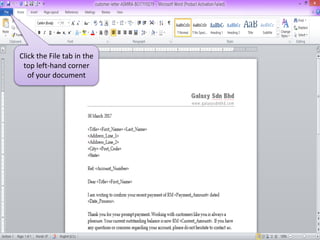
Click the File tab in the
top left-hand corner
of your document
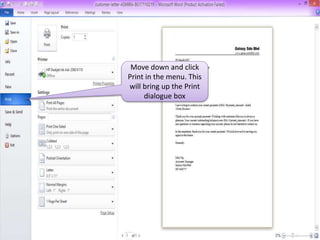
Move down and click
Print in the menu. This
will bring up the Print
dialogue box
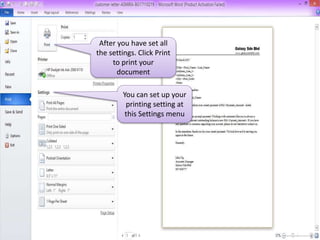
After you have set all
the settings. Click Print
to print your
document
You can set up your
printing setting at
this Settings menu

How to Print a document in Microsoft Words 2010

  • 1.
    How to printa document in Microsoft Words 2010 Name : ASMIRA SYAKIRRA Matric No. : BG17110219
  • 2.
    Click the Filetab in the top left-hand corner of your document
  • 3.
    Move down andclick Print in the menu. This will bring up the Print dialogue box
  • 4.
    After you haveset all the settings. Click Print to print your document You can set up your printing setting at this Settings menu