mymidcities.orgonline giving tutorialHow to give at www.Midcities.org/give
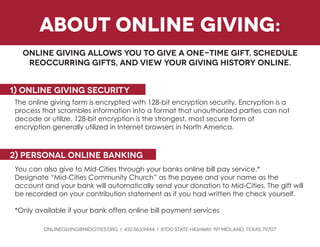
about online giving: 
Online giving allows you to give a one-time gift, schedule reoccurring gifts, and view your giving history online. 
1) Online giving security 
The online giving form is encrypted with 128-bit encryption security. Encryption is a process that scrambles information into a format that unauthorized parties can not decode or utilize. 128-bit encryption is the strongest, most secure form of 
encryption generally utilized in Internet browsers in North America. 
You can also give to Mid-Cities through your banks online bill pay service.* 
Designate “Mid-Cities Community Church” as the payee and your name as the 
account and your bank will automatically send your donation to Mid-Cities. The gift will be recorded on your contribution statement as if you had written the check yourself. 
*Only available if your bank offers online bill payment services 
ONLINEGIVING@MIDCITIES.ORG i 432.563.9444 i 8700 State Highway 191 Midland, texas 79707 
2) personal online banking
ONLINEGIVING@MIDCITIES.ORG i 432.563.9444 i 8700 State Highway 191 Midland, texas 79707 
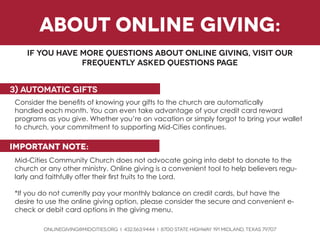
Consider the benefits of knowing your gifts to the church are automatically 
handled each month. You can even take advantage of your credit card reward 
programs as you give. Whether you’re on vacation or simply forgot to bring your wallet to church, your commitment to supporting Mid-Cities continues. 
important note: 
Mid-Cities Community Church does not advocate going into debt to donate to the church or any other ministry. Online giving is a convenient tool to help believers regularly and faithfully offer their first fruits to the Lord. 
*If you do not currently pay your monthly balance on credit cards, but have the 
desire to use the online giving option, please consider the secure and convenient e- check or debit card options in the giving menu. 
3) automatic gifts 
if you have more questions about online giving, visit our 
frequently asked questions page 
about online giving:
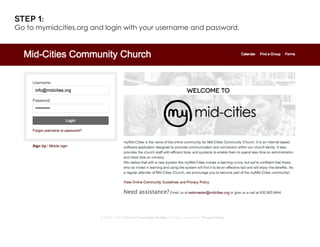
Step 1: 
Go to mymidcities.org and login with your username and password.
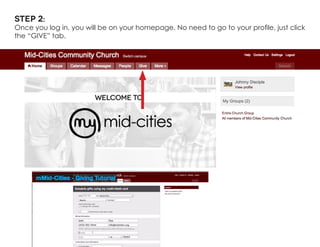
Step 2: 
Once you log in, you will be on your homepage. No need to go to your profile, just click the “GIVE” tab.
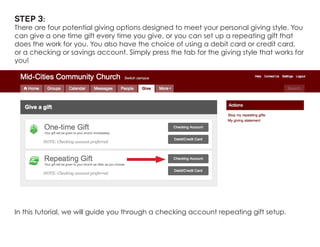
Step 3: 
There are four potential giving options designed to meet your personal giving style. You can give a one time gift every time you give, or you can set up a repeating gift that does the work for you. You also have the choice of using a debit card or credit card, or a checking or savings account. Simply press the tab for the giving style that works for you! 
In this tutorial, we will guide you through a checking account repeating gift setup.
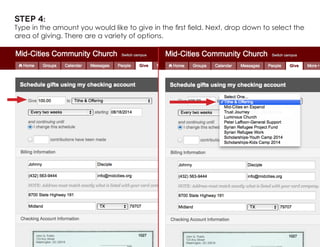
Step 4: 
Type in the amount you would like to give in the first field. Next, drop down to select the area of giving. There are a variety of options.
Step 5: 
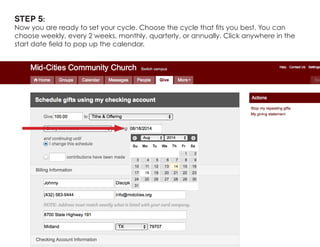
Now you are ready to set your cycle. Choose the cycle that fits you best. You can choose weekly, every 2 weeks, monthly, quarterly, or annually. Click anywhere in the start date field to pop up the calendar.
Step 6: 
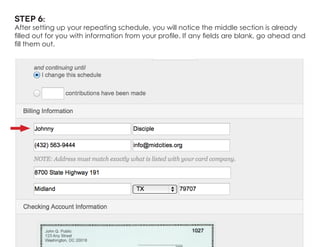
After setting up your repeating schedule, you will notice the middle section is already filled out for you with information from your profile. If any fields are blank, go ahead and fill them out.
Step 7: 
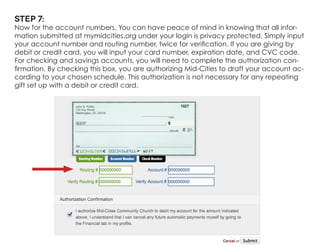
Now for the account numbers. You can have peace of mind in knowing that all information submitted at mymidcities.org under your login is privacy protected. Simply input your account number and routing number, twice for verification. If you are giving by debit or credit card, you will input your card number, expiration date, and CVC code. 
For checking and savings accounts, you will need to complete the authorization confirmation. By checking this box, you are authorizing Mid-Cities to draft your account according to your chosen schedule. This authorization is not necessary for any repeating gift set up with a debit or credit card.
Step 8: 
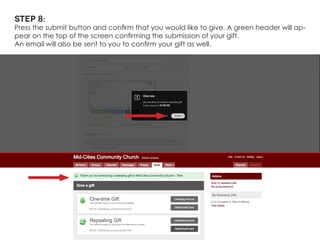
Press the submit button and confirm that you would like to give. A green header will appear on the top of the screen confirming the submission of your gift. 
An email will also be sent to you to confirm your gift as well.
mymidcities.orgneed assistance? email us at webmaster@midcities.orgor give us a call at 432.563.9444

How to Give on myMidCities

  • 1.
    mymidcities.orgonline giving tutorialHowto give at www.Midcities.org/give
  • 2.
    about online giving: Online giving allows you to give a one-time gift, schedule reoccurring gifts, and view your giving history online. 1) Online giving security The online giving form is encrypted with 128-bit encryption security. Encryption is a process that scrambles information into a format that unauthorized parties can not decode or utilize. 128-bit encryption is the strongest, most secure form of encryption generally utilized in Internet browsers in North America. You can also give to Mid-Cities through your banks online bill pay service.* Designate “Mid-Cities Community Church” as the payee and your name as the account and your bank will automatically send your donation to Mid-Cities. The gift will be recorded on your contribution statement as if you had written the check yourself. *Only available if your bank offers online bill payment services ONLINEGIVING@MIDCITIES.ORG i 432.563.9444 i 8700 State Highway 191 Midland, texas 79707 2) personal online banking
  • 3.
    ONLINEGIVING@MIDCITIES.ORG i 432.563.9444i 8700 State Highway 191 Midland, texas 79707 Consider the benefits of knowing your gifts to the church are automatically handled each month. You can even take advantage of your credit card reward programs as you give. Whether you’re on vacation or simply forgot to bring your wallet to church, your commitment to supporting Mid-Cities continues. important note: Mid-Cities Community Church does not advocate going into debt to donate to the church or any other ministry. Online giving is a convenient tool to help believers regularly and faithfully offer their first fruits to the Lord. *If you do not currently pay your monthly balance on credit cards, but have the desire to use the online giving option, please consider the secure and convenient e- check or debit card options in the giving menu. 3) automatic gifts if you have more questions about online giving, visit our frequently asked questions page about online giving:
  • 4.
    Step 1: Goto mymidcities.org and login with your username and password.
  • 5.
    Step 2: Onceyou log in, you will be on your homepage. No need to go to your profile, just click the “GIVE” tab.
  • 6.
    Step 3: Thereare four potential giving options designed to meet your personal giving style. You can give a one time gift every time you give, or you can set up a repeating gift that does the work for you. You also have the choice of using a debit card or credit card, or a checking or savings account. Simply press the tab for the giving style that works for you! In this tutorial, we will guide you through a checking account repeating gift setup.
  • 7.
    Step 4: Typein the amount you would like to give in the first field. Next, drop down to select the area of giving. There are a variety of options.
  • 8.
    Step 5: Nowyou are ready to set your cycle. Choose the cycle that fits you best. You can choose weekly, every 2 weeks, monthly, quarterly, or annually. Click anywhere in the start date field to pop up the calendar.
  • 9.
    Step 6: Aftersetting up your repeating schedule, you will notice the middle section is already filled out for you with information from your profile. If any fields are blank, go ahead and fill them out.
  • 10.
    Step 7: Nowfor the account numbers. You can have peace of mind in knowing that all information submitted at mymidcities.org under your login is privacy protected. Simply input your account number and routing number, twice for verification. If you are giving by debit or credit card, you will input your card number, expiration date, and CVC code. For checking and savings accounts, you will need to complete the authorization confirmation. By checking this box, you are authorizing Mid-Cities to draft your account according to your chosen schedule. This authorization is not necessary for any repeating gift set up with a debit or credit card.
  • 11.
    Step 8: Pressthe submit button and confirm that you would like to give. A green header will appear on the top of the screen confirming the submission of your gift. An email will also be sent to you to confirm your gift as well.
  • 12.
    mymidcities.orgneed assistance? emailus at webmaster@midcities.orgor give us a call at 432.563.9444