CSS BOX MODEL
What is Box Model
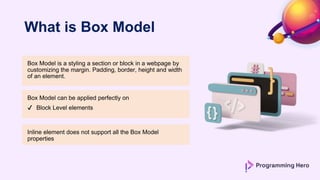
Box Model is a styling a section or block in a webpage by
customizing the margin. Padding, border, height and width
of an element.
Box Model can be applied perfectly on
✔ Block Level elements
Inline element does not support all the Box Model
properties
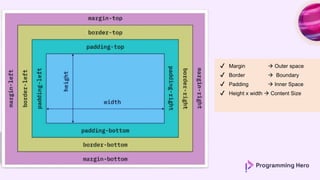
✔ Margin  Outer space
✔ Border  Boundary
✔ Padding  Inner Space
✔ Height x width  Content Size
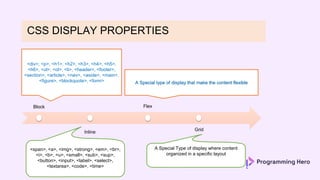
CSS DISPLAY PROPERTIES
Block
Inline
Flex
Grid
<div>, <p>, <h1>, <h2>, <h3>, <h4>, <h5>,
<h6>, <ul>, <ol>, <li>, <header>, <footer>,
<section>, <article>, <nav>, <aside>, <main>,
<figure>, <blockquote>, <form>
A Special Type of display where content
organized in a specific layout
A Special type of display that make the content flexible
<span>, <a>, <img>, <strong>, <em>, <br>,
<i>, <b>, <u>, <small>, <sub>, <sup>,
<button>, <input>, <label>, <select>,
<textarea>, <code>, <time>
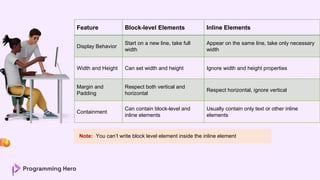
Inline Vs. Block Element
Feature Block-level Elements Inline Elements
Display Behavior
Start on a new line, take full
width
Appear on the same line, take only necessary
width
Width and Height Can set width and height Ignore width and height properties
Margin and
Padding
Respect both vertical and
horizontal
Respect horizontal, ignore vertical
Containment
Can contain block-level and
inline elements
Usually contain only text or other inline
elements
Note: You can’t write block level element inside the inline element
Thank you!

How to Create flex box and design box model for a particular section

  • 1.
  • 2.
    What is BoxModel Box Model is a styling a section or block in a webpage by customizing the margin. Padding, border, height and width of an element. Box Model can be applied perfectly on ✔ Block Level elements Inline element does not support all the Box Model properties
  • 3.
    ✔ Margin Outer space ✔ Border  Boundary ✔ Padding  Inner Space ✔ Height x width  Content Size
  • 4.
    CSS DISPLAY PROPERTIES Block Inline Flex Grid <div>,<p>, <h1>, <h2>, <h3>, <h4>, <h5>, <h6>, <ul>, <ol>, <li>, <header>, <footer>, <section>, <article>, <nav>, <aside>, <main>, <figure>, <blockquote>, <form> A Special Type of display where content organized in a specific layout A Special type of display that make the content flexible <span>, <a>, <img>, <strong>, <em>, <br>, <i>, <b>, <u>, <small>, <sub>, <sup>, <button>, <input>, <label>, <select>, <textarea>, <code>, <time>
  • 5.
  • 6.
    Feature Block-level ElementsInline Elements Display Behavior Start on a new line, take full width Appear on the same line, take only necessary width Width and Height Can set width and height Ignore width and height properties Margin and Padding Respect both vertical and horizontal Respect horizontal, ignore vertical Containment Can contain block-level and inline elements Usually contain only text or other inline elements Note: You can’t write block level element inside the inline element
  • 7.