How to Attribute Creative
Commons Licence?
S.K. Soam
Head, Information and Communication Management
NAARM, Hyderabad- 500 030, India
soam@naarm.ernet.in
1.Type of Licences
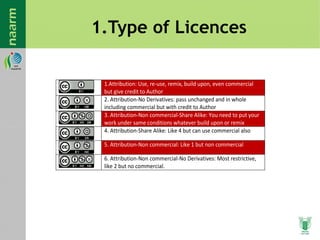
1.Attribution: Use, re-use, remix, build upon, even commercial
but give credit to Author
2. Attribution-No Derivatives: pass unchanged and in whole
including commercial but with credit to Author
3. Attribution-Non commercial-Share Alike: You need to put your
work under same conditions whatever build upon or remix
4. Attribution-Share Alike: Like 4 but can use commercial also
5. Attribution-Non commercial: Like 1 but non commercial
6. Attribution-Non commercial-No Derivatives: Most restrictive,
like 2 but no commercial.
2. Open CC website and Choose
Licence
3. Fill the Required Information
4. Adding cc notice to Digital
Document
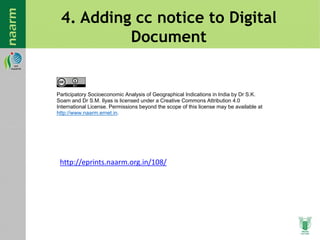
Participatory Socioeconomic Analysis of Geographical Indications in India by Dr S.K.
Soam and Dr S.M. Ilyas is licensed under a Creative Commons Attribution 4.0
International License. Permissions beyond the scope of this license may be available at
http://www.naarm.ernet.in.
http://eprints.naarm.org.in/108/
4.1. Editing PDF using Acrobat
5. Create XMP File
5.1. Adding XMP file to a pdf
Change Folder options
5.2. Select Show hidden file,
folders and drives
Copy the XMP file you saved to the folder
C:UsersAdmin1AppDataRoamingAdobeXMPMetadata Templates
5.3. Open Document properties in
Acrobat
5.4. Go to Additional Metadata>
Advanced
5.5.Click on the fly-out menu in
the top left corner
5.6. Select the template you saved
6. Integrating creative commons panel
Download the latest creative commons panel Zip file from
http://johnbishopimages.com/creativecommons/?xmp
6.1. Copy the XMP folder from ZIP file into
C:UsersAdmin1AppDataRoamingAdobe
6.2. Copy FlashPlayer Trust folder from ZIP file into
C:UsersAdmin1AppDataRoamingMacromediaFlash
Player#Security
6.3. Open Xmp.cfg file using notepad from
C:UsersAdmin1AppDataRoamingMacromediaFlash
Player#SecurityFlashPlayerTrust
6.4. Change the username to the username of your
system (eg: <username) to Admin1) and remove # from
the path
7. Open Acrobat and view the creative commons
panel

How to attribute creative commons licence

  • 1.
    How to AttributeCreative Commons Licence? S.K. Soam Head, Information and Communication Management NAARM, Hyderabad- 500 030, India soam@naarm.ernet.in
  • 2.
    1.Type of Licences 1.Attribution:Use, re-use, remix, build upon, even commercial but give credit to Author 2. Attribution-No Derivatives: pass unchanged and in whole including commercial but with credit to Author 3. Attribution-Non commercial-Share Alike: You need to put your work under same conditions whatever build upon or remix 4. Attribution-Share Alike: Like 4 but can use commercial also 5. Attribution-Non commercial: Like 1 but non commercial 6. Attribution-Non commercial-No Derivatives: Most restrictive, like 2 but no commercial.
  • 3.
    2. Open CCwebsite and Choose Licence
  • 4.
    3. Fill theRequired Information
  • 5.
    4. Adding ccnotice to Digital Document Participatory Socioeconomic Analysis of Geographical Indications in India by Dr S.K. Soam and Dr S.M. Ilyas is licensed under a Creative Commons Attribution 4.0 International License. Permissions beyond the scope of this license may be available at http://www.naarm.ernet.in. http://eprints.naarm.org.in/108/
  • 7.
    4.1. Editing PDFusing Acrobat
  • 8.
  • 9.
    5.1. Adding XMPfile to a pdf Change Folder options
  • 10.
    5.2. Select Showhidden file, folders and drives
  • 11.
    Copy the XMPfile you saved to the folder C:UsersAdmin1AppDataRoamingAdobeXMPMetadata Templates
  • 12.
    5.3. Open Documentproperties in Acrobat
  • 13.
    5.4. Go toAdditional Metadata> Advanced
  • 14.
    5.5.Click on thefly-out menu in the top left corner
  • 15.
    5.6. Select thetemplate you saved
  • 16.
    6. Integrating creativecommons panel Download the latest creative commons panel Zip file from http://johnbishopimages.com/creativecommons/?xmp
  • 17.
    6.1. Copy theXMP folder from ZIP file into C:UsersAdmin1AppDataRoamingAdobe
  • 18.
    6.2. Copy FlashPlayerTrust folder from ZIP file into C:UsersAdmin1AppDataRoamingMacromediaFlash Player#Security
  • 19.
    6.3. Open Xmp.cfgfile using notepad from C:UsersAdmin1AppDataRoamingMacromediaFlash Player#SecurityFlashPlayerTrust
  • 20.
    6.4. Change theusername to the username of your system (eg: <username) to Admin1) and remove # from the path
  • 21.
    7. Open Acrobatand view the creative commons panel