How to 
ASP.NET MVC4 
201408 Training Material 
Daniel.Chou
下午好,有準備咖啡了嗎?
希望不會zzzZZZ…
時間關係 
這次MVC中先不著墨在 
Model….
DEMO Project: 
• 歡迎下載使用,有任何建議或問題請不吝指教。 
• https://github.com/danielchou/MVC4Demo
Agenda 
• Why MVC? 
• How to install? 
• Start MVC Project 
– URL 發動! 
– Routing 解析 
– Controller 決定流程 
– Action 決定轉出格式 
– View 輕薄的外衣。 
• Q&A
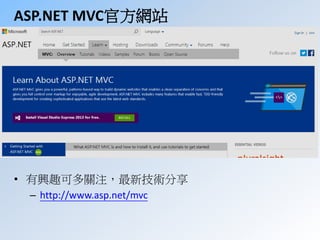
ASP.NET MVC官方網站 
• 有興趣可多關注,最新技術分享 
– http://www.asp.net/mvc
ASP.NET MVC其實就是優點 
• ASP.NET MVC gives you a powerful, patterns-based way to 
build dynamic websites that enables a clean separation of 
concerns and that gives you full control over markup for 
enjoyable, agile development. ASP.NET MVC includes many 
features that enable fast, TDD-friendly development for 
creating sophisticated applications that use the latest web 
standards. 
– Patterns-base 習慣大於配置 
– SoC ”關注點分離!”,流程與UI分離。 
– Enjoyable(?)、agile 開發更快速 
– TDD-friendly 單元、整合、自動測試架構。 
– Latest web standards. 符合最新網頁標準
ASP.NET MVC優點 
• 很容易: 
– 開發行動裝置。 
– 建構HTTP API網站。 
– AJAX實作。 
– 整合前端程式框架,jQuery、Knockout、AngularJS。 
– 分工、平行開發 
– 擴充架構、維護 
• 特色: 
– 沒有PostBack 
– 開放原始碼 
– Layout套版沒有伺服器控制項的羈絆 
– 支援多種ViewEngine 
– Routing支援 
– 網頁流量低、執行速度快。
ASP.NET MVC缺點 
• 以下都不能: 
– ViewState 
– Page Trace 
– ASP.NET Event Model 
– Server Control (GridView, FormView,….) 
• 較辛苦,對有些人要重頭學起。 
– HTTP 我怎會不懂? 
– 熟悉JavaScript… 很難debug耶? 
– 網頁HTML基本組成我又不是美工? 
– 不再拖拉開發寫得怎可能比我用拉的快?? 
– 前端?後端? ….?
MVC其實容易卡在“基礎“
只是還原 
網頁開發應有的樣子
網頁標準-Http Method 
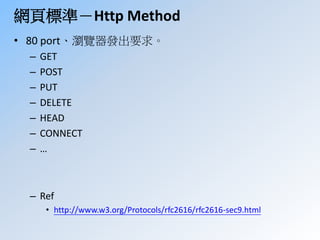
• 80 port、瀏覽器發出要求。 
– GET 
– POST 
– PUT 
– DELETE 
– HEAD 
– CONNECT 
– … 
– Ref 
• http://www.w3.org/Protocols/rfc2616/rfc2616-sec9.html
網頁標準-Http Method -Rest架構 
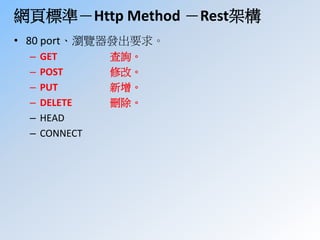
• 80 port、瀏覽器發出要求。 
– GET 查詢。 
– POST 修改。 
– PUT 新增。 
– DELETE 刪除。 
– HEAD 
– CONNECT
網頁標準- Http Status Code 
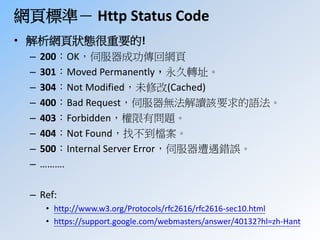
• 解析網頁狀態很重要的! 
– 200:OK,伺服器成功傳回網頁 
– 301:Moved Permanently,永久轉址。 
– 304:Not Modified,未修改(Cached) 
– 400:Bad Request,伺服器無法解讀該要求的語法。 
– 403:Forbidden,權限有問題。 
– 404:Not Found,找不到檔案。 
– 500:Internal Server Error,伺服器遭遇錯誤。 
– ………. 
– Ref: 
• http://www.w3.org/Protocols/rfc2616/rfc2616-sec10.html 
• https://support.google.com/webmasters/answer/40132?hl=zh-Hant
Chrome Devtool 
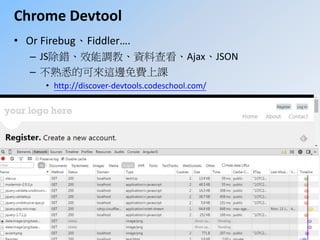
• Or Firebug、Fiddler…. 
– JS除錯、效能調教、資料查看、Ajax、JSON 
– 不熟悉的可來這邊免費上課 
• http://discover-devtools.codeschool.com/
ASP.NETWebform為何以前不用懂這些? 
• 歷史淵源的 
• 網頁程式剛崛起 
• 大家習慣Winform開發,事件驅動 
• 在無狀態的Web上硬是模擬出狀態(ViewState)
學這麼多永遠學不完阿
討論一下你的學習c/p值 
• 微軟 
• MVC2 2010 
• MVC3 2011 
• MVC4 2012 
• MVC5 2013 
• vNext 2014 
• 真是沒完沒了….XD (我會建議選取部分使用….) 
• 網頁開放標準 
– Javascript EMCAcript6 
– CSS CSS3 
– HTML(4) HTML5 
• JSP,PHP,Ruby,Python…甚至mobile也利用這些標準
User的需求、喜好 
永遠推動新技術的產生
當系統功能日益龐大複雜…
MVC架構 
分工、維護、擴充 
會讓你蠻開心的
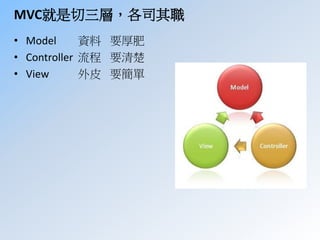
MVC就是切三層,各司其職 
• Model 資料要厚肥 
• Controller 流程要清楚 
• View 外皮要簡單
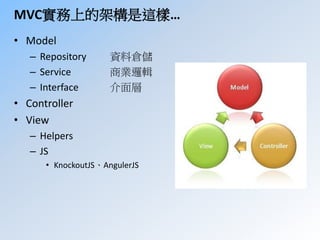
MVC實務上的架構是這樣… 
• Model 
– Repository 資料倉儲 
– Service 商業邏輯 
– Interface 介面層 
• Controller 
• View 
– Helpers 
– JS 
• KnockoutJS、AngulerJS
應該切入正題了…
Agenda 
• Why MVC? 
• How to install?  
• Start MVC Project 
– URL 發動! 
– Routing 解析 
– Controller 決定流程 
– Action 決定轉出格式 
– View 輕薄的外衣。 
• Q&A
Which version? 
• VS2010 MVC4今天介紹這個 
• VS2012 MVC5 
– .NetFramework 4.5+ 
– Visual Studio 2012 
• VS2014 MVC6 
– vNext 
– No more System.Data, lighter... 
– Linux、MAC、RaspbarryPi… available. 
– Azure Cloud
ASP.NET MVC4 features. 
• 對行動裝置平台支援更好,更加開放標準!! 
– ASP.NET web API 
– Project templates enhancements 
– Mobile project template 
– JQuery mobile and View switcher 
– Bundling and minification JS,CSS 
– OAuth, OpenID
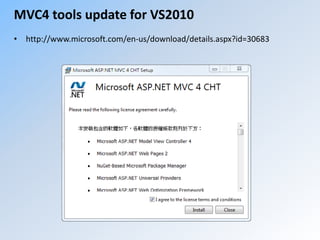
MVC4 tools update for VS2010 
• http://www.microsoft.com/en-us/download/details.aspx?id=30683
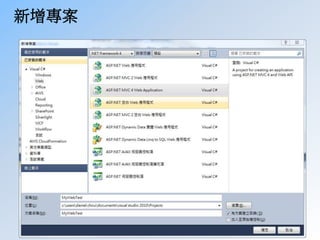
新增專案
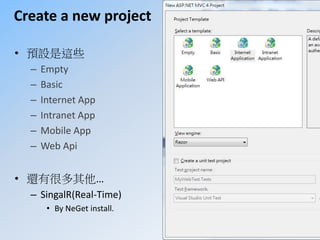
Create a new project 
• 預設是這些 
– Empty 
– Basic 
– Internet App 
– Intranet App 
– Mobile App 
– Web Api 
• 還有很多其他… 
– SingalR(Real-Time) 
• By NeGet install.
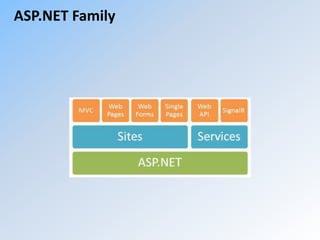
ASP.NET Family
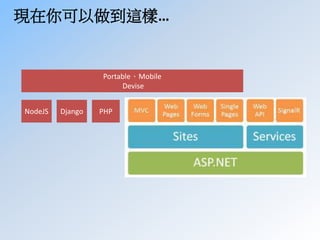
現在你可以做到這樣… 
Portable、Mobile 
NodeJS Django PHP 
Devise
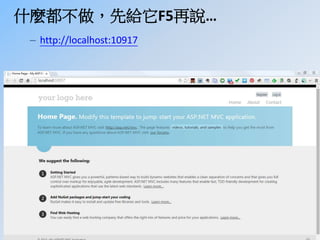
什麼都不做,先給它F5再說… 
– http://localhost:10917
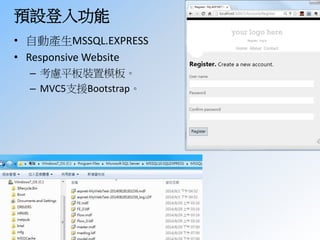
預設登入功能 
• 自動產生MSSQL.EXPRESS 
• ResponsiveWebsite 
– 考慮平板裝置模板。 
– MVC5支援Bootstrap。
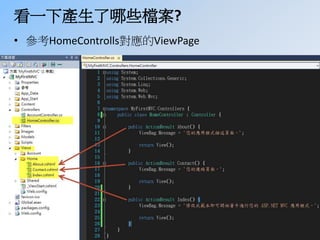
看一下產生了哪些檔案? 
• 參考HomeControlls對應的ViewPage
DEMO 
New a MVC4 project.
可收工了…
No, 只是先幫你Scalffolding…
該怎改起?
Agenda 
• Why MVC? 
• How to install? 
• Start MVC Project 
– URL 發動! 
– Routing 解析 
– Controller 決定流程 
– Action 決定轉出格式 
– View 輕薄的外衣。 
• Q&A
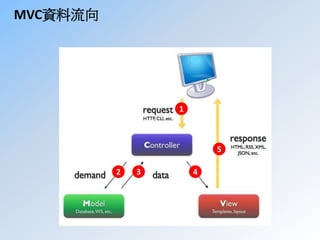
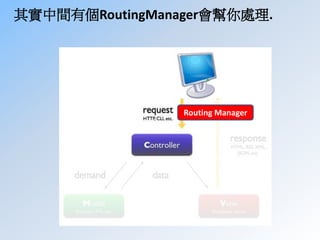
MVC資料流向 
1 
2 3 4 
5
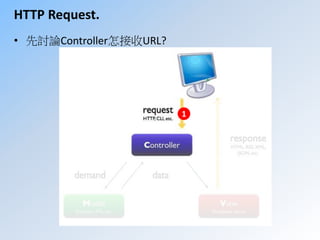
HTTP Request. 
• 先討論Controller怎接收URL? 
1
其實中間有個RoutingManager會幫你處理. 
Routing Manager
你組出的URL是不一樣的。 
• Webform的網址 
– http://Server/Products/ProductDetails.aspx?kind=sport&id=3 
• MVC的網址 
– http://Server/Products/Details/sport/3  
– Why Rewrite Routing 
• URL更直覺、有意義、更易SEO! 
• Webform也做得到,但你不會想這樣做。 
• IIS改裝後會不穩定、效能差。 
• 其實MVC網站各種URL都可以解析得出來!
RoutingTable !!!
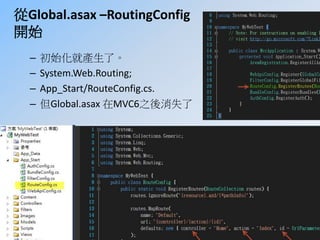
從Global.asax –RoutingConfig 
開始 
– 初始化就產生了。 
– System.Web.Routing; 
– App_Start/RouteConfig.cs. 
– 但Global.asax 在MVC6之後消失了
APP_Start內其他類別的作用? 
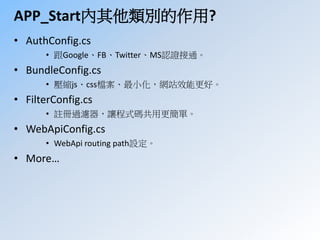
• AuthConfig.cs 
• 跟Google、FB、Twitter、MS認證接通。 
• BundleConfig.cs 
• 壓縮js、css檔案、最小化,網站效能更好。 
• FilterConfig.cs 
• 註冊過濾器,讓程式碼共用更簡單。 
• WebApiConfig.cs 
• WebApi routing path設定。 
• More…
再回到Routes.MapRoute 
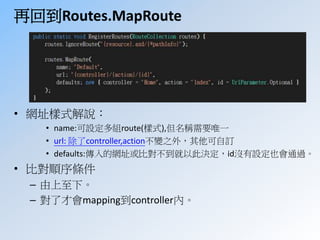
• 網址樣式解說: 
• name:可設定多組route(樣式),但名稱需要唯一 
• url: 除了controller,action不變之外,其他可自訂 
• defaults:傳入的網址或比對不到就以此決定,id沒有設定也會通過。 
• 比對順序條件 
– 由上至下。 
– 對了才會mapping到controller內。
Route 比對順序 
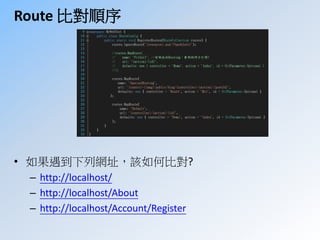
• 如果遇到下列網址,該如何比對? 
– http://localhost/ 
– http://localhost/About 
– http://localhost/Account/Register
Route 比對順序 
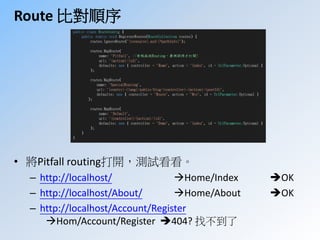
• 將Pitfall routing打開,測試看看。 
– http://localhost/ Home/Index OK 
– http://localhost/About/ Home/About OK 
– http://localhost/Account/Register 
Hom/Account/Register 404? 找不到了
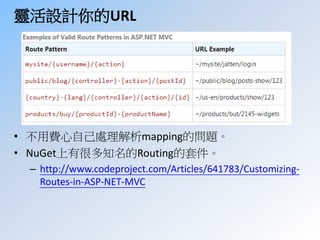
靈活設計你的URL 
• 不用費心自己處理解析mapping的問題。 
• NuGet上有很多知名的Routing的套件。 
– http://www.codeproject.com/Articles/641783/Customizing- 
Routes-in-ASP-NET-MVC
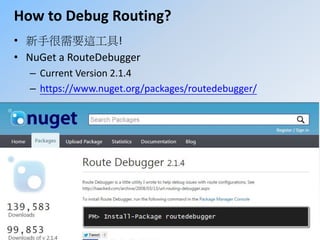
How to Debug Routing? 
• 新手很需要這工具! 
• NuGet a RouteDebugger 
– Current Version 2.1.4 
– https://www.nuget.org/packages/routedebugger/
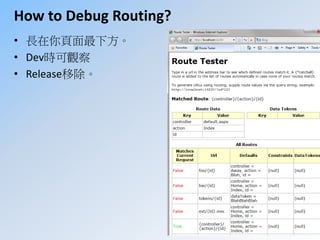
How to Debug Routing? 
• 長在你頁面最下方。 
• Dev時可觀察 
• Release移除。
Demo-Route
Agenda 
• Why MVC? 
• How to install? 
• Start MVC Project 
– URL 發動! 
– Routing 解析 
– Controller 決定流程 
– Action 決定轉出格式 
– View 輕薄的外衣。 
• Q&A
Controller:負責控制流程 
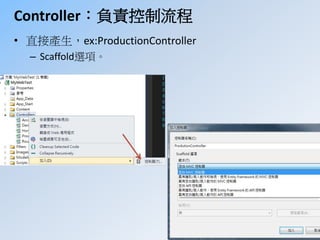
• 直接產生,ex:ProductionController 
– Scaffold選項。
假設為ProductController 
• 繼承Controller 
• Index ActionResult預設會產生。 
– 預設為[HTTPGet] 
– 這時候還沒有ViewPage。
ActionResult之間資料傳遞 
• 種類: 
– ViewData 
• 最主要的方式 
• 只活在同一個Action內。 
– ViewBag 
• 同ViewData 
• 支援物件式寫法,this.ViewBag.Title=“Hello, ViewBag”; 
– TempData 
• 可活在同一個Request, 可跨Action傳遞。 
• 可從Controller內丟到ViewPage外面。 
• 上面的雖好用,但建議用強型別(物件)傳遞資料。
ActionResult接收表單資料 
• 同樣可以用Request物件 
• 建議用強型別(物件)傳遞資料。 
• DefaultModelBinder類別 
– 自動化資料轉換 
– 又稱為“Model Binding” 
– 可重複使用
就這樣很簡單, 
看你Controller怎設計而已
DEMO 
ViewData拋到ViewPage 
DefaultModelBinder
Agenda 
• Why MVC? 
• How to install? 
• Start MVC Project 
– URL 發動! 
– Routing 解析 
– Controller 決定流程 
– ActionResult 決定轉出格式 
– View 輕薄的外衣。 
• Q&A
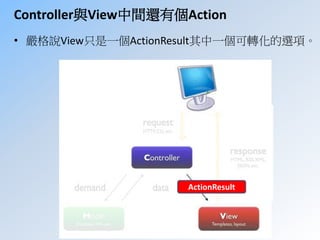
Controller與View中間還有個Action 
• 嚴格說View只是一個ActionResult其中一個可轉化的選項。 
ActionResult
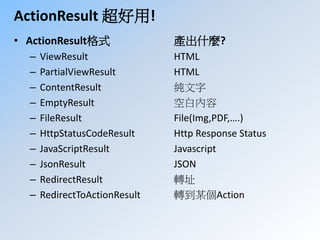
ActionResult 超好用! 
• ActionResult格式產出什麼? 
– ViewResult HTML 
– PartialViewResult HTML 
– ContentResult 純文字 
– EmptyResult 空白內容 
– FileResult File(Img,PDF,….) 
– HttpStatusCodeResult Http Response Status 
– JavaScriptResult Javascript 
– JsonResult JSON 
– RedirectResult 轉址 
– RedirectToActionResult 轉到某個Action
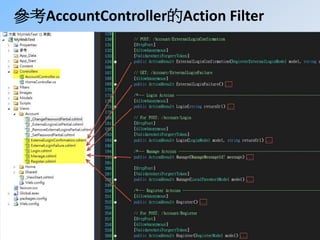
參考AccountController的Action Filter
Action Filter 
• 屬性類別(Attribute Class) 
– 可套用到Controller層級。 
– Action方法執行過程中,增加固定動作。 
– 程式碼更乾淨,好維護! 
• 依照實作介面可區分為: 
– Action Filter 
– Result Filter 
– Authorize Filter 
– Exception Filter
Agenda 
• Why MVC? 
• How to install? 
• Start MVC Project 
– URL 發動! 
– Routing 解析 
– Controller 決定流程 
– ActionResult 決定轉出格式 
– View 輕薄的外衣 
• Q&A
DEMO 
自訂CROS Attribute. 
改造我的JSONResult.
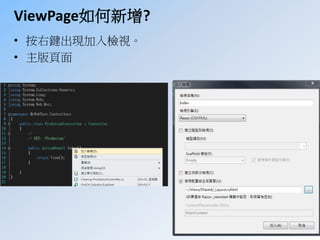
ViewPage如何新增? 
• 按右鍵出現加入檢視。 
• 主版頁面
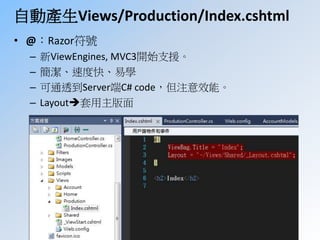
自動產生Views/Production/Index.cshtml 
• @:Razor符號 
– 新ViewEngines, MVC3開始支援。 
– 簡潔、速度快、易學 
– 可通透到Server端C# code,但注意效能。 
– Layout套用主版面
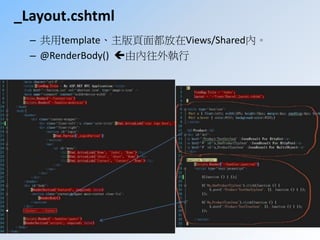
_Layout.cshtml 
– 共用template、主版頁面都放在Views/Shared內。 
– @RenderBody() 由內往外執行
Web Helpers 
• 取代ASP.NET Server控制項 
• 內建、第三方、擴充自建。 
• 內建舉例如下: 
– @Html.TextBoxFor(m=>m.Birthday) 
– @Html.HiddenFor(m=>m.ID) 
– @Html.ActionLink(“linkText”,”Action”,”Controller”,new{}); 
– @Html.Partial(“ViewPageName”,Model); 
– ….太多了
DEMO 
Razor運算式
流程、UI可以分工了!! 
關注點分離SoC 
Seperation of Concern
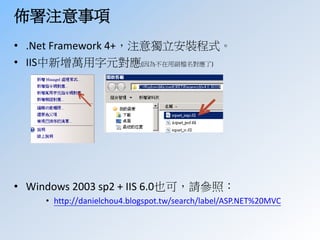
佈署注意事項 
• .Net Framework 4+,注意獨立安裝程式。 
• IIS中新增萬用字元對應(因為不在用副檔名對應了) 
• Windows 2003 sp2 + IIS 6.0也可,請參照: 
• http://danielchou4.blogspot.tw/search/label/ASP.NET%20MVC
M、V、C每一塊都可著墨很多, 
但Routing最重要!
Q & A

How to ASP.NET MVC4