How Not To Use DynamoDB
DynamoDB – Intro
• What is DynamoDB
• Why use DynamoDB?
• Realising the mistakes
Single Table Design
• The more tables the better right?
• Keep related data together
• Less requests = Better App Performance & Cheaper DynamoDB
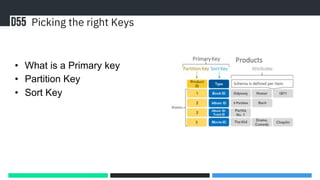
Picking the right Keys
• What is a Primary key
• Partition Key
• Sort Key
Querying Data
Scans, Scans, Scans!
Never Deleting your data
What is TTL
Deleting your old data
Thank You
https://www.linkedin.com/in/john-hatton-04653b1b7/

How Not To Use DynamoDB

Editor's Notes

  • #2 Hi Everyone, I'm john from D55 who are AWS DynamoDB Service Delivery Partner and where I'm a tech lead and this evening im going to be sharing some of my experiences and learnings when it comes to DynamoDB and tell you a little bit about how to not use it.
  • #3  Before I go into why I chose to use dynamo db and go into some of ways of how not to use dynamodb , Im going to give a brief description of what is DynamoDB. So wha tis DynamoDB? Well it's a fully managed Serverless Key-value NoSQL Database service offered by AWS, being a NoSQL key-value store means it doesn't store it’s data in structured or relational mappings but instead stores it as json objects in a simple key value format, it’s also designed to run high performance at any scale. DynamoDB works just like other databases where data is stored in tables, each table contains a set of items and each item has a set of fields. Moving onto to why we chose to use DynamoDB, when I was new to aws and serverless technologies we had a project where we needed a solution for storing key-value pair data. I came across dynamodb DB and believed it would be the perfect fit, due to it being able to scale and handle uneven demand. Before I go onto to talk about how not to use DynamoDB and how it should be used, I just wanted to mention how we realised the mistakes we had made. Coming into a team that did not have a lot of AWS or DynamoDB experience we just tried to do our best and get it to work, at the time not knowing about all of the aws docs and best practices. It was only after a couple of months when I started to learn about AWS in general and start to look at what kind of knowledge I would need to pass the developer associate exam, was it that I learnt how to use DynamoDB and the best practices, while learning this I then realised we where not utilising DynamoDB 100% so even though DynamoDB was performing well it wasn’t performing as well as it could have been. From there we set out to fix this mistakes and the next few slides will go over the mistakes we made and how and why they where fixed.
  • #4 The first area I want to talk about is Single Table Design. Coming from a .net full stack background and using Microsoft sql I didn't think too much about single table designs and tried to separate them out as if it was a relational database thinking the more tables the better. Although this talk is about DynamoDB Single Table design is not just specific to DynamoDB and some of things I am going to talk about can be using for other NoSQL databases. When we first implemented one of the solution we had a few different tables with varying data in and it was only when looking at best practices and how to use dynamoDB efficiently did I realise that having multiple tables when the data is related means doing more queries than necessary, When designing a DynamoDB application it’s important to identify specific query patterns that your system must satisfy. When reading AWS’s best practices they state that keeping related data together is the single most important factor for speeding up response time in applications, this was something we noticed as instead of needing to make multiple calls to different table we could get all of the related data we needed in one request, this not only reduced the cost of DynamoDB but im our case improved the performance a lot due to retrieving all neccsary items in a single request and for me reducing costs and improving performance is a great win. As a general rule you should look to main as few tables as possible in a DynamoDB application, while there are always exceptions to the rules If you have data that is related and can be stored together doing this could also give you big improvements as well.
  • #5 Moving onto Picking the right keys in DynamoDb. There are 2 types of primary keys in DynamoDB these are Partition Key – A simple primary key composed of one attribute known as the partition key. Partition Key and Sort Keys – Also referred to as a composite primary key and is composed of 2 attributes, the first one being the partition key and the second being the sort key. DynamoDB uses the partition key’s value as an input to an internal hash function. The output from the hash function determines the partition in which the item is stored. Each item’s location is determined by the hash value of its partition key. In most cases, all items with the same partition key are stored together in a collection, which we define as a group of items with the same partition key but different sort keys DynamoDB automatically supports your access patterns using the throughput you have provisioned, or up to your account limits if using on-demand mode. When data is access is imbalanced a hot partition or hot key can receive a higher volume of read and write traffic compared to other partitions. If more than 3000 read operations or more than 1000 write operations happen on a single partition throttling will occur, to avoid throttling you want to design tour DynamoDB table with the right partition key to meet your access requirements and provide even distribution of data. When thinking about what your partition key should be it’s always best to think which attribute would provide the most amount of partitions and avoid a particular partition from becoming hot. One way is to use High cardinality attributes, which are attributes that have distinct values for each item such as customerId, UserId, etc Another recommendation is to add random numbers or digits from a predetermined range for write heavy use cases.
  • #6  When first interacting with DynamoDB we would use scans. In General, Scan operations are less efficient than other operations in DynamoDB. A Scan operation always scans the entire table or secondary index. It then filters out values to provide the result you want, essentially adding the extra step of removing data from the result set. You should look to avoid scanning on a large table or index as not only will this increase the cost of DynamoDB but from a performance point of you it will also slow down your application. This is because Scan examines every item for the requested values and can use up the provisioned throughput for a large table, an example of this is if you have a million rows in your table and you scan it will look through all 1 million rows to then return the values you requested. In our case we where able to change from scans to queries as we were using the partition key or partition key and sort key, One issue we had was that the sort key on a particular table was a date time was the sort key and initially we did not know you can use expression attributes where you can say date is greater than a certain time for example, when we changed all of our scans to queries we saw a notable increase in performance as well as a decrease in cost. As with the other areas so far this again was found by looking at the best practices on AWS.
  • #7 One of the important things I learnt and discovered was maintanace of your data especially if you no longer need it. During the initial implementation, all data would be kept in dynamodb even though it would not be needed a week after it had been processed. The reason for wanting to clear this data is to improve the querying performance as it would only be querying relevant data. To achieve this we used TTL or Time To Live which allows you to define a per item timestamp to determine when an item is no longer needed, shortly after the date and time DynamoDB deletes the item without consuming any write throughput. When enabling TTL on a DynamoDB table, you must identify a specific attribute name that the service will look for when determining if an item is eligible for expiration. After you enable TTL on a table, a per-partition scanner background process automatically and continuously evaluates the expiry status of items in the table. And is doing all of the heavy lifting so you don’t need to worry about it as DynamoDB does it all in the background. TTL Is very useful if you are storing items that lose relevance after a specific time and although this might not be considered a best practice itself, only storing the data you need is always useful.
  • #8 There are many more best practices for DynamoDB but hopefully you have enjoyed listening to some of the ways in which not to use DynamoDB and some of the best practices I learnt and implemented. I post about serverless from time to time on linked with links to blogs if anyone want’s to scan the QR code. Thank you for listening.