Welcome to
Impactful Reporting
Welcome - let’s talk
Chat Q&A Support
● Hi! Who do you work for,
in what role and sector?
● Are you using HubSpot
reports?
● What do you hope to get
from today?
● Questions about today’s
content
● Questions about HubSpot
● Other topic-related
questions
● Sound, etc. - DM
Rae Hardy-Aitken
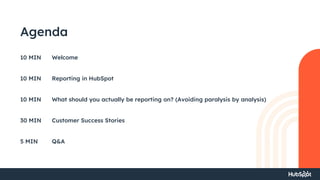
Agenda
Welcome
Reporting in HubSpot
What should you actually be reporting on? (Avoiding paralysis by analysis)
Customer Success Stories
Q&A
10 MIN
10 MIN
10 MIN
30 MIN
5 MIN
Rae Hardy-Aitken
Host and key support for
today’s HUG.
Director of Business
Operations
Ross Breckenridge
Mr Breck himself, the HubSpot
reporting guru here to talk
you through impactful
reporting.
Managing Director
Hannah Doulton
The sorcerer's apprentice in
HubSpot reporting and a firm
believer in less is more.
Senior HubSpot
Consultant
Meet the Speakers
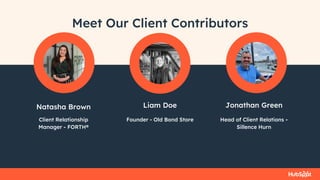
Natasha Brown Liam Doe
Meet Our Client Contributors
Client Relationship
Manager - FORTH®
Founder - Old Bond Store
Jonathan Green
Head of Client Relations -
Sillence Hurn
Before we get stuck, how do YOU make toast?
Before we get stuck in,
how do YOU make
toast?
Reporting in HubSpot
What should you actually be reporting on?
Pulse Check:
In the comments, please share: Are you -
● A guru?
● Just playing around?
● A complete novice?
Reporting in HubSpot
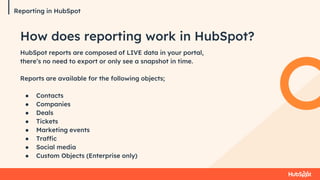
HubSpot reports are composed of LIVE data in your portal,
there’s no need to export or only see a snapshot in time.
Reports are available for the following objects;
● Contacts
● Companies
● Deals
● Tickets
● Marketing events
● Traffic
● Social media
● Custom Objects (Enterprise only)
How does reporting work in HubSpot?
How to build a
report
Reporting in HubSpot
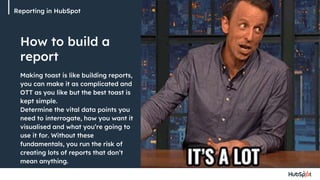
Making toast is like building reports,
you can make it as complicated and
OTT as you like but the best toast is
kept simple.
Determine the vital data points you
need to interrogate, how you want it
visualised and what you’re going to
use it for. Without these
fundamentals, you run the risk of
creating lots of reports that don’t
mean anything.
Reporting in HubSpot
Report Library
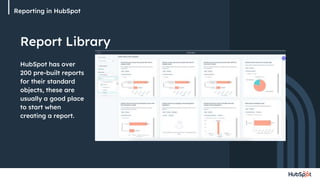
HubSpot has over
200 pre-built reports
for their standard
objects, these are
usually a good place
to start when
creating a report.
Reporting in HubSpot
Building a Custom
Report
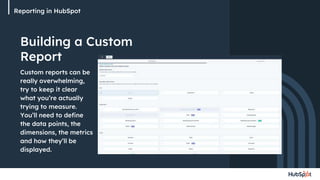
Custom reports can be
really overwhelming,
try to keep it clear
what you’re actually
trying to measure.
You’ll need to define
the data points, the
dimensions, the metrics
and how they’ll be
displayed.
Reporting in HubSpot
Reporting
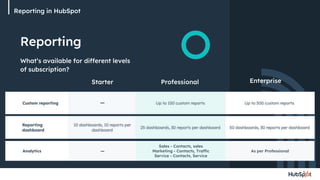
What’s available for different levels
of subscription?
Starter Professional Enterprise
Analytics — As per Professional
Sales - Contacts, sales
Marketing - Contacts, Traffic
Service - Contacts, Service
Reporting in HubSpot
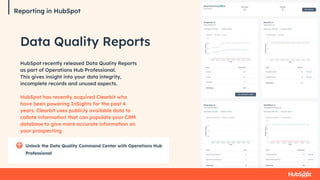
Data Quality Reports
HubSpot recently released Data Quality Reports
as part of Operations Hub Professional.
This gives insight into your data integrity,
incomplete records and unused aspects.
HubSpot has recently acquired Clearbit who
have been powering InSights for the past 4
years. Clearbit uses publicly available data to
collate information that can populate your CRM
database to give more accurate information on
your prospecting.
Reporting in HubSpot
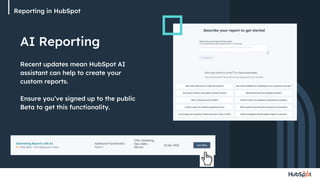
AI Reporting
Recent updates mean HubSpot AI
assistant can help to create your
custom reports.
Ensure you’ve signed up to the public
Beta to get this functionality.
Reporting in HubSpot
What should you
actually be reporting
on? (Avoiding paralysis
by analysis)
What should you actually be reporting on?
Pulse Check:
How true is the statement “we have agreed
reporting metrics across the business and
monitor these consistently”
● Absolutely
● Kind of
● Not at all
What should you actually be reporting on?
Mistakes people
make
● Just because you can, doesn’t
mean you should
● What action do you take from
the report - is it leading or
lagging
● Don’t try to report on too many
data points in one report - build
a dashboard
● Start with why, be consistent
and refine over time
● To report on it you have to be
capturing it
What should you actually be reporting on?
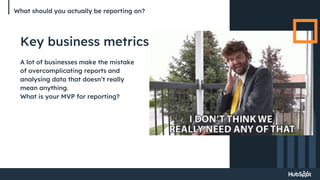
Key business metrics
A lot of businesses make the mistake
of overcomplicating reports and
analysing data that doesn’t really
mean anything.
What is your MVP for reporting?
What should you actually be reporting on?
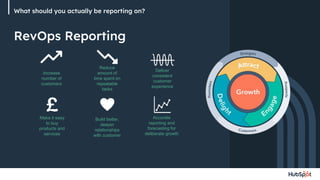
Increase
number of
customers
Reduce
amount of
time spent on
repeatable
tasks
Build better,
deeper
relationships
with customer
Accurate
reporting and
forecasting for
deliberate growth
Deliver
consistent
customer
experience
Make it easy
to buy
products and
services
RevOps Reporting
What should you actually be reporting on?
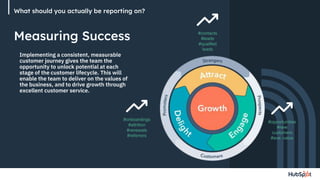
Measuring Success #contacts
#leads
#qualifed
leads
#opportunities
#new
customers
#ave. value
#onboardings
#attrition
#renewals
#referrers
Implementing a consistent, measurable
customer journey gives the team the
opportunity to unlock potential at each
stage of the customer lifecycle. This will
enable the team to deliver on the values of
the business, and to drive growth through
excellent customer service.
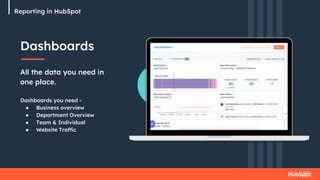
Dashboards
All the data you need in
one place.
Dashboards you need -
● Business overview
● Department Overview
● Team & Individual
● Website Traffic
Reporting in HubSpot
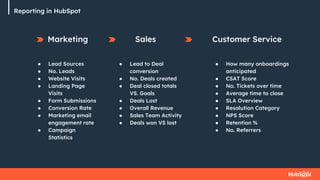
Marketing
● Lead Sources
● No. Leads
● Website Visits
● Landing Page
Visits
● Form Submissions
● Conversion Rate
● Marketing email
engagement rate
● Campaign
Statistics
Sales
● Lead to Deal
conversion
● No. Deals created
● Deal closed totals
VS. Goals
● Deals Lost
● Overall Revenue
● Sales Team Activity
● Deals won VS lost
Reporting in HubSpot
Customer Service
● How many onboardings
anticipated
● CSAT Score
● No. Tickets over time
● Average time to close
● SLA Overview
● Resolution Category
● NPS Score
● Retention %
● No. Referrers
Reporting in HubSpot
Customer Success
Stories
Customer Success Stories
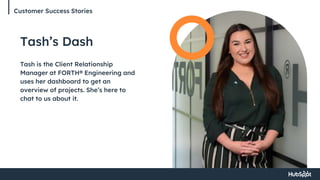
Tash’s Dash
Tash is the Client Relationship
Manager at FORTH® Engineering and
uses her dashboard to get an
overview of projects. She’s here to
chat to us about it.
Customer Success Stories
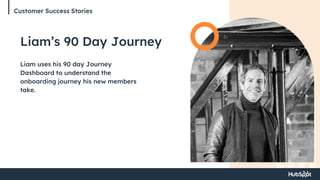
Liam’s 90 Day Journey
Liam uses his 90 day Journey
Dashboard to understand the
onboarding journey his new members
take.
Customer Success Stories
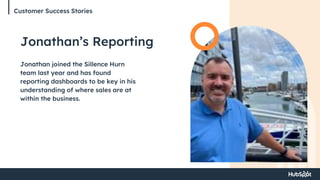
Jonathan’s Reporting
Jonathan joined the Sillence Hurn
team last year and has found
reporting dashboards to be key in his
understanding of where sales are at
within the business.
Customer Success Stories
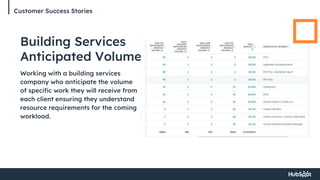
Building Services
Anticipated Volume
Working with a building services
company who anticipate the volume
of specific work they will receive from
each client ensuring they understand
resource requirements for the coming
workload.
Customer Success Stories
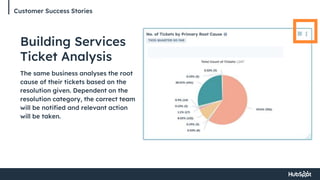
Building Services
Ticket Analysis
The same business analyses the root
cause of their tickets based on the
resolution given. Dependent on the
resolution category, the correct team
will be notified and relevant action
will be taken.
Thank you - let’s keep going
Learn Contact us
● HubSpot Reporting Certification in
the Academy
● Reach out for bespoke support and
training
● Join the next HUG
● LinkedIn - Hampshire HubSpot
User Group
● Hannah@breckenridge.agency
● Ross@breckenridge.agency
Before you go…
Our next virtual HHUG will
take place on Tuesday
30th April with HubSpot
Speaker Cian McLoughlin
will be discussing how to
streamline your Marketing
to Sales Handover.
Thank you

HHUG-03-2024-Impactful-Reporting-in-HubSpot.pptx

  • 1.
  • 2.
    Welcome - let’stalk Chat Q&A Support ● Hi! Who do you work for, in what role and sector? ● Are you using HubSpot reports? ● What do you hope to get from today? ● Questions about today’s content ● Questions about HubSpot ● Other topic-related questions ● Sound, etc. - DM Rae Hardy-Aitken
  • 3.
    Agenda Welcome Reporting in HubSpot Whatshould you actually be reporting on? (Avoiding paralysis by analysis) Customer Success Stories Q&A 10 MIN 10 MIN 10 MIN 30 MIN 5 MIN
  • 4.
    Rae Hardy-Aitken Host andkey support for today’s HUG. Director of Business Operations Ross Breckenridge Mr Breck himself, the HubSpot reporting guru here to talk you through impactful reporting. Managing Director Hannah Doulton The sorcerer's apprentice in HubSpot reporting and a firm believer in less is more. Senior HubSpot Consultant Meet the Speakers
  • 5.
    Natasha Brown LiamDoe Meet Our Client Contributors Client Relationship Manager - FORTH® Founder - Old Bond Store Jonathan Green Head of Client Relations - Sillence Hurn
  • 6.
    Before we getstuck, how do YOU make toast? Before we get stuck in, how do YOU make toast?
  • 7.
  • 8.
    What should youactually be reporting on? Pulse Check: In the comments, please share: Are you - ● A guru? ● Just playing around? ● A complete novice?
  • 9.
    Reporting in HubSpot HubSpotreports are composed of LIVE data in your portal, there’s no need to export or only see a snapshot in time. Reports are available for the following objects; ● Contacts ● Companies ● Deals ● Tickets ● Marketing events ● Traffic ● Social media ● Custom Objects (Enterprise only) How does reporting work in HubSpot?
  • 10.
    How to builda report Reporting in HubSpot Making toast is like building reports, you can make it as complicated and OTT as you like but the best toast is kept simple. Determine the vital data points you need to interrogate, how you want it visualised and what you’re going to use it for. Without these fundamentals, you run the risk of creating lots of reports that don’t mean anything.
  • 11.
    Reporting in HubSpot ReportLibrary HubSpot has over 200 pre-built reports for their standard objects, these are usually a good place to start when creating a report.
  • 12.
    Reporting in HubSpot Buildinga Custom Report Custom reports can be really overwhelming, try to keep it clear what you’re actually trying to measure. You’ll need to define the data points, the dimensions, the metrics and how they’ll be displayed.
  • 13.
    Reporting in HubSpot Reporting What’savailable for different levels of subscription? Starter Professional Enterprise Analytics — As per Professional Sales - Contacts, sales Marketing - Contacts, Traffic Service - Contacts, Service
  • 14.
    Reporting in HubSpot DataQuality Reports HubSpot recently released Data Quality Reports as part of Operations Hub Professional. This gives insight into your data integrity, incomplete records and unused aspects. HubSpot has recently acquired Clearbit who have been powering InSights for the past 4 years. Clearbit uses publicly available data to collate information that can populate your CRM database to give more accurate information on your prospecting. Reporting in HubSpot
  • 15.
    Reporting in HubSpot AIReporting Recent updates mean HubSpot AI assistant can help to create your custom reports. Ensure you’ve signed up to the public Beta to get this functionality.
  • 16.
    Reporting in HubSpot Whatshould you actually be reporting on? (Avoiding paralysis by analysis)
  • 17.
    What should youactually be reporting on? Pulse Check: How true is the statement “we have agreed reporting metrics across the business and monitor these consistently” ● Absolutely ● Kind of ● Not at all
  • 18.
    What should youactually be reporting on? Mistakes people make ● Just because you can, doesn’t mean you should ● What action do you take from the report - is it leading or lagging ● Don’t try to report on too many data points in one report - build a dashboard ● Start with why, be consistent and refine over time ● To report on it you have to be capturing it
  • 19.
    What should youactually be reporting on? Key business metrics A lot of businesses make the mistake of overcomplicating reports and analysing data that doesn’t really mean anything. What is your MVP for reporting?
  • 20.
    What should youactually be reporting on? Increase number of customers Reduce amount of time spent on repeatable tasks Build better, deeper relationships with customer Accurate reporting and forecasting for deliberate growth Deliver consistent customer experience Make it easy to buy products and services RevOps Reporting
  • 21.
    What should youactually be reporting on? Measuring Success #contacts #leads #qualifed leads #opportunities #new customers #ave. value #onboardings #attrition #renewals #referrers Implementing a consistent, measurable customer journey gives the team the opportunity to unlock potential at each stage of the customer lifecycle. This will enable the team to deliver on the values of the business, and to drive growth through excellent customer service.
  • 22.
    Dashboards All the datayou need in one place. Dashboards you need - ● Business overview ● Department Overview ● Team & Individual ● Website Traffic Reporting in HubSpot
  • 23.
    Marketing ● Lead Sources ●No. Leads ● Website Visits ● Landing Page Visits ● Form Submissions ● Conversion Rate ● Marketing email engagement rate ● Campaign Statistics Sales ● Lead to Deal conversion ● No. Deals created ● Deal closed totals VS. Goals ● Deals Lost ● Overall Revenue ● Sales Team Activity ● Deals won VS lost Reporting in HubSpot Customer Service ● How many onboardings anticipated ● CSAT Score ● No. Tickets over time ● Average time to close ● SLA Overview ● Resolution Category ● NPS Score ● Retention % ● No. Referrers
  • 24.
  • 25.
    Customer Success Stories Tash’sDash Tash is the Client Relationship Manager at FORTH® Engineering and uses her dashboard to get an overview of projects. She’s here to chat to us about it.
  • 26.
    Customer Success Stories Liam’s90 Day Journey Liam uses his 90 day Journey Dashboard to understand the onboarding journey his new members take.
  • 27.
    Customer Success Stories Jonathan’sReporting Jonathan joined the Sillence Hurn team last year and has found reporting dashboards to be key in his understanding of where sales are at within the business.
  • 28.
    Customer Success Stories BuildingServices Anticipated Volume Working with a building services company who anticipate the volume of specific work they will receive from each client ensuring they understand resource requirements for the coming workload.
  • 29.
    Customer Success Stories BuildingServices Ticket Analysis The same business analyses the root cause of their tickets based on the resolution given. Dependent on the resolution category, the correct team will be notified and relevant action will be taken.
  • 30.
    Thank you -let’s keep going Learn Contact us ● HubSpot Reporting Certification in the Academy ● Reach out for bespoke support and training ● Join the next HUG ● LinkedIn - Hampshire HubSpot User Group ● Hannah@breckenridge.agency ● Ross@breckenridge.agency
  • 31.
    Before you go… Ournext virtual HHUG will take place on Tuesday 30th April with HubSpot Speaker Cian McLoughlin will be discussing how to streamline your Marketing to Sales Handover.
  • 32.

Editor's Notes

  • #3 Welcome to Hampshire HUG If you’re just joining us, please introduce yourself in the chat: Who do you work for, in what sector? What’s your role? Are you using HubSpot reporting at the moment? What do you hope to get from today? FYI - we are recording this session for those that can’t make it
  • #4 How does reporting work in HubSpot - what are the nuts and bolts of it? What should you, rather than could you, be reporting on? Then we jump out of theory and into practice as we hear from some HubSpot users. Reporting is really hard to explain in the abstract, so looking at examples where there is real data and we can understand how it’s structured for a purpose will help us all see what might be possible for us. So now I’ll introduce our speakers and guests
  • #6 Welcome and massive thanks for being here to Give us a wave - we’re looking forward to hearing from you later But 1st, I’m going to hand over to Ross
  • #33 I’ll email with slides, recording and link to next event