HE OVIDEOPERFORMANCE
Walter Ebert
@wltrd
mastodon.social/@walterebert
https://yoast.com/video-backgrounds-suck/
AUTOPLAYING VIDEOS
<video autoplay loop muted playsinline>
<source src="video.mp4" type="video/mp4">
</video>
AUTOPLAYING VIDEOS
muted: Chrome, iOS, Android
playsinline: iOS
<video autoplay loop muted playsinline>
<source src="video.mp4" type="video/mp4">
</video>
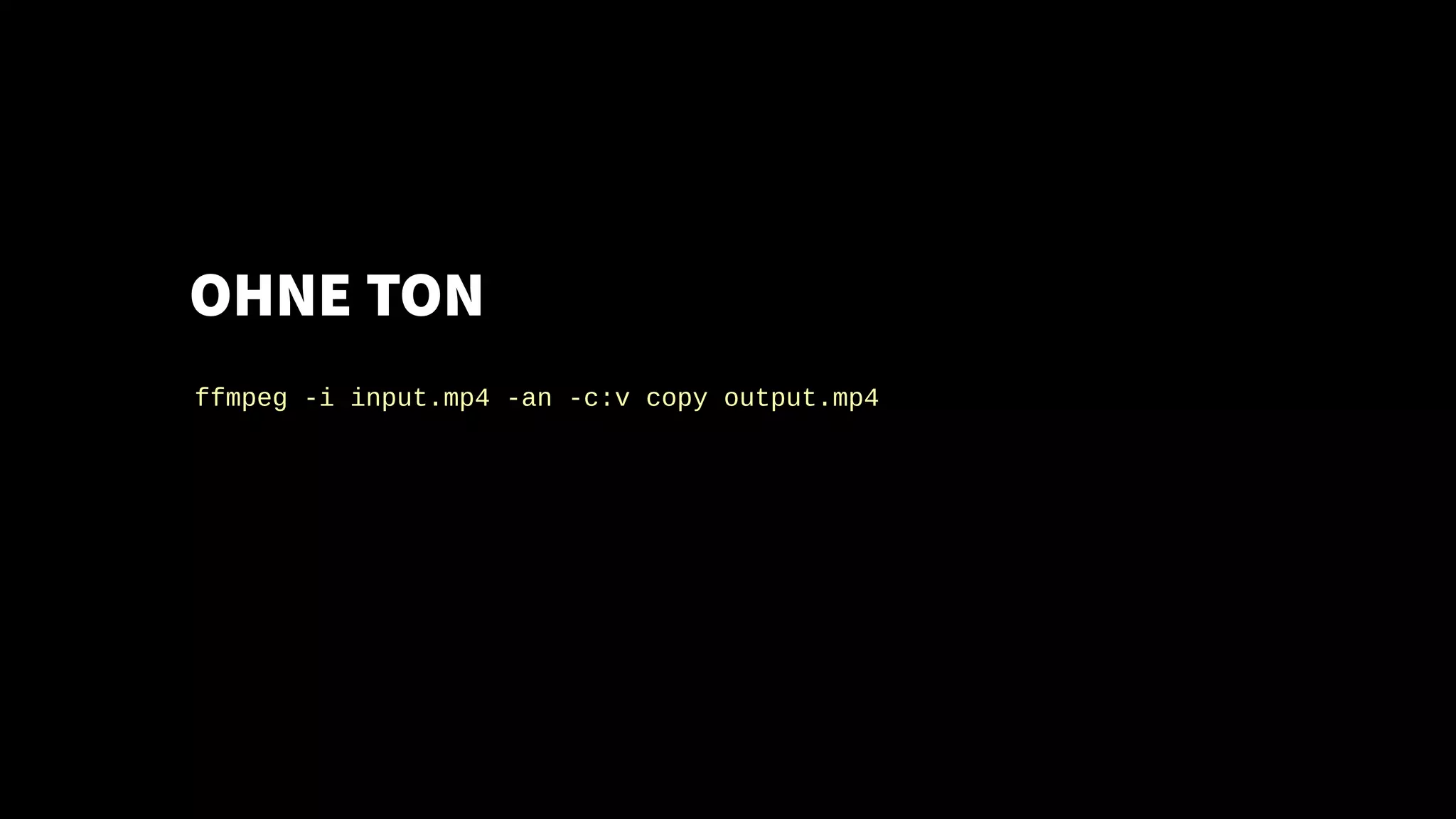
OHNE TON
ffmpeg -i input.mp4 -an -c:v copy output.mp4
OHNE TON
Geht auch mit
ffmpeg -i input.mp4 -an -c:v copy output.mp4
HandBrake
MOOV-ATOM (MP4)
ffmpeg -i input.mp4 -an -c:v copy -movflags +faststart output.mp4
https://www.adobe.com/devnet/video/articles/mp4_movie_atom.html
ALL THE CODECS!
<video autoplay loop muted playsinline>
<source src="av1.webm" type='video/webm;codecs="av1"'>
<source src="av1.mp4" type='video/mp4;codecs="av1"'>
<source src="h265.mp4" type='video/mp4;codecs="hvc1.1.L0.0"'>
<source src="vp9.webm" type='video/webm;codecs="vp9"'>
<source src="h264.mp4" type='video/mp4'>
</video>
BEGRÜNDUNGEN
KEIN VIDEO
ZU LADEN
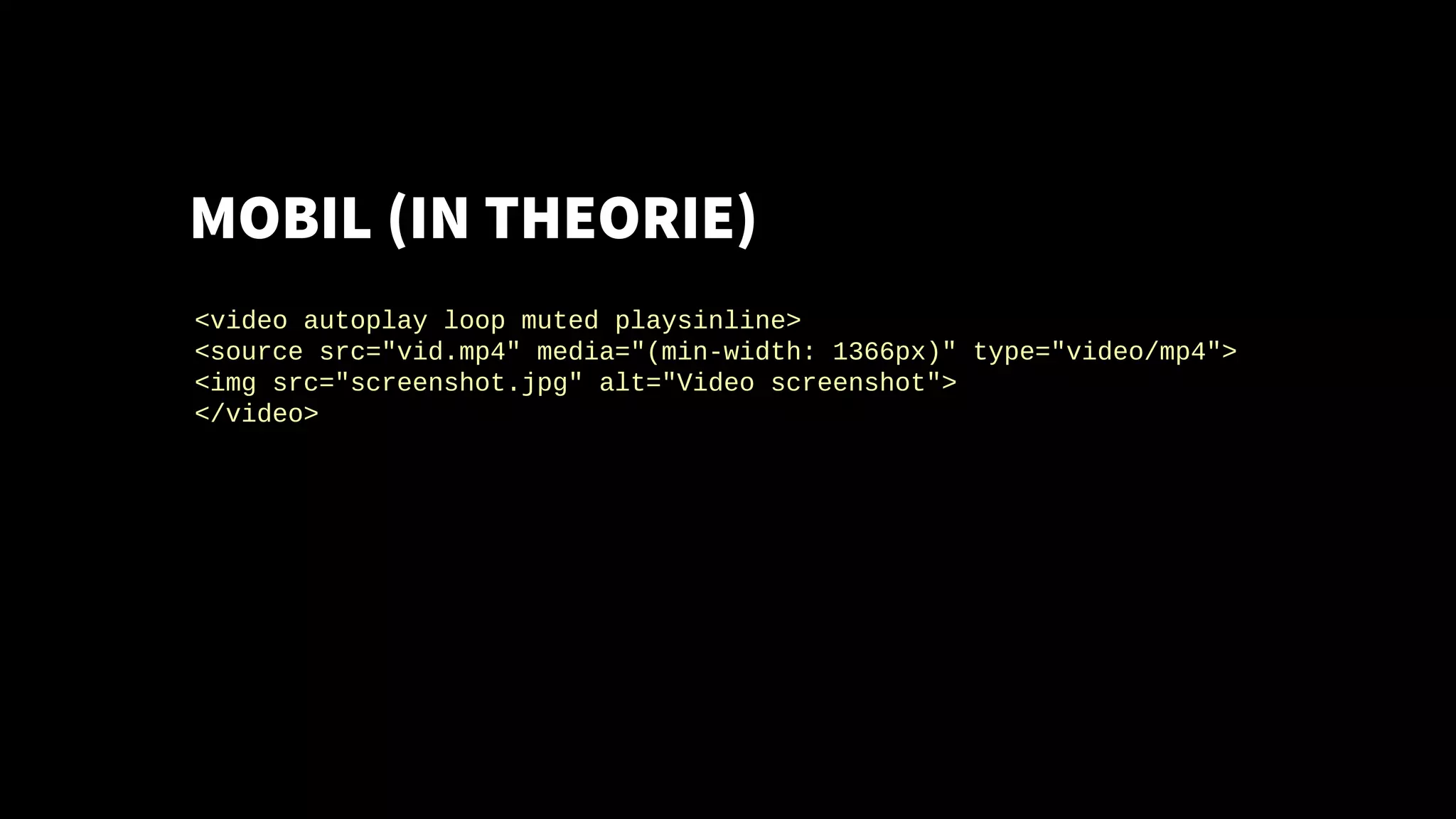
MOBIL (IN THEORIE)
<video autoplay loop muted playsinline>
<source src="vid.mp4" media="(min-width: 1366px)" type="video/mp4">
<img src="screenshot.jpg" alt="Video screenshot">
</video>
MOBIL
Problem: Video Media Query Support wurde aus
Chrome + Firefox entfernt
<video autoplay loop muted playsinline>
<source src="vid.mp4" media="(min-width: 1366px)" type="video/mp4">
<img src="screenshot.jpg" alt="Video screenshot">
</video>
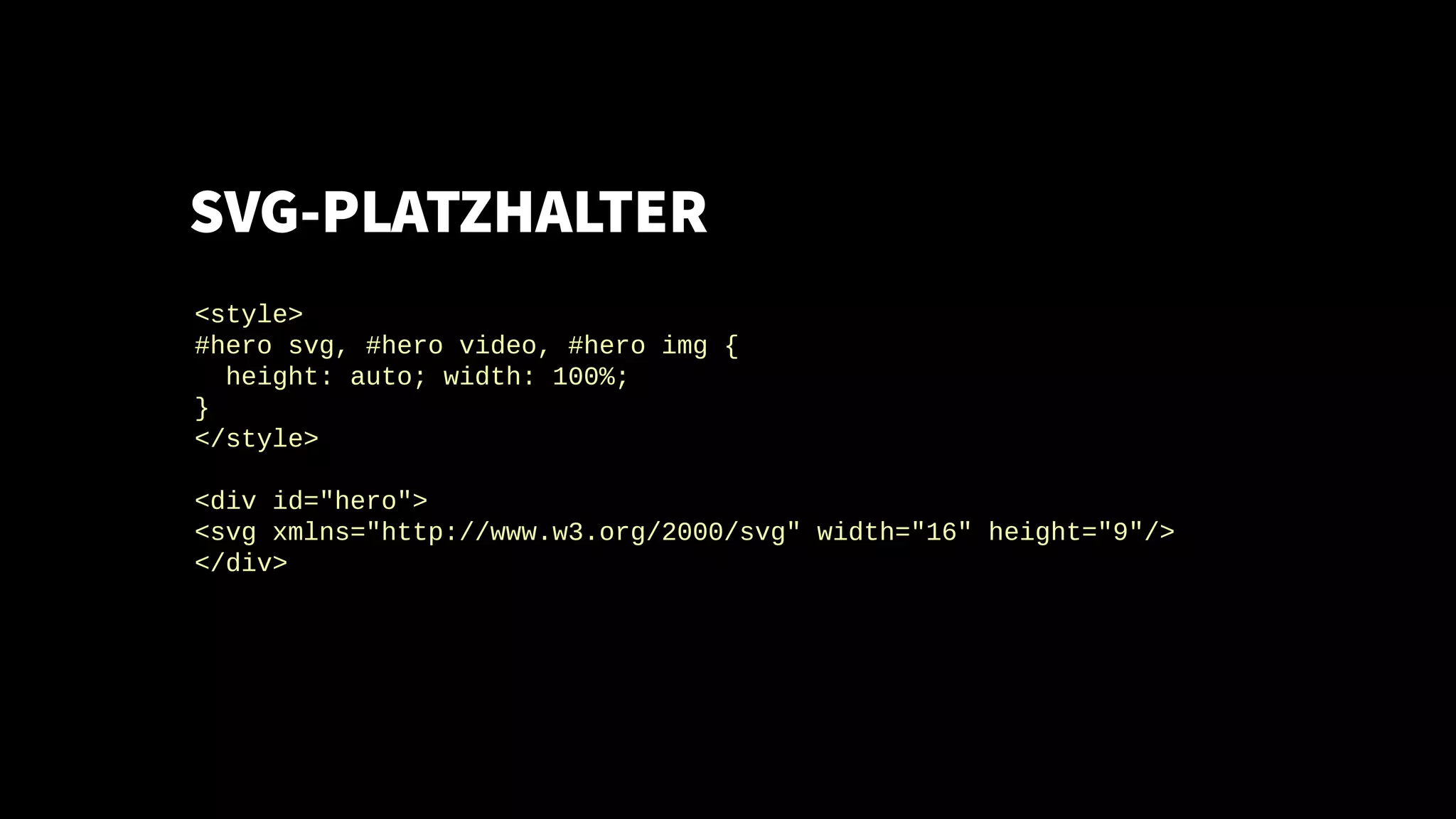
SVG-PLATZHALTER
<style>
#hero svg, #hero video, #hero img {
height: auto; width: 100%;
}
</style>
<div id="hero">
<svg xmlns="http://www.w3.org/2000/svg" width="16" height="9"/>
</div>
SVG-PLATZHALTER
<script>
var hero = document.getElementById('hero')
if (window.screen.width > 1365) {
var video = document.createElement('video')
video.src = 'video.mp4'
video.setAttribute('muted', 'muted')
video.setAttribute('loop', 'loop')
hero.innerHTML = ''
hero.appendChild(video)
video.play()
} else {
hero.innerHTML = '<img src="screenshot.jpg" alt="screenshot">'
}
SVG ALS POSTER-BILD
<video id="hero" preload="none" loop muted playsinline
poster="data:image/svg+xml,%3Csvg%20xmlns%3D%22...">
</video>
<script>
var video = document.getElementById('hero')
if (window.screen.width > 1365) {
video.setAttribute('src', 'large.mp4')
video.play()
} else {
video.setAttribute('poster', 'screenshot.jpg')
video.setAttribute('controls', 'controls')
video.setAttribute('src', 'small.mp4')
}
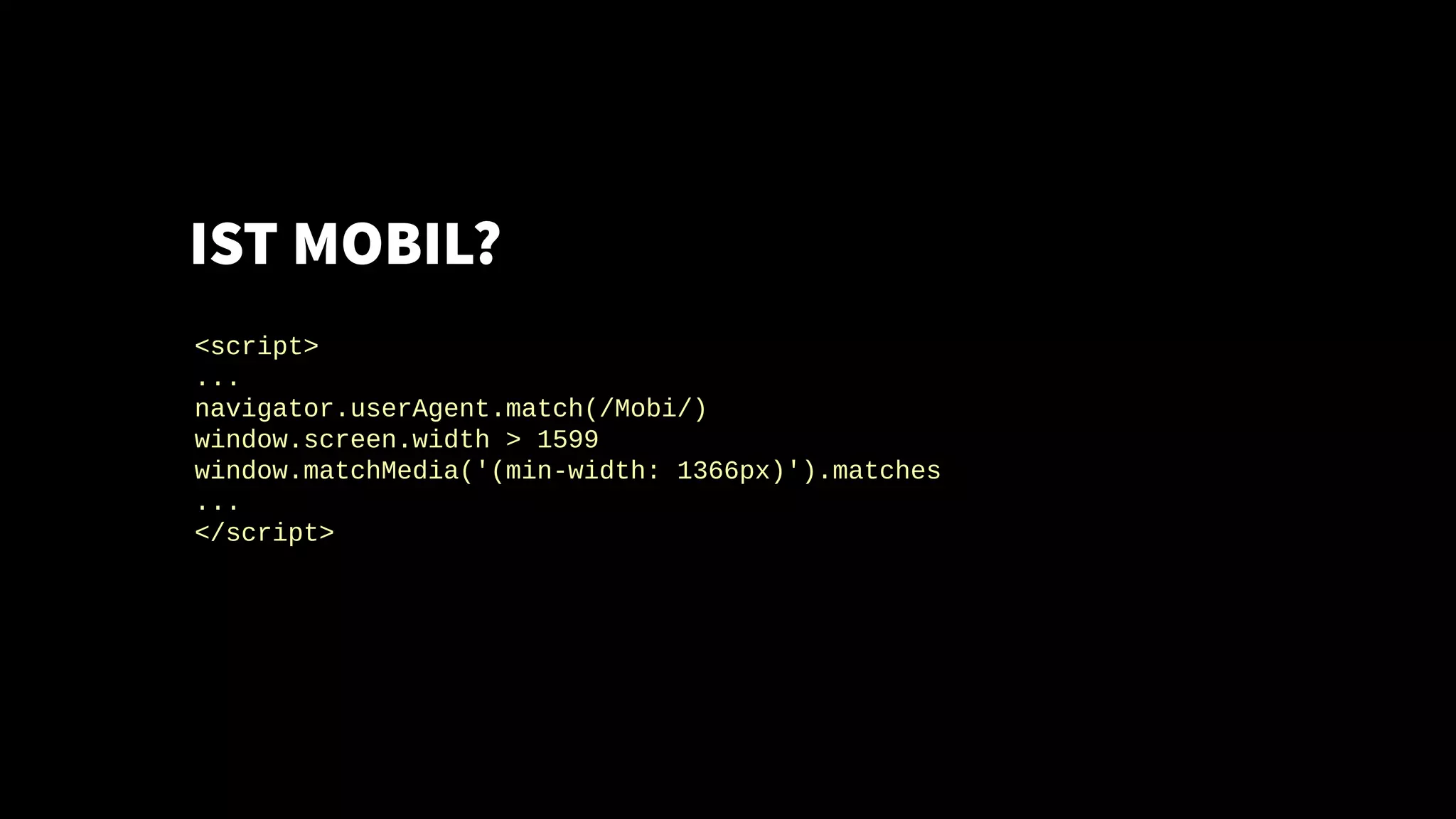
IST MOBIL?
<script>
...
navigator.userAgent.match(/Mobi/)
window.screen.width > 1599
window.matchMedia('(min-width: 1366px)').matches
...
</script>
IST SICHTBAR?
<video id="hero" preload="none" loop muted playsinline src="v.mp4"/>
<script>
if ("hidden" in document) {
var hero = document.getElementById('hero')
if (!document.hidden) hero.play()
document.addEventListener('visibilitychange', function () {
if (document.hidden) hero.pause()
else hero.play()
}, false)
}
</script>
REDUCED MOTION
Safari, Firefox
<script>
var autoplay = true
if (window.matchMedia('(prefers-reduced-motion: reduce)').matches) {
autoplay = false
}
</script>
CHROME DATA SAVER
<script>
var autoplay = true
if ("connection" in navigator && navigator.connection.saveData) {
autoplay = false
}
</script>
<?php
if (empty($_SERVER['HTTP_SAVE_DATA'])) {
// Load video
}
https://developer.chrome.com/multidevice/data-compression
DO NOT TRACK
Relevant für DSGVO
<script>
var autoplay = true
if ("doNotTrack" in navigator && navigator.doNotTrack === "1") {
autoplay = false
}
</script>
<?php
if (empty($_SERVER['HTTP_DNT']) ||
$_SERVER['HTTP_DNT'] === 'unspecified') {
// Video von Drittanbieter (YouTube, Vimeo, ...)
}
https://www.praetor.im/notizen/please-do-not-track/
MODERNES JAVASCRIPT
<script type="module">
let autoplay = true
</script>
<script nomodule>
var autoplay = false
</script>
NETWORK INFORMATION API
<script>
var autoplay = false
if (
"connection" in navigator &&
(
navigator.connection.type === 'ethernet' ||
navigator.connection.type === 'wifi' ||
navigator.connection.type === '4g'
)
) {
autoplay = true
}
</script>
https://caniuse.com/#feat=netinfo
AUTOPLAY DEAKTIVIERT?
<script>
window.setTimeout(function () {
var hero = document.getElementById('hero')
if (hero.paused) {
hero.setAttribute('controls', 'controls')
hero.setAttribute('poster', 'screenshot.jpg')
}
}, 2000)
</script>
https://www.w3.org/2010/05/video/mediaevents.html
VIDEO ALS BILD
<picture>
<source srcset="video.mp4" type="video/mp4">
<source srcset="video.webp" type="image/webp">
<img src="video.gif" alt="Video">webm
</picture>
https://calendar.perfplanet.com/2017/animated-gif-without-the-gif/
FRAGEN?
@wltrd
mastodon.social/@walterebert
slideshare.net/walterebert
walterebert.de

Hero Video Performance

  • 1.
  • 2.
  • 3.
    AUTOPLAYING VIDEOS <video autoplayloop muted playsinline> <source src="video.mp4" type="video/mp4"> </video>
  • 4.
    AUTOPLAYING VIDEOS muted: Chrome,iOS, Android playsinline: iOS <video autoplay loop muted playsinline> <source src="video.mp4" type="video/mp4"> </video>
  • 5.
    OHNE TON ffmpeg -iinput.mp4 -an -c:v copy output.mp4
  • 6.
    OHNE TON Geht auchmit ffmpeg -i input.mp4 -an -c:v copy output.mp4 HandBrake
  • 7.
    MOOV-ATOM (MP4) ffmpeg -iinput.mp4 -an -c:v copy -movflags +faststart output.mp4 https://www.adobe.com/devnet/video/articles/mp4_movie_atom.html
  • 8.
    ALL THE CODECS! <videoautoplay loop muted playsinline> <source src="av1.webm" type='video/webm;codecs="av1"'> <source src="av1.mp4" type='video/mp4;codecs="av1"'> <source src="h265.mp4" type='video/mp4;codecs="hvc1.1.L0.0"'> <source src="vp9.webm" type='video/webm;codecs="vp9"'> <source src="h264.mp4" type='video/mp4'> </video>
  • 9.
  • 10.
    MOBIL (IN THEORIE) <videoautoplay loop muted playsinline> <source src="vid.mp4" media="(min-width: 1366px)" type="video/mp4"> <img src="screenshot.jpg" alt="Video screenshot"> </video>
  • 11.
    MOBIL Problem: Video MediaQuery Support wurde aus Chrome + Firefox entfernt <video autoplay loop muted playsinline> <source src="vid.mp4" media="(min-width: 1366px)" type="video/mp4"> <img src="screenshot.jpg" alt="Video screenshot"> </video>
  • 12.
    SVG-PLATZHALTER <style> #hero svg, #herovideo, #hero img { height: auto; width: 100%; } </style> <div id="hero"> <svg xmlns="http://www.w3.org/2000/svg" width="16" height="9"/> </div>
  • 13.
    SVG-PLATZHALTER <script> var hero =document.getElementById('hero') if (window.screen.width > 1365) { var video = document.createElement('video') video.src = 'video.mp4' video.setAttribute('muted', 'muted') video.setAttribute('loop', 'loop') hero.innerHTML = '' hero.appendChild(video) video.play() } else { hero.innerHTML = '<img src="screenshot.jpg" alt="screenshot">' }
  • 14.
    SVG ALS POSTER-BILD <videoid="hero" preload="none" loop muted playsinline poster="data:image/svg+xml,%3Csvg%20xmlns%3D%22..."> </video> <script> var video = document.getElementById('hero') if (window.screen.width > 1365) { video.setAttribute('src', 'large.mp4') video.play() } else { video.setAttribute('poster', 'screenshot.jpg') video.setAttribute('controls', 'controls') video.setAttribute('src', 'small.mp4') }
  • 15.
    IST MOBIL? <script> ... navigator.userAgent.match(/Mobi/) window.screen.width >1599 window.matchMedia('(min-width: 1366px)').matches ... </script>
  • 16.
    IST SICHTBAR? <video id="hero"preload="none" loop muted playsinline src="v.mp4"/> <script> if ("hidden" in document) { var hero = document.getElementById('hero') if (!document.hidden) hero.play() document.addEventListener('visibilitychange', function () { if (document.hidden) hero.pause() else hero.play() }, false) } </script>
  • 17.
    REDUCED MOTION Safari, Firefox <script> varautoplay = true if (window.matchMedia('(prefers-reduced-motion: reduce)').matches) { autoplay = false } </script>
  • 18.
    CHROME DATA SAVER <script> varautoplay = true if ("connection" in navigator && navigator.connection.saveData) { autoplay = false } </script> <?php if (empty($_SERVER['HTTP_SAVE_DATA'])) { // Load video } https://developer.chrome.com/multidevice/data-compression
  • 19.
    DO NOT TRACK Relevantfür DSGVO <script> var autoplay = true if ("doNotTrack" in navigator && navigator.doNotTrack === "1") { autoplay = false } </script> <?php if (empty($_SERVER['HTTP_DNT']) || $_SERVER['HTTP_DNT'] === 'unspecified') { // Video von Drittanbieter (YouTube, Vimeo, ...) } https://www.praetor.im/notizen/please-do-not-track/
  • 20.
    MODERNES JAVASCRIPT <script type="module"> letautoplay = true </script> <script nomodule> var autoplay = false </script>
  • 21.
    NETWORK INFORMATION API <script> varautoplay = false if ( "connection" in navigator && ( navigator.connection.type === 'ethernet' || navigator.connection.type === 'wifi' || navigator.connection.type === '4g' ) ) { autoplay = true } </script>
  • 22.
  • 23.
    AUTOPLAY DEAKTIVIERT? <script> window.setTimeout(function (){ var hero = document.getElementById('hero') if (hero.paused) { hero.setAttribute('controls', 'controls') hero.setAttribute('poster', 'screenshot.jpg') } }, 2000) </script> https://www.w3.org/2010/05/video/mediaevents.html
  • 24.
    VIDEO ALS BILD <picture> <sourcesrcset="video.mp4" type="video/mp4"> <source srcset="video.webp" type="image/webp"> <img src="video.gif" alt="Video">webm </picture> https://calendar.perfplanet.com/2017/animated-gif-without-the-gif/
  • 25.