2
Separate chaining
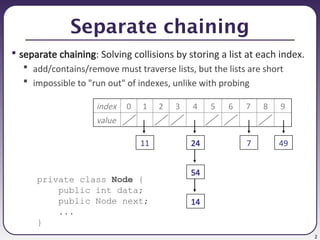
• separatechaining: Solving collisions by storing a list at each index.
add/contains/remove must traverse lists, but the lists are short
impossible to "run out" of indexes, unlike with probing
private class Node {
public int data;
public Node next;
...
}
index 0 1 2 3 4 5 6 7 8 9
value
54
14
24
11 7 49
3.
3
Implementing HashIntSet
• Let'simplement a hash set of ints using separate chaining.
public class HashIntSet implements IntSet {
// array of linked lists;
// elements[i] = front of list #i (null if empty)
private Node[] elements;
private int size;
// constructs new empty set
public HashIntSet() {
elements = new Node[10];
size = 0;
}
// hash function maps values to indexes
private int hash(int value) {
return Math.abs(value) % elements.length;
}
...
4.
4
The add operation
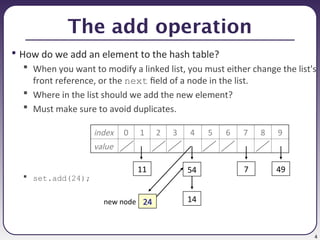
•How do we add an element to the hash table?
When you want to modify a linked list, you must either change the list's
front reference, or the next field of a node in the list.
Where in the list should we add the new element?
Must make sure to avoid duplicates.
set.add(24);
index 0 1 2 3 4 5 6 7 8 9
value
54
14
24
11 7 49
new node
5.
5
Implementing add
public voidadd(int value) {
if (!contains(value)) {
int h = hash(value); // add to front
Node newNode = new Node(value); // of list #h
newNode.next = elements[h];
elements[h] = newNode;
size++;
}
}
6.
6
The contains operation
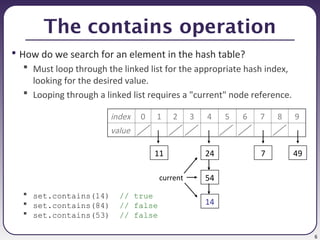
•How do we search for an element in the hash table?
Must loop through the linked list for the appropriate hash index,
looking for the desired value.
Looping through a linked list requires a "current" node reference.
set.contains(14) // true
set.contains(84) // false
set.contains(53) // false
index 0 1 2 3 4 5 6 7 8 9
value
54
14
24
11 7 49
current
7.
7
Implementing contains
public booleancontains(int value) {
Node current = elements[hash(value)];
while (current != null) {
if (current.data == value) {
return true;
}
current = current.next;
}
return false;
}
8.
8
The remove operation
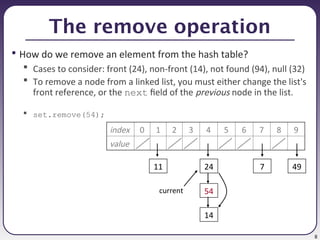
•How do we remove an element from the hash table?
Cases to consider: front (24), non-front (14), not found (94), null (32)
To remove a node from a linked list, you must either change the list's
front reference, or the next field of the previous node in the list.
set.remove(54);
index 0 1 2 3 4 5 6 7 8 9
value
54
14
24
11 7 49
current
9.
9
Implementing remove
public voidremove(int value) {
int h = hash(value);
if (elements[h] != null && elements[h].data == value) {
elements[h] = elements[h].next; // front case
size--;
} else {
Node current = elements[h]; // non-front case
while (current != null && current.next != null) {
if (current.next.data == value) {
current.next = current.next.next;
size--;
return;
}
current = current.next;
}
}
}
10.
10
Rehashing w/ chaining
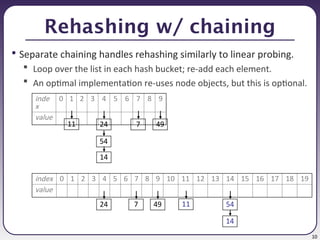
•Separate chaining handles rehashing similarly to linear probing.
Loop over the list in each hash bucket; re-add each element.
An optimal implementation re-uses node objects, but this is optional.
inde
x
0 1 2 3 4 5 6 7 8 9
value
11 24
54
14
7 49
index 0 1 2 3 4 5 6 7 8 9 10 11 12 13 14 15 16 17 18 19
value
11
24
14
7 49 54
11.
11
Hash set ofobjects
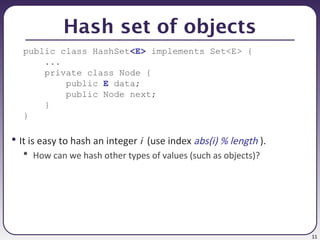
public class HashSet<E> implements Set<E> {
...
private class Node {
public E data;
public Node next;
}
}
• It is easy to hash an integer i (use index abs(i) % length ).
How can we hash other types of values (such as objects)?
12.
12
The hashCode method
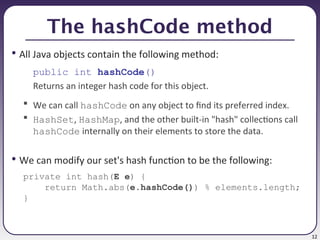
•All Java objects contain the following method:
public int hashCode()
Returns an integer hash code for this object.
We can call hashCode on any object to find its preferred index.
HashSet, HashMap, and the other built-in "hash" collections call
hashCode internally on their elements to store the data.
• We can modify our set's hash function to be the following:
private int hash(E e) {
return Math.abs(e.hashCode()) % elements.length;
}
13.
13
Issues with generics
•You must make an unusual cast on your array of generic nodes:
public class HashSet<E> implements Set<E> {
private Node[] elements;
...
public HashSet() {
elements = (Node[]) new HashSet.Node[10];
}
• Perform all element comparisons using equals:
public boolean contains(int value) {
...
// if (current.data == value) {
if (current.data.equals(value)) {
return true;
}
...
14.
14
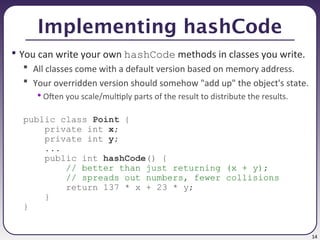
Implementing hashCode
• Youcan write your own hashCode methods in classes you write.
All classes come with a default version based on memory address.
Your overridden version should somehow "add up" the object's state.
• Often you scale/multiply parts of the result to distribute the results.
public class Point {
private int x;
private int y;
...
public int hashCode() {
// better than just returning (x + y);
// spreads out numbers, fewer collisions
return 137 * x + 23 * y;
}
}
15.
15
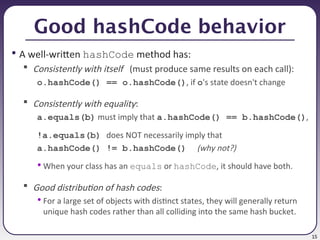
Good hashCode behavior
•A well-written hashCode method has:
Consistently with itself (must produce same results on each call):
o.hashCode() == o.hashCode(), if o's state doesn't change
Consistently with equality:
a.equals(b) must imply that a.hashCode() == b.hashCode(),
!a.equals(b) does NOT necessarily imply that
a.hashCode() != b.hashCode() (why not?)
• When your class has an equals or hashCode, it should have both.
Good distribution of hash codes:
• For a large set of objects with distinct states, they will generally return
unique hash codes rather than all colliding into the same hash bucket.
16.
16
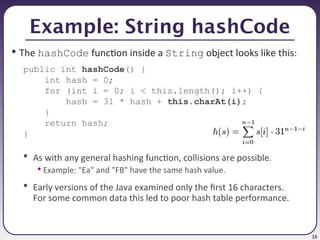
Example: String hashCode
•The hashCode function inside a String object looks like this:
public int hashCode() {
int hash = 0;
for (int i = 0; i < this.length(); i++) {
hash = 31 * hash + this.charAt(i);
}
return hash;
}
As with any general hashing function, collisions are possible.
• Example: "Ea" and "FB" have the same hash value.
Early versions of the Java examined only the first 16 characters.
For some common data this led to poor hash table performance.
17.
17
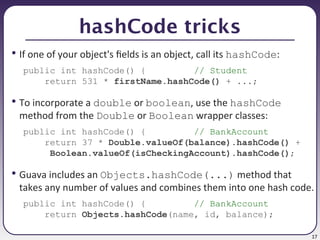
hashCode tricks
• Ifone of your object's fields is an object, call its hashCode:
public int hashCode() { // Student
return 531 * firstName.hashCode() + ...;
• To incorporate a double or boolean, use the hashCode
method from the Double or Boolean wrapper classes:
public int hashCode() { // BankAccount
return 37 * Double.valueOf(balance).hashCode() +
Boolean.valueOf(isCheckingAccount).hashCode();
• Guava includes an Objects.hashCode(...) method that
takes any number of values and combines them into one hash code.
public int hashCode() { // BankAccount
return Objects.hashCode(name, id, balance);
18.
18
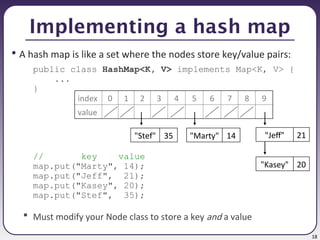
Implementing a hashmap
• A hash map is like a set where the nodes store key/value pairs:
public class HashMap<K, V> implements Map<K, V> {
...
}
// key value
map.put("Marty", 14);
map.put("Jeff", 21);
map.put("Kasey", 20);
map.put("Stef", 35);
Must modify your Node class to store a key and a value
index 0 1 2 3 4 5 6 7 8 9
value
"Jeff" 21
"Marty" 14
"Kasey" 20
"Stef" 35
19.
19
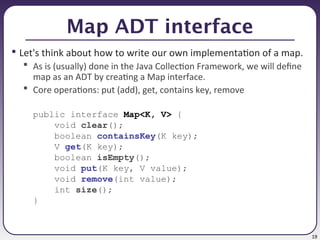
Map ADT interface
•Let's think about how to write our own implementation of a map.
As is (usually) done in the Java Collection Framework, we will define
map as an ADT by creating a Map interface.
Core operations: put (add), get, contains key, remove
public interface Map<K, V> {
void clear();
boolean containsKey(K key);
V get(K key);
boolean isEmpty();
void put(K key, V value);
void remove(int value);
int size();
}
20.
20
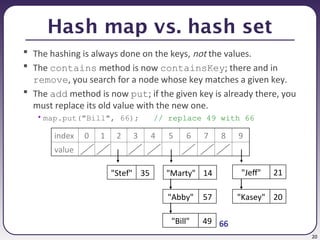
Hash map vs.hash set
The hashing is always done on the keys, not the values.
The contains method is now containsKey; there and in
remove, you search for a node whose key matches a given key.
The add method is now put; if the given key is already there, you
must replace its old value with the new one.
• map.put("Bill", 66); // replace 49 with 66
index 0 1 2 3 4 5 6 7 8 9
value
"Jeff" 21
"Marty" 14
"Kasey" 20
"Stef" 35
66
"Abby" 57
"Bill" 49
![3
Implementing HashIntSet
• Let's implement a hash set of ints using separate chaining.
public class HashIntSet implements IntSet {
// array of linked lists;
// elements[i] = front of list #i (null if empty)
private Node[] elements;
private int size;
// constructs new empty set
public HashIntSet() {
elements = new Node[10];
size = 0;
}
// hash function maps values to indexes
private int hash(int value) {
return Math.abs(value) % elements.length;
}
...](https://image.slidesharecdn.com/11-hashcode-map-250610205249-5623dddd/85/hashcode-hash-map-hashing-hashset-hashing-3-320.jpg)
![5
Implementing add
public void add(int value) {
if (!contains(value)) {
int h = hash(value); // add to front
Node newNode = new Node(value); // of list #h
newNode.next = elements[h];
elements[h] = newNode;
size++;
}
}](https://image.slidesharecdn.com/11-hashcode-map-250610205249-5623dddd/85/hashcode-hash-map-hashing-hashset-hashing-5-320.jpg)
![7
Implementing contains
public boolean contains(int value) {
Node current = elements[hash(value)];
while (current != null) {
if (current.data == value) {
return true;
}
current = current.next;
}
return false;
}](https://image.slidesharecdn.com/11-hashcode-map-250610205249-5623dddd/85/hashcode-hash-map-hashing-hashset-hashing-7-320.jpg)
![9
Implementing remove
public void remove(int value) {
int h = hash(value);
if (elements[h] != null && elements[h].data == value) {
elements[h] = elements[h].next; // front case
size--;
} else {
Node current = elements[h]; // non-front case
while (current != null && current.next != null) {
if (current.next.data == value) {
current.next = current.next.next;
size--;
return;
}
current = current.next;
}
}
}](https://image.slidesharecdn.com/11-hashcode-map-250610205249-5623dddd/85/hashcode-hash-map-hashing-hashset-hashing-9-320.jpg)
![13
Issues with generics
• You must make an unusual cast on your array of generic nodes:
public class HashSet<E> implements Set<E> {
private Node[] elements;
...
public HashSet() {
elements = (Node[]) new HashSet.Node[10];
}
• Perform all element comparisons using equals:
public boolean contains(int value) {
...
// if (current.data == value) {
if (current.data.equals(value)) {
return true;
}
...](https://image.slidesharecdn.com/11-hashcode-map-250610205249-5623dddd/85/hashcode-hash-map-hashing-hashset-hashing-13-320.jpg)