
Hash, Little Baby…
Some practical examples when SAS hash
objects are really helpful
Dmitry Shopin
Data Analyst
BC Centre for Excellence in HIV/AIDS
Vancouver SAS User Group, 28 May 2014
AppenderAppender
LoggerLogger
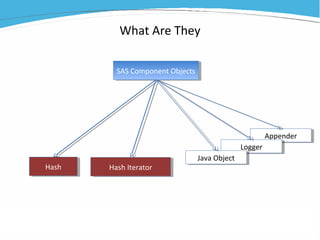
What Are They
SAS Component ObjectsSAS Component Objects
HashHash Hash IteratorHash Iterator
Java ObjectJava Object
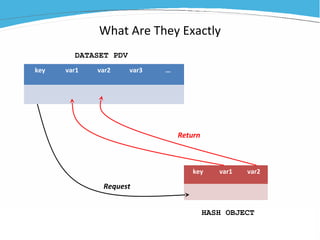
What Are They Exactly
key var1 var2 var3 …
key var1 var2
DATASET PDV
HASH OBJECT
Request
Return
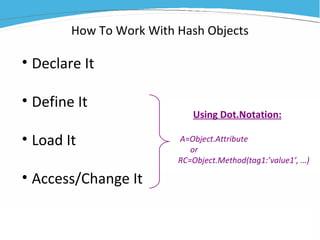
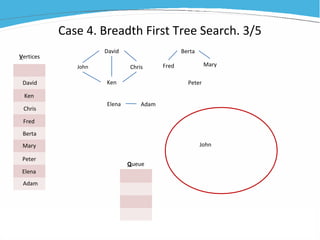
How To Work With Hash Objects
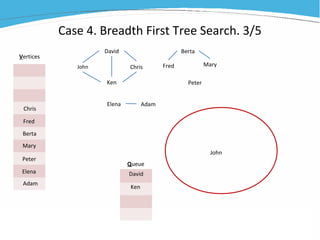
• Declare It
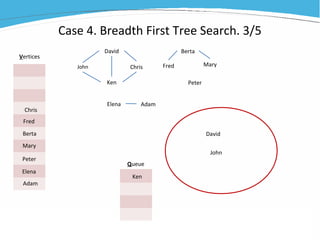
• Define It
• Load It
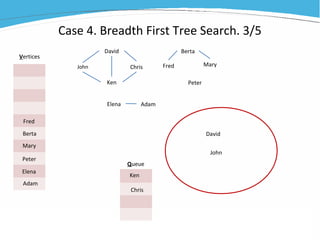
• Access/Change It
Using Dot.Notation:
A=Object.Attribute
or
RC=Object.Method(tag1:’value1’, …)
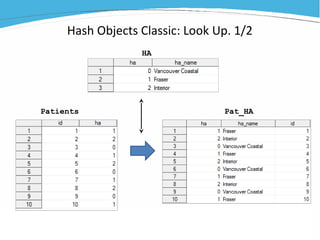
Hash Objects Classic: Look Up. 1/2
Patients Pat_HA
HA
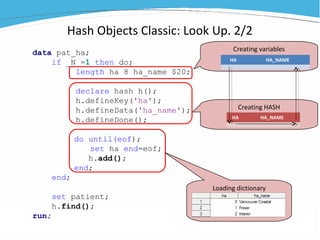
Creating variables
Hash Objects Classic: Look Up. 2/2
data pat_ha;
if _N_=1 then do;
length ha 8 ha_name $20;
declare hash h();
h.defineKey('ha');
h.defineData('ha_name');
h.defineDone();
do until(eof);
set ha end=eof;
h.add();
end;
end;
set patient;
h.find();
run;
Loading dictionary
HA HA_NAME
Creating HASH
HA HA_NAME
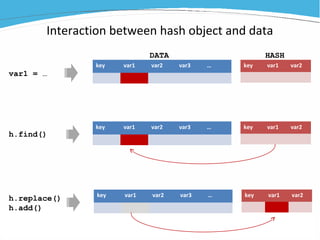
Interaction between hash object and data
key var1 var2 var3 … key var1 var2
var1 = …
h.find()
key var1 var2 var3 … key var1 var2
h.replace()
h.add()
key var1 var2 var3 … key var1 var2
DATA HASH
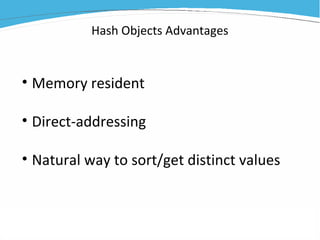
Hash Objects Advantages
• Memory resident
• Direct-addressing
• Natural way to sort/get distinct values
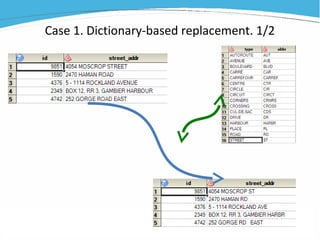
Case 1. Dictionary-based replacement. 1/2
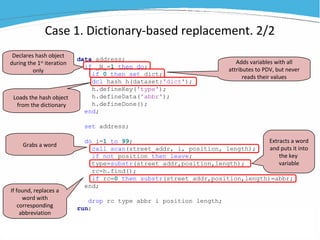
data address;
if _N_=1 then do;
if 0 then set dict;
dcl hash h(dataset:'dict');
h.defineKey('type');
h.defineData('abbr');
h.defineDone();
end;
set address;
do i=1 to 99;
call scan(street_addr, i, position, length);
if not position then leave;
type=substr(street_addr,position,length);
rc=h.find();
if rc=0 then substr(street_addr,position,length)=abbr;
end;
drop rc type abbr i position length;
run;
Declares hash object
during the 1st
iteration
only
Adds variables with all
attributes to PDV, but never
reads their values
Loads the hash object
from the dictionary
Grabs a word
Extracts a word
and puts it into
the key
variable
If found, replaces a
word with
corresponding
abbreviation
Case 1. Dictionary-based replacement. 2/2
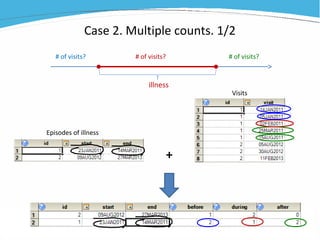
Case 2. Multiple counts. 1/2
illness
# of visits? # of visits? # of visits?
+
Episodes of illness
Visits
data _NULL_;
if _N_=1 then do;
length before during after 8;
dcl hash h();
h.defineKey('id');
h.defineData('id','start','end','before','during','after');
h.defineDone();
do until(eof1);
set epi end=eof1;
h.add();
end;
end;
set visits end=eof2;
rc=h.find();
if rc=0 then do;
select;
when(visit<start) before+1;
when(start<=visit<=end) during+1;
when(end<visit) after+1;
otherwise;
end;
h.replace();
end;
if eof2 then h.output(dataset:'counts');
run;
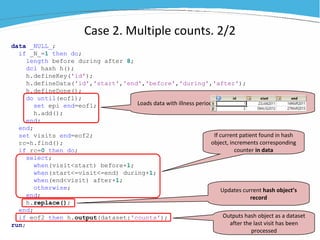
Case 2. Multiple counts. 2/2
Loads data with illness periods
If current patient found in hash
object, increments corresponding
counter in data
Updates current hash object’s
record
Outputs hash object as a dataset
after the last visit has been
processed
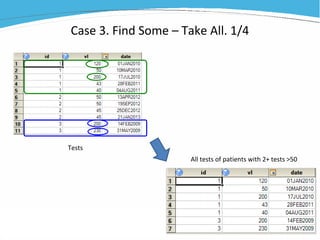
Case 3. Find Some – Take All. 1/4
Tests
All tests of patients with 2+ tests >50
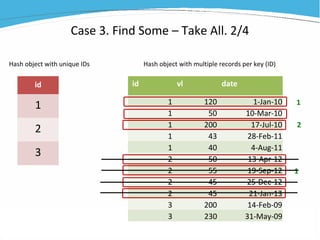
Case 3. Find Some – Take All. 2/4
id vl date
1 120 1-Jan-10
1 50 10-Mar-10
1 200 17-Jul-10
1 43 28-Feb-11
1 40 4-Aug-11
2 50 13-Apr-12
2 55 19-Sep-12
2 45 25-Dec-12
2 45 21-Jan-13
3 200 14-Feb-09
3 230 31-May-09
id
1
2
3
1
2
1
Hash object with unique IDs Hash object with multiple records per key (ID)
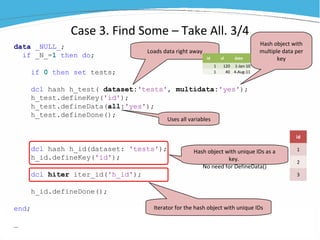
Case 3. Find Some – Take All. 3/4
data _NULL_;
if _N_=1 then do;
if 0 then set tests;
dcl hash h_test( dataset:'tests', multidata:'yes');
h_test.defineKey('id');
h_test.defineData(all:'yes');
h_test.defineDone();
dcl hash h_id(dataset: 'tests');
h_id.defineKey('id');
dcl hiter iter_id('h_id');
h_id.defineDone();
end;
…
Hash object with
multiple data per
key
Hash object with unique IDs as a
key.
No need for DefineData()
Iterator for the hash object with unique IDs
id
1
2
3
Loads data right away
id vl date
1 120 1-Jan-10
1 40 4-Aug-11
Uses all variables
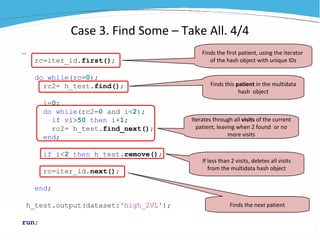
Case 3. Find Some – Take All. 4/4
…
rc=iter_id.first();
do while(rc=0);
rc2= h_test.find();
i=0;
do while(rc2=0 and i<2);
if vl>50 then i+1;
rc2= h_test.find_next();
end;
if i<2 then h_test.remove();
rc=iter_id.next();
end;
h_test.output(dataset:'high_2VL');
run;
Finds the first patient, using the iterator
of the hash object with unique IDs
Iterates through all visits of the current
patient, leaving when 2 found or no
more visits
If less than 2 visits, deletes all visits
from the multidata hash object
Finds this patient in the multidata
hash object
Finds the next patient
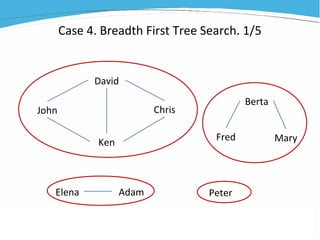
Case 4. Breadth First Tree Search. 1/5
John
David
Ken
Chris
Elena Adam
Fred
Berta
Mary
Peter
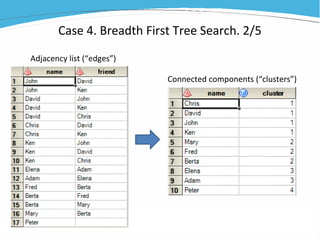
Case 4. Breadth First Tree Search. 2/5
Adjacency list (“edges”)
Connected components (“clusters”)
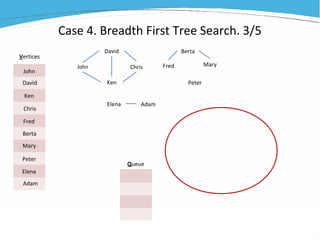
Case 4. Breadth First Tree Search. 3/5
John
David
Ken
Chris
Elena
Adam
Fred
Berta
Mary
Peter
Vertices
Queue
John
David
Ken
Chris
Elena Adam
Fred
Berta
Mary
Peter
Case 4. Breadth First Tree Search. 3/5
John
David
Ken
Chris
Elena
Adam
Fred
Berta
Mary
Peter
Vertices
Queue
John
David
Ken
Chris
Elena Adam
Fred
Berta
Mary
Peter
Case 4. Breadth First Tree Search. 3/5
John
David
Ken
Chris
Elena
Adam
Fred
Berta
Mary
Peter
Vertices
Queue
John
David
Ken
Chris
Elena Adam
Fred
Berta
Mary
Peter
Case 4. Breadth First Tree Search. 3/5
John
David
Ken
Chris
Elena
Adam
Fred
Berta
Mary
Peter
Vertices
Queue
John
David
Ken
Chris
Elena Adam
Fred
Berta
Mary
Peter
Case 4. Breadth First Tree Search. 3/5
John
David
Ken
Chris
Elena
Adam
Fred
Berta
Mary
Peter
Vertices
Queue
John
David
Ken
Chris
Elena Adam
Fred
Berta
Mary
Peter
Case 4. Breadth First Tree Search. 3/5
John
David
Ken
Chris
Elena
Adam
Fred
Berta
Mary
Peter
Vertices
Queue
John
David
Ken
Chris
Elena Adam
Fred
Berta
Mary
Peter
Case 4. Breadth First Tree Search. 3/5
John
David
Ken
Chris
Elena
Adam
Fred
Berta
Mary
Peter
Vertices
Queue
John
David
Ken
Chris
Elena Adam
Fred
Berta
Mary
Peter
Case 4. Breadth First Tree Search. 3/5
John
David
Ken
Chris
Elena
Adam
Fred
Berta
Mary
Peter
Vertices
Queue
John
David
Ken
Chris
Elena Adam
Fred
Berta
Mary
Peter
Case 4. Breadth First Tree Search. 4/5
data _null_;
dcl hash V();
V.defineKey('name');
V.defineData('name','cluster');
dcl hiter Vi('V');
V.defineDone();
dcl hash E(dataset:'Connections', multidata:'y');
E.defineKey('name');
E.defineData('name','friend');
E.defineDone();
dcl hash Q(ordered:'y');
Q.defineKey('qnum','name');
Q.defineData('qnum', 'name');
dcl hiter Qi('Q');
Q.defineDone();
do until(eof);
set Connections end=eof;
call missing(cluster);
V.add();
end;
Hash object for Vertices, with iterator
Hash object for Edges
Hash object for Queue, with
iterator
Loading the unique names
John
David
Ken
Chris
Queue
Selecting next name to start new cluster,
when queue is empty
Dequeueing all names in queue one-by-one
until it’s empty
Enqueueing all connections of dequeued
name
rc1=Vi.first();
do while(rc1=0);
if missing(cluster) then do;
qnum=1; Q.add();
n+1; cluster=n; V.replace();
rc2=Qi.first();
do while(rc2=0);
qnum=qnum+Q.num_items-1;
rc3=E.find();
do while(rc3=0);
name=friend; rc4=V.find();
if rc4=0 and missing(cluster) then do;
qnum+1; Q.add();
cluster=n; V.replace();
end;
rc3=E.find_next();
end;
Qi.first();
Qi.delete(); Q.remove(); Qi=_new_ hiter ('Q');
rc2=Qi.first();
end;
end;
rc1=Vi.next();
end;
V.output(dataset:'clusters');
run;
Hash More!
?

Hash, Little Baby. Some examples of SAS programming when hash object are really helpful

  • 1.
    Hash, Little Baby… Somepractical examples when SAS hash objects are really helpful Dmitry Shopin Data Analyst BC Centre for Excellence in HIV/AIDS Vancouver SAS User Group, 28 May 2014
  • 2.
    AppenderAppender LoggerLogger What Are They SASComponent ObjectsSAS Component Objects HashHash Hash IteratorHash Iterator Java ObjectJava Object
  • 3.
    What Are TheyExactly key var1 var2 var3 … key var1 var2 DATASET PDV HASH OBJECT Request Return
  • 4.
    How To WorkWith Hash Objects • Declare It • Define It • Load It • Access/Change It Using Dot.Notation: A=Object.Attribute or RC=Object.Method(tag1:’value1’, …)
  • 5.
    Hash Objects Classic:Look Up. 1/2 Patients Pat_HA HA
  • 6.
    Creating variables Hash ObjectsClassic: Look Up. 2/2 data pat_ha; if _N_=1 then do; length ha 8 ha_name $20; declare hash h(); h.defineKey('ha'); h.defineData('ha_name'); h.defineDone(); do until(eof); set ha end=eof; h.add(); end; end; set patient; h.find(); run; Loading dictionary HA HA_NAME Creating HASH HA HA_NAME
  • 7.
    Interaction between hashobject and data key var1 var2 var3 … key var1 var2 var1 = … h.find() key var1 var2 var3 … key var1 var2 h.replace() h.add() key var1 var2 var3 … key var1 var2 DATA HASH
  • 8.
    Hash Objects Advantages •Memory resident • Direct-addressing • Natural way to sort/get distinct values
  • 9.
    Case 1. Dictionary-basedreplacement. 1/2
  • 10.
    data address; if _N_=1then do; if 0 then set dict; dcl hash h(dataset:'dict'); h.defineKey('type'); h.defineData('abbr'); h.defineDone(); end; set address; do i=1 to 99; call scan(street_addr, i, position, length); if not position then leave; type=substr(street_addr,position,length); rc=h.find(); if rc=0 then substr(street_addr,position,length)=abbr; end; drop rc type abbr i position length; run; Declares hash object during the 1st iteration only Adds variables with all attributes to PDV, but never reads their values Loads the hash object from the dictionary Grabs a word Extracts a word and puts it into the key variable If found, replaces a word with corresponding abbreviation Case 1. Dictionary-based replacement. 2/2
  • 11.
    Case 2. Multiplecounts. 1/2 illness # of visits? # of visits? # of visits? + Episodes of illness Visits
  • 12.
    data _NULL_; if _N_=1then do; length before during after 8; dcl hash h(); h.defineKey('id'); h.defineData('id','start','end','before','during','after'); h.defineDone(); do until(eof1); set epi end=eof1; h.add(); end; end; set visits end=eof2; rc=h.find(); if rc=0 then do; select; when(visit<start) before+1; when(start<=visit<=end) during+1; when(end<visit) after+1; otherwise; end; h.replace(); end; if eof2 then h.output(dataset:'counts'); run; Case 2. Multiple counts. 2/2 Loads data with illness periods If current patient found in hash object, increments corresponding counter in data Updates current hash object’s record Outputs hash object as a dataset after the last visit has been processed
  • 13.
    Case 3. FindSome – Take All. 1/4 Tests All tests of patients with 2+ tests >50
  • 14.
    Case 3. FindSome – Take All. 2/4 id vl date 1 120 1-Jan-10 1 50 10-Mar-10 1 200 17-Jul-10 1 43 28-Feb-11 1 40 4-Aug-11 2 50 13-Apr-12 2 55 19-Sep-12 2 45 25-Dec-12 2 45 21-Jan-13 3 200 14-Feb-09 3 230 31-May-09 id 1 2 3 1 2 1 Hash object with unique IDs Hash object with multiple records per key (ID)
  • 15.
    Case 3. FindSome – Take All. 3/4 data _NULL_; if _N_=1 then do; if 0 then set tests; dcl hash h_test( dataset:'tests', multidata:'yes'); h_test.defineKey('id'); h_test.defineData(all:'yes'); h_test.defineDone(); dcl hash h_id(dataset: 'tests'); h_id.defineKey('id'); dcl hiter iter_id('h_id'); h_id.defineDone(); end; … Hash object with multiple data per key Hash object with unique IDs as a key. No need for DefineData() Iterator for the hash object with unique IDs id 1 2 3 Loads data right away id vl date 1 120 1-Jan-10 1 40 4-Aug-11 Uses all variables
  • 16.
    Case 3. FindSome – Take All. 4/4 … rc=iter_id.first(); do while(rc=0); rc2= h_test.find(); i=0; do while(rc2=0 and i<2); if vl>50 then i+1; rc2= h_test.find_next(); end; if i<2 then h_test.remove(); rc=iter_id.next(); end; h_test.output(dataset:'high_2VL'); run; Finds the first patient, using the iterator of the hash object with unique IDs Iterates through all visits of the current patient, leaving when 2 found or no more visits If less than 2 visits, deletes all visits from the multidata hash object Finds this patient in the multidata hash object Finds the next patient
  • 17.
    Case 4. BreadthFirst Tree Search. 1/5 John David Ken Chris Elena Adam Fred Berta Mary Peter
  • 18.
    Case 4. BreadthFirst Tree Search. 2/5 Adjacency list (“edges”) Connected components (“clusters”)
  • 19.
    Case 4. BreadthFirst Tree Search. 3/5 John David Ken Chris Elena Adam Fred Berta Mary Peter Vertices Queue John David Ken Chris Elena Adam Fred Berta Mary Peter
  • 20.
    Case 4. BreadthFirst Tree Search. 3/5 John David Ken Chris Elena Adam Fred Berta Mary Peter Vertices Queue John David Ken Chris Elena Adam Fred Berta Mary Peter
  • 21.
    Case 4. BreadthFirst Tree Search. 3/5 John David Ken Chris Elena Adam Fred Berta Mary Peter Vertices Queue John David Ken Chris Elena Adam Fred Berta Mary Peter
  • 22.
    Case 4. BreadthFirst Tree Search. 3/5 John David Ken Chris Elena Adam Fred Berta Mary Peter Vertices Queue John David Ken Chris Elena Adam Fred Berta Mary Peter
  • 23.
    Case 4. BreadthFirst Tree Search. 3/5 John David Ken Chris Elena Adam Fred Berta Mary Peter Vertices Queue John David Ken Chris Elena Adam Fred Berta Mary Peter
  • 24.
    Case 4. BreadthFirst Tree Search. 3/5 John David Ken Chris Elena Adam Fred Berta Mary Peter Vertices Queue John David Ken Chris Elena Adam Fred Berta Mary Peter
  • 25.
    Case 4. BreadthFirst Tree Search. 3/5 John David Ken Chris Elena Adam Fred Berta Mary Peter Vertices Queue John David Ken Chris Elena Adam Fred Berta Mary Peter
  • 26.
    Case 4. BreadthFirst Tree Search. 3/5 John David Ken Chris Elena Adam Fred Berta Mary Peter Vertices Queue John David Ken Chris Elena Adam Fred Berta Mary Peter
  • 27.
    Case 4. BreadthFirst Tree Search. 4/5 data _null_; dcl hash V(); V.defineKey('name'); V.defineData('name','cluster'); dcl hiter Vi('V'); V.defineDone(); dcl hash E(dataset:'Connections', multidata:'y'); E.defineKey('name'); E.defineData('name','friend'); E.defineDone(); dcl hash Q(ordered:'y'); Q.defineKey('qnum','name'); Q.defineData('qnum', 'name'); dcl hiter Qi('Q'); Q.defineDone(); do until(eof); set Connections end=eof; call missing(cluster); V.add(); end; Hash object for Vertices, with iterator Hash object for Edges Hash object for Queue, with iterator Loading the unique names John David Ken Chris Queue
  • 28.
    Selecting next nameto start new cluster, when queue is empty Dequeueing all names in queue one-by-one until it’s empty Enqueueing all connections of dequeued name rc1=Vi.first(); do while(rc1=0); if missing(cluster) then do; qnum=1; Q.add(); n+1; cluster=n; V.replace(); rc2=Qi.first(); do while(rc2=0); qnum=qnum+Q.num_items-1; rc3=E.find(); do while(rc3=0); name=friend; rc4=V.find(); if rc4=0 and missing(cluster) then do; qnum+1; Q.add(); cluster=n; V.replace(); end; rc3=E.find_next(); end; Qi.first(); Qi.delete(); Q.remove(); Qi=_new_ hiter ('Q'); rc2=Qi.first(); end; end; rc1=Vi.next(); end; V.output(dataset:'clusters'); run;
  • 29.

Editor's Notes

  • #3 Hash objects and hash iterators associated with them, are both members of the entire family of SAS Component Objects. Component Objects are data elements that make a bridge between SAS which was created basically to manipulate tables row by row and object-oriented programming languages that work with data elements as whole objects with their own attributes and methods.
  • #4 Hash object in SAS is a data structure that is similar to usual SAS datasets but with a few important differences: -hash objects exist only during one DATA-step -they are stored completely in memory (RAM), not on disk -their records (which in this case called data items) can be accessed only by calling their key – unique value stored in one or more specially dedicated variables. Hash object mirrors dataset (or part of this dataset) that is being processed in the current DATA-step. Each variable in hash objects has its counterpart in PDV – programming data vector which holds the current row of the dataset. And the only way to get some value from hash is to call a certain record from it by its key and after that hash object will copy its values to the corresponding variables in PDV.
  • #5 There are 4 main steps in working with hash objects. First of all you need to declare it. It means that you create some empty shell with a specific name that will belong to this object during the entire DATA-step. And also you declare the type of the object because there are two closely related objects in SAS – hash and hash iterator. Next, you define the structure of the declared object – you name its variables that consist of key variables (which will be used for access to data items) and data variables. Also you define obejct’s properties, that can alterate its behavior later. The next step – you have to load the object with actual data. And it can be done in a couple of ways. And the last step - the actual work with the hash objects, which is the ultimate goal of all previous steps – declaring, defining and loading. The last three steps must be done using DOT.notation – syntaxis usual for object-oriented languages.
  • #6 Example of a basic usage of hash objects in SAS – Look-up of Health Authorities names and adding them to the list of patients
  • #7 We do everything in one datastep and the result of this datastep will be our wanted dataset pat_ha – patients with corresponding health authority names. What we want to do is to load our dictionary – codes and names of health authorities – into a hash object and then process patients list as usual – row by-row and for each row to look up authority in the hash object and add it to the new dataset. As we need to create hash object only once (we don’t want to recreate it from scratch for each patient) we put declaration, definition and loading into this block. In this manner we do these steps only on the first iteration of the DATA-step, using autovariable _N_. Now. Hash object can’t create its variables itself, they should be created beforehands in PDV. For that we use length statement and we create the same variables that exist in our dictionary – numeric variable with HA-code and character variable with HA name. Then we declare our hash object… Now we need to load our hash object with actual data. To do that we’ll walk through the whole dictionary – dataset HA – using DO UNTIL loop and keyword END in the SET statement. As we get each record in dictionary (putting it into PDV), we apply method ADD – it adds the current record from the PDV to hash object. All of this is done on the first iteration of THIS set-statement, before the first patient is processed. And since now for each patient we apply method FIND of our hash object. And again it’s clear from this method’s name what it does – it finds current key (which is the code of HA corresponding to the current patient) in the hash obect and returns matching data – HA-name to PDV
  • #8 There are 3 types of interaction. First actually is not interaction at all. When you assign some variable in a usual SAS way (like var1 equals something, some value, function or whatever) you DO NOT change corresponding variable in hash. The second type is returning some value from hash. And this is exactly what method FIND does (and some other methods as well) – they copy value from hash object to the corresponding variable in PDV (in the dataset). Actually you can apply these two kinds of statements alternately repeatedly – assign variable in dataset, change it with value from hash, again assign another value and again return value from hash. And so on. And third type of interaction , which changes value in hash object. There are special methods for that, like REPLACE or ADD that we used for loading our dictionary. And this is very important to keep in mind for efficient coding with hash objects – you can not manipulate hash objects independently from the main dataset – you always should remember that calling for hash object changes your dataset. And vice versa – to change hash object you need to have desired value in our dataset.
  • #10 We have a dataset with street addresses as text strings, and we need to replace all street types with their abbreviations: like street=st, avenue=ave and so on. We have a table, copied from Canada Post web-site that will serve us as a look-up table or dictionary for this kind of replacement. How coud we do that without hash objects? Well, we could use TRANWRD() function, but it accepts only one pair of words – target and replacement, so we would need to concoct something with macro loops and macrovariables and we’ll have to use more than one data-step that’s fo sure, so it’s not neat and kind of boring. We’ll use hashes and here’s how we’re going to do that. We want to put our dictionary into a hash object and then, walking through our main dataset record-by-record, we’ll iterate over each word in an address string and will look up for each word in the hash.
  • #12 We have list of patients with their periods of illness – start date and end date. And in another dataset we have patients’ visits dates. And we want to calculate how many visits patient had before the illness, during the illness and after the illness. Definitely we could try to do that with a couple of PROC SQLs or merge and then sum up visits in another DATA-step but we want to do it quickly and to have one nice and neat DATA-step. So we’ll use hash objects. And what we’re going to do is we’ll put patients into the hash and will make one pass through all visits, updating counters for the number of visits in different periods of patients timeline.
  • #13 We declare, define and load hash object as before. Notice that we can use abbreviation DCL instead of DECLARE. It’s nice if you are as lazy as myself. After creating the hash, we start to process our visits one by one. And as soon as we found the corresponding patient in the hash object (using FIND method) we check when this visit occurred in relation to the period of illness. Remember that all variables in hash have their mirrors in PDV, so as soon as we found patient, all corresponding data - start date, end date, current values of counters are copied to the PDV. So we can use them in our code. And we do use for incrementing corresponding counter by 1. Ok. But now – remember again that slide with interaction between hash and dataset – we changed counter only in dataset or PDV, not in the hash. So now we need to send these changed value back to the hash. And for this we use method REPLACE. Make notice - we don’t need to point explicitly which record in the hash object we want to replace, because we have current ID value in the current record of the dataset which shows unambiguously which patient we are dealing right now. Ok. Now when we completed processing all visits (that’s why we needed one more END-variable for the dataset with visits) we need to output data from the hash object into usual SAS dataset. And for that we have method OUTPUT. Its tag-argument DATASET defines the name that we want to give to this dataset. And that’s why we defined ID-variable as both key and data. That’s because we want to have this variable in our final dataset. But hash-objects don’t output keys. So we need to duplicate key- variable among data-variables.
  • #14 We have groups of records that we either select or exclude entirely based on the values of some of these records. For example, we have some laboratory test results for different patients. An we interested only in patients that have at least 2 or more tests with result more than 50 whatever it means in clinical sense. But we want to grab ALL tests of such patients (because we are interested in dynamic of their results). And if patient have less than 2 tests with result &amp;gt; than 50, we don’t need such patient at all. So how can we accomplish that? Again, we can pass the dataset more than once – firstly sorting them, then marking patients satisfying our requiremnet and at last selecting all their tests. Or we could use some complex SQL-query with subqueries. But it’s long, multistep, can have performance issues and at last boring. So we’ll use hash objects again.
  • #15 We’ll put the whole dataset with tests into a hash object and then we’ll iterate through all tests for each patient separately. And as soon as we find two tests satisfying our requrement (&amp;gt; than 50) we leave this patient and go to the next one. But if we walked through all tests of a certain person and didn’t find 2 or more such tests, then we’ll just delete all the tests for this patient from the hash object.
  • #16 First, we define our main hash object with all tests. There are some little tricks here. First of all we don’t need to create variables for the hash explicitly as we did with LENGTH statement. We want just copy these variables with all their attributes. And we do it with this funny looking IF-statement. What it does is it loads all variables with all their attributes like length, type, format from the dataset and creates these variables in Program Data Vector (PDV). But since the condition “IF 0” is always false, actual data are never loaded into PDV, so we just create empty PDV here, and that’s all that we need. Then we declare hash object for tests with option MULTIDATA. Before I told that key values should be unique. But starting from the SAS version 9.1 or 2 there has been added this ability to have multiple data items linked with the same key value. And that’s what we need since one patient can have many tests. And also we can skip loading step if we use tag-argument DATASET. We just need to put the name of the dataset in quotes after this tag. It’s a convenient method to load the entire dataset to hash object rather than looping over all records with ADD method, as we did before. And then we define key variables as usual. But we don’t need to list all data variables in defineData method. We just want to load the entire dataset, that’s why we use argument ALL with value ‘yes’. Done Then we need one more hash object, that will contain only unique IDs for the patients. And at last we need hash iterator. It’s an auxilliary object, linked to a certain hash object. Essentially it’s just a counter or iterator that allows you not to look for a certain key value in your hash object but just to iterate through it one by one from the first item to the last. Or vice versa. And we declare it like this, using keyword HITER and supplying as an argument the name of the hash object that we want to link to this iterator. So now we have multidata hash object with all tests (multiple tests for one id value) and hash object with unique IDs only with corresponding iterator.
  • #17 Now we need to grab the first patient ID. For that we call method FIRST for our iterator linked to the list of unique IDs. Now we find this patient’s tests among all tests in the multidata hash object. And as as we found this patient we start to iterate through all his or her tests in a DO WHILE loop using one more method: FIND_NEXT. This method is specific for multidata hash objects. It doesn’t search for a patient itself – it searches all data items one-by-one for a specific key value (patient id in our case). And we do that until one of the two events happens: either we reach the last test for the patient (and in this case method FIND_NEXT will return RC2-value different from 0) or we already found 2 tests with result &amp;gt; than 50. In both cases we leave the loop and then check. If counter I less than 2 then we don’t need this patient and we use another great method – REMOVE. It removes from hash object ALL data items related to the current id. If I equals two then we do nothing. And in any case we go to the next patient. To do that we need to increment our iterator. For that there exists method NEXT. AS soon as we applied it, hash iterator moves our focus to the next patient id in the list of unique IDs. And repeat all checking for a new patient. When we done with all patients, we output the hash object with tests. All tests of patients without 2 50+ tests won’t be there anymore.
  • #18 Ok. Now the last and the most complex case. But the real value of this example is that if all previous tasks could be solved with conventional SAS code though maybe in a less neat way than with hashes, this time using hash objects are probably the only way to realize the algorithm (unless you are ready to write hundreds of lines of macro code). And that’s because of the nature of the algorithm itself – it requires to use such dynamic data structure as QUEUE. So here’s the background of the case. Suppose we have data from some social network about connections between people. We want to define clusters of people that form closed groups not connected to anybody else. WE can represent these connections as a graph where vertices are people and edges are connections between them. And our task is a well-known in graph-theory problem of searching so called connected components. There are a few algorithms to solve this problem and one of them – Breadth First Tree Search. So, that’s what we’re going to implement with SAS. And just in one data-step.
  • #19 On the left is what we have – list of connections or Adjacency list. Each record is two people who are connected. What we want to get is on the right – list of unique names with assigned cluster numbers so that people from one connected component or group have the same cluster number.
  • #20 Before we go for the code here’s how this algorithm works: We have list of all unique names and infornation about connections (adjacency list).
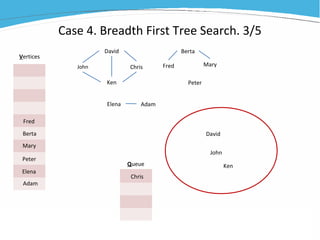
  • #21 We grab the first person from the list and put him to the queue – special data structure that uses principle first in first out.
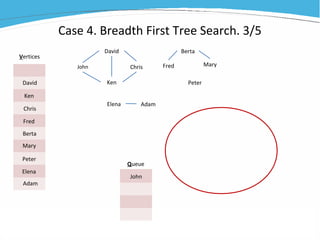
  • #22 Now we have one person in the queue. Let’s extract the first (and only so far) person from the queue and do something with him.
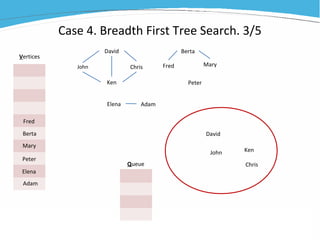
  • #23 We check all John’s connections and enqueue them now one by one. It’ll be David and Ken.
  • #24 Now we dequeue again the first person in the queue – this time it is David and analyze his connection.
  • #25 We see that his connections are John, Chris and Ken, but John is already processed, and Ken is already in the queue so we add only Chris to the end of the queue. Now Ken is the first in the queue.
  • #26 We dequeue Ken and no new friends are added to the queue.
  • #27 The same for Chris. Now the queue is empty and it means that we finished one connected component or cluster – we can assign the same number to all these guys. Then we select next person from the list. This person will give start to the new cluster and we’ll repeat all the process. And will repeat all of this unitl all people are analyzed.
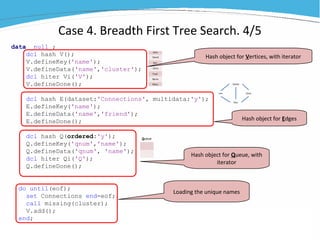
  • #28 First of all we define hashs object for unique names - that list where we’ll grab names from. Also we’ll use the same object for assigning cluster names, so we’ll create variable ‘cluster’ in it. And since we’ll need to iterate through these names, we’ll declare a hash iterator. Now we need hash object with connections or edges. It will be hash object E. And it’ll be multidata hash, because one person can have many friends. And we have key variable name and data variable friend there. And we load this hash right away because we just need the entire dataset Connections And at last we need something for the queue. It’ll be hash object Q with corresponding iterator. And we introduce new option here – ordered. It means that all records added to Q will be added in the ascending order of their keys. And keys here are qnum – which is just ordinal number and name – name of the person. Now the only thing that left is to load hash V with unique names. And we do it easily using natural ability of hashes to create distinct values. Variable cluster is empty so far. Ok, we all set, we have ready list of unique names V, list of connections E and empty Queue Q.
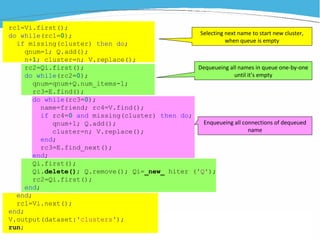
  • #29 And here’s the actual algorithm. It’s a bit crowded and has quite a few nested loops. But I’ll walk through it not line by line but loop by loop, so it’ll be easier in this way to see what we do where. So, the first one – yellow, the outermost loop. This is where we grab new names from the list V (remember, unique names?). At the start of the algorithm we grab the first name using already mentioned before method FIRST with iterator and then we repeat this grabbing every time when the queue gets empty. We use NEXT-method for that. And we have to check if the person we are grabbing doesn’t have cluster number otherwise this person has already been added to some group and we can skip him or her. As soon as we found such person we add this name to the first position of the queue and assign new cluster number to this person. And if we can’t find any more person without cluster number assigned it means that we done and we leave the loop and output our desired list of names with cluster numbers. Now one level deeper – what we do when we started new cluster with a new person from the list and added this person to the empty queue? We’re focusing on the first person in the queue and searching for all her connections. As you remember the list of connections is multidata one, so we’ll probably find many connections for this person. And we’ll add them to the Q in this innermost loop that is not yet highlighted. Now we need to delete this person from the queue because we finished with her. Here’s a little sequence of actions for that – we delete iterator, remove person and re-create iterator. A bit messy but it should be done in this way. And again we return to the first person in the Q which is now another one, moved up from the second position. At last the innermost – pink loop. Here we get dequeued person connections and add them to the Q. We iterate through all connections of a certain person using already known method FIND_NEXT. And each new friend we put to the end of the Q, thanks to this numerator which we increment by 1 every time. Well, that’s it. We did it, we discovered all connected components
  • #30 Thanks for your attention and long patience. And I encourage everybody to use hash objects often because this is such kind of tool that unveils its advantages very gradually. Have you had any questions – I’ll try to answer.