HandPunch
  4000
HandPunch Guys LLC
672 Dogwood Ave., Ste 223A
 Franklin Square, NY 11010
       516-414-1290
HP-3000/4000
Terminal User’s Guide
This equipment has been tested and found to comply with the limits for a Class B digital
device, pursuant to part 15 of the FCC Rules. These limits are designed to provide reasonable
protection against harmful interference when the equipment is operated in a commercial
environment. This equipment generates, uses, and can radiate radio frequency energy, and,
if not installed and used in accordance with the Installation Manual, may cause harmful
interference to radio communications. Operation of this equipment in a residential area is likely
to cause harmful interference, in which case the user will be required to correct the interference
at the user’s own expense.


This Class A digital apparatus meets all requirements of the Canadian Interference-Causing
Equipment Regulations.

Cet appareil numerique de la classe A respecte toutes les exigences du Reglemente sure le
materiel brouilleur du Canada.


                          HandPunch Guys LLC
                          672 Dogwood Ave., Ste 223A
                          Franklin Square, NY 11010
                          516-414-1290


© 1998 through 2009 Schlage Biometrics, Inc. – ALL RIGHTS RESERVED
Document Part Number: 70100-6003 – Revision 3.1 – June, 2009

HandPunch is a trademark of Schlage Biometrics, Inc.


The trademarks used in this Manual are the property of the trademark holders. The use of
these trademarks in this Manual should not be regarded as infringing upon or affecting the
validity of any of these trademarks.

Schlage Biometrics, Inc. reserves the right to change, without notice, product offerings or
specifications.

No part of this publication may be reproduced in any form without the express written
permission from Schlage Biometrics, Inc.
Table of Contents


Introduction	                                                            3
	 Biometrics	                                                            4
	   Principle of Operation	                                              4
	   Specifications	                                                      7

Planning an Installation	                                                11
	 Site Preparation 	                                                     11
	   HandPunch Placement 	                                                11
	   Wiring 	                                                             12
	   Power Input 	                                                        12
	   Battery Backup 	                                                     12
	   Earth Ground and Shielding 	                                         13
	   Communications 	                                                     18
	   External Devices 	                                                   20

Mechanical Installation 	                                                23
	   Wall Plate Installation 	                                            23
	   Mounting the Wall Plate 	                                            24
	
Networking and Communications 	                                          27
	   Stand-alone HandReader 	                                             27
	   Master or Remote HandReader in a HandReader Network 	                27
	   Remote HandReader in a HandReader Network Connected to a Host PC 	   27
	   Remote HandReader Connected to a Host PC via Optional Modem 	        28
	   Remote HandReader Connected to a Host PC via Optional Ethernet 	     29
	   Printer 	                                                            29

Wiring Connections 	                                                     31

Erasing the Memory 	                                                     43

Closing the HandPunch 	                                                  45

Enter Command Menu 	                                                     47
	 If No One is Enrolled in the HandPunch 	                               47
	   If Users are Enrolled in the HandPunch 	                             47
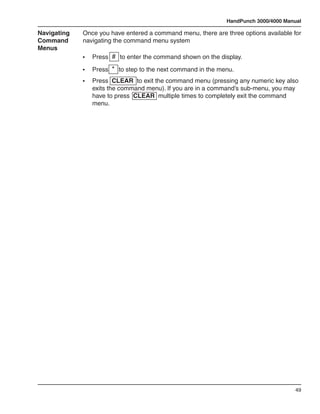
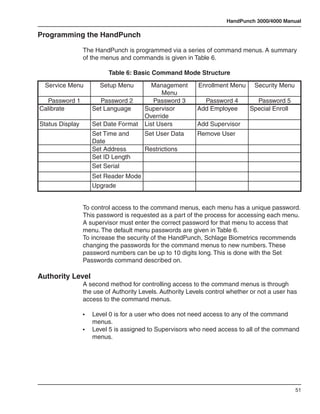
	   Navigating Command Menus 	                                           49

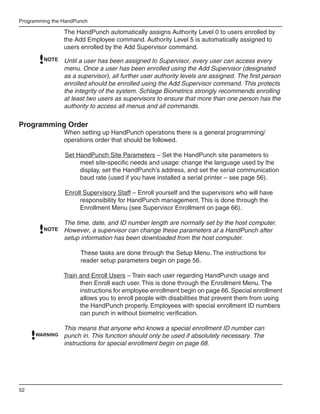
Programming the HandPunch 	                                              51
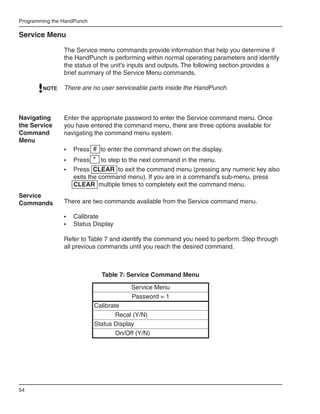
	 Service Menu 	                                                         54
	   Setup Menu 	                                                         56
	   Management Menu 	                                                    60
	   Enrollment Menu 	                                                    63
	   Special Menu 	                                                       67

HandPunch Maintenance 	                                                  69

Appendix A - Installation Tips 	                                         70
Appendix B - Differences in Board Layout 	   72

Appendix C - Old Installation Guide 	        76

Appendix D - Troubleshooting 	               94

Glossary 	                                   96

Limited Warranty 	                           98
HandPunch 3000/4000 Manual


Introduction
         The HandPunch 3000/4000 is part of Schlage Biometrics’ 3rd generation line
         of biometric hand geometry Time and Attendance Terminals1. The HandPunch
         records and stores a three-dimensional shape of the human hand for
         comparison and identity verification. Upon verification, the HandPunch records
         the time, date, user ID number, and collected time and attendance data for
         collection by a host computer. The HandPunch can produce an output that can
         unlock a door and it can communicate with a host computer. The HandPunch
         also has auxiliary inputs and outputs that can be used to control other systems
         such as bells and alarms.

         The HandPunch provides proof-positive employee verification combined
         with the sophisticated operating features one expects in a modern Time and
         Attendance Terminal. Because of this unique combination of capabilities, the
         HandPunch provides the most accurate Time and Attendance data collection
         terminal available. The key features of the HandPunch include:

         •	   Programmable Function Keys
         	    -	 HP-3000 – 2
         	    -	 HP-4000 – 10
         •	   User Time Restrictions
         •	   Supervisor Override at the “Time Clock”
         	    -	 Add Punch
         	    -	 Add Bulk Hours or Dollars
         	    -	 Review Punches
         •	   Department Transfers
         •	   Explicit Punch Menu
         •	   Transaction Buffer
         	    -	 HP-3000 – 5,120 event capacity
         	    -	 HP-4000 – 7,680 event capacity
         •	   Bell Schedules
         •	   Door Control and Monitoring
         •	   Programmable Clock and Date Formats and Daylight Savings Switch-over

         The HP-4000 also includes:
         • 	 Integrated Bar Code Reader
         • 	 Programmable User Messages
         • 	 Data Validation


              1.	   For the sake of using a consistent name throughout the manual, the HandPunch
                    3000/4000 terminal is referred to as the HandPunch for the remainder of this manual.


                                                                                                       3
Introduction

Biometrics     Biometrics is a term describing the automatic measurement and comparison
               of human characteristics. While its origins are ancient, the evolution of
               advanced scanning and microprocessor technology brought biometrics into
               everyday life. Electronic hand geometry technology first appeared in the
               1970s. Schlage Biometrics Inc., founded in 1986, built the first mass-produced
               hand geometry readers and made biometric technology affordable for the
               commercial market. Today, Schlage Biometrics’ products are in use in every
               imaginable application from protecting cash vaults to verifying employee
               attendance in hospitals.

Principle of The HandPunch uses low-level infrared light, optics, and a CMOS camera
Operation    to capture a three-dimensional image of the hand. Using advanced
               microprocessor technology, the HandPunch converts the image to an
               electronic template. It stores the template in a database along with the user’s
               ID number.

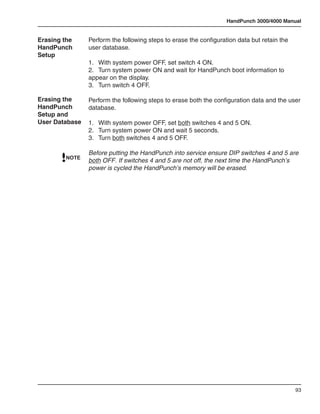
               To gain punch, the user enters his or her ID number at the HandPunch’s
               keypad or uses an external card reader. The HandPunch prompts the user to
               place his or her hand on the HandPunch’s platen1. The HandPunch compares
               the hand on the platen with the stored user’s unique template. If the images
               match, the HandPunch records the transaction for processing.

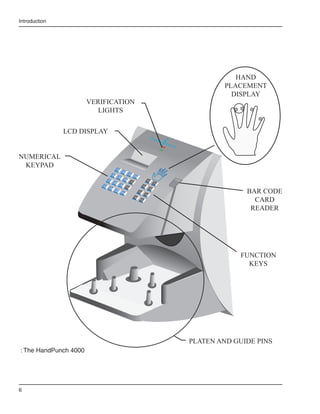
The       The HandPunch is a time and attendance terminal designed for use with time
HandPunch and attendance software. Refer to “Figure 1-1” on page 5 and “Figure 1-2” on
          page 6 when reviewing the information in this section.
Terminal
               The HandPunch has an integrated keypad for ID entry and reader
               programming. The HandPunch 3000 has two function keys (F1 and F2 – see
               Figure 1-1). The HandPunch 4000 has ten function keys (F1 through F10 –
               see Figure 1-2). These function keys can be programmed to collect data or to
               activate auxiliary outputs. The CLEAR and ENTER keys assist in data
               entry and programming.


                 1.	   The Platen is the flat surface at the base of the HandPunch (see Figure 1-1). This
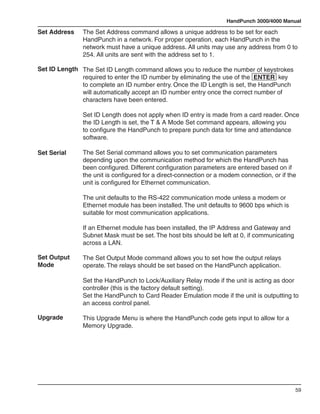
                       is where users place their hands for enrollment and verification. It has guide pins to
                       assist positioning the fingers during use.


4
HandPunch 3000/4000 Manual

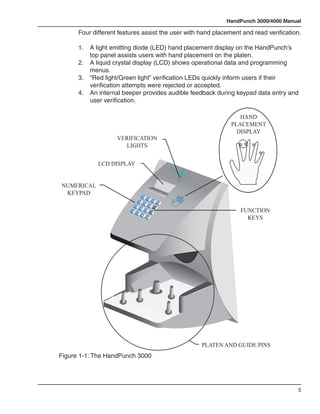
      Four different features assist the user with hand placement and read verification.

      1.	   A light emitting diode (LED) hand placement display on the HandPunch’s 		
      	     top panel assists users with hand placement on the platen.
      2.	   A liquid crystal display (LCD) shows operational data and programming 		
      	     menus.
      3.	   “Red light/Green light” verification LEDs quickly inform users if their 	 	 	
      	     verification attempts were rejected or accepted.
      4.	   An internal beeper provides audible feedback during keypad data entry and 		
      	     user verification.

                                                                                                                                      HAND
                                                                                                                                   PLACEMENT
                                                                                                                                     DISPLAY
                     VERIFICATION
                       LIGHTS

              LCD DISPLAY
                                                                                              Recog
                                                                                                   nition
                                                                                                            Syste
                                                                                                                 ms In
                                                                                                                      c.


NUMERICAL
 KEYPAD                                         1
                                                              2
                                        4                                    3
                                                                                      Clear
                                                    5
                                7                                   6
                                                                                 F1

                                                                                                                                      FUNCTION
                                            8
                            *
                           No
                                                        9
                                                                        F2
                                    0
                                                #

                                                                                                                                        KEYS
                                            Ns
                                            Yeo
                                                            Enter


                                                                                                                           PLATEN AND GUIDE PINS
Figure 1-1: The HandPunch 3000


                                                                                                                                                          5
Introduction


                                                                                                                                                                 HAND
                                                                                                                                                              PLACEMENT
                                                                                                                                                                DISPLAY
                       VERIFICATION
                         LIGHTS

               LCD DISPLAY
                                                                                                                     Recog
                                                                                                                              nition
                                                                                                                                       System
                                                                                                                                             s Inc.


NUMERICAL
 KEYPAD                                         1
                                                              2
                                        4                                    3
                                                                                      Clear
                                                    5
                                7                                   6                                          F3
                                                                                 F1
                                            8                                                                            F7
                            *
                           No
                                                        9                                            F4
                                                                        F2

                                                                                                                                                                    BAR CODE
                                    0                                                                               F8
                                            Ns
                                            Yeo
                                                #
                                                            Enter                             F5
                                                                                                          F9


                                                                                                                                                                      CARD
                                                                                      F6
                                                                                               F10


                                                                                                                                                                     READER


                                                                                                                                                                  FUNCTION
                                                                                                                                                                    KEYS


                                                                                                                                                      PLATEN AND GUIDE PINS
: The HandPunch 4000


6
HandPunch 3000/4000 Manual

Specifications

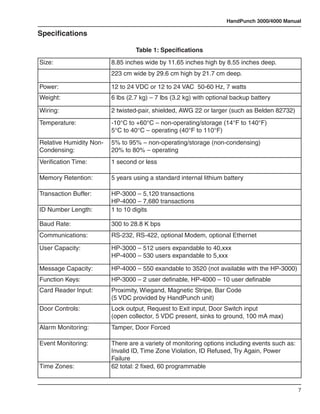
                                  Table 1: Specifications
Size:                    8.85 inches wide by 11.65 inches high by 8.55 inches deep.
                         223 cm wide by 29.6 cm high by 21.7 cm deep.

Power:                   12 to 24 VDC or 12 to 24 VAC 50-60 Hz, 7 watts
Weight:                  6 lbs (2.7 kg) – 7 lbs (3.2 kg) with optional backup battery

Wiring:                  2 twisted-pair, shielded, AWG 22 or larger (such as Belden 82732)
Temperature:             -10°C to +60°C – non-operating/storage (14°F to 140°F)
                         5°C to 40°C – operating (40°F to 110°F)
Relative Humidity Non-   5% to 95% – non-operating/storage (non-condensing)
Condensing:              20% to 80% – operating
Verification Time:       1 second or less

Memory Retention:        5 years using a standard internal lithium battery

Transaction Buffer:      HP-3000 – 5,120 transactions
                         HP-4000 – 7,680 transactions
ID Number Length:        1 to 10 digits

Baud Rate:               300 to 28.8 K bps
Communications:          RS-232, RS-422, optional Modem, optional Ethernet

User Capacity:           HP-3000 – 512 users expandable to 40,xxx
                         HP-4000 – 530 users expandable to 5,xxx

Message Capacity:        HP-4000 – 550 exandable to 3520 (not available with the HP-3000)
Function Keys:           HP-3000 – 2 user definable, HP-4000 – 10 user definable
Card Reader Input:       Proximity, Wiegand, Magnetic Stripe, Bar Code
                         (5 VDC provided by HandPunch unit)
Door Controls:           Lock output, Request to Exit input, Door Switch input
                         (open collector, 5 VDC present, sinks to ground, 100 mA max)
Alarm Monitoring:        Tamper, Door Forced

Event Monitoring:        There are a variety of monitoring options including events such as:
                         Invalid ID, Time Zone Violation, ID Refused, Try Again, Power
                         Failure
Time Zones:              62 total: 2 fixed, 60 programmable


                                                                                               7
Introduction

                                         Table 1: Specifications
Time Schedules:            HP-4000 – 3 definable time schedules per user
Auxiliary Inputs:          2 (open collector, 5 VDC present, sinks to ground, 100 mA max)
Auxiliary Outputs:         up to 3 user definable
                           (open collector, 5 VDC present, sinks to ground, 100 mA max)
Options
                HandPunch units have the following options available.

                •	 Backup Battery Support	 See Technical Note 70200-0012 – Rev. D
                •	 Modem Communication	 See Technical Note 70200-0013 – Rev. D
                •	 Ethernet Communication	 See Technical Note 70200-0014 – Rev. D

                Recommended European Power Supply1:

                Ault, Inc.
                7300 Boone Ave. North
                Minneapolis, MN 55428 USA
                PH: 612-493-1900
                E-mail: info@ault.com

                Part number: D48-121000-A040G
                230 VAC Input, 12 VDC @ 1Amp output (unregulated)
                Ault style #41 connector (barrel plug)


                                approved


                                                            recyclable


                     1.	   Not evaluated by UL for UL 294 installations.


8
HandPunch 3000/4000 Manual

UL           The HP-3000 and HP-4000 meet UL compliance requirements for UL 294
Compliance   Access Control Systems under this condition:

             1.	   The HandPunch is configured at the factory with a Wiegand output that 		
             	     enables the HandPunch to communicate with an access control panel. The 	
             	     access control panel controls the locking and unlocking of the door. The 		
             	     panel must reside on the secure side of the facility.


                                                                                            9
Introduction


               This page is intentionally blank.


10
HandPunch 3000/4000 Manual


Planning an Installation
Site        Before you begin installation, check the site blueprints, riser diagrams, and
Preparation specifications for important information about the HandPunch’s location and
            other systems that will connect to the HandPunch. Look for any existing wall
            preparations and wiring that other contractors may have installed for the
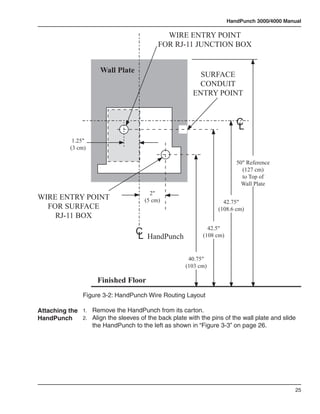
            HandPunch. A wire routing layout diagram (see “Figure 3-2” on page 25) is provided
            to assist in planning.

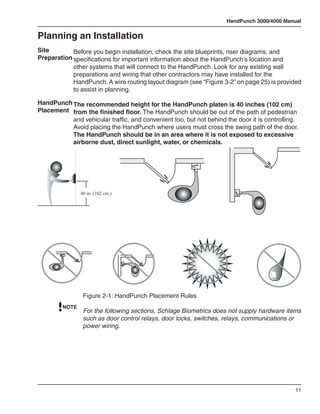
HandPunch The recommended height for the HandPunch platen is 40 inches (102 cm)
Placement from the finished floor. The HandPunch should be out of the path of pedestrian
          and vehicular traffic, and convenient too, but not behind the door it is controlling.
          Avoid placing the HandPunch where users must cross the swing path of the door.
          The HandPunch should be in an area where it is not exposed to excessive
          airborne dust, direct sunlight, water, or chemicals.


                40 in. (102 cm.)


                 Figure 2-1: HandPunch Placement Rules
         NOTE
                 For the following sections, Schlage Biometrics does not supply hardware items
                 such as door control relays, door locks, switches, relays, communications or
                 power wiring.


                                                                                             11
Planning An Installation

Wiring
                   Four basic circuits typically connect to the HandPunch:

                   •	   Power Input
                   •	   Earth Ground and Shielding
                   •	   Networking and Communications
                   •	   External Devices

                   The minimum wire size for these circuits is AWG 22; the maximum wire size
                   is AWG 18. Schlage Biometrics recommends using Belden 82732 or its
                   equivalent when wiring for RS-422 communications.


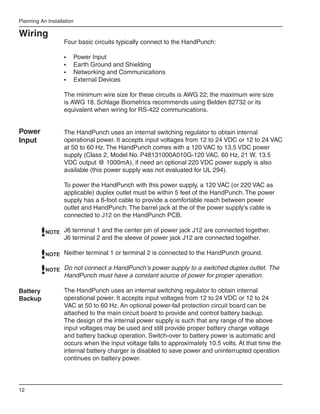
Power              The HandPunch uses an internal switching regulator to obtain internal
Input              operational power. It accepts input voltages from 12 to 24 VDC or 12 to 24 VAC
                   at 50 to 60 Hz. The HandPunch comes with a 120 VAC to 13.5 VDC power
                   supply (Class 2, Model No. P48131000A010G-120 VAC, 60 Hz, 21 W, 13.5
                   VDC output @ 1000mA), if need an optional 220 VDC power supply is also
                   available (this power supply was not evaluated for UL 294).

                   To power the HandPunch with this power supply, a 120 VAC (or 220 VAC as
                   applicable) duplex outlet must be within 5 feet of the HandPunch. The power
                   supply has a 6-foot cable to provide a comfortable reach between power
                   outlet and HandPunch. The barrel jack at the of the power supply’s cable is
                   connected to J12 on the HandPunch PCB.

           NOTE J6 terminal 1 and the center pin of power jack J12 are connected together.
                   J6 terminal 2 and the sleeve of power jack J12 are connected together.

           NOTE Neither terminal 1 or terminal 2 is connected to the HandPunch ground.

           NOTE Do not connect a HandPunch’s power supply to a switched duplex outlet. The
                   HandPunch must have a constant source of power for proper operation.

Battery            The HandPunch uses an internal switching regulator to obtain internal
Backup             operational power. It accepts input voltages from 12 to 24 VDC or 12 to 24
                   VAC at 50 to 60 Hz. An optional power-fail protection circuit board can be
                   attached to the main circuit board to provide and control battery backup.
                   The design of the internal power supply is such that any range of the above
                   input voltages may be used and still provide proper battery charge voltage
                   and battery backup operation. Switch-over to battery power is automatic and
                   occurs when the input voltage falls to approximately 10.5 volts. At that time the
                   internal battery charger is disabled to save power and uninterrupted operation
                   continues on battery power.


12
HandPunch 3000/4000 Manual

            When input power is restored, the HandPunch switches off of battery
            operation and the battery charger is re-enabled to recharge the battery.
            Battery charge voltage is set at approximately 13.65 volts, and battery charge
            current is limited to approximately 50 mA. A fully discharged battery requires
            approximately 12 hours of charge to fully recover.

            Additional options installed and specific configurations within the HandPunch
            make it difficult to predict precisely how long battery support will last, but in
            general two hours of battery operation can be expected. While operating on
            battery backup due to loss of main input power, the battery output voltage
            is constantly monitored by internal circuitry. If the battery voltage reaches
            approximately 9.5 volts the HandPunch automatically shuts down. This is done
            to prevent full exhaustion of the battery. A yellow indicator on the top panel
            illuminates to indicate that the HandPunch is running off of battery power. This
            indicator extinguishes when main input power is restored.

            Shunt J7 which is located to the left of TS3 see “Figure 4-1” on page 31 enables
            or disables battery operation on those HandPunchs equipped with optional
            battery backup. If a HandPunch does not have the optional battery backup
            package installed, J7 is not used. On HandPunchs equipped with the battery
            backup option, J7 allows service personnel a mechanism for disabling battery
            backup operation before removal of main input power. To fully power down a
            HandPunch equipped with battery backup, remove or reposition shunt J7 so
            that the two pins protruding up from the main logic board are not connected
            to each other. This effectively opens the circuit, removing the battery from any
            internal circuitry. Main input power can then be removed and the HandPunch
            will fully shut down. Once the HandPunch has fully shut down, shunt J7 may
            be reinstalled. The design of the power supply is such that main input power
            must be reapplied to re-enable the battery protection mechanism. If shunt J7
            is not properly installed, the internal backup battery will not be charged, and in
            the event of a main input power loss, the HandPunch will shut down.
            The HandPunch with the battery backup option uses a 12 volt 800 ma/hour
            sealed lead acid battery to provide backup battery power. This battery is
            located immediately inside the rear panel of the HandPunch and plugs into
            jack J4 on the keypad control circuit board located in the top of the chassis.


Earth       Schlage Biometrics recommends that all HandPunchs be grounded with a
Ground      solid, reliable earth ground connection. This connection establishes a common
and         ground return point used to protect internal semiconductor devices from
Shielding   ElectroStatic Discharge (ESD) and from external signal line transients. It also
            provides a common signal level reference point between externally networked
            HandPunchs. Schlage Biometrics recommends that the earth ground source
            be identified by a qualified electrician familiar with electrical codes as well as
            wiring and grounding techniques.


                                                                                            13
Planning An Installation

                   This is an extremely important and often overlooked aspect of hard-wired
                   serial communication systems. If the sending and receiving stations do not
                   agree on the ground reference for the signal voltages, communication errors
                   or a total inability to communicate may be observed. If the voltages are very
                   different, it is even possible to damage the units.

                   The subject of grounding can be complicated, and the full circuit of a system,
                   including power supplies and often even the building line power wiring, must
                   be understood. It is strongly recommended that a qualified electrician or
                   electrical engineer familiar with this subject be consulted when designing
                   the wiring of an HGU network installation. Always adhere to any applicable
                   electrical codes for your area. Schlage Biometrics is not responsible for
                   damage done to units due to improper wiring.

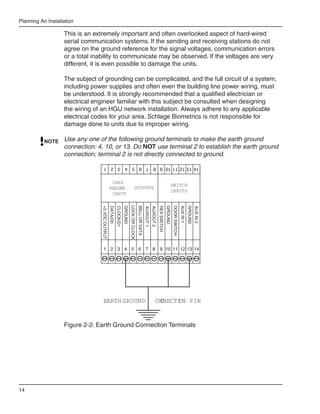
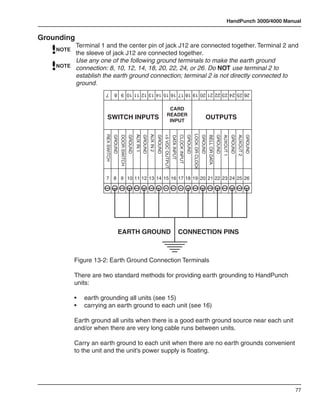
           NOTE    Use any one of the following ground terminals to make the earth ground
                   connection: 4, 10, or 13. Do NOT use terminal 2 to establish the earth ground
                   connection; terminal 2 is not directly connected to ground.
                                    14 13 12 11 10 9 8 7 6 5 4 3 2 1


                                                  CARD
                                                                                                                                                      SWITCH
                                                 READER                                 OUTPUTS
                                                                                                                                                      INPUTS
                                                  INPUT
                                                                               LOCK OR CLOCK
                                                                      GROUND


                                                                                                                                                 GROUND


                                                                                                                                                                                   GROUND
                                                                                                                                                          DOOR SWITCH
                                                                                                                                                                        AUX IN 1
                                                                                               BELL OR DATA


                                                                                                                                    REX SWITCH
                                 +5 VDC OUTPUT
                                                 DATA/D0


                                                                                                                                                                                            AUX IN 2
                                                           CLOCK/D1


                                                                                                              AUXOUT 1
                                                                                                                         AUXOUT 2


                                   1 2 3 4 5 6 7 8                                                                                   9 10 11 12 13 14


                                   EARTH GROUND                                                                               ONNECTI PIN
                                                                                                                               C    ON


                   Figure 2-2: Earth Ground Connection Terminals


14
HandPunch 3000/4000 Manual

               There are two standard methods for providing earth grounding to HandPunch
               units:

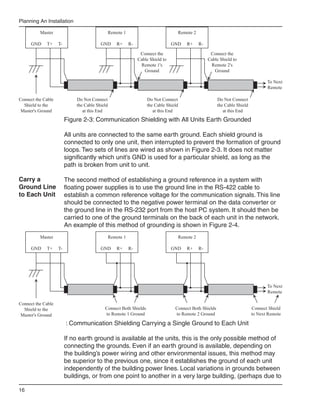
               •	   earth grounding all units (see Figure 2-3)
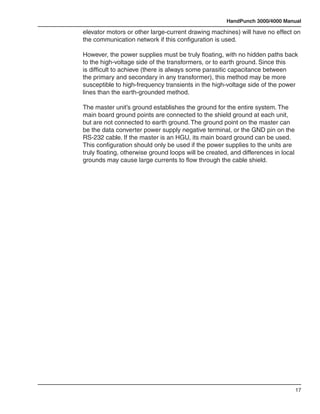
               •	   carrying an earth ground to each unit (see Figure 2-4)

               Earth ground all units when there is a good earth ground source near each
               unit and/or when there are very long cable runs between units.

             Carry an earth ground to each unit when there are no earth grounds
Earth Ground convenient to the unit and the unit’s power supply is floating.
All Units

               One method of establishing a ground reference is to connect each unit’s
               main board ground to earth ground. Earth ground is found on the third pin on
               standard AC line sockets (in the United States, this is the round one in the
               middle). If the building wiring is functioning correctly, this should be a low-
               impedance path to a true ground, which then serves as a common reference
               point for the units.

               If this method of grounding the units is used, it is not necessary to connect the
               units in the network together with a ground line in the communication cable.
               Indeed, doing so could create ground loops—large-area loops which provide
               a good coupling to external magnetic fields—which may actually compound
               communication problems. If a magnetic field, such as that from a lightning
               strike, induces a voltage in the ground loop, it is possible for large currents
               to flow around the loop, which can raise the ground potential of some units
               relative to others. When the shield or the cable is connected to any ground
               in this configuration, it should be connected only at one end to prevent the
               formation of ground loops.

               For systems with multiple units on a network, there will be a series of cables
               daisy-chained between the units, and the shield of each leg of the network
               should be connected to ground at only one end. It does not matter which end.
               An example of this method of grounding is shown in Figure 2-3.


                                                                                                 15
Planning An Installation

          Master                                Remote 1                               Remote 2

      GND    T+     T-                   GND       R+      R-                     GND     R+      R-

                                                                 Connect the                            Connect the
                                                                Cable Shield to                        Cable Shield to
                                                                 Remote 1's                             Remote 2's
                                                                   Ground                                 Ground

                                                                                                                                     To Next
                                                                                                                                     Remote

Connect the Cable            Do Not Connect                         Do Not Connect                         Do Not Connect
  Shield to the              the Cable Shield                       the Cable Shield                       the Cable Shield
 Master's Ground                at this End                            at this End                            at this End
                         Figure 2-3: Communication Shielding with All Units Earth Grounded

                         All units are connected to the same earth ground. Each shield ground is
                         connected to only one unit, then interrupted to prevent the formation of ground
                         loops. Two sets of lines are wired as shown in Figure 2-3. It does not matter
                         significantly which unit’s GND is used for a particular shield, as long as the
                         path is broken from unit to unit.

Carry a                  The second method of establishing a ground reference in a system with
Ground Line              floating power supplies is to use the ground line in the RS-422 cable to
to Each Unit             establish a common reference voltage for the communication signals. This line
                         should be connected to the negative power terminal on the data converter or
                         the ground line in the RS-232 port from the host PC system. It should then be
                         carried to one of the ground terminals on the back of each unit in the network.
                         An example of this method of grounding is shown in Figure 2-4.
          Master                                Remote 1                               Remote 2

      GND    T+     T-                   GND       R+      R-                     GND     R+      R-


                                                                                                                                     To Next
                                                                                                                                     Remote

Connect the Cable
  Shield to the                            Connect Both Shields                    Connect Both Shields                       Connect Shield
 Master's Ground                           to Remote 1 Ground                      to Remote 2 Ground                         to Next Remote

                         : Communication Shielding Carrying a Single Ground to Each Unit

                         If no earth ground is available at the units, this is the only possible method of
                         connecting the grounds. Even if an earth ground is available, depending on
                         the building’s power wiring and other environmental issues, this method may
                         be superior to the previous one, since it establishes the ground of each unit
                         independently of the building power lines. Local variations in grounds between
                         buildings, or from one point to another in a very large building, (perhaps due to

16
HandPunch 3000/4000 Manual

elevator motors or other large-current drawing machines) will have no effect on
the communication network if this configuration is used.

However, the power supplies must be truly floating, with no hidden paths back
to the high-voltage side of the transformers, or to earth ground. Since this
is difficult to achieve (there is always some parasitic capacitance between
the primary and secondary in any transformer), this method may be more
susceptible to high-frequency transients in the high-voltage side of the power
lines than the earth-grounded method.

The master unit’s ground establishes the ground for the entire system. The
main board ground points are connected to the shield ground at each unit,
but are not connected to earth ground. The ground point on the master can
be the data converter power supply negative terminal, or the GND pin on the
RS-232 cable. If the master is an HGU, its main board ground can be used.
This configuration should only be used if the power supplies to the units are
truly floating, otherwise ground loops will be created, and differences in local
grounds may cause large currents to flow through the cable shield.


                                                                                   17
Planning An Installation

Communications

HandPunch          HandPunch/host computer communications can be configured in one of three
to Host            ways:
Computer
Connection         •	 via a direct RS-232 connection
                   •	 via a direct RS-422 connection using a data converter
                   •	 via an optional Ethernet network connection (one HandPunch terminal
                      must have the Ethernet communication option installed)
                   •	 via an optional Modem connection (one HandPunch terminal must have
                      the Modem communication option installed)

RS-232 Host        A direct HandPunch connection to a host computer can be made through an
Computer           4-conductor cable in an RS-232 serial configuration. A 6’ or 50’ cable may be
Connection         purchased through Schlage Biometrics or a wiring diagram for the RS-232 to
                   host computer connection is found on “Table 4” on page 33.

           NOTE If you make the RS-232 to host computer connection you cannot use the serial
                   printer option (see page 21).

RS-422 Host        A direct HandPunch network connection to a host computer can be made
Computer           through a shielded, 4-conductor cable in a full-duplex RS-422 configuration.
Connection         An RJ-11 jack must be installed within 6 feet of the host computer. Position
                   the RJ-11 jack using the template provided in this manual (see “Figure 3-2” on
                   page 25). The HandPunch RS-422 network is connected to this jack.

                   A data converter (Schlage Biometrics P/N: DC-102) is required to connect the
                   host computer to the RS-422 HandPunch network. The DC-102 is connected
                   to an available RS-232 serial port on the computer. Then connect the DC-102
                   to the RJ-11 jack using the 8 foot cable provided with the DC-102. A wiring
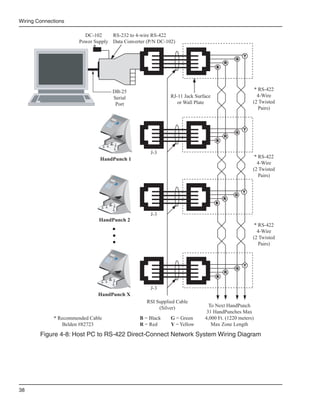
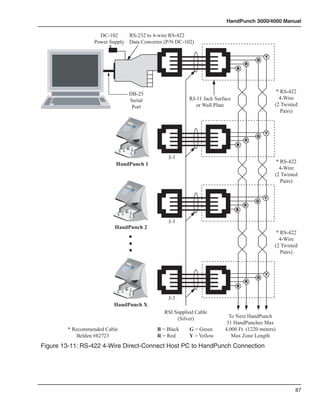
                   diagram for the RS-422 to host computer connection is found on page 31.

                   A HandPunch communication network is then connected, unit-to-unit, via an
                   RS-422 “daisy-chain” network. A network RJ-11 jack is installed on or in the
                   wall behind each terminal. Each RJ-11 jack is then interconnected in daisy-
                   chain fashion using two, twisted-pair, AWG22 wires (Schlage Biometrics
                   recommends using Belden No. 82723 cable). The daisy-chain network can
                   extend up to 4,000 feet in length, and can have up to 31 HandPunch terminals
                   connected to it.

                   Connect the HandPunch terminal to the RJ-11 jack using the short silver cable
                   provided with the terminal.


18
HandPunch 3000/4000 Manual

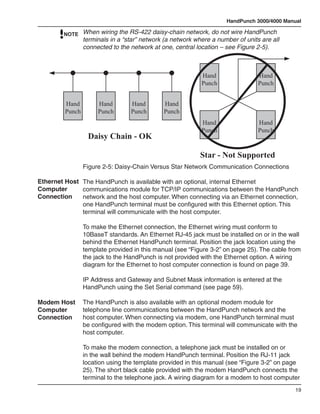
        NOTE When wiring the RS-422 daisy-chain network, do not wire HandPunch
                 terminals in a “star” network (a network where a number of units are all
                 connected to the network at one, central location – see Figure 2-5).


                                                            Hand                 Hand
                                                            Punch                Punch


         Hand         Hand        Hand        Hand
         Punch        Punch       Punch       Punch
                                                            Hand                 Hand
                                                            Punch                Punch
                  Daisy Chain - OK

                                                            Star - Not Supported
                 Figure 2-5: Daisy-Chain Versus Star Network Communication Connections

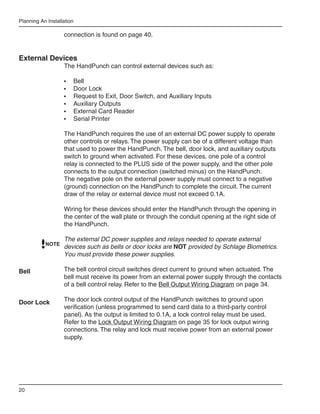
Ethernet Host The HandPunch is available with an optional, internal Ethernet
Computer      communications module for TCP/IP communications between the HandPunch
Connection    network and the host computer. When connecting via an Ethernet connection,
              one HandPunch terminal must be configured with this Ethernet option. This
              terminal will communicate with the host computer.

                 To make the Ethernet connection, the Ethernet wiring must conform to
                 10BaseT standards. An Ethernet RJ-45 jack must be installed on or in the wall
                 behind the Ethernet HandPunch terminal. Position the jack location using the
                 template provided in this manual (see “Figure 3-2” on page 25). The cable from
                 the jack to the HandPunch is not provided with the Ethernet option. A wiring
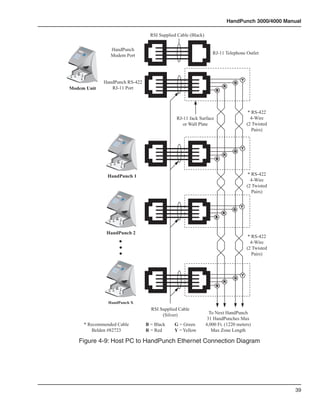
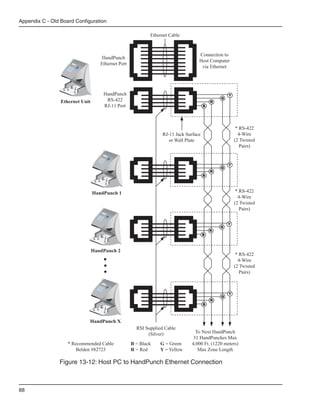
                 diagram for the Ethernet to host computer connection is found on page 39.

                 IP Address and Gateway and Subnet Mask information is entered at the
                 HandPunch using the Set Serial command (see page 59).

Modem Host       The HandPunch is also available with an optional modem module for
Computer         telephone line communications between the HandPunch network and the
Connection       host computer. When connecting via modem, one HandPunch terminal must
                 be configured with the modem option. This terminal will communicate with the
                 host computer.

                 To make the modem connection, a telephone jack must be installed on or
                 in the wall behind the modem HandPunch terminal. Position the RJ-11 jack
                 location using the template provided in this manual (see “Figure 3-2” on page
                 25). The short black cable provided with the modem HandPunch connects the
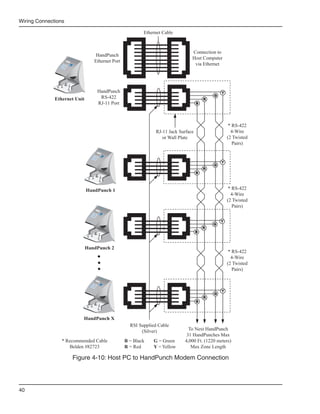
                 terminal to the telephone jack. A wiring diagram for a modem to host computer
                                                                                             19
Planning An Installation

                   connection is found on page 40.


External Devices
                   The HandPunch can control external devices such as:

                   •	   Bell
                   •	   Door Lock
                   •	   Request to Exit, Door Switch, and Auxiliary Inputs
                   •	   Auxiliary Outputs
                   •	   External Card Reader
                   •	   Serial Printer

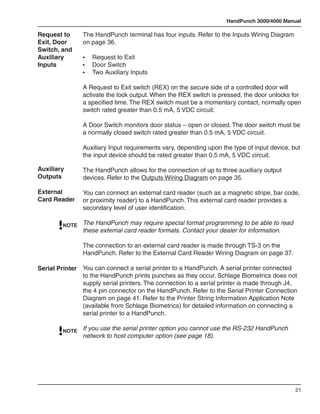
                   The HandPunch requires the use of an external DC power supply to operate
                   other controls or relays. The power supply can be of a different voltage than
                   that used to power the HandPunch. The bell, door lock, and auxiliary outputs
                   switch to ground when activated. For these devices, one pole of a control
                   relay is connected to the PLUS side of the power supply, and the other pole
                   connects to the output connection (switched minus) on the HandPunch.
                   The negative pole on the external power supply must connect to a negative
                   (ground) connection on the HandPunch to complete the circuit. The current
                   draw of the relay or external device must not exceed 0.1A.

                   Wiring for these devices should enter the HandPunch through the opening in
                   the center of the wall plate or through the conduit opening at the right side of
                   the HandPunch.

                   The external DC power supplies and relays needed to operate external
           NOTE
                   devices such as bells or door locks are NOT provided by Schlage Biometrics.
                   You must provide these power supplies.

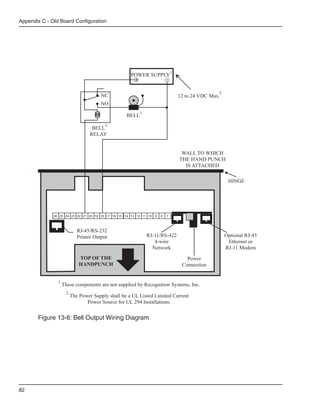
Bell               The bell control circuit switches direct current to ground when actuated. The
                   bell must receive its power from an external power supply through the contacts
                   of a bell control relay. Refer to the Bell Output Wiring Diagram on page 34.

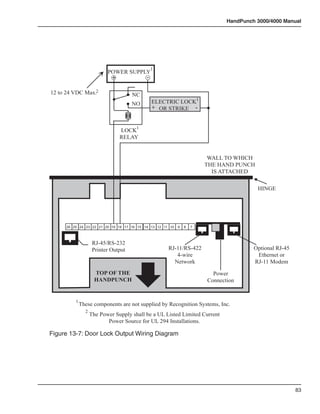
Door Lock          The door lock control output of the HandPunch switches to ground upon
                   verification (unless programmed to send card data to a third-party control
                   panel). As the output is limited to 0.1A, a lock control relay must be used.
                   Refer to the Lock Output Wiring Diagram on page 35 for lock output wiring
                   connections. The relay and lock must receive power from an external power
                   supply.


20
HandPunch 3000/4000 Manual

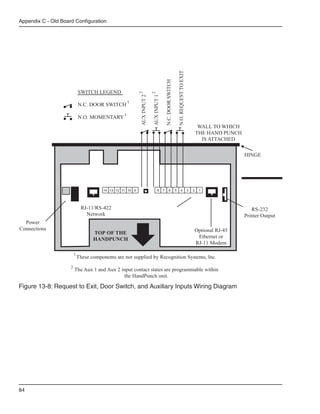
Request to      The HandPunch terminal has four inputs. Refer to the Inputs Wiring Diagram
Exit, Door      on page 36.
Switch, and
Auxiliary       •	   Request to Exit
Inputs          •	   Door Switch
                •	   Two Auxiliary Inputs

                A Request to Exit switch (REX) on the secure side of a controlled door will
                activate the lock output. When the REX switch is pressed, the door unlocks for
                a specified time. The REX switch must be a momentary contact, normally open
                switch rated greater than 0.5 mA, 5 VDC circuit.

                A Door Switch monitors door status – open or closed. The door switch must be
                a normally closed switch rated greater than 0.5 mA, 5 VDC circuit.

                Auxiliary Input requirements vary, depending upon the type of input device, but
                the input device should be rated greater than 0.5 mA, 5 VDC circuit.

Auxiliary       The HandPunch allows for the connection of up to three auxiliary output
Outputs         devices. Refer to the Outputs Wiring Diagram on page 35.

External        You can connect an external card reader (such as a magnetic stripe, bar code,
Card Reader     or proximity reader) to a HandPunch. This external card reader provides a
                secondary level of user identification.

         NOTE   The HandPunch may require special format programming to be able to read
                these external card reader formats. Contact your dealer for information.

                The connection to an external card reader is made through TS-3 on the
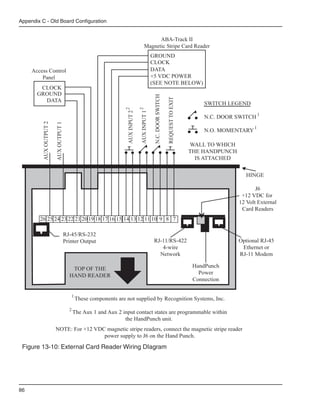
                HandPunch. Refer to the External Card Reader Wiring Diagram on page 37.

Serial Printer You can connect a serial printer to a HandPunch. A serial printer connected
               to the HandPunch prints punches as they occur. Schlage Biometrics does not
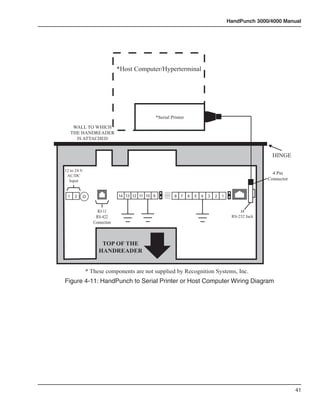
               supply serial printers. The connection to a serial printer is made through J4,
               the 4 pin connector on the HandPunch. Refer to the Serial Printer Connection
               Diagram on page 41. Refer to the Printer String Information Application Note
               (available from Schlage Biometrics) for detailed information on connecting a
               serial printer to a HandPunch.

         NOTE   If you use the serial printer option you cannot use the RS-232 HandPunch
                network to host computer option (see page 18).


                                                                                             21
Planning An Installation


                           This page is intentionally blank.


22
HandPunch 3000/4000 Manual


Mechanical Installation
               Select an installation location based on the guidelines provided in the Planning
               an Installation section beginning on page 11.
Wall Plate
Installation

       NOTE    For the following instructions protect the HandPunch from the dust and debris
               generated during the wall plate installation process.

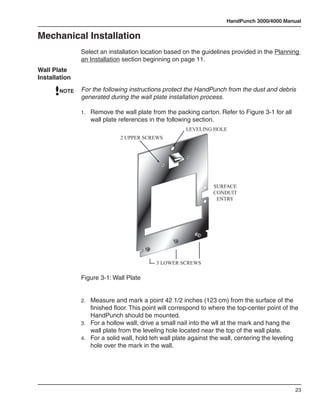
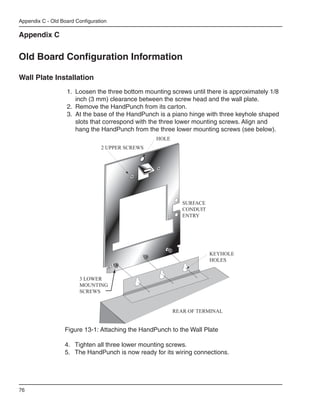
               1.	 Remove the wall plate from the packing carton. Refer to Figure 3-1 for all
                  wall plate references in the following section.
                                                       LEVELING HOLE
                              2 UPPER SCREWS


                                                                 SURFACE
                                                                 CONDUIT
                                                                  ENTRY


                                           3 LOWER SCREWS

               Figure 3-1: Wall Plate


               2.	 Measure and mark a point 42 1/2 inches (123 cm) from the surface of the
                   finished floor. This point will correspond to where the top-center point of the
                   HandPunch should be mounted.
               3.	 For a hollow wall, drive a small nail into the wll at the mark and hang the
                   wall plate from the leveling hole located near the top of the wall plate.
               4.	 For a solid wall, hold teh wall plate against the wall, centering the leveling
                   hole over the mark in the wall.


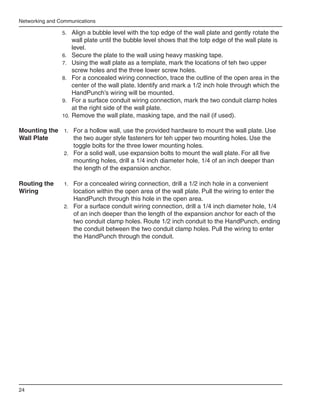
                                                                                                23
Networking and Communications

                5.	 Align a bubble level with the top edge of the wall plate and gently rotate the
                     wall plate until the bubble level shows that the totp edge of the wall plate is
                     level.
                6.	 Secure the plate to the wall using heavy masking tape.
                7.	 Using the wall plate as a template, mark the locations of teh two upper
                     screw holes and the three lower screw holes.
                8.	 For a concealed wiring connection, trace the outline of the open area in the
                     center of the wall plate. Identify and mark a 1/2 inch hole through which the
                     HandPunch’s wiring will be mounted.
                9.	 For a surface conduit wiring connection, mark the two conduit clamp holes
                     at the right side of the wall plate.
                10.	 Remove the wall plate, masking tape, and the nail (if used).

Mounting the 1.	 For a hollow wall, use the provided hardware to mount the wall plate. Use
Wall Plate       the two auger style fasteners for teh upper two mounting holes. Use the
                 toggle bolts for the three lower mounting holes.
             2.	 For a solid wall, use expansion bolts to mount the wall plate. For all five
                 mounting holes, drill a 1/4 inch diameter hole, 1/4 of an inch deeper than
                 the length of the expansion anchor.

Routing the      1.	 For a concealed wiring connection, drill a 1/2 inch hole in a convenient
Wiring               location within the open area of the wall plate. Pull the wiring to enter the
                     HandPunch through this hole in the open area.
                 2.	 For a surface conduit wiring connection, drill a 1/4 inch diameter hole, 1/4
                     of an inch deeper than the length of the expansion anchor for each of the
                     two conduit clamp holes. Route 1/2 inch conduit to the HandPunch, ending
                     the conduit between the two conduit clamp holes. Pull the wiring to enter
                     the HandPunch through the conduit.


24
HandPunch 3000/4000 Manual

                                              WIRE ENTRY POINT
                                            FOR RJ-11 JUNCTION BOX


                       Wall Plate
                                                           SURFACE
                                                          CONDUIT
                                                         ENTRY POINT


                                                                          C
                                                                          L
             1.25"
            (3 cm)

                                                                          50" Reference
                                                                            (127 cm)
                                                                            to Top of
                                                                            Wall Plate
                                         2"
WIRE ENTRY POINT                       (5 cm)                       42.75"
  FOR SURFACE                                                     (108.6 cm)
    RJ-11 BOX
                                                              42.5"
                                    C HandPunch
                                    L                       (108 cm)


                                                       40.75"
                                                      (103 cm)

                      Finished Floor
                Figure 3-2: HandPunch Wire Routing Layout

Attaching the 1.	 Remove the HandPunch from its carton.
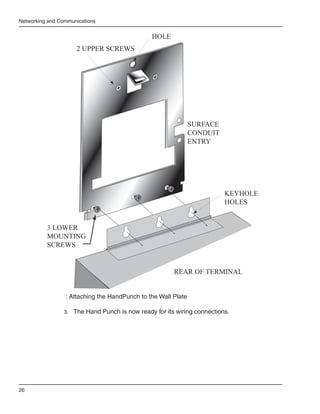
HandPunch     2.	 Align the sleeves of the back plate with the pins of the wall plate and slide
                  the HandPunch to the left as shown in “Figure 3-3” on page 26.


                                                                                              25
Networking and Communications


                                                HOLE
                     2 UPPER SCREWS


                                                               SURFACE
                                                               CONDUIT
                                                               ENTRY


                                                                          KEYHOLE
                                                                          HOLES


          3 LOWER
          MOUNTING
          SCREWS


                                                        REAR OF TERMINAL


                 : Attaching the HandPunch to the Wall Plate

                 3.	 The Hand Punch is now ready for its wiring connections.


26
HandPunch 3000/4000 Manual

Networking and Communications
               HandReader networking and communications can be configured in one of five
               ways:

               •	 as a stand-alone HandReader
               •	 as a master or remote HandReader in a HandReader network
               •	 as a remote HandReader in a HandReader network connected to a host
                  PC
               •	 as a remote network connected via optional Modem to host PC
               •	 as a remote network connected via optional Ethernet to host PC


Stand-alone    When installed as a stand-alone access control system there is no
HandReader     communication wiring to other HandReaders or to a host computer. Power
               input and control output wiring are all that are required. An RS-232 serial
               printer output is available for event logging (refer to the Printer section on 29).
               Schlage Biometrics highly recommends using Backhand™ software to backup
               template information stored in the HandReader.


Master or      Multiple HandReaders can be linked together in a HandReader network.
Remote
HandReader     •	 Up to 32 HandReaders can be linked together on a 2-wire RS-485 or
in a              4-wire RS-422 network (see Figure 3-1).
HandReader     •	 Two twisted-pair, shielded, AWG 22 (or larger) wire should be used
Network           (Schlage Biometrics recommends Belden 82732 or its equivalent).
               •	 The wiring must be a “daisy-chain” network from HandReader to
                  HandReader and must not exceed 4,000 feet (1220 meters) in total length.

               The master/remote network requires user enrollment at the “master”
               HandReader. The master HandReader distributes hand template data with ID
               numbrs and time restrictions (if any) to the other HandReaders in the network.
               Users removed at the master HandReader are automatically removed from
               the remote readers. A printer connected to the master HandReader will report
               transactions from all Handreaders on the network.


Remote         Multiple HandReaders can be linked to a presonal computer (PC) for an
HandReader     integrated access control network. Real time monitoring of door status and
in a           a variety of alarm types can be done with Schlage Biometrics’ HandNet for
HandReader     Windows™ (Schlage Biometrics model number HN-300) software. To run
Network        HandNet for Windows™, the computer must be PC compatible, using a
Connected to   Pentium™-166 or faster microprocessor and it must have a CD-ROM.
a Host PC
               •	   The HandNet software can monitor over 1,000 HandReaders
                    simultaneously.


                                                                                                27
Networking and Communications

                 •	   An unlimited number of sites can be created with up to 32 HandReaders
                      per site.
                 •	   The HandReaders report all transactions to the PC. The HandNet software
                      records all transactions and displays a variety of reports generated from
                      this information.
                 •	   Template management is handled automatically.
                 •	   Users may enroll at any HandReader in the system. The PC collects the
                      data and distributes it to other HandReaders in the network.
                 •	   Access may be restricted by time and by HandReader via HandNet’s
                      access profiles and by the use of time zones.

                 Typically, HandReader networks link to a PC using an RS-422 connection.
                 These networks have the following requirements:

                 •	 Two twisted pair, shielded, AWG 22 wire or larger should be used (Schlage
                    Biometrics recommends Belden No. 82723 or equivalent cable).
                 •	 HandReaders must be wired together in a “daisy-chain” network from
                    HandReader to HandReader and then to the host PC. The total length of
                    teh wiring must not exceed 4,000 feet per network.
                 •	 The network requires an RS-422 to RS-232 converter (Schlage Biometrics
                    P/N DC-102) at the PC.

                 Schlage Biometrics’ optional HandNet for Windows™ software allows
                 programming of most of the remote HandReader setups from the computer.
                 However, each HandReader on the network requires the setting of an address.
                 HandReader addresses may be repeated, but only on different sites. Display
                 language, date format changes, and the communication mode must also be
                 set at the HandReader.


Remote           An optional internal “answer only” 14.4 bps modem is available for
HandReader       HandReaders. This modem is designed for operation with United States phone
Connected to     systems. Site wiring should conform to standard telephone wiring standards
a Host PC via    and terminate at teh HandReader with a standard RJ-11 modular phone
Optional         jack. Each HandReader with a modem includes a XXXX cable for the final
Modem            connection between the phone jack and the HandReader modem. Modem
                 HandReaders may be networked with up to 31 non-modem HandReaders
                 using RS-422 wiring. Refer to the Modem application note (available from
                 Schlage Biometrics) for detailed information.


28
HandPunch 3000/4000 Manual

               The HandReader is available with an optional internal Ethernet
Remote         communications module for TCP/IP communications. The wiring must
HandReader     conform to 10BaseT standards. Typically, network wiring terminates at the
Connected      HandReader with a standard RJ-45 modular jack. The cable from the jack to
to a Host PC   the HandReader is not provided with the Ethernet option. The IP address,
via Optional   Gateway, and Host Bits are entered at the HandReader in the SET SERIAL
Ethernet       menu. Ethernet HandReaders may be networked with up to 31 non-Ethernet
               HandReaders using RS-422 twisted pair cable. Refer to the Ethernet
               application note (available from Schlage Biometrics) for detailed information.


Printer        A serial printer can be connected to a HandReader. A printer connected to a
               remote HandReader will print only the events that occur at that HandReader.
               Schlage Biometrics Inc. does not supply serial printers. Refer to the Printer
               String application note (available from Schlage Biometrics) for detailed
               information.


                                                                                                29
Networking and Communications


                                This page is intentionally blank.


30
HandPunch 3000/4000 Manual


Wiring Connections
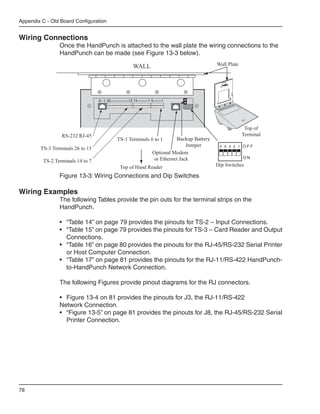
           Once the HandPunch is attached to the wall plate the wiring connections to
           the HandPunch can be made (see Figure 4-1).
                                     Reset    J7 Battery
                   WALL              Switch    Jumper                Wall Plate


                  Power             Terminal                                       Top of
                Connectors   RJ-11 Strips Optional Modem Serial RS-232            Terminal
                             RS-422          or Ethernet


                             Top of HandPunch
           Figure 4-1: Wiring Connections


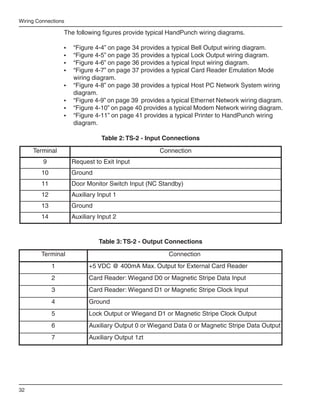
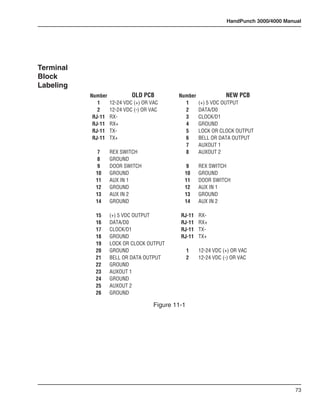
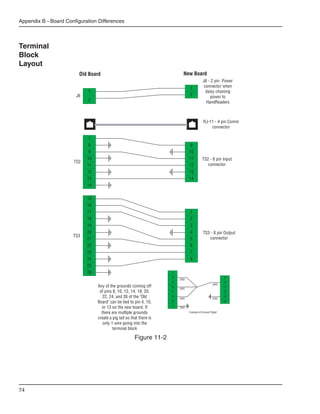
Wiring     The following tables provide the pinouts for the terminal strips on the
Examples   HandPunch.

           •	 “Table 2” on page 32 provides the pinouts for TS-2: Input Connections.
           •	 “Table 3” on page 32 provides the pinouts for TS-3: Card Reader and Output
              Connections.
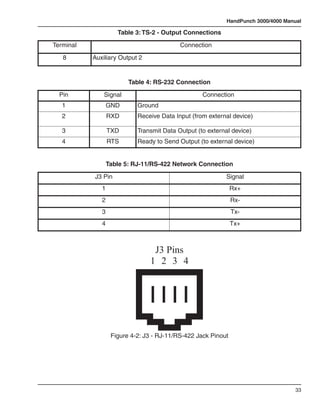
           •	 “Table 4” on page 33 provides the pinouts for the Serial RS-232 Connection.
           •	 “Table 5” on page 33 provides the pinouts for the RS-422 HandPunch to
              HandPunch Network Connection.


           The following figures provide the pinout diagrams for the RJ-11 and RS-232
           connectors:

           •	 “Figure 4-2” on page 33 provides the pinouts for J3, the RJ-11/RS-422
              Network Configuration.
           •	 “Figure 4-3” on page 34 provides the pinouts for J8, the RS-232 Serial Printer
              Connection.


                                                                                             31
Wiring Connections

                 The following figures provide typical HandPunch wiring diagrams.

                 •	   “Figure 4-4” on page 34 provides a typical Bell Output wiring diagram.
                 •	   “Figure 4-5” on page 35 provides a typical Lock Output wiring diagram.
                 •	   “Figure 4-6” on page 36 provides a typical Input wiring diagram.
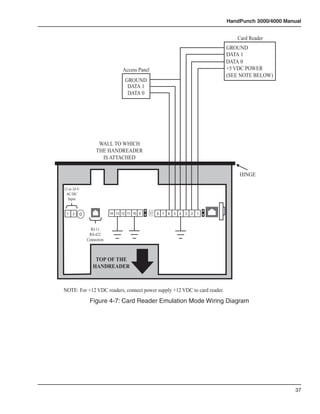
                 •	   “Figure 4-7” on page 37 provides a typical Card Reader Emulation Mode
                      wiring diagram.
                 •	   “Figure 4-8” on page 38 provides a typical Host PC Network System wiring
                      diagram.
                 •	   “Figure 4-9” on page 39  provides a typical Ethernet Network wiring diagram.
                 •	   “Figure 4-10” on page 40 provides a typical Modem Network wiring diagram.
                 •	   “Figure 4-11” on page 41 provides a typical Printer to HandPunch wiring
                      diagram.

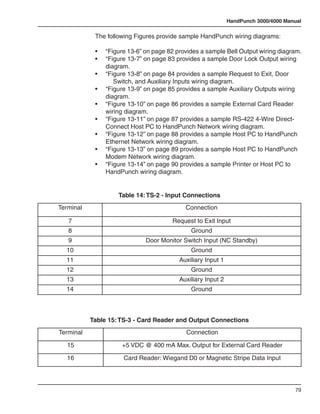
                                 Table 2: TS-2 - Input Connections
     Terminal                                        Connection
         9            Request to Exit Input
        10            Ground
        11            Door Monitor Switch Input (NC Standby)
        12            Auxiliary Input 1
        13            Ground
        14            Auxiliary Input 2


                                Table 3: TS-2 - Output Connections
        Terminal                                        Connection
             1              +5 VDC @ 400mA Max. Output for External Card Reader
             2              Card Reader: Wiegand D0 or Magnetic Stripe Data Input
             3              Card Reader: Wiegand D1 or Magnetic Stripe Clock Input
             4              Ground
             5              Lock Output or Wiegand D1 or Magnetic Stripe Clock Output
             6              Auxiliary Output 0 or Wiegand Data 0 or Magnetic Stripe Data Output
             7              Auxiliary Output 1zt


32
HandPunch 3000/4000 Manual

                     Table 3: TS-2 - Output Connections
Terminal                                   Connection
   8       Auxiliary Output 2


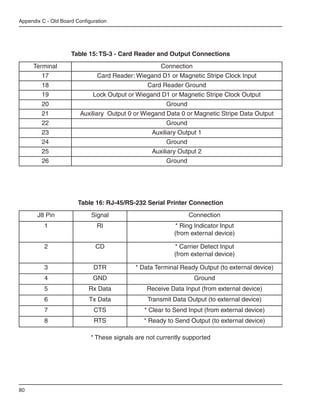
                         Table 4: RS-232 Connection
  Pin          Signal                              Connection
   1              GND       Ground
   2              RXD       Receive Data Input (from external device)

   3              TXD       Transmit Data Output (to external device)
   4              RTS       Ready to Send Output (to external device)


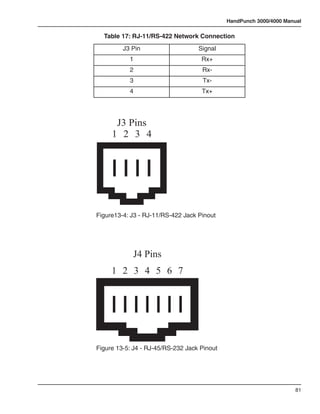
                  Table 5: RJ-11/RS-422 Network Connection
           J3 Pin                                          Signal
              1                                                Rx+
              2                                                Rx-
              3                                                Tx-
              4                                                Tx+


                                 J3 Pins
                                1 2 3 4


                   Figure 4-2: J3 - RJ-11/RS-422 Jack Pinout


                                                                                   33
Wiring Connections


                                                  RS-232 Pins
                                                  1           2         3               4


                                          Figure 4-3: J4 - RS-232 Jack Pinout
                                                                  * POWER SUPPLY
                                                                  +12 to 24 VDC Max
                                                                    +            -


                                                                                NC
                                                           *AUX                 NO
                                                                                            +       BELL   -
                                                           RELAY


                                                                                             WALL TO WHICH
                                                                                            THE HANDREADER
                                                                                              IS ATTACHED

                                                                                                               HINGE

                     12 to 24 V
                      AC/DC
                       Input


                      1   2                    14 13 12 11 10 9     8   7   6   5   4   3   2   1


                                    RJ-11
                                   RS-422
                                  Connection


                                     TOP OF THE
                                    HANDREADER


                                  * These components are not supplied by Recognition Systems, Inc.
                ** The operation of the Auxiliary Outputs depend upon how the inputs have been configured.
                                       Figure 4-4: Bell Output Wiring Diagram


34
HandPunch 3000/4000 Manual


                                                * POWER SUPPLY
                                                +12 to 24 VDC Max
                                                  +            -


                                                                    NC
                                                                                 *ELECTRIC LOCK
                                            *LOCK                   NO
                                                                                 + OR STRIKE -
                                            RELAY


                                                                              WALL TO WHICH
                                                                             THE HANDREADER
                                                                               IS ATTACHED

                                                                                                  HINGE

  12 to 24 V
   AC/DC
    Input


   1   2                     14 13 12 11 10 9       8   7   6   5   4    3   2   1


                 RJ-11
                RS-422
               Connection


                  TOP OF THE
                 HANDREADER


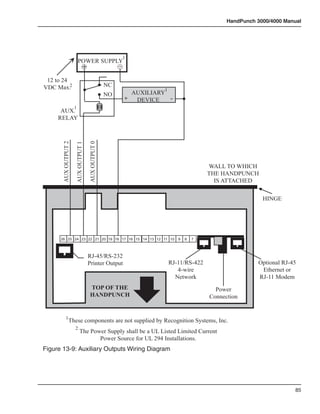
               * These components are not supplied by Recognition Systems, Inc.
** The operation of the Auxiliary Outputs depend upon how the inputs have been configured.
                            Figure 4-5: Lock Output Wiring Diagram


                                                                                                            35
Wiring Connections


                                                          N.O. DOOR SWITCH

                                                                             REQUEST TO EXIT
           SWITCH LEGEND


                                          AUX INPUT 2**


                                                          AUX INPUT 1**
           N.O. MOMENTARY*

           N.C. DOOR SWITCH*
                                                                                                                        WALL TO WHICH
                                                                                                                       THE HANDREADER
                                                                                                                         IS ATTACHED

                                                                                                                                        HINGE

                12 to 24 V
                 AC/DC
                  Input


                 1   2                        14 13 12 11 10 9                                 8   7   6   5   4   3   2   1


                               RJ-11
                              RS-422
                             Connection


                                TOP OF THE
                               HANDREADER


                             * These components are not supplied by Recognition Systems, Inc.
              ** The operation of the Auxiliary Inputs depend upon how the inputs have been configured.

         Figure 4-6: Request to Exit, Door Switch, and Auxiliary Inputs Wiring Diagram


36
HandPunch 3000/4000 Manual


                                                                                Card Reader
                                                                             GROUND
                                                                             DATA 1
                                                                             DATA 0
                                Access Panel                                 +5 VDC POWER
                                                                             (SEE NOTE BELOW)
                                 GROUND
                                  DATA 1
                                  DATA 0


                   WALL TO WHICH
                  THE HANDREADER
                    IS ATTACHED

                                                                                 HINGE

12 to 24 V
 AC/DC
  Input


 1   2                    14 13 12 11 10 9     8 7   6   5   4   3   2   1


               RJ-11
              RS-422
             Connection


                 TOP OF THE
                HANDREADER


NOTE: For +12 VDC readers, connect power supply +12 VDC to card reader.
              Figure 4-7: Card Reader Emulation Mode Wiring Diagram


                                                                                                    37
Wiring Connections

                         DC-102     RS-232 to 4-wire RS-422
                       Power Supply Data Converter (P/N DC-102)

                                                                                                                                                                                                                           Y
                                                                                                                                                                                                                       G
                                                                                                                                                                                                                   R
                                                                                                                                                                                                               B


                                                                                                                               DB-25                                                                                            * RS-422
                                                                                                                               Serial                                                     RJ-11 Jack Surface                     4-Wire
                                                                                                                                Port                                                         or Wall Plate                     (2 Twisted
                                                                                                                                                                                                                                  Pairs)
                                                                                                                                          Recogniti
                                                                                                                                                    on
                                                                                                                                                           Systems
                                                                                                                                                                       Inc.


                                                                                   1
                                                                                                   2
                                                                        4                                         3
                                                                                                                           Clear
                                                                                        5
                                                            7                                            6
                                                                                                                      F1
                                                                            8
                                                No  *                                        9
                                                                                                             F2
                                                                0
                                                                                No
                                                                                  #
                                                                                Yes
                                                                                                 Enter


                                                                                                                                                                                                                           Y
                                                                                                                                                                                                                       G
                                                                                                                                                                                                                   R
                                                                                                                                                                                                               B


                                                                                                                                                                                  J-3
                               HandPunch 1                                                                                                                                                                                      * RS-422
                                                                                                                                                                                                                                 4-Wire
                                                                                                                                                                                                                               (2 Twisted
                                                                                                                                    Recogniti
                                                                                                                                               on
                                                                                                                                                      Systems
                                                                                                                                                                Inc.
                                                                                                                                                                                                                                  Pairs)
                                                                    1
                                                                                   2
                                                        4                                          3
                                                                                                                  Clear
                                                                        5
                                            7                                            6
                                                                                                         F1
                                                            8
                                    No  *                                   9
                                                                                             F2
                                                0
                                                                No
                                                                  #
                                                                Yes
                                                                                 Enter


                                                                                                                                                                                                                           Y
                                                                                                                                                                                                                       G
                                                                                                                                                                                                                   R
                                                                                                                                                                                                               B


                                                                                                                                                                                  J-3
                               HandPunch 2
                                                                                                                                                                                                                                * RS-422
                                                                                                                                                                                                                                 4-Wire
                                                                                                                                                                                                                               (2 Twisted
                                                                                                                                                                                                                                  Pairs)
                                                                                                                                   Recogniti
                                                                                                                                            on
                                                                                                                                                    Systems
                                                                                                                                                              Inc.


                                                                1
                                                                                  2
                                                        4                                         3
                                                                                                              Clear
                                                                      5
                                            7                                           6
                                                                                                      F1
                                                            8
                                    *
                                   No
                                                                            9
                                                                                            F2
                                                0
                                                            No
                                                            Yes
                                                                #
                                                                                Enter


                                                                                                                                                                                                                           Y
                                                                                                                                                                                                                       G
                                                                                                                                                                                                                   R
                                                                                                                                                                                                               B


                                                                                                                                                                                  J-3
                              HandPunch X
                                                                                                                                                                                RSI Supplied Cable
                                                                                                                                                                                     (Silver)              To Next HandPunch
                                                                                                                                                                                                          31 HandPunches Max
             * Recommended Cable                                                                                                                                              B = Black   G = Green      4,000 Ft. (1220 meters)
                Belden #82723                                                                                                                                                 R = Red     Y = Yellow        Max Zone Length

        Figure 4-8: Host PC to RS-422 Direct-Connect Network System Wiring Diagram


38
HandPunch 3000/4000 Manual

                                                                                                                                                                                                                                                 RSI Supplied Cable (Black)

                                                                                                   HandPunch
                                                                    Recogniti
                                                                             on
                                                                                  Systems
                                                                                          Inc.


      7
              4

                  8
                      1

                          5
                                    2

                                          6
                                                   3

                                                       F1
                                                            Clear


                                                                                                   Modem Port                                                                                                                                                                    RJ-11 Telephone Outlet
  *
 No
                              9
                                              F2
          0
                  No
                  Yes
                      #
                                  Enter


                                                                                                                                                                                                                                                                                                 Y
                                                                                                 HandPunch RS-422                                                                                                                                                                            G
                                                                                                                                                                                                                                                                                       R
Modem Unit                                                                                          RJ-11 Port                                                                                                                                                                     B


                                                                                                                                                                                                                                                                                                      * RS-422
                                                                                                                                                                                                                                                             RJ-11 Jack Surface                        4-Wire
                                                                                                                                                                                                                                                                or Wall Plate                        (2 Twisted
                                                                                                                                                                                                                                                                                                        Pairs)
                                                                                                                                                                                                           Recogniti
                                                                                                                                                                                                                     on
                                                                                                                                                                                                                            Systems
                                                                                                                                                                                                                                        Inc.


                                                                                                                                                    1
                                                                                                                                                                    2
                                                                                                                                         4                                         3
                                                                                                                                                                                            Clear
                                                                                                                                                         5
                                                                                                                             7                                            6
                                                                                                                                                                                       F1
                                                                                                                                             8
                                                                                                                 No  *                                        9
                                                                                                                                                                              F2
                                                                                                                                 0
                                                                                                                                                 No
                                                                                                                                                   #
                                                                                                                                                 Yes
                                                                                                                                                                  Enter


                                                                                                                                                                                                                                                                                                 Y
                                                                                                                                                                                                                                                                                             G
                                                                                                                                                                                                                                                                                       R
                                                                                                                                                                                                                                                                                   B


                                                                                                  HandPunch 1                                                                                                                                                                                         * RS-422
                                                                                                                                                                                                                                                                                                       4-Wire
                                                                                                                                                                                                                                                                                                     (2 Twisted
                                                                                                                                                                                                     Recogniti
                                                                                                                                                                                                                on
                                                                                                                                                                                                                       Systems
                                                                                                                                                                                                                                 Inc.
                                                                                                                                                                                                                                                                                                        Pairs)
                                                                                                                                     1
                                                                                                                                                    2
                                                                                                                         4                                          3
                                                                                                                                                                                   Clear
                                                                                                                                         5
                                                                                                             7                                            6
                                                                                                                                                                          F1
                                                                                                                             8
                                                                                                     No  *                                   9
                                                                                                                                                              F2
                                                                                                                 0
                                                                                                                                 No
                                                                                                                                   #
                                                                                                                                 Yes
                                                                                                                                                  Enter


                                                                                                                                                                                                                                                                                                 Y
                                                                                                                                                                                                                                                                                             G
                                                                                                                                                                                                                                                                                       R
                                                                                                                                                                                                                                                                                   B


                                                                                                  HandPunch 2
                                                                                                                                                                                                                                                                                                      * RS-422
                                                                                                                                                                                                                                                                                                       4-Wire
                                                                                                                                                                                                                                                                                                     (2 Twisted
                                                                                                                                                                                                                                                                                                        Pairs)
                                                                                                                                                                                                    Recogniti
                                                                                                                                                                                                             on
                                                                                                                                                                                                                     Systems
                                                                                                                                                                                                                               Inc.


                                                                                                                                 1
                                                                                                                                                   2
                                                                                                                         4                                         3
                                                                                                                                                                               Clear
                                                                                                                                     5
                                                                                                             7                                           6
                                                                                                                                                                       F1
                                                                                                                             8
                                                                                                     *
                                                                                                    No
                                                                                                                                             9
                                                                                                                                                             F2
                                                                                                                 0
                                                                                                                             No
                                                                                                                             Yes
                                                                                                                                 #
                                                                                                                                                 Enter


                                                                                                                                                                                                                                                                                                 Y
                                                                                                                                                                                                                                                                                             G
                                                                                                                                                                                                                                                                                       R
                                                                                                                                                                                                                                                                                   B


                                                                                                  HandPunch X
                                                                                                                                                                                                                                                 RSI Supplied Cable
                                                                                                                                                                                                                                                      (Silver)                  To Next HandPunch
                                                                                                                                                                                                                                                                               31 HandPunches Max
                                                                                * Recommended Cable                                                                                                                                            B = Black    G = Green         4,000 Ft. (1220 meters)
                                                                                   Belden #82723                                                                                                                                               R = Red      Y = Yellow           Max Zone Length

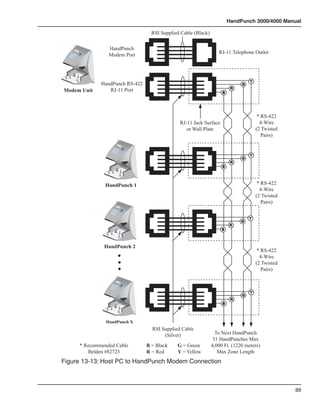
                                                            Figure 4-9: Host PC to HandPunch Ethernet Connection Diagram


                                                                                                                                                                                                                                                                                                                  39
Wiring Connections

                                                                                                                                                                                                                                                                       Ethernet Cable


                                                                                                                                                                                                                                                                                              Connection to
                                                                                                                                                                              HandPunch
                                                                                                                                                                                                                                                                                              Host Computer
                                                                                                                                                                             Ethernet Port
                                                                                   Recogniti
                                                                                            on
                                                                                                 Systems
                                                                                                           Inc.


                 *
                No
                     7
                             4

                                 8
                                     1

                                         5

                                             9
                                                   2

                                                         6

                                                             F2
                                                                  3

                                                                      F1
                                                                           Clear                                                                                                                                                                                                               via Ethernet
                         0
                                 No
                                 Yes
                                     #
                                                 Enter


                                                                                                                                                                                                             HandPunch                                                                                        Y
                                                                                                                                                                                                                                                                                                          G
              Ethernet Unit                                                                                                                                                                                   RS-422                                                                                  R
                                                                                                                                                                                                             RJ-11 Port                                                                           B


                                                                                                                                                                                                                                                                                                                   * RS-422
                                                                                                                                                                                                                                                                             RJ-11 Jack Surface                     4-Wire
                                                                                                                                                                                                                                                                                or Wall Plate                     (2 Twisted
                                                                                                                                                                                                                                                                                                                     Pairs)
                                                                                                                                                                                                                           Recogniti
                                                                                                                                                                                                                                     on
                                                                                                                                                                                                                                            Systems
                                                                                                                                                                                                                                                        Inc.


                                                                                                                                                                    1
                                                                                                                                                                                    2
                                                                                                                                                         4                                         3
                                                                                                                                                                                                            Clear
                                                                                                                                                                         5
                                                                                                                                             7                                            6
                                                                                                                                                                                                       F1
                                                                                                                                                             8
                                                                                                                                 No  *                                        9
                                                                                                                                                                                              F2
                                                                                                                                                 0
                                                                                                                                                                 No
                                                                                                                                                                   #
                                                                                                                                                                 Yes
                                                                                                                                                                                  Enter


                                                                                                                                                                                                                                                                                                              Y
                                                                                                                                                                                                                                                                                                          G
                                                                                                                                                                                                                                                                                                      R
                                                                                                                                                                                                                                                                                                  B


                                                                                                                  HandPunch 1                                                                                                                                                                                      * RS-422
                                                                                                                                                                                                                                                                                                                    4-Wire
                                                                                                                                                                                                                                                                                                                  (2 Twisted
                                                                                                                                                                                                                     Recogniti
                                                                                                                                                                                                                                on
                                                                                                                                                                                                                                       Systems
                                                                                                                                                                                                                                                 Inc.
                                                                                                                                                                                                                                                                                                                     Pairs)
                                                                                                                                                     1
                                                                                                                                                                    2
                                                                                                                                         4                                          3
                                                                                                                                                                                                   Clear
                                                                                                                                                         5
                                                                                                                             7                                            6
                                                                                                                                                                                          F1
                                                                                                                                             8
                                                                                                                     No  *                                   9
                                                                                                                                                                              F2
                                                                                                                                 0
                                                                                                                                                 No
                                                                                                                                                   #
                                                                                                                                                 Yes
                                                                                                                                                                  Enter


                                                                                                                                                                                                                                                                                                              Y
                                                                                                                                                                                                                                                                                                          G
                                                                                                                                                                                                                                                                                                      R
                                                                                                                                                                                                                                                                                                  B


                                                                                                                  HandPunch 2
                                                                                                                                                                                                                                                                                                                   * RS-422
                                                                                                                                                                                                                                                                                                                    4-Wire
                                                                                                                                                                                                                                                                                                                  (2 Twisted
                                                                                                                                                                                                                                                                                                                     Pairs)
                                                                                                                                                                                                                    Recogniti
                                                                                                                                                                                                                             on
                                                                                                                                                                                                                                     Systems
                                                                                                                                                                                                                                               Inc.


                                                                                                                                                 1
                                                                                                                                                                   2
                                                                                                                                         4                                         3
                                                                                                                                                                                               Clear
                                                                                                                                                       5
                                                                                                                             7                                           6
                                                                                                                                                                                       F1
                                                                                                                                             8
                                                                                                                     *
                                                                                                                    No
                                                                                                                                                             9
                                                                                                                                                                             F2
                                                                                                                                 0
                                                                                                                                             No
                                                                                                                                             Yes
                                                                                                                                                 #
                                                                                                                                                                 Enter


                                                                                                                                                                                                                                                                                                              Y
                                                                                                                                                                                                                                                                                                          G
                                                                                                                                                                                                                                                                                                      R
                                                                                                                                                                                                                                                                                                  B


                                                                                                                  HandPunch X
                                                                                                                                                                                                                                                                 RSI Supplied Cable
                                                                                                                                                                                                                                                                      (Silver)              To Next HandPunch
                                                                                                                                                                                                                                                                                           31 HandPunches Max
                             * Recommended Cable                                                                                                                                                                                                               B = Black    G = Green     4,000 Ft. (1220 meters)
                                Belden #82723                                                                                                                                                                                                                  R = Red      Y = Yellow       Max Zone Length

                                                                                                  Figure 4-10: Host PC to HandPunch Modem Connection


40
HandPunch 3000/4000 Manual


                             *Host Computer/Hyperterminal


                                                *Serial Printer

      WALL TO WHICH
     THE HANDREADER
       IS ATTACHED

                                                                          HINGE
                                                                                                           HINGE

12 to 24 V
 AC/DC
                                                                                                           4 Pin
  Input                                                                                                  Connector


 1    2                      14 13 12 11 10 9             8   7   6   5   4   3   2   1


                  RJ-11                                                                        J4
                 RS-422                                                                    RS-232 Jack
                Connection


                    TOP OF THE
                   HANDREADER


             * These components are not supplied by Recognition Systems, Inc.
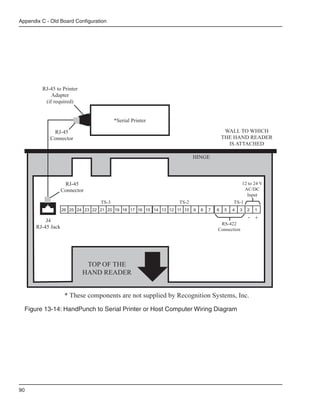
Figure 4-11: HandPunch to Serial Printer or Host Computer Wiring Diagram


                                                                                                                     41
Wiring Connections


                     This page is intentionally blank.


42
HandPunch 3000/4000 Manual


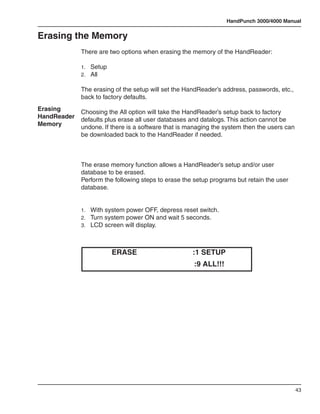
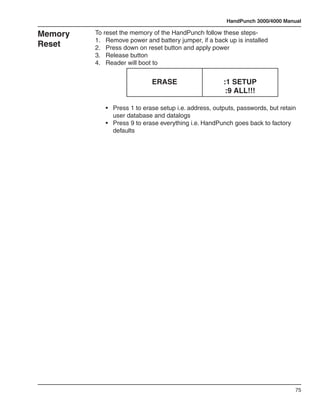
Erasing the Memory
             There are two options when erasing the memory of the HandReader:

             1.	 Setup
             2.	 All

             The erasing of the setup will set the HandReader’s address, passwords, etc.,
             back to factory defaults.
Erasing      Choosing the All option will take the HandReader’s setup back to factory
HandReader   defaults plus erase all user databases and datalogs. This action cannot be
Memory       undone. If there is a software that is managing the system then the users can
             be downloaded back to the HandReader if needed.


             The erase memory function allows a HandReader’s setup and/or user
             database to be erased.
             Perform the following steps to erase the setup programs but retain the user
             database.


             1.	 With system power OFF, depress reset switch.
             2.	 Turn system power ON and wait 5 seconds.
             3.	 LCD screen will display.


                         ERASE                       :1 SETUP
                                                     :9 ALL!!!


                                                                                             43
Planning an Installation


                           This page intentionally blank.


44
HandPunch 3000/4000 Manual

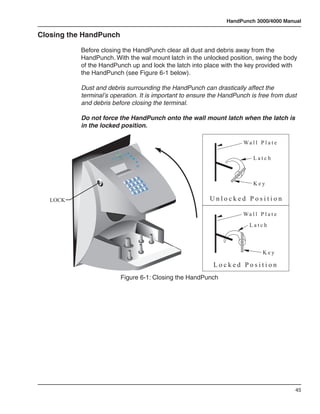
Closing the HandPunch

           Before closing the HandPunch clear all dust and debris away from the
           HandPunch. With the wal mount latch in the unlocked position, swing the body
           of the HandPunch up and lock the latch into place with the key provided with
           the HandPunch (see Figure 6-1 below).

           Dust and debris surrounding the HandPunch can drastically affect the
           terminal’s operation. It is important to ensure the HandPunch is free from dust
           and debris before closing the terminal.

           Do not force the HandPunch onto the wall mount latch when the latch is
           in the locked position.

                                                                               Wa l l P l a t e
                                            goceR
                                      noitin
                      .cnI s
                             metsyS
                                                                                   Latch


                                                                                   Key
                                                    oN


   LOCK                                                             Unlocked Position

                                                                               Wa l l P l a t e
                                                                                 Latch


                                                                                        Key

                                                                     Locked Position
                                      Figure 6-1: Closing the HandPunch


                                                                                                  45
Planning an Installation


                           This page intentionally blank.


46
HandPunch 3000/4000 Manual


Enter Command Menu
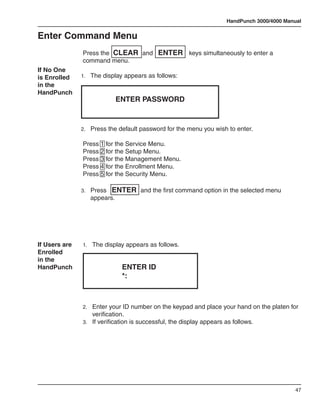
               Press the CLEAR and ENTER keys simultaneously to enter a
               command menu.
If No One
is Enrolled    1.	 The display appears as follows:
in the
HandPunch
                             ENTER PASSWORD


               2.	 Press the default password for the menu you wish to enter.

               Press 1 for the Service Menu.
               Press 2 for the Setup Menu.
               Press 3 for the Management Menu.
               Press 4 for the Enrollment Menu.
               Press 5 for the Security Menu.

               3.	 Press   ENTER and the first command option in the selected menu
                  appears.


If Users are   1.	 The display appears as follows.
Enrolled
in the
HandPunch                      ENTER ID
                               *:


               2.	 Enter your ID number on the keypad and place your hand on the platen for
                   verification.
               3.	 If verification is successful, the display appears as follows.


                                                                                             47
Enter a Command Menu


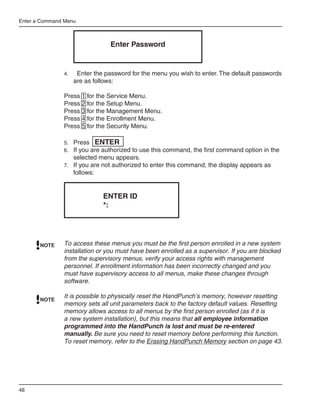
                                  Enter Password


               4.	    Enter the password for the menu you wish to enter. The default passwords
                     are as follows:

               Press 1 for the Service Menu.
               Press 2 for the Setup Menu.
               Press 3 for the Management Menu.
               Press 4 for the Enrollment Menu.
               Press 5 for the Security Menu.

               5.	 Press ENTER
               6.	 If you are authorized to use this command, the first command option in the
                     selected menu appears.
               7.	 If you are not authorized to enter this command, the display appears as
                     follows:


                                ENTER ID
                                *:


       NOTE    To access these menus you must be the first person enrolled in a new system
               installation or you must have been enrolled as a supervisor. If you are blocked
               from the supervisory menus, verify your access rights with management
               personnel. If enrollment information has been incorrectly changed and you
               must have supervisory access to all menus, make these changes through
               software.

               It is possible to physically reset the HandPunch’s memory, however resetting
       NOTE
               memory sets all unit parameters back to the factory default values. Resetting
               memory allows access to all menus by the first person enrolled (as if it is
               a new system installation), but this means that all employee information
               programmed into the HandPunch is lost and must be re-entered
               manually. Be sure you need to reset memory before performing this function.
               To reset memory, refer to the Erasing HandPunch Memory section on page 43.


48
HandPunch 3000/4000 Manual

Navigating   Once you have entered a command menu, there are three options available for
Command      navigating the command menu system
Menus
             •	   Press # to enter the command shown on the display.

             •	   Press * to step to the next command in the menu.
             •	   Press CLEAR to exit the command menu (pressing any numeric key also
                  exits the command menu). If you are in a command’s sub-menu, you may
                  have to press CLEAR multiple times to completely exit the command
                  menu.


                                                                                      49
Enter a Command Menu


                       This page is intentionally blank.


50
HandPunch 3000/4000 Manual

Programming the HandPunch

                 The HandPunch is programmed via a series of command menus. A summary
                 of the menus and commands is given in Table 6.

                           Table 6: Basic Command Mode Structure
  Service Menu          Setup Menu         Management      Enrollment Menu      Security Menu
                                              Menu
  Password 1             Password 2        Password 3        Password 4         Password 5
Calibrate             Set Language      Supervisor         Add Employee       Special Enroll
                                        Override
Status Display        Set Date Format   List Users         Add Supervisor
                      Set Time and      Set User Data      Remove User
                      Date
                      Set Address       Restrictions
                      Set ID Length
                      Set Serial
                      Set Reader Mode
                      Upgrade


                 To control access to the command menus, each menu has a unique password.
                 This password is requested as a part of the process for accessing each menu.
                 A supervisor must enter the correct password for that menu to access that
                 menu. The default menu passwords are given in Table 6.
                 To increase the security of the HandPunch, Schlage Biometrics recommends
                 changing the passwords for the command menus to new numbers. These
                 password numbers can be up to 10 digits long. This is done with the Set
                 Passwords command described on.

Authority Level
                 A second method for controlling access to the command menus is through
                 the use of Authority Levels. Authority Levels control whether or not a user has
                 access to the command menus.

                 •	 Level 0 is for a user who does not need access to any of the command
                    menus.
                 •	 Level 5 is assigned to Supervisors who need access to all of the command
                    menus.


                                                                                                51
Programming the HandPunch

                The HandPunch automatically assigns Authority Level 0 to users enrolled by
                the Add Employee command. Authority Level 5 is automatically assigned to
                users enrolled by the Add Supervisor command.
         NOTE   Until a user has been assigned to Supervisor, every user can access every
                menu. Once a user has been enrolled using the Add Supervisor (designated
                as a supervisor), all further user authority levels are assigned. The first person
                enrolled should be enrolled using the Add Supervisor command. This protects
                the integrity of the system. Schlage Biometrics strongly recommends enrolling
                at least two users as supervisors to ensure that more than one person has the
                authority to access all menus and all commands.


Programming Order
                When setting up HandPunch operations there is a general programming/
                operations order that should be followed.

                Set HandPunch Site Parameters – Set the HandPunch site parameters to
                     meet site-specific needs and usage: change the language used by the
                     display, set the HandPunch’s address, and set the serial communication
                     baud rate (used if you have installed a serial printer – see page 56).

                Enroll Supervisory Staff – Enroll yourself and the supervisors who will have
                     responsibility for HandPunch management. This is done through the
                     Enrollment Menu (see Supervisor Enrollment on page 66).

                The time, date, and ID number length are normally set by the host computer.
         NOTE   However, a supervisor can change these parameters at a HandPunch after
                setup information has been downloaded from the host computer.

                      These tasks are done through the Setup Menu. The instructions for
                      reader setup parameters begin on page 56.

                Train and Enroll Users – Train each user regarding HandPunch usage and
                      then Enroll each user. This is done through the Enrollment Menu. The
                      instructions for employee enrollment begin on page 66. Special enrollment
                      allows you to enroll people with disabilities that prevent them from using
                      the HandPunch properly. Employees with special enrollment ID numbers
                      can punch in without biometric verification.

                This means that anyone who knows a special enrollment ID number can
      WARNING   punch in. This function should only be used if absolutely necessary. The
                instructions for special enrollment begin on page 68.


52
HandPunch 3000/4000 Manual

System Management
          Onca a HandPunch system is in operation the following commands are used
          for system management.

          Supervisor Override – Review employee punch history, add bulk hours or
                dollars, or record a punch for an employee. This is done through the
                Management Menu. The instructions for supervisor override begin on
                page 61.
          List Users – List the users authorized to use a HandPunch. This is done
                through the Management Menu. The instructions for listing employees
                begin on page 62.
          Set User Data – Set a user’s reject threshold (adjusting the sensitivity applied
                when a HandPunch reads a hand) and assign time zones to users
                (defining when users are allowed to punch in and out). These tasks are
                done through the Management Menu. The instructions for setting user
                data begin on page 62.
          Restrictions – Set or remove time restrictions for when employees punch in.
                This is doen through the Management Menu. The instructions for setting
                in time restrictions begin on page 62.
          Remove User – Remove employees (and supervisors) from a HandPunch.
                This is done through the Enrollment Menu. The instructions for removing
                employees begin on page 66.
          Set Amnesty¹ – Temporarily remove time resrictions at a HandPunch to
                accommodate circumstances that may affect when employees punch
                in (such as inclement weather). This is done through the Management
                Menu. The instructions for setting amnesty begin on page 62.


                    1.	 On HandPunch 4000 units only.


                                                                                        53
Programming the HandPunch

Service Menu

                The Service menu commands provide information that help you determine if
                the HandPunch is performing within normal operating parameters and identify
                the status of the unit’s inputs and outputs. The following section provides a
                brief summary of the Service Menu commands.

        NOTE    There are no user serviceable parts inside the HandPunch.


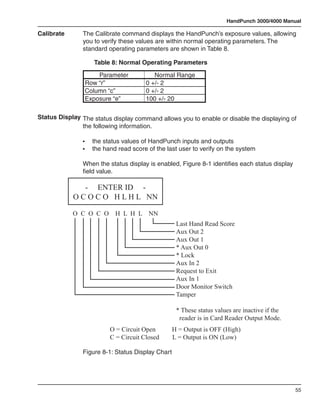
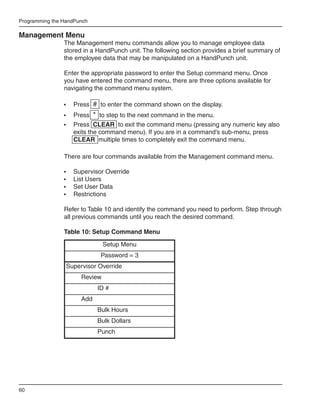
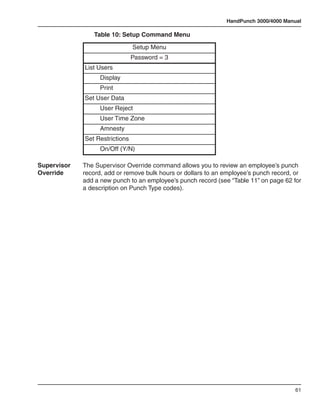
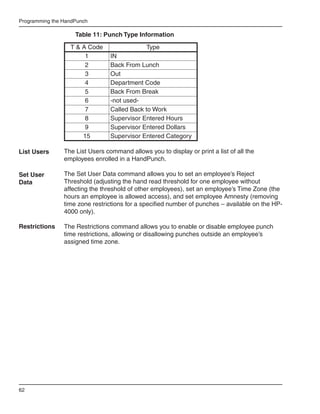
Navigating      Enter the appropriate password to enter the Service command menu. Once
the Service     you have entered the command menu, there are three options available for
Command         navigating the command menu system.
Menu
                •	   Press # to enter the command shown on the display.
                •	 Press * to step to the next command in the menu.
                •	 Press CLEAR to exit the command menu (pressing any numeric key also
                   exits the command menu). If you are in a command’s sub-menu, press
                   CLEAR multiple times to completely exit the command menu.
Service
Commands        There are two commands available from the Service command menu.

                •	   Calibrate
                •	   Status Display

                Refer to Table 7 and identify the command you need to perform. Step through
                all previous commands until you reach the desired command.


                              Table 7: Service Command Menu
                                         Service Menu
                                         Password = 1
                            Calibrate
                                    Recal (Y/N)
                            Status Display
                                    On/Off (Y/N)


54
HandPunch 3000/4000 Manual

Calibrate      The Calibrate command displays the HandPunch’s exposure values, allowing
               you to verify these values are within normal operating parameters. The
               standard operating parameters are shown in Table 8.

               	     Table 8: Normal Operating Parameters
                       Parameter           Normal Range
                   Row “r”              0 +/- 2
                   Column “c”           0 +/- 2
                   Exposure “e”         100 +/- 20

Status Display The status display command allows you to enable or disable the displaying of
               the following information.

               •	    the status values of HandPunch inputs and outputs
               •	    the hand read score of the last user to verify on the system

               When the status display is enabled, Figure 8-1 identifies each status display
               field value.

               - ENTER ID -
            O C O C O H L H L NN

            O C O C O        H L H L NN
                                                   Last Hand Read Score
                                                   Aux Out 2
                                                   Aux Out 1
                                                   * Aux Out 0
                                                   * Lock
                                                   Aux In 2
                                                   Request to Exit
                                                   Aux In 1
                                                   Door Monitor Switch
                                                   Tamper

                                                   * These status values are inactive if the
                                                    reader is in Card Reader Output Mode.
                           O = Circuit Open       H = Output is OFF (High)
                           C = Circuit Closed     L = Output is ON (Low)

               Figure 8-1: Status Display Chart


                                                                                               55
Programming the HandPunch

Setup Menu
                The Setup menu commands allow you to set the basic operating parameters
                for the HandPunch unit. The following section provides a brief summary of all
                the parameters that may be set on a HandPunch unit.

       NOTE     Once in the Command Menu, you can step through and set the parameters
                for each command sequentially. You do not have to exit command mode after
                setting any individual command.

Navigating      Enter the appropriate password to enter the Setup command menu. Once
the Setup       you have entered the command menu, there are three options available for
Command         navigating the command menu system.
Menu
                •	 Press # to enter the command shown on the display.
                •	 Press * to step to the next command in the menu.
                •	 Press CLEAR to exit the command menu (pressing any numeric key
                   also exits the command menu). If you are in a command’s sub-menu, press
                   CLEAR multiple times to completely exit the command menu.

Setup           There are six commands available from the Setup command menu:
Commands
                •	   Set Language
                •	   Set Date Format
                •	   Set Date and Time
                •	   Set Address
                •	   Set ID Length
                •	   Set Serial
                •	   Set Output Mode

                Refer to “Table 9” on page 57 and identify the command you need to perform.
                Step through all previous commands until you reach the desired command.


56
HandPunch 3000/4000 Manual


      Table 9: Setup Command Menu

                   Setup Menu

                Password = 2

Set Language

       Select Language

Set Date Format

       Select Date Format

Set Time and Date

       Month (MM)

       Day (DD)

       Year (YY)

       Hour (HH)

       Minute (MM)

Set Address

       New Address

Set ID Length

       New ID Length

       Set T & A Mode
         a
Set Serial

       RS-422 (Y/N)

       Select Baud Rate

       RS-232

       Select Baud Rate

       Use RS-232 for Printer or Host


                                                               57
Programming the HandPunch

                                 Table 9: Setup Command Menu

                                            Setup Menu
                                           Password = 2
                                    a
                        Set Serial
                                  Verify/Enter IP Address
                                  Verify/Enter Gateway
                                  Verify/Enter Host Bit
                        Set Output Mode
                                  For Lock & Auxiliary (Y/N)
                                  For Card Reader Output (Y/N)
                        Upgrade
                                  Code

                            a.	    The Set Serial command has different
                            	      values based on whether the HandPunch
                            	      unit is configured for serial or modem
                            	      communication versus Ethernet
                            	      communication.

Set Language The Set Language command allows the language shown on the HandPunch’s
             display to be “localized” for a variety of countries:

                -	   English	                                  -	   German
                -	   Japanese	                                 -	   Russian
                -	   French	                                   -	   Indonesian
                -	   Italian	                                  -	   Portuguese
                -	   Spanish	                                  -	   Polish

Set Date        The Set Date Format Command allows the date format shown on the
Format          HandPunch’s display to be “localized” for a variety of countries.

                -	   mm/dd/yy	                                 -	 mm-dd-yy
                -	   dd-MMM-yy	                                -	 MMM dd,yy
                -	   dd-mm-yy	                                 -	 ddMMMyyyy
                -	   dd/mm/yy

Set Time        The Set Time and Date command allows the HandPunch’s time and date to be
and Date        set. This is normally not necessary as the HandPunch’s time and date are set
                by the host computer.


58
HandPunch 3000/4000 Manual

Set Address    The Set Address command allows a unique address to be set for each
               HandPunch in a network. For proper operation, each HandPunch in the
               network must have a unique address. All units may use any address from 0 to
               254. All units are sent with the address set to 1.

Set ID Length The Set ID Length command allows you to reduce the number of keystrokes
              required to enter the ID number by eliminating the use of the ENTER key
              to complete an ID number entry. Once the ID Length is set, the HandPunch
              will automatically accept an ID number entry once the correct number of
              characters have been entered.

               Set ID Length does not apply when ID entry is made from a card reader. Once
               the ID Length is set, the T & A Mode Set command appears, allowing you
               to configure the HandPunch to prepare punch data for time and attendance
               software.

Set Serial     The Set Serial command allows you to set communication parameters
               depending upon the communication method for which the HandPunch has
               been configured. Different configuration parameters are entered based on if
               the unit is configured for a direct-connection or a modem connection, or if the
               unit is configured for Ethernet communication.

               The unit defaults to the RS-422 communication mode unless a modem or
               Ethernet module has been installed. The unit defaults to 9600 bps which is
               suitable for most communication applications.

               If an Ethernet module has been installed, the IP Address and Gateway and
               Subnet Mask must be set. The host bits should be left at 0, if communicating
               across a LAN.

Set Output     The Set Output Mode command allows you to set how the output relays
Mode           operate. The relays should be set based on the HandPunch application.

               Set the HandPunch to Lock/Auxiliary Relay mode if the unit is acting as door
               controller (this is the factory default setting).
               Set the HandPunch to Card Reader Emulation mode if the unit is outputting to
               an access control panel.

Upgrade        This Upgrade Menu is where the HandPunch code gets input to allow for a
               Memory Upgrade.


                                                                                              59
Programming the HandPunch

Management Menu
                The Management menu commands allow you to manage employee data
                stored in a HandPunch unit. The following section provides a brief summary of
                the employee data that may be manipulated on a HandPunch unit.

                Enter the appropriate password to enter the Setup command menu. Once
                you have entered the command menu, there are three options available for
                navigating the command menu system.

                •	   Press # to enter the command shown on the display.
                •	 Press * to step to the next command in the menu.
                •	 Press CLEAR to exit the command menu (pressing any numeric key also
                   exits the command menu). If you are in a command’s sub-menu, press
                   CLEAR multiple times to completely exit the command menu.

                There are four commands available from the Management command menu.

                •	   Supervisor Override
                •	   List Users
                •	   Set User Data
                •	   Restrictions

                Refer to Table 10 and identify the command you need to perform. Step through
                all previous commands until you reach the desired command.

                Table 10: Setup Command Menu
                                Setup Menu
                              Password = 3
                 Supervisor Override
                       Review
                             ID #
                       Add
                             Bulk Hours
                             Bulk Dollars
                             Punch


60
HandPunch 3000/4000 Manual

             	      Table 10: Setup Command Menu
                                    Setup Menu
                                    Password = 3
                 List Users
                      Display
                      Print
                 Set User Data
                      User Reject
                      User Time Zone
                      Amnesty
                 Set Restrictions
                      On/Off (Y/N)

Supervisor   The Supervisor Override command allows you to review an employee’s punch
Override     record, add or remove bulk hours or dollars to an employee’s punch record, or
             add a new punch to an employee’s punch record (see “Table 11” on page 62 for
             a description on Punch Type codes).


                                                                                       61
Programming the HandPunch

                	    Table 11: Punch Type Information
                    T & A Code                Type
                         1       IN
                         2       Back From Lunch
                         3       Out
                         4       Department Code
                         5       Back From Break
                         6       -not used-
                         7       Called Back to Work
                         8       Supervisor Entered Hours
                         9       Supervisor Entered Dollars
                        15       Supervisor Entered Category

List Users      The List Users command allows you to display or print a list of all the
                employees enrolled in a HandPunch.

Set User        The Set User Data command allows you to set an employee’s Reject
Data            Threshold (adjusting the hand read threshold for one employee without
                affecting the threshold of other employees), set an employee’s Time Zone (the
                hours an employee is allowed access), and set employee Amnesty (removing
                time zone restrictions for a specified number of punches – available on the HP-
                4000 only).

Restrictions    The Restrictions command allows you to enable or disable employee punch
                time restrictions, allowing or disallowing punches outside an employee’s
                assigned time zone.


62
HandPunch 3000/4000 Manual

Enrollment Menu
              Enrollment is the process of recording a hand image and associating it with
              an ID number. The first person to enroll in the HandPunch has access to
              all command menus. This person should enroll using the Add Supervisor
              command (see page 66). Once a supervisor has been enrolled, all further
              enrollments use the following rules:

              •	 A user enrolled through the Add Employee command (page 66) is assigned
                 Authority Level 0. This allows the user to punch in and/or gain access
                 through a door secured by the HandPunch.
              •	 A user enrolled through the Add Supervisor command (see page 66) is
                 assigned Authority Level 5. This allows the supervisor to punch in and
                 gain access through a door secured by the HandPunch, and it allows the
                 supervisor to access all command menus.

              Until a user has been assigned to Authority Level 5 using the Add Supervisor
       NOTE
              command, every user with Authority Level 0 can access every menu. This is
              done to ensure that the first person enrolled is able to access all the menus
              to perform all the programming required to support the HandPunch. Once a
              user has been enrolled using the Add Supervisor command, all further user
              authority levels are assigned as per the list above. This protects the integrity
              of the system by enacting the Authority Level rules described above. Schlage
              Biometrics strongly recommends enrolling at least two users as supervisors to
              ensure that more than one person has the authority to access all menus and
              all commands.

Navigating    Advance planning and training make enrollment fast and easy. Users
the Setup     should be informed on what to expect and how to place their hands on the
Command       HandPunch before you enroll them.
Menu
              Enter the appropriate password to enter the Setup command menu. Once
              you have entered the command menu, there are three options available for
              navigating the command menu system.

              •	   Press # to enter the command shown on the display.
              •	 Press # to step to the next command in the menu.
              •	 Press CLEAR to exit the command menu (pressing any numeric key also
                 exits the command menu). If you are in a command’s sub-menu, press
                 CLEAR multiple times to completely exit the command menu.


                                                                                            63
Programming the HandPunch

Preparation     Here are a few guidelines to help you prepare for an enrollment session:

                •	   You can enroll one person or a group of people during an enrollment
                     session.
                •	   Each user must have a unique personal identification (ID) number. It will
                     save you considerable time if you assign the ID numbers in advance (Refer
                     to the Design an ID Numbering System section on page 47).
                •	   The HandPunch will not accept two people with the same ID number.
                •	   If you enroll people using the last four digits of their phone numbers or
                     social security numbers, you may get duplicate numbers.
                •	   If you are enrolling large groups of people you may consider using an
                     enrollment trainer. It is a replica of a platen that is available through your
                     Schlage Biometrics reseller.

User            The HandPunch is easy to use and non-threatening. However, most
Education       people have never used a biometric HandPunch. Training users on how the
                HandPunch works and how to use it will eliminate most fears and concerns
                before they occur. Inform the users of these facts.

                •	   The HandPunch reads the shape of the hand, not the fingerprints or
                     palmprints.
                •	   It does not identify people. It confirms people’s identity.
                •	   It scans with an invisible light of the type used in TV remote controls.
                •	   It does not transfer germs any more than a doorknob or money.
                •	   It does not invade privacy; it guarantees it.
                •	   The enrollment process requires three or more reads to collect enough
                     information to create a template.

Proper Hand     For correct, consistent hand reads it is very important that your hand is placed
Placement       on the platen in the same manner every time. The following rules apply for
                proper hand placement on the platen also refer to “Figure 8-2” on page 65.

                •	   If you are wearing a ring, rotate the ring so the stone faces up in its normal
                     position.
                •	   Slide your right hand onto the platen rather like an airplane landing at the
                     airport.
                •	   Slide your hand forward until the web between your index and middle finger
                     stops against the Web Pin.
                •	   Keep your hand flat. You should feel the surface of the platen on your palm
                     and the underside of your fingers.
                •	   Close your fingers together until they touch the Finger Pins and watch the
                     hand diagram light display on the top panel.
                •	   The lights go out when you have properly placed your fingers. If a light
                     remains on, a finger is not in proper contact with its Finger Pin.


64
HandPunch 3000/4000 Manual


                                                                 WEB PIN


             Figure 8-2: Placing Your Hand on the Platen

Left Hand    Some right hands cannot be used in the HandPunch due to disabilities such
Enrollment   as missing fingers. You can enroll a user with the left hand facing palm side
             up. The techniques for left hand enrollment are the same as for standard
             enrollment. The user should keep the back of the hand flat against the platen
             and move the fingers against the web pin and the finger pins in the same
             manner as in standard enrollment. Users enrolled with the left hand must
             always verify with the left hand. Extra practice on placing the hand on the
             platen may be required to ensure correct, consistent hand reads.

Read Score   When a user uses the HandPunch, the display appears as follows:


                   OKAY (USER ID)
              SCORE IS: (SCORE NUMBER)


             The score number on the display reflects how accurately the user’s hand is
             placed on the platen (see page 64). Scores that vary greatly between low and
             high numbers are indicative of inconsistent hand placement. Scores above
             50 are indicative of improper hand placement or of a drastic change in the
             physical appearance of the hand.

             When this occurs, emphasize the importance of sliding the hand onto the
             platen and keeping the hand flat. Re-training and practice should lower a
             user’s score. It might be necessary to change a user’s reject threshold if the
             user has a mild disability. Re-enrollment might be necessary to create a new
             user template.


                                                                                              65
Programming the HandPunch

Enrollment      There are three commands available from the Enrollment command menu:
Commands
                •	    Add Employee
                •	    Add Supervisor
                •	    Remove User

                Refer to Table 12 to identify the command you need to perform. Step through
                all previous commands until you reach the desired command.


                	      Table 12: Enrollment Command Menu
                                     Service Menu
                                       Password = 4
                    Add Employee
                        ID #
                    Add Supervisor
                        ID #
                    Remove User
                        ID #

Add             The Add Employee command allows you to enroll a new employee into the
Employee        HandPunch.

Add             The Add Supervisor command allows you to enroll a new supervisor into the
Supervisor      HandPunch.

Remove          The Remove User command allows you to remove an employee or supervisor
User            from the HandPunch.


66
HandPunch 3000/4000 Manual

Special Menu
           The Special menu has one command – Special Enroll. This command
           accommodates users with disabilities that make it difficult or impossible to
           use a HandPunch in its standard way. The following section provides a brief
           description of the Special Menu command.

           Enter the appropriate password to enter the Special command menu. Once
           you have entered the command menu, there are three options available for
           navigating the command menu system.

           Press # to enter the command shown on the display.
           Press * to step to the next command in the menu.
           Press CLEAR to exit the command menu (pressing any numeric key also
           exits the command menu). If you are in a command’s sub-menu, press
           CLEAR multiple times to completely exit the command menu.

Special Command
           There is one command available from the Special command menu:

           •	    Special Enroll


           Refer to Table 13 and identify the command you need to perform. Step through
           all previous commands until you reach the desired command.

           	      Table 13: Special Command Menu
                                  Special Menu
                                  Password = 5
               Special Enroll
                    ID #
                    On/Off (Y/N)


                                                                                          67
Programming the HandPunch

Special Enroll The Special Enroll command allows a user to be enrolled such that the ID
               number is the primary criteria for determining access. A hand read is required,
               but is not verified against any stored identification data. A time zone value
               can be applied to the Special Enrollment ID number to limit access times (see
               page 62). The HandPunch default is for no time zone to be applied.

        NOTE
                Special Enrollment affects the integrity of the HandPunch terminal and should
                only be used as a last resort. Anyone who knows a Special Enroll ID number
                is granted access when the ID number is used. Before specially enrolling a
                user, try to alleviate verification problems by adjusting the individual user’s
                reject threshold (see page 62) or by using left hand enrollment (see page 65).


68
HandPunch 3000/4000 Manual

HandPunch Maintenance
               A minimum amount of system maintenance is required to keep HandPunchs
               fully functional. HandPunchs should be cleaned periodically to prevent an
               accumulation of dust from affecting the HandPunch’s readability. User Scores
               should be reviewed periodically to ensure the HandPunch is performing
               properly.

        NOTE There are NO user serviceable parts inside the HandPunch.

Cleaning the   Once a HandPunch system is in operation there are three HandPunch
HandPunch      commands that can assist with system maintenance. These commands are
               performed through the Service Menu. The instructions for these commands
               begin on page 54.

               •	   Calibrate – View HandPunch exposure values.
               •	   Status Display – Display HandPunch input/output status, the hand read
                    score of the last user to verify on the system.

               Inspect and clean the HandPunch regularly to maintain optimum performance.
               Clean the platen, side mirror, reflector, and the window above the platen using
               a clean cloth dampened with ordinary, non-abrasive window cleaner (see
               Figure 9-1 below). Start at the rear corners of the platen and work your way
               forward.
        NOTE
               DO NOT SPRAY CLEANING FLUID DIRECTLY INTO OR ON THE
               HandPunch.


               Figure 9-1: HandPunch Cleaning

User Score     Periodically check users’ scores (refer to the Read Score section on page
               65). Scores should average under 30. Occasionally a user will score above
               30. This is not necessarily an indication of poor performance. If a number of
               scores average over 30, clean the HandPunch and check scores again. If
               scores remain high, or if users are experiencing frequent rejections, run the
               Calibration command (see page 55).


                                                                                               69
Appendix A - Tips

Appendix A

Tips for a successful Installation
                    HandPunch
                    •	   Think of the HandPunch as a camera
                    •	   Clean the HandPunch before it gets dirty
                    •	   Use non-abrasive cleaners such as glass cleaners and non-abrasive and
                    	    clean cloths
                    •	   Make cleaning the HandPunch part of Janitorial program
                    •	   Do not remove the foam backing from the wall mounting plate
                    •	   Seal any holes made in the wall for wire routing, so that dust will not blow
                    	    into the HandPunch

                    Location
                    •	   Mount all HandPunchs in a network so that the top of the platen is 40” off
                    	    of the floor
                    •	   If an enrollment HandPunch is used make sure that it is placed with the
                    	    top platen 40” off of the floor and not sitting directly on top of a desk, this
                    	    will help to eliminate “bad enrollments”
                    •	   Mount the HandPunch so that it is not difficult or dangerous to verify then
                    	    open the door
                    •	   It is not recommended to mount the HandPunch in an area where there is	 	
                    	    airborne dust, in the path of direct sunlight, or where the HandPunch can
                    	    be exposed to water or corrosive gasses

                    Enrollment
                    •	 Educate the Enrollee on Hand Geometry
                    •	 Explain enrollment process
                    •	 Train Enrollee on hand placement
                    	  -Practice placing hand on platen
                    	  -Rotate rings to be stone-up
                    	  -Make sure hand is flat on platen
                    	  -Close finger towards the center of hand
                    	  -Fingers gently touch finger pins
                    •	 Let the enrollee enter in their own ID number during the enrollment
                    	  process, this forces the Enroller to step aside allowing the Enrollee to
                    	  stand in front of the HandPunch helping to eliminate “bad enrollments”
                    •	 If an enrollment HandReader is used make sure that it is placed with the
                       top of the platen 40” off of the floor and not sitting directly on top of a desk,
                       this will help to eliminate “bad enrollments”
                    •	 If an enrollment transaction fails:
                    	 -Retrain the user on correct placement and ensure that rings are rotated to 	
                    	 be stone-up then

70
HandPunch 3000/4000 Manual
	 -Try again to enroll the same hand
	 -Try to enroll the other hand (with the hand placed upside-down so the 		
	    thumb still contacts the thumb-pin on the platen)
•	 After enrollment, it is a good idea to let the enrollee enter their ID number
   and practice a verification transaction to ensure that the enrollment was
   high-quality.
•	 If a user consistently fails during verifications days/months/years later, re-
   enroll the user to ensure a high quality and up-to-date enrollment record.

Communication
•	   Make sure the Data Convertor is plugged in
•	   When starting a network for the first time bring one HandPunch up at a
	    time, this is a very easy way to find out where communication problems
	    may exist


                                                                              71
Appendix B - Board Configuration Differences

Appendix B


Noted Board Configuration Differences
                    Because of Schlage Biometrics’ camera retrofit of the HandPunch some
                    changes have been made to the main PCB and they are listed as follows:

                    •	 Dipswitches have been removed
                    	 -comm lines are terminated.
                    	 -RS-485 is set by wiring jumpers.
                    	 -memory is reset with a push-button reset and user interface with 			
                    	 keypad and LCD.
                    •	 The labeling of the terminal strips have changed. See “Figure 11-1” on
                    page 73.
                    •	 The configuration of the terminal strips have changed. See “Figure 11-2”
                    on page 74.
                    •	 Power has moved to the right side of the PCB.
                    •	 The RSS-232 RJ-45 receptacle has been replaced with a 4 pin Molex 	       	
                    	 connector on the left side of the PCB.
                    •	 A 2 pin Molex connector (J5) has been added to the board, next to the 	 	
                    	 reset button, to supply power for the LEDs. This connector should never be 	
                    	 unplugged. unless a modem or Ethernet is added to the PCB.
                    •	 The upgrading of the memory is now handled through software codes at 	 	
                    	 the HandPunch. Contact Order Entry for memory upgrades.


72
HandPunch 3000/4000 Manual


Terminal
Block
Labeling
           Number            OLD PCB          Number               NEW PCB
              1     12-24 VDC (+) OR VAC        1       (+) 5 VDC OUTPUT
              2     12-24 VDC (-) OR VAC        2       DATA/D0
            RJ-11   RX-                         3       CLOCK/D1
            RJ-11   RX+                         4       GROUND
            RJ-11   TX-                         5       LOCK OR CLOCK OUTPUT
            RJ-11   TX+                         6       BELL OR DATA OUTPUT
                                                7       AUXOUT 1
              7     REX SWITCH                  8       AUXOUT 2
              8     GROUND
              9     DOOR SWITCH                  9      REX SWITCH
             10     GROUND                      10      GROUND
             11     AUX IN 1                    11      DOOR SWITCH
             12     GROUND                      12      AUX IN 1
             13     AUX IN 2                    13      GROUND
             14     GROUND                      14      AUX IN 2

             15     (+) 5 VDC OUTPUT           RJ-11    RX-
             16     DATA/D0                    RJ-11    RX+
             17     CLOCK/D1                   RJ-11    TX-
             18     GROUND                     RJ-11    TX+
             19     LOCK OR CLOCK OUTPUT
             20     GROUND                          1   12-24 VDC (+) OR VAC
             21     BELL OR DATA OUTPUT             2   12-24 VDC (-) OR VAC
             22     GROUND
             23     AUXOUT 1
             24     GROUND
             25     AUXOUT 2
             26     GROUND

                                      Figure 11-1


                                                                                          73
Appendix B - Board Configuration Differences


Terminal
Block
Layout
                         Old Board                                           New Board
                                                                                             J6 - 2 pin Power
                                                                                 1            connector when
                            1                                                                  daisy chaining
                       J6                                                        2                power to
                            2                                                                  HandReaders


                                                                                             RJ-11 - 4 pin Comm
                                                                                                 connector

                            7
                            8                                                    9
                            9                                                    10
                            10                                                   11         TS2 - 6 pin Input
                      TS2
                            11                                                   12            connector
                            12                                                   13
                            13                                                   14
                            14


                            15
                            16
                            17                                                   1
                            18                                                   2
                            19                                                   3
                            20                                                   4           TS3 - 8 pin Output
                      TS3
                            21                                                   5              connector
                            22                                                   6
                            23                                                   7
                            24                                                   8
                            25
                            26                                        7
                                                                      8                                      9
                                                                           GRD
                                                                      9                                      10
                                                                                                      GRD
                                 Any of the grounds coming off        10
                                                                           GRD
                                                                                                             11
                                  of pins 8, 10, 12, 14, 18, 20,      11                                     12

                                    22, 24, and 26 of the "Old        12
                                                                           GRD                        GRD
                                                                                                             13

                                 Board" can be tied to pin 4, 10,     13                                     14

                                   or 13 on the new board. If         14
                                                                           GRD

                                   there are multiple grounds                    Example of Ground Pigtail

                                 create a pig tail so that there is
                                    only 1 wire going into the
                                          terminal block

                                                        Figure 11-2


74
HandPunch 3000/4000 Manual

Memory   To reset the memory of the HandPunch follow these steps-
         1.	 Remove power and battery jumper, if a back up is installed
Reset    2.	 Press down on reset button and apply power
         3.	 Release button
         4.	 Reader will boot to


                              ERASE                      :1 SETUP
                                                          :9 ALL!!!

         	 •	   Press 1 to erase setup i.e. address, outputs, passwords, but retain 	 	
         		     user database and datalogs
         	 •	   Press 9 to erase everything i.e. HandPunch goes back to factory 	 	
         		     defaults


                                                                                    75
Appendix C - Old Board Configuration

Appendix C


Old Board Configuration Information

Wall Plate Installation
                   1.	 Loosen the three bottom mounting screws until there is approximately 1/8 		
                   	 inch (3 mm) clearance between the screw head and the wall plate.
                   2.	 Remove the HandPunch from its carton.
                   3.	 At the base of the HandPunch is a piano hinge with three keyhole shaped
                   	 slots that correspond with the three lower mounting screws. Align and 		
                   	 hang the HandPunch from the three lower mounting screws (see below).
                                                   HOLE
                                 2 UPPER SCREWS


                                                             SURFACE
                                                             CONDUIT
                                                             ENTRY


                                                                       KEYHOLE
                                                                       HOLES


                        3 LOWER
                        MOUNTING
                        SCREWS


                                                          REAR OF TERMINAL


                  Figure 13-1: Attaching the HandPunch to the Wall Plate

                  4.	 Tighten all three lower mounting screws.
                  5.	 The HandPunch is now ready for its wiring connections.


76
HandPunch 3000/4000 Manual


Grounding
         Terminal 1 and the center pin of jack J12 are connected together. Terminal 2 and
    NOTE
         the sleeve of jack J12 are connected together.
         Use any one of the following ground terminals to make the earth ground
    NOTE connection: 8, 10, 12, 14, 18, 20, 22, 24, or 26. Do NOT use terminal 2 to
         establish the earth ground connection; terminal 2 is not directly connected to
         ground.
                      7             26 25 24 23 22 21 20 19 18 17 16 15 14 13 12 11 10 9 8


                                                                                                                 CARD
                                                                                                                READER
                         SWITCH INPUTS                                                                           INPUT
                                                                                                                                                                                    OUTPUTS


                                                                                                                                                               LOCK OR CLOCK
                                                                                       AUX IN 2
                                                                   AUX IN 1
                      REX SWITCH


                                                                                                           +5 VDC OUTPUT


                                                                                                                                        CLOCK INPUT
                                   GROUND


                                                          GROUND


                                                                              GROUND


                                                                                                  GROUND


                                                                                                                                                      GROUND


                                                                                                                                                                               GROUND


                                                                                                                                                                                                       GROUND
                                                                                                                                                                                                                AUXOUT 1
                                                                                                                                                                                                                           GROUND
                                                                                                                                                                                                                                    AUXOUT 2
                                                                                                                                                                                                                                               GROUND
                                            DOOR SWITCH


                                                                                                                                                                                        BELL OR DATA
                                                                                                                           DATA INPUT
                      7 8 9 10 11 12 13 14 15 16 17 18 19 20 21 22 23 24 25 26


                                        EARTH GROUND                                                                                    CONNECTION PINS


           Figure 13-2: Earth Ground Connection Terminals

           There are two standard methods for providing earth grounding to HandPunch
           units:

           •	 earth grounding all units (see 15)
           •	 carrying an earth ground to each unit (see 16)

           Earth ground all units when there is a good earth ground source near each unit
           and/or when there are very long cable runs between units.

           Carry an earth ground to each unit when there are no earth grounds convenient
           to the unit and the unit’s power supply is floating.


                                                                                                                                                                                                                                                        77
Appendix C - Old Board Configuration


Wiring Connections
                 Once the HandPunch is attached to the wall plate the wiring connections to the
                 HandPunch can be made (see Figure 13-3 below).

                                                   WALL                                 Wall Plate


                                   8 1 26        15 14    76    1


                                                                                                      Top of
                  RS-232 RJ-45                                                                       Terminal
                                            TS-1 Terminals 6 to 1      Backup Battery
                                                                            Jumper       5 4 3 2 1 OFF
        TS-3 Terminals 26 to 15
                                                            Optional Modem
                                                             or Ethernet Jack                        ON
          TS-2 Terminals 14 to 7
                                             Top of Hand Reader                         Dip Switches

                 Figure 13-3: Wiring Connections and Dip Switches

Wiring Examples
                 The following Tables provide the pin outs for the terminal strips on the
                 HandPunch.

                 •	   “Table 14” on page 79 provides the pinouts for TS-2 – Input Connections.
                 •	   “Table 15” on page 79 provides the pinouts for TS-3 – Card Reader and Output
                 	    Connections.
                 •	   “Table 16” on page 80 provides the pinouts for the RJ-45/RS-232 Serial Printer
                 	    or Host Computer Connection.
                 •	   “Table 17” on page 81 provides the pinouts for the RJ-11/RS-422 HandPunch-
                 	    to-HandPunch Network Connection.

                 The following Figures provide pinout diagrams for the RJ connectors.

                 •	 Figure 13-4 on 81 provides the pinouts for J3, the RJ-11/RS-422 				
                 Network Connection.
                 •	 “Figure 13-5” on page 81 provides the pinouts for J8, the RJ-45/RS-232 Serial		
                 	 Printer Connection.


78
HandPunch 3000/4000 Manual

            The following Figures provide sample HandPunch wiring diagrams:

            • 	 “Figure 13-6” on page 82 provides a sample Bell Output wiring diagram.
            • 	 “Figure 13-7” on page 83 provides a sample Door Lock Output wiring 		
            	 diagram.
            • 	 “Figure 13-8” on page 84 provides a sample Request to Exit, Door 		
            		 Switch, and Auxiliary Inputs wiring diagram.
            • 	 “Figure 13-9” on page 85 provides a sample Auxiliary Outputs wiring 		
            	 diagram.
            • 	 “Figure 13-10” on page 86 provides a sample External Card Reader 		
            	 wiring diagram.
            • 	 “Figure 13-11” on page 87 provides a sample RS-422 4-Wire Direct-		
            	 Connect Host PC to HandPunch Network wiring diagram.
            • 	 “Figure 13-12” on page 88 provides a sample Host PC to HandPunch 		
            	 Ethernet Network wiring diagram.
            • 	 “Figure 13-13” on page 89 provides a sample Host PC to HandPunch 		
            	 Modem Network wiring diagram.
            • 	 “Figure 13-14” on page 90 provides a sample Printer or Host PC to 		
            	 HandPunch wiring diagram.


                    Table 14: TS-2 - Input Connections
Terminal                                    Connection

   7                                   Request to Exit Input
   8                                          Ground
   9                         Door Monitor Switch Input (NC Standby)
  10                                          Ground
  11                                     Auxiliary Input 1
  12                                          Ground
  13                                     Auxiliary Input 2
  14                                          Ground


           Table 15: TS-3 - Card Reader and Output Connections
Terminal                                    Connection

  15                 +5 VDC @ 400 mA Max. Output for External Card Reader

  16                  Card Reader: Wiegand D0 or Magnetic Stripe Data Input


                                                                                    79
Appendix C - Old Board Configuration


                     Table 15: TS-3 - Card Reader and Output Connections
     Terminal                                         Connection
         17                     Card Reader: Wiegand D1 or Magnetic Stripe Clock Input
         18                                      Card Reader Ground
         19                   Lock Output or Wiegand D1 or Magnetic Stripe Clock Output
         20                                             Ground
         21              Auxiliary Output 0 or Wiegand Data 0 or Magnetic Stripe Data Output
         22                                             Ground
         23                                        Auxiliary Output 1
         24                                             Ground
         25                                        Auxiliary Output 2
         26                                             Ground


                        Table 16: RJ-45/RS-232 Serial Printer Connection
       J8 Pin                Signal                              Connection
          1                     RI                         * Ring Indicator Input
                                                           (from external device)

          2                    CD                          * Carrier Detect Input
                                                           (from external device)

          3                   DTR            * Data Terminal Ready Output (to external device)
          4                   GND                                  Ground
          5                 Rx Data              Receive Data Input (from external device)
          6                 Tx Data              Transmit Data Output (to external device)
          7                   CTS               * Clear to Send Input (from external device)
          8                   RTS               * Ready to Send Output (to external device)

                             * These signals are not currently supported


80
HandPunch 3000/4000 Manual

  Table 17: RJ-11/RS-422 Network Connection
         J3 Pin                    Signal
           1                        Rx+
           2                        Rx-
           3                        Tx-
           4                        Tx+


      J3 Pins
     1 2 3 4


Figure13-4: J3 - RJ-11/RS-422 Jack Pinout


            J4 Pins
     1 2 3 4 5 6 7


Figure 13-5: J4 - RJ-45/RS-232 Jack Pinout


                                                                    81
Appendix C - Old Board Configuration


                                                                               1
                                                     POWER SUPPLY
                                                      +         -

                                                                                                   2
                                        NC                                         12 to 24 VDC Max.
                                        NO
                                                          1
                                                   BELL
                                          1
                                    BELL
                                   RELAY


                                                                                    WALL TO WHICH
                                                                                   THE HAND PUNCH
                                                                                     IS ATTACHED


                                                                                                        HINGE


              26 25 24 23 22 21 20 19 18 17 16 15 14 13 12 11 10   9   8   7


                             RJ-45/RS-232
                             Printer Output                   RJ-11/RS-422                             Optional RJ-45
                                                                 4-wire                                 Ethernet or
                                                                Network                                RJ-11 Modem
                              TOP OF THE                                              Power
                              HANDPUNCH                                             Connection


                1
                    These components are not supplied by Recognition Systems, Inc.
                      2
                          The Power Supply shall be a UL Listed Limited Current
                                 Power Source for UL 294 Installations.


       Figure 13-6: Bell Output Wiring Diagram


82
HandPunch 3000/4000 Manual


                                            1
                          POWER SUPPLY
                           +         -

12 to 24 VDC Max.2                   NC
                                     NO     ELECTRIC LOCK1
                                            + OR STRIKE -


                                      1
                               LOCK
                               RELAY


                                                                       WALL TO WHICH
                                                                      THE HAND PUNCH
                                                                        IS ATTACHED


                                                                                       HINGE


     26 25 24 23 22 21 20 19 18 17 16 15 14 13 12 11 10   9   8   7


                    RJ-45/RS-232
                    Printer Output                  RJ-11/RS-422                      Optional RJ-45
                                                       4-wire                          Ethernet or
                                                      Network                         RJ-11 Modem
                     TOP OF THE                                         Power
                     HANDPUNCH                                        Connection


         1
             These components are not supplied by Recognition Systems, Inc.
               2
                   The Power Supply shall be a UL Listed Limited Current
                          Power Source for UL 294 Installations.

Figure 13-7: Door Lock Output Wiring Diagram


                                                                                                       83
Appendix C - Old Board Configuration


                                                                                                                  N.O. REQUEST TO EXIT
                                                                                           N.C. DOOR SWITCH
                             SWITCH LEGEND


                                                           2


                                                                         2
                                                           AUX INPUT 2

                                                                         AUX INPUT 1
                                                      1
                             N.C. DOOR SWITCH
                                                  1
                             N.O. MOMENTARY
                                                                                                                                                  WALL TO WHICH
                                                                                                                                                 THE HAND PUNCH
                                                                                                                                                   IS ATTACHED


                                                                                                                                                                  HINGE


                                        14 13 12 11 10 9                        8      7           6          5           4              3   2    1


                              RJ-11/RS-422                                                                                                                           RS-232
                                Network                                                                                                                           Printer Output
  Power
Connections                                                                                                                                  Optional RJ-45
                                    TOP OF THE
                                    HANDPUNCH                                                                                                 Ethernet or
                                                                                                                                             RJ-11 Modem

                         1
                             These components are not supplied by Recognition Systems, Inc.
                     2
                         The Aux 1 and Aux 2 input contact states are programmable within
                                              the HandPunch unit.

Figure 13-8: Request to Exit, Door Switch, and Auxiliary Inputs Wiring Diagram


84
HandPunch 3000/4000 Manual


                                                        1
                         POWER SUPPLY
                          +         -

 12 to 24
VDC Max.2                                          NC
                                                                  1
                                                   NO     AUXILIARY
                                                        +  DEVICE   -
                     1
      AUX.
     RELAY
                                    AUX OUTPUT 0
      AUX OUTPUT 2

                     AUX OUTPUT 1


                                                                                     WALL TO WHICH
                                                                                     THE HANDPUNCH
                                                                                       IS ATTACHED


                                                                                                       HINGE


      26 25 24 23 22 21 20 19 18 17 16 15 14 13 12 11 10                 9   8   7


                                    RJ-45/RS-232
                                    Printer Output                    RJ-11/RS-422                    Optional RJ-45
                                                                         4-wire                        Ethernet or
                                                                        Network                       RJ-11 Modem
                                      TOP OF THE                                       Power
                                      HANDPUNCH                                      Connection


           1
               These components are not supplied by Recognition Systems, Inc.
                     2
                           The Power Supply shall be a UL Listed Limited Current
                                  Power Source for UL 294 Installations.
Figure 13-9: Auxiliary Outputs Wiring Diagram


                                                                                                                   85
Appendix C - Old Board Configuration


                                                                                              ABA-Track II
                                                                                        Magnetic Stripe Card Reader
                                                                                                 GROUND
                                                                                                 CLOCK
     Access Control                                                                              DATA
         Panel                                                                                   +5 VDC POWER
                                                                                                 (SEE NOTE BELOW)
        CLOCK
       GROUND


                                                                                                  N.C. DOOR SWITCH
         DATA


                                                                                                                     REQUEST TO EXIT
                                                                                                                                            SWITCH LEGEND


                                                                  2


                                                                                 AUX INPUT 1 2
                                                                   AUX INPUT 2
                                                                                                                                            N.C. DOOR SWITCH 1
         AUX OUTPUT 2

                        AUX OUTPUT 1


                                                                                                                                                             1
                                                                                                                                            N.O. MOMENTARY

                                                                                                                                       WALL TO WHICH
                                                                                                                                       THE HANDPUNCH
                                                                                                                                         IS ATTACHED


                                                                                                                                                          HINGE

                                                                                                                                                              J6
                                                                                                                                                        +12 VDC for
                                                                                                                                                       12 Volt External
                                                                                                                                                        Card Readers
        26 25 24 23 22 21 20 19 18 17 16 15 14 13 12 11 10 9 8 7

                                       RJ-45/RS-232
                                       Printer Output                                             RJ-11/RS-422                                         Optional RJ-45
                                                                                                     4-wire                                             Ethernet or
                                                                                                    Network                                            RJ-11 Modem

                                                                                                                                        HandPunch
                                          TOP OF THE
                                                                                                                                          Power
                                         HAND READER
                                                                                                                                        Connection

                                          1
                                              These components are not supplied by Recognition Systems, Inc.
                                         2
                                             The Aux 1 and Aux 2 input contact states are programmable within
                                                                  the HandPunch unit.
                        NOTE: For +12 VDC magnetic stripe readers, connect the magnetic stripe reader
                                         power supply to J6 on the Hand Punch.

 Figure 13-10: External Card Reader Wiring DIagram


86
HandPunch 3000/4000 Manual

                    DC-102     RS-232 to 4-wire RS-422
                  Power Supply Data Converter (P/N DC-102)

                                                                                                                                                                                                                     Y
                                                                                                                                                                                                                 G
                                                                                                                                                                                                             R
                                                                                                                                                                                                         B


                                                                                                                          DB-25                                                                                           * RS-422
                                                                                                                          Serial                                                    RJ-11 Jack Surface                     4-Wire
                                                                                                                           Port                                                        or Wall Plate                     (2 Twisted
                                                                                                                                                                                                                            Pairs)
                                                                                                                                    Recognit
                                                                                                                                               ion
                                                                                                                                                     Systems
                                                                                                                                                                 Inc.


                                                                              1
                                                                                              2
                                                                   4                                         3
                                                                                                                      Clear
                                                                                   5
                                                       7                                            6
                                                                                                                 F1
                                                                       8
                                           No  *                                        9
                                                                                                        F2
                                                           0
                                                                           No
                                                                             #
                                                                           Yes
                                                                                            Enter


                                                                                                                                                                                                                     Y
                                                                                                                                                                                                                 G
                                                                                                                                                                                                             R
                                                                                                                                                                                                         B


                                                                                                                                                                            J-3
                          HandPunch 1                                                                                                                                                                                     * RS-422
                                                                                                                                                                                                                           4-Wire
                                                                                                                                                                                                                         (2 Twisted
                                                                                                                               Recognit
                                                                                                                                         ion
                                                                                                                                                Systems
                                                                                                                                                          Inc.
                                                                                                                                                                                                                            Pairs)
                                                               1
                                                                              2
                                                   4                                          3
                                                                                                             Clear
                                                                   5
                                       7                                            6
                                                                                                    F1
                                                       8
                               No  *                                   9
                                                                                        F2
                                           0
                                                           No
                                                             #
                                                           Yes
                                                                            Enter


                                                                                                                                                                                                                     Y
                                                                                                                                                                                                                 G
                                                                                                                                                                                                             R
                                                                                                                                                                                                         B


                                                                                                                                                                            J-3
                          HandPunch 2
                                                                                                                                                                                                                          * RS-422
                                                                                                                                                                                                                           4-Wire
                                                                                                                                                                                                                         (2 Twisted
                                                                                                                                                                                                                            Pairs)
                                                                                                                              Recognit
                                                                                                                                      ion
                                                                                                                                               Systems
                                                                                                                                                         Inc.


                                                           1
                                                                             2
                                                   4                                         3
                                                                                                         Clear
                                                                 5
                                       7                                           6
                                                                                                 F1
                                                       8
                               *
                              No
                                                                       9
                                                                                       F2
                                           0
                                                       No
                                                       Yes
                                                           #
                                                                           Enter


                                                                                                                                                                                                                     Y
                                                                                                                                                                                                                 G
                                                                                                                                                                                                             R
                                                                                                                                                                                                         B


                                                                                                                                                                            J-3
                         HandPunch X
                                                                                                                                                                          RSI Supplied Cable
                                                                                                                                                                               (Silver)              To Next HandPunch
                                                                                                                                                                                                    31 HandPunches Max
        * Recommended Cable                                                                                                                                             B = Black   G = Green      4,000 Ft. (1220 meters)
           Belden #82723                                                                                                                                                R = Red     Y = Yellow        Max Zone Length
Figure 13-11: RS-422 4-Wire Direct-Connect Host PC to HandPunch Connection


                                                                                                                                                                                                                                  87
Appendix C - Old Board Configuration

                                                                                                                                                                                                                                                                        Ethernet Cable


                                                                                                                                                                                                                                                                                               Connection to
                                                                                                                                                                               HandPunch
                                                                                                                                                                                                                                                                                               Host Computer
                                                                                                                                                                              Ethernet Port
                                                                                      Recogniti
                                                                                               on
                                                                                                    Systems
                                                                                                            Inc.


                    *
                   No
                        7
                                4

                                    8
                                        1

                                            5

                                                9
                                                      2

                                                            6

                                                                F2
                                                                     3

                                                                         F1
                                                                              Clear                                                                                                                                                                                                             via Ethernet
                            0
                                    No
                                    Yes
                                        #
                                                    Enter


                                                                                                                                                                                                              HandPunch                                                                                        Y
                                                                                                                                                                                                                                                                                                           G
                 Ethernet Unit                                                                                                                                                                                 RS-422                                                                                  R
                                                                                                                                                                                                              RJ-11 Port                                                                           B


                                                                                                                                                                                                                                                                                                                    * RS-422
                                                                                                                                                                                                                                                                              RJ-11 Jack Surface                     4-Wire
                                                                                                                                                                                                                                                                                 or Wall Plate                     (2 Twisted
                                                                                                                                                                                                                                                                                                                      Pairs)
                                                                                                                                                                                                                            Recogniti
                                                                                                                                                                                                                                      on
                                                                                                                                                                                                                                             Systems
                                                                                                                                                                                                                                                         Inc.


                                                                                                                                                                     1
                                                                                                                                                                                     2
                                                                                                                                                          4                                         3
                                                                                                                                                                                                             Clear
                                                                                                                                                                          5
                                                                                                                                              7                                            6
                                                                                                                                                                                                        F1
                                                                                                                                                              8
                                                                                                                                  No  *                                        9
                                                                                                                                                                                               F2
                                                                                                                                                  0
                                                                                                                                                                  No
                                                                                                                                                                    #
                                                                                                                                                                  Yes
                                                                                                                                                                                   Enter


                                                                                                                                                                                                                                                                                                               Y
                                                                                                                                                                                                                                                                                                           G
                                                                                                                                                                                                                                                                                                       R
                                                                                                                                                                                                                                                                                                   B


                                                                                                                   HandPunch 1                                                                                                                                                                                      * RS-422
                                                                                                                                                                                                                                                                                                                     4-Wire
                                                                                                                                                                                                                                                                                                                   (2 Twisted
                                                                                                                                                                                                                      Recogniti
                                                                                                                                                                                                                                 on
                                                                                                                                                                                                                                        Systems
                                                                                                                                                                                                                                                  Inc.
                                                                                                                                                                                                                                                                                                                      Pairs)
                                                                                                                                                      1
                                                                                                                                                                     2
                                                                                                                                          4                                          3
                                                                                                                                                                                                    Clear
                                                                                                                                                          5
                                                                                                                              7                                            6
                                                                                                                                                                                           F1
                                                                                                                                              8
                                                                                                                      No  *                                   9
                                                                                                                                                                               F2
                                                                                                                                  0
                                                                                                                                                  No
                                                                                                                                                    #
                                                                                                                                                  Yes
                                                                                                                                                                   Enter


                                                                                                                                                                                                                                                                                                               Y
                                                                                                                                                                                                                                                                                                           G
                                                                                                                                                                                                                                                                                                       R
                                                                                                                                                                                                                                                                                                   B


                                                                                                                   HandPunch 2
                                                                                                                                                                                                                                                                                                                    * RS-422
                                                                                                                                                                                                                                                                                                                     4-Wire
                                                                                                                                                                                                                                                                                                                   (2 Twisted
                                                                                                                                                                                                                                                                                                                      Pairs)
                                                                                                                                                                                                                     Recogniti
                                                                                                                                                                                                                              on
                                                                                                                                                                                                                                      Systems
                                                                                                                                                                                                                                                Inc.


                                                                                                                                                  1
                                                                                                                                                                    2
                                                                                                                                          4                                         3
                                                                                                                                                                                                Clear
                                                                                                                                                        5
                                                                                                                              7                                           6
                                                                                                                                                                                        F1
                                                                                                                                              8
                                                                                                                      *
                                                                                                                     No
                                                                                                                                                              9
                                                                                                                                                                              F2
                                                                                                                                  0
                                                                                                                                              No
                                                                                                                                              Yes
                                                                                                                                                  #
                                                                                                                                                                  Enter


                                                                                                                                                                                                                                                                                                               Y
                                                                                                                                                                                                                                                                                                           G
                                                                                                                                                                                                                                                                                                       R
                                                                                                                                                                                                                                                                                                   B


                                                                                                                   HandPunch X
                                                                                                                                                                                                                                                                  RSI Supplied Cable
                                                                                                                                                                                                                                                                       (Silver)              To Next HandPunch
                                                                                                                                                                                                                                                                                            31 HandPunches Max
                                * Recommended Cable                                                                                                                                                                                                             B = Black    G = Green     4,000 Ft. (1220 meters)
                                   Belden #82723                                                                                                                                                                                                                R = Red      Y = Yellow       Max Zone Length

                Figure 13-12: Host PC to HandPunch Ethernet Connection


88
HandPunch 3000/4000 Manual

                                                                                                                                                                                                                                                 RSI Supplied Cable (Black)

                                                                                                      HandPunch
                                                                     Recogniti
                                                                              on
                                                                                   Systems
                                                                                             Inc.


       7
               4

                   8
                       1

                           5
                                     2

                                           6
                                                    3

                                                        F1
                                                             Clear


                                                                                                      Modem Port                                                                                                                                                                 RJ-11 Telephone Outlet
   *
  No
                               9
                                               F2
           0
                   No
                   Yes
                       #
                                   Enter


                                                                                                                                                                                                                                                                                                Y
                                                                                                    HandPunch RS-422                                                                                                                                                                        G
                                                                                                                                                                                                                                                                                        R
Modem Unit                                                                                             RJ-11 Port                                                                                                                                                                  B


                                                                                                                                                                                                                                                                                                     * RS-422
                                                                                                                                                                                                                                                             RJ-11 Jack Surface                       4-Wire
                                                                                                                                                                                                                                                                or Wall Plate                       (2 Twisted
                                                                                                                                                                                                                                                                                                       Pairs)
                                                                                                                                                                                                              Recogniti
                                                                                                                                                                                                                        on
                                                                                                                                                                                                                                Systems
                                                                                                                                                                                                                                        Inc.


                                                                                                                                                       1
                                                                                                                                                                       2
                                                                                                                                            4                                         3
                                                                                                                                                                                               Clear
                                                                                                                                                            5
                                                                                                                                7                                            6
                                                                                                                                                                                          F1
                                                                                                                                                8
                                                                                                                    No  *                                        9
                                                                                                                                                                                 F2
                                                                                                                                    0
                                                                                                                                                    No
                                                                                                                                                      #
                                                                                                                                                    Yes
                                                                                                                                                                     Enter


                                                                                                                                                                                                                                                                                                Y
                                                                                                                                                                                                                                                                                            G
                                                                                                                                                                                                                                                                                        R
                                                                                                                                                                                                                                                                                   B


                                                                                                     HandPunch 1                                                                                                                                                                                     * RS-422
                                                                                                                                                                                                                                                                                                      4-Wire
                                                                                                                                                                                                                                                                                                    (2 Twisted
                                                                                                                                                                                                        Recogniti
                                                                                                                                                                                                                   on
                                                                                                                                                                                                                          Systems
                                                                                                                                                                                                                                  Inc.
                                                                                                                                                                                                                                                                                                       Pairs)
                                                                                                                                        1
                                                                                                                                                       2
                                                                                                                            4                                          3
                                                                                                                                                                                      Clear
                                                                                                                                            5
                                                                                                                7                                            6
                                                                                                                                                                             F1
                                                                                                                                8
                                                                                                        No  *                                   9
                                                                                                                                                                 F2
                                                                                                                    0
                                                                                                                                    No
                                                                                                                                      #
                                                                                                                                    Yes
                                                                                                                                                     Enter


                                                                                                                                                                                                                                                                                                Y
                                                                                                                                                                                                                                                                                            G
                                                                                                                                                                                                                                                                                        R
                                                                                                                                                                                                                                                                                   B


                                                                                                     HandPunch 2
                                                                                                                                                                                                                                                                                                     * RS-422
                                                                                                                                                                                                                                                                                                      4-Wire
                                                                                                                                                                                                                                                                                                    (2 Twisted
                                                                                                                                                                                                                                                                                                       Pairs)
                                                                                                                                                                                                       Recogniti
                                                                                                                                                                                                                on
                                                                                                                                                                                                                        Systems
                                                                                                                                                                                                                                Inc.


                                                                                                                                    1
                                                                                                                                                      2
                                                                                                                            4                                         3
                                                                                                                                                                                  Clear
                                                                                                                                          5
                                                                                                                7                                           6
                                                                                                                                                                          F1
                                                                                                                                8
                                                                                                        *
                                                                                                       No
                                                                                                                                                9
                                                                                                                                                                F2
                                                                                                                    0
                                                                                                                                No
                                                                                                                                Yes
                                                                                                                                    #
                                                                                                                                                    Enter


                                                                                                                                                                                                                                                                                                Y
                                                                                                                                                                                                                                                                                            G
                                                                                                                                                                                                                                                                                        R
                                                                                                                                                                                                                                                                                   B


                                                                                                     HandPunch X
                                                                                                                                                                                                                                                 RSI Supplied Cable
                                                                                                                                                                                                                                                      (Silver)                  To Next HandPunch
                                                                                                                                                                                                                                                                               31 HandPunches Max
                                                                                 * Recommended Cable                                                                                                                                           B = Black    G = Green         4,000 Ft. (1220 meters)
                                                                                    Belden #82723                                                                                                                                              R = Red      Y = Yellow           Max Zone Length
Figure 13-13: Host PC to HandPunch Modem Connection


                                                                                                                                                                                                                                                                                                                 89
Appendix C - Old Board Configuration


         RJ-45 to Printer
             Adapter
          (if required)


                                          *Serial Printer

             RJ-45                                                                        WALL TO WHICH
            Connector                                                                    THE HAND READER
                                                                                           IS ATTACHED

                                                                         HINGE


                     RJ-45                                                                        12 to 24 V
                    Connector                                                                      AC/DC
                                                                                                    Input
                                   TS-3                           TS-2                       TS-1
                    26 25 24 23 22 21 20 19 18 17 16 15 14 13 12 11 10   9   8   7   6   5   4   3   2   1
                                                                                                     - +
           J4
                                                                                      RS-422
       RJ-45 Jack                                                                    Connection


                             TOP OF THE
                            HAND READER


                     * These components are not supplied by Recognition Systems, Inc.

  Figure 13-14: HandPunch to Serial Printer or Host Computer Wiring Diagram


90
HandPunch 3000/4000 Manual

Setting the DIP Switches
              The DIP Switch settings perform three tasks for the HandPunch (see Figure
              13-15 below):

              •	 Set End of Line (EOL) Termination to match the type of termination needed 	
              	 by the network.
              • 	 Set the Communication Method to match the type of network used.
              • 	 Erase Memory to clear HandPunch memory to all factory defaults values 	 	
              	 and also clear all user memory.

                            WA L L


                     5 4 3 2 1       OFF


                                     ON

                                           E O L Te r m i n a t i o n
                                           E O L Te r m i n a t i o n
                                           Communication Method
                                           Erase HandReader Setup
                                           Erase HandReader Setup and Database

                   TOP OF HANDREADER

   Figure 13-15: HandPunch Dip Switches


                                                                                          91
Appendix C - Old Board Configuration

End of Line        Termination helps to ensure clean data signals are transmitted through the
Termination        network wiring. Termination is applied to the end-of-line (EOL) HandPunch
                   in the network daisy-chain. The factory default setting is for EOL termination
                   to be disabled – switches 1 and 2 OFF. Refer to “Figure 13-15” on page 91 for
                   switch ON/OFF positioning.

                   •	   To enable EOL termination at a HandPunch, both switches 1 and 2 must 	 	
                   	    be ON.
                   •	   To disable EOL termination at a HandPunch, both switches 1 and 2 must 	 	
                   	    be OFF.

                   EOL Termination must be enabled for:
                   • 	 A single HandPunch terminal installation.
                   • 	 In a HandPunch Direct-Connect network – the last HandPunch in the 	     	
                   	 daisy-chain (the one farthest from the host computer).
                   • 	 In a Modem/HandPunch to PC network the HandPunch terminal with the
                   	 Ethernet option (for communication with the host computer) in the daisy-		
                   	 chain.

                   EOL Termination must be disabled for:
                   • 	 All HandPunches in the network not identified in teh previous section.
                   • 	 In an Ethernet/HandPunch to PC network the HandPunch terminal with
                   	 the Ethernet option (for communication with the host computer) in the 		
                   	 daisy-chain.

Communication Method
                   The communication method dip switch is set ON for factory testing purposes.
                   The factory default setting and for standard operation, switch 3 must be OFF.

                   • 	 Switch 3 must always be OFF.

Erasing HandPunch Memory
                   The erase memory function can perform either or both of the following:

                   • 	 Erase a HandPunch’s configuration data.
                   • 	 Erase a HandPunch’s user database, transaction buffer, and menus (and 	 	
                   	 messages on the HandPunch 4000).

                   The factory default setting (and normal operation setting) is set for switches 4
                   and 5 to be OFF, retaining memory.

                   If the HandPunch is equipped with the battery backup option, remove shunt
          NOTE
                   J7 in front of the DIP switch array (see “Figure 13-3” on page 78) before
                   proceeding. Replace shunt J7 after completion of the following steps.


92
HandPunch 3000/4000 Manual


Erasing the     Perform the following steps to erase the configuration data but retain the
HandPunch       user database.
Setup
                1.	 With system power OFF, set switch 4 ON.
                2.	 Turn system power ON and wait for HandPunch boot information to
                appear on the display.
                3.	 Turn switch 4 OFF.

Erasing the     Perform the following steps to erase both the configuration data and the user
HandPunch       database.
Setup and
User Database   1.	 With system power OFF, set both switches 4 and 5 ON.
                2.	 Turn system power ON and wait 5 seconds.
                3.	 Turn both switches 4 and 5 OFF.

                Before putting the HandPunch into service ensure DIP switches 4 and 5 are
        NOTE
                both OFF. If switches 4 and 5 are not off, the next time the HandPunch’s
                power is cycled the HandPunch’s memory will be erased.


                                                                                             93
Appendix D - Troubleshooting Tips

          Appendix D


          Troubleshooting Guide

          Display Messages During Verification
                                Various messages can appear on the HandPunch’s dispaly during
                                hand verification. These messages are defined in Table 18 below.

                   Table 18: Display Messages During Verification
     Message                                        Definition
PLACE HAND                 The platen is ready to receive your hand for verification.
ID VERIFIED                You are verified, proceed.
REMOVE HAND                Remove your hand and place it on the platen again.
                           Follow proper hand placement rules.
TRY AGAIN                  Your attempt was rejected. Repeat verification following
                           proper hand placement rules.
ID REFUSED                 Your rejections exceeded the maximum number of tries
                           allowed. Wait until another employee has verified and try
                           again or call your supervisor.
ENTER ID                   You entered your ID number incorrectly or your access
                           time is restricted.

              •	 If the display shows TRY AGAIN, you are not verified. You may have made
                 an error in entering your ID number or in placing your hand on the platen.
                 Re-enter your ID number and try again, taking care to follow proper hand
                 placement rules (see 64).
              •	 If the display shows TIME RESTRICTION, you are not authorized to punch
                 in at this time. If this seems to be in error, contact your supervisor about time
                 restrictions.
              •	 After a pre-programmed number of denied attempts, an ID number will no
                 longer be accepted and the display will appear as follows:


                                 ID INVALID
                               TEMPORARILY


94
HandPunch 3000/4000 Manual

                 This is called a “lockout”. Before the rejected ID number can be used again,
                 another employee or a supervisor must successfully verify at the HandPunch.

                 •	   If you enter your ID number, but do not place your hand on the platen, the
                      HandPunch will time-out in about 25 seconds. You can immediately end
                      this time-out by the CLEAR key.


Beeper and LED Status During Verification
             The HandPunch’s beeper and LED status display also displays hand
             verification information. This information is defined in Table 19 below.

                 	    Table 19: Beeper and LED Status During Verification
    Operation               Beeps                LED               Meaning
During Keypad           1 per Keystroke           –           Keystroke
Entry                                                         Accepted
After ID Entry                 –                   –          OK - Proceed
After ID Entry                 2                   –          ID Number Not in
                                                              Database
After Hand                     1                Green         ID Verified
Placement
After Hand                     2                 Red          ID Not Verified -
Placement                                                     Try Again
After Hand                 1 Long                Red          ID Refused
Placement                 Continuous


                                                                                               95
Glossary


Glossary
           Address, IP – An Internet Protocol address is a unique address assigned to a
             computer for communicating over a LAN/WAN. It is made up of 4 sets of numbers,
             separated by periods (for example, 123.245.78.901).
           Address, HandPunch – A HandPunch Address is a unique identification number
             assigned to a HandPunch. Each HandPunch on a site must be assigned its own
             unique address.
           AWG – American Wire Gauge is a U.S. standard set of wire conductor sizes. The
             “gauge” refers to the diameter of teh wire. The higher the gauge number, the
             smaller the diameter, the thinner the wire, and teh greater the electrical resistance.
             Thicker, smaller gauge wire carries more current because it has less electrical
             resistance over a given length. Thicker wire is better for long wire distances.
           Daisy-Chain – A Daisy-Chaing is a method of wiring together HandPunch on a
              network, where the first HandPunch is connected to the second HandPunch,
              which is connected to the third HandPunch, and so on until the last HandPunch is
              reached.
           End-of-Line (EOL) Termination – EOL Termination is a set of resistors attached to
             the data lines at the last HandPunch physically connected to a network. These
             resistors prevent data signal distortion and reflection back across the data lines,
             improving the integrity of the network connection.
           HandPunch Address – see Address, HandPunch.
           IP Address – see Address, IP.
           Platen – The Platen is the flat surface at the base of the HandPunch, on which a user
              places his/her hand for enrollment and verification. The platen has guide pins to
              ensure the user’s fingers are consistently positioned correctly.
           Template – A Template is a set of data generated for a user. It is made up of the user’s
              enrollment information and any system configuration parameters that are assigned
              to the user. The template is stored at each HandPunch and can be stored at the
              host computer with the Time and Attendance software.
           Time Zone – A Time Zone is an identified period of time, during which a user is
              allowed to punch in our out at a HandPunch. Punch attempts outside of that time
              period are rejected by the HandPunch.
           Transaction – A Transaction is any kind of event recorded at a HandPunch.
              Transactions may include In or Out punches, department transfers, and supervisor
              edits.


96
HandPunch 3000/4000 Manual


Wiegand™ Reader – The term “Wiegand Reader” has two meanings depending upon
   its application. A true Wiegand reader reads a specially constructed card made
   up of small pieces of magnetic wire. As the card is swiped through the reader, the
   individual bits of wire generate a unique data signal. This data signal is made up
   of a Facility Code field (typically 8 bits), an ID number field (typically 16 bits), and
   parity bits (typically 2 bits) for a total of 26 bits of data. Now this 26-bit Wiegand
   data format has been adopted by a variety of card reader devices for entering user
   ID data. Other Wiegand formats (for example, 37-bit) are used as well.


                                                                                         97
Warranty

Limited Warranty

           Schlage Biometrics, Inc. (the “Company”) warrants to the original user the
           products manufactured by the Company (the “Product”) to be free of defects in
           material and workmanship for a period of one year from the date of purchase by
           usch user or 15 months from the date of shipment from the factory, whichever is
           sooner, provided:

           1.	 The Company has been notified within such period by return of any alleged
           defective product, free and clear of all liens and encumbrances, to the Company
           or its authorized dealer, transportation prepaid; and

           2.	 The Product has not been abused, misused, or improperly maintained and/or
           repaired during such period; and

           3.	 Such defect has not been caused by ordinary wear and tear; and

           4.	 Such defect is not the result of voltage surges/brownouts, lightning, water
           damage/flooding, fire, explosion, earthquakes, tornadoes, acts of aggression/war,
           or similar phenomenon; and

           5.	 Accessories used as integral to the Product have been approved by the
           Company.

           The Company shall, at its option, either repair or replace, free of charge, the
           Product found, upon the Company’s inspection, to be so defective, or if agreed
           upon, refund the purchase price, less a reasonable allowance for depreciation, in
           exchange for the Product.

           THE COMPANY MAKES NO OTHER WARRANTY AND ALL IMPLIED
           WARRANTIES INCLUDING ANY WARRANTY OF MERCHANTABILITY OR
           FITNESS FOR A PARTICULAR PURPOSE ARE LIMITED TO THE DURATION
           OF THE EXPRESSED WARRANTY PERIOD AS SET FORTH ABOVE.

           THE COMPANY’S MAXIMUM LIABILITY THEREUNDER IS LIMITED TO THE
           PURCHASE PRICE OF THE PRODUCT. IN NO EVENT SHALL THE COMPANY
           BE LIABLE FOR ANY CONSEQUENTIAL, INDIRECT, INCIDENTAL, OR
           SPECIAL DAMAGES OF ANY NATURE ARISING FROM THE SAME OR THE
           USE OF THE PRODUCT.

           Schlage Biometrics, Inc. reserves the right to make changes in the design of any
           of its products without incurring any obligation to make the same change on units
           previously purchased.


98
Ingersoll Rand’s Security Technologies Sector is a leading global provider of products and services that
                        make environments safe, secure, and productive. The Sector’s market-leading products include electronic
                        and biometric access control systems; time and attendance and personnel scheduling systems; mechanical
                        locks and portable security, door closures and exit devices, steel doors and frames, architectural hardware
                        and technologies and services for global security markets.


                 408.341.4110                                                     www.schlage.com          www.ingersollrand.com


Schlage
Biometric Solutions
Ingersoll Rand Security Technologies
1520 Dell Avenue
Campbell, CA 95008
Office: 866-861-2480/512-712-1413 (international)
Fax: 866-303-1794/408-341-4111
E-mail: sbssupport@irco.com                          ©2009 Ingersoll-Rand Company Limited              P/N 70100-6003 Rev. 3.1 06/09

HandPunch 4000 Manual

  • 1.
    HandPunch 4000 HandPunchGuys LLC 672 Dogwood Ave., Ste 223A Franklin Square, NY 11010 516-414-1290
  • 2.
  • 3.
    This equipment hasbeen tested and found to comply with the limits for a Class B digital device, pursuant to part 15 of the FCC Rules. These limits are designed to provide reasonable protection against harmful interference when the equipment is operated in a commercial environment. This equipment generates, uses, and can radiate radio frequency energy, and, if not installed and used in accordance with the Installation Manual, may cause harmful interference to radio communications. Operation of this equipment in a residential area is likely to cause harmful interference, in which case the user will be required to correct the interference at the user’s own expense. This Class A digital apparatus meets all requirements of the Canadian Interference-Causing Equipment Regulations. Cet appareil numerique de la classe A respecte toutes les exigences du Reglemente sure le materiel brouilleur du Canada. HandPunch Guys LLC 672 Dogwood Ave., Ste 223A Franklin Square, NY 11010 516-414-1290 © 1998 through 2009 Schlage Biometrics, Inc. – ALL RIGHTS RESERVED Document Part Number: 70100-6003 – Revision 3.1 – June, 2009 HandPunch is a trademark of Schlage Biometrics, Inc. The trademarks used in this Manual are the property of the trademark holders. The use of these trademarks in this Manual should not be regarded as infringing upon or affecting the validity of any of these trademarks. Schlage Biometrics, Inc. reserves the right to change, without notice, product offerings or specifications. No part of this publication may be reproduced in any form without the express written permission from Schlage Biometrics, Inc.
  • 4.
    Table of Contents Introduction 3 Biometrics 4 Principle of Operation 4 Specifications 7 Planning an Installation 11 Site Preparation 11 HandPunch Placement 11 Wiring 12 Power Input 12 Battery Backup 12 Earth Ground and Shielding 13 Communications 18 External Devices 20 Mechanical Installation 23 Wall Plate Installation 23 Mounting the Wall Plate 24 Networking and Communications 27 Stand-alone HandReader 27 Master or Remote HandReader in a HandReader Network 27 Remote HandReader in a HandReader Network Connected to a Host PC 27 Remote HandReader Connected to a Host PC via Optional Modem 28 Remote HandReader Connected to a Host PC via Optional Ethernet 29 Printer 29 Wiring Connections 31 Erasing the Memory 43 Closing the HandPunch 45 Enter Command Menu 47 If No One is Enrolled in the HandPunch 47 If Users are Enrolled in the HandPunch 47 Navigating Command Menus 49 Programming the HandPunch 51 Service Menu 54 Setup Menu 56 Management Menu 60 Enrollment Menu 63 Special Menu 67 HandPunch Maintenance 69 Appendix A - Installation Tips 70
  • 5.
    Appendix B -Differences in Board Layout 72 Appendix C - Old Installation Guide 76 Appendix D - Troubleshooting 94 Glossary 96 Limited Warranty 98
  • 6.
    HandPunch 3000/4000 Manual Introduction The HandPunch 3000/4000 is part of Schlage Biometrics’ 3rd generation line of biometric hand geometry Time and Attendance Terminals1. The HandPunch records and stores a three-dimensional shape of the human hand for comparison and identity verification. Upon verification, the HandPunch records the time, date, user ID number, and collected time and attendance data for collection by a host computer. The HandPunch can produce an output that can unlock a door and it can communicate with a host computer. The HandPunch also has auxiliary inputs and outputs that can be used to control other systems such as bells and alarms. The HandPunch provides proof-positive employee verification combined with the sophisticated operating features one expects in a modern Time and Attendance Terminal. Because of this unique combination of capabilities, the HandPunch provides the most accurate Time and Attendance data collection terminal available. The key features of the HandPunch include: • Programmable Function Keys - HP-3000 – 2 - HP-4000 – 10 • User Time Restrictions • Supervisor Override at the “Time Clock” - Add Punch - Add Bulk Hours or Dollars - Review Punches • Department Transfers • Explicit Punch Menu • Transaction Buffer - HP-3000 – 5,120 event capacity - HP-4000 – 7,680 event capacity • Bell Schedules • Door Control and Monitoring • Programmable Clock and Date Formats and Daylight Savings Switch-over The HP-4000 also includes: • Integrated Bar Code Reader • Programmable User Messages • Data Validation 1. For the sake of using a consistent name throughout the manual, the HandPunch 3000/4000 terminal is referred to as the HandPunch for the remainder of this manual. 3
  • 7.
    Introduction Biometrics Biometrics is a term describing the automatic measurement and comparison of human characteristics. While its origins are ancient, the evolution of advanced scanning and microprocessor technology brought biometrics into everyday life. Electronic hand geometry technology first appeared in the 1970s. Schlage Biometrics Inc., founded in 1986, built the first mass-produced hand geometry readers and made biometric technology affordable for the commercial market. Today, Schlage Biometrics’ products are in use in every imaginable application from protecting cash vaults to verifying employee attendance in hospitals. Principle of The HandPunch uses low-level infrared light, optics, and a CMOS camera Operation to capture a three-dimensional image of the hand. Using advanced microprocessor technology, the HandPunch converts the image to an electronic template. It stores the template in a database along with the user’s ID number. To gain punch, the user enters his or her ID number at the HandPunch’s keypad or uses an external card reader. The HandPunch prompts the user to place his or her hand on the HandPunch’s platen1. The HandPunch compares the hand on the platen with the stored user’s unique template. If the images match, the HandPunch records the transaction for processing. The The HandPunch is a time and attendance terminal designed for use with time HandPunch and attendance software. Refer to “Figure 1-1” on page 5 and “Figure 1-2” on page 6 when reviewing the information in this section. Terminal The HandPunch has an integrated keypad for ID entry and reader programming. The HandPunch 3000 has two function keys (F1 and F2 – see Figure 1-1). The HandPunch 4000 has ten function keys (F1 through F10 – see Figure 1-2). These function keys can be programmed to collect data or to activate auxiliary outputs. The CLEAR and ENTER keys assist in data entry and programming. 1. The Platen is the flat surface at the base of the HandPunch (see Figure 1-1). This is where users place their hands for enrollment and verification. It has guide pins to assist positioning the fingers during use. 4
  • 8.
    HandPunch 3000/4000 Manual Four different features assist the user with hand placement and read verification. 1. A light emitting diode (LED) hand placement display on the HandPunch’s top panel assists users with hand placement on the platen. 2. A liquid crystal display (LCD) shows operational data and programming menus. 3. “Red light/Green light” verification LEDs quickly inform users if their verification attempts were rejected or accepted. 4. An internal beeper provides audible feedback during keypad data entry and user verification. HAND PLACEMENT DISPLAY VERIFICATION LIGHTS LCD DISPLAY Recog nition Syste ms In c. NUMERICAL KEYPAD 1 2 4 3 Clear 5 7 6 F1 FUNCTION 8 * No 9 F2 0 # KEYS Ns Yeo Enter PLATEN AND GUIDE PINS Figure 1-1: The HandPunch 3000 5
  • 9.
    Introduction HAND PLACEMENT DISPLAY VERIFICATION LIGHTS LCD DISPLAY Recog nition System s Inc. NUMERICAL KEYPAD 1 2 4 3 Clear 5 7 6 F3 F1 8 F7 * No 9 F4 F2 BAR CODE 0 F8 Ns Yeo # Enter F5 F9 CARD F6 F10 READER FUNCTION KEYS PLATEN AND GUIDE PINS : The HandPunch 4000 6
  • 10.
    HandPunch 3000/4000 Manual Specifications Table 1: Specifications Size: 8.85 inches wide by 11.65 inches high by 8.55 inches deep. 223 cm wide by 29.6 cm high by 21.7 cm deep. Power: 12 to 24 VDC or 12 to 24 VAC 50-60 Hz, 7 watts Weight: 6 lbs (2.7 kg) – 7 lbs (3.2 kg) with optional backup battery Wiring: 2 twisted-pair, shielded, AWG 22 or larger (such as Belden 82732) Temperature: -10°C to +60°C – non-operating/storage (14°F to 140°F) 5°C to 40°C – operating (40°F to 110°F) Relative Humidity Non- 5% to 95% – non-operating/storage (non-condensing) Condensing: 20% to 80% – operating Verification Time: 1 second or less Memory Retention: 5 years using a standard internal lithium battery Transaction Buffer: HP-3000 – 5,120 transactions HP-4000 – 7,680 transactions ID Number Length: 1 to 10 digits Baud Rate: 300 to 28.8 K bps Communications: RS-232, RS-422, optional Modem, optional Ethernet User Capacity: HP-3000 – 512 users expandable to 40,xxx HP-4000 – 530 users expandable to 5,xxx Message Capacity: HP-4000 – 550 exandable to 3520 (not available with the HP-3000) Function Keys: HP-3000 – 2 user definable, HP-4000 – 10 user definable Card Reader Input: Proximity, Wiegand, Magnetic Stripe, Bar Code (5 VDC provided by HandPunch unit) Door Controls: Lock output, Request to Exit input, Door Switch input (open collector, 5 VDC present, sinks to ground, 100 mA max) Alarm Monitoring: Tamper, Door Forced Event Monitoring: There are a variety of monitoring options including events such as: Invalid ID, Time Zone Violation, ID Refused, Try Again, Power Failure Time Zones: 62 total: 2 fixed, 60 programmable 7
  • 11.
    Introduction Table 1: Specifications Time Schedules: HP-4000 – 3 definable time schedules per user Auxiliary Inputs: 2 (open collector, 5 VDC present, sinks to ground, 100 mA max) Auxiliary Outputs: up to 3 user definable (open collector, 5 VDC present, sinks to ground, 100 mA max) Options HandPunch units have the following options available. • Backup Battery Support See Technical Note 70200-0012 – Rev. D • Modem Communication See Technical Note 70200-0013 – Rev. D • Ethernet Communication See Technical Note 70200-0014 – Rev. D Recommended European Power Supply1: Ault, Inc. 7300 Boone Ave. North Minneapolis, MN 55428 USA PH: 612-493-1900 E-mail: info@ault.com Part number: D48-121000-A040G 230 VAC Input, 12 VDC @ 1Amp output (unregulated) Ault style #41 connector (barrel plug) approved recyclable 1. Not evaluated by UL for UL 294 installations. 8
  • 12.
    HandPunch 3000/4000 Manual UL The HP-3000 and HP-4000 meet UL compliance requirements for UL 294 Compliance Access Control Systems under this condition: 1. The HandPunch is configured at the factory with a Wiegand output that enables the HandPunch to communicate with an access control panel. The access control panel controls the locking and unlocking of the door. The panel must reside on the secure side of the facility. 9
  • 13.
    Introduction This page is intentionally blank. 10
  • 14.
    HandPunch 3000/4000 Manual Planningan Installation Site Before you begin installation, check the site blueprints, riser diagrams, and Preparation specifications for important information about the HandPunch’s location and other systems that will connect to the HandPunch. Look for any existing wall preparations and wiring that other contractors may have installed for the HandPunch. A wire routing layout diagram (see “Figure 3-2” on page 25) is provided to assist in planning. HandPunch The recommended height for the HandPunch platen is 40 inches (102 cm) Placement from the finished floor. The HandPunch should be out of the path of pedestrian and vehicular traffic, and convenient too, but not behind the door it is controlling. Avoid placing the HandPunch where users must cross the swing path of the door. The HandPunch should be in an area where it is not exposed to excessive airborne dust, direct sunlight, water, or chemicals. 40 in. (102 cm.) Figure 2-1: HandPunch Placement Rules NOTE For the following sections, Schlage Biometrics does not supply hardware items such as door control relays, door locks, switches, relays, communications or power wiring. 11
  • 15.
    Planning An Installation Wiring Four basic circuits typically connect to the HandPunch: • Power Input • Earth Ground and Shielding • Networking and Communications • External Devices The minimum wire size for these circuits is AWG 22; the maximum wire size is AWG 18. Schlage Biometrics recommends using Belden 82732 or its equivalent when wiring for RS-422 communications. Power The HandPunch uses an internal switching regulator to obtain internal Input operational power. It accepts input voltages from 12 to 24 VDC or 12 to 24 VAC at 50 to 60 Hz. The HandPunch comes with a 120 VAC to 13.5 VDC power supply (Class 2, Model No. P48131000A010G-120 VAC, 60 Hz, 21 W, 13.5 VDC output @ 1000mA), if need an optional 220 VDC power supply is also available (this power supply was not evaluated for UL 294). To power the HandPunch with this power supply, a 120 VAC (or 220 VAC as applicable) duplex outlet must be within 5 feet of the HandPunch. The power supply has a 6-foot cable to provide a comfortable reach between power outlet and HandPunch. The barrel jack at the of the power supply’s cable is connected to J12 on the HandPunch PCB. NOTE J6 terminal 1 and the center pin of power jack J12 are connected together. J6 terminal 2 and the sleeve of power jack J12 are connected together. NOTE Neither terminal 1 or terminal 2 is connected to the HandPunch ground. NOTE Do not connect a HandPunch’s power supply to a switched duplex outlet. The HandPunch must have a constant source of power for proper operation. Battery The HandPunch uses an internal switching regulator to obtain internal Backup operational power. It accepts input voltages from 12 to 24 VDC or 12 to 24 VAC at 50 to 60 Hz. An optional power-fail protection circuit board can be attached to the main circuit board to provide and control battery backup. The design of the internal power supply is such that any range of the above input voltages may be used and still provide proper battery charge voltage and battery backup operation. Switch-over to battery power is automatic and occurs when the input voltage falls to approximately 10.5 volts. At that time the internal battery charger is disabled to save power and uninterrupted operation continues on battery power. 12
  • 16.
    HandPunch 3000/4000 Manual When input power is restored, the HandPunch switches off of battery operation and the battery charger is re-enabled to recharge the battery. Battery charge voltage is set at approximately 13.65 volts, and battery charge current is limited to approximately 50 mA. A fully discharged battery requires approximately 12 hours of charge to fully recover. Additional options installed and specific configurations within the HandPunch make it difficult to predict precisely how long battery support will last, but in general two hours of battery operation can be expected. While operating on battery backup due to loss of main input power, the battery output voltage is constantly monitored by internal circuitry. If the battery voltage reaches approximately 9.5 volts the HandPunch automatically shuts down. This is done to prevent full exhaustion of the battery. A yellow indicator on the top panel illuminates to indicate that the HandPunch is running off of battery power. This indicator extinguishes when main input power is restored. Shunt J7 which is located to the left of TS3 see “Figure 4-1” on page 31 enables or disables battery operation on those HandPunchs equipped with optional battery backup. If a HandPunch does not have the optional battery backup package installed, J7 is not used. On HandPunchs equipped with the battery backup option, J7 allows service personnel a mechanism for disabling battery backup operation before removal of main input power. To fully power down a HandPunch equipped with battery backup, remove or reposition shunt J7 so that the two pins protruding up from the main logic board are not connected to each other. This effectively opens the circuit, removing the battery from any internal circuitry. Main input power can then be removed and the HandPunch will fully shut down. Once the HandPunch has fully shut down, shunt J7 may be reinstalled. The design of the power supply is such that main input power must be reapplied to re-enable the battery protection mechanism. If shunt J7 is not properly installed, the internal backup battery will not be charged, and in the event of a main input power loss, the HandPunch will shut down. The HandPunch with the battery backup option uses a 12 volt 800 ma/hour sealed lead acid battery to provide backup battery power. This battery is located immediately inside the rear panel of the HandPunch and plugs into jack J4 on the keypad control circuit board located in the top of the chassis. Earth Schlage Biometrics recommends that all HandPunchs be grounded with a Ground solid, reliable earth ground connection. This connection establishes a common and ground return point used to protect internal semiconductor devices from Shielding ElectroStatic Discharge (ESD) and from external signal line transients. It also provides a common signal level reference point between externally networked HandPunchs. Schlage Biometrics recommends that the earth ground source be identified by a qualified electrician familiar with electrical codes as well as wiring and grounding techniques. 13
  • 17.
    Planning An Installation This is an extremely important and often overlooked aspect of hard-wired serial communication systems. If the sending and receiving stations do not agree on the ground reference for the signal voltages, communication errors or a total inability to communicate may be observed. If the voltages are very different, it is even possible to damage the units. The subject of grounding can be complicated, and the full circuit of a system, including power supplies and often even the building line power wiring, must be understood. It is strongly recommended that a qualified electrician or electrical engineer familiar with this subject be consulted when designing the wiring of an HGU network installation. Always adhere to any applicable electrical codes for your area. Schlage Biometrics is not responsible for damage done to units due to improper wiring. NOTE Use any one of the following ground terminals to make the earth ground connection: 4, 10, or 13. Do NOT use terminal 2 to establish the earth ground connection; terminal 2 is not directly connected to ground. 14 13 12 11 10 9 8 7 6 5 4 3 2 1 CARD SWITCH READER OUTPUTS INPUTS INPUT LOCK OR CLOCK GROUND GROUND GROUND DOOR SWITCH AUX IN 1 BELL OR DATA REX SWITCH +5 VDC OUTPUT DATA/D0 AUX IN 2 CLOCK/D1 AUXOUT 1 AUXOUT 2 1 2 3 4 5 6 7 8 9 10 11 12 13 14 EARTH GROUND ONNECTI PIN C ON Figure 2-2: Earth Ground Connection Terminals 14

  • 18.
    HandPunch 3000/4000 Manual There are two standard methods for providing earth grounding to HandPunch units: • earth grounding all units (see Figure 2-3) • carrying an earth ground to each unit (see Figure 2-4) Earth ground all units when there is a good earth ground source near each unit and/or when there are very long cable runs between units. Carry an earth ground to each unit when there are no earth grounds Earth Ground convenient to the unit and the unit’s power supply is floating. All Units One method of establishing a ground reference is to connect each unit’s main board ground to earth ground. Earth ground is found on the third pin on standard AC line sockets (in the United States, this is the round one in the middle). If the building wiring is functioning correctly, this should be a low- impedance path to a true ground, which then serves as a common reference point for the units. If this method of grounding the units is used, it is not necessary to connect the units in the network together with a ground line in the communication cable. Indeed, doing so could create ground loops—large-area loops which provide a good coupling to external magnetic fields—which may actually compound communication problems. If a magnetic field, such as that from a lightning strike, induces a voltage in the ground loop, it is possible for large currents to flow around the loop, which can raise the ground potential of some units relative to others. When the shield or the cable is connected to any ground in this configuration, it should be connected only at one end to prevent the formation of ground loops. For systems with multiple units on a network, there will be a series of cables daisy-chained between the units, and the shield of each leg of the network should be connected to ground at only one end. It does not matter which end. An example of this method of grounding is shown in Figure 2-3. 15
  • 19.
    Planning An Installation Master Remote 1 Remote 2 GND T+ T- GND R+ R- GND R+ R- Connect the Connect the Cable Shield to Cable Shield to Remote 1's Remote 2's Ground Ground To Next Remote Connect the Cable Do Not Connect Do Not Connect Do Not Connect Shield to the the Cable Shield the Cable Shield the Cable Shield Master's Ground at this End at this End at this End Figure 2-3: Communication Shielding with All Units Earth Grounded All units are connected to the same earth ground. Each shield ground is connected to only one unit, then interrupted to prevent the formation of ground loops. Two sets of lines are wired as shown in Figure 2-3. It does not matter significantly which unit’s GND is used for a particular shield, as long as the path is broken from unit to unit. Carry a The second method of establishing a ground reference in a system with Ground Line floating power supplies is to use the ground line in the RS-422 cable to to Each Unit establish a common reference voltage for the communication signals. This line should be connected to the negative power terminal on the data converter or the ground line in the RS-232 port from the host PC system. It should then be carried to one of the ground terminals on the back of each unit in the network. An example of this method of grounding is shown in Figure 2-4. Master Remote 1 Remote 2 GND T+ T- GND R+ R- GND R+ R- To Next Remote Connect the Cable Shield to the Connect Both Shields Connect Both Shields Connect Shield Master's Ground to Remote 1 Ground to Remote 2 Ground to Next Remote : Communication Shielding Carrying a Single Ground to Each Unit If no earth ground is available at the units, this is the only possible method of connecting the grounds. Even if an earth ground is available, depending on the building’s power wiring and other environmental issues, this method may be superior to the previous one, since it establishes the ground of each unit independently of the building power lines. Local variations in grounds between buildings, or from one point to another in a very large building, (perhaps due to 16
  • 20.
    HandPunch 3000/4000 Manual elevatormotors or other large-current drawing machines) will have no effect on the communication network if this configuration is used. However, the power supplies must be truly floating, with no hidden paths back to the high-voltage side of the transformers, or to earth ground. Since this is difficult to achieve (there is always some parasitic capacitance between the primary and secondary in any transformer), this method may be more susceptible to high-frequency transients in the high-voltage side of the power lines than the earth-grounded method. The master unit’s ground establishes the ground for the entire system. The main board ground points are connected to the shield ground at each unit, but are not connected to earth ground. The ground point on the master can be the data converter power supply negative terminal, or the GND pin on the RS-232 cable. If the master is an HGU, its main board ground can be used. This configuration should only be used if the power supplies to the units are truly floating, otherwise ground loops will be created, and differences in local grounds may cause large currents to flow through the cable shield. 17
  • 21.
    Planning An Installation Communications HandPunch HandPunch/host computer communications can be configured in one of three to Host ways: Computer Connection • via a direct RS-232 connection • via a direct RS-422 connection using a data converter • via an optional Ethernet network connection (one HandPunch terminal must have the Ethernet communication option installed) • via an optional Modem connection (one HandPunch terminal must have the Modem communication option installed) RS-232 Host A direct HandPunch connection to a host computer can be made through an Computer 4-conductor cable in an RS-232 serial configuration. A 6’ or 50’ cable may be Connection purchased through Schlage Biometrics or a wiring diagram for the RS-232 to host computer connection is found on “Table 4” on page 33. NOTE If you make the RS-232 to host computer connection you cannot use the serial printer option (see page 21). RS-422 Host A direct HandPunch network connection to a host computer can be made Computer through a shielded, 4-conductor cable in a full-duplex RS-422 configuration. Connection An RJ-11 jack must be installed within 6 feet of the host computer. Position the RJ-11 jack using the template provided in this manual (see “Figure 3-2” on page 25). The HandPunch RS-422 network is connected to this jack. A data converter (Schlage Biometrics P/N: DC-102) is required to connect the host computer to the RS-422 HandPunch network. The DC-102 is connected to an available RS-232 serial port on the computer. Then connect the DC-102 to the RJ-11 jack using the 8 foot cable provided with the DC-102. A wiring diagram for the RS-422 to host computer connection is found on page 31. A HandPunch communication network is then connected, unit-to-unit, via an RS-422 “daisy-chain” network. A network RJ-11 jack is installed on or in the wall behind each terminal. Each RJ-11 jack is then interconnected in daisy- chain fashion using two, twisted-pair, AWG22 wires (Schlage Biometrics recommends using Belden No. 82723 cable). The daisy-chain network can extend up to 4,000 feet in length, and can have up to 31 HandPunch terminals connected to it. Connect the HandPunch terminal to the RJ-11 jack using the short silver cable provided with the terminal. 18
  • 22.
    HandPunch 3000/4000 Manual NOTE When wiring the RS-422 daisy-chain network, do not wire HandPunch terminals in a “star” network (a network where a number of units are all connected to the network at one, central location – see Figure 2-5). Hand Hand Punch Punch Hand Hand Hand Hand Punch Punch Punch Punch Hand Hand Punch Punch Daisy Chain - OK Star - Not Supported Figure 2-5: Daisy-Chain Versus Star Network Communication Connections Ethernet Host The HandPunch is available with an optional, internal Ethernet Computer communications module for TCP/IP communications between the HandPunch Connection network and the host computer. When connecting via an Ethernet connection, one HandPunch terminal must be configured with this Ethernet option. This terminal will communicate with the host computer. To make the Ethernet connection, the Ethernet wiring must conform to 10BaseT standards. An Ethernet RJ-45 jack must be installed on or in the wall behind the Ethernet HandPunch terminal. Position the jack location using the template provided in this manual (see “Figure 3-2” on page 25). The cable from the jack to the HandPunch is not provided with the Ethernet option. A wiring diagram for the Ethernet to host computer connection is found on page 39. IP Address and Gateway and Subnet Mask information is entered at the HandPunch using the Set Serial command (see page 59). Modem Host The HandPunch is also available with an optional modem module for Computer telephone line communications between the HandPunch network and the Connection host computer. When connecting via modem, one HandPunch terminal must be configured with the modem option. This terminal will communicate with the host computer. To make the modem connection, a telephone jack must be installed on or in the wall behind the modem HandPunch terminal. Position the RJ-11 jack location using the template provided in this manual (see “Figure 3-2” on page 25). The short black cable provided with the modem HandPunch connects the terminal to the telephone jack. A wiring diagram for a modem to host computer 19
  • 23.
    Planning An Installation connection is found on page 40. External Devices The HandPunch can control external devices such as: • Bell • Door Lock • Request to Exit, Door Switch, and Auxiliary Inputs • Auxiliary Outputs • External Card Reader • Serial Printer The HandPunch requires the use of an external DC power supply to operate other controls or relays. The power supply can be of a different voltage than that used to power the HandPunch. The bell, door lock, and auxiliary outputs switch to ground when activated. For these devices, one pole of a control relay is connected to the PLUS side of the power supply, and the other pole connects to the output connection (switched minus) on the HandPunch. The negative pole on the external power supply must connect to a negative (ground) connection on the HandPunch to complete the circuit. The current draw of the relay or external device must not exceed 0.1A. Wiring for these devices should enter the HandPunch through the opening in the center of the wall plate or through the conduit opening at the right side of the HandPunch. The external DC power supplies and relays needed to operate external NOTE devices such as bells or door locks are NOT provided by Schlage Biometrics. You must provide these power supplies. Bell The bell control circuit switches direct current to ground when actuated. The bell must receive its power from an external power supply through the contacts of a bell control relay. Refer to the Bell Output Wiring Diagram on page 34. Door Lock The door lock control output of the HandPunch switches to ground upon verification (unless programmed to send card data to a third-party control panel). As the output is limited to 0.1A, a lock control relay must be used. Refer to the Lock Output Wiring Diagram on page 35 for lock output wiring connections. The relay and lock must receive power from an external power supply. 20
  • 24.
    HandPunch 3000/4000 Manual Requestto The HandPunch terminal has four inputs. Refer to the Inputs Wiring Diagram Exit, Door on page 36. Switch, and Auxiliary • Request to Exit Inputs • Door Switch • Two Auxiliary Inputs A Request to Exit switch (REX) on the secure side of a controlled door will activate the lock output. When the REX switch is pressed, the door unlocks for a specified time. The REX switch must be a momentary contact, normally open switch rated greater than 0.5 mA, 5 VDC circuit. A Door Switch monitors door status – open or closed. The door switch must be a normally closed switch rated greater than 0.5 mA, 5 VDC circuit. Auxiliary Input requirements vary, depending upon the type of input device, but the input device should be rated greater than 0.5 mA, 5 VDC circuit. Auxiliary The HandPunch allows for the connection of up to three auxiliary output Outputs devices. Refer to the Outputs Wiring Diagram on page 35. External You can connect an external card reader (such as a magnetic stripe, bar code, Card Reader or proximity reader) to a HandPunch. This external card reader provides a secondary level of user identification. NOTE The HandPunch may require special format programming to be able to read these external card reader formats. Contact your dealer for information. The connection to an external card reader is made through TS-3 on the HandPunch. Refer to the External Card Reader Wiring Diagram on page 37. Serial Printer You can connect a serial printer to a HandPunch. A serial printer connected to the HandPunch prints punches as they occur. Schlage Biometrics does not supply serial printers. The connection to a serial printer is made through J4, the 4 pin connector on the HandPunch. Refer to the Serial Printer Connection Diagram on page 41. Refer to the Printer String Information Application Note (available from Schlage Biometrics) for detailed information on connecting a serial printer to a HandPunch. NOTE If you use the serial printer option you cannot use the RS-232 HandPunch network to host computer option (see page 18). 21
  • 25.
    Planning An Installation This page is intentionally blank. 22
  • 26.
    HandPunch 3000/4000 Manual MechanicalInstallation Select an installation location based on the guidelines provided in the Planning an Installation section beginning on page 11. Wall Plate Installation NOTE For the following instructions protect the HandPunch from the dust and debris generated during the wall plate installation process. 1. Remove the wall plate from the packing carton. Refer to Figure 3-1 for all wall plate references in the following section. LEVELING HOLE 2 UPPER SCREWS SURFACE CONDUIT ENTRY 3 LOWER SCREWS Figure 3-1: Wall Plate 2. Measure and mark a point 42 1/2 inches (123 cm) from the surface of the finished floor. This point will correspond to where the top-center point of the HandPunch should be mounted. 3. For a hollow wall, drive a small nail into the wll at the mark and hang the wall plate from the leveling hole located near the top of the wall plate. 4. For a solid wall, hold teh wall plate against the wall, centering the leveling hole over the mark in the wall. 23
  • 27.
    Networking and Communications 5. Align a bubble level with the top edge of the wall plate and gently rotate the wall plate until the bubble level shows that the totp edge of the wall plate is level. 6. Secure the plate to the wall using heavy masking tape. 7. Using the wall plate as a template, mark the locations of teh two upper screw holes and the three lower screw holes. 8. For a concealed wiring connection, trace the outline of the open area in the center of the wall plate. Identify and mark a 1/2 inch hole through which the HandPunch’s wiring will be mounted. 9. For a surface conduit wiring connection, mark the two conduit clamp holes at the right side of the wall plate. 10. Remove the wall plate, masking tape, and the nail (if used). Mounting the 1. For a hollow wall, use the provided hardware to mount the wall plate. Use Wall Plate the two auger style fasteners for teh upper two mounting holes. Use the toggle bolts for the three lower mounting holes. 2. For a solid wall, use expansion bolts to mount the wall plate. For all five mounting holes, drill a 1/4 inch diameter hole, 1/4 of an inch deeper than the length of the expansion anchor. Routing the 1. For a concealed wiring connection, drill a 1/2 inch hole in a convenient Wiring location within the open area of the wall plate. Pull the wiring to enter the HandPunch through this hole in the open area. 2. For a surface conduit wiring connection, drill a 1/4 inch diameter hole, 1/4 of an inch deeper than the length of the expansion anchor for each of the two conduit clamp holes. Route 1/2 inch conduit to the HandPunch, ending the conduit between the two conduit clamp holes. Pull the wiring to enter the HandPunch through the conduit. 24
  • 28.
    HandPunch 3000/4000 Manual WIRE ENTRY POINT FOR RJ-11 JUNCTION BOX Wall Plate SURFACE CONDUIT ENTRY POINT C L 1.25" (3 cm) 50" Reference (127 cm) to Top of Wall Plate 2" WIRE ENTRY POINT (5 cm) 42.75" FOR SURFACE (108.6 cm) RJ-11 BOX 42.5" C HandPunch L (108 cm) 40.75" (103 cm) Finished Floor Figure 3-2: HandPunch Wire Routing Layout Attaching the 1. Remove the HandPunch from its carton. HandPunch 2. Align the sleeves of the back plate with the pins of the wall plate and slide the HandPunch to the left as shown in “Figure 3-3” on page 26. 25
  • 29.
    Networking and Communications HOLE 2 UPPER SCREWS SURFACE CONDUIT ENTRY KEYHOLE HOLES 3 LOWER MOUNTING SCREWS REAR OF TERMINAL : Attaching the HandPunch to the Wall Plate 3. The Hand Punch is now ready for its wiring connections. 26
  • 30.
    HandPunch 3000/4000 Manual Networkingand Communications HandReader networking and communications can be configured in one of five ways: • as a stand-alone HandReader • as a master or remote HandReader in a HandReader network • as a remote HandReader in a HandReader network connected to a host PC • as a remote network connected via optional Modem to host PC • as a remote network connected via optional Ethernet to host PC Stand-alone When installed as a stand-alone access control system there is no HandReader communication wiring to other HandReaders or to a host computer. Power input and control output wiring are all that are required. An RS-232 serial printer output is available for event logging (refer to the Printer section on 29). Schlage Biometrics highly recommends using Backhand™ software to backup template information stored in the HandReader. Master or Multiple HandReaders can be linked together in a HandReader network. Remote HandReader • Up to 32 HandReaders can be linked together on a 2-wire RS-485 or in a 4-wire RS-422 network (see Figure 3-1). HandReader • Two twisted-pair, shielded, AWG 22 (or larger) wire should be used Network (Schlage Biometrics recommends Belden 82732 or its equivalent). • The wiring must be a “daisy-chain” network from HandReader to HandReader and must not exceed 4,000 feet (1220 meters) in total length. The master/remote network requires user enrollment at the “master” HandReader. The master HandReader distributes hand template data with ID numbrs and time restrictions (if any) to the other HandReaders in the network. Users removed at the master HandReader are automatically removed from the remote readers. A printer connected to the master HandReader will report transactions from all Handreaders on the network. Remote Multiple HandReaders can be linked to a presonal computer (PC) for an HandReader integrated access control network. Real time monitoring of door status and in a a variety of alarm types can be done with Schlage Biometrics’ HandNet for HandReader Windows™ (Schlage Biometrics model number HN-300) software. To run Network HandNet for Windows™, the computer must be PC compatible, using a Connected to Pentium™-166 or faster microprocessor and it must have a CD-ROM. a Host PC • The HandNet software can monitor over 1,000 HandReaders simultaneously. 27
  • 31.
    Networking and Communications • An unlimited number of sites can be created with up to 32 HandReaders per site. • The HandReaders report all transactions to the PC. The HandNet software records all transactions and displays a variety of reports generated from this information. • Template management is handled automatically. • Users may enroll at any HandReader in the system. The PC collects the data and distributes it to other HandReaders in the network. • Access may be restricted by time and by HandReader via HandNet’s access profiles and by the use of time zones. Typically, HandReader networks link to a PC using an RS-422 connection. These networks have the following requirements: • Two twisted pair, shielded, AWG 22 wire or larger should be used (Schlage Biometrics recommends Belden No. 82723 or equivalent cable). • HandReaders must be wired together in a “daisy-chain” network from HandReader to HandReader and then to the host PC. The total length of teh wiring must not exceed 4,000 feet per network. • The network requires an RS-422 to RS-232 converter (Schlage Biometrics P/N DC-102) at the PC. Schlage Biometrics’ optional HandNet for Windows™ software allows programming of most of the remote HandReader setups from the computer. However, each HandReader on the network requires the setting of an address. HandReader addresses may be repeated, but only on different sites. Display language, date format changes, and the communication mode must also be set at the HandReader. Remote An optional internal “answer only” 14.4 bps modem is available for HandReader HandReaders. This modem is designed for operation with United States phone Connected to systems. Site wiring should conform to standard telephone wiring standards a Host PC via and terminate at teh HandReader with a standard RJ-11 modular phone Optional jack. Each HandReader with a modem includes a XXXX cable for the final Modem connection between the phone jack and the HandReader modem. Modem HandReaders may be networked with up to 31 non-modem HandReaders using RS-422 wiring. Refer to the Modem application note (available from Schlage Biometrics) for detailed information. 28
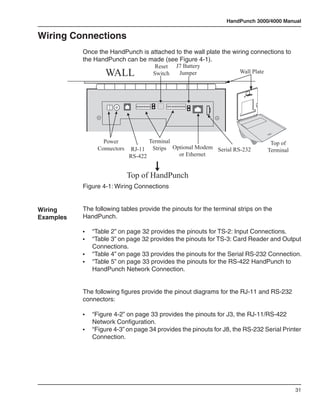
  • 32.
    HandPunch 3000/4000 Manual The HandReader is available with an optional internal Ethernet Remote communications module for TCP/IP communications. The wiring must HandReader conform to 10BaseT standards. Typically, network wiring terminates at the Connected HandReader with a standard RJ-45 modular jack. The cable from the jack to to a Host PC the HandReader is not provided with the Ethernet option. The IP address, via Optional Gateway, and Host Bits are entered at the HandReader in the SET SERIAL Ethernet menu. Ethernet HandReaders may be networked with up to 31 non-Ethernet HandReaders using RS-422 twisted pair cable. Refer to the Ethernet application note (available from Schlage Biometrics) for detailed information. Printer A serial printer can be connected to a HandReader. A printer connected to a remote HandReader will print only the events that occur at that HandReader. Schlage Biometrics Inc. does not supply serial printers. Refer to the Printer String application note (available from Schlage Biometrics) for detailed information. 29
  • 33.
    Networking and Communications This page is intentionally blank. 30
  • 34.
    HandPunch 3000/4000 Manual WiringConnections Once the HandPunch is attached to the wall plate the wiring connections to the HandPunch can be made (see Figure 4-1). Reset J7 Battery WALL Switch Jumper Wall Plate Power Terminal Top of Connectors RJ-11 Strips Optional Modem Serial RS-232 Terminal RS-422 or Ethernet Top of HandPunch Figure 4-1: Wiring Connections Wiring The following tables provide the pinouts for the terminal strips on the Examples HandPunch. • “Table 2” on page 32 provides the pinouts for TS-2: Input Connections. • “Table 3” on page 32 provides the pinouts for TS-3: Card Reader and Output Connections. • “Table 4” on page 33 provides the pinouts for the Serial RS-232 Connection. • “Table 5” on page 33 provides the pinouts for the RS-422 HandPunch to HandPunch Network Connection. The following figures provide the pinout diagrams for the RJ-11 and RS-232 connectors: • “Figure 4-2” on page 33 provides the pinouts for J3, the RJ-11/RS-422 Network Configuration. • “Figure 4-3” on page 34 provides the pinouts for J8, the RS-232 Serial Printer Connection. 31
  • 35.
    Wiring Connections The following figures provide typical HandPunch wiring diagrams. • “Figure 4-4” on page 34 provides a typical Bell Output wiring diagram. • “Figure 4-5” on page 35 provides a typical Lock Output wiring diagram. • “Figure 4-6” on page 36 provides a typical Input wiring diagram. • “Figure 4-7” on page 37 provides a typical Card Reader Emulation Mode wiring diagram. • “Figure 4-8” on page 38 provides a typical Host PC Network System wiring diagram. • “Figure 4-9” on page 39 provides a typical Ethernet Network wiring diagram. • “Figure 4-10” on page 40 provides a typical Modem Network wiring diagram. • “Figure 4-11” on page 41 provides a typical Printer to HandPunch wiring diagram. Table 2: TS-2 - Input Connections Terminal Connection 9 Request to Exit Input 10 Ground 11 Door Monitor Switch Input (NC Standby) 12 Auxiliary Input 1 13 Ground 14 Auxiliary Input 2 Table 3: TS-2 - Output Connections Terminal Connection 1 +5 VDC @ 400mA Max. Output for External Card Reader 2 Card Reader: Wiegand D0 or Magnetic Stripe Data Input 3 Card Reader: Wiegand D1 or Magnetic Stripe Clock Input 4 Ground 5 Lock Output or Wiegand D1 or Magnetic Stripe Clock Output 6 Auxiliary Output 0 or Wiegand Data 0 or Magnetic Stripe Data Output 7 Auxiliary Output 1zt 32
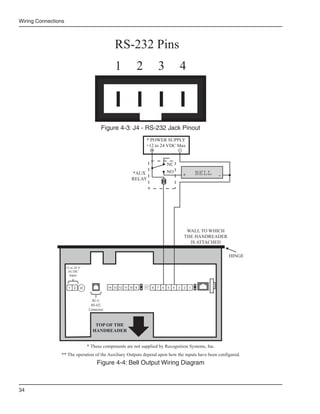
  • 36.
    HandPunch 3000/4000 Manual Table 3: TS-2 - Output Connections Terminal Connection 8 Auxiliary Output 2 Table 4: RS-232 Connection Pin Signal Connection 1 GND Ground 2 RXD Receive Data Input (from external device) 3 TXD Transmit Data Output (to external device) 4 RTS Ready to Send Output (to external device) Table 5: RJ-11/RS-422 Network Connection J3 Pin Signal 1 Rx+ 2 Rx- 3 Tx- 4 Tx+ J3 Pins 1 2 3 4 Figure 4-2: J3 - RJ-11/RS-422 Jack Pinout 33
  • 37.
    Wiring Connections RS-232 Pins 1 2 3 4 Figure 4-3: J4 - RS-232 Jack Pinout * POWER SUPPLY +12 to 24 VDC Max + - NC *AUX NO + BELL - RELAY WALL TO WHICH THE HANDREADER IS ATTACHED HINGE 12 to 24 V AC/DC Input 1 2 14 13 12 11 10 9 8 7 6 5 4 3 2 1 RJ-11 RS-422 Connection TOP OF THE HANDREADER * These components are not supplied by Recognition Systems, Inc. ** The operation of the Auxiliary Outputs depend upon how the inputs have been configured. Figure 4-4: Bell Output Wiring Diagram 34
  • 38.
    HandPunch 3000/4000 Manual * POWER SUPPLY +12 to 24 VDC Max + - NC *ELECTRIC LOCK *LOCK NO + OR STRIKE - RELAY WALL TO WHICH THE HANDREADER IS ATTACHED HINGE 12 to 24 V AC/DC Input 1 2 14 13 12 11 10 9 8 7 6 5 4 3 2 1 RJ-11 RS-422 Connection TOP OF THE HANDREADER * These components are not supplied by Recognition Systems, Inc. ** The operation of the Auxiliary Outputs depend upon how the inputs have been configured. Figure 4-5: Lock Output Wiring Diagram 35
  • 39.
    Wiring Connections N.O. DOOR SWITCH REQUEST TO EXIT SWITCH LEGEND AUX INPUT 2** AUX INPUT 1** N.O. MOMENTARY* N.C. DOOR SWITCH* WALL TO WHICH THE HANDREADER IS ATTACHED HINGE 12 to 24 V AC/DC Input 1 2 14 13 12 11 10 9 8 7 6 5 4 3 2 1 RJ-11 RS-422 Connection TOP OF THE HANDREADER * These components are not supplied by Recognition Systems, Inc. ** The operation of the Auxiliary Inputs depend upon how the inputs have been configured. Figure 4-6: Request to Exit, Door Switch, and Auxiliary Inputs Wiring Diagram 36
  • 40.
    HandPunch 3000/4000 Manual Card Reader GROUND DATA 1 DATA 0 Access Panel +5 VDC POWER (SEE NOTE BELOW) GROUND DATA 1 DATA 0 WALL TO WHICH THE HANDREADER IS ATTACHED HINGE 12 to 24 V AC/DC Input 1 2 14 13 12 11 10 9 8 7 6 5 4 3 2 1 RJ-11 RS-422 Connection TOP OF THE HANDREADER NOTE: For +12 VDC readers, connect power supply +12 VDC to card reader. Figure 4-7: Card Reader Emulation Mode Wiring Diagram 37
  • 41.
    Wiring Connections DC-102 RS-232 to 4-wire RS-422 Power Supply Data Converter (P/N DC-102) Y G R B DB-25 * RS-422 Serial RJ-11 Jack Surface 4-Wire Port or Wall Plate (2 Twisted Pairs) Recogniti on Systems Inc. 1 2 4 3 Clear 5 7 6 F1 8 No * 9 F2 0 No # Yes Enter Y G R B J-3 HandPunch 1 * RS-422 4-Wire (2 Twisted Recogniti on Systems Inc. Pairs) 1 2 4 3 Clear 5 7 6 F1 8 No * 9 F2 0 No # Yes Enter Y G R B J-3 HandPunch 2 * RS-422 4-Wire (2 Twisted Pairs) Recogniti on Systems Inc. 1 2 4 3 Clear 5 7 6 F1 8 * No 9 F2 0 No Yes # Enter Y G R B J-3 HandPunch X RSI Supplied Cable (Silver) To Next HandPunch 31 HandPunches Max * Recommended Cable B = Black G = Green 4,000 Ft. (1220 meters) Belden #82723 R = Red Y = Yellow Max Zone Length Figure 4-8: Host PC to RS-422 Direct-Connect Network System Wiring Diagram 38
  • 42.
    HandPunch 3000/4000 Manual RSI Supplied Cable (Black) HandPunch Recogniti on Systems Inc. 7 4 8 1 5 2 6 3 F1 Clear Modem Port RJ-11 Telephone Outlet * No 9 F2 0 No Yes # Enter Y HandPunch RS-422 G R Modem Unit RJ-11 Port B * RS-422 RJ-11 Jack Surface 4-Wire or Wall Plate (2 Twisted Pairs) Recogniti on Systems Inc. 1 2 4 3 Clear 5 7 6 F1 8 No * 9 F2 0 No # Yes Enter Y G R B HandPunch 1 * RS-422 4-Wire (2 Twisted Recogniti on Systems Inc. Pairs) 1 2 4 3 Clear 5 7 6 F1 8 No * 9 F2 0 No # Yes Enter Y G R B HandPunch 2 * RS-422 4-Wire (2 Twisted Pairs) Recogniti on Systems Inc. 1 2 4 3 Clear 5 7 6 F1 8 * No 9 F2 0 No Yes # Enter Y G R B HandPunch X RSI Supplied Cable (Silver) To Next HandPunch 31 HandPunches Max * Recommended Cable B = Black G = Green 4,000 Ft. (1220 meters) Belden #82723 R = Red Y = Yellow Max Zone Length Figure 4-9: Host PC to HandPunch Ethernet Connection Diagram 39
  • 43.
    Wiring Connections Ethernet Cable Connection to HandPunch Host Computer Ethernet Port Recogniti on Systems Inc. * No 7 4 8 1 5 9 2 6 F2 3 F1 Clear via Ethernet 0 No Yes # Enter HandPunch Y G Ethernet Unit RS-422 R RJ-11 Port B * RS-422 RJ-11 Jack Surface 4-Wire or Wall Plate (2 Twisted Pairs) Recogniti on Systems Inc. 1 2 4 3 Clear 5 7 6 F1 8 No * 9 F2 0 No # Yes Enter Y G R B HandPunch 1 * RS-422 4-Wire (2 Twisted Recogniti on Systems Inc. Pairs) 1 2 4 3 Clear 5 7 6 F1 8 No * 9 F2 0 No # Yes Enter Y G R B HandPunch 2 * RS-422 4-Wire (2 Twisted Pairs) Recogniti on Systems Inc. 1 2 4 3 Clear 5 7 6 F1 8 * No 9 F2 0 No Yes # Enter Y G R B HandPunch X RSI Supplied Cable (Silver) To Next HandPunch 31 HandPunches Max * Recommended Cable B = Black G = Green 4,000 Ft. (1220 meters) Belden #82723 R = Red Y = Yellow Max Zone Length Figure 4-10: Host PC to HandPunch Modem Connection 40
  • 44.
    HandPunch 3000/4000 Manual *Host Computer/Hyperterminal *Serial Printer WALL TO WHICH THE HANDREADER IS ATTACHED HINGE HINGE 12 to 24 V AC/DC 4 Pin Input Connector 1 2 14 13 12 11 10 9 8 7 6 5 4 3 2 1 RJ-11 J4 RS-422 RS-232 Jack Connection TOP OF THE HANDREADER * These components are not supplied by Recognition Systems, Inc. Figure 4-11: HandPunch to Serial Printer or Host Computer Wiring Diagram 41
  • 45.
    Wiring Connections This page is intentionally blank. 42
  • 46.
    HandPunch 3000/4000 Manual Erasingthe Memory There are two options when erasing the memory of the HandReader: 1. Setup 2. All The erasing of the setup will set the HandReader’s address, passwords, etc., back to factory defaults. Erasing Choosing the All option will take the HandReader’s setup back to factory HandReader defaults plus erase all user databases and datalogs. This action cannot be Memory undone. If there is a software that is managing the system then the users can be downloaded back to the HandReader if needed. The erase memory function allows a HandReader’s setup and/or user database to be erased. Perform the following steps to erase the setup programs but retain the user database. 1. With system power OFF, depress reset switch. 2. Turn system power ON and wait 5 seconds. 3. LCD screen will display. ERASE :1 SETUP :9 ALL!!! 43
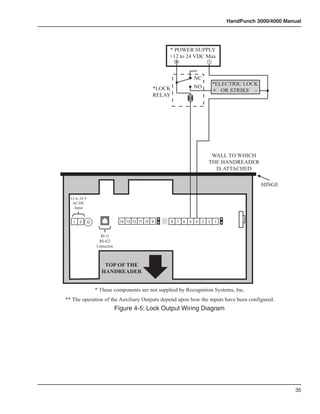
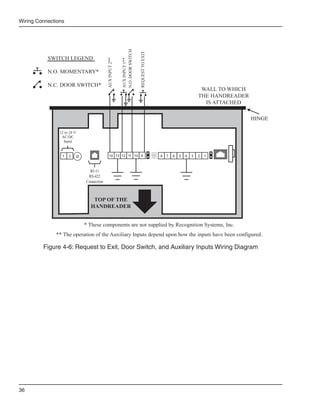
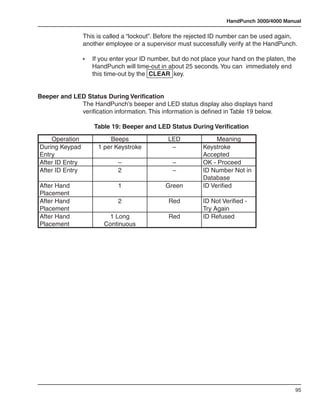
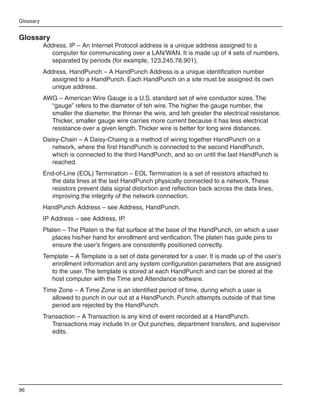
  • 47.
    Planning an Installation This page intentionally blank. 44
  • 48.
    HandPunch 3000/4000 Manual Closingthe HandPunch Before closing the HandPunch clear all dust and debris away from the HandPunch. With the wal mount latch in the unlocked position, swing the body of the HandPunch up and lock the latch into place with the key provided with the HandPunch (see Figure 6-1 below). Dust and debris surrounding the HandPunch can drastically affect the terminal’s operation. It is important to ensure the HandPunch is free from dust and debris before closing the terminal. Do not force the HandPunch onto the wall mount latch when the latch is in the locked position. Wa l l P l a t e goceR noitin .cnI s metsyS Latch Key oN LOCK Unlocked Position Wa l l P l a t e Latch Key Locked Position Figure 6-1: Closing the HandPunch 45
  • 49.
    Planning an Installation This page intentionally blank. 46
  • 50.
    HandPunch 3000/4000 Manual EnterCommand Menu Press the CLEAR and ENTER keys simultaneously to enter a command menu. If No One is Enrolled 1. The display appears as follows: in the HandPunch ENTER PASSWORD 2. Press the default password for the menu you wish to enter. Press 1 for the Service Menu. Press 2 for the Setup Menu. Press 3 for the Management Menu. Press 4 for the Enrollment Menu. Press 5 for the Security Menu. 3. Press ENTER and the first command option in the selected menu appears. If Users are 1. The display appears as follows. Enrolled in the HandPunch ENTER ID *: 2. Enter your ID number on the keypad and place your hand on the platen for verification. 3. If verification is successful, the display appears as follows. 47
  • 51.
    Enter a CommandMenu Enter Password 4. Enter the password for the menu you wish to enter. The default passwords are as follows: Press 1 for the Service Menu. Press 2 for the Setup Menu. Press 3 for the Management Menu. Press 4 for the Enrollment Menu. Press 5 for the Security Menu. 5. Press ENTER 6. If you are authorized to use this command, the first command option in the selected menu appears. 7. If you are not authorized to enter this command, the display appears as follows: ENTER ID *: NOTE To access these menus you must be the first person enrolled in a new system installation or you must have been enrolled as a supervisor. If you are blocked from the supervisory menus, verify your access rights with management personnel. If enrollment information has been incorrectly changed and you must have supervisory access to all menus, make these changes through software. It is possible to physically reset the HandPunch’s memory, however resetting NOTE memory sets all unit parameters back to the factory default values. Resetting memory allows access to all menus by the first person enrolled (as if it is a new system installation), but this means that all employee information programmed into the HandPunch is lost and must be re-entered manually. Be sure you need to reset memory before performing this function. To reset memory, refer to the Erasing HandPunch Memory section on page 43. 48
  • 52.
    HandPunch 3000/4000 Manual Navigating Once you have entered a command menu, there are three options available for Command navigating the command menu system Menus • Press # to enter the command shown on the display. • Press * to step to the next command in the menu. • Press CLEAR to exit the command menu (pressing any numeric key also exits the command menu). If you are in a command’s sub-menu, you may have to press CLEAR multiple times to completely exit the command menu. 49
  • 53.
    Enter a CommandMenu This page is intentionally blank. 50
  • 54.
    HandPunch 3000/4000 Manual Programmingthe HandPunch The HandPunch is programmed via a series of command menus. A summary of the menus and commands is given in Table 6. Table 6: Basic Command Mode Structure Service Menu Setup Menu Management Enrollment Menu Security Menu Menu Password 1 Password 2 Password 3 Password 4 Password 5 Calibrate Set Language Supervisor Add Employee Special Enroll Override Status Display Set Date Format List Users Add Supervisor Set Time and Set User Data Remove User Date Set Address Restrictions Set ID Length Set Serial Set Reader Mode Upgrade To control access to the command menus, each menu has a unique password. This password is requested as a part of the process for accessing each menu. A supervisor must enter the correct password for that menu to access that menu. The default menu passwords are given in Table 6. To increase the security of the HandPunch, Schlage Biometrics recommends changing the passwords for the command menus to new numbers. These password numbers can be up to 10 digits long. This is done with the Set Passwords command described on. Authority Level A second method for controlling access to the command menus is through the use of Authority Levels. Authority Levels control whether or not a user has access to the command menus. • Level 0 is for a user who does not need access to any of the command menus. • Level 5 is assigned to Supervisors who need access to all of the command menus. 51
  • 55.
    Programming the HandPunch The HandPunch automatically assigns Authority Level 0 to users enrolled by the Add Employee command. Authority Level 5 is automatically assigned to users enrolled by the Add Supervisor command. NOTE Until a user has been assigned to Supervisor, every user can access every menu. Once a user has been enrolled using the Add Supervisor (designated as a supervisor), all further user authority levels are assigned. The first person enrolled should be enrolled using the Add Supervisor command. This protects the integrity of the system. Schlage Biometrics strongly recommends enrolling at least two users as supervisors to ensure that more than one person has the authority to access all menus and all commands. Programming Order When setting up HandPunch operations there is a general programming/ operations order that should be followed. Set HandPunch Site Parameters – Set the HandPunch site parameters to meet site-specific needs and usage: change the language used by the display, set the HandPunch’s address, and set the serial communication baud rate (used if you have installed a serial printer – see page 56). Enroll Supervisory Staff – Enroll yourself and the supervisors who will have responsibility for HandPunch management. This is done through the Enrollment Menu (see Supervisor Enrollment on page 66). The time, date, and ID number length are normally set by the host computer. NOTE However, a supervisor can change these parameters at a HandPunch after setup information has been downloaded from the host computer. These tasks are done through the Setup Menu. The instructions for reader setup parameters begin on page 56. Train and Enroll Users – Train each user regarding HandPunch usage and then Enroll each user. This is done through the Enrollment Menu. The instructions for employee enrollment begin on page 66. Special enrollment allows you to enroll people with disabilities that prevent them from using the HandPunch properly. Employees with special enrollment ID numbers can punch in without biometric verification. This means that anyone who knows a special enrollment ID number can WARNING punch in. This function should only be used if absolutely necessary. The instructions for special enrollment begin on page 68. 52
  • 56.
    HandPunch 3000/4000 Manual SystemManagement Onca a HandPunch system is in operation the following commands are used for system management. Supervisor Override – Review employee punch history, add bulk hours or dollars, or record a punch for an employee. This is done through the Management Menu. The instructions for supervisor override begin on page 61. List Users – List the users authorized to use a HandPunch. This is done through the Management Menu. The instructions for listing employees begin on page 62. Set User Data – Set a user’s reject threshold (adjusting the sensitivity applied when a HandPunch reads a hand) and assign time zones to users (defining when users are allowed to punch in and out). These tasks are done through the Management Menu. The instructions for setting user data begin on page 62. Restrictions – Set or remove time restrictions for when employees punch in. This is doen through the Management Menu. The instructions for setting in time restrictions begin on page 62. Remove User – Remove employees (and supervisors) from a HandPunch. This is done through the Enrollment Menu. The instructions for removing employees begin on page 66. Set Amnesty¹ – Temporarily remove time resrictions at a HandPunch to accommodate circumstances that may affect when employees punch in (such as inclement weather). This is done through the Management Menu. The instructions for setting amnesty begin on page 62. 1. On HandPunch 4000 units only. 53
  • 57.
    Programming the HandPunch ServiceMenu The Service menu commands provide information that help you determine if the HandPunch is performing within normal operating parameters and identify the status of the unit’s inputs and outputs. The following section provides a brief summary of the Service Menu commands. NOTE There are no user serviceable parts inside the HandPunch. Navigating Enter the appropriate password to enter the Service command menu. Once the Service you have entered the command menu, there are three options available for Command navigating the command menu system. Menu • Press # to enter the command shown on the display. • Press * to step to the next command in the menu. • Press CLEAR to exit the command menu (pressing any numeric key also exits the command menu). If you are in a command’s sub-menu, press CLEAR multiple times to completely exit the command menu. Service Commands There are two commands available from the Service command menu. • Calibrate • Status Display Refer to Table 7 and identify the command you need to perform. Step through all previous commands until you reach the desired command. Table 7: Service Command Menu Service Menu Password = 1 Calibrate Recal (Y/N) Status Display On/Off (Y/N) 54
  • 58.
    HandPunch 3000/4000 Manual Calibrate The Calibrate command displays the HandPunch’s exposure values, allowing you to verify these values are within normal operating parameters. The standard operating parameters are shown in Table 8. Table 8: Normal Operating Parameters Parameter Normal Range Row “r” 0 +/- 2 Column “c” 0 +/- 2 Exposure “e” 100 +/- 20 Status Display The status display command allows you to enable or disable the displaying of the following information. • the status values of HandPunch inputs and outputs • the hand read score of the last user to verify on the system When the status display is enabled, Figure 8-1 identifies each status display field value. - ENTER ID - O C O C O H L H L NN O C O C O H L H L NN Last Hand Read Score Aux Out 2 Aux Out 1 * Aux Out 0 * Lock Aux In 2 Request to Exit Aux In 1 Door Monitor Switch Tamper * These status values are inactive if the reader is in Card Reader Output Mode. O = Circuit Open H = Output is OFF (High) C = Circuit Closed L = Output is ON (Low) Figure 8-1: Status Display Chart 55
  • 59.
    Programming the HandPunch SetupMenu The Setup menu commands allow you to set the basic operating parameters for the HandPunch unit. The following section provides a brief summary of all the parameters that may be set on a HandPunch unit. NOTE Once in the Command Menu, you can step through and set the parameters for each command sequentially. You do not have to exit command mode after setting any individual command. Navigating Enter the appropriate password to enter the Setup command menu. Once the Setup you have entered the command menu, there are three options available for Command navigating the command menu system. Menu • Press # to enter the command shown on the display. • Press * to step to the next command in the menu. • Press CLEAR to exit the command menu (pressing any numeric key also exits the command menu). If you are in a command’s sub-menu, press CLEAR multiple times to completely exit the command menu. Setup There are six commands available from the Setup command menu: Commands • Set Language • Set Date Format • Set Date and Time • Set Address • Set ID Length • Set Serial • Set Output Mode Refer to “Table 9” on page 57 and identify the command you need to perform. Step through all previous commands until you reach the desired command. 56
  • 60.
    HandPunch 3000/4000 Manual Table 9: Setup Command Menu Setup Menu Password = 2 Set Language Select Language Set Date Format Select Date Format Set Time and Date Month (MM) Day (DD) Year (YY) Hour (HH) Minute (MM) Set Address New Address Set ID Length New ID Length Set T & A Mode a Set Serial RS-422 (Y/N) Select Baud Rate RS-232 Select Baud Rate Use RS-232 for Printer or Host 57
  • 61.
    Programming the HandPunch Table 9: Setup Command Menu Setup Menu Password = 2 a Set Serial Verify/Enter IP Address Verify/Enter Gateway Verify/Enter Host Bit Set Output Mode For Lock & Auxiliary (Y/N) For Card Reader Output (Y/N) Upgrade Code a. The Set Serial command has different values based on whether the HandPunch unit is configured for serial or modem communication versus Ethernet communication. Set Language The Set Language command allows the language shown on the HandPunch’s display to be “localized” for a variety of countries: - English - German - Japanese - Russian - French - Indonesian - Italian - Portuguese - Spanish - Polish Set Date The Set Date Format Command allows the date format shown on the Format HandPunch’s display to be “localized” for a variety of countries. - mm/dd/yy - mm-dd-yy - dd-MMM-yy - MMM dd,yy - dd-mm-yy - ddMMMyyyy - dd/mm/yy Set Time The Set Time and Date command allows the HandPunch’s time and date to be and Date set. This is normally not necessary as the HandPunch’s time and date are set by the host computer. 58
  • 62.
    HandPunch 3000/4000 Manual SetAddress The Set Address command allows a unique address to be set for each HandPunch in a network. For proper operation, each HandPunch in the network must have a unique address. All units may use any address from 0 to 254. All units are sent with the address set to 1. Set ID Length The Set ID Length command allows you to reduce the number of keystrokes required to enter the ID number by eliminating the use of the ENTER key to complete an ID number entry. Once the ID Length is set, the HandPunch will automatically accept an ID number entry once the correct number of characters have been entered. Set ID Length does not apply when ID entry is made from a card reader. Once the ID Length is set, the T & A Mode Set command appears, allowing you to configure the HandPunch to prepare punch data for time and attendance software. Set Serial The Set Serial command allows you to set communication parameters depending upon the communication method for which the HandPunch has been configured. Different configuration parameters are entered based on if the unit is configured for a direct-connection or a modem connection, or if the unit is configured for Ethernet communication. The unit defaults to the RS-422 communication mode unless a modem or Ethernet module has been installed. The unit defaults to 9600 bps which is suitable for most communication applications. If an Ethernet module has been installed, the IP Address and Gateway and Subnet Mask must be set. The host bits should be left at 0, if communicating across a LAN. Set Output The Set Output Mode command allows you to set how the output relays Mode operate. The relays should be set based on the HandPunch application. Set the HandPunch to Lock/Auxiliary Relay mode if the unit is acting as door controller (this is the factory default setting). Set the HandPunch to Card Reader Emulation mode if the unit is outputting to an access control panel. Upgrade This Upgrade Menu is where the HandPunch code gets input to allow for a Memory Upgrade. 59
  • 63.
    Programming the HandPunch ManagementMenu The Management menu commands allow you to manage employee data stored in a HandPunch unit. The following section provides a brief summary of the employee data that may be manipulated on a HandPunch unit. Enter the appropriate password to enter the Setup command menu. Once you have entered the command menu, there are three options available for navigating the command menu system. • Press # to enter the command shown on the display. • Press * to step to the next command in the menu. • Press CLEAR to exit the command menu (pressing any numeric key also exits the command menu). If you are in a command’s sub-menu, press CLEAR multiple times to completely exit the command menu. There are four commands available from the Management command menu. • Supervisor Override • List Users • Set User Data • Restrictions Refer to Table 10 and identify the command you need to perform. Step through all previous commands until you reach the desired command. Table 10: Setup Command Menu Setup Menu Password = 3 Supervisor Override Review ID # Add Bulk Hours Bulk Dollars Punch 60
  • 64.
    HandPunch 3000/4000 Manual Table 10: Setup Command Menu Setup Menu Password = 3 List Users Display Print Set User Data User Reject User Time Zone Amnesty Set Restrictions On/Off (Y/N) Supervisor The Supervisor Override command allows you to review an employee’s punch Override record, add or remove bulk hours or dollars to an employee’s punch record, or add a new punch to an employee’s punch record (see “Table 11” on page 62 for a description on Punch Type codes). 61
  • 65.
    Programming the HandPunch Table 11: Punch Type Information T & A Code Type 1 IN 2 Back From Lunch 3 Out 4 Department Code 5 Back From Break 6 -not used- 7 Called Back to Work 8 Supervisor Entered Hours 9 Supervisor Entered Dollars 15 Supervisor Entered Category List Users The List Users command allows you to display or print a list of all the employees enrolled in a HandPunch. Set User The Set User Data command allows you to set an employee’s Reject Data Threshold (adjusting the hand read threshold for one employee without affecting the threshold of other employees), set an employee’s Time Zone (the hours an employee is allowed access), and set employee Amnesty (removing time zone restrictions for a specified number of punches – available on the HP- 4000 only). Restrictions The Restrictions command allows you to enable or disable employee punch time restrictions, allowing or disallowing punches outside an employee’s assigned time zone. 62
  • 66.
    HandPunch 3000/4000 Manual EnrollmentMenu Enrollment is the process of recording a hand image and associating it with an ID number. The first person to enroll in the HandPunch has access to all command menus. This person should enroll using the Add Supervisor command (see page 66). Once a supervisor has been enrolled, all further enrollments use the following rules: • A user enrolled through the Add Employee command (page 66) is assigned Authority Level 0. This allows the user to punch in and/or gain access through a door secured by the HandPunch. • A user enrolled through the Add Supervisor command (see page 66) is assigned Authority Level 5. This allows the supervisor to punch in and gain access through a door secured by the HandPunch, and it allows the supervisor to access all command menus. Until a user has been assigned to Authority Level 5 using the Add Supervisor NOTE command, every user with Authority Level 0 can access every menu. This is done to ensure that the first person enrolled is able to access all the menus to perform all the programming required to support the HandPunch. Once a user has been enrolled using the Add Supervisor command, all further user authority levels are assigned as per the list above. This protects the integrity of the system by enacting the Authority Level rules described above. Schlage Biometrics strongly recommends enrolling at least two users as supervisors to ensure that more than one person has the authority to access all menus and all commands. Navigating Advance planning and training make enrollment fast and easy. Users the Setup should be informed on what to expect and how to place their hands on the Command HandPunch before you enroll them. Menu Enter the appropriate password to enter the Setup command menu. Once you have entered the command menu, there are three options available for navigating the command menu system. • Press # to enter the command shown on the display. • Press # to step to the next command in the menu. • Press CLEAR to exit the command menu (pressing any numeric key also exits the command menu). If you are in a command’s sub-menu, press CLEAR multiple times to completely exit the command menu. 63
  • 67.
    Programming the HandPunch Preparation Here are a few guidelines to help you prepare for an enrollment session: • You can enroll one person or a group of people during an enrollment session. • Each user must have a unique personal identification (ID) number. It will save you considerable time if you assign the ID numbers in advance (Refer to the Design an ID Numbering System section on page 47). • The HandPunch will not accept two people with the same ID number. • If you enroll people using the last four digits of their phone numbers or social security numbers, you may get duplicate numbers. • If you are enrolling large groups of people you may consider using an enrollment trainer. It is a replica of a platen that is available through your Schlage Biometrics reseller. User The HandPunch is easy to use and non-threatening. However, most Education people have never used a biometric HandPunch. Training users on how the HandPunch works and how to use it will eliminate most fears and concerns before they occur. Inform the users of these facts. • The HandPunch reads the shape of the hand, not the fingerprints or palmprints. • It does not identify people. It confirms people’s identity. • It scans with an invisible light of the type used in TV remote controls. • It does not transfer germs any more than a doorknob or money. • It does not invade privacy; it guarantees it. • The enrollment process requires three or more reads to collect enough information to create a template. Proper Hand For correct, consistent hand reads it is very important that your hand is placed Placement on the platen in the same manner every time. The following rules apply for proper hand placement on the platen also refer to “Figure 8-2” on page 65. • If you are wearing a ring, rotate the ring so the stone faces up in its normal position. • Slide your right hand onto the platen rather like an airplane landing at the airport. • Slide your hand forward until the web between your index and middle finger stops against the Web Pin. • Keep your hand flat. You should feel the surface of the platen on your palm and the underside of your fingers. • Close your fingers together until they touch the Finger Pins and watch the hand diagram light display on the top panel. • The lights go out when you have properly placed your fingers. If a light remains on, a finger is not in proper contact with its Finger Pin. 64
  • 68.
    HandPunch 3000/4000 Manual WEB PIN Figure 8-2: Placing Your Hand on the Platen Left Hand Some right hands cannot be used in the HandPunch due to disabilities such Enrollment as missing fingers. You can enroll a user with the left hand facing palm side up. The techniques for left hand enrollment are the same as for standard enrollment. The user should keep the back of the hand flat against the platen and move the fingers against the web pin and the finger pins in the same manner as in standard enrollment. Users enrolled with the left hand must always verify with the left hand. Extra practice on placing the hand on the platen may be required to ensure correct, consistent hand reads. Read Score When a user uses the HandPunch, the display appears as follows: OKAY (USER ID) SCORE IS: (SCORE NUMBER) The score number on the display reflects how accurately the user’s hand is placed on the platen (see page 64). Scores that vary greatly between low and high numbers are indicative of inconsistent hand placement. Scores above 50 are indicative of improper hand placement or of a drastic change in the physical appearance of the hand. When this occurs, emphasize the importance of sliding the hand onto the platen and keeping the hand flat. Re-training and practice should lower a user’s score. It might be necessary to change a user’s reject threshold if the user has a mild disability. Re-enrollment might be necessary to create a new user template. 65
  • 69.
    Programming the HandPunch Enrollment There are three commands available from the Enrollment command menu: Commands • Add Employee • Add Supervisor • Remove User Refer to Table 12 to identify the command you need to perform. Step through all previous commands until you reach the desired command. Table 12: Enrollment Command Menu Service Menu Password = 4 Add Employee ID # Add Supervisor ID # Remove User ID # Add The Add Employee command allows you to enroll a new employee into the Employee HandPunch. Add The Add Supervisor command allows you to enroll a new supervisor into the Supervisor HandPunch. Remove The Remove User command allows you to remove an employee or supervisor User from the HandPunch. 66
  • 70.
    HandPunch 3000/4000 Manual SpecialMenu The Special menu has one command – Special Enroll. This command accommodates users with disabilities that make it difficult or impossible to use a HandPunch in its standard way. The following section provides a brief description of the Special Menu command. Enter the appropriate password to enter the Special command menu. Once you have entered the command menu, there are three options available for navigating the command menu system. Press # to enter the command shown on the display. Press * to step to the next command in the menu. Press CLEAR to exit the command menu (pressing any numeric key also exits the command menu). If you are in a command’s sub-menu, press CLEAR multiple times to completely exit the command menu. Special Command There is one command available from the Special command menu: • Special Enroll Refer to Table 13 and identify the command you need to perform. Step through all previous commands until you reach the desired command. Table 13: Special Command Menu Special Menu Password = 5 Special Enroll ID # On/Off (Y/N) 67
  • 71.
    Programming the HandPunch SpecialEnroll The Special Enroll command allows a user to be enrolled such that the ID number is the primary criteria for determining access. A hand read is required, but is not verified against any stored identification data. A time zone value can be applied to the Special Enrollment ID number to limit access times (see page 62). The HandPunch default is for no time zone to be applied. NOTE Special Enrollment affects the integrity of the HandPunch terminal and should only be used as a last resort. Anyone who knows a Special Enroll ID number is granted access when the ID number is used. Before specially enrolling a user, try to alleviate verification problems by adjusting the individual user’s reject threshold (see page 62) or by using left hand enrollment (see page 65). 68
  • 72.
    HandPunch 3000/4000 Manual HandPunchMaintenance A minimum amount of system maintenance is required to keep HandPunchs fully functional. HandPunchs should be cleaned periodically to prevent an accumulation of dust from affecting the HandPunch’s readability. User Scores should be reviewed periodically to ensure the HandPunch is performing properly. NOTE There are NO user serviceable parts inside the HandPunch. Cleaning the Once a HandPunch system is in operation there are three HandPunch HandPunch commands that can assist with system maintenance. These commands are performed through the Service Menu. The instructions for these commands begin on page 54. • Calibrate – View HandPunch exposure values. • Status Display – Display HandPunch input/output status, the hand read score of the last user to verify on the system. Inspect and clean the HandPunch regularly to maintain optimum performance. Clean the platen, side mirror, reflector, and the window above the platen using a clean cloth dampened with ordinary, non-abrasive window cleaner (see Figure 9-1 below). Start at the rear corners of the platen and work your way forward. NOTE DO NOT SPRAY CLEANING FLUID DIRECTLY INTO OR ON THE HandPunch. Figure 9-1: HandPunch Cleaning User Score Periodically check users’ scores (refer to the Read Score section on page 65). Scores should average under 30. Occasionally a user will score above 30. This is not necessarily an indication of poor performance. If a number of scores average over 30, clean the HandPunch and check scores again. If scores remain high, or if users are experiencing frequent rejections, run the Calibration command (see page 55). 69
  • 73.
    Appendix A -Tips Appendix A Tips for a successful Installation HandPunch • Think of the HandPunch as a camera • Clean the HandPunch before it gets dirty • Use non-abrasive cleaners such as glass cleaners and non-abrasive and clean cloths • Make cleaning the HandPunch part of Janitorial program • Do not remove the foam backing from the wall mounting plate • Seal any holes made in the wall for wire routing, so that dust will not blow into the HandPunch Location • Mount all HandPunchs in a network so that the top of the platen is 40” off of the floor • If an enrollment HandPunch is used make sure that it is placed with the top platen 40” off of the floor and not sitting directly on top of a desk, this will help to eliminate “bad enrollments” • Mount the HandPunch so that it is not difficult or dangerous to verify then open the door • It is not recommended to mount the HandPunch in an area where there is airborne dust, in the path of direct sunlight, or where the HandPunch can be exposed to water or corrosive gasses Enrollment • Educate the Enrollee on Hand Geometry • Explain enrollment process • Train Enrollee on hand placement -Practice placing hand on platen -Rotate rings to be stone-up -Make sure hand is flat on platen -Close finger towards the center of hand -Fingers gently touch finger pins • Let the enrollee enter in their own ID number during the enrollment process, this forces the Enroller to step aside allowing the Enrollee to stand in front of the HandPunch helping to eliminate “bad enrollments” • If an enrollment HandReader is used make sure that it is placed with the top of the platen 40” off of the floor and not sitting directly on top of a desk, this will help to eliminate “bad enrollments” • If an enrollment transaction fails: -Retrain the user on correct placement and ensure that rings are rotated to be stone-up then 70
  • 74.
    HandPunch 3000/4000 Manual -Try again to enroll the same hand -Try to enroll the other hand (with the hand placed upside-down so the thumb still contacts the thumb-pin on the platen) • After enrollment, it is a good idea to let the enrollee enter their ID number and practice a verification transaction to ensure that the enrollment was high-quality. • If a user consistently fails during verifications days/months/years later, re- enroll the user to ensure a high quality and up-to-date enrollment record. Communication • Make sure the Data Convertor is plugged in • When starting a network for the first time bring one HandPunch up at a time, this is a very easy way to find out where communication problems may exist 71
  • 75.
    Appendix B -Board Configuration Differences Appendix B Noted Board Configuration Differences Because of Schlage Biometrics’ camera retrofit of the HandPunch some changes have been made to the main PCB and they are listed as follows: • Dipswitches have been removed -comm lines are terminated. -RS-485 is set by wiring jumpers. -memory is reset with a push-button reset and user interface with keypad and LCD. • The labeling of the terminal strips have changed. See “Figure 11-1” on page 73. • The configuration of the terminal strips have changed. See “Figure 11-2” on page 74. • Power has moved to the right side of the PCB. • The RSS-232 RJ-45 receptacle has been replaced with a 4 pin Molex connector on the left side of the PCB. • A 2 pin Molex connector (J5) has been added to the board, next to the reset button, to supply power for the LEDs. This connector should never be unplugged. unless a modem or Ethernet is added to the PCB. • The upgrading of the memory is now handled through software codes at the HandPunch. Contact Order Entry for memory upgrades. 72
  • 76.
    HandPunch 3000/4000 Manual Terminal Block Labeling Number OLD PCB Number NEW PCB 1 12-24 VDC (+) OR VAC 1 (+) 5 VDC OUTPUT 2 12-24 VDC (-) OR VAC 2 DATA/D0 RJ-11 RX- 3 CLOCK/D1 RJ-11 RX+ 4 GROUND RJ-11 TX- 5 LOCK OR CLOCK OUTPUT RJ-11 TX+ 6 BELL OR DATA OUTPUT 7 AUXOUT 1 7 REX SWITCH 8 AUXOUT 2 8 GROUND 9 DOOR SWITCH 9 REX SWITCH 10 GROUND 10 GROUND 11 AUX IN 1 11 DOOR SWITCH 12 GROUND 12 AUX IN 1 13 AUX IN 2 13 GROUND 14 GROUND 14 AUX IN 2 15 (+) 5 VDC OUTPUT RJ-11 RX- 16 DATA/D0 RJ-11 RX+ 17 CLOCK/D1 RJ-11 TX- 18 GROUND RJ-11 TX+ 19 LOCK OR CLOCK OUTPUT 20 GROUND 1 12-24 VDC (+) OR VAC 21 BELL OR DATA OUTPUT 2 12-24 VDC (-) OR VAC 22 GROUND 23 AUXOUT 1 24 GROUND 25 AUXOUT 2 26 GROUND Figure 11-1 73
  • 77.
    Appendix B -Board Configuration Differences Terminal Block Layout Old Board New Board J6 - 2 pin Power 1 connector when 1 daisy chaining J6 2 power to 2 HandReaders RJ-11 - 4 pin Comm connector 7 8 9 9 10 10 11 TS2 - 6 pin Input TS2 11 12 connector 12 13 13 14 14 15 16 17 1 18 2 19 3 20 4 TS3 - 8 pin Output TS3 21 5 connector 22 6 23 7 24 8 25 26 7 8 9 GRD 9 10 GRD Any of the grounds coming off 10 GRD 11 of pins 8, 10, 12, 14, 18, 20, 11 12 22, 24, and 26 of the "Old 12 GRD GRD 13 Board" can be tied to pin 4, 10, 13 14 or 13 on the new board. If 14 GRD there are multiple grounds Example of Ground Pigtail create a pig tail so that there is only 1 wire going into the terminal block Figure 11-2 74
  • 78.
    HandPunch 3000/4000 Manual Memory To reset the memory of the HandPunch follow these steps- 1. Remove power and battery jumper, if a back up is installed Reset 2. Press down on reset button and apply power 3. Release button 4. Reader will boot to ERASE :1 SETUP :9 ALL!!! • Press 1 to erase setup i.e. address, outputs, passwords, but retain user database and datalogs • Press 9 to erase everything i.e. HandPunch goes back to factory defaults 75
  • 79.
    Appendix C -Old Board Configuration Appendix C Old Board Configuration Information Wall Plate Installation 1. Loosen the three bottom mounting screws until there is approximately 1/8 inch (3 mm) clearance between the screw head and the wall plate. 2. Remove the HandPunch from its carton. 3. At the base of the HandPunch is a piano hinge with three keyhole shaped slots that correspond with the three lower mounting screws. Align and hang the HandPunch from the three lower mounting screws (see below). HOLE 2 UPPER SCREWS SURFACE CONDUIT ENTRY KEYHOLE HOLES 3 LOWER MOUNTING SCREWS REAR OF TERMINAL Figure 13-1: Attaching the HandPunch to the Wall Plate 4. Tighten all three lower mounting screws. 5. The HandPunch is now ready for its wiring connections. 76
  • 80.
    HandPunch 3000/4000 Manual Grounding Terminal 1 and the center pin of jack J12 are connected together. Terminal 2 and NOTE the sleeve of jack J12 are connected together. Use any one of the following ground terminals to make the earth ground NOTE connection: 8, 10, 12, 14, 18, 20, 22, 24, or 26. Do NOT use terminal 2 to establish the earth ground connection; terminal 2 is not directly connected to ground. 7 26 25 24 23 22 21 20 19 18 17 16 15 14 13 12 11 10 9 8 CARD READER SWITCH INPUTS INPUT OUTPUTS LOCK OR CLOCK AUX IN 2 AUX IN 1 REX SWITCH +5 VDC OUTPUT CLOCK INPUT GROUND GROUND GROUND GROUND GROUND GROUND GROUND AUXOUT 1 GROUND AUXOUT 2 GROUND DOOR SWITCH BELL OR DATA DATA INPUT 7 8 9 10 11 12 13 14 15 16 17 18 19 20 21 22 23 24 25 26 EARTH GROUND CONNECTION PINS Figure 13-2: Earth Ground Connection Terminals There are two standard methods for providing earth grounding to HandPunch units: • earth grounding all units (see 15) • carrying an earth ground to each unit (see 16) Earth ground all units when there is a good earth ground source near each unit and/or when there are very long cable runs between units. Carry an earth ground to each unit when there are no earth grounds convenient to the unit and the unit’s power supply is floating. 77
  • 81.
    Appendix C -Old Board Configuration Wiring Connections Once the HandPunch is attached to the wall plate the wiring connections to the HandPunch can be made (see Figure 13-3 below). WALL Wall Plate 8 1 26 15 14 76 1 Top of RS-232 RJ-45 Terminal TS-1 Terminals 6 to 1 Backup Battery Jumper 5 4 3 2 1 OFF TS-3 Terminals 26 to 15 Optional Modem or Ethernet Jack ON TS-2 Terminals 14 to 7 Top of Hand Reader Dip Switches Figure 13-3: Wiring Connections and Dip Switches Wiring Examples The following Tables provide the pin outs for the terminal strips on the HandPunch. • “Table 14” on page 79 provides the pinouts for TS-2 – Input Connections. • “Table 15” on page 79 provides the pinouts for TS-3 – Card Reader and Output Connections. • “Table 16” on page 80 provides the pinouts for the RJ-45/RS-232 Serial Printer or Host Computer Connection. • “Table 17” on page 81 provides the pinouts for the RJ-11/RS-422 HandPunch- to-HandPunch Network Connection. The following Figures provide pinout diagrams for the RJ connectors. • Figure 13-4 on 81 provides the pinouts for J3, the RJ-11/RS-422 Network Connection. • “Figure 13-5” on page 81 provides the pinouts for J8, the RJ-45/RS-232 Serial Printer Connection. 78
  • 82.
    HandPunch 3000/4000 Manual The following Figures provide sample HandPunch wiring diagrams: • “Figure 13-6” on page 82 provides a sample Bell Output wiring diagram. • “Figure 13-7” on page 83 provides a sample Door Lock Output wiring diagram. • “Figure 13-8” on page 84 provides a sample Request to Exit, Door Switch, and Auxiliary Inputs wiring diagram. • “Figure 13-9” on page 85 provides a sample Auxiliary Outputs wiring diagram. • “Figure 13-10” on page 86 provides a sample External Card Reader wiring diagram. • “Figure 13-11” on page 87 provides a sample RS-422 4-Wire Direct- Connect Host PC to HandPunch Network wiring diagram. • “Figure 13-12” on page 88 provides a sample Host PC to HandPunch Ethernet Network wiring diagram. • “Figure 13-13” on page 89 provides a sample Host PC to HandPunch Modem Network wiring diagram. • “Figure 13-14” on page 90 provides a sample Printer or Host PC to HandPunch wiring diagram. Table 14: TS-2 - Input Connections Terminal Connection 7 Request to Exit Input 8 Ground 9 Door Monitor Switch Input (NC Standby) 10 Ground 11 Auxiliary Input 1 12 Ground 13 Auxiliary Input 2 14 Ground Table 15: TS-3 - Card Reader and Output Connections Terminal Connection 15 +5 VDC @ 400 mA Max. Output for External Card Reader 16 Card Reader: Wiegand D0 or Magnetic Stripe Data Input 79
  • 83.
    Appendix C -Old Board Configuration Table 15: TS-3 - Card Reader and Output Connections Terminal Connection 17 Card Reader: Wiegand D1 or Magnetic Stripe Clock Input 18 Card Reader Ground 19 Lock Output or Wiegand D1 or Magnetic Stripe Clock Output 20 Ground 21 Auxiliary Output 0 or Wiegand Data 0 or Magnetic Stripe Data Output 22 Ground 23 Auxiliary Output 1 24 Ground 25 Auxiliary Output 2 26 Ground Table 16: RJ-45/RS-232 Serial Printer Connection J8 Pin Signal Connection 1 RI * Ring Indicator Input (from external device) 2 CD * Carrier Detect Input (from external device) 3 DTR * Data Terminal Ready Output (to external device) 4 GND Ground 5 Rx Data Receive Data Input (from external device) 6 Tx Data Transmit Data Output (to external device) 7 CTS * Clear to Send Input (from external device) 8 RTS * Ready to Send Output (to external device) * These signals are not currently supported 80
  • 84.
    HandPunch 3000/4000 Manual Table 17: RJ-11/RS-422 Network Connection J3 Pin Signal 1 Rx+ 2 Rx- 3 Tx- 4 Tx+ J3 Pins 1 2 3 4 Figure13-4: J3 - RJ-11/RS-422 Jack Pinout J4 Pins 1 2 3 4 5 6 7 Figure 13-5: J4 - RJ-45/RS-232 Jack Pinout 81
  • 85.
    Appendix C -Old Board Configuration 1 POWER SUPPLY + - 2 NC 12 to 24 VDC Max. NO 1 BELL 1 BELL RELAY WALL TO WHICH THE HAND PUNCH IS ATTACHED HINGE 26 25 24 23 22 21 20 19 18 17 16 15 14 13 12 11 10 9 8 7 RJ-45/RS-232 Printer Output RJ-11/RS-422 Optional RJ-45 4-wire Ethernet or Network RJ-11 Modem TOP OF THE Power HANDPUNCH Connection 1 These components are not supplied by Recognition Systems, Inc. 2 The Power Supply shall be a UL Listed Limited Current Power Source for UL 294 Installations. Figure 13-6: Bell Output Wiring Diagram 82
  • 86.
    HandPunch 3000/4000 Manual 1 POWER SUPPLY + - 12 to 24 VDC Max.2 NC NO ELECTRIC LOCK1 + OR STRIKE - 1 LOCK RELAY WALL TO WHICH THE HAND PUNCH IS ATTACHED HINGE 26 25 24 23 22 21 20 19 18 17 16 15 14 13 12 11 10 9 8 7 RJ-45/RS-232 Printer Output RJ-11/RS-422 Optional RJ-45 4-wire Ethernet or Network RJ-11 Modem TOP OF THE Power HANDPUNCH Connection 1 These components are not supplied by Recognition Systems, Inc. 2 The Power Supply shall be a UL Listed Limited Current Power Source for UL 294 Installations. Figure 13-7: Door Lock Output Wiring Diagram 83
  • 87.
    Appendix C -Old Board Configuration N.O. REQUEST TO EXIT N.C. DOOR SWITCH SWITCH LEGEND 2 2 AUX INPUT 2 AUX INPUT 1 1 N.C. DOOR SWITCH 1 N.O. MOMENTARY WALL TO WHICH THE HAND PUNCH IS ATTACHED HINGE 14 13 12 11 10 9 8 7 6 5 4 3 2 1 RJ-11/RS-422 RS-232 Network Printer Output Power Connections Optional RJ-45 TOP OF THE HANDPUNCH Ethernet or RJ-11 Modem 1 These components are not supplied by Recognition Systems, Inc. 2 The Aux 1 and Aux 2 input contact states are programmable within the HandPunch unit. Figure 13-8: Request to Exit, Door Switch, and Auxiliary Inputs Wiring Diagram 84
  • 88.
    HandPunch 3000/4000 Manual 1 POWER SUPPLY + - 12 to 24 VDC Max.2 NC 1 NO AUXILIARY + DEVICE - 1 AUX. RELAY AUX OUTPUT 0 AUX OUTPUT 2 AUX OUTPUT 1 WALL TO WHICH THE HANDPUNCH IS ATTACHED HINGE 26 25 24 23 22 21 20 19 18 17 16 15 14 13 12 11 10 9 8 7 RJ-45/RS-232 Printer Output RJ-11/RS-422 Optional RJ-45 4-wire Ethernet or Network RJ-11 Modem TOP OF THE Power HANDPUNCH Connection 1 These components are not supplied by Recognition Systems, Inc. 2 The Power Supply shall be a UL Listed Limited Current Power Source for UL 294 Installations. Figure 13-9: Auxiliary Outputs Wiring Diagram 85
  • 89.
    Appendix C -Old Board Configuration ABA-Track II Magnetic Stripe Card Reader GROUND CLOCK Access Control DATA Panel +5 VDC POWER (SEE NOTE BELOW) CLOCK GROUND N.C. DOOR SWITCH DATA REQUEST TO EXIT SWITCH LEGEND 2 AUX INPUT 1 2 AUX INPUT 2 N.C. DOOR SWITCH 1 AUX OUTPUT 2 AUX OUTPUT 1 1 N.O. MOMENTARY WALL TO WHICH THE HANDPUNCH IS ATTACHED HINGE J6 +12 VDC for 12 Volt External Card Readers 26 25 24 23 22 21 20 19 18 17 16 15 14 13 12 11 10 9 8 7 RJ-45/RS-232 Printer Output RJ-11/RS-422 Optional RJ-45 4-wire Ethernet or Network RJ-11 Modem HandPunch TOP OF THE Power HAND READER Connection 1 These components are not supplied by Recognition Systems, Inc. 2 The Aux 1 and Aux 2 input contact states are programmable within the HandPunch unit. NOTE: For +12 VDC magnetic stripe readers, connect the magnetic stripe reader power supply to J6 on the Hand Punch. Figure 13-10: External Card Reader Wiring DIagram 86
  • 90.
    HandPunch 3000/4000 Manual DC-102 RS-232 to 4-wire RS-422 Power Supply Data Converter (P/N DC-102) Y G R B DB-25 * RS-422 Serial RJ-11 Jack Surface 4-Wire Port or Wall Plate (2 Twisted Pairs) Recognit ion Systems Inc. 1 2 4 3 Clear 5 7 6 F1 8 No * 9 F2 0 No # Yes Enter Y G R B J-3 HandPunch 1 * RS-422 4-Wire (2 Twisted Recognit ion Systems Inc. Pairs) 1 2 4 3 Clear 5 7 6 F1 8 No * 9 F2 0 No # Yes Enter Y G R B J-3 HandPunch 2 * RS-422 4-Wire (2 Twisted Pairs) Recognit ion Systems Inc. 1 2 4 3 Clear 5 7 6 F1 8 * No 9 F2 0 No Yes # Enter Y G R B J-3 HandPunch X RSI Supplied Cable (Silver) To Next HandPunch 31 HandPunches Max * Recommended Cable B = Black G = Green 4,000 Ft. (1220 meters) Belden #82723 R = Red Y = Yellow Max Zone Length Figure 13-11: RS-422 4-Wire Direct-Connect Host PC to HandPunch Connection 87
  • 91.
    Appendix C -Old Board Configuration Ethernet Cable Connection to HandPunch Host Computer Ethernet Port Recogniti on Systems Inc. * No 7 4 8 1 5 9 2 6 F2 3 F1 Clear via Ethernet 0 No Yes # Enter HandPunch Y G Ethernet Unit RS-422 R RJ-11 Port B * RS-422 RJ-11 Jack Surface 4-Wire or Wall Plate (2 Twisted Pairs) Recogniti on Systems Inc. 1 2 4 3 Clear 5 7 6 F1 8 No * 9 F2 0 No # Yes Enter Y G R B HandPunch 1 * RS-422 4-Wire (2 Twisted Recogniti on Systems Inc. Pairs) 1 2 4 3 Clear 5 7 6 F1 8 No * 9 F2 0 No # Yes Enter Y G R B HandPunch 2 * RS-422 4-Wire (2 Twisted Pairs) Recogniti on Systems Inc. 1 2 4 3 Clear 5 7 6 F1 8 * No 9 F2 0 No Yes # Enter Y G R B HandPunch X RSI Supplied Cable (Silver) To Next HandPunch 31 HandPunches Max * Recommended Cable B = Black G = Green 4,000 Ft. (1220 meters) Belden #82723 R = Red Y = Yellow Max Zone Length Figure 13-12: Host PC to HandPunch Ethernet Connection 88
  • 92.
    HandPunch 3000/4000 Manual RSI Supplied Cable (Black) HandPunch Recogniti on Systems Inc. 7 4 8 1 5 2 6 3 F1 Clear Modem Port RJ-11 Telephone Outlet * No 9 F2 0 No Yes # Enter Y HandPunch RS-422 G R Modem Unit RJ-11 Port B * RS-422 RJ-11 Jack Surface 4-Wire or Wall Plate (2 Twisted Pairs) Recogniti on Systems Inc. 1 2 4 3 Clear 5 7 6 F1 8 No * 9 F2 0 No # Yes Enter Y G R B HandPunch 1 * RS-422 4-Wire (2 Twisted Recogniti on Systems Inc. Pairs) 1 2 4 3 Clear 5 7 6 F1 8 No * 9 F2 0 No # Yes Enter Y G R B HandPunch 2 * RS-422 4-Wire (2 Twisted Pairs) Recogniti on Systems Inc. 1 2 4 3 Clear 5 7 6 F1 8 * No 9 F2 0 No Yes # Enter Y G R B HandPunch X RSI Supplied Cable (Silver) To Next HandPunch 31 HandPunches Max * Recommended Cable B = Black G = Green 4,000 Ft. (1220 meters) Belden #82723 R = Red Y = Yellow Max Zone Length Figure 13-13: Host PC to HandPunch Modem Connection 89
  • 93.
    Appendix C -Old Board Configuration RJ-45 to Printer Adapter (if required) *Serial Printer RJ-45 WALL TO WHICH Connector THE HAND READER IS ATTACHED HINGE RJ-45 12 to 24 V Connector AC/DC Input TS-3 TS-2 TS-1 26 25 24 23 22 21 20 19 18 17 16 15 14 13 12 11 10 9 8 7 6 5 4 3 2 1 - + J4 RS-422 RJ-45 Jack Connection TOP OF THE HAND READER * These components are not supplied by Recognition Systems, Inc. Figure 13-14: HandPunch to Serial Printer or Host Computer Wiring Diagram 90
  • 94.
    HandPunch 3000/4000 Manual Settingthe DIP Switches The DIP Switch settings perform three tasks for the HandPunch (see Figure 13-15 below): • Set End of Line (EOL) Termination to match the type of termination needed by the network. • Set the Communication Method to match the type of network used. • Erase Memory to clear HandPunch memory to all factory defaults values and also clear all user memory. WA L L 5 4 3 2 1 OFF ON E O L Te r m i n a t i o n E O L Te r m i n a t i o n Communication Method Erase HandReader Setup Erase HandReader Setup and Database TOP OF HANDREADER Figure 13-15: HandPunch Dip Switches 91
  • 95.
    Appendix C -Old Board Configuration End of Line Termination helps to ensure clean data signals are transmitted through the Termination network wiring. Termination is applied to the end-of-line (EOL) HandPunch in the network daisy-chain. The factory default setting is for EOL termination to be disabled – switches 1 and 2 OFF. Refer to “Figure 13-15” on page 91 for switch ON/OFF positioning. • To enable EOL termination at a HandPunch, both switches 1 and 2 must be ON. • To disable EOL termination at a HandPunch, both switches 1 and 2 must be OFF. EOL Termination must be enabled for: • A single HandPunch terminal installation. • In a HandPunch Direct-Connect network – the last HandPunch in the daisy-chain (the one farthest from the host computer). • In a Modem/HandPunch to PC network the HandPunch terminal with the Ethernet option (for communication with the host computer) in the daisy- chain. EOL Termination must be disabled for: • All HandPunches in the network not identified in teh previous section. • In an Ethernet/HandPunch to PC network the HandPunch terminal with the Ethernet option (for communication with the host computer) in the daisy-chain. Communication Method The communication method dip switch is set ON for factory testing purposes. The factory default setting and for standard operation, switch 3 must be OFF. • Switch 3 must always be OFF. Erasing HandPunch Memory The erase memory function can perform either or both of the following: • Erase a HandPunch’s configuration data. • Erase a HandPunch’s user database, transaction buffer, and menus (and messages on the HandPunch 4000). The factory default setting (and normal operation setting) is set for switches 4 and 5 to be OFF, retaining memory. If the HandPunch is equipped with the battery backup option, remove shunt NOTE J7 in front of the DIP switch array (see “Figure 13-3” on page 78) before proceeding. Replace shunt J7 after completion of the following steps. 92
  • 96.
    HandPunch 3000/4000 Manual Erasingthe Perform the following steps to erase the configuration data but retain the HandPunch user database. Setup 1. With system power OFF, set switch 4 ON. 2. Turn system power ON and wait for HandPunch boot information to appear on the display. 3. Turn switch 4 OFF. Erasing the Perform the following steps to erase both the configuration data and the user HandPunch database. Setup and User Database 1. With system power OFF, set both switches 4 and 5 ON. 2. Turn system power ON and wait 5 seconds. 3. Turn both switches 4 and 5 OFF. Before putting the HandPunch into service ensure DIP switches 4 and 5 are NOTE both OFF. If switches 4 and 5 are not off, the next time the HandPunch’s power is cycled the HandPunch’s memory will be erased. 93
  • 97.
    Appendix D -Troubleshooting Tips Appendix D Troubleshooting Guide Display Messages During Verification Various messages can appear on the HandPunch’s dispaly during hand verification. These messages are defined in Table 18 below. Table 18: Display Messages During Verification Message Definition PLACE HAND The platen is ready to receive your hand for verification. ID VERIFIED You are verified, proceed. REMOVE HAND Remove your hand and place it on the platen again. Follow proper hand placement rules. TRY AGAIN Your attempt was rejected. Repeat verification following proper hand placement rules. ID REFUSED Your rejections exceeded the maximum number of tries allowed. Wait until another employee has verified and try again or call your supervisor. ENTER ID You entered your ID number incorrectly or your access time is restricted. • If the display shows TRY AGAIN, you are not verified. You may have made an error in entering your ID number or in placing your hand on the platen. Re-enter your ID number and try again, taking care to follow proper hand placement rules (see 64). • If the display shows TIME RESTRICTION, you are not authorized to punch in at this time. If this seems to be in error, contact your supervisor about time restrictions. • After a pre-programmed number of denied attempts, an ID number will no longer be accepted and the display will appear as follows: ID INVALID TEMPORARILY 94
  • 98.
    HandPunch 3000/4000 Manual This is called a “lockout”. Before the rejected ID number can be used again, another employee or a supervisor must successfully verify at the HandPunch. • If you enter your ID number, but do not place your hand on the platen, the HandPunch will time-out in about 25 seconds. You can immediately end this time-out by the CLEAR key. Beeper and LED Status During Verification The HandPunch’s beeper and LED status display also displays hand verification information. This information is defined in Table 19 below. Table 19: Beeper and LED Status During Verification Operation Beeps LED Meaning During Keypad 1 per Keystroke – Keystroke Entry Accepted After ID Entry – – OK - Proceed After ID Entry 2 – ID Number Not in Database After Hand 1 Green ID Verified Placement After Hand 2 Red ID Not Verified - Placement Try Again After Hand 1 Long Red ID Refused Placement Continuous 95
  • 99.
    Glossary Glossary Address, IP – An Internet Protocol address is a unique address assigned to a computer for communicating over a LAN/WAN. It is made up of 4 sets of numbers, separated by periods (for example, 123.245.78.901). Address, HandPunch – A HandPunch Address is a unique identification number assigned to a HandPunch. Each HandPunch on a site must be assigned its own unique address. AWG – American Wire Gauge is a U.S. standard set of wire conductor sizes. The “gauge” refers to the diameter of teh wire. The higher the gauge number, the smaller the diameter, the thinner the wire, and teh greater the electrical resistance. Thicker, smaller gauge wire carries more current because it has less electrical resistance over a given length. Thicker wire is better for long wire distances. Daisy-Chain – A Daisy-Chaing is a method of wiring together HandPunch on a network, where the first HandPunch is connected to the second HandPunch, which is connected to the third HandPunch, and so on until the last HandPunch is reached. End-of-Line (EOL) Termination – EOL Termination is a set of resistors attached to the data lines at the last HandPunch physically connected to a network. These resistors prevent data signal distortion and reflection back across the data lines, improving the integrity of the network connection. HandPunch Address – see Address, HandPunch. IP Address – see Address, IP. Platen – The Platen is the flat surface at the base of the HandPunch, on which a user places his/her hand for enrollment and verification. The platen has guide pins to ensure the user’s fingers are consistently positioned correctly. Template – A Template is a set of data generated for a user. It is made up of the user’s enrollment information and any system configuration parameters that are assigned to the user. The template is stored at each HandPunch and can be stored at the host computer with the Time and Attendance software. Time Zone – A Time Zone is an identified period of time, during which a user is allowed to punch in our out at a HandPunch. Punch attempts outside of that time period are rejected by the HandPunch. Transaction – A Transaction is any kind of event recorded at a HandPunch. Transactions may include In or Out punches, department transfers, and supervisor edits. 96
  • 100.
    HandPunch 3000/4000 Manual Wiegand™Reader – The term “Wiegand Reader” has two meanings depending upon its application. A true Wiegand reader reads a specially constructed card made up of small pieces of magnetic wire. As the card is swiped through the reader, the individual bits of wire generate a unique data signal. This data signal is made up of a Facility Code field (typically 8 bits), an ID number field (typically 16 bits), and parity bits (typically 2 bits) for a total of 26 bits of data. Now this 26-bit Wiegand data format has been adopted by a variety of card reader devices for entering user ID data. Other Wiegand formats (for example, 37-bit) are used as well. 97
  • 101.
    Warranty Limited Warranty Schlage Biometrics, Inc. (the “Company”) warrants to the original user the products manufactured by the Company (the “Product”) to be free of defects in material and workmanship for a period of one year from the date of purchase by usch user or 15 months from the date of shipment from the factory, whichever is sooner, provided: 1. The Company has been notified within such period by return of any alleged defective product, free and clear of all liens and encumbrances, to the Company or its authorized dealer, transportation prepaid; and 2. The Product has not been abused, misused, or improperly maintained and/or repaired during such period; and 3. Such defect has not been caused by ordinary wear and tear; and 4. Such defect is not the result of voltage surges/brownouts, lightning, water damage/flooding, fire, explosion, earthquakes, tornadoes, acts of aggression/war, or similar phenomenon; and 5. Accessories used as integral to the Product have been approved by the Company. The Company shall, at its option, either repair or replace, free of charge, the Product found, upon the Company’s inspection, to be so defective, or if agreed upon, refund the purchase price, less a reasonable allowance for depreciation, in exchange for the Product. THE COMPANY MAKES NO OTHER WARRANTY AND ALL IMPLIED WARRANTIES INCLUDING ANY WARRANTY OF MERCHANTABILITY OR FITNESS FOR A PARTICULAR PURPOSE ARE LIMITED TO THE DURATION OF THE EXPRESSED WARRANTY PERIOD AS SET FORTH ABOVE. THE COMPANY’S MAXIMUM LIABILITY THEREUNDER IS LIMITED TO THE PURCHASE PRICE OF THE PRODUCT. IN NO EVENT SHALL THE COMPANY BE LIABLE FOR ANY CONSEQUENTIAL, INDIRECT, INCIDENTAL, OR SPECIAL DAMAGES OF ANY NATURE ARISING FROM THE SAME OR THE USE OF THE PRODUCT. Schlage Biometrics, Inc. reserves the right to make changes in the design of any of its products without incurring any obligation to make the same change on units previously purchased. 98
  • 102.
    Ingersoll Rand’s SecurityTechnologies Sector is a leading global provider of products and services that make environments safe, secure, and productive. The Sector’s market-leading products include electronic and biometric access control systems; time and attendance and personnel scheduling systems; mechanical locks and portable security, door closures and exit devices, steel doors and frames, architectural hardware and technologies and services for global security markets. 408.341.4110 www.schlage.com www.ingersollrand.com Schlage Biometric Solutions Ingersoll Rand Security Technologies 1520 Dell Avenue Campbell, CA 95008 Office: 866-861-2480/512-712-1413 (international) Fax: 866-303-1794/408-341-4111 E-mail: sbssupport@irco.com ©2009 Ingersoll-Rand Company Limited P/N 70100-6003 Rev. 3.1 06/09