Latest Productivity Software
in Education
Contents
1. Introduction
2. Apache OpenOffice
3. Reason to choose the topic
4. Working with OpenOffice
5. Advantages
6. Disadvantages
7. Applications of OpenOffice
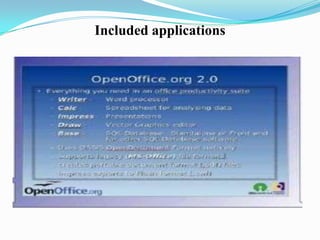
8. Included Applications
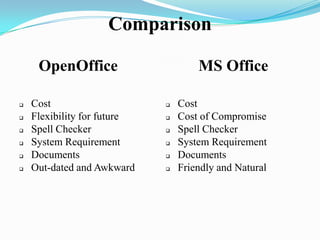
9. Comparison with MS Office
10. Conclusion
What are productivity Software?
 Increase Ratio of Quantity and Quality to per
unit of Time
 Reusability
 Maintainability
Why
 Suite of Applications
 Result of over twenty years' software
engineering
 Used by Governments, Education, Businesses,
IT Businesses, Advocates and many more …
 Open Source
Word Processing Software
 Allows users to create documents that contain text
and graphics
 User can change shape and size of characters in
headlines and headings
 Can change the colour of the characters
 Enables user to organize text into newspaper like
columns
 Word processing software also allows a user to insert
clipart
 This allows a user to insert drawings, diagrams, and
photographs into a document
 Allows user to organize data in rows and
columns to perform calculations
 Organizes data in rows and columns by
allowing letters to identify each column and
numbers to identify each row
 Allows users to enter in their own formulas to
perform calculations
 It makes it easier for users to correct mistakes
on a worksheet
Electronic Spreadsheet Software
Presentation Software
 Allows users to create documents that are used to
communicate ideas, messages, and other information
to a group
 This software provides many layouts for each
individual slide
 Title slide, two- column slide, and slide with clipart
 Once presentation is completed a user can print out the
slides as hand-outs
Advantages Of OpenOffice
 No Licensing Fee
 Open Source
 Compatibility
 Opening New File
 More Efficient Calculations
No Licensing Fee
 It is free for anyone to use and can distribute
at no cost.
 Features present in other Office suites are free
with OpenOffice.
Open Source
 You can distribute this software.
 You can copy this software as well according
to your choice.
Compatibility
 It is compatible with various OS.
 other office suites are designed to operate on
only one type of OS.
 OpenOffice is available for Windows, Linux,
Mac and more.
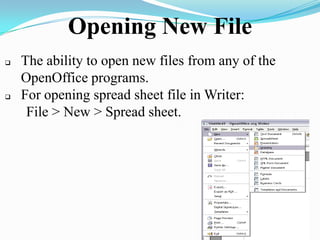
Opening New File
 The ability to open new files from any of the
OpenOffice programs.
 For opening spread sheet file in Writer:
File > New > Spread sheet.
More Efficient Calculations
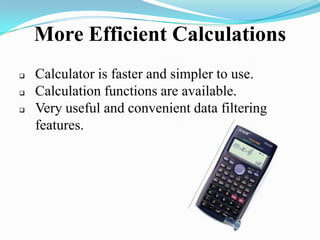
 Calculator is faster and simpler to use.
 Calculation functions are available.
 Very useful and convenient data filtering
features.
Disadvantages
Higher Memory Usage It has a higher memory and
CPU usage, it
cause the program to function
slower.
Limited Fonts It has a small variety of fonts,
downloading is required for
this purpose.
Technical Support The problem lies in the fact
that these people may not
have the answers or the time
to locate the answers that the
user is searching for.
APPLICATIONS OF OPEN
OFFICE
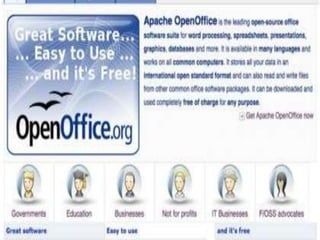
 Apache open office is used in :
1.Governments
2.Education
3.Businesses
4.Not for profits
5.IT business
Apache In Education
 Meet all the needs for both
student and teachers.
 To access databases and
spreadsheets
 Flexible word processor
 Good quality graphics are
provided by it
 Freely used and distributed
 No license worries
For Pupils And Students
 Perfectly legal so data sharing is convenient
 For IT students , its an essential platform for
developing IT skills
 Easy for understanding real life software
engineering
For Teachers And Academies
 Platform for creating teaching materials
 To manage administrative tasks
 Provide existing possibilities for school
projects
 Ex: the writer word processor is easy to use
for memos
Open For All
 Leading international force in digital addition
 Highest quality software regardless of income
 Provide different versions for local languages
Included applications
Comparison
OpenOffice
 Cost
 Flexibility for future
 Spell Checker
 System Requirement
 Documents
 Out-dated and Awkward
MS Office
 Cost
 Cost of Compromise
 Spell Checker
 System Requirement
 Documents
 Friendly and Natural
Conclusion
Meets all the needs in education field
Meet all the requirement for office software package
A leading openoffice
Can easily be downloaded
Free of charge
Licensed
Class Activity
Quiz Activity to check intelligence
 Write “T” for true and “F” for false statement in the
scoring table given to check how intelligent you are?
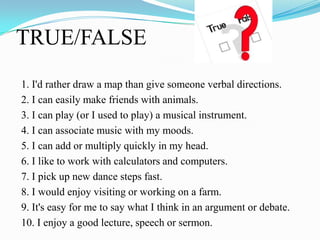
TRUE/FALSE
1. I'd rather draw a map than give someone verbal directions.
2. I can easily make friends with animals.
3. I can play (or I used to play) a musical instrument.
4. I can associate music with my moods.
5. I can add or multiply quickly in my head.
6. I like to work with calculators and computers.
7. I pick up new dance steps fast.
8. I would enjoy visiting or working on a farm.
9. It's easy for me to say what I think in an argument or debate.
10. I enjoy a good lecture, speech or sermon.
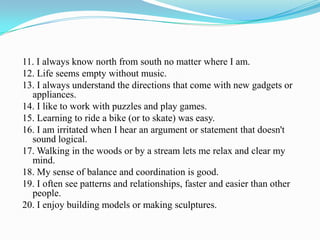
11. I always know north from south no matter where I am.
12. Life seems empty without music.
13. I always understand the directions that come with new gadgets or
appliances.
14. I like to work with puzzles and play games.
15. Learning to ride a bike (or to skate) was easy.
16. I am irritated when I hear an argument or statement that doesn't
sound logical.
17. Walking in the woods or by a stream lets me relax and clear my
mind.
18. My sense of balance and coordination is good.
19. I often see patterns and relationships, faster and easier than other
people.
20. I enjoy building models or making sculptures.
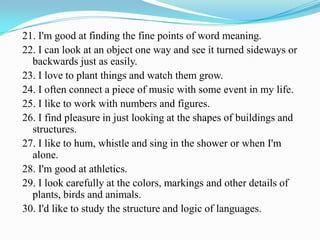
21. I'm good at finding the fine points of word meaning.
22. I can look at an object one way and see it turned sideways or
backwards just as easily.
23. I love to plant things and watch them grow.
24. I often connect a piece of music with some event in my life.
25. I like to work with numbers and figures.
26. I find pleasure in just looking at the shapes of buildings and
structures.
27. I like to hum, whistle and sing in the shower or when I'm
alone.
28. I'm good at athletics.
29. I look carefully at the colors, markings and other details of
plants, birds and animals.
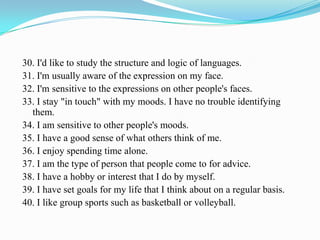
30. I'd like to study the structure and logic of languages.
31. I'm usually aware of the expression on my face.
32. I'm sensitive to the expressions on other people's faces.
33. I stay "in touch" with my moods. I have no trouble identifying
them.
34. I am sensitive to other people's moods.
35. I have a good sense of what others think of me.
36. I enjoy spending time alone.
37. I am the type of person that people come to for advice.
38. I have a hobby or interest that I do by myself.
39. I have set goals for my life that I think about on a regular basis.
40. I like group sports such as basketball or volleyball.
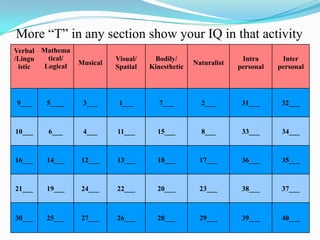
Verbal
/Lingu
istic
Mathema
tical/
Logical Musical
Visual/
Spatial
Bodily/
Kinesthetic
Naturalist
Intra
personal
Inter
personal
9___ 5____ 3___ 1___ 7___ 2___ 31___ 32___
10___ 6___ 4___ 11___ 15___ 8___ 33___ 34___
16___ 14___ 12___ 13___ 18___ 17___ 36___ 35___
21___ 19___ 24___ 22___ 20___ 23___ 38___ 37___
30___ 25___ 27___ 26___ 28___ 29___ 39___ 40___
More “T” in any section show your IQ in that activity
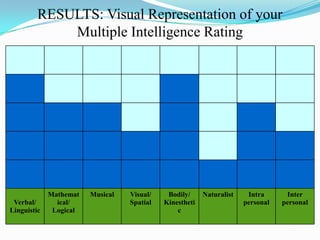
RESULTS: Visual Representation of your
Multiple Intelligence Rating
Verbal/
Linguistic
Mathemat
ical/
Logical
Musical Visual/
Spatial
Bodily/
Kinestheti
c
Naturalist Intra
personal
Inter
personal
Final result
 This whole activity is made on OPENOFFICE word
processor and power point
 The above graph shows the student is more intelligent in
verbal and bodily activities .
Group2

Group2

  • 1.
  • 2.
    Contents 1. Introduction 2. ApacheOpenOffice 3. Reason to choose the topic 4. Working with OpenOffice 5. Advantages 6. Disadvantages 7. Applications of OpenOffice 8. Included Applications 9. Comparison with MS Office 10. Conclusion
  • 3.
    What are productivitySoftware?  Increase Ratio of Quantity and Quality to per unit of Time  Reusability  Maintainability
  • 5.
    Why  Suite ofApplications  Result of over twenty years' software engineering  Used by Governments, Education, Businesses, IT Businesses, Advocates and many more …  Open Source
  • 6.
    Word Processing Software Allows users to create documents that contain text and graphics  User can change shape and size of characters in headlines and headings  Can change the colour of the characters  Enables user to organize text into newspaper like columns  Word processing software also allows a user to insert clipart  This allows a user to insert drawings, diagrams, and photographs into a document
  • 7.
     Allows userto organize data in rows and columns to perform calculations  Organizes data in rows and columns by allowing letters to identify each column and numbers to identify each row  Allows users to enter in their own formulas to perform calculations  It makes it easier for users to correct mistakes on a worksheet Electronic Spreadsheet Software
  • 8.
    Presentation Software  Allowsusers to create documents that are used to communicate ideas, messages, and other information to a group  This software provides many layouts for each individual slide  Title slide, two- column slide, and slide with clipart  Once presentation is completed a user can print out the slides as hand-outs
  • 9.
    Advantages Of OpenOffice No Licensing Fee  Open Source  Compatibility  Opening New File  More Efficient Calculations
  • 10.
    No Licensing Fee It is free for anyone to use and can distribute at no cost.  Features present in other Office suites are free with OpenOffice.
  • 11.
    Open Source  Youcan distribute this software.  You can copy this software as well according to your choice.
  • 12.
    Compatibility  It iscompatible with various OS.  other office suites are designed to operate on only one type of OS.  OpenOffice is available for Windows, Linux, Mac and more.
  • 13.
    Opening New File The ability to open new files from any of the OpenOffice programs.  For opening spread sheet file in Writer: File > New > Spread sheet.
  • 14.
    More Efficient Calculations Calculator is faster and simpler to use.  Calculation functions are available.  Very useful and convenient data filtering features.
  • 15.
    Disadvantages Higher Memory UsageIt has a higher memory and CPU usage, it cause the program to function slower. Limited Fonts It has a small variety of fonts, downloading is required for this purpose. Technical Support The problem lies in the fact that these people may not have the answers or the time to locate the answers that the user is searching for.
  • 16.
    APPLICATIONS OF OPEN OFFICE Apache open office is used in : 1.Governments 2.Education 3.Businesses 4.Not for profits 5.IT business
  • 18.
    Apache In Education Meet all the needs for both student and teachers.  To access databases and spreadsheets  Flexible word processor  Good quality graphics are provided by it  Freely used and distributed  No license worries
  • 19.
    For Pupils AndStudents  Perfectly legal so data sharing is convenient  For IT students , its an essential platform for developing IT skills  Easy for understanding real life software engineering
  • 20.
    For Teachers AndAcademies  Platform for creating teaching materials  To manage administrative tasks  Provide existing possibilities for school projects  Ex: the writer word processor is easy to use for memos
  • 21.
    Open For All Leading international force in digital addition  Highest quality software regardless of income  Provide different versions for local languages
  • 22.
  • 23.
    Comparison OpenOffice  Cost  Flexibilityfor future  Spell Checker  System Requirement  Documents  Out-dated and Awkward MS Office  Cost  Cost of Compromise  Spell Checker  System Requirement  Documents  Friendly and Natural
  • 24.
    Conclusion Meets all theneeds in education field Meet all the requirement for office software package A leading openoffice Can easily be downloaded Free of charge Licensed
  • 25.
  • 26.
    Quiz Activity tocheck intelligence  Write “T” for true and “F” for false statement in the scoring table given to check how intelligent you are?
  • 27.
    TRUE/FALSE 1. I'd ratherdraw a map than give someone verbal directions. 2. I can easily make friends with animals. 3. I can play (or I used to play) a musical instrument. 4. I can associate music with my moods. 5. I can add or multiply quickly in my head. 6. I like to work with calculators and computers. 7. I pick up new dance steps fast. 8. I would enjoy visiting or working on a farm. 9. It's easy for me to say what I think in an argument or debate. 10. I enjoy a good lecture, speech or sermon.
  • 28.
    11. I alwaysknow north from south no matter where I am. 12. Life seems empty without music. 13. I always understand the directions that come with new gadgets or appliances. 14. I like to work with puzzles and play games. 15. Learning to ride a bike (or to skate) was easy. 16. I am irritated when I hear an argument or statement that doesn't sound logical. 17. Walking in the woods or by a stream lets me relax and clear my mind. 18. My sense of balance and coordination is good. 19. I often see patterns and relationships, faster and easier than other people. 20. I enjoy building models or making sculptures.
  • 29.
    21. I'm goodat finding the fine points of word meaning. 22. I can look at an object one way and see it turned sideways or backwards just as easily. 23. I love to plant things and watch them grow. 24. I often connect a piece of music with some event in my life. 25. I like to work with numbers and figures. 26. I find pleasure in just looking at the shapes of buildings and structures. 27. I like to hum, whistle and sing in the shower or when I'm alone. 28. I'm good at athletics. 29. I look carefully at the colors, markings and other details of plants, birds and animals. 30. I'd like to study the structure and logic of languages.
  • 30.
    30. I'd liketo study the structure and logic of languages. 31. I'm usually aware of the expression on my face. 32. I'm sensitive to the expressions on other people's faces. 33. I stay "in touch" with my moods. I have no trouble identifying them. 34. I am sensitive to other people's moods. 35. I have a good sense of what others think of me. 36. I enjoy spending time alone. 37. I am the type of person that people come to for advice. 38. I have a hobby or interest that I do by myself. 39. I have set goals for my life that I think about on a regular basis. 40. I like group sports such as basketball or volleyball.
  • 31.
    Verbal /Lingu istic Mathema tical/ Logical Musical Visual/ Spatial Bodily/ Kinesthetic Naturalist Intra personal Inter personal 9___ 5____3___ 1___ 7___ 2___ 31___ 32___ 10___ 6___ 4___ 11___ 15___ 8___ 33___ 34___ 16___ 14___ 12___ 13___ 18___ 17___ 36___ 35___ 21___ 19___ 24___ 22___ 20___ 23___ 38___ 37___ 30___ 25___ 27___ 26___ 28___ 29___ 39___ 40___ More “T” in any section show your IQ in that activity
  • 32.
    RESULTS: Visual Representationof your Multiple Intelligence Rating Verbal/ Linguistic Mathemat ical/ Logical Musical Visual/ Spatial Bodily/ Kinestheti c Naturalist Intra personal Inter personal
  • 33.
    Final result  Thiswhole activity is made on OPENOFFICE word processor and power point  The above graph shows the student is more intelligent in verbal and bodily activities .