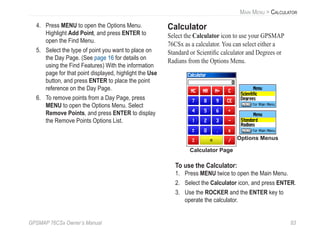
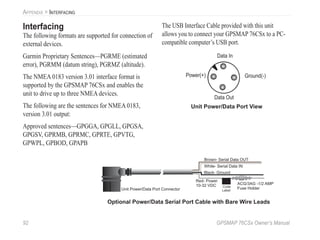
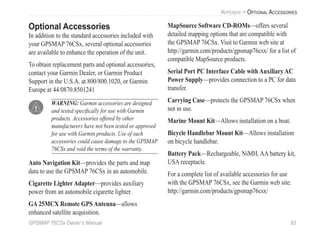
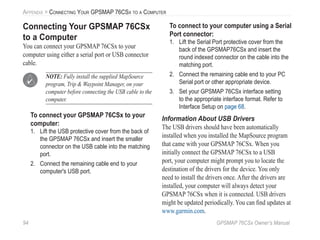
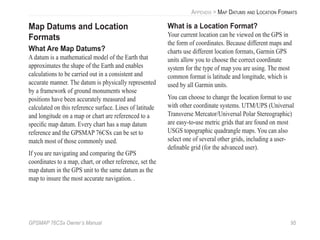
GPSMAP
®
76CSx
mapping gps with sensors
owner’s manual
Shown with optional MapSource®
data.
© 2005 Garmin Ltd. or its subsidiaries
Garmin International, Inc.
1200 East 151st
Street,
Olathe, Kansas 66062, U.S.A.
Tel. 913/397.8200 or 800/800.1020
Fax 913/397.8282
Garmin (Europe) Ltd.
Unit 5, The Quadrangle, Abbey Park
Industrial Estate, Romsey, SO51 9DL,
U.K.
Tel. 44/0870.8501241
Fax 44/0870.8501251
Garmin Corporation
No. 68, Jangshu 2nd
Road, Shijr, Taipei
County, Taiwan
Tel. 886/2.2642.9199
Fax 886/2.2642.9099
All rights reserved. Except as expressly provided herein, no part of this manual may be reproduced, copied, transmitted,
disseminated, downloaded or stored in any storage medium, for any purpose without the express prior written consent of Garmin.
Garmin hereby grants permission to download a single copy of this manual onto a hard drive or other electronic storage medium
to be viewed and to print one copy of this manual or of any revision hereto, provided that such electronic or printed copy of this
manual must contain the complete text of this copyright notice and provided further that any unauthorized commercial distribution
of this manual or any revision hereto is strictly prohibited.
Information in this document is subject to change without notice. Garmin reserves the right to change or
improve its products and to make changes in the content without obligation to notify any person or organization
of such changes or improvements. Visit the Garmin Web site (www.garmin.com) for current updates and
supplemental information concerning the use and operation of this and other Garmin products.
Garmin®
, GPSMAP®
, AutoLocate®
, TracBack®
, BlueChart®
, and MapSource®
are registered trademarks of
Garmin Ltd. or its subsidiaries and may not be used without the express permission of Garmin.
This product includes technology owned by SiRF Technology, Inc. SiRF’s technology is protected by U.S.
and foreign patents pending and issued. SiRF, SiRFstar and the SiRF logo are registered trademarks of SiRF
Technology, Inc. SiRFstarIII and SiRF Powered are trademarks of SiRF Technology, Inc.
December 2005 Part Number 190-00558-00 Rev. B Printed in Taiwan
GPSMAP 76CSx Owner’s Manual i
INTRODUCTION > ABOUT THIS MANUAL
INTRODUCTION
Thank you for choosing the Garmin GPSMAP 76CSx.
The GPSMAP 76CSx uses the proven performance of
Garmin GPS and full-featured mapping to create an
unsurpassed portable GPS receiver. Take a moment
now to compare the contents of this package with
the packing list on the box. If any pieces are missing,
contact your Garmin dealer immediately.
About This Manual
To get the most out of your new navigation system,
take time to read this manual and learn the operating
procedures for your unit in detail. This manual is
organized into the following sections.
The Introduction contains the Table of Contents.
The Getting Started section provides an overview of
the unit, how to turn the unit on, and how to acquire
satellites.
The Basic Operation section provides information
about setting up waypoints, routes, and tracks.
The Main Pages section contains an overview of
the Satellite, Trip Computer, Map, Compass, and
Altimeter Pages.
The Main Menu section describes features found in
the Main Menu, and information on how to change
settings.
The Appendix contains information such as
specifications, optional accessories, and maintenance
information. You can also find warranty and FCC
information in the Appendix.
An Index is provided at the end of the manual for
reference.
Manual Conventions
This manual uses the term Warning to indicate a
potentially hazardous situation, which, if not avoided,
could result in death or serious injury.
This manual uses the term Caution to indicate a
potentially hazardous situation, which, if not avoided,
may result in minor injury or property damage. It may
also be used without the symbol to alert you to avoid
unsafe practices.
ii GPSMAP 76CSx Owner’s Manual
INTRODUCTION > TABLE OF CONTENTS
TABLE OF CONTENTS
Introduction.......................................................i
About This Manual ..............................................i
Manual Conventions................................................i
Software License Agreement ............................v
Product Registration..........................................v
Contact Garmin.......................................................v
Caring for the GPSMAP 76CSx ........................vi
Cleaning the Case .................................................vi
Cleaning the Screen...............................................vi
Storage...................................................................vi
Water Immersion ...................................................vi
Warning .............................................................vii
Caution.............................................................viii
Getting Started.................................................1
Unit Overview .....................................................1
Using the GPSMAP 76CSx Keypad ..................3
Turning on the GPSMAP 76CSx........................4
Adjusting the Backlight..........................................4
Initializing the GPS Receiver.............................5
Initialization Options..............................................6
Using the GPSMAP 76CSx ................................6
Understanding Terms..............................................6
Selecting Options and Entering Data......................7
Using the Status Bar ...............................................8
On-Screen Messages...............................................9
Using the Databases................................................9
Basic Operation.............................................10
Creating and Using Waypoints .......................10
Marking Your Current Location ...........................10
Creating Waypoints Using the Map...................... 11
Creating a Waypoint Using Coordinates .............. 11
Editing Waypoints ................................................12
Deleting Waypoints ..............................................12
Averaging the Waypoint’s Location .....................13
Projecting a Waypoint...........................................14
Proximity Waypoints ............................................15
Man OverBoard (MOB) .......................................16
Using the Find Menu........................................16
Find By Name.......................................................17
Recent Finds .........................................................18
Using the Find Information Page..........................18
Find Information Page Options Menu..................18
Finding a Waypoint...............................................20
GPSMAP 76CSx Owner’s Manual iii
INTRODUCTION > TABLE OF CONTENTS
Finding a Geocache ..............................................21
Finding a City.......................................................21
Finding an Interstate Exit .....................................22
Finding an Intersection.........................................24
Searching for a Point of Interest...........................24
Using Tracks.....................................................26
Track Profiles........................................................29
Navigating a Saved Track.....................................30
Creating and Using Routes .............................31
Creating a Route...................................................31
Navigating a Route...............................................32
Editing a Route.....................................................33
Using the Route Page Options..............................35
Main Pages.....................................................36
Satellite Page....................................................37
Using the Satellite Page Options Menu................37
Map Page...........................................................38
Using Additional Map Data..................................39
Changing the Zoom Range...................................40
Map Orientation....................................................40
Map Page Options ................................................40
Guidance Text.......................................................41
Setting up the Map Page.......................................42
Measuring Distance..............................................45
Turning Declutter On or Off.................................46
Restoring Defaults................................................47
Compass Page..................................................47
Using the Electronic Compass..............................48
Compass Page Options.........................................50
Sight ‘N Go Navigation........................................51
Using the Course Pointer or Bearing Pointer .......52
Data Fields............................................................53
Altimeter Page ..................................................54
Altimeter Page Options ........................................55
Plot Over Time (Distance)....................................56
View Pressure/Elevation Plots .............................56
Zoom Ranges........................................................57
View Points...........................................................58
View Points on Map .............................................58
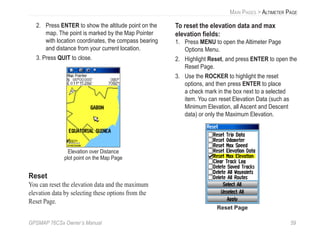
Reset .....................................................................59
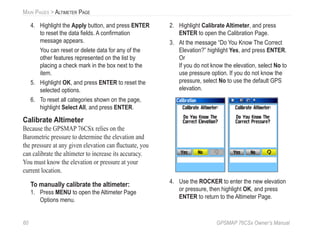
Calibrate Altimeter ...............................................60
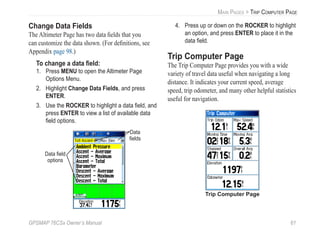
Change Data Fields...............................................61
Trip Computer Page .........................................61
Trip Computer Page Options Menu......................62
iv GPSMAP 76CSx Owner’s Manual
INTRODUCTION > TABLE OF CONTENTS
Main Menu......................................................63
Tracks................................................................63
Track Page Options...............................................64
Route Page........................................................64
Highway Page...................................................64
Setup Menu.......................................................65
System Setup ........................................................66
Display Setup........................................................67
Interface Setup......................................................68
Tones Setup...........................................................68
Page Sequence Setup............................................69
Map Page Setup....................................................69
Routing Setup.......................................................70
Geocache Setup ....................................................71
Marine Setup.........................................................72
Time Setup............................................................73
Units Setup ...........................................................73
Heading Setup.......................................................74
Calibration Setup..................................................75
Altimeter Setup.....................................................76
Welcome Setup.....................................................77
Jumpmaster...........................................................78
Proximity Waypoints........................................82
Calendar............................................................82
Calculator..........................................................83
Stopwatch .........................................................84
Sun and Moon...................................................85
Hunt and Fish ...................................................86
Games Menu.....................................................87
Appendix........................................................91
Specifications...................................................91
Interfacing.........................................................92
Optional Accessories.......................................93
Connecting Your GPSMAP 76CSx to a Com-
puter .............................................................94
Map Datums and Location Formats ...............95
What is WAAS/EGNOS?...................................97
Data Field Definitions.......................................98
FCC Compliance.............................................101
Limited Warranty ............................................102
Index.............................................................104
GPSMAP 76CSx Owner’s Manual v
INTRODUCTION > SOFTWARE LICENSE AGREEMENT AND PRODUCT REGISTRATION
Software License Agreement
BY USING THE GPSMAP 76CSx, YOU AGREE TO BE
BOUND BY THE TERMS AND CONDITIONS OF THE
FOLLOWING SOFTWARE LICENSE AGREEMENT.
PLEASE READ THIS AGREEMENT CAREFULLY.
Garmin grants you a limited license to use the software
embedded in this device (the “Software”) in binary executable
form in the normal operation of the product. Title, ownership
rights, and intellectual property rights in and to the Software
remain in Garmin.
You acknowledge that the Software is the property of
Garmin and is protected under the United States of America
copyright laws and international copyright treaties. You further
acknowledge that the structure, organization, and code of the
Software are valuable trade secrets of Garmin and that the
Software in source code form remains a valuable trade secret
of Garmin. You agree not to decompile, disassemble, modify,
reverse assemble, reverse engineer, or reduce to human
readable form the Software or any part thereof or create any
derivative works based on the Software. You agree not to
export or re-export the Software to any country in violation of
the export control laws of the United States of America.
Product Registration
Help us better support you by completing our online
registration today! Have the serial number on the
back of your GPSMAP 76CSx handy and connect to
our Web site (http://www.garmin.com). Look for the
Product Registration link on our Home page.
Use this area to record the serial number of your
GPSMAP 76CSx. Be sure to keep your original sales
receipt in a safe place or attach a photocopy inside the
manual.
Serial Number: ___ ___ ___ ___ ___ ___ ___ ___
Contact Garmin
If you should encounter any difficulty while using
your GPSMAP 76CSx, or if you have any questions,
in the U.S.A. contact Garmin Product Support by
phone: 913/397.8200 or 800/800.1020, Monday–
Friday, 8 AM–5 PM Central Time; or by e-mail at
www.garmin.com/contactUs.
In Europe, contact Garmin (Europe) Ltd. at
44/0870.8501241.
vi GPSMAP 76CSx Owner’s Manual
INTRODUCTION > CARING FOR THE GPSMAP 76CSX
Caring for the GPSMAP 76CSx
The GPSMAP 76CSx case is constructed of
high quality materials and does not require user
maintenance except cleaning.
Cleaning the Case
Clean the unit’s outer casing (except for the screen)
using a cloth dampened with a mild detergent solution
and then wipe dry. Avoid chemical cleaners and
solvents that may damage plastic components.
Cleaning the Screen
The GPSMAP 76CSx screen should be cleaned using
a soft, clean, lint-free cloth. Water, isopropyl alcohol,
or eyeglass cleaner can be used if needed. If these
are used, apply the liquid to the cloth and then gently
wipe the screen with the moistened cloth.
Storage
Do not store the GPSMAP 76CSx where prolonged
exposure to temperature extremes may occur (such as
in the trunk of a car) as permanent damage may result.
User information, such as waypoints and routes are
retained in the unit’s memory without the need for
external power. It is always a good practice to back
up important user data by manually recording it or
downloading it to a PC (transferring it to MapSource).
Water Immersion
The GPSMAP 76CSx is waterproof to IEC Standard
60529 IPX7. It can withstand immersion in 1 meter
of water for 30 minutes. Prolonged submersion can
cause damage to the unit. After submersion, be certain
to wipe and air dry the unit and replace batteries
before reuse.
GPSMAP 76CSx Owner’s Manual vii
INTRODUCTION > WARNING
Failure to avoid the following potentially hazardous
situations could result in an accident or collision
resulting in death or serious injury.
When navigating, carefully compare information displayed
on the GPSMAP 76CSx to all available navigation sources,
including information from visual sightings, and maps. For
safety, always resolve any discrepancies or questions before
continuing navigation.
Use the electronic chart in the GPSMAP 76CSx only to
facilitate, not to replace, the use of authorized government
charts. Official government charts and notices to mariners
contain all information needed to navigate safely.
Warning
WARNING: This product, its packaging, and its components contain chemicals known to the State of California to cause cancer,
birth defects, or reproductive harm. This Notice is being provided in accordance with California’s Proposition 65. If you have any
questions or would like additional information, please refer to our Web site at http://www.garmin.com/prop65.
viii GPSMAP 76CSx Owner’s Manual
INTRODUCTION > CAUTION
Failure to avoid the following potentially hazardous
situations may result in injury or property damage.
Use the GPSMAP 76CSx only as a navigational aid. Do
not attempt to use the GPSMAP 76CSx for any purpose
requiring precise measurement of direction, distance,
location, or topography. This product should not be used to
determine ground proximity for aircraft navigation.
The Global Positioning System (GPS) is operated by the
United States government, which is solely responsible for
its accuracy and maintenance. The government’s system
is subject to changes which could affect the accuracy and
performance of all GPS equipment, including the GPSMAP
76CSx. Although the GPSMAP 76CSx is a precision
navigation device, any navigation device can be misused or
misinterpreted and, therefore, become unsafe.
Map Data Information: One of the goals of Garmin is to provide customers with the most complete and accurate cartography
that is available to us at a reasonable cost. We use a combination of governmental and private data sources, which we identify in
product literature and copyright messages displayed to the consumer. Virtually all data sources contain inaccurate or incomplete
data to some extent. In some countries, complete and accurate map information is either not available or is prohibitively
expensive.
Caution
GPSMAP 76CSx Owner’s Manual 1
GETTING STARTED
Unit Overview
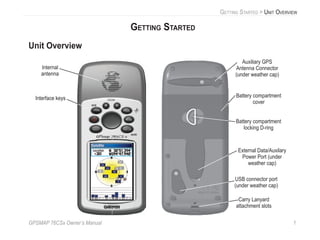
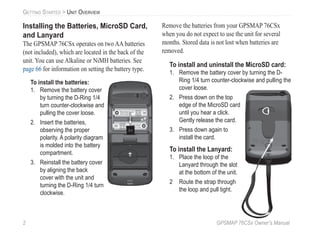
Carry Lanyard
attachment slots
Battery compartment
cover
External Data/Auxilary
Power Port (under
weather cap)
Internal
antenna
Interface keys
Auxiliary GPS
Antenna Connector
(under weather cap)
Battery compartment
locking D-ring
USB connector port
(under weather cap)
GETTING STARTED > UNIT OVERVIEW
2 GPSMAP 76CSx Owner’s Manual
GETTING STARTED > UNIT OVERVIEW
Installing the Batteries, MicroSD Card,
and Lanyard
The GPSMAP 76CSx operates on two AA batteries
(not included), which are located in the back of the
unit. You can use Alkaline or NiMH batteries. See
page 66 for information on setting the battery type.
To install the batteries:
1. Remove the battery cover
by turning the D-Ring 1/4
turn counter-clockwise and
pulling the cover loose.
2. Insert the batteries,
observing the proper
polarity. A polarity diagram
is molded into the battery
compartment.
3. Reinstall the battery cover
by aligning the back
cover with the unit and
turning the D-Ring 1/4 turn
clockwise.
Remove the batteries from your GPSMAP 76CSx
when you do not expect to use the unit for several
months. Stored data is not lost when batteries are
removed.
To install and uninstall the MicroSD card:
1. Remove the battery cover by turning the D-
Ring 1/4 turn counter-clockwise and pulling the
cover loose.
2. Press down on the top
edge of the MicroSD card
until you hear a click.
Gently release the card.
3. Press down again to
install the card.
To install the Lanyard:
1. Place the loop of the
Lanyard through the slot
at the bottom of the unit.
2 Route the strap through
the loop and pull tight.
MICRO
SD
CARD
GPSMAP 76CSx Owner’s Manual 3
GETTING STARTED > USING THE GPSMAP 76CSX KEYPAD
Using the GPSMAP 76CSx Keypad
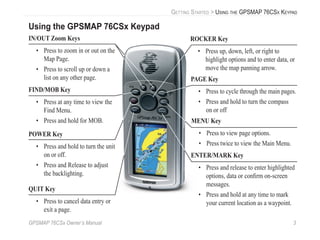
QUIT Key
• Press to cancel data entry or
exit a page.
ENTER/MARK Key
• Press and release to enter highlighted
options, data or confirm on-screen
messages.
• Press and hold at any time to mark
your current location as a waypoint.
IN/OUT Zoom Keys
• Press to zoom in or out on the
Map Page.
• Press to scroll up or down a
list on any other page.
FIND/MOB Key
• Press at any time to view the
Find Menu.
• Press and hold for MOB.
POWER Key
• Press and hold to turn the unit
on or off.
• Press and Release to adjust
the backlighting.
ROCKER Key
• Press up, down, left, or right to
highlight options and to enter data, or
move the map panning arrow.
PAGE Key
• Press to cycle through the main pages.
• Press and hold to turn the compass
on or off
MENU Key
• Press to view page options.
• Press twice to view the Main Menu.
4 GPSMAP 76CSx Owner’s Manual
GETTING STARTED > TURNING ON THE GPSMAP 76CSX
Turning on the GPSMAP 76CSx
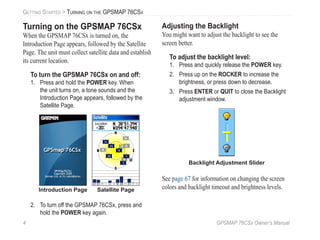
When the GPSMAP 76CSx is turned on, the
Introduction Page appears, followed by the Satellite
Page. The unit must collect satellite data and establish
its current location.
To turn the GPSMAP 76CSx on and off:
1. Press and hold the POWER key. When
the unit turns on, a tone sounds and the
Introduction Page appears, followed by the
Satellite Page.
Introduction Page Satellite Page
2. To turn off the GPSMAP 76CSx, press and
hold the POWER key again.
Adjusting the Backlight
You might want to adjust the backlight to see the
screen better.
To adjust the backlight level:
1. Press and quickly release the POWER key.
2. Press up on the ROCKER to increase the
brightness, or press down to decrease.
3. Press ENTER or QUIT to close the Backlight
adjustment window.
Backlight Adjustment Slider
See page 67 for information on changing the screen
colors and backlight timeout and brightness levels.
GPSMAP 76CSx Owner’s Manual 5
GETTING STARTED > INITIALIZING THE GPS RECEIVER
Initializing the GPS Receiver
The first time you turn on your GPSMAP 76CSx, the
GPS receiver must collect satellite data and establish
its current location. To ensure proper initialization,
the GPSMAP 76CSx is shipped from the factory in
AutoLocate mode, which allows the receiver to “find
itself” anywhere in the world. To receive satellite
signals, you should be outdoors and have a clear view
of the sky.
To initialize your GPSMAP 76CSx:
1. Press and hold the POWER key to turn on the
GPSMAP 76CSx.
2. Hold the unit in front of you with the top tilted
upward. When the receiver has signals from
at least three satellites, the top of the page
changes to indicate position accuracy and
location coordinates.
3. Press and release the PAGE key until the Map
Page appears. You are now ready to begin
GPS-aided navigation.
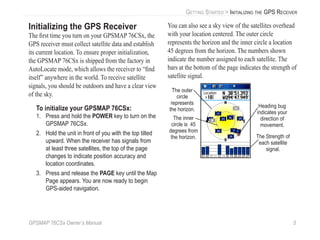
You can also see a sky view of the satellites overhead
with your location centered. The outer circle
represents the horizon and the inner circle a location
45 degrees from the horizon. The numbers shown
indicate the number assigned to each satellite. The
bars at the bottom of the page indicates the strength of
satellite signal.
The Strength of
each satellite
signal.
The outer
circle
represents
the horizon.
The inner
circle is 45
degrees from
the horizon.
Heading bug
indicates your
direction of
movement.
6 GPSMAP 76CSx Owner’s Manual
GETTING STARTED > USING THE GPSMAP 76CSX
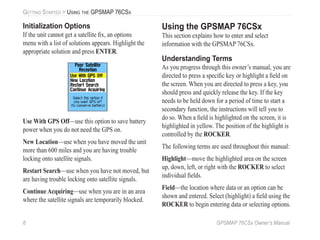
Initialization Options
If the unit cannot get a satellite fix, an options
menu with a list of solutions appears. Highlight the
appropriate solution and press ENTER.
Use With GPS Off—use this option to save battery
power when you do not need the GPS on.
New Location—use when you have moved the unit
more than 600 miles and you are having trouble
locking onto satellite signals.
Restart Search—use when you have not moved, but
are having trouble locking onto satellite signals.
Continue Acquiring—use when you are in an area
where the satellite signals are temporarily blocked.
Using the GPSMAP 76CSx
This section explains how to enter and select
information with the GPSMAP 76CSx.
Understanding Terms
As you progress through this owner’s manual, you are
directed to press a specific key or highlight a field on
the screen. When you are directed to press a key, you
should press and quickly release the key. If the key
needs to be held down for a period of time to start a
secondary function, the instructions will tell you to
do so. When a field is highlighted on the screen, it is
highlighted in yellow. The position of the highlight is
controlled by the ROCKER.
The following terms are used throughout this manual:
Highlight—move the highlighted area on the screen
up, down, left, or right with the ROCKER to select
individual fields.
Field—the location where data or an option can be
shown and entered. Select (highlight) a field using the
ROCKER to begin entering data or selecting options.
GPSMAP 76CSx Owner’s Manual 7
GETTING STARTED > USING THE GPSMAP 76CSX
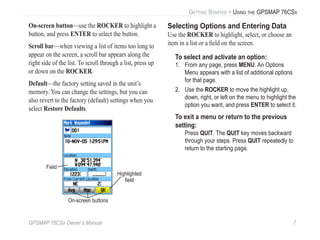
On-screen button—use the ROCKER to highlight a
button, and press ENTER to select the button.
Scroll bar—when viewing a list of items too long to
appear on the screen, a scroll bar appears along the
right side of the list. To scroll through a list, press up
or down on the ROCKER.
Default—the factory setting saved in the unit’s
memory. You can change the settings, but you can
also revert to the factory (default) settings when you
select Restore Defaults.
Highlighted
field
On-screen buttons
Field
Selecting Options and Entering Data
Use the ROCKER to highlight, select, or choose an
item in a list or a field on the screen.
To select and activate an option:
1. From any page, press MENU. An Options
Menu appears with a list of additional options
for that page.
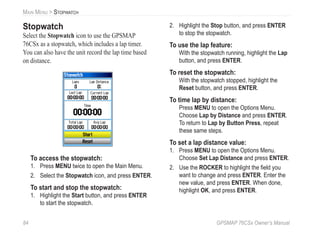
2. Use the ROCKER to move the highlight up,
down, right, or left on the menu to highlight the
option you want, and press ENTER to select it.
To exit a menu or return to the previous
setting:
Press QUIT. The QUIT key moves backward
through your steps. Press QUIT repeatedly to
return to the starting page.
8 GPSMAP 76CSx Owner’s Manual
GETTING STARTED > USING THE GPSMAP 76CSX
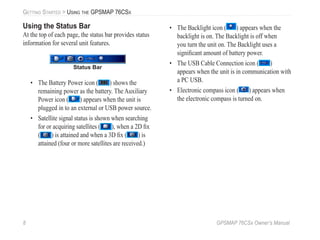
Using the Status Bar
At the top of each page, the status bar provides status
information for several unit features.
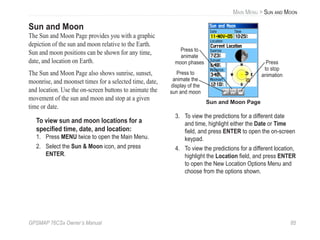
Status Bar
• The Battery Power icon ( ) shows the
remaining power as the battery. The Auxiliary
Power icon ( ) appears when the unit is
plugged in to an external or USB power source.
• Satellite signal status is shown when searching
for or acquiring satellites ( ), when a 2D fix
( ) is attained and when a 3D fix ( ) is
attained (four or more satellites are received.)
• The Backlight icon ( ) appears when the
backlight is on. The Backlight is off when
you turn the unit on. The Backlight uses a
significant amount of battery power.
• The USB Cable Connection icon ( )
appears when the unit is in communication with
a PC USB.
• Electronic compass icon ( ) appears when
the electronic compass is turned on.
GPSMAP 76CSx Owner’s Manual 9
GETTING STARTED > USING THE GPSMAP 76CSX
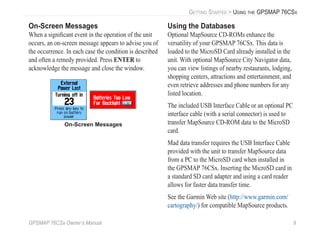
On-Screen Messages
When a significant event in the operation of the unit
occurs, an on-screen message appears to advise you of
the occurrence. In each case the condition is described
and often a remedy provided. Press ENTER to
acknowledge the message and close the window.
On-Screen Messages
Using the Databases
Optional MapSource CD-ROMs enhance the
versatility of your GPSMAP 76CSx. This data is
loaded to the MicroSD Card already installed in the
unit. With optional MapSource City Navigator data,
you can view listings of nearby restaurants, lodging,
shopping centers, attractions and entertainment, and
even retrieve addresses and phone numbers for any
listed location.
The included USB Interface Cable or an optional PC
interface cable (with a serial connector) is used to
transfer MapSource CD-ROM data to the MicroSD
card.
Mad data transfer requires the USB Interface Cable
provided with the unit to transfer MapSource data
from a PC to the MicroSD card when installed in
the GPSMAP 76CSx. Inserting the MicroSD card in
a standard SD card adapter and using a card reader
allows for faster data transfer time.
See the Garmin Web site (http://www.garmin.com/
cartography/) for compatible MapSource products.
10 GPSMAP 76CSx Owner’s Manual
BASIC OPERATION > CREATING AND USING WAYPOINTS
BASIC OPERATION
This section explains some of the more common
operations you will perform with your GPSMAP
76CSx including creating and using waypoints, tracks,
and routes using the Find Menu.
Creating and Using Waypoints
Waypoints are locations or landmarks you record and
store in your GPS. They are locations you might want
to return to later. You can add waypoints to routes and
even create a Go To directly to the selected waypoint.
Waypoints can be created using three methods.
You can press the ENTER/MARK key while at a
location, create a waypoint on the Map Page, or enter
coordinates for a waypoint manually.
Marking Your Current Location
Use the ENTER/MARK key to quickly capture your
current location to create a new waypoint. You must
have a valid position (2D or 3D) fix to mark your
current location.
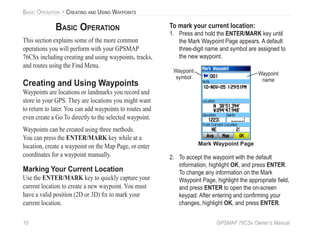
To mark your current location:
1. Press and hold the ENTER/MARK key until
the Mark Waypoint Page appears. A default
three-digit name and symbol are assigned to
the new waypoint.
Mark Waypoint Page
Waypoint
name
Waypoint
symbol
2. To accept the waypoint with the default
information, highlight OK, and press ENTER.
To change any information on the Mark
Waypoint Page, highlight the appropriate field,
and press ENTER to open the on-screen
keypad. After entering and confirming your
changes, highlight OK, and press ENTER.
GPSMAP 76CSx Owner’s Manual 11
BASIC OPERATION > CREATING AND USING WAYPOINTS
Creating Waypoints Using the Map
You can quickly create a waypoint using the
Map Page. When you pan the map and move the
pointer over a map item, you will see a highlighted
description of the item.
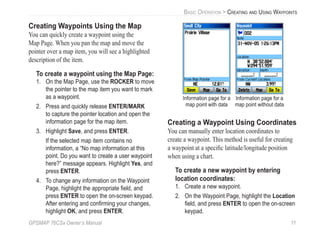
To create a waypoint using the Map Page:
1. On the Map Page, use the ROCKER to move
the pointer to the map item you want to mark
as a waypoint.
2. Press and quickly release ENTER/MARK
to capture the pointer location and open the
information page for the map item.
3. Highlight Save, and press ENTER.
If the selected map item contains no
information, a “No map information at this
point. Do you want to create a user waypoint
here?” message appears. Highlight Yes, and
press ENTER.
4. To change any information on the Waypoint
Page, highlight the appropriate field, and
press ENTER to open the on-screen keypad.
After entering and confirming your changes,
highlight OK, and press ENTER.
Information page for a
map point with data
Information page for a
map point without data
Creating a Waypoint Using Coordinates
You can manually enter location coordinates to
create a waypoint. This method is useful for creating
a waypoint at a specific latitude/longitude position
when using a chart.
To create a new waypoint by entering
location coordinates:
1. Create a new waypoint.
2. On the Waypoint Page, highlight the Location
field, and press ENTER to open the on-screen
keypad.
12 GPSMAP 76CSx Owner’s Manual
BASIC OPERATION > CREATING AND USING WAYPOINTS
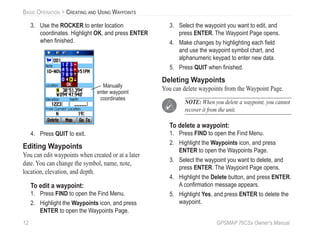
3. Use the ROCKER to enter location
coordinates. Highlight OK, and press ENTER
when finished.
Manually
enter waypoint
coordinates
4. Press QUIT to exit.
Editing Waypoints
You can edit waypoints when created or at a later
date. You can change the symbol, name, note,
location, elevation, and depth.
To edit a waypoint:
1. Press FIND to open the Find Menu.
2. Highlight the Waypoints icon, and press
ENTER to open the Waypoints Page.
3. Select the waypoint you want to edit, and
press ENTER. The Waypoint Page opens.
4. Make changes by highlighting each field
and use the waypoint symbol chart, and
alphanumeric keypad to enter new data.
5. Press QUIT when finished.
Deleting Waypoints
You can delete waypoints from the Waypoint Page.
NOTE: When you delete a waypoint, you cannot
recover it from the unit.
To delete a waypoint:
1. Press FIND to open the Find Menu.
2. Highlight the Waypoints icon, and press
ENTER to open the Waypoints Page.
3. Select the waypoint you want to delete, and
press ENTER. The Waypoint Page opens.
4. Highlight the Delete button, and press ENTER.
A confirmation message appears.
5. Highlight Yes, and press ENTER to delete the
waypoint.
GPSMAP 76CSx Owner’s Manual 13
BASIC OPERATION > CREATING AND USING WAYPOINTS
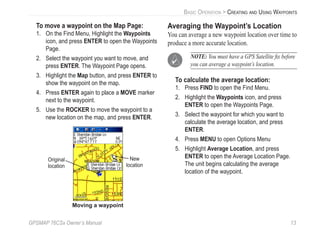
To move a waypoint on the Map Page:
1. On the Find Menu, Highlight the Waypoints
icon, and press ENTER to open the Waypoints
Page.
2. Select the waypoint you want to move, and
press ENTER. The Waypoint Page opens.
3. Highlight the Map button, and press ENTER to
show the waypoint on the map.
4. Press ENTER again to place a MOVE marker
next to the waypoint.
5. Use the ROCKER to move the waypoint to a
new location on the map, and press ENTER.
Original
location
New
location
Moving a waypoint
Averaging the Waypoint’s Location
You can average a new waypoint location over time to
produce a more accurate location.
NOTE: You must have a GPS Satellite fix before
you can average a waypoint’s location.
To calculate the average location:
1. Press FIND to open the Find Menu.
2. Highlight the Waypoints icon, and press
ENTER to open the Waypoints Page.
3. Select the waypoint for which you want to
calculate the average location, and press
ENTER.
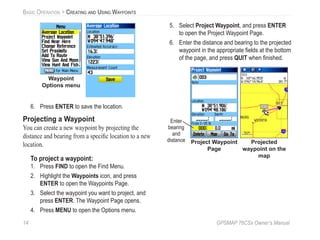
4. Press MENU to open Options Menu
5. Highlight Average Location, and press
ENTER to open the Average Location Page.
The unit begins calculating the average
location of the waypoint.
14 GPSMAP 76CSx Owner’s Manual
BASIC OPERATION > CREATING AND USING WAYPOINTS
Waypoint
Options menu
6. Press ENTER to save the location.
Projecting a Waypoint
You can create a new waypoint by projecting the
distance and bearing from a specific location to a new
location.
To project a waypoint:
1. Press FIND to open the Find Menu.
2. Highlight the Waypoints icon, and press
ENTER to open the Waypoints Page.
3. Select the waypoint you want to project, and
press ENTER. The Waypoint Page opens.
4. Press MENU to open the Options menu.
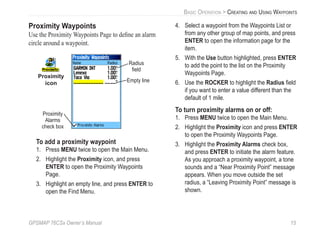
5. Select Project Waypoint, and press ENTER
to open the Project Waypoint Page.
6. Enter the distance and bearing to the projected
waypoint in the appropriate fields at the bottom
of the page, and press QUIT when finished.
Project Waypoint
Page
Projected
waypoint on the
map
Enter
bearing
and
distance
GPSMAP 76CSx Owner’s Manual 15
BASIC OPERATION > CREATING AND USING WAYPOINTS
Proximity Waypoints
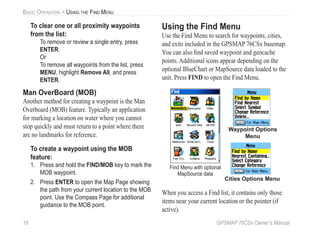
Use the Proximity Waypoints Page to define an alarm
circle around a waypoint.
Proximity
icon Empty line
Proximity
Alarms
check box
Radius
field
To add a proximity waypoint
1. Press MENU twice to open the Main Menu.
2. Highlight the Proximity icon, and press
ENTER to open the Proximity Waypoints
Page.
3. Highlight an empty line, and press ENTER to
open the Find Menu.
4. Select a waypoint from the Waypoints List or
from any other group of map points, and press
ENTER to open the information page for the
item.
5. With the Use button highlighted, press ENTER
to add the point to the list on the Proximity
Waypoints Page.
6. Use the ROCKER to highlight the Radius field
if you want to enter a value different than the
default of 1 mile.
To turn proximity alarms on or off:
1. Press MENU twice to open the Main Menu.
2. Highlight the Proximity icon and press ENTER
to open the Proximity Waypoints Page.
3. Highlight the Proximity Alarms check box,
and press ENTER to initiate the alarm feature.
As you approach a proximity waypoint, a tone
sounds and a “Near Proximity Point” message
appears. When you move outside the set
radius, a “Leaving Proximity Point” message is
shown.
16 GPSMAP 76CSx Owner’s Manual
BASIC OPERATION > USING THE FIND MENU
To clear one or all proximity waypoints
from the list:
To remove or review a single entry, press
ENTER.
Or
To remove all waypoints from the list, press
MENU, highlight Remove All, and press
ENTER.
Man OverBoard (MOB)
Another method for creating a waypoint is the Man
Overboard (MOB) feature. Typically an application
for marking a location on water where you cannot
stop quickly and must return to a point where there
are no landmarks for reference.
To create a waypoint using the MOB
feature:
1. Press and hold the FIND/MOB key to mark the
MOB waypoint.
2. Press ENTER to open the Map Page showing
the path from your current location to the MOB
point. Use the Compass Page for additional
guidance to the MOB point.
Using the Find Menu
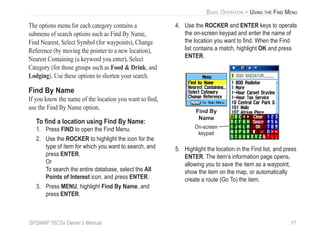
Use the Find Menu to search for waypoints, cities,
and exits included in the GPSMAP 76CSx basemap.
You can also find saved waypoint and geocache
points. Additional icons appear depending on the
optional BlueChart or MapSource data loaded to the
unit. Press FIND to open the Find Menu.
Waypoint Options
Menu
Cities Options Menu
Find Menu with optional
MapSource data
When you access a Find list, it contains only those
items near your current location or the pointer (if
active).
GPSMAP 76CSx Owner’s Manual 17
BASIC OPERATION > USING THE FIND MENU
The options menu for each category contains a
submenu of search options such as Find By Name,
Find Nearest, Select Symbol (for waypoints), Change
Reference (by moving the pointer to a new location),
Nearest Containing (a keyword you enter), Select
Category (for those groups such as Food & Drink, and
Lodging). Use these options to shorten your search.
Find By Name
If you know the name of the location you want to find,
use the Find By Name option.
To find a location using Find By Name:
1. Press FIND to open the Find Menu.
2. Use the ROCKER to highlight the icon for the
type of item for which you want to search, and
press ENTER.
Or
To search the entire database, select the All
Points of Interest icon, and press ENTER.
3. Press MENU, highlight Find By Name, and
press ENTER.
4. Use the ROCKER and ENTER keys to operate
the on-screen keypad and enter the name of
the location you want to find. When the Find
list contains a match, highlight OK and press
ENTER.
Find By
Name
On-screen
keypad
5. Highlight the location in the Find list, and press
ENTER. The item’s information page opens,
allowing you to save the item as a waypoint,
show the item on the map, or automatically
create a route (Go To) the item.
18 GPSMAP 76CSx Owner’s Manual
BASIC OPERATION > USING THE FIND MENU
Recent Finds
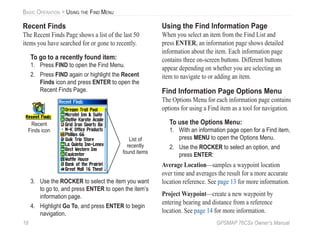
The Recent Finds Page shows a list of the last 50
items you have searched for or gone to recently.
To go to a recently found item:
1. Press FIND to open the Find Menu.
2. Press FIND again or highlight the Recent
Finds icon and press ENTER to open the
Recent Finds Page.
List of
recently
found items
Recent
Finds icon
3. Use the ROCKER to select the item you want
to go to, and press ENTER to open the item’s
information page.
4. Highlight Go To, and press ENTER to begin
navigation.
Using the Find Information Page
When you select an item from the Find List and
press ENTER, an information page shows detailed
information about the item. Each information page
contains three on-screen buttons. Different buttons
appear depending on whether you are selecting an
item to navigate to or adding an item.
Find Information Page Options Menu
The Options Menu for each information page contains
options for using a Find item as a tool for navigation.
To use the Options Menu:
1. With an information page open for a Find item,
press MENU to open the Options Menu.
2. Use the ROCKER to select an option, and
press ENTER:
Average Location—samples a waypoint location
over time and averages the result for a more accurate
location reference. See page 13 for more information.
Project Waypoint—create a new waypoint by
entering bearing and distance from a reference
location. See page 14 for more information.
GPSMAP 76CSx Owner’s Manual 19
BASIC OPERATION > USING THE FIND MENU
Find Near Here—returns you to the Find Menu
where you can search for map items near the item
defined on the information page.
Change Reference—point to a new location on the
Map Page using the pointer.
Set Proximity—program an alarm to sound when you
are within a specified radius of an item. See page 15
for more information.
Add To Route—include this item on a new route or
add it to an existing route. See “Creating and Using
Routes” on page 31 for more information.
View Sun and Moon—view Sun and Moon tables for
this item location. See page 85 for more information.
View Hunt and Fish—view Hunt and Fish tables for
this item location. See page 86 for more information.
Map Information—show the map from which
the map item originated. See the Appendix for
information about downloading detailed maps.
To find an item near another item:
1. Press FIND to open the Find Menu.
2. Select an icon on the Find Menu, and press
ENTER.
3. Highlight an item in the Find list, and press
ENTER to open the information page.
4. Press MENU to open the Options Menu,
Highlight Find Near Here, and press ENTER.
The Find Menu opens again with each
category containing items near the item
selected on the information page.
5. Select a category icon and press ENTER to
open a Find list of items near the item.
20 GPSMAP 76CSx Owner’s Manual
BASIC OPERATION > USING THE FIND MENU
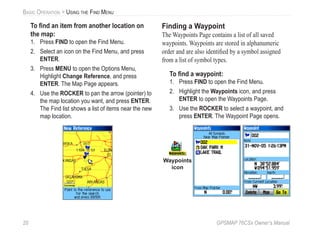
To find an item from another location on
the map:
1. Press FIND to open the Find Menu.
2. Select an icon on the Find Menu, and press
ENTER.
3. Press MENU to open the Options Menu,
Highlight Change Reference, and press
ENTER. The Map Page appears.
4. Use the ROCKER to pan the arrow (pointer) to
the map location you want, and press ENTER.
The Find list shows a list of items near the new
map location.
Finding a Waypoint
The Waypoints Page contains a list of all saved
waypoints. Waypoints are stored in alphanumeric
order and are also identified by a symbol assigned
from a list of symbol types.
To find a waypoint:
1. Press FIND to open the Find Menu.
2. Highlight the Waypoints icon, and press
ENTER to open the Waypoints Page.
3. Use the ROCKER to select a waypoint, and
press ENTER. The Waypoint Page opens.
Waypoints
icon
GPSMAP 76CSx Owner’s Manual 21
BASIC OPERATION > USING THE FIND MENU
Finding a Geocache
Use the Geocache icon to view the list of geocache
locations created using your GPSMAP 76CSx
or downloaded from your computer. A geocache
location is a waypoint with a special geocache symbol
assigned to give special significance and to allow it
to be separated from others on the waypoints list. For
more information on creating a geocache point, see
Geocache Setup instructions on page 71 and
www.garmin.com/products/gpsmap76csx/.
To find a geocache:
1. Press FIND to open the Find Menu.
2. Highlight the Geocache icon, and press
ENTER to open the Geocache Page. You can
view found geocaches or those that have not
been found.
3. Use the ROCKER to highlight a geocache
on the list, and press ENTER to open the
information page.
4. Highlight the Go To button and press ENTER
to navigate to the geocache location. When
you navigate to a geocache, the Compass
Page changes to Geocache Navigation
mode and any additional information about
downloaded cache location is shown in the
comment field.
When a geocache is found, the unit will mark the
cache as found, log an entry into the calendar, and
provide an option that, when activated, will show the
nearest cache.
Finding a City
Use the Cities icon on the Find Menu to find any city
listed in the mapping database (either in the basemap
or from downloaded detailed mapping data).
To find a city:
1. Press FIND to open the Find Menu.
2. Highlight the Cities icon, and press ENTER
The Cities Page shows a list of cities near your
current location.
22 GPSMAP 76CSx Owner’s Manual
BASIC OPERATION > USING THE FIND MENU
3. Select a city from the list and press ENTER to
open the information page for the selected city.
Or
If the city you want is not listed, press MENU,
select a search method, and press ENTER.
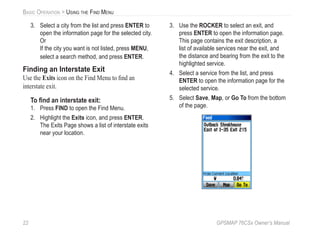
Finding an Interstate Exit
Use the Exits icon on the Find Menu to find an
interstate exit.
To find an interstate exit:
1. Press FIND to open the Find Menu.
2. Highlight the Exits icon, and press ENTER.
The Exits Page shows a list of interstate exits
near your location.
3. Use the ROCKER to select an exit, and
press ENTER to open the information page.
This page contains the exit description, a
list of available services near the exit, and
the distance and bearing from the exit to the
highlighted service.
4. Select a service from the list, and press
ENTER to open the information page for the
selected service.
5. Select Save, Map, or Go To from the bottom
of the page.
GPSMAP 76CSx Owner’s Manual 23
BASIC OPERATION > USING THE FIND MENU
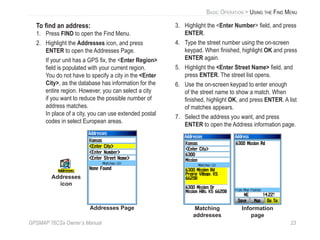
To find an address:
1. Press FIND to open the Find Menu.
2. Highlight the Addresses icon, and press
ENTER to open the Addresses Page.
If your unit has a GPS fix, the <Enter Region>
field is populated with your current region.
You do not have to specify a city in the <Enter
City>, as the database has information for the
entire region. However, you can select a city
if you want to reduce the possible number of
address matches.
In place of a city, you can use extended postal
codes in select European areas.
Addresses Page
Addresses
icon
3. Highlight the <Enter Number> field, and press
ENTER.
4. Type the street number using the on-screen
keypad. When finished, highlight OK and press
ENTER again.
5. Highlight the <Enter Street Name> field, and
press ENTER. The street list opens.
6. Use the on-screen keypad to enter enough
of the street name to show a match. When
finished, highlight OK, and press ENTER. A list
of matches appears.
7. Select the address you want, and press
ENTER to open the Address information page.
Matching
addresses
Information
page
24 GPSMAP 76CSx Owner’s Manual
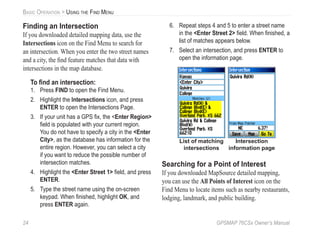
BASIC OPERATION > USING THE FIND MENU
Finding an Intersection
If you downloaded detailed mapping data, use the
Intersections icon on the Find Menu to search for
an intersection. When you enter the two street names
and a city, the find feature matches that data with
intersections in the map database.
To find an intersection:
1. Press FIND to open the Find Menu.
2. Highlight the Intersections icon, and press
ENTER to open the Intersections Page.
3. If your unit has a GPS fix, the <Enter Region>
field is populated with your current region.
You do not have to specify a city in the <Enter
City>, as the database has information for the
entire region. However, you can select a city
if you want to reduce the possible number of
intersection matches.
4. Highlight the <Enter Street 1> field, and press
ENTER.
5. Type the street name using the on-screen
keypad. When finished, highlight OK, and
press ENTER again.
6. Repeat steps 4 and 5 to enter a street name
in the <Enter Street 2> field. When finished, a
list of matches appears below.
7. Select an intersection, and press ENTER to
open the information page.
Intersection
information page
List of matching
intersections
Searching for a Point of Interest
If you downloaded MapSource detailed mapping,
you can use the All Points of Interest icon on the
Find Menu to locate items such as nearby restaurants,
lodging, landmark, and public building.
GPSMAP 76CSx Owner’s Manual 25
BASIC OPERATION > USING THE FIND MENU
To find a point of interest:
1. Press FIND to open the Find Menu.
2. Highlight the All Points of Interest icon, and
press ENTER to show a list of all points near
your current location.
3. Highlight an item in the list, and press ENTER
to open the information page for the item.
Or
Press MENU to open the Options Menu where
you can select options to help you narrow your
search.
Narrow search
criteria using the
Options Menu
4. Highlight the item you want from the list, and
press ENTER to open the information page for
the selected item.
If you are searching for a restaurant that is part of
a national chain, only the restaurant nearest to your
location is shown when you search using the Find
Nearest option. If you search using the By Name
option, all of the locations for that chain in the
mapping database are shown with the closest to your
current location listed first.
Custom Points of Interest
You can create your own category for points of
interest by using the Garmin POI Loader utility
available from the Garmin Web site
www.garmin.com/products/poiloader/.
26 GPSMAP 76CSx Owner’s Manual
BASIC OPERATION > USING TRACKS
Using Tracks
The Tracks feature creates an electronic bread crumb
trail or “track log” on the Map Page as you travel. The
track log contains information about points along its
path, including time, location, elevation, and depth
(depth requires NMEA input, see page 92) for each
point.
The track log starts recording as soon as the unit gets
a location fix. The percentage of memory used by the
current track log appears at the top of the Tracks Page.
Tracks Page
Percentage
of memory
used
List of
saved
tracks
To clear the track log:
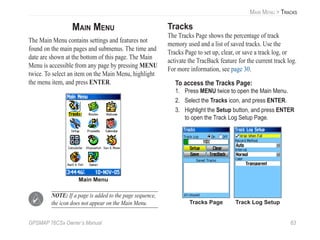
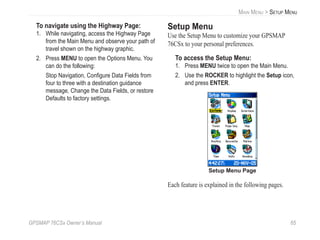
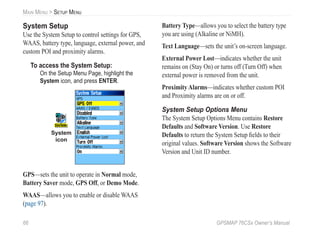
1. Press MENU twice to open the Main Menu.
2. Select the Tracks icon and press ENTER to
open the Tracks Page
3. Highlight the Clear button, and press ENTER.
A confirmation message appears.
4. Highlight OK, and press ENTER.
To set up a track log:
1. Press MENU twice to open the Main Menu.
2. Select the Tracks icon, and press ENTER to
open the Tracks Page.
3. Highlight the Setup button, and press ENTER
to open the Track Log Setup Page.
GPSMAP 76CSx Owner’s Manual 27
BASIC OPERATION > USING TRACKS
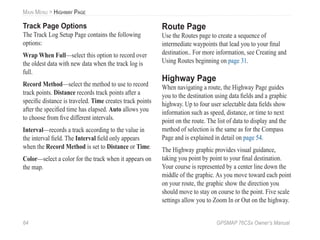
Wrap When Full—when selected, the track log
records over the oldest data with new data.
Record Method—Distance records track points after
a specified distance is traveled. Time creates track
points after a specified time has elapsed. Auto allows
you choose from five intervals.
Interval—records a track according to the Record
Method and Interval. Enter a specific distance, time,
or frequency.
Color—select the color of the active track on the
map.
To save the entire track log:
1. Press MENU twice to open the Main Menu.
2. Select the Tracks icon, and press ENTER to
open the Tracks Page.
3 Highlight the Save button and press ENTER.
A message appears asking you if you want to
save the entire track.
4. Select Yes, and press ENTER to save the
track. A “Saving Track” message appears
followed by the Saved Track Page.
Track
name
Track
distance
Track
color
Calculated
area
Saved Track Page
Use the Saved Track page to rename the track, view
the track distance and calculated area, and specify a
color for the track on the Map Page
To save a portion of the track log:
1. Press MENU twice to open the Main Menu.
2. Select the Tracks icon, and press ENTER to
open the Tracks Page.
3. Highlight the Save button and press ENTER,
a message appears asking you if you want to
save the entire track.
28 GPSMAP 76CSx Owner’s Manual
BASIC OPERATION > USING TRACKS
4. Select No, and press ENTER to save only a
portion of the track log. A map showing the
entire track appears
5. Use the ROCKER to move the pointer to the
point on the track line that you want to be the
beginning point, and press ENTER.
6. Use the ROCKER to move the arrow to the
point on the track line that you want to be the
ending point, and press ENTER. A “Saving
Track” message appears followed by the
Saved Track Page.
7. With OK highlighted, press ENTER.
To view a track on the map:
On the Saved Track Page, select the Map
button, and press ENTER to open the Map
Page. A map showing the entire track appears.
Begin and End markers and user waypoints
are added to the track.
Use the Area Calculation option on the Options Menu
to calculate the area of a track.
To calculate the area of a track:
1. With the Track Log Page open and the Track
Log on, press MENU to open the Options
Menu.
Saved track on the Map
Page
2. Highlight Area Calculation, and press ENTER
to open the Area Calculation Page.
3. Press ENTER to start the area calculation.
As you begin to move and define the area’s
boundaries, a Stop button appears at the
bottom of the page.
4. When finished defining the area, press ENTER
to open the page with a Save button.
GPSMAP 76CSx Owner’s Manual 29
BASIC OPERATION > USING TRACKS
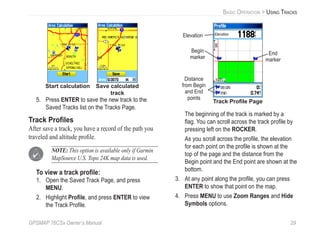
Start calculation Save calculated
track
5. Press ENTER to save the new track to the
Saved Tracks list on the Tracks Page.
Track Profiles
After save a track, you have a record of the path you
traveled and altitude profile.
NOTE: This option is available only if Garmin
MapSource U.S. Topo 24K map data is used.
To view a track profile:
1. Open the Saved Track Page, and press
MENU.
2. Highlight Profile, and press ENTER to view
the Track Profile.
Begin
marker
End
marker
Track Profile Page
Elevation
Distance
from Begin
and End
points
The beginning of the track is marked by a
flag. You can scroll across the track profile by
pressing left on the ROCKER.
As you scroll across the profile, the elevation
for each point on the profile is shown at the
top of the page and the distance from the
Begin point and the End point are shown at the
bottom.
3. At any point along the profile, you can press
ENTER to show that point on the map.
4. Press MENU to use Zoom Ranges and Hide
Symbols options.
30 GPSMAP 76CSx Owner’s Manual
BASIC OPERATION > USING TRACKS
A Track Elevation Profile can also be created from
Digital Elevation Models (DEM) maps (MapSource
U.S. Topo 24K), which include elevation data
contained in the map. When these types of maps are
available, a Use Map Data - Use Track Data option
menu appears when you select Profile.
Navigating a Saved Track
You can save your track log to use later as a
TracBack®
. When initiated, a TracBack route takes
you back to the stored track log point you select.
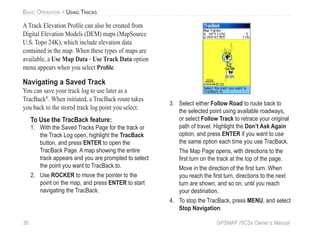
To Use the TracBack feature:
1. With the Saved Tracks Page for the track or
the Track Log open, highlight the TracBack
button, and press ENTER to open the
TracBack Page. A map showing the entire
track appears and you are prompted to select
the point you want to TracBack to.
2. Use ROCKER to move the pointer to the
point on the map, and press ENTER to start
navigating the TracBack.
3. Select either Follow Road to route back to
the selected point using available roadways,
or select Follow Track to retrace your original
path of travel. Highlight the Don’t Ask Again
option, and press ENTER if you want to use
the same option each time you use TracBack.
The Map Page opens, with directions to the
first turn on the track at the top of the page.
Move in the direction of the first turn. When
you reach the first turn, directions to the next
turn are shown, and so on, until you reach
your destination.
4. To stop the TracBack, press MENU, and select
Stop Navigation.
GPSMAP 76CSx Owner’s Manual 31
BASIC OPERATION > CREATING AND USING ROUTES
Creating and Using Routes
Route navigation allows you to create a sequence of
intermediate waypoints that lead you to your final
destination. The GPSMAP 76CSx lets you store 50
routes with up to 250 points each.
Creating a Route
You can create or modify a route using the Routes
Page, and you can add waypoints to a route from
the Find Menu. You can create more complex routes
using a PC and MapSource mapping programs and
then transfer them to the unit memory. Auto-Routes,
which are generated when you select Go To for a
Find item, map item, or waypoint, cannot be saved.
Saved routes with more than 50 waypoints cannot be
navigated using the Follow Roads option.
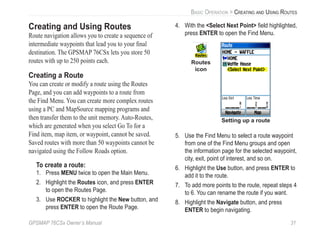
To create a route:
1. Press MENU twice to open the Main Menu.
2. Highlight the Routes icon, and press ENTER
to open the Routes Page.
3. Use ROCKER to highlight the New button, and
press ENTER to open the Route Page.
4. With the <Select Next Point> field highlighted,
press ENTER to open the Find Menu.
Setting up a route
Routes
icon
5. Use the Find Menu to select a route waypoint
from one of the Find Menu groups and open
the information page for the selected waypoint,
city, exit, point of interest, and so on.
6. Highlight the Use button, and press ENTER to
add it to the route.
7. To add more points to the route, repeat steps 4
to 6. You can rename the route if you want.
8. Highlight the Navigate button, and press
ENTER to begin navigating.
32 GPSMAP 76CSx Owner’s Manual
BASIC OPERATION > CREATING AND USING ROUTES
Navigating a Route
After you create a route, you can begin navigation
immediately or save it to the Saved Routes list.
To navigate a saved route:
1. Press MENU twice to open the Main Menu.
2. Highlight the Routes icon, and press ENTER
to open the Routes Page.
3. Highlight a saved route, and press ENTER to
open the Route Page.
4. Highlight the Navigate button, and press
ENTER.
5. Select Follow Road or Off Road from the
prompt.
6. To stop navigating, press MENU, select Stop
Navigation, and press ENTER.
When navigating a route, a guidance message and
graphic view of turns in the route appear as you
approach each one. Using the Follow Roads option on
the Routing Setup Page increases the number of turns
and shows an Active Route Page with a list of turns.
If you selected the Off Road option you can view
only the list of points for a route from the Active
Route Page. See “Routing Setup” on page 70.
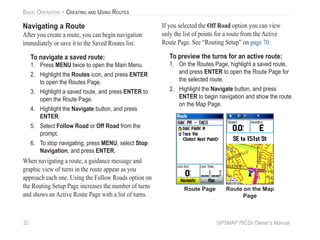
To preview the turns for an active route:
1. On the Routes Page, highlight a saved route,
and press ENTER to open the Route Page for
the selected route.
2. Highlight the Navigate button, and press
ENTER to begin navigation and show the route
on the Map Page.
Route on the Map
Page
Route Page
GPSMAP 76CSx Owner’s Manual 33
BASIC OPERATION > CREATING AND USING ROUTES
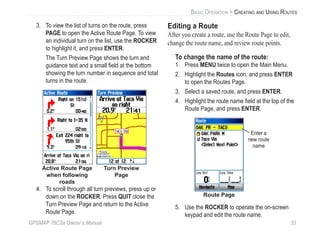
3. To view the list of turns on the route, press
PAGE to open the Active Route Page. To view
an individual turn on the list, use the ROCKER
to highlight it, and press ENTER.
The Turn Preview Page shows the turn and
guidance text and a small field at the bottom
showing the turn number in sequence and total
turns in the route.
Active Route Page
when following
roads
Turn Preview
Page
4. To scroll through all turn previews, press up or
down on the ROCKER. Press QUIT close the
Turn Preview Page and return to the Active
Route Page.
Editing a Route
After you create a route, use the Route Page to edit,
change the route name, and review route points.
To change the name of the route:
1. Press MENU twice to open the Main Menu.
2. Highlight the Routes icon, and press ENTER
to open the Routes Page.
3. Select a saved route, and press ENTER.
4. Highlight the route name field at the top of the
Route Page, and press ENTER.
Enter a
new route
name
Route Page
5. Use the ROCKER to operate the on-screen
keypad and edit the route name.
34 GPSMAP 76CSx Owner’s Manual
BASIC OPERATION > CREATING AND USING ROUTES
To review individual route points:
1. Press MENU twice to open the Main Menu.
2. Highlight the Routes icon, and press ENTER
to open the Routes Page.
3. Select a saved route, and press ENTER.
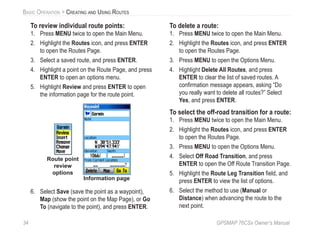
4. Highlight a point on the Route Page, and press
ENTER to open an options menu.
5. Highlight Review and press ENTER to open
the information page for the route point.
Route point
review
options
Information page
6. Select Save (save the point as a waypoint),
Map (show the point on the Map Page), or Go
To (navigate to the point), and press ENTER.
To delete a route:
1. Press MENU twice to open the Main Menu.
2. Highlight the Routes icon, and press ENTER
to open the Routes Page.
3. Press MENU to open the Options Menu.
4. Highlight Delete All Routes, and press
ENTER to clear the list of saved routes. A
confirmation message appears, asking “Do
you really want to delete all routes?” Select
Yes, and press ENTER.
To select the off-road transition for a route:
1. Press MENU twice to open the Main Menu.
2. Highlight the Routes icon, and press ENTER
to open the Routes Page.
3. Press MENU to open the Options Menu.
4. Select Off Road Transition, and press
ENTER to open the Off Route Transition Page.
5. Highlight the Route Leg Transition field, and
press ENTER to view the list of options.
6. Select the method to use (Manual or
Distance) when advancing the route to the
next point.
GPSMAP 76CSx Owner’s Manual 35
BASIC OPERATION > CREATING AND USING ROUTES
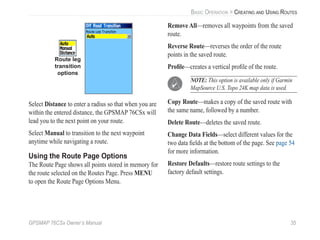
Route leg
transition
options
Select Distance to enter a radius so that when you are
within the entered distance, the GPSMAP 76CSx will
lead you to the next point on your route.
Select Manual to transition to the next waypoint
anytime while navigating a route.
Using the Route Page Options
The Route Page shows all points stored in memory for
the route selected on the Routes Page. Press MENU
to open the Route Page Options Menu.
Remove All—removes all waypoints from the saved
route.
Reverse Route—reverses the order of the route
points in the saved route.
Profile—creates a vertical profile of the route.
NOTE: This option is available only if Garmin
MapSource U.S. Topo 24K map data is used.
Copy Route—makes a copy of the saved route with
the same name, followed by a number.
Delete Route—deletes the saved route.
Change Data Fields—select different values for the
two data fields at the bottom of the page. See page 54
for more information.
Restore Defaults—restore route settings to the
factory default settings.
36 GPSMAP 76CSx Owner’s Manual
MAIN PAGES > OVERVIEW
MAIN PAGES
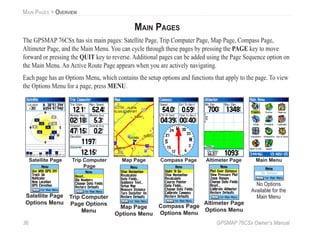
The GPSMAP 76CSx has six main pages: Satellite Page, Trip Computer Page, Map Page, Compass Page,
Altimeter Page, and the Main Menu. You can cycle through these pages by pressing the PAGE key to move
forward or pressing the QUIT key to reverse. Additional pages can be added using the Page Sequence option on
the Main Menu. An Active Route Page appears when you are actively navigating.
Each page has an Options Menu, which contains the setup options and functions that apply to the page. To view
the Options Menu for a page, press MENU.
Satellite Page Trip Computer
Page
Map Page Compass Page Altimeter Page
Satellite Page
Options Menu
Trip Computer
Page Options
Menu
Map Page
Options Menu
Compass Page
Options Menu
Altimeter Page
Options Menu
Main Menu
No Options
Available for the
Main Menu
GPSMAP 76CSx Owner’s Manual 37
MAIN PAGES > SATELLITE PAGE
Satellite Page
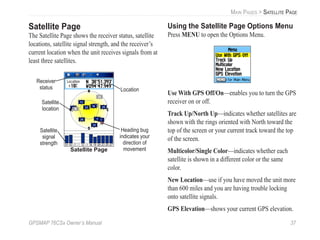
The Satellite Page shows the receiver status, satellite
locations, satellite signal strength, and the receiver’s
current location when the unit receives signals from at
least three satellites.
Heading bug
indicates your
direction of
movement
Satellite
signal
strength
Location
Receiver
status
Satellite Page
Satellite
location
Using the Satellite Page Options Menu
Press MENU to open the Options Menu.
Use With GPS Off/On—enables you to turn the GPS
receiver on or off.
Track Up/North Up—indicates whether satellites are
shown with the rings oriented with North toward the
top of the screen or your current track toward the top
of the screen.
Multicolor/Single Color—indicates whether each
satellite is shown in a different color or the same
color.
New Location—use if you have moved the unit more
than 600 miles and you are having trouble locking
onto satellite signals.
GPS Elevation—shows your current GPS elevation.
38 GPSMAP 76CSx Owner’s Manual
MAIN PAGES > MAP PAGE
Map Page
The GPSMAP 76CSx comes with a built-in basemap
that includes a database of cities, interstates, state and
county highways, exit information, and lake and river
outlines. The standard basemap can be enhanced with
MapSource or BlueChart data.
Two map operating modes, position mode and pan
mode, determine what cartography is shown on
the map. Position mode pans the map to keep your
present location in the screen area. The position
marker shows your travel on the Map Page. When
you press the ROCKER, the GPSMAP 76CSx enters
pan mode, which moves the map to keep the white
arrow (map pointer) within the screen area.
When you are in pan mode, you can move the map
pointer about the page to highlight and identify map
items. If there is more than one map item under the
pointer, a list appears with the item selected on the
map and highlighted on the list.
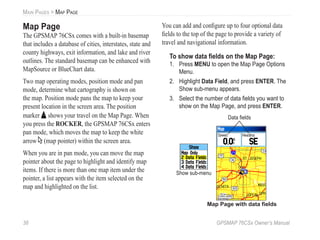
You can add and configure up to four optional data
fields to the top of the page to provide a variety of
travel and navigational information.
To show data fields on the Map Page:
1. Press MENU to open the Map Page Options
Menu.
2. Highlight Data Field, and press ENTER. The
Show sub-menu appears.
3. Select the number of data fields you want to
show on the Map Page, and press ENTER.
Data fields
Show sub-menu
Map Page with data fields
GPSMAP 76CSx Owner’s Manual 39
MAIN PAGES > MAP PAGE
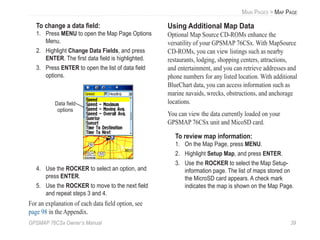
To change a data field:
1. Press MENU to open the Map Page Options
Menu.
2. Highlight Change Data Fields, and press
ENTER. The first data field is highlighted.
3. Press ENTER to open the list of data field
options.
Data field
options
4. Use the ROCKER to select an option, and
press ENTER.
5. Use the ROCKER to move to the next field
and repeat steps 3 and 4.
For an explanation of each data field option, see
page 98 in the Appendix.
Using Additional Map Data
Optional Map Source CD-ROMs enhance the
versatility of your GPSMAP 76CSx. With MapSource
CD-ROMs, you can view listings such as nearby
restaurants, lodging, shopping centers, attractions,
and entertainment, and you can retrieve addresses and
phone numbers for any listed location. With additional
BlueChart data, you can access information such as
marine navaids, wrecks, obstructions, and anchorage
locations.
You can view the data currently loaded on your
GPSMAP 76CSx unit and MicoSD card.
To review map information:
1. On the Map Page, press MENU.
2. Highlight Setup Map, and press ENTER.
3. Use the ROCKER to select the Map Setup-
information page. The list of maps stored on
the MicroSD card appears. A check mark
indicates the map is shown on the Map Page.
40 GPSMAP 76CSx Owner’s Manual
MAIN PAGES > MAP PAGE
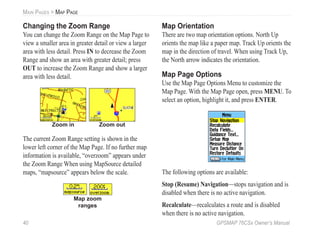
Changing the Zoom Range
You can change the Zoom Range on the Map Page to
view a smaller area in greater detail or view a larger
area with less detail. Press IN to decrease the Zoom
Range and show an area with greater detail; press
OUT to increase the Zoom Range and show a larger
area with less detail.
Zoom in Zoom out
The current Zoom Range setting is shown in the
lower left corner of the Map Page. If no further map
information is available, “overzoom” appears under
the Zoom Range When using MapSource detailed
maps, “mapsource” appears below the scale.
Map zoom
ranges
Map Orientation
There are two map orientation options. North Up
orients the map like a paper map. Track Up orients the
map in the direction of travel. When using Track Up,
the North arrow indicates the orientation.
Map Page Options
Use the Map Page Options Menu to customize the
Map Page. With the Map Page open, press MENU. To
select an option, highlight it, and press ENTER.
The following options are available:
Stop (Resume) Navigation—stops navigation and is
disabled when there is no active navigation.
Recalculate—recalculates a route and is disabled
when there is no active navigation.
GPSMAP 76CSx Owner’s Manual 41
MAIN PAGES > MAP PAGE
Data Fields—opens the Show sub menu so you can
select the number of data fields to show at the top of
the Map Page. Map Only, 2, 3, or 4 data fields.
Change Data Fields—allows you to select the type of
data you want to show in the data fields. This option is
available only if 2, 3, or 4 data fields is selected.
Guidance Text—shows messages on the screen
advising you of your next navigation move when
navigating to a destination.
Setup Map—access to six pages of Map settings so
you can customize the map to your preferences.
Measure Distance (Stop Measuring)—Measures
the distance from your current location to the map
pointer.
Turn Declutter On (Off)—eliminates items on the
map that can block road details when the map is
zoomed out.
Restore Defaults—returns the map to the factory set
map defaults.
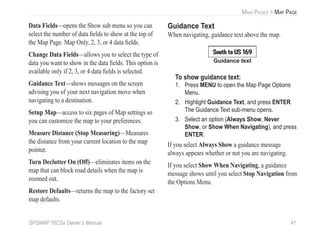
Guidance Text
When navigating, guidance text above the map.
Guidance text
To show guidance text:
1. Press MENU to open the Map Page Options
Menu.
2. Highlight Guidance Text, and press ENTER.
The Guidance Text sub-menu opens.
3. Select an option (Always Show, Never
Show, or Show When Navigating), and press
ENTER.
If you select Always Show a guidance message
always appears whether or not you are navigating.
If you select Show When Navigating, a guidance
message shows until you select Stop Navigation from
the Options Menu.
42 GPSMAP 76CSx Owner’s Manual
MAIN PAGES > MAP PAGE
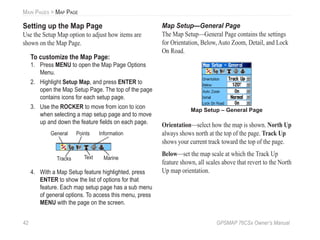
Setting up the Map Page
Use the Setup Map option to adjust how items are
shown on the Map Page.
To customize the Map Page:
1. Press MENU to open the Map Page Options
Menu.
2. Highlight Setup Map, and press ENTER to
open the Map Setup Page. The top of the page
contains icons for each setup page.
3. Use the ROCKER to move from icon to icon
when selecting a map setup page and to move
up and down the feature fields on each page.
General
Tracks
Points
Text
Information
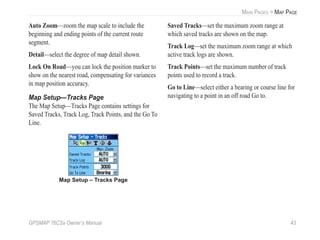
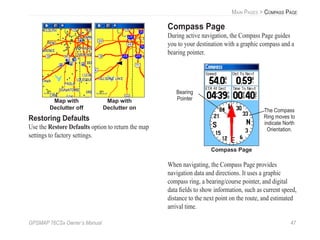
Marine
4. With a Map Setup feature highlighted, press
ENTER to show the list of options for that
feature. Each map setup page has a sub menu
of general options. To access this menu, press
MENU with the page on the screen.
Map Setup—General Page
The Map Setup—General Page contains the settings
for Orientation, Below, Auto Zoom, Detail, and Lock
On Road.
Map Setup – General Page
Orientation—select how the map is shown. North Up
always shows north at the top of the page. Track Up
shows your current track toward the top of the page.
Below—set the map scale at which the Track Up
feature shown, all scales above that revert to the North
Up map orientation.
GPSMAP 76CSx Owner’s Manual 43
MAIN PAGES > MAP PAGE
Auto Zoom—zoom the map scale to include the
beginning and ending points of the current route
segment.
Detail—select the degree of map detail shown.
Lock On Road—you can lock the position marker to
show on the nearest road, compensating for variances
in map position accuracy.
Map Setup—Tracks Page
The Map Setup—Tracks Page contains settings for
Saved Tracks, Track Log, Track Points, and the Go To
Line.
Map Setup – Tracks Page
Saved Tracks—set the maximum zoom range at
which saved tracks are shown on the map.
Track Log—set the maximum zoom range at which
active track logs are shown.
Track Points—set the maximum number of track
points used to record a track.
Go to Line—select either a bearing or course line for
navigating to a point in an off road Go to.
44 GPSMAP 76CSx Owner’s Manual
MAIN PAGES > MAP PAGE
Map Setup—Points Page
The Map Setup—Points Page to set the map scale at
which Map Points, User Waypoints, Street Label,
and Land Cover appear on the Map Page. Select
Auto, Off, or from 20 ft to 800 mi.
Map Setup – Points Page
Map Setup—Text Page
Use the Map Setup—Text Page to select the text size
for descriptions of map items on the Map Page. You
can select from Small, Medium, or Large.
Map Setup – Text Page
Map Setup—Information Page
The Map Setup—Text Page shows a list of
downloaded detailed maps such as topographic,
marine charts, and MapSource maps with auto-routing
capability. Use ROCKER to highlight a map and
press ENTER to show it on the map screen or turn it
off.
GPSMAP 76CSx Owner’s Manual 45
MAIN PAGES > MAP PAGE
Map Setup – Information Page
Press MENU to view the list of options for showing
maps.
Map Setup—Marine Page
Use the Map Setup—Marine Page to customize
settings for marine colors, spot soundings, light
sectors, and symbol sets when using downloaded
marine charts MapSource BlueChart marine mapping
data.
Map Setup – Marine Page
Marine Colors—toggles marine colors on or off on
the Map Page.
Spot Soundings—toggles spot soundings on or off on
the Map Page.
Light Sectors—controls the display of lighted
navigation aids.
Symbol Set—select the symbol set to use (Auto,
GARMIN, NOAA, International).
Measuring Distance
You can measure the distance between two map items.
To measure distance between two points:
1. Press MENU to open the Map Page Options
Menu.
2. Highlight Measure Distance, and press
ENTER. An on-screen arrow appears on the
map at your current location with REF below it.
3. Move the arrow to the reference point (the
starting point you want to measure from),
and press ENTER. A push pin icon marks the
starting point on the map.
46 GPSMAP 76CSx Owner’s Manual
MAIN PAGES > MAP PAGE
4. Move the arrow to the point you want to
measure to. The distance between the two
points is shown in the upper-right corner of the
Map Page.
5. Press QUIT to cancel.
Push pin
indicating the
beginning
point of the
measurement
End point of
measurement
labeled REF
Measured
distance
Turning Declutter On or Off
You can remove unwanted items from the Map Page
(declutter the screen) such as map item titles and
icons. This is useful when the map is zoomed to a
scale that is partially obscured by titles and icons that
remain the same size regardless of the map scale.
To turn declutter on or off:
1. Press MENU to open the Map Page Options
menu.
2. Highlight Turn Declutter On, and press
ENTER.
3. To turn Declutter off, press MENU, select Turn
Declutter Off, and press ENTER.
GPSMAP 76CSx Owner’s Manual 47
MAIN PAGES > COMPASS PAGE
Map with
Declutter off
Map with
Declutter on
Restoring Defaults
Use the Restore Defaults option to return the map
settings to factory settings.
Compass Page
During active navigation, the Compass Page guides
you to your destination with a graphic compass and a
bearing pointer.
Compass Page
The Compass
Ring moves to
indicate North
Orientation.
Bearing
Pointer
When navigating, the Compass Page provides
navigation data and directions. It uses a graphic
compass ring, a bearing/course pointer, and digital
data fields to show information, such as current speed,
distance to the next point on the route, and estimated
arrival time.
48 GPSMAP 76CSx Owner’s Manual
MAIN PAGES > COMPASS PAGE
The rotating compass ring indicates the direction you
are heading. The Bearing/Course Pointer indicates
the direction (bearing) to your destination, relative
to your current heading direction. The compass ring
and bearing pointer work independently to show
your direction of movement and the direction to your
destination. You can choose a Bearing Pointer or
Course Pointer for guidance.
Course Pointer
Bearing Pointer
Scale
The Course Pointer
indicates your
course of travel and
the distance you
drift off course.
The Bearing
Pointer always
indicates the
direction of your
destination.
The compass ring is an electronic compass that
functions like a magnetic compass when you are
stationary. When you are moving and reach a pre-set
speed, it uses data from the GPS receiver to maintain
your heading. When you stop (after a pre-set time), it
again operates like a magnetic compass. The compass
ring is especially helpful when using a paper map
or chart in conjunction with your GPSMAP 76CSx
for navigation. When the electronic compass is on, a
compass icon appears in the status bar.
Using the Electronic Compass
When you manually turn the electronic compass
off, it stays off until you manually turn it on again.
However, sometimes when you turn the electronic
compass on, the GPSMAP 76CSx overrides the
compass and uses the GPS receiver to track your
heading. You can customize the criteria for switching
between the electronic compass and the GPS.
GPSMAP 76CSx Owner’s Manual 49
MAIN PAGES > COMPASS PAGE
To turn the electronic compass on or off:
1. Press and hold the PAGE key to turn the
electronic compass on or off. The Compass
icon appears in the status bar when the
electronic compass is on. When you are not
using the electronic compass, turn it off to
conserve batteries. When it is turned off, the
unit uses the GPS receiver for navigation.
2. Hold the GPSMAP 76CSx level to get an
accurate electronic compass reading. A “Hold
Level” message appears if you are not holding
the electronic compass correctly, or if it is
not calibrated. (See the following page for
calibration instructions.)
Setting the speed and time for Compass
Auto On/Off:
1. Press MENU twice to open the Main Menu.
2. Highlight Setup, and press ENTER to open
the Setup Menu.
3. Highlight the Heading icon, and press ENTER
to open the Heading Setup Page.
4. Highlight the Switch to compass heading
when below field, and press ENTER.
Heading Setup Page
Speed
setting
Time delay
options
5. Use the numeric keypad to enter a speed.
6. Highlight the for more than field, and press
ENTER to set the time delay from the time
options list.
Calibrating the Electronic Compass
When you first use the GPSMAP 76CSx or after
you install new batteries, you have to calibrate the
electronic compass outdoors. The accuracy of the
electronic compass is adversely affected if the unit
is not held level or you are near objects that generate
magnetic fields, such as cars or buildings.
50 GPSMAP 76CSx Owner’s Manual
MAIN PAGES > COMPASS PAGE
To calibrate the electronic compass:
1. Press MENU to open the Compass Page
Options menu
2. Highlight Calibrate Compass, and press
ENTER to open the Calibration Page.
3. With the Start button highlighted, press
ENTER, and follow on-screen directions for
holding and turning the unit.
A message appears notifying you to adjust
your turning speed as needed. Hold the unit
level while turning.
A “Calibration Successful” message appears
when finished.
If a “Calibration Failed” message appears,
repeat the process.
4. Press ENTER to return to the Compass Page.
Compass Page Options
Use the options menu to customize the Compass
Page. With the Compass Page open, press MENU. To
select an option, highlight it, and press ENTER.
Compass Page
Options Menu
The following options are available:
Sight ‘N Go—aligns the pointer with the sighting
mark (on the case above the screen) and the
destination you can see in the distance.
Stop (Resume) Navigation—stops or starts
navigation to your destination. This option is not
available if you do not have an active go to or route.
GPSMAP 76CSx Owner’s Manual 51
MAIN PAGES > COMPASS PAGE
Recalculate—recalculates your route based on your
current position. This option is not available if you do
not have an active go to or route.
Course (Bearing) Pointer—work independently
of each other, one indicating the direction to your
destination and the other, your relationship to a course
line leading to the destination.
Data Fields—allows you to select the number of data
fields that appear on the Compass Page.
Change Data Fields—allows you to select the type of
data you want to show in the data fields. See page 54
for more information.
Calibrate Compass—allows you to calibrate the
electronic compass.
Restore Defaults—restores the default settings for
the Compass Page.
Sight ‘N Go Navigation
Sight ‘N Go allows you to set a course to a point you
see in the distance.
To use Sight ‘N Go to navigate:
1. Press MENU to open the Compass Page
Options menu.
2. Highlight Sight ‘N Go, and press ENTER to
start the Sight ‘N Go feature. The compass
ring with pointer is in-line with the sighting
mark on the case.
3. Hold the unit at eye level and line up the two
sighting marks with the distant object. Press
ENTER to lock direction. The Sighting Page
opens.
Sighting Page
52 GPSMAP 76CSx Owner’s Manual
MAIN PAGES > COMPASS PAGE
4. Highlight Set Course, and press ENTER to
open the Compass Page.
5. Begin traveling to your destination on a course
line using the Course or Bearing Pointer as a
guide.
To stop navigation:
1. Press MENU to open the Map Page Options
menu.
2. Highlight Stop Navigation, and press ENTER
to stop navigating.
Using the Course Pointer or Bearing
Pointer
The Bearing Pointer and Course Pointer work
independently of each other. One indicates the
direction to your destination, and the other indicates
your relationship to a course line leading to the
destination.
If the Bearing Pointer arrow is pointing straight
up, for example, you are going directly to your
destination. If it points any direction other than up,
turn toward that direction until the arrow is pointing
up and then continue in that direction. The Bearing
Pointer always points to the destination, regardless of
the direction you are moving.
The Bearing Pointer always indicates the direction
to your destination from your current location.
The Course Pointer points in the direction of your
destination, and you drift away from the line of travel
from your original location to your destination, the
Course Deviation Indicator (arrow with horizontal
dotted line) provides graphic indication of drift (right
or left) according to the scale shown at the edge of the
compass ring. Move to the right or left to get back on
course. This is most efficient if you are navigating on
GPSMAP 76CSx Owner’s Manual 53
MAIN PAGES > COMPASS PAGE
water or where no major obstacles are in your path.
It also helps you avoid hazards to either side of the
course such as shoals or submerged rocks.
The Course Pointer indicates your course of travel from
your original location and the distance off course.
0.25 mi Scale
To select the Course Pointer or the Bearing
Pointer:
1. Press MENU to open the Compass Page
Options menu. The Bearing Pointer is the
factory default. When the Bearing Pointer
option is shown, the Course Pointer is active
and vice versa.
2. Highlight the Bearing or Course Pointer option,
and press ENTER to start.
Data Fields
You can show three or four data fields on the Compass
Page.
3 Data Fields 4 Data Fields
To show data fields on the Compass Page:
1. Press MENU to open the Compass Page
Options menu.
2. Highlight Data Field, and press ENTER. The
Show sub-menu appears.
3. Select the number of data fields you want to
show on the Compass Page (three or four),
and press ENTER.
54 GPSMAP 76CSx Owner’s Manual
MAIN PAGES > ALTIMETER PAGE
To change data fields:
1. Press MENU to open the Compass Page
Options menu.
2. Highlight Change Data Fields, and press
ENTER. The first data field is highlighted.
3. Press ENTER to select from a list of types of
navigation data to appear in that field.
4. Use the ROCKER to highlight the option you
want, and press ENTER.
5. After entering your selection and entry, use the
ROCKER to move to the next field and repeat
the process.
6. Repeat Steps 3 and 4 to change remaining
data fields.
To restore data fields to default settings:
1. Press MENU to open the Compass Page
Options Menu.
2. Highlight Restore Defaults, and press ENTER
to return the page to factory settings.
Altimeter Page
The Altimeter Page shows the current elevation, rate
of ascent/descent, a profile of elevation changes over
distance or time, or a profile of pressure changes over
time.
Altimeter Page
Current
elevation
Selectable
data fields
Rate of ascent/
descent
Range Grid
Measurement
Scale
Elevation
profile
The Status field at the bottom of the page shows the
current elevation and your current rate of ascent or
descent when moving. It can also show the ambient
pressure and time of measurement.
GPSMAP 76CSx Owner’s Manual 55
MAIN PAGES > ALTIMETER PAGE
You can configure the Profile field in the center of
the page to show either elevation or ambient pressure
plots as selected from the Altimeter Page Options
menu.
Data fields at the top of the page are user selectable
and show a variety of recorded or current data.
Altimeter Page Options
Use the Altimeter Page Options Menu to customize
the Altimeter Page. With the Altimeter Page open,
press MENU to open the Options Menu.
Altimeter Page
Options Menu
The following options are available:
Plot Over Time (Plot Over Distance)—plots the
elevation over time or distance.
View Elevation Plot (View Pressure Plot)—shows
elevation or pressure plot.
Zoom Ranges—allows you to set the Zoom Ranges
for elevation, distance, or time when you show the
View Elevation Plot.
Reset—allows you to reset the elevation data and the
maximum elevation data.
Calibrate Altimeter—if you know the correct
elevation for your location, you can increase the
accuracy of the altimeter using the Calibrate Altimeter
option.
Restore Defaults—use to clear recorded data from
the page and begin recording new data.
You can customize the View option by using the
Zoom Ranges option to determine time, distance,
pressure, and elevation parameters.
56 GPSMAP 76CSx Owner’s Manual
MAIN PAGES > ALTIMETER PAGE
Plot Over Time (Distance)
These two measurement options (changes over a set
period of time or changes over a set distance) apply
only to the View Elevation Plot option. The View
Pressure Plot option is measured by time and pressure
only. When one option is active, the other is shown on
the Altimeter Page Options Menu.
Elevation over
Distance plot
Pressure over
Time plot
View Pressure/Elevation Plots
Select the View Elevation Plot option to plot a profile
of elevation changes that occur as you navigate over
a set distance or period of time. Select View Pressure
Plot to view a record of changes in barometric
pressure for a set period of time. When one option
is active, the other option is shown on the Options
Menu.
To view elevation or pressure plots:
1. Use the ROCKER to select the option you
want from the Altimeter Options Menu, and
press ENTER to show the plot.
2. Adjust time and distance measurement using
the Elevation Plot Zoom Ranges explained on
following pages.
3. To clear the plot and start again, you must
clear the Track Log.
GPSMAP 76CSx Owner’s Manual 57
MAIN PAGES > ALTIMETER PAGE
Zoom Ranges
You can set the Zoom Ranges for elevation, distance,
or time when you show the View Elevation Plot.
• Ranges for vertical distance are shown as you
press up or down on the ROCKER.
• Ranges for linear distance are shown as you
press left or right on the ROCKER.
• Ranges for time are shown for a time plot when
you press left or right on the ROCKER.
Zoom ranges for
Elevation over
distance plot
Zoom ranges for
Pressure over time
plot
Ranges for View Pressure Plot pressure values are
shown when you press up or down on the ROCKER.
Values for time and distance are shown in the same
manner as for elevation plots.
To adjust zoom ranges:
1. Select the type of plot you want to view, and
use the ROCKER to highlight Zoom Ranges.
2. Press ENTER to open the Zoom Ranges
Page. Press up or down on the ROCKER to
adjust the vertical distance or pressure and
press left or right to adjust either the time or
distance.
Or
Press up or down on the ROCKER with a plot
shown to switch to the Zoom Range mode.
3. Press ENTER to return to the Plot Page.
58 GPSMAP 76CSx Owner’s Manual
MAIN PAGES > ALTIMETER PAGE
View Points
You can scroll through a recorded elevation or
pressure profile to view data for any point along the
profile. When the red vertical and horizontal cross
hairs are stopped at a location along the profile, the
screen shows the elevation or pressure, time of day,
and date the point was created.
View point for an
altitude plot
Red crosshairs
View point for a
pressure plot
To use the View Points option:
1. Press MENU to open the Altimeter Page
Options Menu.
2. Select View Pressure Plot or View Elevation
Plot, and press ENTER to open the Plot Page.
3. Press left or right on the ROCKER to scroll the
cross hairs across the profile.
As the cross hairs move across the profile, the
status window at the bottom of page changes
to show the date, time, and altitude or pressure
for the point at the intersection.
View Points on Map
You can view the location of points on the Map Page.
To view altitude points on the Map Page:
1. With the Altimeter Page open, use the
ROCKER to move the red crosshairs to the
point you want to view.
GPSMAP 76CSx Owner’s Manual 59
MAIN PAGES > ALTIMETER PAGE
2. Press ENTER to show the altitude point on the
map. The point is marked by the Map Pointer
with location coordinates, the compass bearing
and distance from your current location.
3. Press QUIT to close.
Elevation over Distance
plot point on the Map Page
Reset
You can reset the elevation data and the maximum
elevation data by selecting these options from the
Reset Page.
To reset the elevation data and max
elevation fields:
1. Press MENU to open the Altimeter Page
Options Menu.
2. Highlight Reset, and press ENTER to open the
Reset Page.
3. Use the ROCKER to highlight the reset
options, and then press ENTER to place
a check mark in the box next to a selected
item. You can reset Elevation Data (such as
Minimum Elevation, all Ascent and Descent
data) or only the Maximum Elevation.
Reset Page
60 GPSMAP 76CSx Owner’s Manual
MAIN PAGES > ALTIMETER PAGE
4. Highlight the Apply button, and press ENTER
to reset the data fields. A confirmation
message appears.
You can reset or delete data for any of the
other features represented on the list by
placing a check mark in the box next to the
item.
5. Highlight OK, and press ENTER to reset the
selected options.
6. To reset all categories shown on the page,
highlight Select All, and press ENTER.
Calibrate Altimeter
Because the GPSMAP 76CSx relies on the
Barometric pressure to determine the elevation and
the pressure at any given elevation can fluctuate, you
can calibrate the altimeter to increase its accuracy.
You must know the elevation or pressure at your
current location.
To manually calibrate the altimeter:
1. Press MENU to open the Altimeter Page
Options menu.
2. Highlight Calibrate Altimeter, and press
ENTER to open the Calibration Page.
3. At the message “Do You Know The Correct
Elevation?” highlight Yes, and press ENTER.
Or
If you do not know the elevation, select No to
use pressure option. If you do not know the
pressure, select No to use the default GPS
elevation.
4. Use the ROCKER to enter the new elevation
or pressure, then highlight OK, and press
ENTER to return to the Altimeter Page.
GPSMAP 76CSx Owner’s Manual 61
MAIN PAGES > TRIP COMPUTER PAGE
Change Data Fields
The Altimeter Page has two data fields that you
can customize the data shown. (For definitions, see
Appendix page 98.)
To change a data field:
1. Press MENU to open the Altimeter Page
Options Menu.
2. Highlight Change Data Fields, and press
ENTER.
3. Use the ROCKER to highlight a data field, and
press ENTER to view a list of available data
field options.
Data field
options
Data
fields
4. Press up or down on the ROCKER to highlight
an option, and press ENTER to place it in the
data field.
Trip Computer Page
The Trip Computer Page provides you with a wide
variety of travel data useful when navigating a long
distance. It indicates your current speed, average
speed, trip odometer, and many other helpful statistics
useful for navigation.
Trip Computer Page
62 GPSMAP 76CSx Owner’s Manual
MAIN PAGES > TRIP COMPUTER PAGE
You can customize the Trip Computer to meet your
personal requirements, with list of data options to
choose from. Selecting the type of data to appear is
done in the same manner as for the similar data fields
on the Map Page. (See page 54 for details.)
Trip Computer Page Options Menu
The following options are available:
Reset—stars a new record of the trip computer.
Before each trip, reset the trip information by
highlighting Reset from the Options Menu, and
pressing ENTER.
The Reset Page offers options for resetting trip
computer data, clearing the Track Log, and deleting
Saved Tracks, Waypoints and Routes. This page
allows you select individual items, select all, and
deselect all. When your selections are made, highlight
Apply, and press ENTER. Answer OK to the
“The Data You Have Selected Will Be Permanently
Deleted” prompt, and press ENTER to complete the
reset.
Big Numbers—shows fewer fields with larger
numbers.
Change Data Fields—allows you to select the type
of data you want to show in the data fields.
Restore Defaults—allows you to return the page to
factory settings.
GPSMAP 76CSx Owner’s Manual 63
MAIN MENU > TRACKS
MAIN MENU
The Main Menu contains settings and features not
found on the main pages and submenus. The time and
date are shown at the bottom of this page. The Main
Menu is accessible from any page by pressing MENU
twice. To select an item on the Main Menu, highlight
the menu item, and press ENTER.
Main Menu
NOTE: If a page is added to the page sequence,
the icon does not appear on the Main Menu.
Tracks
The Tracks Page shows the percentage of track
memory used and a list of saved tracks. Use the
Tracks Page to set up, clear, or save a track log, or
activate the TracBack feature for the current track log.
For more information, see page 30.
To access the Tracks Page:
1. Press MENU twice to open the Main Menu.
2. Select the Tracks icon, and press ENTER.
3. Highlight the Setup button, and press ENTER
to open the Track Log Setup Page.
Tracks Page Track Log Setup
64 GPSMAP 76CSx Owner’s Manual
MAIN MENU > HIGHWAY PAGE
Track Page Options
The Track Log Setup Page contains the following
options:
Wrap When Full—select this option to record over
the oldest data with new data when the track log is
full.
Record Method—select the method to use to record
track points. Distance records track points after a
specific distance is traveled. Time creates track points
after the specified time has elapsed. Auto allows you
to choose from five different intervals.
Interval—records a track according to the value in
the interval field. The Interval field only appears
when the Record Method is set to Distance or Time.
Color—select a color for the track when it appears on
the map.
Route Page
Use the Routes page to create a sequence of
intermediate waypoints that lead you to your final
destination.. For more information, see Creating and
Using Routes beginning on page 31.
Highway Page
When navigating a route, the Highway Page guides
you to the destination using data fields and a graphic
highway. Up to four user selectable data fields show
information such as speed, distance, or time to next
point on the route. The list of data to display and the
method of selection is the same as for the Compass
Page and is explained in detail on page 54.
The Highway graphic provides visual guidance,
taking you point by point to your final destination.
Your course is represented by a center line down the
middle of the graphic. As you move toward each point
on your route, the graphic show the direction you
should move to stay on course to the point. Five scale
settings allow you to Zoom In or Out on the highway.
GPSMAP 76CSx Owner’s Manual 65
MAIN MENU > SETUP MENU
To navigate using the Highway Page:
1. While navigating, access the Highway Page
from the Main Menu and observe your path of
travel shown on the highway graphic.
2. Press MENU to open the Options Menu. You
can do the following:
Stop Navigation, Configure Data Fields from
four to three with a destination guidance
message, Change the Data Fields, or restore
Defaults to factory settings.
Setup Menu
Use the Setup Menu to customize your GPSMAP
76CSx to your personal preferences.
To access the Setup Menu:
1. Press MENU twice to open the Main Menu.
2. Use the ROCKER to highlight the Setup icon,
and press ENTER.
Setup Menu Page
Each feature is explained in the following pages.
66 GPSMAP 76CSx Owner’s Manual
MAIN MENU > SETUP MENU
System Setup
Use the System Setup to control settings for GPS,
WAAS, battery type, language, external power, and
custom POI and proximity alarms.
To access the System Setup:
On the Setup Menu Page, highlight the
System icon, and press ENTER.
System
icon
GPS—sets the unit to operate in Normal mode,
Battery Saver mode, GPS Off, or Demo Mode.
WAAS—allows you to enable or disable WAAS
(page 97).
Battery Type—allows you to select the battery type
you are using (Alkaline or NiMH).
Text Language—sets the unit’s on-screen language.
External Power Lost—indicates whether the unit
remains on (Stay On) or turns off (Turn Off) when
external power is removed from the unit.
Proximity Alarms—indicates whether custom POI
and Proximity alarms are on or off.
System Setup Options Menu
The System Setup Options Menu contains Restore
Defaults and Software Version. Use Restore
Defaults to return the System Setup fields to their
original values. Software Version shows the Software
Version and Unit ID number.
GPSMAP 76CSx Owner’s Manual 67
MAIN MENU > SETUP MENU
Display Setup
Use the Display Setup to select a screen color scheme
for day and night viewing. You can set the backlight
timeout and the level of brightness. Reducing these
values can significantly save on battery power.
To access the Display Setup:
On the Setup Menu, highlight the Display icon,
and press ENTER.
Display Mode—sets the display to Day, Night, or
Auto mode. Select Auto to automatically switch from
day to night at sunset and change back at sunrise.
Daytime Color Scheme/Nightime Color Scheme—
select the color scheme to use when operating in Day
or Night mode.
Backlight Timeout—sets the backlight to stay on
when it is turned on, or to time out after a selected
period of time has elapsed when using the battery.
The backlight stays on regardless of this setting when
external power is used.
Backlight Level—turns the backlight up or down.
Press up on the ROCKER to increase the intensity or
down to decrease.
68 GPSMAP 76CSx Owner’s Manual
MAIN MENU > SETUP MENU
Interface Setup
Use the Interface Setup to control the input/output
format used when connecting your unit to external
devices.
To access the Interface Setup Page:
On the Setup Menu Page, highlight the
Interface icon, and press ENTER.
Serial Data Format—sets the data format to one of
the following:
• GARMIN—the proprietary format used
to exchange waypoint, route, track log and
MapSource data with a PC.
• NMEA In/NMEA Out—Supports input and
output of standard NMEA 0183 version 3.01
data.
• TEXT OUT—Allows ASCII text output of
location and velocity information. No input.
• NONE—Provides no interfacing capabilities.
Tones Setup
Use the Tones Setup to customize sound tones made
by the unit.
To access the Tones Setup Page:
1. On the Setup Menu Page, highlight the Tones
icon, and press ENTER.
2. Select Message Beep, Key Beep, Power
Beep, Turn Warning (Early), or Turn Warning
(Final) field. Press ENTER.
3. As you move down the list each different tone
sounds. Press enter to select a tone.
GPSMAP 76CSx Owner’s Manual 69
MAIN MENU > SETUP MENU
Page Sequence Setup
Use the Page Sequence Setup Page to change the
order of the main pages, or add additional pages
to the main page sequence when you press PAGE
repeatedly.
NOTE: If you add a page to the main page
sequence, it will no longer appear on the Main
Menu.
To access the Page Sequence Setup Page:
On the Setup Menu Page, highlight the Page
Sequence icon, and press ENTER.
To move, insert, or remove a page:
1. To move a page in the order, highlight the
page, and press ENTER. Select Move, and
press up or down on the ROCKER to move
the page up or down in the list. Press ENTER
when finished.
2. To insert a new page, highlight the page you
want to insert before in the order, and press
ENTER. Select Insert, then select a page from
the list, and press ENTER.
3. To remove a page, highlight the page and
press ENTER. Select Remove, and press
ENTER.
Map Page Setup
The Map Page Setup information is located on
page 38.
70 GPSMAP 76CSx Owner’s Manual
MAIN MENU > SETUP MENU
Routing Setup
Use the Routing Setup to customize the manner in
which routing functions behave.
To access the Routing Setup Page:
1. On the Setup Menu, highlight the Routing
icon, and press ENTER.
2. Highlight the Follow Road Options button to
open the Follow Road Options Page where
you can select additional route options.
Follow Road Options
Routing Setup Page
Guidance Method—allows the unit to calculate
routes based on:
• Prompted—you are prompted to select a
preference before the route is calculated.
• Follow Road—increases the number of turns
the route contains.
• Off Road—creates a direct line from your
current location to your destination. This is
useful when traveling outside of the detailed
map coverage area or where no roads exist.
Follow Road Method—select how the unit calculates
follow road routes based on:
• Prompted—you are prompted to select a
preference before the route is calculated.
• Faster Time—routes calculated are faster to
drive but might be longer in distance.
• Shorter Distance—routes calculated are
shorter in distance but take more time to drive.
Next Turn Pop-up—turns the Next Turn pop-up
window on or off.
GPSMAP 76CSx Owner’s Manual 71
MAIN MENU > SETUP MENU
Follow Road Options
Off Route Recalculation—allows you to set whether
the unit prompts you when it is recalculating your
route (Prompted) or recalculates automatically. You
can turn off-route recalculation off.
Calculation Method—sets how the unit searches for
the route.
• Quickest Calculation—calculates the route
the quickest, but it might not produce the best
route.
• Quick Calculation—takes more time to
calculate but generates a better quality route.
• Better Route—generates an even better quality
route but uses a longer calculation time.
• Best Route—generates the optimal route but
takes the longest time to calculate.
Calculate Routes For—sets route calculation for the
vehicle you are operating to optimize the route for
your vehicle type, as some roads have vehicle-based
restrictions.
Avoid—allows you to avoid certain road types and
maneuvers on your route.
Geocache Setup
Use the Geocache Setup Page to find and record
items hidden at geographic locations. See the Garmin
Web site (www.garmin.com) for details and how to
download geocache locations from the Internet.
NOTE: Before setting up and placing physical
geocache stations on public or private land, be
certain you are not in violation of ordinances or
laws governing use of these properties.
72 GPSMAP 76CSx Owner’s Manual
MAIN MENU > SETUP MENU
To access the Geocache Setup Page:
On the Setup Menu Page, highlight the
Geocache icon, and press ENTER.
Marine Setup
Use the Marine Setup Page to define marine alarm
settings.
To access the Marine Setup Page:
On the Setup Menu Page, highlight the Marine
icon, and press ENTER.
Anchor Drag Alarm—sets an alarm to sound when
you exceed a specified drift distance.
Off Course Alarm—sets an alarm to sound when you
are off your course.
Deep Water Alarm/Shallow Water Alarm—sets an
alarm to sound when you enter an area of water that is
too deep or too shallow.
GPSMAP 76CSx Owner’s Manual 73
MAIN MENU > SETUP MENU
Time Setup
Use the Time Setup Page to set the time format and
zone, and set the unit to conform to Daylight Saving
Time. The current time and date appear at the bottom
of the page.
To access the Time Setup Page:
On the Setup Menu Page, highlight the Time
icon, and press ENTER.
Time
icon
Time Zone—choose the time zone for your city so
the GPSMAP 76CSx will show the correct local time.
Select Other to enter a UTC Offset.
Units Setup
Use the Units Setup Page to customize the
measurement units.
To access the Interface Setup Page:
On the Setup Menu Page, highlight the Units
icon, and press ENTER.
Units
icon
Position Format—is the coordinates the system in
which a given location reading is shown. The default
format is latitude and longitude in degrees, minutes,
and thousandths of a minute (hddd°mm.mmm).
74 GPSMAP 76CSx Owner’s Manual
MAIN MENU > SETUP MENU
Map Datum—describes geographic locations for
surveying, mapping, and navigation and are not actual
maps built in the unit. The default setting is WGS 84.
The unit automatically chooses the best datum based
on your chosen position format.
For more information about selecting Position
Formats and Map Datums, see page 95 in the
Appendix.
WARNING: Selecting the wrong map datum
can result in substantial location errors. You
should only change the position format if you are
using a map or chart that specifies a different
position format or map datum or want to use
a format you are familiar with.When in doubt,
use the default WGS 84 datum for best overall
performance.
Distance/Speed—select the unit of measurement to
show your speed and distance traveled.
Elevation (Vert. Speed)—select the unit of
measurement (Feet (ft/min), Meters (m/min), or
Meters (m/sec)) to show your altitude.
Depth—select the unit of measurement (Feet,
Fathoms, or Meters) to show the depth.
Temperature—select the unit of measurement
(Fahrenheit or Celsius) to show temperature.
Pressure—select the unit of measurement (Inches,
Millibars, or Hectopascals) to show pressure.
Heading Setup
Use the Heading Setup Page to specify the type of
heading display and the type of North reference used
to calculate your heading.
NOTE: Unless you have a working knowledge
of Headings and North Referencing, it is
recommended that you use the default values.
To access the Heading Setup Page:
On the Setup Menu Page, highlight the
Heading icon, and press ENTER.
GPSMAP 76CSx Owner’s Manual 75
MAIN MENU > SETUP MENU
Display—select the value (Cardinal Letters, Degrees,
or Mils) to show your heading.
North Reference—provides headings based on a true
north reference.
Switch to compass heading when below (for more
than)—Select speed and time delay for electronic
compass switching. See page 49.
Calibration Setup
The Calibration Setup Page allows you to calibrate
both the Compass and Altimeter for increased
accuracy in navigation.
To calibrate the compass:
1. On the Setup Menu Page, highlight the
Calibration icon, and press ENTER. The
“Which sensor would you like to calibrate?”
message appears.
2. Highlight the Compass button, and press
ENTER to open the Compass Calibration
Page. Follow instructions on page 50.
To calibrate the Altimeter:
Select Altimeter and press ENTER to show
the Altimeter Calibration Page and follow
instructions on page 60.
76 GPSMAP 76CSx Owner’s Manual
MAIN MENU > SETUP MENU
Altimeter Setup
The Altimeter Setup Page allows you to setup the
Altimeter to self-calibrate each time you turn on
the unit, to function as a barometer, or to manually
calibrate when you have accurate elevation or
pressure data.
To set up the Altimeter:
1. On the Setup Menu Page, highlight the
Altimeter icon, and press ENTER.
2. Highlight the Auto Calibration field, and press
ENTER to select from On or Off. When On,
elevation is corrected by GPS.
3. Highlight the Barometer Mode field, and press
ENTER to select Variable Elevation (used
when moving) or Fixed Elevation (used when
stationary, allowing the Altimeter to function
as a standard barometer). Trip data is not
recorded when in Fixed Elevation mode.
To manually calibrate the Altimeter:
1. Highlight the Calibrate Altimeter button, and
press ENTER. You can calibrate the Altimeter
using one of three methods:
Enter the correct elevation: this requires a
reliable source for determining the elevation
for your current location.
Enter the correct pressure: this requires a
reliable source to determine the accurate
barometric pressure at your current location.
Allow the GPS Receiver to determine the
elevation: the GPS receiver estimates the
current elevation when determining its location.
The accuracy varys depending on the position
of satellites overhead. It is not as accurate as
an elevation entered from a known source, but
is sufficient for most navigation applications.
2. When finished, a Completed or Failed
message will display.
GPSMAP 76CSx Owner’s Manual 77
MAIN MENU > SETUP MENU
Welcome Setup
Use the Welcome Setup Page to insert a message,
such as owner information, that appears when you
turn on your GPSMAP 76CSx.
Adding a welcome
message
To access the Welcome Setup Page:
On the Setup Menu Page, highlight the
Welcome Message icon, and press ENTER.
To add a welcome message:
1. Use the on-screen keypad and the ROCKER
to enter your welcome message, and press
ENTER.
2. When finished, highlight OK, and press
ENTER to close.
3. Turn you unit off and then on again to view
your Welcome message.
Welcome message
78 GPSMAP 76CSx Owner’s Manual
MAIN MENU > SETUP MENU
Jumpmaster
The Jumpmaster is designed for experienced
skydivers. A jumpmaster is the individual in charge of
a unit of skydivers coordinating a unit or cargo drop.
Jumpmaster
To access the Jumpmaster:
On the Setup Menu Page, highlight the
Jumpmaster icon, and press ENTER.
The Jumpmaster follows military guidelines for
calculating a jumpmaster’s high altitude release point
(HARP). The Jumpmaster can auto-detect when you
have jumped to begin navigating toward the desired
impact point (DIP) using the barometer and electronic
compass.
You can set the Jumpmaster to one of three types
of jumps, HAHO, HALO, or Static. The jump type
selected determines what additional setup information
is required. For all jump types, altitudes (drop or
opening) are measured in feet above ground level
(AGL).
An impact point (DIP) must be set for HAHO jumps.
This is a waypoint marked where you want to land.
The drop altitude of at least 1,000 feet must be
specified next. The Jumpmaster uses the drop altitude
as the opening altitude for HAHO jumps. Common
values for a drop altitude range from 12,000 to 24,000
feet AGL.
For HALO jumps, the required information is the
same as the HAHO jump type, plus an opening
altitude. This altitude may not be a larger value than
GPSMAP 76CSx Owner’s Manual 79
MAIN MENU > SETUP MENU
the drop altitude. Common values for an opening
altitude range from 2,000 to 6,000 feet AGL.
Static jumps require a drop altitude of at least 1,000
feet to be specified. A constant wind speed and
direction for the duration of the jump is assumed.
For HAHO and HALO jumps, wind speeds and
directions can be entered for every 1,000 feet of
canopy drift (CD) and every 2,000 feet of free fall
drift (FFD). These wind speeds are entered on the
Wind Setup page by selecting the Wind button.
Forward Throw and Course to HARP allow a user
to determine the direction and magnitude the aircraft
will carry the user after jumping and before free fall
or canopy drift begins.
A number of additional constants are entered on the
Constant Setup page by selecting Constant.
A check box at the bottom allows for auto-navigation
to the DIP. If you want your GPSMAP76CSx to
determine when you have jumped, this box should
be checked. A message appears describing how to
manually navigate the route.
Selecting the Goto HARP button begins the
navigation process and takes you to Wind Setup. If
Wind Setup information is missing, the GPSMAP
76CSx automatically sets up the route with the
calculated HARP and the selected DIP before taking
you to the Navigation page.
Wind Setup
Wind speeds and directions are added on the Wind
Setup.
Wind Setup
80 GPSMAP 76CSx Owner’s Manual
MAIN MENU > SETUP MENU
Wind speeds are measured in knots and directions
are based on origination of wind. This information
is usually based on data collected from National
Oceanographic & Atmospheric Administration
(NOAA) or by a drop zone support team leader
(DZSTL) who monitors the course of a Pilot Balloon
(PiBal) released from the ground at the DIP and wind
streamers dropped from aircraft.
Jumpmaster is capable of handling doglegs in wind
direction.
Select Clear All from the Options Menu of this page
to clear the list of wind speeds and directions. Wind
speeds and directions must be entered as a pair to be
valid. Those pairs left as “_ _ _” will be ignored in
calculations.
Constant Setup
The Constant Setup allows you to fine-tune certain
aspects of the planned jump.
Constant Setup
All jump types also can use a Percent Max to
increase or decrease the range or their jump. Entries
less than 100% decrease drift distance to the DIP
while those greater than 100% increase drift distance.
More experienced jumpmasters may choose to use
smaller numbers while those less experienced may
use larger numbers.
GPSMAP 76CSx Owner’s Manual 81
MAIN MENU > SETUP MENU
Safety Factor is used in HAHO jump types to allow
a margin or error for a jump. Safety factors are
usually integer values, no smaller than two, and are
determined by the jumpmaster based on specifications
for the jump.
A number of K values can be specified for different
jumps. HAHO jumps use K-open while HALO jumps
use K-open and K-freefall. Static jumps use K-static.
K-values are based on the parachute canopy rating.
Each parachute should be labeled with a K value.
Common values may range from 3.0 for K-freefall to
48.0+ for HAHO K-open.
Select Restore Defaults from the Option Menu of this
page to reset the values.
The following is a list of abbreviations and acronyms
commonly used:
AGL—Above Ground Level Altitude measure
CD—Canopy Drift drift while parachute is open
DIP—Desired Impact Point location where landing
should occur
DZ—Drop Zone area where landing should occur
DZSTL—Drop Zone Support Team Leader
LFFD—Free Fall Drift drift before parachute is open
HAHO—High Altitude High Opening type of jump
HALO—High Altitude Low Opening type of jump
HARP—High Altitude Release Point location jumper
exits from aircraft
MSL—Mean Sea Level Altitude measure
PRP—Primary Release Point HARP plus forward
throw of aircraft
82 GPSMAP 76CSx Owner’s Manual
MAIN MENU > PROXIMITY WAYPOINTS AND CALENDAR
The following list of additional terms are often used
by jumpmasters:
Drop Altitude—altitude when jumpmaster exits
aircraft, measured in AGL
Forward Throw Horizontal—distance traveled by
due to aircraft speed
K values—wind drag values for parachutes
Opening Altitude—altitude when jumpmaster opens
chute, measured in AGL
Static Jump—type of jump where wind speed and
direction are assumed constant for the duration of the
jump
Proximity Waypoints
Use the Proximity Waypoints Page to define an alarm
circle around a stored waypoint location. The alarm
circle can help you avoid restricted locations.
For more information on proximity waypoints see the
“Proximity Waypoints” section on page 15.
Calendar
Use the Calendar to view sunrise/sunset times, moon
phase, hunt and fish probabilities, and archived
waypoints for activities you want to navigate to, for
any given day and location.
To use the Calendar:
1. Press MENU twice to open the Main Menu.
2. Select the Calendar icon, and press ENTER.
The Calendar Page opens with the current
week shown.
3. Use the ROCKER to highlight the day you
want to add waypoints to and press ENTER to
show the page for that day.
GPSMAP 76CSx Owner’s Manual 83
MAIN MENU > CALCULATOR
4. Press MENU to open the Options Menu.
Highlight Add Point, and press ENTER to
open the Find Menu.
5. Select the type of point you want to place on
the Day Page. (See page 16 for details on
using the Find Features) With the information
page for that point displayed, highlight the Use
button, and press ENTER to place the point
reference on the Day Page.
6. To remove points from a Day Page, press
MENU to open the Options Menu. Select
Remove Points, and press ENTER to display
the Remove Points Options List.
Calculator
Select the Calculator icon to use your GPSMAP
76CSx as a calculator. You can select either a
Standard or Scientific calculator and Degrees or
Radians from the Options Menu.
Options Menus
Calculator Page
To use the Calculator:
1. Press MENU twice to open the Main Menu.
2. Select the Calculator icon, and press ENTER.
3. Use the ROCKER and the ENTER key to
operate the calculator.
84 GPSMAP 76CSx Owner’s Manual
MAIN MENU > STOPWATCH
Stopwatch
Select the Stopwatch icon to use the GPSMAP
76CSx as a stopwatch, which includes a lap timer.
You can also have the unit record the lap time based
on distance.
To access the stopwatch:
1. Press MENU twice to open the Main Menu.
2. Select the Stopwatch icon, and press ENTER.
To start and stop the stopwatch:
1. Highlight the Start button, and press ENTER
to start the stopwatch.
2. Highlight the Stop button, and press ENTER
to stop the stopwatch.
To use the lap feature:
With the stopwatch running, highlight the Lap
button, and press ENTER.
To reset the stopwatch:
With the stopwatch stopped, highlight the
Reset button, and press ENTER.
To time lap by distance:
Press MENU to open the Options Menu.
Choose Lap by Distance and press ENTER.
To return to Lap by Button Press, repeat
these same steps.
To set a lap distance value:
1. Press MENU to open the Options Menu.
Choose Set Lap Distance and press ENTER.
2. Use the ROCKER to highlight the field you
want to change and press ENTER. Enter the
new value, and press ENTER. When done,
highlight OK, and press ENTER.
GPSMAP 76CSx Owner’s Manual 85
MAIN MENU > SUN AND MOON
Sun and Moon
The Sun and Moon Page provides you with a graphic
depiction of the sun and moon relative to the Earth.
Sun and moon positions can be shown for any time,
date, and location on Earth.
The Sun and Moon Page also shows sunrise, sunset,
moonrise, and moonset times for a selected time, date,
and location. Use the on-screen buttons to animate the
movement of the sun and moon and stop at a given
time or date.
To view sun and moon locations for a
specified time, date, and location:
1. Press MENU twice to open the Main Menu.
2. Select the Sun & Moon icon, and press
ENTER.
Sun and Moon Page
Press to
animate the
display of the
sun and moon
Press to
animate
moon phases Press
to stop
animation
3. To view the predictions for a different date
and time, highlight either the Date or Time
field, and press ENTER to open the on-screen
keypad.
4. To view the predictions for a different location,
highlight the Location field, and press ENTER
to open the New Location Options Menu and
choose from the options shown.
86 GPSMAP 76CSx Owner’s Manual
MAIN MENU > HUNT AND FISH
Hunt and Fish
The Hunt and Fish Tables provide you with a listing
of predicted best times for hunting and fishing for a
chosen date and location.
To show hunting and fishing predictions
for a specified date and location:
1. Press MENU twice to open the Main Menu.
2. Select the Hunt & Fish icon, and press
ENTER. The current date and location appear
in the date and location fields at the top of the
page.
3. To view the predictions for a different date,
highlight the Date field and press ENTER to
open the on-screen keypad.
4. To view the predictions for a different location,
highlight the Location field, and press ENTER
to open the “New Location” Options Menu.
Choose Use Map to select a point on the map
using the pointer arrow. Press ENTER to show
the table for that location. The Location field
now states “Map Location”.
Choose Use Find Menu to select a point
from the Find Feature database. Follow
instructions for using the Find Feature
beginning on page 16. When a find item is
selected, highlight Use at the bottom of the
item information page, and press ENTER. The
Location field now shows the name of the find
item.
5. To return to the current date, press MENU, and
then ENTER.
GPSMAP 76CSx Owner’s Manual 87
MAIN MENU > GAMES MENU
Games Menu
The Games Menu contains six games (Memory Race,
Virtual Maze, GekoSmak, Nibbons, Gekoids, and
Beast Hunt) for entertainment. Some games use GPS
as a virtual component in the play.
Games Menu
To select and play a game:
1. Press MENU twice to open the Main Menu
2. Select the Games icon, and press ENTER.
3. Use the ROCKER to highlight a game, and
press ENTER. A brief description of each
game appears.
WARNING: When playing any of the virtual
games (where you are moving on a real playing
field), use caution in selecting an area free of
hazards such a holes, obstructions, or proximity
to vehicular traffic. Playing these games can
distract your attention from observing objects in
your path.
4. Press QUIT and highlight Yes when prompted
to stop playing.
88 GPSMAP 76CSx Owner’s Manual
MAIN MENU > GAMES MENU
Memory Race
This is a GPS game where the playing piece
moves where you move. To win the Memory Race,
remember which square has which symbol. Clear
the board by matching the pairs of symbols. Travel
to each square, highlight Open at the bottom of the
screen, and press ENTER to view the symbol.
To adjust the grid or square size in custom
mode:
1. Highlight the Grid Size or Square Size field,
and press ENTER to select from the Options
Menu lists. Press ENTER to make your
selection.
2. Highlight Start, and press ENTER to begin the
game.
3. Highlight Re-Center, and press ENTER to
place yourself back in the middle of the game
board.
Virtual Maze
This GPS-based game creates a virtual maze on the
screen. You are placed at a central position in the
maze and must explore the maze collecting flags.
The lower right corner of the screen tells you how
many flags remain. The lower left corner contains a
timer showing the elapsed time. The difficulty level
determines how much of the maze you can see at one
time. Viewing less of the maze makes the game more
difficult.
TIP: Press MENU, and select Cheat to start
cheat mode. Enabling this mode penalizes you by
five minutes and counts seconds by ten instead of
two. Press ENTER to turn off cheat mode.
GPSMAP 76CSx Owner’s Manual 89
MAIN MENU > GAMES MENU
GekoSmak
GekoSmak is a GPS-based game that features you as
the player piece. Periodically, Gekos appear on the
screen. Before the Geko disappears, move toward
the Geko and press ENTER to smack the Geko with
a hammer. If you get the Geko, an “!” mark appears
above the hammer, if not, only a hammer appears
momentarily.
Field size choices are small, medium and large. Small
fields are approximately 20 yards by 30 yards and
large fields are 60 yards by 90 yards (about the size of
an American football field).
The difficulty levels are: Easy, Normal and Hard.
These levels determine how often Gekos appear. The
pace quickens and values vary as difficulty levels
increase.
Nibbons
In this GPS-based game, you must walk around the
board collecting the numbers as they appear. As you
walk, your “tail” grows. You can travel anywhere
on the screen but you cannot cross your tail, or you
will lose a life. As an added challenge, you must also
avoid the skulls that chase after you.
Nibbons
90 GPSMAP 76CSx Owner’s Manual
MAIN MENU > GAMES MENU
Gekoids
This GPS-based game, which can be played without
GPS on, is all about blasting gekoids. You are the
ship, and you can survive only when you avoid
getting hit. Before you begin to play, be sure to
set your game settings. Orient Map “Northwards”
rotates your ship in the center of the map. The map is
stationary and north is always up. Orient Map “Ship
Up” rotates the virtual world around your ship. Your
ship always points Up. Press ENTER to start.
Beast Hunt
Although not a true GPS-based game, Beast Hunt
requires some navigation skills. You must find and
defeat the dragon with an arrow before it breathes fire
at you or you fall into one of the pits while navigating
a maze of platforms. Occasionally you are transported
by slides that curve or move you diagonally. The
game consists of several difficulty levels and an
extended or limited visibility option. When you lose
a game, the screen shows the layout of hazards, slides
and warning platforms. A scoreboard keeps track of
your wins and loses.
To play Beast Hunt:
1. Select Beast Hunt from the Games Menu,
and press ENTER. The game overview page
appears.
2. Press ENTER to open the Difficulty Level
menu. Select a difficulty level (Trainee,
Beginner, Expert, or Master), and press
ENTER to open the Visibility menu.
3. Select a visibility option (Extended or
Limited), and press ENTER to begin play.
4. Use the ROCKER to jump from platform to
platform.
When you land on a shaded platform, you are
one or two steps from the dragon. A platform
with a circle is next to a pit. If you fall into a pit,
jump into the dragon or shoot an arrow that
misses the dragon, you lose.
5. To defeat the dragon, press ENTER to place
an arrow in a shaded platform. Use the
ROCKER to point and press ENTER to shoot.
GPSMAP 76CSx Owner’s Manual 91
APPENDIX > SPECIFICATIONS
APPENDIX
Specifications
Physical
Size: 6.2" H x 2.7" W x 1.4" D
Weight: 7.6 ounces (216 g) w/batteries installed.
Display: 1.5" W x 2.2" H, 256-color, high resolution,
transreflective (160 x 240 pixels) with backlighting.
Case: Rugged, fully gasketed, water resistant, IEC-529, IPX7
Temp Range: 5 to 158o
F (-15 to 70o
C)*
*The temperature rating of the GPSMAP 76CSx may exceed the usable range
of some batteries. Some batteries can rupture at high temperatures.
Performance
Receiver: WAAS enabled
Acquisition Times*:
Approx. 1 second (warm start)
Approx. 38 seconds (cold start)
Approx. 45 seconds (factory reset)
*On average for a stationary receiver with an open sky view.
Update Rate: 1/second, continuous
Antenna: Built-in quad helix, remote antenna capability.
Compass: Accuracy; +/- 5 degrees1
, resolution; 1 degree
Altimeter: Accuracy; +/- 10 feet*, resolution; 1 ft.
*Subject to proper user calibration.
Power
Source: Two 1.5 volt AA batteries, USB power, 12 V Adapter
Cable, or up to 36 VDC external power
Battery Life: Up to 18 hours (typical use)*
*Alkaline batteries lose a significant amount of their capacity as the
temperature decreases. Use Lithium batteries when operating the GPSMAP
76CSx in below-freezing conditions. Extensive use of screen backlighting,
electronic compass, and audible tones significantly reduce battery life.
Accuracy
GPS: <10 meters (49 feet) 95% typical*
*Subject to accuracy degradation to 100m 2DRMS under the U.S. DoD
imposed Selective Availability (SA) Program when activated.
DGPS: 3-5 meters (10-16 feet) 95% typical*
*
WAAS accuracy in North America.
Velocity: 0.05 meter/sec steady state
Interfaces: NMEA 0183 version 2.3, and RS-232 and USB for
PC interface
Data Storage Life: Indefinite: no memory battery required
Map Storage: Dependant on the formatted capacity of the
MicroSD Digital Card
(A small portion of the card capacity has been used in formatting the card for use.)
92 GPSMAP 76CSx Owner’s Manual
APPENDIX > INTERFACING
Interfacing
The following formats are supported for connection of
external devices.
Garmin Proprietary Sentences—PGRME (estimated
error), PGRMM (datum string), PGRMZ (altitude).
The NMEA 0183 version 3.01 interface format is
supported by the GPSMAP 76CSx and enables the
unit to drive up to three NMEA devices.
The following are the sentences for NMEA 0183,
version 3.01 output:
Approved sentences—GPGGA, GPGLL, GPGSA,
GPGSV, GPRMB, GPRMC, GPRTE, GPVTG,
GPWPL, GPBOD, GPAPB
The USB Interface Cable provided with this unit
allows you to connect your GPSMAP 76CSx to a PC-
compatible computer’s USB port.
Unit Power/Data Port View
(-)
Gro
und
Dat
a
Out
Dat
a
In
(+)
Pow
er
Power(+)
Data In
Data Out
Ground(-)
Optional Power/Data Serial Port Cable with Bare Wire Leads
GPSMAP 76CSx Owner’s Manual 93
APPENDIX > OPTIONAL ACCESSORIES
Optional Accessories
In addition to the standard accessories included with
your GPSMAP 76CSx, several optional accessories
are available to enhance the operation of the unit.
To obtain replacement parts and optional accessories,
contact your Garmin Dealer, or Garmin Product
Support in the U.S.A. at 800/800.1020, or Garmin
Europe at 44/0870.8501241
WARNING: Garmin accessories are designed
and tested specifically for use with Garmin
products. Accessories offered by other
manufacturers have not been tested or approved
for use with Garmin products. Use of such
accessories could cause damage to the GPSMAP
76CSx and void the terms of the warranty.
Auto Navigation Kit—provides the parts and map
data to use the GPSMAP 76CSx in an automobile.
Cigarette LighterAdapter—provides auxiliary
power from an automobile cigarette lighter.
GA 25MCX Remote GPS Antenna—allows
enhanced satellite acquisition.
MapSource Software CD-ROMs—offers several
detailed mapping options that are compatible with
the GPSMAP 76CSx. Visit to Garmin web site at
http://garmin.com/products/gpsmap76csx/ for a list of
compatible MapSource products.
Serial Port PC Interface Cable with Auxiliary AC
Power Supply—provides connection to a PC for data
transfer.
Carrying Case—protects the GPSMAP 76CSx when
not in use.
Marine Mount Kit—Allows installation on a boat.
Bicycle Handlebar Mount Kit—Allows installation
on bicycle handlebar.
Battery Pack—Rechargeable, NiMH, AA battery kit,
USA receptacle.
For a complete list of available accessories for use
with the GPSMAP 76CSx, see the Garmin web site:
http://garmin.com/products/gpsmap76csx/
94 GPSMAP 76CSx Owner’s Manual
APPENDIX > CONNECTING YOUR GPSMAP 76CSX TO A COMPUTER
Connecting Your GPSMAP 76CSx
to a Computer
You can connect your GPSMAP 76CSx to your
computer using either a serial port or USB connector
cable.
NOTE: Fully install the supplied MapSource
program, Trip & Waypoint Manager, on your
computer before connecting the USB cable to the
computer.
To connect your GPSMAP 76CSx to your
computer:
1. Lift the USB protective cover from the back of
the GPSMAP 76CSx and insert the smaller
connector on the USB cable into the matching
port.
2. Connect the remaining cable end to your
computer's USB port.
To connect to your computer using a Serial
Port connector:
1. Lift the Serial Port protective cover from the
back of the GPSMAP76CSx and insert the
round indexed connector on the cable into the
matching port.
2. Connect the remaining cable end to your PC
Serial port or other appropriate device.
3. Set your GPSMAP 76CSx interface setting
to the appropriate interface format. Refer to
Interface Setup on page 68.
Information About USB Drivers
The USB drivers should have been automatically
installed when you installed the MapSource program
that came with your GPSMAP 76CSx. When you
initially connect the GPSMAP 76CSx to a USB
port, your computer might prompt you to locate the
destination of the drivers for the device. You only
need to install the drivers once. After the drivers are
installed, your computer will always detect your
GPSMAP 76CSx when it is connected. USB drivers
might be updated periodically. You can find updates at
www.garmin.com.
GPSMAP 76CSx Owner’s Manual 95
APPENDIX > MAP DATUMS AND LOCATION FORMATS
Map Datums and Location
Formats
What Are Map Datums?
A datum is a mathematical model of the Earth that
approximates the shape of the Earth and enables
calculations to be carried out in a consistent and
accurate manner. The datum is physically represented
by a framework of ground monuments whose
positions have been accurately measured and
calculated on this reference surface. Lines of latitude
and longitude on a map or chart are referenced to a
specific map datum. Every chart has a map datum
reference and the GPSMAP 76CSx can be set to
match most of those commonly used.
If you are navigating and comparing the GPS
coordinates to a map, chart, or other reference, set the
map datum in the GPS unit to the same datum as the
map to insure the most accurate navigation. .
What is a Location Format?
Your current location can be viewed on the GPS in
the form of coordinates. Because different maps and
charts use different location formats, Garmin GPS
units allow you to choose the correct coordinate
system for the type of map you are using. The most
common format is latitude and longitude, which is
used by all Garmin units.
You can choose to change the location format to use
with other coordinate systems. UTM/UPS (Universal
Transverse Mercator/Universal Polar Stereographic)
are easy-to-use metric grids that are found on most
USGS topographic quadrangle maps. You can also
select one of several other grids, including a user-
definable grid (for the advanced user).
96 GPSMAP 76CSx Owner’s Manual
APPENDIX > MAP DATUMS AND LOCATION FORMATS
Loran TD Setup
To set up Loran TD from the Setup Menu:
1. Press MENU twice to open the Main Menu.
2. Use the ROCKER to highlight the Setup icon,
and press ENTER to open the Setup Menu.
3. Use the ROCKER to highlight the Units icon
and press ENTER to open the Units Setup
Page.
4. Highlight the Position Format field and press
ENTER to open the format list.
5. Highlight Loran TD, and press ENTER to open
the Loran TD Page.
6. To change the settings of any of the five fields,
highlight the field, press ENTER select/enter
the setting, then press ENTER.
7. When finished, highlight Save, and press
ENTER
If the active GRI Chain, secondary stations, or offsets
have been changed since the waypoint was created,
the waypoint will now reference the active GRI-chain
and secondary stations and adjust the TD coordinates
accordingly. Remember that the GPSMAP 76CSx
is not relying on the LORAN signal for navigation
and actually converts the TD coordinate to a useful
latitude and longitude coordinate before storing
the waypoint to memory or using it for navigation.
Because of this, the unit can navigate to a TD
coordinate anywhere in the world.
You must know your GRI chain number and
secondary stations to create a LORAN TD position.
For more information, read our LORAN TD Position
Format Handbook, available on the Garmin Web site,
at www.garmin.com/support/userManual.jsp.
GPSMAP 76CSx Owner’s Manual 97
APPENDIX > WHAT IS WAAS/EGNOS?
What is WAAS/EGNOS?
The Wide Area Augmentation System (WAAS) is an
FAA funded service to improve the overall integrity of
the GPS signal for users in North America. In Europe,
WAAS is referred to as EGNOS.
The system is made up of satellites and approximately
25 ground reference stations positioned across the
United States that monitor GPS satellite data. Two
master stations, located on either coast, collect data
from the reference stations and create a GPS data
correction message.
According to the FAA’s Web site, testing of WAAS in
September 2002 confirmed an accuracy performance
of 1-2 meters horizontal and 2-3 meters vertical
throughout the majority of the continental United
States and portions of Alaska.
WAAS is just one service provider that adheres to the
MOPS (Minimum Operational Performance Standard)
for global Satellite Based Augmentation Systems
(SBAS). Eventually there will be several services of
worldwide geostationary communication satellites
that broadcast integrity information and differential
correction data as transmitted by ground reference
stations.
All SBAS systems use the same receiver frequency;
therefore any operational SBAS system should be
capable of providing your GPS unit with increased
accuracy at any location in the world.
Currently, enabling WAAS on your GPSMAP 76CSx
in regions that are not supported by ground stations,
may not improve accuracy, even when receiving
signals from an SBAS satellite. In fact it can degrade
the accuracy to less than that provided by GPS
satellites alone. For this reason, when you enable
WAAS on your Garmin GPS receiver, the receiver
automatically uses the method that achieves the best
accuracy. To enable or disable WAAS, see page 66.
For more information, go to http://gps.faa.gov/
Programs/WAAS/waas.htm.
98 GPSMAP 76CSx Owner’s Manual
APPENDIX > DATA FIELD DEFINITIONS
Data Field Definitions
Accuracy GPS—The current accuracy of your GPS
determined location.
Ambient Pressure—The uncalibrated current
pressure.
Ascent - Average—The average vertical distance of
ascents.
Ascent - Maximum—The Maximum ascent rate in
feet/meters per minute.
Ascent - Total—The total distance ascended.
Barometer—The calibrated current pressure.
Bearing—The compass direction from your current
position to a destination point.
Course—The desired path of travel from your
starting point to your destination point.
Depth—The depth of water from sonar NMEA input.
Descent - Average—The average vertical distance of
descent.
Descent - Maximum—The maximum descent rate in
feet/meters per minute.
Descent - Total—The total distance descended.
Distance To Destination—The entire distance, from
beginning to end, of a route.
Distance To Next—The distance to the next point on
a route.
ETAAt Destination—The estimated time of arrival
at your destination, if you maintain your current speed
and course.
ETAAt Next—The estimated time of arrival at the
next point on your route, if you maintain your current
speed and course.
Elevation—The distance above or below mean sea
level.
Elevation - Maximum—The highest elevation
reached.
Elevation - Minimum—The lowest elevation
reached.
GPSMAP 76CSx Owner’s Manual 99
APPENDIX > DATA FIELD DEFINITIONS
Glide Ratio—The ratio of horizontal distance
traveled to vertical distance.
Glide Ratio Dest—The glide ratio required to
descend from your present position and elevation to
the destination’s elevation.
Heading—Your direction of travel as indicated by a
compass, in degrees or cardinal letters (N,S,E,W).
Location (lat/lon)—Your current location as latitude/
longitude coordinates.
Location (selected)—Your current location described
in the selected units of measure (other than lat/lon).
Odometer—The total distance you have traveled for
all trips.
Off Course—The distance off your direct course line,
right or left.
Pointer—The arrow that indicates the direction to
travel to the next point on a route.
Speed—Your current vehicle speed can be measured
in miles per hour, kilometers per hour or knots.
Speed - Maximum—The maximum speed you have
attained since the Trip Computer was reset.
Speed - Moving Avg—The average speed while your
vehicle was moving.
Speed - Overall Avg—The average speed determined
by both the moving and stopped time and speed.
Sunrise—The time of sunrise for the current date and
location.
Sunset—The time of sunset for the current date and
location.
Time To Destination—The estimated time enroute
to your final destination, if you maintain your current
speed and course.
Time To Next—The estimated time enroute to the
next point on your route, if you maintain your current
speed and course.
Time of Day—The current time and date. It can be
displayed in 12 or 24 hour format in local time or
universal (UTC) time.
100 GPSMAP 76CSx Owner’s Manual
APPENDIX > DATA FIELD DEFINITIONS
To Course—Your direction of travel to get back on
course.
Trip Odometer—The running total of distance
traveled since the Trip Computer was reset.
Trip Time - Moving—The length of time your
vehicle has been in motion, since the Trip Computer
was reset.
Trip Time - Stopped—The length of time that the
vehicle has been stopped (stationary) while the unit
was powered On and tracking your location (since the
Trip Computer was reset).
Trip Time - Total—The total time the unit has been
tracking since the Trip Computer was reset.
Turn—The direction of, and distance to, the next turn
on an active route.
Velocity Made Good—The rate of closure on a
destination based upon your current speed and course
of travel.
Vertical Speed—The rate of altitude gain/loss over
time.
Vertical Speed To Dest—The measurement of your
rate of acsent/decsent to a predetermined altitude.
Water Speed—The data acquired from measurement
devices interfaced to the GPSMAP 76CS is used to
calculate your current speed over water.
Water Temperature—The temperature of water at a
measured depth using measurement devices interfaced
to the GPSMAP 76CS.
Waypoint At Destination—The last point on a route,
your destination.
Waypoint At Next—The next point on your route.
GPSMAP 76CSx Owner’s Manual 101
APPENDIX > FCC COMPLIANCE
FCC Compliance
The GPSMAP 76CSx complies with Part 15 of the
FCC interference limits for Class B digital devices
FOR HOME OR OFFICE USE. These limits are
designed to provide more reasonable protection
against harmful interference in a residential
installation, and are more stringent than “outdoor”
requirements.
Operation of this device is subject to the following
conditions: (1) This device may not cause harmful
interference, and (2) this device must accept any
interference received, including interference that may
cause undesired operation.
This equipment generates, uses, and can radiate radio
frequency energy and may cause harmful interference
to radio communications if not installed and used
in accordance with the instructions. However, there
is no guarantee that interference will not occur in a
particular installation. If this equipment does cause
harmful interference to radio or television reception,
which can be determined by turning the equipment
off and on, the user is encouraged to try to correct the
interference by one of the following measures:
• Reorient or relocate the receiving antenna.
• Increase the separation between the equipment
and the receiver.
• Connect the equipment into an outlet on a
circuit different from that to which the receiver
is connected.
• Consult the dealer or an experienced radio/TV
technician for help.
The GPSMAP 76CSx does not contain any user-
serviceable parts. Repairs should only be made by
an authorized Garmin service center. Unauthorized
repairs or modifications could result in permanent
damage to the equipment, and void your warranty and
your authority to operate this device under Part 15
regulations.
102 GPSMAP 76CSx Owner’s Manual
APPENDIX > LIMITED WARRANTY
Limited Warranty
This Garmin product is warranted to be free from
defects in materials or workmanship for one year from
the date of purchase. Within this period, Garmin will
at its sole option repair or replace any components
that fail in normal use. Such repairs or replacement
will be made at no charge to the customer for parts or
labor, provided that the customer shall be responsible
for any transportation cost. This warranty does not
cover failures due to abuse, misuse, accident or
unauthorized alteration or repairs.
THE WARRANTIES AND REMEDIES
CONTAINED HEREIN ARE EXCLUSIVE AND IN
LIEU OF ALL OTHER WARRANTIES EXPRESS
OR IMPLIED OR STATUTORY, INCLUDING ANY
LIABILITYARISING UNDER ANY WARRANTY
OF MERCHANTABILITY OR FITNESS FOR
A PARTICULAR PURPOSE, STATUTORY OR
OTHERWISE. THIS WARRANTY GIVES YOU
SPECIFIC LEGAL RIGHTS, WHICH MAY VARY
FROM STATE TO STATE.
IN NO EVENT SHALL GARMIN BE LIABLE
FOR ANY INCIDENTAL, SPECIAL, INDIRECT
OR CONSEQUENTIAL DAMAGES, WHETHER
RESULTING FROM THE USE, MISUSE, OR
INABILITY TO USE THIS PRODUCT OR FROM
DEFECTS IN THE PRODUCT. Some states do not
allow the exclusion of incidental or consequential
damages, so the above limitations may not apply to
you.
Garmin retains the exclusive right to repair or replace
the unit or software or offer a full refund of the
purchase price at its sole discretion. SUCH REMEDY
SHALL BE YOUR SOLE AND EXCLUSIVE
REMEDY FOR ANY BREACH OF WARRANTY.
To obtain warranty service, contact your local Garmin
authorized dealer or call Garmin Product Support for
shipping instructions and an RMA tracking number.
The unit should be securely packed with the tracking
number clearly written on the outside of the package.
The unit should then be sent, freight charges prepaid,
to any Garmin warranty service station. A copy of
the original sales receipt is required as the proof of
purchase for warranty repairs.
GPSMAP 76CSx Owner’s Manual 103
APPENDIX > LIMITED WARRANTY
Garmin International, Inc.
1200 E 151st Street, Olathe, Kansas 66062 U.S.A.
Tel. 913/397.8200
Fax. 913/397.8282
Garmin (Europe) Ltd.
Unit 5, The Quadrangle, Abbey Park Industrial Estate,
Romsey, SO51 9DL U.K.
Tel. 44/0870.8501241
Fax 44/0870.8501251
Online Auction Purchases: Products sold through
online auctions are not eligible for rebates or
other special offers from Garmin. Online auction
confirmations are not accepted for warranty
verification. To obtain warranty service, an original or
copy of the sales receipt from the original retailer is
required. Garmin will not replace missing components
from any package purchased through an online
auction.
International Purchases: A separate warranty
is provided by international distributors for units
purchased outside the United States. This warranty
is provided by the local in-country distributor and
this distributor provides local service for your unit.
Distributor warranties are only valid in the area of
intended distribution. Units purchased in the United
States or Canada must be returned to the Garmin
service center in the United Kingdom, the United
States, Canada, or Taiwan for service.
The Garmin GPSMAP 76CSx has no user-serviceable
parts. Should you ever encounter a problem with your
unit, please take it to an authorized Garmin dealer for
repairs.
The GPSMAP 76CSx is fastened shut with screws.
Any attempt to open the case to change or modify
the unit in any way will void your warranty and may
result in permanent damage to the equipment.
104 GPSMAP 76CSx Owner’s Manual
INDEX
INDEX
Symbols
2D navigation 8
3D navigation 8
A
accessories 93
addresses 23
alarms, proxomity 19, 66
altimeter 54, 54–58, 76
calibrate 55, 60
altitude 54–58
averaging location 13
B
backlight 4, 67
batteries 2
battery type 66
bearing pointer 52, 53
C
calculator 83
calendar 82
calibrate 75
calulate area 28
caution i, viii
cleaning vi
color 37
compass 47, 49, 50
Calibration 49
conventions i
Course Deviation Indicator
(CDI) 52
course pointer 52, 53
creating waypoints 10, 11
D
databases 9
data fields 38, 39, 41, 54, 60,
61, 62
declutter 41, 46
default 7, 41, 47, 62
deleting waypoints 12
depth 74
display setup 67
E
editing
routes 33
editing waypoints 12
elevation 37, 74
Enter/Mark key 3
entering data 7
F
FCC 101
field 6
fields, data 54
Find/MOB key 3
find menu 16
address 23
city 21
find by name 17
geocache 21
intersection 24
interstate exit 22
near here 19
point of interest 24
recent finds 18
waypoints 20
G
games 87
geochache 21, 71
GPS 66
GPS off/on 37
GRI Chain 96
guidance text 41
H
heading setup 74
highlight 6
highway page 64
How To
adjust zoom ranges 57, 58
create a route 31
find a point of interest 25
manually calibrate the
altimeter 60
program a data field 61
project a waypoint 14
reset the elevation data 59
reset the max elevation
fields 59
use Sight N Go to navi-
gate 51
use the View Points op-
tion 58
view Elevation or Pressure
plots 56
hunt and fish 19, 86
I
In/Out zoom keys 3
initializing the GPS 5, 6
interface setup 68
interfacing 92
intersections 24
GPSMAP 76CSx Owner’s Manual 105
INDEX
J
jumpmaster 78
constant setup 80
wind setup 79
L
language 66
lanyard 2
location formats 95
lock on road 43
M
main menu 63
man overboard 16
MapSource 9
map data 39
map datum 74, 95
map information 19
map page 38
customizing 42
information 44
setup 42
map setup
general 42
marine 45
points 44
text 44
tracks 43
marine setup 72
measure distance 41, 45
Menu key 3
messages 9
MOB 16
N
navigating
guidance text 41
lock on road 43
recalulate 40
resume 40
route 32
stop 40, 52
tracks 30
new location 37
north up 37, 40, 42
O
off-road transition 34
P
Page key 3
page sequence 69
plot over time 56
points
track 43
view 58
point of interest 24
pojecting waypoints 14
position format 73
Power key 3
pressure 74
pressure plots, view 56
preview turns 32
profile field 55
proximity alarm 19, 66
proximity waypoints 15, 82
Q
Quit key 3
R
recalculate route 40
resume navigation 40
Rocker key 3
routes
active 32
creating 31
delete 34
editing 33
lock on road 43
navigating 32
off-road transition 34
points 34
recalculate 40
saved 32
setup 70
S
satellite page 37
saved tracks 43
scroll bar 7
secondary stations 96
setup map 41
setup menu 65
Sight ‘N Go 50, 51
status bar 8
stopwatch 84
stop navigation 40
storage vi
sun and moon 19, 85
system setup 66
T
temperature 74
time setup 73
time zone 73
tones setup 68
TracBack 30
106 GPSMAP 76CSx Owner’s Manual
INDEX
tracks 26, 63, 64
navigating 30
points 43
profiles 29
track log 26, 43
calculate area 28
color 27, 64
interval 27, 64
record method 27, 64
saving 27, 43
viewing 28
wrap when full 27, 64
track up 37, 40, 42
trip computer 61, 62
turning on/off 4
U
unit setup 73
W
WAAS 66, 97
warning i, vii
warranty 102
water immersion vi
waypoints 10, 11
averaging location 13
creating 10, 11
current location 10
deleting 12
editing 12
finding 20
MOB 16
projecting 14
proximity 15
using 10
welcome setup 77
Z
zoom ranges 40, 43, 57
For the latest free software updates (excluding map data) throughout the life of your
Garmin products, visit the Garmin Web site at www.garmin.com.
© Copyright 2005 Garmin Ltd. or its subsidiaries
Garmin International, Inc.
1200 East 151st
Street, Olathe, Kansas 66062, U.S.A.
Garmin (Europe) Ltd.
Unit 5, The Quadrangle, Abbey Park Industrial Estate, Romsey, SO51 9DL, U.K.
Garmin Corporation
No. 68, Jangshu 2nd
Road, Shijr, Taipei County, Taiwan
www.garmin.com
Part Number 190-00558-00 Rev. B

GPSMAP 76CSx.pdf

  • 1.
    GPSMAP ® 76CSx mapping gps withsensors owner’s manual Shown with optional MapSource® data.
  • 2.
    © 2005 GarminLtd. or its subsidiaries Garmin International, Inc. 1200 East 151st Street, Olathe, Kansas 66062, U.S.A. Tel. 913/397.8200 or 800/800.1020 Fax 913/397.8282 Garmin (Europe) Ltd. Unit 5, The Quadrangle, Abbey Park Industrial Estate, Romsey, SO51 9DL, U.K. Tel. 44/0870.8501241 Fax 44/0870.8501251 Garmin Corporation No. 68, Jangshu 2nd Road, Shijr, Taipei County, Taiwan Tel. 886/2.2642.9199 Fax 886/2.2642.9099 All rights reserved. Except as expressly provided herein, no part of this manual may be reproduced, copied, transmitted, disseminated, downloaded or stored in any storage medium, for any purpose without the express prior written consent of Garmin. Garmin hereby grants permission to download a single copy of this manual onto a hard drive or other electronic storage medium to be viewed and to print one copy of this manual or of any revision hereto, provided that such electronic or printed copy of this manual must contain the complete text of this copyright notice and provided further that any unauthorized commercial distribution of this manual or any revision hereto is strictly prohibited. Information in this document is subject to change without notice. Garmin reserves the right to change or improve its products and to make changes in the content without obligation to notify any person or organization of such changes or improvements. Visit the Garmin Web site (www.garmin.com) for current updates and supplemental information concerning the use and operation of this and other Garmin products. Garmin® , GPSMAP® , AutoLocate® , TracBack® , BlueChart® , and MapSource® are registered trademarks of Garmin Ltd. or its subsidiaries and may not be used without the express permission of Garmin. This product includes technology owned by SiRF Technology, Inc. SiRF’s technology is protected by U.S. and foreign patents pending and issued. SiRF, SiRFstar and the SiRF logo are registered trademarks of SiRF Technology, Inc. SiRFstarIII and SiRF Powered are trademarks of SiRF Technology, Inc. December 2005 Part Number 190-00558-00 Rev. B Printed in Taiwan
  • 3.
    GPSMAP 76CSx Owner’sManual i INTRODUCTION > ABOUT THIS MANUAL INTRODUCTION Thank you for choosing the Garmin GPSMAP 76CSx. The GPSMAP 76CSx uses the proven performance of Garmin GPS and full-featured mapping to create an unsurpassed portable GPS receiver. Take a moment now to compare the contents of this package with the packing list on the box. If any pieces are missing, contact your Garmin dealer immediately. About This Manual To get the most out of your new navigation system, take time to read this manual and learn the operating procedures for your unit in detail. This manual is organized into the following sections. The Introduction contains the Table of Contents. The Getting Started section provides an overview of the unit, how to turn the unit on, and how to acquire satellites. The Basic Operation section provides information about setting up waypoints, routes, and tracks. The Main Pages section contains an overview of the Satellite, Trip Computer, Map, Compass, and Altimeter Pages. The Main Menu section describes features found in the Main Menu, and information on how to change settings. The Appendix contains information such as specifications, optional accessories, and maintenance information. You can also find warranty and FCC information in the Appendix. An Index is provided at the end of the manual for reference. Manual Conventions This manual uses the term Warning to indicate a potentially hazardous situation, which, if not avoided, could result in death or serious injury. This manual uses the term Caution to indicate a potentially hazardous situation, which, if not avoided, may result in minor injury or property damage. It may also be used without the symbol to alert you to avoid unsafe practices.
  • 4.
    ii GPSMAP 76CSxOwner’s Manual INTRODUCTION > TABLE OF CONTENTS TABLE OF CONTENTS Introduction.......................................................i About This Manual ..............................................i Manual Conventions................................................i Software License Agreement ............................v Product Registration..........................................v Contact Garmin.......................................................v Caring for the GPSMAP 76CSx ........................vi Cleaning the Case .................................................vi Cleaning the Screen...............................................vi Storage...................................................................vi Water Immersion ...................................................vi Warning .............................................................vii Caution.............................................................viii Getting Started.................................................1 Unit Overview .....................................................1 Using the GPSMAP 76CSx Keypad ..................3 Turning on the GPSMAP 76CSx........................4 Adjusting the Backlight..........................................4 Initializing the GPS Receiver.............................5 Initialization Options..............................................6 Using the GPSMAP 76CSx ................................6 Understanding Terms..............................................6 Selecting Options and Entering Data......................7 Using the Status Bar ...............................................8 On-Screen Messages...............................................9 Using the Databases................................................9 Basic Operation.............................................10 Creating and Using Waypoints .......................10 Marking Your Current Location ...........................10 Creating Waypoints Using the Map...................... 11 Creating a Waypoint Using Coordinates .............. 11 Editing Waypoints ................................................12 Deleting Waypoints ..............................................12 Averaging the Waypoint’s Location .....................13 Projecting a Waypoint...........................................14 Proximity Waypoints ............................................15 Man OverBoard (MOB) .......................................16 Using the Find Menu........................................16 Find By Name.......................................................17 Recent Finds .........................................................18 Using the Find Information Page..........................18 Find Information Page Options Menu..................18 Finding a Waypoint...............................................20
  • 5.
    GPSMAP 76CSx Owner’sManual iii INTRODUCTION > TABLE OF CONTENTS Finding a Geocache ..............................................21 Finding a City.......................................................21 Finding an Interstate Exit .....................................22 Finding an Intersection.........................................24 Searching for a Point of Interest...........................24 Using Tracks.....................................................26 Track Profiles........................................................29 Navigating a Saved Track.....................................30 Creating and Using Routes .............................31 Creating a Route...................................................31 Navigating a Route...............................................32 Editing a Route.....................................................33 Using the Route Page Options..............................35 Main Pages.....................................................36 Satellite Page....................................................37 Using the Satellite Page Options Menu................37 Map Page...........................................................38 Using Additional Map Data..................................39 Changing the Zoom Range...................................40 Map Orientation....................................................40 Map Page Options ................................................40 Guidance Text.......................................................41 Setting up the Map Page.......................................42 Measuring Distance..............................................45 Turning Declutter On or Off.................................46 Restoring Defaults................................................47 Compass Page..................................................47 Using the Electronic Compass..............................48 Compass Page Options.........................................50 Sight ‘N Go Navigation........................................51 Using the Course Pointer or Bearing Pointer .......52 Data Fields............................................................53 Altimeter Page ..................................................54 Altimeter Page Options ........................................55 Plot Over Time (Distance)....................................56 View Pressure/Elevation Plots .............................56 Zoom Ranges........................................................57 View Points...........................................................58 View Points on Map .............................................58 Reset .....................................................................59 Calibrate Altimeter ...............................................60 Change Data Fields...............................................61 Trip Computer Page .........................................61 Trip Computer Page Options Menu......................62
  • 6.
    iv GPSMAP 76CSxOwner’s Manual INTRODUCTION > TABLE OF CONTENTS Main Menu......................................................63 Tracks................................................................63 Track Page Options...............................................64 Route Page........................................................64 Highway Page...................................................64 Setup Menu.......................................................65 System Setup ........................................................66 Display Setup........................................................67 Interface Setup......................................................68 Tones Setup...........................................................68 Page Sequence Setup............................................69 Map Page Setup....................................................69 Routing Setup.......................................................70 Geocache Setup ....................................................71 Marine Setup.........................................................72 Time Setup............................................................73 Units Setup ...........................................................73 Heading Setup.......................................................74 Calibration Setup..................................................75 Altimeter Setup.....................................................76 Welcome Setup.....................................................77 Jumpmaster...........................................................78 Proximity Waypoints........................................82 Calendar............................................................82 Calculator..........................................................83 Stopwatch .........................................................84 Sun and Moon...................................................85 Hunt and Fish ...................................................86 Games Menu.....................................................87 Appendix........................................................91 Specifications...................................................91 Interfacing.........................................................92 Optional Accessories.......................................93 Connecting Your GPSMAP 76CSx to a Com- puter .............................................................94 Map Datums and Location Formats ...............95 What is WAAS/EGNOS?...................................97 Data Field Definitions.......................................98 FCC Compliance.............................................101 Limited Warranty ............................................102 Index.............................................................104
  • 7.
    GPSMAP 76CSx Owner’sManual v INTRODUCTION > SOFTWARE LICENSE AGREEMENT AND PRODUCT REGISTRATION Software License Agreement BY USING THE GPSMAP 76CSx, YOU AGREE TO BE BOUND BY THE TERMS AND CONDITIONS OF THE FOLLOWING SOFTWARE LICENSE AGREEMENT. PLEASE READ THIS AGREEMENT CAREFULLY. Garmin grants you a limited license to use the software embedded in this device (the “Software”) in binary executable form in the normal operation of the product. Title, ownership rights, and intellectual property rights in and to the Software remain in Garmin. You acknowledge that the Software is the property of Garmin and is protected under the United States of America copyright laws and international copyright treaties. You further acknowledge that the structure, organization, and code of the Software are valuable trade secrets of Garmin and that the Software in source code form remains a valuable trade secret of Garmin. You agree not to decompile, disassemble, modify, reverse assemble, reverse engineer, or reduce to human readable form the Software or any part thereof or create any derivative works based on the Software. You agree not to export or re-export the Software to any country in violation of the export control laws of the United States of America. Product Registration Help us better support you by completing our online registration today! Have the serial number on the back of your GPSMAP 76CSx handy and connect to our Web site (http://www.garmin.com). Look for the Product Registration link on our Home page. Use this area to record the serial number of your GPSMAP 76CSx. Be sure to keep your original sales receipt in a safe place or attach a photocopy inside the manual. Serial Number: ___ ___ ___ ___ ___ ___ ___ ___ Contact Garmin If you should encounter any difficulty while using your GPSMAP 76CSx, or if you have any questions, in the U.S.A. contact Garmin Product Support by phone: 913/397.8200 or 800/800.1020, Monday– Friday, 8 AM–5 PM Central Time; or by e-mail at www.garmin.com/contactUs. In Europe, contact Garmin (Europe) Ltd. at 44/0870.8501241.
  • 8.
    vi GPSMAP 76CSxOwner’s Manual INTRODUCTION > CARING FOR THE GPSMAP 76CSX Caring for the GPSMAP 76CSx The GPSMAP 76CSx case is constructed of high quality materials and does not require user maintenance except cleaning. Cleaning the Case Clean the unit’s outer casing (except for the screen) using a cloth dampened with a mild detergent solution and then wipe dry. Avoid chemical cleaners and solvents that may damage plastic components. Cleaning the Screen The GPSMAP 76CSx screen should be cleaned using a soft, clean, lint-free cloth. Water, isopropyl alcohol, or eyeglass cleaner can be used if needed. If these are used, apply the liquid to the cloth and then gently wipe the screen with the moistened cloth. Storage Do not store the GPSMAP 76CSx where prolonged exposure to temperature extremes may occur (such as in the trunk of a car) as permanent damage may result. User information, such as waypoints and routes are retained in the unit’s memory without the need for external power. It is always a good practice to back up important user data by manually recording it or downloading it to a PC (transferring it to MapSource). Water Immersion The GPSMAP 76CSx is waterproof to IEC Standard 60529 IPX7. It can withstand immersion in 1 meter of water for 30 minutes. Prolonged submersion can cause damage to the unit. After submersion, be certain to wipe and air dry the unit and replace batteries before reuse.
  • 9.
    GPSMAP 76CSx Owner’sManual vii INTRODUCTION > WARNING Failure to avoid the following potentially hazardous situations could result in an accident or collision resulting in death or serious injury. When navigating, carefully compare information displayed on the GPSMAP 76CSx to all available navigation sources, including information from visual sightings, and maps. For safety, always resolve any discrepancies or questions before continuing navigation. Use the electronic chart in the GPSMAP 76CSx only to facilitate, not to replace, the use of authorized government charts. Official government charts and notices to mariners contain all information needed to navigate safely. Warning WARNING: This product, its packaging, and its components contain chemicals known to the State of California to cause cancer, birth defects, or reproductive harm. This Notice is being provided in accordance with California’s Proposition 65. If you have any questions or would like additional information, please refer to our Web site at http://www.garmin.com/prop65.
  • 10.
    viii GPSMAP 76CSxOwner’s Manual INTRODUCTION > CAUTION Failure to avoid the following potentially hazardous situations may result in injury or property damage. Use the GPSMAP 76CSx only as a navigational aid. Do not attempt to use the GPSMAP 76CSx for any purpose requiring precise measurement of direction, distance, location, or topography. This product should not be used to determine ground proximity for aircraft navigation. The Global Positioning System (GPS) is operated by the United States government, which is solely responsible for its accuracy and maintenance. The government’s system is subject to changes which could affect the accuracy and performance of all GPS equipment, including the GPSMAP 76CSx. Although the GPSMAP 76CSx is a precision navigation device, any navigation device can be misused or misinterpreted and, therefore, become unsafe. Map Data Information: One of the goals of Garmin is to provide customers with the most complete and accurate cartography that is available to us at a reasonable cost. We use a combination of governmental and private data sources, which we identify in product literature and copyright messages displayed to the consumer. Virtually all data sources contain inaccurate or incomplete data to some extent. In some countries, complete and accurate map information is either not available or is prohibitively expensive. Caution
  • 11.
    GPSMAP 76CSx Owner’sManual 1 GETTING STARTED Unit Overview Carry Lanyard attachment slots Battery compartment cover External Data/Auxilary Power Port (under weather cap) Internal antenna Interface keys Auxiliary GPS Antenna Connector (under weather cap) Battery compartment locking D-ring USB connector port (under weather cap) GETTING STARTED > UNIT OVERVIEW
  • 12.
    2 GPSMAP 76CSxOwner’s Manual GETTING STARTED > UNIT OVERVIEW Installing the Batteries, MicroSD Card, and Lanyard The GPSMAP 76CSx operates on two AA batteries (not included), which are located in the back of the unit. You can use Alkaline or NiMH batteries. See page 66 for information on setting the battery type. To install the batteries: 1. Remove the battery cover by turning the D-Ring 1/4 turn counter-clockwise and pulling the cover loose. 2. Insert the batteries, observing the proper polarity. A polarity diagram is molded into the battery compartment. 3. Reinstall the battery cover by aligning the back cover with the unit and turning the D-Ring 1/4 turn clockwise. Remove the batteries from your GPSMAP 76CSx when you do not expect to use the unit for several months. Stored data is not lost when batteries are removed. To install and uninstall the MicroSD card: 1. Remove the battery cover by turning the D- Ring 1/4 turn counter-clockwise and pulling the cover loose. 2. Press down on the top edge of the MicroSD card until you hear a click. Gently release the card. 3. Press down again to install the card. To install the Lanyard: 1. Place the loop of the Lanyard through the slot at the bottom of the unit. 2 Route the strap through the loop and pull tight. MICRO SD CARD
  • 13.
    GPSMAP 76CSx Owner’sManual 3 GETTING STARTED > USING THE GPSMAP 76CSX KEYPAD Using the GPSMAP 76CSx Keypad QUIT Key • Press to cancel data entry or exit a page. ENTER/MARK Key • Press and release to enter highlighted options, data or confirm on-screen messages. • Press and hold at any time to mark your current location as a waypoint. IN/OUT Zoom Keys • Press to zoom in or out on the Map Page. • Press to scroll up or down a list on any other page. FIND/MOB Key • Press at any time to view the Find Menu. • Press and hold for MOB. POWER Key • Press and hold to turn the unit on or off. • Press and Release to adjust the backlighting. ROCKER Key • Press up, down, left, or right to highlight options and to enter data, or move the map panning arrow. PAGE Key • Press to cycle through the main pages. • Press and hold to turn the compass on or off MENU Key • Press to view page options. • Press twice to view the Main Menu.
  • 14.
    4 GPSMAP 76CSxOwner’s Manual GETTING STARTED > TURNING ON THE GPSMAP 76CSX Turning on the GPSMAP 76CSx When the GPSMAP 76CSx is turned on, the Introduction Page appears, followed by the Satellite Page. The unit must collect satellite data and establish its current location. To turn the GPSMAP 76CSx on and off: 1. Press and hold the POWER key. When the unit turns on, a tone sounds and the Introduction Page appears, followed by the Satellite Page. Introduction Page Satellite Page 2. To turn off the GPSMAP 76CSx, press and hold the POWER key again. Adjusting the Backlight You might want to adjust the backlight to see the screen better. To adjust the backlight level: 1. Press and quickly release the POWER key. 2. Press up on the ROCKER to increase the brightness, or press down to decrease. 3. Press ENTER or QUIT to close the Backlight adjustment window. Backlight Adjustment Slider See page 67 for information on changing the screen colors and backlight timeout and brightness levels.
  • 15.
    GPSMAP 76CSx Owner’sManual 5 GETTING STARTED > INITIALIZING THE GPS RECEIVER Initializing the GPS Receiver The first time you turn on your GPSMAP 76CSx, the GPS receiver must collect satellite data and establish its current location. To ensure proper initialization, the GPSMAP 76CSx is shipped from the factory in AutoLocate mode, which allows the receiver to “find itself” anywhere in the world. To receive satellite signals, you should be outdoors and have a clear view of the sky. To initialize your GPSMAP 76CSx: 1. Press and hold the POWER key to turn on the GPSMAP 76CSx. 2. Hold the unit in front of you with the top tilted upward. When the receiver has signals from at least three satellites, the top of the page changes to indicate position accuracy and location coordinates. 3. Press and release the PAGE key until the Map Page appears. You are now ready to begin GPS-aided navigation. You can also see a sky view of the satellites overhead with your location centered. The outer circle represents the horizon and the inner circle a location 45 degrees from the horizon. The numbers shown indicate the number assigned to each satellite. The bars at the bottom of the page indicates the strength of satellite signal. The Strength of each satellite signal. The outer circle represents the horizon. The inner circle is 45 degrees from the horizon. Heading bug indicates your direction of movement.
  • 16.
    6 GPSMAP 76CSxOwner’s Manual GETTING STARTED > USING THE GPSMAP 76CSX Initialization Options If the unit cannot get a satellite fix, an options menu with a list of solutions appears. Highlight the appropriate solution and press ENTER. Use With GPS Off—use this option to save battery power when you do not need the GPS on. New Location—use when you have moved the unit more than 600 miles and you are having trouble locking onto satellite signals. Restart Search—use when you have not moved, but are having trouble locking onto satellite signals. Continue Acquiring—use when you are in an area where the satellite signals are temporarily blocked. Using the GPSMAP 76CSx This section explains how to enter and select information with the GPSMAP 76CSx. Understanding Terms As you progress through this owner’s manual, you are directed to press a specific key or highlight a field on the screen. When you are directed to press a key, you should press and quickly release the key. If the key needs to be held down for a period of time to start a secondary function, the instructions will tell you to do so. When a field is highlighted on the screen, it is highlighted in yellow. The position of the highlight is controlled by the ROCKER. The following terms are used throughout this manual: Highlight—move the highlighted area on the screen up, down, left, or right with the ROCKER to select individual fields. Field—the location where data or an option can be shown and entered. Select (highlight) a field using the ROCKER to begin entering data or selecting options.
  • 17.
    GPSMAP 76CSx Owner’sManual 7 GETTING STARTED > USING THE GPSMAP 76CSX On-screen button—use the ROCKER to highlight a button, and press ENTER to select the button. Scroll bar—when viewing a list of items too long to appear on the screen, a scroll bar appears along the right side of the list. To scroll through a list, press up or down on the ROCKER. Default—the factory setting saved in the unit’s memory. You can change the settings, but you can also revert to the factory (default) settings when you select Restore Defaults. Highlighted field On-screen buttons Field Selecting Options and Entering Data Use the ROCKER to highlight, select, or choose an item in a list or a field on the screen. To select and activate an option: 1. From any page, press MENU. An Options Menu appears with a list of additional options for that page. 2. Use the ROCKER to move the highlight up, down, right, or left on the menu to highlight the option you want, and press ENTER to select it. To exit a menu or return to the previous setting: Press QUIT. The QUIT key moves backward through your steps. Press QUIT repeatedly to return to the starting page.
  • 18.
    8 GPSMAP 76CSxOwner’s Manual GETTING STARTED > USING THE GPSMAP 76CSX Using the Status Bar At the top of each page, the status bar provides status information for several unit features. Status Bar • The Battery Power icon ( ) shows the remaining power as the battery. The Auxiliary Power icon ( ) appears when the unit is plugged in to an external or USB power source. • Satellite signal status is shown when searching for or acquiring satellites ( ), when a 2D fix ( ) is attained and when a 3D fix ( ) is attained (four or more satellites are received.) • The Backlight icon ( ) appears when the backlight is on. The Backlight is off when you turn the unit on. The Backlight uses a significant amount of battery power. • The USB Cable Connection icon ( ) appears when the unit is in communication with a PC USB. • Electronic compass icon ( ) appears when the electronic compass is turned on.
  • 19.
    GPSMAP 76CSx Owner’sManual 9 GETTING STARTED > USING THE GPSMAP 76CSX On-Screen Messages When a significant event in the operation of the unit occurs, an on-screen message appears to advise you of the occurrence. In each case the condition is described and often a remedy provided. Press ENTER to acknowledge the message and close the window. On-Screen Messages Using the Databases Optional MapSource CD-ROMs enhance the versatility of your GPSMAP 76CSx. This data is loaded to the MicroSD Card already installed in the unit. With optional MapSource City Navigator data, you can view listings of nearby restaurants, lodging, shopping centers, attractions and entertainment, and even retrieve addresses and phone numbers for any listed location. The included USB Interface Cable or an optional PC interface cable (with a serial connector) is used to transfer MapSource CD-ROM data to the MicroSD card. Mad data transfer requires the USB Interface Cable provided with the unit to transfer MapSource data from a PC to the MicroSD card when installed in the GPSMAP 76CSx. Inserting the MicroSD card in a standard SD card adapter and using a card reader allows for faster data transfer time. See the Garmin Web site (http://www.garmin.com/ cartography/) for compatible MapSource products.
  • 20.
    10 GPSMAP 76CSxOwner’s Manual BASIC OPERATION > CREATING AND USING WAYPOINTS BASIC OPERATION This section explains some of the more common operations you will perform with your GPSMAP 76CSx including creating and using waypoints, tracks, and routes using the Find Menu. Creating and Using Waypoints Waypoints are locations or landmarks you record and store in your GPS. They are locations you might want to return to later. You can add waypoints to routes and even create a Go To directly to the selected waypoint. Waypoints can be created using three methods. You can press the ENTER/MARK key while at a location, create a waypoint on the Map Page, or enter coordinates for a waypoint manually. Marking Your Current Location Use the ENTER/MARK key to quickly capture your current location to create a new waypoint. You must have a valid position (2D or 3D) fix to mark your current location. To mark your current location: 1. Press and hold the ENTER/MARK key until the Mark Waypoint Page appears. A default three-digit name and symbol are assigned to the new waypoint. Mark Waypoint Page Waypoint name Waypoint symbol 2. To accept the waypoint with the default information, highlight OK, and press ENTER. To change any information on the Mark Waypoint Page, highlight the appropriate field, and press ENTER to open the on-screen keypad. After entering and confirming your changes, highlight OK, and press ENTER.
  • 21.
    GPSMAP 76CSx Owner’sManual 11 BASIC OPERATION > CREATING AND USING WAYPOINTS Creating Waypoints Using the Map You can quickly create a waypoint using the Map Page. When you pan the map and move the pointer over a map item, you will see a highlighted description of the item. To create a waypoint using the Map Page: 1. On the Map Page, use the ROCKER to move the pointer to the map item you want to mark as a waypoint. 2. Press and quickly release ENTER/MARK to capture the pointer location and open the information page for the map item. 3. Highlight Save, and press ENTER. If the selected map item contains no information, a “No map information at this point. Do you want to create a user waypoint here?” message appears. Highlight Yes, and press ENTER. 4. To change any information on the Waypoint Page, highlight the appropriate field, and press ENTER to open the on-screen keypad. After entering and confirming your changes, highlight OK, and press ENTER. Information page for a map point with data Information page for a map point without data Creating a Waypoint Using Coordinates You can manually enter location coordinates to create a waypoint. This method is useful for creating a waypoint at a specific latitude/longitude position when using a chart. To create a new waypoint by entering location coordinates: 1. Create a new waypoint. 2. On the Waypoint Page, highlight the Location field, and press ENTER to open the on-screen keypad.
  • 22.
    12 GPSMAP 76CSxOwner’s Manual BASIC OPERATION > CREATING AND USING WAYPOINTS 3. Use the ROCKER to enter location coordinates. Highlight OK, and press ENTER when finished. Manually enter waypoint coordinates 4. Press QUIT to exit. Editing Waypoints You can edit waypoints when created or at a later date. You can change the symbol, name, note, location, elevation, and depth. To edit a waypoint: 1. Press FIND to open the Find Menu. 2. Highlight the Waypoints icon, and press ENTER to open the Waypoints Page. 3. Select the waypoint you want to edit, and press ENTER. The Waypoint Page opens. 4. Make changes by highlighting each field and use the waypoint symbol chart, and alphanumeric keypad to enter new data. 5. Press QUIT when finished. Deleting Waypoints You can delete waypoints from the Waypoint Page. NOTE: When you delete a waypoint, you cannot recover it from the unit. To delete a waypoint: 1. Press FIND to open the Find Menu. 2. Highlight the Waypoints icon, and press ENTER to open the Waypoints Page. 3. Select the waypoint you want to delete, and press ENTER. The Waypoint Page opens. 4. Highlight the Delete button, and press ENTER. A confirmation message appears. 5. Highlight Yes, and press ENTER to delete the waypoint.
  • 23.
    GPSMAP 76CSx Owner’sManual 13 BASIC OPERATION > CREATING AND USING WAYPOINTS To move a waypoint on the Map Page: 1. On the Find Menu, Highlight the Waypoints icon, and press ENTER to open the Waypoints Page. 2. Select the waypoint you want to move, and press ENTER. The Waypoint Page opens. 3. Highlight the Map button, and press ENTER to show the waypoint on the map. 4. Press ENTER again to place a MOVE marker next to the waypoint. 5. Use the ROCKER to move the waypoint to a new location on the map, and press ENTER. Original location New location Moving a waypoint Averaging the Waypoint’s Location You can average a new waypoint location over time to produce a more accurate location. NOTE: You must have a GPS Satellite fix before you can average a waypoint’s location. To calculate the average location: 1. Press FIND to open the Find Menu. 2. Highlight the Waypoints icon, and press ENTER to open the Waypoints Page. 3. Select the waypoint for which you want to calculate the average location, and press ENTER. 4. Press MENU to open Options Menu 5. Highlight Average Location, and press ENTER to open the Average Location Page. The unit begins calculating the average location of the waypoint.
  • 24.
    14 GPSMAP 76CSxOwner’s Manual BASIC OPERATION > CREATING AND USING WAYPOINTS Waypoint Options menu 6. Press ENTER to save the location. Projecting a Waypoint You can create a new waypoint by projecting the distance and bearing from a specific location to a new location. To project a waypoint: 1. Press FIND to open the Find Menu. 2. Highlight the Waypoints icon, and press ENTER to open the Waypoints Page. 3. Select the waypoint you want to project, and press ENTER. The Waypoint Page opens. 4. Press MENU to open the Options menu. 5. Select Project Waypoint, and press ENTER to open the Project Waypoint Page. 6. Enter the distance and bearing to the projected waypoint in the appropriate fields at the bottom of the page, and press QUIT when finished. Project Waypoint Page Projected waypoint on the map Enter bearing and distance
  • 25.
    GPSMAP 76CSx Owner’sManual 15 BASIC OPERATION > CREATING AND USING WAYPOINTS Proximity Waypoints Use the Proximity Waypoints Page to define an alarm circle around a waypoint. Proximity icon Empty line Proximity Alarms check box Radius field To add a proximity waypoint 1. Press MENU twice to open the Main Menu. 2. Highlight the Proximity icon, and press ENTER to open the Proximity Waypoints Page. 3. Highlight an empty line, and press ENTER to open the Find Menu. 4. Select a waypoint from the Waypoints List or from any other group of map points, and press ENTER to open the information page for the item. 5. With the Use button highlighted, press ENTER to add the point to the list on the Proximity Waypoints Page. 6. Use the ROCKER to highlight the Radius field if you want to enter a value different than the default of 1 mile. To turn proximity alarms on or off: 1. Press MENU twice to open the Main Menu. 2. Highlight the Proximity icon and press ENTER to open the Proximity Waypoints Page. 3. Highlight the Proximity Alarms check box, and press ENTER to initiate the alarm feature. As you approach a proximity waypoint, a tone sounds and a “Near Proximity Point” message appears. When you move outside the set radius, a “Leaving Proximity Point” message is shown.
  • 26.
    16 GPSMAP 76CSxOwner’s Manual BASIC OPERATION > USING THE FIND MENU To clear one or all proximity waypoints from the list: To remove or review a single entry, press ENTER. Or To remove all waypoints from the list, press MENU, highlight Remove All, and press ENTER. Man OverBoard (MOB) Another method for creating a waypoint is the Man Overboard (MOB) feature. Typically an application for marking a location on water where you cannot stop quickly and must return to a point where there are no landmarks for reference. To create a waypoint using the MOB feature: 1. Press and hold the FIND/MOB key to mark the MOB waypoint. 2. Press ENTER to open the Map Page showing the path from your current location to the MOB point. Use the Compass Page for additional guidance to the MOB point. Using the Find Menu Use the Find Menu to search for waypoints, cities, and exits included in the GPSMAP 76CSx basemap. You can also find saved waypoint and geocache points. Additional icons appear depending on the optional BlueChart or MapSource data loaded to the unit. Press FIND to open the Find Menu. Waypoint Options Menu Cities Options Menu Find Menu with optional MapSource data When you access a Find list, it contains only those items near your current location or the pointer (if active).
  • 27.
    GPSMAP 76CSx Owner’sManual 17 BASIC OPERATION > USING THE FIND MENU The options menu for each category contains a submenu of search options such as Find By Name, Find Nearest, Select Symbol (for waypoints), Change Reference (by moving the pointer to a new location), Nearest Containing (a keyword you enter), Select Category (for those groups such as Food & Drink, and Lodging). Use these options to shorten your search. Find By Name If you know the name of the location you want to find, use the Find By Name option. To find a location using Find By Name: 1. Press FIND to open the Find Menu. 2. Use the ROCKER to highlight the icon for the type of item for which you want to search, and press ENTER. Or To search the entire database, select the All Points of Interest icon, and press ENTER. 3. Press MENU, highlight Find By Name, and press ENTER. 4. Use the ROCKER and ENTER keys to operate the on-screen keypad and enter the name of the location you want to find. When the Find list contains a match, highlight OK and press ENTER. Find By Name On-screen keypad 5. Highlight the location in the Find list, and press ENTER. The item’s information page opens, allowing you to save the item as a waypoint, show the item on the map, or automatically create a route (Go To) the item.
  • 28.
    18 GPSMAP 76CSxOwner’s Manual BASIC OPERATION > USING THE FIND MENU Recent Finds The Recent Finds Page shows a list of the last 50 items you have searched for or gone to recently. To go to a recently found item: 1. Press FIND to open the Find Menu. 2. Press FIND again or highlight the Recent Finds icon and press ENTER to open the Recent Finds Page. List of recently found items Recent Finds icon 3. Use the ROCKER to select the item you want to go to, and press ENTER to open the item’s information page. 4. Highlight Go To, and press ENTER to begin navigation. Using the Find Information Page When you select an item from the Find List and press ENTER, an information page shows detailed information about the item. Each information page contains three on-screen buttons. Different buttons appear depending on whether you are selecting an item to navigate to or adding an item. Find Information Page Options Menu The Options Menu for each information page contains options for using a Find item as a tool for navigation. To use the Options Menu: 1. With an information page open for a Find item, press MENU to open the Options Menu. 2. Use the ROCKER to select an option, and press ENTER: Average Location—samples a waypoint location over time and averages the result for a more accurate location reference. See page 13 for more information. Project Waypoint—create a new waypoint by entering bearing and distance from a reference location. See page 14 for more information.
  • 29.
    GPSMAP 76CSx Owner’sManual 19 BASIC OPERATION > USING THE FIND MENU Find Near Here—returns you to the Find Menu where you can search for map items near the item defined on the information page. Change Reference—point to a new location on the Map Page using the pointer. Set Proximity—program an alarm to sound when you are within a specified radius of an item. See page 15 for more information. Add To Route—include this item on a new route or add it to an existing route. See “Creating and Using Routes” on page 31 for more information. View Sun and Moon—view Sun and Moon tables for this item location. See page 85 for more information. View Hunt and Fish—view Hunt and Fish tables for this item location. See page 86 for more information. Map Information—show the map from which the map item originated. See the Appendix for information about downloading detailed maps. To find an item near another item: 1. Press FIND to open the Find Menu. 2. Select an icon on the Find Menu, and press ENTER. 3. Highlight an item in the Find list, and press ENTER to open the information page. 4. Press MENU to open the Options Menu, Highlight Find Near Here, and press ENTER. The Find Menu opens again with each category containing items near the item selected on the information page. 5. Select a category icon and press ENTER to open a Find list of items near the item.
  • 30.
    20 GPSMAP 76CSxOwner’s Manual BASIC OPERATION > USING THE FIND MENU To find an item from another location on the map: 1. Press FIND to open the Find Menu. 2. Select an icon on the Find Menu, and press ENTER. 3. Press MENU to open the Options Menu, Highlight Change Reference, and press ENTER. The Map Page appears. 4. Use the ROCKER to pan the arrow (pointer) to the map location you want, and press ENTER. The Find list shows a list of items near the new map location. Finding a Waypoint The Waypoints Page contains a list of all saved waypoints. Waypoints are stored in alphanumeric order and are also identified by a symbol assigned from a list of symbol types. To find a waypoint: 1. Press FIND to open the Find Menu. 2. Highlight the Waypoints icon, and press ENTER to open the Waypoints Page. 3. Use the ROCKER to select a waypoint, and press ENTER. The Waypoint Page opens. Waypoints icon
  • 31.
    GPSMAP 76CSx Owner’sManual 21 BASIC OPERATION > USING THE FIND MENU Finding a Geocache Use the Geocache icon to view the list of geocache locations created using your GPSMAP 76CSx or downloaded from your computer. A geocache location is a waypoint with a special geocache symbol assigned to give special significance and to allow it to be separated from others on the waypoints list. For more information on creating a geocache point, see Geocache Setup instructions on page 71 and www.garmin.com/products/gpsmap76csx/. To find a geocache: 1. Press FIND to open the Find Menu. 2. Highlight the Geocache icon, and press ENTER to open the Geocache Page. You can view found geocaches or those that have not been found. 3. Use the ROCKER to highlight a geocache on the list, and press ENTER to open the information page. 4. Highlight the Go To button and press ENTER to navigate to the geocache location. When you navigate to a geocache, the Compass Page changes to Geocache Navigation mode and any additional information about downloaded cache location is shown in the comment field. When a geocache is found, the unit will mark the cache as found, log an entry into the calendar, and provide an option that, when activated, will show the nearest cache. Finding a City Use the Cities icon on the Find Menu to find any city listed in the mapping database (either in the basemap or from downloaded detailed mapping data). To find a city: 1. Press FIND to open the Find Menu. 2. Highlight the Cities icon, and press ENTER The Cities Page shows a list of cities near your current location.
  • 32.
    22 GPSMAP 76CSxOwner’s Manual BASIC OPERATION > USING THE FIND MENU 3. Select a city from the list and press ENTER to open the information page for the selected city. Or If the city you want is not listed, press MENU, select a search method, and press ENTER. Finding an Interstate Exit Use the Exits icon on the Find Menu to find an interstate exit. To find an interstate exit: 1. Press FIND to open the Find Menu. 2. Highlight the Exits icon, and press ENTER. The Exits Page shows a list of interstate exits near your location. 3. Use the ROCKER to select an exit, and press ENTER to open the information page. This page contains the exit description, a list of available services near the exit, and the distance and bearing from the exit to the highlighted service. 4. Select a service from the list, and press ENTER to open the information page for the selected service. 5. Select Save, Map, or Go To from the bottom of the page.
  • 33.
    GPSMAP 76CSx Owner’sManual 23 BASIC OPERATION > USING THE FIND MENU To find an address: 1. Press FIND to open the Find Menu. 2. Highlight the Addresses icon, and press ENTER to open the Addresses Page. If your unit has a GPS fix, the <Enter Region> field is populated with your current region. You do not have to specify a city in the <Enter City>, as the database has information for the entire region. However, you can select a city if you want to reduce the possible number of address matches. In place of a city, you can use extended postal codes in select European areas. Addresses Page Addresses icon 3. Highlight the <Enter Number> field, and press ENTER. 4. Type the street number using the on-screen keypad. When finished, highlight OK and press ENTER again. 5. Highlight the <Enter Street Name> field, and press ENTER. The street list opens. 6. Use the on-screen keypad to enter enough of the street name to show a match. When finished, highlight OK, and press ENTER. A list of matches appears. 7. Select the address you want, and press ENTER to open the Address information page. Matching addresses Information page
  • 34.
    24 GPSMAP 76CSxOwner’s Manual BASIC OPERATION > USING THE FIND MENU Finding an Intersection If you downloaded detailed mapping data, use the Intersections icon on the Find Menu to search for an intersection. When you enter the two street names and a city, the find feature matches that data with intersections in the map database. To find an intersection: 1. Press FIND to open the Find Menu. 2. Highlight the Intersections icon, and press ENTER to open the Intersections Page. 3. If your unit has a GPS fix, the <Enter Region> field is populated with your current region. You do not have to specify a city in the <Enter City>, as the database has information for the entire region. However, you can select a city if you want to reduce the possible number of intersection matches. 4. Highlight the <Enter Street 1> field, and press ENTER. 5. Type the street name using the on-screen keypad. When finished, highlight OK, and press ENTER again. 6. Repeat steps 4 and 5 to enter a street name in the <Enter Street 2> field. When finished, a list of matches appears below. 7. Select an intersection, and press ENTER to open the information page. Intersection information page List of matching intersections Searching for a Point of Interest If you downloaded MapSource detailed mapping, you can use the All Points of Interest icon on the Find Menu to locate items such as nearby restaurants, lodging, landmark, and public building.
  • 35.
    GPSMAP 76CSx Owner’sManual 25 BASIC OPERATION > USING THE FIND MENU To find a point of interest: 1. Press FIND to open the Find Menu. 2. Highlight the All Points of Interest icon, and press ENTER to show a list of all points near your current location. 3. Highlight an item in the list, and press ENTER to open the information page for the item. Or Press MENU to open the Options Menu where you can select options to help you narrow your search. Narrow search criteria using the Options Menu 4. Highlight the item you want from the list, and press ENTER to open the information page for the selected item. If you are searching for a restaurant that is part of a national chain, only the restaurant nearest to your location is shown when you search using the Find Nearest option. If you search using the By Name option, all of the locations for that chain in the mapping database are shown with the closest to your current location listed first. Custom Points of Interest You can create your own category for points of interest by using the Garmin POI Loader utility available from the Garmin Web site www.garmin.com/products/poiloader/.
  • 36.
    26 GPSMAP 76CSxOwner’s Manual BASIC OPERATION > USING TRACKS Using Tracks The Tracks feature creates an electronic bread crumb trail or “track log” on the Map Page as you travel. The track log contains information about points along its path, including time, location, elevation, and depth (depth requires NMEA input, see page 92) for each point. The track log starts recording as soon as the unit gets a location fix. The percentage of memory used by the current track log appears at the top of the Tracks Page. Tracks Page Percentage of memory used List of saved tracks To clear the track log: 1. Press MENU twice to open the Main Menu. 2. Select the Tracks icon and press ENTER to open the Tracks Page 3. Highlight the Clear button, and press ENTER. A confirmation message appears. 4. Highlight OK, and press ENTER. To set up a track log: 1. Press MENU twice to open the Main Menu. 2. Select the Tracks icon, and press ENTER to open the Tracks Page. 3. Highlight the Setup button, and press ENTER to open the Track Log Setup Page.
  • 37.
    GPSMAP 76CSx Owner’sManual 27 BASIC OPERATION > USING TRACKS Wrap When Full—when selected, the track log records over the oldest data with new data. Record Method—Distance records track points after a specified distance is traveled. Time creates track points after a specified time has elapsed. Auto allows you choose from five intervals. Interval—records a track according to the Record Method and Interval. Enter a specific distance, time, or frequency. Color—select the color of the active track on the map. To save the entire track log: 1. Press MENU twice to open the Main Menu. 2. Select the Tracks icon, and press ENTER to open the Tracks Page. 3 Highlight the Save button and press ENTER. A message appears asking you if you want to save the entire track. 4. Select Yes, and press ENTER to save the track. A “Saving Track” message appears followed by the Saved Track Page. Track name Track distance Track color Calculated area Saved Track Page Use the Saved Track page to rename the track, view the track distance and calculated area, and specify a color for the track on the Map Page To save a portion of the track log: 1. Press MENU twice to open the Main Menu. 2. Select the Tracks icon, and press ENTER to open the Tracks Page. 3. Highlight the Save button and press ENTER, a message appears asking you if you want to save the entire track.
  • 38.
    28 GPSMAP 76CSxOwner’s Manual BASIC OPERATION > USING TRACKS 4. Select No, and press ENTER to save only a portion of the track log. A map showing the entire track appears 5. Use the ROCKER to move the pointer to the point on the track line that you want to be the beginning point, and press ENTER. 6. Use the ROCKER to move the arrow to the point on the track line that you want to be the ending point, and press ENTER. A “Saving Track” message appears followed by the Saved Track Page. 7. With OK highlighted, press ENTER. To view a track on the map: On the Saved Track Page, select the Map button, and press ENTER to open the Map Page. A map showing the entire track appears. Begin and End markers and user waypoints are added to the track. Use the Area Calculation option on the Options Menu to calculate the area of a track. To calculate the area of a track: 1. With the Track Log Page open and the Track Log on, press MENU to open the Options Menu. Saved track on the Map Page 2. Highlight Area Calculation, and press ENTER to open the Area Calculation Page. 3. Press ENTER to start the area calculation. As you begin to move and define the area’s boundaries, a Stop button appears at the bottom of the page. 4. When finished defining the area, press ENTER to open the page with a Save button.
  • 39.
    GPSMAP 76CSx Owner’sManual 29 BASIC OPERATION > USING TRACKS Start calculation Save calculated track 5. Press ENTER to save the new track to the Saved Tracks list on the Tracks Page. Track Profiles After save a track, you have a record of the path you traveled and altitude profile. NOTE: This option is available only if Garmin MapSource U.S. Topo 24K map data is used. To view a track profile: 1. Open the Saved Track Page, and press MENU. 2. Highlight Profile, and press ENTER to view the Track Profile. Begin marker End marker Track Profile Page Elevation Distance from Begin and End points The beginning of the track is marked by a flag. You can scroll across the track profile by pressing left on the ROCKER. As you scroll across the profile, the elevation for each point on the profile is shown at the top of the page and the distance from the Begin point and the End point are shown at the bottom. 3. At any point along the profile, you can press ENTER to show that point on the map. 4. Press MENU to use Zoom Ranges and Hide Symbols options.
  • 40.
    30 GPSMAP 76CSxOwner’s Manual BASIC OPERATION > USING TRACKS A Track Elevation Profile can also be created from Digital Elevation Models (DEM) maps (MapSource U.S. Topo 24K), which include elevation data contained in the map. When these types of maps are available, a Use Map Data - Use Track Data option menu appears when you select Profile. Navigating a Saved Track You can save your track log to use later as a TracBack® . When initiated, a TracBack route takes you back to the stored track log point you select. To Use the TracBack feature: 1. With the Saved Tracks Page for the track or the Track Log open, highlight the TracBack button, and press ENTER to open the TracBack Page. A map showing the entire track appears and you are prompted to select the point you want to TracBack to. 2. Use ROCKER to move the pointer to the point on the map, and press ENTER to start navigating the TracBack. 3. Select either Follow Road to route back to the selected point using available roadways, or select Follow Track to retrace your original path of travel. Highlight the Don’t Ask Again option, and press ENTER if you want to use the same option each time you use TracBack. The Map Page opens, with directions to the first turn on the track at the top of the page. Move in the direction of the first turn. When you reach the first turn, directions to the next turn are shown, and so on, until you reach your destination. 4. To stop the TracBack, press MENU, and select Stop Navigation.
  • 41.
    GPSMAP 76CSx Owner’sManual 31 BASIC OPERATION > CREATING AND USING ROUTES Creating and Using Routes Route navigation allows you to create a sequence of intermediate waypoints that lead you to your final destination. The GPSMAP 76CSx lets you store 50 routes with up to 250 points each. Creating a Route You can create or modify a route using the Routes Page, and you can add waypoints to a route from the Find Menu. You can create more complex routes using a PC and MapSource mapping programs and then transfer them to the unit memory. Auto-Routes, which are generated when you select Go To for a Find item, map item, or waypoint, cannot be saved. Saved routes with more than 50 waypoints cannot be navigated using the Follow Roads option. To create a route: 1. Press MENU twice to open the Main Menu. 2. Highlight the Routes icon, and press ENTER to open the Routes Page. 3. Use ROCKER to highlight the New button, and press ENTER to open the Route Page. 4. With the <Select Next Point> field highlighted, press ENTER to open the Find Menu. Setting up a route Routes icon 5. Use the Find Menu to select a route waypoint from one of the Find Menu groups and open the information page for the selected waypoint, city, exit, point of interest, and so on. 6. Highlight the Use button, and press ENTER to add it to the route. 7. To add more points to the route, repeat steps 4 to 6. You can rename the route if you want. 8. Highlight the Navigate button, and press ENTER to begin navigating.
  • 42.
    32 GPSMAP 76CSxOwner’s Manual BASIC OPERATION > CREATING AND USING ROUTES Navigating a Route After you create a route, you can begin navigation immediately or save it to the Saved Routes list. To navigate a saved route: 1. Press MENU twice to open the Main Menu. 2. Highlight the Routes icon, and press ENTER to open the Routes Page. 3. Highlight a saved route, and press ENTER to open the Route Page. 4. Highlight the Navigate button, and press ENTER. 5. Select Follow Road or Off Road from the prompt. 6. To stop navigating, press MENU, select Stop Navigation, and press ENTER. When navigating a route, a guidance message and graphic view of turns in the route appear as you approach each one. Using the Follow Roads option on the Routing Setup Page increases the number of turns and shows an Active Route Page with a list of turns. If you selected the Off Road option you can view only the list of points for a route from the Active Route Page. See “Routing Setup” on page 70. To preview the turns for an active route: 1. On the Routes Page, highlight a saved route, and press ENTER to open the Route Page for the selected route. 2. Highlight the Navigate button, and press ENTER to begin navigation and show the route on the Map Page. Route on the Map Page Route Page
  • 43.
    GPSMAP 76CSx Owner’sManual 33 BASIC OPERATION > CREATING AND USING ROUTES 3. To view the list of turns on the route, press PAGE to open the Active Route Page. To view an individual turn on the list, use the ROCKER to highlight it, and press ENTER. The Turn Preview Page shows the turn and guidance text and a small field at the bottom showing the turn number in sequence and total turns in the route. Active Route Page when following roads Turn Preview Page 4. To scroll through all turn previews, press up or down on the ROCKER. Press QUIT close the Turn Preview Page and return to the Active Route Page. Editing a Route After you create a route, use the Route Page to edit, change the route name, and review route points. To change the name of the route: 1. Press MENU twice to open the Main Menu. 2. Highlight the Routes icon, and press ENTER to open the Routes Page. 3. Select a saved route, and press ENTER. 4. Highlight the route name field at the top of the Route Page, and press ENTER. Enter a new route name Route Page 5. Use the ROCKER to operate the on-screen keypad and edit the route name.
  • 44.
    34 GPSMAP 76CSxOwner’s Manual BASIC OPERATION > CREATING AND USING ROUTES To review individual route points: 1. Press MENU twice to open the Main Menu. 2. Highlight the Routes icon, and press ENTER to open the Routes Page. 3. Select a saved route, and press ENTER. 4. Highlight a point on the Route Page, and press ENTER to open an options menu. 5. Highlight Review and press ENTER to open the information page for the route point. Route point review options Information page 6. Select Save (save the point as a waypoint), Map (show the point on the Map Page), or Go To (navigate to the point), and press ENTER. To delete a route: 1. Press MENU twice to open the Main Menu. 2. Highlight the Routes icon, and press ENTER to open the Routes Page. 3. Press MENU to open the Options Menu. 4. Highlight Delete All Routes, and press ENTER to clear the list of saved routes. A confirmation message appears, asking “Do you really want to delete all routes?” Select Yes, and press ENTER. To select the off-road transition for a route: 1. Press MENU twice to open the Main Menu. 2. Highlight the Routes icon, and press ENTER to open the Routes Page. 3. Press MENU to open the Options Menu. 4. Select Off Road Transition, and press ENTER to open the Off Route Transition Page. 5. Highlight the Route Leg Transition field, and press ENTER to view the list of options. 6. Select the method to use (Manual or Distance) when advancing the route to the next point.
  • 45.
    GPSMAP 76CSx Owner’sManual 35 BASIC OPERATION > CREATING AND USING ROUTES Route leg transition options Select Distance to enter a radius so that when you are within the entered distance, the GPSMAP 76CSx will lead you to the next point on your route. Select Manual to transition to the next waypoint anytime while navigating a route. Using the Route Page Options The Route Page shows all points stored in memory for the route selected on the Routes Page. Press MENU to open the Route Page Options Menu. Remove All—removes all waypoints from the saved route. Reverse Route—reverses the order of the route points in the saved route. Profile—creates a vertical profile of the route. NOTE: This option is available only if Garmin MapSource U.S. Topo 24K map data is used. Copy Route—makes a copy of the saved route with the same name, followed by a number. Delete Route—deletes the saved route. Change Data Fields—select different values for the two data fields at the bottom of the page. See page 54 for more information. Restore Defaults—restore route settings to the factory default settings.
  • 46.
    36 GPSMAP 76CSxOwner’s Manual MAIN PAGES > OVERVIEW MAIN PAGES The GPSMAP 76CSx has six main pages: Satellite Page, Trip Computer Page, Map Page, Compass Page, Altimeter Page, and the Main Menu. You can cycle through these pages by pressing the PAGE key to move forward or pressing the QUIT key to reverse. Additional pages can be added using the Page Sequence option on the Main Menu. An Active Route Page appears when you are actively navigating. Each page has an Options Menu, which contains the setup options and functions that apply to the page. To view the Options Menu for a page, press MENU. Satellite Page Trip Computer Page Map Page Compass Page Altimeter Page Satellite Page Options Menu Trip Computer Page Options Menu Map Page Options Menu Compass Page Options Menu Altimeter Page Options Menu Main Menu No Options Available for the Main Menu
  • 47.
    GPSMAP 76CSx Owner’sManual 37 MAIN PAGES > SATELLITE PAGE Satellite Page The Satellite Page shows the receiver status, satellite locations, satellite signal strength, and the receiver’s current location when the unit receives signals from at least three satellites. Heading bug indicates your direction of movement Satellite signal strength Location Receiver status Satellite Page Satellite location Using the Satellite Page Options Menu Press MENU to open the Options Menu. Use With GPS Off/On—enables you to turn the GPS receiver on or off. Track Up/North Up—indicates whether satellites are shown with the rings oriented with North toward the top of the screen or your current track toward the top of the screen. Multicolor/Single Color—indicates whether each satellite is shown in a different color or the same color. New Location—use if you have moved the unit more than 600 miles and you are having trouble locking onto satellite signals. GPS Elevation—shows your current GPS elevation.
  • 48.
    38 GPSMAP 76CSxOwner’s Manual MAIN PAGES > MAP PAGE Map Page The GPSMAP 76CSx comes with a built-in basemap that includes a database of cities, interstates, state and county highways, exit information, and lake and river outlines. The standard basemap can be enhanced with MapSource or BlueChart data. Two map operating modes, position mode and pan mode, determine what cartography is shown on the map. Position mode pans the map to keep your present location in the screen area. The position marker shows your travel on the Map Page. When you press the ROCKER, the GPSMAP 76CSx enters pan mode, which moves the map to keep the white arrow (map pointer) within the screen area. When you are in pan mode, you can move the map pointer about the page to highlight and identify map items. If there is more than one map item under the pointer, a list appears with the item selected on the map and highlighted on the list. You can add and configure up to four optional data fields to the top of the page to provide a variety of travel and navigational information. To show data fields on the Map Page: 1. Press MENU to open the Map Page Options Menu. 2. Highlight Data Field, and press ENTER. The Show sub-menu appears. 3. Select the number of data fields you want to show on the Map Page, and press ENTER. Data fields Show sub-menu Map Page with data fields
  • 49.
    GPSMAP 76CSx Owner’sManual 39 MAIN PAGES > MAP PAGE To change a data field: 1. Press MENU to open the Map Page Options Menu. 2. Highlight Change Data Fields, and press ENTER. The first data field is highlighted. 3. Press ENTER to open the list of data field options. Data field options 4. Use the ROCKER to select an option, and press ENTER. 5. Use the ROCKER to move to the next field and repeat steps 3 and 4. For an explanation of each data field option, see page 98 in the Appendix. Using Additional Map Data Optional Map Source CD-ROMs enhance the versatility of your GPSMAP 76CSx. With MapSource CD-ROMs, you can view listings such as nearby restaurants, lodging, shopping centers, attractions, and entertainment, and you can retrieve addresses and phone numbers for any listed location. With additional BlueChart data, you can access information such as marine navaids, wrecks, obstructions, and anchorage locations. You can view the data currently loaded on your GPSMAP 76CSx unit and MicoSD card. To review map information: 1. On the Map Page, press MENU. 2. Highlight Setup Map, and press ENTER. 3. Use the ROCKER to select the Map Setup- information page. The list of maps stored on the MicroSD card appears. A check mark indicates the map is shown on the Map Page.
  • 50.
    40 GPSMAP 76CSxOwner’s Manual MAIN PAGES > MAP PAGE Changing the Zoom Range You can change the Zoom Range on the Map Page to view a smaller area in greater detail or view a larger area with less detail. Press IN to decrease the Zoom Range and show an area with greater detail; press OUT to increase the Zoom Range and show a larger area with less detail. Zoom in Zoom out The current Zoom Range setting is shown in the lower left corner of the Map Page. If no further map information is available, “overzoom” appears under the Zoom Range When using MapSource detailed maps, “mapsource” appears below the scale. Map zoom ranges Map Orientation There are two map orientation options. North Up orients the map like a paper map. Track Up orients the map in the direction of travel. When using Track Up, the North arrow indicates the orientation. Map Page Options Use the Map Page Options Menu to customize the Map Page. With the Map Page open, press MENU. To select an option, highlight it, and press ENTER. The following options are available: Stop (Resume) Navigation—stops navigation and is disabled when there is no active navigation. Recalculate—recalculates a route and is disabled when there is no active navigation.
  • 51.
    GPSMAP 76CSx Owner’sManual 41 MAIN PAGES > MAP PAGE Data Fields—opens the Show sub menu so you can select the number of data fields to show at the top of the Map Page. Map Only, 2, 3, or 4 data fields. Change Data Fields—allows you to select the type of data you want to show in the data fields. This option is available only if 2, 3, or 4 data fields is selected. Guidance Text—shows messages on the screen advising you of your next navigation move when navigating to a destination. Setup Map—access to six pages of Map settings so you can customize the map to your preferences. Measure Distance (Stop Measuring)—Measures the distance from your current location to the map pointer. Turn Declutter On (Off)—eliminates items on the map that can block road details when the map is zoomed out. Restore Defaults—returns the map to the factory set map defaults. Guidance Text When navigating, guidance text above the map. Guidance text To show guidance text: 1. Press MENU to open the Map Page Options Menu. 2. Highlight Guidance Text, and press ENTER. The Guidance Text sub-menu opens. 3. Select an option (Always Show, Never Show, or Show When Navigating), and press ENTER. If you select Always Show a guidance message always appears whether or not you are navigating. If you select Show When Navigating, a guidance message shows until you select Stop Navigation from the Options Menu.
  • 52.
    42 GPSMAP 76CSxOwner’s Manual MAIN PAGES > MAP PAGE Setting up the Map Page Use the Setup Map option to adjust how items are shown on the Map Page. To customize the Map Page: 1. Press MENU to open the Map Page Options Menu. 2. Highlight Setup Map, and press ENTER to open the Map Setup Page. The top of the page contains icons for each setup page. 3. Use the ROCKER to move from icon to icon when selecting a map setup page and to move up and down the feature fields on each page. General Tracks Points Text Information Marine 4. With a Map Setup feature highlighted, press ENTER to show the list of options for that feature. Each map setup page has a sub menu of general options. To access this menu, press MENU with the page on the screen. Map Setup—General Page The Map Setup—General Page contains the settings for Orientation, Below, Auto Zoom, Detail, and Lock On Road. Map Setup – General Page Orientation—select how the map is shown. North Up always shows north at the top of the page. Track Up shows your current track toward the top of the page. Below—set the map scale at which the Track Up feature shown, all scales above that revert to the North Up map orientation.
  • 53.
    GPSMAP 76CSx Owner’sManual 43 MAIN PAGES > MAP PAGE Auto Zoom—zoom the map scale to include the beginning and ending points of the current route segment. Detail—select the degree of map detail shown. Lock On Road—you can lock the position marker to show on the nearest road, compensating for variances in map position accuracy. Map Setup—Tracks Page The Map Setup—Tracks Page contains settings for Saved Tracks, Track Log, Track Points, and the Go To Line. Map Setup – Tracks Page Saved Tracks—set the maximum zoom range at which saved tracks are shown on the map. Track Log—set the maximum zoom range at which active track logs are shown. Track Points—set the maximum number of track points used to record a track. Go to Line—select either a bearing or course line for navigating to a point in an off road Go to.
  • 54.
    44 GPSMAP 76CSxOwner’s Manual MAIN PAGES > MAP PAGE Map Setup—Points Page The Map Setup—Points Page to set the map scale at which Map Points, User Waypoints, Street Label, and Land Cover appear on the Map Page. Select Auto, Off, or from 20 ft to 800 mi. Map Setup – Points Page Map Setup—Text Page Use the Map Setup—Text Page to select the text size for descriptions of map items on the Map Page. You can select from Small, Medium, or Large. Map Setup – Text Page Map Setup—Information Page The Map Setup—Text Page shows a list of downloaded detailed maps such as topographic, marine charts, and MapSource maps with auto-routing capability. Use ROCKER to highlight a map and press ENTER to show it on the map screen or turn it off.
  • 55.
    GPSMAP 76CSx Owner’sManual 45 MAIN PAGES > MAP PAGE Map Setup – Information Page Press MENU to view the list of options for showing maps. Map Setup—Marine Page Use the Map Setup—Marine Page to customize settings for marine colors, spot soundings, light sectors, and symbol sets when using downloaded marine charts MapSource BlueChart marine mapping data. Map Setup – Marine Page Marine Colors—toggles marine colors on or off on the Map Page. Spot Soundings—toggles spot soundings on or off on the Map Page. Light Sectors—controls the display of lighted navigation aids. Symbol Set—select the symbol set to use (Auto, GARMIN, NOAA, International). Measuring Distance You can measure the distance between two map items. To measure distance between two points: 1. Press MENU to open the Map Page Options Menu. 2. Highlight Measure Distance, and press ENTER. An on-screen arrow appears on the map at your current location with REF below it. 3. Move the arrow to the reference point (the starting point you want to measure from), and press ENTER. A push pin icon marks the starting point on the map.
  • 56.
    46 GPSMAP 76CSxOwner’s Manual MAIN PAGES > MAP PAGE 4. Move the arrow to the point you want to measure to. The distance between the two points is shown in the upper-right corner of the Map Page. 5. Press QUIT to cancel. Push pin indicating the beginning point of the measurement End point of measurement labeled REF Measured distance Turning Declutter On or Off You can remove unwanted items from the Map Page (declutter the screen) such as map item titles and icons. This is useful when the map is zoomed to a scale that is partially obscured by titles and icons that remain the same size regardless of the map scale. To turn declutter on or off: 1. Press MENU to open the Map Page Options menu. 2. Highlight Turn Declutter On, and press ENTER. 3. To turn Declutter off, press MENU, select Turn Declutter Off, and press ENTER.
  • 57.
    GPSMAP 76CSx Owner’sManual 47 MAIN PAGES > COMPASS PAGE Map with Declutter off Map with Declutter on Restoring Defaults Use the Restore Defaults option to return the map settings to factory settings. Compass Page During active navigation, the Compass Page guides you to your destination with a graphic compass and a bearing pointer. Compass Page The Compass Ring moves to indicate North Orientation. Bearing Pointer When navigating, the Compass Page provides navigation data and directions. It uses a graphic compass ring, a bearing/course pointer, and digital data fields to show information, such as current speed, distance to the next point on the route, and estimated arrival time.
  • 58.
    48 GPSMAP 76CSxOwner’s Manual MAIN PAGES > COMPASS PAGE The rotating compass ring indicates the direction you are heading. The Bearing/Course Pointer indicates the direction (bearing) to your destination, relative to your current heading direction. The compass ring and bearing pointer work independently to show your direction of movement and the direction to your destination. You can choose a Bearing Pointer or Course Pointer for guidance. Course Pointer Bearing Pointer Scale The Course Pointer indicates your course of travel and the distance you drift off course. The Bearing Pointer always indicates the direction of your destination. The compass ring is an electronic compass that functions like a magnetic compass when you are stationary. When you are moving and reach a pre-set speed, it uses data from the GPS receiver to maintain your heading. When you stop (after a pre-set time), it again operates like a magnetic compass. The compass ring is especially helpful when using a paper map or chart in conjunction with your GPSMAP 76CSx for navigation. When the electronic compass is on, a compass icon appears in the status bar. Using the Electronic Compass When you manually turn the electronic compass off, it stays off until you manually turn it on again. However, sometimes when you turn the electronic compass on, the GPSMAP 76CSx overrides the compass and uses the GPS receiver to track your heading. You can customize the criteria for switching between the electronic compass and the GPS.
  • 59.
    GPSMAP 76CSx Owner’sManual 49 MAIN PAGES > COMPASS PAGE To turn the electronic compass on or off: 1. Press and hold the PAGE key to turn the electronic compass on or off. The Compass icon appears in the status bar when the electronic compass is on. When you are not using the electronic compass, turn it off to conserve batteries. When it is turned off, the unit uses the GPS receiver for navigation. 2. Hold the GPSMAP 76CSx level to get an accurate electronic compass reading. A “Hold Level” message appears if you are not holding the electronic compass correctly, or if it is not calibrated. (See the following page for calibration instructions.) Setting the speed and time for Compass Auto On/Off: 1. Press MENU twice to open the Main Menu. 2. Highlight Setup, and press ENTER to open the Setup Menu. 3. Highlight the Heading icon, and press ENTER to open the Heading Setup Page. 4. Highlight the Switch to compass heading when below field, and press ENTER. Heading Setup Page Speed setting Time delay options 5. Use the numeric keypad to enter a speed. 6. Highlight the for more than field, and press ENTER to set the time delay from the time options list. Calibrating the Electronic Compass When you first use the GPSMAP 76CSx or after you install new batteries, you have to calibrate the electronic compass outdoors. The accuracy of the electronic compass is adversely affected if the unit is not held level or you are near objects that generate magnetic fields, such as cars or buildings.
  • 60.
    50 GPSMAP 76CSxOwner’s Manual MAIN PAGES > COMPASS PAGE To calibrate the electronic compass: 1. Press MENU to open the Compass Page Options menu 2. Highlight Calibrate Compass, and press ENTER to open the Calibration Page. 3. With the Start button highlighted, press ENTER, and follow on-screen directions for holding and turning the unit. A message appears notifying you to adjust your turning speed as needed. Hold the unit level while turning. A “Calibration Successful” message appears when finished. If a “Calibration Failed” message appears, repeat the process. 4. Press ENTER to return to the Compass Page. Compass Page Options Use the options menu to customize the Compass Page. With the Compass Page open, press MENU. To select an option, highlight it, and press ENTER. Compass Page Options Menu The following options are available: Sight ‘N Go—aligns the pointer with the sighting mark (on the case above the screen) and the destination you can see in the distance. Stop (Resume) Navigation—stops or starts navigation to your destination. This option is not available if you do not have an active go to or route.
  • 61.
    GPSMAP 76CSx Owner’sManual 51 MAIN PAGES > COMPASS PAGE Recalculate—recalculates your route based on your current position. This option is not available if you do not have an active go to or route. Course (Bearing) Pointer—work independently of each other, one indicating the direction to your destination and the other, your relationship to a course line leading to the destination. Data Fields—allows you to select the number of data fields that appear on the Compass Page. Change Data Fields—allows you to select the type of data you want to show in the data fields. See page 54 for more information. Calibrate Compass—allows you to calibrate the electronic compass. Restore Defaults—restores the default settings for the Compass Page. Sight ‘N Go Navigation Sight ‘N Go allows you to set a course to a point you see in the distance. To use Sight ‘N Go to navigate: 1. Press MENU to open the Compass Page Options menu. 2. Highlight Sight ‘N Go, and press ENTER to start the Sight ‘N Go feature. The compass ring with pointer is in-line with the sighting mark on the case. 3. Hold the unit at eye level and line up the two sighting marks with the distant object. Press ENTER to lock direction. The Sighting Page opens. Sighting Page
  • 62.
    52 GPSMAP 76CSxOwner’s Manual MAIN PAGES > COMPASS PAGE 4. Highlight Set Course, and press ENTER to open the Compass Page. 5. Begin traveling to your destination on a course line using the Course or Bearing Pointer as a guide. To stop navigation: 1. Press MENU to open the Map Page Options menu. 2. Highlight Stop Navigation, and press ENTER to stop navigating. Using the Course Pointer or Bearing Pointer The Bearing Pointer and Course Pointer work independently of each other. One indicates the direction to your destination, and the other indicates your relationship to a course line leading to the destination. If the Bearing Pointer arrow is pointing straight up, for example, you are going directly to your destination. If it points any direction other than up, turn toward that direction until the arrow is pointing up and then continue in that direction. The Bearing Pointer always points to the destination, regardless of the direction you are moving. The Bearing Pointer always indicates the direction to your destination from your current location. The Course Pointer points in the direction of your destination, and you drift away from the line of travel from your original location to your destination, the Course Deviation Indicator (arrow with horizontal dotted line) provides graphic indication of drift (right or left) according to the scale shown at the edge of the compass ring. Move to the right or left to get back on course. This is most efficient if you are navigating on
  • 63.
    GPSMAP 76CSx Owner’sManual 53 MAIN PAGES > COMPASS PAGE water or where no major obstacles are in your path. It also helps you avoid hazards to either side of the course such as shoals or submerged rocks. The Course Pointer indicates your course of travel from your original location and the distance off course. 0.25 mi Scale To select the Course Pointer or the Bearing Pointer: 1. Press MENU to open the Compass Page Options menu. The Bearing Pointer is the factory default. When the Bearing Pointer option is shown, the Course Pointer is active and vice versa. 2. Highlight the Bearing or Course Pointer option, and press ENTER to start. Data Fields You can show three or four data fields on the Compass Page. 3 Data Fields 4 Data Fields To show data fields on the Compass Page: 1. Press MENU to open the Compass Page Options menu. 2. Highlight Data Field, and press ENTER. The Show sub-menu appears. 3. Select the number of data fields you want to show on the Compass Page (three or four), and press ENTER.
  • 64.
    54 GPSMAP 76CSxOwner’s Manual MAIN PAGES > ALTIMETER PAGE To change data fields: 1. Press MENU to open the Compass Page Options menu. 2. Highlight Change Data Fields, and press ENTER. The first data field is highlighted. 3. Press ENTER to select from a list of types of navigation data to appear in that field. 4. Use the ROCKER to highlight the option you want, and press ENTER. 5. After entering your selection and entry, use the ROCKER to move to the next field and repeat the process. 6. Repeat Steps 3 and 4 to change remaining data fields. To restore data fields to default settings: 1. Press MENU to open the Compass Page Options Menu. 2. Highlight Restore Defaults, and press ENTER to return the page to factory settings. Altimeter Page The Altimeter Page shows the current elevation, rate of ascent/descent, a profile of elevation changes over distance or time, or a profile of pressure changes over time. Altimeter Page Current elevation Selectable data fields Rate of ascent/ descent Range Grid Measurement Scale Elevation profile The Status field at the bottom of the page shows the current elevation and your current rate of ascent or descent when moving. It can also show the ambient pressure and time of measurement.
  • 65.
    GPSMAP 76CSx Owner’sManual 55 MAIN PAGES > ALTIMETER PAGE You can configure the Profile field in the center of the page to show either elevation or ambient pressure plots as selected from the Altimeter Page Options menu. Data fields at the top of the page are user selectable and show a variety of recorded or current data. Altimeter Page Options Use the Altimeter Page Options Menu to customize the Altimeter Page. With the Altimeter Page open, press MENU to open the Options Menu. Altimeter Page Options Menu The following options are available: Plot Over Time (Plot Over Distance)—plots the elevation over time or distance. View Elevation Plot (View Pressure Plot)—shows elevation or pressure plot. Zoom Ranges—allows you to set the Zoom Ranges for elevation, distance, or time when you show the View Elevation Plot. Reset—allows you to reset the elevation data and the maximum elevation data. Calibrate Altimeter—if you know the correct elevation for your location, you can increase the accuracy of the altimeter using the Calibrate Altimeter option. Restore Defaults—use to clear recorded data from the page and begin recording new data. You can customize the View option by using the Zoom Ranges option to determine time, distance, pressure, and elevation parameters.
  • 66.
    56 GPSMAP 76CSxOwner’s Manual MAIN PAGES > ALTIMETER PAGE Plot Over Time (Distance) These two measurement options (changes over a set period of time or changes over a set distance) apply only to the View Elevation Plot option. The View Pressure Plot option is measured by time and pressure only. When one option is active, the other is shown on the Altimeter Page Options Menu. Elevation over Distance plot Pressure over Time plot View Pressure/Elevation Plots Select the View Elevation Plot option to plot a profile of elevation changes that occur as you navigate over a set distance or period of time. Select View Pressure Plot to view a record of changes in barometric pressure for a set period of time. When one option is active, the other option is shown on the Options Menu. To view elevation or pressure plots: 1. Use the ROCKER to select the option you want from the Altimeter Options Menu, and press ENTER to show the plot. 2. Adjust time and distance measurement using the Elevation Plot Zoom Ranges explained on following pages. 3. To clear the plot and start again, you must clear the Track Log.
  • 67.
    GPSMAP 76CSx Owner’sManual 57 MAIN PAGES > ALTIMETER PAGE Zoom Ranges You can set the Zoom Ranges for elevation, distance, or time when you show the View Elevation Plot. • Ranges for vertical distance are shown as you press up or down on the ROCKER. • Ranges for linear distance are shown as you press left or right on the ROCKER. • Ranges for time are shown for a time plot when you press left or right on the ROCKER. Zoom ranges for Elevation over distance plot Zoom ranges for Pressure over time plot Ranges for View Pressure Plot pressure values are shown when you press up or down on the ROCKER. Values for time and distance are shown in the same manner as for elevation plots. To adjust zoom ranges: 1. Select the type of plot you want to view, and use the ROCKER to highlight Zoom Ranges. 2. Press ENTER to open the Zoom Ranges Page. Press up or down on the ROCKER to adjust the vertical distance or pressure and press left or right to adjust either the time or distance. Or Press up or down on the ROCKER with a plot shown to switch to the Zoom Range mode. 3. Press ENTER to return to the Plot Page.
  • 68.
    58 GPSMAP 76CSxOwner’s Manual MAIN PAGES > ALTIMETER PAGE View Points You can scroll through a recorded elevation or pressure profile to view data for any point along the profile. When the red vertical and horizontal cross hairs are stopped at a location along the profile, the screen shows the elevation or pressure, time of day, and date the point was created. View point for an altitude plot Red crosshairs View point for a pressure plot To use the View Points option: 1. Press MENU to open the Altimeter Page Options Menu. 2. Select View Pressure Plot or View Elevation Plot, and press ENTER to open the Plot Page. 3. Press left or right on the ROCKER to scroll the cross hairs across the profile. As the cross hairs move across the profile, the status window at the bottom of page changes to show the date, time, and altitude or pressure for the point at the intersection. View Points on Map You can view the location of points on the Map Page. To view altitude points on the Map Page: 1. With the Altimeter Page open, use the ROCKER to move the red crosshairs to the point you want to view.
  • 69.
    GPSMAP 76CSx Owner’sManual 59 MAIN PAGES > ALTIMETER PAGE 2. Press ENTER to show the altitude point on the map. The point is marked by the Map Pointer with location coordinates, the compass bearing and distance from your current location. 3. Press QUIT to close. Elevation over Distance plot point on the Map Page Reset You can reset the elevation data and the maximum elevation data by selecting these options from the Reset Page. To reset the elevation data and max elevation fields: 1. Press MENU to open the Altimeter Page Options Menu. 2. Highlight Reset, and press ENTER to open the Reset Page. 3. Use the ROCKER to highlight the reset options, and then press ENTER to place a check mark in the box next to a selected item. You can reset Elevation Data (such as Minimum Elevation, all Ascent and Descent data) or only the Maximum Elevation. Reset Page
  • 70.
    60 GPSMAP 76CSxOwner’s Manual MAIN PAGES > ALTIMETER PAGE 4. Highlight the Apply button, and press ENTER to reset the data fields. A confirmation message appears. You can reset or delete data for any of the other features represented on the list by placing a check mark in the box next to the item. 5. Highlight OK, and press ENTER to reset the selected options. 6. To reset all categories shown on the page, highlight Select All, and press ENTER. Calibrate Altimeter Because the GPSMAP 76CSx relies on the Barometric pressure to determine the elevation and the pressure at any given elevation can fluctuate, you can calibrate the altimeter to increase its accuracy. You must know the elevation or pressure at your current location. To manually calibrate the altimeter: 1. Press MENU to open the Altimeter Page Options menu. 2. Highlight Calibrate Altimeter, and press ENTER to open the Calibration Page. 3. At the message “Do You Know The Correct Elevation?” highlight Yes, and press ENTER. Or If you do not know the elevation, select No to use pressure option. If you do not know the pressure, select No to use the default GPS elevation. 4. Use the ROCKER to enter the new elevation or pressure, then highlight OK, and press ENTER to return to the Altimeter Page.
  • 71.
    GPSMAP 76CSx Owner’sManual 61 MAIN PAGES > TRIP COMPUTER PAGE Change Data Fields The Altimeter Page has two data fields that you can customize the data shown. (For definitions, see Appendix page 98.) To change a data field: 1. Press MENU to open the Altimeter Page Options Menu. 2. Highlight Change Data Fields, and press ENTER. 3. Use the ROCKER to highlight a data field, and press ENTER to view a list of available data field options. Data field options Data fields 4. Press up or down on the ROCKER to highlight an option, and press ENTER to place it in the data field. Trip Computer Page The Trip Computer Page provides you with a wide variety of travel data useful when navigating a long distance. It indicates your current speed, average speed, trip odometer, and many other helpful statistics useful for navigation. Trip Computer Page
  • 72.
    62 GPSMAP 76CSxOwner’s Manual MAIN PAGES > TRIP COMPUTER PAGE You can customize the Trip Computer to meet your personal requirements, with list of data options to choose from. Selecting the type of data to appear is done in the same manner as for the similar data fields on the Map Page. (See page 54 for details.) Trip Computer Page Options Menu The following options are available: Reset—stars a new record of the trip computer. Before each trip, reset the trip information by highlighting Reset from the Options Menu, and pressing ENTER. The Reset Page offers options for resetting trip computer data, clearing the Track Log, and deleting Saved Tracks, Waypoints and Routes. This page allows you select individual items, select all, and deselect all. When your selections are made, highlight Apply, and press ENTER. Answer OK to the “The Data You Have Selected Will Be Permanently Deleted” prompt, and press ENTER to complete the reset. Big Numbers—shows fewer fields with larger numbers. Change Data Fields—allows you to select the type of data you want to show in the data fields. Restore Defaults—allows you to return the page to factory settings.
  • 73.
    GPSMAP 76CSx Owner’sManual 63 MAIN MENU > TRACKS MAIN MENU The Main Menu contains settings and features not found on the main pages and submenus. The time and date are shown at the bottom of this page. The Main Menu is accessible from any page by pressing MENU twice. To select an item on the Main Menu, highlight the menu item, and press ENTER. Main Menu NOTE: If a page is added to the page sequence, the icon does not appear on the Main Menu. Tracks The Tracks Page shows the percentage of track memory used and a list of saved tracks. Use the Tracks Page to set up, clear, or save a track log, or activate the TracBack feature for the current track log. For more information, see page 30. To access the Tracks Page: 1. Press MENU twice to open the Main Menu. 2. Select the Tracks icon, and press ENTER. 3. Highlight the Setup button, and press ENTER to open the Track Log Setup Page. Tracks Page Track Log Setup
  • 74.
    64 GPSMAP 76CSxOwner’s Manual MAIN MENU > HIGHWAY PAGE Track Page Options The Track Log Setup Page contains the following options: Wrap When Full—select this option to record over the oldest data with new data when the track log is full. Record Method—select the method to use to record track points. Distance records track points after a specific distance is traveled. Time creates track points after the specified time has elapsed. Auto allows you to choose from five different intervals. Interval—records a track according to the value in the interval field. The Interval field only appears when the Record Method is set to Distance or Time. Color—select a color for the track when it appears on the map. Route Page Use the Routes page to create a sequence of intermediate waypoints that lead you to your final destination.. For more information, see Creating and Using Routes beginning on page 31. Highway Page When navigating a route, the Highway Page guides you to the destination using data fields and a graphic highway. Up to four user selectable data fields show information such as speed, distance, or time to next point on the route. The list of data to display and the method of selection is the same as for the Compass Page and is explained in detail on page 54. The Highway graphic provides visual guidance, taking you point by point to your final destination. Your course is represented by a center line down the middle of the graphic. As you move toward each point on your route, the graphic show the direction you should move to stay on course to the point. Five scale settings allow you to Zoom In or Out on the highway.
  • 75.
    GPSMAP 76CSx Owner’sManual 65 MAIN MENU > SETUP MENU To navigate using the Highway Page: 1. While navigating, access the Highway Page from the Main Menu and observe your path of travel shown on the highway graphic. 2. Press MENU to open the Options Menu. You can do the following: Stop Navigation, Configure Data Fields from four to three with a destination guidance message, Change the Data Fields, or restore Defaults to factory settings. Setup Menu Use the Setup Menu to customize your GPSMAP 76CSx to your personal preferences. To access the Setup Menu: 1. Press MENU twice to open the Main Menu. 2. Use the ROCKER to highlight the Setup icon, and press ENTER. Setup Menu Page Each feature is explained in the following pages.
  • 76.
    66 GPSMAP 76CSxOwner’s Manual MAIN MENU > SETUP MENU System Setup Use the System Setup to control settings for GPS, WAAS, battery type, language, external power, and custom POI and proximity alarms. To access the System Setup: On the Setup Menu Page, highlight the System icon, and press ENTER. System icon GPS—sets the unit to operate in Normal mode, Battery Saver mode, GPS Off, or Demo Mode. WAAS—allows you to enable or disable WAAS (page 97). Battery Type—allows you to select the battery type you are using (Alkaline or NiMH). Text Language—sets the unit’s on-screen language. External Power Lost—indicates whether the unit remains on (Stay On) or turns off (Turn Off) when external power is removed from the unit. Proximity Alarms—indicates whether custom POI and Proximity alarms are on or off. System Setup Options Menu The System Setup Options Menu contains Restore Defaults and Software Version. Use Restore Defaults to return the System Setup fields to their original values. Software Version shows the Software Version and Unit ID number.
  • 77.
    GPSMAP 76CSx Owner’sManual 67 MAIN MENU > SETUP MENU Display Setup Use the Display Setup to select a screen color scheme for day and night viewing. You can set the backlight timeout and the level of brightness. Reducing these values can significantly save on battery power. To access the Display Setup: On the Setup Menu, highlight the Display icon, and press ENTER. Display Mode—sets the display to Day, Night, or Auto mode. Select Auto to automatically switch from day to night at sunset and change back at sunrise. Daytime Color Scheme/Nightime Color Scheme— select the color scheme to use when operating in Day or Night mode. Backlight Timeout—sets the backlight to stay on when it is turned on, or to time out after a selected period of time has elapsed when using the battery. The backlight stays on regardless of this setting when external power is used. Backlight Level—turns the backlight up or down. Press up on the ROCKER to increase the intensity or down to decrease.
  • 78.
    68 GPSMAP 76CSxOwner’s Manual MAIN MENU > SETUP MENU Interface Setup Use the Interface Setup to control the input/output format used when connecting your unit to external devices. To access the Interface Setup Page: On the Setup Menu Page, highlight the Interface icon, and press ENTER. Serial Data Format—sets the data format to one of the following: • GARMIN—the proprietary format used to exchange waypoint, route, track log and MapSource data with a PC. • NMEA In/NMEA Out—Supports input and output of standard NMEA 0183 version 3.01 data. • TEXT OUT—Allows ASCII text output of location and velocity information. No input. • NONE—Provides no interfacing capabilities. Tones Setup Use the Tones Setup to customize sound tones made by the unit. To access the Tones Setup Page: 1. On the Setup Menu Page, highlight the Tones icon, and press ENTER. 2. Select Message Beep, Key Beep, Power Beep, Turn Warning (Early), or Turn Warning (Final) field. Press ENTER. 3. As you move down the list each different tone sounds. Press enter to select a tone.
  • 79.
    GPSMAP 76CSx Owner’sManual 69 MAIN MENU > SETUP MENU Page Sequence Setup Use the Page Sequence Setup Page to change the order of the main pages, or add additional pages to the main page sequence when you press PAGE repeatedly. NOTE: If you add a page to the main page sequence, it will no longer appear on the Main Menu. To access the Page Sequence Setup Page: On the Setup Menu Page, highlight the Page Sequence icon, and press ENTER. To move, insert, or remove a page: 1. To move a page in the order, highlight the page, and press ENTER. Select Move, and press up or down on the ROCKER to move the page up or down in the list. Press ENTER when finished. 2. To insert a new page, highlight the page you want to insert before in the order, and press ENTER. Select Insert, then select a page from the list, and press ENTER. 3. To remove a page, highlight the page and press ENTER. Select Remove, and press ENTER. Map Page Setup The Map Page Setup information is located on page 38.
  • 80.
    70 GPSMAP 76CSxOwner’s Manual MAIN MENU > SETUP MENU Routing Setup Use the Routing Setup to customize the manner in which routing functions behave. To access the Routing Setup Page: 1. On the Setup Menu, highlight the Routing icon, and press ENTER. 2. Highlight the Follow Road Options button to open the Follow Road Options Page where you can select additional route options. Follow Road Options Routing Setup Page Guidance Method—allows the unit to calculate routes based on: • Prompted—you are prompted to select a preference before the route is calculated. • Follow Road—increases the number of turns the route contains. • Off Road—creates a direct line from your current location to your destination. This is useful when traveling outside of the detailed map coverage area or where no roads exist. Follow Road Method—select how the unit calculates follow road routes based on: • Prompted—you are prompted to select a preference before the route is calculated. • Faster Time—routes calculated are faster to drive but might be longer in distance. • Shorter Distance—routes calculated are shorter in distance but take more time to drive. Next Turn Pop-up—turns the Next Turn pop-up window on or off.
  • 81.
    GPSMAP 76CSx Owner’sManual 71 MAIN MENU > SETUP MENU Follow Road Options Off Route Recalculation—allows you to set whether the unit prompts you when it is recalculating your route (Prompted) or recalculates automatically. You can turn off-route recalculation off. Calculation Method—sets how the unit searches for the route. • Quickest Calculation—calculates the route the quickest, but it might not produce the best route. • Quick Calculation—takes more time to calculate but generates a better quality route. • Better Route—generates an even better quality route but uses a longer calculation time. • Best Route—generates the optimal route but takes the longest time to calculate. Calculate Routes For—sets route calculation for the vehicle you are operating to optimize the route for your vehicle type, as some roads have vehicle-based restrictions. Avoid—allows you to avoid certain road types and maneuvers on your route. Geocache Setup Use the Geocache Setup Page to find and record items hidden at geographic locations. See the Garmin Web site (www.garmin.com) for details and how to download geocache locations from the Internet. NOTE: Before setting up and placing physical geocache stations on public or private land, be certain you are not in violation of ordinances or laws governing use of these properties.
  • 82.
    72 GPSMAP 76CSxOwner’s Manual MAIN MENU > SETUP MENU To access the Geocache Setup Page: On the Setup Menu Page, highlight the Geocache icon, and press ENTER. Marine Setup Use the Marine Setup Page to define marine alarm settings. To access the Marine Setup Page: On the Setup Menu Page, highlight the Marine icon, and press ENTER. Anchor Drag Alarm—sets an alarm to sound when you exceed a specified drift distance. Off Course Alarm—sets an alarm to sound when you are off your course. Deep Water Alarm/Shallow Water Alarm—sets an alarm to sound when you enter an area of water that is too deep or too shallow.
  • 83.
    GPSMAP 76CSx Owner’sManual 73 MAIN MENU > SETUP MENU Time Setup Use the Time Setup Page to set the time format and zone, and set the unit to conform to Daylight Saving Time. The current time and date appear at the bottom of the page. To access the Time Setup Page: On the Setup Menu Page, highlight the Time icon, and press ENTER. Time icon Time Zone—choose the time zone for your city so the GPSMAP 76CSx will show the correct local time. Select Other to enter a UTC Offset. Units Setup Use the Units Setup Page to customize the measurement units. To access the Interface Setup Page: On the Setup Menu Page, highlight the Units icon, and press ENTER. Units icon Position Format—is the coordinates the system in which a given location reading is shown. The default format is latitude and longitude in degrees, minutes, and thousandths of a minute (hddd°mm.mmm).
  • 84.
    74 GPSMAP 76CSxOwner’s Manual MAIN MENU > SETUP MENU Map Datum—describes geographic locations for surveying, mapping, and navigation and are not actual maps built in the unit. The default setting is WGS 84. The unit automatically chooses the best datum based on your chosen position format. For more information about selecting Position Formats and Map Datums, see page 95 in the Appendix. WARNING: Selecting the wrong map datum can result in substantial location errors. You should only change the position format if you are using a map or chart that specifies a different position format or map datum or want to use a format you are familiar with.When in doubt, use the default WGS 84 datum for best overall performance. Distance/Speed—select the unit of measurement to show your speed and distance traveled. Elevation (Vert. Speed)—select the unit of measurement (Feet (ft/min), Meters (m/min), or Meters (m/sec)) to show your altitude. Depth—select the unit of measurement (Feet, Fathoms, or Meters) to show the depth. Temperature—select the unit of measurement (Fahrenheit or Celsius) to show temperature. Pressure—select the unit of measurement (Inches, Millibars, or Hectopascals) to show pressure. Heading Setup Use the Heading Setup Page to specify the type of heading display and the type of North reference used to calculate your heading. NOTE: Unless you have a working knowledge of Headings and North Referencing, it is recommended that you use the default values. To access the Heading Setup Page: On the Setup Menu Page, highlight the Heading icon, and press ENTER.
  • 85.
    GPSMAP 76CSx Owner’sManual 75 MAIN MENU > SETUP MENU Display—select the value (Cardinal Letters, Degrees, or Mils) to show your heading. North Reference—provides headings based on a true north reference. Switch to compass heading when below (for more than)—Select speed and time delay for electronic compass switching. See page 49. Calibration Setup The Calibration Setup Page allows you to calibrate both the Compass and Altimeter for increased accuracy in navigation. To calibrate the compass: 1. On the Setup Menu Page, highlight the Calibration icon, and press ENTER. The “Which sensor would you like to calibrate?” message appears. 2. Highlight the Compass button, and press ENTER to open the Compass Calibration Page. Follow instructions on page 50. To calibrate the Altimeter: Select Altimeter and press ENTER to show the Altimeter Calibration Page and follow instructions on page 60.
  • 86.
    76 GPSMAP 76CSxOwner’s Manual MAIN MENU > SETUP MENU Altimeter Setup The Altimeter Setup Page allows you to setup the Altimeter to self-calibrate each time you turn on the unit, to function as a barometer, or to manually calibrate when you have accurate elevation or pressure data. To set up the Altimeter: 1. On the Setup Menu Page, highlight the Altimeter icon, and press ENTER. 2. Highlight the Auto Calibration field, and press ENTER to select from On or Off. When On, elevation is corrected by GPS. 3. Highlight the Barometer Mode field, and press ENTER to select Variable Elevation (used when moving) or Fixed Elevation (used when stationary, allowing the Altimeter to function as a standard barometer). Trip data is not recorded when in Fixed Elevation mode. To manually calibrate the Altimeter: 1. Highlight the Calibrate Altimeter button, and press ENTER. You can calibrate the Altimeter using one of three methods: Enter the correct elevation: this requires a reliable source for determining the elevation for your current location. Enter the correct pressure: this requires a reliable source to determine the accurate barometric pressure at your current location. Allow the GPS Receiver to determine the elevation: the GPS receiver estimates the current elevation when determining its location. The accuracy varys depending on the position of satellites overhead. It is not as accurate as an elevation entered from a known source, but is sufficient for most navigation applications. 2. When finished, a Completed or Failed message will display.
  • 87.
    GPSMAP 76CSx Owner’sManual 77 MAIN MENU > SETUP MENU Welcome Setup Use the Welcome Setup Page to insert a message, such as owner information, that appears when you turn on your GPSMAP 76CSx. Adding a welcome message To access the Welcome Setup Page: On the Setup Menu Page, highlight the Welcome Message icon, and press ENTER. To add a welcome message: 1. Use the on-screen keypad and the ROCKER to enter your welcome message, and press ENTER. 2. When finished, highlight OK, and press ENTER to close. 3. Turn you unit off and then on again to view your Welcome message. Welcome message
  • 88.
    78 GPSMAP 76CSxOwner’s Manual MAIN MENU > SETUP MENU Jumpmaster The Jumpmaster is designed for experienced skydivers. A jumpmaster is the individual in charge of a unit of skydivers coordinating a unit or cargo drop. Jumpmaster To access the Jumpmaster: On the Setup Menu Page, highlight the Jumpmaster icon, and press ENTER. The Jumpmaster follows military guidelines for calculating a jumpmaster’s high altitude release point (HARP). The Jumpmaster can auto-detect when you have jumped to begin navigating toward the desired impact point (DIP) using the barometer and electronic compass. You can set the Jumpmaster to one of three types of jumps, HAHO, HALO, or Static. The jump type selected determines what additional setup information is required. For all jump types, altitudes (drop or opening) are measured in feet above ground level (AGL). An impact point (DIP) must be set for HAHO jumps. This is a waypoint marked where you want to land. The drop altitude of at least 1,000 feet must be specified next. The Jumpmaster uses the drop altitude as the opening altitude for HAHO jumps. Common values for a drop altitude range from 12,000 to 24,000 feet AGL. For HALO jumps, the required information is the same as the HAHO jump type, plus an opening altitude. This altitude may not be a larger value than
  • 89.
    GPSMAP 76CSx Owner’sManual 79 MAIN MENU > SETUP MENU the drop altitude. Common values for an opening altitude range from 2,000 to 6,000 feet AGL. Static jumps require a drop altitude of at least 1,000 feet to be specified. A constant wind speed and direction for the duration of the jump is assumed. For HAHO and HALO jumps, wind speeds and directions can be entered for every 1,000 feet of canopy drift (CD) and every 2,000 feet of free fall drift (FFD). These wind speeds are entered on the Wind Setup page by selecting the Wind button. Forward Throw and Course to HARP allow a user to determine the direction and magnitude the aircraft will carry the user after jumping and before free fall or canopy drift begins. A number of additional constants are entered on the Constant Setup page by selecting Constant. A check box at the bottom allows for auto-navigation to the DIP. If you want your GPSMAP76CSx to determine when you have jumped, this box should be checked. A message appears describing how to manually navigate the route. Selecting the Goto HARP button begins the navigation process and takes you to Wind Setup. If Wind Setup information is missing, the GPSMAP 76CSx automatically sets up the route with the calculated HARP and the selected DIP before taking you to the Navigation page. Wind Setup Wind speeds and directions are added on the Wind Setup. Wind Setup
  • 90.
    80 GPSMAP 76CSxOwner’s Manual MAIN MENU > SETUP MENU Wind speeds are measured in knots and directions are based on origination of wind. This information is usually based on data collected from National Oceanographic & Atmospheric Administration (NOAA) or by a drop zone support team leader (DZSTL) who monitors the course of a Pilot Balloon (PiBal) released from the ground at the DIP and wind streamers dropped from aircraft. Jumpmaster is capable of handling doglegs in wind direction. Select Clear All from the Options Menu of this page to clear the list of wind speeds and directions. Wind speeds and directions must be entered as a pair to be valid. Those pairs left as “_ _ _” will be ignored in calculations. Constant Setup The Constant Setup allows you to fine-tune certain aspects of the planned jump. Constant Setup All jump types also can use a Percent Max to increase or decrease the range or their jump. Entries less than 100% decrease drift distance to the DIP while those greater than 100% increase drift distance. More experienced jumpmasters may choose to use smaller numbers while those less experienced may use larger numbers.
  • 91.
    GPSMAP 76CSx Owner’sManual 81 MAIN MENU > SETUP MENU Safety Factor is used in HAHO jump types to allow a margin or error for a jump. Safety factors are usually integer values, no smaller than two, and are determined by the jumpmaster based on specifications for the jump. A number of K values can be specified for different jumps. HAHO jumps use K-open while HALO jumps use K-open and K-freefall. Static jumps use K-static. K-values are based on the parachute canopy rating. Each parachute should be labeled with a K value. Common values may range from 3.0 for K-freefall to 48.0+ for HAHO K-open. Select Restore Defaults from the Option Menu of this page to reset the values. The following is a list of abbreviations and acronyms commonly used: AGL—Above Ground Level Altitude measure CD—Canopy Drift drift while parachute is open DIP—Desired Impact Point location where landing should occur DZ—Drop Zone area where landing should occur DZSTL—Drop Zone Support Team Leader LFFD—Free Fall Drift drift before parachute is open HAHO—High Altitude High Opening type of jump HALO—High Altitude Low Opening type of jump HARP—High Altitude Release Point location jumper exits from aircraft MSL—Mean Sea Level Altitude measure PRP—Primary Release Point HARP plus forward throw of aircraft
  • 92.
    82 GPSMAP 76CSxOwner’s Manual MAIN MENU > PROXIMITY WAYPOINTS AND CALENDAR The following list of additional terms are often used by jumpmasters: Drop Altitude—altitude when jumpmaster exits aircraft, measured in AGL Forward Throw Horizontal—distance traveled by due to aircraft speed K values—wind drag values for parachutes Opening Altitude—altitude when jumpmaster opens chute, measured in AGL Static Jump—type of jump where wind speed and direction are assumed constant for the duration of the jump Proximity Waypoints Use the Proximity Waypoints Page to define an alarm circle around a stored waypoint location. The alarm circle can help you avoid restricted locations. For more information on proximity waypoints see the “Proximity Waypoints” section on page 15. Calendar Use the Calendar to view sunrise/sunset times, moon phase, hunt and fish probabilities, and archived waypoints for activities you want to navigate to, for any given day and location. To use the Calendar: 1. Press MENU twice to open the Main Menu. 2. Select the Calendar icon, and press ENTER. The Calendar Page opens with the current week shown. 3. Use the ROCKER to highlight the day you want to add waypoints to and press ENTER to show the page for that day.
  • 93.
    GPSMAP 76CSx Owner’sManual 83 MAIN MENU > CALCULATOR 4. Press MENU to open the Options Menu. Highlight Add Point, and press ENTER to open the Find Menu. 5. Select the type of point you want to place on the Day Page. (See page 16 for details on using the Find Features) With the information page for that point displayed, highlight the Use button, and press ENTER to place the point reference on the Day Page. 6. To remove points from a Day Page, press MENU to open the Options Menu. Select Remove Points, and press ENTER to display the Remove Points Options List. Calculator Select the Calculator icon to use your GPSMAP 76CSx as a calculator. You can select either a Standard or Scientific calculator and Degrees or Radians from the Options Menu. Options Menus Calculator Page To use the Calculator: 1. Press MENU twice to open the Main Menu. 2. Select the Calculator icon, and press ENTER. 3. Use the ROCKER and the ENTER key to operate the calculator.
  • 94.
    84 GPSMAP 76CSxOwner’s Manual MAIN MENU > STOPWATCH Stopwatch Select the Stopwatch icon to use the GPSMAP 76CSx as a stopwatch, which includes a lap timer. You can also have the unit record the lap time based on distance. To access the stopwatch: 1. Press MENU twice to open the Main Menu. 2. Select the Stopwatch icon, and press ENTER. To start and stop the stopwatch: 1. Highlight the Start button, and press ENTER to start the stopwatch. 2. Highlight the Stop button, and press ENTER to stop the stopwatch. To use the lap feature: With the stopwatch running, highlight the Lap button, and press ENTER. To reset the stopwatch: With the stopwatch stopped, highlight the Reset button, and press ENTER. To time lap by distance: Press MENU to open the Options Menu. Choose Lap by Distance and press ENTER. To return to Lap by Button Press, repeat these same steps. To set a lap distance value: 1. Press MENU to open the Options Menu. Choose Set Lap Distance and press ENTER. 2. Use the ROCKER to highlight the field you want to change and press ENTER. Enter the new value, and press ENTER. When done, highlight OK, and press ENTER.
  • 95.
    GPSMAP 76CSx Owner’sManual 85 MAIN MENU > SUN AND MOON Sun and Moon The Sun and Moon Page provides you with a graphic depiction of the sun and moon relative to the Earth. Sun and moon positions can be shown for any time, date, and location on Earth. The Sun and Moon Page also shows sunrise, sunset, moonrise, and moonset times for a selected time, date, and location. Use the on-screen buttons to animate the movement of the sun and moon and stop at a given time or date. To view sun and moon locations for a specified time, date, and location: 1. Press MENU twice to open the Main Menu. 2. Select the Sun & Moon icon, and press ENTER. Sun and Moon Page Press to animate the display of the sun and moon Press to animate moon phases Press to stop animation 3. To view the predictions for a different date and time, highlight either the Date or Time field, and press ENTER to open the on-screen keypad. 4. To view the predictions for a different location, highlight the Location field, and press ENTER to open the New Location Options Menu and choose from the options shown.
  • 96.
    86 GPSMAP 76CSxOwner’s Manual MAIN MENU > HUNT AND FISH Hunt and Fish The Hunt and Fish Tables provide you with a listing of predicted best times for hunting and fishing for a chosen date and location. To show hunting and fishing predictions for a specified date and location: 1. Press MENU twice to open the Main Menu. 2. Select the Hunt & Fish icon, and press ENTER. The current date and location appear in the date and location fields at the top of the page. 3. To view the predictions for a different date, highlight the Date field and press ENTER to open the on-screen keypad. 4. To view the predictions for a different location, highlight the Location field, and press ENTER to open the “New Location” Options Menu. Choose Use Map to select a point on the map using the pointer arrow. Press ENTER to show the table for that location. The Location field now states “Map Location”. Choose Use Find Menu to select a point from the Find Feature database. Follow instructions for using the Find Feature beginning on page 16. When a find item is selected, highlight Use at the bottom of the item information page, and press ENTER. The Location field now shows the name of the find item. 5. To return to the current date, press MENU, and then ENTER.
  • 97.
    GPSMAP 76CSx Owner’sManual 87 MAIN MENU > GAMES MENU Games Menu The Games Menu contains six games (Memory Race, Virtual Maze, GekoSmak, Nibbons, Gekoids, and Beast Hunt) for entertainment. Some games use GPS as a virtual component in the play. Games Menu To select and play a game: 1. Press MENU twice to open the Main Menu 2. Select the Games icon, and press ENTER. 3. Use the ROCKER to highlight a game, and press ENTER. A brief description of each game appears. WARNING: When playing any of the virtual games (where you are moving on a real playing field), use caution in selecting an area free of hazards such a holes, obstructions, or proximity to vehicular traffic. Playing these games can distract your attention from observing objects in your path. 4. Press QUIT and highlight Yes when prompted to stop playing.
  • 98.
    88 GPSMAP 76CSxOwner’s Manual MAIN MENU > GAMES MENU Memory Race This is a GPS game where the playing piece moves where you move. To win the Memory Race, remember which square has which symbol. Clear the board by matching the pairs of symbols. Travel to each square, highlight Open at the bottom of the screen, and press ENTER to view the symbol. To adjust the grid or square size in custom mode: 1. Highlight the Grid Size or Square Size field, and press ENTER to select from the Options Menu lists. Press ENTER to make your selection. 2. Highlight Start, and press ENTER to begin the game. 3. Highlight Re-Center, and press ENTER to place yourself back in the middle of the game board. Virtual Maze This GPS-based game creates a virtual maze on the screen. You are placed at a central position in the maze and must explore the maze collecting flags. The lower right corner of the screen tells you how many flags remain. The lower left corner contains a timer showing the elapsed time. The difficulty level determines how much of the maze you can see at one time. Viewing less of the maze makes the game more difficult. TIP: Press MENU, and select Cheat to start cheat mode. Enabling this mode penalizes you by five minutes and counts seconds by ten instead of two. Press ENTER to turn off cheat mode.
  • 99.
    GPSMAP 76CSx Owner’sManual 89 MAIN MENU > GAMES MENU GekoSmak GekoSmak is a GPS-based game that features you as the player piece. Periodically, Gekos appear on the screen. Before the Geko disappears, move toward the Geko and press ENTER to smack the Geko with a hammer. If you get the Geko, an “!” mark appears above the hammer, if not, only a hammer appears momentarily. Field size choices are small, medium and large. Small fields are approximately 20 yards by 30 yards and large fields are 60 yards by 90 yards (about the size of an American football field). The difficulty levels are: Easy, Normal and Hard. These levels determine how often Gekos appear. The pace quickens and values vary as difficulty levels increase. Nibbons In this GPS-based game, you must walk around the board collecting the numbers as they appear. As you walk, your “tail” grows. You can travel anywhere on the screen but you cannot cross your tail, or you will lose a life. As an added challenge, you must also avoid the skulls that chase after you. Nibbons
  • 100.
    90 GPSMAP 76CSxOwner’s Manual MAIN MENU > GAMES MENU Gekoids This GPS-based game, which can be played without GPS on, is all about blasting gekoids. You are the ship, and you can survive only when you avoid getting hit. Before you begin to play, be sure to set your game settings. Orient Map “Northwards” rotates your ship in the center of the map. The map is stationary and north is always up. Orient Map “Ship Up” rotates the virtual world around your ship. Your ship always points Up. Press ENTER to start. Beast Hunt Although not a true GPS-based game, Beast Hunt requires some navigation skills. You must find and defeat the dragon with an arrow before it breathes fire at you or you fall into one of the pits while navigating a maze of platforms. Occasionally you are transported by slides that curve or move you diagonally. The game consists of several difficulty levels and an extended or limited visibility option. When you lose a game, the screen shows the layout of hazards, slides and warning platforms. A scoreboard keeps track of your wins and loses. To play Beast Hunt: 1. Select Beast Hunt from the Games Menu, and press ENTER. The game overview page appears. 2. Press ENTER to open the Difficulty Level menu. Select a difficulty level (Trainee, Beginner, Expert, or Master), and press ENTER to open the Visibility menu. 3. Select a visibility option (Extended or Limited), and press ENTER to begin play. 4. Use the ROCKER to jump from platform to platform. When you land on a shaded platform, you are one or two steps from the dragon. A platform with a circle is next to a pit. If you fall into a pit, jump into the dragon or shoot an arrow that misses the dragon, you lose. 5. To defeat the dragon, press ENTER to place an arrow in a shaded platform. Use the ROCKER to point and press ENTER to shoot.
  • 101.
    GPSMAP 76CSx Owner’sManual 91 APPENDIX > SPECIFICATIONS APPENDIX Specifications Physical Size: 6.2" H x 2.7" W x 1.4" D Weight: 7.6 ounces (216 g) w/batteries installed. Display: 1.5" W x 2.2" H, 256-color, high resolution, transreflective (160 x 240 pixels) with backlighting. Case: Rugged, fully gasketed, water resistant, IEC-529, IPX7 Temp Range: 5 to 158o F (-15 to 70o C)* *The temperature rating of the GPSMAP 76CSx may exceed the usable range of some batteries. Some batteries can rupture at high temperatures. Performance Receiver: WAAS enabled Acquisition Times*: Approx. 1 second (warm start) Approx. 38 seconds (cold start) Approx. 45 seconds (factory reset) *On average for a stationary receiver with an open sky view. Update Rate: 1/second, continuous Antenna: Built-in quad helix, remote antenna capability. Compass: Accuracy; +/- 5 degrees1 , resolution; 1 degree Altimeter: Accuracy; +/- 10 feet*, resolution; 1 ft. *Subject to proper user calibration. Power Source: Two 1.5 volt AA batteries, USB power, 12 V Adapter Cable, or up to 36 VDC external power Battery Life: Up to 18 hours (typical use)* *Alkaline batteries lose a significant amount of their capacity as the temperature decreases. Use Lithium batteries when operating the GPSMAP 76CSx in below-freezing conditions. Extensive use of screen backlighting, electronic compass, and audible tones significantly reduce battery life. Accuracy GPS: <10 meters (49 feet) 95% typical* *Subject to accuracy degradation to 100m 2DRMS under the U.S. DoD imposed Selective Availability (SA) Program when activated. DGPS: 3-5 meters (10-16 feet) 95% typical* * WAAS accuracy in North America. Velocity: 0.05 meter/sec steady state Interfaces: NMEA 0183 version 2.3, and RS-232 and USB for PC interface Data Storage Life: Indefinite: no memory battery required Map Storage: Dependant on the formatted capacity of the MicroSD Digital Card (A small portion of the card capacity has been used in formatting the card for use.)
  • 102.
    92 GPSMAP 76CSxOwner’s Manual APPENDIX > INTERFACING Interfacing The following formats are supported for connection of external devices. Garmin Proprietary Sentences—PGRME (estimated error), PGRMM (datum string), PGRMZ (altitude). The NMEA 0183 version 3.01 interface format is supported by the GPSMAP 76CSx and enables the unit to drive up to three NMEA devices. The following are the sentences for NMEA 0183, version 3.01 output: Approved sentences—GPGGA, GPGLL, GPGSA, GPGSV, GPRMB, GPRMC, GPRTE, GPVTG, GPWPL, GPBOD, GPAPB The USB Interface Cable provided with this unit allows you to connect your GPSMAP 76CSx to a PC- compatible computer’s USB port. Unit Power/Data Port View (-) Gro und Dat a Out Dat a In (+) Pow er Power(+) Data In Data Out Ground(-) Optional Power/Data Serial Port Cable with Bare Wire Leads
  • 103.
    GPSMAP 76CSx Owner’sManual 93 APPENDIX > OPTIONAL ACCESSORIES Optional Accessories In addition to the standard accessories included with your GPSMAP 76CSx, several optional accessories are available to enhance the operation of the unit. To obtain replacement parts and optional accessories, contact your Garmin Dealer, or Garmin Product Support in the U.S.A. at 800/800.1020, or Garmin Europe at 44/0870.8501241 WARNING: Garmin accessories are designed and tested specifically for use with Garmin products. Accessories offered by other manufacturers have not been tested or approved for use with Garmin products. Use of such accessories could cause damage to the GPSMAP 76CSx and void the terms of the warranty. Auto Navigation Kit—provides the parts and map data to use the GPSMAP 76CSx in an automobile. Cigarette LighterAdapter—provides auxiliary power from an automobile cigarette lighter. GA 25MCX Remote GPS Antenna—allows enhanced satellite acquisition. MapSource Software CD-ROMs—offers several detailed mapping options that are compatible with the GPSMAP 76CSx. Visit to Garmin web site at http://garmin.com/products/gpsmap76csx/ for a list of compatible MapSource products. Serial Port PC Interface Cable with Auxiliary AC Power Supply—provides connection to a PC for data transfer. Carrying Case—protects the GPSMAP 76CSx when not in use. Marine Mount Kit—Allows installation on a boat. Bicycle Handlebar Mount Kit—Allows installation on bicycle handlebar. Battery Pack—Rechargeable, NiMH, AA battery kit, USA receptacle. For a complete list of available accessories for use with the GPSMAP 76CSx, see the Garmin web site: http://garmin.com/products/gpsmap76csx/
  • 104.
    94 GPSMAP 76CSxOwner’s Manual APPENDIX > CONNECTING YOUR GPSMAP 76CSX TO A COMPUTER Connecting Your GPSMAP 76CSx to a Computer You can connect your GPSMAP 76CSx to your computer using either a serial port or USB connector cable. NOTE: Fully install the supplied MapSource program, Trip & Waypoint Manager, on your computer before connecting the USB cable to the computer. To connect your GPSMAP 76CSx to your computer: 1. Lift the USB protective cover from the back of the GPSMAP 76CSx and insert the smaller connector on the USB cable into the matching port. 2. Connect the remaining cable end to your computer's USB port. To connect to your computer using a Serial Port connector: 1. Lift the Serial Port protective cover from the back of the GPSMAP76CSx and insert the round indexed connector on the cable into the matching port. 2. Connect the remaining cable end to your PC Serial port or other appropriate device. 3. Set your GPSMAP 76CSx interface setting to the appropriate interface format. Refer to Interface Setup on page 68. Information About USB Drivers The USB drivers should have been automatically installed when you installed the MapSource program that came with your GPSMAP 76CSx. When you initially connect the GPSMAP 76CSx to a USB port, your computer might prompt you to locate the destination of the drivers for the device. You only need to install the drivers once. After the drivers are installed, your computer will always detect your GPSMAP 76CSx when it is connected. USB drivers might be updated periodically. You can find updates at www.garmin.com.
  • 105.
    GPSMAP 76CSx Owner’sManual 95 APPENDIX > MAP DATUMS AND LOCATION FORMATS Map Datums and Location Formats What Are Map Datums? A datum is a mathematical model of the Earth that approximates the shape of the Earth and enables calculations to be carried out in a consistent and accurate manner. The datum is physically represented by a framework of ground monuments whose positions have been accurately measured and calculated on this reference surface. Lines of latitude and longitude on a map or chart are referenced to a specific map datum. Every chart has a map datum reference and the GPSMAP 76CSx can be set to match most of those commonly used. If you are navigating and comparing the GPS coordinates to a map, chart, or other reference, set the map datum in the GPS unit to the same datum as the map to insure the most accurate navigation. . What is a Location Format? Your current location can be viewed on the GPS in the form of coordinates. Because different maps and charts use different location formats, Garmin GPS units allow you to choose the correct coordinate system for the type of map you are using. The most common format is latitude and longitude, which is used by all Garmin units. You can choose to change the location format to use with other coordinate systems. UTM/UPS (Universal Transverse Mercator/Universal Polar Stereographic) are easy-to-use metric grids that are found on most USGS topographic quadrangle maps. You can also select one of several other grids, including a user- definable grid (for the advanced user).
  • 106.
    96 GPSMAP 76CSxOwner’s Manual APPENDIX > MAP DATUMS AND LOCATION FORMATS Loran TD Setup To set up Loran TD from the Setup Menu: 1. Press MENU twice to open the Main Menu. 2. Use the ROCKER to highlight the Setup icon, and press ENTER to open the Setup Menu. 3. Use the ROCKER to highlight the Units icon and press ENTER to open the Units Setup Page. 4. Highlight the Position Format field and press ENTER to open the format list. 5. Highlight Loran TD, and press ENTER to open the Loran TD Page. 6. To change the settings of any of the five fields, highlight the field, press ENTER select/enter the setting, then press ENTER. 7. When finished, highlight Save, and press ENTER If the active GRI Chain, secondary stations, or offsets have been changed since the waypoint was created, the waypoint will now reference the active GRI-chain and secondary stations and adjust the TD coordinates accordingly. Remember that the GPSMAP 76CSx is not relying on the LORAN signal for navigation and actually converts the TD coordinate to a useful latitude and longitude coordinate before storing the waypoint to memory or using it for navigation. Because of this, the unit can navigate to a TD coordinate anywhere in the world. You must know your GRI chain number and secondary stations to create a LORAN TD position. For more information, read our LORAN TD Position Format Handbook, available on the Garmin Web site, at www.garmin.com/support/userManual.jsp.
  • 107.
    GPSMAP 76CSx Owner’sManual 97 APPENDIX > WHAT IS WAAS/EGNOS? What is WAAS/EGNOS? The Wide Area Augmentation System (WAAS) is an FAA funded service to improve the overall integrity of the GPS signal for users in North America. In Europe, WAAS is referred to as EGNOS. The system is made up of satellites and approximately 25 ground reference stations positioned across the United States that monitor GPS satellite data. Two master stations, located on either coast, collect data from the reference stations and create a GPS data correction message. According to the FAA’s Web site, testing of WAAS in September 2002 confirmed an accuracy performance of 1-2 meters horizontal and 2-3 meters vertical throughout the majority of the continental United States and portions of Alaska. WAAS is just one service provider that adheres to the MOPS (Minimum Operational Performance Standard) for global Satellite Based Augmentation Systems (SBAS). Eventually there will be several services of worldwide geostationary communication satellites that broadcast integrity information and differential correction data as transmitted by ground reference stations. All SBAS systems use the same receiver frequency; therefore any operational SBAS system should be capable of providing your GPS unit with increased accuracy at any location in the world. Currently, enabling WAAS on your GPSMAP 76CSx in regions that are not supported by ground stations, may not improve accuracy, even when receiving signals from an SBAS satellite. In fact it can degrade the accuracy to less than that provided by GPS satellites alone. For this reason, when you enable WAAS on your Garmin GPS receiver, the receiver automatically uses the method that achieves the best accuracy. To enable or disable WAAS, see page 66. For more information, go to http://gps.faa.gov/ Programs/WAAS/waas.htm.
  • 108.
    98 GPSMAP 76CSxOwner’s Manual APPENDIX > DATA FIELD DEFINITIONS Data Field Definitions Accuracy GPS—The current accuracy of your GPS determined location. Ambient Pressure—The uncalibrated current pressure. Ascent - Average—The average vertical distance of ascents. Ascent - Maximum—The Maximum ascent rate in feet/meters per minute. Ascent - Total—The total distance ascended. Barometer—The calibrated current pressure. Bearing—The compass direction from your current position to a destination point. Course—The desired path of travel from your starting point to your destination point. Depth—The depth of water from sonar NMEA input. Descent - Average—The average vertical distance of descent. Descent - Maximum—The maximum descent rate in feet/meters per minute. Descent - Total—The total distance descended. Distance To Destination—The entire distance, from beginning to end, of a route. Distance To Next—The distance to the next point on a route. ETAAt Destination—The estimated time of arrival at your destination, if you maintain your current speed and course. ETAAt Next—The estimated time of arrival at the next point on your route, if you maintain your current speed and course. Elevation—The distance above or below mean sea level. Elevation - Maximum—The highest elevation reached. Elevation - Minimum—The lowest elevation reached.
  • 109.
    GPSMAP 76CSx Owner’sManual 99 APPENDIX > DATA FIELD DEFINITIONS Glide Ratio—The ratio of horizontal distance traveled to vertical distance. Glide Ratio Dest—The glide ratio required to descend from your present position and elevation to the destination’s elevation. Heading—Your direction of travel as indicated by a compass, in degrees or cardinal letters (N,S,E,W). Location (lat/lon)—Your current location as latitude/ longitude coordinates. Location (selected)—Your current location described in the selected units of measure (other than lat/lon). Odometer—The total distance you have traveled for all trips. Off Course—The distance off your direct course line, right or left. Pointer—The arrow that indicates the direction to travel to the next point on a route. Speed—Your current vehicle speed can be measured in miles per hour, kilometers per hour or knots. Speed - Maximum—The maximum speed you have attained since the Trip Computer was reset. Speed - Moving Avg—The average speed while your vehicle was moving. Speed - Overall Avg—The average speed determined by both the moving and stopped time and speed. Sunrise—The time of sunrise for the current date and location. Sunset—The time of sunset for the current date and location. Time To Destination—The estimated time enroute to your final destination, if you maintain your current speed and course. Time To Next—The estimated time enroute to the next point on your route, if you maintain your current speed and course. Time of Day—The current time and date. It can be displayed in 12 or 24 hour format in local time or universal (UTC) time.
  • 110.
    100 GPSMAP 76CSxOwner’s Manual APPENDIX > DATA FIELD DEFINITIONS To Course—Your direction of travel to get back on course. Trip Odometer—The running total of distance traveled since the Trip Computer was reset. Trip Time - Moving—The length of time your vehicle has been in motion, since the Trip Computer was reset. Trip Time - Stopped—The length of time that the vehicle has been stopped (stationary) while the unit was powered On and tracking your location (since the Trip Computer was reset). Trip Time - Total—The total time the unit has been tracking since the Trip Computer was reset. Turn—The direction of, and distance to, the next turn on an active route. Velocity Made Good—The rate of closure on a destination based upon your current speed and course of travel. Vertical Speed—The rate of altitude gain/loss over time. Vertical Speed To Dest—The measurement of your rate of acsent/decsent to a predetermined altitude. Water Speed—The data acquired from measurement devices interfaced to the GPSMAP 76CS is used to calculate your current speed over water. Water Temperature—The temperature of water at a measured depth using measurement devices interfaced to the GPSMAP 76CS. Waypoint At Destination—The last point on a route, your destination. Waypoint At Next—The next point on your route.
  • 111.
    GPSMAP 76CSx Owner’sManual 101 APPENDIX > FCC COMPLIANCE FCC Compliance The GPSMAP 76CSx complies with Part 15 of the FCC interference limits for Class B digital devices FOR HOME OR OFFICE USE. These limits are designed to provide more reasonable protection against harmful interference in a residential installation, and are more stringent than “outdoor” requirements. Operation of this device is subject to the following conditions: (1) This device may not cause harmful interference, and (2) this device must accept any interference received, including interference that may cause undesired operation. This equipment generates, uses, and can radiate radio frequency energy and may cause harmful interference to radio communications if not installed and used in accordance with the instructions. However, there is no guarantee that interference will not occur in a particular installation. If this equipment does cause harmful interference to radio or television reception, which can be determined by turning the equipment off and on, the user is encouraged to try to correct the interference by one of the following measures: • Reorient or relocate the receiving antenna. • Increase the separation between the equipment and the receiver. • Connect the equipment into an outlet on a circuit different from that to which the receiver is connected. • Consult the dealer or an experienced radio/TV technician for help. The GPSMAP 76CSx does not contain any user- serviceable parts. Repairs should only be made by an authorized Garmin service center. Unauthorized repairs or modifications could result in permanent damage to the equipment, and void your warranty and your authority to operate this device under Part 15 regulations.
  • 112.
    102 GPSMAP 76CSxOwner’s Manual APPENDIX > LIMITED WARRANTY Limited Warranty This Garmin product is warranted to be free from defects in materials or workmanship for one year from the date of purchase. Within this period, Garmin will at its sole option repair or replace any components that fail in normal use. Such repairs or replacement will be made at no charge to the customer for parts or labor, provided that the customer shall be responsible for any transportation cost. This warranty does not cover failures due to abuse, misuse, accident or unauthorized alteration or repairs. THE WARRANTIES AND REMEDIES CONTAINED HEREIN ARE EXCLUSIVE AND IN LIEU OF ALL OTHER WARRANTIES EXPRESS OR IMPLIED OR STATUTORY, INCLUDING ANY LIABILITYARISING UNDER ANY WARRANTY OF MERCHANTABILITY OR FITNESS FOR A PARTICULAR PURPOSE, STATUTORY OR OTHERWISE. THIS WARRANTY GIVES YOU SPECIFIC LEGAL RIGHTS, WHICH MAY VARY FROM STATE TO STATE. IN NO EVENT SHALL GARMIN BE LIABLE FOR ANY INCIDENTAL, SPECIAL, INDIRECT OR CONSEQUENTIAL DAMAGES, WHETHER RESULTING FROM THE USE, MISUSE, OR INABILITY TO USE THIS PRODUCT OR FROM DEFECTS IN THE PRODUCT. Some states do not allow the exclusion of incidental or consequential damages, so the above limitations may not apply to you. Garmin retains the exclusive right to repair or replace the unit or software or offer a full refund of the purchase price at its sole discretion. SUCH REMEDY SHALL BE YOUR SOLE AND EXCLUSIVE REMEDY FOR ANY BREACH OF WARRANTY. To obtain warranty service, contact your local Garmin authorized dealer or call Garmin Product Support for shipping instructions and an RMA tracking number. The unit should be securely packed with the tracking number clearly written on the outside of the package. The unit should then be sent, freight charges prepaid, to any Garmin warranty service station. A copy of the original sales receipt is required as the proof of purchase for warranty repairs.
  • 113.
    GPSMAP 76CSx Owner’sManual 103 APPENDIX > LIMITED WARRANTY Garmin International, Inc. 1200 E 151st Street, Olathe, Kansas 66062 U.S.A. Tel. 913/397.8200 Fax. 913/397.8282 Garmin (Europe) Ltd. Unit 5, The Quadrangle, Abbey Park Industrial Estate, Romsey, SO51 9DL U.K. Tel. 44/0870.8501241 Fax 44/0870.8501251 Online Auction Purchases: Products sold through online auctions are not eligible for rebates or other special offers from Garmin. Online auction confirmations are not accepted for warranty verification. To obtain warranty service, an original or copy of the sales receipt from the original retailer is required. Garmin will not replace missing components from any package purchased through an online auction. International Purchases: A separate warranty is provided by international distributors for units purchased outside the United States. This warranty is provided by the local in-country distributor and this distributor provides local service for your unit. Distributor warranties are only valid in the area of intended distribution. Units purchased in the United States or Canada must be returned to the Garmin service center in the United Kingdom, the United States, Canada, or Taiwan for service. The Garmin GPSMAP 76CSx has no user-serviceable parts. Should you ever encounter a problem with your unit, please take it to an authorized Garmin dealer for repairs. The GPSMAP 76CSx is fastened shut with screws. Any attempt to open the case to change or modify the unit in any way will void your warranty and may result in permanent damage to the equipment.
  • 114.
    104 GPSMAP 76CSxOwner’s Manual INDEX INDEX Symbols 2D navigation 8 3D navigation 8 A accessories 93 addresses 23 alarms, proxomity 19, 66 altimeter 54, 54–58, 76 calibrate 55, 60 altitude 54–58 averaging location 13 B backlight 4, 67 batteries 2 battery type 66 bearing pointer 52, 53 C calculator 83 calendar 82 calibrate 75 calulate area 28 caution i, viii cleaning vi color 37 compass 47, 49, 50 Calibration 49 conventions i Course Deviation Indicator (CDI) 52 course pointer 52, 53 creating waypoints 10, 11 D databases 9 data fields 38, 39, 41, 54, 60, 61, 62 declutter 41, 46 default 7, 41, 47, 62 deleting waypoints 12 depth 74 display setup 67 E editing routes 33 editing waypoints 12 elevation 37, 74 Enter/Mark key 3 entering data 7 F FCC 101 field 6 fields, data 54 Find/MOB key 3 find menu 16 address 23 city 21 find by name 17 geocache 21 intersection 24 interstate exit 22 near here 19 point of interest 24 recent finds 18 waypoints 20 G games 87 geochache 21, 71 GPS 66 GPS off/on 37 GRI Chain 96 guidance text 41 H heading setup 74 highlight 6 highway page 64 How To adjust zoom ranges 57, 58 create a route 31 find a point of interest 25 manually calibrate the altimeter 60 program a data field 61 project a waypoint 14 reset the elevation data 59 reset the max elevation fields 59 use Sight N Go to navi- gate 51 use the View Points op- tion 58 view Elevation or Pressure plots 56 hunt and fish 19, 86 I In/Out zoom keys 3 initializing the GPS 5, 6 interface setup 68 interfacing 92 intersections 24
  • 115.
    GPSMAP 76CSx Owner’sManual 105 INDEX J jumpmaster 78 constant setup 80 wind setup 79 L language 66 lanyard 2 location formats 95 lock on road 43 M main menu 63 man overboard 16 MapSource 9 map data 39 map datum 74, 95 map information 19 map page 38 customizing 42 information 44 setup 42 map setup general 42 marine 45 points 44 text 44 tracks 43 marine setup 72 measure distance 41, 45 Menu key 3 messages 9 MOB 16 N navigating guidance text 41 lock on road 43 recalulate 40 resume 40 route 32 stop 40, 52 tracks 30 new location 37 north up 37, 40, 42 O off-road transition 34 P Page key 3 page sequence 69 plot over time 56 points track 43 view 58 point of interest 24 pojecting waypoints 14 position format 73 Power key 3 pressure 74 pressure plots, view 56 preview turns 32 profile field 55 proximity alarm 19, 66 proximity waypoints 15, 82 Q Quit key 3 R recalculate route 40 resume navigation 40 Rocker key 3 routes active 32 creating 31 delete 34 editing 33 lock on road 43 navigating 32 off-road transition 34 points 34 recalculate 40 saved 32 setup 70 S satellite page 37 saved tracks 43 scroll bar 7 secondary stations 96 setup map 41 setup menu 65 Sight ‘N Go 50, 51 status bar 8 stopwatch 84 stop navigation 40 storage vi sun and moon 19, 85 system setup 66 T temperature 74 time setup 73 time zone 73 tones setup 68 TracBack 30
  • 116.
    106 GPSMAP 76CSxOwner’s Manual INDEX tracks 26, 63, 64 navigating 30 points 43 profiles 29 track log 26, 43 calculate area 28 color 27, 64 interval 27, 64 record method 27, 64 saving 27, 43 viewing 28 wrap when full 27, 64 track up 37, 40, 42 trip computer 61, 62 turning on/off 4 U unit setup 73 W WAAS 66, 97 warning i, vii warranty 102 water immersion vi waypoints 10, 11 averaging location 13 creating 10, 11 current location 10 deleting 12 editing 12 finding 20 MOB 16 projecting 14 proximity 15 using 10 welcome setup 77 Z zoom ranges 40, 43, 57
  • 118.
    For the latestfree software updates (excluding map data) throughout the life of your Garmin products, visit the Garmin Web site at www.garmin.com. © Copyright 2005 Garmin Ltd. or its subsidiaries Garmin International, Inc. 1200 East 151st Street, Olathe, Kansas 66062, U.S.A. Garmin (Europe) Ltd. Unit 5, The Quadrangle, Abbey Park Industrial Estate, Romsey, SO51 9DL, U.K. Garmin Corporation No. 68, Jangshu 2nd Road, Shijr, Taipei County, Taiwan www.garmin.com Part Number 190-00558-00 Rev. B