Gira S1.
Secure remote access to the Smart Home with KNX
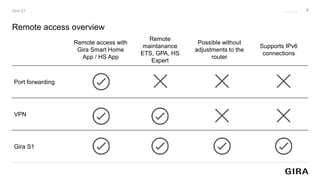
Remote access overview
2
Gira S1
Remote access with
Gira Smart Home
App / HS App
Remote
maintanance
ETS, GPA, HS
Expert
Possible without
adjustments to the
router
Supports IPv6
connections
Port forwarding
VPN
Gira S1
Remote access overview
3
Gira S1
Remote access with
Gira Smart Home
App / HS App
Remote
maintanance
ETS, GPA, HS
Expert
Possible without
adjustments to the
router
Supports IPv6
connections
Port forwarding
VPN
Gira S1
Remote access overview
4
Gira S1
Remote access with
Gira Smart Home
App / HS App
Remote
maintanance
ETS, GPA, HS
Expert
Possible without
adjustments to the
router
Supports IPv6
connections
Port forwarding
VPN
Gira S1
Features
5
Gira S1
• KNX IP interface
• Secure remote access and fast setup
• Secure and fast remote maintenance
• Gira Smart Home and HomeServer App integration
• Important messages directly to the phone
• Independent from internet provider and router
• Remote access finally plannable and calculable
• German data protection
The system
6
Gira S1
Installation
7
Gira S1
DC 24 to 30 V
IP network
Service
provider
Router
The device
8
Gira S1
Register your Gira S1
9
Gira Device portal
Gira S1
deviceportal.gira.com
Enter your registration ID
Note: the Gira S1 has to be connected to the internet
Gira Device portal
10
Gira S1
Configure remote access
11
Gira S1
Gira Project Assistant – remote access
12
Gira S1
Remote maintance with the ETS
13
Gira S1
Everything under control
14
Gira S1
ETS application
15
Gira S1
• KNX Secure
• Block/unblock remote access
• Message trigger
• Time server
• Logger (microSD up to 32GB)
VPN
Gira S1 with VPN
21. April 2023
17
Gira S1 - VPN.
OpenVPN-
Client
A
OpenVPN tunnel
OpenVPN-
Server
B
Remote network
OpenVPN client comparison
18
OpenVPN
OpenVPN Connect Client
OpenVPN GUI Client
(Community)
Create your own network
Direct participation
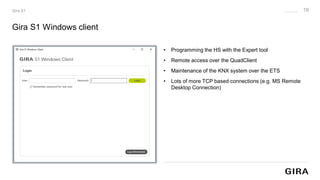
Gira S1 Windows client
19
Gira S1
• Programming the HS with the Expert tool
• Remote access over the QuadClient
• Maintenance of the KNX system over the ETS
• Lots of more TCP based connections (e.g. MS Remote
Desktop Connection)
Amazon Alexa and Google Assistent
20
Gira S1
Gira
device portal
from 4.10
from 2.4
21
Highlights
Remote maintenance for HS,
X1, KNX and more.
Messages
Check local websites on the go
Access management - full
control over access
Remote access becomes fast,
easy and calculable
Gira S1
Secure remote access to the
smart home
Legal notes.
This document and all of its parts are protected by copyright.
Any use that is not expressly permitted by copyright law
requires the prior written consent of Gira Giersiepen GmbH & Co KG.
This applies in particular to reproduction, editing, translation and
storage and processing in electronic form. Transfer to a third party
is not permitted without the prior written consent of Gira Giersiepen GmbH & Co. KG.
Gira Giersiepen GmbH & Co. KG
Dahlienstrasse
42477 Radevormwald
Tel.: +49 2195 602-0
E-mail: info@gira.de
www.gira.com

Gira S1 - Slides

  • 1.
    Gira S1. Secure remoteaccess to the Smart Home with KNX
  • 2.
    Remote access overview 2 GiraS1 Remote access with Gira Smart Home App / HS App Remote maintanance ETS, GPA, HS Expert Possible without adjustments to the router Supports IPv6 connections Port forwarding VPN Gira S1
  • 3.
    Remote access overview 3 GiraS1 Remote access with Gira Smart Home App / HS App Remote maintanance ETS, GPA, HS Expert Possible without adjustments to the router Supports IPv6 connections Port forwarding VPN Gira S1
  • 4.
    Remote access overview 4 GiraS1 Remote access with Gira Smart Home App / HS App Remote maintanance ETS, GPA, HS Expert Possible without adjustments to the router Supports IPv6 connections Port forwarding VPN Gira S1
  • 5.
    Features 5 Gira S1 • KNXIP interface • Secure remote access and fast setup • Secure and fast remote maintenance • Gira Smart Home and HomeServer App integration • Important messages directly to the phone • Independent from internet provider and router • Remote access finally plannable and calculable • German data protection
  • 6.
  • 7.
    Installation 7 Gira S1 DC 24to 30 V IP network Service provider Router
  • 8.
  • 9.
    Register your GiraS1 9 Gira Device portal Gira S1 deviceportal.gira.com Enter your registration ID Note: the Gira S1 has to be connected to the internet
  • 10.
  • 11.
  • 12.
    Gira Project Assistant– remote access 12 Gira S1
  • 13.
    Remote maintance withthe ETS 13 Gira S1
  • 14.
  • 15.
    ETS application 15 Gira S1 •KNX Secure • Block/unblock remote access • Message trigger • Time server • Logger (microSD up to 32GB)
  • 16.
  • 17.
    Gira S1 withVPN 21. April 2023 17 Gira S1 - VPN. OpenVPN- Client A OpenVPN tunnel OpenVPN- Server B Remote network
  • 18.
    OpenVPN client comparison 18 OpenVPN OpenVPNConnect Client OpenVPN GUI Client (Community) Create your own network Direct participation
  • 19.
    Gira S1 Windowsclient 19 Gira S1 • Programming the HS with the Expert tool • Remote access over the QuadClient • Maintenance of the KNX system over the ETS • Lots of more TCP based connections (e.g. MS Remote Desktop Connection)
  • 20.
    Amazon Alexa andGoogle Assistent 20 Gira S1 Gira device portal from 4.10 from 2.4
  • 21.
    21 Highlights Remote maintenance forHS, X1, KNX and more. Messages Check local websites on the go Access management - full control over access Remote access becomes fast, easy and calculable Gira S1 Secure remote access to the smart home
  • 22.
    Legal notes. This documentand all of its parts are protected by copyright. Any use that is not expressly permitted by copyright law requires the prior written consent of Gira Giersiepen GmbH & Co KG. This applies in particular to reproduction, editing, translation and storage and processing in electronic form. Transfer to a third party is not permitted without the prior written consent of Gira Giersiepen GmbH & Co. KG. Gira Giersiepen GmbH & Co. KG Dahlienstrasse 42477 Radevormwald Tel.: +49 2195 602-0 E-mail: info@gira.de www.gira.com