EN

Dear Customer,
Gigaset Communications GmbH is the legal successor to
Siemens Home and Office Communication Devices GmbH &
Co. KG (SHC), which in turn continued the Gigaset business
of Siemens AG. Any statements made by Siemens AG or
SHC that are found in the user guides should therefore be
understood as statements of Gigaset Communications
GmbH.
We hope you enjoy your Gigaset.

DE

Sehr geehrte Kundin, sehr geehrter Kunde,
die Gigaset Communications GmbH ist Rechtsnachfolgerin
der Siemens Home and Office Communication Devices
GmbH & Co. KG (SHC), die ihrerseits das Gigaset-Geschäft
der Siemens AG fortführte. Etwaige Erklärungen der
Siemens AG oder der SHC in den Bedienungsanleitungen
sind daher als Erklärungen der Gigaset Communications
GmbH zu verstehen.
Wir wünschen Ihnen viel Freude mit Ihrem Gigaset.

FR

Chère Cliente, Cher Client,
la société Gigaset Communications GmbH succède en droit
à Siemens Home and Office Communication Devices GmbH
& Co. KG (SHC) qui poursuivait elle-même les activités Gigaset de Siemens AG. Donc les éventuelles explications de Siemens AG ou de SHC figurant dans les modes d’emploi
doivent être comprises comme des explications de Gigaset
Communications GmbH.
Nous vous souhaitons beaucoup d’agrément avec votre
Gigaset.

IT

NL

ES

PT

Gentile cliente,
la Gigaset Communications GmbH è successore della Siemens Home and Office Communication Devices GmbH &
Co. KG (SHC) che a sua volta ha proseguito l’attività della
Siemens AG. Eventuali dichiarazioni della Siemens AG o
della SHC nei manuali d’istruzione, vanno pertanto intese
come dichiarazioni della Gigaset Communications GmbH.
Le auguriamo tanta soddisfazione con il vostro Gigaset.
Geachte klant,
Gigaset Communications GmbH is de rechtsopvolger van
Siemens Home and Office Communication Devices GmbH &
Co. KG (SHC), de onderneming die de Gigaset-activiteiten
van Siemens AG heeft overgenomen. Eventuele uitspraken
of mededelingen van Siemens AG of SHC in de gebruiksaanwijzingen dienen daarom als mededelingen van Gigaset
Communications GmbH te worden gezien.
Wij wensen u veel plezier met uw Gigaset.
Estimado cliente,
la Gigaset Communications GmbH es derechohabiente de la
Siemens Home and Office Communication Devices GmbH &
Co. KG (SHC) que por su parte continuó el negocio Gigaset
de la Siemens AG. Las posibles declaraciones de la
Siemens AG o de la SHC en las instrucciones de uso se
deben entender por lo tanto como declaraciones de la Gigaset Communications GmbH.
Le deseamos que disfrute con su Gigaset.
SCaros clientes,
Gigaset Communications GmbH é a sucessora legal da Siemens Home and Office Communication Devices GmbH &
Co. KG (SHC), que, por sua vez, deu continuidade ao sector
de negócios Gigaset, da Siemens AG. Quaisquer declarações por parte da Siemens AG ou da SHC encontradas nos
manuais de utilização deverão, portanto, ser consideradas
como declarações da Gigaset Communications GmbH.
Desejamos que tenham bons momentos com o seu Gigaset.

Issued by
Gigaset Communications GmbH
Schlavenhorst 66, D-46395 Bocholt
Gigaset Communications GmbH is a trademark
licensee of Siemens AG

DA

Kære Kunde,
Gigaset Communications GmbH er retlig efterfølger til Siemens Home and Office Communication Devices GmbH &
Co. KG (SHC), som fra deres side videreførte Siemens AGs
Gigaset-forretninger. Siemens AGs eller SHCs eventuelle
forklaringer i betjeningsvejledningerne skal derfor forstås
som Gigaset Communications GmbHs forklaringer.
Vi håber, du får meget glæde af din Gigaset.

FI

Arvoisa asiakkaamme,
Gigaset Communications GmbH on Siemens Home and
Office Communication Devices GmbH & Co. KG (SHC)-yrityksen oikeudenomistaja, joka jatkoi puolestaan Siemens
AG:n Gigaset-liiketoimintaa. Käyttöoppaissa mahdollisesti
esiintyvät Siemens AG:n tai SHC:n selosteet on tämän
vuoksi ymmärrettävä Gigaset Communications GmbH:n
selosteina.
Toivotamme Teille paljon iloa Gigaset-laitteestanne.

SV

Kära kund,
Gigaset Communications GmbH övertar rättigheterna från
Siemens Home and Office Communication Devices GmbH &
Co. KG (SHC), som bedrev Gigaset-verksamheten efter Siemens AG. Alla förklaringar från Siemens AG eller SHC i
användarhandboken gäller därför som förklaringar från
Gigaset Communications GmbH.
Vi önskar dig mycket nöje med din Gigaset.

NO

Kjære kunde,
Gigaset Communications GmbH er rettslig etterfølger etter
Siemens Home and Office Communication Devices GmbH &
Co. KG (SHC), som i sin tur videreførte Gigaset-geskjeften i
Siemens AG. Eventuelle meddelelser fra Siemens AG eller
SHC i bruksanvisningene er derfor å forstå som meddelelser
fra Gigaset Communications GmbH.
Vi håper du får stor glede av din Gigaset-enhet.

EL

Αγαπητή πελάτισσα, αγαπητέ πελάτη,
η Gigaset Communications GmbH είναι η νομική διάδοχος της
Siemens Home and Office Communication Devices GmbH &
Co. KG (SHC), η οποία έχει αναλάβει την εμπορική
δραστηριότητα Gigaset της Siemens AG. Οι δηλώσεις της
Siemens AG ή της SHC στις οδηγίες χρήσης αποτελούν
επομένως δηλώσεις της Gigaset Communications GmbH.
Σας ευχόμαστε καλή διασκέδαση με τη συσκευή σας Gigaset.

HR

Poštovani korisnici,
Gigaset Communications GmbH pravni je sljednik tvrtke
Siemens Home and Office Communication Devices GmbH &
Co. KG (SHC), koji je nastavio Gigaset poslovanje tvrtke
Siemens AG. Zato sve izjave tvrtke Siemens AG ili SHC koje
se nalaze u uputama za upotrebu treba tumačiti kao izjave
tvrtke Gigaset Communications GmbH.
Nadamo se da sa zadovoljstvom koristite svoj Gigaset
uređaj.

SL

Spoštovani kupec!
Podjetje Gigaset Communications GmbH je pravni naslednik
podjetja Siemens Home and Office Communication Devices
GmbH & Co. KG (SHC), ki nadaljuje dejavnost znamke
Gigaset podjetja Siemens AG. Vse izjave podjetja Siemens
AG ali SHC v priročnikih za uporabnike torej veljajo kot izjave
podjetja Gigaset Communications GmbH.
Želimo vam veliko užitkov ob uporabi naprave Gigaset.

© Gigaset Communications GmbH 2008
All rights reserved.
Subject to availability. Rights of modifications
reserved.
www.gigaset.com
CS

Vážení zákazníci,
společnost Gigaset Communications GmbH je právním
nástupcem společnosti Siemens Home and Office
Communication Devices GmbH & Co. KG (SHC), která dále
přejala segment produktů Gigaset společnosti Siemens AG.
Jakékoli prohlášení společnosti Siemens AG nebo SHC, které
naleznete v uživatelských příručkách, je třeba považovat za
prohlášení společnosti Gigaset Communications GmbH.
Doufáme, že jste s produkty Gigaset spokojeni.

SK

Vážený zákazník,
Spoločnosť Gigaset Communications GmbH je právnym
nástupcom spoločnosti Siemens Home and Office
Communication Devices GmbH & Co. KG (SHC), ktorá zasa
pokračovala v činnosti divízie Gigaset spoločnosti Siemens
AG. Z tohto dôvodu je potrebné všetky vyhlásenia
spoločnosti Siemens AG alebo SHC, ktoré sa nachádzajú v
používateľských príručkách, chápať ako vyhlásenia
spoločnosti Gigaset Communications GmbH.
Veríme, že budete so zariadením Gigaset spokojní.

RO

Stimate client,
Gigaset Communications GmbH este succesorul legal al
companiei Siemens Home and Office Communication
Devices GmbH & Co. KG (SHC), care, la rândul său, a
continuat activitatea companiei Gigaset a Siemens AG.
Orice afirmaţii efectuate de Siemens AG sau SHC şi incluse
în ghidurile de utilizare vor fi, prin urmare, considerate a
aparţine Gigaset Communications GmbH.
Sperăm ca produsele Gigaset să fie la înălţimea dorinţelor
dvs.

SR

Poštovani potrošaču,
Gigaset Communications GmbH je pravni naslednik
kompanije Siemens Home and Office Communication
Devices GmbH & Co. KG (SHC), kroz koju je nastavljeno
poslovanje kompanije Gigaset kao dela Siemens AG. Stoga
sve izjave od strane Siemens AG ili SHC koje se mogu naći u
korisničkim uputstvima treba tumačiti kao izjave kompanije
Gigaset Communications GmbH.
Nadamo se da ćete uživati u korišćenju svog Gigaset
uređaja.

BG

Уважаеми потребители,
Gigaset Communications GmbH е правоприемникът на
Siemens Home and Office Communication Devices GmbH
& Co. KG (SHC), която на свой ред продължи бизнеса на
подразделението Siemens AG. По тази причина
всякакви изложения, направени от Siemens AG или
SHC, които се намират в ръководствата за
потребителя, следва да се разбират като изложения на
Gigaset Communications GmbH.
Надяваме се да ползвате с удоволствие вашия Gigaset.

HU

Tisztelt Vásárló!
A Siemens Home and Communication Devices GmbH & Co.
KG (SHC) törvényes jogutódja a Gigaset Communications
GmbH, amely a Siemens AG Gigaset üzletágának utódja.
Ebből következően a Siemens AG vagy az SHC felhasználói
kézikönyveiben található bármely kijelentést a Gigaset
Communications GmbH kijelentésének kell tekinteni.
Reméljük, megelégedéssel használja Gigaset készülékét.

Issued by
Gigaset Communications GmbH
Schlavenhorst 66, D-46395 Bocholt
Gigaset Communications GmbH is a trademark
licensee of Siemens AG

PL

Szanowny Kliencie,
Firma Gigaset Communications GmbH jest spadkobiercą
prawnym firmy Siemens Home and Office Communication
Devices GmbH & Co. KG (SHC), która z kolei przejęła
segment produktów Gigaset od firmy Siemens AG. Wszelkie
oświadczenia firm Siemens AG i SHC, które można znaleźć
w instrukcjach obsługi, należy traktować jako oświadczenia
firmy Gigaset Communications GmbH.
Życzymy wiele przyjemności z korzystania z produktów
Gigaset.

TR

Sayın Müşterimiz,
Gigaset Communications GmbH, Siemens AG'nin Gigaset
işletmesini yürüten Siemens Home and Office
Communication Devices GmbH & Co. KG (SHC)'nin yasal
halefidir. Kullanma kılavuzlarında bulunan ve Siemens AG
veya SHC tarafından yapılan bildiriler Gigaset
Communications GmbH tarafından yapılmış bildiriler olarak
algılanmalıdır.
Gigaset'ten memnun kalmanızı ümit ediyoruz.

RU

Уважаемыи покупатель!
Компания Gigaset Communications GmbH является
правопреемником компании Siemens Home and Office
Communication Devices GmbH & Co. KG (SHC), которая,
в свою очередь, приняла подразделение Gigaset в свое
управление от компании Siemens AG. Поэтому любые
заявления, сделанные от имени компании Siemens AG
или SHC и встречающиеся в руководствах
пользователя, должны восприниматься как заявления
компании Gigaset Communications GmbH.
Мы надеемся, что продукты Gigaset удовлетворяют
вашим требованиям.

© Gigaset Communications GmbH 2008
All rights reserved.
Subject to availability. Rights of modifications
reserved.
www.gigaset.com
Gigaset C250 / englisch / A31008-C250-J101-176-19 / cover_0_Vorlage.fm / 20.06.2003

s

Be inspired
Gigaset C250 / englisch / A31008-C250-J101-176-19 / covers_I-II.fm / 20.06.2003

The handset at a glance

The handset at a glance
Talk/Handsfree key:
Top half:
N Answer a call
N Initiate dialling
N Switch from handsfree
to "earpiece" mode
Bottom half:
N Switch from "earpiece"
to handsfree mode
N Lights up: Handsfree is
activated
N Flashes: Incoming call

Message key
N Accesses the lists of

text messages, network mailbox, calls list/
answering machine
(C 250 only)
N Flashes: new SMS,
messages, calls
Open directory
Key 1
Select answering machine
(C 250 only)/network mailbox (press for
approx. 2 seconds)
Star key
N Ringer on/off (press for

approx. 2 seconds)
N When texting: Toggles
between upper/lower
case and digits

Display (display screen)

U
Ûu v
MENU

Charge status
= flat
U fully
charged
= flashes: battery is
almost flat or is charging
Current functions and
display keys
The display keys give you
access to the functions
shown in the display.
End call and
On/Off key
N End call
N Cancel function
N One menu level back
(press briefly)
N Back to idle status
(press for approx. 1
second)
N Handset on/off (press
for approx.2 seconds)
Hash key
Keypad lock on/off (press
for approx. 1 second)
Speed dial list key
Open speed dial list(press
briefly)
Microphone
Recall key
Insert a dial pause (hold
key down)

1
Gigaset C250 / englisch / A31008-C250-J101-1-7619 / C_250_AMIVZ.fm / 20.06.2003

Table of Contents

Table of Contents
The handset at a glance . . . . . . . . . . . . . . . . . . . . . . 1
Safety precautions . . . . . . . . . . . . . . . . . . . . . . . . . . 6
Preparing to use your phone . . . . . . . . . . . . . . . . . . 7
Installing the base . . . . . . . . . . . . . . . . . . . . . . . . . . . . . . . . . . . . . . . . . . . . . . . . . . . . . 7
Connecting the base . . . . . . . . . . . . . . . . . . . . . . . . . . . . . . . . . . . . . . . . . . . . . . . . . . . 8
Preparing to use the handset . . . . . . . . . . . . . . . . . . . . . . . . . . . . . . . . . . . . . . . . . . . . . 9
Attaching the belt clip . . . . . . . . . . . . . . . . . . . . . . . . . . . . . . . . . . . . . . . . . . . . . . . . . 11
Activating/deactivating the handset . . . . . . . . . . . . . . . . . . . . . . . . . . . . . . . . . . . . . . 11
Activating/deactivating the keypad lock . . . . . . . . . . . . . . . . . . . . . . . . . . . . . . . . . . . 11

Operating the telephone, menu guidance . . . . . . 12
Keys . . . . . . . . . . . . . . . . . . . . . . . . . . . . . . . . . . . . . . . . . . . . . . . . . . . . . . . . . . . . . . .
Correcting wrong inputs . . . . . . . . . . . . . . . . . . . . . . . . . . . . . . . . . . . . . . . . . . . . . . .
Idle status . . . . . . . . . . . . . . . . . . . . . . . . . . . . . . . . . . . . . . . . . . . . . . . . . . . . . . . . . . .
Menu operation, with 'Setting Handsfree Volume' as an example . . . . . . . . . . . . . . .

12
13
13
14

Date and Time . . . . . . . . . . . . . . . . . . . . . . . . . . . . . 15
Setting the date and the time . . . . . . . . . . . . . . . . . . . . . . . . . . . . . . . . . . . . . . . . . . .
Changing the time mode . . . . . . . . . . . . . . . . . . . . . . . . . . . . . . . . . . . . . . . . . . . . . .
Setting the alarm clock . . . . . . . . . . . . . . . . . . . . . . . . . . . . . . . . . . . . . . . . . . . . . . . .
Cancelling a wake-up call . . . . . . . . . . . . . . . . . . . . . . . . . . . . . . . . . . . . . . . . . . . . . . .
Setting an appointment . . . . . . . . . . . . . . . . . . . . . . . . . . . . . . . . . . . . . . . . . . . . . . . .
Viewing an appointment you have not kept . . . . . . . . . . . . . . . . . . . . . . . . . . . . . . . .

15
15
16
17
17
18

Making calls . . . . . . . . . . . . . . . . . . . . . . . . . . . . . . . 19
Making external calls and ending a call . . . . . . . . . . . . . . . . . . . . . . . . . . . . . . . . . . . .
Answering a call . . . . . . . . . . . . . . . . . . . . . . . . . . . . . . . . . . . . . . . . . . . . . . . . . . . . . .
Calling Line Identification . . . . . . . . . . . . . . . . . . . . . . . . . . . . . . . . . . . . . . . . . . . . . .
Handsfree . . . . . . . . . . . . . . . . . . . . . . . . . . . . . . . . . . . . . . . . . . . . . . . . . . . . . . . . . . .
Activating/deactivating open listening (call screening at the base) (C 250 only) . . .
Handset muting . . . . . . . . . . . . . . . . . . . . . . . . . . . . . . . . . . . . . . . . . . . . . . . . . . . . . .

19
19
20
21
22
22

Using the directory and other lists . . . . . . . . . . . . 23
Directory and speed dial list . . . . . . . . . . . . . . . . . . . . . . . . . . . . . . . . . . . . . . . . . . . . .
Directory with voice-activated dialling (C 250 only) . . . . . . . . . . . . . . . . . . . . . . . . .
Last number redial list . . . . . . . . . . . . . . . . . . . . . . . . . . . . . . . . . . . . . . . . . . . . . . . . .
Opening lists with the Message key . . . . . . . . . . . . . . . . . . . . . . . . . . . . . . . . . . . . . .
Calls list and answering machine list (C 250 only) . . . . . . . . . . . . . . . . . . . . . . . . . . .

2

23
29
33
34
35
Gigaset C250 / englisch / A31008-C250-J101-1-7619 / C_250_AMIVZ.fm / 20.06.2003

Table of Contents

SMS (Text Messages) . . . . . . . . . . . . . . . . . . . . . . . 39
General . . . . . . . . . . . . . . . . . . . . . . . . . . . . . . . . . . . . . . . . . . . . . . . . . . . . . . . . . . . .
Before you can send and receive text messages . . . . . . . . . . . . . . . . . . . . . . . . . . . .
Sending and receiving text messages . . . . . . . . . . . . . . . . . . . . . . . . . . . . . . . . . . . .
Text message sending and the draft message list . . . . . . . . . . . . . . . . . . . . . . . . . . .
Receiving text messages, incoming message list . . . . . . . . . . . . . . . . . . . . . . . . . . . .
Using several text message mailboxes . . . . . . . . . . . . . . . . . . . . . . . . . . . . . . . . . . . .
SMS notification . . . . . . . . . . . . . . . . . . . . . . . . . . . . . . . . . . . . . . . . . . . . . . . . . . . . .
Text messages to a PABX . . . . . . . . . . . . . . . . . . . . . . . . . . . . . . . . . . . . . . . . . . . . . . .
Errors when sending and receiving a text message . . . . . . . . . . . . . . . . . . . . . . . . . .

39
40
40
42
47
51
55
56
56

Using the answering machine in the C 250
Base . . . . . . . . . . . . . . . . . . . . . . . . . . . . . . . . . . . . . 58
Operating the answering machine from the base . . . . . . . . . . . . . . . . . . . . . . . . . . .
Operating the answering machine from the handset . . . . . . . . . . . . . . . . . . . . . . . .
Recording memos . . . . . . . . . . . . . . . . . . . . . . . . . . . . . . . . . . . . . . . . . . . . . . . . . . . .
Operating the answering machine with voice prompts . . . . . . . . . . . . . . . . . . . . . . .
Operating the answering machine while you are away from home
(remote operation) . . . . . . . . . . . . . . . . . . . . . . . . . . . . . . . . . . . . . . . . . . . . . . . . . . .

58
59
64
66
67

Setting the Answering Machine of the C 250
Base . . . . . . . . . . . . . . . . . . . . . . . . . . . . . . . . . . . . . 69
Ring delay and charge saving function for remote operation . . . . . . . . . . . . . . . . . .
Setting the recording time and recording quality . . . . . . . . . . . . . . . . . . . . . . . . . . . .
Activating/deactivating call screening . . . . . . . . . . . . . . . . . . . . . . . . . . . . . . . . . . . . .
Resetting fast access on the answering machine . . . . . . . . . . . . . . . . . . . . . . . . . . . .

69
70
70
71

Using the network mailbox . . . . . . . . . . . . . . . . . . 72
Configuring the network mailbox for fast access . . . . . . . . . . . . . . . . . . . . . . . . . . . . 72
Viewing a message from the network mailbox . . . . . . . . . . . . . . . . . . . . . . . . . . . . . . 72

Registering and de-registering handsets . . . . . . . 73
Automatic registration: Gigaset C 2 on Gigaset C 200 or C 250 . . . . . . . . . . . . . . . . .
Manual registration: Gigaset C 2 on Gigaset C 200 or C 250 . . . . . . . . . . . . . . . . . . .
Manual registration:
Gigaset 1000 to 4000 and other handsets with GAP functionality . . . . . . . . . . . . . .
De-registering handsets . . . . . . . . . . . . . . . . . . . . . . . . . . . . . . . . . . . . . . . . . . . . . . .
Paging a handset . . . . . . . . . . . . . . . . . . . . . . . . . . . . . . . . . . . . . . . . . . . . . . . . . . . . .
Changing the base . . . . . . . . . . . . . . . . . . . . . . . . . . . . . . . . . . . . . . . . . . . . . . . . . . . .

73
74
75
75
75
76

3
Gigaset C250 / englisch / A31008-C250-J101-1-7619 / C_250_AMIVZ.fm / 20.06.2003

Table of Contents

Using several handsets . . . . . . . . . . . . . . . . . . . . . . 77
Internal calls, ending a call . . . . . . . . . . . . . . . . . . . . . . . . . . . . . . . . . . . . . . . . . . . . .
Changing the name of a handset . . . . . . . . . . . . . . . . . . . . . . . . . . . . . . . . . . . . . . . .
Changing a handset's internal number . . . . . . . . . . . . . . . . . . . . . . . . . . . . . . . . . . . .
Internal consultation calls . . . . . . . . . . . . . . . . . . . . . . . . . . . . . . . . . . . . . . . . . . . . . .
Accepting/rejecting call waiting during an internal call . . . . . . . . . . . . . . . . . . . . . . .
Listening in to an external call . . . . . . . . . . . . . . . . . . . . . . . . . . . . . . . . . . . . . . . . . .
Call Director (calling a specific handset) (C 250 only) . . . . . . . . . . . . . . . . . . . . . . . . .
Using a handset as a room monitor . . . . . . . . . . . . . . . . . . . . . . . . . . . . . . . . . . . . . . .
Setting the Walk and Talk mode . . . . . . . . . . . . . . . . . . . . . . . . . . . . . . . . . . . . . . . . .

77
77
78
79
79
80
81
83
85

Handset settings . . . . . . . . . . . . . . . . . . . . . . . . . . . 87
Changing the display language . . . . . . . . . . . . . . . . . . . . . . . . . . . . . . . . . . . . . . . . . .
Activate/deactivate Auto Answer . . . . . . . . . . . . . . . . . . . . . . . . . . . . . . . . . . . . . . . .
Adjusting the loudspeaker volume . . . . . . . . . . . . . . . . . . . . . . . . . . . . . . . . . . . . . . .
Changing the ringer tone . . . . . . . . . . . . . . . . . . . . . . . . . . . . . . . . . . . . . . . . . . . . . . .
Activating/deactivating advisory tones . . . . . . . . . . . . . . . . . . . . . . . . . . . . . . . . . . . .
Restoring the handset factory settings . . . . . . . . . . . . . . . . . . . . . . . . . . . . . . . . . . . .

87
87
88
89
92
93

Setting the base . . . . . . . . . . . . . . . . . . . . . . . . . . . 94
Protecting the telephone from unauthorised access . . . . . . . . . . . . . . . . . . . . . . . . . .
Changing the loudspeaker volume of the base (C 250 only) . . . . . . . . . . . . . . . . . . .
Changing the ringer volume and the ringer melody (C 250 only) . . . . . . . . . . . . . . .
Activating/cancelling the key click on the base: (C 250 only) . . . . . . . . . . . . . . . . . . .
Repeater support . . . . . . . . . . . . . . . . . . . . . . . . . . . . . . . . . . . . . . . . . . . . . . . . . . . . .
Restoring the base factory settings . . . . . . . . . . . . . . . . . . . . . . . . . . . . . . . . . . . . . . .

94
95
96
96
97
97

Connecting the base to a PABX . . . . . . . . . . . . . . . 99
Dialling modes and recall . . . . . . . . . . . . . . . . . . . . . . . . . . . . . . . . . . . . . . . . . . . . . . . 99
Setting pauses . . . . . . . . . . . . . . . . . . . . . . . . . . . . . . . . . . . . . . . . . . . . . . . . . . . . . . 100
Switching temporarily to tone dialling (DTMF) . . . . . . . . . . . . . . . . . . . . . . . . . . . . . 100

4
Gigaset C250 / englisch / A31008-C250-J101-1-7619 / C_250_AMIVZ.fm / 20.06.2003

Table of Contents

Appendix . . . . . . . . . . . . . . . . . . . . . . . . . . . . . . . . 101
Care . . . . . . . . . . . . . . . . . . . . . . . . . . . . . . . . . . . . . . . . . . . . . . . . . . . . . . . . . . . . . .
Contact with liquid . . . . . . . . . . . . . . . . . . . . . . . . . . . . . . . . . . . . . . . . . . . . . . . . . .
Questions and Answers . . . . . . . . . . . . . . . . . . . . . . . . . . . . . . . . . . . . . . . . . . . . . . .
Service (Customer Care) . . . . . . . . . . . . . . . . . . . . . . . . . . . . . . . . . . . . . . . . . . . . . .
Specifications . . . . . . . . . . . . . . . . . . . . . . . . . . . . . . . . . . . . . . . . . . . . . . . . . . . . . .
Answering machine remote operation (C 250 only) . . . . . . . . . . . . . . . . . . . . . . . .
Character set chart . . . . . . . . . . . . . . . . . . . . . . . . . . . . . . . . . . . . . . . . . . . . . . . . . .
Predictive text . . . . . . . . . . . . . . . . . . . . . . . . . . . . . . . . . . . . . . . . . . . . . . . . . . . . . .

101
101
101
103
105
107
107
108

Accessories . . . . . . . . . . . . . . . . . . . . . . . . . . . . . . 110
Menu Tree . . . . . . . . . . . . . . . . . . . . . . . . . . . . . . . 112
Main menu . . . . . . . . . . . . . . . . . . . . . . . . . . . . . . . . . . . . . . . . . . . . . . . . . . . . . . . . 112
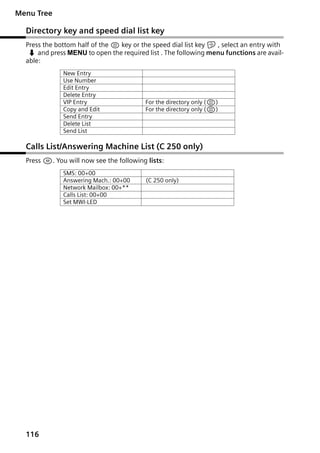
Directory key and speed dial list key . . . . . . . . . . . . . . . . . . . . . . . . . . . . . . . . . . . . . 116
Calls List/Answering Machine List (C 250 only) . . . . . . . . . . . . . . . . . . . . . . . . . . . . 116

Index . . . . . . . . . . . . . . . . . . . . . . . . . . . . . . . . . . . 117

5
Gigaset C250 / englisch / A31008-C250-J101-1-7619 / starting.fm / 20.06.2003

Safety precautions

Safety precautions
$

!

Only use the power supply unit supplied, as indicated on the underside of
the device.
Fit only the recommended rechargeable batteries (page 105) of the same
type! Use no other types of batteries or non-rechargeable batteries, as they
could damage health and cause personal injury.

‹
Œ

Ensure correct polarity when fitting rechargeable batteries, and use the battery type according to these instructions (you will see polarity symbols in the
handset's battery compartments).
The operation of medical appliances may be affected. Be aware of the technical conditions within the particular environment (e.g. doctor's practice).

The handset may cause an intrusive 'hum' in hearing aids.

Do not install the base in bathrooms or shower rooms (page 101). The handset and base are not watertight.

Drivers must not use their phones while driving (Walk and Talk function).

Switch off your phone while on board an aircraft (Walk and Talk function) and
ensure that it cannot be switched on again accidentally.
Do not use the phone in environments subject to explosion hazard (e.g. auto
paint shops).

ƒ

Ensure that your Gigaset is accompanied by these instructions when you give
it to others to use.
Dispose of the batteries and phone in accordance with environmental regulations.

i
6

Not all of the functions described in these instructions are available in all
countries.
Gigaset C250 / englisch / A31008-C250-J101-1-7619 / starting.fm / 20.06.2003

Preparing to use your phone

Preparing to use your phone
The pack contains:
N one Gigaset C 200 or C 250 base,
N one Gigaset C 2 handset,
N one power supply unit with power cord,
N one telephone cord,
N one belt clip for the handset,
N two batteries,
N one set of operating instructions.

Installing the base
Hints on installing
The base is designed to be operated in enclosed, dry areas at temperatures ranging from
+5 °C to +45 °C. Install the base at a central location in your home, e.g. in the hall.
N Never expose the telephone to heat sources, direct sunlight, other

W

electrical appliances.

N Protect your Gigaset from moisture, dust, corrosive liquids and

vapours.

Range
The base has a range of approx. 300 m outdoors and up to 50 m indoors.

7
Gigaset C250 / englisch / A31008-C250-J101-1-7619 / starting.fm / 20.06.2003

Preparing to use your phone

Connecting the base
Phone outlet
Cable recess

1.
Phone jack with
phone cord

Underside of
base (enlarged
view)

1.

N Fit the small jack on the phone cord into the socket in the base (it clips into place),
N Place cord in cable recess,
N Fit phone jack into phone outlet.

Outlet
Cable recess

2.
Power supply unit
230 V with power
cord

Underside
of base
(enlarged view)

2.

N Insert the small jack on the power cord into the socket on the underside of the base,
N Place cord in cable recess,
N Plug the power supply unit into your power outlet.
Internal phone jack connections:

3
2
1

4
5
6

1
2
3
4
5
6

unassigned
unassigned
a
b
unassigned
unassigned

N Keep the power supply unit plugged in at all times to ensure your

i

phone is ready for use whenever you need it.

N If ever you purchase a phone cord from a store, ensure that the phone

conductors are correctly connected (3-4 connection).

8
Gigaset C250 / englisch / A31008-C250-J101-1-7619 / starting.fm / 20.06.2003

Preparing to use your phone

Preparing to use the handset
Removing protective film

The display is protected by a plastic film.
Remove the protective plastic film!

Inserting the batteries

N Insert the batteries ensuring correct polarity – see figure on left.
N Position the battery cover so that it is open by around 3 mm, then slide up until it

closes with a click,

N To open the battery cover, press on the chequered area and slide down.

W

Use only the rechargeable batteries recommended by Siemens on
page 105! Never use conventional batteries (non-rechargeable) or other
battery types as this may cause significant damage to health and property. For example, the jacket of the battery could be destroyed (hazardous). The phone could also malfunction or be damaged.

9
Gigaset C250 / englisch / A31008-C250-J101-1-7619 / starting.fm / 20.06.2003

Preparing to use your phone
Placing the handset into the base and charging the batteries
When you place the handset into the base, the handset will register automatically to
the base. Proceed step by step as follows:
1. Place the handset in the base with the display up.
2. Wait till the handset has registered automatically to the base (page 73): This operation takes around one minute. While registration is in progress the screen displays
Registering and Base 1 flashes. After registration, you will see a '1' in the top left
of the display - this means that the handset has been assigned the first internal
number. You can change the handset name (page 77).
3. Now leave the handset in the base for the batteries to charge – the batteries are supplied uncharged. Battery charging is indicated in the top right of the display by the
flashing battery icon = :

=
e

Batteries flat
Batteries 1/3 charged

V
U

Batteries 2/3 charged
Batt. fully charged

Should automatic registration be interrupted, register the handset manually as
described starting on page 74. You can get help from a table containing basic questions
and answers (page 101).

i

To register additional handsets, refer to page 74.

W

For the initial charge we recommend a continuous, uninterrupted charging period of five hours, whatever charge status is indicated. After a while
the charge capacity of the batteries will decrease for technical reasons.

The battery charging status is correctly displayed only after uninterrupted charging/
discharging. You should therefore avoid removing the batteries unnecessarily and ending the charging process prematurely.
N Once initial charging is complete, you can replace your handset in the

i

base after each call. Charging is controlled electronically. This ensures
that the batteries are charged in a way that maximises their life.
N The batteries heat up during charging. This is normal and not dangerous.

Note
Your telephone is now ready for use. With the Gigaset C 250, the answering machine
with pre-recorded announcement is also activated. To correctly record the time of calls
and, if applicable, messages (C 250 only) you must now set the date and time
(page 15).

10
Gigaset C250 / englisch / A31008-C250-J101-1-7619 / starting.fm / 20.06.2003

Preparing to use your phone

Attaching the belt clip

Push the belt clip onto the back of the handset until the lugs click into the recesses on
either side of the handset.

Activating/deactivating the handset
To activate the handset press the 'end call' key a and hold. You will hear a confirmation tone (rising tone sequence).
To deactivate the handset, press the 'end call' key a again in the idle status and hold
(confirmation tone).

i

The handset activates automatically when placed in the base or charger.

Activating/deactivating the keypad lock
You can 'lock' the keys on your handset, e.g. when carrying the unit in your pocket or
bag. This protects the keypad against inadvertent activation.
Press the hash key and hold (confirmation tone).
The Ø icon appears in the display.
To deactivate the keypad lock, press the hash key R again and hold (confirmation
tone).
N The keypad lock deactivates automatically when you receive a call. It

i

re-activates when the call is finished.

N When the keypad lock is active, you cannot even call emergency num-

bers.

11
Gigaset C250 / englisch / A31008-C250-J101-176-19 / guidance.fm / 20.06.2003

Operating the telephone, menu guidance

Operating the telephone, menu guidance
Keys
Talk/Handsfree key
The Talk/Handsfree key d is a rocker key with two functions. You press the top half of
the key to initiate a call. When you press the bottom half you initiate a call and the
handsfree function activates automatically.
Rocker key:
Top half of the key = Talk key
Bottom half of the key = Handsfree key

Display keys
The display keys are the horizontal rocker keys just below the display. Depending on
the particular operating situation, their function changes according to whether you
press the left or right side of the key. The current function is shown in the display directly
above the key to which it relates.
Example
Û

u vMENU

Display keys

The various functions are explained below:
Display icon
[__________]
•
[________]
INT
[_______]
OK
[______________]
MENU

¼

[_______]
Û

12

Meaning when key is pressed
Last number redial key: Open the list of the last 10 numbers you dialled.
INT key: Open the list of handsets when in idle status.
OK key: Confirm menu function or confirm an input and store.
Menu key: Open the main menu when in idle status
Open a status-dependent menu while making a call.
Scroll up/down.
Move cursor left/right.
Access to wake-up function.
Delete key: Delete input from right to left one character at a time.
Gigaset C250 / englisch / A31008-C250-J101-176-19 / guidance.fm / 20.06.2003

Operating the telephone, menu guidance

Correcting wrong inputs
After a correct input you will hear a confirmation tone (rising tone sequence), an incorrect input is indicated by an error tone (falling tone sequence). You can repeat the input.
If you have entered incorrect characters in the text, you can correct them as follows:
Deleting characters to the left of the cursor with Û
To correct a telephone number or text, use the display keys uv to move the cursor
to the right of the incorrect character. Now press the display key Û. The character is
deleted. Now enter the correct character.
Inserting characters on the right of the cursor
If you have omitted a character, use the display keys uv to go to the place where
you want to insert the character, and key it in.

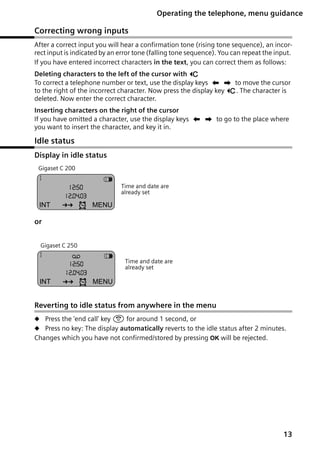
Idle status
Display in idle status
Gigaset C 200

1
12:50
12.04.03

INT

Þ

¼

V

Time and date are
already set

MENU

or
Gigaset C 250

1

×

12:50
12.04.03

INT

Þ

¼

V

Time and date are
already set

MENU

Reverting to idle status from anywhere in the menu
N Press the 'end call' key a for around 1 second, or
N Press no key: The display automatically reverts to the idle status after 2 minutes.

Changes which you have not confirmed/stored by pressing OK will be rejected.

13
Gigaset C250 / englisch / A31008-C250-J101-176-19 / guidance.fm / 20.06.2003

Operating the telephone, menu guidance

Menu operation, with 'Setting Handsfree Volume' as an example
1. MENU

Press the display key. The menu opens.

2. s

Press the display key repeatedly until Audio Settings appears on the
screen.

3. OK

Confirm with the display key.

4. s

Press the display key repeatedly until Handsfree Volume appears on the
screen.

5. OK

Confirm with the display key.

7. OK

Now press the display key to confirm the setting.

8. a

Press and hold the 'end call' key to return to the idle status.

6. u v Press the left or right display key to select the required volume (1–5).

14
Gigaset C250 / englisch / A31008-C250-J101-176-19 / TimeCalendar.fm / 20.06.2003

Date and Time

Date and Time
Setting the date and the time
Correct date and time settings are essential if you want to know exactly when calls/messages (C 250) were received.
[_______________]
MENU

Open the menu.

[__________] [_____________________________________________________________]
Calender/Clock
[_________]
OK

Select the menu item and confirm.

[__________] [_____________________________________________________________]
Date/Time
[_________]
OK

Select the menu item and confirm.
Enter the date:

[_______]
OK

Enter the day/month/year and confirm.
Example: For 20.05.2003, enter
2QQ5QI.
Enter the time:

[_______]
OK

Enter hours/minutes and confirm.
Example: For 9.35, enter QOI5.
Only when the 12-hour display is selected:

[__________] [_________]
OK

Select a.m. or p.m. and confirm.
Long press (back to idle status).

¼ appears on the bottom line of the display.

Changing the time mode
You can choose between the 12 hour and the 24 hour display (factory setting) for the
time (a.m. = 1st half of the day; p.m. = 2nd half of the day).
[_______________]
MENU

Open the menu.

[__________] [_____________________________________________________________]
Calender/Clock
[_________]
OK

Select the menu item and confirm.

[__________] [_____________________________________________________________]
Time Mode
[_________]
OK

Select the menu item and confirm.

either ...
[__________] [_____________________________________________________________]
24 hour
[_________]
OK

Select the menu item and confirm (‰ = On).

or ...
[_____________________________________________________________] [__________]
12 hour
OK

Confirm (‰ = On).
Long press (back to idle status).

15
Gigaset C250 / englisch / A31008-C250-J101-176-19 / TimeCalendar.fm / 20.06.2003

Date and Time

Setting the alarm clock
You can use your handset as an alarm clock.
Precondition: You have set the date and time (page 15) .

Activating/deactivating the alarm clock and setting the wake-up time
either ...

Activate the alarm clock:

[_____]
¼

Press the display key.

[_____________________________________________________________] [__________]
Alarm Clock
OK

Confirm (‰ = On).
Set the wake-up time:
Enter hours/minutes and confirm.
Example: For 7.15, enter QM15. The top
line of the screen displays the alarm clock icon ¼.

[_______]
OK

When the 12-hour display is selected:
[__________] [_____________________________________________________________]
am
[_________ ]
OK

or ...

Select a.m. or p.m. and confirm (‰ = On), e.g. am.
Deactivate the alarm clock:

[_____]
¼

Press the display key.

[_____________________________________________________________] [__________]
Alarm Clock
OK

Confirm (‰ disappears).
Long press (back to idle status).

N A wake-up call only sounds when the handset is in the idle status and

i

16

the room monitor function is not activated.
N To find out how to set the wake-up volume and melody, turn to
page 89.
N When you deactivate the alarm clock the ¼ icon will only go out if
there is no active appointment.
Gigaset C250 / englisch / A31008-C250-J101-176-19 / TimeCalendar.fm / 20.06.2003

Date and Time

Cancelling a wake-up call
A wake-up call sounds on the handset with its selected ringer melody, and Alarm Clock
appears in the display. Press any key to cancel the wake-up call. The alarm clock is still
switched on.

Setting an appointment
You can use your handset to remind yourself of an appointment. You do this by setting
the time of the appointment.

Activating/deactivating the appointment function
[_______________]
MENU

Open the menu.

[__________] [_____________________________________________________________]
Calender/Clock
[_________]
OK

Select the menu item and confirm.

[_____________________________________________________________] [__________]
Set Appointment
OK

Confirm (‰ = On).

[________]
OK

Confirm again if an appointment is activated.
Enter the date:
Enter the day/month and confirm.
Example: For 20.05. enter 2QQ5.

[_______]
OK

Enter the time:
Enter hours/minutes and confirm.
Example: For 9:05 enter QOQ5.

[_______]
OK

Name the appointment:
Enter a name (up to 16 characters) and confirm (for
inputting text see page 107). Delete an existing
appointment.

[_______]
OK

Long press (back to idle status).
The top line displays the alarm clock icon ¼.

N If you do not give the appointment a name, its date and time will

appear in the display when it is due.

N To find out how to set the wake-up volume and melody, turn to

i

page 89.

N If you are using the 12 hour clock, select a.m. or p.m. with s and

press OK to confirm.

N The handset will only display an appointment when it is in the idle

status. An appointment is not displayed when the room monitor is
active or while a phone call is in progress.

17
Gigaset C250 / englisch / A31008-C250-J101-176-19 / TimeCalendar.fm / 20.06.2003

Date and Time
Deactivating an appointment call
An appointment call sounds with its selected ringer melody (page 89).
[_______]
OK

Press the display key. The alarm clock icon ¼ disappears when the alarm clock is not activated.

Cancelling an appointment
[______________]
MENU

Open the menu.

[__________] [_____________________________________________________________]
Calender/Clock
[_________ ]
OK

Select the menu item and confirm.

[_____________________________________________________________] [__________]
Set Appointment
OK

Confirm (‰ disappears).

Viewing an appointment you have not kept
If the handset reminds you of an appointment but you do not keep it, a message appears
in the display together with the name of the appointment. If you did not name the
appointment, its date and time are displayed. Press any key to cancel the message.

18
Gigaset C250 / englisch / A31008-C250-J101-176-19 / telephony.fm / 20.06.2003

Making calls

Making calls
Making external calls and ending a call
External calls are calls into the public telephone network.
Enter the number and press the Talk/Handsfree key.
The number is dialled.
End the call:
Press the end call key.

i

N You can also press the Talk/Handsfree key c first (you hear the

dialling tone) and then enter the number.

N You can use the end call key a to cancel the dialling operation.

Inserting a dialling pause
You can insert a dialling pause between the prefix and the actual telephone number.
To do this, press S for around 2 seconds. Now enter the telephone number.

i

To call another handset, see the description on page 77.

Answering a call
Your handset rings, the call is displayed on the screen and the handsfree key d flashes.
Press c to answer the call. If the handset is in the base/charger and the Auto Answer
function is activated (page 87), then you just need to lift the handset out of the base/
charger to take the call.

i

If the ringer is intrusive, press P for around 1 second. You can take the
call so long as it is displayed on the screen.

19
Gigaset C250 / englisch / A31008-C250-J101-176-19 / telephony.fm / 20.06.2003

Making calls

Calling Line Identification
When you get a call, you will see the caller's number and/or name displayed on the
screen.
Preconditions:
1. You have asked your network provider for the caller's number (CLIP) or name (CNIP)
to be displayed on your handset screen.
2. The caller has asked the network provider for his number to be identified (CLI).
3. Your network provider supports CLIP, CLI and CNIP.
CLIP
CNIP
CLI

Calling Line Identification Presentation
Calling Name Identification Presentation
Calling Line Identification

Screen display with CLIP/CLI
With calling line identification, the caller's telephone number is displayed on the handset screen. If you have stored an entry for this number in your directory, then that entry
will be displayed instead of the number, e.g. 'Anna'.
Å
1234567890

Ringer symbol
Telephone number or 'Anna'

MENU
The screen displays External Call if the number is not identified.
The screen displays Withheld if the caller withholds his number, (page 24) or Unavailable if he has not requested CLI.

Screen display with CNIP
If you have CNIP, then the name (town) that is registered with your network provider for
the calling number will also be displayed on your handset.
Anna Lechner, Berlin
1234567890
MENU

Name and town
Number

The screen displays External Call if the number is not identified.
The screen displays Withheld if the caller withholds his number, (page 24) or Unavailable if he has not requested CLI.

i

20

You may have to pay a charge to use calling line identification. Please ask
your network provider for details.
Gigaset C250 / englisch / A31008-C250-J101-176-19 / telephony.fm / 20.06.2003

Making calls

Handsfree
Activating/deactivating handsfree
Activate while dialling:
Enter the telephone number and press the top half of
the key.
Activate during a call:
Press the bottom half of the key.
Deactivate handsfree:
Press the top half of the key.
As soon as you terminate the handsfree mode you switch to 'earpiece mode' and continue the call on the handset.
N If you wish to place the handset in the base during a call you must

i

press the bottom half of the d key and hold it down while you
position the handset in the base.
N You should inform your caller that you intend to use the handsfree
function before you activate it.

Adjusting the volume while in handsfree mode
A call is in progress and handsfree is activated.
Press the bottom half of the key again.
[________] [________]

Decrease or increase the volume.

[________]
OK

Now press the display key to store the setting.

21
Gigaset C250 / englisch / A31008-C250-J101-176-19 / telephony.fm / 20.06.2003

Making calls

Activating/deactivating open listening (call screening at the base)
(C 250 only)
You can activate the built-in base loudspeaker to allow other people in the room to hear
what your external caller is saying.
Precondition: A call in is progress.
Press the display key to open the menu.

[______________]
MENU

either ...

Activate open listening:

[__________] [_____________________________________________________________]
Open Listening On
[_________ ]
OK

or ...

Select the menu item and confirm.
Deactivate open listening:

[_____________________________________________________________] [__________]
Open Listening Off
OK

Confirm.
Long press (back to idle status).

N You should inform your caller that you intend to use the open listen-

i

ing function before you activate it.
N You can adjust the volume on the base with the ð and ñ keys
(page 96).

Handset muting
You can mute your handset during external calls, e.g. if you wish to talk confidentially
to another person in the room. The external caller cannot hear your conversation during
this time (hold melody). You do not hear your caller either.
[_______]
INT

Open list of handsets. The call is 'held' (wait melody).
Cancel muting:

[______________]
MENU
[__________] [_____________________________________________________________]
******Back******
[_________ ]
OK

22

Press the display key to open the menu.
Select and confirm, or press the end call key a.
Gigaset C250 / englisch / A31008-C250-J101-1-7619 / Directories.fm / 20.06.2003

Using the directory and other lists

Using the directory and other lists
Directory and speed dial list
You can store up to 100 numbers in the directory and the speed dial list (depending on
the size of individual entries).
The directory makes dialling easier for you. You open the directory with the h key. You
can mark any directory entry as 'VIP'.
The speed dial list is a special directory in which you can store particularly important
numbers such as private telephone numbers and prefixes of network providers (socalled 'call-by-call numbers'). You open the speed dial list with the C key.
You create the directory and speed dial list for your individual handset. You can send the
lists/individual entries to the other handsets if you want them to be available at other
handsets as well (page 28).
The speed dial list is operated in just the same way as the directory, except for the way
in which entries are stored.
N The EATONI predictive text helps you input names (page 108, this

feature is deactivated when you purchase your phone).

N Please refer to the Character Set Chart (page 107) to see how to

i

enter text correctly.

N You can enter up to 32 digits for a number and up to 16 letters for a

name.
N Turn to page 19 for instructions on how to insert a dialling pause.

Storing a telephone number in the directory
Open the directory.
[_______________]
MENU

Press the display key to open the menu.

[_____________________________________________________________] [__________]
New Entry
OK

Confirm.

[_______]
OK

Enter the number and confirm.

[______________]
MENU

Enter the name and press the display key.

[_____________________________________________________________] [__________]
Save Entry
OK

Confirm. The entry is stored.
Long press (back to idle status).

i

If your phone is connected to a PABX you may have to enter the access
code (outside line code) as the first digit of your directory entry (refer to
the operating instructions of your PABX).

23
Gigaset C250 / englisch / A31008-C250-J101-1-7619 / Directories.fm / 20.06.2003

Using the directory and other lists
Storing a telephone number in the speed dial list
You can assign a digit (0, 2–9) to up to nine entries on your speed dial list. When you
press and hold one of these digits, e.g. '3', and press the top half of the d key you are
immediately connected to the telephone number that is assigned '3'.
Open the speed dial list.
[______________]
MENU

Press the display key to open the menu.

[_____________________________________________________________] [__________]
New Entry
OK

Confirm.

[_______]
OK

Enter the number and confirm.

[______________ ]
MENU

Enter the name and press the display key.

[_____________________________________________________________] [__________]
Save Entry
OK

Confirm. The entry is stored.

[______________]
MENU

Press the display key to open the menu.

[__________] [_____________________________________________________________]
Shortcut
[_________ ]
OK

Select the menu item and confirm.

[__________] [_____________________________________________________________]
Shortcut: 2
[_________ ]
OK

Select the digit and confirm.
Long press (back to idle status).

i

Speed dial digits cannot be assigned more than once at a time.

Dialling with the directory/speed dial list
or

either ...

Open the directory or speed dial list
Scroll to the entry:
Select entry.
Press the key. The number is dialled.

or ...

Enter the first letter:
Enter the first letter of the name you require.
Press the key. The number is dialled.

24
Gigaset C250 / englisch / A31008-C250-J101-1-7619 / Directories.fm / 20.06.2003

Using the directory and other lists
Editing an entry in the directory/speed dial list
Open the directory or speed dial list.

or

[__________] [______________]
MENU

Select the entry and press the display key.

[__________] [_____________________________________________________________]
Edit Entry
[_________]
OK

Select the menu item and confirm.
Change the number and confirm.

[_______]
OK

Edit the name.
[_______________]
MENU

Press the display key to open the menu.

[_____________________________________________________________] [__________]
Save Entry
OK

Confirm. The entry is stored.
Long press (back to idle status).

Copying and editing a directory entry
So that you do not have to enter a similar entry twice, you can create a copy and then
edit that entry.
Open the directory.
[__________] [______________]
MENU

Select the entry and press the display key.

[__________] [_____________________________________________________________]
Copy and Edit
[_________]
OK

Select the menu item and confirm.

either ...
Change the number and confirm.

[_______]
OK

or ...
Edit the name and confirm.

[_______]
OK
[_______________]
MENU

Press the display key to open the menu.

[_____________________________________________________________] [__________]
Save Entry
OK

Confirm. The entry is stored.

... then
[________]
OK

If you only edit the name, you will see a message telling you that the number already exists. Press the display key to confirm the prompt.
Long press (back to idle status).

i

The 'VIP' setting and the voice patterns (C 250 only) are not copied.

25
Gigaset C250 / englisch / A31008-C250-J101-1-7619 / Directories.fm / 20.06.2003

Using the directory and other lists
Marking a directory entry as VIP
You can mark directory entries of callers who are particularly important to you as 'VIP'
(Very Important Person). You can also assign a particular melody to VIP numbers. You
can then tell who is calling you from the ringer melody. The VIP melody sounds after the
first ring tone.
Precondition: Calling Line Identification is activated (page 20).
Open the directory.
[_________] [______________ ]
MENU
[__________] [_____________________________________________________________]
VIP Entry
[_________ ]
OK
[_________] [_________]
OK

Select the entry and press the display key.
Select the menu item and confirm (‰ = On).
You hear the current melody. Select a melody (1–10)
(page 89) and confirm. The number ends with 'VIP'.
Long press (back to idle status).

Deleting a single entry or directory/speed dial list
or

[_________] [______________ ]
MENU

either ...
[__________] [_____________________________________________________________]
Delete Entry
[_________ ]
OK

or ...

Open the directory or speed dial list.
Select the entry and press the display key.
Delete a single entry:
Select the menu item and confirm.
Delete the entire directory/speed dial list:

[__________] [_____________________________________________________________]
Delete List
[_________ ]
OK

Select the menu item and confirm.

[_______]
OK

Press the display key to confirm the prompt.

... then
Long press (back to idle status).

26
Gigaset C250 / englisch / A31008-C250-J101-1-7619 / Directories.fm / 20.06.2003

Using the directory and other lists
Adding a displayed telephone number to the directory
When a telephone number appears in the display (CLIP) you can add it to your directory.
This can be done while dialling from the last number redial list, from the calls list/
answering machine list (C 250 only) or during a call.
[_______________]
MENU

Press the display key to open the menu.

[__________] [_____________________________________________________________]
Copy to Directory
[_________]
OK

Select the menu item and confirm.

[________]
OK

Confirm the telephone number.
Enter a name if required.

[_______________]
MENU

Press the display key to open the menu.

[_____________________________________________________________] [__________]
Save Entry
OK

Confirm. The entry is stored.
Long press (back to idle status).

If you have CNIP (page 20) as well as CLIP, then the name that goes with
the telephone number will also be displayed (up to 16 characters long).

i

Picking a phone number from the directory/speed dial list
If you are prompted to enter an external telephone number while you are operating
your telephone, you can use the directory to do this.
Precondition: The input field for external telephone numbers is displayed.
or

[__________] [_________]
OK

Open the directory or speed dial list.
Select the entry and confirm.

The telephone number is added to the entry field.

27
Gigaset C250 / englisch / A31008-C250-J101-1-7619 / Directories.fm / 20.06.2003

Using the directory and other lists
Sending a single entry or complete list to a handset
You can send single entries or the complete list to another handset that is registered on
the same base. This saves you the need to make double entries. VIP settings and speed
dial (shortcut) digits are not sent.
or

[_________] [______________ ]
MENU

either ...
[__________] [_____________________________________________________________]
Send Entry
[_________ ]
OK

or ...
[__________] [_____________________________________________________________]
Send List
[_________ ]
OK

Open the directory or speed dial list.
Select the entry and press the display key.
Send a single entry:
Select the menu item and confirm.
Send complete list:
Select the menu item and confirm.

... then
[__________] [_____________________________________________________________]
INT 2
[_________ ]
OK

Select the handset to which you wish to send the
entry or list and confirm, e.g. handset 2. Your selections are sent to that handset.
Long press (back to idle status).

After an entry has been sent you are asked if you want to send another entry. If you confirm with the display key OK you can select more entries to send; once you have finishing sending, press the 'end call' key a.
The successful transfer of data is confirmed with a message and with the confirmation
tone at the receiving handset. Existing entries in the receiving handset are retained.
Entries with identical numbers or names are not overwritten. The number of entries that
are stored in the receiving handset may therefore differ from the number of entries that
you have sent to it.
The transfer is cancelled if the phone rings and you take the call or if the memory of the
receiving handset is full. The last entry to be transferred appears in the display.

28
Gigaset C250 / englisch / A31008-C250-J101-1-7619 / Directories.fm / 20.06.2003

Using the directory and other lists

Directory with voice-activated dialling (C 250 only)
With voice-activated dialling, you dial simply by speaking the name of the person you
wish to call. You must record your voice pattern, i.e. you speak the name and store it.
The name which you speak is stored in the telephone.
Up to four users can record a voice pattern for an entry.
Before a user records a voice pattern therefore, he must first 'identify' himself, e.g. as
User 2.
A maximum of 20 voice patterns can be stored for directory entries. If a voice pattern
is stored for an entry in the directory with voice-activated dialling, then that entry is
marked ‰.

Switching between the normal directory and the directory with voiceactivated dialling (C 250 only).
Open the directory.
Press the directory key again to open the directory
with voice-activated dialling.
To return from the directory with voice-activated dialling to the normal directory, press
the directory key h once more.

29
Gigaset C250 / englisch / A31008-C250-J101-1-7619 / Directories.fm / 20.06.2003

Using the directory and other lists
Recording a voice pattern for an existing entry (C 250 only)
Record your voice pattern in quiet surroundings..
Step 1: Open the directory with voice-activated
dialling:
Press the directory key twice.
[_______]
OK

Confirm.

[__________] [_____________________________________________________________]
User 2
[_________ ]
OK

Select and confirm, e.g. User 2.
Step 2: Select entry for voice-activated dialling:
Select an entry which has no recorded voice pattern.
Step 3: Begin recording:

[______________]
MENU

Press the display key to open the menu.

[_____________________________________________________________] [__________]
Record Word
OK

Confirm. The name appears in the display.

[_______]
OK

Confirm the display prompt. The loudspeaker activates. You hear the ready tone (a short tone). Now
speak the name. After the second prompt in the display you hear the ready tone again. Speak the name
again. Your recording is stored automatically.
Long press (back to idle status).

i

30

To change the user name, select the user as described on page page 67.
Gigaset C250 / englisch / A31008-C250-J101-1-7619 / Directories.fm / 20.06.2003

Using the directory and other lists
Recording a voice pattern for a new entry (C 250 only)
Press the directory key twice.
[________]
OK

Confirm.

[__________] [_____________________________________________________________]
User 2
[_________]
OK

Select and confirm, e.g. User 2.

[_______________]
MENU

Press the display key to open the menu.

[_____________________________________________________________] [__________]
New Entry
OK

Confirm.

[_______]
OK

Enter the number and confirm.

[_______]
OK

Enter name and confirm (for text input see
page 107).

To record the voice pattern, continue as described in the previous section in 'Step 3:
Begin recording'.
N If your two recordings are too different from each other, you will be

i

prompted to repeat them.
N A message tells you if your speech pattern is too much like another
user's. Clear this message by pressing a, return to the start of the
recording procedure and repeat the recording.

Using voice-activated dialling (C 250 only)
Press the top half of the key and hold.
The display prompts you to speak. After you hear the ready tone, speak the name,
e.g. Anna. If the name matches the recorded voice pattern, it is repeated. The telephone number is dialled.

31
Gigaset C250 / englisch / A31008-C250-J101-1-7619 / Directories.fm / 20.06.2003

Using the directory and other lists
Phone announces the caller's name (C 250 only)
When you receive an external call, you hear the ringer and the telephone announces the
caller's name.
Preconditions: Calling Line Identification is active (page 20) and you have recorded a
voice pattern for the incoming number (page 30).
Activating/deactivating the name announcement
[______________]
MENU

Press the display key to open the menu.

[__________] [_____________________________________________________________]
Base Settings
[_________ ]
OK

Select the menu item and confirm.

[__________] [_____________________________________________________________]
Additional Features
[_________ ]
OK

Select the menu item and confirm.

[__________] [_____________________________________________________________]
Name Announcement
[_________ ]
OK

Select the menu item and confirm (‰ = On).

Playing or deleting voice patterns (C 250 only)
You can play a particular user's voice pattern for an entry, or you can delete it. This does
not affect the voice patterns of the other users.
Open the directory with voice-activated dialling and select the entry (see Step 1 and
Step 2, page 30). Now:
Press the display key to open the menu.

[______________]
MENU

either ...

Play the voice pattern:

[__________] [_____________________________________________________________]
Play Recording
[_________ ]
OK

or ...

Select the menu item and confirm. The loudspeaker
activates.
Delete the voice pattern:

[__________] [_____________________________________________________________]
Delete Word
[_________ ]
OK

Select the menu item and confirm. The ‰ after the
entry disappears.
Long press (back to idle status).

i

32

Deleting a voice pattern for an entry does not affect its number or name
– they are retained. The voice patterns of other users for the same entry
are also unaffected.
Gigaset C250 / englisch / A31008-C250-J101-1-7619 / Directories.fm / 20.06.2003

Using the directory and other lists
Viewing and editing an entry (C 250 only)
Open the directory with voice-activated dialling, and select an entry (checked ‰)
(see Step 1 and Step 2, page 30). You can now view and edit the name and number of
the entry in the same way as you would in the directory without voice-activated dialling
(page 25).

Deleting a single voice-activated dialling entry or the complete list
(C 250 only)
Open the directory with voice-activated dialling and select the entry (see Step 1 and
Step 2 page 30). You can now delete a single entry or the complete directory with voiceactivated dialling as described for the directory without voice-activated dialling
(page 26).

Last number redial list
The last number redial list contains the ten last dialled numbers. If names have been
stored for these numbers in the directory, then both the names and the numbers will be
displayed. You can use the last number redial list to redial the telephone numbers.

Dialling telephone numbers from the last number redial list
[__________]
•

Open the last number redial list.
Select an entry and press the top half of the key.
The telephone number is dialled.
N To add or change the telephone number, press MENU and confirm

i

Use Number with OK.

N To add a telephone number from the last number redial list to the

directory (page 27), press MENU,

Copy to Directory OK.

Deleting a single telephone number or the entire last number redial list
[__________]
•

Open the last number redial list.

[__________] [______________]
MENU

Select an entry and open the menu.

either ...

Delete a single telephone number:

[__________] [_____________________________________________________________]
Delete Entry
[_________]
OK

Select the menu item and confirm.
If there still entries on the list, press the key and hold
(back to idle status).

or ...
[__________] [_____________________________________________________________]
Delete List
[_________]
OK+

Delete the entire last number redial list:
Select the menu item and confirm.

33
Gigaset C250 / englisch / A31008-C250-J101-1-7619 / Directories.fm / 20.06.2003

Using the directory and other lists

Opening lists with the Message key
You can use the Message key f to open the following lists:
1. Text message list (if several mailboxes are set up, they will all be listed),
2. Answering machine list (C 250 only),
3. Messages in the network mailbox (if your network provider supports this function
and the network mailbox is configured for fast access, page 72),
4. Calls list.
As soon as a new entry (a text message, a message on the built-in answering machine
(C 250 only) and/or a call) arrives in one or more of the lists, the f key flashes and you
hear an advisory tone. If you now press the flashing f key but you do not open any of
the lists but instead close the menu, the f key continues to flash.
If you press the flashing f key and open one of the lists, when you close the list the
key will stop flashing even if one of the other lists still contains new entries. If there is
at least one new entry, you can set the f key 'flashing' again, i.e. reactivate it. This will
let others, e.g. members of your family/your office colleagues, know that they have
received new messages.
The following lists are displayed when you press f:

N If only one list has new entries, the first new entry on that list is displayed; if the

entries are in a personal mailbox (page 51), then the appropriate list is displayed.
N If several lists have new entries, those lists are offered for your selection.
N If there are no new messages in any of the lists, then all the lists are offered for your
selection.
N If calls are stored in the network mailbox, you will see a message if the correct setting has been made (refer to the network mailbox operating instructions).

Setting the Message key to 'flashing'/deactivating the Message key
Precondition: There is still one new entry in one of the lists.
Open the calls list.
[__________] [_____________________________________________________________]
Set MWI-LED
[_________ ]
OK

Select the menu item and confirm.
Long press (back to idle status).

The key only flashes until it is pressed again and a list or list entry is opened.

34
Gigaset C250 / englisch / A31008-C250-J101-1-7619 / Directories.fm / 20.06.2003

Using the directory and other lists

Calls list and answering machine list (C 250 only)
The numbers of the last 30 calls are saved in the calls list. The oldest entry is deleted
when the calls list is full and new entries are added.
Precondition: The caller's number has been identified (page 20).
Depending on the setting, either all calls or only missed calls (default) are stored ('Set
calls list', page 35).
Depending on this setting, several calls from the same number are entered in the calls
list as follows:
N More than once when All Calls is set,
N Once and only the last missed call when Missed Calls is set.
Here is an example of how the calls list (Calls List: ) appears in the display:
Number of new entries in the list
Calls List: 01+05

Number of old, read entries in the list

You can use the answering machine list to listen to the messages that are on the
answering machine on the Gigaset C 250 . The date and time of arrival and caller's
number of each message is displayed provided they are identified.
Once you have listened to them, the new messages are added after the old messages in
the answering machine list.
Here is an example of how the answering machine list (Answering Mach.: ) appears in
the display:
Answering Mach.: 01+05

Number of new entries/messages in the list
Number of old, played entries/messages in the list

Setting the calls list
Open the calls list.
[__________] [_____________________________________________________________]
Calls List: 01+02
[_________]
OK

Select the menu item and confirm.

[_______________]
MENU

Press the display key to open the menu.

[__________] [_____________________________________________________________]
Calls List Settings
[_________]
OK

Select the menu item and confirm. The current selection is checked ‰.

either ...
[_____________________________________________________________] [__________]
Missed Calls
OK

or ...
[__________] [_____________________________________________________________]
All Calls
[_________]
OK

Only calls which you could not take:
Confirm.
All calls:
Select the menu item and confirm.
Long press (back to idle status).

35
Gigaset C250 / englisch / A31008-C250-J101-1-7619 / Directories.fm / 20.06.2003

Using the directory and other lists
Opening the calls list/answering machine list (C 250 only)
New calls (calls list) and new messages (answering machine) are indicated by the f
key flashing and by an advisory tone.
Open the calls list.
either ...

Open the calls list:

[__________] [_____________________________________________________________]
Calls List: 01+02
[_________ ]
OK

Select the menu item and confirm.
The entry received last is displayed.
Select entry.

or ...

Open the answering machine list:

[__________] [_____________________________________________________________]
Answering Mach.: 01+02
[_________ ]
OK

Select the menu item and confirm. The entry of the
first new message to arrive is displayed. The loudspeaker activates. Message playback begins.
Scroll to the next or previous message. The entry of
the message appears in the display. Message playback begins.

i

To delete an entry or a message , press
MENU, Delete Entry OK .

Calling back a caller
Precondition: The caller's number has been identified (page 20).
Open the calls list/answering machine list (C 250 only) and select an entry. Now:
Press the Talk key once (calls list) or twice (answering
machine list, C 250only).
The telephone number is entered in the last number redial list.

36
Gigaset C250 / englisch / A31008-C250-J101-1-7619 / Directories.fm / 20.06.2003

Using the directory and other lists
Viewing an entry in the calls list/answering machine list (C 250 only),
adding a number to the directory
You can view the time when a call arrived and add the caller's number to your directory.
Precondition: Calling Line Identification is activated.
Open the calls list/answering machine list and select an entry. Now:
[_______________]
MENU

either ...

Press the display key to open the menu.
Copy telephone number to the directory:

[__________] [_____________________________________________________________]
Copy to Directory
[_________]
OK

Select the menu item and confirm.

[________]
OK

Confirm the number.
[______________]
MENU

[_____________________________________________________________] [__________]
Save Entry
OK

or ...
[__________] [_____________________________________________________________]
Date and Time
[_________]
OK

or ...
[__________] [_____________________________________________________________]
Status
[_________]
OK

Enter name and open the menu.
Confirm. The entry is stored.
View the date and time of arrival:
Select the menu item and confirm.
View information whether new or old:
Select the menu item and confirm.

... then
Long press (back to idle status).

37
Gigaset C250 / englisch / A31008-C250-J101-1-7619 / Directories.fm / 20.06.2003

Using the directory and other lists
The entry's status is displayed like this:

V

2
1234567890

First (new) call/First (new) message of a total
of two (new) calls/messages

New
OK

The following status messages are used:
New call

The call is new in the list.

Old call

The call is old in the list.

Calls received

The call was taken
(All Calls setting only, page 35).

Answer Machine

C 250 only: The answering machine answered the call but the
caller did not leave a message (All Calls setting only, page 35).

New Msg.

C 250 only: The message is new in the list.

Old Msg.

C 250 only: The message is old in the list, it has already been
played.

i

Gigaset C 250: When picking a telephone number from the answering
machine list, message playback is interrupted when you press MENU.
Playback will resume when the telephone number has been stored in the
directory.

Deleting the calls list
Open the calls list (page 36). Now:
[______________]
MENU

Press the display key to open the menu.

[__________] [_____________________________________________________________]
Delete List
[_________ ]
OK

Select the menu item and confirm. Caution: All old
and new entries will be deleted.
Long press (back to idle status).

Deleting old messages from the answering machine list is explained on page 63.

Deleting a single entry from the calls list
Open the calls list and select an entry (page 36). Now:
[______________]
MENU

Press the display key to open the menu.

[_____________________________________________________________] [__________]
Delete Entry
OK

Confirm.
Long press (back to idle status).

38
Gigaset C250 / englisch / A31008-C250-J101-176-19 / sms_neutral_theresa.fm / 20.06.2003

SMS (Text Messages)

SMS (Text Messages)
With your handset you can send and receive text messages using the so-called SMS
(Short Message Service). You can write, edit, read, delete or forward text messages from
any registered handset that has SMS functionality. When several handsets are in use at
any one time, only one handset can access the SMS function.

i

SMS is not available in all countries. Please ask your service provider if
SMS is supported for your telefone line.

i

Please remember that when the SMS function is active the first ring is
muted (page 91).

General
Text messages are exchanged between SMS centres that are operated by service providers. The telephone number of the SMS centres through which you wish to send and
receive text messages must be entered in your phone. Up to five SMS centres can be
entered. SMS centres may be preconfigured at the factory. You can change the telephone numbers of the SMS centres.
You can receive text messages from any of the SMS centres whose number you have
entered. Of course you must be registered to receive text messages with those SMS centres. Your text message is sent through the SMS centre that is entered as the active send
service centre (page 41). Only one SMS centre can be the active send centre at any one
time.
Your text message is sent through the SMS centre that is entered as SMS Centre No.
1(active send service centre). However you can activate any other SMS centre as the
active send service centre to send a current message (page 41). Note that the next text
message you write will be sent automatically through SMS Centre No. 1 again.
Sending text messages to email addresses
If you wish to send text messages to email addresses you must make additional settings
for the send centre on your phone (page 41). Ask your service provider if he supports
the "SMS to email" service and what settings you must make.

Storage capacity
The number of text messages that can be stored in the base depends on the size of the
messages. The memory is used for the incoming and draft message lists. When the
memory is full, you are prompted to delete messages.

39
Gigaset C250 / englisch / A31008-C250-J101-176-19 / sms_neutral_theresa.fm / 20.06.2003

SMS (Text Messages)

Before you can send and receive text messages
N Calling Line Identification (page 20) must be enabled for your phone line. Check

with your telephone network provider to make sure that this service is activated on
your phone line. You may have to apply for it to your network provider.
N To receive text messages you must be registered with your service provider.
Ask your service provider,
N what charges are billed for sending and receiving a text message,
N which mobile phone operators you can send text messages to and which mobile

phone operators you can receive text messages from,

N which functions your SMS service offers,
N how you are registered with SMS centres which your phone may already be precon-

figured for – automatically by sending a message or by a special registration procedure.

Sending and receiving text messages
To send and receive a text message, you must enter the call numbers of the SMS centre
of your service provider. These numbers may be preconfigured at the factory.

Activating and deactivating the send message and receive message
functions
The text message 'send' and 'receive' functions are already activated when you purchase
your phone.
[_______________]
MENU

Press the display key to open the menu.
Initiate the setting.

either ...
[________ ]
OK

or ...
[________ ]
OK

Deactivate 'send/receive SMS':
Enter and confirm.
Activate 'send/receive SMS':
Enter and confirm.

The settings which you have made for sending and receiving text messages (e.g. the call
numbers of the SMS centres, personal mailboxes etc.) and the entries in the incoming
and draft message lists are saved when you switch off your phone. They are reactivated
automatically when you switch on your phone again.
When you switch off you cannot send or receive any text messages with your phone.
The first ring tone is signalled again (page 91).

40
Gigaset C250 / englisch / A31008-C250-J101-176-19 / sms_neutral_theresa.fm / 20.06.2003

SMS (Text Messages)
Entering the numbers of an SMS centre, changing the send centre
You can enter and change the call numbers of an SMS centre. A previously stored SMS
centre number is changed by being overwritten.
You should find out about the services and special functions offered by your service provider before you make a new application and/or before you delete pre-configured call
numbers.
If your service provider supports the sending of text messages to email addresses you
can also enter a number for the 'SMS to email' service. You will then be prompted to use
this number when sending a text message to an email address.
[_______________ ]
MENU

Press the display key to open the menu.

[_____________________________________________________________] [__________]
SMS
OK

Confirm.

[__________] [_____________________________________________________________]
Settings
[_________]
OK

Select the menu item and confirm.

[_____________________________________________________________] [__________]
Service Centres
OK

Confirm.

[__________] [_____________________________________________________________]
SMS Centre No. 3
[_________]
OK

Select and confirm, e.g. SMS Centre No. 3.
3
SMS Centre No. 3

t s

U

OK

Activate SMS centre as the send centre:
[_____________________________________________________________] [__________]
Active Send Service Centre
OK

If required, confirm to temporarily activate SMS
Centre No. 3 as the send centre for your registration
with the service provider (‰ = On). The previously
selected send service centre is automatically deactivated.
Enter the number of the SMS centre:

[__________] [_____________________________________________________________]
SMS
[_________]
OK

Select the menu item and confirm.
Enter the number and confirm.

[________]
OK

Enter the number of the email service:
[__________] [_____________________________________________________________]
E-mail
[_________]
OK
[________]
OK

Select the menu item and confirm.
Enter the number and confirm.
Long press (back to idle status).

i

Ask your service provider for details of how you should enter service numbers if you wish to use personal mailboxes (assuming your service provider supports this function).

41
Gigaset C250 / englisch / A31008-C250-J101-176-19 / sms_neutral_theresa.fm / 20.06.2003

SMS (Text Messages)

Text message sending and the draft message list
If a call arrives while you are writing a message, then the message is automatically saved
to the draft message list. You can take the call and finish writing the message later
(page 45).
Text messages that cannot be sent are assigned an error status (page 56) and are placed
in the incoming message list.
Text messages are only stored automatically if sending is interrupted. If you wish to
store a message then you must do so before it is sent.
Your phone line is busy while your text message is being transmitted to the SMS send
centre. The message Transferring SMS! is displayed on all handsets.

i

Remember that some service providers will bill you for a cancelled call
to the SMS centre.

Writing text messages
A single text message can be up to 160 characters long. If your text is longer, it will be
sent automatically as a linked message. Up to four messages with 153 characters each
can be linked. This means that you can enter up to 612 characters, but remember that
linking is more expensive.
Remember that the service provider cannot deliver a text message that contains Greek
or Cyrillic characters. If you have set Greek or Russian as your display language therefore, you will need to change the input language before you write a message.
When you have opened the input window for the text message, press the display key
MENU first. From the menu, select Predictive Text Language and then press OK to
confirm your choice. Now select an input language that uses the Roman character set
(e.g. Deutsch or English). Press OK to confirm your selection and then briefly press the
'end call' key a twice to return to the input window. The setting of the input language
only applies to the current text message.

42
Gigaset C250 / englisch / A31008-C250-J101-176-19 / sms_neutral_theresa.fm / 20.06.2003

SMS (Text Messages)
You write a text message like this:
[_______________ ]
MENU

Press the display key to open the menu.

[_____________________________________________________________] [__________]
SMS
OK

Confirm.

[__________] [_____________________________________________________________]
SMS 1
[_________]
OK

If more than one mailbox is activated (page 51),
select a mailbox and confirm, e.g. SMS 1.
If required, enter the mailbox PIN and confirm.

[_______]
OK
[_____________________________________________________________] [__________]
Write Message
OK

Confirm. The input field opens.
Input your text (for text input see page 107).

2
with

Û

tomorrow

U

The number indicates the message you are in (with linked messages). Example: You are in the second message.
Text of the message

u v MENU

Predictive text
The EATONI predictive text feature helps you write your message (page 108, default is
On). You can deactivate EATONI at any time by selecting MENU, s Predictive Text
OK.
N Please refer to the Character Set Chart (page 107) to see how to

enter text correctly.

i

N Use 1 to insert a space, and P to toggle between upper case,

lower case and digits (page 107).

N You can find out how to correct text on page 13.
N If you receive a text message that is incomplete (e.g. because your

phone's memory is full), you will see a message.

Saving text messages
Precondition: You have written a text message (page 42) and the input field is open.
[_______________ ]
MENU

Press the display key to open the menu.

[__________] [_____________________________________________________________]
Save Text
[_________]
OK

Confirm. You can send your text message later
(see page 44).

The message is stored in the draft message list. It can be retrieved and sent at a later
time (page 45).

43
Gigaset C250 / englisch / A31008-C250-J101-176-19 / sms_neutral_theresa.fm / 20.06.2003

SMS (Text Messages)
Sending a text message without saving it
Precondition: You have written a text message (page 42) and the input field is open.
[_______________]
MENU

Press the display key to open the menu.

[_____________________________________________________________] [__________]
Send Text
OK

Confirm.

[_____________________________________________________________] [__________]
SMS
OK

Confirm.

either ...
Enter the recipient's number (with prefix).
or ...

Select a number from the directory:
Open the directory.

[_________] [_________]
OK

Select the entry and confirm. The number appears in
the display.

... then
[_______]
OK

Confirm. The message is sent.
N The recipient's number must always include the area code (prefix),

i

even if you are in that area.

N When you send a text message to a specific SMS mailbox, you must

put the mailbox ID at the end of the phone number (page 51).

Sending a text message to an email address
If your service provider supports the 'SMS to email' service, then you can also send your
text messages to email addresses. Ask your service provider what format you must enter
the email address in so that he can deliver your message as an email.
To send a text message to an email address, proceed as follows (example).
Enter the recipient's email address at the beginning of your text message. Separate the
email address from the text of the message by a space or a colon (this depends on the
provider).
If the predictive text feature is off, enter the '@' character using the hash key R
(press x2), the colon using the Q key (press x8) and the space with 1 (press once).
If predictive text is on, enter '@' by giving the hash key R 1 long and 1 short press.
You can temporarily save with MENU, s Save Text OK .

44
Gigaset C250 / englisch / A31008-C250-J101-176-19 / sms_neutral_theresa.fm / 20.06.2003

SMS (Text Messages)
You must send the text message to the number of the email service (page 44).
Enter the email address:
Enter the full email address and end it with a space
or a colon.
Enter the text of the message:
Enter the text. The text is always displayed on one
line.

1
U
p.mai@ort.de Hello

Û

u v MENU

email address, space,
SMS text (example).

Send a text message to the email service:
[_______________ ]
MENU

Press the display key to open the menu.

[_____________________________________________________________] [__________]
Send Text
OK

Confirm.

[__________] [_____________________________________________________________]
E-mail
[_________]
OK

Select the menu item and confirm.
Enter the number of the email service and confirm:
If the number of the send centre's email service is
entered (page 40), then this number is offered.

[_______]
OK

Opening the draft message list
The draft message list shows you:
N Text messages which you saved before you sent them (page 42),
N Text messages you could not send because, for example, you were interrupted by an
incoming call while you were writing the message.
These messages are stored until you delete them.
[_______________ ]
MENU

Press the display key to open the menu.

[_____________________________________________________________] [__________]
SMS
OK

Confirm.

[__________] [_____________________________________________________________]
SMS 2
[_________]
OK

If necessary, select and confirm, e.g. SMS 2.
If required, enter the mailbox PIN and confirm
(see page 51).

[_______]
OK
[__________] [_____________________________________________________________]
Outgoing
[_________]
OK

i

Select the menu item and confirm.

When the memory is full, you are prompted to delete messages.

45
Gigaset C250 / englisch / A31008-C250-J101-176-19 / sms_neutral_theresa.fm / 20.06.2003

SMS (Text Messages)
Reading and deleting text messages in the draft message list
Precondition: You have opened the draft message list (page 45). If more than one mailbox is activated, then you have opened the draft message list for a mailbox.
[_________] [__________________]
MENU

either ...
[_____________________________________________________________] [__________]
Read SMS
OK

or ...
[__________] [_____________________________________________________________]
Delete Entry
[_________ ]
OK

Select SMS and press the display key.
Read SMS:
Confirm. Use s to view the continuation of the text
message in the display.
Delete SMS:
Select the menu item and confirm. The text message
is deleted.
Long press (back to idle status).

Deleting the entire draft message list
This function deletes all the messages in the draft message list.
Precondition: You have opened the draft message list (page 45).
[_______________]
MENU

Press the display key to open the menu.

[__________] [_____________________________________________________________]
Delete List
[_________ ]
OK

Select the menu item and confirm. The text message
is deleted.

[_______]
OK

Press the display key to confirm the prompt.
Long press (back to idle status).

Sending or editing text messages in the draft message list
Precondition: You have opened a text message in the draft message list to read
(page 46).
[_______________]
MENU

either ...
[_____________________________________________________________] [__________]
Write Message
OK

or ...
[__________] [_____________________________________________________________]
Use text
[_________ ]
OK

Press the display key to open the menu.
Write and send a new text message :
Confirm. A blank input field is opened (page 42).
Edit and send a stored text message:
Select the menu item and confirm. The input field is
opened with the contents of the stored text message.

You can now send the message as described on page 44.

46
Gigaset C250 / englisch / A31008-C250-J101-176-19 / sms_neutral_theresa.fm / 20.06.2003

SMS (Text Messages)

Receiving text messages, incoming message list
New text messages are indicated by the message New messages, by the f key flashing on all handsets and by an advisory tone.
In the incoming message list the new (unread) messages are before the old messages.
New and old messages are sorted according to their time of arrival: oldest new message,
... , newest message, oldest old message, ..., newest old message.
Linked messages are stored as one message (assuming your service provider supports
text message linking). If an incoming linked message is too long or has not transferred
completely, it will be split into individual messages and stored in the incoming message
list.
You can view the date and time (as transmitted by the message centre) of every message.

Opening the incoming message list
The incoming message list shows you:
N All received messages,
N Messages that could not be sent despite several attempts. These messages are all
stored with an error status (page 56).
The message list is displayed for example as follows:
SMS: 01+05

Number of new entries in the list
Number of old, read entries in the list
Name of the general or personal mailbox

Opening with the message key
Precondition: There is at least one new message in the list.
Press the message key.
[__________] [_____________________________________________________________]
SMS: 01+05
[_________]
OK

If necessary, select a mailbox and confirm. The
incoming message list is opened and the first new
message is displayed.

The display tells you if the message memory is full. Press OK to confirm and delete messages you no longer require from the incoming and draft message list.
Opening with the menu
[_______________ ]
MENU

Press the display key to open the menu.

[_____________________________________________________________] [__________]
SMS
OK

Confirm.

[__________] [_____________________________________________________________]
SMS 2
[_________]
OK

If more than one mailbox is activated (page 51),
select a mailbox and confirm, e.g. SMS 2.

[_______]
OK
[__________] [_____________________________________________________________]
Incoming 01+05
[_________]
OK

If required, enter the mailbox PIN and confirm.
Select the menu item and confirm.

47
Gigaset C250 / englisch / A31008-C250-J101-176-19 / sms_neutral_theresa.fm / 20.06.2003

SMS (Text Messages)
Viewing the date and time of an incoming text message
You can view the date and time of an incoming text message.
Precondition: You have opened the incoming message list (page 47).
[_________] [__________________]
MENU

Select SMS and press the display key.

[__________] [_____________________________________________________________]
Date and Time
[_________ ]
OK

Select the menu item and confirm. The date and
time of the incoming message are displayed.
Long press (back to idle status).

Reading and deleting text messages in the incoming message list
Precondition: You have opened the incoming message list (page 47).
[_________] [__________________]
MENU

either ...
[_____________________________________________________________] [__________]
Read SMS
OK

or ...
[__________] [_____________________________________________________________]
Delete Entry
[_________ ]
OK

Select SMS and press the display key.
Read SMS:
Confirm. Use s to view the continuation of the
text message in the display.
Delete an individual SMS:
Select the menu item and confirm. The next SMS is
now displayed.
Long press (back to idle status).

A new message which you have read acquires the status Old.

Deleting the entire incoming message list
This function deletes all new and old text messages in the incoming message list.
Precondition: You have opened the incoming message list (page 47).
[_______________]
MENU

Press the display key to open the menu.

[__________] [_____________________________________________________________]
Delete List
[_________ ]
OK

Select the menu item and confirm.

[_______]
OK

Press the display key to confirm the prompt.
Long press (back to idle status).

48
Gigaset C250 / englisch / A31008-C250-J101-176-19 / sms_neutral_theresa.fm / 20.06.2003

SMS (Text Messages)
Replying to or forwarding text messages
While you read a text message you can use the following functions:
[_______________ ]
MENU

either ...
[_____________________________________________________________] [__________]
Reply
OK

or ...
[__________] [_____________________________________________________________]
Answer: Yes
[_________]
OK

or ...
[__________] [_____________________________________________________________]
Answer: No
[_________]
OK

or ...
[__________] [_____________________________________________________________]
Use text
[_________]
OK

Press the display key to open the menu.
Reply to an incoming message:
Confirm. You can reply to the message immediately
in the input field.
Answer 'Yes':
Select the menu item and confirm.
Answer 'No':
Select the menu item and confirm.
Edit the incoming message and return it:
Select the menu item and confirm.
Edit text as required.

... then
[_______________]
MENU

Press the display key to open the menu.

[_____________________________________________________________] [__________]
Send
OK

Confirm and then send the message as described on
page 44.

or ...
[__________] [_____________________________________________________________]
Save Text
[_________]
OK

Select the menu item and confirm.

To forward a text message, open the menu with MENU and select Send. Now send the
message as described on page 44.

49
Gigaset C250 / englisch / A31008-C250-J101-176-19 / sms_neutral_theresa.fm / 20.06.2003

SMS (Text Messages)
Adding the telephone number of a text message to the directory
You can add the telephone number to your directory.
Precondition: You have opened the incoming message list and selected a message.
[_______________]
MENU

Press the display key to open the menu.

[__________] [_____________________________________________________________]
Copy to Directory
[_________ ]
OK

Select the menu item and confirm.

[_______]
OK

Confirm the telephone number.
Enter a name (up to 16 characters) (for inputting text
see page 107).

[_______________]
MENU

Press the display key to open the menu.

[_____________________________________________________________] [__________]
Save Entry
OK

Confirm.
Long press (back to idle status).

i

The number of the text message recipient must be stored in the directory
together with its area code (prefix) so that it can also be used for sending
text messages.

Marking text messages as 'new'
If you wish to put an 'old' text message (one which you have already read) back to the
top of the incoming message list, you must first mark it as 'new'. The f key on the
handset will now flash. This will let others, e.g. members of your family, know that they
have received a message.
Precondition: You have opened the incoming message list and selected an old message.
[_______________]
MENU

Press the display key to open the menu.

[__________] [_____________________________________________________________]
Mark as New
[_________ ]
OK

Select the menu item and confirm.
Long press (back to idle status).

50
Gigaset C250 / englisch / A31008-C250-J101-176-19 / sms_neutral_theresa.fm / 20.06.2003

SMS (Text Messages)

Using several text message mailboxes
You can add three user-based 'personal' mailboxes to your phone, allowing up to three
persons to have their own SMS mailbox. The options are:
N 1 SMS,
N 3 personal mailboxes.

i

You can only use the personal mailboxes if your service provider supports
the delivery of text messages to personal mailboxes. If necessary you
should ask your service provider what you must do when entering the
SMS centre's numbers to use personal mailboxes (e.g. append an '*' to
the centre's number).

Open the SMS list with the message key. You will see:
N All the mailboxes that have been activated,
N All the mailboxes which contain at least one new message.
Access to personal mailboxes can be protected with a PIN (4 digits). With the general
mailbox this is not possible.

Setting up a personal mailbox
To be able to use several mailboxes, you must activate each mailbox and assign it an 'ID',
which is a kind of extension number.
An SMS centre receiving a text message for your number with no mailbox ID will put it
in your general mailbox.
If only the general mailbox is activated, all incoming text messages will be put in it even
though they are sent with a mailbox ID.
If you wish to protect your mailbox you can assign it a PIN which you must then enter
before you can open it.
The general mailbox cannot be assigned a PIN. Only the general mailbox is activated
when you purchase the phone. Its mailbox ID is '0'. The general mailbox cannot be deactivated.

51
Gigaset C250 / englisch / A31008-C250-J101-176-19 / sms_neutral_theresa.fm / 20.06.2003

SMS (Text Messages)

[_______________]
MENU

Press the display key to open the menu.

[_____________________________________________________________] [__________]
SMS
OK

Confirm.

[__________] [_____________________________________________________________]
Settings
[_________ ]
OK

Select the menu item and confirm.

[__________] [_____________________________________________________________]
SMS Mailboxes
[_________ ]
OK

Select the menu item and confirm. Activated mailboxes are checked ‰.

[__________] [_____________________________________________________________]
SMS 2
[_________ ]
OK

Select and confirm, e.g. SMS 2.
Activate/deactivate the mailbox:

[_____________________________________________________________] [__________]
Activate SMS Mailbox
OK

Confirm to activate or deactivate the mailbox
(‰ = On).

U

SMS 2

t s

‰

OK

Confirm.

[_______]
OK

Assign an ID to a mailbox:
[__________] [_____________________________________________________________]
Box-ID:
[_________ ]
OK

Select the menu item and confirm.

[_________] [_________]
OK

Select a number from the available ID's and confirm.
Press the 'end call' key briefly to return to the previous menu level.
Activate/deactivate PIN protection for a mailbox:

[__________] [_____________________________________________________________]
SMS PIN Protection
[_________ ]
OK

Select the menu item and confirm (‰ = On).

[_______]
OK

Enter PIN and confirm.

[_______]
OK

Re-enter PIN and confirm.
Long press (back to idle status).

i

If you operate a number of devices (bases) with SMS functionality on a
single phone line, then each SMS mailbox ID may only occur once. In this
case you must also change the preset ID of the general mailbox.

To find out how to change the PIN, turn to page 53. If you have forgotten your PIN, you
can reset it by restoring the factory settings of the base. This will delete all messages
from all mailboxes.
When you deactivate a mailbox, messages sent to that box will be lost. The messages
stored for that box are deleted.
If you deactivate the PIN protection, the PIN is reset to 0000.

52
Gigaset C250 / englisch / A31008-C250-J101-176-19 / sms_neutral_theresa.fm / 20.06.2003

SMS (Text Messages)
Sending a text message to a personal mailbox
To send a text message to your personal mailbox, the sender must know your ID and
enter it after your number. Send your SMS contact a text message. He or she will automatically receive your SMS number with your current ID and can then store it in their
directory.
N The message will not be delivered if the sender has used an invalid

ID or the mailbox has been deactivated.

i

N The message will go to your general mailbox if the sender has not

entered the ID.

Changing the ID, name and PIN of a mailbox
[_______________ ]
MENU

Press the display key to open the menu.

[_____________________________________________________________] [__________]
SMS
OK

Confirm.

[__________] [_____________________________________________________________]
Settings
[_________]
OK

Select the menu item and confirm.

[__________] [_____________________________________________________________]
SMS Mailboxes
[_________]
OK

Select the menu item and confirm. All activated mailboxes are checked ‰.

[__________] [_____________________________________________________________]
SMS 2
[_________]
OK

Select and confirm, e.g. SMS 2.
If required, enter the mailbox PIN and confirm.

[_______]
OK

Change mailbox ID:
[_____________________________________________________________] [__________]
Box-ID:
OK

Select the menu item and confirm.

[__________] [_________]
OK

Select a number from the available ID's and confirm.
Press the 'end call' key briefly to return to the previous menu level.
Change the name of the mailbox:

[__________] [_____________________________________________________________]
Change Name
[_________]
OK

Select the menu item and confirm.
Enter the new name and confirm.

[_______]
OK

Change mailbox PIN:
[__________] [_____________________________________________________________]
Change SMS PIN
[_________]
OK

Select the menu item and confirm.

[_______]
OK

Enter new PIN and confirm.

[_______]
OK

Re-enter new PIN and confirm.
Long press (back to idle status).

i

The general mailbox cannot be PIN protected.

53
Gigaset C250 / englisch / A31008-C250-J101-176-19 / sms_neutral_theresa.fm / 20.06.2003

SMS (Text Messages)
Deactivating PIN protection
Precondition: PIN protection is activated.
[_______________]
MENU

Press the display key to open the menu.

[_____________________________________________________________] [__________]
SMS
OK

Confirm.

[__________] [_____________________________________________________________]
Settings
[_________ ]
OK

Select the menu item and confirm.

[__________] [_____________________________________________________________]
SMS Mailboxes
[_________ ]
OK

Select the menu item and confirm.
All activated mailboxes are checked ‰.

[__________] [_____________________________________________________________]
SMS 2
[_________ ]
OK

Select and confirm, e.g. SMS 2.

[_______]
OK
[__________] [_____________________________________________________________]
SMS PIN Protection
[_________ ]
OK

Enter the mailbox PIN and confirm.
Select the menu item and confirm (‰ disappears).
Long press (back to idle status).

54
Gigaset C250 / englisch / A31008-C250-J101-176-19 / sms_neutral_theresa.fm / 20.06.2003

SMS (Text Messages)

SMS notification
You are expecting an important call but you have to go out. You can have a notification
sent to any device with SMS functionality, e.g. your mobile phone, by SMS. You must
first store the destination number in your phone which is at home (the default is Off).
Precondition: The caller's number was identified when a call was missed (CLI).

Storing the notify number
[_______________ ]
MENU

Press the display key to open the menu.

[_____________________________________________________________] [__________]
SMS
OK

Confirm.

[__________] [_____________________________________________________________]
Settings
[_________]
OK

Select the menu item and confirm.

[__________] [_____________________________________________________________]
Notify Number
[_________]
OK

Select the menu item and confirm.
Enter the number (e.g. of your mobile phone) and
confirm. The entry is stored.

[_______]
OK

Long press (back to idle status).

Setting the notify type
You can select which calls will be notified:
N Missed calls from the calls list and/or
N Messages from the answering machine (C 250 only)
[_______________ ]
MENU

Press the display key to open the menu.

[_____________________________________________________________] [__________]
SMS
OK

Confirm.

[__________] [_____________________________________________________________]
Settings
[_________]
OK

Select the menu item and confirm.

[__________] [_____________________________________________________________]
Notify Type
[_________]
OK

Select the menu item and confirm.

either ...

Messages from the answering machine:

[_____________________________________________________________] [__________]
Ans.M Message
OK

or ...

Confirm.
Missed calls only:

[__________] [_____________________________________________________________]
Missed Calls
[_________]
OK

Select the menu item and confirm.
Long press (back to idle status).

i

If Greek or Russian is set as the display language on your handset, you will
be notified in English.

55
Gigaset C250 / englisch / A31008-C250-J101-176-19 / sms_neutral_theresa.fm / 20.06.2003

SMS (Text Messages)
Text messages to a PABX
You can only receive a text message when the Calling Line Identification is forwarded to the extension of the PABX (CLIP).
The CLIP of the number of the SMS centre is evaluated in the Gigaset (telephone).
If your phone is connected to a PABX, you may have to prefix the number of the SMS
centre with an access code (this depends on your PABX). If in doubt, you can test your
PABX by sending a text message to your own number and putting the access code
before the number of the SMS centre. If you do not receive the message, send another
one, this time without the access code.
When you send messages, your sender number may be sent without your extension
number. The recipient cannot reply to you directly in this case.
Text messages can only be sent and received through ISDN exchanges with the MSN
number assigned to your base.

Errors when sending and receiving a text message
Errors when sending a text message
The following error codes are displayed:
Error Code

Description

E0

Calling Line Identification permanently withheld (CLIR).
Calling Line Identification is not enabled.
Error occurred during message transfer.
Connection to SMS centre failed.
Text messages cannot be sent or received if the number of an SMS centre is missing or incorrectly stored. Check that the number of the SMS
centre has been correctly stored.

FE
FD

56
Gigaset C250 / englisch / A31008-C250-J101-176-19 / sms_neutral_theresa.fm / 20.06.2003

SMS (Text Messages)
Errors when receiving a text message
You cannot receive text messages under the following conditions:
N The CLIP service (Calling Line Identification Presentation) is not activated for your
phone line,
N Call diversion is activated with All Calls (page 25),
N Call diversion All Calls is activated for the network mailbox,
N The memory (incoming and draft message lists) is full. A message appears on the
screen if your phone cannot receive any more text messages for this reason.

i

Messages with special contents (images, sounds) are not supported.

Self-help with error messages
Error Message

Possible Cause

Remedy

You cannot send messages.

You have not requested the
CLIP service (Calling Line Identification Presentation).
Message transfer was interrupted (e.g. by a call).
No number or an invalid
number is entered for the SMS
centre activated as the send
centre.
Your phone's memory is full.
The provider has not yet sent
the rest of the message.
You have changed the ID of
your mailbox (page 51).

Ask for this service to be enabled.

You receive a message whose
text is incomplete.
You have stopped receiving
messages.
You receive no messages.
The message is played back.

Messages are only received
during the day.

Re-send the message.
Enter the number.

Delete some old messages
(page 46).

Tell your SMS contacts your
new ID or undo the change
(page 51).
You have not activated your
Activate your mailbox
mailbox.
(page 51).
The "display call number" serv- Ask your network provider to
ice is not activated.
activate this service (there is a
charge for this).
Your terminal is stored in the
Register the terminal (again)
database of your SMS provider for SMS reception.
as having no fixed network
SMS functionality, i.e. you are
no longer registered in it.
If your SMS network provider's Register the terminal (again)
database does not yet know
for SMS reception to get it rethat your terminal supports
assigned in the database.
fixed network SMS functionality, then it will only attempt to
deliver messages during the
day.

57
Gigaset C250 / englisch / A31008-C250-J101-176-19 / answering_m.fm / 20.06.2003

Using the answering machine in the C 250 Base

Using the answering machine in the C 250
Base
The Gigaset C 250 has a built-in answering machine that records calls provided it is activated (default setting). It can be operated:
N from the base,
N from the handset (with voice prompts if available),
N from the remote control (with voice prompts if available).
The date and time of arrival of each message is logged if you have previously set this
function (page 15).
As well as the built-in answering machine, you can also select an answering machine of
your network provider (e.g. Deutsche Telekom’s network mailbox).

Definitions
Message
Memos

Message that a caller leaves on the answering machine.
"Spoken notes" that you can record on the answering machine for members of your family or office colleagues, for example.
Announcement mode Answer and record or announce only.
Answer and record
The caller hears a pre-recorded or personal announcement and may then
mode
leave a message.
Announce only mode The caller hears your announcement but cannot leave a message.
Pre-recorded
A preset announcement (standard text).
announcement
Personal announceAn announcement you record in your own words.
ment

Operating the answering machine from the base
You can operate the answering machine using the keys on the base in the idle status.

Explanation of keys

Adjust volume during message playback:
ð = softer; ñ = louder.
Skips back to the beginning of the message (press once) or
to the previous message (press twice).
Playback/Stop Key: Plays back messages from the answering
machine or cancels the playback.
Skips to the next message (press once) or the next message
but one (press twice).
On/Off Key: Activates/deactivates the answering machine.
Flashes as long as there is at least one new message.
Deletes the current message.
Registration/Paging Key: This key is used to register handsets and for the "Paging" function (page 75).

If the answering machine is being operated from a handset or if it is recording a message, it cannot be operated from the base at the same time.

i
58

If you deactivate the answering machine but the On/Off key continues to
flash, this means that there is at least one new message on the answering
machine that you have not yet played back.
Gigaset C250 / englisch / A31008-C250-J101-176-19 / answering_m.fm / 20.06.2003

Using the answering machine in the C 250 Base

Operating the answering machine from the handset
The handset's loudspeaker activates automatically if you receive an acoustic prompt or
message while operating the answering machine from the handset. Press the top half
of the d key to deactivate handsfree mode.

Activating/deactivating the answering machine
[_______________]
MENU

Press the display key to open the menu.

[__________] [_____________________________________________________________]
Voice Mail
[_________]
OK

Select the menu item and confirm.

[__________] [_____________________________________________________________]
Answer Machine
[_________]
OK

Select the menu item and confirm (‰ = On).

When you have activated the answering machine, the remaining memory time is
announced and × appears in the display. The ö key on the base lights up. If the
memory is full and one announcement is present (page 59), then the answering
machine switches automatically to that announcement. If there is no announcement, it
switches itself off. Delete old messages in this case. The answering machine automatically returns to the original announce mode when the old messages have been
deleted.

Recording a personal announcement/announce only
[_______________]
MENU

Press the display key to open the menu.

[__________] [_____________________________________________________________]
Voice Mail
[_________]
OK

Select the menu item and confirm.

[__________] [_____________________________________________________________]
Announcements
[_________]
OK

Select the menu item and confirm.

either ...
[_____________________________________________________________] [__________]
Record Announcement
OK

or ...
[__________] [_____________________________________________________________]
Record Announce Only
[_________]
OK

... then

Record personal announcement:
Confirm.
Record announce only:
Select the menu item and confirm.
The display prompts you to start recording:

[________]
OK

Confirm. You hear the ready tone (a short tone).
Now record your announcement.

[________]
OK

Confirm. The recorded announcement is repeated
for you to check.

59
Gigaset C250 / englisch / A31008-C250-J101-176-19 / answering_m.fm / 20.06.2003

Using the answering machine in the C 250 Base

N Recording ends automatically when the max. recording time of

i

170 seconds is exceeded or there was a break in speaking or more
than 2 seconds.
N While recording, you may cancel the announcement by pressing a
and then record again using the display key OK.
N If you cancel while recording:
– in the Answer and Record mode, the pre-recorded announcement
will be used again,
– in the Announce Only mode the answering machine is
deactivated.

Listening to announcements
[______________]
MENU

Press the display key to open the menu.

[__________] [_____________________________________________________________]
Voice Mail
[_________ ]
OK

Select the menu item and confirm.

[__________] [_____________________________________________________________]
Announcements
[_________ ]
OK

Select the menu item and confirm.

either ...
[__________] [_____________________________________________________________]
Play Announcement
[_________ ]
OK

or ...
[__________] [_____________________________________________________________]
Play Announce Only
[_________ ]
OK

Play personal announcement:
Select the menu item and confirm.
Play announce only:
Select the menu item and confirm.

Deleting announcements
[______________]
MENU

Press the display key to open the menu.

[__________] [_____________________________________________________________]
Voice Mail
[_________ ]
OK

Select the menu item and confirm.

[__________] [_____________________________________________________________]
Announcements
[_________ ]
OK

Select the menu item and confirm.

[__________] [_____________________________________________________________]
Delete Announcement
[_________ ]
OK

Select the menu item and confirm.

[_______]
OK

Press the display key to confirm the prompt.

or ...
[__________] [_____________________________________________________________]
Delete Announce Only
[_________ ]
OK

Select the menu item and confirm.

[_______]
OK

Press the display key to confirm the prompt.

60
Gigaset C250 / englisch / A31008-C250-J101-176-19 / answering_m.fm / 20.06.2003

Using the answering machine in the C 250 Base
Select announcement mode
You can choose between the Answer and Record mode and the Announce Only
mode (if you have recorded the announce only, page 59). For definitions of the terms
see page 58.
There is one pre-recorded announcement stored in your phone for the Answer and
Record mode. This announcement is used if you have not yet recorded a personal
announcement or if a personal announcement has been deleted.
[_______________]
MENU

Press the display key to open the menu.

[__________] [_____________________________________________________________]
Voice Mail
[_________]
OK

Select the menu item and confirm.

[__________] [_____________________________________________________________]
Announcements
[_________]
OK

Select the menu item and confirm.

[__________] [_____________________________________________________________]
Set Answer Mode
[_________]
OK

Select the menu item and confirm.

either ...
[_____________________________________________________________] [__________]
Answer and Record
OK

or ...
[__________] [_____________________________________________________________]
Announce Only
[_________]
OK

With record message:
Confirm (‰ = On).
No record message:
Select the menu item and confirm (‰ = On). Your
selected announcement is saved even after the
answering machine is deactivated.

How the answering machine responds to the deletion of announcements
N Answer and Record mode The answering machine remains activated after the
personal announcement is deleted. The pre-recorded announcement is used.
N Announce Only mode The answering machine deactivates after the Announce
Only is deleted.

61
Gigaset C250 / englisch / A31008-C250-J101-176-19 / answering_m.fm / 20.06.2003

Using the answering machine in the C 250 Base
Playing messages
The date and time of arrival of each message is logged (provided this function is set,
page 15). If Calling Line Identification is activated, then the caller's number or name is
displayed.
New messages that have not yet been played are indicated by a message in the display,
by the ö key flashing on the base and the f key flashing on the handset.
Pressing f starts the playback with the first new message. If there are no new messages, the old messages are played back. After the last new message, the old ones are
played back. You now hear the end tone.
Once they have been played, new messages are added to the list after the old ones.
If you want to listen again to messages you have already played, you must select the
answering machine list.
Open calls list/answering machine list.
[__________] [_____________________________________________________________]
Answering Mach.: 01+02
[_________ ]
OK

Select the menu item and confirm. The playback
starts.
The loudspeaker activates.

Stop and skip forward/back during playback
either ...

1. Using the keypad:
Stop playback:

[______________]
MENU

Stop playback:

[_____________________________________________________________] [__________]
Continue
OK

Confirm to continue.
Skip forward and back:

[_________ ]

To the start of the current message.

2 x [________]

To the previous message.

[_________ ]

To the next message.

2 x [________]

To the next message but one.

or ...

2. Using voice prompts (page 66):
Press the top half of the key and hold.

The loudspeaker activates. You hear the ready tone (a short tone). Now speak the command Back or Forward (page 66).

i

62

The answering machine reverts to idle status if playback is interrupted for
more than a minute.
Gigaset C250 / englisch / A31008-C250-J101-176-19 / answering_m.fm / 20.06.2003

Using the answering machine in the C 250 Base
Marking a message as "new" during playback
If you wish to put an "old" message which you have already listened to back to the beginning of the list, you must mark it as "new"; the ö key on the base and thef key on
the handset will now flash. During playback:
[_______________]
MENU

Press the display key to open the menu.

[__________] [_____________________________________________________________]
Mark as New
[_________]
OK

Select the menu item and confirm.

Adding the telephone number of a message to the directory
You can add a telephone number to the directory. During playback:
[_______________]
MENU

Press the display key to open the menu.

[__________] [_____________________________________________________________]
Copy to Directory
[_________]
OK

Select the menu item and confirm.
Enter name (for text input see page 107).

[_______________]
MENU

Press the display key to open the menu.

[_____________________________________________________________] [__________]
Save Text
OK

Confirm. The entry is stored.

Deleting messages
You can delete old messages either all together or individually.
Deleting all old messages
During playback or pause:
[_______________]
MENU

Press the display key to open the menu.

[__________] [_____________________________________________________________]
Delete all
[_________]
OK

Select the menu item and confirm.

[________]
OK

Press the display key to confirm the prompt.

i

A new message must be played for 3 seconds before it acquires 'old' status and can be deleted.

Deleting individual old messages
While playing back the message to be deleted:
either ...
[________]
Û

or ...

1. Using the keypad:
Press the display key.
2. Using voice prompts (page 66):
Press the top half of the key and hold.

The loudspeaker activates. You hear the ready tone (a short tone). Now speak the command Delete. You will hear the ready tone again when prompted to repeat the command. Repeat Delete.

63
Gigaset C250 / englisch / A31008-C250-J101-176-19 / answering_m.fm / 20.06.2003

Using the answering machine in the C 250 Base

Recording memos
Memos are played back and deleted in the same way as messages. New memos are indicated by the ö key (on the base) and the f key (on the handset) flashing. You can
record a number of memos.
[______________]
MENU

Press the display key to open the menu.

[__________] [_____________________________________________________________]
Voice Mail
[_________ ]
OK

Select the menu item and confirm.

[__________] [_____________________________________________________________]
Record Memo
[_________ ]
OK

Select the menu item and confirm.

[_______]
OK

Confirm the display prompt. The loudspeaker activates. You hear the ready tone (a short tone). Now
record your memo.

[_______]
OK

Confirm. The recording is stored.

If you press the a key while recording the memo, recording is cancelled and the
memo will not be stored.

Adding a telephone number from the answering machine list to the
directory
Open calls list/answering machine list.
[__________] [_____________________________________________________________]
Answering Mach.: 01+02
[_________ ]
OK

Select the menu item and confirm.
Select entry.

[______________]
MENU

Press the display key to open the menu.

[__________] [_____________________________________________________________]
Copy to Directory
[_________ ]
OK

Select the menu item and confirm.
Enter name (for text input see page 107).

[______________]
MENU

Press the display key to open the menu.

[_____________________________________________________________] [__________]
Save Text
OK

Confirm. The entry is stored.
Long press (back to idle status).

Picking up a call from the answering machine
You can take a call while the answering machine is recording it.
Press the Talk/Handsfree key.
Recording stops and you can speak to the caller. If 2 seconds of the call have already
been recorded when you pick it up, the call will be displayed as a new message. The
ö and f keys flash when the call is finished.

64
Gigaset C250 / englisch / A31008-C250-J101-176-19 / answering_m.fm / 20.06.2003

Using the answering machine in the C 250 Base
Activating/deactivating Two-Way Recording
You can record an external call with the answering machine. The recording time
depends on the selected recording quality (page 70) and the amount of available memory.
Precondition: You are conducting an external call.
Press the display key to open the menu.

[_______________]
MENU

either ...

Activate two way record:

[__________] [_____________________________________________________________]
Two Way Record
[_________]
OK

or ...

Select the menu item and confirm (‰ = On).
Deactivate two way record:

[_____________________________________________________________] [__________]
Stop Recording
OK

Confirm.

Two way recording is indicated by an advisory text and is added to the message list as a
new message.

i

Tell the other party that the call is being recorded.

65
Gigaset C250 / englisch / A31008-C250-J101-176-19 / answering_m.fm / 20.06.2003

Using the answering machine in the C 250 Base

Operating the answering machine with voice prompts
You can use voice commands to control message playback. Four users (user 1 to 4) can
store their pronunciation of the commands Delete, Forward and Back for voice recognition. For the recording, the user must speak all three voice patterns in the above
order.

Recording voice commands
Record your voice pattern in quiet surroundings.
[______________]
MENU

Press the display key to open the menu.

[__________] [_____________________________________________________________]
Voice Mail
[_________ ]
OK

Select the menu item and confirm.

[__________] [_____________________________________________________________]
Voice Prompts
[_________ ]
OK

Select the menu item and confirm.

[_____________________________________________________________] [__________]
Record Word
OK

Confirm.

[_______]
OK

Confirm the message in the display.

[__________] [_____________________________________________________________]
User 2
[_________ ]
OK

Select and confirm, e.g. User 2.

[_______]
OK

Confirm the message in the display.

The loudspeaker activates. You will hear the ready tone (a short tone) when prompted
to speak the first command. Now speak the command Delete. You will hear the ready
tone again when prompted to repeat the command. Repeat Delete.
The loudspeaker activates. You hear the ready tone (a short tone): Speak now. You will
hear the ready tone again when prompted to repeat the command. Repeat Delete.
You are now prompted to speak the second command Forward . Proceed exactly as you
did for the Delete command. Finally, speak the third command Back.
[_______]
OK

i

66

Confirm. The recording is stored.
No further voice patterns can be recorded when the memory is full.
Gigaset C250 / englisch / A31008-C250-J101-176-19 / answering_m.fm / 20.06.2003

Using the answering machine in the C 250 Base
Changing the user name
[_______________]
MENU

Press the display key to open the menu.

[__________] [_____________________________________________________________]
Voice Mail
[_________]
OK

Select the menu item and confirm.

[__________] [_____________________________________________________________]
Voice Prompts
[_________]
OK

Select the menu item and confirm.

[__________] [_____________________________________________________________]
User List Complete
[_________]
OK

Select the menu item and confirm.

[__________] [_____________________________________________________________]
User 2
[_________]
OK

Select and confirm, e.g. User 2.

[_____________________________________________________________] [__________]
Change User Name
OK

Confirm.
Enter the user name and confirm.

[_______]
OK

Long press (back to idle status).

Activating/deactivating voice prompts
Precondition: You have recorded voice commands.
[_______________]
MENU

Press the display key to open the menu.

[__________] [_____________________________________________________________]
Voice Mail
[_________]
OK

Select the menu item and confirm.

[__________] [_____________________________________________________________]
Voice Prompts
[_________]
OK

Select the menu item and confirm.

[__________] [_____________________________________________________________]
Voice Control
[_________]
OK

Select the menu item and confirm (‰ = On).

Operating the answering machine while you are away from home
(remote operation)
You can check and activate your answering machine from any other telephone (hotel,
pay phone etc.).
Precondition:
1. You have previously changed the preset system PIN (0000) at home (page 94).
2. The phone from which you are calling has tone dialling (DTMF), i.e. you hear different tones when you press the keys. Alternatively you can use a code transmitter
(available from your mobile phone retailer).

i

You will find a quick guide to the remote operation of your answering
machine on page 107.

67
Gigaset C250 / englisch / A31008-C250-J101-176-19 / answering_m.fm / 20.06.2003

Using the answering machine in the C 250 Base
Calling your answering machine and playing messages
Dial your own telephone number.
While you listen to your announcement:
Press the 9 key and enter your system PIN.
The answering machine tells you whether any new messages have been recorded. The
messages are now played back. You can remote operate your answering machine in one
of two ways:
N with the keypad,
N with voice prompts.
Operating the answering machine with the keypad
Key the appropriate digit for the required action.
Digit

Meaning
Go to the start of the current message.
Go to previous messages (press repeatedly).
Stop. Press again to resume.
Go to the next message.
Go to the next messages (press repeatedly).
Mark a message as "new".
Delete the current message.

Operating the answering machine with voice prompts
Before each voice command, press 9 and then speak the command when you hear the
ready tone. When you delete a message you are prompted to repeat the command.
Repeat "DELETE" (without pressing 9 first).
Precondition: You have first activated the voice prompts (page 67).

Activating the answering machine remotely
If you have forgotten to activate your answering machine you can activate it remotely.
Call your own number with a mobile phone or tone dialling phone and let the number
ring for around one minute. You will hear: “Please enter PIN”.
Precondition: The system PIN must not be 0000 (page 94).
Enter system PIN.
Your answering machine is activated. It tells you how much memory time is left. The
messages are now played back.

i
68

The answering machine cannot be deactivated remotely.
Gigaset C250 / englisch / A31008-C250-J101-176-19 / answering_m.fm / 20.06.2003

Setting the Answering Machine of the C 250 Base

Setting the Answering Machine of the C 250
Base
The answering machine has already been preset at the factory. However you can make
individual settings using the handset.

Ring delay and charge saving function for remote operation
You can set when you want the answering machine to activate. The options are: immediately, after 10 sec., after 20 sec. (the default setting) or after 30 sec. Instead of a fixed
ring delay you can also select the charge saving setting Auto.
In this setting the answering machine activates automatically:
N after 10 seconds if there are new messages;
N after 20 seconds if there are no new messages.
After around 15 seconds in remote operation you will know that there are no new messages (otherwise the answering machine would have already activated). There will be
no call charges if you hang up now.

i

Please remember:
N Only ringer melodies 1-3 are the same as the call tones during a call.
N With all ringer tones the first ringer tone is suppressed. You can cancel the suppression of the first ringer tone (page 91).

[_______________]
MENU

Press the display key to open the menu.

[__________] [_____________________________________________________________]
Voice Mail
[_________]
OK

Select the menu item and confirm.

[__________] [_____________________________________________________________]
Ring Delay
[_________]
OK

Select the menu item and confirm.

[__________] [_________]
OK

Select Auto, 10 sec, 20 sec, 30 sec or Immediately
and confirm.

69
Gigaset C250 / englisch / A31008-C250-J101-176-19 / answering_m.fm / 20.06.2003

Setting the Answering Machine of the C 250 Base

Setting the recording time and recording quality
You can set the maximum length of a message and its recording quality. The recording
quality determines the total recording time of your answering machine.
The total recording time is up to 9 minutes in the High Quality setting and up to
15 minutes in the Long Play setting.
[______________]
MENU

Press the display key to open the menu.

[__________] [_____________________________________________________________]
Voice Mail
[_________ ]
OK

Select the menu item and confirm.

[__________] [_____________________________________________________________]
Records
[_________ ]
OK

Select the menu item and confirm.

[__________] [_____________________________________________________________]
Message Length
[_________ ]
OK

Confirm.

either ...
Select recording time (30 sec, 60 sec, 120 sec or
Maximum) and confirm.

[_________] [_________]
OK

or ...
[__________] [_____________________________________________________________]
Record Quality
[_________ ]
OK

Select the menu item and confirm.

[_________] [_________]
OK

Select Long Play or High Quality and confirm.

Activating/deactivating call screening
While a message is recording, you can monitor the call on the loudspeaker of any handset or on the loudspeaker in the base (default).
[______________]
MENU

Press the display key to open the menu.

[__________] [_____________________________________________________________]
Voice Mail
[_________ ]
OK

Select the menu item and confirm.

[__________] [_____________________________________________________________]
Call Screening
[_________ ]
OK

Select the menu item and confirm.

either ...

Activate the loudspeaker in the handset:

[_____________________________________________________________] [__________]
Handset
OK

or ...

Activate the loudspeaker in the base:

[__________] [_____________________________________________________________]
Base
[_________ ]
OK

i

70

Confirm (‰ = On).
Select the menu item and confirm (‰ = On).

N You can switch off the Call Screening function on the handset during

the call using the 'end call' key a.
Gigaset C250 / englisch / A31008-C250-J101-176-19 / answering_m.fm / 20.06.2003

Setting the Answering Machine of the C 250 Base

Resetting fast access on the answering machine
The (built-in) answering machine is preconfigured for fast access at the factory. However if you have set the network mailbox for fast access (see page 72) you can reset this
setting.
[_______________]
MENU

Press the display key to open the menu.

[__________] [_____________________________________________________________]
Voice Mail
[_________]
OK

Select the menu item and confirm.

[_____________________________________________________________] [__________]
Set Key 1
OK

Confirm.

[__________] [_____________________________________________________________]
Answer Machine
[_________]
OK

Select the menu item and confirm.
Long press (back to idle status).

If you now long press the 1 key you will be connected directly to the answering
machine.

i

The setting for fast access applies to all registered handsets.

71
Gigaset C250 / englisch / A31008-C250-J101-176-19 / SAG_ T-netbox.fm / 20.06.2003

Using the network mailbox

Using the network mailbox
The 'T-NetBox' network mailbox is the answering machine in your network provider's
network ('T-Net'). You cannot use the network mailbox unless you have applied to your
network provider.

Configuring the network mailbox for fast access
When fast access is configured, by pressing and holding the 1 key you can either
select the network mailbox or the built-in answering machine (Gigaset C 250) directly.
With the Gigaset C 200 the network mailbox is preconfigured for fast access. You just
need to enter the number of the network mailbox.
With the Gigaset C 250 the (built-in) answering machine is preconfigured for fast
access. You can configure the network mailbox instead. Ask your network provider
about this.
Entering the network mailbox number and configuring the network mailbox for
fast access
[______________]
MENU

Press the display key to open the menu.

[__________] [_____________________________________________________________]
Voice Mail
[_________ ]
OK

Select the menu item and confirm.

[_____________________________________________________________] [__________]
Set Key 1
OK

Confirm.

[_____________________________________________________________] [__________]
Network Mailbox
OK

Confirm.

[______________ ]
MENU
[_____________________________________________________________] [__________]
Save Text
OK

Enter the telephone number of the mailbox and
press the display key.
Confirm. The entry is stored.
Long press (back to idle status).

This setting is now valid for all registered handsets. To find out how to reset fast access
on the Gigaset C 250 to the answering machine, refer to page 71.

Calling the network mailbox
Press 1 and hold. This connects you directly to the network mailbox.
If you now press the d key, you can 'open listen' to the announcements of the network
mailbox and operate the network mailbox easily and conveniently.

Viewing a message from the network mailbox
When a message arrives for you, you get a call from the network mailbox. If you have
requested Calling Line Identification, the display shows the number. If you accept the
call, the new messages are played back. If you do not accept the call, the number of the
network mailbox will be stored in the list of missed calls and the message key flashes
(page 34).

72
Gigaset C250 / englisch / A31008-C250-J101-176-19 / registration.fm / 20.06.2003

Registering and de-registering handsets

Registering and de-registering handsets
You can register up to six handsets on your base.
A C 2 handset that is not yet registered on a base is registered automatically. Handsets
that belong to the Gigaset 1000, 2000, 3000, 4000 families and handsets made by
other manufacturers must be registered manually.
A C 2 handset can be registered on up to four bases.

Automatic registration: Gigaset C 2 on Gigaset C 200 or C 250
Any handset that is not registered on a base can be registered automatically.
To register your handset for the first time, place it in the base with the display up. Registration takes around one minute. While registration is in progress the screen displays
Registering and Base 1 flashes. The handset will be automatically assigned the lowest unassigned internal number (1–6). You will see this number in the top left of the display after registration, e.g. '1'. This means that the handset has been assigned the first
internal number. If all internal numbers 1–6 have been assigned (six handsets are registered on a base), the number 6 is overwritten if that handset is in idle status.
You can change the handset name (page 77).
N Automatic registration is not possible when the base on which you

i

wish to register the handset is being used to make a call.

N You can give a registered handset a different internal number

(page 78) or a different name (page 77).

73
Gigaset C250 / englisch / A31008-C250-J101-176-19 / registration.fm / 20.06.2003

Registering and de-registering handsets

Manual registration: Gigaset C 2 on Gigaset C 200 or C 250
You must initiate handset registration on the handset and on the base.

1. On the handset
[______________]
MENU

Press the display key to open the menu.

[__________] [_____________________________________________________________]
Handset Settings
[_________ ]
OK

Select the menu item and confirm.

[__________] [_____________________________________________________________]
Register Handset
[_________ ]
OK

Select the menu item and confirm.

[__________] [_____________________________________________________________]
Base 2
[_________ ]
OK

Select base (1–4) and confirm, e.g. Base 2.

[_______]
OK

Enter the system PIN of the base (the default is 0000)
and confirm.

Base 2 flashes in the display when the system PIN has been entered.

2. On the base
Press the Registration/Paging key on the base
(page 58) until you hear a signal tone (C 250 only)
(approx. 3 seconds). Registration is initiated.
The base search is cancelled after 60 seconds. If registration has not completed inside
this time, repeat the process.
When registration is successful, the handset is automatically assigned the lowest unassigned number, as described in the chapter 'Automatic Registration' (page 73).

74
Gigaset C250 / englisch / A31008-C250-J101-176-19 / registration.fm / 20.06.2003

Registering and de-registering handsets

Manual registration:
Gigaset 1000 to 4000 and other handsets with GAP functionality
This section describes how to connect handsets belonging to the Gigaset families, handsets A 2, C 1, S 1 or handsets of other devices with GAP functionality to your C 200/C
250 .

1. On the handset
Start to register the handset as described in its operating instructions.

2. On the base
Press the Registration/Paging key on the base
(page 58) until you hear a signal tone (C 250 only)
(approx. 3 seconds). Registration is initiated.
The next unassigned internal number (1-6) is automatically assigned to the handset as
it is registered. If all the numbers have been assigned, number 6 is overwritten provided
the handset is in idle status.

De-registering handsets
You can de-register any registered handset from any registered C 2 handset.
[________]
INT

Open list of handsets.

[__________] [______________]
MENU

Select the handset you wish to de-register (your own
handset is checked ‰) and press the display key.

[__________] [_____________________________________________________________]
De-register Handset
[_________]
OK

Select the menu item and confirm.
Enter the current system PIN (the default setting is
0000) and confirm.

[_______]
OK

Press the display key to confirm the prompt.

[________]
OK

Paging a handset
If you have mislaid your handset you can 'page' it with the help of the base. The Registration/Paging key is on the base to the right of the handset shell (page 58).
Press the Registration/Paging key on the base for 1
second. All handsets will ring together ('Paging').
End paging:
Press the Registration/Paging key on the base again
for 1 second or press the top half of the c key.

i

N Paging ends automatically after 30 seconds.
N The paging call can be heard even when the ringer is switched off.

75
Gigaset C250 / englisch / A31008-C250-J101-176-19 / registration.fm / 20.06.2003

Registering and de-registering handsets

Changing the base
The following settings may be made if your handset is registered with more than one
base:
N Set to one specific base, e.g. the base at home or the base at the office.
N Set to the base with the best reception (Best Base). This setting will automatically
select whichever base has the best reception.
[______________]
MENU

Press the display key to open the menu.

[__________] [_____________________________________________________________]
Handset Settings
[_________ ]
OK

Select the menu item and confirm.

[__________] [_____________________________________________________________]
Select Base
[_________ ]
OK

Select the menu item and confirm.

[_________] [_________]
OK

Select one of the registered bases or Best Base and
confirm.

76
Gigaset C250 / englisch / A31008-C250-J101-176-19 / registration.fm / 20.06.2003

Using several handsets

Using several handsets
Internal calls, ending a call
Internal calls are calls with other handsets that are registered with the same base. These
calls are free.

Calling a specific handset or all handsets simultaneously.
Select handset (your own is checked ‰).

[________]
INT

either ...

Call a specific handset:

Select the handset and press the Talk/Handsfree key.
or ...

Call all handsets (group call'):
Press the star key. All handsets are called.

... then

End the call:
Press the end call key.
N To call a specific handset, you can also enter the handset number after

you open the list, e.g. INT 2.

i

N If you receive a call during an internal call or group call, the group call

is not interrupted.

Changing the name of a handset
The names 'INT 1', 'INT 2' etc. are assigned automatically. However you can change
these names, e.g. to 'Anna' etc. (10 characters maximum). The changed name is displayed in the list of every handset.
[________]
INT

Open list of handsets.

[__________] [______________]
MENU

Select the handset and press the display key.

[__________] [_____________________________________________________________]
Change Handset Name
[_________]
OK

Select the menu item and confirm.
Delete the old name using Û.

[_______]
OK

Enter the name and confirm.
Press the end call key.

77
Gigaset C250 / englisch / A31008-C250-J101-176-19 / registration.fm / 20.06.2003

Using several handsets

Changing a handset's internal number
A handset is automatically assigned the lowest unassigned number when it is registered (page 73). You can change the internal number of all registered handsets
(1–6).
[_______]
INT

Open list of handsets.

[______________]
MENU

Press the display key to open the menu.

[_____________________________________________________________] [__________]
Edit Handset Number
OK

Confirm.
Select a handset.

[_______]
OK

The current number flashes. Enter the new internal
number (1–6) and confirm. The handset's old
number is overwritten.
Press the 'end call' key.

i

You will hear the error tone if you assign an internal number twice (a falling tone sequence). Repeat the process with an unused number.

Transferring a call to another handset
You can transfer (connect) an external call to another handset..
[_______]
INT

Open list of handsets.
The external caller hears the wait melody.
Select one specific handset or Calling all handsets
and press the top half of the key. When the internal
user answers, announce the external call.
Press the 'end call' key. The external call is transferred
to the other handset.

i

78

Instead of announcing the call you can also press the 'end call' key a
immediately. If the internal user does not answer or is busy, the call will
come back to you automatically (Recall appears in the display).
Gigaset C250 / englisch / A31008-C250-J101-176-19 / registration.fm / 20.06.2003

Using several handsets

Internal consultation calls
You can call an internal user (e.g. to consult with him) while speaking with an external
caller. You are automatically reconnected to the external user when you end this internal call.
Open list of handsets.
The external caller hears the wait melody.

[________]
INT

Select handset and press the top half of the key.
End consultation call:
[_______________]
MENU

Press the display key to open the menu.

[_____________________________________________________________] [__________]
Back
OK

Confirm. You are reconnected to the external caller.

Accepting/rejecting call waiting during an internal call
If you get an external call while conducting an internal call, you will hear the call waiting tone (short tone). The caller's number or name will appear in the display if Calling
Line Identification is enabled.
either ...

Cancel internal call, accept external call:

[_______________]
MENU

Press the display key to open the menu.

[_____________________________________________________________] [__________]
Accept Call Waiting
OK

Select the menu item and confirm. The internal call
is ended. You are connected to the external caller.

or ...

Reject external call:

[__________] [_____________________________________________________________]
Reject Call Waiting
[_________]
OK

i

Select the menu item and confirm. The call waiting
tone is deactivated. You are still connected to the
internal caller.

If you reject the call waiting tone on your handset, it can still be heard on
other registered handsets.

79
Gigaset C250 / englisch / A31008-C250-J101-176-19 / registration.fm / 20.06.2003

Using several handsets

Listening in to an external call
You are conducting an external call. An internal party can listen in to this call and can
speak as well. A signal tone indicates 'listening in' to all call parties.
Precondition: The Listening in function is activated (default is Off).

Activating/deactivating 'internal listening in'
[______________]
MENU

Press the display key to open the menu.

[__________] [_____________________________________________________________]
Base Settings
[_________ ]
OK

Select the menu item and confirm.

[__________] [_____________________________________________________________]
Additional Features
[_________ ]
OK

Select the menu item and confirm.

[__________] [_____________________________________________________________]
Listening in
[_________ ]
OK

Select and confirm to activate or deactivate listening
in (‰ = On).
Enter the system PIN (page 94) and confirm.

[_______]
OK

Long press (back to idle status).

Internal listening in
On your handset you see Line in use. You wish to listen in to this external call.
Press the Talk/Handsfree key. You can now listen in to
the call. All parties hear a signal tone.
End listening in:
Press the end call key (signal tone).

i

80

If the first internal party presses the 'end call' key a, a signal tone
sounds. The handset that is 'listening in' is still connected to the external
party however.
Gigaset C250 / englisch / A31008-C250-J101-176-19 / registration.fm / 20.06.2003

Using several handsets

Call Director (calling a specific handset) (C 250 only)
You can set your phone so that an external caller is put through direct to a specific handset. You must activate the Call Director for this. When he has dialled your number, the
caller is asked to select the number of the person he wishes to speak to, or he hears your
personal Call Director announcement. He now has 5 seconds to dial the internal number
of the required handset.
Precondition: The Call Director has been activated.

i

If the dialled party does not take the call, the answering machine will
accept it provided it is switched on. If the ring delay of the answering
machine is set to Immediately (page 69), then the call director
announcement will not be played.

Activating/deactivating the Call Director (C 250 only)
[_______________]
MENU

Press the display key to open the menu.

[__________] [_____________________________________________________________]
Base Settings
[_________]
OK

Select the menu item and confirm.

[__________] [_____________________________________________________________]
Call Director
[_________]
OK

Select the menu item and confirm.

[_____________________________________________________________] [__________]
Call Director Activation
OK

Confirm to activate or deactivate the Call Director (‰
= On).
Long press (back to idle status).

81
Gigaset C250 / englisch / A31008-C250-J101-176-19 / registration.fm / 20.06.2003

Using several handsets
Recording a Call Director announcement (C 250 only)
Here is a typical Call Director announcement: 'To speak to Mr. Jones press 1, to speak to
the secretary press 2. If you do not want to speak to anyone in particular, press the
>star< key'.
[______________]
MENU

Press the display key to open the menu.

[__________] [_____________________________________________________________]
Base Settings
[_________ ]
OK

Select the menu item and confirm.

[__________] [_____________________________________________________________]
Call Director
[_________ ]
OK

Select the menu item and confirm.

[__________] [_____________________________________________________________]
Record Announcement
[_________ ]
OK

Select the menu item and confirm. The display
prompts you to start recording.

[_______]
OK

Confirm. You hear the ready tone (a short tone).
Now record your announcement.

[_______]
OK

Confirm. The recorded announcement is repeated
for you to check.

i

N If you press the 'end call' key a while recording your announce-

ment, the recording will not be saved.

N Recording ends when the max. recording time of 170 seconds is

exceeded or there was a break in speech of more than 2 seconds.

Playing/deleting a Call Director announcement (C 250 only)
[______________]
MENU

Press the display key to open the menu.

[__________] [_____________________________________________________________]
Base Settings
[_________ ]
OK

Select the menu item and confirm.

[__________] [_____________________________________________________________]
Call Director
[_________ ]
OK

Select the menu item and confirm.
Activate the loudspeaker if necessary.

either ...
[__________] [_____________________________________________________________]
Play Announcement
[_________ ]
OK

or ...

Play the announcement:
Select the menu item and confirm.
Delete the announcement:

[__________] [_____________________________________________________________]
Delete Announcement
[_________ ]
OK

Select the menu item and confirm.

[_______]
OK

Press the display key to confirm the prompt.
Long press (back to idle status).

82
Gigaset C250 / englisch / A31008-C250-J101-176-19 / registration.fm / 20.06.2003

Using several handsets
Picking up a call (C 250 only)
If the call is not taken at the called handset when Call Director is activated, you can pick
it up at another handset by pressing the Talk/Handsfree key c. The call is only visually
indicated at that handset.

Using a handset as a room monitor
With this function, a previously stored internal or external number is called when a set
noise level in the room is reached (the baby cries). When you answer the call you hear
the noise in the baby's room. The room monitor remains activated on the handset even
after you hang up.
The handset should be between 1 and 2 metres away from the baby. The microphone
must be directed towards the baby.
When the room monitor is activated, incoming calls to the handset which is near the
baby are indicated without a ring tone, they are just shown on the display. When entering an external phone number, make sure that the line to which you want the room
monitor to be transferred is not blocked by an activated answering machine.

W

Always check the settings of the room monitor before you leave
home, e.g. sensitivity and phone line.
N If you redirect your room monitor to an external number, then you

i

should tell that number's owner.
N A room monitor stops calling an external number after around
90 seconds. Room monitor call times to an internal number
(handset) are unlimited.
N The room monitor function severely curtails the handset's operating
time. If necessary you should place the 'room monitor handset' in the
charger to ensure that the battery does not run down.

83
Gigaset C250 / englisch / A31008-C250-J101-176-19 / registration.fm / 20.06.2003

Using several handsets
Activating the room monitor function and entering the 'call to' number for
the first time
[______________]
MENU

Press the display key to open the menu.

[__________] [_____________________________________________________________]
Additional Features
[_________ ]
OK

Select the menu item and confirm.

[_____________________________________________________________] [__________]
Room Monitor
OK

Confirm.

either ...

Enter an internal number as the 'call to' number:

[__________] [_____________________________________________________________]
Call Internal
[_________ ]
OK

Select the menu item and confirm.

[_________] [_________]
OK

Select the handset and confirm.

or ...

Enter an external number as the 'call to' number:

[__________] [_____________________________________________________________]
Call External
[_________ ]
OK

Select the menu item and confirm.
Enter the number and confirm.

[_______]
OK

If the room monitor is activated, you go straight to the room monitor setting when you
press the display key MENU (open menu).
N You can pick the external number from the directory. Instead of key-

i

ing in the number, press the h key, use s to select an entry and
confirm your choice with OK.
N If you enter an external number as the 'call to' number, only the last
4 digits will appear in the input panel.

Setting the room monitor's sensitivity
[______________]
MENU

Press the display key to open the menu.

[__________] [_____________________________________________________________]
Additional Features
[_________ ]
OK

Select the menu item and confirm.

[_____________________________________________________________] [__________]
Room Monitor
OK

Confirm.

[__________] [_____________________________________________________________]
Level
[_________ ]
OK

If necessary, select and confirm.

[_________] [_________]
OK

Select Low or High and confirm. The setting is
checked ‰.

84
Gigaset C250 / englisch / A31008-C250-J101-176-19 / registration.fm / 20.06.2003

Using several handsets
Deactivating the room monitor
The room monitor function must be deactivated on the handset that is in the baby's
room.
[_______________]
MENU

Press the display key to open the menu.

[______________________________________________] [__________] OK
Room Monitor off

Confirm.

Deactivating the room monitor remotely
You can deactivate the room monitor remotely. Take the call from the room monitor and
press O R. The room monitor function will deactivate around 90 seconds after the
call ends. The room monitor will make no further calls. The other room monitor functions on the handset (e.g. no ringer) will remain activated until you press MENU and OK
on the handset that is in the baby's room.

Setting the Walk and Talk mode
The Walk and Talk function allows two C 2 handsets to communicate with each other no
matter how far they are from the base.
Example: You go on holiday and take two handsets with Walk and Talk functionality
with you. Set the Walk and Talk function on both handsets. You can now communicate
using the handsets.
Precondition:
N Both handsets have been registered to the same base or
N Both handsets are registered to different bases and both are set to Best Base
(page 76) or
N One of the handsets is not registered to any base and the registered handset is set
to Best Base or
N Neither handset is registered to a base.

i

In Walk and Talk mode
N The maximum range between handsets is 300 metres outdoors,
N The handsets cannot be reached by incoming calls,
N Handset operating times are severely curtailed.

85
Gigaset C250 / englisch / A31008-C250-J101-176-19 / registration.fm / 20.06.2003

Using several handsets
Activating/deactivating the Walk and Talk mode
Activate the Walk and Talk mode:
[______________]
MENU

Press the display key to open the menu.

[__________] [_____________________________________________________________]
Additional Features
[_________ ]
OK

Select the menu item and confirm.

[__________] [_____________________________________________________________]
Walk and Talk
[_________ ]
OK

Select the menu item and confirm.
Deactivate the Walk and Talk mode:

[______________]
MENU

Press the display key to open the menu.

[_____________________________________________________________] [__________]
Walk and Talk Off
OK

Confirm.

When you press the top half of the d key after you activate the Walk and Talk mode,
the call will go to all handsets which are in that mode. The connection is made with the
first handset to answer the Walk and Talk call.
N Ring and advisory tones are set in exactly the same way as if your

handsets at home were in range of the base (page 88 and page 90).

i

N 'Activate/deactivate ringer' (page 90) and 'Activate/deactivate keypad

lock' (page 11) are available in the Walk and Talk mode.

N The Walk and Talk mode is retained even when you switch your hand-

set off and back on.

86
Gigaset C250 / englisch / A31008-C250-J101-1-7619 / settings_bs_hs.fm / 20.06.2003

Handset settings

Handset settings
Your handset is preset. You can change the settings to suit your requirements.

Changing the display language
You can view the display texts in different languages.
[_______________]
MENU

Press the display key to open the menu.

[__________] [_____________________________________________________________]
Handset Settings
[_________]
OK

Select the menu item and confirm.

[__________] [_____________________________________________________________]
Language
[_________]
OK

Select the menu item and confirm. The current language is checked ‰ (the default setting is German).

[__________] [_________]
OK

Select a language and confirm.
Long press (back to idle status).
N If you set the wrong language in error, press MENU M 2. Now

i

select the correct language with s and press OK to confirm your
choice.
N When you change the display language the character set can change
too, e.g. for Russian.

Activate/deactivate Auto Answer
If you have activated this function, when you get a call you can simply lift the handset
out of its base or the charger without having to press the Talk/Directory key c
(the default setting is On).
[_______________]
MENU

Press the display key to open the menu.

[__________] [_____________________________________________________________]
Handset Settings
[_________]
OK

Select the menu item and confirm.

[_____________________________________________________________] [__________]
Auto Answer
OK

Confirm to deactivate or activate the function
(‰ = On).
Long press (back to idle status).

87
Gigaset C250 / englisch / A31008-C250-J101-1-7619 / settings_bs_hs.fm / 20.06.2003

Handset settings

Adjusting the loudspeaker volume
You can adjust the earpiece volume on three levels (1–3) and the handsfree volume on
five levels (1–5) – you can even do this while an external call is in progress.
[______________]
MENU

Press the display key to open the menu.

[__________] [_____________________________________________________________]
Audio Settings
[_________ ]
OK

Select the menu item and confirm.

[_____________________________________________________________] [__________]
Earpiece Volume
OK

Confirm. You hear the current setting.

[_________] [_________]
OK

Select the earpiece volume and confirm.

[__________] [_____________________________________________________________]
Handsfree Volume
[_________ ]
OK

Select the menu item and confirm.

[_________] [_________]
OK

Select the handsfree volume and confirm.
Long press (back to idle status).

88
Gigaset C250 / englisch / A31008-C250-J101-1-7619 / settings_bs_hs.fm / 20.06.2003

Handset settings

Changing the ringer tone
You can set the ringer volume individually for an internal or external call, for a wake-up
call or for an appointment. A range of options are available:
N Six volume levels:
– Five volume levels (1–5; e.g. volume level 2 = ˆ),
– 'Crescendo' call (6; the volume increases with each ring = ‰).
N Ten melodies (1-10; melodies 1–3 are the 'classical ringer tones').

Changing the ringer melody
[_______________]
MENU

Press the display key to open the menu.

[__________] [_____________________________________________________________]
Audio Settings
[_________]
OK

Select the menu item and confirm.

[__________] [_____________________________________________________________]
Ringer Melody
[_________]
OK

Select the menu item and confirm.

either ...
[_____________________________________________________________] [__________]
External Calls
OK

or ...
[__________] [_____________________________________________________________]
Internal Calls
[_________]
OK

or ...
[__________] [_____________________________________________________________]
Appointment
[_________]
OK

or ...
[__________] [_____________________________________________________________]
Alarm Clock
[_________]
OK

For external calls:
Confirm.
For internal calls:
Select the menu item and confirm.
For an appointment (page 17):
Select the menu item and confirm.
For a preset wake-up call (page 16):
Select the menu item and confirm.

... then
[_____________________________________________________________] [__________]
Melody 1
OK

Confirm melody, e.g. Melody 1 (‰ = On).
Long press (back to idle status).

You can also set all ringers the same. The current setting will be automatically used for
external calls. To do this, select All Ringer Tones and confirm twice with OK.

89
Gigaset C250 / englisch / A31008-C250-J101-1-7619 / settings_bs_hs.fm / 20.06.2003

Handset settings
Adjusting the ringer volume
[______________]
MENU

Press the display key to open the menu.

[__________] [_____________________________________________________________]
Audio Settings
[_________ ]
OK

Select the menu item and confirm.

[__________] [_____________________________________________________________]
Ringer Volume
[_________ ]
OK

Select the menu item and confirm.

[_________] [_________]
OK

You hear the current volume. Select volume and confirm.
Long press (back to idle status).

Activating/deactivating the ringer
All handsets ring when there is an incoming call. You can cancel the ringer on your
handset before you answer a call or when the handset is in idle status; the ringer can be
cancelled permanently or just for the current call.
Cancelling the ringer permanently:
Press the star key and hold until the ringer cannot be
heard any longer. The ringer is now permanently
cancelled. The Ú icon appears in the display.
Re-activating the ringer:
Press the star key and hold.
To cancel the ringer in the idle status, press the key and hold until the Ú icon appears.
The ringer cannot be re-activated while an external call is in progress.

i

90

To cancel the ringer for the current call, press the display key MENU
and then Silent.
Gigaset C250 / englisch / A31008-C250-J101-1-7619 / settings_bs_hs.fm / 20.06.2003

Handset settings
First ring muting off/on
The first ring is muted so that you are not disturbed by an incoming text message. You
can change this setting so you can hear the first ring too.
[_______________]
MENU

Press the display key to open the menu.
Press keys.

either ...

You want to hear the first ring:
Press the key.

or ...

You do not want to hear the first ring:
Press the key.

[________]
OK

i

Confirm.
If you accept a call on the first ring and if this ring has signalled a text message, then the message will be lost.

91
Gigaset C250 / englisch / A31008-C250-J101-1-7619 / settings_bs_hs.fm / 20.06.2003

Handset settings

Activating/deactivating advisory tones
Your handset uses 'advisory tones' to tell you about different activities and statuses. The
following advisory tones can be activated and deactivated individually (the default setting is On).
N Key click: Every key press is confirmed
N Acknowledge tones:
– Confirmation tone (rising tone sequence): at the end of an input/setting, when
the handset is placed in the base and when a new text message or a new entry
arrives in the calls list/answering machine list (C 250 only)
– Error tone (a falling tone sequence): with incorrect inputs
– End of menu tone: when scrolling at the end of a menu
N Battery tone: The batteries must be charged.
[______________]
MENU

Press the display key to open the menu.

[__________] [_____________________________________________________________]
Audio Settings
[_________ ]
OK

Select the menu item and confirm.

[__________] [_____________________________________________________________]
Advisory Tones
[_________ ]
OK

Select the menu item and confirm.

either ...
[_____________________________________________________________] [__________]
Key Tones
OK

or ...

Activate/cancel key click:
Confirm (‰ = On).
Activate/cancel battery warning tone:

[__________] [_____________________________________________________________]
Battery Low
[_________ ]
OK

Select the menu item and confirm.

[__________] [_____________________________________________________________]
On
[_________ ]
OK

Select condition (Off, On, During Call) and confirm,
e.g. On (checked ‰).
Press the 'end call' key briefly to return to the previous menu level.

or ...
[__________] [_____________________________________________________________]
Confirmation Tone
[_________ ]
OK

Activate/cancel confirmation tones:
Select the menu item and confirm (‰ = On).

... then
Long press (back to idle status).

92
Gigaset C250 / englisch / A31008-C250-J101-1-7619 / settings_bs_hs.fm / 20.06.2003

Handset settings

Restoring the handset factory settings
You can reset individual settings and changes you have made. Entries in the directory,
the calls list and the speed dial list and the handset's registration on the base will be
retained. Press a to cancel the reset.
[_______________]
MENU

Press the display key to open the menu.

[__________] [_____________________________________________________________]
Handset Settings
[_________]
OK

Select the menu item and confirm.

[__________] [_____________________________________________________________]
Reset Handset
[_________]
OK

Select the menu item and confirm.

[________]
OK

Press the display key to confirm the prompt.
Long press (back to idle status).

Factory settings of the handset
Base selection
Earpiece volume
Handsfree volume
Ringer volume
Ringer melody
Auto answer
Battery tone/Key click/Confirmation tone
Display language
Alarm clock/appointment

Best Base
1
3
5
1
activated
activated
country specific
deactivated

Appointment name
Last number redial list
Room monitor/room monitor sensitivity

deleted
empty
deactivated/high

page 76
page 88
page 88
page 89
page 89
page 87
page 92
page 87
page 16/
page 17
page 17
page 33
page 85/
page 84

93
Gigaset C250 / englisch / A31008-C250-J101-1-7619 / settings_bs_hs.fm / 20.06.2003

Setting the base

Setting the base
All the settings for the base are made with a registered C 2 handset.

Protecting the telephone from unauthorised access
You can protect your telephone from unauthorised access by saving system settings for
the base with a system PIN which only you know. The system PIN must now be entered
for handset registration/de-registration, restoring factory settings or internal listening
in, for example.

Changing the System PIN
You can change the base's 4-digit system PIN (default setting 0000) to a 4-digit PIN
which is known only to you. This also allows you to remotely operate the answering
machine from the Gigaset C 250 (page 67).
[______________]
MENU

Press the display key to open the menu.

[__________] [_____________________________________________________________]
Base Settings
[_________ ]
OK

Select the menu item and confirm.

[__________] [_____________________________________________________________]
System PIN
[_________ ]
OK

Select the menu item and confirm.

[_______]
OK

Enter the current system PIN and confirm. For security reasons the input is shown as four asterisks
(****).
Enter the new system PIN and confirm.

[_______]
OK

Repeat the new system PIN and confirm.

[_______]
OK

Long press (back to idle status).

94
Gigaset C250 / englisch / A31008-C250-J101-1-7619 / settings_bs_hs.fm / 20.06.2003

Setting the base

Changing the loudspeaker volume of the base (C 250 only)
The loudspeaker volume is the volume that the built-in base loudspeaker uses for message playback and call screening. There are 5 volume levels for you to choose from. The
volume is set either on the base or with the handset.
Setting on the base:
During message playback, press ñ (for louder) or ð (for softer) on the base.
Setting with the handset
[_______________]
MENU

Press the display key to open the menu.

[__________] [_____________________________________________________________]
Base Settings
[_________]
OK

Select the menu item and confirm.

[_____________________________________________________________] [__________]
Audio Settings
OK

Confirm.

[__________] [_____________________________________________________________]
Loudspeaker Volume
[_________]
OK

Select the menu item and confirm. The current loudspeaker volume sounds.

[__________] [_________]
OK

Select desired volume (1-5) and confirm.
Long press (back to idle status).

95
Gigaset C250 / englisch / A31008-C250-J101-1-7619 / settings_bs_hs.fm / 20.06.2003

Setting the base

Changing the ringer volume and the ringer melody (C 250 only)
As with the handset, you can choose between different ringer volumes and ringer melodies for the base (see page 89). You can also cancel the base ringer.
Adjusting the ringer volume on the base:
While an incoming call is ringing, press ñ (for louder) or ð (for softer) on the base .
Setting the ringer volume and melody from the handset:
[______________]
MENU

Press the display key to open the menu.

[__________] [_____________________________________________________________]
Base Settings
[_________ ]
OK

Select the menu item and confirm.

[_____________________________________________________________] [__________]
Audio Settings
OK

Confirm.

either ...

Adjust the ringer volume:

[__________] [_____________________________________________________________]
Ringer Volume
[_________ ]
OK

Select the menu item and confirm. You hear the current volume.

[_________] [_________]
OK

Select desired volume (0–6) and confirm.
'0' cancels the ringer.

or ...

Changing the ringer melody:

[__________] [_____________________________________________________________]
Ringer Melody
[_________ ]
OK

Select the menu item and confirm. You hear the current melody.

[__________] [_____________________________________________________________]
Melody 1
[_________ ]
OK

Select melody (1–10) and confirm, e.g. Melody 1.

... then
Long press (back to idle status).

Activating/cancelling the key click on the base: (C 250 only)
[______________]
MENU

Press the display key to open the menu.

[__________] [_____________________________________________________________]
Base Settings
[_________ ]
OK

Select the menu item and confirm.

[_____________________________________________________________] [__________]
Audio Settings
OK

Confirm.

[__________] [_____________________________________________________________]
Key Tones
[_________ ]
OK

Select the menu item and confirm (‰ = On).
Long press (back to idle status).

96
Gigaset C250 / englisch / A31008-C250-J101-1-7619 / settings_bs_hs.fm / 20.06.2003

Setting the base

Repeater support
With a repeater you can increase the range and reception strength of your base; the
repeater must be registered. To use the repeater you must first activate the repeater
mode. This will cancel any calls that are in progress.
[_______________]
MENU

Press the display key to open the menu.

[__________] [_____________________________________________________________]
Base Settings
[_________]
OK

Select the menu item and confirm.

[__________] [_____________________________________________________________]
Additional Features
[_________]
OK

Select the menu item and confirm.

[__________] [_____________________________________________________________]
Repeater Mode
[_________]
OK

Select the menu item and confirm (‰ = On).
Press the display key to confirm the prompt.

[________]
OK

Long press (back to idle status).

Restoring the base factory settings
Resetting does not affect the system PIN and handsets are still registered.
[_______________]
MENU

Press the display key to open the menu.

[__________] [_____________________________________________________________]
Base Settings
[_________]
OK

Select the menu item and confirm.

[__________] [_____________________________________________________________]
Base Reset
[_________]
OK

Select the menu item and confirm.

[_______]
OK
[________]
OK

Enter the system PIN (the factory setting is 0000)
and confirm.
Press the display key to confirm the prompt.

97
Gigaset C250 / englisch / A31008-C250-J101-1-7619 / settings_bs_hs.fm / 20.06.2003

Setting the base
Factory settings of the base
Internal listening in
Network provider preselection
Numbers of the SMS centres/Email services
Send centre
SMS incoming and draft messages list

deactivated
preset according to country
empty
empty

List type
Dialling pause
Pause after recall key
Pause after line seizure
Recall
Dialling mode
Fast access 1

missed calls
3s
800 ms
3s
120 ms
DTMF
Network mailbox with no number
or Built-in answering machine
(C 250 only)

Functions on the answering machine
(C 250 only):
Answering machine
Messages on the answering machine
Directory with voice-activated dialling
Voice patterns

activated
deleted
empty
deleted

Name announcement
Ringer volume
Ringer melody
Loudspeaker volume
Base key click
Announcement
Personal announcement/Announce only
Voice prompts
Recording time/quality
Ring delay
Call Director
Call screening

deactivated
5
1
2
activated
Pre-recorded announcement
deleted
deactivated
120 s/standard
after 20 s
off
activated

98

page 80
page 45
page 39
page 41
page 47
and
page 42
page 35
page 100
page 100
page 100
page 99
page 99
page 72/
page 71

page 59
page 62
page 29
page 30/
page 66
page 32
page 96
page 96
page 95
page 96
page 61
page 59
page 67
page 70
page 69
page 81
page 70
Gigaset C250 / englisch / A31008-C250-J101-1-7619 / pabx.fm / 20.06.2003

Connecting the base to a PABX

Connecting the base to a PABX
The following settings are only needed when your PABX requires them, please refer to
the operating instructions for your PABX.

i

You cannot send or receive text messages on PABX's that do not support
Calling Line Identification.

Dialling modes and recall
The current setting is indicated by ‰.

Step 1: Changing the dialling mode
The following dialling modes can be set:
N Tone dialling (DTMF),
N Dial pulsing (DP),
N DTMF earth (country-specific).
[_______________]
MENU

Press the display key to open the menu.

[__________] [_____________________________________________________________]
Base Settings
[_________]
OK

Select the menu item and confirm.

[__________] [_____________________________________________________________]
Additional Features
[_________]
OK

Select the menu item and confirm.

[_____________________________________________________________] [__________]
Dialling Mode
OK

Confirm.

[__________] [_________]
OK

Select the dialling mode and confirm.
Long press (back to idle status).

Step 2: Setting the recall
[_______________]
MENU

Press the display key to open the menu.

[__________] [_____________________________________________________________]
Base Settings
[_________]
OK

Select the menu item and confirm.

[__________] [_____________________________________________________________]
Additional Features
[_________]
OK

Select the menu item and confirm.

[__________] [_____________________________________________________________]
Recall
[_________]
OK

Select the menu item and confirm.

[__________] [_________]
OK

Select recall and confirm.
Long press (back to idle status).

99
Gigaset C250 / englisch / A31008-C250-J101-1-7619 / pabx.fm / 20.06.2003

Connecting the base to a PABX

Setting pauses
Changing the pause after line seizure
You can set the length of the pause that is inserted between pressing the top half of the
c key and the transmission of the telephone number (the default setting is 3 seconds).
[______________]
MENU

Press the display key to open the menu.
Press keys.

[_______]
OK

Enter a number for the length of the pause
(1 = 1 sec.; 2 = 3 sec.; 3 = 7 sec.; 4 = 2.5 sec.)
and confirm.

Change pause after Recall key
You can change the length of the pause if your PABX requires this (refer to the operating
instructions for your PABX; the default setting is 800 ms).
[______________]
MENU

Press the display key to open the menu.
Press keys.

[_______]
OK

Enter a number for the length of the pause
(1 = 800 ms; 2 = 1600 ms; 3 = 3200 ms) and confirm.

Changing the dialling pause
[______________]
MENU

Press the display key to open the menu.
Press keys.

[_______]
OK

Enter a number for the length of the pause
(1 = 1 sec.; 2 = 2 sec.; 3 = 3 sec.; 4 = 6 sec.) and confirm.

Switching temporarily to tone dialling (DTMF)
If your PABX still operates with dial pulsing (DP) but tone dialling (DTMF) is required for
a particular call (e.g. to check your network mailbox), you must switch to tone dialling
during the call.
Precondition: A call is in progress.
[______________]
MENU

Press the display key to open the menu.

[__________] [_____________________________________________________________]
Tone dialing
[_________ ]
OK

Select the menu item and confirm. Tone dialling is
now activated for this call.

100
Gigaset C250 / englisch / A31008-C250-J101-1-7619 / appendix.fm / 20.06.2003

Appendix

Appendix
Care
Wipe the base and handset with a damp cloth (use no solvent) or an antistatic cloth.
Never use a dry cloth as this can cause static discharge.

Contact with liquid

!

If the handset should come into contact with liquid, on no account switch the device
on. Remove all batteries immediately.
Allow the liquid to drain out of the device, and then pat all parts of the device dry.
Keep the handset with the batteries removed in a warm, dry place for at least 72 hours.
In many cases, you will then be able to use it again.

Questions and Answers
If you have any questions about the use of your phone, you can contact us 24/7 at
www.my-siemens.com. You will find the most frequently asked questions and answers
below.
What has happened
when …

Possible Cause

… the display is blank?

Press the 'end call' key a for
around 2 sec. .
Charge or replace the batteries
(page 10).
The keypad lock is activated.
Press the hash key R for
around 2 sec. to deactivate
the lock. (page 11).
The handset is outside the range Move the handset nearer to the
of the base.
base.
The base is not switched on.
Check the power connector at
the base (page 8).
The handset is set for Best Base Move the handset nearer to the
but no base is switched on or
base.
within range.
Check the power connector at
the base (page 8).
The automatic registration of
Register your handset manuyour handset to the base has
ally (page 74).
been interrupted.
The base will not charge the
Use an additional charger.
handset if telephoning is simultaneously in progress.

… the handset fails to respond
to a key press?
… "Base x" flashes in the display?

… Searching for Base
flashes in the display?
… an internet address appears
in the display?
… (when using more than one
handset) the handset that is in
the base does not charge?

Possible solution

The handset is not switched on.
The batteries are flat.

101
Gigaset C250 / englisch / A31008-C250-J101-1-7619 / appendix.fm / 20.06.2003

Appendix
What has happened
when …

Possible Cause

… the handset or the base C
250 does not ring?

The ringer is switched off.

… I can hear no ringer tone/
dial tone?
… the call units/charges are
not displayed?
… the call charges are not displayed?
… the other party cannot hear
me?
… the incoming call number is
not displayed even though
CLIP is set?
… I hear an error tone (falling
tone sequence) when keying
an input?
… I cannot listen to the network mailbox.
… the calls list does not indicate a time for a message?
… the answering machine
says "PIN is incorrect" during
remote operation?
… the answering machine
does not record any messages
or has automatically switched
over to 'announce only'?
… voice commands do not
work?

102

Possible solution

Switch on the ringer in the
handset (page 88) or base C
250.
Call Diversion is set to All Calls. Switch off Call Diversion
(page 25).
You have changed the telephone When purchasing a new cord
cord on your Gigaset.
ensure that it has the correct
pin connections (page 8).
There are no metering pulses.
Ask your network provider to
transmit the metering pulses.
The charge per unit is set to
Set the charge per unit
"00.00".
(page 48).
You have pressed the INT key.
Switch on the microphone
This mutes the handset.
again (page 22).
Calling line identification is not The caller should ask his netenabled.
work provider to enable the
identification of his number
(CLI).
The action has failed or the input Repeat the procedure; watch
is incorrect.
the display and if necessary
refer to the operating instructions.
Your phone system is set for
Set your phone system to tone
pulse dialling.
dialling (page 100).
Date/time are not set.
Set the date/time (page 15).
The entered system PIN is incor- Enter the system PIN again or
rect or still set to 0000.
set a PIN that is different from
0000 (page 94).
Its memory is full.
Delete old messages
Play back new messages and
delete.
You are too far away from the
handset.
The noise level in the room is too
high.

The handset should be around
20 cm (8 inches) away from
you.
Record your voice pattern in
quieter surroundings.
Gigaset C250 / englisch / A31008-C250-J101-1-7619 / appendix.fm / 20.06.2003

Appendix

Service (Customer Care)
You can get assistance easily when you have technical questions or questions about
how to use your device by using our online support service on the Internet at:
www.my-siemens.com/customercare
or by referring to the section entitled Questions and answers in this manual
(page 101).
If the device needs to be repaired, please contact one of our Customer Care Centers:
Abu Dhabi. . . . . . . . . . . . . . . 0 26 42 38 00
Argentina . . . . . . . . . . . . 0 80 08 88 98 78
Australia . . . . . . . . . . . . . . . 18 00 62 24 14
Austria . . . . . . . . . . . . . . . . 05 17 07 50 04
Bahrain . . . . . . . . . . . . . . . . . . . . . 40 42 34
Bangladesh . . . . . . . . . . . . . . 0 17 52 74 47
Belgium . . . . . . . . . . . . . . . . 0 78 15 22 21
Bosnia Herzegovina . . . . . . . 0 33 27 66 49
Brazil . . . . . . . . . . . . . . . . 0 80 07 07 12 48
Brunei . . . . . . . . . . . . . . . . . . . 02 43 08 01
Bulgaria. . . . . . . . . . . . . . . . . . 02 73 94 88
Cambodia . . . . . . . . . . . . . . . . 12 80 05 00
Canada . . . . . . . . . . . . . . 1 88 87 77 02 11
China . . . . . . . . . . . . . . . 0 21 50 31 81 49
Croatia . . . . . . . . . . . . . . . . . 0 16 10 53 81
Czech Republic . . . . . . . . . . 02 33 03 27 27
Denmark . . . . . . . . . . . . . . . . . 35 25 86 00
Dubai . . . . . . . . . . . . . . . . . . 0 43 96 64 33
Egypt. . . . . . . . . . . . . . . . . . . 0 23 33 41 11
Estonia . . . . . . . . . . . . . . . . . . 06 30 47 97
Finland . . . . . . . . . . . . . . . . 09 22 94 37 00
France. . . . . . . . . . . . . . . . . 01 56 38 42 00
Germany . . . . . . . . . . . . . . .01805 333 222
Greece . . . . . . . . . . . . . . 0 80 11 11 11 16
Hong Kong . . . . . . . . . . . . . . . 28 61 11 18
Hungary . . . . . . . . . . . . . . . 06 14 71 24 44
Iceland . . . . . . . . . . . . . . . . . . . 5 11 30 00
India . . . . . . . . . . . . . . 01 13 73 85 89 - 98
Indonesia . . . . . . . . . . . . 0 21 46 82 60 81
Ireland . . . . . . . . . . . . . . . . 18 50 77 72 77
Italy. . . . . . . . . . . . . . . . . . . 02 66 76 44 00
Ivory Coast . . . . . . . . . . . . . . . 80 00 03 33
Jordan. . . . . . . . . . . . . . . . . . 0 64 39 86 42
Kenya . . . . . . . . . . . . . . . . . . . . 2 72 37 17
Kuwait . . . . . . . . . . . . . . . . . . . 2 45 41 78
Latvia . . . . . . . . . . . . . . . . . . . . 7 50 11 14
Lebanon . . . . . . . . . . . . . . . . . 01 44 30 43
Libya . . . . . . . . . . . . . . . . . . 02 13 50 28 82
Lithuania. . . . . . . . . . . . . . . . 8 22 74 20 10

Luxembourg . . . . . . . . . . . . . 43 84 33 99
Macedonia. . . . . . . . . . . . . . . . 02 13 14 84
Malaysia. . . . . . . . . . . . . . . 03 21 63 11 18
Malta . . . . . . . . . . . . 00 35 32 14 94 06 32
Mauritius . . . . . . . . . . . . . . . . . . 2 11 62 13
Mexico . . . . . . . . . . . . . .01 80 07 11 00 03
Morocco . . . . . . . . . . . . . . . . . 22 66 92 09
Netherlands. . . . . . . . . . . . 0900-3333102
New Zealand . . . . . . . . . . . 08 00 27 43 63
Norway . . . . . . . . . . . . . . . . . . 22 70 84 00
Oman. . . . . . . . . . . . . . . . . . . . . . 79 10 12
Pakistan . . . . . . . . . . . . . . . 02 15 66 22 00
Philippines . . . . . . . . . . . . . . 0 27 57 11 18
Poland . . . . . . . . . . . . . . . . 08 01 30 00 30
Portugal . . . . . . . . . . . . . . . . 8 00 85 32 04
Qatar . . . . . . . . . . . . . . . . . . . . 04 32 20 10
Romania . . . . . . . . . . . . . . 02 12 04 60 00
Russia. . . . . . . . . . . . . . . . (800) 200 10 10
Saudi Arabia . . . . . . . . . . . . 0 22 26 00 43
Serbia. . . . . . . . . . . . . . . . . 01 13 22 84 85
Singapore . . . . . . . . . . . . . . . . 62 27 11 18
Slovak Republic . . . . . . . . . 02 59 68 22 66
Slovenia . . . . . . . . . . . . . . . . 0 14 74 63 36
South Africa. . . . . . . . . . . . 08 60 10 11 57
Spain . . . . . . . . . . . . . . . . . . 9 02 11 50 61
Sweden . . . . . . . . . . . . . . . . 0 87 50 99 11
Switzerland . . . . . . . . . . . . 08 48 21 20 00
Taiwan . . . . . . . . . . . . . . . . 02 25 18 65 04
Thailand. . . . . . . . . . . . . . . . 0 22 68 11 18
Tunisia . . . . . . . . . . . . . . . . . 0 71 86 19 02
Turkey . . . . . . . . . . . . . . . 0 21 65 79 71 00
Ukraine . . . . . . . . . . . . . . 8 80 05 01 00 00
United Arab Emirates . . . . . 0 43 31 95 78
United Kingdom . . . . . . . 0 87 05 33 44 11
USA . . . . . . . . . . . . . . . . . 1 88 87 77 02 11
Vietnam . . . . . . . . . . . . . . . . . . 45 63 22 44

103
Gigaset C250 / englisch / A31008-C250-J101-1-7619 / appendix.fm / 20.06.2003

Appendix
In some countries repair and replace services are impossible where the products are not
sold through our authorised dealers.
Your Gigaset C200 / C250 is designed for operation in your country, as indicated on the
packaging and on the device itself. Country-specific conditions have been taken into
account. If you have any questions about the differences between the public phone networks, please contact your specialist dealer or network provider.
The CE mark attests to the phone's compliance with the essential requirements of the
R&TTE directive.
Excerpt from the original declaration:
"We, Siemens AG, declare that the above mentioned product is manufactured according to our Full
Quality Assurance System certified by CETECOM ICT Services GmbH in compliance with ANNEX V
of the R&TTE-Directive 99/05/EC. The presumption of conformity with the essential requirements
regarding Council Directive 99/05/EC is ensured."
Senior Approvals Manager
The Declaration of Conformity (DoC) has been signed. If required, a copy of the original DoC can
be made available via the company hotline.

104
Gigaset C250 / englisch / A31008-C250-J101-1-7619 / appendix.fm / 20.06.2003

Appendix

Specifications
Recommended batteries
Nickel-metal-hydride (NiMH):
N Sanyo Twicell 700
N Sanyo Twicell 650
N Panasonic 700 mAh
N GP 700 mAh
N YDT AAA SUPER 700
N VARTA PhonePower AAA 700 mAh

Handset operating times/charging times
Capacity
(mAh)

Standby time
(hours)

Calling time
(hours)

700

approx. 170 (7 days) approx. 13

Charging time
(hours)
approx. 5

These operating and charging times apply only when using the recommended batteries.

Power consumption
N In standby status (no charging): C 200 approx. 1.6 Watt or C 250 approx. 2.2 Watt.
N In standby status (device charging): C 200 approx. 4.1 Watt or C 250 approx. 4.6

Watt.

N While calling (no charging): C 200 approx. 2.0 Watt or C 250 approx. 2.5 Watt.

105
Gigaset C250 / englisch / A31008-C250-J101-1-7619 / appendix.fm / 20.06.2003

Appendix
General Specifications
Feature

Value

DECT standard
GAP standard
No. of channels
Radio frequency range
Duplex method
Channel grid
Bit rate
Modulation
Language code
Transmission power
Range
Power supply/Base
Environmental conditions for operation

is supported
is supported
60 duplex channels
1880–1900 MHz
Time multiplex, 10 ms frame length
1728 kHz
1152 kbit/s
GFSK
32 kbit/s
10 mW, average power per channel
up to 300 m outdoors, up to 50 m indoors
230 V ~/ 50 Hz
+5 °C to +45 °C;
20 % to 75 % humidity
DTMF (tone dialling)/DP (dial pulsing)
120 ms
Gigaset C 200: 129 x 114 x 63 mm (L x W x H) and
Gigaset C 250: 132 x 140 x 65 mm (L x W x H)
151 x 55 x 27 mm (L × W × H)
Base C 200: 148 g and Base C 250: 224 g; handset
with battery cells: 129 g

Dialling mode
Recall
Dimensions/Base
Dimensions/Handset
Weight

106
Gigaset C250 / englisch / A31008-C250-J101-1-7619 / appendix.fm / 20.06.2003

Appendix

Answering machine remote operation (C 250 only)
The functions of the keys used to operate the answering machine remotely are the same
for all telephones, handsets and tone transmitters. The “credit card” shows you how to
perform remote operations on an external telephone (e.g. from a pay phone, from a
hotel etc.) and the meaning of the keys.

To begin:
PreDial your own telephone number.
vious
You hear your answering machine.

+

Stop/
Cont.

Next

Press key and enter the
system PIN. Control
the answering
machine with the digit
keys.

Activate the answering
machine: Allow phone to ring for
around 1 min.

Voice
prompts
new

delete

Enter system PIN. The
answering machine
activates itself.

Character set chart
Standard characters
Press the relevant key repeatedly or hold it down
1x

2 x 3 x 4 x 5 x 6 x 7 x 8 x 9 x 10 x 11 x 12 x 13 x 14 x

Space

a
d
g
j
m
p
t
w
.

1
b
e
h
k
n
q
u
x
,

Abc-->
abc

abc -->
123

#

@

â

c
f
i
l
o
r
v
y
?

*


£
2
3
4
5
6
s
8
z
!
/
&

$
ä
ë
ï

¥
á
é
í

¤
à
è
ì

â
ê
î

ã

ç

ö
7
ü
9
0
(
§

ñ
ß
ú
ÿ
+
)

ó

ò

ô

õ

ù
ý
<

û
æ
:
=

ø
¿
>

å
¡
%

“

‘

;

_

107
Gigaset C250 / englisch / A31008-C250-J101-1-7619 / appendix.fm / 20.06.2003

Appendix
Creating and editing text (without predictive text)
You can create and edit text in a number of ways:
N The cursor is controlled with u v t s.
N Characters (to the left of the cursor) are deleted with Û.
N Characters are added to the left of the cursor (page 13).
N To switch from upper case (first letter upper case, all other letters lower case) to
lower case, press P before you key in the letter. Pressing P again switches from
lower case letters to digits. Press again to return to upper case letters.
N The first letter of the name of directory entries is automatically capitalised, followed
by lower case letters.
Order of directory entries
1. Space (shown here as s)
2. Digits (0–9)
3. Letters (alphabetical)
4. Other characters
To work around the alphabetical order of the entries in the directory, insert a space
before the name. This entry then goes to the first position (example: „sCarla"). You can
also number the entries with digits (e.g. "1Jane", "2Mary", "3John").

Predictive text
The EATONI predictive text helps you to write:
N Text messages,
N Names in the directory,
N Names in the speed dial list.
Each key between Q and O is assigned several letters and characters which all
appear on a selection line immediately above the softkeys (beneath the text area) as
soon as you press a key. When you are entering letters, the letter you are most probably
looking for is greyed. This letter is at the beginning of the selection line and is transferred to the text area.
Hello Peter, my k
klj5

Û

U

u v MENU

Text of the
Selection line

If this letter is the one you want, confirm it by pressing the next key. If the letter selected
by the EATONI is not the one you want, then press the hash key R repeatedly until the
required letter appears greyed in the display line and is transferred to the text area.

P
R

108

Pressing the star key for approx. 2 seconds switches from abc mode to Abc,
from Abc to 123 and from 123 back to abc again (applies to text you subsequently enter).
Goes to the next letter in the selection list (greyed).
Gigaset C250 / englisch / A31008-C250-J101-1-7619 / appendix.fm / 20.06.2003

Appendix
Activating/deactivating predictive text
Predictive text is activated and deactivated according to specific functions. Even if you
have deactivated EATONI when entering a name in the telephone for instance, it is still
available for writing text messages.
Precondition: You are in a text input field (text message, name in the directory or speed
dial list).
[_______________]
MENU
[__________] [_____________________________________________________________]
Predictive Text
[_________]
OK

Press the display key to open the menu.
Select the menu item and confirm (‰ = On).
Press the 'end call' key briefly to return to the text
area. Now enter your text.

109
Gigaset C250 / englisch / A31008-C250-J101-176-19 / Accessories.fm / 20.06.2003

Accessories

Accessories
Gigaset Handsets
Turn your Gigaset into a cordless telephone system:
Gigaset Handset C 2
Graphic display with date and time
Directory for around 100 entries
Handsfree
SMS (CLIP must be enabled)
EATONI predictive text
Caller-based ringer melody setting
(for VIP calls)
N Room monitor
N Walk and Talk
N Voice selection for 20 names (C 250 only)
N Announce name when calling (C 250 only)
N
N
N
N
N
N

Gigaset Handset S 1
Large illuminated graphic display with date and time
Directory for around 200 entries
Full duplex grade handsfree
SMS (CLIP must be enabled)
EATONI predictive text
Caller-based ringer melody setting
(for VIP calls)
N Room monitor
N Walk and Talk
N Voice selection for 29 names
N Announce name when calling
N
N
N
N
N
N

110
Gigaset C250 / englisch / A31008-C250-J101-176-19 / Accessories.fm / 20.06.2003

Accessories
Gigaset Handset C 1
Graphic display with date and time
Directory for around 50 entries
Handsfree
SMS (CLIP must be enabled)

N
N
N
N

All accessories and batteries are available from your mobile phone retailer. Or you can
order direct online from the my-siemens Online Shop: www.my-siemens.com/shop.
The Online Shop also has the latest product information.

111
Gigaset C250 / englisch / A31008-C250-J101-1-7619 / menuetree.fm / 20.06.2003

Menu Tree

Menu Tree
Instead of scrolling to locate a menu function, you can select a menu function faster by
opening the menu and keying in the digit combination ('shortcut').
Example: MENU 5 4 4 for 'set ringer melody for the alarm clock'.

Main menu
With the telephone in the idle status, press MENU (open menu):
1

SMS

or ...
1

SMS

You have activated an SMS mailbox (general or private without PIN)
1-1 Write Message
1-2 Incoming
00+00
1-3 Outgoing
You have activated an SMS mailbox with a PIN or 2-4 mailboxes
1-1 SMS
1-1-1 Write Message
1-1-2 Incoming
00+00
1-1-3 Outgoing
1-2 SMS 1
to 1- SMS 2
4
SMS 3

1-6-1

Service Centres

1-6-1-1 SMS Centre No. 1
1-6-1-… [to]
1-6-1-5 SMS Centre No. 5

SMS Mailboxes

1-6-2-1
1-6-2-2
1-6-2-3
1-6-2-4

SMS
SMS 1
SMS 2
SMS 3

1-6-3
1-6-4

Settings

Write Message

1-6-2

1-6

1-2-1
to
1-4-4
1-2-2
to
1-4-2
1-2-3
to
1-4-3

Notify Number
Notify Type

1-6-4-1

Ans.M Message
(C 250 only)
Missed Calls

Incoming
00+00
Outgoing

1-6-4-2

112
Gigaset C250 / englisch / A31008-C250-J101-1-7619 / menuetree.fm / 20.06.2003

Menu Tree
3

Additional
Features

3-1

Room Monitor

5

Calender/
Clock

Audio Settings

Call Internal

3-1-2
3-1-3

Call External
Level

4-4-1
4-4-2

24 hour
12 hour

5-4-1

External Calls

5-4-1-1
5-4-1-...
5-4-1-0

Melody 1
[to]
Melody 10

Internal Calls

5-4-2-1
5-4-2-...
5-4-2-0

Melody 1
[to]
Melody 10

5-4-3

Appointment

5-4-3-1
5-4-3-...
5-4-3-0

Melody 1
[to]
Melody 10

5-4-4

Alarm Clock

5-4-4-1
5-4-4-...
5-4-4-0

Melody 1
[to]
Melody 10

5-4-5

Set Appointment
Alarm Clock
Date/Time
Time Mode

Low
High

All Ringer Tones 5-4-5-1
5-4-5-...
5-4-5-0

Melody 1
[to]
Melody 10

5-5-1
5-5-2

Key Tones
Battery Low

5-5-3

Confirmation
Tone

Walk and Talk

4-1

3-1-3-1
3-1-3-2

5-4-2

3-2
4

3-1-1

4-2
4-3
4-4
5-1
5-2
5-3
5-4

5-5

Earpiece Volume
Handsfree Volume
Ringer Volume
Ringer Melody

Advisory Tones

5-5-2-1
5-5-2-2
5-5-2-3

Off
On
During Call

113
Gigaset C250 / englisch / A31008-C250-J101-1-7619 / menuetree.fm / 20.06.2003

Menu Tree
7

Handset Set- 7-1
tings
7-2
7-3

Auto Answer

Select Base

(List)

7-5
Base Settings

(List)
(List)

7-4
8

Language
Register Handset
Reset Handset

8-1

Audio Settings
(C 250 only)

8-2
8-3
8-4

System PIN
Base Reset
Additional Features

8-1-1

Loudspeaker
VolumeVolume

8-1-2
8-1-3
8-1-4

Ringer Volume
Ringer Melody
Key Tones

8-4-1

Dialling Mode

8-4-3
8-4-6
8-4-7
8-5

Preselection

Recall

Repeater Mode
Listening in
Name
Announcement

8-5-1

Preselect
Number
With Preselect
Without Preselect

8-5-2
8-5-3
8-6

Call Director
(C 250 only)

8-6-1
8-6-2
8-6-3
8-6-4

114

Call Director
Activation
Record
Announcement
Play Announcement
Delete
Announcement

Tone

8-4-1-2
8-4-1-3
8-4-2

8-4-1-1

Pulse
Tone-Earth

8-4-2-1
8-4-2-...
8-4-2-8

80 ms
[to]
800 ms
Gigaset C250 / englisch / A31008-C250-J101-1-7619 / menuetree.fm / 20.06.2003

Menu Tree
9

Voice Mail

9-1

Set Key 1

9-1-1
9-1-2

C 250 only:
9-2
9-3
9-4
9-5

Answer Machine
Call Screening
9-3-1
9-3-2
Record Memo
Announce9-5-1
ments
9-5-2
9-5-3
9-5-4
9-5-5
9-5-6
9-5-7

Network Mailbox
Answer
Machine
Handset
Base
Record
Announcement
Play Announcement
Delete
Announcement
Record
Announce Only
Play Announce
Only
Delete
Announce Only
Set Answer
Mode

9-5-7-1
9-5-7-2

Answer and
Record
Announce Only

9-6

Records

9-6-1
9-6-2

Message Length
Record Quality 9-6-2-1
9-6-2-2

9-7

Ring Delay

9-7-1
9-7-2
9-7-3
9-7-4
9-7-5

Immediately
10 sec
20 sec
30 sec
Auto

9-8

Voice Prompts

9-8-1

Record Word

(List)

9-8-2
9-8-3

Voice Control
User List Complete

9-8-3-1

User 1

9-8-3-...
9-8-3-4

[to]
User 4

Long Play
High Quality

115
Gigaset C250 / englisch / A31008-C250-J101-1-7619 / menuetree.fm / 20.06.2003

Menu Tree

Directory key and speed dial list key
Press the bottom half of the h key or the speed dial list key C , select an entry with
sand press MENU to open the required list . The following menu functions are available:
New Entry
Use Number
Edit Entry
Delete Entry
VIP Entry
Copy and Edit
Send Entry
Delete List
Send List

For the directory only (h)

Calls List/Answering Machine List (C 250 only)
Press f. You will now see the following lists:
SMS: 00+00
Answering Mach.: 00+00
Network Mailbox: 00+**
Calls List: 00+00
Set MWI-LED

116

(C 250 only)
Gigaset C250 / englisch / A31008-C250-J101-1-7619 / C_250_AMSIX.fm / 20.06.2003

Index

Index
A
Access code
pause . . . . . . . . . . . . . . . . . . . . . 100
Access protection . . . . . . . . . . . . . . . 94
Accessories . . . . . . . . . . . . . . . . . . . 110
Acknowledge tones . . . . . . . . . . . . . . 92
Activate
answering machine remotely
(C 250 only) . . . . . . . . . . . . . . . . 68
appointment . . . . . . . . . . . . . . . . . 17
call director (C 250 only) . . . . . . . . 81
handset . . . . . . . . . . . . . . . . . . . . . 11
keypad lock . . . . . . . . . . . . . . . . . . 11
room monitor . . . . . . . . . . . . . . . . 84
voice prompts (C 250 only) . . . . . . 67
Walk and Talk mode . . . . . . . . . . . . 86
Activate, see Answering Machine
(C 250 only) . . . . . . . . . . 59
Activating . . . . . . . . . . . . . . . . . . . . . 68
Advisory tones . . . . . . . . . . . . . . . . . 92
Alarm clock . . . . . . . . . . . . . . . . . . . . 16
Alarm to internal/external
(room monitor) . . . . . . . 84
Announce only (answering machine) . 58
play . . . . . . . . . . . . . . . . . . . . . . . . 60
recording . . . . . . . . . . . . . . . . . . . 59
Announcement (C 250 only)
for answering machine . . . . . . . . . 60
for Call Director . . . . . . . . . . . . . . . 82
of caller's name . . . . . . . . . . . . . . . 32
personal announcement . . . . . . . . 58
recording . . . . . . . . . . . . . . . . . . . 59
Announcement mode (Ans. M.) . . 58, 61
Answer (auto) . . . . . . . . . . . . . . . . . . 87
Answer and record (C 250 only) . . . . . 58
Answering a call . . . . . . . . . . . . . . . . 19

Answering Machine (C 250 only) . . . . 63
activate/deactivate (base) . . . . . . . . 58
activate/deactivate (handset) . . . . . 59
announcement mode . . . . . . . . 58, 61
definitions . . . . . . . . . . . . . . . . . . . 58
delete announcement . . . . . . . . . . . 60
delete message. . . . . . . . . . . . . . . . 63
network mailbox. . . . . . . . . . . . . . . 72
open list . . . . . . . . . . . . . . . . . . . . . 34
operating from the base . . . . . . . . . 58
operating from the handset . . . . . . 59
picking up a call . . . . . . . . . . . . . . . 64
play announcement . . . . . . . . . . . . 60
record memo . . . . . . . . . . . . . . . . . 64
recording quality . . . . . . . . . . . . . . 70
recording time . . . . . . . . . . . . . . . . 70
remote operation . . . . . . . . . . 67, 107
set Key 1 . . . . . . . . . . . . . . . . . . . . 71
set ring delay . . . . . . . . . . . . . . . . . 69
setting . . . . . . . . . . . . . . . . . . . . . . 69
skip forward/back . . . . . . . . . . . 58, 68
two way recording . . . . . . . . . . . . . 65
voice prompts. . . . . . . . . . . . . . 66, 67
Answering machine list (C 250 only) . . 34
opening . . . . . . . . . . . . . . . . . . . . . 36
Appointment
activate/set . . . . . . . . . . . . . . . . . . . 17
deactivate . . . . . . . . . . . . . . . . . . . 18
name . . . . . . . . . . . . . . . . . . . . . . . 17
not kept . . . . . . . . . . . . . . . . . . . . . 18
Area code . . . . . . . . . . . . . . . . . . . . . 44
Area prefix, see area code
Auto answer . . . . . . . . . . . . . . . . . . . 87

117
Gigaset C250 / englisch / A31008-C250-J101-1-7619 / C_250_AMSIX.fm / 20.06.2003

Index

B
Base
change . . . . . . . . . . . . . . . . . . . . . 76
connect to a PABX . . . . . . . . . . . . . 99
connecting . . . . . . . . . . . . . . . . . . . 8
open listening (C 250 only) . . . . . . 22
reset, see Factory settings
restore factory settings . . . . . . . . . . 97
select . . . . . . . . . . . . . . . . . . . . . . 76
settings . . . . . . . . . . . . . . . . . . . . . 94
volume (C 250 only). . . . . . . . . . . . 58
Batteries
charging . . . . . . . . . . . . . . . . . . . . 10
indicator . . . . . . . . . . . . . . . . . . . . 10
inserting . . . . . . . . . . . . . . . . . . . 6, 9
recommended . . . . . . . . . . . . . . . 105
Battery tone . . . . . . . . . . . . . . . . . . . 92
Belt clip. . . . . . . . . . . . . . . . . . . . . . . 11
Best base . . . . . . . . . . . . . . . . . . 76, 85

C
Call
ending. . . . . . . . . . . . . . . . . . . . . . 19
picking up from ans. m. . . . . . . . . . 64
transfer (connect) . . . . . . . . . . . . . 78
two way record . . . . . . . . . . . . . . . 65
Call Director (C 250 only)
announcement . . . . . . . . . . . . . . . 82
Call director (C 250 only) . . . . . . . . . . 81
activate/deactivate . . . . . . . . . . . . . 81
pick up a call . . . . . . . . . . . . . . . . . 83
Call screening (with base or handset) . 70
Call waiting
internal call . . . . . . . . . . . . . . . . . . 79
Call-by-Call numbers . . . . . . . . . . . . . 23
Calling back a caller . . . . . . . . . . . . . . 36
Calling back from calls list . . . . . . . . . 36
Calling direct, see Call Director
Calling Line Identification (CLI/CLIP) . . 20
Calls list . . . . . . . . . . . . . . . . . . . . . . 34
delete a single entry . . . . . . . . . . . . 38
opening . . . . . . . . . . . . . . . . . . . . . 36
setting . . . . . . . . . . . . . . . . . . . . . . 35
Care of the telephone . . . . . . . . . . . 101
Change
dialling mode . . . . . . . . . . . . . . . . . 99
pause . . . . . . . . . . . . . . . . . . . . . 100
user name (for voice pattern) . . . . . 30
Changing the System PIN . . . . . . . . . . 94

118

Character set
standard character chart . . . . . . . . 107
Charge indicator (batteries) . . . . . . . . 10
Charge saving function . . . . . . . . . . . . 69
Charge status . . . . . . . . . . . . . . . . . . . . 1
CLI/CLIP . . . . . . . . . . . . . . . . . . . . . . . 20
CNIP . . . . . . . . . . . . . . . . . . . . . . 20, 27
Confirmation tone . . . . . . . . . 11, 13, 92
Connect . . . . . . . . . . . . . . . . . . . . . . . 78
Connect to a PABX . . . . . . . . . . . . . . . 99
Consultation call (internal) . . . . . . . . . 79
Correcting wrong inputs . . . . . . . . . . . 13
Customer Care (Service) . . . . . . . . . . 103
Customer service . . . . . . . . . . . . . . . 103

D
Date and time . . . . . . . . . . . . . . . . . . 15
Date and time (SMS) . . . . . . . . . . . . . 48
Date setting . . . . . . . . . . . . . . . . . . . . 15
Deactivate
appointment call. . . . . . . . . . . . . . . 18
call director (C 250 only) . . . . . . . . . 81
handset . . . . . . . . . . . . . . . . . . . . . 11
keypad lock . . . . . . . . . . . . . . . . . . 11
ringer (handset) . . . . . . . . . . . . . . . 90
SMS . . . . . . . . . . . . . . . . . . . . . . . . 40
Walk and Talk mode . . . . . . . . . . . . 86
Definitions (C 250 only) . . . . . . . . . . . 58
Delete
announcement for ans. m.
(C 250 only) . . . . . . . . . . . . . . . . . 60
announcement for Call Director
(C 250 only) . . . . . . . . . . . . . . . . . 82
directory entry . . . . . . . . . . . . . . . . 26
incoming message list . . . . . . . . . . . 46
message . . . . . . . . . . . . . . . . . . . . . 63
SMS list . . . . . . . . . . . . . . . . . . . . . 48
voice pattern (C 250 only) . . . . . . . . 32
Delete key . . . . . . . . . . . . . . . . . . . . . 12
De-registering handsets . . . . . . . . . . . 75
Dialling mode . . . . . . . . . . . . . . . . . . 99
change . . . . . . . . . . . . . . . . . . . . . . 99
Dialling pause . . . . . . . . . . . . . . . . . . 19
Gigaset C250 / englisch / A31008-C250-J101-1-7619 / C_250_AMSIX.fm / 20.06.2003

Index
Directory . . . . . . . . . . . . . . . . . . . . . 23
copy and edit an entry . . . . . . . . . . 25
delete an entry . . . . . . . . . . . . . . . 26
display and edit an entry . . . . . . . . 25
entry under different name . . . . . . 25
send . . . . . . . . . . . . . . . . . . . . . . . 28
send an entry to a handset . . . . . . . 28
store number for SMS . . . . . . . . . . 49
storing a number . . . . . . . . . . . . . . 23
switching to voice-activated dialling
(C 250 only) . . . . . . . . . . . . . . . . 29
use to input telephone number . . . 27
with voice-activated dialling
(C 250 only) . . . . . . . . . . . . . . . . 29
Display
12/24 hour display . . . . . . . . . . . . . 15
changing language . . . . . . . . . . . . 87
keys . . . . . . . . . . . . . . . . . . . . . . . 12
name (CNIP) . . . . . . . . . . . . . . . . . 20
number (CLI/CLIP) . . . . . . . . . . . . . 20
DP (dial pulsing) . . . . . . . . . . . . . . . . 99
Draft message list . . . . . . . . . 42, 43, 45

E
Earpiece mode . . . . . . . . . . . . . . . 1, 21
Earpiece volume . . . . . . . . . . . . . . . . 88
Edit
entry (voice-activated dialling,
C 250 only) . . . . . . . . . . . . . . . . . 33
Voice pattern (C 250 only) . . . . . . . 33
email address (SMS) . . . . . . . . . . 44, 45
email service
number . . . . . . . . . . . . . . . . . . . . . 45
email service number . . . . . . . . . . . . 41
End call key. . . . . . . . . . . . . . . . . . 1, 19
Entry (directory)
delete . . . . . . . . . . . . . . . . . . . . . . 26
display and edit . . . . . . . . . . . . . . . 25
find and dial . . . . . . . . . . . . . . . . . 24
Entry (voice-activated dialling,
C 250 only) . . . . . . . . . . 33
Error . . . . . . . . . . . . . . . . . . . . . . . . . 92
Error tone . . . . . . . . . . . . . . . . . . 13, 92

F
Factory settings
base . . . . . . . . . . . . . . . . . . . . . . . . 97
handset . . . . . . . . . . . . . . . . . . . . . 93
Fast access
Key 1 . . . . . . . . . . . . . . . . . . . . . 1, 71
network mailbox. . . . . . . . . . . . . . . 72
Forward (SMS) . . . . . . . . . . . . . . . . . . 49

G
General mailbox (SMS) . . . . . . . . . . . . 51
Group call . . . . . . . . . . . . . . . . . . . . . 77

H
Handset
activate/deactivate . . . . . . . . . . . . . 11
Call Director (C 250 only) . . . . . . . . 81
change for best reception . . . . . . . . 76
change to another base . . . . . . . . . 76
charging times . . . . . . . . . . . . . . . 105
de-register . . . . . . . . . . . . . . . . . . . 75
muting . . . . . . . . . . . . . . . . . . . . . . 22
name . . . . . . . . . . . . . . . . . . . . . . . 77
operating and charging times . . . . 105
paging . . . . . . . . . . . . . . . . . . . . . . 75
preparing to use . . . . . . . . . . . . . . . . 9
register . . . . . . . . . . . . . . . . . . . . . 73
register on another base . . . . . . . . . 76
reset, see Factory settings
restore factory settings . . . . . . . . . . 93
settings . . . . . . . . . . . . . . . . . . . . . 87
use as room monitor . . . . . . . . . . . . 83
Handset at a glance . . . . . . . . . . . . . . . 1
Handsfree
activate/deactivate . . . . . . . . . . . . . 21
key. . . . . . . . . . . . . . . . . . . . . . . . . . 1
volume . . . . . . . . . . . . . . . . . . 21, 88
Hash key . . . . . . . . . . . . . . . . . . . . 1, 11
Hearing aids . . . . . . . . . . . . . . . . . . . . 6

119
Gigaset C250 / englisch / A31008-C250-J101-1-7619 / C_250_AMSIX.fm / 20.06.2003

Index

I
Icon
for new messages . . . . . . . . . . 62, 63
ID, see SMS
Idle status (display) . . . . . . . . . . . . . . 13
Incoming message list (SMS) . . . . 42, 47
Installing (base) . . . . . . . . . . . . . . . . . 7
Internal
consultation . . . . . . . . . . . . . . . . . 79
listen in . . . . . . . . . . . . . . . . . . . . . 80
making calls. . . . . . . . . . . . . . . . . . 77

K
Key 1 (fast access) . . . . . . . . . . . . . 1, 71
Key click
base (C 250 only) . . . . . . . . . . . . . . 96
handset . . . . . . . . . . . . . . . . . . . . . 92
Keys
delete key . . . . . . . . . . . . . . . . . . . 12
display keys . . . . . . . . . . . . . . . . . . 12
end call key . . . . . . . . . . . . . . . . . . 19
key click . . . . . . . . . . . . . . . . . . . . . 92
key press (confirmation tone) . . . . . 92
keypad lock . . . . . . . . . . . . . . . . . . 11
last number redial key . . . . . . . . . . 12
menu key . . . . . . . . . . . . . . . . . . . 12
OK key . . . . . . . . . . . . . . . . . . . . . . 12
on the handset. . . . . . . . . . . . . . . . 12

L
Language, see Changing display language
Last number redial
key . . . . . . . . . . . . . . . . . . . . . . . . 12
last number redial list . . . . . . . . . . . 33
manual . . . . . . . . . . . . . . . . . . . . . 33
List
Answering Machine (C 250 only) . . 34
calls list . . . . . . . . . . . . . . . . . . . . . 34
delete (SMS) . . . . . . . . . . . . . . 46, 48
draft message list (SMS) . . . . . . . . . 43
incoming message list (SMS) . . . . . 47
last number redial list . . . . . . . . . . . 33
missed calls . . . . . . . . . . . . . . . . . . 35
network mailbox . . . . . . . . . . . . . . 34
Listen in . . . . . . . . . . . . . . . . . . . . . . 80
Lock
keypad lock . . . . . . . . . . . . . . . . . . 11

120

Loudspeaker volume . . . . . . . . . . . . . 88
base (C 250 only) . . . . . . . . . . . . . . 95
handset . . . . . . . . . . . . . . . . . . . . . 88
Lower/upper case . . . . . . . . . . . . . 1, 108

M
Mailbox ID, see SMS . . . . . . . . . . . . . . 51
Mailbox, see SMS . . . . . . . . . . . . . . . . 51
Making calls
answering a call . . . . . . . . . . . . . . . 19
external . . . . . . . . . . . . . . . . . . . . . 19
internal . . . . . . . . . . . . . . . . . . . . . 77
Manual last number redial . . . . . . . . . 33
Mark a message as new
Answering Machine (C 250 only) . . . 63
SMS . . . . . . . . . . . . . . . . . . . . . . . . 63
Medical appliances . . . . . . . . . . . . . . . . 6
Melody . . . . . . . . . . . . . . . . . . . . . . . 89
Memo . . . . . . . . . . . . . . . . . . . . . 58, 64
Menu
end tone. . . . . . . . . . . . . . . . . . . . . 92
guidance through the menu . . . . . . 12
key . . . . . . . . . . . . . . . . . . . . . . . . . 12
operating . . . . . . . . . . . . . . . . . . . . 14
tree . . . . . . . . . . . . . . . . . . . . . . . 112
Message . . . . . . . . . . . . . . . . . . . . . . 58
delete . . . . . . . . . . . . . . . . . . . . . . . 63
icon for new . . . . . . . . . . . . . . . 62, 63
play . . . . . . . . . . . . . . . . . . . . . . . . 62
Message key . . . . . . . . . . . . . . . . . . . . 1
opening a list . . . . . . . . . . . . . . . . . 34
set to flashing . . . . . . . . . . . . . . . . . 34
Message length, see Recording time
Microphone . . . . . . . . . . . . . . . . . . . . . 1
Missed calls . . . . . . . . . . . . . . . . . . . . 35
Mode, see Answering Machine
Muting (first ring) . . . . . . . . . . . . 39, 91
Muting (handset) . . . . . . . . . . . . . . . . 22

N
Name
display caller's (CNIP) . . . . . . . . . . . 20
of a handset . . . . . . . . . . . . . . . . . . 77
Name announcement (voice-activated
dialling, C 250 only) . . . . 32
Network mailbox
configuring for fast access . . . . . . . . 72
viewing message . . . . . . . . . . . . . . 72
Network provider . . . . . . . . . . . . . . . . 23
Gigaset C250 / englisch / A31008-C250-J101-1-7619 / C_250_AMSIX.fm / 20.06.2003

Index
Noise level (room monitor) . . . . . . . . 84
Notes (spoken) see Memo
Notification, see SMS
Notify number (SMS) . . . . . . . . . . . . 55
Notify type (SMS) . . . . . . . . . . . . . . . 55
Number
store (SMS) . . . . . . . . . . . . . . . . . . 49
Number, see telephone number or entry

O
OK key . . . . . . . . . . . . . . . . . . . . . . . 12
On/Off key . . . . . . . . . . . . . . . . . . . . . 1
Online Shop . . . . . . . . . . . . . . . . . . 111
Open listening (base, C 250 only) . . . 22
Operating time
handset . . . . . . . . . . . . . . . . . . . . 105
in Walk and Talk mode . . . . . . . . . . 85
room monitor . . . . . . . . . . . . . . . . 83
Operation
preparing to use the handset . . . . . . 9
preparing to use the phone . . . . . . . 7
Order of entries . . . . . . . . . . . . . . . 108

P
PABX . . . . . . . . . . . . . . . . . . . . . . . . 99
pause after access code . . . . . . . . 100
set dialling mode . . . . . . . . . . . . . . 99
set recall . . . . . . . . . . . . . . . . . . . . 99
switch to tone dialling . . . . . . . . . 100
Pack contents . . . . . . . . . . . . . . . . . . . 7
Paging/Paging key . . . . . . . . . . . . 58, 75
Pause
after access code . . . . . . . . . . . . . 100
after Recall key . . . . . . . . . . . . . . 100
change after line seizure . . . . . . . 100
Personal mailboxes (SMS) . . . . . . . . . 51
Phone cord . . . . . . . . . . . . . . . . . . . . . 8
Phone jack . . . . . . . . . . . . . . . . . . . . . 8
PIN
mailbox PIN (SMS) . . . . . . . . . . . . . 51
system PIN . . . . . . . . . . . . . . . . . . 94
PIN protection, see SMS . . . . . . . . . . . 52
Play (C 250 only)
announcement . . . . . . . . . . . . . . . 60
announcement for ans. m. . . . . . . . 60
announcement for Call Director . . . 82
messages . . . . . . . . . . . . . . . . . . . 62
voice pattern . . . . . . . . . . . . . . . . . 32
Power consumption . . . . . . . . . . . . 105

Power cord . . . . . . . . . . . . . . . . . . . . . 8
Power supply unit . . . . . . . . . . . . . . 6, 8
Predictive text . . . . . . . . . . . . . . . . . 108
activate/deactivate . . . . . . . . . . . . 109
Prefix, see area code . . . . . . . . . . . . . 44
Pre-recorded message (answering
machine C 250 only) . . . . 58
Provider . . . . . . . . . . . . . . . . . . . . . . . 39
Push to talk, see Using voice-activated
dialling . . . . . . . . . . . . . . 31

Q
Questions and answers . . . . . . . . . . 101

R
Range . . . . . . . . . . . . . . . . . . . . . . . . . 7
Read a text message . . . . . . . . . . . . . 46
Recall . . . . . . . . . . . . . . . . . . . . . . . . 99
Recall key . . . . . . . . . . . . . . . . . . . . . . 1
pause after . . . . . . . . . . . . . . . . . . 100
Recording (C 250 only)
announcement for ans. m. . . . . . . . 59
announcement for Call Director . . . . 82
memo . . . . . . . . . . . . . . . . . . . . . . 64
two way recording . . . . . . . . . . . . . 65
voice pattern . . . . . . . . . . . . . . 30, 31
Recording quality . . . . . . . . . . . . . . . . 70
Recording time . . . . . . . . . . . . . . . . . 70
Registering handsets . . . . . . . . . . . . . 73
Registration key . . . . . . . . . . . . . . . . . 58
Remote operation (C 250 only) . . . . . 107
activate . . . . . . . . . . . . . . . . . . . . . 68
Answering machine . . . . . . . . . . . . 67
Removing protective film . . . . . . . . . . . 9
Repeater . . . . . . . . . . . . . . . . . . . . . . 97
Reply to (SMS) . . . . . . . . . . . . . . . . . . 49
Reset, see Factory settings . . . . . . . . . 93
Ring delay (C 250 only) . . . . . . . . . . . 69
Ringer . . . . . . . . . . . . . . . . . . . . . . . . 89
activate/deactivate . . . . . . . . . . . . . 90
melody (base, C 250 only) . . . . . . . 96
mute . . . . . . . . . . . . . . . . . . . . . . . 91
set volume . . . . . . . . . . . . . . . . . . . 89
volume (base, C 250 only) . . . . . . . 96
Room monitor
activate . . . . . . . . . . . . . . . . . . . . . 84
alarm to internal/external . . . . . . . . 84
deactivate . . . . . . . . . . . . . . . . . . . 85
deactivate remotely . . . . . . . . . . . . 85
sensitivity . . . . . . . . . . . . . . . . . . . . 84

121
Gigaset C250 / englisch / A31008-C250-J101-1-7619 / C_250_AMSIX.fm / 20.06.2003

Index

S
Safety precautions . . . . . . . . . . . . . . . . 6
Saving
SMS. . . . . . . . . . . . . . . . . . . . . . . . 43
Select (base) . . . . . . . . . . . . . . . . . . . 76
Select user . . . . . . . . . . . . . . . . . . . . 30
Select user, see Voice pattern
Select user, see Voice Prompts
Self-help with errors (SMS) . . . . . . . . 57
Send . . . . . . . . . . . . . . . . . . . . . . . . . 28
a text message . . . . . . . . . . . . . . . . 46
directory entry to a handset . . . . . . 28
SMS. . . . . . . . . . . . . . . . . . . . . . . . 44
Send centre . . . . . . . . . . . . . . . . . . . 39
Sensitivity (room monitor) . . . . . . . . . 84
Service . . . . . . . . . . . . . . . . . . . . . . 103
Service Provider . . . . . . . 39, 40, 41, 42
Setting
alarm clock . . . . . . . . . . . . . . . . . . 16
Answering Machine (C 250 only) . . 69
appointment . . . . . . . . . . . . . . . . . 17
date . . . . . . . . . . . . . . . . . . . . . . . 15
display language . . . . . . . . . . . . . . 87
earpiece volume . . . . . . . . . . . . . . 88
loudspeaker volume . . . . . . . . . . . . 88
recall . . . . . . . . . . . . . . . . . . . . . . . 99
ring delay . . . . . . . . . . . . . . . . . . . 69
ringer volume . . . . . . . . . . . . . . . . 89
time . . . . . . . . . . . . . . . . . . . . . . . 15
Setting, see also Base
Settings, see also Handset
Short Message Service, see SMS. . . . . 39
Shortcut . . . . . . . . . . . . . . . . . . . . . 112
Signal tone (registration, C 250 only) . 74
Signal tone, see Advisory tones
Skip back (ans. m.) . . . . . . . . . . . 58, 68
Skip forward (answering machine) 58, 68

122

SMS . . . . . . . . . . . . . . . . . . . . . . . . . . 39
activate/deactivate mailbox . . . . . . . 52
assign mailbox PIN . . . . . . . . . . . . . 51
change mailbox . . . . . . . . . . . . . . . 53
date and time . . . . . . . . . . . . . . . . . 48
deactivate function . . . . . . . . . . . . . 40
delete complete list . . . . . . . . . . 46, 48
edit incoming message . . . . . . . . . . 49
enter email address . . . . . . . . . . . . . 45
errors in reception/transmission . . . . 57
forward . . . . . . . . . . . . . . . . . . . . . 49
mailbox ID . . . . . . . . . . . . . . . . 51, 53
mark as new . . . . . . . . . . . . . . . . . . 50
notification by SMS
notify number. . . . . . . . . . . . . . . . . 55
notify type . . . . . . . . . . . . . . . . . . . 55
PIN protection . . . . . . . . . . . . . . . . . 52
predictive text . . . . . . . . . . . . . . . . . 43
read/delete (incoming message list) . 48
read/delete stored SMS . . . . . . . . . . 46
reply to. . . . . . . . . . . . . . . . . . . . . . 49
return incoming message . . . . . . . . 49
saving . . . . . . . . . . . . . . . . . . . . . . 43
self-help with error messages . . . . . 57
send . . . . . . . . . . . . . . . . . . . . . 44, 46
send centre . . . . . . . . . . . . . . . . . . 41
setting up a personal mailbox . . . . . 51
several mailboxes . . . . . . . . . . . . . . 51
SMS as an email . . . . . . . . . . . . . . . 44
SMS centres . . . . . . . . . . . . . . . . . . 39
storing a number . . . . . . . . . . . . . . 49
to a PABX . . . . . . . . . . . . . . . . . . . . 56
writing . . . . . . . . . . . . . . . . . . . . . . 42
SMS centre . . . . . . . . . . . . . . . . . . . . 39
entering/changing number . . . . . . . 41
Specifications. . . . . . . . . . . . . . . . . . 105
Speed dial key . . . . . . . . . . . . . . . . . . 23
Speed dial list. . . . . . . . . . . . . . . . . . . 23
delete a single entry . . . . . . . . . 25, 26
store a number . . . . . . . . . . . . . . . . 24
Speed dial list key . . . . . . . . . . . . . . . . . 1
Standard characters . . . . . . . . . . . . . 107
chart . . . . . . . . . . . . . . . . . . . . . . 107
Star key . . . . . . . . . . . . . . . . . . . . . 1, 90
Store entry (network mailbox) . . . . . . 72
System settings . . . . . . . . . . . . . . . . . 94
Gigaset C250 / englisch / A31008-C250-J101-1-7619 / C_250_AMSIX.fm / 20.06.2003

Index

T
Taking a direct call (C 250 only) . . . . . 83
Talk key . . . . . . . . . . . . . . . . . . . . . . . 1
Telephone
preparing to use . . . . . . . . . . . . . . . 7
protect from access . . . . . . . . . . . . 94
Telephone number
enter number of network mailbox . 72
input from directory . . . . . . . . . . . . 27
pick from directory . . . . . . . . . . . . . 27
store (directory) . . . . . . . . . . . . . . . 23
Text message, see SMS
Time mode . . . . . . . . . . . . . . . . . . . . 15
Time setting . . . . . . . . . . . . . . . . . . . 15
Tone
battery tone . . . . . . . . . . . . . . . . . 92
confirmation . . . . . . . . . . . . . . 13, 92
error . . . . . . . . . . . . . . . . . . . . . . . 13
error tone . . . . . . . . . . . . . . . . . . . 92
Tone dialling (DTMF) . . . . . . . . . . . . 100
Two way record . . . . . . . . . . . . . . . . . 65

Volume
base (C 250 only) . . . . . . . . . . . . . . 58
Earpiece volume . . . . . . . . . . . . . . . 88
handsfree . . . . . . . . . . . . . . . . . 21, 88
loudspeaker (handset) . . . . . . . . . . 88
ringer (handset) . . . . . . . . . . . . . . . 89

W
Wait melody . . . . . . . . . . . . . . . . . . . 22
Walk and Talk. . . . . . . . . . . . . . . . . . . 85
Walk and Talk mode . . . . . . . . . . . . . . 86
Warning tone, see Advisory tones . . . . 92
Writing digits . . . . . . . . . . . . . . . . 1, 108
Writing text messages . . . . . . . . . . . . 42
Wrong inputs (correcting) . . . . . . . . . 13

U
Upper/lower case . . . . . . . . . . . . 1, 108
User name (voice-activated dialling) . 30

V
Viewing a message from the network
mailbox . . . . . . . . . . . . . 72
Viewing network mailbox messages . . 72
VIP (directory entry) . . . . . . . . . . . . . 26
Voice pattern (C 250 only)
edit . . . . . . . . . . . . . . . . . . . . . . . . 33
play/delete . . . . . . . . . . . . . . . . . . 32
recording . . . . . . . . . . . . . . . . 30, 31
Voice prompts (C 250 only) . . . . . 58, 66
activate/deactivate . . . . . . . . . . . . . 67
recording commands . . . . . . . . . . . 66
select user . . . . . . . . . . . . . . . . . . . 66
Voice-activated dialling (C 250 only) . 29
dial . . . . . . . . . . . . . . . . . . . . . . . . 31
directory with voice-activated
dialling . . . . . . . . . . . . . . . . . . . . 29
switching to directory . . . . . . . . . . 29

123
Gigaset C250 / englisch / A31008-C250-J101-1-7619 / cover_back_Vorlage.fm / 20.06.2003

A3 1 0 0 8 - C2 5 0 - J 1 0 1 - 1 - 7 6 1 9

Issued by
Information and Communication mobile
Haidenauplatz 1
D-81667 Munich
© Siemens AG 2003
All rights reserved. Subject to availability.
Right of modification reserved.
Printed in Germany (06/2003).
Siemens Aktiengesellschaft
http://www.my-siemens.com
No.: A31008-C250-J101-1-7619

Gigaset c280 user guide

  • 1.
    EN Dear Customer, Gigaset CommunicationsGmbH is the legal successor to Siemens Home and Office Communication Devices GmbH & Co. KG (SHC), which in turn continued the Gigaset business of Siemens AG. Any statements made by Siemens AG or SHC that are found in the user guides should therefore be understood as statements of Gigaset Communications GmbH. We hope you enjoy your Gigaset. DE Sehr geehrte Kundin, sehr geehrter Kunde, die Gigaset Communications GmbH ist Rechtsnachfolgerin der Siemens Home and Office Communication Devices GmbH & Co. KG (SHC), die ihrerseits das Gigaset-Geschäft der Siemens AG fortführte. Etwaige Erklärungen der Siemens AG oder der SHC in den Bedienungsanleitungen sind daher als Erklärungen der Gigaset Communications GmbH zu verstehen. Wir wünschen Ihnen viel Freude mit Ihrem Gigaset. FR Chère Cliente, Cher Client, la société Gigaset Communications GmbH succède en droit à Siemens Home and Office Communication Devices GmbH & Co. KG (SHC) qui poursuivait elle-même les activités Gigaset de Siemens AG. Donc les éventuelles explications de Siemens AG ou de SHC figurant dans les modes d’emploi doivent être comprises comme des explications de Gigaset Communications GmbH. Nous vous souhaitons beaucoup d’agrément avec votre Gigaset. IT NL ES PT Gentile cliente, la Gigaset Communications GmbH è successore della Siemens Home and Office Communication Devices GmbH & Co. KG (SHC) che a sua volta ha proseguito l’attività della Siemens AG. Eventuali dichiarazioni della Siemens AG o della SHC nei manuali d’istruzione, vanno pertanto intese come dichiarazioni della Gigaset Communications GmbH. Le auguriamo tanta soddisfazione con il vostro Gigaset. Geachte klant, Gigaset Communications GmbH is de rechtsopvolger van Siemens Home and Office Communication Devices GmbH & Co. KG (SHC), de onderneming die de Gigaset-activiteiten van Siemens AG heeft overgenomen. Eventuele uitspraken of mededelingen van Siemens AG of SHC in de gebruiksaanwijzingen dienen daarom als mededelingen van Gigaset Communications GmbH te worden gezien. Wij wensen u veel plezier met uw Gigaset. Estimado cliente, la Gigaset Communications GmbH es derechohabiente de la Siemens Home and Office Communication Devices GmbH & Co. KG (SHC) que por su parte continuó el negocio Gigaset de la Siemens AG. Las posibles declaraciones de la Siemens AG o de la SHC en las instrucciones de uso se deben entender por lo tanto como declaraciones de la Gigaset Communications GmbH. Le deseamos que disfrute con su Gigaset. SCaros clientes, Gigaset Communications GmbH é a sucessora legal da Siemens Home and Office Communication Devices GmbH & Co. KG (SHC), que, por sua vez, deu continuidade ao sector de negócios Gigaset, da Siemens AG. Quaisquer declarações por parte da Siemens AG ou da SHC encontradas nos manuais de utilização deverão, portanto, ser consideradas como declarações da Gigaset Communications GmbH. Desejamos que tenham bons momentos com o seu Gigaset. Issued by Gigaset Communications GmbH Schlavenhorst 66, D-46395 Bocholt Gigaset Communications GmbH is a trademark licensee of Siemens AG DA Kære Kunde, Gigaset Communications GmbH er retlig efterfølger til Siemens Home and Office Communication Devices GmbH & Co. KG (SHC), som fra deres side videreførte Siemens AGs Gigaset-forretninger. Siemens AGs eller SHCs eventuelle forklaringer i betjeningsvejledningerne skal derfor forstås som Gigaset Communications GmbHs forklaringer. Vi håber, du får meget glæde af din Gigaset. FI Arvoisa asiakkaamme, Gigaset Communications GmbH on Siemens Home and Office Communication Devices GmbH & Co. KG (SHC)-yrityksen oikeudenomistaja, joka jatkoi puolestaan Siemens AG:n Gigaset-liiketoimintaa. Käyttöoppaissa mahdollisesti esiintyvät Siemens AG:n tai SHC:n selosteet on tämän vuoksi ymmärrettävä Gigaset Communications GmbH:n selosteina. Toivotamme Teille paljon iloa Gigaset-laitteestanne. SV Kära kund, Gigaset Communications GmbH övertar rättigheterna från Siemens Home and Office Communication Devices GmbH & Co. KG (SHC), som bedrev Gigaset-verksamheten efter Siemens AG. Alla förklaringar från Siemens AG eller SHC i användarhandboken gäller därför som förklaringar från Gigaset Communications GmbH. Vi önskar dig mycket nöje med din Gigaset. NO Kjære kunde, Gigaset Communications GmbH er rettslig etterfølger etter Siemens Home and Office Communication Devices GmbH & Co. KG (SHC), som i sin tur videreførte Gigaset-geskjeften i Siemens AG. Eventuelle meddelelser fra Siemens AG eller SHC i bruksanvisningene er derfor å forstå som meddelelser fra Gigaset Communications GmbH. Vi håper du får stor glede av din Gigaset-enhet. EL Αγαπητή πελάτισσα, αγαπητέ πελάτη, η Gigaset Communications GmbH είναι η νομική διάδοχος της Siemens Home and Office Communication Devices GmbH & Co. KG (SHC), η οποία έχει αναλάβει την εμπορική δραστηριότητα Gigaset της Siemens AG. Οι δηλώσεις της Siemens AG ή της SHC στις οδηγίες χρήσης αποτελούν επομένως δηλώσεις της Gigaset Communications GmbH. Σας ευχόμαστε καλή διασκέδαση με τη συσκευή σας Gigaset. HR Poštovani korisnici, Gigaset Communications GmbH pravni je sljednik tvrtke Siemens Home and Office Communication Devices GmbH & Co. KG (SHC), koji je nastavio Gigaset poslovanje tvrtke Siemens AG. Zato sve izjave tvrtke Siemens AG ili SHC koje se nalaze u uputama za upotrebu treba tumačiti kao izjave tvrtke Gigaset Communications GmbH. Nadamo se da sa zadovoljstvom koristite svoj Gigaset uređaj. SL Spoštovani kupec! Podjetje Gigaset Communications GmbH je pravni naslednik podjetja Siemens Home and Office Communication Devices GmbH & Co. KG (SHC), ki nadaljuje dejavnost znamke Gigaset podjetja Siemens AG. Vse izjave podjetja Siemens AG ali SHC v priročnikih za uporabnike torej veljajo kot izjave podjetja Gigaset Communications GmbH. Želimo vam veliko užitkov ob uporabi naprave Gigaset. © Gigaset Communications GmbH 2008 All rights reserved. Subject to availability. Rights of modifications reserved. www.gigaset.com
  • 2.
    CS Vážení zákazníci, společnost GigasetCommunications GmbH je právním nástupcem společnosti Siemens Home and Office Communication Devices GmbH & Co. KG (SHC), která dále přejala segment produktů Gigaset společnosti Siemens AG. Jakékoli prohlášení společnosti Siemens AG nebo SHC, které naleznete v uživatelských příručkách, je třeba považovat za prohlášení společnosti Gigaset Communications GmbH. Doufáme, že jste s produkty Gigaset spokojeni. SK Vážený zákazník, Spoločnosť Gigaset Communications GmbH je právnym nástupcom spoločnosti Siemens Home and Office Communication Devices GmbH & Co. KG (SHC), ktorá zasa pokračovala v činnosti divízie Gigaset spoločnosti Siemens AG. Z tohto dôvodu je potrebné všetky vyhlásenia spoločnosti Siemens AG alebo SHC, ktoré sa nachádzajú v používateľských príručkách, chápať ako vyhlásenia spoločnosti Gigaset Communications GmbH. Veríme, že budete so zariadením Gigaset spokojní. RO Stimate client, Gigaset Communications GmbH este succesorul legal al companiei Siemens Home and Office Communication Devices GmbH & Co. KG (SHC), care, la rândul său, a continuat activitatea companiei Gigaset a Siemens AG. Orice afirmaţii efectuate de Siemens AG sau SHC şi incluse în ghidurile de utilizare vor fi, prin urmare, considerate a aparţine Gigaset Communications GmbH. Sperăm ca produsele Gigaset să fie la înălţimea dorinţelor dvs. SR Poštovani potrošaču, Gigaset Communications GmbH je pravni naslednik kompanije Siemens Home and Office Communication Devices GmbH & Co. KG (SHC), kroz koju je nastavljeno poslovanje kompanije Gigaset kao dela Siemens AG. Stoga sve izjave od strane Siemens AG ili SHC koje se mogu naći u korisničkim uputstvima treba tumačiti kao izjave kompanije Gigaset Communications GmbH. Nadamo se da ćete uživati u korišćenju svog Gigaset uređaja. BG Уважаеми потребители, Gigaset Communications GmbH е правоприемникът на Siemens Home and Office Communication Devices GmbH & Co. KG (SHC), която на свой ред продължи бизнеса на подразделението Siemens AG. По тази причина всякакви изложения, направени от Siemens AG или SHC, които се намират в ръководствата за потребителя, следва да се разбират като изложения на Gigaset Communications GmbH. Надяваме се да ползвате с удоволствие вашия Gigaset. HU Tisztelt Vásárló! A Siemens Home and Communication Devices GmbH & Co. KG (SHC) törvényes jogutódja a Gigaset Communications GmbH, amely a Siemens AG Gigaset üzletágának utódja. Ebből következően a Siemens AG vagy az SHC felhasználói kézikönyveiben található bármely kijelentést a Gigaset Communications GmbH kijelentésének kell tekinteni. Reméljük, megelégedéssel használja Gigaset készülékét. Issued by Gigaset Communications GmbH Schlavenhorst 66, D-46395 Bocholt Gigaset Communications GmbH is a trademark licensee of Siemens AG PL Szanowny Kliencie, Firma Gigaset Communications GmbH jest spadkobiercą prawnym firmy Siemens Home and Office Communication Devices GmbH & Co. KG (SHC), która z kolei przejęła segment produktów Gigaset od firmy Siemens AG. Wszelkie oświadczenia firm Siemens AG i SHC, które można znaleźć w instrukcjach obsługi, należy traktować jako oświadczenia firmy Gigaset Communications GmbH. Życzymy wiele przyjemności z korzystania z produktów Gigaset. TR Sayın Müşterimiz, Gigaset Communications GmbH, Siemens AG'nin Gigaset işletmesini yürüten Siemens Home and Office Communication Devices GmbH & Co. KG (SHC)'nin yasal halefidir. Kullanma kılavuzlarında bulunan ve Siemens AG veya SHC tarafından yapılan bildiriler Gigaset Communications GmbH tarafından yapılmış bildiriler olarak algılanmalıdır. Gigaset'ten memnun kalmanızı ümit ediyoruz. RU Уважаемыи покупатель! Компания Gigaset Communications GmbH является правопреемником компании Siemens Home and Office Communication Devices GmbH & Co. KG (SHC), которая, в свою очередь, приняла подразделение Gigaset в свое управление от компании Siemens AG. Поэтому любые заявления, сделанные от имени компании Siemens AG или SHC и встречающиеся в руководствах пользователя, должны восприниматься как заявления компании Gigaset Communications GmbH. Мы надеемся, что продукты Gigaset удовлетворяют вашим требованиям. © Gigaset Communications GmbH 2008 All rights reserved. Subject to availability. Rights of modifications reserved. www.gigaset.com
  • 3.
    Gigaset C250 /englisch / A31008-C250-J101-176-19 / cover_0_Vorlage.fm / 20.06.2003 s Be inspired
  • 4.
    Gigaset C250 /englisch / A31008-C250-J101-176-19 / covers_I-II.fm / 20.06.2003 The handset at a glance The handset at a glance Talk/Handsfree key: Top half: N Answer a call N Initiate dialling N Switch from handsfree to "earpiece" mode Bottom half: N Switch from "earpiece" to handsfree mode N Lights up: Handsfree is activated N Flashes: Incoming call Message key N Accesses the lists of text messages, network mailbox, calls list/ answering machine (C 250 only) N Flashes: new SMS, messages, calls Open directory Key 1 Select answering machine (C 250 only)/network mailbox (press for approx. 2 seconds) Star key N Ringer on/off (press for approx. 2 seconds) N When texting: Toggles between upper/lower case and digits Display (display screen) U Ûu v MENU Charge status = flat U fully charged = flashes: battery is almost flat or is charging Current functions and display keys The display keys give you access to the functions shown in the display. End call and On/Off key N End call N Cancel function N One menu level back (press briefly) N Back to idle status (press for approx. 1 second) N Handset on/off (press for approx.2 seconds) Hash key Keypad lock on/off (press for approx. 1 second) Speed dial list key Open speed dial list(press briefly) Microphone Recall key Insert a dial pause (hold key down) 1
  • 5.
    Gigaset C250 /englisch / A31008-C250-J101-1-7619 / C_250_AMIVZ.fm / 20.06.2003 Table of Contents Table of Contents The handset at a glance . . . . . . . . . . . . . . . . . . . . . . 1 Safety precautions . . . . . . . . . . . . . . . . . . . . . . . . . . 6 Preparing to use your phone . . . . . . . . . . . . . . . . . . 7 Installing the base . . . . . . . . . . . . . . . . . . . . . . . . . . . . . . . . . . . . . . . . . . . . . . . . . . . . . 7 Connecting the base . . . . . . . . . . . . . . . . . . . . . . . . . . . . . . . . . . . . . . . . . . . . . . . . . . . 8 Preparing to use the handset . . . . . . . . . . . . . . . . . . . . . . . . . . . . . . . . . . . . . . . . . . . . . 9 Attaching the belt clip . . . . . . . . . . . . . . . . . . . . . . . . . . . . . . . . . . . . . . . . . . . . . . . . . 11 Activating/deactivating the handset . . . . . . . . . . . . . . . . . . . . . . . . . . . . . . . . . . . . . . 11 Activating/deactivating the keypad lock . . . . . . . . . . . . . . . . . . . . . . . . . . . . . . . . . . . 11 Operating the telephone, menu guidance . . . . . . 12 Keys . . . . . . . . . . . . . . . . . . . . . . . . . . . . . . . . . . . . . . . . . . . . . . . . . . . . . . . . . . . . . . . Correcting wrong inputs . . . . . . . . . . . . . . . . . . . . . . . . . . . . . . . . . . . . . . . . . . . . . . . Idle status . . . . . . . . . . . . . . . . . . . . . . . . . . . . . . . . . . . . . . . . . . . . . . . . . . . . . . . . . . . Menu operation, with 'Setting Handsfree Volume' as an example . . . . . . . . . . . . . . . 12 13 13 14 Date and Time . . . . . . . . . . . . . . . . . . . . . . . . . . . . . 15 Setting the date and the time . . . . . . . . . . . . . . . . . . . . . . . . . . . . . . . . . . . . . . . . . . . Changing the time mode . . . . . . . . . . . . . . . . . . . . . . . . . . . . . . . . . . . . . . . . . . . . . . Setting the alarm clock . . . . . . . . . . . . . . . . . . . . . . . . . . . . . . . . . . . . . . . . . . . . . . . . Cancelling a wake-up call . . . . . . . . . . . . . . . . . . . . . . . . . . . . . . . . . . . . . . . . . . . . . . . Setting an appointment . . . . . . . . . . . . . . . . . . . . . . . . . . . . . . . . . . . . . . . . . . . . . . . . Viewing an appointment you have not kept . . . . . . . . . . . . . . . . . . . . . . . . . . . . . . . . 15 15 16 17 17 18 Making calls . . . . . . . . . . . . . . . . . . . . . . . . . . . . . . . 19 Making external calls and ending a call . . . . . . . . . . . . . . . . . . . . . . . . . . . . . . . . . . . . Answering a call . . . . . . . . . . . . . . . . . . . . . . . . . . . . . . . . . . . . . . . . . . . . . . . . . . . . . . Calling Line Identification . . . . . . . . . . . . . . . . . . . . . . . . . . . . . . . . . . . . . . . . . . . . . . Handsfree . . . . . . . . . . . . . . . . . . . . . . . . . . . . . . . . . . . . . . . . . . . . . . . . . . . . . . . . . . . Activating/deactivating open listening (call screening at the base) (C 250 only) . . . Handset muting . . . . . . . . . . . . . . . . . . . . . . . . . . . . . . . . . . . . . . . . . . . . . . . . . . . . . . 19 19 20 21 22 22 Using the directory and other lists . . . . . . . . . . . . 23 Directory and speed dial list . . . . . . . . . . . . . . . . . . . . . . . . . . . . . . . . . . . . . . . . . . . . . Directory with voice-activated dialling (C 250 only) . . . . . . . . . . . . . . . . . . . . . . . . . Last number redial list . . . . . . . . . . . . . . . . . . . . . . . . . . . . . . . . . . . . . . . . . . . . . . . . . Opening lists with the Message key . . . . . . . . . . . . . . . . . . . . . . . . . . . . . . . . . . . . . . Calls list and answering machine list (C 250 only) . . . . . . . . . . . . . . . . . . . . . . . . . . . 2 23 29 33 34 35
  • 6.
    Gigaset C250 /englisch / A31008-C250-J101-1-7619 / C_250_AMIVZ.fm / 20.06.2003 Table of Contents SMS (Text Messages) . . . . . . . . . . . . . . . . . . . . . . . 39 General . . . . . . . . . . . . . . . . . . . . . . . . . . . . . . . . . . . . . . . . . . . . . . . . . . . . . . . . . . . . Before you can send and receive text messages . . . . . . . . . . . . . . . . . . . . . . . . . . . . Sending and receiving text messages . . . . . . . . . . . . . . . . . . . . . . . . . . . . . . . . . . . . Text message sending and the draft message list . . . . . . . . . . . . . . . . . . . . . . . . . . . Receiving text messages, incoming message list . . . . . . . . . . . . . . . . . . . . . . . . . . . . Using several text message mailboxes . . . . . . . . . . . . . . . . . . . . . . . . . . . . . . . . . . . . SMS notification . . . . . . . . . . . . . . . . . . . . . . . . . . . . . . . . . . . . . . . . . . . . . . . . . . . . . Text messages to a PABX . . . . . . . . . . . . . . . . . . . . . . . . . . . . . . . . . . . . . . . . . . . . . . . Errors when sending and receiving a text message . . . . . . . . . . . . . . . . . . . . . . . . . . 39 40 40 42 47 51 55 56 56 Using the answering machine in the C 250 Base . . . . . . . . . . . . . . . . . . . . . . . . . . . . . . . . . . . . . 58 Operating the answering machine from the base . . . . . . . . . . . . . . . . . . . . . . . . . . . Operating the answering machine from the handset . . . . . . . . . . . . . . . . . . . . . . . . Recording memos . . . . . . . . . . . . . . . . . . . . . . . . . . . . . . . . . . . . . . . . . . . . . . . . . . . . Operating the answering machine with voice prompts . . . . . . . . . . . . . . . . . . . . . . . Operating the answering machine while you are away from home (remote operation) . . . . . . . . . . . . . . . . . . . . . . . . . . . . . . . . . . . . . . . . . . . . . . . . . . . 58 59 64 66 67 Setting the Answering Machine of the C 250 Base . . . . . . . . . . . . . . . . . . . . . . . . . . . . . . . . . . . . . 69 Ring delay and charge saving function for remote operation . . . . . . . . . . . . . . . . . . Setting the recording time and recording quality . . . . . . . . . . . . . . . . . . . . . . . . . . . . Activating/deactivating call screening . . . . . . . . . . . . . . . . . . . . . . . . . . . . . . . . . . . . . Resetting fast access on the answering machine . . . . . . . . . . . . . . . . . . . . . . . . . . . . 69 70 70 71 Using the network mailbox . . . . . . . . . . . . . . . . . . 72 Configuring the network mailbox for fast access . . . . . . . . . . . . . . . . . . . . . . . . . . . . 72 Viewing a message from the network mailbox . . . . . . . . . . . . . . . . . . . . . . . . . . . . . . 72 Registering and de-registering handsets . . . . . . . 73 Automatic registration: Gigaset C 2 on Gigaset C 200 or C 250 . . . . . . . . . . . . . . . . . Manual registration: Gigaset C 2 on Gigaset C 200 or C 250 . . . . . . . . . . . . . . . . . . . Manual registration: Gigaset 1000 to 4000 and other handsets with GAP functionality . . . . . . . . . . . . . . De-registering handsets . . . . . . . . . . . . . . . . . . . . . . . . . . . . . . . . . . . . . . . . . . . . . . . Paging a handset . . . . . . . . . . . . . . . . . . . . . . . . . . . . . . . . . . . . . . . . . . . . . . . . . . . . . Changing the base . . . . . . . . . . . . . . . . . . . . . . . . . . . . . . . . . . . . . . . . . . . . . . . . . . . . 73 74 75 75 75 76 3
  • 7.
    Gigaset C250 /englisch / A31008-C250-J101-1-7619 / C_250_AMIVZ.fm / 20.06.2003 Table of Contents Using several handsets . . . . . . . . . . . . . . . . . . . . . . 77 Internal calls, ending a call . . . . . . . . . . . . . . . . . . . . . . . . . . . . . . . . . . . . . . . . . . . . . Changing the name of a handset . . . . . . . . . . . . . . . . . . . . . . . . . . . . . . . . . . . . . . . . Changing a handset's internal number . . . . . . . . . . . . . . . . . . . . . . . . . . . . . . . . . . . . Internal consultation calls . . . . . . . . . . . . . . . . . . . . . . . . . . . . . . . . . . . . . . . . . . . . . . Accepting/rejecting call waiting during an internal call . . . . . . . . . . . . . . . . . . . . . . . Listening in to an external call . . . . . . . . . . . . . . . . . . . . . . . . . . . . . . . . . . . . . . . . . . Call Director (calling a specific handset) (C 250 only) . . . . . . . . . . . . . . . . . . . . . . . . . Using a handset as a room monitor . . . . . . . . . . . . . . . . . . . . . . . . . . . . . . . . . . . . . . . Setting the Walk and Talk mode . . . . . . . . . . . . . . . . . . . . . . . . . . . . . . . . . . . . . . . . . 77 77 78 79 79 80 81 83 85 Handset settings . . . . . . . . . . . . . . . . . . . . . . . . . . . 87 Changing the display language . . . . . . . . . . . . . . . . . . . . . . . . . . . . . . . . . . . . . . . . . . Activate/deactivate Auto Answer . . . . . . . . . . . . . . . . . . . . . . . . . . . . . . . . . . . . . . . . Adjusting the loudspeaker volume . . . . . . . . . . . . . . . . . . . . . . . . . . . . . . . . . . . . . . . Changing the ringer tone . . . . . . . . . . . . . . . . . . . . . . . . . . . . . . . . . . . . . . . . . . . . . . . Activating/deactivating advisory tones . . . . . . . . . . . . . . . . . . . . . . . . . . . . . . . . . . . . Restoring the handset factory settings . . . . . . . . . . . . . . . . . . . . . . . . . . . . . . . . . . . . 87 87 88 89 92 93 Setting the base . . . . . . . . . . . . . . . . . . . . . . . . . . . 94 Protecting the telephone from unauthorised access . . . . . . . . . . . . . . . . . . . . . . . . . . Changing the loudspeaker volume of the base (C 250 only) . . . . . . . . . . . . . . . . . . . Changing the ringer volume and the ringer melody (C 250 only) . . . . . . . . . . . . . . . Activating/cancelling the key click on the base: (C 250 only) . . . . . . . . . . . . . . . . . . . Repeater support . . . . . . . . . . . . . . . . . . . . . . . . . . . . . . . . . . . . . . . . . . . . . . . . . . . . . Restoring the base factory settings . . . . . . . . . . . . . . . . . . . . . . . . . . . . . . . . . . . . . . . 94 95 96 96 97 97 Connecting the base to a PABX . . . . . . . . . . . . . . . 99 Dialling modes and recall . . . . . . . . . . . . . . . . . . . . . . . . . . . . . . . . . . . . . . . . . . . . . . . 99 Setting pauses . . . . . . . . . . . . . . . . . . . . . . . . . . . . . . . . . . . . . . . . . . . . . . . . . . . . . . 100 Switching temporarily to tone dialling (DTMF) . . . . . . . . . . . . . . . . . . . . . . . . . . . . . 100 4
  • 8.
    Gigaset C250 /englisch / A31008-C250-J101-1-7619 / C_250_AMIVZ.fm / 20.06.2003 Table of Contents Appendix . . . . . . . . . . . . . . . . . . . . . . . . . . . . . . . . 101 Care . . . . . . . . . . . . . . . . . . . . . . . . . . . . . . . . . . . . . . . . . . . . . . . . . . . . . . . . . . . . . . Contact with liquid . . . . . . . . . . . . . . . . . . . . . . . . . . . . . . . . . . . . . . . . . . . . . . . . . . Questions and Answers . . . . . . . . . . . . . . . . . . . . . . . . . . . . . . . . . . . . . . . . . . . . . . . Service (Customer Care) . . . . . . . . . . . . . . . . . . . . . . . . . . . . . . . . . . . . . . . . . . . . . . Specifications . . . . . . . . . . . . . . . . . . . . . . . . . . . . . . . . . . . . . . . . . . . . . . . . . . . . . . Answering machine remote operation (C 250 only) . . . . . . . . . . . . . . . . . . . . . . . . Character set chart . . . . . . . . . . . . . . . . . . . . . . . . . . . . . . . . . . . . . . . . . . . . . . . . . . Predictive text . . . . . . . . . . . . . . . . . . . . . . . . . . . . . . . . . . . . . . . . . . . . . . . . . . . . . . 101 101 101 103 105 107 107 108 Accessories . . . . . . . . . . . . . . . . . . . . . . . . . . . . . . 110 Menu Tree . . . . . . . . . . . . . . . . . . . . . . . . . . . . . . . 112 Main menu . . . . . . . . . . . . . . . . . . . . . . . . . . . . . . . . . . . . . . . . . . . . . . . . . . . . . . . . 112 Directory key and speed dial list key . . . . . . . . . . . . . . . . . . . . . . . . . . . . . . . . . . . . . 116 Calls List/Answering Machine List (C 250 only) . . . . . . . . . . . . . . . . . . . . . . . . . . . . 116 Index . . . . . . . . . . . . . . . . . . . . . . . . . . . . . . . . . . . 117 5
  • 9.
    Gigaset C250 /englisch / A31008-C250-J101-1-7619 / starting.fm / 20.06.2003 Safety precautions Safety precautions $ ! Only use the power supply unit supplied, as indicated on the underside of the device. Fit only the recommended rechargeable batteries (page 105) of the same type! Use no other types of batteries or non-rechargeable batteries, as they could damage health and cause personal injury. ‹ Œ Ensure correct polarity when fitting rechargeable batteries, and use the battery type according to these instructions (you will see polarity symbols in the handset's battery compartments). The operation of medical appliances may be affected. Be aware of the technical conditions within the particular environment (e.g. doctor's practice). The handset may cause an intrusive 'hum' in hearing aids. Do not install the base in bathrooms or shower rooms (page 101). The handset and base are not watertight. Drivers must not use their phones while driving (Walk and Talk function). Switch off your phone while on board an aircraft (Walk and Talk function) and ensure that it cannot be switched on again accidentally. Do not use the phone in environments subject to explosion hazard (e.g. auto paint shops). ƒ Ensure that your Gigaset is accompanied by these instructions when you give it to others to use. Dispose of the batteries and phone in accordance with environmental regulations. i 6 Not all of the functions described in these instructions are available in all countries.
  • 10.
    Gigaset C250 /englisch / A31008-C250-J101-1-7619 / starting.fm / 20.06.2003 Preparing to use your phone Preparing to use your phone The pack contains: N one Gigaset C 200 or C 250 base, N one Gigaset C 2 handset, N one power supply unit with power cord, N one telephone cord, N one belt clip for the handset, N two batteries, N one set of operating instructions. Installing the base Hints on installing The base is designed to be operated in enclosed, dry areas at temperatures ranging from +5 °C to +45 °C. Install the base at a central location in your home, e.g. in the hall. N Never expose the telephone to heat sources, direct sunlight, other W electrical appliances. N Protect your Gigaset from moisture, dust, corrosive liquids and vapours. Range The base has a range of approx. 300 m outdoors and up to 50 m indoors. 7
  • 11.
    Gigaset C250 /englisch / A31008-C250-J101-1-7619 / starting.fm / 20.06.2003 Preparing to use your phone Connecting the base Phone outlet Cable recess 1. Phone jack with phone cord Underside of base (enlarged view) 1. N Fit the small jack on the phone cord into the socket in the base (it clips into place), N Place cord in cable recess, N Fit phone jack into phone outlet. Outlet Cable recess 2. Power supply unit 230 V with power cord Underside of base (enlarged view) 2. N Insert the small jack on the power cord into the socket on the underside of the base, N Place cord in cable recess, N Plug the power supply unit into your power outlet. Internal phone jack connections: 3 2 1 4 5 6 1 2 3 4 5 6 unassigned unassigned a b unassigned unassigned N Keep the power supply unit plugged in at all times to ensure your i phone is ready for use whenever you need it. N If ever you purchase a phone cord from a store, ensure that the phone conductors are correctly connected (3-4 connection). 8
  • 12.
    Gigaset C250 /englisch / A31008-C250-J101-1-7619 / starting.fm / 20.06.2003 Preparing to use your phone Preparing to use the handset Removing protective film The display is protected by a plastic film. Remove the protective plastic film! Inserting the batteries N Insert the batteries ensuring correct polarity – see figure on left. N Position the battery cover so that it is open by around 3 mm, then slide up until it closes with a click, N To open the battery cover, press on the chequered area and slide down. W Use only the rechargeable batteries recommended by Siemens on page 105! Never use conventional batteries (non-rechargeable) or other battery types as this may cause significant damage to health and property. For example, the jacket of the battery could be destroyed (hazardous). The phone could also malfunction or be damaged. 9
  • 13.
    Gigaset C250 /englisch / A31008-C250-J101-1-7619 / starting.fm / 20.06.2003 Preparing to use your phone Placing the handset into the base and charging the batteries When you place the handset into the base, the handset will register automatically to the base. Proceed step by step as follows: 1. Place the handset in the base with the display up. 2. Wait till the handset has registered automatically to the base (page 73): This operation takes around one minute. While registration is in progress the screen displays Registering and Base 1 flashes. After registration, you will see a '1' in the top left of the display - this means that the handset has been assigned the first internal number. You can change the handset name (page 77). 3. Now leave the handset in the base for the batteries to charge – the batteries are supplied uncharged. Battery charging is indicated in the top right of the display by the flashing battery icon = : = e Batteries flat Batteries 1/3 charged V U Batteries 2/3 charged Batt. fully charged Should automatic registration be interrupted, register the handset manually as described starting on page 74. You can get help from a table containing basic questions and answers (page 101). i To register additional handsets, refer to page 74. W For the initial charge we recommend a continuous, uninterrupted charging period of five hours, whatever charge status is indicated. After a while the charge capacity of the batteries will decrease for technical reasons. The battery charging status is correctly displayed only after uninterrupted charging/ discharging. You should therefore avoid removing the batteries unnecessarily and ending the charging process prematurely. N Once initial charging is complete, you can replace your handset in the i base after each call. Charging is controlled electronically. This ensures that the batteries are charged in a way that maximises their life. N The batteries heat up during charging. This is normal and not dangerous. Note Your telephone is now ready for use. With the Gigaset C 250, the answering machine with pre-recorded announcement is also activated. To correctly record the time of calls and, if applicable, messages (C 250 only) you must now set the date and time (page 15). 10
  • 14.
    Gigaset C250 /englisch / A31008-C250-J101-1-7619 / starting.fm / 20.06.2003 Preparing to use your phone Attaching the belt clip Push the belt clip onto the back of the handset until the lugs click into the recesses on either side of the handset. Activating/deactivating the handset To activate the handset press the 'end call' key a and hold. You will hear a confirmation tone (rising tone sequence). To deactivate the handset, press the 'end call' key a again in the idle status and hold (confirmation tone). i The handset activates automatically when placed in the base or charger. Activating/deactivating the keypad lock You can 'lock' the keys on your handset, e.g. when carrying the unit in your pocket or bag. This protects the keypad against inadvertent activation. Press the hash key and hold (confirmation tone). The Ø icon appears in the display. To deactivate the keypad lock, press the hash key R again and hold (confirmation tone). N The keypad lock deactivates automatically when you receive a call. It i re-activates when the call is finished. N When the keypad lock is active, you cannot even call emergency num- bers. 11
  • 15.
    Gigaset C250 /englisch / A31008-C250-J101-176-19 / guidance.fm / 20.06.2003 Operating the telephone, menu guidance Operating the telephone, menu guidance Keys Talk/Handsfree key The Talk/Handsfree key d is a rocker key with two functions. You press the top half of the key to initiate a call. When you press the bottom half you initiate a call and the handsfree function activates automatically. Rocker key: Top half of the key = Talk key Bottom half of the key = Handsfree key Display keys The display keys are the horizontal rocker keys just below the display. Depending on the particular operating situation, their function changes according to whether you press the left or right side of the key. The current function is shown in the display directly above the key to which it relates. Example Û u vMENU Display keys The various functions are explained below: Display icon [__________] • [________] INT [_______] OK [______________] MENU ¼ [_______] Û 12 Meaning when key is pressed Last number redial key: Open the list of the last 10 numbers you dialled. INT key: Open the list of handsets when in idle status. OK key: Confirm menu function or confirm an input and store. Menu key: Open the main menu when in idle status Open a status-dependent menu while making a call. Scroll up/down. Move cursor left/right. Access to wake-up function. Delete key: Delete input from right to left one character at a time.
  • 16.
    Gigaset C250 /englisch / A31008-C250-J101-176-19 / guidance.fm / 20.06.2003 Operating the telephone, menu guidance Correcting wrong inputs After a correct input you will hear a confirmation tone (rising tone sequence), an incorrect input is indicated by an error tone (falling tone sequence). You can repeat the input. If you have entered incorrect characters in the text, you can correct them as follows: Deleting characters to the left of the cursor with Û To correct a telephone number or text, use the display keys uv to move the cursor to the right of the incorrect character. Now press the display key Û. The character is deleted. Now enter the correct character. Inserting characters on the right of the cursor If you have omitted a character, use the display keys uv to go to the place where you want to insert the character, and key it in. Idle status Display in idle status Gigaset C 200 1 12:50 12.04.03 INT Þ ¼ V Time and date are already set MENU or Gigaset C 250 1 × 12:50 12.04.03 INT Þ ¼ V Time and date are already set MENU Reverting to idle status from anywhere in the menu N Press the 'end call' key a for around 1 second, or N Press no key: The display automatically reverts to the idle status after 2 minutes. Changes which you have not confirmed/stored by pressing OK will be rejected. 13
  • 17.
    Gigaset C250 /englisch / A31008-C250-J101-176-19 / guidance.fm / 20.06.2003 Operating the telephone, menu guidance Menu operation, with 'Setting Handsfree Volume' as an example 1. MENU Press the display key. The menu opens. 2. s Press the display key repeatedly until Audio Settings appears on the screen. 3. OK Confirm with the display key. 4. s Press the display key repeatedly until Handsfree Volume appears on the screen. 5. OK Confirm with the display key. 7. OK Now press the display key to confirm the setting. 8. a Press and hold the 'end call' key to return to the idle status. 6. u v Press the left or right display key to select the required volume (1–5). 14
  • 18.
    Gigaset C250 /englisch / A31008-C250-J101-176-19 / TimeCalendar.fm / 20.06.2003 Date and Time Date and Time Setting the date and the time Correct date and time settings are essential if you want to know exactly when calls/messages (C 250) were received. [_______________] MENU Open the menu. [__________] [_____________________________________________________________] Calender/Clock [_________] OK Select the menu item and confirm. [__________] [_____________________________________________________________] Date/Time [_________] OK Select the menu item and confirm. Enter the date: [_______] OK Enter the day/month/year and confirm. Example: For 20.05.2003, enter 2QQ5QI. Enter the time: [_______] OK Enter hours/minutes and confirm. Example: For 9.35, enter QOI5. Only when the 12-hour display is selected: [__________] [_________] OK Select a.m. or p.m. and confirm. Long press (back to idle status). ¼ appears on the bottom line of the display. Changing the time mode You can choose between the 12 hour and the 24 hour display (factory setting) for the time (a.m. = 1st half of the day; p.m. = 2nd half of the day). [_______________] MENU Open the menu. [__________] [_____________________________________________________________] Calender/Clock [_________] OK Select the menu item and confirm. [__________] [_____________________________________________________________] Time Mode [_________] OK Select the menu item and confirm. either ... [__________] [_____________________________________________________________] 24 hour [_________] OK Select the menu item and confirm (‰ = On). or ... [_____________________________________________________________] [__________] 12 hour OK Confirm (‰ = On). Long press (back to idle status). 15
  • 19.
    Gigaset C250 /englisch / A31008-C250-J101-176-19 / TimeCalendar.fm / 20.06.2003 Date and Time Setting the alarm clock You can use your handset as an alarm clock. Precondition: You have set the date and time (page 15) . Activating/deactivating the alarm clock and setting the wake-up time either ... Activate the alarm clock: [_____] ¼ Press the display key. [_____________________________________________________________] [__________] Alarm Clock OK Confirm (‰ = On). Set the wake-up time: Enter hours/minutes and confirm. Example: For 7.15, enter QM15. The top line of the screen displays the alarm clock icon ¼. [_______] OK When the 12-hour display is selected: [__________] [_____________________________________________________________] am [_________ ] OK or ... Select a.m. or p.m. and confirm (‰ = On), e.g. am. Deactivate the alarm clock: [_____] ¼ Press the display key. [_____________________________________________________________] [__________] Alarm Clock OK Confirm (‰ disappears). Long press (back to idle status). N A wake-up call only sounds when the handset is in the idle status and i 16 the room monitor function is not activated. N To find out how to set the wake-up volume and melody, turn to page 89. N When you deactivate the alarm clock the ¼ icon will only go out if there is no active appointment.
  • 20.
    Gigaset C250 /englisch / A31008-C250-J101-176-19 / TimeCalendar.fm / 20.06.2003 Date and Time Cancelling a wake-up call A wake-up call sounds on the handset with its selected ringer melody, and Alarm Clock appears in the display. Press any key to cancel the wake-up call. The alarm clock is still switched on. Setting an appointment You can use your handset to remind yourself of an appointment. You do this by setting the time of the appointment. Activating/deactivating the appointment function [_______________] MENU Open the menu. [__________] [_____________________________________________________________] Calender/Clock [_________] OK Select the menu item and confirm. [_____________________________________________________________] [__________] Set Appointment OK Confirm (‰ = On). [________] OK Confirm again if an appointment is activated. Enter the date: Enter the day/month and confirm. Example: For 20.05. enter 2QQ5. [_______] OK Enter the time: Enter hours/minutes and confirm. Example: For 9:05 enter QOQ5. [_______] OK Name the appointment: Enter a name (up to 16 characters) and confirm (for inputting text see page 107). Delete an existing appointment. [_______] OK Long press (back to idle status). The top line displays the alarm clock icon ¼. N If you do not give the appointment a name, its date and time will appear in the display when it is due. N To find out how to set the wake-up volume and melody, turn to i page 89. N If you are using the 12 hour clock, select a.m. or p.m. with s and press OK to confirm. N The handset will only display an appointment when it is in the idle status. An appointment is not displayed when the room monitor is active or while a phone call is in progress. 17
  • 21.
    Gigaset C250 /englisch / A31008-C250-J101-176-19 / TimeCalendar.fm / 20.06.2003 Date and Time Deactivating an appointment call An appointment call sounds with its selected ringer melody (page 89). [_______] OK Press the display key. The alarm clock icon ¼ disappears when the alarm clock is not activated. Cancelling an appointment [______________] MENU Open the menu. [__________] [_____________________________________________________________] Calender/Clock [_________ ] OK Select the menu item and confirm. [_____________________________________________________________] [__________] Set Appointment OK Confirm (‰ disappears). Viewing an appointment you have not kept If the handset reminds you of an appointment but you do not keep it, a message appears in the display together with the name of the appointment. If you did not name the appointment, its date and time are displayed. Press any key to cancel the message. 18
  • 22.
    Gigaset C250 /englisch / A31008-C250-J101-176-19 / telephony.fm / 20.06.2003 Making calls Making calls Making external calls and ending a call External calls are calls into the public telephone network. Enter the number and press the Talk/Handsfree key. The number is dialled. End the call: Press the end call key. i N You can also press the Talk/Handsfree key c first (you hear the dialling tone) and then enter the number. N You can use the end call key a to cancel the dialling operation. Inserting a dialling pause You can insert a dialling pause between the prefix and the actual telephone number. To do this, press S for around 2 seconds. Now enter the telephone number. i To call another handset, see the description on page 77. Answering a call Your handset rings, the call is displayed on the screen and the handsfree key d flashes. Press c to answer the call. If the handset is in the base/charger and the Auto Answer function is activated (page 87), then you just need to lift the handset out of the base/ charger to take the call. i If the ringer is intrusive, press P for around 1 second. You can take the call so long as it is displayed on the screen. 19
  • 23.
    Gigaset C250 /englisch / A31008-C250-J101-176-19 / telephony.fm / 20.06.2003 Making calls Calling Line Identification When you get a call, you will see the caller's number and/or name displayed on the screen. Preconditions: 1. You have asked your network provider for the caller's number (CLIP) or name (CNIP) to be displayed on your handset screen. 2. The caller has asked the network provider for his number to be identified (CLI). 3. Your network provider supports CLIP, CLI and CNIP. CLIP CNIP CLI Calling Line Identification Presentation Calling Name Identification Presentation Calling Line Identification Screen display with CLIP/CLI With calling line identification, the caller's telephone number is displayed on the handset screen. If you have stored an entry for this number in your directory, then that entry will be displayed instead of the number, e.g. 'Anna'. Å 1234567890 Ringer symbol Telephone number or 'Anna' MENU The screen displays External Call if the number is not identified. The screen displays Withheld if the caller withholds his number, (page 24) or Unavailable if he has not requested CLI. Screen display with CNIP If you have CNIP, then the name (town) that is registered with your network provider for the calling number will also be displayed on your handset. Anna Lechner, Berlin 1234567890 MENU Name and town Number The screen displays External Call if the number is not identified. The screen displays Withheld if the caller withholds his number, (page 24) or Unavailable if he has not requested CLI. i 20 You may have to pay a charge to use calling line identification. Please ask your network provider for details.
  • 24.
    Gigaset C250 /englisch / A31008-C250-J101-176-19 / telephony.fm / 20.06.2003 Making calls Handsfree Activating/deactivating handsfree Activate while dialling: Enter the telephone number and press the top half of the key. Activate during a call: Press the bottom half of the key. Deactivate handsfree: Press the top half of the key. As soon as you terminate the handsfree mode you switch to 'earpiece mode' and continue the call on the handset. N If you wish to place the handset in the base during a call you must i press the bottom half of the d key and hold it down while you position the handset in the base. N You should inform your caller that you intend to use the handsfree function before you activate it. Adjusting the volume while in handsfree mode A call is in progress and handsfree is activated. Press the bottom half of the key again. [________] [________] Decrease or increase the volume. [________] OK Now press the display key to store the setting. 21
  • 25.
    Gigaset C250 /englisch / A31008-C250-J101-176-19 / telephony.fm / 20.06.2003 Making calls Activating/deactivating open listening (call screening at the base) (C 250 only) You can activate the built-in base loudspeaker to allow other people in the room to hear what your external caller is saying. Precondition: A call in is progress. Press the display key to open the menu. [______________] MENU either ... Activate open listening: [__________] [_____________________________________________________________] Open Listening On [_________ ] OK or ... Select the menu item and confirm. Deactivate open listening: [_____________________________________________________________] [__________] Open Listening Off OK Confirm. Long press (back to idle status). N You should inform your caller that you intend to use the open listen- i ing function before you activate it. N You can adjust the volume on the base with the ð and ñ keys (page 96). Handset muting You can mute your handset during external calls, e.g. if you wish to talk confidentially to another person in the room. The external caller cannot hear your conversation during this time (hold melody). You do not hear your caller either. [_______] INT Open list of handsets. The call is 'held' (wait melody). Cancel muting: [______________] MENU [__________] [_____________________________________________________________] ******Back****** [_________ ] OK 22 Press the display key to open the menu. Select and confirm, or press the end call key a.
  • 26.
    Gigaset C250 /englisch / A31008-C250-J101-1-7619 / Directories.fm / 20.06.2003 Using the directory and other lists Using the directory and other lists Directory and speed dial list You can store up to 100 numbers in the directory and the speed dial list (depending on the size of individual entries). The directory makes dialling easier for you. You open the directory with the h key. You can mark any directory entry as 'VIP'. The speed dial list is a special directory in which you can store particularly important numbers such as private telephone numbers and prefixes of network providers (socalled 'call-by-call numbers'). You open the speed dial list with the C key. You create the directory and speed dial list for your individual handset. You can send the lists/individual entries to the other handsets if you want them to be available at other handsets as well (page 28). The speed dial list is operated in just the same way as the directory, except for the way in which entries are stored. N The EATONI predictive text helps you input names (page 108, this feature is deactivated when you purchase your phone). N Please refer to the Character Set Chart (page 107) to see how to i enter text correctly. N You can enter up to 32 digits for a number and up to 16 letters for a name. N Turn to page 19 for instructions on how to insert a dialling pause. Storing a telephone number in the directory Open the directory. [_______________] MENU Press the display key to open the menu. [_____________________________________________________________] [__________] New Entry OK Confirm. [_______] OK Enter the number and confirm. [______________] MENU Enter the name and press the display key. [_____________________________________________________________] [__________] Save Entry OK Confirm. The entry is stored. Long press (back to idle status). i If your phone is connected to a PABX you may have to enter the access code (outside line code) as the first digit of your directory entry (refer to the operating instructions of your PABX). 23
  • 27.
    Gigaset C250 /englisch / A31008-C250-J101-1-7619 / Directories.fm / 20.06.2003 Using the directory and other lists Storing a telephone number in the speed dial list You can assign a digit (0, 2–9) to up to nine entries on your speed dial list. When you press and hold one of these digits, e.g. '3', and press the top half of the d key you are immediately connected to the telephone number that is assigned '3'. Open the speed dial list. [______________] MENU Press the display key to open the menu. [_____________________________________________________________] [__________] New Entry OK Confirm. [_______] OK Enter the number and confirm. [______________ ] MENU Enter the name and press the display key. [_____________________________________________________________] [__________] Save Entry OK Confirm. The entry is stored. [______________] MENU Press the display key to open the menu. [__________] [_____________________________________________________________] Shortcut [_________ ] OK Select the menu item and confirm. [__________] [_____________________________________________________________] Shortcut: 2 [_________ ] OK Select the digit and confirm. Long press (back to idle status). i Speed dial digits cannot be assigned more than once at a time. Dialling with the directory/speed dial list or either ... Open the directory or speed dial list Scroll to the entry: Select entry. Press the key. The number is dialled. or ... Enter the first letter: Enter the first letter of the name you require. Press the key. The number is dialled. 24
  • 28.
    Gigaset C250 /englisch / A31008-C250-J101-1-7619 / Directories.fm / 20.06.2003 Using the directory and other lists Editing an entry in the directory/speed dial list Open the directory or speed dial list. or [__________] [______________] MENU Select the entry and press the display key. [__________] [_____________________________________________________________] Edit Entry [_________] OK Select the menu item and confirm. Change the number and confirm. [_______] OK Edit the name. [_______________] MENU Press the display key to open the menu. [_____________________________________________________________] [__________] Save Entry OK Confirm. The entry is stored. Long press (back to idle status). Copying and editing a directory entry So that you do not have to enter a similar entry twice, you can create a copy and then edit that entry. Open the directory. [__________] [______________] MENU Select the entry and press the display key. [__________] [_____________________________________________________________] Copy and Edit [_________] OK Select the menu item and confirm. either ... Change the number and confirm. [_______] OK or ... Edit the name and confirm. [_______] OK [_______________] MENU Press the display key to open the menu. [_____________________________________________________________] [__________] Save Entry OK Confirm. The entry is stored. ... then [________] OK If you only edit the name, you will see a message telling you that the number already exists. Press the display key to confirm the prompt. Long press (back to idle status). i The 'VIP' setting and the voice patterns (C 250 only) are not copied. 25
  • 29.
    Gigaset C250 /englisch / A31008-C250-J101-1-7619 / Directories.fm / 20.06.2003 Using the directory and other lists Marking a directory entry as VIP You can mark directory entries of callers who are particularly important to you as 'VIP' (Very Important Person). You can also assign a particular melody to VIP numbers. You can then tell who is calling you from the ringer melody. The VIP melody sounds after the first ring tone. Precondition: Calling Line Identification is activated (page 20). Open the directory. [_________] [______________ ] MENU [__________] [_____________________________________________________________] VIP Entry [_________ ] OK [_________] [_________] OK Select the entry and press the display key. Select the menu item and confirm (‰ = On). You hear the current melody. Select a melody (1–10) (page 89) and confirm. The number ends with 'VIP'. Long press (back to idle status). Deleting a single entry or directory/speed dial list or [_________] [______________ ] MENU either ... [__________] [_____________________________________________________________] Delete Entry [_________ ] OK or ... Open the directory or speed dial list. Select the entry and press the display key. Delete a single entry: Select the menu item and confirm. Delete the entire directory/speed dial list: [__________] [_____________________________________________________________] Delete List [_________ ] OK Select the menu item and confirm. [_______] OK Press the display key to confirm the prompt. ... then Long press (back to idle status). 26
  • 30.
    Gigaset C250 /englisch / A31008-C250-J101-1-7619 / Directories.fm / 20.06.2003 Using the directory and other lists Adding a displayed telephone number to the directory When a telephone number appears in the display (CLIP) you can add it to your directory. This can be done while dialling from the last number redial list, from the calls list/ answering machine list (C 250 only) or during a call. [_______________] MENU Press the display key to open the menu. [__________] [_____________________________________________________________] Copy to Directory [_________] OK Select the menu item and confirm. [________] OK Confirm the telephone number. Enter a name if required. [_______________] MENU Press the display key to open the menu. [_____________________________________________________________] [__________] Save Entry OK Confirm. The entry is stored. Long press (back to idle status). If you have CNIP (page 20) as well as CLIP, then the name that goes with the telephone number will also be displayed (up to 16 characters long). i Picking a phone number from the directory/speed dial list If you are prompted to enter an external telephone number while you are operating your telephone, you can use the directory to do this. Precondition: The input field for external telephone numbers is displayed. or [__________] [_________] OK Open the directory or speed dial list. Select the entry and confirm. The telephone number is added to the entry field. 27
  • 31.
    Gigaset C250 /englisch / A31008-C250-J101-1-7619 / Directories.fm / 20.06.2003 Using the directory and other lists Sending a single entry or complete list to a handset You can send single entries or the complete list to another handset that is registered on the same base. This saves you the need to make double entries. VIP settings and speed dial (shortcut) digits are not sent. or [_________] [______________ ] MENU either ... [__________] [_____________________________________________________________] Send Entry [_________ ] OK or ... [__________] [_____________________________________________________________] Send List [_________ ] OK Open the directory or speed dial list. Select the entry and press the display key. Send a single entry: Select the menu item and confirm. Send complete list: Select the menu item and confirm. ... then [__________] [_____________________________________________________________] INT 2 [_________ ] OK Select the handset to which you wish to send the entry or list and confirm, e.g. handset 2. Your selections are sent to that handset. Long press (back to idle status). After an entry has been sent you are asked if you want to send another entry. If you confirm with the display key OK you can select more entries to send; once you have finishing sending, press the 'end call' key a. The successful transfer of data is confirmed with a message and with the confirmation tone at the receiving handset. Existing entries in the receiving handset are retained. Entries with identical numbers or names are not overwritten. The number of entries that are stored in the receiving handset may therefore differ from the number of entries that you have sent to it. The transfer is cancelled if the phone rings and you take the call or if the memory of the receiving handset is full. The last entry to be transferred appears in the display. 28
  • 32.
    Gigaset C250 /englisch / A31008-C250-J101-1-7619 / Directories.fm / 20.06.2003 Using the directory and other lists Directory with voice-activated dialling (C 250 only) With voice-activated dialling, you dial simply by speaking the name of the person you wish to call. You must record your voice pattern, i.e. you speak the name and store it. The name which you speak is stored in the telephone. Up to four users can record a voice pattern for an entry. Before a user records a voice pattern therefore, he must first 'identify' himself, e.g. as User 2. A maximum of 20 voice patterns can be stored for directory entries. If a voice pattern is stored for an entry in the directory with voice-activated dialling, then that entry is marked ‰. Switching between the normal directory and the directory with voiceactivated dialling (C 250 only). Open the directory. Press the directory key again to open the directory with voice-activated dialling. To return from the directory with voice-activated dialling to the normal directory, press the directory key h once more. 29
  • 33.
    Gigaset C250 /englisch / A31008-C250-J101-1-7619 / Directories.fm / 20.06.2003 Using the directory and other lists Recording a voice pattern for an existing entry (C 250 only) Record your voice pattern in quiet surroundings.. Step 1: Open the directory with voice-activated dialling: Press the directory key twice. [_______] OK Confirm. [__________] [_____________________________________________________________] User 2 [_________ ] OK Select and confirm, e.g. User 2. Step 2: Select entry for voice-activated dialling: Select an entry which has no recorded voice pattern. Step 3: Begin recording: [______________] MENU Press the display key to open the menu. [_____________________________________________________________] [__________] Record Word OK Confirm. The name appears in the display. [_______] OK Confirm the display prompt. The loudspeaker activates. You hear the ready tone (a short tone). Now speak the name. After the second prompt in the display you hear the ready tone again. Speak the name again. Your recording is stored automatically. Long press (back to idle status). i 30 To change the user name, select the user as described on page page 67.
  • 34.
    Gigaset C250 /englisch / A31008-C250-J101-1-7619 / Directories.fm / 20.06.2003 Using the directory and other lists Recording a voice pattern for a new entry (C 250 only) Press the directory key twice. [________] OK Confirm. [__________] [_____________________________________________________________] User 2 [_________] OK Select and confirm, e.g. User 2. [_______________] MENU Press the display key to open the menu. [_____________________________________________________________] [__________] New Entry OK Confirm. [_______] OK Enter the number and confirm. [_______] OK Enter name and confirm (for text input see page 107). To record the voice pattern, continue as described in the previous section in 'Step 3: Begin recording'. N If your two recordings are too different from each other, you will be i prompted to repeat them. N A message tells you if your speech pattern is too much like another user's. Clear this message by pressing a, return to the start of the recording procedure and repeat the recording. Using voice-activated dialling (C 250 only) Press the top half of the key and hold. The display prompts you to speak. After you hear the ready tone, speak the name, e.g. Anna. If the name matches the recorded voice pattern, it is repeated. The telephone number is dialled. 31
  • 35.
    Gigaset C250 /englisch / A31008-C250-J101-1-7619 / Directories.fm / 20.06.2003 Using the directory and other lists Phone announces the caller's name (C 250 only) When you receive an external call, you hear the ringer and the telephone announces the caller's name. Preconditions: Calling Line Identification is active (page 20) and you have recorded a voice pattern for the incoming number (page 30). Activating/deactivating the name announcement [______________] MENU Press the display key to open the menu. [__________] [_____________________________________________________________] Base Settings [_________ ] OK Select the menu item and confirm. [__________] [_____________________________________________________________] Additional Features [_________ ] OK Select the menu item and confirm. [__________] [_____________________________________________________________] Name Announcement [_________ ] OK Select the menu item and confirm (‰ = On). Playing or deleting voice patterns (C 250 only) You can play a particular user's voice pattern for an entry, or you can delete it. This does not affect the voice patterns of the other users. Open the directory with voice-activated dialling and select the entry (see Step 1 and Step 2, page 30). Now: Press the display key to open the menu. [______________] MENU either ... Play the voice pattern: [__________] [_____________________________________________________________] Play Recording [_________ ] OK or ... Select the menu item and confirm. The loudspeaker activates. Delete the voice pattern: [__________] [_____________________________________________________________] Delete Word [_________ ] OK Select the menu item and confirm. The ‰ after the entry disappears. Long press (back to idle status). i 32 Deleting a voice pattern for an entry does not affect its number or name – they are retained. The voice patterns of other users for the same entry are also unaffected.
  • 36.
    Gigaset C250 /englisch / A31008-C250-J101-1-7619 / Directories.fm / 20.06.2003 Using the directory and other lists Viewing and editing an entry (C 250 only) Open the directory with voice-activated dialling, and select an entry (checked ‰) (see Step 1 and Step 2, page 30). You can now view and edit the name and number of the entry in the same way as you would in the directory without voice-activated dialling (page 25). Deleting a single voice-activated dialling entry or the complete list (C 250 only) Open the directory with voice-activated dialling and select the entry (see Step 1 and Step 2 page 30). You can now delete a single entry or the complete directory with voiceactivated dialling as described for the directory without voice-activated dialling (page 26). Last number redial list The last number redial list contains the ten last dialled numbers. If names have been stored for these numbers in the directory, then both the names and the numbers will be displayed. You can use the last number redial list to redial the telephone numbers. Dialling telephone numbers from the last number redial list [__________] • Open the last number redial list. Select an entry and press the top half of the key. The telephone number is dialled. N To add or change the telephone number, press MENU and confirm i Use Number with OK. N To add a telephone number from the last number redial list to the directory (page 27), press MENU, Copy to Directory OK. Deleting a single telephone number or the entire last number redial list [__________] • Open the last number redial list. [__________] [______________] MENU Select an entry and open the menu. either ... Delete a single telephone number: [__________] [_____________________________________________________________] Delete Entry [_________] OK Select the menu item and confirm. If there still entries on the list, press the key and hold (back to idle status). or ... [__________] [_____________________________________________________________] Delete List [_________] OK+ Delete the entire last number redial list: Select the menu item and confirm. 33
  • 37.
    Gigaset C250 /englisch / A31008-C250-J101-1-7619 / Directories.fm / 20.06.2003 Using the directory and other lists Opening lists with the Message key You can use the Message key f to open the following lists: 1. Text message list (if several mailboxes are set up, they will all be listed), 2. Answering machine list (C 250 only), 3. Messages in the network mailbox (if your network provider supports this function and the network mailbox is configured for fast access, page 72), 4. Calls list. As soon as a new entry (a text message, a message on the built-in answering machine (C 250 only) and/or a call) arrives in one or more of the lists, the f key flashes and you hear an advisory tone. If you now press the flashing f key but you do not open any of the lists but instead close the menu, the f key continues to flash. If you press the flashing f key and open one of the lists, when you close the list the key will stop flashing even if one of the other lists still contains new entries. If there is at least one new entry, you can set the f key 'flashing' again, i.e. reactivate it. This will let others, e.g. members of your family/your office colleagues, know that they have received new messages. The following lists are displayed when you press f: N If only one list has new entries, the first new entry on that list is displayed; if the entries are in a personal mailbox (page 51), then the appropriate list is displayed. N If several lists have new entries, those lists are offered for your selection. N If there are no new messages in any of the lists, then all the lists are offered for your selection. N If calls are stored in the network mailbox, you will see a message if the correct setting has been made (refer to the network mailbox operating instructions). Setting the Message key to 'flashing'/deactivating the Message key Precondition: There is still one new entry in one of the lists. Open the calls list. [__________] [_____________________________________________________________] Set MWI-LED [_________ ] OK Select the menu item and confirm. Long press (back to idle status). The key only flashes until it is pressed again and a list or list entry is opened. 34
  • 38.
    Gigaset C250 /englisch / A31008-C250-J101-1-7619 / Directories.fm / 20.06.2003 Using the directory and other lists Calls list and answering machine list (C 250 only) The numbers of the last 30 calls are saved in the calls list. The oldest entry is deleted when the calls list is full and new entries are added. Precondition: The caller's number has been identified (page 20). Depending on the setting, either all calls or only missed calls (default) are stored ('Set calls list', page 35). Depending on this setting, several calls from the same number are entered in the calls list as follows: N More than once when All Calls is set, N Once and only the last missed call when Missed Calls is set. Here is an example of how the calls list (Calls List: ) appears in the display: Number of new entries in the list Calls List: 01+05 Number of old, read entries in the list You can use the answering machine list to listen to the messages that are on the answering machine on the Gigaset C 250 . The date and time of arrival and caller's number of each message is displayed provided they are identified. Once you have listened to them, the new messages are added after the old messages in the answering machine list. Here is an example of how the answering machine list (Answering Mach.: ) appears in the display: Answering Mach.: 01+05 Number of new entries/messages in the list Number of old, played entries/messages in the list Setting the calls list Open the calls list. [__________] [_____________________________________________________________] Calls List: 01+02 [_________] OK Select the menu item and confirm. [_______________] MENU Press the display key to open the menu. [__________] [_____________________________________________________________] Calls List Settings [_________] OK Select the menu item and confirm. The current selection is checked ‰. either ... [_____________________________________________________________] [__________] Missed Calls OK or ... [__________] [_____________________________________________________________] All Calls [_________] OK Only calls which you could not take: Confirm. All calls: Select the menu item and confirm. Long press (back to idle status). 35
  • 39.
    Gigaset C250 /englisch / A31008-C250-J101-1-7619 / Directories.fm / 20.06.2003 Using the directory and other lists Opening the calls list/answering machine list (C 250 only) New calls (calls list) and new messages (answering machine) are indicated by the f key flashing and by an advisory tone. Open the calls list. either ... Open the calls list: [__________] [_____________________________________________________________] Calls List: 01+02 [_________ ] OK Select the menu item and confirm. The entry received last is displayed. Select entry. or ... Open the answering machine list: [__________] [_____________________________________________________________] Answering Mach.: 01+02 [_________ ] OK Select the menu item and confirm. The entry of the first new message to arrive is displayed. The loudspeaker activates. Message playback begins. Scroll to the next or previous message. The entry of the message appears in the display. Message playback begins. i To delete an entry or a message , press MENU, Delete Entry OK . Calling back a caller Precondition: The caller's number has been identified (page 20). Open the calls list/answering machine list (C 250 only) and select an entry. Now: Press the Talk key once (calls list) or twice (answering machine list, C 250only). The telephone number is entered in the last number redial list. 36
  • 40.
    Gigaset C250 /englisch / A31008-C250-J101-1-7619 / Directories.fm / 20.06.2003 Using the directory and other lists Viewing an entry in the calls list/answering machine list (C 250 only), adding a number to the directory You can view the time when a call arrived and add the caller's number to your directory. Precondition: Calling Line Identification is activated. Open the calls list/answering machine list and select an entry. Now: [_______________] MENU either ... Press the display key to open the menu. Copy telephone number to the directory: [__________] [_____________________________________________________________] Copy to Directory [_________] OK Select the menu item and confirm. [________] OK Confirm the number. [______________] MENU [_____________________________________________________________] [__________] Save Entry OK or ... [__________] [_____________________________________________________________] Date and Time [_________] OK or ... [__________] [_____________________________________________________________] Status [_________] OK Enter name and open the menu. Confirm. The entry is stored. View the date and time of arrival: Select the menu item and confirm. View information whether new or old: Select the menu item and confirm. ... then Long press (back to idle status). 37
  • 41.
    Gigaset C250 /englisch / A31008-C250-J101-1-7619 / Directories.fm / 20.06.2003 Using the directory and other lists The entry's status is displayed like this: V 2 1234567890 First (new) call/First (new) message of a total of two (new) calls/messages New OK The following status messages are used: New call The call is new in the list. Old call The call is old in the list. Calls received The call was taken (All Calls setting only, page 35). Answer Machine C 250 only: The answering machine answered the call but the caller did not leave a message (All Calls setting only, page 35). New Msg. C 250 only: The message is new in the list. Old Msg. C 250 only: The message is old in the list, it has already been played. i Gigaset C 250: When picking a telephone number from the answering machine list, message playback is interrupted when you press MENU. Playback will resume when the telephone number has been stored in the directory. Deleting the calls list Open the calls list (page 36). Now: [______________] MENU Press the display key to open the menu. [__________] [_____________________________________________________________] Delete List [_________ ] OK Select the menu item and confirm. Caution: All old and new entries will be deleted. Long press (back to idle status). Deleting old messages from the answering machine list is explained on page 63. Deleting a single entry from the calls list Open the calls list and select an entry (page 36). Now: [______________] MENU Press the display key to open the menu. [_____________________________________________________________] [__________] Delete Entry OK Confirm. Long press (back to idle status). 38
  • 42.
    Gigaset C250 /englisch / A31008-C250-J101-176-19 / sms_neutral_theresa.fm / 20.06.2003 SMS (Text Messages) SMS (Text Messages) With your handset you can send and receive text messages using the so-called SMS (Short Message Service). You can write, edit, read, delete or forward text messages from any registered handset that has SMS functionality. When several handsets are in use at any one time, only one handset can access the SMS function. i SMS is not available in all countries. Please ask your service provider if SMS is supported for your telefone line. i Please remember that when the SMS function is active the first ring is muted (page 91). General Text messages are exchanged between SMS centres that are operated by service providers. The telephone number of the SMS centres through which you wish to send and receive text messages must be entered in your phone. Up to five SMS centres can be entered. SMS centres may be preconfigured at the factory. You can change the telephone numbers of the SMS centres. You can receive text messages from any of the SMS centres whose number you have entered. Of course you must be registered to receive text messages with those SMS centres. Your text message is sent through the SMS centre that is entered as the active send service centre (page 41). Only one SMS centre can be the active send centre at any one time. Your text message is sent through the SMS centre that is entered as SMS Centre No. 1(active send service centre). However you can activate any other SMS centre as the active send service centre to send a current message (page 41). Note that the next text message you write will be sent automatically through SMS Centre No. 1 again. Sending text messages to email addresses If you wish to send text messages to email addresses you must make additional settings for the send centre on your phone (page 41). Ask your service provider if he supports the "SMS to email" service and what settings you must make. Storage capacity The number of text messages that can be stored in the base depends on the size of the messages. The memory is used for the incoming and draft message lists. When the memory is full, you are prompted to delete messages. 39
  • 43.
    Gigaset C250 /englisch / A31008-C250-J101-176-19 / sms_neutral_theresa.fm / 20.06.2003 SMS (Text Messages) Before you can send and receive text messages N Calling Line Identification (page 20) must be enabled for your phone line. Check with your telephone network provider to make sure that this service is activated on your phone line. You may have to apply for it to your network provider. N To receive text messages you must be registered with your service provider. Ask your service provider, N what charges are billed for sending and receiving a text message, N which mobile phone operators you can send text messages to and which mobile phone operators you can receive text messages from, N which functions your SMS service offers, N how you are registered with SMS centres which your phone may already be precon- figured for – automatically by sending a message or by a special registration procedure. Sending and receiving text messages To send and receive a text message, you must enter the call numbers of the SMS centre of your service provider. These numbers may be preconfigured at the factory. Activating and deactivating the send message and receive message functions The text message 'send' and 'receive' functions are already activated when you purchase your phone. [_______________] MENU Press the display key to open the menu. Initiate the setting. either ... [________ ] OK or ... [________ ] OK Deactivate 'send/receive SMS': Enter and confirm. Activate 'send/receive SMS': Enter and confirm. The settings which you have made for sending and receiving text messages (e.g. the call numbers of the SMS centres, personal mailboxes etc.) and the entries in the incoming and draft message lists are saved when you switch off your phone. They are reactivated automatically when you switch on your phone again. When you switch off you cannot send or receive any text messages with your phone. The first ring tone is signalled again (page 91). 40
  • 44.
    Gigaset C250 /englisch / A31008-C250-J101-176-19 / sms_neutral_theresa.fm / 20.06.2003 SMS (Text Messages) Entering the numbers of an SMS centre, changing the send centre You can enter and change the call numbers of an SMS centre. A previously stored SMS centre number is changed by being overwritten. You should find out about the services and special functions offered by your service provider before you make a new application and/or before you delete pre-configured call numbers. If your service provider supports the sending of text messages to email addresses you can also enter a number for the 'SMS to email' service. You will then be prompted to use this number when sending a text message to an email address. [_______________ ] MENU Press the display key to open the menu. [_____________________________________________________________] [__________] SMS OK Confirm. [__________] [_____________________________________________________________] Settings [_________] OK Select the menu item and confirm. [_____________________________________________________________] [__________] Service Centres OK Confirm. [__________] [_____________________________________________________________] SMS Centre No. 3 [_________] OK Select and confirm, e.g. SMS Centre No. 3. 3 SMS Centre No. 3 t s U OK Activate SMS centre as the send centre: [_____________________________________________________________] [__________] Active Send Service Centre OK If required, confirm to temporarily activate SMS Centre No. 3 as the send centre for your registration with the service provider (‰ = On). The previously selected send service centre is automatically deactivated. Enter the number of the SMS centre: [__________] [_____________________________________________________________] SMS [_________] OK Select the menu item and confirm. Enter the number and confirm. [________] OK Enter the number of the email service: [__________] [_____________________________________________________________] E-mail [_________] OK [________] OK Select the menu item and confirm. Enter the number and confirm. Long press (back to idle status). i Ask your service provider for details of how you should enter service numbers if you wish to use personal mailboxes (assuming your service provider supports this function). 41
  • 45.
    Gigaset C250 /englisch / A31008-C250-J101-176-19 / sms_neutral_theresa.fm / 20.06.2003 SMS (Text Messages) Text message sending and the draft message list If a call arrives while you are writing a message, then the message is automatically saved to the draft message list. You can take the call and finish writing the message later (page 45). Text messages that cannot be sent are assigned an error status (page 56) and are placed in the incoming message list. Text messages are only stored automatically if sending is interrupted. If you wish to store a message then you must do so before it is sent. Your phone line is busy while your text message is being transmitted to the SMS send centre. The message Transferring SMS! is displayed on all handsets. i Remember that some service providers will bill you for a cancelled call to the SMS centre. Writing text messages A single text message can be up to 160 characters long. If your text is longer, it will be sent automatically as a linked message. Up to four messages with 153 characters each can be linked. This means that you can enter up to 612 characters, but remember that linking is more expensive. Remember that the service provider cannot deliver a text message that contains Greek or Cyrillic characters. If you have set Greek or Russian as your display language therefore, you will need to change the input language before you write a message. When you have opened the input window for the text message, press the display key MENU first. From the menu, select Predictive Text Language and then press OK to confirm your choice. Now select an input language that uses the Roman character set (e.g. Deutsch or English). Press OK to confirm your selection and then briefly press the 'end call' key a twice to return to the input window. The setting of the input language only applies to the current text message. 42
  • 46.
    Gigaset C250 /englisch / A31008-C250-J101-176-19 / sms_neutral_theresa.fm / 20.06.2003 SMS (Text Messages) You write a text message like this: [_______________ ] MENU Press the display key to open the menu. [_____________________________________________________________] [__________] SMS OK Confirm. [__________] [_____________________________________________________________] SMS 1 [_________] OK If more than one mailbox is activated (page 51), select a mailbox and confirm, e.g. SMS 1. If required, enter the mailbox PIN and confirm. [_______] OK [_____________________________________________________________] [__________] Write Message OK Confirm. The input field opens. Input your text (for text input see page 107). 2 with Û tomorrow U The number indicates the message you are in (with linked messages). Example: You are in the second message. Text of the message u v MENU Predictive text The EATONI predictive text feature helps you write your message (page 108, default is On). You can deactivate EATONI at any time by selecting MENU, s Predictive Text OK. N Please refer to the Character Set Chart (page 107) to see how to enter text correctly. i N Use 1 to insert a space, and P to toggle between upper case, lower case and digits (page 107). N You can find out how to correct text on page 13. N If you receive a text message that is incomplete (e.g. because your phone's memory is full), you will see a message. Saving text messages Precondition: You have written a text message (page 42) and the input field is open. [_______________ ] MENU Press the display key to open the menu. [__________] [_____________________________________________________________] Save Text [_________] OK Confirm. You can send your text message later (see page 44). The message is stored in the draft message list. It can be retrieved and sent at a later time (page 45). 43
  • 47.
    Gigaset C250 /englisch / A31008-C250-J101-176-19 / sms_neutral_theresa.fm / 20.06.2003 SMS (Text Messages) Sending a text message without saving it Precondition: You have written a text message (page 42) and the input field is open. [_______________] MENU Press the display key to open the menu. [_____________________________________________________________] [__________] Send Text OK Confirm. [_____________________________________________________________] [__________] SMS OK Confirm. either ... Enter the recipient's number (with prefix). or ... Select a number from the directory: Open the directory. [_________] [_________] OK Select the entry and confirm. The number appears in the display. ... then [_______] OK Confirm. The message is sent. N The recipient's number must always include the area code (prefix), i even if you are in that area. N When you send a text message to a specific SMS mailbox, you must put the mailbox ID at the end of the phone number (page 51). Sending a text message to an email address If your service provider supports the 'SMS to email' service, then you can also send your text messages to email addresses. Ask your service provider what format you must enter the email address in so that he can deliver your message as an email. To send a text message to an email address, proceed as follows (example). Enter the recipient's email address at the beginning of your text message. Separate the email address from the text of the message by a space or a colon (this depends on the provider). If the predictive text feature is off, enter the '@' character using the hash key R (press x2), the colon using the Q key (press x8) and the space with 1 (press once). If predictive text is on, enter '@' by giving the hash key R 1 long and 1 short press. You can temporarily save with MENU, s Save Text OK . 44
  • 48.
    Gigaset C250 /englisch / A31008-C250-J101-176-19 / sms_neutral_theresa.fm / 20.06.2003 SMS (Text Messages) You must send the text message to the number of the email service (page 44). Enter the email address: Enter the full email address and end it with a space or a colon. Enter the text of the message: Enter the text. The text is always displayed on one line. 1 U p.mai@ort.de Hello Û u v MENU email address, space, SMS text (example). Send a text message to the email service: [_______________ ] MENU Press the display key to open the menu. [_____________________________________________________________] [__________] Send Text OK Confirm. [__________] [_____________________________________________________________] E-mail [_________] OK Select the menu item and confirm. Enter the number of the email service and confirm: If the number of the send centre's email service is entered (page 40), then this number is offered. [_______] OK Opening the draft message list The draft message list shows you: N Text messages which you saved before you sent them (page 42), N Text messages you could not send because, for example, you were interrupted by an incoming call while you were writing the message. These messages are stored until you delete them. [_______________ ] MENU Press the display key to open the menu. [_____________________________________________________________] [__________] SMS OK Confirm. [__________] [_____________________________________________________________] SMS 2 [_________] OK If necessary, select and confirm, e.g. SMS 2. If required, enter the mailbox PIN and confirm (see page 51). [_______] OK [__________] [_____________________________________________________________] Outgoing [_________] OK i Select the menu item and confirm. When the memory is full, you are prompted to delete messages. 45
  • 49.
    Gigaset C250 /englisch / A31008-C250-J101-176-19 / sms_neutral_theresa.fm / 20.06.2003 SMS (Text Messages) Reading and deleting text messages in the draft message list Precondition: You have opened the draft message list (page 45). If more than one mailbox is activated, then you have opened the draft message list for a mailbox. [_________] [__________________] MENU either ... [_____________________________________________________________] [__________] Read SMS OK or ... [__________] [_____________________________________________________________] Delete Entry [_________ ] OK Select SMS and press the display key. Read SMS: Confirm. Use s to view the continuation of the text message in the display. Delete SMS: Select the menu item and confirm. The text message is deleted. Long press (back to idle status). Deleting the entire draft message list This function deletes all the messages in the draft message list. Precondition: You have opened the draft message list (page 45). [_______________] MENU Press the display key to open the menu. [__________] [_____________________________________________________________] Delete List [_________ ] OK Select the menu item and confirm. The text message is deleted. [_______] OK Press the display key to confirm the prompt. Long press (back to idle status). Sending or editing text messages in the draft message list Precondition: You have opened a text message in the draft message list to read (page 46). [_______________] MENU either ... [_____________________________________________________________] [__________] Write Message OK or ... [__________] [_____________________________________________________________] Use text [_________ ] OK Press the display key to open the menu. Write and send a new text message : Confirm. A blank input field is opened (page 42). Edit and send a stored text message: Select the menu item and confirm. The input field is opened with the contents of the stored text message. You can now send the message as described on page 44. 46
  • 50.
    Gigaset C250 /englisch / A31008-C250-J101-176-19 / sms_neutral_theresa.fm / 20.06.2003 SMS (Text Messages) Receiving text messages, incoming message list New text messages are indicated by the message New messages, by the f key flashing on all handsets and by an advisory tone. In the incoming message list the new (unread) messages are before the old messages. New and old messages are sorted according to their time of arrival: oldest new message, ... , newest message, oldest old message, ..., newest old message. Linked messages are stored as one message (assuming your service provider supports text message linking). If an incoming linked message is too long or has not transferred completely, it will be split into individual messages and stored in the incoming message list. You can view the date and time (as transmitted by the message centre) of every message. Opening the incoming message list The incoming message list shows you: N All received messages, N Messages that could not be sent despite several attempts. These messages are all stored with an error status (page 56). The message list is displayed for example as follows: SMS: 01+05 Number of new entries in the list Number of old, read entries in the list Name of the general or personal mailbox Opening with the message key Precondition: There is at least one new message in the list. Press the message key. [__________] [_____________________________________________________________] SMS: 01+05 [_________] OK If necessary, select a mailbox and confirm. The incoming message list is opened and the first new message is displayed. The display tells you if the message memory is full. Press OK to confirm and delete messages you no longer require from the incoming and draft message list. Opening with the menu [_______________ ] MENU Press the display key to open the menu. [_____________________________________________________________] [__________] SMS OK Confirm. [__________] [_____________________________________________________________] SMS 2 [_________] OK If more than one mailbox is activated (page 51), select a mailbox and confirm, e.g. SMS 2. [_______] OK [__________] [_____________________________________________________________] Incoming 01+05 [_________] OK If required, enter the mailbox PIN and confirm. Select the menu item and confirm. 47
  • 51.
    Gigaset C250 /englisch / A31008-C250-J101-176-19 / sms_neutral_theresa.fm / 20.06.2003 SMS (Text Messages) Viewing the date and time of an incoming text message You can view the date and time of an incoming text message. Precondition: You have opened the incoming message list (page 47). [_________] [__________________] MENU Select SMS and press the display key. [__________] [_____________________________________________________________] Date and Time [_________ ] OK Select the menu item and confirm. The date and time of the incoming message are displayed. Long press (back to idle status). Reading and deleting text messages in the incoming message list Precondition: You have opened the incoming message list (page 47). [_________] [__________________] MENU either ... [_____________________________________________________________] [__________] Read SMS OK or ... [__________] [_____________________________________________________________] Delete Entry [_________ ] OK Select SMS and press the display key. Read SMS: Confirm. Use s to view the continuation of the text message in the display. Delete an individual SMS: Select the menu item and confirm. The next SMS is now displayed. Long press (back to idle status). A new message which you have read acquires the status Old. Deleting the entire incoming message list This function deletes all new and old text messages in the incoming message list. Precondition: You have opened the incoming message list (page 47). [_______________] MENU Press the display key to open the menu. [__________] [_____________________________________________________________] Delete List [_________ ] OK Select the menu item and confirm. [_______] OK Press the display key to confirm the prompt. Long press (back to idle status). 48
  • 52.
    Gigaset C250 /englisch / A31008-C250-J101-176-19 / sms_neutral_theresa.fm / 20.06.2003 SMS (Text Messages) Replying to or forwarding text messages While you read a text message you can use the following functions: [_______________ ] MENU either ... [_____________________________________________________________] [__________] Reply OK or ... [__________] [_____________________________________________________________] Answer: Yes [_________] OK or ... [__________] [_____________________________________________________________] Answer: No [_________] OK or ... [__________] [_____________________________________________________________] Use text [_________] OK Press the display key to open the menu. Reply to an incoming message: Confirm. You can reply to the message immediately in the input field. Answer 'Yes': Select the menu item and confirm. Answer 'No': Select the menu item and confirm. Edit the incoming message and return it: Select the menu item and confirm. Edit text as required. ... then [_______________] MENU Press the display key to open the menu. [_____________________________________________________________] [__________] Send OK Confirm and then send the message as described on page 44. or ... [__________] [_____________________________________________________________] Save Text [_________] OK Select the menu item and confirm. To forward a text message, open the menu with MENU and select Send. Now send the message as described on page 44. 49
  • 53.
    Gigaset C250 /englisch / A31008-C250-J101-176-19 / sms_neutral_theresa.fm / 20.06.2003 SMS (Text Messages) Adding the telephone number of a text message to the directory You can add the telephone number to your directory. Precondition: You have opened the incoming message list and selected a message. [_______________] MENU Press the display key to open the menu. [__________] [_____________________________________________________________] Copy to Directory [_________ ] OK Select the menu item and confirm. [_______] OK Confirm the telephone number. Enter a name (up to 16 characters) (for inputting text see page 107). [_______________] MENU Press the display key to open the menu. [_____________________________________________________________] [__________] Save Entry OK Confirm. Long press (back to idle status). i The number of the text message recipient must be stored in the directory together with its area code (prefix) so that it can also be used for sending text messages. Marking text messages as 'new' If you wish to put an 'old' text message (one which you have already read) back to the top of the incoming message list, you must first mark it as 'new'. The f key on the handset will now flash. This will let others, e.g. members of your family, know that they have received a message. Precondition: You have opened the incoming message list and selected an old message. [_______________] MENU Press the display key to open the menu. [__________] [_____________________________________________________________] Mark as New [_________ ] OK Select the menu item and confirm. Long press (back to idle status). 50
  • 54.
    Gigaset C250 /englisch / A31008-C250-J101-176-19 / sms_neutral_theresa.fm / 20.06.2003 SMS (Text Messages) Using several text message mailboxes You can add three user-based 'personal' mailboxes to your phone, allowing up to three persons to have their own SMS mailbox. The options are: N 1 SMS, N 3 personal mailboxes. i You can only use the personal mailboxes if your service provider supports the delivery of text messages to personal mailboxes. If necessary you should ask your service provider what you must do when entering the SMS centre's numbers to use personal mailboxes (e.g. append an '*' to the centre's number). Open the SMS list with the message key. You will see: N All the mailboxes that have been activated, N All the mailboxes which contain at least one new message. Access to personal mailboxes can be protected with a PIN (4 digits). With the general mailbox this is not possible. Setting up a personal mailbox To be able to use several mailboxes, you must activate each mailbox and assign it an 'ID', which is a kind of extension number. An SMS centre receiving a text message for your number with no mailbox ID will put it in your general mailbox. If only the general mailbox is activated, all incoming text messages will be put in it even though they are sent with a mailbox ID. If you wish to protect your mailbox you can assign it a PIN which you must then enter before you can open it. The general mailbox cannot be assigned a PIN. Only the general mailbox is activated when you purchase the phone. Its mailbox ID is '0'. The general mailbox cannot be deactivated. 51
  • 55.
    Gigaset C250 /englisch / A31008-C250-J101-176-19 / sms_neutral_theresa.fm / 20.06.2003 SMS (Text Messages) [_______________] MENU Press the display key to open the menu. [_____________________________________________________________] [__________] SMS OK Confirm. [__________] [_____________________________________________________________] Settings [_________ ] OK Select the menu item and confirm. [__________] [_____________________________________________________________] SMS Mailboxes [_________ ] OK Select the menu item and confirm. Activated mailboxes are checked ‰. [__________] [_____________________________________________________________] SMS 2 [_________ ] OK Select and confirm, e.g. SMS 2. Activate/deactivate the mailbox: [_____________________________________________________________] [__________] Activate SMS Mailbox OK Confirm to activate or deactivate the mailbox (‰ = On). U SMS 2 t s ‰ OK Confirm. [_______] OK Assign an ID to a mailbox: [__________] [_____________________________________________________________] Box-ID: [_________ ] OK Select the menu item and confirm. [_________] [_________] OK Select a number from the available ID's and confirm. Press the 'end call' key briefly to return to the previous menu level. Activate/deactivate PIN protection for a mailbox: [__________] [_____________________________________________________________] SMS PIN Protection [_________ ] OK Select the menu item and confirm (‰ = On). [_______] OK Enter PIN and confirm. [_______] OK Re-enter PIN and confirm. Long press (back to idle status). i If you operate a number of devices (bases) with SMS functionality on a single phone line, then each SMS mailbox ID may only occur once. In this case you must also change the preset ID of the general mailbox. To find out how to change the PIN, turn to page 53. If you have forgotten your PIN, you can reset it by restoring the factory settings of the base. This will delete all messages from all mailboxes. When you deactivate a mailbox, messages sent to that box will be lost. The messages stored for that box are deleted. If you deactivate the PIN protection, the PIN is reset to 0000. 52
  • 56.
    Gigaset C250 /englisch / A31008-C250-J101-176-19 / sms_neutral_theresa.fm / 20.06.2003 SMS (Text Messages) Sending a text message to a personal mailbox To send a text message to your personal mailbox, the sender must know your ID and enter it after your number. Send your SMS contact a text message. He or she will automatically receive your SMS number with your current ID and can then store it in their directory. N The message will not be delivered if the sender has used an invalid ID or the mailbox has been deactivated. i N The message will go to your general mailbox if the sender has not entered the ID. Changing the ID, name and PIN of a mailbox [_______________ ] MENU Press the display key to open the menu. [_____________________________________________________________] [__________] SMS OK Confirm. [__________] [_____________________________________________________________] Settings [_________] OK Select the menu item and confirm. [__________] [_____________________________________________________________] SMS Mailboxes [_________] OK Select the menu item and confirm. All activated mailboxes are checked ‰. [__________] [_____________________________________________________________] SMS 2 [_________] OK Select and confirm, e.g. SMS 2. If required, enter the mailbox PIN and confirm. [_______] OK Change mailbox ID: [_____________________________________________________________] [__________] Box-ID: OK Select the menu item and confirm. [__________] [_________] OK Select a number from the available ID's and confirm. Press the 'end call' key briefly to return to the previous menu level. Change the name of the mailbox: [__________] [_____________________________________________________________] Change Name [_________] OK Select the menu item and confirm. Enter the new name and confirm. [_______] OK Change mailbox PIN: [__________] [_____________________________________________________________] Change SMS PIN [_________] OK Select the menu item and confirm. [_______] OK Enter new PIN and confirm. [_______] OK Re-enter new PIN and confirm. Long press (back to idle status). i The general mailbox cannot be PIN protected. 53
  • 57.
    Gigaset C250 /englisch / A31008-C250-J101-176-19 / sms_neutral_theresa.fm / 20.06.2003 SMS (Text Messages) Deactivating PIN protection Precondition: PIN protection is activated. [_______________] MENU Press the display key to open the menu. [_____________________________________________________________] [__________] SMS OK Confirm. [__________] [_____________________________________________________________] Settings [_________ ] OK Select the menu item and confirm. [__________] [_____________________________________________________________] SMS Mailboxes [_________ ] OK Select the menu item and confirm. All activated mailboxes are checked ‰. [__________] [_____________________________________________________________] SMS 2 [_________ ] OK Select and confirm, e.g. SMS 2. [_______] OK [__________] [_____________________________________________________________] SMS PIN Protection [_________ ] OK Enter the mailbox PIN and confirm. Select the menu item and confirm (‰ disappears). Long press (back to idle status). 54
  • 58.
    Gigaset C250 /englisch / A31008-C250-J101-176-19 / sms_neutral_theresa.fm / 20.06.2003 SMS (Text Messages) SMS notification You are expecting an important call but you have to go out. You can have a notification sent to any device with SMS functionality, e.g. your mobile phone, by SMS. You must first store the destination number in your phone which is at home (the default is Off). Precondition: The caller's number was identified when a call was missed (CLI). Storing the notify number [_______________ ] MENU Press the display key to open the menu. [_____________________________________________________________] [__________] SMS OK Confirm. [__________] [_____________________________________________________________] Settings [_________] OK Select the menu item and confirm. [__________] [_____________________________________________________________] Notify Number [_________] OK Select the menu item and confirm. Enter the number (e.g. of your mobile phone) and confirm. The entry is stored. [_______] OK Long press (back to idle status). Setting the notify type You can select which calls will be notified: N Missed calls from the calls list and/or N Messages from the answering machine (C 250 only) [_______________ ] MENU Press the display key to open the menu. [_____________________________________________________________] [__________] SMS OK Confirm. [__________] [_____________________________________________________________] Settings [_________] OK Select the menu item and confirm. [__________] [_____________________________________________________________] Notify Type [_________] OK Select the menu item and confirm. either ... Messages from the answering machine: [_____________________________________________________________] [__________] Ans.M Message OK or ... Confirm. Missed calls only: [__________] [_____________________________________________________________] Missed Calls [_________] OK Select the menu item and confirm. Long press (back to idle status). i If Greek or Russian is set as the display language on your handset, you will be notified in English. 55
  • 59.
    Gigaset C250 /englisch / A31008-C250-J101-176-19 / sms_neutral_theresa.fm / 20.06.2003 SMS (Text Messages) Text messages to a PABX You can only receive a text message when the Calling Line Identification is forwarded to the extension of the PABX (CLIP). The CLIP of the number of the SMS centre is evaluated in the Gigaset (telephone). If your phone is connected to a PABX, you may have to prefix the number of the SMS centre with an access code (this depends on your PABX). If in doubt, you can test your PABX by sending a text message to your own number and putting the access code before the number of the SMS centre. If you do not receive the message, send another one, this time without the access code. When you send messages, your sender number may be sent without your extension number. The recipient cannot reply to you directly in this case. Text messages can only be sent and received through ISDN exchanges with the MSN number assigned to your base. Errors when sending and receiving a text message Errors when sending a text message The following error codes are displayed: Error Code Description E0 Calling Line Identification permanently withheld (CLIR). Calling Line Identification is not enabled. Error occurred during message transfer. Connection to SMS centre failed. Text messages cannot be sent or received if the number of an SMS centre is missing or incorrectly stored. Check that the number of the SMS centre has been correctly stored. FE FD 56
  • 60.
    Gigaset C250 /englisch / A31008-C250-J101-176-19 / sms_neutral_theresa.fm / 20.06.2003 SMS (Text Messages) Errors when receiving a text message You cannot receive text messages under the following conditions: N The CLIP service (Calling Line Identification Presentation) is not activated for your phone line, N Call diversion is activated with All Calls (page 25), N Call diversion All Calls is activated for the network mailbox, N The memory (incoming and draft message lists) is full. A message appears on the screen if your phone cannot receive any more text messages for this reason. i Messages with special contents (images, sounds) are not supported. Self-help with error messages Error Message Possible Cause Remedy You cannot send messages. You have not requested the CLIP service (Calling Line Identification Presentation). Message transfer was interrupted (e.g. by a call). No number or an invalid number is entered for the SMS centre activated as the send centre. Your phone's memory is full. The provider has not yet sent the rest of the message. You have changed the ID of your mailbox (page 51). Ask for this service to be enabled. You receive a message whose text is incomplete. You have stopped receiving messages. You receive no messages. The message is played back. Messages are only received during the day. Re-send the message. Enter the number. Delete some old messages (page 46). Tell your SMS contacts your new ID or undo the change (page 51). You have not activated your Activate your mailbox mailbox. (page 51). The "display call number" serv- Ask your network provider to ice is not activated. activate this service (there is a charge for this). Your terminal is stored in the Register the terminal (again) database of your SMS provider for SMS reception. as having no fixed network SMS functionality, i.e. you are no longer registered in it. If your SMS network provider's Register the terminal (again) database does not yet know for SMS reception to get it rethat your terminal supports assigned in the database. fixed network SMS functionality, then it will only attempt to deliver messages during the day. 57
  • 61.
    Gigaset C250 /englisch / A31008-C250-J101-176-19 / answering_m.fm / 20.06.2003 Using the answering machine in the C 250 Base Using the answering machine in the C 250 Base The Gigaset C 250 has a built-in answering machine that records calls provided it is activated (default setting). It can be operated: N from the base, N from the handset (with voice prompts if available), N from the remote control (with voice prompts if available). The date and time of arrival of each message is logged if you have previously set this function (page 15). As well as the built-in answering machine, you can also select an answering machine of your network provider (e.g. Deutsche Telekom’s network mailbox). Definitions Message Memos Message that a caller leaves on the answering machine. "Spoken notes" that you can record on the answering machine for members of your family or office colleagues, for example. Announcement mode Answer and record or announce only. Answer and record The caller hears a pre-recorded or personal announcement and may then mode leave a message. Announce only mode The caller hears your announcement but cannot leave a message. Pre-recorded A preset announcement (standard text). announcement Personal announceAn announcement you record in your own words. ment Operating the answering machine from the base You can operate the answering machine using the keys on the base in the idle status. Explanation of keys Adjust volume during message playback: ð = softer; ñ = louder. Skips back to the beginning of the message (press once) or to the previous message (press twice). Playback/Stop Key: Plays back messages from the answering machine or cancels the playback. Skips to the next message (press once) or the next message but one (press twice). On/Off Key: Activates/deactivates the answering machine. Flashes as long as there is at least one new message. Deletes the current message. Registration/Paging Key: This key is used to register handsets and for the "Paging" function (page 75). If the answering machine is being operated from a handset or if it is recording a message, it cannot be operated from the base at the same time. i 58 If you deactivate the answering machine but the On/Off key continues to flash, this means that there is at least one new message on the answering machine that you have not yet played back.
  • 62.
    Gigaset C250 /englisch / A31008-C250-J101-176-19 / answering_m.fm / 20.06.2003 Using the answering machine in the C 250 Base Operating the answering machine from the handset The handset's loudspeaker activates automatically if you receive an acoustic prompt or message while operating the answering machine from the handset. Press the top half of the d key to deactivate handsfree mode. Activating/deactivating the answering machine [_______________] MENU Press the display key to open the menu. [__________] [_____________________________________________________________] Voice Mail [_________] OK Select the menu item and confirm. [__________] [_____________________________________________________________] Answer Machine [_________] OK Select the menu item and confirm (‰ = On). When you have activated the answering machine, the remaining memory time is announced and × appears in the display. The ö key on the base lights up. If the memory is full and one announcement is present (page 59), then the answering machine switches automatically to that announcement. If there is no announcement, it switches itself off. Delete old messages in this case. The answering machine automatically returns to the original announce mode when the old messages have been deleted. Recording a personal announcement/announce only [_______________] MENU Press the display key to open the menu. [__________] [_____________________________________________________________] Voice Mail [_________] OK Select the menu item and confirm. [__________] [_____________________________________________________________] Announcements [_________] OK Select the menu item and confirm. either ... [_____________________________________________________________] [__________] Record Announcement OK or ... [__________] [_____________________________________________________________] Record Announce Only [_________] OK ... then Record personal announcement: Confirm. Record announce only: Select the menu item and confirm. The display prompts you to start recording: [________] OK Confirm. You hear the ready tone (a short tone). Now record your announcement. [________] OK Confirm. The recorded announcement is repeated for you to check. 59
  • 63.
    Gigaset C250 /englisch / A31008-C250-J101-176-19 / answering_m.fm / 20.06.2003 Using the answering machine in the C 250 Base N Recording ends automatically when the max. recording time of i 170 seconds is exceeded or there was a break in speaking or more than 2 seconds. N While recording, you may cancel the announcement by pressing a and then record again using the display key OK. N If you cancel while recording: – in the Answer and Record mode, the pre-recorded announcement will be used again, – in the Announce Only mode the answering machine is deactivated. Listening to announcements [______________] MENU Press the display key to open the menu. [__________] [_____________________________________________________________] Voice Mail [_________ ] OK Select the menu item and confirm. [__________] [_____________________________________________________________] Announcements [_________ ] OK Select the menu item and confirm. either ... [__________] [_____________________________________________________________] Play Announcement [_________ ] OK or ... [__________] [_____________________________________________________________] Play Announce Only [_________ ] OK Play personal announcement: Select the menu item and confirm. Play announce only: Select the menu item and confirm. Deleting announcements [______________] MENU Press the display key to open the menu. [__________] [_____________________________________________________________] Voice Mail [_________ ] OK Select the menu item and confirm. [__________] [_____________________________________________________________] Announcements [_________ ] OK Select the menu item and confirm. [__________] [_____________________________________________________________] Delete Announcement [_________ ] OK Select the menu item and confirm. [_______] OK Press the display key to confirm the prompt. or ... [__________] [_____________________________________________________________] Delete Announce Only [_________ ] OK Select the menu item and confirm. [_______] OK Press the display key to confirm the prompt. 60
  • 64.
    Gigaset C250 /englisch / A31008-C250-J101-176-19 / answering_m.fm / 20.06.2003 Using the answering machine in the C 250 Base Select announcement mode You can choose between the Answer and Record mode and the Announce Only mode (if you have recorded the announce only, page 59). For definitions of the terms see page 58. There is one pre-recorded announcement stored in your phone for the Answer and Record mode. This announcement is used if you have not yet recorded a personal announcement or if a personal announcement has been deleted. [_______________] MENU Press the display key to open the menu. [__________] [_____________________________________________________________] Voice Mail [_________] OK Select the menu item and confirm. [__________] [_____________________________________________________________] Announcements [_________] OK Select the menu item and confirm. [__________] [_____________________________________________________________] Set Answer Mode [_________] OK Select the menu item and confirm. either ... [_____________________________________________________________] [__________] Answer and Record OK or ... [__________] [_____________________________________________________________] Announce Only [_________] OK With record message: Confirm (‰ = On). No record message: Select the menu item and confirm (‰ = On). Your selected announcement is saved even after the answering machine is deactivated. How the answering machine responds to the deletion of announcements N Answer and Record mode The answering machine remains activated after the personal announcement is deleted. The pre-recorded announcement is used. N Announce Only mode The answering machine deactivates after the Announce Only is deleted. 61
  • 65.
    Gigaset C250 /englisch / A31008-C250-J101-176-19 / answering_m.fm / 20.06.2003 Using the answering machine in the C 250 Base Playing messages The date and time of arrival of each message is logged (provided this function is set, page 15). If Calling Line Identification is activated, then the caller's number or name is displayed. New messages that have not yet been played are indicated by a message in the display, by the ö key flashing on the base and the f key flashing on the handset. Pressing f starts the playback with the first new message. If there are no new messages, the old messages are played back. After the last new message, the old ones are played back. You now hear the end tone. Once they have been played, new messages are added to the list after the old ones. If you want to listen again to messages you have already played, you must select the answering machine list. Open calls list/answering machine list. [__________] [_____________________________________________________________] Answering Mach.: 01+02 [_________ ] OK Select the menu item and confirm. The playback starts. The loudspeaker activates. Stop and skip forward/back during playback either ... 1. Using the keypad: Stop playback: [______________] MENU Stop playback: [_____________________________________________________________] [__________] Continue OK Confirm to continue. Skip forward and back: [_________ ] To the start of the current message. 2 x [________] To the previous message. [_________ ] To the next message. 2 x [________] To the next message but one. or ... 2. Using voice prompts (page 66): Press the top half of the key and hold. The loudspeaker activates. You hear the ready tone (a short tone). Now speak the command Back or Forward (page 66). i 62 The answering machine reverts to idle status if playback is interrupted for more than a minute.
  • 66.
    Gigaset C250 /englisch / A31008-C250-J101-176-19 / answering_m.fm / 20.06.2003 Using the answering machine in the C 250 Base Marking a message as "new" during playback If you wish to put an "old" message which you have already listened to back to the beginning of the list, you must mark it as "new"; the ö key on the base and thef key on the handset will now flash. During playback: [_______________] MENU Press the display key to open the menu. [__________] [_____________________________________________________________] Mark as New [_________] OK Select the menu item and confirm. Adding the telephone number of a message to the directory You can add a telephone number to the directory. During playback: [_______________] MENU Press the display key to open the menu. [__________] [_____________________________________________________________] Copy to Directory [_________] OK Select the menu item and confirm. Enter name (for text input see page 107). [_______________] MENU Press the display key to open the menu. [_____________________________________________________________] [__________] Save Text OK Confirm. The entry is stored. Deleting messages You can delete old messages either all together or individually. Deleting all old messages During playback or pause: [_______________] MENU Press the display key to open the menu. [__________] [_____________________________________________________________] Delete all [_________] OK Select the menu item and confirm. [________] OK Press the display key to confirm the prompt. i A new message must be played for 3 seconds before it acquires 'old' status and can be deleted. Deleting individual old messages While playing back the message to be deleted: either ... [________] Û or ... 1. Using the keypad: Press the display key. 2. Using voice prompts (page 66): Press the top half of the key and hold. The loudspeaker activates. You hear the ready tone (a short tone). Now speak the command Delete. You will hear the ready tone again when prompted to repeat the command. Repeat Delete. 63
  • 67.
    Gigaset C250 /englisch / A31008-C250-J101-176-19 / answering_m.fm / 20.06.2003 Using the answering machine in the C 250 Base Recording memos Memos are played back and deleted in the same way as messages. New memos are indicated by the ö key (on the base) and the f key (on the handset) flashing. You can record a number of memos. [______________] MENU Press the display key to open the menu. [__________] [_____________________________________________________________] Voice Mail [_________ ] OK Select the menu item and confirm. [__________] [_____________________________________________________________] Record Memo [_________ ] OK Select the menu item and confirm. [_______] OK Confirm the display prompt. The loudspeaker activates. You hear the ready tone (a short tone). Now record your memo. [_______] OK Confirm. The recording is stored. If you press the a key while recording the memo, recording is cancelled and the memo will not be stored. Adding a telephone number from the answering machine list to the directory Open calls list/answering machine list. [__________] [_____________________________________________________________] Answering Mach.: 01+02 [_________ ] OK Select the menu item and confirm. Select entry. [______________] MENU Press the display key to open the menu. [__________] [_____________________________________________________________] Copy to Directory [_________ ] OK Select the menu item and confirm. Enter name (for text input see page 107). [______________] MENU Press the display key to open the menu. [_____________________________________________________________] [__________] Save Text OK Confirm. The entry is stored. Long press (back to idle status). Picking up a call from the answering machine You can take a call while the answering machine is recording it. Press the Talk/Handsfree key. Recording stops and you can speak to the caller. If 2 seconds of the call have already been recorded when you pick it up, the call will be displayed as a new message. The ö and f keys flash when the call is finished. 64
  • 68.
    Gigaset C250 /englisch / A31008-C250-J101-176-19 / answering_m.fm / 20.06.2003 Using the answering machine in the C 250 Base Activating/deactivating Two-Way Recording You can record an external call with the answering machine. The recording time depends on the selected recording quality (page 70) and the amount of available memory. Precondition: You are conducting an external call. Press the display key to open the menu. [_______________] MENU either ... Activate two way record: [__________] [_____________________________________________________________] Two Way Record [_________] OK or ... Select the menu item and confirm (‰ = On). Deactivate two way record: [_____________________________________________________________] [__________] Stop Recording OK Confirm. Two way recording is indicated by an advisory text and is added to the message list as a new message. i Tell the other party that the call is being recorded. 65
  • 69.
    Gigaset C250 /englisch / A31008-C250-J101-176-19 / answering_m.fm / 20.06.2003 Using the answering machine in the C 250 Base Operating the answering machine with voice prompts You can use voice commands to control message playback. Four users (user 1 to 4) can store their pronunciation of the commands Delete, Forward and Back for voice recognition. For the recording, the user must speak all three voice patterns in the above order. Recording voice commands Record your voice pattern in quiet surroundings. [______________] MENU Press the display key to open the menu. [__________] [_____________________________________________________________] Voice Mail [_________ ] OK Select the menu item and confirm. [__________] [_____________________________________________________________] Voice Prompts [_________ ] OK Select the menu item and confirm. [_____________________________________________________________] [__________] Record Word OK Confirm. [_______] OK Confirm the message in the display. [__________] [_____________________________________________________________] User 2 [_________ ] OK Select and confirm, e.g. User 2. [_______] OK Confirm the message in the display. The loudspeaker activates. You will hear the ready tone (a short tone) when prompted to speak the first command. Now speak the command Delete. You will hear the ready tone again when prompted to repeat the command. Repeat Delete. The loudspeaker activates. You hear the ready tone (a short tone): Speak now. You will hear the ready tone again when prompted to repeat the command. Repeat Delete. You are now prompted to speak the second command Forward . Proceed exactly as you did for the Delete command. Finally, speak the third command Back. [_______] OK i 66 Confirm. The recording is stored. No further voice patterns can be recorded when the memory is full.
  • 70.
    Gigaset C250 /englisch / A31008-C250-J101-176-19 / answering_m.fm / 20.06.2003 Using the answering machine in the C 250 Base Changing the user name [_______________] MENU Press the display key to open the menu. [__________] [_____________________________________________________________] Voice Mail [_________] OK Select the menu item and confirm. [__________] [_____________________________________________________________] Voice Prompts [_________] OK Select the menu item and confirm. [__________] [_____________________________________________________________] User List Complete [_________] OK Select the menu item and confirm. [__________] [_____________________________________________________________] User 2 [_________] OK Select and confirm, e.g. User 2. [_____________________________________________________________] [__________] Change User Name OK Confirm. Enter the user name and confirm. [_______] OK Long press (back to idle status). Activating/deactivating voice prompts Precondition: You have recorded voice commands. [_______________] MENU Press the display key to open the menu. [__________] [_____________________________________________________________] Voice Mail [_________] OK Select the menu item and confirm. [__________] [_____________________________________________________________] Voice Prompts [_________] OK Select the menu item and confirm. [__________] [_____________________________________________________________] Voice Control [_________] OK Select the menu item and confirm (‰ = On). Operating the answering machine while you are away from home (remote operation) You can check and activate your answering machine from any other telephone (hotel, pay phone etc.). Precondition: 1. You have previously changed the preset system PIN (0000) at home (page 94). 2. The phone from which you are calling has tone dialling (DTMF), i.e. you hear different tones when you press the keys. Alternatively you can use a code transmitter (available from your mobile phone retailer). i You will find a quick guide to the remote operation of your answering machine on page 107. 67
  • 71.
    Gigaset C250 /englisch / A31008-C250-J101-176-19 / answering_m.fm / 20.06.2003 Using the answering machine in the C 250 Base Calling your answering machine and playing messages Dial your own telephone number. While you listen to your announcement: Press the 9 key and enter your system PIN. The answering machine tells you whether any new messages have been recorded. The messages are now played back. You can remote operate your answering machine in one of two ways: N with the keypad, N with voice prompts. Operating the answering machine with the keypad Key the appropriate digit for the required action. Digit Meaning Go to the start of the current message. Go to previous messages (press repeatedly). Stop. Press again to resume. Go to the next message. Go to the next messages (press repeatedly). Mark a message as "new". Delete the current message. Operating the answering machine with voice prompts Before each voice command, press 9 and then speak the command when you hear the ready tone. When you delete a message you are prompted to repeat the command. Repeat "DELETE" (without pressing 9 first). Precondition: You have first activated the voice prompts (page 67). Activating the answering machine remotely If you have forgotten to activate your answering machine you can activate it remotely. Call your own number with a mobile phone or tone dialling phone and let the number ring for around one minute. You will hear: “Please enter PIN”. Precondition: The system PIN must not be 0000 (page 94). Enter system PIN. Your answering machine is activated. It tells you how much memory time is left. The messages are now played back. i 68 The answering machine cannot be deactivated remotely.
  • 72.
    Gigaset C250 /englisch / A31008-C250-J101-176-19 / answering_m.fm / 20.06.2003 Setting the Answering Machine of the C 250 Base Setting the Answering Machine of the C 250 Base The answering machine has already been preset at the factory. However you can make individual settings using the handset. Ring delay and charge saving function for remote operation You can set when you want the answering machine to activate. The options are: immediately, after 10 sec., after 20 sec. (the default setting) or after 30 sec. Instead of a fixed ring delay you can also select the charge saving setting Auto. In this setting the answering machine activates automatically: N after 10 seconds if there are new messages; N after 20 seconds if there are no new messages. After around 15 seconds in remote operation you will know that there are no new messages (otherwise the answering machine would have already activated). There will be no call charges if you hang up now. i Please remember: N Only ringer melodies 1-3 are the same as the call tones during a call. N With all ringer tones the first ringer tone is suppressed. You can cancel the suppression of the first ringer tone (page 91). [_______________] MENU Press the display key to open the menu. [__________] [_____________________________________________________________] Voice Mail [_________] OK Select the menu item and confirm. [__________] [_____________________________________________________________] Ring Delay [_________] OK Select the menu item and confirm. [__________] [_________] OK Select Auto, 10 sec, 20 sec, 30 sec or Immediately and confirm. 69
  • 73.
    Gigaset C250 /englisch / A31008-C250-J101-176-19 / answering_m.fm / 20.06.2003 Setting the Answering Machine of the C 250 Base Setting the recording time and recording quality You can set the maximum length of a message and its recording quality. The recording quality determines the total recording time of your answering machine. The total recording time is up to 9 minutes in the High Quality setting and up to 15 minutes in the Long Play setting. [______________] MENU Press the display key to open the menu. [__________] [_____________________________________________________________] Voice Mail [_________ ] OK Select the menu item and confirm. [__________] [_____________________________________________________________] Records [_________ ] OK Select the menu item and confirm. [__________] [_____________________________________________________________] Message Length [_________ ] OK Confirm. either ... Select recording time (30 sec, 60 sec, 120 sec or Maximum) and confirm. [_________] [_________] OK or ... [__________] [_____________________________________________________________] Record Quality [_________ ] OK Select the menu item and confirm. [_________] [_________] OK Select Long Play or High Quality and confirm. Activating/deactivating call screening While a message is recording, you can monitor the call on the loudspeaker of any handset or on the loudspeaker in the base (default). [______________] MENU Press the display key to open the menu. [__________] [_____________________________________________________________] Voice Mail [_________ ] OK Select the menu item and confirm. [__________] [_____________________________________________________________] Call Screening [_________ ] OK Select the menu item and confirm. either ... Activate the loudspeaker in the handset: [_____________________________________________________________] [__________] Handset OK or ... Activate the loudspeaker in the base: [__________] [_____________________________________________________________] Base [_________ ] OK i 70 Confirm (‰ = On). Select the menu item and confirm (‰ = On). N You can switch off the Call Screening function on the handset during the call using the 'end call' key a.
  • 74.
    Gigaset C250 /englisch / A31008-C250-J101-176-19 / answering_m.fm / 20.06.2003 Setting the Answering Machine of the C 250 Base Resetting fast access on the answering machine The (built-in) answering machine is preconfigured for fast access at the factory. However if you have set the network mailbox for fast access (see page 72) you can reset this setting. [_______________] MENU Press the display key to open the menu. [__________] [_____________________________________________________________] Voice Mail [_________] OK Select the menu item and confirm. [_____________________________________________________________] [__________] Set Key 1 OK Confirm. [__________] [_____________________________________________________________] Answer Machine [_________] OK Select the menu item and confirm. Long press (back to idle status). If you now long press the 1 key you will be connected directly to the answering machine. i The setting for fast access applies to all registered handsets. 71
  • 75.
    Gigaset C250 /englisch / A31008-C250-J101-176-19 / SAG_ T-netbox.fm / 20.06.2003 Using the network mailbox Using the network mailbox The 'T-NetBox' network mailbox is the answering machine in your network provider's network ('T-Net'). You cannot use the network mailbox unless you have applied to your network provider. Configuring the network mailbox for fast access When fast access is configured, by pressing and holding the 1 key you can either select the network mailbox or the built-in answering machine (Gigaset C 250) directly. With the Gigaset C 200 the network mailbox is preconfigured for fast access. You just need to enter the number of the network mailbox. With the Gigaset C 250 the (built-in) answering machine is preconfigured for fast access. You can configure the network mailbox instead. Ask your network provider about this. Entering the network mailbox number and configuring the network mailbox for fast access [______________] MENU Press the display key to open the menu. [__________] [_____________________________________________________________] Voice Mail [_________ ] OK Select the menu item and confirm. [_____________________________________________________________] [__________] Set Key 1 OK Confirm. [_____________________________________________________________] [__________] Network Mailbox OK Confirm. [______________ ] MENU [_____________________________________________________________] [__________] Save Text OK Enter the telephone number of the mailbox and press the display key. Confirm. The entry is stored. Long press (back to idle status). This setting is now valid for all registered handsets. To find out how to reset fast access on the Gigaset C 250 to the answering machine, refer to page 71. Calling the network mailbox Press 1 and hold. This connects you directly to the network mailbox. If you now press the d key, you can 'open listen' to the announcements of the network mailbox and operate the network mailbox easily and conveniently. Viewing a message from the network mailbox When a message arrives for you, you get a call from the network mailbox. If you have requested Calling Line Identification, the display shows the number. If you accept the call, the new messages are played back. If you do not accept the call, the number of the network mailbox will be stored in the list of missed calls and the message key flashes (page 34). 72
  • 76.
    Gigaset C250 /englisch / A31008-C250-J101-176-19 / registration.fm / 20.06.2003 Registering and de-registering handsets Registering and de-registering handsets You can register up to six handsets on your base. A C 2 handset that is not yet registered on a base is registered automatically. Handsets that belong to the Gigaset 1000, 2000, 3000, 4000 families and handsets made by other manufacturers must be registered manually. A C 2 handset can be registered on up to four bases. Automatic registration: Gigaset C 2 on Gigaset C 200 or C 250 Any handset that is not registered on a base can be registered automatically. To register your handset for the first time, place it in the base with the display up. Registration takes around one minute. While registration is in progress the screen displays Registering and Base 1 flashes. The handset will be automatically assigned the lowest unassigned internal number (1–6). You will see this number in the top left of the display after registration, e.g. '1'. This means that the handset has been assigned the first internal number. If all internal numbers 1–6 have been assigned (six handsets are registered on a base), the number 6 is overwritten if that handset is in idle status. You can change the handset name (page 77). N Automatic registration is not possible when the base on which you i wish to register the handset is being used to make a call. N You can give a registered handset a different internal number (page 78) or a different name (page 77). 73
  • 77.
    Gigaset C250 /englisch / A31008-C250-J101-176-19 / registration.fm / 20.06.2003 Registering and de-registering handsets Manual registration: Gigaset C 2 on Gigaset C 200 or C 250 You must initiate handset registration on the handset and on the base. 1. On the handset [______________] MENU Press the display key to open the menu. [__________] [_____________________________________________________________] Handset Settings [_________ ] OK Select the menu item and confirm. [__________] [_____________________________________________________________] Register Handset [_________ ] OK Select the menu item and confirm. [__________] [_____________________________________________________________] Base 2 [_________ ] OK Select base (1–4) and confirm, e.g. Base 2. [_______] OK Enter the system PIN of the base (the default is 0000) and confirm. Base 2 flashes in the display when the system PIN has been entered. 2. On the base Press the Registration/Paging key on the base (page 58) until you hear a signal tone (C 250 only) (approx. 3 seconds). Registration is initiated. The base search is cancelled after 60 seconds. If registration has not completed inside this time, repeat the process. When registration is successful, the handset is automatically assigned the lowest unassigned number, as described in the chapter 'Automatic Registration' (page 73). 74
  • 78.
    Gigaset C250 /englisch / A31008-C250-J101-176-19 / registration.fm / 20.06.2003 Registering and de-registering handsets Manual registration: Gigaset 1000 to 4000 and other handsets with GAP functionality This section describes how to connect handsets belonging to the Gigaset families, handsets A 2, C 1, S 1 or handsets of other devices with GAP functionality to your C 200/C 250 . 1. On the handset Start to register the handset as described in its operating instructions. 2. On the base Press the Registration/Paging key on the base (page 58) until you hear a signal tone (C 250 only) (approx. 3 seconds). Registration is initiated. The next unassigned internal number (1-6) is automatically assigned to the handset as it is registered. If all the numbers have been assigned, number 6 is overwritten provided the handset is in idle status. De-registering handsets You can de-register any registered handset from any registered C 2 handset. [________] INT Open list of handsets. [__________] [______________] MENU Select the handset you wish to de-register (your own handset is checked ‰) and press the display key. [__________] [_____________________________________________________________] De-register Handset [_________] OK Select the menu item and confirm. Enter the current system PIN (the default setting is 0000) and confirm. [_______] OK Press the display key to confirm the prompt. [________] OK Paging a handset If you have mislaid your handset you can 'page' it with the help of the base. The Registration/Paging key is on the base to the right of the handset shell (page 58). Press the Registration/Paging key on the base for 1 second. All handsets will ring together ('Paging'). End paging: Press the Registration/Paging key on the base again for 1 second or press the top half of the c key. i N Paging ends automatically after 30 seconds. N The paging call can be heard even when the ringer is switched off. 75
  • 79.
    Gigaset C250 /englisch / A31008-C250-J101-176-19 / registration.fm / 20.06.2003 Registering and de-registering handsets Changing the base The following settings may be made if your handset is registered with more than one base: N Set to one specific base, e.g. the base at home or the base at the office. N Set to the base with the best reception (Best Base). This setting will automatically select whichever base has the best reception. [______________] MENU Press the display key to open the menu. [__________] [_____________________________________________________________] Handset Settings [_________ ] OK Select the menu item and confirm. [__________] [_____________________________________________________________] Select Base [_________ ] OK Select the menu item and confirm. [_________] [_________] OK Select one of the registered bases or Best Base and confirm. 76
  • 80.
    Gigaset C250 /englisch / A31008-C250-J101-176-19 / registration.fm / 20.06.2003 Using several handsets Using several handsets Internal calls, ending a call Internal calls are calls with other handsets that are registered with the same base. These calls are free. Calling a specific handset or all handsets simultaneously. Select handset (your own is checked ‰). [________] INT either ... Call a specific handset: Select the handset and press the Talk/Handsfree key. or ... Call all handsets (group call'): Press the star key. All handsets are called. ... then End the call: Press the end call key. N To call a specific handset, you can also enter the handset number after you open the list, e.g. INT 2. i N If you receive a call during an internal call or group call, the group call is not interrupted. Changing the name of a handset The names 'INT 1', 'INT 2' etc. are assigned automatically. However you can change these names, e.g. to 'Anna' etc. (10 characters maximum). The changed name is displayed in the list of every handset. [________] INT Open list of handsets. [__________] [______________] MENU Select the handset and press the display key. [__________] [_____________________________________________________________] Change Handset Name [_________] OK Select the menu item and confirm. Delete the old name using Û. [_______] OK Enter the name and confirm. Press the end call key. 77
  • 81.
    Gigaset C250 /englisch / A31008-C250-J101-176-19 / registration.fm / 20.06.2003 Using several handsets Changing a handset's internal number A handset is automatically assigned the lowest unassigned number when it is registered (page 73). You can change the internal number of all registered handsets (1–6). [_______] INT Open list of handsets. [______________] MENU Press the display key to open the menu. [_____________________________________________________________] [__________] Edit Handset Number OK Confirm. Select a handset. [_______] OK The current number flashes. Enter the new internal number (1–6) and confirm. The handset's old number is overwritten. Press the 'end call' key. i You will hear the error tone if you assign an internal number twice (a falling tone sequence). Repeat the process with an unused number. Transferring a call to another handset You can transfer (connect) an external call to another handset.. [_______] INT Open list of handsets. The external caller hears the wait melody. Select one specific handset or Calling all handsets and press the top half of the key. When the internal user answers, announce the external call. Press the 'end call' key. The external call is transferred to the other handset. i 78 Instead of announcing the call you can also press the 'end call' key a immediately. If the internal user does not answer or is busy, the call will come back to you automatically (Recall appears in the display).
  • 82.
    Gigaset C250 /englisch / A31008-C250-J101-176-19 / registration.fm / 20.06.2003 Using several handsets Internal consultation calls You can call an internal user (e.g. to consult with him) while speaking with an external caller. You are automatically reconnected to the external user when you end this internal call. Open list of handsets. The external caller hears the wait melody. [________] INT Select handset and press the top half of the key. End consultation call: [_______________] MENU Press the display key to open the menu. [_____________________________________________________________] [__________] Back OK Confirm. You are reconnected to the external caller. Accepting/rejecting call waiting during an internal call If you get an external call while conducting an internal call, you will hear the call waiting tone (short tone). The caller's number or name will appear in the display if Calling Line Identification is enabled. either ... Cancel internal call, accept external call: [_______________] MENU Press the display key to open the menu. [_____________________________________________________________] [__________] Accept Call Waiting OK Select the menu item and confirm. The internal call is ended. You are connected to the external caller. or ... Reject external call: [__________] [_____________________________________________________________] Reject Call Waiting [_________] OK i Select the menu item and confirm. The call waiting tone is deactivated. You are still connected to the internal caller. If you reject the call waiting tone on your handset, it can still be heard on other registered handsets. 79
  • 83.
    Gigaset C250 /englisch / A31008-C250-J101-176-19 / registration.fm / 20.06.2003 Using several handsets Listening in to an external call You are conducting an external call. An internal party can listen in to this call and can speak as well. A signal tone indicates 'listening in' to all call parties. Precondition: The Listening in function is activated (default is Off). Activating/deactivating 'internal listening in' [______________] MENU Press the display key to open the menu. [__________] [_____________________________________________________________] Base Settings [_________ ] OK Select the menu item and confirm. [__________] [_____________________________________________________________] Additional Features [_________ ] OK Select the menu item and confirm. [__________] [_____________________________________________________________] Listening in [_________ ] OK Select and confirm to activate or deactivate listening in (‰ = On). Enter the system PIN (page 94) and confirm. [_______] OK Long press (back to idle status). Internal listening in On your handset you see Line in use. You wish to listen in to this external call. Press the Talk/Handsfree key. You can now listen in to the call. All parties hear a signal tone. End listening in: Press the end call key (signal tone). i 80 If the first internal party presses the 'end call' key a, a signal tone sounds. The handset that is 'listening in' is still connected to the external party however.
  • 84.
    Gigaset C250 /englisch / A31008-C250-J101-176-19 / registration.fm / 20.06.2003 Using several handsets Call Director (calling a specific handset) (C 250 only) You can set your phone so that an external caller is put through direct to a specific handset. You must activate the Call Director for this. When he has dialled your number, the caller is asked to select the number of the person he wishes to speak to, or he hears your personal Call Director announcement. He now has 5 seconds to dial the internal number of the required handset. Precondition: The Call Director has been activated. i If the dialled party does not take the call, the answering machine will accept it provided it is switched on. If the ring delay of the answering machine is set to Immediately (page 69), then the call director announcement will not be played. Activating/deactivating the Call Director (C 250 only) [_______________] MENU Press the display key to open the menu. [__________] [_____________________________________________________________] Base Settings [_________] OK Select the menu item and confirm. [__________] [_____________________________________________________________] Call Director [_________] OK Select the menu item and confirm. [_____________________________________________________________] [__________] Call Director Activation OK Confirm to activate or deactivate the Call Director (‰ = On). Long press (back to idle status). 81
  • 85.
    Gigaset C250 /englisch / A31008-C250-J101-176-19 / registration.fm / 20.06.2003 Using several handsets Recording a Call Director announcement (C 250 only) Here is a typical Call Director announcement: 'To speak to Mr. Jones press 1, to speak to the secretary press 2. If you do not want to speak to anyone in particular, press the >star< key'. [______________] MENU Press the display key to open the menu. [__________] [_____________________________________________________________] Base Settings [_________ ] OK Select the menu item and confirm. [__________] [_____________________________________________________________] Call Director [_________ ] OK Select the menu item and confirm. [__________] [_____________________________________________________________] Record Announcement [_________ ] OK Select the menu item and confirm. The display prompts you to start recording. [_______] OK Confirm. You hear the ready tone (a short tone). Now record your announcement. [_______] OK Confirm. The recorded announcement is repeated for you to check. i N If you press the 'end call' key a while recording your announce- ment, the recording will not be saved. N Recording ends when the max. recording time of 170 seconds is exceeded or there was a break in speech of more than 2 seconds. Playing/deleting a Call Director announcement (C 250 only) [______________] MENU Press the display key to open the menu. [__________] [_____________________________________________________________] Base Settings [_________ ] OK Select the menu item and confirm. [__________] [_____________________________________________________________] Call Director [_________ ] OK Select the menu item and confirm. Activate the loudspeaker if necessary. either ... [__________] [_____________________________________________________________] Play Announcement [_________ ] OK or ... Play the announcement: Select the menu item and confirm. Delete the announcement: [__________] [_____________________________________________________________] Delete Announcement [_________ ] OK Select the menu item and confirm. [_______] OK Press the display key to confirm the prompt. Long press (back to idle status). 82
  • 86.
    Gigaset C250 /englisch / A31008-C250-J101-176-19 / registration.fm / 20.06.2003 Using several handsets Picking up a call (C 250 only) If the call is not taken at the called handset when Call Director is activated, you can pick it up at another handset by pressing the Talk/Handsfree key c. The call is only visually indicated at that handset. Using a handset as a room monitor With this function, a previously stored internal or external number is called when a set noise level in the room is reached (the baby cries). When you answer the call you hear the noise in the baby's room. The room monitor remains activated on the handset even after you hang up. The handset should be between 1 and 2 metres away from the baby. The microphone must be directed towards the baby. When the room monitor is activated, incoming calls to the handset which is near the baby are indicated without a ring tone, they are just shown on the display. When entering an external phone number, make sure that the line to which you want the room monitor to be transferred is not blocked by an activated answering machine. W Always check the settings of the room monitor before you leave home, e.g. sensitivity and phone line. N If you redirect your room monitor to an external number, then you i should tell that number's owner. N A room monitor stops calling an external number after around 90 seconds. Room monitor call times to an internal number (handset) are unlimited. N The room monitor function severely curtails the handset's operating time. If necessary you should place the 'room monitor handset' in the charger to ensure that the battery does not run down. 83
  • 87.
    Gigaset C250 /englisch / A31008-C250-J101-176-19 / registration.fm / 20.06.2003 Using several handsets Activating the room monitor function and entering the 'call to' number for the first time [______________] MENU Press the display key to open the menu. [__________] [_____________________________________________________________] Additional Features [_________ ] OK Select the menu item and confirm. [_____________________________________________________________] [__________] Room Monitor OK Confirm. either ... Enter an internal number as the 'call to' number: [__________] [_____________________________________________________________] Call Internal [_________ ] OK Select the menu item and confirm. [_________] [_________] OK Select the handset and confirm. or ... Enter an external number as the 'call to' number: [__________] [_____________________________________________________________] Call External [_________ ] OK Select the menu item and confirm. Enter the number and confirm. [_______] OK If the room monitor is activated, you go straight to the room monitor setting when you press the display key MENU (open menu). N You can pick the external number from the directory. Instead of key- i ing in the number, press the h key, use s to select an entry and confirm your choice with OK. N If you enter an external number as the 'call to' number, only the last 4 digits will appear in the input panel. Setting the room monitor's sensitivity [______________] MENU Press the display key to open the menu. [__________] [_____________________________________________________________] Additional Features [_________ ] OK Select the menu item and confirm. [_____________________________________________________________] [__________] Room Monitor OK Confirm. [__________] [_____________________________________________________________] Level [_________ ] OK If necessary, select and confirm. [_________] [_________] OK Select Low or High and confirm. The setting is checked ‰. 84
  • 88.
    Gigaset C250 /englisch / A31008-C250-J101-176-19 / registration.fm / 20.06.2003 Using several handsets Deactivating the room monitor The room monitor function must be deactivated on the handset that is in the baby's room. [_______________] MENU Press the display key to open the menu. [______________________________________________] [__________] OK Room Monitor off Confirm. Deactivating the room monitor remotely You can deactivate the room monitor remotely. Take the call from the room monitor and press O R. The room monitor function will deactivate around 90 seconds after the call ends. The room monitor will make no further calls. The other room monitor functions on the handset (e.g. no ringer) will remain activated until you press MENU and OK on the handset that is in the baby's room. Setting the Walk and Talk mode The Walk and Talk function allows two C 2 handsets to communicate with each other no matter how far they are from the base. Example: You go on holiday and take two handsets with Walk and Talk functionality with you. Set the Walk and Talk function on both handsets. You can now communicate using the handsets. Precondition: N Both handsets have been registered to the same base or N Both handsets are registered to different bases and both are set to Best Base (page 76) or N One of the handsets is not registered to any base and the registered handset is set to Best Base or N Neither handset is registered to a base. i In Walk and Talk mode N The maximum range between handsets is 300 metres outdoors, N The handsets cannot be reached by incoming calls, N Handset operating times are severely curtailed. 85
  • 89.
    Gigaset C250 /englisch / A31008-C250-J101-176-19 / registration.fm / 20.06.2003 Using several handsets Activating/deactivating the Walk and Talk mode Activate the Walk and Talk mode: [______________] MENU Press the display key to open the menu. [__________] [_____________________________________________________________] Additional Features [_________ ] OK Select the menu item and confirm. [__________] [_____________________________________________________________] Walk and Talk [_________ ] OK Select the menu item and confirm. Deactivate the Walk and Talk mode: [______________] MENU Press the display key to open the menu. [_____________________________________________________________] [__________] Walk and Talk Off OK Confirm. When you press the top half of the d key after you activate the Walk and Talk mode, the call will go to all handsets which are in that mode. The connection is made with the first handset to answer the Walk and Talk call. N Ring and advisory tones are set in exactly the same way as if your handsets at home were in range of the base (page 88 and page 90). i N 'Activate/deactivate ringer' (page 90) and 'Activate/deactivate keypad lock' (page 11) are available in the Walk and Talk mode. N The Walk and Talk mode is retained even when you switch your hand- set off and back on. 86
  • 90.
    Gigaset C250 /englisch / A31008-C250-J101-1-7619 / settings_bs_hs.fm / 20.06.2003 Handset settings Handset settings Your handset is preset. You can change the settings to suit your requirements. Changing the display language You can view the display texts in different languages. [_______________] MENU Press the display key to open the menu. [__________] [_____________________________________________________________] Handset Settings [_________] OK Select the menu item and confirm. [__________] [_____________________________________________________________] Language [_________] OK Select the menu item and confirm. The current language is checked ‰ (the default setting is German). [__________] [_________] OK Select a language and confirm. Long press (back to idle status). N If you set the wrong language in error, press MENU M 2. Now i select the correct language with s and press OK to confirm your choice. N When you change the display language the character set can change too, e.g. for Russian. Activate/deactivate Auto Answer If you have activated this function, when you get a call you can simply lift the handset out of its base or the charger without having to press the Talk/Directory key c (the default setting is On). [_______________] MENU Press the display key to open the menu. [__________] [_____________________________________________________________] Handset Settings [_________] OK Select the menu item and confirm. [_____________________________________________________________] [__________] Auto Answer OK Confirm to deactivate or activate the function (‰ = On). Long press (back to idle status). 87
  • 91.
    Gigaset C250 /englisch / A31008-C250-J101-1-7619 / settings_bs_hs.fm / 20.06.2003 Handset settings Adjusting the loudspeaker volume You can adjust the earpiece volume on three levels (1–3) and the handsfree volume on five levels (1–5) – you can even do this while an external call is in progress. [______________] MENU Press the display key to open the menu. [__________] [_____________________________________________________________] Audio Settings [_________ ] OK Select the menu item and confirm. [_____________________________________________________________] [__________] Earpiece Volume OK Confirm. You hear the current setting. [_________] [_________] OK Select the earpiece volume and confirm. [__________] [_____________________________________________________________] Handsfree Volume [_________ ] OK Select the menu item and confirm. [_________] [_________] OK Select the handsfree volume and confirm. Long press (back to idle status). 88
  • 92.
    Gigaset C250 /englisch / A31008-C250-J101-1-7619 / settings_bs_hs.fm / 20.06.2003 Handset settings Changing the ringer tone You can set the ringer volume individually for an internal or external call, for a wake-up call or for an appointment. A range of options are available: N Six volume levels: – Five volume levels (1–5; e.g. volume level 2 = ˆ), – 'Crescendo' call (6; the volume increases with each ring = ‰). N Ten melodies (1-10; melodies 1–3 are the 'classical ringer tones'). Changing the ringer melody [_______________] MENU Press the display key to open the menu. [__________] [_____________________________________________________________] Audio Settings [_________] OK Select the menu item and confirm. [__________] [_____________________________________________________________] Ringer Melody [_________] OK Select the menu item and confirm. either ... [_____________________________________________________________] [__________] External Calls OK or ... [__________] [_____________________________________________________________] Internal Calls [_________] OK or ... [__________] [_____________________________________________________________] Appointment [_________] OK or ... [__________] [_____________________________________________________________] Alarm Clock [_________] OK For external calls: Confirm. For internal calls: Select the menu item and confirm. For an appointment (page 17): Select the menu item and confirm. For a preset wake-up call (page 16): Select the menu item and confirm. ... then [_____________________________________________________________] [__________] Melody 1 OK Confirm melody, e.g. Melody 1 (‰ = On). Long press (back to idle status). You can also set all ringers the same. The current setting will be automatically used for external calls. To do this, select All Ringer Tones and confirm twice with OK. 89
  • 93.
    Gigaset C250 /englisch / A31008-C250-J101-1-7619 / settings_bs_hs.fm / 20.06.2003 Handset settings Adjusting the ringer volume [______________] MENU Press the display key to open the menu. [__________] [_____________________________________________________________] Audio Settings [_________ ] OK Select the menu item and confirm. [__________] [_____________________________________________________________] Ringer Volume [_________ ] OK Select the menu item and confirm. [_________] [_________] OK You hear the current volume. Select volume and confirm. Long press (back to idle status). Activating/deactivating the ringer All handsets ring when there is an incoming call. You can cancel the ringer on your handset before you answer a call or when the handset is in idle status; the ringer can be cancelled permanently or just for the current call. Cancelling the ringer permanently: Press the star key and hold until the ringer cannot be heard any longer. The ringer is now permanently cancelled. The Ú icon appears in the display. Re-activating the ringer: Press the star key and hold. To cancel the ringer in the idle status, press the key and hold until the Ú icon appears. The ringer cannot be re-activated while an external call is in progress. i 90 To cancel the ringer for the current call, press the display key MENU and then Silent.
  • 94.
    Gigaset C250 /englisch / A31008-C250-J101-1-7619 / settings_bs_hs.fm / 20.06.2003 Handset settings First ring muting off/on The first ring is muted so that you are not disturbed by an incoming text message. You can change this setting so you can hear the first ring too. [_______________] MENU Press the display key to open the menu. Press keys. either ... You want to hear the first ring: Press the key. or ... You do not want to hear the first ring: Press the key. [________] OK i Confirm. If you accept a call on the first ring and if this ring has signalled a text message, then the message will be lost. 91
  • 95.
    Gigaset C250 /englisch / A31008-C250-J101-1-7619 / settings_bs_hs.fm / 20.06.2003 Handset settings Activating/deactivating advisory tones Your handset uses 'advisory tones' to tell you about different activities and statuses. The following advisory tones can be activated and deactivated individually (the default setting is On). N Key click: Every key press is confirmed N Acknowledge tones: – Confirmation tone (rising tone sequence): at the end of an input/setting, when the handset is placed in the base and when a new text message or a new entry arrives in the calls list/answering machine list (C 250 only) – Error tone (a falling tone sequence): with incorrect inputs – End of menu tone: when scrolling at the end of a menu N Battery tone: The batteries must be charged. [______________] MENU Press the display key to open the menu. [__________] [_____________________________________________________________] Audio Settings [_________ ] OK Select the menu item and confirm. [__________] [_____________________________________________________________] Advisory Tones [_________ ] OK Select the menu item and confirm. either ... [_____________________________________________________________] [__________] Key Tones OK or ... Activate/cancel key click: Confirm (‰ = On). Activate/cancel battery warning tone: [__________] [_____________________________________________________________] Battery Low [_________ ] OK Select the menu item and confirm. [__________] [_____________________________________________________________] On [_________ ] OK Select condition (Off, On, During Call) and confirm, e.g. On (checked ‰). Press the 'end call' key briefly to return to the previous menu level. or ... [__________] [_____________________________________________________________] Confirmation Tone [_________ ] OK Activate/cancel confirmation tones: Select the menu item and confirm (‰ = On). ... then Long press (back to idle status). 92
  • 96.
    Gigaset C250 /englisch / A31008-C250-J101-1-7619 / settings_bs_hs.fm / 20.06.2003 Handset settings Restoring the handset factory settings You can reset individual settings and changes you have made. Entries in the directory, the calls list and the speed dial list and the handset's registration on the base will be retained. Press a to cancel the reset. [_______________] MENU Press the display key to open the menu. [__________] [_____________________________________________________________] Handset Settings [_________] OK Select the menu item and confirm. [__________] [_____________________________________________________________] Reset Handset [_________] OK Select the menu item and confirm. [________] OK Press the display key to confirm the prompt. Long press (back to idle status). Factory settings of the handset Base selection Earpiece volume Handsfree volume Ringer volume Ringer melody Auto answer Battery tone/Key click/Confirmation tone Display language Alarm clock/appointment Best Base 1 3 5 1 activated activated country specific deactivated Appointment name Last number redial list Room monitor/room monitor sensitivity deleted empty deactivated/high page 76 page 88 page 88 page 89 page 89 page 87 page 92 page 87 page 16/ page 17 page 17 page 33 page 85/ page 84 93
  • 97.
    Gigaset C250 /englisch / A31008-C250-J101-1-7619 / settings_bs_hs.fm / 20.06.2003 Setting the base Setting the base All the settings for the base are made with a registered C 2 handset. Protecting the telephone from unauthorised access You can protect your telephone from unauthorised access by saving system settings for the base with a system PIN which only you know. The system PIN must now be entered for handset registration/de-registration, restoring factory settings or internal listening in, for example. Changing the System PIN You can change the base's 4-digit system PIN (default setting 0000) to a 4-digit PIN which is known only to you. This also allows you to remotely operate the answering machine from the Gigaset C 250 (page 67). [______________] MENU Press the display key to open the menu. [__________] [_____________________________________________________________] Base Settings [_________ ] OK Select the menu item and confirm. [__________] [_____________________________________________________________] System PIN [_________ ] OK Select the menu item and confirm. [_______] OK Enter the current system PIN and confirm. For security reasons the input is shown as four asterisks (****). Enter the new system PIN and confirm. [_______] OK Repeat the new system PIN and confirm. [_______] OK Long press (back to idle status). 94
  • 98.
    Gigaset C250 /englisch / A31008-C250-J101-1-7619 / settings_bs_hs.fm / 20.06.2003 Setting the base Changing the loudspeaker volume of the base (C 250 only) The loudspeaker volume is the volume that the built-in base loudspeaker uses for message playback and call screening. There are 5 volume levels for you to choose from. The volume is set either on the base or with the handset. Setting on the base: During message playback, press ñ (for louder) or ð (for softer) on the base. Setting with the handset [_______________] MENU Press the display key to open the menu. [__________] [_____________________________________________________________] Base Settings [_________] OK Select the menu item and confirm. [_____________________________________________________________] [__________] Audio Settings OK Confirm. [__________] [_____________________________________________________________] Loudspeaker Volume [_________] OK Select the menu item and confirm. The current loudspeaker volume sounds. [__________] [_________] OK Select desired volume (1-5) and confirm. Long press (back to idle status). 95
  • 99.
    Gigaset C250 /englisch / A31008-C250-J101-1-7619 / settings_bs_hs.fm / 20.06.2003 Setting the base Changing the ringer volume and the ringer melody (C 250 only) As with the handset, you can choose between different ringer volumes and ringer melodies for the base (see page 89). You can also cancel the base ringer. Adjusting the ringer volume on the base: While an incoming call is ringing, press ñ (for louder) or ð (for softer) on the base . Setting the ringer volume and melody from the handset: [______________] MENU Press the display key to open the menu. [__________] [_____________________________________________________________] Base Settings [_________ ] OK Select the menu item and confirm. [_____________________________________________________________] [__________] Audio Settings OK Confirm. either ... Adjust the ringer volume: [__________] [_____________________________________________________________] Ringer Volume [_________ ] OK Select the menu item and confirm. You hear the current volume. [_________] [_________] OK Select desired volume (0–6) and confirm. '0' cancels the ringer. or ... Changing the ringer melody: [__________] [_____________________________________________________________] Ringer Melody [_________ ] OK Select the menu item and confirm. You hear the current melody. [__________] [_____________________________________________________________] Melody 1 [_________ ] OK Select melody (1–10) and confirm, e.g. Melody 1. ... then Long press (back to idle status). Activating/cancelling the key click on the base: (C 250 only) [______________] MENU Press the display key to open the menu. [__________] [_____________________________________________________________] Base Settings [_________ ] OK Select the menu item and confirm. [_____________________________________________________________] [__________] Audio Settings OK Confirm. [__________] [_____________________________________________________________] Key Tones [_________ ] OK Select the menu item and confirm (‰ = On). Long press (back to idle status). 96
  • 100.
    Gigaset C250 /englisch / A31008-C250-J101-1-7619 / settings_bs_hs.fm / 20.06.2003 Setting the base Repeater support With a repeater you can increase the range and reception strength of your base; the repeater must be registered. To use the repeater you must first activate the repeater mode. This will cancel any calls that are in progress. [_______________] MENU Press the display key to open the menu. [__________] [_____________________________________________________________] Base Settings [_________] OK Select the menu item and confirm. [__________] [_____________________________________________________________] Additional Features [_________] OK Select the menu item and confirm. [__________] [_____________________________________________________________] Repeater Mode [_________] OK Select the menu item and confirm (‰ = On). Press the display key to confirm the prompt. [________] OK Long press (back to idle status). Restoring the base factory settings Resetting does not affect the system PIN and handsets are still registered. [_______________] MENU Press the display key to open the menu. [__________] [_____________________________________________________________] Base Settings [_________] OK Select the menu item and confirm. [__________] [_____________________________________________________________] Base Reset [_________] OK Select the menu item and confirm. [_______] OK [________] OK Enter the system PIN (the factory setting is 0000) and confirm. Press the display key to confirm the prompt. 97
  • 101.
    Gigaset C250 /englisch / A31008-C250-J101-1-7619 / settings_bs_hs.fm / 20.06.2003 Setting the base Factory settings of the base Internal listening in Network provider preselection Numbers of the SMS centres/Email services Send centre SMS incoming and draft messages list deactivated preset according to country preset according to country empty empty List type Dialling pause Pause after recall key Pause after line seizure Recall Dialling mode Fast access 1 missed calls 3s 800 ms 3s 120 ms DTMF Network mailbox with no number or Built-in answering machine (C 250 only) Functions on the answering machine (C 250 only): Answering machine Messages on the answering machine Directory with voice-activated dialling Voice patterns activated deleted empty deleted Name announcement Ringer volume Ringer melody Loudspeaker volume Base key click Announcement Personal announcement/Announce only Voice prompts Recording time/quality Ring delay Call Director Call screening deactivated 5 1 2 activated Pre-recorded announcement deleted deactivated 120 s/standard after 20 s off activated 98 page 80 page 45 page 39 page 41 page 47 and page 42 page 35 page 100 page 100 page 100 page 99 page 99 page 72/ page 71 page 59 page 62 page 29 page 30/ page 66 page 32 page 96 page 96 page 95 page 96 page 61 page 59 page 67 page 70 page 69 page 81 page 70
  • 102.
    Gigaset C250 /englisch / A31008-C250-J101-1-7619 / pabx.fm / 20.06.2003 Connecting the base to a PABX Connecting the base to a PABX The following settings are only needed when your PABX requires them, please refer to the operating instructions for your PABX. i You cannot send or receive text messages on PABX's that do not support Calling Line Identification. Dialling modes and recall The current setting is indicated by ‰. Step 1: Changing the dialling mode The following dialling modes can be set: N Tone dialling (DTMF), N Dial pulsing (DP), N DTMF earth (country-specific). [_______________] MENU Press the display key to open the menu. [__________] [_____________________________________________________________] Base Settings [_________] OK Select the menu item and confirm. [__________] [_____________________________________________________________] Additional Features [_________] OK Select the menu item and confirm. [_____________________________________________________________] [__________] Dialling Mode OK Confirm. [__________] [_________] OK Select the dialling mode and confirm. Long press (back to idle status). Step 2: Setting the recall [_______________] MENU Press the display key to open the menu. [__________] [_____________________________________________________________] Base Settings [_________] OK Select the menu item and confirm. [__________] [_____________________________________________________________] Additional Features [_________] OK Select the menu item and confirm. [__________] [_____________________________________________________________] Recall [_________] OK Select the menu item and confirm. [__________] [_________] OK Select recall and confirm. Long press (back to idle status). 99
  • 103.
    Gigaset C250 /englisch / A31008-C250-J101-1-7619 / pabx.fm / 20.06.2003 Connecting the base to a PABX Setting pauses Changing the pause after line seizure You can set the length of the pause that is inserted between pressing the top half of the c key and the transmission of the telephone number (the default setting is 3 seconds). [______________] MENU Press the display key to open the menu. Press keys. [_______] OK Enter a number for the length of the pause (1 = 1 sec.; 2 = 3 sec.; 3 = 7 sec.; 4 = 2.5 sec.) and confirm. Change pause after Recall key You can change the length of the pause if your PABX requires this (refer to the operating instructions for your PABX; the default setting is 800 ms). [______________] MENU Press the display key to open the menu. Press keys. [_______] OK Enter a number for the length of the pause (1 = 800 ms; 2 = 1600 ms; 3 = 3200 ms) and confirm. Changing the dialling pause [______________] MENU Press the display key to open the menu. Press keys. [_______] OK Enter a number for the length of the pause (1 = 1 sec.; 2 = 2 sec.; 3 = 3 sec.; 4 = 6 sec.) and confirm. Switching temporarily to tone dialling (DTMF) If your PABX still operates with dial pulsing (DP) but tone dialling (DTMF) is required for a particular call (e.g. to check your network mailbox), you must switch to tone dialling during the call. Precondition: A call is in progress. [______________] MENU Press the display key to open the menu. [__________] [_____________________________________________________________] Tone dialing [_________ ] OK Select the menu item and confirm. Tone dialling is now activated for this call. 100
  • 104.
    Gigaset C250 /englisch / A31008-C250-J101-1-7619 / appendix.fm / 20.06.2003 Appendix Appendix Care Wipe the base and handset with a damp cloth (use no solvent) or an antistatic cloth. Never use a dry cloth as this can cause static discharge. Contact with liquid ! If the handset should come into contact with liquid, on no account switch the device on. Remove all batteries immediately. Allow the liquid to drain out of the device, and then pat all parts of the device dry. Keep the handset with the batteries removed in a warm, dry place for at least 72 hours. In many cases, you will then be able to use it again. Questions and Answers If you have any questions about the use of your phone, you can contact us 24/7 at www.my-siemens.com. You will find the most frequently asked questions and answers below. What has happened when … Possible Cause … the display is blank? Press the 'end call' key a for around 2 sec. . Charge or replace the batteries (page 10). The keypad lock is activated. Press the hash key R for around 2 sec. to deactivate the lock. (page 11). The handset is outside the range Move the handset nearer to the of the base. base. The base is not switched on. Check the power connector at the base (page 8). The handset is set for Best Base Move the handset nearer to the but no base is switched on or base. within range. Check the power connector at the base (page 8). The automatic registration of Register your handset manuyour handset to the base has ally (page 74). been interrupted. The base will not charge the Use an additional charger. handset if telephoning is simultaneously in progress. … the handset fails to respond to a key press? … "Base x" flashes in the display? … Searching for Base flashes in the display? … an internet address appears in the display? … (when using more than one handset) the handset that is in the base does not charge? Possible solution The handset is not switched on. The batteries are flat. 101
  • 105.
    Gigaset C250 /englisch / A31008-C250-J101-1-7619 / appendix.fm / 20.06.2003 Appendix What has happened when … Possible Cause … the handset or the base C 250 does not ring? The ringer is switched off. … I can hear no ringer tone/ dial tone? … the call units/charges are not displayed? … the call charges are not displayed? … the other party cannot hear me? … the incoming call number is not displayed even though CLIP is set? … I hear an error tone (falling tone sequence) when keying an input? … I cannot listen to the network mailbox. … the calls list does not indicate a time for a message? … the answering machine says "PIN is incorrect" during remote operation? … the answering machine does not record any messages or has automatically switched over to 'announce only'? … voice commands do not work? 102 Possible solution Switch on the ringer in the handset (page 88) or base C 250. Call Diversion is set to All Calls. Switch off Call Diversion (page 25). You have changed the telephone When purchasing a new cord cord on your Gigaset. ensure that it has the correct pin connections (page 8). There are no metering pulses. Ask your network provider to transmit the metering pulses. The charge per unit is set to Set the charge per unit "00.00". (page 48). You have pressed the INT key. Switch on the microphone This mutes the handset. again (page 22). Calling line identification is not The caller should ask his netenabled. work provider to enable the identification of his number (CLI). The action has failed or the input Repeat the procedure; watch is incorrect. the display and if necessary refer to the operating instructions. Your phone system is set for Set your phone system to tone pulse dialling. dialling (page 100). Date/time are not set. Set the date/time (page 15). The entered system PIN is incor- Enter the system PIN again or rect or still set to 0000. set a PIN that is different from 0000 (page 94). Its memory is full. Delete old messages Play back new messages and delete. You are too far away from the handset. The noise level in the room is too high. The handset should be around 20 cm (8 inches) away from you. Record your voice pattern in quieter surroundings.
  • 106.
    Gigaset C250 /englisch / A31008-C250-J101-1-7619 / appendix.fm / 20.06.2003 Appendix Service (Customer Care) You can get assistance easily when you have technical questions or questions about how to use your device by using our online support service on the Internet at: www.my-siemens.com/customercare or by referring to the section entitled Questions and answers in this manual (page 101). If the device needs to be repaired, please contact one of our Customer Care Centers: Abu Dhabi. . . . . . . . . . . . . . . 0 26 42 38 00 Argentina . . . . . . . . . . . . 0 80 08 88 98 78 Australia . . . . . . . . . . . . . . . 18 00 62 24 14 Austria . . . . . . . . . . . . . . . . 05 17 07 50 04 Bahrain . . . . . . . . . . . . . . . . . . . . . 40 42 34 Bangladesh . . . . . . . . . . . . . . 0 17 52 74 47 Belgium . . . . . . . . . . . . . . . . 0 78 15 22 21 Bosnia Herzegovina . . . . . . . 0 33 27 66 49 Brazil . . . . . . . . . . . . . . . . 0 80 07 07 12 48 Brunei . . . . . . . . . . . . . . . . . . . 02 43 08 01 Bulgaria. . . . . . . . . . . . . . . . . . 02 73 94 88 Cambodia . . . . . . . . . . . . . . . . 12 80 05 00 Canada . . . . . . . . . . . . . . 1 88 87 77 02 11 China . . . . . . . . . . . . . . . 0 21 50 31 81 49 Croatia . . . . . . . . . . . . . . . . . 0 16 10 53 81 Czech Republic . . . . . . . . . . 02 33 03 27 27 Denmark . . . . . . . . . . . . . . . . . 35 25 86 00 Dubai . . . . . . . . . . . . . . . . . . 0 43 96 64 33 Egypt. . . . . . . . . . . . . . . . . . . 0 23 33 41 11 Estonia . . . . . . . . . . . . . . . . . . 06 30 47 97 Finland . . . . . . . . . . . . . . . . 09 22 94 37 00 France. . . . . . . . . . . . . . . . . 01 56 38 42 00 Germany . . . . . . . . . . . . . . .01805 333 222 Greece . . . . . . . . . . . . . . 0 80 11 11 11 16 Hong Kong . . . . . . . . . . . . . . . 28 61 11 18 Hungary . . . . . . . . . . . . . . . 06 14 71 24 44 Iceland . . . . . . . . . . . . . . . . . . . 5 11 30 00 India . . . . . . . . . . . . . . 01 13 73 85 89 - 98 Indonesia . . . . . . . . . . . . 0 21 46 82 60 81 Ireland . . . . . . . . . . . . . . . . 18 50 77 72 77 Italy. . . . . . . . . . . . . . . . . . . 02 66 76 44 00 Ivory Coast . . . . . . . . . . . . . . . 80 00 03 33 Jordan. . . . . . . . . . . . . . . . . . 0 64 39 86 42 Kenya . . . . . . . . . . . . . . . . . . . . 2 72 37 17 Kuwait . . . . . . . . . . . . . . . . . . . 2 45 41 78 Latvia . . . . . . . . . . . . . . . . . . . . 7 50 11 14 Lebanon . . . . . . . . . . . . . . . . . 01 44 30 43 Libya . . . . . . . . . . . . . . . . . . 02 13 50 28 82 Lithuania. . . . . . . . . . . . . . . . 8 22 74 20 10 Luxembourg . . . . . . . . . . . . . 43 84 33 99 Macedonia. . . . . . . . . . . . . . . . 02 13 14 84 Malaysia. . . . . . . . . . . . . . . 03 21 63 11 18 Malta . . . . . . . . . . . . 00 35 32 14 94 06 32 Mauritius . . . . . . . . . . . . . . . . . . 2 11 62 13 Mexico . . . . . . . . . . . . . .01 80 07 11 00 03 Morocco . . . . . . . . . . . . . . . . . 22 66 92 09 Netherlands. . . . . . . . . . . . 0900-3333102 New Zealand . . . . . . . . . . . 08 00 27 43 63 Norway . . . . . . . . . . . . . . . . . . 22 70 84 00 Oman. . . . . . . . . . . . . . . . . . . . . . 79 10 12 Pakistan . . . . . . . . . . . . . . . 02 15 66 22 00 Philippines . . . . . . . . . . . . . . 0 27 57 11 18 Poland . . . . . . . . . . . . . . . . 08 01 30 00 30 Portugal . . . . . . . . . . . . . . . . 8 00 85 32 04 Qatar . . . . . . . . . . . . . . . . . . . . 04 32 20 10 Romania . . . . . . . . . . . . . . 02 12 04 60 00 Russia. . . . . . . . . . . . . . . . (800) 200 10 10 Saudi Arabia . . . . . . . . . . . . 0 22 26 00 43 Serbia. . . . . . . . . . . . . . . . . 01 13 22 84 85 Singapore . . . . . . . . . . . . . . . . 62 27 11 18 Slovak Republic . . . . . . . . . 02 59 68 22 66 Slovenia . . . . . . . . . . . . . . . . 0 14 74 63 36 South Africa. . . . . . . . . . . . 08 60 10 11 57 Spain . . . . . . . . . . . . . . . . . . 9 02 11 50 61 Sweden . . . . . . . . . . . . . . . . 0 87 50 99 11 Switzerland . . . . . . . . . . . . 08 48 21 20 00 Taiwan . . . . . . . . . . . . . . . . 02 25 18 65 04 Thailand. . . . . . . . . . . . . . . . 0 22 68 11 18 Tunisia . . . . . . . . . . . . . . . . . 0 71 86 19 02 Turkey . . . . . . . . . . . . . . . 0 21 65 79 71 00 Ukraine . . . . . . . . . . . . . . 8 80 05 01 00 00 United Arab Emirates . . . . . 0 43 31 95 78 United Kingdom . . . . . . . 0 87 05 33 44 11 USA . . . . . . . . . . . . . . . . . 1 88 87 77 02 11 Vietnam . . . . . . . . . . . . . . . . . . 45 63 22 44 103
  • 107.
    Gigaset C250 /englisch / A31008-C250-J101-1-7619 / appendix.fm / 20.06.2003 Appendix In some countries repair and replace services are impossible where the products are not sold through our authorised dealers. Your Gigaset C200 / C250 is designed for operation in your country, as indicated on the packaging and on the device itself. Country-specific conditions have been taken into account. If you have any questions about the differences between the public phone networks, please contact your specialist dealer or network provider. The CE mark attests to the phone's compliance with the essential requirements of the R&TTE directive. Excerpt from the original declaration: "We, Siemens AG, declare that the above mentioned product is manufactured according to our Full Quality Assurance System certified by CETECOM ICT Services GmbH in compliance with ANNEX V of the R&TTE-Directive 99/05/EC. The presumption of conformity with the essential requirements regarding Council Directive 99/05/EC is ensured." Senior Approvals Manager The Declaration of Conformity (DoC) has been signed. If required, a copy of the original DoC can be made available via the company hotline. 104
  • 108.
    Gigaset C250 /englisch / A31008-C250-J101-1-7619 / appendix.fm / 20.06.2003 Appendix Specifications Recommended batteries Nickel-metal-hydride (NiMH): N Sanyo Twicell 700 N Sanyo Twicell 650 N Panasonic 700 mAh N GP 700 mAh N YDT AAA SUPER 700 N VARTA PhonePower AAA 700 mAh Handset operating times/charging times Capacity (mAh) Standby time (hours) Calling time (hours) 700 approx. 170 (7 days) approx. 13 Charging time (hours) approx. 5 These operating and charging times apply only when using the recommended batteries. Power consumption N In standby status (no charging): C 200 approx. 1.6 Watt or C 250 approx. 2.2 Watt. N In standby status (device charging): C 200 approx. 4.1 Watt or C 250 approx. 4.6 Watt. N While calling (no charging): C 200 approx. 2.0 Watt or C 250 approx. 2.5 Watt. 105
  • 109.
    Gigaset C250 /englisch / A31008-C250-J101-1-7619 / appendix.fm / 20.06.2003 Appendix General Specifications Feature Value DECT standard GAP standard No. of channels Radio frequency range Duplex method Channel grid Bit rate Modulation Language code Transmission power Range Power supply/Base Environmental conditions for operation is supported is supported 60 duplex channels 1880–1900 MHz Time multiplex, 10 ms frame length 1728 kHz 1152 kbit/s GFSK 32 kbit/s 10 mW, average power per channel up to 300 m outdoors, up to 50 m indoors 230 V ~/ 50 Hz +5 °C to +45 °C; 20 % to 75 % humidity DTMF (tone dialling)/DP (dial pulsing) 120 ms Gigaset C 200: 129 x 114 x 63 mm (L x W x H) and Gigaset C 250: 132 x 140 x 65 mm (L x W x H) 151 x 55 x 27 mm (L × W × H) Base C 200: 148 g and Base C 250: 224 g; handset with battery cells: 129 g Dialling mode Recall Dimensions/Base Dimensions/Handset Weight 106
  • 110.
    Gigaset C250 /englisch / A31008-C250-J101-1-7619 / appendix.fm / 20.06.2003 Appendix Answering machine remote operation (C 250 only) The functions of the keys used to operate the answering machine remotely are the same for all telephones, handsets and tone transmitters. The “credit card” shows you how to perform remote operations on an external telephone (e.g. from a pay phone, from a hotel etc.) and the meaning of the keys. To begin: PreDial your own telephone number. vious You hear your answering machine. + Stop/ Cont. Next Press key and enter the system PIN. Control the answering machine with the digit keys. Activate the answering machine: Allow phone to ring for around 1 min. Voice prompts new delete Enter system PIN. The answering machine activates itself. Character set chart Standard characters Press the relevant key repeatedly or hold it down 1x 2 x 3 x 4 x 5 x 6 x 7 x 8 x 9 x 10 x 11 x 12 x 13 x 14 x Space a d g j m p t w . 1 b e h k n q u x , Abc--> abc abc --> 123 # @ â c f i l o r v y ? * £ 2 3 4 5 6 s 8 z ! / & $ ä ë ï ¥ á é í ¤ à è ì â ê î ã ç ö 7 ü 9 0 ( § ñ ß ú ÿ + ) ó ò ô õ ù ý < û æ : = ø ¿ > å ¡ % “ ‘ ; _ 107
  • 111.
    Gigaset C250 /englisch / A31008-C250-J101-1-7619 / appendix.fm / 20.06.2003 Appendix Creating and editing text (without predictive text) You can create and edit text in a number of ways: N The cursor is controlled with u v t s. N Characters (to the left of the cursor) are deleted with Û. N Characters are added to the left of the cursor (page 13). N To switch from upper case (first letter upper case, all other letters lower case) to lower case, press P before you key in the letter. Pressing P again switches from lower case letters to digits. Press again to return to upper case letters. N The first letter of the name of directory entries is automatically capitalised, followed by lower case letters. Order of directory entries 1. Space (shown here as s) 2. Digits (0–9) 3. Letters (alphabetical) 4. Other characters To work around the alphabetical order of the entries in the directory, insert a space before the name. This entry then goes to the first position (example: „sCarla"). You can also number the entries with digits (e.g. "1Jane", "2Mary", "3John"). Predictive text The EATONI predictive text helps you to write: N Text messages, N Names in the directory, N Names in the speed dial list. Each key between Q and O is assigned several letters and characters which all appear on a selection line immediately above the softkeys (beneath the text area) as soon as you press a key. When you are entering letters, the letter you are most probably looking for is greyed. This letter is at the beginning of the selection line and is transferred to the text area. Hello Peter, my k klj5 Û U u v MENU Text of the Selection line If this letter is the one you want, confirm it by pressing the next key. If the letter selected by the EATONI is not the one you want, then press the hash key R repeatedly until the required letter appears greyed in the display line and is transferred to the text area. P R 108 Pressing the star key for approx. 2 seconds switches from abc mode to Abc, from Abc to 123 and from 123 back to abc again (applies to text you subsequently enter). Goes to the next letter in the selection list (greyed).
  • 112.
    Gigaset C250 /englisch / A31008-C250-J101-1-7619 / appendix.fm / 20.06.2003 Appendix Activating/deactivating predictive text Predictive text is activated and deactivated according to specific functions. Even if you have deactivated EATONI when entering a name in the telephone for instance, it is still available for writing text messages. Precondition: You are in a text input field (text message, name in the directory or speed dial list). [_______________] MENU [__________] [_____________________________________________________________] Predictive Text [_________] OK Press the display key to open the menu. Select the menu item and confirm (‰ = On). Press the 'end call' key briefly to return to the text area. Now enter your text. 109
  • 113.
    Gigaset C250 /englisch / A31008-C250-J101-176-19 / Accessories.fm / 20.06.2003 Accessories Accessories Gigaset Handsets Turn your Gigaset into a cordless telephone system: Gigaset Handset C 2 Graphic display with date and time Directory for around 100 entries Handsfree SMS (CLIP must be enabled) EATONI predictive text Caller-based ringer melody setting (for VIP calls) N Room monitor N Walk and Talk N Voice selection for 20 names (C 250 only) N Announce name when calling (C 250 only) N N N N N N Gigaset Handset S 1 Large illuminated graphic display with date and time Directory for around 200 entries Full duplex grade handsfree SMS (CLIP must be enabled) EATONI predictive text Caller-based ringer melody setting (for VIP calls) N Room monitor N Walk and Talk N Voice selection for 29 names N Announce name when calling N N N N N N 110
  • 114.
    Gigaset C250 /englisch / A31008-C250-J101-176-19 / Accessories.fm / 20.06.2003 Accessories Gigaset Handset C 1 Graphic display with date and time Directory for around 50 entries Handsfree SMS (CLIP must be enabled) N N N N All accessories and batteries are available from your mobile phone retailer. Or you can order direct online from the my-siemens Online Shop: www.my-siemens.com/shop. The Online Shop also has the latest product information. 111
  • 115.
    Gigaset C250 /englisch / A31008-C250-J101-1-7619 / menuetree.fm / 20.06.2003 Menu Tree Menu Tree Instead of scrolling to locate a menu function, you can select a menu function faster by opening the menu and keying in the digit combination ('shortcut'). Example: MENU 5 4 4 for 'set ringer melody for the alarm clock'. Main menu With the telephone in the idle status, press MENU (open menu): 1 SMS or ... 1 SMS You have activated an SMS mailbox (general or private without PIN) 1-1 Write Message 1-2 Incoming 00+00 1-3 Outgoing You have activated an SMS mailbox with a PIN or 2-4 mailboxes 1-1 SMS 1-1-1 Write Message 1-1-2 Incoming 00+00 1-1-3 Outgoing 1-2 SMS 1 to 1- SMS 2 4 SMS 3 1-6-1 Service Centres 1-6-1-1 SMS Centre No. 1 1-6-1-… [to] 1-6-1-5 SMS Centre No. 5 SMS Mailboxes 1-6-2-1 1-6-2-2 1-6-2-3 1-6-2-4 SMS SMS 1 SMS 2 SMS 3 1-6-3 1-6-4 Settings Write Message 1-6-2 1-6 1-2-1 to 1-4-4 1-2-2 to 1-4-2 1-2-3 to 1-4-3 Notify Number Notify Type 1-6-4-1 Ans.M Message (C 250 only) Missed Calls Incoming 00+00 Outgoing 1-6-4-2 112
  • 116.
    Gigaset C250 /englisch / A31008-C250-J101-1-7619 / menuetree.fm / 20.06.2003 Menu Tree 3 Additional Features 3-1 Room Monitor 5 Calender/ Clock Audio Settings Call Internal 3-1-2 3-1-3 Call External Level 4-4-1 4-4-2 24 hour 12 hour 5-4-1 External Calls 5-4-1-1 5-4-1-... 5-4-1-0 Melody 1 [to] Melody 10 Internal Calls 5-4-2-1 5-4-2-... 5-4-2-0 Melody 1 [to] Melody 10 5-4-3 Appointment 5-4-3-1 5-4-3-... 5-4-3-0 Melody 1 [to] Melody 10 5-4-4 Alarm Clock 5-4-4-1 5-4-4-... 5-4-4-0 Melody 1 [to] Melody 10 5-4-5 Set Appointment Alarm Clock Date/Time Time Mode Low High All Ringer Tones 5-4-5-1 5-4-5-... 5-4-5-0 Melody 1 [to] Melody 10 5-5-1 5-5-2 Key Tones Battery Low 5-5-3 Confirmation Tone Walk and Talk 4-1 3-1-3-1 3-1-3-2 5-4-2 3-2 4 3-1-1 4-2 4-3 4-4 5-1 5-2 5-3 5-4 5-5 Earpiece Volume Handsfree Volume Ringer Volume Ringer Melody Advisory Tones 5-5-2-1 5-5-2-2 5-5-2-3 Off On During Call 113
  • 117.
    Gigaset C250 /englisch / A31008-C250-J101-1-7619 / menuetree.fm / 20.06.2003 Menu Tree 7 Handset Set- 7-1 tings 7-2 7-3 Auto Answer Select Base (List) 7-5 Base Settings (List) (List) 7-4 8 Language Register Handset Reset Handset 8-1 Audio Settings (C 250 only) 8-2 8-3 8-4 System PIN Base Reset Additional Features 8-1-1 Loudspeaker VolumeVolume 8-1-2 8-1-3 8-1-4 Ringer Volume Ringer Melody Key Tones 8-4-1 Dialling Mode 8-4-3 8-4-6 8-4-7 8-5 Preselection Recall Repeater Mode Listening in Name Announcement 8-5-1 Preselect Number With Preselect Without Preselect 8-5-2 8-5-3 8-6 Call Director (C 250 only) 8-6-1 8-6-2 8-6-3 8-6-4 114 Call Director Activation Record Announcement Play Announcement Delete Announcement Tone 8-4-1-2 8-4-1-3 8-4-2 8-4-1-1 Pulse Tone-Earth 8-4-2-1 8-4-2-... 8-4-2-8 80 ms [to] 800 ms
  • 118.
    Gigaset C250 /englisch / A31008-C250-J101-1-7619 / menuetree.fm / 20.06.2003 Menu Tree 9 Voice Mail 9-1 Set Key 1 9-1-1 9-1-2 C 250 only: 9-2 9-3 9-4 9-5 Answer Machine Call Screening 9-3-1 9-3-2 Record Memo Announce9-5-1 ments 9-5-2 9-5-3 9-5-4 9-5-5 9-5-6 9-5-7 Network Mailbox Answer Machine Handset Base Record Announcement Play Announcement Delete Announcement Record Announce Only Play Announce Only Delete Announce Only Set Answer Mode 9-5-7-1 9-5-7-2 Answer and Record Announce Only 9-6 Records 9-6-1 9-6-2 Message Length Record Quality 9-6-2-1 9-6-2-2 9-7 Ring Delay 9-7-1 9-7-2 9-7-3 9-7-4 9-7-5 Immediately 10 sec 20 sec 30 sec Auto 9-8 Voice Prompts 9-8-1 Record Word (List) 9-8-2 9-8-3 Voice Control User List Complete 9-8-3-1 User 1 9-8-3-... 9-8-3-4 [to] User 4 Long Play High Quality 115
  • 119.
    Gigaset C250 /englisch / A31008-C250-J101-1-7619 / menuetree.fm / 20.06.2003 Menu Tree Directory key and speed dial list key Press the bottom half of the h key or the speed dial list key C , select an entry with sand press MENU to open the required list . The following menu functions are available: New Entry Use Number Edit Entry Delete Entry VIP Entry Copy and Edit Send Entry Delete List Send List For the directory only (h) For the directory only (h) Calls List/Answering Machine List (C 250 only) Press f. You will now see the following lists: SMS: 00+00 Answering Mach.: 00+00 Network Mailbox: 00+** Calls List: 00+00 Set MWI-LED 116 (C 250 only)
  • 120.
    Gigaset C250 /englisch / A31008-C250-J101-1-7619 / C_250_AMSIX.fm / 20.06.2003 Index Index A Access code pause . . . . . . . . . . . . . . . . . . . . . 100 Access protection . . . . . . . . . . . . . . . 94 Accessories . . . . . . . . . . . . . . . . . . . 110 Acknowledge tones . . . . . . . . . . . . . . 92 Activate answering machine remotely (C 250 only) . . . . . . . . . . . . . . . . 68 appointment . . . . . . . . . . . . . . . . . 17 call director (C 250 only) . . . . . . . . 81 handset . . . . . . . . . . . . . . . . . . . . . 11 keypad lock . . . . . . . . . . . . . . . . . . 11 room monitor . . . . . . . . . . . . . . . . 84 voice prompts (C 250 only) . . . . . . 67 Walk and Talk mode . . . . . . . . . . . . 86 Activate, see Answering Machine (C 250 only) . . . . . . . . . . 59 Activating . . . . . . . . . . . . . . . . . . . . . 68 Advisory tones . . . . . . . . . . . . . . . . . 92 Alarm clock . . . . . . . . . . . . . . . . . . . . 16 Alarm to internal/external (room monitor) . . . . . . . 84 Announce only (answering machine) . 58 play . . . . . . . . . . . . . . . . . . . . . . . . 60 recording . . . . . . . . . . . . . . . . . . . 59 Announcement (C 250 only) for answering machine . . . . . . . . . 60 for Call Director . . . . . . . . . . . . . . . 82 of caller's name . . . . . . . . . . . . . . . 32 personal announcement . . . . . . . . 58 recording . . . . . . . . . . . . . . . . . . . 59 Announcement mode (Ans. M.) . . 58, 61 Answer (auto) . . . . . . . . . . . . . . . . . . 87 Answer and record (C 250 only) . . . . . 58 Answering a call . . . . . . . . . . . . . . . . 19 Answering Machine (C 250 only) . . . . 63 activate/deactivate (base) . . . . . . . . 58 activate/deactivate (handset) . . . . . 59 announcement mode . . . . . . . . 58, 61 definitions . . . . . . . . . . . . . . . . . . . 58 delete announcement . . . . . . . . . . . 60 delete message. . . . . . . . . . . . . . . . 63 network mailbox. . . . . . . . . . . . . . . 72 open list . . . . . . . . . . . . . . . . . . . . . 34 operating from the base . . . . . . . . . 58 operating from the handset . . . . . . 59 picking up a call . . . . . . . . . . . . . . . 64 play announcement . . . . . . . . . . . . 60 record memo . . . . . . . . . . . . . . . . . 64 recording quality . . . . . . . . . . . . . . 70 recording time . . . . . . . . . . . . . . . . 70 remote operation . . . . . . . . . . 67, 107 set Key 1 . . . . . . . . . . . . . . . . . . . . 71 set ring delay . . . . . . . . . . . . . . . . . 69 setting . . . . . . . . . . . . . . . . . . . . . . 69 skip forward/back . . . . . . . . . . . 58, 68 two way recording . . . . . . . . . . . . . 65 voice prompts. . . . . . . . . . . . . . 66, 67 Answering machine list (C 250 only) . . 34 opening . . . . . . . . . . . . . . . . . . . . . 36 Appointment activate/set . . . . . . . . . . . . . . . . . . . 17 deactivate . . . . . . . . . . . . . . . . . . . 18 name . . . . . . . . . . . . . . . . . . . . . . . 17 not kept . . . . . . . . . . . . . . . . . . . . . 18 Area code . . . . . . . . . . . . . . . . . . . . . 44 Area prefix, see area code Auto answer . . . . . . . . . . . . . . . . . . . 87 117
  • 121.
    Gigaset C250 /englisch / A31008-C250-J101-1-7619 / C_250_AMSIX.fm / 20.06.2003 Index B Base change . . . . . . . . . . . . . . . . . . . . . 76 connect to a PABX . . . . . . . . . . . . . 99 connecting . . . . . . . . . . . . . . . . . . . 8 open listening (C 250 only) . . . . . . 22 reset, see Factory settings restore factory settings . . . . . . . . . . 97 select . . . . . . . . . . . . . . . . . . . . . . 76 settings . . . . . . . . . . . . . . . . . . . . . 94 volume (C 250 only). . . . . . . . . . . . 58 Batteries charging . . . . . . . . . . . . . . . . . . . . 10 indicator . . . . . . . . . . . . . . . . . . . . 10 inserting . . . . . . . . . . . . . . . . . . . 6, 9 recommended . . . . . . . . . . . . . . . 105 Battery tone . . . . . . . . . . . . . . . . . . . 92 Belt clip. . . . . . . . . . . . . . . . . . . . . . . 11 Best base . . . . . . . . . . . . . . . . . . 76, 85 C Call ending. . . . . . . . . . . . . . . . . . . . . . 19 picking up from ans. m. . . . . . . . . . 64 transfer (connect) . . . . . . . . . . . . . 78 two way record . . . . . . . . . . . . . . . 65 Call Director (C 250 only) announcement . . . . . . . . . . . . . . . 82 Call director (C 250 only) . . . . . . . . . . 81 activate/deactivate . . . . . . . . . . . . . 81 pick up a call . . . . . . . . . . . . . . . . . 83 Call screening (with base or handset) . 70 Call waiting internal call . . . . . . . . . . . . . . . . . . 79 Call-by-Call numbers . . . . . . . . . . . . . 23 Calling back a caller . . . . . . . . . . . . . . 36 Calling back from calls list . . . . . . . . . 36 Calling direct, see Call Director Calling Line Identification (CLI/CLIP) . . 20 Calls list . . . . . . . . . . . . . . . . . . . . . . 34 delete a single entry . . . . . . . . . . . . 38 opening . . . . . . . . . . . . . . . . . . . . . 36 setting . . . . . . . . . . . . . . . . . . . . . . 35 Care of the telephone . . . . . . . . . . . 101 Change dialling mode . . . . . . . . . . . . . . . . . 99 pause . . . . . . . . . . . . . . . . . . . . . 100 user name (for voice pattern) . . . . . 30 Changing the System PIN . . . . . . . . . . 94 118 Character set standard character chart . . . . . . . . 107 Charge indicator (batteries) . . . . . . . . 10 Charge saving function . . . . . . . . . . . . 69 Charge status . . . . . . . . . . . . . . . . . . . . 1 CLI/CLIP . . . . . . . . . . . . . . . . . . . . . . . 20 CNIP . . . . . . . . . . . . . . . . . . . . . . 20, 27 Confirmation tone . . . . . . . . . 11, 13, 92 Connect . . . . . . . . . . . . . . . . . . . . . . . 78 Connect to a PABX . . . . . . . . . . . . . . . 99 Consultation call (internal) . . . . . . . . . 79 Correcting wrong inputs . . . . . . . . . . . 13 Customer Care (Service) . . . . . . . . . . 103 Customer service . . . . . . . . . . . . . . . 103 D Date and time . . . . . . . . . . . . . . . . . . 15 Date and time (SMS) . . . . . . . . . . . . . 48 Date setting . . . . . . . . . . . . . . . . . . . . 15 Deactivate appointment call. . . . . . . . . . . . . . . 18 call director (C 250 only) . . . . . . . . . 81 handset . . . . . . . . . . . . . . . . . . . . . 11 keypad lock . . . . . . . . . . . . . . . . . . 11 ringer (handset) . . . . . . . . . . . . . . . 90 SMS . . . . . . . . . . . . . . . . . . . . . . . . 40 Walk and Talk mode . . . . . . . . . . . . 86 Definitions (C 250 only) . . . . . . . . . . . 58 Delete announcement for ans. m. (C 250 only) . . . . . . . . . . . . . . . . . 60 announcement for Call Director (C 250 only) . . . . . . . . . . . . . . . . . 82 directory entry . . . . . . . . . . . . . . . . 26 incoming message list . . . . . . . . . . . 46 message . . . . . . . . . . . . . . . . . . . . . 63 SMS list . . . . . . . . . . . . . . . . . . . . . 48 voice pattern (C 250 only) . . . . . . . . 32 Delete key . . . . . . . . . . . . . . . . . . . . . 12 De-registering handsets . . . . . . . . . . . 75 Dialling mode . . . . . . . . . . . . . . . . . . 99 change . . . . . . . . . . . . . . . . . . . . . . 99 Dialling pause . . . . . . . . . . . . . . . . . . 19
  • 122.
    Gigaset C250 /englisch / A31008-C250-J101-1-7619 / C_250_AMSIX.fm / 20.06.2003 Index Directory . . . . . . . . . . . . . . . . . . . . . 23 copy and edit an entry . . . . . . . . . . 25 delete an entry . . . . . . . . . . . . . . . 26 display and edit an entry . . . . . . . . 25 entry under different name . . . . . . 25 send . . . . . . . . . . . . . . . . . . . . . . . 28 send an entry to a handset . . . . . . . 28 store number for SMS . . . . . . . . . . 49 storing a number . . . . . . . . . . . . . . 23 switching to voice-activated dialling (C 250 only) . . . . . . . . . . . . . . . . 29 use to input telephone number . . . 27 with voice-activated dialling (C 250 only) . . . . . . . . . . . . . . . . 29 Display 12/24 hour display . . . . . . . . . . . . . 15 changing language . . . . . . . . . . . . 87 keys . . . . . . . . . . . . . . . . . . . . . . . 12 name (CNIP) . . . . . . . . . . . . . . . . . 20 number (CLI/CLIP) . . . . . . . . . . . . . 20 DP (dial pulsing) . . . . . . . . . . . . . . . . 99 Draft message list . . . . . . . . . 42, 43, 45 E Earpiece mode . . . . . . . . . . . . . . . 1, 21 Earpiece volume . . . . . . . . . . . . . . . . 88 Edit entry (voice-activated dialling, C 250 only) . . . . . . . . . . . . . . . . . 33 Voice pattern (C 250 only) . . . . . . . 33 email address (SMS) . . . . . . . . . . 44, 45 email service number . . . . . . . . . . . . . . . . . . . . . 45 email service number . . . . . . . . . . . . 41 End call key. . . . . . . . . . . . . . . . . . 1, 19 Entry (directory) delete . . . . . . . . . . . . . . . . . . . . . . 26 display and edit . . . . . . . . . . . . . . . 25 find and dial . . . . . . . . . . . . . . . . . 24 Entry (voice-activated dialling, C 250 only) . . . . . . . . . . 33 Error . . . . . . . . . . . . . . . . . . . . . . . . . 92 Error tone . . . . . . . . . . . . . . . . . . 13, 92 F Factory settings base . . . . . . . . . . . . . . . . . . . . . . . . 97 handset . . . . . . . . . . . . . . . . . . . . . 93 Fast access Key 1 . . . . . . . . . . . . . . . . . . . . . 1, 71 network mailbox. . . . . . . . . . . . . . . 72 Forward (SMS) . . . . . . . . . . . . . . . . . . 49 G General mailbox (SMS) . . . . . . . . . . . . 51 Group call . . . . . . . . . . . . . . . . . . . . . 77 H Handset activate/deactivate . . . . . . . . . . . . . 11 Call Director (C 250 only) . . . . . . . . 81 change for best reception . . . . . . . . 76 change to another base . . . . . . . . . 76 charging times . . . . . . . . . . . . . . . 105 de-register . . . . . . . . . . . . . . . . . . . 75 muting . . . . . . . . . . . . . . . . . . . . . . 22 name . . . . . . . . . . . . . . . . . . . . . . . 77 operating and charging times . . . . 105 paging . . . . . . . . . . . . . . . . . . . . . . 75 preparing to use . . . . . . . . . . . . . . . . 9 register . . . . . . . . . . . . . . . . . . . . . 73 register on another base . . . . . . . . . 76 reset, see Factory settings restore factory settings . . . . . . . . . . 93 settings . . . . . . . . . . . . . . . . . . . . . 87 use as room monitor . . . . . . . . . . . . 83 Handset at a glance . . . . . . . . . . . . . . . 1 Handsfree activate/deactivate . . . . . . . . . . . . . 21 key. . . . . . . . . . . . . . . . . . . . . . . . . . 1 volume . . . . . . . . . . . . . . . . . . 21, 88 Hash key . . . . . . . . . . . . . . . . . . . . 1, 11 Hearing aids . . . . . . . . . . . . . . . . . . . . 6 119
  • 123.
    Gigaset C250 /englisch / A31008-C250-J101-1-7619 / C_250_AMSIX.fm / 20.06.2003 Index I Icon for new messages . . . . . . . . . . 62, 63 ID, see SMS Idle status (display) . . . . . . . . . . . . . . 13 Incoming message list (SMS) . . . . 42, 47 Installing (base) . . . . . . . . . . . . . . . . . 7 Internal consultation . . . . . . . . . . . . . . . . . 79 listen in . . . . . . . . . . . . . . . . . . . . . 80 making calls. . . . . . . . . . . . . . . . . . 77 K Key 1 (fast access) . . . . . . . . . . . . . 1, 71 Key click base (C 250 only) . . . . . . . . . . . . . . 96 handset . . . . . . . . . . . . . . . . . . . . . 92 Keys delete key . . . . . . . . . . . . . . . . . . . 12 display keys . . . . . . . . . . . . . . . . . . 12 end call key . . . . . . . . . . . . . . . . . . 19 key click . . . . . . . . . . . . . . . . . . . . . 92 key press (confirmation tone) . . . . . 92 keypad lock . . . . . . . . . . . . . . . . . . 11 last number redial key . . . . . . . . . . 12 menu key . . . . . . . . . . . . . . . . . . . 12 OK key . . . . . . . . . . . . . . . . . . . . . . 12 on the handset. . . . . . . . . . . . . . . . 12 L Language, see Changing display language Last number redial key . . . . . . . . . . . . . . . . . . . . . . . . 12 last number redial list . . . . . . . . . . . 33 manual . . . . . . . . . . . . . . . . . . . . . 33 List Answering Machine (C 250 only) . . 34 calls list . . . . . . . . . . . . . . . . . . . . . 34 delete (SMS) . . . . . . . . . . . . . . 46, 48 draft message list (SMS) . . . . . . . . . 43 incoming message list (SMS) . . . . . 47 last number redial list . . . . . . . . . . . 33 missed calls . . . . . . . . . . . . . . . . . . 35 network mailbox . . . . . . . . . . . . . . 34 Listen in . . . . . . . . . . . . . . . . . . . . . . 80 Lock keypad lock . . . . . . . . . . . . . . . . . . 11 120 Loudspeaker volume . . . . . . . . . . . . . 88 base (C 250 only) . . . . . . . . . . . . . . 95 handset . . . . . . . . . . . . . . . . . . . . . 88 Lower/upper case . . . . . . . . . . . . . 1, 108 M Mailbox ID, see SMS . . . . . . . . . . . . . . 51 Mailbox, see SMS . . . . . . . . . . . . . . . . 51 Making calls answering a call . . . . . . . . . . . . . . . 19 external . . . . . . . . . . . . . . . . . . . . . 19 internal . . . . . . . . . . . . . . . . . . . . . 77 Manual last number redial . . . . . . . . . 33 Mark a message as new Answering Machine (C 250 only) . . . 63 SMS . . . . . . . . . . . . . . . . . . . . . . . . 63 Medical appliances . . . . . . . . . . . . . . . . 6 Melody . . . . . . . . . . . . . . . . . . . . . . . 89 Memo . . . . . . . . . . . . . . . . . . . . . 58, 64 Menu end tone. . . . . . . . . . . . . . . . . . . . . 92 guidance through the menu . . . . . . 12 key . . . . . . . . . . . . . . . . . . . . . . . . . 12 operating . . . . . . . . . . . . . . . . . . . . 14 tree . . . . . . . . . . . . . . . . . . . . . . . 112 Message . . . . . . . . . . . . . . . . . . . . . . 58 delete . . . . . . . . . . . . . . . . . . . . . . . 63 icon for new . . . . . . . . . . . . . . . 62, 63 play . . . . . . . . . . . . . . . . . . . . . . . . 62 Message key . . . . . . . . . . . . . . . . . . . . 1 opening a list . . . . . . . . . . . . . . . . . 34 set to flashing . . . . . . . . . . . . . . . . . 34 Message length, see Recording time Microphone . . . . . . . . . . . . . . . . . . . . . 1 Missed calls . . . . . . . . . . . . . . . . . . . . 35 Mode, see Answering Machine Muting (first ring) . . . . . . . . . . . . 39, 91 Muting (handset) . . . . . . . . . . . . . . . . 22 N Name display caller's (CNIP) . . . . . . . . . . . 20 of a handset . . . . . . . . . . . . . . . . . . 77 Name announcement (voice-activated dialling, C 250 only) . . . . 32 Network mailbox configuring for fast access . . . . . . . . 72 viewing message . . . . . . . . . . . . . . 72 Network provider . . . . . . . . . . . . . . . . 23
  • 124.
    Gigaset C250 /englisch / A31008-C250-J101-1-7619 / C_250_AMSIX.fm / 20.06.2003 Index Noise level (room monitor) . . . . . . . . 84 Notes (spoken) see Memo Notification, see SMS Notify number (SMS) . . . . . . . . . . . . 55 Notify type (SMS) . . . . . . . . . . . . . . . 55 Number store (SMS) . . . . . . . . . . . . . . . . . . 49 Number, see telephone number or entry O OK key . . . . . . . . . . . . . . . . . . . . . . . 12 On/Off key . . . . . . . . . . . . . . . . . . . . . 1 Online Shop . . . . . . . . . . . . . . . . . . 111 Open listening (base, C 250 only) . . . 22 Operating time handset . . . . . . . . . . . . . . . . . . . . 105 in Walk and Talk mode . . . . . . . . . . 85 room monitor . . . . . . . . . . . . . . . . 83 Operation preparing to use the handset . . . . . . 9 preparing to use the phone . . . . . . . 7 Order of entries . . . . . . . . . . . . . . . 108 P PABX . . . . . . . . . . . . . . . . . . . . . . . . 99 pause after access code . . . . . . . . 100 set dialling mode . . . . . . . . . . . . . . 99 set recall . . . . . . . . . . . . . . . . . . . . 99 switch to tone dialling . . . . . . . . . 100 Pack contents . . . . . . . . . . . . . . . . . . . 7 Paging/Paging key . . . . . . . . . . . . 58, 75 Pause after access code . . . . . . . . . . . . . 100 after Recall key . . . . . . . . . . . . . . 100 change after line seizure . . . . . . . 100 Personal mailboxes (SMS) . . . . . . . . . 51 Phone cord . . . . . . . . . . . . . . . . . . . . . 8 Phone jack . . . . . . . . . . . . . . . . . . . . . 8 PIN mailbox PIN (SMS) . . . . . . . . . . . . . 51 system PIN . . . . . . . . . . . . . . . . . . 94 PIN protection, see SMS . . . . . . . . . . . 52 Play (C 250 only) announcement . . . . . . . . . . . . . . . 60 announcement for ans. m. . . . . . . . 60 announcement for Call Director . . . 82 messages . . . . . . . . . . . . . . . . . . . 62 voice pattern . . . . . . . . . . . . . . . . . 32 Power consumption . . . . . . . . . . . . 105 Power cord . . . . . . . . . . . . . . . . . . . . . 8 Power supply unit . . . . . . . . . . . . . . 6, 8 Predictive text . . . . . . . . . . . . . . . . . 108 activate/deactivate . . . . . . . . . . . . 109 Prefix, see area code . . . . . . . . . . . . . 44 Pre-recorded message (answering machine C 250 only) . . . . 58 Provider . . . . . . . . . . . . . . . . . . . . . . . 39 Push to talk, see Using voice-activated dialling . . . . . . . . . . . . . . 31 Q Questions and answers . . . . . . . . . . 101 R Range . . . . . . . . . . . . . . . . . . . . . . . . . 7 Read a text message . . . . . . . . . . . . . 46 Recall . . . . . . . . . . . . . . . . . . . . . . . . 99 Recall key . . . . . . . . . . . . . . . . . . . . . . 1 pause after . . . . . . . . . . . . . . . . . . 100 Recording (C 250 only) announcement for ans. m. . . . . . . . 59 announcement for Call Director . . . . 82 memo . . . . . . . . . . . . . . . . . . . . . . 64 two way recording . . . . . . . . . . . . . 65 voice pattern . . . . . . . . . . . . . . 30, 31 Recording quality . . . . . . . . . . . . . . . . 70 Recording time . . . . . . . . . . . . . . . . . 70 Registering handsets . . . . . . . . . . . . . 73 Registration key . . . . . . . . . . . . . . . . . 58 Remote operation (C 250 only) . . . . . 107 activate . . . . . . . . . . . . . . . . . . . . . 68 Answering machine . . . . . . . . . . . . 67 Removing protective film . . . . . . . . . . . 9 Repeater . . . . . . . . . . . . . . . . . . . . . . 97 Reply to (SMS) . . . . . . . . . . . . . . . . . . 49 Reset, see Factory settings . . . . . . . . . 93 Ring delay (C 250 only) . . . . . . . . . . . 69 Ringer . . . . . . . . . . . . . . . . . . . . . . . . 89 activate/deactivate . . . . . . . . . . . . . 90 melody (base, C 250 only) . . . . . . . 96 mute . . . . . . . . . . . . . . . . . . . . . . . 91 set volume . . . . . . . . . . . . . . . . . . . 89 volume (base, C 250 only) . . . . . . . 96 Room monitor activate . . . . . . . . . . . . . . . . . . . . . 84 alarm to internal/external . . . . . . . . 84 deactivate . . . . . . . . . . . . . . . . . . . 85 deactivate remotely . . . . . . . . . . . . 85 sensitivity . . . . . . . . . . . . . . . . . . . . 84 121
  • 125.
    Gigaset C250 /englisch / A31008-C250-J101-1-7619 / C_250_AMSIX.fm / 20.06.2003 Index S Safety precautions . . . . . . . . . . . . . . . . 6 Saving SMS. . . . . . . . . . . . . . . . . . . . . . . . 43 Select (base) . . . . . . . . . . . . . . . . . . . 76 Select user . . . . . . . . . . . . . . . . . . . . 30 Select user, see Voice pattern Select user, see Voice Prompts Self-help with errors (SMS) . . . . . . . . 57 Send . . . . . . . . . . . . . . . . . . . . . . . . . 28 a text message . . . . . . . . . . . . . . . . 46 directory entry to a handset . . . . . . 28 SMS. . . . . . . . . . . . . . . . . . . . . . . . 44 Send centre . . . . . . . . . . . . . . . . . . . 39 Sensitivity (room monitor) . . . . . . . . . 84 Service . . . . . . . . . . . . . . . . . . . . . . 103 Service Provider . . . . . . . 39, 40, 41, 42 Setting alarm clock . . . . . . . . . . . . . . . . . . 16 Answering Machine (C 250 only) . . 69 appointment . . . . . . . . . . . . . . . . . 17 date . . . . . . . . . . . . . . . . . . . . . . . 15 display language . . . . . . . . . . . . . . 87 earpiece volume . . . . . . . . . . . . . . 88 loudspeaker volume . . . . . . . . . . . . 88 recall . . . . . . . . . . . . . . . . . . . . . . . 99 ring delay . . . . . . . . . . . . . . . . . . . 69 ringer volume . . . . . . . . . . . . . . . . 89 time . . . . . . . . . . . . . . . . . . . . . . . 15 Setting, see also Base Settings, see also Handset Short Message Service, see SMS. . . . . 39 Shortcut . . . . . . . . . . . . . . . . . . . . . 112 Signal tone (registration, C 250 only) . 74 Signal tone, see Advisory tones Skip back (ans. m.) . . . . . . . . . . . 58, 68 Skip forward (answering machine) 58, 68 122 SMS . . . . . . . . . . . . . . . . . . . . . . . . . . 39 activate/deactivate mailbox . . . . . . . 52 assign mailbox PIN . . . . . . . . . . . . . 51 change mailbox . . . . . . . . . . . . . . . 53 date and time . . . . . . . . . . . . . . . . . 48 deactivate function . . . . . . . . . . . . . 40 delete complete list . . . . . . . . . . 46, 48 edit incoming message . . . . . . . . . . 49 enter email address . . . . . . . . . . . . . 45 errors in reception/transmission . . . . 57 forward . . . . . . . . . . . . . . . . . . . . . 49 mailbox ID . . . . . . . . . . . . . . . . 51, 53 mark as new . . . . . . . . . . . . . . . . . . 50 notification by SMS notify number. . . . . . . . . . . . . . . . . 55 notify type . . . . . . . . . . . . . . . . . . . 55 PIN protection . . . . . . . . . . . . . . . . . 52 predictive text . . . . . . . . . . . . . . . . . 43 read/delete (incoming message list) . 48 read/delete stored SMS . . . . . . . . . . 46 reply to. . . . . . . . . . . . . . . . . . . . . . 49 return incoming message . . . . . . . . 49 saving . . . . . . . . . . . . . . . . . . . . . . 43 self-help with error messages . . . . . 57 send . . . . . . . . . . . . . . . . . . . . . 44, 46 send centre . . . . . . . . . . . . . . . . . . 41 setting up a personal mailbox . . . . . 51 several mailboxes . . . . . . . . . . . . . . 51 SMS as an email . . . . . . . . . . . . . . . 44 SMS centres . . . . . . . . . . . . . . . . . . 39 storing a number . . . . . . . . . . . . . . 49 to a PABX . . . . . . . . . . . . . . . . . . . . 56 writing . . . . . . . . . . . . . . . . . . . . . . 42 SMS centre . . . . . . . . . . . . . . . . . . . . 39 entering/changing number . . . . . . . 41 Specifications. . . . . . . . . . . . . . . . . . 105 Speed dial key . . . . . . . . . . . . . . . . . . 23 Speed dial list. . . . . . . . . . . . . . . . . . . 23 delete a single entry . . . . . . . . . 25, 26 store a number . . . . . . . . . . . . . . . . 24 Speed dial list key . . . . . . . . . . . . . . . . . 1 Standard characters . . . . . . . . . . . . . 107 chart . . . . . . . . . . . . . . . . . . . . . . 107 Star key . . . . . . . . . . . . . . . . . . . . . 1, 90 Store entry (network mailbox) . . . . . . 72 System settings . . . . . . . . . . . . . . . . . 94
  • 126.
    Gigaset C250 /englisch / A31008-C250-J101-1-7619 / C_250_AMSIX.fm / 20.06.2003 Index T Taking a direct call (C 250 only) . . . . . 83 Talk key . . . . . . . . . . . . . . . . . . . . . . . 1 Telephone preparing to use . . . . . . . . . . . . . . . 7 protect from access . . . . . . . . . . . . 94 Telephone number enter number of network mailbox . 72 input from directory . . . . . . . . . . . . 27 pick from directory . . . . . . . . . . . . . 27 store (directory) . . . . . . . . . . . . . . . 23 Text message, see SMS Time mode . . . . . . . . . . . . . . . . . . . . 15 Time setting . . . . . . . . . . . . . . . . . . . 15 Tone battery tone . . . . . . . . . . . . . . . . . 92 confirmation . . . . . . . . . . . . . . 13, 92 error . . . . . . . . . . . . . . . . . . . . . . . 13 error tone . . . . . . . . . . . . . . . . . . . 92 Tone dialling (DTMF) . . . . . . . . . . . . 100 Two way record . . . . . . . . . . . . . . . . . 65 Volume base (C 250 only) . . . . . . . . . . . . . . 58 Earpiece volume . . . . . . . . . . . . . . . 88 handsfree . . . . . . . . . . . . . . . . . 21, 88 loudspeaker (handset) . . . . . . . . . . 88 ringer (handset) . . . . . . . . . . . . . . . 89 W Wait melody . . . . . . . . . . . . . . . . . . . 22 Walk and Talk. . . . . . . . . . . . . . . . . . . 85 Walk and Talk mode . . . . . . . . . . . . . . 86 Warning tone, see Advisory tones . . . . 92 Writing digits . . . . . . . . . . . . . . . . 1, 108 Writing text messages . . . . . . . . . . . . 42 Wrong inputs (correcting) . . . . . . . . . 13 U Upper/lower case . . . . . . . . . . . . 1, 108 User name (voice-activated dialling) . 30 V Viewing a message from the network mailbox . . . . . . . . . . . . . 72 Viewing network mailbox messages . . 72 VIP (directory entry) . . . . . . . . . . . . . 26 Voice pattern (C 250 only) edit . . . . . . . . . . . . . . . . . . . . . . . . 33 play/delete . . . . . . . . . . . . . . . . . . 32 recording . . . . . . . . . . . . . . . . 30, 31 Voice prompts (C 250 only) . . . . . 58, 66 activate/deactivate . . . . . . . . . . . . . 67 recording commands . . . . . . . . . . . 66 select user . . . . . . . . . . . . . . . . . . . 66 Voice-activated dialling (C 250 only) . 29 dial . . . . . . . . . . . . . . . . . . . . . . . . 31 directory with voice-activated dialling . . . . . . . . . . . . . . . . . . . . 29 switching to directory . . . . . . . . . . 29 123
  • 127.
    Gigaset C250 /englisch / A31008-C250-J101-1-7619 / cover_back_Vorlage.fm / 20.06.2003 A3 1 0 0 8 - C2 5 0 - J 1 0 1 - 1 - 7 6 1 9 Issued by Information and Communication mobile Haidenauplatz 1 D-81667 Munich © Siemens AG 2003 All rights reserved. Subject to availability. Right of modification reserved. Printed in Germany (06/2003). Siemens Aktiengesellschaft http://www.my-siemens.com No.: A31008-C250-J101-1-7619