Oracle® Cloud
Getting Started with Oracle Analytics Cloud
E83317-08
May 2018
Oracle Cloud Getting Started with Oracle Analytics Cloud,
E83317-08
Copyright © 2017, 2018, Oracle and/or its affiliates. All rights reserved.
Primary Authors: Ari Gerber, Rosie Harvey
Contributors: Oracle Analytics Cloud development, product management, and quality assurance teams
This software and related documentation are provided under a license agreement containing restrictions on
use and disclosure and are protected by intellectual property laws. Except as expressly permitted in your
license agreement or allowed by law, you may not use, copy, reproduce, translate, broadcast, modify,
license, transmit, distribute, exhibit, perform, publish, or display any part, in any form, or by any means.
Reverse engineering, disassembly, or decompilation of this software, unless required by law for
interoperability, is prohibited.
The information contained herein is subject to change without notice and is not warranted to be error-free. If
you find any errors, please report them to us in writing.
If this is software or related documentation that is delivered to the U.S. Government or anyone licensing it on
behalf of the U.S. Government, then the following notice is applicable:
U.S. GOVERNMENT END USERS: Oracle programs, including any operating system, integrated software,
any programs installed on the hardware, and/or documentation, delivered to U.S. Government end users are
"commercial computer software" pursuant to the applicable Federal Acquisition Regulation and agency-
specific supplemental regulations. As such, use, duplication, disclosure, modification, and adaptation of the
programs, including any operating system, integrated software, any programs installed on the hardware,
and/or documentation, shall be subject to license terms and license restrictions applicable to the programs.
No other rights are granted to the U.S. Government.
This software or hardware is developed for general use in a variety of information management applications.
It is not developed or intended for use in any inherently dangerous applications, including applications that
may create a risk of personal injury. If you use this software or hardware in dangerous applications, then you
shall be responsible to take all appropriate fail-safe, backup, redundancy, and other measures to ensure its
safe use. Oracle Corporation and its affiliates disclaim any liability for any damages caused by use of this
software or hardware in dangerous applications.
Oracle and Java are registered trademarks of Oracle and/or its affiliates. Other names may be trademarks of
their respective owners.
Intel and Intel Xeon are trademarks or registered trademarks of Intel Corporation. All SPARC trademarks are
used under license and are trademarks or registered trademarks of SPARC International, Inc. AMD, Opteron,
the AMD logo, and the AMD Opteron logo are trademarks or registered trademarks of Advanced Micro
Devices. UNIX is a registered trademark of The Open Group.
This software or hardware and documentation may provide access to or information about content, products,
and services from third parties. Oracle Corporation and its affiliates are not responsible for and expressly
disclaim all warranties of any kind with respect to third-party content, products, and services unless otherwise
set forth in an applicable agreement between you and Oracle. Oracle Corporation and its affiliates will not be
responsible for any loss, costs, or damages incurred due to your access to or use of third-party content,
products, or services, except as set forth in an applicable agreement between you and Oracle.
Contents
Preface
Audience iv
Documentation Accessibility iv
Related Documents v
Conventions v
1 What is Oracle Analytics Cloud?
About Oracle Analytics Cloud 1-1
Features of Oracle Analytics Cloud 1-1
About Oracle Analytics Cloud Products 1-3
Standard, Data Lake, and Enterprise Editions 1-6
Sample Scenarios 1-7
2 How Do I Get Started?
Getting Started with Oracle Autonomous Analytics Cloud 2-1
Getting Started with Oracle Analytics Cloud 2-2
3 Where Do I Go for More Information?
iii
Preface
Learn how to get started with Oracle Analytics Cloud.
Topics:
• Audience
• Documentation Accessibility
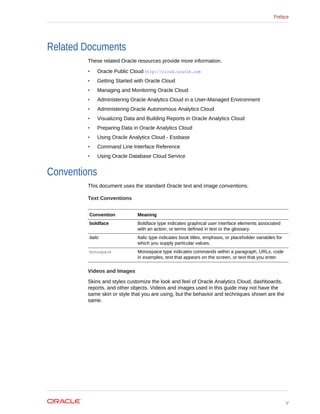
• Related Documents
• Conventions
Audience
Getting Started with Oracle Analytics Cloud is intended for consumers, analysts, and
administrators using Oracle Analytics Cloud for the first time:
• Administrators create services, manage access to Oracle Analytics Cloud and
perform other administrative duties such as backing up and restoring information
for others.
• Analysts load data, model data, visualize data, and create reports for consumers.
They also perform sensitivity analysis with data to understand future impact, and
initiate processes to collect and consolidate data. Analysts also test data
scenarios, collect data and consolidate it.
• Consumers work with their favorite visualizations, reports, and customize their
dashboard pages. Dashboards allow consumers to quickly analyze and manage
activity across their system. They also participate in data consolidation workflows.
Documentation Accessibility
For information about Oracle's commitment to accessibility, visit the Oracle
Accessibility Program website at http://www.oracle.com/pls/topic/lookup?
ctx=acc&id=docacc.
Access to Oracle Support
Oracle customers that have purchased support have access to electronic support
through My Oracle Support. For information, visit http://www.oracle.com/pls/topic/
lookup?ctx=acc&id=info or visit http://www.oracle.com/pls/topic/lookup?ctx=acc&id=trs
if you are hearing impaired.
Preface
iv
Related Documents
These related Oracle resources provide more information.
• Oracle Public Cloud http://cloud.oracle.com
• Getting Started with Oracle Cloud
• Managing and Monitoring Oracle Cloud
• Administering Oracle Analytics Cloud in a User-Managed Environment
• Administering Oracle Autonomous Analytics Cloud
• Visualizing Data and Building Reports in Oracle Analytics Cloud
• Preparing Data in Oracle Analytics Cloud
• Using Oracle Analytics Cloud - Essbase
• Command Line Interface Reference
• Using Oracle Database Cloud Service
Conventions
This document uses the standard Oracle text and image conventions.
Text Conventions
Convention Meaning
boldface Boldface type indicates graphical user interface elements associated
with an action, or terms defined in text or the glossary.
italic Italic type indicates book titles, emphasis, or placeholder variables for
which you supply particular values.
monospace Monospace type indicates commands within a paragraph, URLs, code
in examples, text that appears on the screen, or text that you enter.
Videos and Images
Skins and styles customize the look and feel of Oracle Analytics Cloud, dashboards,
reports, and other objects. Videos and images used in this guide may not have the
same skin or style that you are using, but the behavior and techniques shown are the
same.
Preface
v
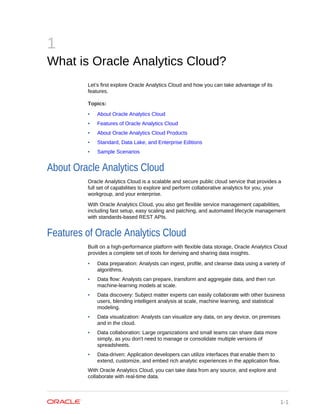
1
What is Oracle Analytics Cloud?
Let’s first explore Oracle Analytics Cloud and how you can take advantage of its
features.
Topics:
• About Oracle Analytics Cloud
• Features of Oracle Analytics Cloud
• About Oracle Analytics Cloud Products
• Standard, Data Lake, and Enterprise Editions
• Sample Scenarios
About Oracle Analytics Cloud
Oracle Analytics Cloud is a scalable and secure public cloud service that provides a
full set of capabilities to explore and perform collaborative analytics for you, your
workgroup, and your enterprise.
With Oracle Analytics Cloud, you also get flexible service management capabilities,
including fast setup, easy scaling and patching, and automated lifecycle management
with standards-based REST APIs.
Features of Oracle Analytics Cloud
Built on a high-performance platform with flexible data storage, Oracle Analytics Cloud
provides a complete set of tools for deriving and sharing data insights.
• Data preparation: Analysts can ingest, profile, and cleanse data using a variety of
algorithms.
• Data flow: Analysts can prepare, transform and aggregate data, and then run
machine-learning models at scale.
• Data discovery: Subject matter experts can easily collaborate with other business
users, blending intelligent analysis at scale, machine learning, and statistical
modeling.
• Data visualization: Analysts can visualize any data, on any device, on premises
and in the cloud.
• Data collaboration: Large organizations and small teams can share data more
simply, as you don't need to manage or consolidate multiple versions of
spreadsheets.
• Data-driven: Application developers can utilize interfaces that enable them to
extend, customize, and embed rich analytic experiences in the application flow.
With Oracle Analytics Cloud, you can take data from any source, and explore and
collaborate with real-time data.
1-1
You can interact with your personal data, ingest and harmonize data sources, collate
and manage disparate inputs, and handle data with coherence and consistency during
organizational sharing.
As you visually research and discover, you can review and visualize both personal and
corporate data, and gain insights at key stages of the iterative information cycle.
You can also perform role-based visualization, for example, as a Sales VP, Sales
Manager, Marketing Analyst, or Services Manager.
You can initiate data collaboration based on any data, and access real-time data with
a variety of interface options.
You can display data in a choice of Oracle reports and dashboards.
Chapter 1
Features of Oracle Analytics Cloud
1-2
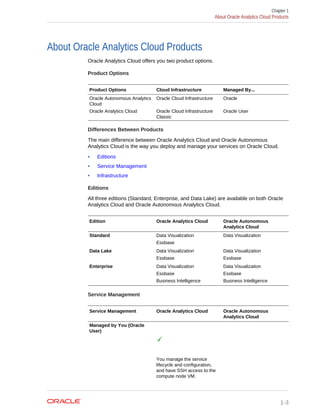
About Oracle Analytics Cloud Products
Oracle Analytics Cloud offers you two product options.
Product Options
Product Options Cloud Infrastructure Managed By...
Oracle Autonomous Analytics
Cloud
Oracle Cloud Infrastructure Oracle
Oracle Analytics Cloud Oracle Cloud Infrastructure
Classic
Oracle User
Differences Between Products
The main difference between Oracle Analytics Cloud and Oracle Autonomous
Analytics Cloud is the way you deploy and manage your services on Oracle Cloud.
• Editions
• Service Management
• Infrastructure
Editions
All three editions (Standard, Enterprise, and Data Lake) are available on both Oracle
Analytics Cloud and Oracle Autonomous Analytics Cloud.
Edition Oracle Analytics Cloud Oracle Autonomous
Analytics Cloud
Standard Data Visualization
Essbase
Data Visualization
Data Lake Data Visualization
Essbase
Data Visualization
Essbase
Enterprise Data Visualization
Essbase
Business Intelligence
Data Visualization
Essbase
Business Intelligence
Service Management
Service Management Oracle Analytics Cloud Oracle Autonomous
Analytics Cloud
Managed by You (Oracle
User)
You manage the service
lifecycle and configuration,
and have SSH access to the
compute node VM.
Chapter 1
About Oracle Analytics Cloud Products
1-3
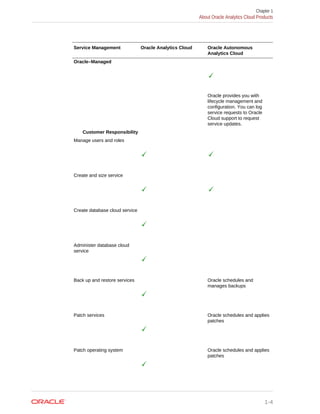
Service Management Oracle Analytics Cloud Oracle Autonomous
Analytics Cloud
Oracle–Managed
Oracle provides you with
lifecycle management and
configuration. You can log
service requests to Oracle
Cloud support to request
service updates.
Customer Responsibility
Manage users and roles
Create and size service
Create database cloud service
Administer database cloud
service
Back up and restore services Oracle schedules and
manages backups
Patch services Oracle schedules and applies
patches
Patch operating system Oracle schedules and applies
patches
Chapter 1
About Oracle Analytics Cloud Products
1-4
Service Management Oracle Analytics Cloud Oracle Autonomous
Analytics Cloud
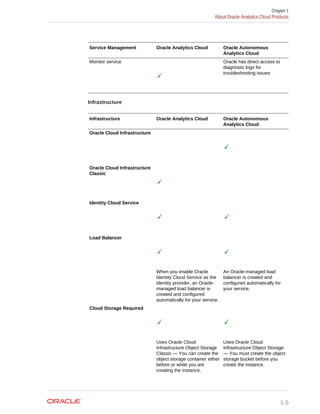
Monitor service Oracle has direct access to
diagnostic logs for
troubleshooting issues
Infrastructure
Infrastructure Oracle Analytics Cloud Oracle Autonomous
Analytics Cloud
Oracle Cloud Infrastructure
Classic
Identity Cloud Service
Load Balancer
When you enable Oracle
Identity Cloud Service as the
identity provider, an Oracle-
managed load balancer is
created and configured
automatically for your service.
An Oracle-managed load
balancer is created and
configured automatically for
your service.
Cloud Storage Required
Uses Oracle Cloud
Infrastructure Object Storage
Classic — You can create the
object storage container either
before or while you are
creating the instance.
Uses Oracle Cloud
Infrastructure Object Storage
— You must create the object
storage bucket before you
create the instance.
Chapter 1
About Oracle Analytics Cloud Products
1-5
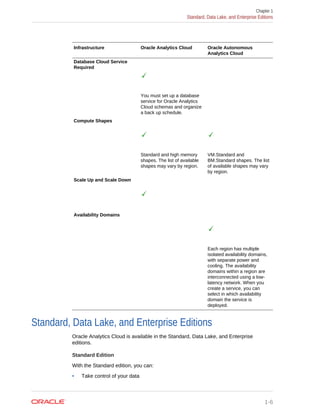
Infrastructure Oracle Analytics Cloud Oracle Autonomous
Analytics Cloud
Database Cloud Service
Required
You must set up a database
service for Oracle Analytics
Cloud schemas and organize
a back up schedule.
Compute Shapes
Standard and high memory
shapes. The list of available
shapes may vary by region.
VM.Standard and
BM.Standard shapes. The list
of available shapes may vary
by region.
Scale Up and Scale Down
Availability Domains
Each region has multiple
isolated availability domains,
with separate power and
cooling. The availability
domains within a region are
interconnected using a low-
latency network. When you
create a service, you can
select in which availability
domain the service is
deployed.
Standard, Data Lake, and Enterprise Editions
Oracle Analytics Cloud is available in the Standard, Data Lake, and Enterprise
editions.
Standard Edition
With the Standard edition, you can:
• Take control of your data
Chapter 1
Standard, Data Lake, and Enterprise Editions
1-6
• Create processes for business analytics application and data collection
• Discover insights on the data that you provide
• Prepare data through interactive data flows
• Explore data through grammar-based visualization
• Coordinate business analytics within your department or organization
Data Lake Edition
The Data Lake edition offers all the features in the Standard edition. In addition, you
can:
• Explore and replicate data
• Create scalable data flows including ingestion, transformation, and persistence
• Execute data flows by using Apache Spark or Oracle Database Cloud
Enterprise Edition
The Enterprise edition offers all the features in the Standard edition and the Data Lake
edition. In addition, you can:
• Build data models, reports, and analytic dashboards in an enterprise business
intelligence environment
• Design and publish pixel-perfect reports from your enterprise data
• Migrate content from your existing on-premises environment
• Perform a sensitivity analysis to test various data scenarios
• Use the Oracle Analytics Cloud Day by Day mobile app
• Maintain live and optimized connectivity to on-premises data warehouses
Sample Scenarios
Here are some sample scenarios of your deployment of Standard, Data Lake, and
Enterprise Editions of Oracle Analytics Cloud.
Standard, Data Lake, and Enterprise Edition
Sample Scenario Description
Self-Service Data Analysis You can connect to specific data sources, perform data
preparation activities, analyze data, discover insights, and tell
data stories.
For example, you might create rough models and content, or
projects to return to for monitoring and further analysis. Your
primary focus here is on data preparation and interactive analytics
of information.
Chapter 1
Sample Scenarios
1-7
Sample Scenario Description
Distribute and Share
Analytic Content
You can collaborate and share content. This can be static content,
such as PDFs and images that are shared with passive users, or
interactive content shared with other analysts.
Interactive content can vary based on the specific business
scenario, such as sharing an interactive story, collaborating in the
creation of a story or a scenario for analysis, or sharing an
application.
Perform Data Collection
and Consolidation
You can collect data, adjust the data as necessary, collaborate
with other analysts, and submit the results for approval.
Access Data from a Mobile
Device
You can access, analyze, and share analytic content from mobile
devices.
Data Lake Edition and Enterprise Edition
Sample Scenario Description
Explore Data Lakes You can create data flows to visualize data in your data lakes.
Replicate Data in Data
Lakes
You can replicate data from Oracle Service Cloud (RightNow) into
Oracle Big Data Cloud Service, Oracle Database Cloud, and
Oracle Database.
For example, you can replicate data from customer service
records in Oracle Service Cloud into your data lake on Oracle Big
Data Cloud Service and then perform further data preparation and
analysis with data flows and data visualization projects.
Enterprise Edition Only
Sample Scenario Description
Build Business Intelligence
Data Models
You can create data models at the enterprise level, as a single,
consistent source of data.
Build Enterprise Business
Intelligence Reports and
Dashboards
You can build and employ highly-formatted reporting content and
comprehensive interactions for analytical dashboards at the
enterprise level.
Publish Pixel-Perfect
Reports
You can design pixel-perfect reports to publish analytical content
at the enterprise level.
Migrate On-premises
Business Intelligence
You can move your existing on-premises Oracle business
intelligence applications and content directly to the cloud.
Model Data and Scenario-
Based Analysis
You can explore data while looking for insights and perform
sensitivity analysis to test various data scenarios.
Analyze Business Analytics
Anywhere
You can use the Day by Day mobile app. An innovative app that
infuses personalized analytics on the go, at the right time, and
place. Day by Day learns what users are interested in, when and
where they are interested in it and who they collaborate with.
Chapter 1
Sample Scenarios
1-8
2
How Do I Get Started?
Sometimes it’s hard to know where to start. Knowing the steps and which ones apply
to you can help you get started.
Topics:
• Getting Started with Oracle Autonomous Analytics Cloud
• Getting Started with Oracle Analytics Cloud
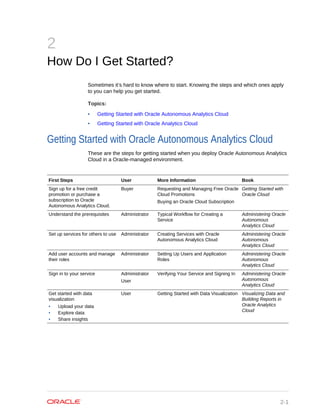
Getting Started with Oracle Autonomous Analytics Cloud
These are the steps for getting started when you deploy Oracle Autonomous Analytics
Cloud in a Oracle-managed environment.
First Steps User More Information Book
Sign up for a free credit
promotion or purchase a
subscription to Oracle
Autonomous Analytics Cloud.
Buyer Requesting and Managing Free Oracle
Cloud Promotions
Buying an Oracle Cloud Subscription
Getting Started with
Oracle Cloud
Understand the prerequisites Administrator Typical Workflow for Creating a
Service
Administering Oracle
Autonomous
Analytics Cloud
Set up services for others to use Administrator Creating Services with Oracle
Autonomous Analytics Cloud
Administering Oracle
Autonomous
Analytics Cloud
Add user accounts and manage
their roles
Administrator Setting Up Users and Application
Roles
Administering Oracle
Autonomous
Analytics Cloud
Sign in to your service Administrator
User
Verifying Your Service and Signing In Administering Oracle
Autonomous
Analytics Cloud
Get started with data
visualization
• Upload your data
• Explore data
• Share insights
User Getting Started with Data Visualization Visualizing Data and
Building Reports in
Oracle Analytics
Cloud
2-1
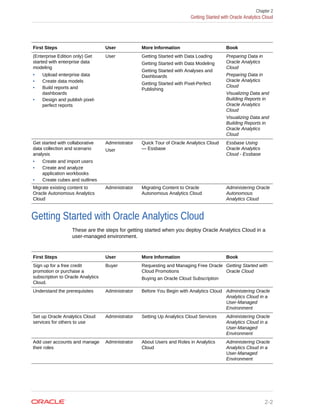
First Steps User More Information Book
(Enterprise Edition only) Get
started with enterprise data
modeling
• Upload enterprise data
• Create data models
• Build reports and
dashboards
• Design and publish pixel-
perfect reports
User Getting Started with Data Loading
Getting Started with Data Modeling
Getting Started with Analyses and
Dashboards
Getting Started with Pixel-Perfect
Publishing
Preparing Data in
Oracle Analytics
Cloud
Preparing Data in
Oracle Analytics
Cloud
Visualizing Data and
Building Reports in
Oracle Analytics
Cloud
Visualizing Data and
Building Reports in
Oracle Analytics
Cloud
Get started with collaborative
data collection and scenario
analysis
• Create and import users
• Create and analyze
application workbooks
• Create cubes and outlines
Administrator
User
Quick Tour of Oracle Analytics Cloud
— Essbase
Essbase Using
Oracle Analytics
Cloud - Essbase
Migrate existing content to
Oracle Autonomous Analytics
Cloud
Administrator Migrating Content to Oracle
Autonomous Analytics Cloud
Administering Oracle
Autonomous
Analytics Cloud
Getting Started with Oracle Analytics Cloud
These are the steps for getting started when you deploy Oracle Analytics Cloud in a
user-managed environment.
First Steps User More Information Book
Sign up for a free credit
promotion or purchase a
subscription to Oracle Analytics
Cloud.
Buyer Requesting and Managing Free Oracle
Cloud Promotions
Buying an Oracle Cloud Subscription
Getting Started with
Oracle Cloud
Understand the prerequisites Administrator Before You Begin with Analytics Cloud Administering Oracle
Analytics Cloud in a
User-Managed
Environment
Set up Oracle Analytics Cloud
services for others to use
Administrator Setting Up Analytics Cloud Services Administering Oracle
Analytics Cloud in a
User-Managed
Environment
Add user accounts and manage
their roles
Administrator About Users and Roles in Analytics
Cloud
Administering Oracle
Analytics Cloud in a
User-Managed
Environment
Chapter 2
Getting Started with Oracle Analytics Cloud
2-2
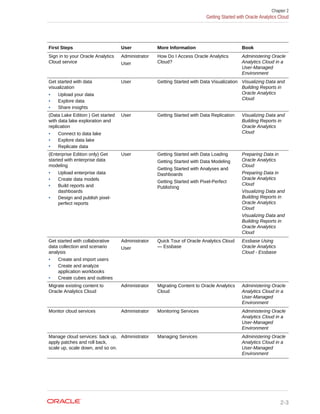
First Steps User More Information Book
Sign in to your Oracle Analytics
Cloud service
Administrator
User
How Do I Access Oracle Analytics
Cloud?
Administering Oracle
Analytics Cloud in a
User-Managed
Environment
Get started with data
visualization
• Upload your data
• Explore data
• Share insights
User Getting Started with Data Visualization Visualizing Data and
Building Reports in
Oracle Analytics
Cloud
(Data Lake Edition ) Get started
with data lake exploration and
replication
• Connect to data lake
• Explore data lake
• Replicate data
User Getting Started with Data Replication Visualizing Data and
Building Reports in
Oracle Analytics
Cloud
(Enterprise Edition only) Get
started with enterprise data
modeling
• Upload enterprise data
• Create data models
• Build reports and
dashboards
• Design and publish pixel-
perfect reports
User Getting Started with Data Loading
Getting Started with Data Modeling
Getting Started with Analyses and
Dashboards
Getting Started with Pixel-Perfect
Publishing
Preparing Data in
Oracle Analytics
Cloud
Preparing Data in
Oracle Analytics
Cloud
Visualizing Data and
Building Reports in
Oracle Analytics
Cloud
Visualizing Data and
Building Reports in
Oracle Analytics
Cloud
Get started with collaborative
data collection and scenario
analysis
• Create and import users
• Create and analyze
application workbooks
• Create cubes and outlines
Administrator
User
Quick Tour of Oracle Analytics Cloud
— Essbase
Essbase Using
Oracle Analytics
Cloud - Essbase
Migrate existing content to
Oracle Analytics Cloud
Administrator Migrating Content to Oracle Analytics
Cloud
Administering Oracle
Analytics Cloud in a
User-Managed
Environment
Monitor cloud services Administrator Monitoring Services Administering Oracle
Analytics Cloud in a
User-Managed
Environment
Manage cloud services: back up,
apply patches and roll back,
scale up, scale down, and so on.
Administrator Managing Services Administering Oracle
Analytics Cloud in a
User-Managed
Environment
Chapter 2
Getting Started with Oracle Analytics Cloud
2-3
3
Where Do I Go for More Information?
There are plenty of books, videos, and other resources available. Watch short videos
and explore the documentation to learn more.
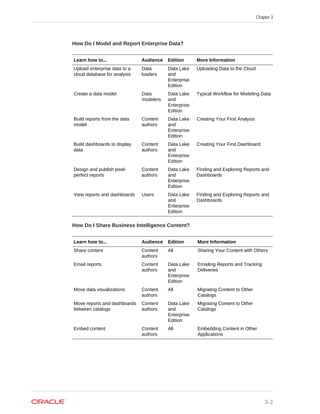
• How Do I Set Up a Cloud Service?
• How Do I Model Enterprise Data?
• How Do I Visualize Data?
• How Do I Share BI Content?
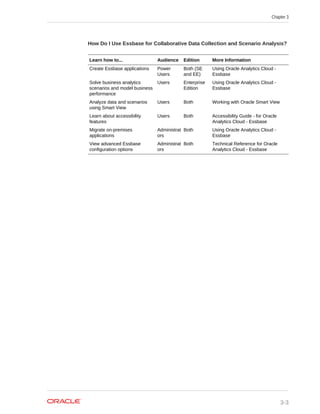
• How Do I Use Essbase for Collaborative Data Collection and Scenario Analysis?
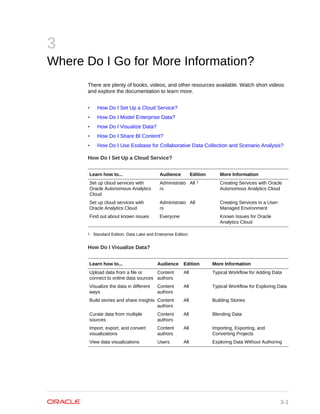
How Do I Set Up a Cloud Service?
Learn how to... Audience Edition More Information
Set up cloud services with
Oracle Autonomous Analytics
Cloud
Administrato
rs
All 1 Creating Services with Oracle
Autonomous Analytics Cloud
Set up cloud services with
Oracle Analytics Cloud
Administrato
rs
All Creating Services in a User-
Managed Environment
Find out about known issues Everyone Known Issues for Oracle
Analytics Cloud
1 Standard Edition, Data Lake and Enterprise Edition
How Do I Visualize Data?
Learn how to... Audience Edition More Information
Upload data from a file or
connect to online data sources
Content
authors
All Typical Workflow for Adding Data
Visualize the data in different
ways
Content
authors
All Typical Workflow for Exploring Data
Build stories and share insights Content
authors
All Building Stories
Curate data from multiple
sources
Content
authors
All Blending Data
Import, export, and convert
visualizations
Content
authors
All Importing, Exporting, and
Converting Projects
View data visualizations Users All Exploring Data Without Authoring
3-1
How Do I Model and Report Enterprise Data?
Learn how to... Audience Edition More Information
Upload enterprise data to a
cloud database for analysis
Data
loaders
Data Lake
and
Enterprise
Edition
Uploading Data to the Cloud
Create a data model Data
modelers
Data Lake
and
Enterprise
Edition
Typical Workflow for Modeling Data
Build reports from the data
model
Content
authors
Data Lake
and
Enterprise
Edition
Creating Your First Analysis
Build dashboards to display
data
Content
authors
Data Lake
and
Enterprise
Edition
Creating Your First Dashboard
Design and publish pixel-
perfect reports
Content
authors
Data Lake
and
Enterprise
Edition
Finding and Exploring Reports and
Dashboards
View reports and dashboards Users Data Lake
and
Enterprise
Edition
Finding and Exploring Reports and
Dashboards
How Do I Share Business Intelligence Content?
Learn how to... Audience Edition More Information
Share content Content
authors
All Sharing Your Content with Others
Email reports Content
authors
Data Lake
and
Enterprise
Edition
Emailing Reports and Tracking
Deliveries
Move data visualizations Content
authors
All Migrating Content to Other
Catalogs
Move reports and dashboards
between catalogs
Content
authors
Data Lake
and
Enterprise
Edition
Migrating Content to Other
Catalogs
Embed content Content
authors
All Embedding Content in Other
Applications
Chapter 3
3-2
How Do I Use Essbase for Collaborative Data Collection and Scenario Analysis?
Learn how to... Audience Edition More Information
Create Essbase applications Power
Users
Both (SE
and EE)
Using Oracle Analytics Cloud -
Essbase
Solve business analytics
scenarios and model business
performance
Users Enterprise
Edition
Using Oracle Analytics Cloud -
Essbase
Analyze data and scenarios
using Smart View
Users Both Working with Oracle Smart View
Learn about accessibility
features
Users Both Accessibility Guide - for Oracle
Analytics Cloud - Essbase
Migrate on-premises
applications
Administrat
ors
Both Using Oracle Analytics Cloud -
Essbase
View advanced Essbase
configuration options
Administrat
ors
Both Technical Reference for Oracle
Analytics Cloud - Essbase
Chapter 3
3-3

Getting started-oracle-analytics-cloud

  • 1.
    Oracle® Cloud Getting Startedwith Oracle Analytics Cloud E83317-08 May 2018
  • 2.
    Oracle Cloud GettingStarted with Oracle Analytics Cloud, E83317-08 Copyright © 2017, 2018, Oracle and/or its affiliates. All rights reserved. Primary Authors: Ari Gerber, Rosie Harvey Contributors: Oracle Analytics Cloud development, product management, and quality assurance teams This software and related documentation are provided under a license agreement containing restrictions on use and disclosure and are protected by intellectual property laws. Except as expressly permitted in your license agreement or allowed by law, you may not use, copy, reproduce, translate, broadcast, modify, license, transmit, distribute, exhibit, perform, publish, or display any part, in any form, or by any means. Reverse engineering, disassembly, or decompilation of this software, unless required by law for interoperability, is prohibited. The information contained herein is subject to change without notice and is not warranted to be error-free. If you find any errors, please report them to us in writing. If this is software or related documentation that is delivered to the U.S. Government or anyone licensing it on behalf of the U.S. Government, then the following notice is applicable: U.S. GOVERNMENT END USERS: Oracle programs, including any operating system, integrated software, any programs installed on the hardware, and/or documentation, delivered to U.S. Government end users are "commercial computer software" pursuant to the applicable Federal Acquisition Regulation and agency- specific supplemental regulations. As such, use, duplication, disclosure, modification, and adaptation of the programs, including any operating system, integrated software, any programs installed on the hardware, and/or documentation, shall be subject to license terms and license restrictions applicable to the programs. No other rights are granted to the U.S. Government. This software or hardware is developed for general use in a variety of information management applications. It is not developed or intended for use in any inherently dangerous applications, including applications that may create a risk of personal injury. If you use this software or hardware in dangerous applications, then you shall be responsible to take all appropriate fail-safe, backup, redundancy, and other measures to ensure its safe use. Oracle Corporation and its affiliates disclaim any liability for any damages caused by use of this software or hardware in dangerous applications. Oracle and Java are registered trademarks of Oracle and/or its affiliates. Other names may be trademarks of their respective owners. Intel and Intel Xeon are trademarks or registered trademarks of Intel Corporation. All SPARC trademarks are used under license and are trademarks or registered trademarks of SPARC International, Inc. AMD, Opteron, the AMD logo, and the AMD Opteron logo are trademarks or registered trademarks of Advanced Micro Devices. UNIX is a registered trademark of The Open Group. This software or hardware and documentation may provide access to or information about content, products, and services from third parties. Oracle Corporation and its affiliates are not responsible for and expressly disclaim all warranties of any kind with respect to third-party content, products, and services unless otherwise set forth in an applicable agreement between you and Oracle. Oracle Corporation and its affiliates will not be responsible for any loss, costs, or damages incurred due to your access to or use of third-party content, products, or services, except as set forth in an applicable agreement between you and Oracle.
  • 3.
    Contents Preface Audience iv Documentation Accessibilityiv Related Documents v Conventions v 1 What is Oracle Analytics Cloud? About Oracle Analytics Cloud 1-1 Features of Oracle Analytics Cloud 1-1 About Oracle Analytics Cloud Products 1-3 Standard, Data Lake, and Enterprise Editions 1-6 Sample Scenarios 1-7 2 How Do I Get Started? Getting Started with Oracle Autonomous Analytics Cloud 2-1 Getting Started with Oracle Analytics Cloud 2-2 3 Where Do I Go for More Information? iii
  • 4.
    Preface Learn how toget started with Oracle Analytics Cloud. Topics: • Audience • Documentation Accessibility • Related Documents • Conventions Audience Getting Started with Oracle Analytics Cloud is intended for consumers, analysts, and administrators using Oracle Analytics Cloud for the first time: • Administrators create services, manage access to Oracle Analytics Cloud and perform other administrative duties such as backing up and restoring information for others. • Analysts load data, model data, visualize data, and create reports for consumers. They also perform sensitivity analysis with data to understand future impact, and initiate processes to collect and consolidate data. Analysts also test data scenarios, collect data and consolidate it. • Consumers work with their favorite visualizations, reports, and customize their dashboard pages. Dashboards allow consumers to quickly analyze and manage activity across their system. They also participate in data consolidation workflows. Documentation Accessibility For information about Oracle's commitment to accessibility, visit the Oracle Accessibility Program website at http://www.oracle.com/pls/topic/lookup? ctx=acc&id=docacc. Access to Oracle Support Oracle customers that have purchased support have access to electronic support through My Oracle Support. For information, visit http://www.oracle.com/pls/topic/ lookup?ctx=acc&id=info or visit http://www.oracle.com/pls/topic/lookup?ctx=acc&id=trs if you are hearing impaired. Preface iv
  • 5.
    Related Documents These relatedOracle resources provide more information. • Oracle Public Cloud http://cloud.oracle.com • Getting Started with Oracle Cloud • Managing and Monitoring Oracle Cloud • Administering Oracle Analytics Cloud in a User-Managed Environment • Administering Oracle Autonomous Analytics Cloud • Visualizing Data and Building Reports in Oracle Analytics Cloud • Preparing Data in Oracle Analytics Cloud • Using Oracle Analytics Cloud - Essbase • Command Line Interface Reference • Using Oracle Database Cloud Service Conventions This document uses the standard Oracle text and image conventions. Text Conventions Convention Meaning boldface Boldface type indicates graphical user interface elements associated with an action, or terms defined in text or the glossary. italic Italic type indicates book titles, emphasis, or placeholder variables for which you supply particular values. monospace Monospace type indicates commands within a paragraph, URLs, code in examples, text that appears on the screen, or text that you enter. Videos and Images Skins and styles customize the look and feel of Oracle Analytics Cloud, dashboards, reports, and other objects. Videos and images used in this guide may not have the same skin or style that you are using, but the behavior and techniques shown are the same. Preface v
  • 6.
    1 What is OracleAnalytics Cloud? Let’s first explore Oracle Analytics Cloud and how you can take advantage of its features. Topics: • About Oracle Analytics Cloud • Features of Oracle Analytics Cloud • About Oracle Analytics Cloud Products • Standard, Data Lake, and Enterprise Editions • Sample Scenarios About Oracle Analytics Cloud Oracle Analytics Cloud is a scalable and secure public cloud service that provides a full set of capabilities to explore and perform collaborative analytics for you, your workgroup, and your enterprise. With Oracle Analytics Cloud, you also get flexible service management capabilities, including fast setup, easy scaling and patching, and automated lifecycle management with standards-based REST APIs. Features of Oracle Analytics Cloud Built on a high-performance platform with flexible data storage, Oracle Analytics Cloud provides a complete set of tools for deriving and sharing data insights. • Data preparation: Analysts can ingest, profile, and cleanse data using a variety of algorithms. • Data flow: Analysts can prepare, transform and aggregate data, and then run machine-learning models at scale. • Data discovery: Subject matter experts can easily collaborate with other business users, blending intelligent analysis at scale, machine learning, and statistical modeling. • Data visualization: Analysts can visualize any data, on any device, on premises and in the cloud. • Data collaboration: Large organizations and small teams can share data more simply, as you don't need to manage or consolidate multiple versions of spreadsheets. • Data-driven: Application developers can utilize interfaces that enable them to extend, customize, and embed rich analytic experiences in the application flow. With Oracle Analytics Cloud, you can take data from any source, and explore and collaborate with real-time data. 1-1
  • 7.
    You can interactwith your personal data, ingest and harmonize data sources, collate and manage disparate inputs, and handle data with coherence and consistency during organizational sharing. As you visually research and discover, you can review and visualize both personal and corporate data, and gain insights at key stages of the iterative information cycle. You can also perform role-based visualization, for example, as a Sales VP, Sales Manager, Marketing Analyst, or Services Manager. You can initiate data collaboration based on any data, and access real-time data with a variety of interface options. You can display data in a choice of Oracle reports and dashboards. Chapter 1 Features of Oracle Analytics Cloud 1-2
  • 8.
    About Oracle AnalyticsCloud Products Oracle Analytics Cloud offers you two product options. Product Options Product Options Cloud Infrastructure Managed By... Oracle Autonomous Analytics Cloud Oracle Cloud Infrastructure Oracle Oracle Analytics Cloud Oracle Cloud Infrastructure Classic Oracle User Differences Between Products The main difference between Oracle Analytics Cloud and Oracle Autonomous Analytics Cloud is the way you deploy and manage your services on Oracle Cloud. • Editions • Service Management • Infrastructure Editions All three editions (Standard, Enterprise, and Data Lake) are available on both Oracle Analytics Cloud and Oracle Autonomous Analytics Cloud. Edition Oracle Analytics Cloud Oracle Autonomous Analytics Cloud Standard Data Visualization Essbase Data Visualization Data Lake Data Visualization Essbase Data Visualization Essbase Enterprise Data Visualization Essbase Business Intelligence Data Visualization Essbase Business Intelligence Service Management Service Management Oracle Analytics Cloud Oracle Autonomous Analytics Cloud Managed by You (Oracle User) You manage the service lifecycle and configuration, and have SSH access to the compute node VM. Chapter 1 About Oracle Analytics Cloud Products 1-3
  • 9.
    Service Management OracleAnalytics Cloud Oracle Autonomous Analytics Cloud Oracle–Managed Oracle provides you with lifecycle management and configuration. You can log service requests to Oracle Cloud support to request service updates. Customer Responsibility Manage users and roles Create and size service Create database cloud service Administer database cloud service Back up and restore services Oracle schedules and manages backups Patch services Oracle schedules and applies patches Patch operating system Oracle schedules and applies patches Chapter 1 About Oracle Analytics Cloud Products 1-4
  • 10.
    Service Management OracleAnalytics Cloud Oracle Autonomous Analytics Cloud Monitor service Oracle has direct access to diagnostic logs for troubleshooting issues Infrastructure Infrastructure Oracle Analytics Cloud Oracle Autonomous Analytics Cloud Oracle Cloud Infrastructure Oracle Cloud Infrastructure Classic Identity Cloud Service Load Balancer When you enable Oracle Identity Cloud Service as the identity provider, an Oracle- managed load balancer is created and configured automatically for your service. An Oracle-managed load balancer is created and configured automatically for your service. Cloud Storage Required Uses Oracle Cloud Infrastructure Object Storage Classic — You can create the object storage container either before or while you are creating the instance. Uses Oracle Cloud Infrastructure Object Storage — You must create the object storage bucket before you create the instance. Chapter 1 About Oracle Analytics Cloud Products 1-5
  • 11.
    Infrastructure Oracle AnalyticsCloud Oracle Autonomous Analytics Cloud Database Cloud Service Required You must set up a database service for Oracle Analytics Cloud schemas and organize a back up schedule. Compute Shapes Standard and high memory shapes. The list of available shapes may vary by region. VM.Standard and BM.Standard shapes. The list of available shapes may vary by region. Scale Up and Scale Down Availability Domains Each region has multiple isolated availability domains, with separate power and cooling. The availability domains within a region are interconnected using a low- latency network. When you create a service, you can select in which availability domain the service is deployed. Standard, Data Lake, and Enterprise Editions Oracle Analytics Cloud is available in the Standard, Data Lake, and Enterprise editions. Standard Edition With the Standard edition, you can: • Take control of your data Chapter 1 Standard, Data Lake, and Enterprise Editions 1-6
  • 12.
    • Create processesfor business analytics application and data collection • Discover insights on the data that you provide • Prepare data through interactive data flows • Explore data through grammar-based visualization • Coordinate business analytics within your department or organization Data Lake Edition The Data Lake edition offers all the features in the Standard edition. In addition, you can: • Explore and replicate data • Create scalable data flows including ingestion, transformation, and persistence • Execute data flows by using Apache Spark or Oracle Database Cloud Enterprise Edition The Enterprise edition offers all the features in the Standard edition and the Data Lake edition. In addition, you can: • Build data models, reports, and analytic dashboards in an enterprise business intelligence environment • Design and publish pixel-perfect reports from your enterprise data • Migrate content from your existing on-premises environment • Perform a sensitivity analysis to test various data scenarios • Use the Oracle Analytics Cloud Day by Day mobile app • Maintain live and optimized connectivity to on-premises data warehouses Sample Scenarios Here are some sample scenarios of your deployment of Standard, Data Lake, and Enterprise Editions of Oracle Analytics Cloud. Standard, Data Lake, and Enterprise Edition Sample Scenario Description Self-Service Data Analysis You can connect to specific data sources, perform data preparation activities, analyze data, discover insights, and tell data stories. For example, you might create rough models and content, or projects to return to for monitoring and further analysis. Your primary focus here is on data preparation and interactive analytics of information. Chapter 1 Sample Scenarios 1-7
  • 13.
    Sample Scenario Description Distributeand Share Analytic Content You can collaborate and share content. This can be static content, such as PDFs and images that are shared with passive users, or interactive content shared with other analysts. Interactive content can vary based on the specific business scenario, such as sharing an interactive story, collaborating in the creation of a story or a scenario for analysis, or sharing an application. Perform Data Collection and Consolidation You can collect data, adjust the data as necessary, collaborate with other analysts, and submit the results for approval. Access Data from a Mobile Device You can access, analyze, and share analytic content from mobile devices. Data Lake Edition and Enterprise Edition Sample Scenario Description Explore Data Lakes You can create data flows to visualize data in your data lakes. Replicate Data in Data Lakes You can replicate data from Oracle Service Cloud (RightNow) into Oracle Big Data Cloud Service, Oracle Database Cloud, and Oracle Database. For example, you can replicate data from customer service records in Oracle Service Cloud into your data lake on Oracle Big Data Cloud Service and then perform further data preparation and analysis with data flows and data visualization projects. Enterprise Edition Only Sample Scenario Description Build Business Intelligence Data Models You can create data models at the enterprise level, as a single, consistent source of data. Build Enterprise Business Intelligence Reports and Dashboards You can build and employ highly-formatted reporting content and comprehensive interactions for analytical dashboards at the enterprise level. Publish Pixel-Perfect Reports You can design pixel-perfect reports to publish analytical content at the enterprise level. Migrate On-premises Business Intelligence You can move your existing on-premises Oracle business intelligence applications and content directly to the cloud. Model Data and Scenario- Based Analysis You can explore data while looking for insights and perform sensitivity analysis to test various data scenarios. Analyze Business Analytics Anywhere You can use the Day by Day mobile app. An innovative app that infuses personalized analytics on the go, at the right time, and place. Day by Day learns what users are interested in, when and where they are interested in it and who they collaborate with. Chapter 1 Sample Scenarios 1-8
  • 14.
    2 How Do IGet Started? Sometimes it’s hard to know where to start. Knowing the steps and which ones apply to you can help you get started. Topics: • Getting Started with Oracle Autonomous Analytics Cloud • Getting Started with Oracle Analytics Cloud Getting Started with Oracle Autonomous Analytics Cloud These are the steps for getting started when you deploy Oracle Autonomous Analytics Cloud in a Oracle-managed environment. First Steps User More Information Book Sign up for a free credit promotion or purchase a subscription to Oracle Autonomous Analytics Cloud. Buyer Requesting and Managing Free Oracle Cloud Promotions Buying an Oracle Cloud Subscription Getting Started with Oracle Cloud Understand the prerequisites Administrator Typical Workflow for Creating a Service Administering Oracle Autonomous Analytics Cloud Set up services for others to use Administrator Creating Services with Oracle Autonomous Analytics Cloud Administering Oracle Autonomous Analytics Cloud Add user accounts and manage their roles Administrator Setting Up Users and Application Roles Administering Oracle Autonomous Analytics Cloud Sign in to your service Administrator User Verifying Your Service and Signing In Administering Oracle Autonomous Analytics Cloud Get started with data visualization • Upload your data • Explore data • Share insights User Getting Started with Data Visualization Visualizing Data and Building Reports in Oracle Analytics Cloud 2-1
  • 15.
    First Steps UserMore Information Book (Enterprise Edition only) Get started with enterprise data modeling • Upload enterprise data • Create data models • Build reports and dashboards • Design and publish pixel- perfect reports User Getting Started with Data Loading Getting Started with Data Modeling Getting Started with Analyses and Dashboards Getting Started with Pixel-Perfect Publishing Preparing Data in Oracle Analytics Cloud Preparing Data in Oracle Analytics Cloud Visualizing Data and Building Reports in Oracle Analytics Cloud Visualizing Data and Building Reports in Oracle Analytics Cloud Get started with collaborative data collection and scenario analysis • Create and import users • Create and analyze application workbooks • Create cubes and outlines Administrator User Quick Tour of Oracle Analytics Cloud — Essbase Essbase Using Oracle Analytics Cloud - Essbase Migrate existing content to Oracle Autonomous Analytics Cloud Administrator Migrating Content to Oracle Autonomous Analytics Cloud Administering Oracle Autonomous Analytics Cloud Getting Started with Oracle Analytics Cloud These are the steps for getting started when you deploy Oracle Analytics Cloud in a user-managed environment. First Steps User More Information Book Sign up for a free credit promotion or purchase a subscription to Oracle Analytics Cloud. Buyer Requesting and Managing Free Oracle Cloud Promotions Buying an Oracle Cloud Subscription Getting Started with Oracle Cloud Understand the prerequisites Administrator Before You Begin with Analytics Cloud Administering Oracle Analytics Cloud in a User-Managed Environment Set up Oracle Analytics Cloud services for others to use Administrator Setting Up Analytics Cloud Services Administering Oracle Analytics Cloud in a User-Managed Environment Add user accounts and manage their roles Administrator About Users and Roles in Analytics Cloud Administering Oracle Analytics Cloud in a User-Managed Environment Chapter 2 Getting Started with Oracle Analytics Cloud 2-2
  • 16.
    First Steps UserMore Information Book Sign in to your Oracle Analytics Cloud service Administrator User How Do I Access Oracle Analytics Cloud? Administering Oracle Analytics Cloud in a User-Managed Environment Get started with data visualization • Upload your data • Explore data • Share insights User Getting Started with Data Visualization Visualizing Data and Building Reports in Oracle Analytics Cloud (Data Lake Edition ) Get started with data lake exploration and replication • Connect to data lake • Explore data lake • Replicate data User Getting Started with Data Replication Visualizing Data and Building Reports in Oracle Analytics Cloud (Enterprise Edition only) Get started with enterprise data modeling • Upload enterprise data • Create data models • Build reports and dashboards • Design and publish pixel- perfect reports User Getting Started with Data Loading Getting Started with Data Modeling Getting Started with Analyses and Dashboards Getting Started with Pixel-Perfect Publishing Preparing Data in Oracle Analytics Cloud Preparing Data in Oracle Analytics Cloud Visualizing Data and Building Reports in Oracle Analytics Cloud Visualizing Data and Building Reports in Oracle Analytics Cloud Get started with collaborative data collection and scenario analysis • Create and import users • Create and analyze application workbooks • Create cubes and outlines Administrator User Quick Tour of Oracle Analytics Cloud — Essbase Essbase Using Oracle Analytics Cloud - Essbase Migrate existing content to Oracle Analytics Cloud Administrator Migrating Content to Oracle Analytics Cloud Administering Oracle Analytics Cloud in a User-Managed Environment Monitor cloud services Administrator Monitoring Services Administering Oracle Analytics Cloud in a User-Managed Environment Manage cloud services: back up, apply patches and roll back, scale up, scale down, and so on. Administrator Managing Services Administering Oracle Analytics Cloud in a User-Managed Environment Chapter 2 Getting Started with Oracle Analytics Cloud 2-3
  • 17.
    3 Where Do IGo for More Information? There are plenty of books, videos, and other resources available. Watch short videos and explore the documentation to learn more. • How Do I Set Up a Cloud Service? • How Do I Model Enterprise Data? • How Do I Visualize Data? • How Do I Share BI Content? • How Do I Use Essbase for Collaborative Data Collection and Scenario Analysis? How Do I Set Up a Cloud Service? Learn how to... Audience Edition More Information Set up cloud services with Oracle Autonomous Analytics Cloud Administrato rs All 1 Creating Services with Oracle Autonomous Analytics Cloud Set up cloud services with Oracle Analytics Cloud Administrato rs All Creating Services in a User- Managed Environment Find out about known issues Everyone Known Issues for Oracle Analytics Cloud 1 Standard Edition, Data Lake and Enterprise Edition How Do I Visualize Data? Learn how to... Audience Edition More Information Upload data from a file or connect to online data sources Content authors All Typical Workflow for Adding Data Visualize the data in different ways Content authors All Typical Workflow for Exploring Data Build stories and share insights Content authors All Building Stories Curate data from multiple sources Content authors All Blending Data Import, export, and convert visualizations Content authors All Importing, Exporting, and Converting Projects View data visualizations Users All Exploring Data Without Authoring 3-1
  • 18.
    How Do IModel and Report Enterprise Data? Learn how to... Audience Edition More Information Upload enterprise data to a cloud database for analysis Data loaders Data Lake and Enterprise Edition Uploading Data to the Cloud Create a data model Data modelers Data Lake and Enterprise Edition Typical Workflow for Modeling Data Build reports from the data model Content authors Data Lake and Enterprise Edition Creating Your First Analysis Build dashboards to display data Content authors Data Lake and Enterprise Edition Creating Your First Dashboard Design and publish pixel- perfect reports Content authors Data Lake and Enterprise Edition Finding and Exploring Reports and Dashboards View reports and dashboards Users Data Lake and Enterprise Edition Finding and Exploring Reports and Dashboards How Do I Share Business Intelligence Content? Learn how to... Audience Edition More Information Share content Content authors All Sharing Your Content with Others Email reports Content authors Data Lake and Enterprise Edition Emailing Reports and Tracking Deliveries Move data visualizations Content authors All Migrating Content to Other Catalogs Move reports and dashboards between catalogs Content authors Data Lake and Enterprise Edition Migrating Content to Other Catalogs Embed content Content authors All Embedding Content in Other Applications Chapter 3 3-2
  • 19.
    How Do IUse Essbase for Collaborative Data Collection and Scenario Analysis? Learn how to... Audience Edition More Information Create Essbase applications Power Users Both (SE and EE) Using Oracle Analytics Cloud - Essbase Solve business analytics scenarios and model business performance Users Enterprise Edition Using Oracle Analytics Cloud - Essbase Analyze data and scenarios using Smart View Users Both Working with Oracle Smart View Learn about accessibility features Users Both Accessibility Guide - for Oracle Analytics Cloud - Essbase Migrate on-premises applications Administrat ors Both Using Oracle Analytics Cloud - Essbase View advanced Essbase configuration options Administrat ors Both Technical Reference for Oracle Analytics Cloud - Essbase Chapter 3 3-3