
GETTING STARTED WITH WORDPRESS
STEP 1
Go to: http://wordpress.com/
STEP 2Signup/registration
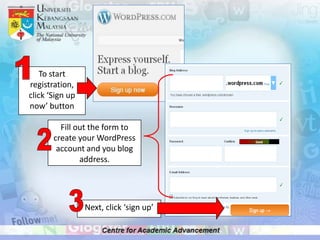
1To start registration, click ‘Sign up now’ buttonFill out the form to create your WordPress account and you blog address.23Next, click ‘sign up’
After you click ‘sign up’, this page will appear. You need to check your e-mail inbox to active you account.4You will received this email, and you need to click this link to start activate your account56Fill out your profile form
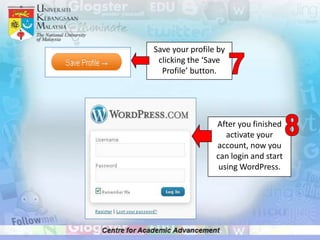
Save your profile by clicking the ‘Save Profile’ button.78After you finished activate your account, now you can login and start using WordPress.
STEP 3Editing your blog
1On your blog homepage, click ‘About’Click ‘Edit’ to start editing the page2
Click ‘preview changes’ before you click the ‘update’ 4Click ‘update’Delete text, and start write up your homepage about.536To return back to your homepage, click this button.
STEP 4To add links to your blog
1Go to My Blog2Click ‘Dashboard’3Click ‘Add New’
Insert information and ‘Add Link’4
STEP 5To change your blog appearance
Click ‘appearance’ at dashboard page1This page will appear and you can choose your favorites themes and appearance23Select a theme and click ‘Activate’
STEP 6To comment on a post
1At your blog page, you can see text ‘comment’ here. To start comment the post you need to click this ‘comment’ text.
This page will appear.23Write your comment here.Click ‘post comment’ to submit/reply your comment.4
THE END

Getting started with wordpress