


Getting started with IoT with only your laptop – © Pete Gallagher – PJG Creations - 2018
Getting started with IoT
with only your laptop
PETE GALLAGHER
PJGCREATIONS.CO.UK
20/10/2018
Getting started with IoT with only your laptop – © Pete Gallagher – PJG Creations - 2018
About Me
Pete Gallagher
@pete_codes / @PJGCreations
www.PJGCreations.co.uk
Pete@PJGCreations.co.uk
IT Consultant
Decades of Desktop, Web & Embedded Software experience
Gadget Addict
Father of two inquisitive girls
Getting started with IoT with only your laptop – © Pete Gallagher – PJG Creations - 2018
What we’re going to be doing…
 Basic Intro to IoT
 The Hardware
 The Software
 Q&A
Getting started with IoT with only your laptop – © Pete Gallagher – PJG Creations - 2018
What is IoT?
Getting started with IoT with only your laptop – © Pete Gallagher – PJG Creations - 2018
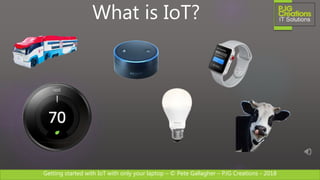
What is IoT?
Getting started with IoT with only your laptop – © Pete Gallagher – PJG Creations - 2018
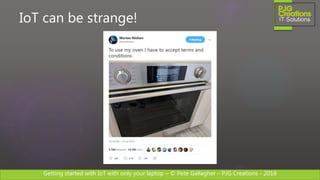
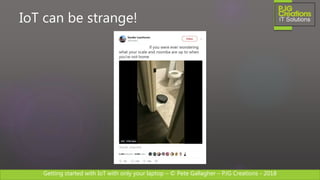
IoT can be strange!
Getting started with IoT with only your laptop – © Pete Gallagher – PJG Creations - 2018
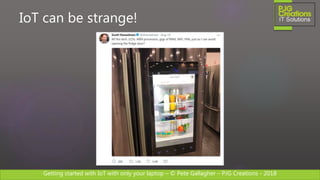
IoT can be strange!
Getting started with IoT with only your laptop – © Pete Gallagher – PJG Creations - 2018
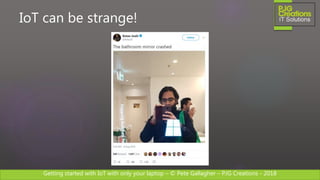
IoT can be strange!
Getting started with IoT with only your laptop – © Pete Gallagher – PJG Creations - 2018
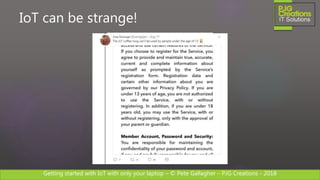
IoT can be strange!
Getting started with IoT with only your laptop – © Pete Gallagher – PJG Creations - 2018
IoT can be strange!
Getting started with IoT with only your laptop – © Pete Gallagher – PJG Creations - 2018
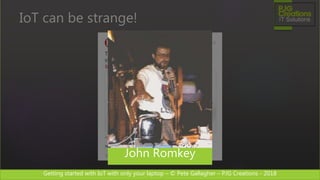
IoT can be strange!
John Romkey
Getting started with IoT with only your laptop – © Pete Gallagher – PJG Creations - 2018
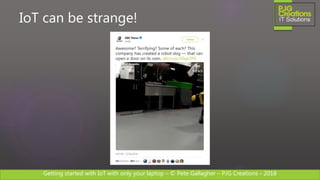
IoT can be strange!
Getting started with IoT with only your laptop – © Pete Gallagher – PJG Creations - 2018
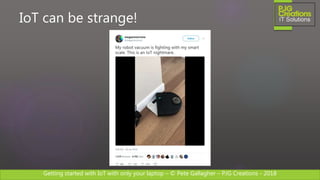
IoT can be strange!
Getting started with IoT with only your laptop – © Pete Gallagher – PJG Creations - 2018
IoT can be strange!
Getting started with IoT with only your laptop – © Pete Gallagher – PJG Creations - 2018
What is IoT for me?
Getting started with IoT with only your laptop – © Pete Gallagher – PJG Creations - 2018
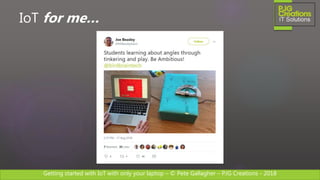
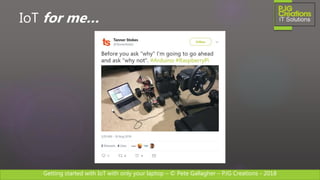
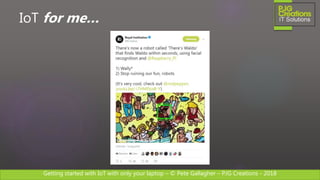
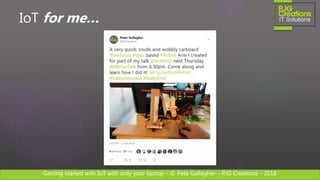
IoT for me…
Getting started with IoT with only your laptop – © Pete Gallagher – PJG Creations - 2018
IoT for me…
Getting started with IoT with only your laptop – © Pete Gallagher – PJG Creations - 2018
IoT for me…
Getting started with IoT with only your laptop – © Pete Gallagher – PJG Creations - 2018
IoT for me…
Getting started with IoT with only your laptop – © Pete Gallagher – PJG Creations - 2018
An Industry Example…
Getting started with IoT with only your laptop – © Pete Gallagher – PJG Creations - 2018
The Connected Cow
Getting started with IoT with only your laptop – © Pete Gallagher – PJG Creations - 2018
The Connected Cow
“To identify a cow in heat, you need to
spend at least 20-30 minutes in the
stables, four to five times a day”
Getting started with IoT with only your laptop – © Pete Gallagher – PJG Creations - 2018
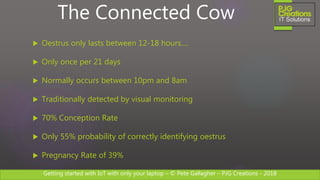
 Oestrus only lasts between 12-18 hours….
 Only once per 21 days
 Normally occurs between 10pm and 8am
 Traditionally detected by visual monitoring
 70% Conception Rate
 Only 55% probability of correctly identifying oestrus
 Pregnancy Rate of 39%
The Connected Cow
Getting started with IoT with only your laptop – © Pete Gallagher – PJG Creations - 2018
The Connected Cow
“How can this be improved with
technology?”
Getting started with IoT with only your laptop – © Pete Gallagher – PJG Creations - 2018
The Connected Cow
Getting started with IoT with only your laptop – © Pete Gallagher – PJG Creations - 2018
The Connected Cow
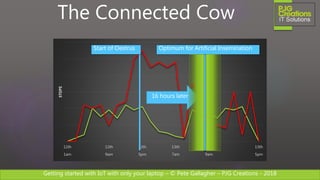
12th
1am
12th
9am
12th
5pm
13th
7am
13th
9am
13th
5pm
STEPS
16 hours later
Start of Oestrus Optimum for Artificial Insemination
Getting started with IoT with only your laptop – © Pete Gallagher – PJG Creations - 2018
The Connected Cow
Getting started with IoT with only your laptop – © Pete Gallagher – PJG Creations - 2018
The Hardware…
Getting started with IoT with only your laptop – © Pete Gallagher – PJG Creations - 2018
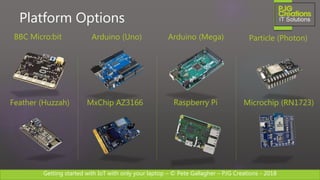
Platform Options
Raspberry Pi
Arduino (Uno) Particle (Photon)BBC Micro:bit
Microchip (RN1723)MxChip AZ3166Feather (Huzzah)
Arduino (Mega)
Getting started with IoT with only your laptop – © Pete Gallagher – PJG Creations - 2018
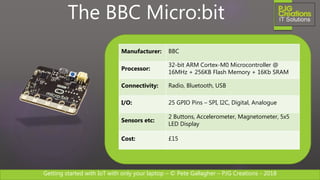
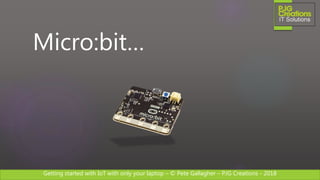
Manufacturer: BBC
Processor:
32-bit ARM Cortex-M0 Microcontroller @
16MHz + 256KB Flash Memory + 16Kb SRAM
Connectivity: Radio, Bluetooth, USB
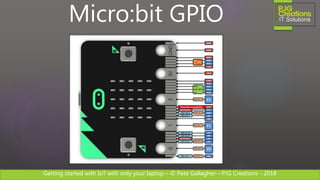
I/O: 25 GPIO Pins – SPI, I2C, Digital, Analogue
Sensors etc:
2 Buttons, Accelerometer, Magnetometer, 5x5
LED Display
Cost: £15
The BBC Micro:bit
Getting started with IoT with only your laptop – © Pete Gallagher – PJG Creations - 2018
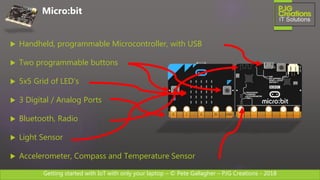
 Handheld, programmable Microcontroller, with USB
 Two programmable buttons
 5x5 Grid of LED’s
 3 Digital / Analog Ports
 Bluetooth, Radio
 Light Sensor
 Accelerometer, Compass and Temperature Sensor
Micro:bit
Getting started with IoT with only your laptop – © Pete Gallagher – PJG Creations - 2018
Micro:bit GPIO
Getting started with IoT with only your laptop – © Pete Gallagher – PJG Creations - 2018
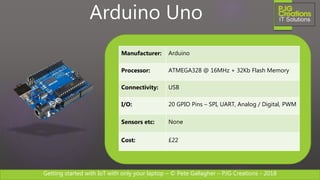
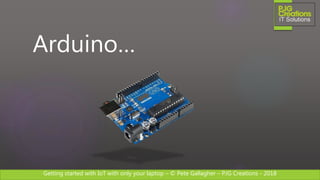
Manufacturer: Arduino
Processor: ATMEGA328 @ 16MHz + 32Kb Flash Memory
Connectivity: USB
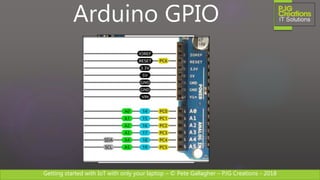
I/O: 20 GPIO Pins – SPI, UART, Analog / Digital, PWM
Sensors etc: None
Cost: £22
Arduino Uno
Getting started with IoT with only your laptop – © Pete Gallagher – PJG Creations - 2018
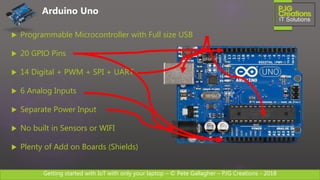
 Programmable Microcontroller with Full size USB
 20 GPIO Pins
 14 Digital + PWM + SPI + UART
 6 Analog Inputs
 Separate Power Input
 No built in Sensors or WIFI
 Plenty of Add on Boards (Shields)
Arduino Uno
Getting started with IoT with only your laptop – © Pete Gallagher – PJG Creations - 2018
Arduino GPIO
Getting started with IoT with only your laptop – © Pete Gallagher – PJG Creations - 2018
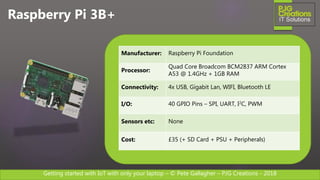
Raspberry Pi 3B+
Manufacturer: Raspberry Pi Foundation
Processor:
Quad Core Broadcom BCM2837 ARM Cortex
A53 @ 1.4GHz + 1GB RAM
Connectivity: 4x USB, Gigabit Lan, WIFI, Bluetooth LE
I/O: 40 GPIO Pins – SPI, UART, I2C, PWM
Sensors etc: None
Cost: £35 (+ SD Card + PSU + Peripherals)
Getting started with IoT with only your laptop – © Pete Gallagher – PJG Creations - 2018
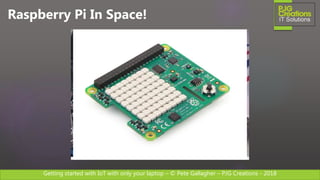
Raspberry Pi In Space!
Getting started with IoT with only your laptop – © Pete Gallagher – PJG Creations - 2018
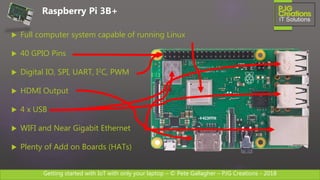
 Full computer system capable of running Linux
 40 GPIO Pins
 Digital IO, SPI, UART, I2C, PWM
 HDMI Output
 4 x USB
 WIFI and Near Gigabit Ethernet
 Plenty of Add on Boards (HATs)
Raspberry Pi 3B+
Getting started with IoT with only your laptop – © Pete Gallagher – PJG Creations - 2018
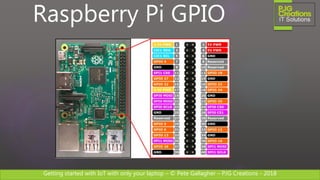
Raspberry Pi GPIO
Getting started with IoT with only your laptop – © Pete Gallagher – PJG Creations - 2018
The Software…
Getting started with IoT with only your laptop – © Pete Gallagher – PJG Creations - 2018
Micro:bit…
Getting started with IoT with only your laptop – © Pete Gallagher – PJG Creations - 2018
Micro:bit
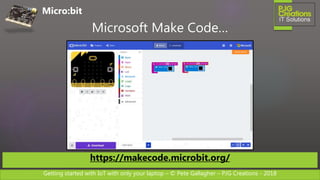
Microsoft Make Code…
https://makecode.microbit.org/
Getting started with IoT with only your laptop – © Pete Gallagher – PJG Creations - 2018
Arduino…
Getting started with IoT with only your laptop – © Pete Gallagher – PJG Creations - 2018
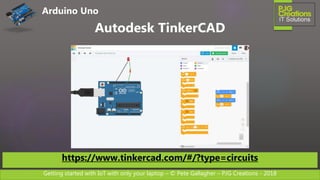
Arduino Uno
Autodesk TinkerCAD
https://www.tinkercad.com/#/?type=circuits
Getting started with IoT with only your laptop – © Pete Gallagher – PJG Creations - 2018
Raspberry Pi…
Getting started with IoT with only your laptop – © Pete Gallagher – PJG Creations - 2018
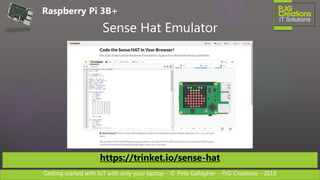
Sense Hat Emulator
https://trinket.io/sense-hat
Raspberry Pi 3B+
Getting started with IoT with only your laptop – © Pete Gallagher – PJG Creations - 2018
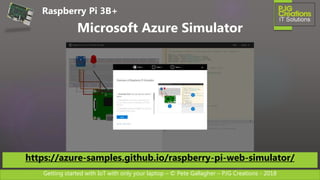
Raspberry Pi 3B+
Microsoft Azure Simulator
https://azure-samples.github.io/raspberry-pi-web-simulator/
Getting started with IoT with only your laptop – © Pete Gallagher – PJG Creations - 2018
 IBM BlueMix:
http://bit.ly/pjgibmwatson
 Visual Studio Code + Azure IoT hub (Blog Post):
http://bit.ly/pjgvscodeiot
 Amazon Alexa Device Simulator
https://developer.amazon.com/alexa
Other Options
Getting started with IoT with only your laptop – © Pete Gallagher – PJG Creations - 2018
 Microsoft Make Code (Micro:bit):
https://makecode.microbit.org/
 TinkerCAD Circuits (Arduino Uno):
https://www.tinkercad.com/#/?type=circuits
 Sense Hat Emulator (Raspberry Pi):
https://trinket.io/sense-hat
 Microsoft Azure Simulator (Raspberry Pi):
https://azure-samples.github.io/raspberry-pi-web-simulator/
Links
Getting started with IoT with only your laptop – © Pete Gallagher – PJG Creations - 2018
 The Connected Cow:
http://bit.ly/pjgconnectedcow
 Microsoft Virtual Academy IoT Course:
http://bit.ly/pjgmsvaiot
Further Learning
Getting started with IoT with only your laptop – © Pete Gallagher – PJG Creations - 2018
 Notts IoT:
https://www.nottsiot.co.uk
 Today’s Slides:
http://bit.ly/RJamIotSlides
 Contact Me:
Twitter: @PJGCreations
Email: pete@pjgcreations.co.uk
Contact Me
Getting started with IoT with only your laptop – © Pete Gallagher – PJG Creations - 2018
Questions?
All done

Getting started with IoT with only your laptop - 2018 - Pi Jam

  • 1.
    Getting started withIoT with only your laptop – © Pete Gallagher – PJG Creations - 2018 Getting started with IoT with only your laptop PETE GALLAGHER PJGCREATIONS.CO.UK 20/10/2018
  • 2.
    Getting started withIoT with only your laptop – © Pete Gallagher – PJG Creations - 2018 About Me Pete Gallagher @pete_codes / @PJGCreations www.PJGCreations.co.uk Pete@PJGCreations.co.uk IT Consultant Decades of Desktop, Web & Embedded Software experience Gadget Addict Father of two inquisitive girls
  • 3.
    Getting started withIoT with only your laptop – © Pete Gallagher – PJG Creations - 2018 What we’re going to be doing…  Basic Intro to IoT  The Hardware  The Software  Q&A
  • 4.
    Getting started withIoT with only your laptop – © Pete Gallagher – PJG Creations - 2018 What is IoT?
  • 5.
    Getting started withIoT with only your laptop – © Pete Gallagher – PJG Creations - 2018 What is IoT?
  • 6.
    Getting started withIoT with only your laptop – © Pete Gallagher – PJG Creations - 2018 IoT can be strange!
  • 7.
    Getting started withIoT with only your laptop – © Pete Gallagher – PJG Creations - 2018 IoT can be strange!
  • 8.
    Getting started withIoT with only your laptop – © Pete Gallagher – PJG Creations - 2018 IoT can be strange!
  • 9.
    Getting started withIoT with only your laptop – © Pete Gallagher – PJG Creations - 2018 IoT can be strange!
  • 10.
    Getting started withIoT with only your laptop – © Pete Gallagher – PJG Creations - 2018 IoT can be strange!
  • 11.
    Getting started withIoT with only your laptop – © Pete Gallagher – PJG Creations - 2018 IoT can be strange! John Romkey
  • 12.
    Getting started withIoT with only your laptop – © Pete Gallagher – PJG Creations - 2018 IoT can be strange!
  • 13.
    Getting started withIoT with only your laptop – © Pete Gallagher – PJG Creations - 2018 IoT can be strange!
  • 14.
    Getting started withIoT with only your laptop – © Pete Gallagher – PJG Creations - 2018 IoT can be strange!
  • 15.
    Getting started withIoT with only your laptop – © Pete Gallagher – PJG Creations - 2018 What is IoT for me?
  • 16.
    Getting started withIoT with only your laptop – © Pete Gallagher – PJG Creations - 2018 IoT for me…
  • 17.
    Getting started withIoT with only your laptop – © Pete Gallagher – PJG Creations - 2018 IoT for me…
  • 18.
    Getting started withIoT with only your laptop – © Pete Gallagher – PJG Creations - 2018 IoT for me…
  • 19.
    Getting started withIoT with only your laptop – © Pete Gallagher – PJG Creations - 2018 IoT for me…
  • 20.
    Getting started withIoT with only your laptop – © Pete Gallagher – PJG Creations - 2018 An Industry Example…
  • 21.
    Getting started withIoT with only your laptop – © Pete Gallagher – PJG Creations - 2018 The Connected Cow
  • 22.
    Getting started withIoT with only your laptop – © Pete Gallagher – PJG Creations - 2018 The Connected Cow “To identify a cow in heat, you need to spend at least 20-30 minutes in the stables, four to five times a day”
  • 23.
    Getting started withIoT with only your laptop – © Pete Gallagher – PJG Creations - 2018  Oestrus only lasts between 12-18 hours….  Only once per 21 days  Normally occurs between 10pm and 8am  Traditionally detected by visual monitoring  70% Conception Rate  Only 55% probability of correctly identifying oestrus  Pregnancy Rate of 39% The Connected Cow
  • 24.
    Getting started withIoT with only your laptop – © Pete Gallagher – PJG Creations - 2018 The Connected Cow “How can this be improved with technology?”
  • 25.
    Getting started withIoT with only your laptop – © Pete Gallagher – PJG Creations - 2018 The Connected Cow
  • 26.
    Getting started withIoT with only your laptop – © Pete Gallagher – PJG Creations - 2018 The Connected Cow 12th 1am 12th 9am 12th 5pm 13th 7am 13th 9am 13th 5pm STEPS 16 hours later Start of Oestrus Optimum for Artificial Insemination
  • 27.
    Getting started withIoT with only your laptop – © Pete Gallagher – PJG Creations - 2018 The Connected Cow
  • 28.
    Getting started withIoT with only your laptop – © Pete Gallagher – PJG Creations - 2018 The Hardware…
  • 29.
    Getting started withIoT with only your laptop – © Pete Gallagher – PJG Creations - 2018 Platform Options Raspberry Pi Arduino (Uno) Particle (Photon)BBC Micro:bit Microchip (RN1723)MxChip AZ3166Feather (Huzzah) Arduino (Mega)
  • 30.
    Getting started withIoT with only your laptop – © Pete Gallagher – PJG Creations - 2018 Manufacturer: BBC Processor: 32-bit ARM Cortex-M0 Microcontroller @ 16MHz + 256KB Flash Memory + 16Kb SRAM Connectivity: Radio, Bluetooth, USB I/O: 25 GPIO Pins – SPI, I2C, Digital, Analogue Sensors etc: 2 Buttons, Accelerometer, Magnetometer, 5x5 LED Display Cost: £15 The BBC Micro:bit
  • 31.
    Getting started withIoT with only your laptop – © Pete Gallagher – PJG Creations - 2018  Handheld, programmable Microcontroller, with USB  Two programmable buttons  5x5 Grid of LED’s  3 Digital / Analog Ports  Bluetooth, Radio  Light Sensor  Accelerometer, Compass and Temperature Sensor Micro:bit
  • 32.
    Getting started withIoT with only your laptop – © Pete Gallagher – PJG Creations - 2018 Micro:bit GPIO
  • 33.
    Getting started withIoT with only your laptop – © Pete Gallagher – PJG Creations - 2018 Manufacturer: Arduino Processor: ATMEGA328 @ 16MHz + 32Kb Flash Memory Connectivity: USB I/O: 20 GPIO Pins – SPI, UART, Analog / Digital, PWM Sensors etc: None Cost: £22 Arduino Uno
  • 34.
    Getting started withIoT with only your laptop – © Pete Gallagher – PJG Creations - 2018  Programmable Microcontroller with Full size USB  20 GPIO Pins  14 Digital + PWM + SPI + UART  6 Analog Inputs  Separate Power Input  No built in Sensors or WIFI  Plenty of Add on Boards (Shields) Arduino Uno
  • 35.
    Getting started withIoT with only your laptop – © Pete Gallagher – PJG Creations - 2018 Arduino GPIO
  • 36.
    Getting started withIoT with only your laptop – © Pete Gallagher – PJG Creations - 2018 Raspberry Pi 3B+ Manufacturer: Raspberry Pi Foundation Processor: Quad Core Broadcom BCM2837 ARM Cortex A53 @ 1.4GHz + 1GB RAM Connectivity: 4x USB, Gigabit Lan, WIFI, Bluetooth LE I/O: 40 GPIO Pins – SPI, UART, I2C, PWM Sensors etc: None Cost: £35 (+ SD Card + PSU + Peripherals)
  • 37.
    Getting started withIoT with only your laptop – © Pete Gallagher – PJG Creations - 2018 Raspberry Pi In Space!
  • 38.
    Getting started withIoT with only your laptop – © Pete Gallagher – PJG Creations - 2018  Full computer system capable of running Linux  40 GPIO Pins  Digital IO, SPI, UART, I2C, PWM  HDMI Output  4 x USB  WIFI and Near Gigabit Ethernet  Plenty of Add on Boards (HATs) Raspberry Pi 3B+
  • 39.
    Getting started withIoT with only your laptop – © Pete Gallagher – PJG Creations - 2018 Raspberry Pi GPIO
  • 40.
    Getting started withIoT with only your laptop – © Pete Gallagher – PJG Creations - 2018 The Software…
  • 41.
    Getting started withIoT with only your laptop – © Pete Gallagher – PJG Creations - 2018 Micro:bit…
  • 42.
    Getting started withIoT with only your laptop – © Pete Gallagher – PJG Creations - 2018 Micro:bit Microsoft Make Code… https://makecode.microbit.org/
  • 43.
    Getting started withIoT with only your laptop – © Pete Gallagher – PJG Creations - 2018 Arduino…
  • 44.
    Getting started withIoT with only your laptop – © Pete Gallagher – PJG Creations - 2018 Arduino Uno Autodesk TinkerCAD https://www.tinkercad.com/#/?type=circuits
  • 45.
    Getting started withIoT with only your laptop – © Pete Gallagher – PJG Creations - 2018 Raspberry Pi…
  • 46.
    Getting started withIoT with only your laptop – © Pete Gallagher – PJG Creations - 2018 Sense Hat Emulator https://trinket.io/sense-hat Raspberry Pi 3B+
  • 47.
    Getting started withIoT with only your laptop – © Pete Gallagher – PJG Creations - 2018 Raspberry Pi 3B+ Microsoft Azure Simulator https://azure-samples.github.io/raspberry-pi-web-simulator/
  • 48.
    Getting started withIoT with only your laptop – © Pete Gallagher – PJG Creations - 2018  IBM BlueMix: http://bit.ly/pjgibmwatson  Visual Studio Code + Azure IoT hub (Blog Post): http://bit.ly/pjgvscodeiot  Amazon Alexa Device Simulator https://developer.amazon.com/alexa Other Options
  • 49.
    Getting started withIoT with only your laptop – © Pete Gallagher – PJG Creations - 2018  Microsoft Make Code (Micro:bit): https://makecode.microbit.org/  TinkerCAD Circuits (Arduino Uno): https://www.tinkercad.com/#/?type=circuits  Sense Hat Emulator (Raspberry Pi): https://trinket.io/sense-hat  Microsoft Azure Simulator (Raspberry Pi): https://azure-samples.github.io/raspberry-pi-web-simulator/ Links
  • 50.
    Getting started withIoT with only your laptop – © Pete Gallagher – PJG Creations - 2018  The Connected Cow: http://bit.ly/pjgconnectedcow  Microsoft Virtual Academy IoT Course: http://bit.ly/pjgmsvaiot Further Learning
  • 51.
    Getting started withIoT with only your laptop – © Pete Gallagher – PJG Creations - 2018  Notts IoT: https://www.nottsiot.co.uk  Today’s Slides: http://bit.ly/RJamIotSlides  Contact Me: Twitter: @PJGCreations Email: pete@pjgcreations.co.uk Contact Me
  • 52.
    Getting started withIoT with only your laptop – © Pete Gallagher – PJG Creations - 2018 Questions? All done

Editor's Notes

  • #12 We all know what the “Internet” in IoT is… Created in 1989 at CERN by Sir Tim Berners Lee. Released to the world in 1991. The Things of course are things like… Toaster was first IoT Device – John Romkey and Sam Hacket – 1990 – First public webpage 1991 – Still needed a human for the bread! Fourth Industrial Revolution
  • #22 Dairy Farmers Have a Problem They artificially inseminate their cows Cows go into heat - only for short periods Called Estrus or Oestrus!
  • #23 Visual Detection - The cow will stand more often + Other methods… Yuck!
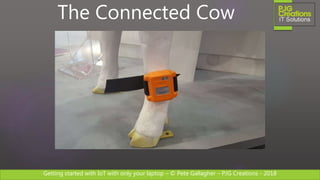
  • #26 A fitbit! Fujitsu 10,000 steps
  • #27 95% accurate for the detection of heat Pregnancy rate increase from 39% to 67% Up to 70% improvement. Window around insemination First half = female Last half = male
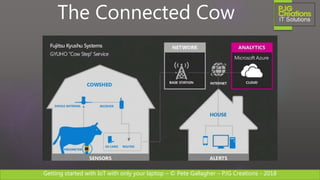
  • #28  Cow Pedometer Antenna Receiver Router Base Station Cloud Alerts to Mobile Devices Labour Saving Other Devices Necklaces + microphone = movement and noise
  • #30 Raspberry Pi 3B+: Quad Core Broadcom BCM2837 @ 1.4GHz WIFI, Bluetooth LE 40 GPIO Pins – SPI, UART, I2C, PWM £35 + SD Card + PSU + Keyboard + Mouse Arduino Uno: ATMEGA328 @ 16MHz 19 GPIO Pins – SPI, UART, Analog / Digital, PWM £22 Particle Photon: STM32F205RGY6 ARM Cortex M3 @ 120Mhz WIFI 18 GPIO Pins – SPI, UART, I2C, Digital / Analogue, CAN, PWM £19 BBC Micro:bit: 16 MHz 32-bit ARM Cortex-M0 microcontroller Radio Accelerometer, Magnetometer, 5x5 LED Display, 25 GPIO Pins £17 Microchip AZ3166: 32bit PIC Microcontroller £60
  • #37 BCM = System on a Chip
  • #38 Sense Hat
  • #40 General Purpose Input Output. Pi’s way of connecting to the Physical World. Power connections. GPIO Pins. Pin 1 is the pin closest to the Display Connector at the Top. Pin 40 is the pin at the diagonal opposite. Other collections of pins for Serial Communications
  • #43 BCM = System on a Chip
  • #45 BCM = System on a Chip
  • #47 BCM = System on a Chip