Download free for 30 days
Sign in
Upload
Language (EN)
Support
Business
Mobile
Social Media
Marketing
Technology
Art & Photos
Career
Design
Education
Presentations & Public Speaking
Government & Nonprofit
Healthcare
Internet
Law
Leadership & Management
Automotive
Engineering
Software
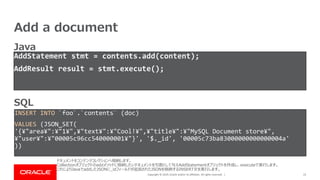
Recruiting & HR
Retail
Sales
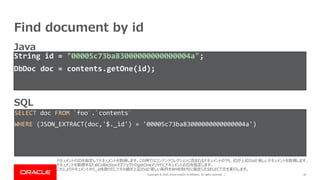
Services
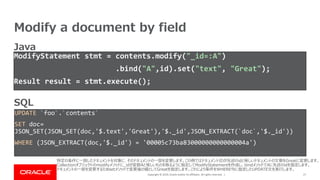
Science
Small Business & Entrepreneurship
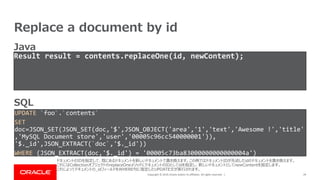
Food
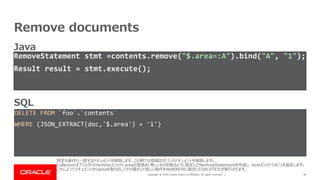
Environment
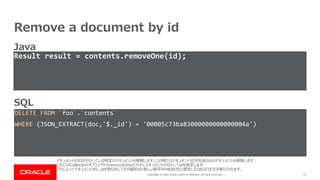
Economy & Finance
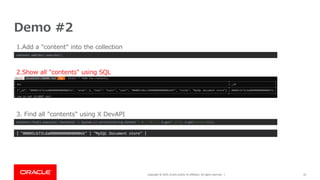
Data & Analytics
Investor Relations
Sports
Spiritual
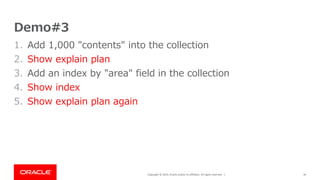
News & Politics
Travel
Self Improvement
Real Estate
Entertainment & Humor
Health & Medicine
Devices & Hardware
Lifestyle
Change Language
Language
English
Español
Português
Français
Deutsche
Cancel
Save
Submit search
EN
Uploaded by
Chihiro Ito
PDF, PPTX
1,487 views
Getting started MySQL as Document Data Store
This presentation is for beginners to use MySQL as a document data store like MongoDB and DynamoDB.
Technology
◦
Read more
9
Save
Share
Embed
Embed presentation
Download
Download as PDF, PPTX
1
/ 49
2
/ 49
3
/ 49
4
/ 49
5
/ 49
6
/ 49
7
/ 49
8
/ 49
9
/ 49
10
/ 49
11
/ 49
12
/ 49
13
/ 49
14
/ 49
15
/ 49
16
/ 49
17
/ 49
18
/ 49
19
/ 49
20
/ 49
21
/ 49
22
/ 49
23
/ 49
24
/ 49
25
/ 49
26
/ 49
27
/ 49
28
/ 49
29
/ 49
30
/ 49
31
/ 49
32
/ 49
33
/ 49
34
/ 49
35
/ 49
36
/ 49
37
/ 49
38
/ 49
39
/ 49
40
/ 49
41
/ 49
42
/ 49
43
/ 49
44
/ 49
45
/ 49
46
/ 49
47
/ 49
48
/ 49
49
/ 49
More Related Content
PDF
Sbtのマルチプロジェクトはいいぞ
by
Yoshitaka Fujii
PDF
MySQL最新情報
by
yoyamasaki
PDF
実はとても面白い...Documentation library
by
Kouta Shiobara
PDF
db tech showcase2016 - MySQLドキュメントストア
by
Shinya Sugiyama
PDF
MySQLドキュメントストアとCTE
by
yoyamasaki
PPTX
[OSC 2017 Tokyo/Fall] OSSコンソーシアム DB部会 MySQL 8.0
by
Ryusuke Kajiyama
PPT
S2dao Seminar in tripodworks
by
tripodworks
PDF
PHP開発者のためのNoSQL入門
by
じゅん なかざ
Sbtのマルチプロジェクトはいいぞ
by
Yoshitaka Fujii
MySQL最新情報
by
yoyamasaki
実はとても面白い...Documentation library
by
Kouta Shiobara
db tech showcase2016 - MySQLドキュメントストア
by
Shinya Sugiyama
MySQLドキュメントストアとCTE
by
yoyamasaki
[OSC 2017 Tokyo/Fall] OSSコンソーシアム DB部会 MySQL 8.0
by
Ryusuke Kajiyama
S2dao Seminar in tripodworks
by
tripodworks
PHP開発者のためのNoSQL入門
by
じゅん なかざ
Similar to Getting started MySQL as Document Data Store
PDF
20170714_MySQLドキュメントストア JSONデータ型&JSON関数 by 日本オラクル株式会社 MySQL GBU 山﨑由章
by
Insight Technology, Inc.
PDF
Spring Data in a Nutshell
by
Tsuyoshi Miyake
PDF
Slick入門
by
chibochibo
PDF
データベース11 - データベースとプログラム
by
Kenta Oku
PDF
金魚本読書ノート JPA編
by
Kazuyoshi Kamitsukasa
PDF
20100717tobesetu
by
akitsukada
PDF
Introduction of Oracle Database Architecture(抜粋版) - JPOUG Oracle Database入学式 ...
by
Ryota Watabe
PDF
MongoDB + XSD/XML
by
Co-graph Inc.
PDF
既存システムへの新技術活用法 ~fluntd/MongoDB~
by
じゅん なかざ
PDF
Enter the-dolphine
by
Mikiya Okuno
PDF
Groovyで楽にSQLを実行してみよう
by
Akira Shimosako
PPT
JPA説明会
by
Ryo Asai
PPT
今年こそ始めたい!SQL超入門 MIRACLE Linux Meetup版 0620
by
Toru Miyahara
PPT
今年こそ始めたい!SQL超入門 セミナー資料 2024年5月22日 富士通クラウドミートアップ
by
Toru Miyahara
PDF
Google Gears データベースの基礎
by
webos-goodies
PDF
Javaでmongo db
by
Funato Takashi
PDF
Introduction of Oracle Database Architecture
by
Ryota Watabe
PDF
Percona ServerをMySQL 5.6と5.7用に作るエンジニアリング(そしてMongoDBのヒント)
by
Colin Charles
PDF
ついにリリース!! MySQL 8.0 最新情報
by
yoyamasaki
PPTX
MySQL Technology Cafe #14 MySQL Shellを使ってもっと楽をしようの会
by
オラクルエンジニア通信
20170714_MySQLドキュメントストア JSONデータ型&JSON関数 by 日本オラクル株式会社 MySQL GBU 山﨑由章
by
Insight Technology, Inc.
Spring Data in a Nutshell
by
Tsuyoshi Miyake
Slick入門
by
chibochibo
データベース11 - データベースとプログラム
by
Kenta Oku
金魚本読書ノート JPA編
by
Kazuyoshi Kamitsukasa
20100717tobesetu
by
akitsukada
Introduction of Oracle Database Architecture(抜粋版) - JPOUG Oracle Database入学式 ...
by
Ryota Watabe
MongoDB + XSD/XML
by
Co-graph Inc.
既存システムへの新技術活用法 ~fluntd/MongoDB~
by
じゅん なかざ
Enter the-dolphine
by
Mikiya Okuno
Groovyで楽にSQLを実行してみよう
by
Akira Shimosako
JPA説明会
by
Ryo Asai
今年こそ始めたい!SQL超入門 MIRACLE Linux Meetup版 0620
by
Toru Miyahara
今年こそ始めたい!SQL超入門 セミナー資料 2024年5月22日 富士通クラウドミートアップ
by
Toru Miyahara
Google Gears データベースの基礎
by
webos-goodies
Javaでmongo db
by
Funato Takashi
Introduction of Oracle Database Architecture
by
Ryota Watabe
Percona ServerをMySQL 5.6と5.7用に作るエンジニアリング(そしてMongoDBのヒント)
by
Colin Charles
ついにリリース!! MySQL 8.0 最新情報
by
yoyamasaki
MySQL Technology Cafe #14 MySQL Shellを使ってもっと楽をしようの会
by
オラクルエンジニア通信
More from Chihiro Ito
PDF
Red Hat Data Grid 8.2 新機能
by
Chihiro Ito
PDF
Red Hat Data Grid 8.1 新機能
by
Chihiro Ito
PDF
Quarkus Technical Deep Dive - Japanese
by
Chihiro Ito
PDF
Advanced database monitoring in modern java
by
Chihiro Ito
PDF
システムのモダナイズ 落ちても良いアプリの作り方
by
Chihiro Ito
PDF
Quarkusのビジネスと技術的な価値
by
Chihiro Ito
PDF
Quarkus による超音速な Spring アプリケーション開発
by
Chihiro Ito
PDF
Oracle code one 2018 報告会概要
by
Chihiro Ito
PDF
Webアプリに低レイテンシ・高可用性を求めるのは間違っているのだろうか
by
Chihiro Ito
PDF
Hello Java
by
Chihiro Ito
PDF
Java Flight Recorderの紹介 at Java Day Tokyo 2015
by
Chihiro Ito
PDF
JPAのキャッシュを使ったアプリケーション高速化手法
by
Chihiro Ito
PDF
Javaはどのように動くのか~スライドでわかるJVMの仕組み
by
Chihiro Ito
PDF
JDKツール使ってますか
by
Chihiro Ito
Red Hat Data Grid 8.2 新機能
by
Chihiro Ito
Red Hat Data Grid 8.1 新機能
by
Chihiro Ito
Quarkus Technical Deep Dive - Japanese
by
Chihiro Ito
Advanced database monitoring in modern java
by
Chihiro Ito
システムのモダナイズ 落ちても良いアプリの作り方
by
Chihiro Ito
Quarkusのビジネスと技術的な価値
by
Chihiro Ito
Quarkus による超音速な Spring アプリケーション開発
by
Chihiro Ito
Oracle code one 2018 報告会概要
by
Chihiro Ito
Webアプリに低レイテンシ・高可用性を求めるのは間違っているのだろうか
by
Chihiro Ito
Hello Java
by
Chihiro Ito
Java Flight Recorderの紹介 at Java Day Tokyo 2015
by
Chihiro Ito
JPAのキャッシュを使ったアプリケーション高速化手法
by
Chihiro Ito
Javaはどのように動くのか~スライドでわかるJVMの仕組み
by
Chihiro Ito
JDKツール使ってますか
by
Chihiro Ito
Recently uploaded
PDF
2025→2026宙畑ゆく年くる年レポート_100社を超える企業アンケート総まとめ!!_企業まとめ_1229_3版
by
sorabatake
PPTX
ddevについて .
by
iPride Co., Ltd.
PDF
Drupal Recipes 解説 .
by
iPride Co., Ltd.
PDF
第21回 Gen AI 勉強会「NotebookLMで60ページ超の スライドを作成してみた」
by
嶋 是一 (Yoshikazu SHIMA)
PDF
Reiwa 7 IT Strategist Afternoon I Question-1 Ansoff's Growth Vector
by
akipii ogaoga
PDF
さくらインターネットの今 法林リージョン:さくらのAIとか GPUとかイベントとか 〜2026年もバク進します!〜
by
法林浩之
PDF
100年後の知財業界-生成AIスライドアドリブプレゼン イーパテントYouTube配信
by
e-Patent Co., Ltd.
PDF
Reiwa 7 IT Strategist Afternoon I Question-1 3C Analysis
by
akipii ogaoga
PDF
Starlink Direct-to-Cell (D2C) 技術の概要と将来の展望
by
CRI Japan, Inc.
2025→2026宙畑ゆく年くる年レポート_100社を超える企業アンケート総まとめ!!_企業まとめ_1229_3版
by
sorabatake
ddevについて .
by
iPride Co., Ltd.
Drupal Recipes 解説 .
by
iPride Co., Ltd.
第21回 Gen AI 勉強会「NotebookLMで60ページ超の スライドを作成してみた」
by
嶋 是一 (Yoshikazu SHIMA)
Reiwa 7 IT Strategist Afternoon I Question-1 Ansoff's Growth Vector
by
akipii ogaoga
さくらインターネットの今 法林リージョン:さくらのAIとか GPUとかイベントとか 〜2026年もバク進します!〜
by
法林浩之
100年後の知財業界-生成AIスライドアドリブプレゼン イーパテントYouTube配信
by
e-Patent Co., Ltd.
Reiwa 7 IT Strategist Afternoon I Question-1 3C Analysis
by
akipii ogaoga
Starlink Direct-to-Cell (D2C) 技術の概要と将来の展望
by
CRI Japan, Inc.
Getting started MySQL as Document Data Store
1.
Copyright © 2019,
Oracle and/or its affiliates. All rights reserved. | Getting started MySQL as Document Data Store Chihiro Ito (@chiroito) Technologist & Oracle Groundbreaker Advocate Oracle Japan March 26, 2019 @Oracle MySQL Cafe #2 April 19, 2019 @中国地方DB勉強会 in 沖縄 April 20, 2019 @Open Source Conference 2019 OKINAWA
2.
Copyright © 2019,
Oracle and/or its affiliates. All rights reserved. | 2 • Chihiro Ito (@chiroito) • ex Consultant for App/MW Architect • Technologist @Oracle Japan • Oracle Groundbreaker Advocate • OpenJDK Author • MySQL Beginner Speaker Oracle | OSS
3.
Copyright © 2019,
Oracle and/or its affiliates. All rights reserved. | Introduction 3
4.
Copyright © 2019,
Oracle and/or its affiliates. All rights reserved. | What's X DevAPI? • This slide doesn't explain what's X DevAPI. • If you would like to know it, please google X DevAPI. • This slide explains X DevAPI using the code. • NOTICE – Sample code is focused on understanding X DevAPI. – Therefore, some code is not suitable for production applications. 4 X DevAPIについての資料はインターネット上にたくさんあるのでそちらをご覧ください。今回はコードで説明します。 このスライドに登場するコードはX DevAPI の理解に焦点をあてているため、実際のアプリケーションには適さないコードを含んでいますのでご注意下さい。
5.
Copyright © 2019,
Oracle and/or its affiliates. All rights reserved. | Developers develop as follows, before String url = "jdbc:mysql://localhost/foo"; Connection con = DriverManager.getConnection(url, "user", "pw"); PreparedStatement stmt = con.prepareStatement("SELECT * FROM area WHERE id=?"); stmt.setInt(1, 1); ResultSet resultSet = stmt.executeQuery(); while( resultSet.next() ) { System.out.println(resultSet.getString("name")); } 5 以前、開発者はこのコードのように JDBC を使用してMySQLとやりとりしていました。
6.
Copyright © 2019,
Oracle and/or its affiliates. All rights reserved. | Now that developers can develop as follows String url = "mysqlx://user:pw@127.0.0.1:33060/foo"; SessionFactory sf = new SessionFactory(); Session session = sf.getSession(url); Schema foo = session.getDefaultSchema(); foo.getTable("area").getOne("1").execute() .forEach(d->System.out.println(d.getString("name"))); 6 これからはこのように流れるようなインターフェース(Fluent interface)でアプリケーションを開発できます。
7.
Copyright © 2019,
Oracle and/or its affiliates. All rights reserved. | • Bulletin board system • Each BBS specialized in area 7 Demo scenario Taro How is MySQL? xxxxxxxxxxxxxxxxx xxxxxxxxxxxxxxxxx xxxxxxxxxxx Cool ! Hanako What is green tea? xxxxxxxxxxxxxxxxx xxxxxxxxxxxxxxxxx xxxxxxxxxxx Good ! User Name Title Text 本スライドにはいくつかのデモを含みます。デモで使用するシステムは地域を意識した掲示板システムをイメージしてます。
8.
Copyright © 2019,
Oracle and/or its affiliates. All rights reserved. | •Contents –Title –Text –User Id –Area Id •User –Name 8 •Area –ID –Name Sample Data on this demo Collection Table デモシステムで使用するデータは3種類です。 システムの成長に合わせて型が変りそうなコンテンツとユーザの情報はコレクションとし、変らなさそうな地域のマスタ情報はテーブルとします。 Data models are likely to change in the future. Data model is hard to change.
9.
Copyright © 2019,
Oracle and/or its affiliates. All rights reserved. | Memo • See executed SQL Log – C:¥ProgramData¥MySQL¥MySQL Server 8.0¥Data¥%HOSTNAME%.log – MySQL Workbench – [INSTANCE] – [Server Logs] – [General Log File] • Execute SQL on MySQL Shell 1. Launch MySQL Shell 2. ¥connect --mysqlx <User>@localhost 3. ¥sql; • Sample source code – https://github.com/chiroito/msql_document_store 9
10.
Copyright © 2019,
Oracle and/or its affiliates. All rights reserved. | Preparation code for use as a document store 10
11.
Copyright © 2019,
Oracle and/or its affiliates. All rights reserved. | Session • Create/get schema • Begin/commit/rollback Schema • Create/get collection • Create/get Table 11 Collection – Manage JSON (Find, Add, etc) – ID field is created by X DevAPI Table • Manage tables (Select, Insert, etc) • collection can be used as table What should developers know in X DevAPI X DevAPIを使う上で覚える必要があるインターフェースはこの4つです。 あとは流れるようなインターフェースでコードを書くためあまりインターフェースやクラスを意識しません。
12.
Copyright © 2019,
Oracle and/or its affiliates. All rights reserved. | 12 Relation of classes in X DevAPI Schema Collection create/get Session Table create/get get 先ほどの4つのインターフェースの関係です。 SessionFactoryクラスを使ってSessionオブジェクトを作成し、SessionオブジェクトはSchemaを作成したり取得します。 SchemaオブジェクトはCollectionオブジェクトの作成や取得とTableオブジェクトを取得します。
13.
Copyright © 2019,
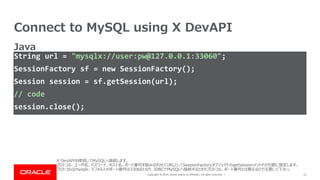
Oracle and/or its affiliates. All rights reserved. | Connect to MySQL using X DevAPI String url = "mysqlx://user:pw@127.0.0.1:33060"; SessionFactory sf = new SessionFactory(); Session session = sf.getSession(url); // code session.close(); 13 Java X DevAPIを使用してMySQLへ接続します。 プロトコル、ユーザ名、パスワード、ホスト名、ポート番号を組み合わせてURLとしてSessionFactoryオブジェクトのgetSessionメソッドの引数に指定します。 プロトコルはmysqlx、デフォルトのポート番号は33060となり、JDBCでMySQLへ接続するときのプロトコル、ポート番号とは異なるので注意して下さい。
14.
Copyright © 2019,
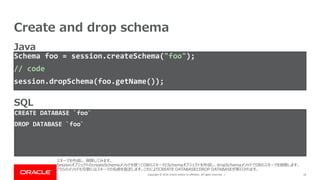
Oracle and/or its affiliates. All rights reserved. | Create and drop schema 14 Schema foo = session.createSchema("foo"); // code session.dropSchema(foo.getName()); CREATE DATABASE `foo` DROP DATABASE `foo` SQL Java スキーマを作成し、削除してみます。 SessionオブジェクトのcreateSchemaメソッドを使ってDBのスキーマとSchemaオブジェクトを作成し、dropSchemaメソッドでDBのスキーマを削除します。 どちらのメソッドも引数にはスキーマの名前を指定します。これによりCREATE DATABASEとDROP DATABASEが実行されます。
15.
Copyright © 2019,
Oracle and/or its affiliates. All rights reserved. | Create and drop collection 15 Collection contents = foo.createCollection("contents"); // code foo.dropCollection(contents.getName()); CREATE TABLE `foo`.`contents` ( doc JSON, _id VARBINARY(32) GENERATED ALWAYS AS(JSON_UNQUOTE(JSON_EXTRACT(doc, '$._id'))) STORED PRIMARY KEY ) CHARSET utf8mb4 ENGINE=InnoDB DROP TABLE `foo`.`contents` SQL Java コレクションを作成し、削除します。 SchemaオブジェクトのcreateCollectionメソッドでCollectionオブジェクトを作成し、dropCollectionメソッドで削除します。どちらも引数にコレクション名を指定します。 createCollectionを実行するとコレクションに相当する表が作成されます。表はJSON型のdoc列と、docに含まれる$._idから作成された_id列によって構成されます。
16.
Copyright © 2019,
Oracle and/or its affiliates. All rights reserved. | Use collection as table Table contents = foo.getCollectionAsTable("Contents"); 16 SELECT T.table_name AS name, IF(ANY_VALUE(T.table_type) LIKE '%VIEW',IF(COUNT(*)=1 AND COUNT(CASE WHEN (column_name = 'doc' AND data_type = 'json') THEN 1 ELSE NULL END)=1, 'COLLECTION_VIEW', 'VIEW'), IF(COUNT(*)-2 = COUNT(CASE WHEN (column_name != '_id' AND column_name != 'doc' AND generation_expression RLIKE 'json_extract¥¥(`doc`,(_[[:alnum:]]+)?¥¥¥¥''¥¥$((¥¥*{2})?(¥¥[([[:digit:]]+|¥¥*)¥¥]|¥¥.([[:alpha:]_¥¥ $][[:alnum:]_¥¥$]*|¥¥*|¥¥".*¥¥")))*¥¥¥¥''¥¥)') THEN 1 ELSE NULL END) AND COUNT(CASE WHEN (column_name = 'doc' AND data_type = 'json') THEN 1 ELSE NULL END)=1 AND COUNT(CASE WHEN (column_name = '_id' AND generation_expression RLIKE '^json_unquote¥¥(json_extract¥¥(`doc`,(_[[:alnum:]]+)?¥¥¥¥''¥¥$¥¥._id¥¥¥¥''¥¥)¥¥)$') THEN 1 ELSE NULL END)=1, 'COLLECTION', 'TABLE')) AS type FROM information_schema.tables AS T LEFT JOIN information_schema.columns AS C ON (T.table_schema = C.table_schema AND T.table_name = C.table_name) WHERE T.table_schema = 'foo' AND T.table_name LIKE 'fo%' GROUP BY name ORDER BY name Java SQL X DevAPIには、コレクションを表として使う機能があります。 SchemaオブジェクトのgetCollectionAsTableメソッドにコレクション名を指定することでTableオブジェクトを取得します。 これにより、非常に複雑なSELECT文が実行されます。
17.
Copyright © 2019,
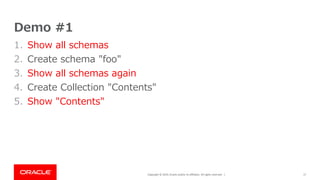
Oracle and/or its affiliates. All rights reserved. | Demo #1 1. Show all schemas 2. Create schema "foo" 3. Show all schemas again 4. Create Collection "Contents" 5. Show "Contents" 17
18.
Copyright © 2019,
Oracle and/or its affiliates. All rights reserved. | 18 Demo #1 Schema foo = session.createSchema("foo", true); Collection contents = foo.createCollection("contents", true); 1. Show all schemas 2. Create schema "foo" 3. Show all schemas again 4. Create Collection "Contents" 5. Show "Contents"
19.
Copyright © 2019,
Oracle and/or its affiliates. All rights reserved. | MySQL as document store 19
20.
Copyright © 2019,
Oracle and/or its affiliates. All rights reserved. | Table • Select • Insert • Update • Delete Collection • Find • Add • Modify/Replace • Remove 20 Each Class has similar access methods TableインターフェースとCollectionインターフェースは同じような機能のメソッドを持っています。 Tableオブジェクトを扱うときは検索にselect、新規作成にinsert、更新にupdate、削除にdeleteのメソッドをそれぞれ使用します。 Collectionオブジェクトを扱うときは検索にfind、新規作成にadd、更新にmodify/replace、削除にremoveのメソッドをそれぞれ使用します。
21.
Copyright © 2019,
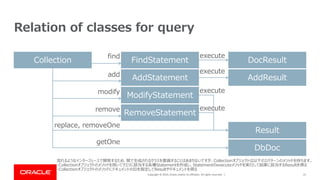
Oracle and/or its affiliates. All rights reserved. | 21 Relation of classes for query Collection execute replace, removeOne getOne DocResult DbDoc Result AddResult find add FindStatement ModifyStatement AddStatement RemoveStatement modify remove execute execute execute 流れるようなインターフェースで開発するため、間で生成されるクラスを意識することはあまりないですが、Collectionオブジェクトは以下の2パターンのメソッドを持ちます。 ・Collectionオブジェクトのメソッドを用いてクエリに該当する各種Statementを作成し、Statementのexecuteメソッドを実行して結果に該当するResultを得る ・CollectionオブジェクトのメソッドにドキュメントのIDを指定してResultやドキュメントを得る
22.
Copyright © 2019,
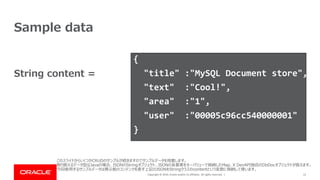
Oracle and/or its affiliates. All rights reserved. | 22 Sample data { "title" :"MySQL Document store", "text" :"Cool!", "area" :"1", "user" :"00005c96cc540000001" } String content = このスライドからいくつかCRUDのサンプルが続きますのでサンプルデータを用意します。 取り扱えるデータ型はJavaの場合、JSONのStringオブジェクト、JSONの各要素をキーバリューで格納したMap、X DevAPI独自のDbDocオブジェクトが扱えます。 今回使用するサンプルデータは掲示板のコンテンツを表す上記のJSONをStringクラスのcontentという変数に格納して使います。
23.
Copyright © 2019,
Oracle and/or its affiliates. All rights reserved. | Add a document 23 AddStatement stmt = contents.add(content); AddResult result = stmt.execute(); INSERT INTO `foo`.`contents` (doc) VALUES (JSON_SET( '{¥"area¥":¥"1¥",¥"text¥":¥"Cool!¥",¥"title¥":¥"MySQL Document store¥", ¥"user¥":¥"00005c96cc540000001¥"}', '$._id', '00005c73ba83000000000000004a' )) SQL Java ドキュメントをコンテンツコレクションへ格納します。 Collectionオブジェクトのaddメソッドに格納したいドキュメントを引数として与えAddStatementオブジェクトを作成し、executeで実行します。 これによりJavaでaddしたJSONに_idフィールドが追加されたJSONを格納するINSERT文を実行します。
24.
Copyright © 2019,
Oracle and/or its affiliates. All rights reserved. | Find all documents 24 FindStatement stmt = contents.find(); DocResult result = stmt.execute(); SELECT doc FROM `foo`.`contents` SQL Java コンテンツコレクションに含まれる全てのドキュメントを取得します。 全てのドキュメントを取得するにはCollectionオブジェクトのfindメソッドに引数を与えずFindStatementオブジェクトを作成し、executeを実行します。 これによりWHERE句の無いSELECT文を実行します。
25.
Copyright © 2019,
Oracle and/or its affiliates. All rights reserved. | Find document by field 25 FindStatement stmt = contents.find("$.area=:A").bind("A", "1"); DocResult result = stmt.execute(); List<DbDoc> docs = findResult.fetchAll(); SELECT doc FROM `foo`.`contents` WHERE (JSON_EXTRACT(doc,'$.area') = '1') SQL Java 特定の条件に一致したドキュメントを取得します。この例ではコンテンツコレクションに含まれるドキュメントのうち、地域IDが1のドキュメントを取得します。 Collectionオブジェクトのfindメソッドにareaが変数Aと等しいものを取るように指定してFindStatementを作成し、bindメソッドでAに1を指定します。 これによりドキュメントからareaを取り出してその値が1と等しい条件をWHERE句に指定したSELECT文を実行します。
26.
Copyright © 2019,
Oracle and/or its affiliates. All rights reserved. | Find document by id 26 String id = "00005c73ba83000000000000004a"; DbDoc doc = contents.getOne(id); SELECT doc FROM `foo`.`contents` WHERE (JSON_EXTRACT(doc,'$._id') = '00005c73ba83000000000000004a') SQL Java ドキュメントのIDを指定してドキュメントを取得します。この例ではコンテンツコレクションに含まれるドキュメントのうち、IDが上記のidと等しいドキュメントを取得します。 ドキュメントを取得するためCollectionオブジェクトのgetOneメソッドにドキュメントのIDを指定します。 これによりドキュメントから_idを取りだしてその値が上記のidと等しい条件をWHERE句に指定したSELECT文を実行します。
27.
Copyright © 2019,
Oracle and/or its affiliates. All rights reserved. | Modify a document by field 27 ModifyStatement stmt = contents.modify("_id=:A") .bind("A",id).set("text", "Great"); Result result = stmt.execute(); UPDATE `foo`.`contents` SET doc= JSON_SET(JSON_SET(doc,'$.text','Great'),'$._id',JSON_EXTRACT(`doc`,'$._id')) WHERE (JSON_EXTRACT(doc,'$._id') = '00005c73ba83000000000000004a') SQL Java 特定の条件に一致したドキュメントを対象に、そのドキュメントの一部を変更します。この例ではドキュメントIDが先述のidと等しいドキュメントの文章をGreatに変更します。 Collectionオブジェクトのmodifyメソッドに_idが変数Aと等しいものを取るように指定してModifyStatementを作成し、bindメソッドでAに先述のidを指定します。 ドキュメントの一部を変更するためsetメソッドで変更後の値としてGreatを指定します。これにより条件をWHERE句に指定したUPDATE文を実行します。
28.
Copyright © 2019,
Oracle and/or its affiliates. All rights reserved. | 28 New Sample data for next code { "title" :"MySQL Document store", "text" :"Awesome!", "area" :"1", "user" :"00005c96cc540000001" } String newContent = これまでのコンテンツに加えて、このあとは新しいコンテンツを使用します。 新しいサンプルデータは掲示板のコンテンツを表す上記のJSONをStringクラスのnewContentという変数に格納して使います。
29.
Copyright © 2019,
Oracle and/or its affiliates. All rights reserved. | Replace a document by id 29 Result result = contents.replaceOne(id, newContent); UPDATE `foo`.`contents` SET doc=JSON_SET(JSON_SET(doc,'$',JSON_OBJECT('area','1','text','Awesome !','title' ,'MySQL Document store','user','00005c96cc540000001')), '$._id',JSON_EXTRACT(`doc`,'$._id')) WHERE (JSON_EXTRACT(doc,'$._id') = '00005c73ba83000000000000004a') SQL Java ドキュメントのIDを指定して、既にあるドキュメントを新しいドキュメントで置き換えます。この例ではドキュメントIDが先述したidのドキュメントを置き換えます。 これにはCollectionオブジェクトのreplaceOneメソッドにドキュメントのIDとしてidを指定し、新しいドキュメントとしてnewContentを指定します。 これによってドキュメントの_idフィールドをWHERE句に指定したUPDATE文が実行されます。
30.
Copyright © 2019,
Oracle and/or its affiliates. All rights reserved. | Remove documents 30 RemoveStatement stmt =contents.remove("$.area=:A").bind("A", "1"); Result result = stmt.execute(); DELETE FROM `foo`.`contents` WHERE (JSON_EXTRACT(doc,'$.area') = '1') SQL Java 特定の条件に一致するドキュメントを削除します。この例では地域IDが 1 のドキュメントを削除します。 Collectionオブジェクトのremoveメソッドにareaが変数Aと等しいものを取るように指定してRemoveStatementを作成し、bindメソッドでAに1を指定します。 これによってドキュメントからareaを取り出してその値が1と等しい条件をWHERE句に指定したDELETE文が実行されます。
31.
Copyright © 2019,
Oracle and/or its affiliates. All rights reserved. | Remove a document by id 31 Result result = contents.removeOne(id); DELETE FROM `foo`.`contents` WHERE (JSON_EXTRACT(doc,'$._id') = '00005c73ba83000000000000004a') SQL Java ドキュメントのIDが分かっている特定のドキュメントを削除します。この例ではドキュメントIDが先述のidのドキュメントを削除します。 これにはCollectionオブジェクトのremoveOneメソッドにドキュメントのIDとしてidを指定します。 これによってドキュメントから_idを取り出してその値がidと等しい条件WHERE句に指定したDELETE文が実行されます。
32.
Copyright © 2019,
Oracle and/or its affiliates. All rights reserved. | Demo #2 1. Add a "content" into the collection 2. Show all "contents" using SQL 3. Find all "contents" using X DevAPI 32
33.
Copyright © 2019,
Oracle and/or its affiliates. All rights reserved. | 33 Demo #2 contents.add(doc).execute(); contents.find().execute().forEach(d -> System.out.println(String.format("| %s | %s |", d.get("_id"), d.get("title")))); | "00005cb73cda0000000000000066" | "MySQL Document store" | 1.Add a "content" into the collection 2.Show all "contents" using SQL 3. Find all "contents" using X DevAPI
34.
Copyright © 2019,
Oracle and/or its affiliates. All rights reserved. | Add Index 34 contents.createIndex( "areaIndex", "{¥"fields¥": [{¥"field¥":¥"$.area¥", ¥"type¥":¥"INTEGER¥"}]}"); ALTER TABLE `foo`.`contents` ADD COLUMN `$ix_i_4F6F5D1B1EC6D0F28A8E18CAB2C5EB2C03DB2D2C` INTEGER GENERATED ALWAYS AS (JSON_EXTRACT(doc, '$.area')) VIRTUAL, ADD INDEX `areaIndex` (`$ix_i_4F6F5D1B1EC6D0F28A8E18CAB2C5EB2C03DB2D2C`) SQL Java 索引を作成します。この例ではコンテンツコレクションの地域IDに索引を作成します。 CollectionオブジェクトのcreateIndexメソッドに索引名と索引の定義を指定します。索引の定義はJSONで書かなければなりません(>_<。) これにより、テーブルに仮想列が作成され、その仮想列に対して索引が作成されます。
35.
Copyright © 2019,
Oracle and/or its affiliates. All rights reserved. | Drop Index 35 contents.dropIndex("areaIndex"); ALTER TABLE `foo`.`contents` DROP INDEX `areaIndex`, DROP COLUMN `$ix_i_4F6F5D1B1EC6D0F28A8E18CAB2C5EB2C03DB2D2C` SQL Java 索引を削除します。この例では先ほど作成したコンテンツコレクションの地域IDに作成した索引を削除します。 CollectionオブジェクトのdropIndexメソッドに索引名を指定します。 これにより、索引と仮想列が削除されます。
36.
Copyright © 2019,
Oracle and/or its affiliates. All rights reserved. | Demo#3 1. Add 1,000 "contents" into the collection 2. Show explain plan 3. Add an index by "area" field in the collection 4. Show index 5. Show explain plan again 36
37.
Copyright © 2019,
Oracle and/or its affiliates. All rights reserved. | 37 Demo#3 for (int i = 0; i < 1000; i++) { JsonString title = new JsonString().setValue("Title"); JsonNumber area = new JsonNumber().setValue("" + (i % 47)); JsonString user = new JsonString().setValue("00005c96cc54000000000000c8d7"); JsonString text = new JsonString().setValue("xxx"); DbDoc d = new DbDocImpl().add("title", title).add("area", area).add("user", user).add("text", text); contents.add(d).execute(); } 1. Add 1,000 "contents" into the collection 2. Show explain plan
38.
Copyright © 2019,
Oracle and/or its affiliates. All rights reserved. | 38 Demo#3 3. Add an index by "area" field in the collection 5. Show explain plan again contents.createIndex("areaIndex", "{¥"fields¥": [{¥"field¥":¥"$.area¥", ¥"type¥":¥"INTEGER¥"}]}"); session.sql(String.format("ANALYZE TABLE %s.%s;", foo.getName(), contents.getName())); 4. Show index
39.
Copyright © 2019,
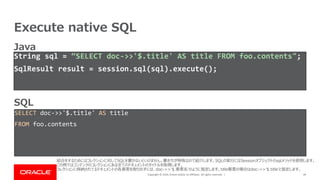
Oracle and/or its affiliates. All rights reserved. | Execute native SQL 39 String sql = “SELECT doc->>'$.title' AS title FROM foo.contents"; SqlResult result = session.sql(sql).execute(); SELECT doc->>'$.title' AS title FROM foo.contents SQL Java 結合をするためにはコレクションに対してSQLを書かないといけません。書き方が特殊なので紹介します。SQLの実行にはSessionオブジェクトのsqlメソッドを使用します。 この例ではコンテンツのコレクションにある全てのドキュメントのタイトルを取得します。 コレクションに格納されてるドキュメントの各要素を取り出すには、doc->>'$.要素名'のように指定します。title要素の場合はdoc->>'$.title'と指定します。
40.
Copyright © 2019,
Oracle and/or its affiliates. All rights reserved. | Caution ! 40 JSONの要素を取る方法は -> と ->> の 2 つの方法があります。 -> と ->> では意味が異なるため注意が必要です。-> では "" で囲まれた状態で値が得られますが、 ->> では "" を除いた状態で値が得られます。 これは、 -> は JSON_EXTRACT() に置き換えられ、 ->> は JSON_UNQUOTE(JSON_EXTRACT()) に置き換えられるからです。 • -> – Return value from JSON column after evaluating path; equivalent to JSON_EXTRACT(). • ->> – Return value from JSON column after evaluating path and unquoting the result; equivalent to JSON_UNQUOTE(JSON_EXTRACT()).
41.
Copyright © 2019,
Oracle and/or its affiliates. All rights reserved. | 41 Joining a collection and a table ID NAME 1 Tokyo 2 Kyoto { "title" :"MySQL Document store", "text" :"Cool!", "area" :"1", "user" :"00005c96cc540000001" } Content collection Area table コレクションとテーブルを結合します。今回は、コンテンツのコレクションと地域の表を結合します。 結合にはコンテンツコレクションのareaフィールドと地域表のIDカラムを使います。
42.
Copyright © 2019,
Oracle and/or its affiliates. All rights reserved. | Joining a collection and a table 42 String sql = "SELECT c.doc->>'$.title' AS title, a.name AS area FROM foo.contents c LEFT OUTER JOIN foo.area a ON c.doc->>'$.area' = a.id"; SqlResult result = session.sql(sql).execute(); SELECT c.doc->>'$.title' AS title, a.name AS area FROM foo.contents c LEFT OUTER JOIN foo.area a ON c.doc->>'$.area' = a.id SQL Java コンテンツのコレクションから地域を取り出すには doc->>'$.area'を指定します。地域表のIDはidカラムを指定するだけです。 これらの2つの値をLEFT OUTER JOINで結合します。コレクションから値の取り出し方が特殊なだけで表の結合と変りません。
43.
Copyright © 2019,
Oracle and/or its affiliates. All rights reserved. | 43 Join a collection and another collection { "title" :"MySQL Document store", "text" :"Cool!", "area" :"1", "user" :"00005c96cc540000001" } { "name":"Taro" } Content collection User collection コレクションを2つ結合します。今回は、コンテンツとユーザのコレクションを結合します。 結合にはコンテンツコレクションのuserフィールドとユーザコレクションの_idを使います。
44.
Copyright © 2019,
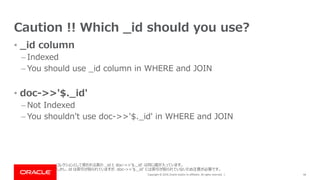
Oracle and/or its affiliates. All rights reserved. | Caution !! Which _id should you use? 44 コレクションとして使われる表の _id と doc->>'$._id' は同じ値が入っています。 しかし、id は索引が貼られていますが、doc->>'$._id' には索引が貼られていないため注意が必要です。 • _id column – Indexed – You should use _id column in WHERE and JOIN • doc->>'$._id' – Not Indexed – You shouldn't use doc->>'$._id' in WHERE and JOIN
45.
Copyright © 2019,
Oracle and/or its affiliates. All rights reserved. | Joining two collection 45 String sql = "SELECT c.doc->>'$.title' AS title, u.doc->>'$.name' AS user FROM foo.contents c LEFT OUTER JOIN foo.users u ON c.doc->>'$.user' = u._id"; SqlResult result = session.sql(sql).execute(); SELECT c.doc->>'$.title' AS title, u.doc->>'$.name' AS user FROM foo.contents c LEFT OUTER JOIN foo.users u ON c.doc->>'$.user' = u._id SQL Java コレクション同士の結合は少し注意が必要です。コンテンツコレクションのuserフィールドにはユーザコレクションの_idフィールドの値を入れましょう。 コンテンツのコレクションからユーザを取り出すには doc->>'$.user'を指定します。ユーザコレクションのIDは_idカラムを指定します。 これらの2つの値をLEFT OUTER JOINで結合します。ユーザの_idカラムを使うことでドキュメントの解析が不要になります。
46.
Copyright © 2019,
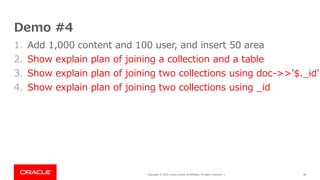
Oracle and/or its affiliates. All rights reserved. | Demo #4 1. Add 1,000 content and 100 user, and insert 50 area 2. Show explain plan of joining a collection and a table 3. Show explain plan of joining two collections using doc->>'$._id' 4. Show explain plan of joining two collections using _id 46
47.
Copyright © 2019,
Oracle and/or its affiliates. All rights reserved. | 47 Demo #4 1. Add a content and 100 user and Insert 100 area 2. Show explain plan of joining a collection and a table 3. Show explain plan of joining two collections using doc->>'$._id' 4. Show explain plan of joining two collections using _id
48.
Copyright © 2019,
Oracle and/or its affiliates. All rights reserved. | 48 Oracle | OSS
49.
Copyright © 2019,
Oracle and/or its affiliates. All rights reserved. | 49
Download


![Copyright © 2019, Oracle and/or its affiliates. All rights reserved. |
Memo
• See executed SQL Log
– C:¥ProgramData¥MySQL¥MySQL Server 8.0¥Data¥%HOSTNAME%.log
– MySQL Workbench – [INSTANCE] – [Server Logs] – [General Log File]
• Execute SQL on MySQL Shell
1. Launch MySQL Shell
2. ¥connect --mysqlx <User>@localhost
3. ¥sql;
• Sample source code
– https://github.com/chiroito/msql_document_store
9](https://image.slidesharecdn.com/mysqldocumentstore-190423115129/85/Getting-started-MySQL-as-Document-Data-Store-9-320.jpg)



![Copyright © 2019, Oracle and/or its affiliates. All rights reserved. |
Use collection as table
Table contents = foo.getCollectionAsTable("Contents");
16
SELECT T.table_name AS name,
IF(ANY_VALUE(T.table_type) LIKE '%VIEW',IF(COUNT(*)=1 AND COUNT(CASE WHEN (column_name = 'doc' AND
data_type = 'json') THEN 1 ELSE NULL END)=1, 'COLLECTION_VIEW', 'VIEW'), IF(COUNT(*)-2 = COUNT(CASE
WHEN (column_name != '_id' AND column_name != 'doc' AND generation_expression RLIKE
'json_extract¥¥(`doc`,(_[[:alnum:]]+)?¥¥¥¥''¥¥$((¥¥*{2})?(¥¥[([[:digit:]]+|¥¥*)¥¥]|¥¥.([[:alpha:]_¥¥
$][[:alnum:]_¥¥$]*|¥¥*|¥¥".*¥¥")))*¥¥¥¥''¥¥)') THEN 1 ELSE NULL END) AND COUNT(CASE WHEN
(column_name = 'doc' AND data_type = 'json') THEN 1 ELSE NULL END)=1 AND COUNT(CASE WHEN
(column_name = '_id' AND generation_expression RLIKE
'^json_unquote¥¥(json_extract¥¥(`doc`,(_[[:alnum:]]+)?¥¥¥¥''¥¥$¥¥._id¥¥¥¥''¥¥)¥¥)$') THEN 1 ELSE
NULL END)=1, 'COLLECTION', 'TABLE')) AS type
FROM information_schema.tables AS T LEFT JOIN information_schema.columns AS C ON (T.table_schema =
C.table_schema AND T.table_name = C.table_name)
WHERE T.table_schema = 'foo' AND T.table_name LIKE 'fo%' GROUP BY name ORDER BY name
Java
SQL
X DevAPIには、コレクションを表として使う機能があります。
SchemaオブジェクトのgetCollectionAsTableメソッドにコレクション名を指定することでTableオブジェクトを取得します。
これにより、非常に複雑なSELECT文が実行されます。](https://image.slidesharecdn.com/mysqldocumentstore-190423115129/85/Getting-started-MySQL-as-Document-Data-Store-16-320.jpg)






![Copyright © 2019, Oracle and/or its affiliates. All rights reserved. |
Add Index
34
contents.createIndex(
"areaIndex",
"{¥"fields¥": [{¥"field¥":¥"$.area¥", ¥"type¥":¥"INTEGER¥"}]}");
ALTER TABLE `foo`.`contents`
ADD COLUMN `$ix_i_4F6F5D1B1EC6D0F28A8E18CAB2C5EB2C03DB2D2C` INTEGER GENERATED
ALWAYS AS (JSON_EXTRACT(doc, '$.area')) VIRTUAL,
ADD INDEX `areaIndex` (`$ix_i_4F6F5D1B1EC6D0F28A8E18CAB2C5EB2C03DB2D2C`)
SQL
Java
索引を作成します。この例ではコンテンツコレクションの地域IDに索引を作成します。
CollectionオブジェクトのcreateIndexメソッドに索引名と索引の定義を指定します。索引の定義はJSONで書かなければなりません(>_<。)
これにより、テーブルに仮想列が作成され、その仮想列に対して索引が作成されます。](https://image.slidesharecdn.com/mysqldocumentstore-190423115129/85/Getting-started-MySQL-as-Document-Data-Store-34-320.jpg)


![Copyright © 2019, Oracle and/or its affiliates. All rights reserved. | 38
Demo#3
3. Add an index by "area" field in the collection
5. Show explain plan again
contents.createIndex("areaIndex", "{¥"fields¥": [{¥"field¥":¥"$.area¥", ¥"type¥":¥"INTEGER¥"}]}");
session.sql(String.format("ANALYZE TABLE %s.%s;", foo.getName(), contents.getName()));
4. Show index](https://image.slidesharecdn.com/mysqldocumentstore-190423115129/85/Getting-started-MySQL-as-Document-Data-Store-38-320.jpg)






![[OSC 2017 Tokyo/Fall] OSSコンソーシアム DB部会 MySQL 8.0](https://cdn.slidesharecdn.com/ss_thumbnails/20170909osc-osscons-mysql8-170918232718-thumbnail.jpg?width=640&height=640&fit=bounds)


