Get Genuine Agreement
Pack Roadmap
version 1.0
Get Genuine 1.0 Roadmap

1. The aim of this Agreement Roadmap is to:
    Highlight agreement architecture
    Define the content of the agreement pack
    Provide guidelines on accurate completion of the agreements
2. The Roadmap is split into three sections:
    High level overview of agreement architecture: to provide a
     summary of changes
    High level overview of pack content: to help you determine which
     documents you need to complete with your customer
    Agreement completion guidelines: to help you accurately
     complete the agreements with your customer and make them ready
     for submission to Microsoft
Get Genuine Agreement
Roadmap
Before delving into the pack, please note:
   Documents in this pack may change from time to time. Please
    check Explore.ms regularly for updates to this packet.
   Do NOT forward this pack directly to your customer. It is your
    responsibility to understand your customer’s requirements and to only
    provide your customer with the documents it needs to purchase
    software through Microsoft.
   This document will NOT tell you which program is best for your
    customer. However, you may refer to the Decision Tool for additional
    guidance at http://www.microsoft.com/licensing.
   These agreements are not for use by the U.S. Government. Please
    contact your Microsoft account manager for more information on the
    U.S. Government licensing agreements.
Get Genuine 1.0 Agreement
Pack Content
Get Genuine Program Pack Content


1.    Signature Form
2.    Program Agreements for EPG
          MBSA
          Get Genuine Agreement
          Legalization PUR
3.    Program Agreements for SMS&P
          Get Genuine Agreement
          Legalization PUR
     Optional Attachments (required under certain conditions)
          Supplemental Contact Information Form
     This Roadmap
Signature Form


   When is a signature form required?
        The signature form is required for signing an agreement, and the optional form.
   What is the role of the signature form?
        The signature form replaces the signature block on individual documents and
         consolidates the signature of all documents associated with a customer’s program.
Program Agreements – MBSA (EPG only)

   When is an MBSA required?
        The MBSA is required for new EPG customers when they or one of their affiliates
         does not have an active MBA or MBSA in place already.
        Customers with an existing MBA may sign a new MBSA to have the latest terms
         apply. This is optional; however, new agreements and enrollments will also be
         necessary to associate the EA or EAS program agreements with the new MBSA.
   What is the role of the MBSA?
        It sets out the high level terms and conditions that apply to all Microsoft volume
         licensing agreements and enrollments entered into under it. It also sets out the
         core terms that apply to Services from Microsoft.
        An active MBA or MBSA must be in place for your customer or one of its global
         affiliates in order to sign a volume licensing agreement or enrollment.
        It is an “evergreen” agreement. This means that it does not have a fixed term or
         expiration date.
Optional Forms

   Supplemental Contact Information Form: identifies the customer’s selection to have
    separate contacts for certain documents, special products, and product support.
Signature Form
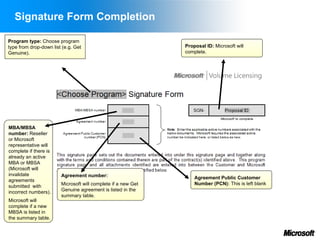
Signature Form Completion

Program type: Choose program
type from drop-down list (e.g. Get                             Proposal ID: Microsoft will
Genuine).                                                      complete.


MBA/MBSA
number: Reseller
or Microsoft
representative will
complete if there is
already an active
MBA or MBSA
(Microsoft will
invalidate              Agreement number:                          Agreement Public Customer
agreements
                        Microsoft will complete if a new Get       Number (PCN): This is left blank
submitted with
incorrect numbers).     Genuine agreement is listed in the
                        summary table.
Microsoft will
complete if a new
MBSA is listed in
the summary table.
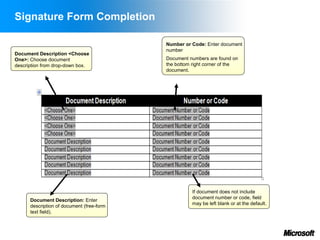
Signature Form Completion

                                           Number or Code: Enter document
                                           number
Document Description <Choose
One>: Choose document                      Document numbers are found on
description from drop-down box.            the bottom right corner of the
                                           document.


                                                     If document does not include
                                                     document number or code, field
      Document Description: Enter
                                                     may be left blank or at the default.
      description of document (free-form
      text field).
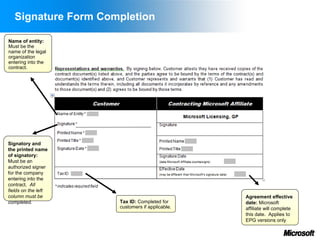
Signature Form Completion

Name of entity:
Must be the
name of the legal
organization
entering into the
contract.


Signatory and
the printed name
of signatory:
Must be an
authorized signer
for the company
entering into the
contract. All
fields on the left
column must be                                  Agreement effective
completed.           Tax ID: Completed for      date: Microsoft
                     customers if applicable.   affiliate will complete
                                                this date. Applies to
                                                EPG versions only
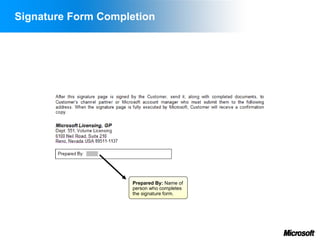
Signature Form Completion


                    Prepared By: Name of
                    person who completes
                    the signature form.
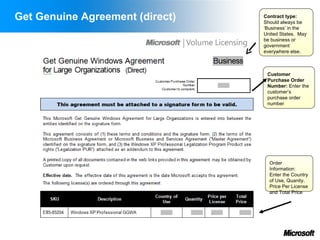
Agreement
Get Genuine Agreement (direct)   Contract type:
                                 Should always be
                                 ‘Business’ in the
                                 United States. May
                                 be business or
                                 government
                                 everywhere else.


                                  Customer
                                  Purchase Order
                                  Number: Enter the
                                  customer’s
                                  purchase order
                                  number


                                   Order
                                   Information:
                                   Enter the Country
                                   of Use, Quanity,
                                   Price Per License
                                   and Total Price
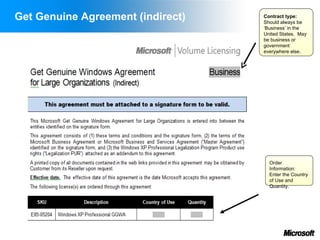
Get Genuine Agreement (indirect)   Contract type:
                                   Should always be
                                   ‘Business’ in the
                                   United States. May
                                   be business or
                                   government
                                   everywhere else.


                                     Order
                                     Information:
                                     Enter the Country
                                     of Use and
                                     Quantity.
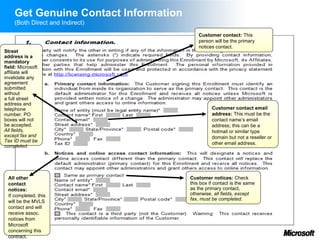
Get Genuine Contact Information
    (Both Direct and Indirect)
                                          Customer contact: This
                                          person will be the primary
                                          notices contact.
Street
address is a
mandatory
field: Microsoft
affiliate will
invalidate any
agreement
submitted
without
a full street
address and
telephone                                       Customer contact email
number. PO                                      address: This must be the
boxes will not                                  contact name’s email
be accepted.                                    address; this can be a
All fields,                                     hotmail or similar type
except fax and                                  domain but not a reseller or
Tax ID must be                                  other email address.
completed.


 All other                            Customer notices: Check
 contact                              this box if contact is the same
 notices:                             as the primary contact,
 If completed, this                   otherwise, all fields, except
                                      fax, must be completed.
 will be the MVLS
 contact and will
 receive assoc.
 notices from
 Microsoft
 concerning this
 contract.
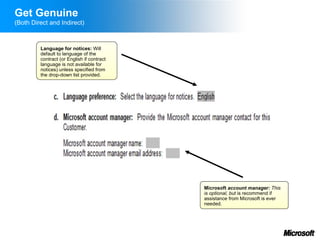
Get Genuine
(Both Direct and Indirect)


         Language for notices: Will
         default to language of the
         contract (or English if contract
         language is not available for
         notices) unless specified from
         the drop-down list provided.


                                            Microsoft account manager: This
                                            is optional, but is recommend if
                                            assistance from Microsoft is ever
                                            needed.
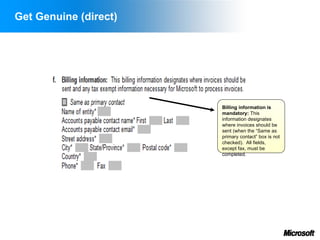
Get Genuine (direct)


                       Billing information is
                       mandatory: This
                       information designates
                       where invoices should be
                       sent (when the “Same as
                       primary contact” box is not
                       checked). All fields,
                       except fax, must be
                       completed.
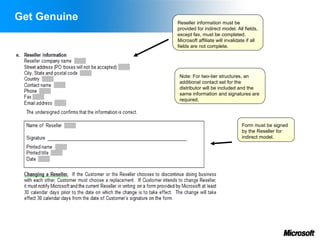
Get Genuine   Reseller information must be
              provided for indirect model. All fields,
              except fax, must be completed.
              Microsoft affiliate will invalidate if all
              fields are not complete.


               Note: For two-tier structures, an
               additional contact set for the
               distributor will be included and the
               same information and signatures are
               required.


                                               Form must be signed
                                               by the Reseller for
                                               indirect model.
Supplemental Documents
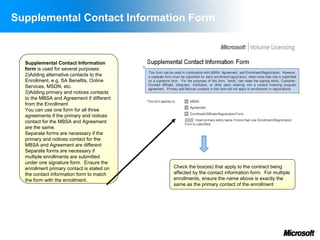
Supplemental Contact Information Form


  Supplemental Contact Information
  form is used for several purposes:
  2)Adding alternative contacts to the
  Enrollment, e.g. SA Benefits, Online
  Services, MSDN, etc.
  3)Adding primary and notices contacts
  to the MBSA and Agreement if different
  from the Enrollment
  You can use one form for all three
  agreements if the primary and notices
  contact for the MBSA and Agreement
  are the same.
  Separate forms are necessary if the
  primary and notices contact for the
  MBSA and Agreement are different
  Separate forms are necessary if
  multiple enrollments are submitted
  under one signature form. Ensure the
  enrollment primary contact is stated on   Check the box(es) that apply to the contract being
  the contact information form to match     affected by the contact information form. For multiple
  the form with the enrollment.             enrollments, ensure the name above is exactly the
                                            same as the primary contact of the enrollment
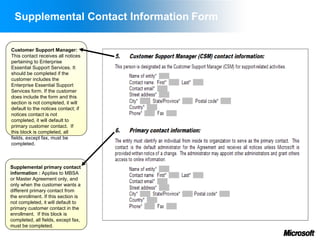
Supplemental Contact Information Form

Customer Support Manager:
This contact receives all notices
pertaining to Enterprise
Essential Support Services. It
should be completed if the
customer includes the
Enterprise Essential Support
Services form. If the customer
does include the form and this
section is not completed, it will
default to the notices contact; if
notices contact is not
completed, it will default to
primary customer contact. If
this block is completed, all
fields, except fax, must be
completed.


Supplemental primary contact
information : Applies to MBSA
or Master Agreement only, and
only when the customer wants a
different primary contact from
the enrollment. If this section is
not completed, it will default to
primary customer contact in the
enrollment. If this block is
completed, all fields, except fax,
must be completed.
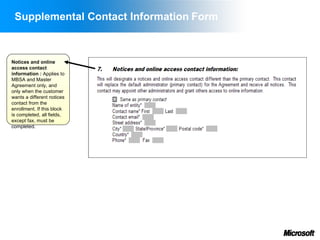
Supplemental Contact Information Form


Notices and online
access contact
information : Applies to
MBSA and Master
Agreement only, and
only when the customer
wants a different notices
contact from the
enrollment. If this block
is completed, all fields,
except fax, must be
completed.
Appendix
Sample Cases of Completed
Signature Forms
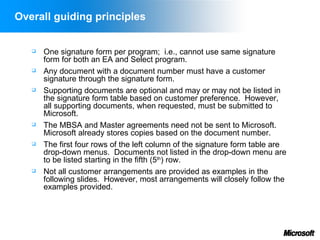
Overall guiding principles


      One signature form per program; i.e., cannot use same signature
       form for both an EA and Select program.
      Any document with a document number must have a customer
       signature through the signature form.
      Supporting documents are optional and may or may not be listed in
       the signature form table based on customer preference. However,
       all supporting documents, when requested, must be submitted to
       Microsoft.
      The MBSA and Master agreements need not be sent to Microsoft.
       Microsoft already stores copies based on the document number.
      The first four rows of the left column of the signature form table are
       drop-down menus. Documents not listed in the drop-down menu are
       to be listed starting in the fifth (5th) row.
      Not all customer arrangements are provided as examples in the
       following slides. However, most arrangements will closely follow the
       examples provided.
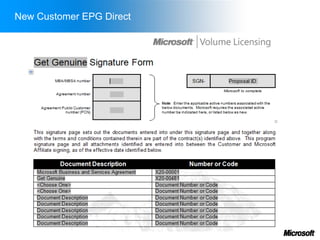
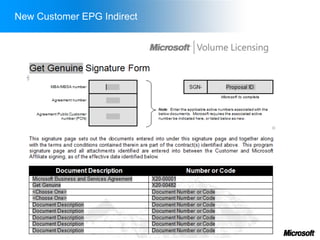
New Customer EPG Direct
New Customer EPG Indirect
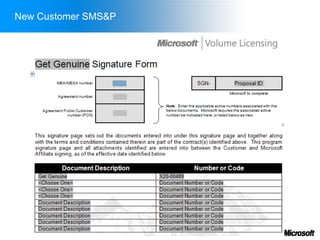
New Customer SMS&P
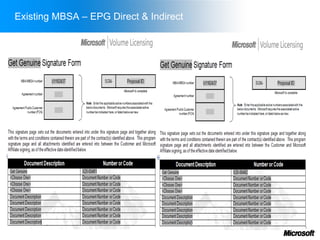
Existing MBSA – EPG Direct & Indirect
Paperwork Processing


      Customer gets complete copies of all documents to the
       contract including the signature form, MBSA (if applicable),
       Get Genuine Agreement, and Legalization PUR
      Microsoft sends original signature form, MBSA (if applicable),
       and agreement to Operations Center listed on the signature
       form.

Get genuineprogramagreementroadmap

  • 1.
    Get Genuine Agreement PackRoadmap version 1.0
  • 2.
    Get Genuine 1.0Roadmap 1. The aim of this Agreement Roadmap is to:  Highlight agreement architecture  Define the content of the agreement pack  Provide guidelines on accurate completion of the agreements 2. The Roadmap is split into three sections:  High level overview of agreement architecture: to provide a summary of changes  High level overview of pack content: to help you determine which documents you need to complete with your customer  Agreement completion guidelines: to help you accurately complete the agreements with your customer and make them ready for submission to Microsoft
  • 3.
    Get Genuine Agreement Roadmap Beforedelving into the pack, please note:  Documents in this pack may change from time to time. Please check Explore.ms regularly for updates to this packet.  Do NOT forward this pack directly to your customer. It is your responsibility to understand your customer’s requirements and to only provide your customer with the documents it needs to purchase software through Microsoft.  This document will NOT tell you which program is best for your customer. However, you may refer to the Decision Tool for additional guidance at http://www.microsoft.com/licensing.  These agreements are not for use by the U.S. Government. Please contact your Microsoft account manager for more information on the U.S. Government licensing agreements.
  • 4.
    Get Genuine 1.0Agreement Pack Content
  • 5.
    Get Genuine ProgramPack Content 1. Signature Form 2. Program Agreements for EPG  MBSA  Get Genuine Agreement  Legalization PUR 3. Program Agreements for SMS&P  Get Genuine Agreement  Legalization PUR  Optional Attachments (required under certain conditions)  Supplemental Contact Information Form  This Roadmap
  • 6.
    Signature Form  When is a signature form required?  The signature form is required for signing an agreement, and the optional form.  What is the role of the signature form?  The signature form replaces the signature block on individual documents and consolidates the signature of all documents associated with a customer’s program.
  • 7.
    Program Agreements –MBSA (EPG only)  When is an MBSA required?  The MBSA is required for new EPG customers when they or one of their affiliates does not have an active MBA or MBSA in place already.  Customers with an existing MBA may sign a new MBSA to have the latest terms apply. This is optional; however, new agreements and enrollments will also be necessary to associate the EA or EAS program agreements with the new MBSA.  What is the role of the MBSA?  It sets out the high level terms and conditions that apply to all Microsoft volume licensing agreements and enrollments entered into under it. It also sets out the core terms that apply to Services from Microsoft.  An active MBA or MBSA must be in place for your customer or one of its global affiliates in order to sign a volume licensing agreement or enrollment.  It is an “evergreen” agreement. This means that it does not have a fixed term or expiration date.
  • 8.
    Optional Forms  Supplemental Contact Information Form: identifies the customer’s selection to have separate contacts for certain documents, special products, and product support.
  • 9.
  • 10.
    Signature Form Completion Programtype: Choose program type from drop-down list (e.g. Get Proposal ID: Microsoft will Genuine). complete. MBA/MBSA number: Reseller or Microsoft representative will complete if there is already an active MBA or MBSA (Microsoft will invalidate Agreement number: Agreement Public Customer agreements Microsoft will complete if a new Get Number (PCN): This is left blank submitted with incorrect numbers). Genuine agreement is listed in the summary table. Microsoft will complete if a new MBSA is listed in the summary table.
  • 11.
    Signature Form Completion Number or Code: Enter document number Document Description <Choose One>: Choose document Document numbers are found on description from drop-down box. the bottom right corner of the document. If document does not include document number or code, field Document Description: Enter may be left blank or at the default. description of document (free-form text field).
  • 12.
    Signature Form Completion Nameof entity: Must be the name of the legal organization entering into the contract. Signatory and the printed name of signatory: Must be an authorized signer for the company entering into the contract. All fields on the left column must be Agreement effective completed. Tax ID: Completed for date: Microsoft customers if applicable. affiliate will complete this date. Applies to EPG versions only
  • 13.
    Signature Form Completion Prepared By: Name of person who completes the signature form.
  • 14.
  • 15.
    Get Genuine Agreement(direct) Contract type: Should always be ‘Business’ in the United States. May be business or government everywhere else. Customer Purchase Order Number: Enter the customer’s purchase order number Order Information: Enter the Country of Use, Quanity, Price Per License and Total Price
  • 16.
    Get Genuine Agreement(indirect) Contract type: Should always be ‘Business’ in the United States. May be business or government everywhere else. Order Information: Enter the Country of Use and Quantity.
  • 17.
    Get Genuine ContactInformation (Both Direct and Indirect) Customer contact: This person will be the primary notices contact. Street address is a mandatory field: Microsoft affiliate will invalidate any agreement submitted without a full street address and telephone Customer contact email number. PO address: This must be the boxes will not contact name’s email be accepted. address; this can be a All fields, hotmail or similar type except fax and domain but not a reseller or Tax ID must be other email address. completed. All other Customer notices: Check contact this box if contact is the same notices: as the primary contact, If completed, this otherwise, all fields, except fax, must be completed. will be the MVLS contact and will receive assoc. notices from Microsoft concerning this contract.
  • 18.
    Get Genuine (Both Directand Indirect) Language for notices: Will default to language of the contract (or English if contract language is not available for notices) unless specified from the drop-down list provided. Microsoft account manager: This is optional, but is recommend if assistance from Microsoft is ever needed.
  • 19.
    Get Genuine (direct) Billing information is mandatory: This information designates where invoices should be sent (when the “Same as primary contact” box is not checked). All fields, except fax, must be completed.
  • 20.
    Get Genuine Reseller information must be provided for indirect model. All fields, except fax, must be completed. Microsoft affiliate will invalidate if all fields are not complete. Note: For two-tier structures, an additional contact set for the distributor will be included and the same information and signatures are required. Form must be signed by the Reseller for indirect model.
  • 21.
  • 22.
    Supplemental Contact InformationForm Supplemental Contact Information form is used for several purposes: 2)Adding alternative contacts to the Enrollment, e.g. SA Benefits, Online Services, MSDN, etc. 3)Adding primary and notices contacts to the MBSA and Agreement if different from the Enrollment You can use one form for all three agreements if the primary and notices contact for the MBSA and Agreement are the same. Separate forms are necessary if the primary and notices contact for the MBSA and Agreement are different Separate forms are necessary if multiple enrollments are submitted under one signature form. Ensure the enrollment primary contact is stated on Check the box(es) that apply to the contract being the contact information form to match affected by the contact information form. For multiple the form with the enrollment. enrollments, ensure the name above is exactly the same as the primary contact of the enrollment
  • 23.
    Supplemental Contact InformationForm Customer Support Manager: This contact receives all notices pertaining to Enterprise Essential Support Services. It should be completed if the customer includes the Enterprise Essential Support Services form. If the customer does include the form and this section is not completed, it will default to the notices contact; if notices contact is not completed, it will default to primary customer contact. If this block is completed, all fields, except fax, must be completed. Supplemental primary contact information : Applies to MBSA or Master Agreement only, and only when the customer wants a different primary contact from the enrollment. If this section is not completed, it will default to primary customer contact in the enrollment. If this block is completed, all fields, except fax, must be completed.
  • 24.
    Supplemental Contact InformationForm Notices and online access contact information : Applies to MBSA and Master Agreement only, and only when the customer wants a different notices contact from the enrollment. If this block is completed, all fields, except fax, must be completed.
  • 25.
    Appendix Sample Cases ofCompleted Signature Forms
  • 26.
    Overall guiding principles  One signature form per program; i.e., cannot use same signature form for both an EA and Select program.  Any document with a document number must have a customer signature through the signature form.  Supporting documents are optional and may or may not be listed in the signature form table based on customer preference. However, all supporting documents, when requested, must be submitted to Microsoft.  The MBSA and Master agreements need not be sent to Microsoft. Microsoft already stores copies based on the document number.  The first four rows of the left column of the signature form table are drop-down menus. Documents not listed in the drop-down menu are to be listed starting in the fifth (5th) row.  Not all customer arrangements are provided as examples in the following slides. However, most arrangements will closely follow the examples provided.
  • 27.
  • 28.
  • 29.
  • 30.
    Existing MBSA –EPG Direct & Indirect
  • 31.
    Paperwork Processing  Customer gets complete copies of all documents to the contract including the signature form, MBSA (if applicable), Get Genuine Agreement, and Legalization PUR  Microsoft sends original signature form, MBSA (if applicable), and agreement to Operations Center listed on the signature form.