Tester Training
Chris Scofield
Just Break It
• Your job is to attempt to break the software.
• Think like the user, do not follow the rules.
• The requirement follows an order. Mix up the order, when
possible.
• Test all browsers, mobile testing, Mac OS testing.
• See tips and tricks for more ways to break it.
Types of Testing
White
Box
Grey
Box
Black
Box
• Based on
Functional
Requirements
• AKA Functional
Testing
• Tested by test
engineers
• Based on Functional &
Design Specification
• Code Based Testing
• AKA Unit testing
• Tested by Developers
• Based on User
Requirements
• AKA User Acceptance
Testing
• Tested by Users
Black Box Test Types
Check the integrity
of database field
values.
User Interface (aka User
Experience) tests how
Users interact and view
the software.
Follow the specification step
by step and then don’t follow
step by step. Think outside
the box, like a user. Don’t
JUST follow the test script
path.
Black Box Test Types – cont.
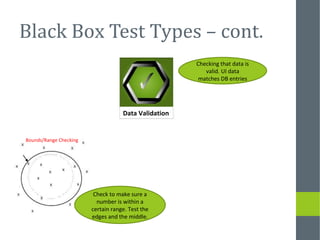
Bounds/Range Checking
Check to make sure a
number is within a
certain range. Test the
edges and the middle.
Data Validation
Checking that data is
valid. UI data
matches DB entries
White & Black Box Test Types
Process intended to reveal flaws in the security
mechanisms of an information system that protect
data and maintain functionality as intended.
Due to the logical
limitations of security
testing, passing
security testing is not
an indication that no
flaws exist or that the
system adequately
satisfies the security
requirements.
White Box Test Types
Installation
Testing
Assures that the system is
installed correctly and working
on the hardware and integrated
modules work together as
expected.
Performed to detect defects in
the interfaces and interactions
between integrated components
or systems, including hardware.
In an object-oriented environment, this is usually at the
class level, and the minimal unit tests include the
constructors and destructors. Written by developers as
they work on code to ensure that the specific function is
working as expected.
Grey Box Test Types
A subset of all defined/planned tests covering the basic
functionality of a component or system. Smoke testing is
conducted in order to ensure that the basic functions of the
whole program work correctly, without the necessity to go into
further details. Daily build and smoke testing are common
practices.
Tests conducted to verify that the defined user requirements
work as the user intended. The tests are usually performed
by clients or end-users. Also referred to as User Acceptance
Testing or UAT.
Performance Testing
LOAD/STABILITYTesting heavy loads, such as
testing of a web site under a
range of loads to determine at
what point the system's
response time degrades orfails.
STRESS
Deliberately intense or thorough
testing used to determine the
stability of a given system or
entity. It involves testing beyond
normal operational capacity,
often to a breaking point, in
order to observe the results.
Executed to determine how a system or sub-system performs in terms of responsiveness and
stability under a particular workload. It can also serve to investigate, measure, validate or
verify other quality attributes of the system, such as scalability, reliability and resource usage.
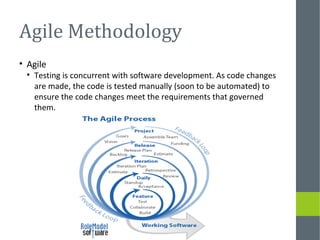
Agile Methodology
• Agile
• Testing is concurrent with software development. As code changes
are made, the code is tested manually (soon to be automated) to
ensure the code changes meet the requirements that governed
them.
Validation
• Documented evidence that provides a high degree of assurance
that software continuously meets the needs of users.
• Validation effort begins with planning, includes all testing types,
ends with reporting.
• Short story: define and document user requirements and
document testing of requirements.
Role in Validation
Test types commonly used during validation at Rho
• Unit
• Functional (Regression as well)
• Installation (test and production environments)
• User Acceptance
Test types commonly used during validation
• Unit
• Installation qualification (test and production environments)
• Functional
• User Acceptance
• Operational qualification
• Performance qualification
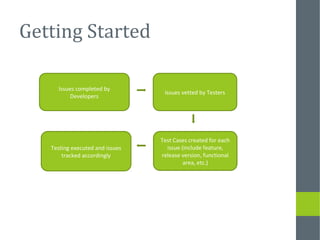
Getting Started
Issues completed by
Developers
Issues vetted by Testers
Test Cases created for each
issue (include feature,
release version, functional
area, etc.)
Testing executed and issues
tracked accordingly
How to Test
• A Test Script is compiled by the tester and
added to the Test Cases. This is a list of
steps a tester is to complete to verify the
validity of the code changes made
• Defects are notated in the Test Case, a
new issue is opened for review by the
developer if defect does not relate to the
active Test Case
• Documentation is critical for testing. See
Documenting Your Test card
Tips and Tricks
• Multi-click
• Data entry tips and tricks
• Irregular characters (%, &, #, etc.)
• Spacing
• Single and double quotes
• Cutting and pasting from other software
• Folder for test files (good and bad) Word docs, excel, etc.
• Page layouts across browsers
• Lorem ipsum website http://www.lipsum.com/
Document Your Test
Be explicit in steps for
recreation
Write down your inputs
Track your browser and
version, operating system
Take screenshots of
errors/unexpected
outcomes
Write down your
outputs
Documenting
UAT/IQT
A quality control
review is
performed on the
executed and
completed test
script.
Tester follows
test steps and
documents on
test script as
detailed in
tester manual
and on test
script
Tester is
trained how to
document,
provided a
Tester Manual
to follow, and
provided the
Test Scripts
Regression Testing
• Testing performed after making functional improvement
or repairs
• Used to determine if the change has regressed other
aspects of the program and introduced new errors.
• Often accomplished through the construction, execution
and analysis of product and system tests.

General Software Tester Training

  • 1.
  • 2.
    Just Break It •Your job is to attempt to break the software. • Think like the user, do not follow the rules. • The requirement follows an order. Mix up the order, when possible. • Test all browsers, mobile testing, Mac OS testing. • See tips and tricks for more ways to break it.
  • 3.
    Types of Testing White Box Grey Box Black Box •Based on Functional Requirements • AKA Functional Testing • Tested by test engineers • Based on Functional & Design Specification • Code Based Testing • AKA Unit testing • Tested by Developers • Based on User Requirements • AKA User Acceptance Testing • Tested by Users
  • 4.
    Black Box TestTypes Check the integrity of database field values. User Interface (aka User Experience) tests how Users interact and view the software. Follow the specification step by step and then don’t follow step by step. Think outside the box, like a user. Don’t JUST follow the test script path.
  • 5.
    Black Box TestTypes – cont. Bounds/Range Checking Check to make sure a number is within a certain range. Test the edges and the middle. Data Validation Checking that data is valid. UI data matches DB entries
  • 6.
    White & BlackBox Test Types Process intended to reveal flaws in the security mechanisms of an information system that protect data and maintain functionality as intended. Due to the logical limitations of security testing, passing security testing is not an indication that no flaws exist or that the system adequately satisfies the security requirements.
  • 7.
    White Box TestTypes Installation Testing Assures that the system is installed correctly and working on the hardware and integrated modules work together as expected. Performed to detect defects in the interfaces and interactions between integrated components or systems, including hardware. In an object-oriented environment, this is usually at the class level, and the minimal unit tests include the constructors and destructors. Written by developers as they work on code to ensure that the specific function is working as expected.
  • 8.
    Grey Box TestTypes A subset of all defined/planned tests covering the basic functionality of a component or system. Smoke testing is conducted in order to ensure that the basic functions of the whole program work correctly, without the necessity to go into further details. Daily build and smoke testing are common practices. Tests conducted to verify that the defined user requirements work as the user intended. The tests are usually performed by clients or end-users. Also referred to as User Acceptance Testing or UAT.
  • 9.
    Performance Testing LOAD/STABILITYTesting heavyloads, such as testing of a web site under a range of loads to determine at what point the system's response time degrades orfails. STRESS Deliberately intense or thorough testing used to determine the stability of a given system or entity. It involves testing beyond normal operational capacity, often to a breaking point, in order to observe the results. Executed to determine how a system or sub-system performs in terms of responsiveness and stability under a particular workload. It can also serve to investigate, measure, validate or verify other quality attributes of the system, such as scalability, reliability and resource usage.
  • 10.
    Agile Methodology • Agile •Testing is concurrent with software development. As code changes are made, the code is tested manually (soon to be automated) to ensure the code changes meet the requirements that governed them.
  • 11.
    Validation • Documented evidencethat provides a high degree of assurance that software continuously meets the needs of users. • Validation effort begins with planning, includes all testing types, ends with reporting. • Short story: define and document user requirements and document testing of requirements.
  • 12.
    Role in Validation Testtypes commonly used during validation at Rho • Unit • Functional (Regression as well) • Installation (test and production environments) • User Acceptance Test types commonly used during validation • Unit • Installation qualification (test and production environments) • Functional • User Acceptance • Operational qualification • Performance qualification
  • 13.
    Getting Started Issues completedby Developers Issues vetted by Testers Test Cases created for each issue (include feature, release version, functional area, etc.) Testing executed and issues tracked accordingly
  • 14.
    How to Test •A Test Script is compiled by the tester and added to the Test Cases. This is a list of steps a tester is to complete to verify the validity of the code changes made • Defects are notated in the Test Case, a new issue is opened for review by the developer if defect does not relate to the active Test Case • Documentation is critical for testing. See Documenting Your Test card
  • 15.
    Tips and Tricks •Multi-click • Data entry tips and tricks • Irregular characters (%, &, #, etc.) • Spacing • Single and double quotes • Cutting and pasting from other software • Folder for test files (good and bad) Word docs, excel, etc. • Page layouts across browsers • Lorem ipsum website http://www.lipsum.com/
  • 16.
    Document Your Test Beexplicit in steps for recreation Write down your inputs Track your browser and version, operating system Take screenshots of errors/unexpected outcomes Write down your outputs
  • 17.
    Documenting UAT/IQT A quality control reviewis performed on the executed and completed test script. Tester follows test steps and documents on test script as detailed in tester manual and on test script Tester is trained how to document, provided a Tester Manual to follow, and provided the Test Scripts
  • 18.
    Regression Testing • Testingperformed after making functional improvement or repairs • Used to determine if the change has regressed other aspects of the program and introduced new errors. • Often accomplished through the construction, execution and analysis of product and system tests.

Editor's Notes

  • #10 Performance testing =